Introduction
"How secure will our customer data actually be after the website goes live?"
This has become one of the most important questions businesses ask while planning a new website or hiring a website development company. Whether it is an eCommerce platform handling payments, a SaaS portal storing user accounts, or a business website collecting customer inquiries, modern websites are now responsible for managing large amounts of sensitive user data every day.
Unfortunately, many businesses still treat website security as something to handle after development is complete. The result is often weak authentication systems, insecure APIs, vulnerable plugins, poor data handling practices, and growing cybersecurity risks that affect customer trust and long-term business growth.
Today, customers expect secure digital experiences by default. A website that feels unsafe can instantly reduce credibility, impact conversions, and create reputational damage. This is why businesses are increasingly prioritizing best practices for protecting user data and data privacy best practices while planning their digital platforms.
For startups, enterprises, eCommerce brands, and growing businesses, website security is no longer just a technical requirement. It is now a critical business decision that directly affects customer confidence, compliance readiness, scalability, and revenue protection.
The reality is that user data protection best practices should begin during website planning and development, not after the website goes live. A secure development approach helps businesses reduce vulnerabilities, protect customer information, improve compliance readiness, and build trust-driven digital experiences from the start.
In this guide, we will explore how businesses can protect customer data online, implement best practices for data security, and build secure websites that support both customer trust and long-term business growth.
Why Businesses Can No Longer Ignore Website Data Security
Modern business websites do far more than display products or services. They collect customer information, process payments, manage user accounts, connect with third-party tools, and store sensitive business data daily. As websites become more integrated and data-driven, security risks continue to increase for businesses of all sizes.
Poor website security can lead to financial losses, customer distrust, compliance issues, operational downtime, and long-term reputational damage. A single vulnerability in a plugin, API, login system, or payment gateway can expose sensitive customer information and directly impact business growth.
Today's customers are also far more privacy-conscious. If a website appears insecure or lacks trust signals, users are less likely to submit forms, create accounts, or complete purchases. This is one reason why businesses are increasingly prioritizing best practices for protecting user data and website data security best practices during website planning and development itself.
Why Modern Websites Face Higher Security Risks
Modern websites rely heavily on:
- APIs
- Cloud infrastructure
- Payment integrations
- Third-party plugins
- Customer portals
- Marketing automation tools
While these technologies improve functionality, they also increase the number of possible security vulnerabilities if not properly managed.
Businesses that launch websites quickly without secure development practices often face risks such as:
- Weak authentication systems
- Outdated plugins
- Insecure integrations
- Poor data handling
- Unmonitored vulnerabilities
This is especially common among startups and rapidly growing businesses, where speed is often prioritized over long-term security planning.
Why Secure Website Development Matters From the Beginning
Many businesses still treat security as something to address after launch. In reality, fixing vulnerabilities later is often far more expensive and risky than building secure systems from the start.
Implementing user data protection best practices during website development helps businesses:
- Reduce cybersecurity risks
- Improve customer trust
- Strengthen compliance readiness
- Protect sensitive customer information
- Create scalable digital platforms
For modern businesses, website security is no longer just a technical requirement. It has become a critical part of customer experience, business credibility, and long-term growth.
What Customer Data Do Websites Actually Need to Protect?
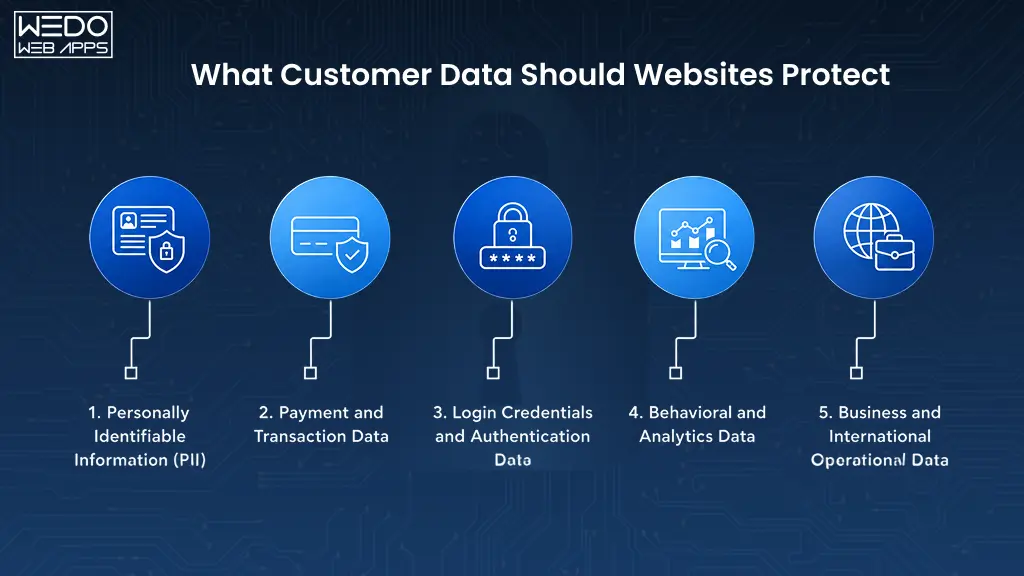
Businesses often associate website security only with payment information or passwords. In reality, modern websites collect multiple types of customer and business data that can become valuable targets for cybercriminals if not properly protected.
Understanding what data your website stores is one of the first steps toward implementing best practices for data security and protecting customer data online.
1. Personally Identifiable Information (PII)
Personally identifiable information includes:
- Customer names
- Email addresses
- Phone numbers
- Physical addresses
- Dates of birth
This type of information is commonly collected through contact forms, account registrations, subscriptions, and checkout pages. If exposed, it can lead to identity theft, spam attacks, and customer trust issues.
2. Payment and Transaction Data
eCommerce and subscription-based websites often process:
- Credit card details
- Billing information
- Transaction histories
- Payment records
Businesses handling online payments must follow strong website data security best practices, including secure payment gateways, encrypted transactions, and PCI-compliant payment processing systems.
3. Login Credentials and Authentication Data
Customer login systems store sensitive authentication information such as:
- Usernames
- Encrypted passwords
- Session data
- Access permissions
Weak authentication systems are one of the biggest causes of website security breaches. This is why user data protection best practices often prioritize secure login architecture and multi-factor authentication.
4. Behavioral and Analytics Data
Modern websites also collect user behavior data through:
- Cookies
- Analytics tools
- Tracking systems
- Personalization engines
While this data helps businesses improve user experience and marketing performance, businesses should still follow data privacy best practices and avoid collecting unnecessary customer information.
5. Business and Internal Operational Data
Many business websites connect with CRM software, internal dashboards, customer databases, and third-party business tools. These systems may contain:
- Operational records
- Employee information
- Sales data
- Customer communication history
Protecting this information requires secure integrations, controlled access management, and ongoing monitoring during website development and maintenance.
Best Practices for Protecting User Data During Website Development
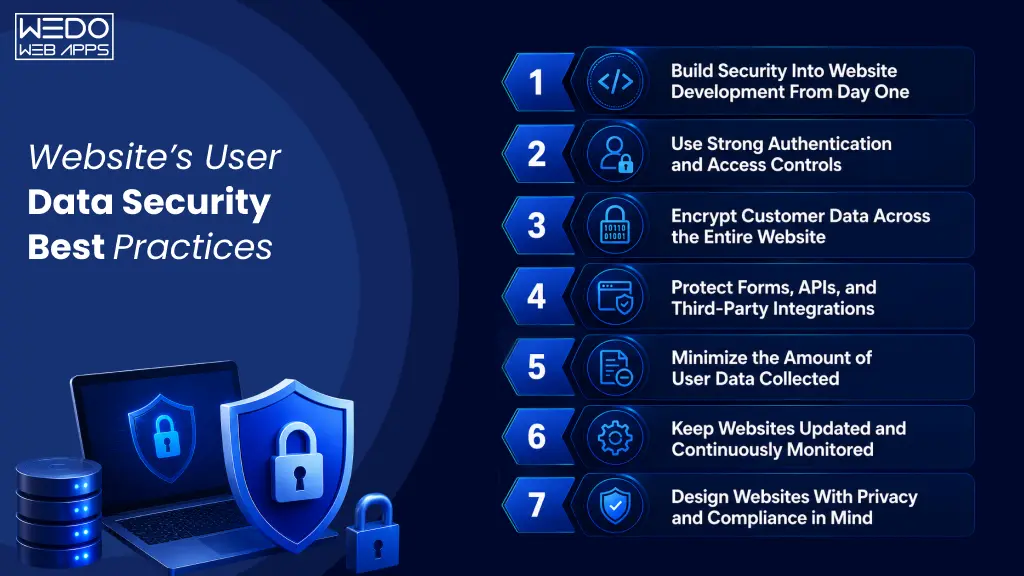
1. Build Security Into Website Development From Day One
One of the biggest mistakes businesses make is treating website security as a post-launch task instead of a core part of the development process. In reality, implementing best practices for protecting user data is much easier, safer, and more cost-effective when security is planned from the outset.
Modern websites interact with payment systems, APIs, customer databases, third-party tools, and cloud infrastructure simultaneously. Without secure development practices, even a visually impressive website can become vulnerable to data leaks, unauthorized access, and cyberattacks.
A secure-first website development approach typically includes:
- Secure coding standards
- Role-based access controls
- Protected admin environments
- Secure API integrations
- Vulnerability testing
- Encrypted data handling
Businesses should also ensure that developers regularly review potential security risks throughout the development lifecycle, rather than waiting until deployment.
For startups and growing businesses, early security planning helps reduce expensive future fixes, downtime risks, and compliance challenges. More importantly, it helps create customer trust from the very beginning.
2. Use Strong Authentication and Access Controls
Weak login systems remain one of the most common reasons websites get compromised. Businesses handling customer accounts, internal dashboards, or sensitive information should prioritize strong authentication systems as part of their user data protection best practices.
Secure authentication measures often include:
- Multi-factor authentication (MFA)
- Strong password policies
- Role-based permissions
- Session expiration controls
- Restricted admin access
Not every employee or user should have full access to sensitive systems or customer data. Limiting permissions based on roles significantly reduces internal security risks and unauthorized access.
For businesses, secure authentication is no longer just a technical feature. It directly affects customer confidence, platform reliability, and overall website trustworthiness.
3. Encrypt Customer Data Across the Entire Website
Encryption is one of the most essential website data security best practices for businesses handling customer information online. It helps protect sensitive data by converting it into unreadable information that can only be accessed through authorized systems.
Modern websites should secure both:
- Data in transit
- Data at rest
Data in transit refers to information moving between users and the website, such as login credentials, payment details, or contact form submissions. This is why HTTPS and SSL certificates are now basic requirements for protecting customer data online.
Data at rest includes information stored inside databases, servers, or cloud systems. Businesses should ensure that stored passwords, customer records, and payment-related information are encrypted properly to reduce security risks in case of unauthorized access.
Secure encryption practices often include:
- HTTPS implementation
- SSL/TLS protocols
- Encrypted databases
- Password hashing
- Secure payment gateways
Customers today actively look for trust indicators before sharing personal information online. A website that appears insecure can reduce form submissions, account registrations, and online purchases almost instantly.
For businesses, encryption is no longer just a technical safeguard. It directly impacts customer trust, compliance readiness, and digital credibility.
4. Protect Forms, APIs, and Third-Party Integrations
Modern websites rely heavily on APIs, plugins, payment systems, CRMs, chat tools, and marketing platforms. While these integrations improve functionality, they also create additional security risks if not properly managed.
Contact forms, checkout pages, login systems, and customer portals are among the most common attack points for cybercriminals. Businesses should follow website data security best practices to ensure these areas are properly secured during development.
Some important protection measures include:
- Secure API authentication
- CAPTCHA implementation
- Spam filtering
- Rate limiting
- Plugin security reviews
- Restricted third-party access
Businesses should avoid installing unnecessary plugins or integrations simply for convenience. Outdated or poorly maintained third-party tools are one of the most common causes of website vulnerabilities.
Implementing strong protection around forms and integrations helps businesses reduce cyber risks while maintaining secure and reliable customer experiences.
5. Minimize the Amount of User Data Collected
One of the most overlooked data privacy best practices is collecting only the information a business actually needs. Many websites gather excessive customer data through long forms, unnecessary account fields, tracking systems, and third-party tools without realizing the additional security risks this creates.
The more customer data a website stores, the greater the impact of a potential security breach. Unnecessary data collection also increases compliance responsibilities and makes website management complex over time.
Businesses should focus on:
- Collecting only essential customer information
- Reducing unnecessary form fields
- Limiting sensitive data storage
- Removing outdated customer records
- Reviewing third-party tracking tools regularly
For example, if a contact form only requires a name and email address, requesting additional personal details may create unnecessary privacy concerns for users.
Modern customers are also becoming more privacy-conscious. Websites that appear transparent and minimal in their data collection practices often build stronger trust and improve user confidence.
For businesses, minimizing data collection is not just about reducing security risks. It also helps create a cleaner user experience, faster onboarding processes, and more privacy-focused digital interactions.
6. Keep Websites Updated and Continuously Monitored
Many website security breaches happen because businesses fail to maintain their websites after launch. Outdated plugins, unsupported themes, expired software versions, and unmonitored vulnerabilities can quickly become entry points for cyberattacks.
This is why ongoing maintenance remains one of the most important best practices for data security.
Businesses should regularly:
- Update plugins and frameworks
- Monitor security vulnerabilities
- Scan for malware
- Maintain secure backups
- Review access permissions
- Monitor suspicious activity
Continuous monitoring helps businesses identify threats before they become major security incidents. It also improves website stability, performance, and customer trust over time.
For businesses handling customer accounts, payments, or sensitive operational data, proactive website maintenance is essential for protecting customer data online and reducing long-term cybersecurity risks.
A secure website is not built only during development. It requires ongoing monitoring, maintenance, and security improvements as technologies and threats continue to evolve.
7. Design Websites With Privacy and Compliance in Mind
Modern businesses are expected to handle customer information responsibly, transparently, and securely. This is why data privacy best practices are now becoming a critical part of website design and development rather than just legal documentation added later.
Businesses collecting customer information through contact forms, account registrations, subscriptions, or payment systems should ensure their websites follow privacy-focused development practices from the beginning.
This often includes:
- Clear privacy policies
- Transparent cookie consent systems
- Secure user data handling
- Controlled data access permissions
- User consent management
- Secure data storage practices
For businesses operating internationally or handling sensitive customer information, compliance requirements such as GDPR, CCPA, or industry-specific regulations may also apply. Failing to address these requirements can create legal, operational, and reputational risks over time.
Privacy-focused website development also improves customer trust. Users are more likely to engage with businesses that clearly explain how customer data is collected, stored, and protected.
Instead of treating compliance as a separate task, modern businesses now integrate privacy and security directly into website architecture, customer journeys, and user experience design. This approach helps create safer digital experiences while supporting long-term scalability and business credibility.
How Secure Website Development Improves Customer Trust and Conversions
Why Security Directly Impacts Buyer Confidence
Customers today evaluate website trustworthiness within seconds. If a website appears outdated, unsecured, or unreliable, users often hesitate to submit personal information, create accounts, or complete purchases.
Security signals such as:
- HTTPS protection
- Secure checkout systems
- Trusted payment gateways
- Clear privacy policies
- Professional website design
- Secure login experiences
play a direct role in building customer confidence online.
For ecommerce businesses and service-based companies, trust is closely connected to conversions. Even small security concerns can increase cart abandonment rates, reduce lead generation, and negatively impact customer retention.
How Secure Checkout and Forms Improve Conversion Rates
Contact forms, checkout pages, and registration systems are often the most sensitive areas of a business website. If these sections feel insecure or overly complicated, users are more likely to leave the website before completing an action.
Secure website development helps businesses create:
- Safer checkout experiences
- Trusted payment environments
- Protected customer interactions
- Smoother form submissions
- Secure account registration systems
This not only helps with protecting customer data online but also improves the overall customer experience.
Why Customers Abandon Websites That Feel Unsafe
Modern users are highly aware of cybersecurity and privacy risks. Warning messages, unsecured connections, suspicious payment flows, or poorly designed login systems can instantly reduce trust.
In many cases, customers may never return to a website after a negative security experience.
This is why businesses increasingly prioritize website data security best practices during development itself rather than treating security as a secondary feature after launch.
The Relationship Between Website Trust Signals and Sales
Website trust signals influence how customers perceive a business online. A secure and professionally developed website creates confidence that the business can safely handle customer information and transactions.
For startups and growing businesses, especially, trust-driven website experiences can become a major competitive advantage. Secure website development not only reduces cybersecurity risks but also supports higher engagement, stronger customer relationships, and long-term business growth.
Common Website Security Mistakes Businesses Make
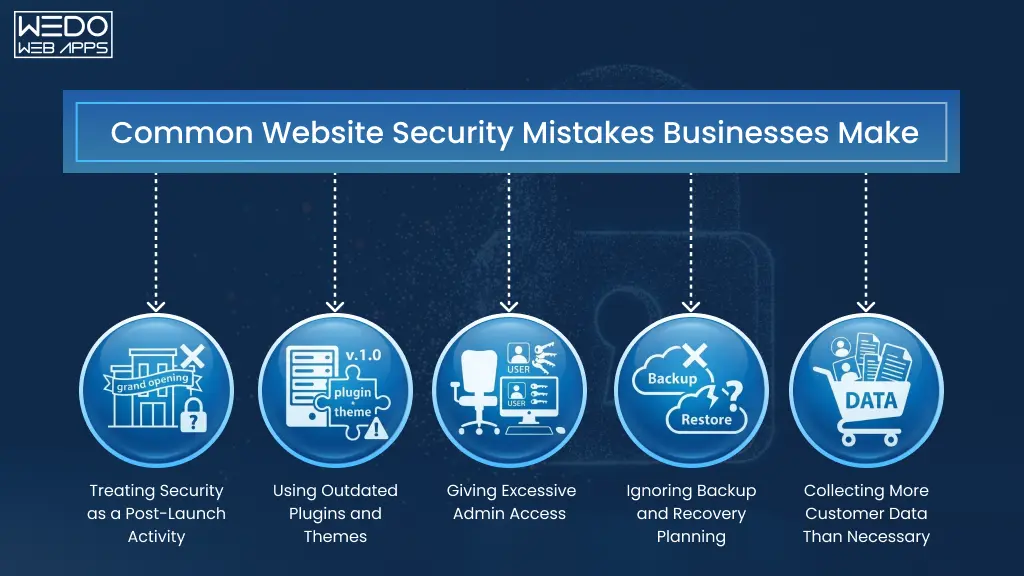
Even businesses that invest heavily in website design and functionality often overlook critical security gaps during development and maintenance. In many cases, these small oversights become major vulnerabilities that expose sensitive customer information and increase cybersecurity risks.
Understanding these common mistakes can help businesses implement stronger website data security best practices from the beginning.
1. Treating Security as a Post-Launch Activity
Many businesses focus only on launching the website quickly and delay security planning until later. This often creates vulnerabilities that become expensive and difficult to fix after deployment.
Secure website development should include:
- Security testing
- Protected infrastructure
- Secure coding practices
- Access management
- Ongoing monitoring
from the very beginning.
2. Using Outdated Plugins and Themes
Outdated plugins, themes, and third-party tools are among the most common causes of website security breaches. Unsupported software can expose websites to malware, unauthorized access, and API vulnerabilities.
Businesses should regularly:
- Update plugins
- Remove unused tools
- Review third-party integrations
- Monitor software vulnerabilities
to reduce long-term risks.
3. Giving Excessive Admin Access
Not every employee, contractor, or team member should have full website access. Excessive permissions increase the risk of accidental changes, internal security issues, and unauthorized access to customer data.
Role-based access controls help businesses manage permissions more securely while protecting sensitive operational information.
4. Ignoring Backup and Recovery Planning
Many businesses realize the importance of backups only after experiencing data loss, malware attacks, or server failure.
Secure backup systems and recovery planning help businesses:
- Restore website functionality quickly
- Reduce downtime
- Protect customer information
- Maintain operational continuity
This is an essential part of protecting customer data online and reducing business disruption.
5. Collecting More Customer Data Than Necessary
Overcollecting customer information increases both privacy concerns and security risks. Businesses should avoid requesting unnecessary personal data unless it directly supports the customer experience or operational requirements.
Following data privacy best practices helps businesses reduce risk exposure while improving customer trust and transparency.
What Businesses Should Ask a Website Development Company About Security
Choosing a website development company is no longer only about design quality, development speed, or feature availability. Businesses today also need to evaluate how seriously a development partner approaches website security, customer data protection, and long-term maintenance.
As cyber threats continue to grow, asking the right security-related questions before starting a project can help businesses avoid costly vulnerabilities later.
How Do You Protect Customer Data During Development?
Businesses should understand how customer information will be handled throughout the development process. Secure development practices may include:
- Encrypted development environments
- Secure coding standards
- Protected admin access
- Secure database management
- Vulnerability testing
This helps ensure user data protection best practices are integrated from the beginning rather than added later.
What Security Testing Is Included?
Security testing plays a major role in identifying vulnerabilities before launch. Businesses should ask whether the development process includes:
- Vulnerability assessments
- Penetration testing
- API security reviews
- Authentication testing
- Malware scanning
Testing helps reduce cybersecurity risks and improve website stability before deployment.
How Are Third-Party Integrations Secured?
Most modern websites rely on:
- Payment gateways
- CRMs
- Plugins
- APIs
- Analytics tools
- Cloud services
Businesses should understand how these integrations are reviewed, monitored, and secured during development to reduce potential vulnerabilities.
What Happens After the Website Launches?
Website security does not end after deployment. Ongoing maintenance, monitoring, updates, and backup management are essential for long-term protection.
Businesses should ask about:
- Update management
- Security monitoring
- Backup systems
- Plugin maintenance
- Incident response support
before choosing a website development partner.
Why Security Discussions Matter Before Hiring Developers
Many businesses only evaluate design portfolios and pricing while ignoring security planning during vendor selection. However, secure website development directly affects customer trust, compliance readiness, scalability, and business continuity.
For startups, ecommerce companies, SaaS platforms, and enterprises alike, choosing a development partner with a strong security-focused approach can significantly reduce long-term operational and cybersecurity risks.
Website Data Security Best Practices for Different Business Types
Different businesses face different website security challenges depending on the type of customer data they handle, the integrations they use, and the scale of their digital operations. This is why website data security best practices should always align with specific business requirements instead of following a one-size-fits-all approach.
1. eCommerce Websites
eCommerce websites regularly process:
- Customer information
- Payment details
- Shipping addresses
- Transaction records
Because of this, eCommerce businesses should prioritize:
- Secure payment gateways
- Encrypted checkout systems
- Fraud prevention tools
- PCI-compliant payment processing
- Secure customer account management
Even small checkout vulnerabilities can directly impact customer trust and sales conversions.
2. SaaS Platforms
SaaS websites and customer portals often store large amounts of user and operational data. These platforms typically require:
- Strong authentication systems
- Role-based access controls
- API security
- Encrypted databases
- Continuous monitoring
Since SaaS platforms rely heavily on integrations and cloud infrastructure, secure architecture planning becomes essential during development itself.
3. Enterprise Websites
Enterprise businesses often manage:
- Internal operational systems
- Employee access controls
- Customer databases
- Multiple business integrations
For enterprise websites, secure access management, infrastructure monitoring, and compliance-focused development play a major role in reducing operational risks and protecting sensitive business information.
4. Startup Websites
Startups often prioritize speed, scalability, and faster launches. However, overlooking security during early development stages can create expensive challenges later.
Startups should focus on:
- Secure development foundations
- Scalable infrastructure
- Trusted third-party integrations
- Secure authentication systems
- >Ongoing website maintenance planning
Implementing best practices for protecting user data early helps startups scale more safely while building stronger customer trust from the beginning.
Emerging Trends Shaping the Future of Website Data Security
As websites become more connected, data-driven, and AI-powered, businesses must continuously adapt their security strategies to address evolving cyber threats and customer privacy expectations. Modern website development is no longer focused only on functionality and performance; security and privacy are becoming equally important parts of digital experience planning.
AI-Powered Threat Detection
Businesses are increasingly using AI-based monitoring systems to detect suspicious website activity, unusual login behavior, spam attacks, and potential vulnerabilities in real time.
AI-powered monitoring helps businesses:
- Identify threats faster
- Automate security alerts
- Reduce manual monitoring efforts
- Improve response times
As cybersecurity risks continue to evolve, automated threat detection is becoming a valuable part of modern website security strategies.
Passwordless Authentication
Traditional password-based systems are gradually being replaced by:
- Biometric authentication
- OTP verification
- Authentication apps
- Passkey-based login systems
Passwordless authentication helps reduce phishing risks and improves both security and user experience.
Zero Trust Security Models
Modern businesses are increasingly adopting Zero Trust approaches where no user, device, or system is automatically trusted without verification.
This approach strengthens:
- Access control
- Authentication security
- Internal data protection
- Cloud security management
especially for businesses managing customer accounts and operational systems.
Privacy-First Website Experiences
Customers today expect businesses to be transparent about how data is collected and used. As a result, privacy-first website experiences are becoming more common across modern digital platforms.
Businesses are now focusing more on:
- Transparent consent systems
- Minimal data collection
- Privacy-focused UX design
- Secure customer interactions
to improve trust and compliance readiness.
Secure Cloud-Native Website Architectures
Cloud-based infrastructure continues to shape modern website development because of its scalability and flexibility. However, businesses also need stronger cloud security best practices to protect customer information and reduce infrastructure vulnerabilities.
This is why secure cloud architecture, API security, and continuous monitoring are becoming core parts of website data security best practices for modern businesses.
How to Protect User Data Without Hurting Website Experience
Many businesses assume that stronger website security automatically creates a slower, more complicated user experience. In reality, modern website development focuses on balancing both security and usability to create safe and seamless customer interactions.
The goal is not to overload users with unnecessary security barriers. Instead, businesses should implement smart security practices that protect customer information while maintaining smooth website experiences.
Balancing Security With User Experience
Poorly implemented security systems can frustrate users and increase drop-offs during registrations, logins, or checkouts. Businesses should focus on security measures that feel natural within the customer journey.
This may include:
- Simplified authentication flows
- Secure but user-friendly checkout systems
- Optimized form experiences
- Transparent privacy messaging
- Secure background monitoring
A secure website should build confidence without making users feel restricted.
Reducing Friction in Authentication
Strong authentication does not always mean complicated login systems. Modern authentication methods such as:
- Biometric verification
- OTP authentication
- Passkeys
- Adaptive multi-factor authentication
help businesses improve security while reducing login friction for users.
This creates a better balance between user convenience and protecting customer data online.
Building Customer Trust Through Transparency
Customers are more likely to trust websites that clearly explain:
- How customer data is collected
- Why information is needed
- How data is protected
- What privacy controls users have
Transparent privacy practices improve user confidence and support stronger long-term customer relationships.
Designing Secure Yet User-Friendly Experiences
Modern website development should integrate security directly into:
- Website architecture
- UI/UX design
- Form experiences
- Account systems
- Checkout processes
rather than adding security as a separate layer later.
Businesses that successfully combine security, usability, and trust often create stronger customer experiences, higher engagement, and better long-term conversions.
Conclusion
A modern business website is no longer just a digital presence, it is a platform responsible for protecting customer trust. From login systems and payment gateways to APIs and customer data, every part of website development now influences security, privacy, and business credibility.
Businesses that follow best practices for protecting user data early during website planning and development are better prepared to reduce cybersecurity risks, build customer confidence, and scale securely over time.
The real advantage today is not just having a fast or visually impressive website. It is building a website customers actually feel safe using.