As e-commerce evolves, businesses must constantly improve their online stores to stay competitive.
If you're a Shopify Plus user looking to take your store to the next level, migrating to Magento 2 could be the solution you're looking for.
Businesses of all sizes choose Magento 2 because of its powerful ecommerce platform, which offers greater customization, flexibility, and scalability.
It requires thoughtful planning and execution to migrate Shopify data to Magento 2.
Here we will discuss the benefits of migrating to Magento 2, the challenges you may encounter, and the steps for data migration you must take to ensure a successful migration.
Why Choose Magento 2 Over Shopify Plus?
For small businesses, the new Shopify store is a perfect choice. But for midsized and large companies, Magento is a better option. Why? Here are the Top 7 reasons to choose Magento 2 as your eCommerce companion:
Reason #1: Popularity
Magento 2 is gaining popularity over Shopify Plus because of its robust features, flexible customization options, and scalability. A large enterprise prefers it due to its better control over product management, SEO, and checkout processes.
Reason #2: Extremely Elastic
Compared with Shopify Plus, Magento 2 has more elasticity and flexibility. Thanks to its open-source architecture, Magento 2 lets businesses customize their online stores according to their specific needs.
Reason #3: Advanced Customization Opportunities
The advanced customization options available in Magento 2 are several steps ahead of Shopify Plus. Using Magento, businesses will help you reach the targeted global audience and expand your customer base to users with different authenticities and languages.
Reason #4: Extended Mobile commerce Technology
Compared to Shopify Plus, Magento 2 offers an extensive range of ecommerce websites features for mobile commerce. The Shopify-magento migrations allows seamless integration of various extensions for Magento 2 to avail mobile-friendly and responsive design that makes your online store rank high on SERPs.
Reason #5: Numerous Third Party Extensions
There are several third-party extensions for Magento 2, making it a robust and diverse alternative to Shopify Plus. Businesses can expand their online store's capabilities and offer a user-friendly and avail various extensions in marketing, payments, shipping, and customer support.
Due to Magento 2's support for several third-party extensions, businesses can customize and expand their online stores more quickly than Shopify. These were some of the reasons why you should make the switch. But the question is: How?
In the next section, we will read about the step-by-step guide and know how to do shopify-magento migration and what are the 2 options available for it.
How To Do Shopify-Magento Migration? 2 Different Options With Steps
For those without much technical knowledge, the migration process may seem difficult. However, the difficulty depends on the method of migration you choose.
Manual Shopify-Magento Migration: One of the cheapest option to migrate your site from Shopify to Magento is Manual migration. Here you can manually export and import data and have full control of the process.
Automated Migration: Here you can use various tools like Cart2Cart, LitExtension or Firebear Studio to export Shopify to Magento site automatically. These extensions allow converting data as products and product categories.
However, for customized elements like design, apps, custom code, shipping rules, payment rules, and security, you need to switch back to manual migration.
Thus, you should prefer manual migration if you have more than one entity or elements in your online store. Otherwise, you'll spend a lot of time working monotonously and could make serious mistakes.
Alternatively, you can hire Magento developers to migrate the data for you. Although this may be quite expensive, there will probably be fewer errors.
1. Manual Shopify-Magento Migration
Manual migration involves exporting all data from your Shopify website to CSV files and importing them into Magento. The CSV files will include data about products, categories, customers, manufacturers, orders, etc.
You only need to remember that each CSV file can hold data up to 9000 rows. Thus, your data should be processed through automated tools if it exceeds the size limit.
Step 1: Click on Magento admin panel, tap on System and select the Import / Export profiles to export the data.
Step 2: Import Shopify CSV files that only include support data, i.e., Advanced Pricing, Products, Customers and Addresses, and Customers Main File.
Step 3: To import unsupported data, copy and paste it from your old website to your current site.
Although Manual Shopify-magento migration will help your ecommerce website builder platform in data migration, you need to put extra effort into fixing the relationship between data tables.
2. Automated Migration
For automated migration, you can choose any popular extension. Even if you need advanced coding skills, this Magento plugin will help you migrate the shop. Let's now discuss how the extension can help you relocate.
Step #1: Install Adobe Commerce (aka Magento)
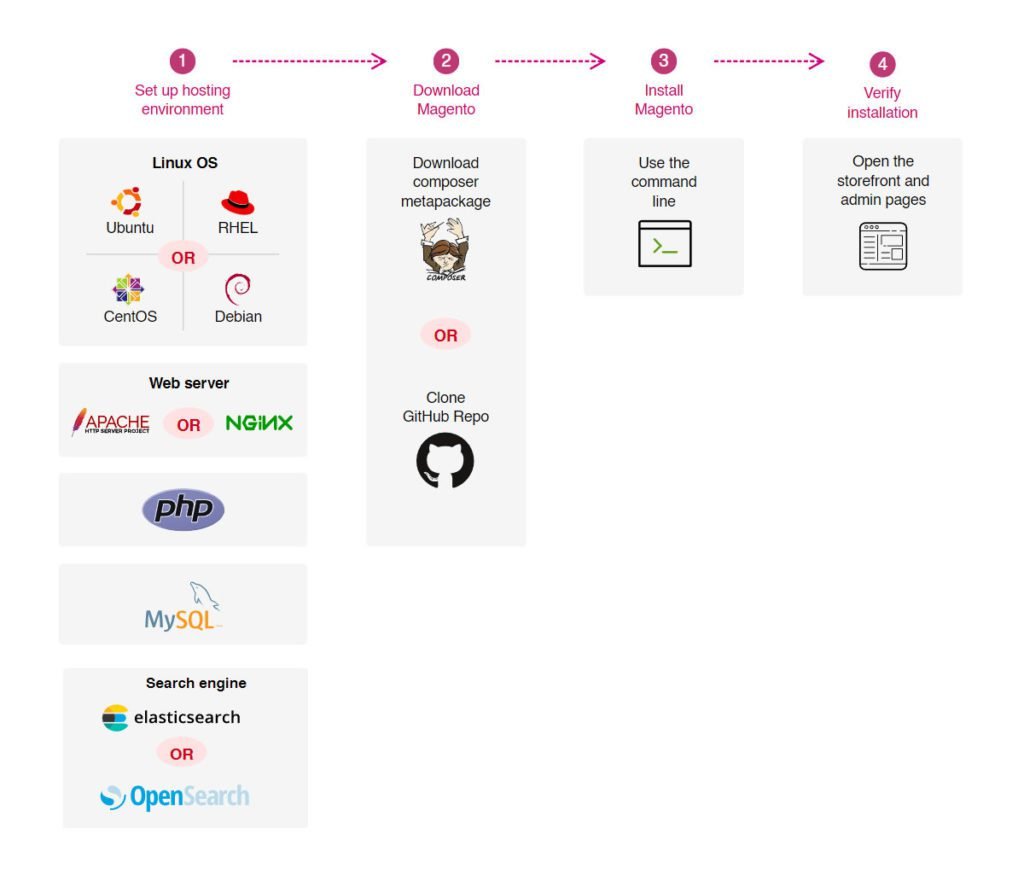
Firstly, install Adobe Commerce (which is called Magento) to migrate from Shopify and ensure your system meets the requirements and download the latest version from Magento Commerce.
To know more about the installation process, check the infographic illustrated below:
Step #2: Perform a Readiness Check & Add a Database
Run a readiness check to ensure everything is ready to migrate. However, if any problem arises during the inspection, you will be notified about it.
Add databases to store the data and fill all the required details of your database like name of the database, server host, username, and password, as well as the password for the database.
Step #3: Configure the future Magento store
Configure your site settings once you have finished working with your database. This step includes:
- Web configuration
, in which you need to enter the URL of the website domain and the admin address of the website. You can also select HTTPS options here, add Magento and add your encryption key here.
- Storefront customization
, which includes adjusting default settings, such as language, currency, and time zone, can also add advanced configurations to your store by adding modules such as Amazon payment and Magento Admin Analytics.
- Admin account creation
, where you specify your user name, email address, and password. From here, you can manage the backend of your ecommerce website.
Step #4: Export Store Data From Shopify
Begin the manual migration from Shopify to Magento 2 and create a backup of your data. Extract all the data of your old site from Shopify admin panel.
Select the appropriate tabs on the right and then click the Export button at the top of the page. After that you will receive an email containing all the necessary data.

Note: Select "CSV for Excel, Numbers, or other spreadsheet programs."
Step #5: Import Data into Adobe Commerce
Go to your Adobe Commerce account, select the "System" section on the left sidebar, then select "Import." Fill in all the fields and upload the CSV file to your account.
After filling out the form, run the data check for your ecommerce store. You can start importing data migration if the data shown is valid.
Now you know the step-by-step guide of migrating your data from Shopify Plus to Magento 2. But are you not curious to know which is the right option to bein your Shopify-Magento migration.
Well. we reccommend manual migration if you have multiple entities in your online store. Otherwise, you'll spend a lot of time working monotonously and could make serious mistakes.
You can also hire a Magento specialist to handle the migration. The professional can review your requirements, provide a more accurate quote, and inform you of any issues that needs your attention.
This may be the easiest way to go because you can keep them as a consultant to assist you in learning Magento for ecommerce platforms and dealing with things you couldn't migrate (like aesthetics).
However, another thing you should be aware of while shifting from Shopify Plus to Magento 2 Migration is the time you will spend in the process. In our next section, we will discuss more about it.
The Time You Will Spend When Migrating To Magento 2 From Shopify
Switching your eCommerce site from Shopify Plus to Magento 2 can be a time-consuming and cautious process. Depending on the size and complexity of your store, migration to Magento 2 will take time.
Approximately 3 to 6 months are needed for the complete migration to Magento 2. The cost of migration depends on the features of your ecommerce website. Although there is no set cost for the Shopify-magento migrations, it can range from a few thousand dollars to tens of thousands. Consult a specialist and get a customized estimate for the migration.
Before you come to a decision, know that Magento for ecommerce stores should have a clear strategy for the process. You also need the right resources and expertise to complete the project on time.
Lastly, consider the cost of migration and the potential benefits you can access with Magento 2 as today Brands are looking for affordable and easy-to-scale ecommerce website provider.
But unfortunately, there is a rift between brands in choosing the right platform to grow their online store. This has resulted in more buzz around Shopify Plus vs Magento commerce.
Thus, let's look at how different they are from the pricing point of view.
Learn the best practices for importing product reviews while following our step-by-step guide for migrating from Shopify Plus to Magento 2.Shopify Plus vs Magento Commerce 2: Pricing & Should You Really Migrate?
Shopify Plus and Magento Commerce 2 cost roughly the same amount in terms of the base price ($22,000 vs. $24,000, respectively) per year when compared to each other.
Here are the pricing models of each platform:Magento Commerce 2 Pricing
For businesses with gross annual revenue of less than $1,000,000 and less than $22,000 annually, Magento Commerce 2's price starts at $22,000 annually.
Then, depending on how much ROI your business is earning and the gross market value of the merchandise you are selling, the price of your Magento online store progresses.
Magento is a platform-as-a-service business used to create and manage online stores. Despite this, Magento Theme 2 does not include hosting and IT fees. As a result, companies need to purchase them separately to grow their business.
If an online store wants to adopt a responsive magento theme, custom magento theme, third-party plugins, and app integrations, they must spend more money.
Medium size enterprises can expect to pay $100 per month or more for hosting - the price of a server depends on the organization's size. That means large companies will pay significantly more for hosting their websites to run them smoothly.
Another vital aspect which you should adopt magento for ecommerce store is that it works efficiently even during spikes in traffic. So like, when you are running flash sales or Black Friday sales, even then, your website will run smoothly and load pages faster.
Using Magento Commerce Cloud's cloud-based software, the cloud server costs $500 per month in addition to the software cost.
Also, consider the cost of IT, as Magento 2 offers more extensive and personalized options to modify their core code to Magento Commerce 2 software and meet the needs of your online store.
These custom magento theme stores generally cost around $5,000 monthly, whether you create it with your in-house IT teams or outsource the work to a third-party organization.
But it shouldn't matter because Magento 2 offers businesses access to a wide range of open-source apps with advanced features to create unique and innovative e-commerce stores.
Thus, although Magento's pricing excludes more hidden costs in general, unlike Shopify Plus, it does not charge a transaction fee for processing your payments. Even so, the overall cost of ownership for a Magento shop is usually higher than Shopify Plus, but you're getting more customization and flexibility.
Shopify Plus Pricing
Each month, Shopify Plus costs $2,000, or $24,000 yearly, with an additional fee for high-volume businesses. While Shopify Plus is a more budget-friendly option for companies looking to create an e-commerce store, there are distinct benefits to using Magento 2 that may justify its higher cost.
Shopify Plus is a SaaS platform that includes hosting, and IT support for its users, which can assist businesses in saving money and time.
However, its lack of flexibility to customize its base code like Magento 2 can limit the ability of businesses to tailor-made stores satisfying the business's unique needs.

Moreover, Shopify Plus requires businesses to pay extra developer costs for custom app integration, which can be more expensive for complex or unique apps.
At some point, you might anticipate that Shopify Plus is a more budget-friendly platform for creating customized websites. But the twist in the tale is Magento 2 is an open-source platform that allows businesses to modify their core code and tailor their functionalities to meet data migration requirements.
Not just that by adding extensions for Magento 2 and Magento commerce cloud you can build an e-commerce platform with more flexible and customizable options.
However, ultimately, companies should carefully evaluate both platforms, choose the one that caters to their needs, and help them create the best online stores for their business.
To make your choice more manageable, we have created a list of why brands choose Magento 2 over Shopify Plus. You will read more about it in the next section! Let's go!
Conclusion
For businesses looking to improve their online stores, migrating from Shopify Plus to Magento 2 can be challenging but rewarding. To create a more tailored and scalable e-commerce platform, carefully plan and implement the migration so that you can take advantage of Magento 2's advanced ecommerce websites features and customization options.
Work with experienced developers and WEDOWEBAPPS LLC migration experts to address potential challenges and costs to ensure a smooth transition. Migrating to Magento 2 can help your business thrive in the fast-paced, competitive e-commerce world with the right approach.
Considering a new platform? Learn the reasons to choose a Magento web development company in our step-by-step guide for migrating from Shopify Plus to Magento 2.