Introduction
A founder once came to us three weeks before his planned launch date. His previous agency had told him "eight weeks, maybe ten." He was at week fourteen, the app wasn't testable yet, and his investor demo was in twenty-one days.
The problem was not the developers. The problem was that no one had given him an honest, phase-by-phase picture of what building an app actually involves, before the contract was signed.
We see this more than we would like to. Clients who were handed a single number ("12 weeks!") with no breakdown, no risk flags, no mention of App Store review times, or the cost of a scope change in week nine.
This guide fixes that. Below is a complete, realistic timeline for React Native app development, broken into every phase, with honest duration ranges, what each phase actually produces, and the specific things that blow up schedules. Whether you are planning a simple utility app or a multi-sided platform, you will leave this page knowing what to expect, what to watch for, and how to protect your launch date.
What Affects a React Native Application Development Timeline the Most?
Before we get into the phases, it helps to understand the variables that compress or stretch every single one of them.
1. Scope Clarity (the biggest one)
A team that starts with a well-defined scope, clear user flows, agreed features, and defined integrations, will move two to three times faster than a team still demanding requirements in four weeks.
Vague briefs are the single largest cause of timeline overruns. Every time a requirement changes after development starts, you are not just adding a feature, you are often re-architecting something that was already built.
2. Team Size and Structure
A solo developer and a four-person team do not just move at different speeds, they also catch different problems. A solo developer might miss a security gap that a dedicated QA engineer would find immediately.
Our React Native app development services assign a dedicated project manager from day one, a decision that alone cuts communication overhead by 30% or more on projects with multiple stakeholders.
3. Third-Party Dependencies
APIs that do not behave as documented. Payment gateway sandboxes that are down. Map services with unexpected rate limits. Third-party integrations introduce unpredictability that is hard to plan around. Budget two to three buffer days per major external dependency.
4. Client Feedback Speed
This one is underestimated. When a developer pushes a build for review, every day that passes without feedback is a day the developer cannot continue without risking wasted work.
Projects where clients review and respond within 24 hours finish 20-40% faster than those with multi-day feedback loops.
5. Platform Targets
React Native builds for both iOS and Android from a shared codebase, but "shared" does not mean "identical." Platform-specific UI polish, permission handling, and edge case testing still add time.
Building for both simultaneously adds roughly 15-20% to development and QA phases compared to single-platform development.
The Full React Native Application Development Timeline at a Glance
Here is how a typical mid-complexity project (MVP-range) maps across a 20-week timeline. Each bar represents the phase's typical duration window.
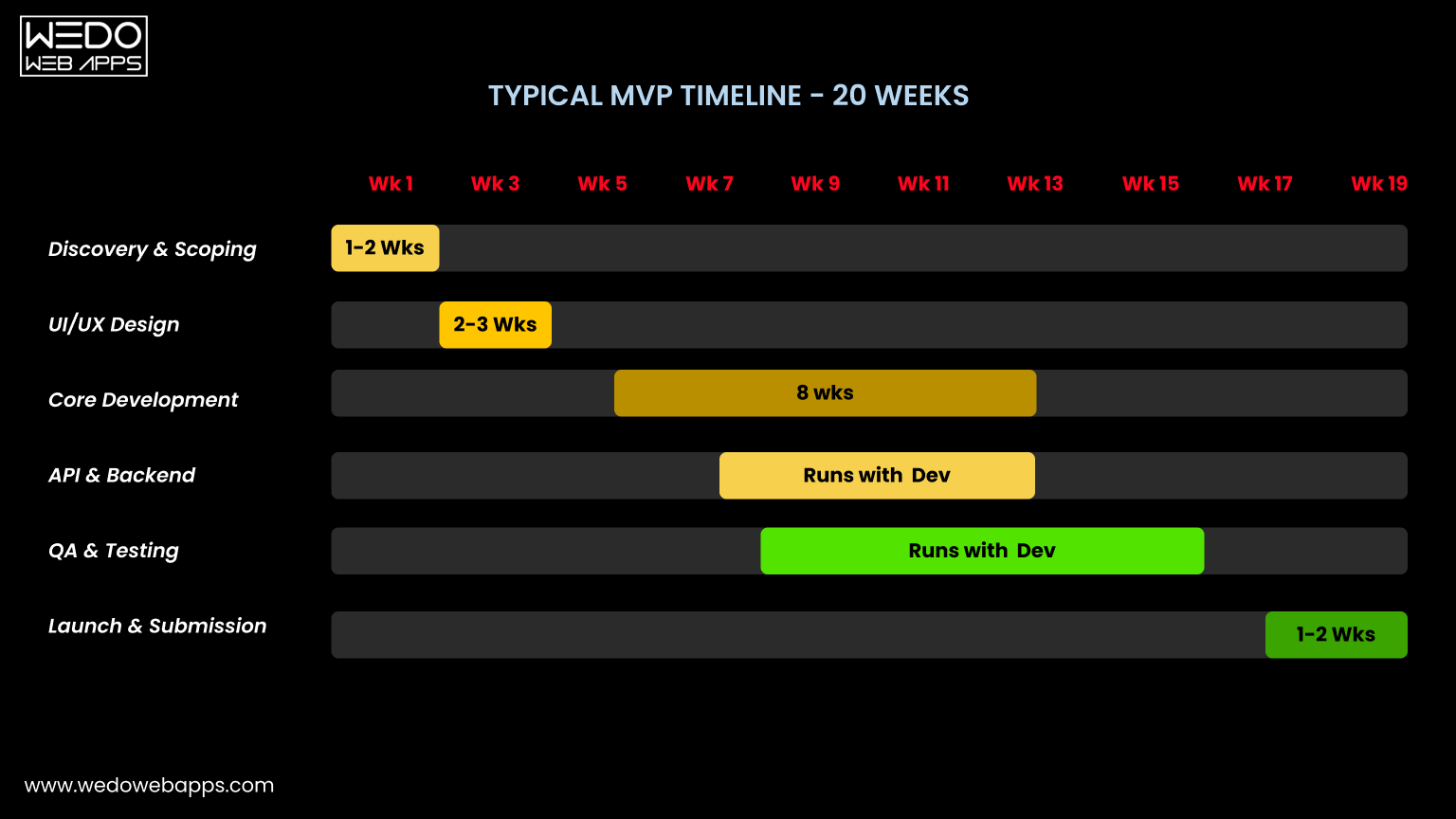
Notice that QA and API integration overlap with core development, they are not separate sequential phases. This is how professional teams actually work. Treating them as "next step" is what causes projects to run three months over schedule.

Phase 1. Discovery and Scoping (1-2 Weeks)
Turning your idea into a buildable blueprint
Discovery is the phase most clients want to skip, and the one that saves the most money when done properly. This is where your idea gets translated into a concrete scope, features, user flows, technical requirements, and a realistic timeline for developing an app.
A good discovery phase surfaces the decisions you will otherwise be forced to make mid-development, at five times the cost and twice the delay. It answers: What does the MVP actually need? What can be built in version two? What integrations are required on day one?
Key Deliverables
- Feature list (prioritized)
- User flow diagrams
- Technical architecture overview
- Project timeline + milestones
- Risk log
What Causes Delays
- Unclear business requirements
- Too many stakeholders with conflicting input
- Scope that keeps expanding in meetings
- No decision-maker with final say
| Pro Tip Before the first discovery meeting, write down your three non-negotiable features, the ones the app literally cannot launch without. Everything else goes on a "nice to have" list. This single exercise cuts discovery time in half and prevents scope creep from the start. |
Phase 2: UI/UX Design (2-3 Weeks)
From Wireframes to Pixel-Perfect Screens
Design is not just about how the app looks, it is about how it works. A well-designed screen tells the developer exactly what to build and removes ambiguity from every interaction. Apps developed with complete, approved designs move 30-50% faster through the development phase than those where design and development happen at the same time.
UI/UX for React Native includes both visual design (screens, components, typography, colors) and interaction design (transitions, loading states, error states, empty states). Empty states and error screens are the most commonly skipped and the most commonly complained about in app reviews.
Key Deliverables
- Wireframes for all core screens
- High-fidelity UI for both iOS and Android
- Component library/design system
- Interactive prototype (optional)
- Asset export for developers
What Causes Delays
- Branding not finalized before design starts
- Multiple revision rounds on the same screen
- Late requests to redesign the navigation structure
- Waiting for competitor reference apps
Phase 3: Core Development (4-12 Weeks)
Building What Users Will Actually Touch
This is where the app gets built. Screens get coded, navigation gets wired up, business logic gets written, and the app begins to feel real. The four-to-twelve-week range is wide because complexity varies enormously, a simple five-screen utility app and a social media platform with real-time features are both "React Native apps" but have almost nothing in common in terms of development effort.
This phase runs concurrently with API integration and QA testing. A professional team doesn't finish all development, then write APIs, then test, those activities overlap. As one screen is built and tested, the next is in development. This parallel approach is what keeps projects on schedule.
Key Deliverables
- All screens built and navigable
- Authentication (login, signup, sessions)
- Core business logic
- Push notification setup
- Device permission flows
- Offline handling
What Causes Delays
- Approved designs changing mid-sprint
- New features added without timeline adjustment
- Platform-specific bugs, especially iOS edge cases
- Poor third-party library compatibility
Many clients add features during development without adjusting the deadline. Every undocumented addition is a hidden cost. Every new feature added in week six is a feature the team designs, builds, integrates, and tests under pressure. Use a change order process, even an informal one, to keep scope and timeline in sync. |
The size of your development team directly affects this phase more than any other. When you hire dedicated React Native developers rather than sharing resources with other projects, core development phases routinely run 30-40% shorter, because there is no context-switching, no competing priorities, and no waiting for availability slots.
Phase 4. API Integration and Backend (2-4 Weeks, Runs Concurrently)
Connecting Your App to the World
React Native apps rarely operate in isolation. They connect to backends, payment processors, maps, analytics, push notification services, third-party logins, and more. API integration is the work of making all those connections reliable, secure, and fast.
This phase follows our standard mobile app development process, integrations are planned in discovery, designed in parallel with the UI, and integrated during development rather than bolted on afterwards. The same structure applies whether you are building a simple content app or a transaction-heavy platform.
Key Deliverables
- REST or GraphQL API connections
- Authentication tokens and session management
- Payment gateway integration
- Push notifications (FCM/APNs)
- Analytics and crash reporting
- Map or location services
What Causes Delays
- API documentation that doesn't match behavior
- Payment provider verification taking 3-7 days
- Third-party sandbox environments going down
- Backend not ready when frontend needs it
Phase 5: QA and Testing (Runs Throughout Development)
Catching Issues Before Users Do
QA is not a phase you do at the end. That model, build everything, then test everything, is how projects discover critical architectural issues one week before launch. Our quality assurance and testing services run in parallel with development: as a screen is completed, it enters the QA queue. Bugs get caught early, fixed while the code is fresh, and never accumulate into a backlog.
The final 1-2 weeks before submission is a dedicated end-to-end testing round, testing the complete app as a user would actually use it, across multiple devices and OS versions.
Key Deliverables
- Functional testing (all features work)
- UI testing (across screen sizes)
- Performance testing (load times, memory)
- Regression testing after bug fixes
- Device matrix testing (iOS + Android)
- Security and permission testing
What Causes Delays
- QA starting too late (post-development)
- Too few test devices available
- Critical bugs found in final-round testing
- No staging environment (testing on production)
Phase 6. Team Size and How it Shapes Your Timeline
Your Team Structure is a Timeline Variable
Most timeline guides skip this entirely, which is a mistake. Team composition is one of the most controllable timeline variables, and one of the most misunderstood.
A typical efficient React Native team looks like this:
- 1 Project Manager: Owns the timeline, client communication, and sprint planning
- 1-2 React Native Developers: Core app development
- 1 Backend Developer: API and server-side logic
- 1 UI/UX Designer: Screens, components, and design system
- 1 QA Engineer: Concurrent testing throughout development
Running a project with a smaller team does not just take longer, it introduces serial dependencies. When one person is designing, developing, and testing, those activities cannot run in parallel. A five-screen app with one person takes longer than a twenty-screen app with the right team.
Dedicated Team Benefits
- Parallel workstreams (design + dev + QA)
- No context-switching or shared priorities
- Faster review and decision cycles
- Single accountability point per function
Under-Staffing Risks
- Serial bottlenecks between phases
- QA rushed at the end
- Design decisions made by developers
- PM work falling on the client
Phase 7. App Store Submission and Launch (1-2 Weeks, Plus the Part Everyone Forgets)
The Finish Line is Further Than it Looks
Every team that has launched an app has a "we were ready and then..." story. App Store submission is the most schedule-disrupting surprise in the entire process, and it is almost entirely outside your control.
| THE SURPRISE THAT DELAYS MOST LAUNCHES Apple's App Store review typically takes 24-48 hours, but can extend to 5-7 days for first-time app submissions or when reviewers flag issues. Google Play is usually faster (a few hours to 3 days), but can also request additional information. If your app gets rejected, for a missing privacy policy, an incomplete demo account, or a guideline violation, add another 3-5 days for the fix and resubmission cycle. Budget at least two weeks of buffer for this phase alone. |
Pre-Submission Checklist
- App Store/Play Store accounts active
- Privacy policy published and linked
- App icons and screenshots prepared
- App descriptions and keywords written
- Demo account credentials for reviewers
- Age ratings completed
- In-app purchase configs reviewed
Common Rejection Reasons
- Missing or broken privacy policy link
- No demo account for reviewers to log in
- Crashes during Apple's review
- Misleading app description or screenshots
- In-app purchases not using Apple's system
- Location/camera permission text too vague

Simple App vs MVP vs Complex Platform: Timeline Comparison
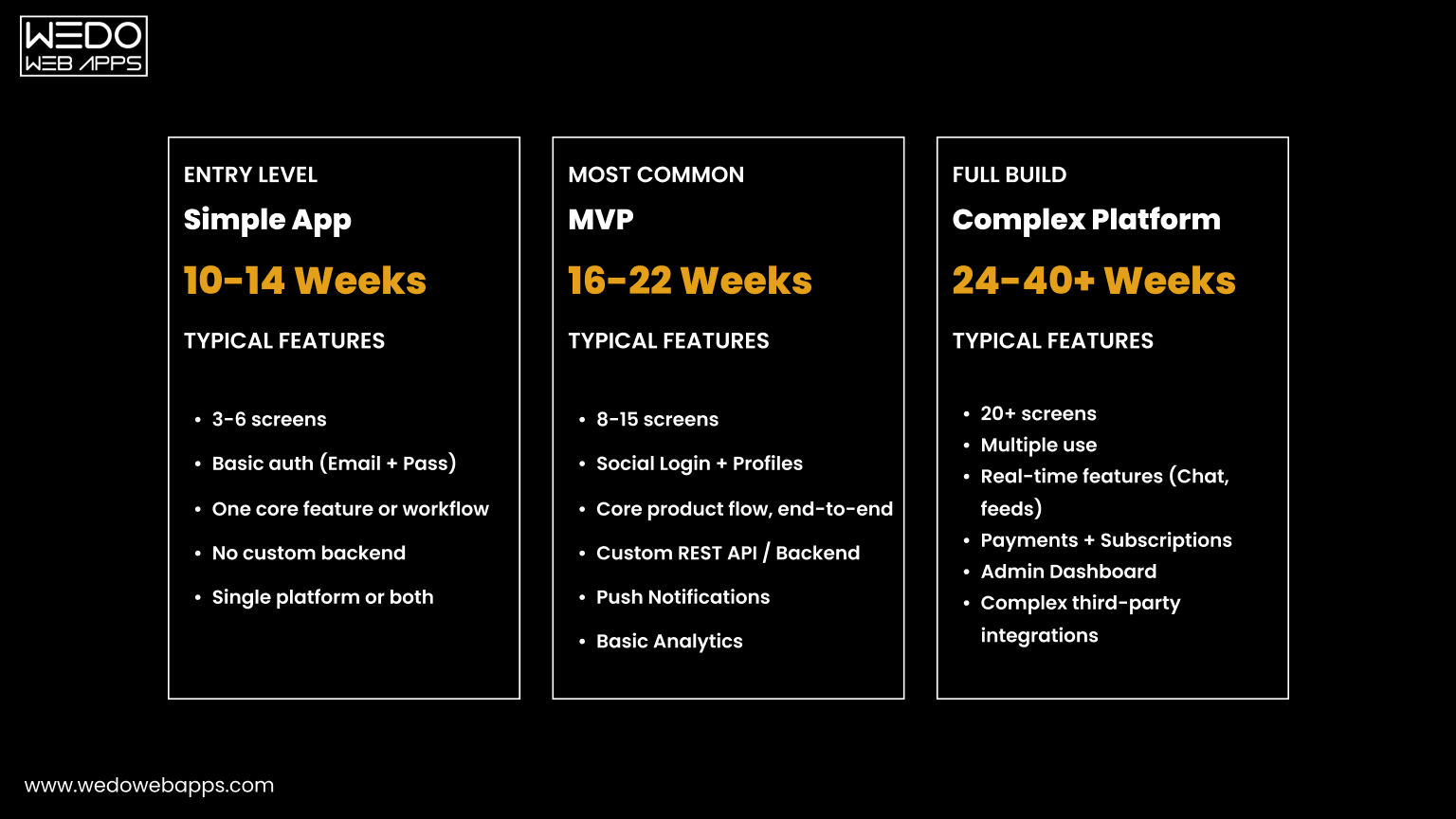
Here is how timelines map to project types. These are real-world ranges, not best-case estimates.

Full Phase Timeline Table
| Phase | Typical Duration | Key Deliverables | Most Common Delay |
|---|---|---|---|
| Discovery and Scoping | 1-2 weeks | Feature list, user flows, architecture plan, milestone timeline | Unclear requirements |
| UI/UX Design | 2-3 weeks | Wireframes, high-fidelity designs, component library, asset exports | Branding not ready |
| Core Development | 4-12 weeks | All screens coded, navigation, auth, business logic, device integrations | Scope changes mid-sprint |
| API & Backend Integration | 2-4 weeks (concurrent) | APIs connected, payments, push notifications, analytics | Third-party API issues |
| QA & Testing | Ongoing + 1-2 week final round | Functional, UI, performance, regression, device matrix testing | Late QA start |
| App Store Submission | 1-2 weeks prep + review wait | Store listings, screenshots, privacy policy, submission, approval | Apple rejection |
How to Speed Up Your React Native Project
Most timeline overruns are not caused by slow developers. They are caused by slow decisions, late deliverables, and creeping scope. Here are the actions that consistently compress timelines without cutting quality.
1. Finalize Your Brand Before Design Starts
If your designer is waiting for logo, font decisions, or color approvals, your project is paused, even if the clock is still running. Have your brand assets locked before the design phase begins. It saves at least a week of back-and-forth.
2. Assign One Decision-Maker
Projects with multiple approvers (two co-founders, a board, several internal stakeholders) routinely take 40-60% longer than those with a single named decision-maker. The team is not slower, they are just waiting for a consensus that never forms quickly. Name one person who can approve designs and unblock decisions within 24 hours.
3. Freeze Scope at the Start of Each Sprint
New ideas are good. New ideas mid-sprint are expensive. Implement a simple rule: feature requests go on a backlog and get evaluated for the next sprint, they don't enter the current one. This single process change is the highest-leverage thing a first-time app client can do to protect their timeline.
4. Set Up Your App Store Accounts Early
Apple Developer enrollment takes 1-2 days, and sometimes up to a week for business verification. Google Play Console setup is faster, but still requires a one-time fee and verification. Do this in week one, not week eighteen.
5. Use a Dedicated Team
Shared-resource models, where developers split time between multiple projects, introduce scheduling dependencies that add weeks to timelines. A team working exclusively on your project can run all phases in parallel and respond to issues the same day.
Conclusion
React Native app development takes as long as the decisions it is built on top of. A clear scope, fast feedback, a dedicated team, and a realistic understanding of App Store timelines will do more for your project schedule than any technical shortcut.
The teams that consistently launch on time are not the ones with the most developers, they are the ones who make decisions quickly, protect their scope, and treat QA as a continuous process rather than a last-minute checkbox.
If you are planning an app and want a timeline built around your actual feature set, not a generic estimate, we are happy to walk through it with you.