Introduction
You have a SaaS idea, business requirements, or simply a need to understand what is already working in the market.
- One search leads to dozens of products.
- Another gives you a long list of companies.
Soon, it becomes difficult to tell which examples actually matter to your use case.
That is where studying SaaS examples becomes useful.
The right examples can show you how companies package software, who they sell to, and which problem they choose to solve. A CRM platform serves a very different need from an accounting tool. A niche micro SaaS product follows a different approach from an enterprise SaaS platform.
You may be comparing B2B SaaS examples for business use, looking at B2C SaaS examples for consumer products, or researching vertical SaaS examples for a specific industry. You may also be searching for accounting SaaS examples or a practical B2B SaaS companies list to study existing products.
This guide brings together real SaaS company examples across these categories. It also explains PaaS IaaS SaaS examples so you can clearly understand where each cloud model fits.
What Is SaaS?
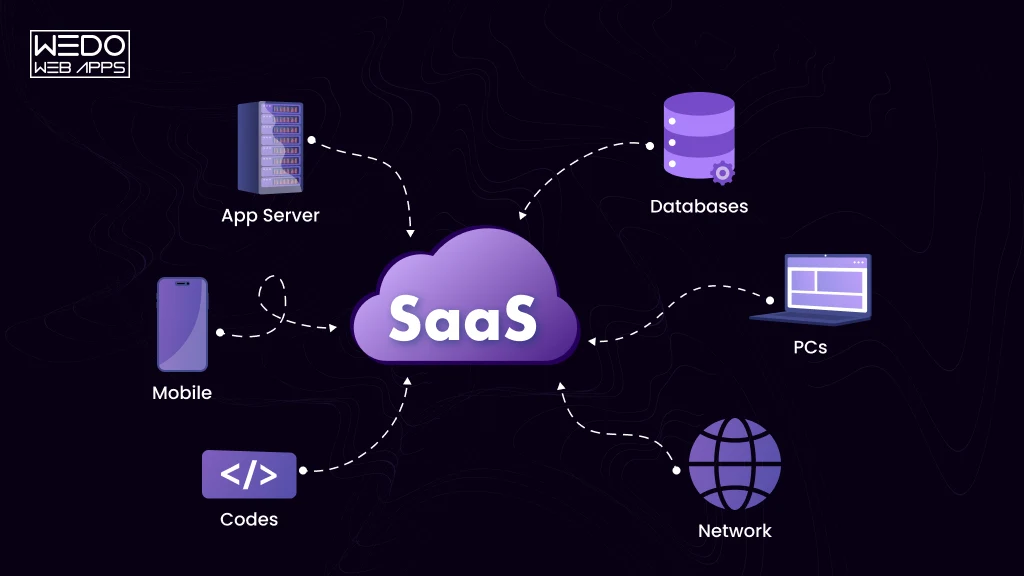
Software as a Service, or Saas, is software that you can access through the internet instead of installing and maintaining it on your own system. The SaaS provider manages the application, hosting, updates, and underlying infrastructure.
You typically pay through a subscription or usage-based plan. This gives you access to the software without having to manage its technical environment yourself.
How SaaS Works
The basic SaaS model connects three things: the provider, the software, and the customer.
| SaaS Component | What it means |
|---|---|
| Cloud delivery | You access the software through the internet |
| Provider managed | The SaaS company handles hosting, updates, and maintenance |
| Subscription access | You typically pay monthly or annually |
| Shared infrastructure | Many customers can use the same platform with separate accounts and data |
| Continuous updates | New features and fixes can be delivered without manual installation |
What Makes a Product SaaS?
A product generally fits the SaaS model when you access it remotely while the provider manages the underlying software and infrastructure.
Think about a tool like Slack. You create an account, choose a plan, and start communicating through the platform. Slack handles the application and its technical infrastructure while you focus on using the product.
That model makes SaaS suitable for businesses that want software access without taking on the full burden of hosting, maintenance, and updates.
SaaS vs Traditional Software
| Factor | SaaS | Traditional Software |
|---|---|---|
| Delivery | Cloud | Local or self-hosted |
| Updates | Provider managed | User or IT managed |
| Access | Usually online | Often device-based |
| Pricing | Subscription or usage | License or purchase |
| Maintenance | Provider managed | Customer managed |
For you as a business user, the main difference is who manages the software after you start using it. With SaaS, the provider takes care of most technical maintenance while you focus on using the product.
40+ SaaS Examples by Category
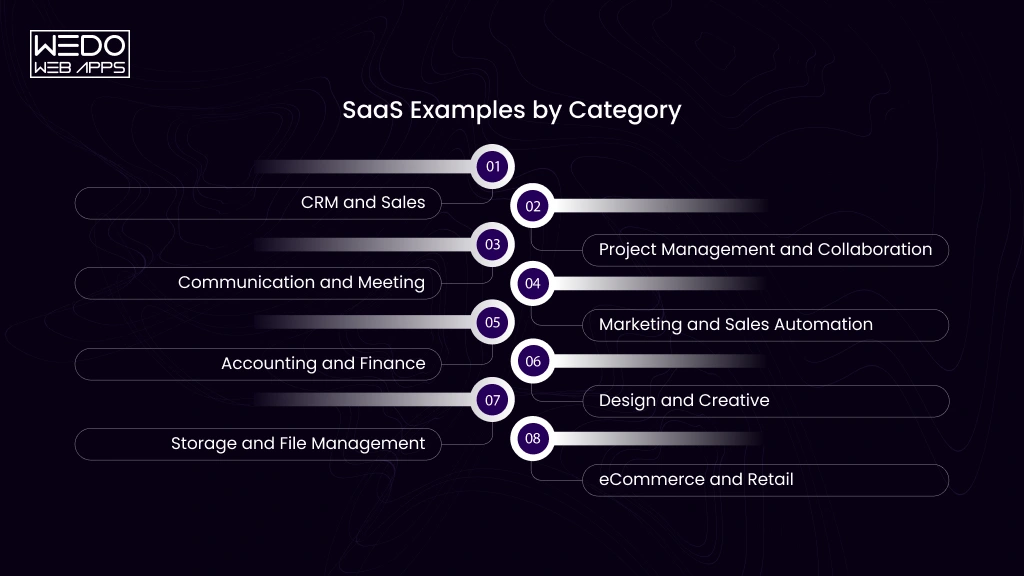
SaaS products solve very different problems depending on the customer and use case. A CRM helps you manage relationships and sales. A project management platform organizes teamwork. An accounting platform handles financial operations.
The following SaaS examples show how companies apply the SaaS model across common business and productivity needs.
CRM and Sales SaaS Examples
CRM software helps you manage customer information, sales opportunities, communication, and follow-up activities from one platform. These are some widely recognized SaaS company examples in this category.
| Company | What it does | Typical users | SaaS use case |
|---|---|---|---|
| Salesforce | CRM, sales, service, and marketing | Sales teams and large organizations | Manage customer data, leads, opportunities, and sales workflows |
| HubSpot | CRM, marketing, sales, and customer service | Startups and growing businesses | Connect lead management, marketing campaigns, sales activity, and customer interactions |
| Pipedrive | Sales pipelines and deal management | Sales representatives and small to mid-sized teams | Track deals, sales activities, follow-ups, and pipeline stages |
| ZohoCRM | CRM, automation, analytics, and sales management | Small and mid-sized businesses | Centralize customer information and automate routine sales tasks |
These SaaS examples companies demonstrate how cloud-based CRM products can serve different sizes while keeping customer and sales information accessible through a managed platform.
Project Management and Collaboration SaaS Examples
Project management tools show how SaaS examples can bring planning, communication, and task tracking into a shared workspace. You can give your team access without installing and maintaining separate software for every user.
Asana demonstrates structured project management. Teams can organize work into projects, assign tasks, set deadlines, and track progress from a shared workspace.
ClickUp takes a broader work management approach. Its SaaS model brings tasks, documents, goals, dashboards, and workflows together so teams can manage different types of work from one platform.
Trello demonstrates how a focused SaaS product can simplify collaboration. Its boards, lists, and cards give teams a visual way to organize and track work.
monday.com shows how SaaS can adapt to different business processes. Teams can create workflows for project management, marketing, sales, operations, and other functions.
Notion combines documentation with collaboration. Teams can create shared pages, databases, project spaces, and internal knowledge hubs within the same cloud-based platform.
Together, these SaaS company examples show that collaboration does not require every team to work in the same place. The software provides a shared system where people can access information, contribute to tasks, and keep projects moving.
Communication and Meeting SaaS Examples
Communication SaaS helps teams stay connected when conversations happen across offices, time zones, and work schedules. These products show how SaaS examples can support both real-time and asynchronous collaboration.
| Platform | Primary Use | What it demonstrates |
|---|---|---|
| Slack | Team messaging and channels | Organizes ongoing conversations around teams, projects, and topics |
| Microsoft Teams | Messaging, meetings, and collaboration | Brings communication and workplace collaboration into one platform |
| Zoom | Video meetings and virtual communication | Delivers real-time communication through a cloud-based service |
| Loom | Video messages and screen recording | Supports asynchronous communication without requiring a live meeting |
The key SaaS model here is accessibility. You can join a conversation, meeting, or shared workspace through an internet-connected device while the provider manages the underlying software.
These SaaS company examples also show how different products can solve the same broad problem, communication, through different user experiences. Slack centers on messaging, Zoom on meetings, and Loom on recorded communication.
Marketing and Sales Automation SaaS Examples
Marketing teams often manage repetitive tasks across email, campaigns, customer journeys, lead management, and sales workflows. SaaS platforms can bring these activities into one online system and automate parts of the process.
Some common SaaS examples include:
- Mailchimp: Helps businesses create email campaigns, manage audiences, and automate customer communications.
- Klaviyo: Focuses on email and SMS marketing, with customer data used to create targeted campaigns and automated flows.
- ActiveCampaign: Combines email marketing, customer relationship management, and marketing automation for growing businesses.
- Marketo: Provides marketing automation tools for businesses managing lead generation, campaigns, and customer engagement at scale.
- Zapier: Connects different business applications and automates workflows between them, reducing the need for repetitive manual tasks.
These SaaS company examples show how cloud software can automate routine marketing and sales activities while connecting data across different tools. Many modern platforms also use AI for tasks such as content suggestions, customer segmentation, workflow assistance, and data analysis.
Accounting and Finance SaaS Examples
Accounting software has moved from locally installed applications to cloud platforms that let businesses manage financial information from anywhere. These accounting SaaS examples cover tasks such as bookkeeping, invoicing, expenses, payroll, and financial reporting.
QuickBooks Online is widely used by small businesses for bookkeeping, invoicing, expense tracking, and financial reporting.
Xero provides cloud accounting tools for businesses that need to manage transactions, invoices, expenses, bank connections, and financial records.
FreshBooks focuses on invoicing, expenses, time tracking, and accounting features for freelancers and small businesses.
Sage offers cloud-based financial and accounting software across different business sizes, with products covering areas such as accounting, payroll, and business management.
What These SaaS Products Have in Common
The delivery model stays consistent even though the features differ. You access the software online, while the provider manages hosting, updates, security, and ongoing maintenance.
For businesses, this means financial teams can work with shared data without maintaining accounting software on individual computers. It also allows providers to add new features and updates centrally.
Design and Creative SaaS Examples
Design software is another strong example of how SaaS can make professional tools accessible through the cloud. Instead of relying on a single workstation, teams can access projects, collaborate, and manage creative work across devices.
Three well-known SaaS examples include:
- Canva: Canva provides browser-based tools for creating presentations, social media graphics, marketing materials, documents, and other visual content. Its model shows how SaaS can make complex creative tasks accessible to a wider audience.
- Figma: Figma focuses on interface design and collaborative product design. Multiple team members can work on shared design files, review changes, and provide feedback through the same online workspace.
- Adobe Creative Cloud: Adobe Creative Cloud provides access to a broad collection of creative applications and related cloud services. It demonstrates how a SaaS model can support professional users who need several specialized creative tools.
What These SaaS Products Demonstrate
The value goes beyond simply moving design software online. Cloud access allows graphic designers to collaborate on shared work, access projects from different devices, and receive software updates without managing the underlying application infrastructure themselves.
This makes design and creative platforms useful SaaS company examples for businesses building products around collaboration, recurring subscriptions, and cloud-based access.
Storage and File Management SaaS Examples
Businesses generate documents, images, presentations, spreadsheets, and other digital files every day. Cloud computing storage SaaS gives teams a central place to store, access, share, and manage those files without maintaining their own storage infrastructure.
Consider these SaaS examples:
- Dropbox: Provides cloud storage and file sharing for individuals and businesses. Teams can access files across devices and collaborate around shared content.
- Box: Focuses on secure cloud content management, file sharing, collaboration, and business workflows.
- Google Drive: Combines cloud file storage with access to productivity tools such as Docs, Sheets, and Slides.
The SaaS model is particularly useful here because storage requirements can change as a business grows. Instead of managing physical storage capacity and software updates internally, you can use a provider-managed platform and select a plan based on your requirements.
These SaaS company examples also show how cloud storage can become more than a place to keep files. Sharing, permissions, collaboration, search, and integrations can turn storage into part of a broader digital workplace.
eCommerce and Retail SaaS Examples
Building an online store involves more than creating product pages. You also need tools for inventory, payments, orders, shipping, customer accounts, and store management. eCommerce SaaS brings many of these functions into a hosted platform.
Shopify provides businesses with tools to create and manage online stores, including product management, checkout, payments, orders, and integrations with other business tools.
BigCommerce provides hosted eCommerce software for businesses that need storefront management, catalog tools, payments, order processing, and integrations.
The SaaS model means you can launch and operate an online store without managing the underlying servers or eCommerce software yourself. The provider handles the platform infrastructure, software updates, and core maintenance while you focus on products, customers, and sales.
These SaaS examples companies also show how SaaS can package complex business functions into a subscription-based product that businesses can access through the web.
B2B SaaS Examples
If you are looking for B2B SaaS examples, focus on software that helps businesses manage specific functions such as sales, customer service, communication, projects, and internal operations.
The following B2B SaaS companies list includes some widely recognized SaaS company examples:
Salesforce
Salesforce provides cloud-based CRM software for businesses managing customer relationships, sales activities, marketing, and service operations.
HubSpot
HubSpot combines CRM, marketing, sales, and customer service tools. It is used by businesses that want to manage several customer-facing activities through one platform.
Slack
Slack provides business communication through channels, direct messages, file sharing, and integrations. Teams can organize conversations around projects, departments, and workflows.
Asana
Asana helps businesses manage projects, tasks, deadlines, and team responsibilities. Its cloud-based model gives teams shared access to project information.
Zendesk
Zendesk provides customer service and support software for businesses. Companies can manage customer requests, support conversations, and service workflows through the platform.
Atlassian
Atlassian provides software for development, project management, collaboration, and service management. Products such as Jira and Confluence are used across technical and business teams.
B2B SaaS Companies at a Glance
| B2B SaaS company | Category | Primary business use |
|---|---|---|
| Salesforce | CRM | Sales and customer management |
| HubSpot | CRM and marketing | Marketing, sales, and customer service |
| Slack | Communication | Team communication and collaboration |
| Asana | Project Management | Project, tasks, and workflows |
| Zendesk | Customer service | Customer support and service |
| Atlassian | Development and collaboration | Software and business workflow |
These B2B SaaS examples show how SaaS companies can build products around specific business needs while delivering access through a cloud-based platform.
B2C SaaS Examples
B2C SaaS examples are software products where the primary buyer and user is an individual consumer. B2B SaaS usually serves organizations and teams, while B2C SaaS focuses on personal needs such as entertainment, design, storage, writing, and learning.
The following SaaS company examples show how the same cloud-based delivery model can serve different consumer needs.
Netflix
Netflix is a subscription-based streaming service that gives consumers access to movies, shows, and other digital content online. It demonstrates how SaaS can deliver an ongoing service through a recurring subscription rather than a one-time software purchase.
Canva
Canva provides online design tools for consumers, creators, students, and professionals. Its platform shows how B2C SaaS companies can make creative software accessible through a browser while also offering paid features for users with more advanced needs.
Dropbox
Dropbox provides personal cloud storage and file management. Users can store, access, organize, and share files across supported devices without managing their own storage infrastructure.
Grammarly
Grammarly provides writing assistance through online tools, browser extensions, and applications. It demonstrates how a B2C SaaS product can become part of everyday workflows by helping users improve their writing and productivity.
Duolingo
Duolingo provides digital language learning through interactive lessons and practice. Its subscription model gives users access to additional features while allowing the platform to serve a large consumer audience.
B2C SaaS Examples at a Glance
| SaaS Company | Category | Primary consumer use |
|---|---|---|
| Netflix | Streaming | Entertainment and digital content |
| Canva | Design | Creating visual content |
| Dropbox | Cloud storage | Personal file storage and sharing |
| Grammarly | Writing productivity | Writing assistance |
| Duolingo | Education | Language learning |
These B2C SaaS examples show how consumer software can turn a recurring need into an accessible online service. Unlike many B2B SaaS examples, the product experience is usually designed around individual users, personal accounts, and direct consumer adoption.
Enterprise SaaS Examples
Enterprise SaaS examples are cloud-based software products designed to support large organizations with complex teams, workflows, data, and operational requirements. Unlike many smaller B2B SaaS examples, enterprise platforms often need extensive administration, security controls, integrations, and support for a large number of users.
Salesforce
Salesforce is an enterprise CRM platform used to manage customer data, sales processes, marketing, and customer service. Its broad range of tools allows organizations to support multiple departments through one connected platform.
Microsoft 365
Microsoft 365 combines productivity and collaboration applications such as Word, Excel, PowerPoint, Outlook, Teams, and SharePoint. Organizations can manage user access and business applications through a centralized cloud environment.
ServiceNow
ServiceNow provides a cloud-based platform for IT service management, employee workflows, customer service, and other enterprise processes. It shows how SaaS can support complex workflows across large organizations.
Workday
Workday provides cloud software for areas such as human resources, finance, payroll, and workforce management. Its products are designed around the operational needs of organizations with large employee bases.
SAP
SAP provides enterprise software covering areas such as finance, procurement, supply chain, human resources, and customer experience. Its cloud offerings demonstrate how SaaS company examples can support core business operations at organizational scale.
What Enterprise SaaS Usually Requires
When evaluating enterprise SaaS companies, businesses often look beyond basic features. Common requirements include:
- Role-based access: Different users need different permissions.
- Security controls: Business and customer data require appropriate protection.
- Integrations: The software needs to connect with existing business systems.
- Compliance support: Organizations may have industry and regulatory requirements.
- Scalability: The platform should support growing users, data, and workloads.
- Administration: IT teams need tools to manage users, settings, and access.
- Analytics: Leaders may need reporting across teams and business functions.
These enterprise SaaS examples show how cloud software can move beyond individual applications and support large-scale business operations.
Micro SaaS Examples
Micro SaaS examples are small, focused SaaS products built around a specific customer group or narrowly defined problem. They typically have a limited product scope and can be operated by a small team or even an individual founder.
Unlike large SaaS company examples, a micro SaaS product does not need to serve a broad market. Its strength often comes from solving one specific problem well.
Examples of Micro SaaS Products
A micro SaaS product might provide:
- Invoice automation for freelancers.
- Appointment scheduling for a specific type of business.
- Social media reporting for marketing agencies.
- Email management for a particular workflow.
- Inventory tracking for a niche retailer.
- Document generation for a specific professional service.
The exact product can vary widely, but the business model usually follows the same SaaS principles: online access, recurring payments, centralized updates, and provider-managed infrastructure.
What Makes a SaaS Product Micro SaaS?
Look for these characteristics:
- Narrow audience: The product serves a clearly defined customer segment.
- Focused problem: It solves one specific problem instead of trying to manage an entire business function.
- Small product scope: The platform usually has fewer core features than a large SaaS suite.
- Lean operations: A small team can often build, operate, and support the product.
- Recurring revenue: Subscriptions provide an ongoing revenue model.
For example, a tool built specifically to generate compliance reports for one professional industry could qualify as micro SaaS. It does not need millions of users if it solves a valuable problem for a clearly defined audience.
These micro SaaS examples show that a SaaS business can start with a focused use case rather than a large feature set.
Vertical SaaS Examples
Vertical SaaS examples are software products built for a specific industry rather than a broad range of businesses. A healthcare platform, restaurant management system, or real estate solution can be designed around the workflow, terminology, and requirements of that particular industry.
Horizontal SaaS vs Vertical SaaS
| SaaS model | Target Market | Example Use |
|---|---|---|
| Horizontal SaaS | Multiple industries | CRM, project management, communication |
| Vertical SaaS | One specific industry | Healthcare, real estate, restaurants |
Healthcare SaaS Examples
Veeva Systems provides cloud software designed for life science organizations, including solutions for areas such as clinical operations, regulatory processes, and commercial activities.
athenahealth provides cloud-based healthcare technology focused on areas such as practice management, electronic health records, and patient engagement.
Real Estate SaaS Examples
Real estate SaaS can help property businesses manage listings, customer relationships, transactions, property operations, and related workflows. These platforms are designed around the needs of agents, brokers, property managers, or other real estate professionals.
Restaurant SaaS Examples
Restaurant-focused SaaS can cover functions such as point of sale, reservations, online ordering, inventory, staff management, and customer engagement. The software is built around workflows that are specific to food service businesses.
Education SaaS Examples
Education SaaS can support schools, colleges, training providers, and learners through tools for learning management, student administration, assessments, communication, and course delivery.
These SaaS company examples show why vertical SaaS can be useful when an industry has specialized workflows or requirements. Instead of adapting a general-purpose platform to a specific industry, the software is designed around that industry's needs from the beginning.
SaaS vs PaaS vs IaaS Examples
If you are comparing PaaS IaaS SaaS examples, the main difference is the level of service and control each cloud model provides.
| Cloud Model | What You Get | Who typically uses it | Example |
|---|---|---|---|
| SaaS | Ready-to-use software | Business users and consumers | Salesforce |
| PaaS | Platform for building applications | Developers | Google App Engine |
| IaaS | Computing infrastructure | IT teams and developers | Amazon EC2 |
SaaS Examples
SaaS provides finished software that you can access through the internet. The provider manages the application, infrastructure, updates, and maintenance.
Examples include Salesforce, Slack, Shopify, and Google Workspace.
These are typical SaaS company examples because users access ready-to-use applications instead of managing the underlying technology.
PaaS Examples
PaaS provides developers with a managed platform for building, deploying, and running applications. It reduces the amount of infrastructure management required during development.
Examples include Google App Engine, Heroku, and Microsoft Azure App Service.
IaaS Examples
IaaS provides virtual computing resources such as servers, storage, and networking. Technical teams get more control over the environment while the cloud provider manages the physical infrastructure.
Examples include Amazon EC2, Google Compute Engine, and Azure Virtual Machines.
SaaS vs PaaS vs IaaS at a Glance
The easiest way to understand these cloud models is to look at who manages what:
| Responsibility | SaaS | PaaS | IaaS |
|---|---|---|---|
| Physical infrastructure | Provider | Provider | Provider |
| Servers | Provider | Provider | Provider |
| Operating system | Provider | Provider | Customer |
| Application Platform | Provider | Provider | Customer |
| Application | Provider | Customer | Customer |
| Data and user access | Customer | Customer | Customer |
In simple terms, SaaS gives you the finished application, PaaS gives developers a platform to build an application, and IaaS provides the infrastructure needed to run them.
These PaaS IaaS SaaS examples are used when comparing cloud service models based on control, software development needs, and technical responsibility.
AI SaaS Examples and the Rise of AI-Powered Software
AI development is becoming part of many SaaS products, from writing and design to CRM, analytics, customer support, and workflow automation. This has created a growing category of AI SaaS examples where artificial intelligence is a core part of the product experience.
What Is AI SaaS?
AI SaaS refers to cloud-based software that uses artificial intelligence to perform tasks, generate outputs, analyze information, or assist users.
The AI capabilities can include natural language processing, content generation, recommendations, prediction, classification, image generation, and automated workflows.
Examples of AI-Powered SaaS
ChatGPT: Provides AI-Powered conversational assistance for tasks such as writing, research, coding, analysis, and content generation.
Grammarly: Uses AI to provide writing suggestions, generate text, and assist users with communication.
Canva: Uses AI features to help users generate and edit visuals and written content within its design platform.
Notion: Uses AI features for tasks such as writing assistance, summarization, and working with information stored in a workspace.
HubSpot: Incorporates AI capabilities across areas such as content creation, customer engagement, sales, and marketing workflows.
These SaaS company examples show how AI can be added to an existing cloud software model to help users complete tasks faster or work with information in new ways.
How AI Is Changing SaaS Products
AI can change how users interact with software by adding capabilities such as:
- Content generation: Create drafts, descriptions, summaries, and other content.
- AI assistance: Get help with tasks through natural language instructions.
- Predictive analytics: Identify patterns and support forecasting.
- Workflow automation: Automate repetitive processes based on rules or AI-generated decisions.
- Personalized: Adapt recommendations and experience to individual users.
- Data analysis: Process large amounts of information and surface useful patterns.
- Customer support: Assist with questions, responses, and support workflows.
AI Native SaaS vs SaaS With AI Features
| Type | What it means | Example |
|---|---|---|
| AI native SaaS | AI is central to the product's core function | AI-focused writing or research platforms |
| SaaS with AI features | An established SaaS product adds AI capabilities | CRM, design, or productivity platforms with AI tools |
The distinction matters when you evaluate AI SaaS examples for your business. A product with an AI feature is different from a product whose primary purpose depends on AI.

What Can You Learn From These SaaS Company Examples?
The value of studying SaaS company examples goes beyond knowing which products are popular. Their products, audiences, and business models can help you identify patterns when researching an existing market or planning your own SaaS product.
1. Start With a Specific Customer Problem
SaaS example: A CRM helps businesses organize customer information, sales activities, and relationships.
What to learn: Define the problem your product solves before deciding which feature to build. A focused problem can make your product easier to position and explain.
2. Keep Adoption Simple
SaaS example: Consumer platforms such as Canva and Dropbox are designed so users can start using the core product without extensive technical knowledge.
What to learn: Make account setup, onboarding, navigation, and first use straightforward. Users should understand the product's value without needing technical assistance.
3. Build Around Repeatable Needs
B2B SaaS example: Accounting, project management, CRM, and communication platforms address tasks that businesses handle continuously.
What to learn: A recurring customer need can create a natural reason to keep using the product and paying for access.
4. Make Integration Part of the Product Strategy
SaaS example: Business software often connects with email, payment, communication, analytics, or productivity platforms.
What to learn: Integrations can help your SaaS product fit into the tools customers already use instead of requiring them to change their entire workflow.
5. Add AI Where It Solves a Real Need
AI SaaS example: Writing platforms can use AI for content generation and suggestions, while CRM platforms can use it for analysis, automation, and customer workflows.
What to learn: AI should support a clear user outcome. Adding an AI feature simply because it is popular does not explain why customers would use it.
A Simple Framework for Evaluating SaaS Examples
When researching SaaS examples companies, ask five questions:
Who is the target user -> What problem does the product solve -> How does the user access it -> Why would they return -> What makes the product different?
These questions can help you evaluate SaaS company examples consistently and identify opportunities for your own SaaS product.
How to Choose a SaaS Product for Your Business
With so many SaaS examples and SaaS company examples available, choosing the right product can take more than comparing feature lists. Start with your business requirements and then assess each platform against them.
1. Define Your Business Requirement
Identify the specific problem you want the SaaS product to solve. For example, you may need a CRM for sales management, accounting software for financial operations, or a project management platform for team workflows.
2. Check Integrations
List the tools your team already uses and check whether the SaaS product connects with them. Useful integrations can reduce manual data entry and prevent information from being isolated across different systems.
3. Compare Pricing and User Limits
Look beyond the starting subscription price. Check user limits, storage allowances, premium features, usage restrictions, and additional charges as your requirements grow.
4. Review Security and Compliance
For business software, check how the provider handles data protection, user permissions, authentication, backups, and relevant compliance requirements.
5. Test the Product Before Committing
Use a free trial, demo, or available free plan when possible. Test the features your team will actually use rather than evaluating the platform only from its feature list.
6. Consider Scalability
Think about what happens when your business grows. A suitable SaaS product should be able to support additional users, data, integrations, and workflows without creating unnecessary disruption.
Quick SaaS Evaluation Checklist
Before choosing between different B2B SaaS examples or other SaaS products, check:
- Does it solve your specific problem?
- Does it fit your existing workflow?
- Does the pricing match your budget?
- Does it provide the required integrations?
- Does it meet your security requirements?
- Can it support future growth?
- Can your team adopt it without excessive training?
This approach helps you compare SaaS company examples based on your actual requirements rather than choosing a product simply because it has a long feature list.
Conclusion
The wide range of SaaS examples shows how cloud software can solve problems across business, consumer, and industry-specific use cases. From B2B SaaS examples such as Salesforce and Slack to B2C SaaS examples such as Canva and Duolingo, the model can support very different audiences.
You can also see more specialized approaches through micro SaaS, vertical SaaS, enterprise SaaS, and AI SaaS examples. Each model starts with a specific customer need and delivers software through the cloud.
If you are researching existing SaaS company examples or planning your own SaaS application development, focus on the problem, target users, required features, integrations, pricing model, and long-term product value. These factors will help you move from studying SaaS products to defining a product that fits a real market need.