Introduction
Your developer says Drupal. Your marketing head says WordPress. Your budget says neither is cheap to get wrong.
You need a site that launches on time and stays secure. Your team should publish without raising a ticket for every change. It also has to keep up when traffic and content grow.
The WordPress vs Drupal decision sits behind all of that. Choose well, and your site supports growth for yours. Choose poorly, and you pay in rebuilds, emergency patches and slow releases.
This guide gives you the full comparison. You will see how WordPress and Drupal stack up on enterprise readiness, performance, security and cost. You will also see which one fits a startup, an SME or a large organisation.
By the end, you will know which platform suits your team.
WordPress or Drupal? The Short Answer
Need a verdict before you read further? Here it is.
- Choose WordPress if you want to launch fast, keep the build budget tight and let your team publish without a developer.
- Choose Drupal if you manage complex content, many user roles, several languages or strict compliance rules.
One test settles most cases. Does your main requirement need a plugin workaround? If yes, look hard at Drupal. If not, WordPress will likely get you live sooner and for less.
WordPress vs Drupal at a Glance
Short on time? This table puts WordPress vs Drupal side by side on the ten factors that decide most projects. Later sections cover each one in depth.
| Factor | WordPress | Drupal |
|---|---|---|
| Best for | Startups, SMEs, content sites, WooCommerce stores | Enterprises, universities, government, complex portals |
| Learning curve | Low. Editor can start publishing in hours | Higher. Site building usually needs a developer |
| Content modelling | Custom post types and fields cover most needs | Native content types, taxonomies and relationships suit large, structured content |
| Permissions | Five default roles. A plugin adds more | Granular permissions built into core |
| Multilingual | Plugins such as WPML or Polylang | Built into core |
| Security approach | Secure core. Risk sits mainly in third-party plugins | Formal security team and tightly reviewed modules. Needs prompt patching |
| Scalability | Scales well with quality hosting, caching and a CDN | Built-in caching suits high traffic and large content volumes |
| Cost | Lower build cost and faster delivery | Higher build cost. Can pay back on complex platforms |
| Ecosystem | Largest marketplace of plugins and themes | Smaller module library with stricter review |
| Talent availability | Very large developer pool | Smaller pool of specialists |
If most of your answers land in one column, you have a strong signal. If they split across both, the section ahead will help you weigh what matters most for your project.
What Is WordPress?
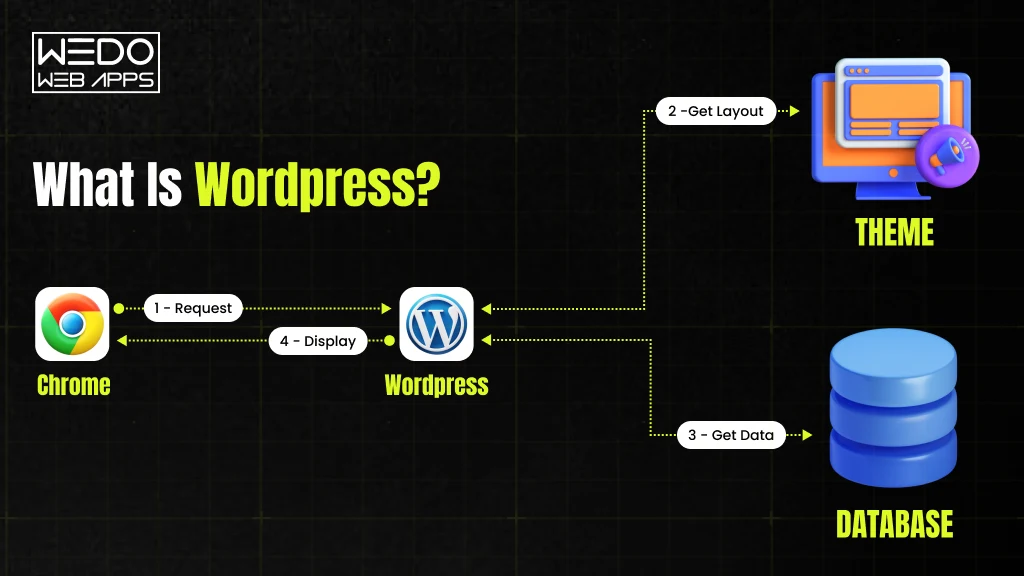
WordPress began in 2003 as a blogging tool. It now runs about 42% of all websites and close to 60% of sites that use a CMS. That reach gives you a deep pool of developers, agencies and tutorials to draw on.
Here is what that looks like in practice:
- Block editor: Introduced in 2018, it builds pages from drag-and-drop blocks. A marketer can assemble a landing page without touching code.
- Plugins and themes: Tens of thousands are available. A site with a contact form and SEO tools can go live within days.
- WooCommerce: This free plugin turns a site into a store. A smaller retailer can list products and take payments from one dashboard.
What Is Drupal?
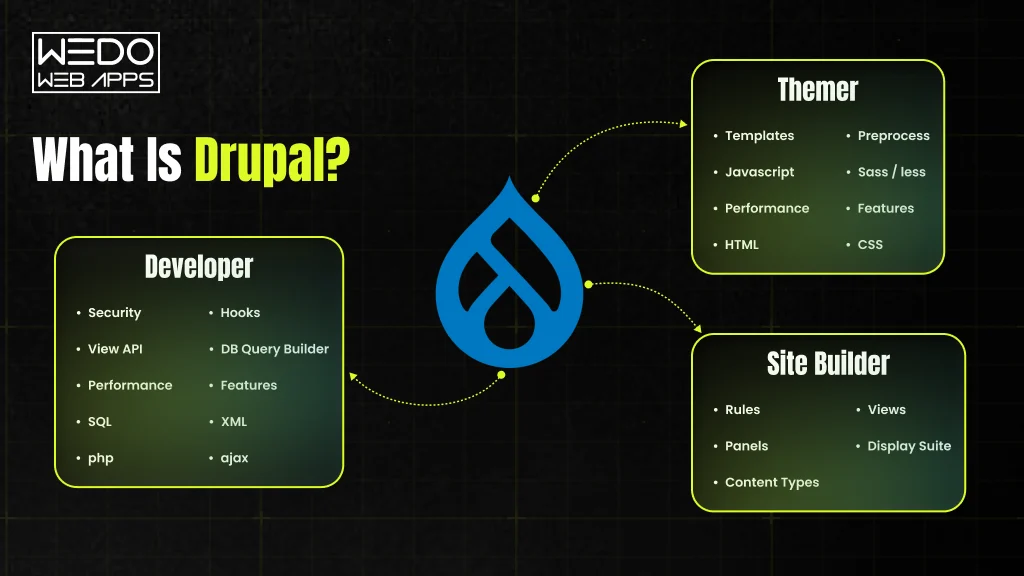
Drupal launched in 2000 with a clear aim to give content structure. You define content types, fields and relationships once, and Drupal development applies them across thousands of pages. Course catalogues, product databases and document libraries are typical fits.
Editing used to be its weak spot. Layout Builder gave editors drag-and-drop page layouts. Drupal CMS arrived in January 2025 with smart defaults and a simpler setup. Version 2.0 followed in January 2026 and added Drupal Canvas, a visual page builder.
Organisations such as NASA and UNICEF run Drupal where scale and governance matter. Its share is small, about 0.7% of websites, so you will find fewer developers, and most of them are specialists.
WordPress vs Drupal Enterprise: Which Fits Large Organisations?
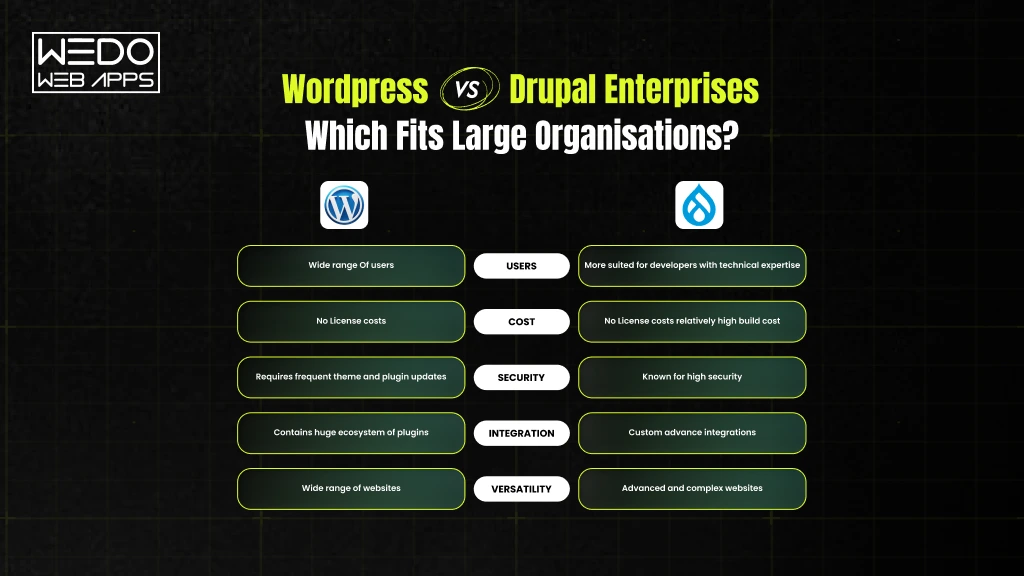
Enterprise projects rarely fail on features. They fail in governance. Dozens of editors, several regions, a legal team and an audit trail all land on one platform. The WordPress vs Drupal enterprise question comes down to how well each one carries that load.
Five Enterprise Needs and How Each Platform Handles Them
- Approval workflows: Legal must sign off before any claim goes live. Drupal's content moderation handles this in core. WordPress development usually needs a workflow plugin or custom code.
- Granular permissions: Regional editors should change only their own market's pages. Drupal sets this per core role. WordPress needs a role-management plugin.
- Multi-site governance: Forty country sites share one design system. Both platforms support it. Drupal gives you tighter control. WordPress Multisite is faster to set up but needs plugin discipline across every site.
- Audit trails: A bank must show how changes what and when. Drupal's revisions and logging cover the basics. WordPress needs an audit-log plugin.
- Integrations: Your CRM, single sign-on and digital asset manager all have to connect. WordPress offers more ready-made connectors. Drupal gives you more control over complex data flows.
Where Enterprise WordPress Works
Large publishers and marketing teams run WordPress at scale. It holds up when four conditions are in place:
- Managed enterprise hosting
- A short, approved plugin list
- Code review before every release
- A staging site for testing updates
Many large organizations use WordPress and Drupal together. A typical setup runs the blog and campaign pages on WordPress and a partner portal on Drupal. Shared single sign-on and one design system tie them together.
Four Questions to Ask Your Team
- How many people will publish, and do they need different permissions?
- How many languages and regional sites will you run in two years?
- Does any content need formal approval before it goes live?
- Who will maintain the platform after launch?
Answer "yes" to the first three and Drupal deserves a serious look. Answer "no" and WordPress will likely serve you well. Not sure where you land? Our team can run a short assessment against these questions before you commit to a build.
Drupal vs WordPress Performance: Which Stays Fast as You Grow?
Slow pages cost you visitors, rankings and sales. Drupal vs WordPress performance comes down to one question: which platform stays fast when your traffic and content double?
Out-of-the-Box Architecture and Caching
Each platform starts from a different place.
- Drupal ships with caching built into the core. Its dynamic page cache stores pages in reusable pieces. BigPipe loads the main page first and streams personalised parts after it.
- WordPress core does not include full-page caching. You add it through your host or a caching plugin.
For you, that means Drupal needs less setup to handle heavy, personalised pages. WordPress needs the right hosting and plugin from day one.
What Drives WordPress Speed
Five things decide how fast your site feels.
- Hosting: Shared hosting buckles during traffic spikes. Managed WordPress hosting adds server-level caching.
- Caching: Page caching serves ready-made pages. An object cache such as Redis speeds up repeated database queries.
- CDN: A visitor in Sydney loads files from a nearby server, not your origin in London.
- Plugin load: Ten plugins loading scripts on every page add up. Remove what you do not use.
- Theme quality: A bloated multipurpose theme can add hundreds of kilobytes. A lean theme loads only what each page needs.
High-Traffic and Large-Content Handling
Scales look different in each case. Here is where each platform sits.
| Scenario | Better fit | Why |
|---|---|---|
| Blog or brochure site, under 100 pages | WordPress | Page caching and a CDN are enough |
| News site with frequent traffic spikes | Either | Needs strong hosting and caching on both |
| Catalogue with 100,000+ pages and filters | Drupal | Core caching handles complex queries well |
| Logged-in portal with personalised content | Drupal | BigPipe and cache tags suit personalised pages |
The Drupal project stays on version 11.3 and serves 26 to 33% more requests on the same database load. It is a vendor figure, so treat it as a signal and test your own build.
Core Web Vitals and SEO Impact
Google measures real user experience with three metrics. They count as part of its page experience signals, so slow pages can hold back your rankings.
| Metric | What it measures | Good score |
|---|---|---|
| LCP | How fast the main content appears | 2.5 seconds or less |
| INP | How fast the page reacts to a tap or click | 200 milliseconds or less |
| CLS | How much the layout jumps while loading | 0.1 or less |
Both platforms can pass. Plugin and theme choices usually decide the result on WordPress. Custom code and configuration decide it on Drupal.
Performance Checklist for Each Platform
Drupal
- Enable the dynamic page cache and BigPipe.
- Add Redis and Memcached for cache storage.
- Put a CDN or Varnish in front of the site.
- Serve images in WebP or AVIF.
- Review contributed modules every quarter.
WordPress
- Use managed hosting with server-level caching.
- Add an object cache such as Redis.
- Put a CDN in front of the site.
- Compress images and lazy-load below-the-fold media.
- Delete unused plugins and switch to a lean theme.
A headless front end on either platform can be very fast, because pages can be served from the edge. It also adds API calls and a second codebase to maintain, so plan caching before you build.
Drupal vs WordPress Security: Where the Real Risk Sits
A breach costs you customer trust, search rankings and weeks of cleanup. The Drupal vs WordPress security debate usually gets one fact wrong. Both cores are well maintained. The risk sits in what you add to them.
Security of Core vs the Ecosystem
Patchstack's 2026 report on 2025 data shows where WordPress risk concentrates.
| WordPress security data 2025 | Figure |
|---|---|
| New vulnerabilities found | 11,334 (up 42% on 2024) |
| Found in plugins | 91% |
| Found in WordPress core | 6 |
| No developer patch at public disclosure | 46% |
| Median time to first mass exploitation | 5 hours |
Core is not your weak point. Plugins are, and attackers move faster than most update schedules.
WordPress Risk Factors and Fixes
- Risk: Abandoned plugins. A plugin you installed in 2021 stops getting updates.
Fix: Check the last update date before you install and replace anything unmaintained.
- Risk: Unpatched flaws. With 46% of issues unpatched at disclosure, updating alone is not enough.
Fix: Add a web application firewall that offers virtual patching.
- Risk: Plugin sprawl. Every extra plugin widens your attack surface.
Fix: Consolidate overlapping plugins into one maintained solution.
- Risk: Weak admin access. Shared logins and no two-factor authentication invite takeovers.
Fix: Enforce 2FA and give every user a named account.
Drupal's Security Team and Module Vetting
Drupal has a formal Security Team that coordinates fixes and publishes advisories. Its contributed module library is smaller and the team's advisory policy covers modules that have a stable release. That tighter ecosystem is one reason governments and regulated industries choose it.
Drupal has had serious flaws too. Drupalgeddon 2 hit unpatched sites in 2018. The lesson holds for any platform: patch quickly and keep your site on a supported version. Drupal 10 security support ends in December 2026.
Compliance and Regulated Industries
Neither platform is GDPR compliant by default. Compliance depends on your hosting, consent tools and how you handle personal data.
- WordPress core includes tools to export and erase personal data. Consent banners and logging need plugins.
- Drupal gives you granular access control and revision history in core. Consent tools come from contributed modules.
For banking, healthcare or public sector work, Drupal's permission model and review process make audits simpler. A well-governed WordPress build can still pass, with more plugin oversight.
Six Hardening Steps for Either Platform
- Apply security updates within days, not months.
- Enforce two-factor authentication for every admin.
- Run a web application firewall.
- Take daily backups and test a restore.
- Give users only the permissions they need.
- Scan the site for vulnerabilities every month.
The practical verdict: A well-run site is secure on either platform. WordPress asks for strict plugin discipline. Drupal asks for specialist maintenance. If you want a second pair of eyes on your current setup, our team can run a security review.
Drupal vs WordPress Cost: What You Will Actually Pay
Both platforms are free to download. Neither is free to run. The Drupal vs WordPress cost gap shows up in development hours, specialist rates and what you pay to keep the site healthy after launch.
Where the Money Goes?
| Cost area | WordPress | Drupal |
|---|---|---|
| Design and build | Lower, themes and plugins speed up delivery | Higher, more configuration and custom development |
| Developers rates | Widely available, so rates stay competitive | Specialist skills, so rates run higher |
| Hosting | Wide range, from shared to managed enterprise | Needs capable hosting once the build grows complex |
| Extensions | Free plugins, plus premium licenses that renew each year | Mostly free modules. Custom modules cost development time |
| Security and maintenance | Plugin updates, firewall and monitoring | Core and module updates, plus security advisories |
| Major upgrades | Usually smooth | Planned projects. Drupal 10 support ends in December 2026 |
| Editor training | Minimal | Moderate |
What Your Budget Depends On?
Your business type sets the starting point.
- Startup: You need a credible site live fast. WordPress usually fits, because a theme and a few plugins cover most early needs. Your spend goes into design, copy and a clean setup.
- SMEs: You may add WooCommerce, booking or a customer area. WordPress still covers most of it. Cost climbs when you need custom integration or several languages.
- Enterprises: Your cost is driven by governance, integrations and scale. A Drupal build costs more upfront but can avoid heavy custom work that a plugin stack would need. A WordPress build costs less to launch but needs strict plugin control and strong hosting.
Total Cost of Ownership Over 3 to 5 Years
Judge cost over three to five years, not the launch invoice.
- Year 1: WordPress usually costs less. You are paying for the build and launch.
- Year 2 and 3: WordPress adds plugin renewals and security tooling updates. Drupal adds module updates and, for some sites, a major version upgrade.
- Year 4 and 5: The gap often narrows on complex platforms, because Drupal needs fewer workarounds.
On a simple site, WordPress stays cheaper throughout.
Hidden Costs to Ask About Before You Sign
Put these questions to any agency quoting your project.
- Which premium plugins does the build need, and what do they cost each year?
- Who handles security updates, and is that in the monthly fee?
- What does the next major upgrade cost and when is it due?
- How much custom code are you building, and who maintains it?
- What happens to the budget if traffic doubles?
A wrong platform choice is the highest hidden cost of all. Rebuilding after two years costs far more than a short discovery phase. Send us your requirements and we will scope both options with line-item estimates.
Other Differences That Matter: WordPress vs Drupal
Enterprise fit, performance, security and cost drive most decisions. Five smaller differences can still tip a close call. Each one below ends with a test you can apply to your own project.
Editor Experience
WordPress's block editor lets a marketer build a landing page on day one. Drupal's layout builder and canvas now allow visual building too, but a developer must set up the content types and templates first.
Test: Will your editors build new page layouts weekly, or fill in fixed templates? Weekly layout work favors WordPress.
Multilingual and Multi-region Sites
A retailer in six countries needs translated content, regional URLs and separate approvals. Drupal handles translation in core. WordPress relies on plugins such as WPML or Polylang, which work well but add licenses and another layout to maintain.
Test: Will you run more than three languages? If yes, price both options carefully.
AI Feature
Drupal CMS 2.0 ships with AI integration tools for content and site building. WordPress adds AI mostly through plugins and hosting integrations. Whichever you choose, check how each tool handles your data before you enable it.
Test: Does your policy allow content to be sent to third-party AI services? Settle that first.
SEO
Both produce clean URLs and support schema and fast pages. WordPress has mature SEO plugins such as Yoast and Rank Math, which suit small teams. Drupal's SEO modules give finer control over structured content at scale.
Test: Are your SEO services managed by a small marketing team or a technical team? Small teams usually work faster in WordPress.
WordPress and Drupal by Business Type
The right platform depends on where your business stands today and where it is heading. Here is how WordPress and Drupal fit each stage, with the point at which you should reconsider.
Startups
You probably have a small team, a tight runway and a site that will change every month as you learn what customers want.
Start with WordPress. A founder-led SaaS company can launch a credible site, blog and demo form in a few weeks. You can add a pricing calculator or a membership area later without a rebuild.
Reconsider when your product needs a customer portal with role-based access and structured data. That is the moment to compare Drupal.
SMEs
You probably have a marketing team of two to ten, a lead generation goal and perhaps an online store.
Start with WordPress. A regional retailer can run its catalogue, blog and checkout through WooCommerce development, with staff updating pages themselves.
Reconsider when you expand into several countries, or your content grows into thousands of linked records, such as a dealer directory with filters. Multilingual and structured data needs are where Drupal starts to earn its higher build cost.
Enterprises
You probably have several departments, regional teams, a legal or compliance function and existing systems to connect.
Run an assessment before you choose. A global manufacturer might run its product catalogue and partner portal on Drupal, and its news and campaign pages on WordPress. The decision is rarely one platform for everything.
Reconsider when your approval workflows or permissions start relying on three or more plugins. That is a sign the platform is working against you.

Decision Checklist: Which Should You Choose?
Tick every statement that describes your project. Then count each column.
Column A: WordPress signals
- You need to launch within weeks, not months.
- Your build budget is fixed and right.
- Marketing staff will publish and edit pages without a developer.
- You run a blog, brochure site, lead generation site or online store.
- You want to hire from a large pool of developers and agencies.
Column B: Drupal Signals
- Your content has complex types and relationships, such as products, courses or documents.
- Content needs formal approval before it goes live.
- You need different permissions for many teams and regions.
- You will publish in several languages.
- You work under strict security or compliance rules.
How to Read Your Score
| Your result | What it points to |
|---|---|
| 3 or more in Column A, 1 or fewer in Column B | WordPress is the safer, faster choice |
| 3 or more in Column B | Give Drupal a serious look |
| 3 or more in both columns | Run a structured assessment. A hybrid setup may fit |
| Low score in both | Your needs are still unclear. Start by listing your must-have features |
A split result is common and it is the point where a second opinion saves the most money.
Migrating Between WordPress and Drupal Without Losing Rankings
Migrations run in both directions. Drupal 7 reached end-of-life in January 2025, and Drupal 10 security support ends in December 2026. Teams on older Drupal versions are moving to a newer release or switching to WordPress. Others outgrow WordPress and move to Drupal.
A migration protects your traffic when you follow these five steps.
- Audit your content: List every type, field, user role and URL. Watch for: orphaned pages nobody visits. Retire them instead of moving them.
- Map your URLs: Match each old address to a new one and plan a 301 redirect for every change. Watch for: changed URL structures, which are the most common cause of ranking drops.
- Rebuild the structure: Recreate content types, roles and templates on the new platform before any content moves.
- Migrate and test: Move content in batches. Check links, images, forms and tracking after each one.
- Launch and monitor: Watch crawl errors, rankings and traffic for the first 30 days.
Planning a move and unsure of the effort involved? Share your current setup and we will outline the migration scope with you.

How WEDOWEBAPPS Helps
You have seen both platforms side by side. The next step is applying that to your own project, and that is where we come in. WEDOWEBAPPS builds on WordPress and Drupal, so we have no reason to push you toward one.
Here is what we can take off your plate:
- CMS selection: We review your goals, team and budget, then recommend a platform with reasons you can show your stakeholders.
- WordPress development: Custom themes, plugins, WooCommerce stores and headless builds for startups, SMEs and enterprises.
- Drupal development: Multilingual, multi-site and portal builds where governance and structured content come first.
- Migration and upgrades: Moves between WordPress, Drupal and other systems, with redirects planned to protect your rankings.
- Security and performance support: Updates, monitoring and speed tuning after launch.
Whatever your size, you get a straight answer on which platform suits you. Book a free consultation and bring your requirements. We will tell you what fits, even if that means the simpler and cheaper option.
Conclusion
The WordPress vs Drupal decision is a fit question. Your content, your team and your budget point to one answer.
WordPress gets you live fast and keeps your team independent. Drupal gives you control when workflows, permissions and languages pile up. Some organisations run both, each where it works best.
Use the checklist above to score your project. Then test the result with someone who builds on both.
That is where we can help. Contact WEDOWEBAPPS with your requirements. You will get a clear recommendation, a realistic scope and no pressure to choose the bigger build.