
Introduction
A small code change can trigger an unexpected bug somewhere else in your application. By the time your team finds it, debugging can take longer than writing the original code.
As your software grows, so does the number of functions, dependencies, and possible failure points. Manual checks alone can slow releases and leave small defects unnoticed.
Unit testing gives developers a practical way to catch these issues earlier. By testing individual pieces of code in isolation, your team can verify whether each unit behaves as expected before changes move further through the application.
But how does the process actually work? Which unit testing types should you know? How does a unit test vs integration test comparison affect your testing strategy? And which unit testing best practices help keep tests useful as your codebase grows?
Let's break down the process, techniques, tools, benefits, and practical considerations behind effective unit testing.
What Is Unit Testing?
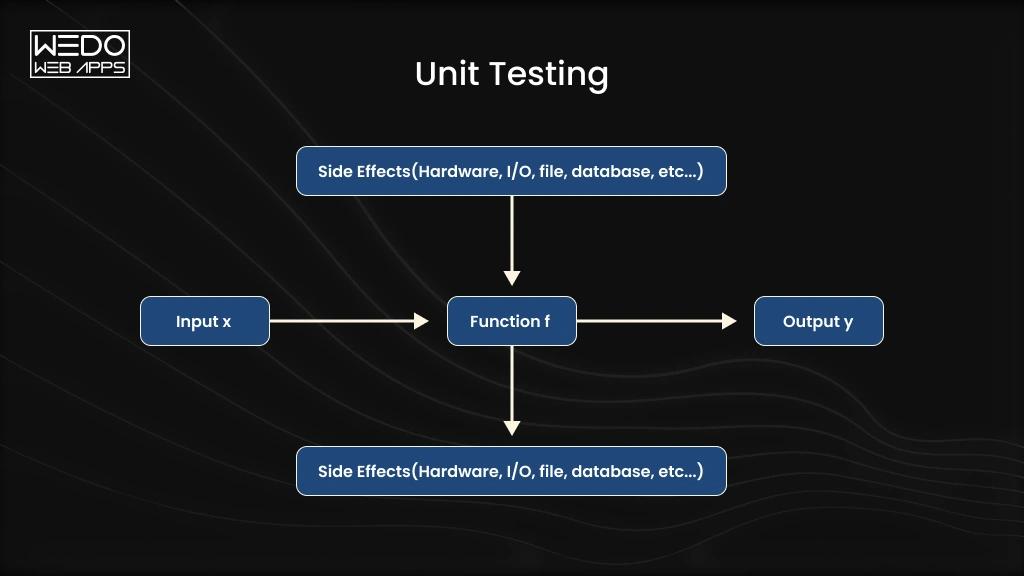
Unit testing is a software testing method used to check individual, testable parts of an application. A unit could be a function, method, class, or small module that performs a specific task.
Instead of testing the entire application at once, developers isolate one unit and verify its behavior against expected results. This makes it easier to identify where a defect originates and fix it before it affects other parts of the system.
What Is a Unit Test?
A unit test could check whether:
- A $100 order receives the correct discount.
- An order below the threshold receives no discount.
- Invalid values are handled correctly.
Developers can run these tests manually or through automated unit testing frameworks. Automated tests are especially useful when the same checks need to run repeatedly during deployment.
Why Is Isolation Important in Unit Testing?
Isolation keeps the test focused on the unit itself rather than surrounding systems. External databases, APIs, payment gateways, or other services can be replaced with mocks or stubs when needed.
This approach helps your team determine whether a specific piece of code works as intended without unrelated dependencies affecting the result.
How Does Unit Testing Work?
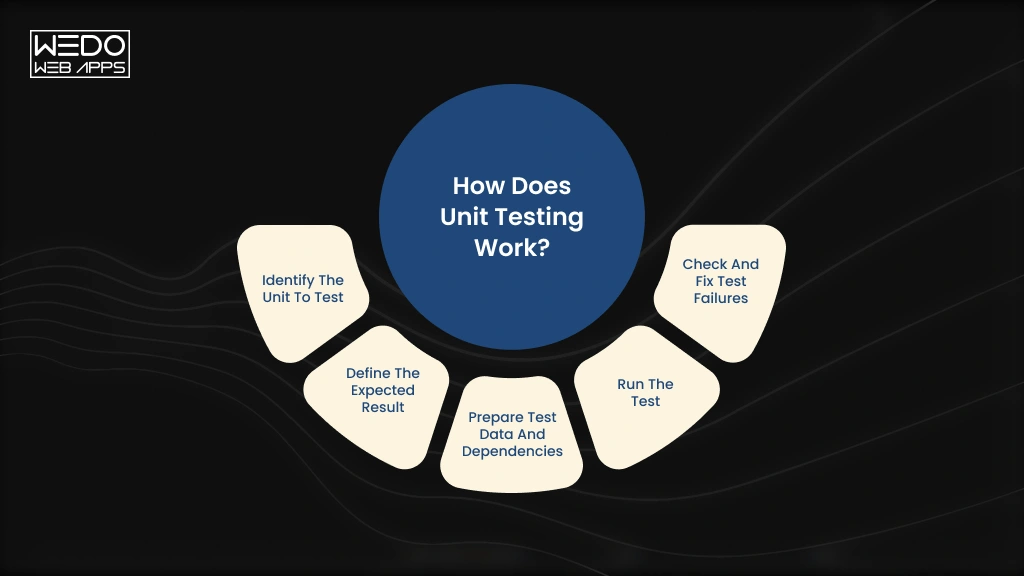
The unit testing process focuses on one small piece of code at a time. Developers define what the unit should do, test that behavior with different inputs, and compare the actual result with the expected result.
A typical unit test follows these steps:
- Identify the unit to test: Select a function, method, class, or module with a clearly defined responsibility.
- Define the expected result: Determine what the unit should return or how it should behave for each test case.
- Prepare test data and dependencies: Create relevant inputs and replace external dependencies with mocks, stubs, or other test doubles.
- Run the test: Execute the test manually or through an automated unit testing framework as part of your mobile application development workflow.
- Check and fix test failures: Compare actual results with expected results, investigate failures, and update the code before running the test again.
For example, if you test a function that calculates shipping costs, you might check standard orders, free-shipping thresholds, and invalid inputs. Each test case should focus on specific expected behavior.
What Are the Types of Unit Testing?
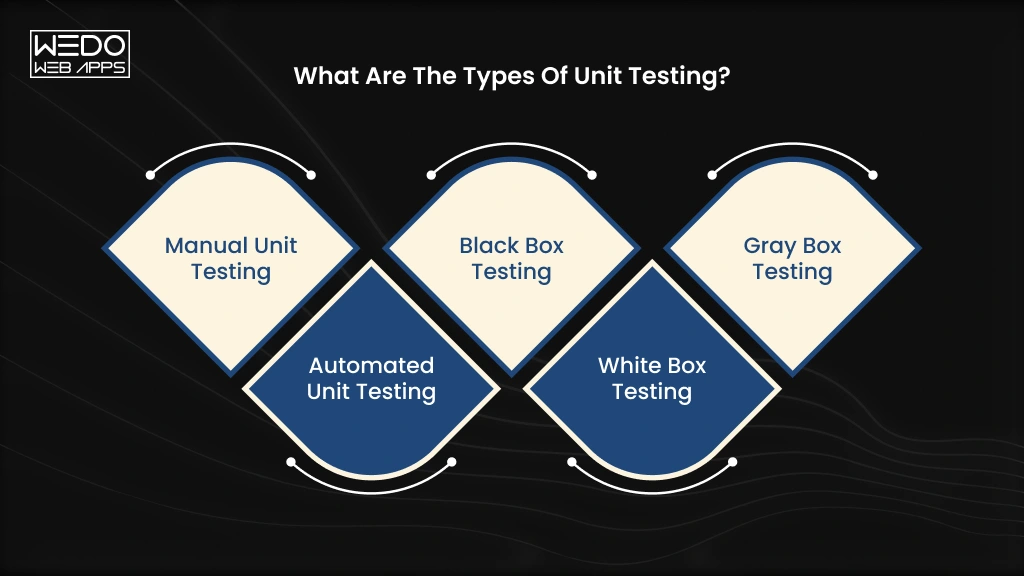
The main unit testing types differ based on how tests are executed and how much knowledge the tester has about the code.
| Type | How it works | Best suited for |
|---|---|---|
| Manual Unit Testing | Developers manually provide inputs and verify the output of individual units | Quick checks during early development |
| Automated Unit Testing | Testing frameworks run predefined tests and compare actual results with expected results | Repeated testing and CI/CD workflows |
| Black Box Testing | Tests focus on inputs and outputs without examining the internal implementation | Validating expected behaviors |
| White Box Testing | Tests consider internal logic, branches, conditions, and execution paths | Checking code-level logic |
| Gray Box Testing | Tests use partial knowledge of the unit's internal structure and behavior | Testing with limited implementation knowledge |
Manual vs Automated Unit Testing
The biggest practical difference is how much work your team needs to repeat.
- Manual unit testing can be useful when developers need a quick check while building a feature. However, repeating the same tests after every code change becomes inefficient.
- Automated unit testing allows your team to run the same checks whenever needed. These tests can also run automatically through CI/CD pipelines, making them useful for projects with frequent releases.
Black Box vs White Box vs Gray Box
These approaches differ mainly in how much internal code knowledge is used.
- Black box testing: Focuses on what the unit does.
- White box testing: Examines how the unit produces its result.
- Gray box testing: Uses some knowledge of the internal implementation.
For most development teams, these approaches can complement each other. The choice depends on the unit tested, the test objective, and your overall unit testing process.

Common Unit Testing Techniques
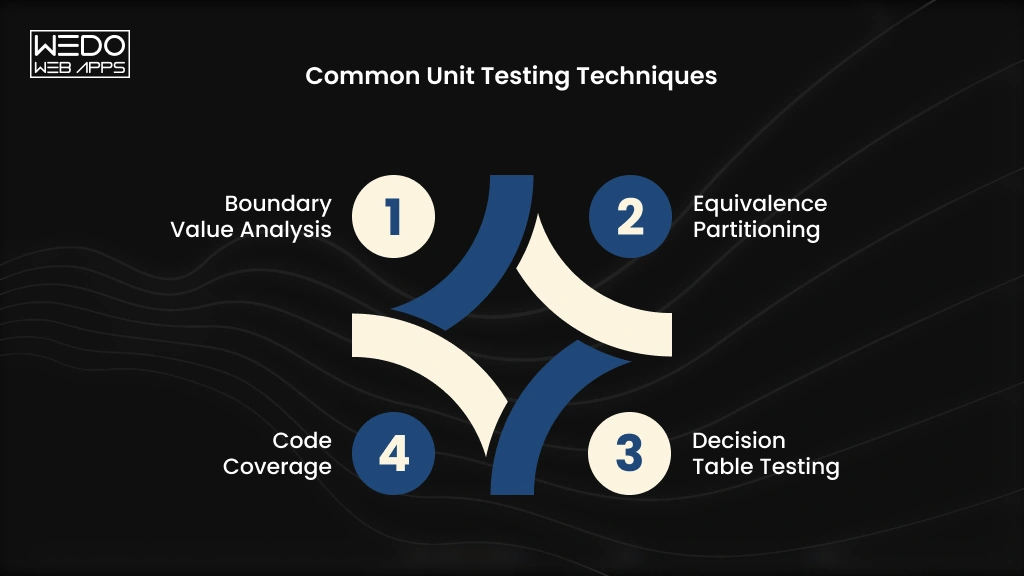
Good unit testing techniques help your team test more than just the expected outcome. They also reveal what happens when users provide unusual, invalid, or boundary-level inputs.
| Technique | What it checks | Simple example |
|---|---|---|
| Boundary Value Analysis | Behavior at the limits of an accepted range | Testing values at 0,1,99, and 100 when the limit is 100 |
| Equivalence Partitioning | Different groups of inputs that should produce similar results | Testing one valid and one invalid age instead of every possible value |
| Decision Table Testing | Results produced by different combinations of conditions | Checking discount eligibility based on membership and order value |
| Code Coverage | How much code executes during testing | Measuring whether important branches and statements have been tested |
Boundary Value Analysis
With boundary value analysis, you test values around the limits of a rule. These cases often expose errors caused by incorrect comparison operators or range handling.
Equivalence Partitioning
Equivalence partitioning divides input into groups expected to behave similarly. You can then select representative values instead of testing every possible input.
Decision Table Testing
Decision table testing works well when multiple conditions affect the result. It helps your team verify different combinations systematically.
Code Coverage
Code coverage measures how much of your code executes when tests run. Common measurements include statement, branch, and function coverage.
High unit test coverage can indicate broader test execution, but coverage alone does not prove that your tests are effective.
What Are the Benefits of Unit Testing?

A bug found during development is usually easier to fix than one discovered after deployment.
That difference matters when your application has dozens of interconnected features. A small calculation error, broken condition, or unexpected input can affect functionality far beyond the original piece of code.
Unit testing helps your team catch these problems while the code is still being developed.
Catch Defects Earlier
Developers receive immediate feedback when a unit behaves differently from what was expected. Fixing the problem at this stage can reduce the time spent tracing failures across the application.
Refactor With Greater Confidence
Need to restructure an existing function or improve its implementation? Existing unit tests can quickly show whether the change has affected expected behavior.
Make Debugging More Focused
A failed unit test points mobile app developers toward a specific function, method, or behavior. They spend less time searching through unrelated application components.
Speed Up Repetitive Checks
Once tests are automated, your team can run them whenever code changes. This is particularly useful when releases happen frequently, or several developers contribute to the same codebase.
Support Maintainable Software
A well-organized test suite documents expected behavior alongside the code. Future developers can use those tests to understand what a unit should continue doing after it is modified.
These benefits make unit testing one part of a broader software testing strategy. For teams that need coverage across different testing stages, quality assurance services can bring unit, integration, functional, and regression testing into a structured process.
Unit Test vs Integration Test: What Is the Difference?
A unit test checks one isolated component. An integration test checks whether multiple components work correctly together.
That difference affects what you test, how quickly tests run, and how you investigate failures.
| Factor | Unit Testing | Integration Testing |
|---|---|---|
| Scope | Tests an individual function, method, class, or module | Tests interactions between multiple components |
| Dependencies | Usually isolated using mocks or stubs | Uses real or closely simulated dependencies |
| Speed | Usually fast to execute | Usually slower because more components are involved |
| Purpose | Verifies individual behavior and logic | Verifies communication and data flow between components |
| External systems | Usually excluded from the test | May include databases, APIs, services, or other systems |
| Debugging | Failures are generally easier to trace | Failure can require checking several connected components |
Can Unit Testing Replace Integration Testing?
No. The two approaches answer different testing questions.
Imagine an eCommerce checkout function correctly calculates the final order total during a unit test. That does not confirm the checkout service can successfully retrieve product data, communicate with the payment gateway, save the order, and update inventory.
Integration testing checks those interactions.
Your testing strategy therefore needs both isolated checks and broader integration checks. Unit tests provide fast feedback on individual components, while integration tests verify that connected components communicate as expected.
Unit Testing vs Integration Testing vs System Testing
Think of the three levels as progressively broader checks:
- Unit testing -> Does this individual component work correctly?
- Integration testing -> Do these connected components work correctly together?
- System testing -> Does the complete application behave as expected?
A mature software testing process uses these levels for different purposes rather than treating them as interchangeable. The right balance depends on your application's architecture, dependencies, release process, and risk areas.
What Are the Best Practices for Unit Testing?
Writing more tests does not automatically create better test coverage. Your tests need to be focused, reliable, and easy to maintain as the codebase changes.
Use these unit testing best practices to keep your test suites useful:
1. Keep Tests Small and Independent
Each test should run without depending on another test. Isolate external services, databases, and APIs with mocks or stubs where appropriate.
2. Test One Behavior at a Time
A single test should verify one clear behavior. When it fails, your team should immediately understand what went wrong.
3. Use Meaningful Test Names
Name tests according to the behavior they verify. A name such as returns_free_shipping_when_order_exceeds_limit tells developers far more than test_shipping_01.
4. Test Valid, Invalid, and Boundary Inputs
Do not test only the expected user path. Include empty values, invalid data, minimum and maximum limits, and other realistic edge cases.
5. Mock External Dependencies
Use mocks, stubs, or fakes when a unit depends on an external system. This keeps tests isolated and prevents network calls or database behavior from affecting results.
6. Keep Test Logic Simple
Complex test code can introduce its own bugs. Keep setup, inputs, assertions, and expected results straightforward.
7. Run Tests Automatically
Add automated unit testing to your CI/CD workflow so tests run when developers submit or merge code.
8. Maintain Tests With Code Changes
When application behavior changes, update the related tests at the same time. Outdated tests can create false failures or allow changed behavior to go unchecked.
Following these practices within an Agile testing methodology helps teams get fast feedback throughout iterative development instead of waiting until the end of the release cycle.
Popular Unit Testing Frameworks and Tools
Your choice of unit testing framework usually depends on the programming language, application architecture, and development workflow. Most frameworks provide test runners, assertions, setup and teardown functions, mocking support, and test reporting.
| Programming Language | Common Unit Testing Tools |
|---|---|
| Java | JUnit |
| Python | pytest, unittest |
| JavaScript | Jest |
| PHP | PHPUnit |
| .NET | NUnit, xUnit |
Tools such as JUnit and pytest help developers automate unit testing and run test suites consistently across development environments. Frameworks such as Jest also support mocking and asynchronous testing, which can be useful for modern JavaScript applications.
For larger teams, the testing framework should also fit naturally into code review and CI/CD workflows. This makes unit testing tools part of the wider development process rather than a separate activity handled only before release.
How Is AI Changing Unit Testing?
Writing unit tests can become repetitive when developers need to cover many functions, input combinations, and edge cases. AI-assisted tools are starting to reduce some of that manual effort.
The biggest change is happening around test creation and test coverage.
AI-Assisted Test Case Generation
AI tools can analyse existing code and suggest AI-generated unit tests for common behaviors. Developers can use these suggestions as a starting point instead of writing every test case from scratch.
For example, given a function that calculates shipping costs, an AI tool might generate tests for standard orders, free-shipping thresholds, missing values, and unexpected inputs.
AI Suggestions for Edge Cases
Developers may overlook unusual combinations when writing tests manually. AI can analyse the logic and suggest additional scenarios that deserve testing.
This can support unit test generation by expanding the range of cases developers consider, particularly around conditions and boundary values.
Why AI-Generated Tests Need Developer Review
AI-generated tests can contain incorrect assumptions about how your application should behave. They may also produce repetitive tests or validate implementation details rather than actual business requirements.
Developers should review every suggested test, verify its expected result, and remove tests that add little value.
Used this way, AI-assisted testing can speed up repetitive work while keeping developers responsible for test quality, business logic, and final validation.
What Are the Challenges and Limitations of Unit Testing?
Unit testing can give your team fast feedback, but building an effective test suite takes ongoing effort. Some challenges become more noticeable as the application and codebase grow.
Large Test Suites Need Maintenance
Every significant code change can require updates to existing tests. A poorly maintained test may create false failures and slow down development.
Tightly Coupled Code Can Be Difficult to Test
When a function depends heavily on other components, isolating it becomes harder. Developers may need to refactor the code or use test doubles to create reliable tests.
Code Coverage Can Be Misleading
High code coverage does not necessarily mean your tests check meaningful behaviors. A test suite can execute most lines of code while missing important business rules or edge cases.
Unit Tests Cannot Validate the Complete Application
A unit test may confirm that a payment function works correctly in isolation. It cannot confirm that the checkout flow communicates correctly with the payment gateway, updates the order, and handles the response properly.
That is why unit tests work best as one layer within a broader testing strategy. Integration, system, regression, and other forms of software testing are still needed to verify how the application behaves as a whole.

Unit Testing Example
Consider an eCommerce application that gives customers a 10% discount when their order reaches $100.
The application could use a simple function like this:
def calculate_discount(total):
    if total >= 100:
        return total * 0.10
    return 0
A developer can create a unit test example to verify the function's behavior:
def test_calculate_discount():
    assert calculate_discount(100) == 10
    assert calculate_discount(200) == 20
    assert calculate_discount(80) == 0
Here, each assertion checks an expected outcome.
- $100: The minimum qualifying amount receives a $10 discount.
- $200: The function correctly calculates a $20 discount.
- $80: The order falls below the threshold, so no discount applies.
The developer can also add tests for boundary and invalid inputs, such as $99.99, $100.01, zero, or negative values.
This simple unit testing example shows the main idea: isolate one function, provide controlled inputs, and verify that its actual output matches the expected result.
Conclusion
Unit testing gives your development team a focused way to verify individual parts of an application before problems spread further. When combined with integration, system, and other testing methods, it creates stronger coverage across your software.
The key is consistency. Write focused tests, cover realistic edge cases, automate execution, and keep tests updated as your application changes.
Planning a new application or improving an existing product? Our development team can help you build a testing strategy around your technical requirements, development workflow, and release goals. Talk to us about your software development project.