Introduction
Your application works. Your business is growing. Yet every new demand seems to expose another limitation.
More users put pressure on performance. New integrations make the architecture harder to manage. Your development teams spend more time maintaining existing systems and less time delivering new features. Meanwhile, customers expect faster experiences across devices and channels.
At some point, your applications need an infrastructure that can keep pace with the business.
That is where cloud application development services come in. Cloud technology can support scalable applications, connected systems, faster deployments, and changing workloads while giving your team more flexibility over how the application is built and managed.
Whether you are launching a new digital product, modernizing a legacy application, or looking to add AI capabilities, the right cloud application development service can help you build around your actual business requirements. A capable cloud application development company can take that work from architecture and development through deployment, security, and ongoing optimization.
What Is Cloud Application Development?
Cloud application development is the process of designing, building, deploying, and managing applications using cloud infrastructure and services. Instead of relying mainly on fixed physical infrastructure, the application can use cloud computing, storage, databases, and other managed resources.
A key distinction is that cloud-based services do not automatically mean cloud-native. An existing application can be moved to the cloud without significantly changing its architecture.
A cloud-native application is designed around cloud capabilities from the start, with architecture that can support changing workloads, automated deployment, and managed services.
How Cloud Applications Work
A typical cloud application connects several layers to handle a user's request:
User -> Frontend -> API -> Cloud Application Layer -> Database or Services -> Response
For example, when a customer places an order, the frontend sends the request through an API. The application processes the order, checks inventory, communicates with payment services, stores the required data, and returns the result to the user.
This structure allows different parts of the application to be managed and scaled according to their requirements.
Cloud Application vs Traditional Application
| Factor | Cloud Application | Traditional Application |
|---|---|---|
| Infrastructure | Uses cloud compute, storage, databases, and managed services | Often relies on fixed or dedicated infrastructure |
| Scaling | Resources can be adjusted as workloads change | Capacity usually requires more advance planning |
| Deployment | Supports automated and frequent releases | Releases may require more manual setup |
| Accessibility | Can support users across locations through the internet or private networks | Access depends more on the hosting environment |
| Maintenance | Cloud services can reduce infrastructure management | More infrastructure components may need direct management |
For businesses evaluating cloud app development services, the important distinction is how the application is designed and managed in the cloud. Simply hosting an existing application on a cloud server does not automatically make it cloud-native.
What Do Cloud Application Development Services Include?
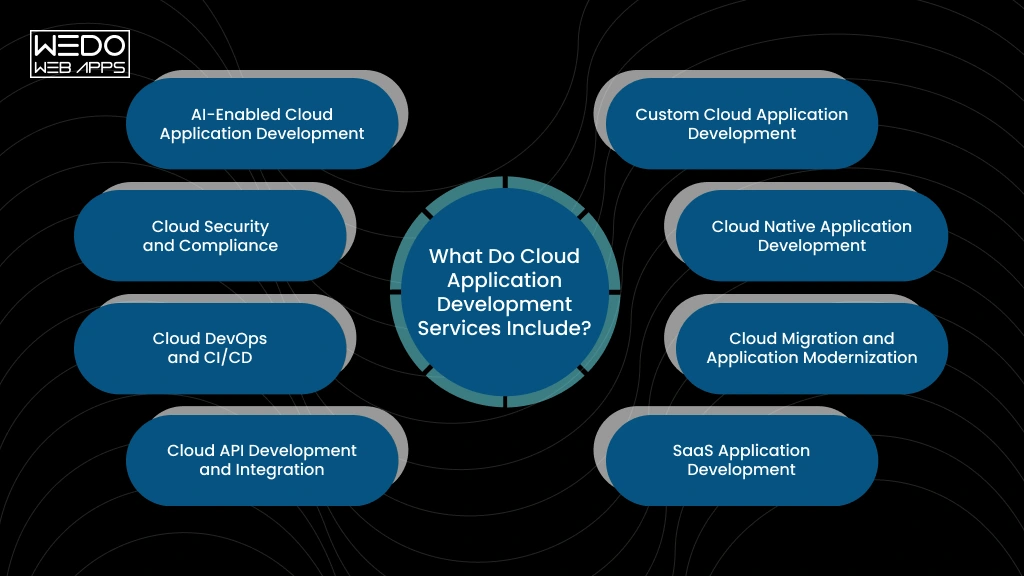
Cloud application development services can cover everything from building a new application to modernizing, securing, and maintaining an existing one. The right combination depends on your product, infrastructure, integrations, and long-term business requirements.
Custom Cloud Application Development
Build an application around your specific workflows, users, features, and business goals. This can include frontend and backend development, databases, APIs, AI integration, and cloud deployment. It suits businesses that need functionality beyond what off-the-shelf software provides.
Cloud Native Application Development
Cloud native development designs the application around cloud capabilities from the beginning. Depending on requirements, this may include containers, managed services, serverless functions, and automated deployment. It fits new products that need flexible infrastructure and frequent releases.
Cloud Migration and Application Modernization
Migration moves existing applications, data, and workloads to cloud infrastructure. Modernization can go further by updating outdated architecture or components. Businesses often consider this when legacy systems are difficult to maintain, scale, or integrate with newer technologies.
SaaS Application Development
SaaS development focuses on software delivered online to multiple customers. Development may include multi-tenant architecture, authentication, subscriptions, billing, permissions, and APIs. It is commonly used when businesses plan to launch a subscription-based software product.
Cloud API Development and Integration
APIs connect your cloud application with other platforms and services. Integrations can include CRMs, ERPs, payment gateways, mobile apps, analytical tools, and third-party services. This helps businesses connect workflows and exchange data across their technology stack.
Cloud DevOps and CI/CD
DevOps development connects testing, deployment, and infrastructure management. CI/CD pipelines can automate builds, testing, and releases. This approach is particularly useful for teams that deploy updates frequently or manage multiple development and production environments.
Cloud Security and Compliance
Security measures can cover identity management, access controls, encryption, secure configurations, monitoring, and vulnerability management. Compliance requirements also influence how data is handled. This becomes especially important for application processing, financial, healthcare, customer, or other regulated data.
AI-Enabled Cloud Application Development
AI capabilities can be added through intelligent search, recommendations, document processing, chatbots, or workflow automation. Development may involve AI models, data pipelines, APIs, and cloud computing resources. This suits businesses adding AI features to new or existing applications.
What Types of Cloud Applications Can You Build?
Cloud technology can support different application models depending on your users, business processes, and product goals. Common options include:
SaaS Application
SaaS application development: software delivered through the cloud. Examples include project management platforms, accounting software, CRM systems, and team collaboration tools.
Cloud-Based Web Applications
Web applications run through a browser while using cloud infrastructure for application logic, database, storage, and other services. They can support customer portals, booking platforms, eCommerce systems, and internal business applications.
Enterprise Cloud Applications
Large organizations can use cloud applications to connect departments, automate workflows, and manage business operations. ERP platforms, supply chain systems, employee portals, and analytics applications are common examples.
Cloud Mobile Applications
Mobile apps can use cloud backends for authentication, data storage, APIs, notifications, payments, and other services. This allows the mobile experience to connect with business systems and user data.
AI-Powered Cloud Applications
AI-powered cloud infrastructure can support applications that use AI for recommendation, intelligent search, document analysis, conversational assistance, or workflow automation. These capabilities can be added to customer-facing products or internal business software.
The right application type depends on what you need to deliver, who will use it, and how the application needs to connect with your existing systems.
Cloud Deployment Models, Service Models, and Platforms
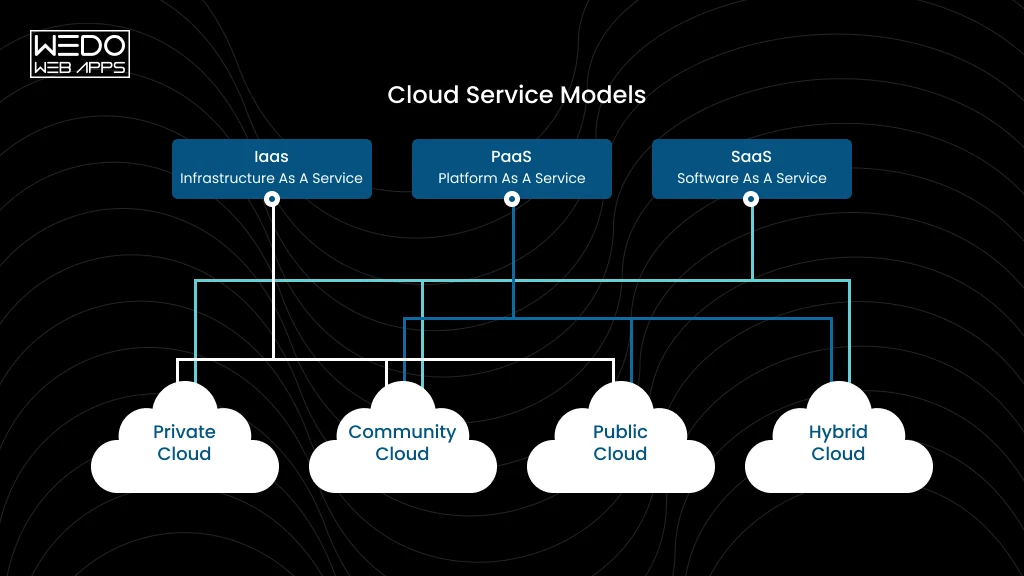
Your cloud architecture depends partly on where the application runs, which cloud resources you manage, and how much infrastructure you want your team to control.
Cloud Deployment Models
Public cloud: Infrastructure is provided by a cloud provider and shared across customers. It suits many applications that need flexible resources without owning physical infrastructure.
Private cloud: Cloud infrastructure is dedicated to one organization. It can suit businesses with specific security, control, or compliance requirements.
Hybrid cloud: Combines private infrastructure with public cloud services. This can work when some workloads or data need to remain in a controlled environment.
Multi-cloud: Uses services from multiple cloud providers. Businesses may choose this approach for specific technical requirements, geographic needs, or to avoid depending entirely on one provider.
Cloud Service Models
| Model | What You Get | Typical Use |
|---|---|---|
| IaaS | Compute, storage, networking, and infrastructure resources | Custom infrastructure and application environments |
| PaaS | Managed application development and deployment environment | Building and deploying applications without managing underlying infrastructure |
| SaaS | Complete software accessed through the internet | Business applications and subscription software |
| FaaS | Functions that run when triggered | Event-driven tasks and specific backend operations |
Which Cloud Platforms Are Used for Application Development?
AWS, Microsoft Azure, and Google Cloud are widely used for cloud application development. Each provides a different combination of computing, databases, storage, security, AI, analytics, and managed services.
Your choice should depend on the application's architecture, existing technology stack, compliance requirements, data location, development team's expertise, and expected cloud usage.
The goal is to select services that fit the application rather than choosing a platform based on its popularity alone.
Key Features and Architecture of a Cloud Application
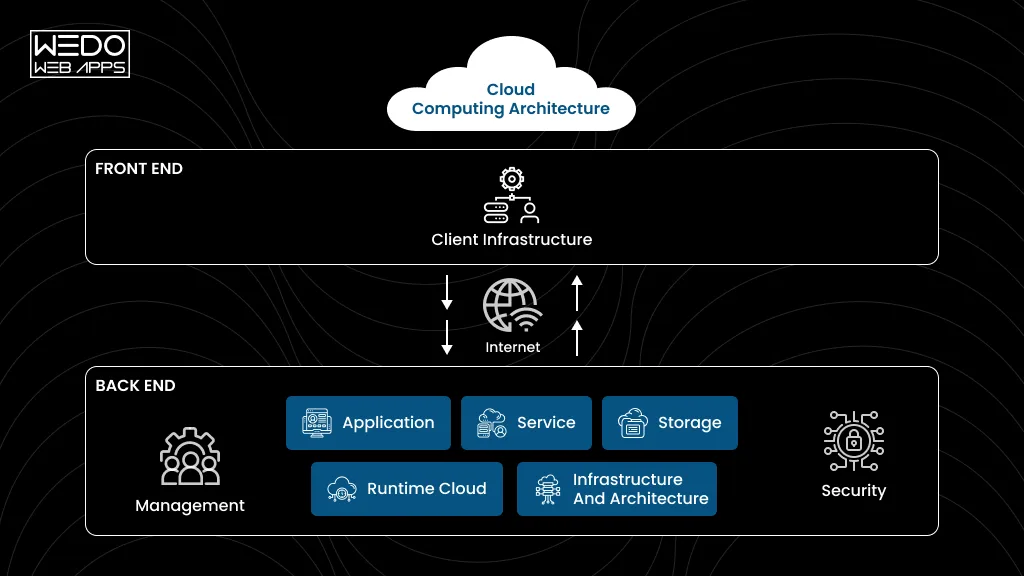
Strong cloud application development services need an architecture that can handle real workloads, protect business data, and support future changes. The right setup depends on what the applications do, how many users it serves, and which system it needs to connect with.
Scalable Architecture
Your application should respond to changing demand without requiring a complete architectural overhaul.
Common approaches include:
- Auto scaling for changing workloads.
- Load balancing across application instances.
- Cloud databases that can scale with usage.
API First Design
APIs create connections between your cloud application and other systems.
For example, an eCommerce application can use APIs to connect its storefront with payment gateways, inventory systems, shipping providers, and mobile applications.
High Availability and Fault Tolerance
Downtime can affect customer activity and internal operations. A cloud application development company can design for higher availability through:
Redundancy -> Failover -> Backup -> Disaster recovery
The right combination depends on your application's availability requirements and business impact.
Security and Identity Management
Security needs to be considered throughout cloud application development.
Common controls include:
| Area | Typical Approach |
|---|---|
| User access | Authentication and role-based permissions |
| Data | Encryption at rest and in transit |
| Infrastructure | Network controls and secure configurations |
| Monitoring | Logs, alerts, and security events |
Monitoring and Observability
Cloud applications can involve multiple services and infrastructure components. Monitoring helps teams track performance, errors, availability, and resource usage.
Logs, metrics, and traces provide additional context when issues occur, making troubleshooting more focused.
Automated Deployment
CI/CD pipelines can automate application builds, testing, and deployment. This reduces manual release work and gives development teams a consistent way to move updates across environments.
Microservices, Containers, and Serverless
These approaches serve different requirements:
- Microservices: Useful when application components need independent development and scaling.
- Containers: Useful for packaging applications consistently across environments.
- Serverless: Useful for event-driven functions where direct server management adds little value.
For smaller applications, a simpler architecture may be more practical.
AI and Machine Learning Readiness
Modern cloud app development services can also prepare applications for future AI capabilities. Architecture may need to account for data pipelines, model APIs, processing requirements, and secure access to business data from the start.
Cloud Application Development Process
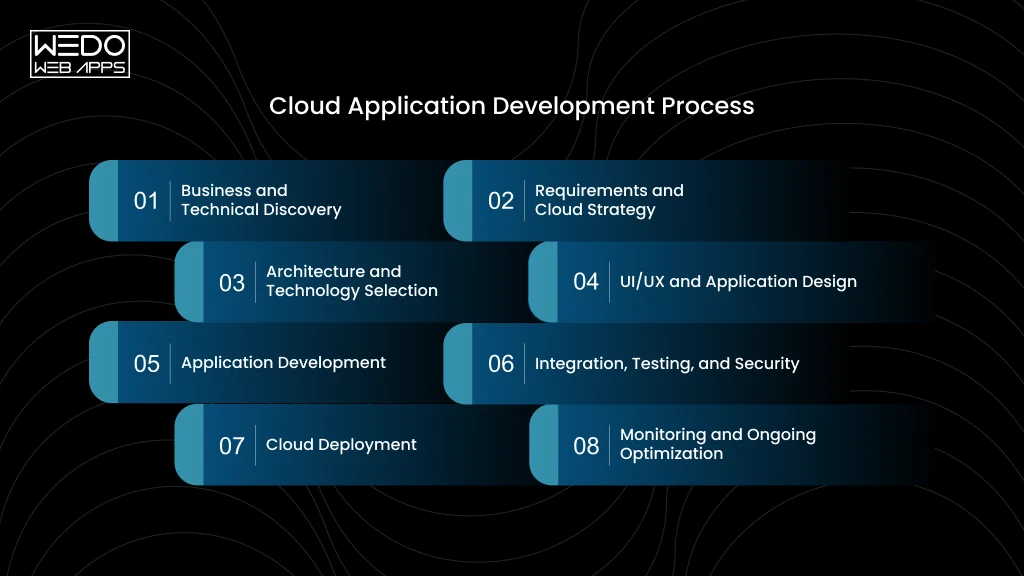
A structured cloud application development process helps turn business requirements into a production-ready application. The exact workflow can vary by project, but these phases provide a practical development path.
1. Business and Technical Discovery
The team first defines the business objective, target users, existing systems, technical constraints, and expected workloads. This helps determine what the application needs before development begins.
2. Requirements and Cloud Strategy
Functional requirements are mapped alongside cloud requirements such as data storage, security, integrations, availability, and expected traffic. The team can then determine which cloud approach fits the project.
3. Architecture and Technology Selection
The architecture is planned around the application's requirements. This may include databases, APIs, cloud services, containers, serverless components, or other technologies.
The team also selects the appropriate cloud platform and development stack.
4. UI/UX and Application Design
Designers create the user experience, application flows, interfaces, and interaction patterns. For customer-facing products, usability and responsive design are considered alongside the technical architecture.
5. Application Development
Developers build the frontend, backend, APIs, databases, integrations, and required cloud components. Development is typically divided into manageable releases so functionality can be tested throughout the project.
6. Integration, Testing, and Security
Before launch, the application is tested for functionality, performance, security, compatibility, and AI integration issues. Security controls are also reviewed to protect application access and business data.
7. Cloud Deployment
The completed application is configured and deployed to the selected cloud environment. Deployment pipelines, environments, access controls, monitoring, and backup processes are set up as required.
8. Monitoring and Ongoing Optimization
After launch, the team monitors application performance, errors, usage, security events, and cloud resource consumption. Cloud application development services may then include updates, performance improvements, infrastructure optimization, and ongoing technical support.
Benefits of Cloud Application Development for Businesses
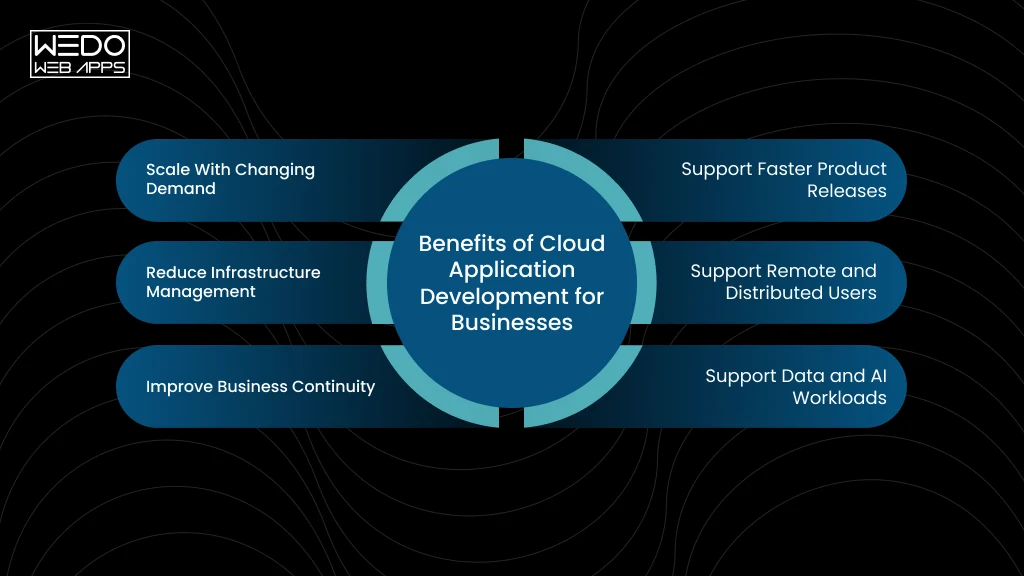
Businesses adopt cloud applications to gain more flexibility in how they build, operate, and scale their software. The right cloud application development services can support changing workloads while reducing some of the infrastructure work involved in running an application.
Scale With Changing Demand
Cloud infrastructure can adjust resources according to application demand. This can be useful for businesses dealing with seasonal traffic, rapid user growth, or unpredictable workloads.
- Scale computing resources as usage changes.
- Handle traffic spikes more effectively.
- Avoid planning infrastructure only around peak demand.
Support Faster Product Releases
Well-structured cloud application development services can combine cloud infrastructure with automated development and deployment workflows.
- Release features through repeatable deployment processes.
- Test changes across separate environments.
- Reduce manual work during application releases.
Reduce Infrastructure Management
Managed cloud services can take care of parts of the underlying infrastructure, allowing your team to focus more on application functionality and business requirements.
- Use managed databases and storage.
- Reduce direct infrastructure administration.
- Automate routine infrastructure tasks.
Support Remote and Distributed Users
Cloud app development services can help applications support users across different locations through internet-based access and appropriate security controls.
- Support distributed teams and customers.
- Provide access across multiple locations.
- Connect users with centralized application data.
Improve Business Continuity
Cloud architecture can support backup, redundancy, recovery, and failover strategies. Your cloud application development company can design these capabilities around your application's availability requirements.
- Maintain backups of important data.
- Plan recovery procedures for service disruptions.
- Reduce dependency on a single infrastructure component.
Support Data and AI Workloads
Cloud platforms provide computing, storage, databases, and AI services that can support growing data requirements.
- Process larger volumes of application data.
- Add analytics and machine learning capabilities.
- Introduce AI features as business requirements evolve.
Challenges in Cloud Application Development and How to Address Them
Moving an application to the cloud or building one from scratch can introduce technical and operational challenges. Identifying them early helps you plan the right architecture, resources, and controls.
| Challenge | How to Address It |
|---|---|
| Cloud Security and Compliance | Define access controls, encryption, monitoring, and compliance requirements during architecture planning rather than adding them after development. |
| Unexpected Cloud Costs | Monitor resource usage, set budgets, remove unused resources, and select managed services based on actual application requirements. |
| Vendor Lock-In | Use portable technologies and well-defined APIs where practical. Evaluate how easily critical workloads and data can move between environments. |
| Legacy System Integration | Assess existing systems before development and use APIs, integration layers, or modernization strategies to connect older and newer components. |
| Data Migration | Plan data mapping, cleansing, transfer, validation, backup, and rollback before moving production data to the new environment. |
| Shortage of Cloud Expertise | Work with an experienced cloud application development company or build internal expertise in cloud architecture, security, DevOps, and cost management. |
The right cloud application development services should address these areas during planning and development. A clear technical strategy can prevent many cloud issues from becoming expensive problems after launch.
How AI Is Changing Cloud Application Development
AI is becoming part of the features businesses expect from modern applications. Cloud infrastructure makes it easier to provide the computing, data access, APIs, and managed AI services these capabilities may require.
AI-Powered Search and Recommendations
Cloud applications can use AI to understand user intent and provide more relevant search results, product recommendations, or personalized content.
Example: An eCommerce application can analyze product data and customer activity to recommend relevant products.
AI Assistants and Chatbots
AI assistants can answer questions, guide users through application workflows, or provide support without requiring every interaction to be handled manually.
Example: A customer portal can use an AI assistant to answer account-related or product-related questions.
Intelligent Document Processing
AI can extract information from invoices, contracts, forms, applications, and other documents. This can reduce manual data entry and help businesses process large document volumes.
AI Agents and Workflow Automation
AI agents can perform multi-step tasks by interacting with APIs, business systems, and application data. This can support workflows such as customer service, research, reporting, and internal operations.
Cloud Infrastructure for AI Workloads
AI features may require additional computing power, storage, data processing, model APIs, and monitoring. Cloud application development services can incorporate these requirements into the application's broader architecture.
Building Applications Ready for Future AI Features
You do not need to add every AI capability at launch. Cloud application development services can prepare APIs, data structures, integration points, and infrastructure so new AI features can be introduced as your requirements evolve.
The goal is to make AI useful within the application itself, whether that means improving a customer experience, automating a workflow, or helping employees work with business data.
How Much Does Cloud Application Development Cost?
The cost of cloud application development depends on what you are building, how complex the architecture needs to be, and how the application will be used after launch. There is no reliable one-size-fits-all figure.
| Cost Factor | What Can Affect the Cost |
|---|---|
| Application Complexity | Number of features, users, workflows, roles, and application components. |
| Features and Integrations | APIs, payment gateways, CRM, ERP, analytics, third-party services, and custom integrations. |
| Architecture and Infrastructure | Databases, containers, serverless services, high availability, security, and other cloud resources. |
| Development Team and Location | Team expertise, project duration, location, engagement model, and required specialists. |
| Cloud Usage and Managed Services | Compute, storage, databases, data transfer, monitoring, and managed cloud services. |
| AI and Data Processing | Model usage, data volume, processing requirements, AI APIs, and computing resources. |
| Maintenance and Optimization | Security updates, bug fixes, monitoring, performance improvements, and infrastructure management. |
Development Cost vs Cloud Ownership Cost
These are two different expenses.
- Development cost covers the work required to plan, design, build, test, and deploy the application.
- Ongoing cloud cost covers the resources and services used after launch, such as computing, storage, databases, data transfer, monitoring, and third-party services.
A cloud application development company can estimate the development investment more accurately once the application scope, integrations, users, architecture, and expected usage are defined. Your team should also account for recurring cloud and maintenance costs when planning the total technology budget.
When Should You Hire a Cloud Application Development Company?
You may need a cloud application development company when your application requirements go beyond basic hosting or routine development. Consider bringing in a specialist when:
- You are building a new cloud-based product: You need architecture, development, integrations, security, and deployment planned together from the beginning.
- You are modernizing a legacy application: Older architecture is making updates, scaling, integrations, or maintenance increasingly difficult.
- You are moving an existing application to the cloud: Migration requires planning around infrastructure, application dependencies, databases, security, and downtime.
- Your current infrastructure struggles with growth: Increasing users or workloads are creating performance, capacity, or reliability concerns.
- You need to connect multiple business systems: APIs and integration work are required to connect platforms such as CRM, ERP, payment, or analytics systems.
- You want to add AI capability: Your existing application needs AI features, data processing, model integration, or AI-driven workflow automation.
The right cloud application development services can cover the technical work across these requirements while keeping the application aligned with your business goals.
How to Choose a Cloud Application Development Company
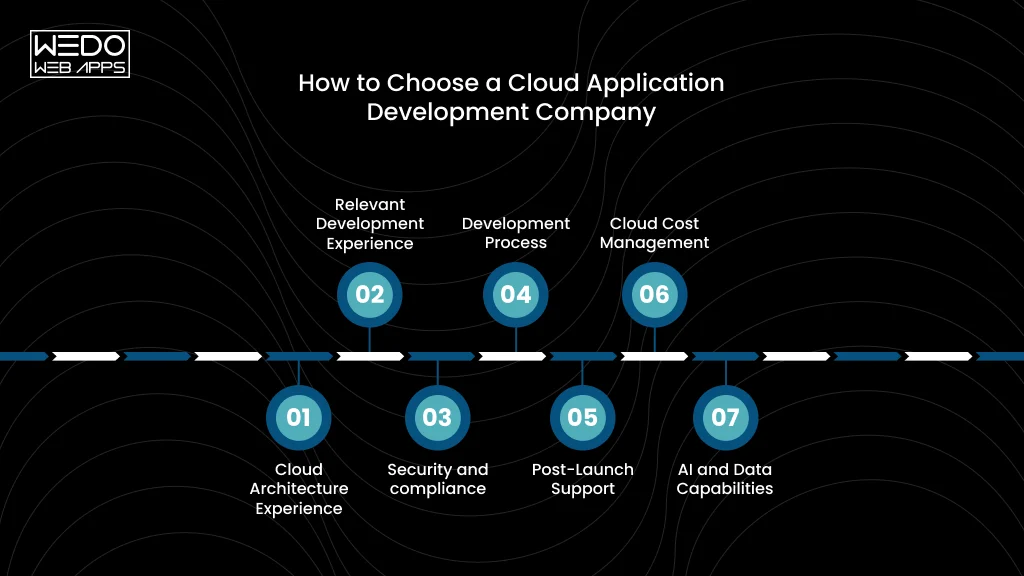
The right cloud application development company should understand both your technology requirements and business objectives. Before signing a project, use this checklist to compare potential providers.
1. Cloud Architecture Experience
Can the team design for scalability, availability, security, APIs, and data requirements? Ask them to explain why their proposed architecture fits your application.
2. Relevant Development Experience
Have they built applications similar to yours? Review projects based on application type, technical complexity, industry requirements, and integrations rather than looking only at a list of technologies.
3. Security and compliance
How will they protect application access and business data? Discuss authentication, encryption, permissions, monitoring, backups, and any industry-specific compliance requirements.
4. Development Process
How will requirements, development, testing, approvals, and releases be managed? You should understand who is responsible for each stage and how progress will be reported.
5. Post-Launch Support
What happens after deployment? Clarify whether the provider offers maintenance, monitoring, security updates, performance optimization, bug fixes, and future development.
6. Cloud Cost Management
How will cloud resources be monitored and optimized? Good cloud application development services should consider infrastructure costs throughout the application lifecycle, not only during development.
7. AI and Data Capabilities
If AI is part of your roadmap, ask about data pipelines, AI APIs, model integration, cloud infrastructure, and application-level AI features. This can help you avoid selecting a team that only handles conventional application development.
Before You Sign
Ask each provider for a clear scope, proposed architecture, development approach, estimated timelines, support terms, and cost breakdown. Comparing these details gives you a more useful basis for evaluating cloud app development services than comparing hourly rates alone.
Conclusion
A successful cloud application needs more than a move from physical infrastructure to the cloud. Architecture, security, integration, deployment, performance, and ongoing maintenance all need to support how your business operates and grows.
Whether you are building a new product, modernizing a legacy system, or adding AI capabilities, the right cloud application development services can help you create an application that is ready for changing requirements.
With an experienced cloud application development company, you can bring development, cloud infrastructure, security, and ongoing optimization together under one strategy.
If you are planning a new cloud application or upgrading an existing one. WEDOWEBAPPS can help you define the right technical approach for your business.