Introduction
A software project can lose time and money long before development begins. Unclear requirements create rework. Poor planning leads to missed deadlines. Weak testing exposes defects after launch. Security gaps can put your users and business at risk.
These challenges often point to one underlying issue: the absence of a structured development process.
The software development life cycle phases help you manage every stage of a software project, from initial planning and requirements analysis to deployment and ongoing maintenance. Each phase gives your team a clear direction, defined responsibilities, and opportunities to identify risks early.
Whether you are building a new digital product, modernizing legacy software, or developing a business application, understanding the software development life cycle (SDLC) helps you make informed decisions about timelines, resources, quality, and security.
In this guide, you will explore the seven SDLC phases, major development models, Agile practices, security in SDLC, essential tools, AI applications, and how a structured process supports successful software delivery.
What is the Software Development Life Cycle (SDLC)?
A software project needs more than skilled developers and a suitable technology stack. You need a clear process that connects business requirements with design, development, testing, and long-term improvements. This is where the software development life cycle (SDLC) becomes essential.
The SDLC is a structured framework used to plan, build, test, deploy, and maintain software. It divides development into defined stages, helping your team coordinate work, control risks, and deliver software that meets user and business expectations.
What Does the Complete Software Development Life Cycle Include?
The complete software development life cycle typically includes seven phases:
- Planning
- Requirement Analysis
- System Design and Architecture
- Implementation and Coding
- Testing and Quality Assurance
- Deployment
- Maintenance and Support
These stages provide a general structure, but the way your team moves through them depends on the selected software development life cycle model. A Waterfall project may follow a sequential process, while Agile teams revisit requirements, design, development, and testing through repeated iterations.
Visual Overview of the SDLC Process
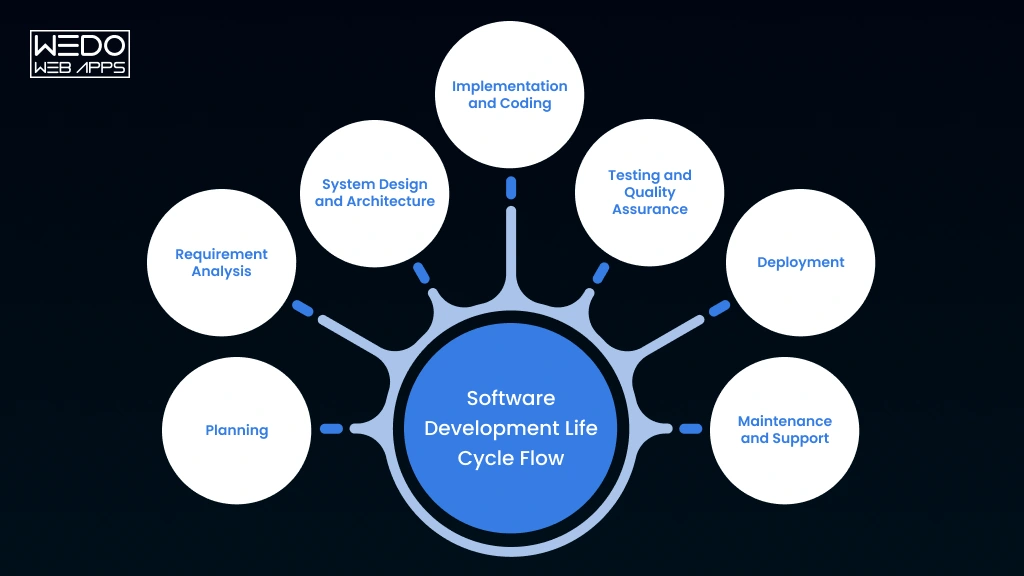
The process is not always strictly linear. In Agile and other iterative approaches, user feedback, testing results, or changing business requirements can send the team back to an earlier stage. This makes the SDLC adaptable to the needs of your project.
SDLC vs SDLC Models vs Development Methodologies
These terms are related but have different meanings:
| Term | Meaning |
|---|---|
| SDLC | The overall framework covering software development stages |
| SDLC Model | The approach used to organize and manage those stages |
| Development Methodology | The practices teams use to plan, build, test, and deliver software. |
For example, Agile is an iterative development approach, while Waterfall follows a more sequential structure. Both can organize the core software development life cycle phases differently based on project requirements, risk, and delivery expectations.
Why Is SDLC Important for Software Development?
A software project can meet its launch date and still fail to deliver business value. Users may struggle with the interface. Performance may decline as traffic grows. Security issues may appear after deployment. Fixing these problems late often requires more time, resources, and development effort.
A structured software development life cycle (SDLC) helps you address these risks throughout the project. Each phase creates checkpoints where your team can review decisions, validate requirements, and improve the product before the next stage.
Key Benefits of Following the SDLC
| Benefit | How it helps your business | Practical example |
|---|---|---|
| Better project planning | Defines scope, resources, timelines, and priorities | Your team identifies the essential features before development begins |
| Reduced development risks | Helps detect technical and operational risks earlier | Architecture reviews reveal scalability concerns before coding progresses |
| Improved software quality | Integrates testing and validation into the development process | QA teams identify checkout failures before customers encounter them |
| Stronger security | Encourages security considerations throughout the SDLC | Developers review authentication and access controls during design |
| Clearer communication | Aligns stakeholders, designers, developers, and testers | Everyone works from documented requirements and acceptance criteria |
| Easier maintenance | Supports documentation, monitoring, and planned improvements | Your team can resolve production issues without disrupting core functionality |
What Happens When SDLC Activities Are Skipped?
Skipping a development phase does not always create an immediate problem. However, it can increase the chances of expensive issues later.
| Skipped or weak activity | Possible consequence |
|---|---|
| Planning | Uncontrolled scope and unrealistic delivery expectations |
| Requirements analysis | Features that do not meet user or business needs |
| System design | Technical limitations and integration problems |
| Testing | Defects reaching production |
| Security reviews | Vulnerabilities discovered after launch |
| Maintenance planning | Rising support costs and declining performance |
For example, if you skip detailed requirements analysis while developing a business application, your team may build features based on assumptions. When stakeholders review the product, major changes may be required. This can affect the budget, timeline, and team workload.
The value of SDLC lies in making important decisions visible and reviewable throughout development. It gives you a practical framework for balancing delivery speed, product quality, security, and long-term maintainability.
What are the 7 Phases of the Software Development Life Cycle
The 7 phases of the software development life cycle provide a structured path for turning an initial idea into a working and maintainable software product. Each phase addresses a specific development requirement, from defining project goals to supporting the application after launch.
Your team may follow these phases sequentially or revisit them through an iterative approach such as Agile. The exact workflow depends on your project scope, technical complexity, risk level, and business priorities.
Overview of the 7 SDLC Phases
| SDLC Phase | Primary Objective | Key Deliverables |
|---|---|---|
| 1. Planning | Define project goals, scope, and feasibility | Project plan, budget, risk assessment |
| 2. Requirements Analysis | Identify business and user requirements | Requirements document, user stories |
| 3. System Design | Plan the software architecture and user experience | Architecture plans, technical designs |
| 4. Implementation | Build and integrate software features | Source code, developed features |
| 5. Testing and QA | Validate functionality, security, and performance | Test reports, defect records |
| 6. Deployment | Release the software to its target environment | Production release, deployment records |
| 7. Maintenance and Support | Keep the software reliable and relevant | Bug fixes, updates, performance improvements |
Let us examine each phase and understand how it contributes to successful software development.
1. Planning Phase in the Software Development Life Cycle
Every successful software project begins with decisions about what you want to build, why it matters, and how your team will deliver it. The planning phase in the software development life cycle establishes this foundation before significant development work begins.
Your team works with stakeholders to define the project's purpose, target users, expected outcomes, and initial scope. This stage also helps identify technical feasibility, resource requirements, estimated costs, and potential risks.
Key planning activities include:
- Defining business objectives and project scope
- Identifying stakeholders and target users
- Evaluating technical and operational feasibility
- Estimating resources, budget, and delivery timelines
- Identifying project risks and dependencies
- Establishing measurable success criteria
Example:
If you want to develop an online grocery delivery application, planning may involve identifying customer segments, delivery requirements, payment integrations, operational constraints, and the essential features for the first release.
The primary outcome is a realistic project direction. Clear planning helps you avoid uncontrolled scope, reduce uncertainty, and prioritize features that support your business goals.
2. Requirements Analysis
A software product can have an impressive design and still fail if it solves the wrong problem. Unclear expectations create misunderstandings between stakeholders and development teams. The requirements analysis phase in the software development life cycle helps prevent these issues by defining what the software must accomplish.
Your team works with business owners, end users, and technical stakeholders to identify functional and nonfunctional requirements. These requirements become a reference point for design, development, testing, and approval.
Key Activities in Requirement Analysis
- Conduct stakeholder interviews and discovery discussions
- Identify user needs and business objectives
- Document functional and nonfunctional requirements
- Create user stories and acceptance criteria
- Prioritize features based on value and feasibility
- Review requirements for clarity, conflicts, and completeness
Functional vs Nonfunctional Requirements
| Requirement Type | What it Defines | Example |
|---|---|---|
| Functional | What the software should do | Users can add products to their shopping cart |
| Non Functional | How the software should perform | The shopping cart should respond within an acceptable time under expected traffic |
For example, an online banking application may require users to transfer funds. That is a functional requirement. Encryption, availability, response time, and access control define important nonfunctional expectations.
A well-documented requirements specification helps your team build against agreed expectations. It also gives QA engineers measurable criteria for validating whether each feature works correctly.
Requirements may evolve during development, particularly in Agile projects. However, changes should be documented, assessed for impact, and prioritized to prevent uncontrolled scope growth.
3. System Design and Architecture
Once your team understands the requirements, the next priority is deciding how the software will work. The system design phase translates business expectations into a technical structure that developers can build, test, and maintain.
A well-planned design helps you make decisions about application architecture, databases, APIs, user interfaces, integrations, scalability, and security before implementation begins.
Key Design Decisions
- Select an appropriate system architecture
- Define database structure and data relationships
- Plan APIs and third-party integrations
- Create wireframes and user experience flows
- Choose suitable programming languages and frameworks
- Address scalability, performance, and security requirements
High-Level Design vs Low-Level Design
| Design type | Focus | Example |
|---|---|---|
| High-Level Design (HLD) | Overall system structure and component relationships | Defining frontend, backend, database, and payment service connections |
| Low-Level Design (LLD) | Detailed implementation of individual components | Defining API methods, database fields, and class-level logic |
Example: For an eCommerce application, high-level design may establish how the product catalog connects with the cart, payment, and order management systems. Low-level design defines the specific database structures and API behavior supporting those features.
Security should be considered during this stage rather than postponed until testing. Your team can evaluate authentication, authorization, data protection, and potential attack surfaces while architectural decisions are still flexible.
The outcome is a technical blueprint that guides implementation and reduces avoidable redesign, integration issues, and scalability constraints.
4. Implementation and Coding
A well-defined design needs to become functional software. During the implementation phase of the software development life cycle, developers convert approved technical specifications into code and integrate the components required for the product.
Your development team establishes the coding environment, follows agreed programming standards, and uses version control to manage changes. Features are developed according to prioritized requirements and reviewed before integration.
Key Activities During Implementation
- Configure development environments and project repositories
- Develop features based on approved requirements
- Integrate APIs, databases, and third-party services
- Follow coding standards and secure development practices
- Conduct code reviews and unit testing
- Document important technical decisions and functionality
Example:
When developing a customer management application, developers may build customer registration, profile management, search, and notification features. Each feature should align with its acceptance criteria and integrate correctly with the broader system.
AI coding assistants can support developers with code suggestions, explanations, refactoring, and documentation. However, generated code requires human review for correctness, security, maintainability, and compatibility with the project architecture.
Implementation is not simply about writing code quickly. It is about building reliable components that can be tested, integrated, and maintained throughout the remaining software development life cycle phases.
5. Testing and Quality Assurance
A software application may work during development and still fail under real-world conditions. Broken features, slow response times, compatibility issues, and security vulnerabilities can damage user trust after launch. The testing and quality assurance phase of the software development life cycle helps identify these problems before they affect your customers.
Testing verifies whether the software meets its functional and nonfunctional requirements. QA teams evaluate individual components, integrated features, system behavior, and user expectations.
Types of Testing in SDLC
| Testing type | Purpose | Example |
|---|---|---|
| Unit testing | Validates individual components | Checking whether a tax calculation function returns the correct result |
| Integration testing | Verifies interactions between components | Testing the connection between an order system and payment gateway |
| Functional testing | Confirms features work as expected | Checking whether users can successfully reset their passwords |
| Performance testing | Evaluates speed, stability, and scalability | Measuring application response during high traffic |
| Security testing | Identifies security weaknesses | Testing access controls and input validation |
| User acceptance testing | Confirms the product meets business needs | Stakeholders review an application before approval |
How Modern QA Supports Better Software Delivery
Your team should involve QA professionals early instead of waiting until development is complete. This approach, often called shift-left testing, helps identify defects and requirement gaps sooner.
A practical QA workflow may include:
- Reviewing requirements and acceptance criteria
- Preparing test scenarios and test cases
- Automating repeatable regression tests
- Testing APIs, integrations, and user workflows
- Tracking defects and verifying fixes
- Conducting security and performance validation
AI tools can assist with test case generation, defect classification, and regression testing. However, QA professionals still need to validate test coverage, review results, and assess real user behavior.
For businesses seeking structured validation, WEDOWEBAPPS Quality Assurance Services can be explored as part of your software delivery planning.
The goal of QA is not simply to find bugs. It is to improve product reliability, reduce release risks, and ensure the software delivers the experience your users expect.
6. Deployment
After testing and approval, your software needs to be released into an environment where users can access it. The deployment phase in the software development life cycle involves moving the application from development or staging into production while minimizing service disruption and release risks.
Deployment requires coordination between developers, QA teams, operations professionals, and business stakeholders. The process depends on the application architecture, infrastructure, release strategy, and operational requirements.
Key Activities During Deployment
- Prepare and configure the production environment
- Deploy application builds and required dependencies
- Configure databases, APIs, and environment variables
- Migrate data when necessary
- Perform smoke testing after release
- Monitor application performance and system health
- Maintain rollback procedures for failed releases
Common Software Deployment Strategies
| Strategy | How it Works | Suitable Scenario |
|---|---|---|
| Big bang deployment | Releases the complete update at once | Smaller releases with manageable operational risk |
| Rolling deployment | Updates application instances gradually | Systems requiring continued availability |
| Blue-green deployment | Maintains separate active and updated environments | Releases requiring rapid rollback |
| Canary deployment | Releases updates to a limited user group first | High-risk changes requiring controlled validation |
Example:
An eCommerce business launching a new checkout experience may release it to a small percentage of users before expanding access. The team can monitor errors, payment failures, and customer feedback before completing the rollout.
Deployment does not mark the end of software delivery. Your team must continue monitoring the application, addressing production issues, and reviewing user feedback. These activities lead directly into the maintenance and support phase.
7. Maintenance and Support
Launching your software is only one milestone in its development journey. After release, users may report bugs, operating systems may change, and business requirements may evolve. The maintenance and support phase of the software development life cycle helps keep your application secure, functional, and aligned with user expectations.
Your team monitors application performance, resolves defects, applies security updates, and introduces improvements based on business priorities and customer feedback.
Key Maintenance Activities
| Maintenance Type | Purpose | Example |
|---|---|---|
| Corrective Maintenance | Fixes identified defects | Resolving a payment failure reported by customers |
| Adaptive Maintenance | Adjusts software to changing environments | Updating an application for a new operating system version |
| Perfective Maintenance | Improves functionality and user experience | Simplifying a complex checkout process |
| Preventive Maintenance | Reduces the likelihood of future problems | Refactoring outdated code and updating dependencies |
Example:
A logistics application may initially support standard deliveries. As the business expands, the team may add real-time tracking, improve database performance, and update security controls to support growing usage.
What Should You Monitor After Deployment?
- Application availability and response times
- System errors and performance bottlenecks
- Security alerts and dependency vulnerabilities
- User feedback and feature requests
- Infrastructure capacity and operating costs
- Backup, recovery, and incident response processes
Maintenance should be considered during earlier software development life cycle phases, particularly planning, design, and implementation. Proper documentation, modular architecture, automated testing, and monitoring can make future updates more manageable.
Effective maintenance protects your software investment by supporting reliability, security, and long-term business value.
What are the Different SDLC Models
Choosing an SDLC model affects how your team plans work, handles changing requirements, collects feedback, and manages software delivery. The right approach depends on your project scope, risk level, regulatory needs, technical complexity, and expected release frequency.
The main software development life cycle models include Waterfall, Agile, Spiral, and V-Model. Each follows a different structure, so you should evaluate how well it fits your business and development requirements.
1. Waterfall Model
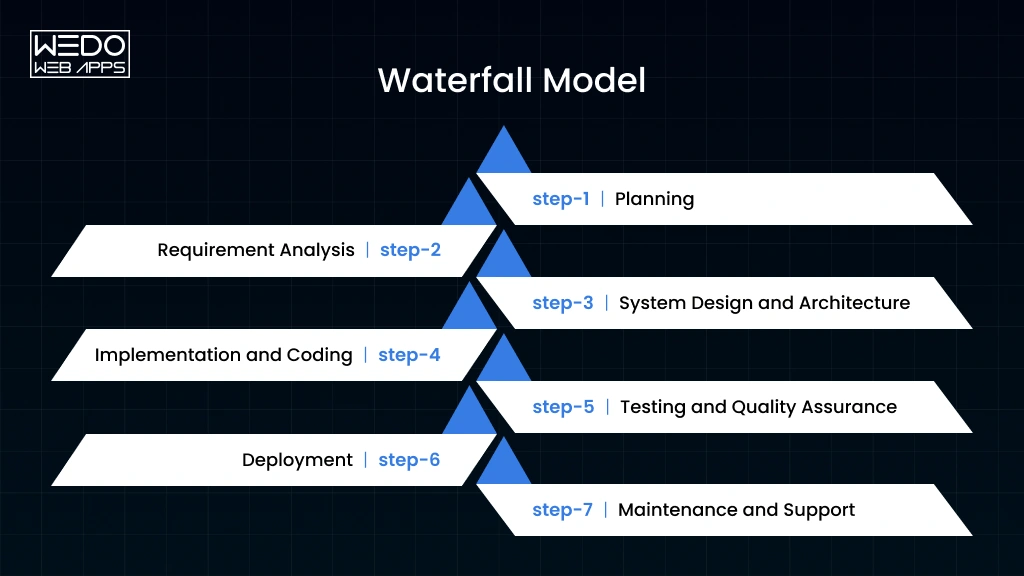
The Waterfall model follows a sequential development process. Your team generally completes one phase before moving to the next. Requirements are defined early, followed by design, implementation, testing, deployment, and maintenance.
Best suited for:
- Projects with stable and clearly documented requirements
- Fixed-scope contracts
- Environments that require formal approvals and documentation
- Software projects with predictable development stages
Example:
A business developing an internal compliance application with established requirements may prefer Waterfall because major changes are less expected.
The model offers clear milestones and documentation. However, late requirement changes can be costly because completed phases may need to be revisited.
2. Agile Model
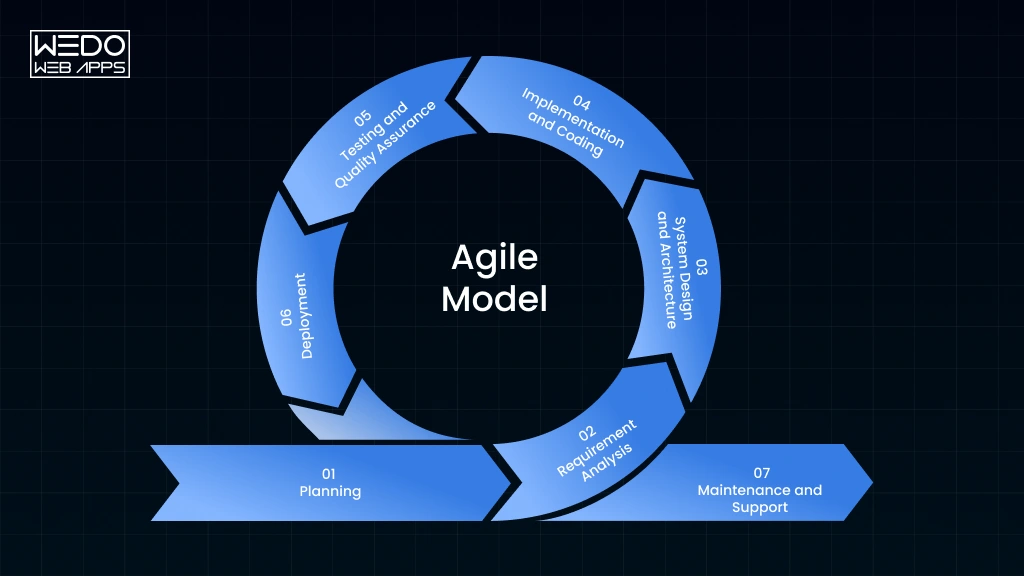
The Agile SDLC model organizes development into shorter, iterative cycles. Instead of waiting until the entire product is complete, your team delivers smaller functional increments and uses feedback to guide the next cycle.
Agile practices commonly involve:
- Prioritized product backlogs
- Short development iterations or sprints
- Frequent stakeholder feedback
- Continuous testing and integration
- Regular reprioritization of requirements
Example: If you are launching a customer-facing mobile application, your team may first release account registration and core booking features. Later iterations can introduce notifications, payments, and personalization based on user feedback.
Agile supports changing requirements and frequent delivery. It also requires active stakeholder participation, clear priorities, and disciplined scope management.
3. Spiral Model
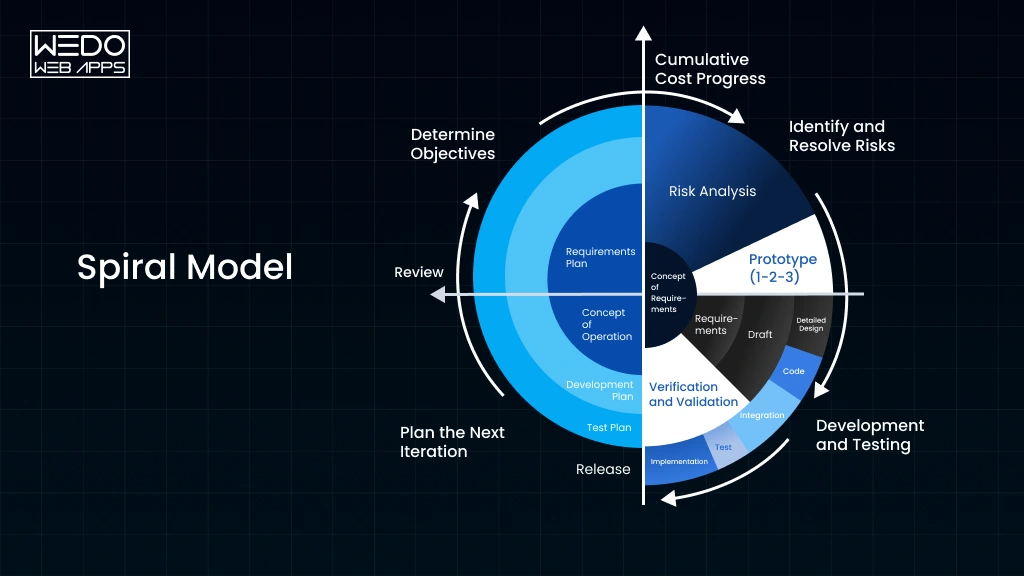
The Spiral model combines iterative development with structured risk analysis. Each cycle focuses on identifying important risks, evaluating possible solutions, developing or testing an increment, and planning the next cycle.
This approach may suit projects involving:
- Complex technical architecture
- Significant security or operational risks
- Uncertain requirements
- Expensive consequences of design failure
Example: A large financial platform introducing a complex integration may use risk-focused iterations to evaluate technical feasibility and security concerns before expanding development.
Spiral development can provide stronger risk visibility, but it may require more planning, specialist expertise, and project management effort than simpler approaches.
4. V-Model
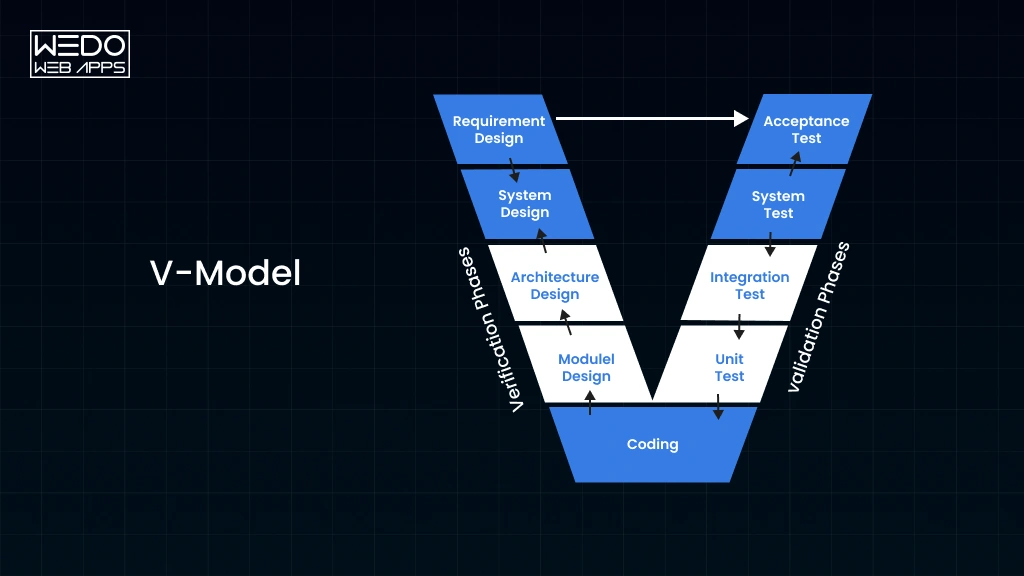
The V-Model is a structured SDLC approach that connects development activities with corresponding testing activities. Test planning begins alongside requirements and design instead of being treated as a final-stage activity.
| Development activity | Related testing activity |
|---|---|
| Requirements analysis | Acceptance testing |
| System design | System testing |
| Architecture design | Integration testing |
| Module design and coding | Unit testing |
Example: Software used in safety-sensitive environments may require traceable links between requirements, implementation, and validation activities.
The V-Model supports systematic verification and validation. Its structured nature can make it less adaptable when requirements change significantly after the project begins.
SDLC Models Comparison
| Model | Flexibility | Primary focus | Suitable project context |
|---|---|---|---|
| Waterfall | Low | Predictable sequential delivery | Stable requirements |
| Agile | High | Iterative delivery and feedback | Evolving product requirements |
| Spiral | Medium to high | Risk analysis through iterations | Complex, high-risk projects |
| V-Model | Low | Verification and validation | Projects requiring traceable testing |
How Should You Choose an SDLC Model?
Consider these questions before selecting a model:
- How stable are your requirements? Stable requirements may support sequential planning, while evolving needs may benefit from Agile.
- How costly would a failure be? High-risk projects may require stronger risk assessment and verification.
- How frequently do you need releases? Frequent releases generally require iterative development and efficient testing.
- What documentation or compliance requirements apply? Some projects need formal approvals and traceability.
- How involved will stakeholders be? Agile approaches depend on regular feedback and prioritization.
There is no single SDLC model that fits every project. Your choice should reflect your business goals, technical constraints, delivery expectations, and risk profile.
Agile SDLC vs Traditional SDLC: What Is the Difference?
How do you decide whether your software project needs a flexible development approach or a more structured delivery process? The answer depends on how often your requirements change, how quickly you need releases, and how much stakeholder feedback your team expects.
The software development life cycle phases Agile approach uses iterative development, continuous feedback, and frequent improvements. Traditional SDLC approaches, such as Waterfall, generally follow a more sequential workflow with defined stages and formal handoffs.
Agile SDLC vs Traditional SDLC
| Factor | Agile SDLC | Traditional SDLC |
|---|---|---|
| Workflow | Iterative and incremental | Generally sequential |
| Requirements | Can evolve throughout development | Usually defined early |
| Delivery | Frequent product increments | Often delivered after major phases |
| Customer Feedback | Collected regularly | Commonly gathered at defined milestones |
| Change Management | Accommodates reprioritization | Changes may require formal approval |
| Testing | Integrated throughout iterations | Often follows defined development stages |
| Planning | Continuous planning and prioritization | Detailed upfront planning |
How Agile SDLC Works
In an Agile project, your team divides the product into smaller development cycles. Each cycle focuses on selected features, testing, review, and improvement.
For example, when developing a food delivery application, the team might deliver restaurant discovery in one iteration, ordering in another, and payment integration in a later cycle. Feedback from each iteration helps shape subsequent work.
This approach can be useful when you need to validate product assumptions, respond to customer feedback, or release improvements regularly.
How Traditional SDLC Works
A traditional SDLC approach generally emphasizes upfront planning, documented requirements, sequential execution, and formal approvals. It can be appropriate when requirements are stable, and the project requires predictable milestones or extensive documentation.
For example, a software project with fixed specifications and strict approval procedures may benefit from a more structured workflow.
The key difference is how each approach manages change and delivery. Agile supports frequent adjustments through iterative cycles, while traditional approaches generally place greater emphasis on planning and controlling changes across defined phases.
Your selection should depend on project requirements, risk, stakeholder involvement, and delivery expectations rather than choosing a model solely because it is popular.
What Is Security in the Software Development Life Cycle?
Security issues discovered after launch can expose your business to data breaches, financial losses, and reputational damage. Fixing vulnerabilities at the end of development may also require expensive changes to application architecture and code.
Security in SDLC addresses these risks by integrating security practices throughout the development process. Instead of treating security as a final testing activity, your team considers potential threats during planning, requirements analysis, design, implementation, testing, deployment, and maintenance.
This approach is commonly called the Secure Software Development Life Cycle (Secure SDLC).
Security Practices Across SDLC Phases
| SDLC phase | Recommended security practice |
|---|---|
| Planning | Identify security objectives, risks, and compliance requirements |
| Requirements | Define authentication, authorization, and data protection needs |
| Design | Conduct threat modeling and review security architecture |
| Implementation | Apply secure coding standards and scan dependencies |
| Testing | Perform security testing, vulnerability assessments, and penetration testing |
| Deployment | Secure configurations, secrets, access permissions, and infrastructure |
| Maintenance | Monitor threats, patch vulnerabilities, and respond to incidents |
What Is the Secure SDLC Approach?
A Secure SDLC embeds security responsibilities into regular development activities. Developers, architects, QA professionals, and operations teams collaborate to identify and address risks throughout the project.
Important security practices include:
- Threat modeling: Identifying potential attack paths during design.
- SAST: Scanning source code for security weaknesses.
- DAST: Testing running applications for potential vulnerabilities.
- Dependency scanning: Identifying vulnerable third-party packages.
- Secrets management: Protecting passwords, tokens, and API credentials.
- Security monitoring: Detecting suspicious activity after deployment.
How DevSecOps Strengthens Software Security
DevSecOps extends security into development and operations workflows. It encourages teams to automate security checks within CI/CD pipelines and address vulnerabilities earlier.
For example, when a developer adds a third-party library, automated dependency scanning can identify known vulnerabilities before the code reaches production. The team can then review the finding, assess its impact, and apply an appropriate fix.
Security automation improves consistency, but it does not eliminate the need for human judgment. Your team must still evaluate business risks, validate security findings, and prioritize remediation based on severity and exposure.
A secure software development life cycle helps you build security into everyday decisions rather than treating it as a final release requirement.
What Tools Are Used in the Software Development Life Cycle?
Managing a software project across multiple software development life cycle phases requires more than manual coordination. Your team needs tools to organize requirements, track development progress, manage code, automate testing, and monitor releases.
The right SDLC tools improve collaboration and visibility. However, tool selection should depend on your project size, technology stack, security requirements, and existing workflows.
Essential Tools Used in SDLC
| SDLC activity | Common tools | How they support development |
|---|---|---|
| Project management | Jira and Confluence | Track tasks, document requirements, and manage project information |
| UI/UX design | Figma | Create wireframes, prototypes, and collaborative design systems |
| Version control | Git and GitHub | Manage source code, branches, and team collaboration |
| API testing | Postman | Validate API requests, responses, and integrations |
| Test automation | Selenium | Automate browser-based testing scenarios |
| CI/CD | Jenkins and GitHub Actions | Automate build, testing, and deployment workflows |
| Code quality | SonarQube | Analyze code quality and identify potential issues |
How to Select the Right SDLC Tools
Your toolset should support the way your team actually works. Before adopting a new platform, consider the following factors:
- Project complexity: Larger projects may need advanced task tracking, permissions, and reporting.
- Team collaboration: Select tools that support communication across developers, designers, QA professionals, and stakeholders.
- Integration capabilities: Check whether tools connect with your repository, CI/CD pipeline, and testing platforms.
- Security requirements: Review access controls, data handling, audit logs, and compliance needs.
- Scalability: Ensure the tool can support additional users, projects, and workflows as your business grows.
Example:
A team developing a web application may use Figma for design, GitHub for source control, Postman for API validation, and a CI/CD platform to automate testing before deployment.
The tools may vary from one organization to another. What matters is how effectively they support collaboration, quality, traceability, and delivery across the software development life cycle.
How AI Supports the Software Development Life Cycle
AI is changing how development teams handle repetitive tasks, analyze project information, and improve software quality. When applied carefully, it can support multiple software development life cycle phases, from requirements analysis to maintenance.
For your business, the value of AI depends on how well it addresses a specific development challenge. AI should support engineering decisions rather than replace technical validation, security reviews, or stakeholder approval.
AI Applications Across SDLC Phases
Requirements Analysis:AI can summarize stakeholder discussions, organize user stories, and identify inconsistencies in documented requirements.
Implementation and Coding:AI coding assistants can suggest code, explain unfamiliar functions, support refactoring, and help generate technical documentation.
Testing and QA:AI can help create test scenarios, identify regression candidates, classify defects, and analyze testing results.
Security and Maintenance:AI-assisted tools can support vulnerability triage, log analysis, anomaly detection, and technical documentation updates.
Example of AI in Software Development
Consider a business application that receives frequent customer support requests. AI can help analyze recurring complaints and identify patterns, such as slow search performance or confusing navigation.
Your product team can use these insights to prioritize improvements. Developers may then use AI assistance for implementation, while QA professionals validate whether the changes resolve the underlying problems.
The process still requires human review. AI-generated code may contain incorrect logic, insecure practices, or compatibility issues. AI-generated test cases may also miss important edge cases.
What Should You Consider Before Using AI in SDLC?
- Data privacy: Avoid exposing confidential business information or sensitive customer data to unapproved AI tools.
- Code quality: Review generated code for correctness, security, and maintainability.
- Testing coverage: Validate that AI-generated tests address meaningful risks and user scenarios.
- Intellectual property: Review applicable licensing and ownership considerations for generated content and code.
- Human oversight: Keep developers, QA professionals, and security specialists responsible for critical decisions.
AI can improve development efficiency when integrated into a controlled workflow. Its effectiveness depends on the quality of your processes, the tools you select, and the expertise of your team.
Common SDLC Challenges and How to Overcome Them
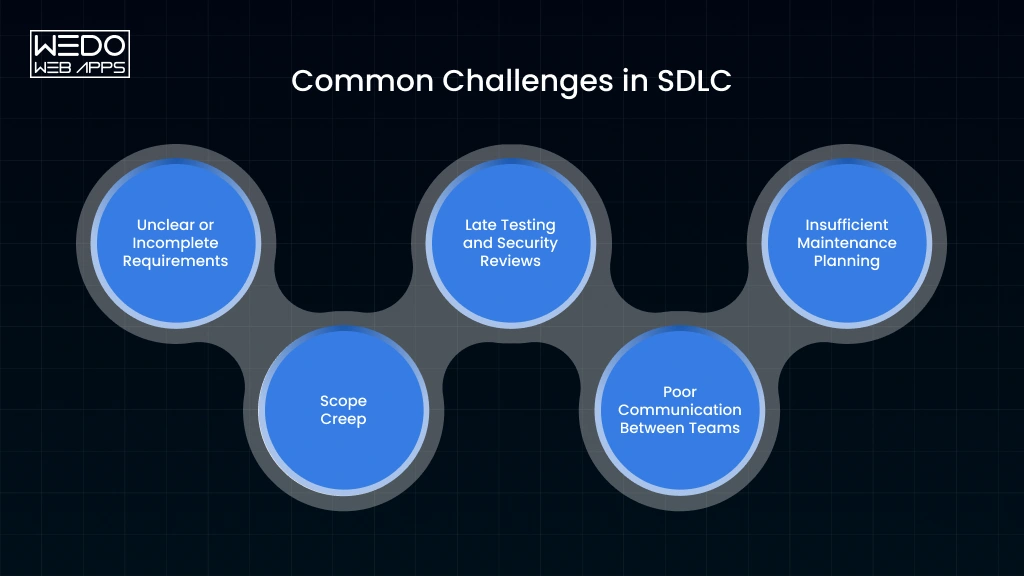
Following the software development life cycle (SDLC) gives your team a structured process, but it does not automatically eliminate project risks. Poor communication, changing requirements, and delayed testing can still affect software delivery.
The key is to identify these challenges early and establish practical ways to address them.
1. Unclear or Incomplete Requirements
Challenge: Developers may interpret business requirements differently from stakeholders. This can result in incorrect features, rework, and delayed approvals.
Solution: Conduct requirement discussions, document acceptance criteria, and validate the scope with stakeholders before development begins.
Example: Before building a reporting dashboard, confirm the required metrics, user roles, filters, and export formats.
2. Scope Creep
Challenge: New feature requests can gradually expand the project beyond its original budget and timeline.
Solution: Use a documented change management process. Evaluate each request based on business value, technical impact, resources, and delivery priorities.
Example: A customer may request an additional payment method during development. Your team should assess its integration effort before adding it to the current release.
3. Late Testing and Security Reviews
Challenge: Discovering defects or vulnerabilities near deployment can increase remediation costs and delay releases.
Solution: Introduce testing and security checks throughout the software development life cycle phases. Use code reviews, automated tests, dependency scanning, and risk-based validation.
Example: A shared acceptance criteria document helps developers and testers evaluate a feature against the same expectations.
4. Poor Communication Between Teams
Challenge: Misalignment between product owners, designers, developers, and QA professionals can lead to inconsistent expectations.
Solution: Establish clear responsibilities, maintain updated documentation, and schedule regular reviews for requirements, progress, and blockers.
Example: A shared acceptance criteria document helps developers and testers evaluate a feature against the same expectations.
5. Insufficient Maintenance Planning
Challenge: Teams may focus heavily on launch and overlook ongoing monitoring, security updates, and technical improvements.
Solution: Plan post-release support during the initial SDLC stages. Define monitoring requirements, maintenance responsibilities, backup procedures, and update priorities.
Example: A high-traffic application should have a plan for performance monitoring, incident response, and scaling as usage increases.
SDLC Challenge Prevention Checklist
Before moving toward deployment, confirm that your team has:
- Approved and documented requirements
- Defined project scope and change management process
- Completed relevant functional and security testing
- Reviewed deployment and rollback procedures
- Assigned maintenance and support responsibilities
A disciplined SDLC approach helps your team respond to challenges before they become expensive project problems.
How WEDOWEBAPPS Follows the Software Development Life Cycle
Choosing a development partner is about more than finding people who can write code. You need a process that keeps business requirements, technical decisions, quality checks, and delivery aligned throughout the project.
WEDOWEBAPPS approaches software product development around the key stages of the software development life cycle, helping businesses move from an initial product idea toward development, testing, deployment, and ongoing improvements.
For projects that require a structured product development approach, you can explore WEDOWEBAPPS Software Product Development Services.
Discovery and Requirements
The process starts by understanding what you want to achieve with the software. Business objectives, target users, functional expectations, and project requirements provide the foundation for subsequent development decisions.
This stage helps establish what needs to be built and gives the development team a clearer basis for estimating scope, resources, and delivery requirements.
Technical Planning and UI/UX
Once requirements are established, the project moves toward technical planning and product design. Architecture, technology decisions, user flows, interfaces, integrations, and scalability requirements need to work together rather than being considered separately.
For you as a business owner, this stage provides an opportunity to validate the product experience and technical direction before substantial implementation begins.
Development and Code Quality
Developers then implement the approved functionality according to the project's technical requirements. Code reviews, development standards, version control, and appropriate testing practices help maintain consistency as the application evolves.
For larger products, maintaining this discipline becomes particularly important because new features and integrations can increase technical complexity over time.
Quality Assurance
Software should be validated before it reaches your users. QA activities evaluate functionality, integrations, usability, performance, and other requirements relevant to the project.
WEDOWEBAPPS provides Quality Assurance Services to support structured testing and quality validation across software projects.
Deployment and Ongoing Support
After the application has passed the required validation, deployment activities move the product toward its intended production environment. Post-release support can then address defects, compatibility changes, performance requirements, and future enhancements.
Keeping Development Aligned With Business Goals
The SDLC works best when technical activities remain connected to measurable business objectives. Your development partner should understand why a feature matters, not only what needs to be developed.
A structured process helps maintain this connection across requirements, design, development, QA, deployment, and maintenance. It also gives you clearer points for reviewing progress and making informed decisions as the product evolves.
Conclusion
Software projects become easier to manage when every stage has a clear purpose. The software development life cycle phases give you a structured way to move from an initial idea to a reliable software product while keeping requirements, quality, security, and long-term maintenance in view.
The right SDLC model depends on your project. Agile can support iterative delivery and changing requirements, while other models may suit projects that need more structured planning, risk management, or verification. Security and QA should remain part of the process rather than becoming final-stage checks.
AI can further support development by improving productivity across requirements, coding, testing, security, and maintenance. However, technical expertise and human validation remain essential.
If you are planning a new software product or modernizing an existing application, a structured development process can help you make better decisions at every stage.