Introduction
Enterprise Android apps fail more often because of poor technology decisions than poor ideas. Many businesses invest in app development, but later struggle with slow releases, scaling issues, rising maintenance costs, fragmented workflows, and difficult integrations, all because their Android development stack was not built for long-term growth.
Today, choosing the best Android development tools for enterprises is about far more than writing code faster. Businesses need Android development ecosystems that support scalability, security, CI/CD automation, performance optimization, team collaboration, and continuous delivery across growing user bases.
At the same time, different businesses require different Android enterprise app development tools. A startup building a fast MVP may prioritize rapid deployment and flexibility, while enterprises handling complex operations often focus more on maintainability, infrastructure stability, monitoring, and scalable architecture.
In this guide, we will explore the best Android development tools for enterprise applications, compare their strengths, discuss where they fit within large-scale Android ecosystems, and help businesses choose the right Android development tools for scalable mobile app growth.
Why Tool Selection Matters in Enterprise Android App Development
Enterprise Android Applications are expected to do far more than basic mobile apps. They often handle large user bases, complex backend integrations, sensitive business data, real-time operations, and multi-team collaboration across different departments. In such environments, the Android development tools a business chooses can directly affect project scalability, operational efficiency, and long-term maintenance costs.
Many businesses underestimate how quickly poor tool selection creates technical limitations. An Android app may launch successfully, but without scalable Android development tools, enterprises often face slower releases, unstable performance, difficult upgrades, fragmented workflows, and rising development expenses as the application grows.
This is why enterprises increasingly evaluate Android development tools based on long-term business impact rather than short-term development convenience.
Enterprise Android Apps Require Scalable Development Ecosystems
Unlike small consumer apps, enterprise Android applications usually involve:
- Complex APIs and backend systems
- Large development teams
- Continuous feature releases
- High security expectations
- Performance optimization requirements
- CI/CD automation pipelines
- Real-time monitoring and analytics
Managing these requirements becomes difficult when businesses rely on outdated or disconnected Android app development tools.
For example:
- Weak CI/CD infrastructure slows development cycles
- Poor architecture support increases technical debt
- Limited testing automation affects app stability
- Inflexible development environments reduce scalability
This is why modern enterprises prioritize an Android development ecosystem that supports automation, modular architecture, collaboration, and continuous scalability from the beginning.
The Right Android Development Tools Reduce Long-Term Costs
Many businesses choose Android development tools based on initial development speed. However, enterprise mobile applications are long-term assets that require continuous optimization, upgrades, monitoring, and maintenance.
The right enterprise Android app development tools help businesses:
- Reduce development bottlenecks
- Improve release consistency
- Simplify app maintenance
- Accelerate testing and deployment
- Improve developer productivity
- Minimize scalability issues
- Reduce infrastructure risks
Over time, these operational improvements can significantly lower the total cost of Android app ownership.
Modern Enterprises Need More Than Just a Coding Environment
Today's Android enterprise app development workflows involve much more than writing application code. Businesses now depend on complete development ecosystems that include:
- UI development frameworks
- Automation tools
- Testing infrastructure
- Performance monitoring platforms
- Cloud integrations
- Security and compliance support
- Collaboration systems
As the Android ecosystem continues to evolve, enterprises increasingly work with experienced Android app development partners to build scalable technology stacks that align with long-term business goals rather than temporary development needs.
What Enterprises Should Evaluate Before Choosing Android Development Tools
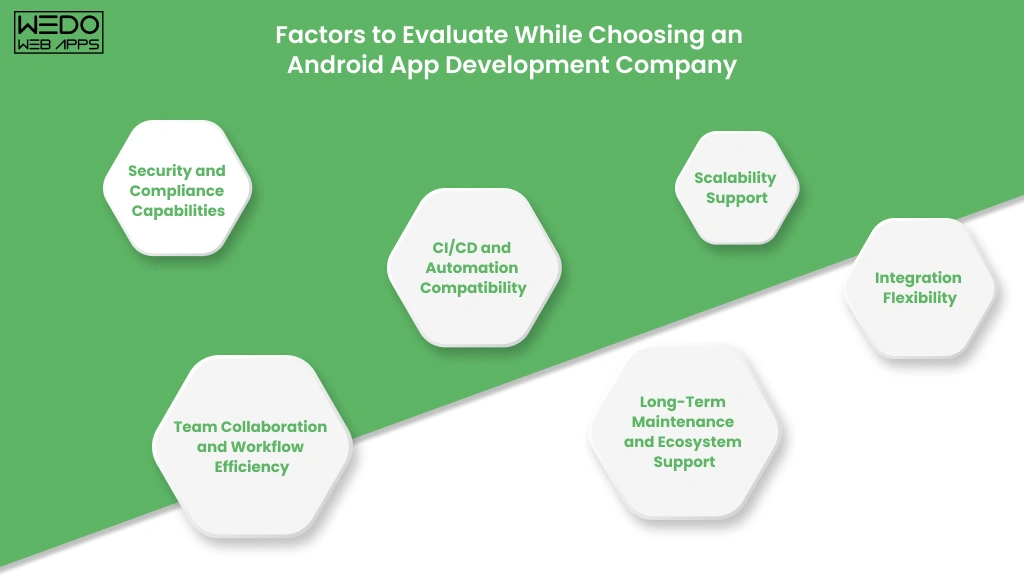
Not every Android development tool is built for enterprise-scale applications. While some tools work well for small MVPs or short-term projects, enterprise mobile applications require development ecosystems that can support scalability, security, operational stability, and continuous growth over time.
Before selecting Android enterprise app development tools, businesses should evaluate how well each tool aligns with their technical requirements, team structure, and long-term mobile strategy.
1. Scalability Support
Scalability is one of the most important factors in enterprise Android app development. As applications grow, businesses often need to handle:
- Increasing user traffic
- Expanding feature sets
- Multiple integrations
- Growing codebases
- Larger development teams
The best Android development tools for enterprises should support modular architecture, efficient build systems, scalable backend connectivity, and long-term maintainability without slowing down development cycles.
Tools that work well for early-stage development may eventually create performance bottlenecks when applications begin scaling rapidly.
2. CI/CD and Automation Compatibility
Modern enterprises rely heavily on CI/CD automation to accelerate releases and improve deployment consistency. Android development tools that integrate smoothly with automation platforms help businesses:
- Reduce manual deployment errors
- Speed up testing cycles
- Improve release stability
- Deliver updates faster
- Maintain development consistency across teams
This is why enterprises often prioritize Android development tools that work efficiently with platforms like GitHub Actions, Jenkins, Gradle, and automated testing frameworks.
3. Security and Compliance Capabilities
Enterprise Android applications frequently manage sensitive customer, financial, operational, or internal business data. Weak development infrastructure can increase security risks and compliance challenges over time.
Businesses should evaluate whether Android development tools support:
- Secure authentication workflows
- Encrypted data handling
- Secure API integrations
- Role-based access controls
- Compliance-friendly architectures
- Continuous security testing
Security limitations become significantly more expensive to fix after applications scale.
4. Team Collaboration and Workflow Efficiency
Large-scale Android projects often involve developers, designers, QA engineers, DevOps teams, product managers, and business stakeholders working together simultaneously.
The best Android app development tools for enterprises should improve:
- Cross-team collaboration
- Version control management
- Workflow visibility
- Code consistency
- Development coordination
- Release management
Poor collaboration infrastructure can slow releases and create operational inefficiencies across enterprise development teams.
5. Integration Flexibility
Enterprise applications rarely operate independently. Most Android apps need integration with:
- CRMs
- ERP systems
- Payment gateways
- Analytics platforms
- Cloud services
- Internal enterprise software
Android development tools with strong integration flexibility help businesses adapt faster as operational requirements evolve.
6. Long-Term Maintenance and Ecosystem Support
Technology stacks evolve quickly. Businesses should prioritize Android development tools that receive:
- Regular updates
- Active community support
- Enterprise adoption
- Long-term ecosystem stability
- Strong documentation
Choosing outdated or poorly supported Android tools can create migration challenges, hiring difficulties, and long-term maintenance problems.
This is why enterprises focus on future-ready Android development ecosystems rather than tools that only solve immediate development requirements.

Best Android Development Tools for Enterprises
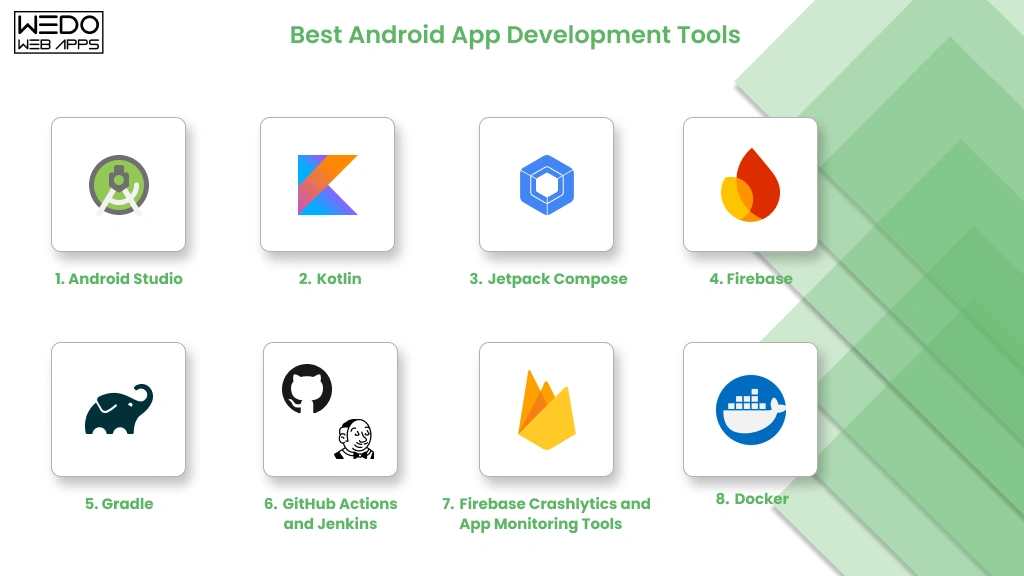
Choosing the best Android development tools for enterprises is not about finding a single platform that does everything. Enterprise Android app development usually depends on a complete ecosystem of tools that support coding, UI development, testing, automation, deployment, monitoring, and scalability.
Below are some of the most widely used Android enterprise app development tools that help businesses build scalable, secure, and maintainable mobile applications.
1. Android Studio
Android Studio remains one of the best Android development tools for enterprise applications because it provides a complete native Android development environment backed directly by Google.
For enterprises managing large-scale Android projects, Android Studio offers:
- Advanced code editing
- Intelligent debugging
- Emulator testing
- Gradle build automation
- Performance profiling
- Git integration
- Jetpack support
Its deep integration with the Android ecosystem makes it highly suitable for businesses building scalable native Android applications.
Why Enterprises Prefer Android Studio
- Official Google Support: Android Studio receives regular updates aligned with the latest Android APIs, security standards, and development practices.
- Strong Scalability Support: Large development teams benefit from modular project structures, advanced build management, and enterprise-grade debugging capabilities.
- Built-In Performance Tools: Enterprises can monitor memory usage, CPU activity, network behavior, and rendering performance directly within the development environment.
- Better Integration Ecosystem: Android Studio works efficiently with CI/CD systems, Firebase services, testing frameworks, and cloud infrastructure tools.
Best Use Cases
- Enterprise Android applications
- Large-scale native mobile apps
- Fintech and healthcare applications
- Apps requiring complex integrations
- Performance-intensive Android solutions
Potential Limitations
- Higher system resource usage
- Steeper learning curve for smaller teams
- Large projects may require optimized build configurations
2. Kotlin
Kotlin has become one of the most preferred Android development tools for enterprise mobile applications because it improves code maintainability, reduces boilerplate code, and accelerates development workflows.
Google officially supports Kotlin for Android development, and many enterprises now prefer it over Java for modern Android applications.
Why Enterprises Prefer Kotlin
- Faster Development Cycles: Kotlin's concise syntax helps developers write cleaner code with fewer repetitive structures, improving productivity across large teams.
- Improved Maintainability: Enterprise Android applications often evolve continuously. Kotlin simplifies long-term maintenance by reducing code complexity.
- Better Null Safety: Kotlin helps minimize common runtime crashes caused by null pointer exceptions, improving application stability.
- Java Interoperability: Businesses migrating from legacy Android systems can integrate Kotlin gradually without rebuilding their entire codebase.
Best Use Cases
- Scalable Android applications
- Enterprise-grade mobile platforms
- Long-term Android modernization projects
- Large development teams
- Apps requiring faster feature iterations
Potential Limitations
- Teams transitioning from Java may require training
- Legacy systems may still contain Java dependencies
3. Jetpack Compose
Jetpack Compose is Google's modern UI toolkit for Android app development. It simplifies UI creation using declarative programming and helps enterprises build faster, more maintainable user interfaces.
As Android applications become more dynamic and design-focused, many enterprises are adopting Jetpack Compose to reduce UI development complexity.
Why Enterprises Are Adopting Jetpack Compose
- Faster UI Development: Developers can build and update interfaces with significantly less boilerplate code compared to traditional XML layouts.
- Better Maintainability: Compose simplifies UI management, making enterprise applications easier to scale and modify over time.
- Improved Development Efficiency: Real-time previews and faster iteration cycles improve collaboration between development and design teams.
- Modern Android Ecosystem Alignment: Jetpack Compose integrates efficiently with modern Android architecture components and Kotlin-based workflows.
Best Use Cases
- Modern enterprise Android apps
- Scalable UI systems
- Dynamic user interfaces
- Long-term Android modernization
- Design-focused enterprise applications
Potential Limitations
- Older Android projects may require gradual migration
- Some legacy libraries may need compatibility adjustments
4. Firebase
Firebase is one of the most widely used Android development tools for enterprise applications that require rapid backend integration, analytics, authentication, cloud messaging, and real-time database capabilities.
While Firebase is commonly associated with startups and MVP development, many enterprises also use Firebase services strategically within larger Android ecosystems to accelerate development workflows and improve operational visibility.
Why Enterprises Use Firebase
- Faster Backend Development: Firebase reduces backend infrastructure complexity by providing ready-to-use services for authentication, databases, notification, and storage.
- Real-Time Capabilities: Applications that depend on live synchronization, messaging, tracking, or collaborative features benefit from Firebase's real-time infrastructure.
- Built-in Analytics and Monitoring: Firebase Analytics and Crashlytics help enterprises monitor user behavior, app stability, crash reports, and performance metrics in real time.
- Faster MVP Validation: Startups and growing businesses often use Firebase to reduce initial development timelines while validating product-market fit.
Best Use Cases
- Startup MVPs
- Real-time applications
- Customer engagement platforms
- Internal workforce apps
- Analytics-driven mobile applications
Potential Limitations
- Overdependence may reduce backend flexibility
- Complex enterprise architectures may eventually require custom backend systems
- Large-scale usage can increase operational costs over time
5. Gradle
Gradle plays a critical role in enterprise Android app development because it automates the build process, dependency management, testing workflows, and deployment configurations.
As enterprise Android applications become larger and more modular, build automation becomes essential for maintaining development efficiency.
Why Enterprises Use Gradle
- Build Automation: Gradle automates repetitive development tasks, reducing manual errors and improving deployment consistency.
- Multi-Module Project Support: Large enterprise applications often contain multiple modules and environments. Gradle helps teams manage these complex structures efficiently.
- Faster CI/CD Integration: Gradle integrates smoothly with Jenkins, GitHub Actions, Bitrise, and other CI/CD platforms used in enterprise workflows.
- Dependency Management: Enterprises can manage libraries, plugins, and version control more effectively across growing Android ecosystems.
Best Use Cases
- Large-scale Android applications
- Multi-team development environments
- Enterprise CI/CD pipelines
- Modular Android architecture
- Automated testing workflows
Potential Limitations
- Complex configurations may increase setup difficulty
- Build optimization may require experienced Android engineers
6. GitHub Actions and Jenkins
CI/CD automation has become essential for enterprise Android app development. Platforms like GitHub Actions and Jenkins help businesses automate testing, builds, deployments, and release management.
Without proper CI/CD infrastructure, enterprises often face delayed releases, inconsistent deployments, and increased operational overhead.
Why Enterprises Use CI/CD Tools
- Faster Release Cycles: Automation allows businesses to ship updates faster without relying heavily on manual deployment processes.
- Improved Testing Consistency: Automated pipelines help teams run continuous testing across different devices, environments, and app versions.
- Reduced Deployment Risks: CI/CD systems minimize human errors during builds and deployments, improving release stability.
- Better Team Coordination: Large Android teams can collaborate more efficiently through centralized automation workflows.
Best Use Cases
- Enterprise Android applications
- Frequent release environments
- Large development teams
- DevOps-driven mobile workflows
- Continuous testing ecosystems
GitHub Actions vs Jenkins
GitHub Actions
Best for:
- Modern cloud-native workflows
- GitHub-centered development teams
- Faster setup and scalability
Jenkins
Best for:
- Highly customized enterprise pipelines
- Complex deployment environments
- Advanced automation requirements
Potential Limitations
- CI/CD pipelines require proper maintenance
- Complex enterprise automation setups may increase infrastructure overhead
7. Firebase Crashlytics and App Monitoring Tools
Enterprise Android applications require continuous monitoring to maintain performance, stability, and user satisfaction. Monitoring tools help businesses identify crashes, performance bottlenecks, and operational issues before they affect large user bases.
Why Monitoring Tools Matter in Enterprise Android Development
- Real-Time Crash Reporting: Enterprises can identify and resolve issues quickly before they impact customer experience.
- Performance Optimization: Monitoring tools help teams track memory usage, rendering delays, API failures, and app responsiveness.
- Better Operational Visibility: Businesses gain deeper insights into user behavior, device compatibility issues, and app reliability.
- Faster Incident Resolution: Development teams can diagnose issues more efficiently using detailed logs and performance analytics.
Best Use Cases
- Large-scale Android applications
- Consumer-facing enterprise apps
- Performance-sensitive applications
- High-traffic mobile ecosystems
- Operational analytics environments
Popular Monitoring Tools
- Firebase Crashlytics
- New Relic
- Datadog
- Sentry
- AppDynamics
Potential Limitations
- Excessive monitoring integrations may affect performance
- Large-scale analytics systems require proper configuration management
8. Docker
Docker is increasingly becoming part of modern Android enterprise app development workflows because it helps standardize development environments and improve deployment consistency.
Large Android teams often face issues caused by inconsistent local environments, dependency conflicts, and infrastructure differences. Docker helps reduce these operational inconsistencies.
Why Enterprises Use Docker
- Environment Standardization: Teams can maintain consistent development environments across devices and operating systems.
- Improved Collaboration: Developers, QA teams, and DevOps engineers can work with identical infrastructure configurations.
- Faster Onboarding: New developers can set up enterprise Android environments more quickly.
- Better CI/CD Support: Docker containers integrate efficiently into enterprise automation pipelines.
Best Use Cases
- Enterprise DevOps workflows
- Large Android engineering teams
- CI/CD infrastructure
- Cloud-native Android ecosystems
- Multi-environment deployment systems
Potential Limitations
- Requires DevOps expertise
- Initial infrastructure setup may be complex for smaller teams
Android Development Tools Comparison for Enterprise Applications
Choosing the right Android enterprise app development tools becomes easier when businesses compare them based on scalability, automation capabilities, maintenance requirements, and long-term operational value.
The table below provides a simplified Android development tools comparison to help enterprises understand where each tool fits within modern Android app development workflows.
| Tool | Primary Purpose | Best For | Enterprise Scalability | Learning Curve | Integration Flexibility |
|---|---|---|---|---|---|
| Android Studio | Native Android development IDE | Enterprise Android app development | High | Medium | High |
| Kotlin | Android programming language | Scalable enterprise applications | High | Medium | High |
| Jetpack Compose | Modern Android UI development | Dynamic and scalable UI systems | High | Medium | High |
| Firebase | Backend services and analytics | MVPs, real-time apps, notifications | Medium to High | Low | Medium |
| Gradle | Build automation and dependency management | CI/CD and modular architecture | High | Medium to High | High |
| GitHub Actions | CI/CD automation | Cloud-native Android workflows | High | Medium | High |
| Jenkins | Enterprise automation pipelines | Complex DevOps infrastructure | High | High | Very High |
| Firebase Crashlytics | Crash reporting and monitoring | Performance monitoring | High | Low | Medium |
| Docker | Environment standardization | DevOps and scalable workflows | High | Medium | High |
Which Android Development Tools Matter Most for Enterprises?
Not every enterprise requires every tool immediately. Businesses should prioritize Android development tools based on:
- Project complexity
- Team size
- Scalability goals
- Release frequency
- Security requirements
- Infrastructure maturity
For example:
- Startups may prioritize Firebase and rapid deployment workflows
- Scaling SaaS platforms may focus heavily on CI/CD automation and monitoring
- Large enterprises often require modular architecture, advanced automation, and infrastructure standardization
This is why enterprise Android app development tools should always be selected as part of a broader mobile growth strategy rather than isolated development decisions.
Best Android Tool Stack for Different Business Types
The best Android development tools for enterprises can vary significantly depending on business goals, application complexity, and operational scale. A startup validating an MVP often requires very different Android development workflows compared to enterprises managing millions of users or complex internal systems.
Below are some common Android development tool stack recommendations based on different business environments.
For Startups Building MVPs
Startups usually prioritize:
- Faster development
- Lower operational overhead
- Rapid deployment
- Quick product validation
Recommended Android Development Tools
- Android Studio
- Kotlin
- Firebase
- GitHub Actions
- Firebase Crashlytics
Why This Stack Works
This setup helps startups launch Android applications quickly while maintaining enough scalability for early-stage growth. Firebase reduces backend complexity, while GitHub Actions simplifies CI/CD automation without requiring large DevOps investments.
For Scaling SaaS Platforms
As SaaS businesses grow, they often require:
- Faster release cycles
- Scalable architecture
- Better automation
- Stronger monitoring systems
Recommended Android Development Tools
- Android Studio
- Kotlin
- Jetpack Compose
- Gradle
- GitHub Actions
- Datadog or New Relic
Why This Stack Works
Scaling SaaS applications benefits from modern UI systems, automated pipelines, and advanced monitoring infrastructure that supports continuous feature delivery and operational scalability.
For Fintech and Healthcare Applications
Fintech and healthcare Android applications usually prioritize:
- Security
- Compliance
- Stability
- Performance reliability
- Scalable infrastructure
Recommended Android Development Tools
- Android Studio
- Kotlin
- Gradle
- Jenkins
- Docker
- Advanced monitoring platforms
Why This Stack Works
These industries require enterprise-grade automation, controlled deployment environments, and strong infrastructure consistency to maintain compliance and operational reliability.
For Enterprise Workforce Applications
Internal enterprise applications often focus on:
- Operational efficiency
- Device compatibility
- Workflow automation
- Backend integrations
Recommended Android Development Tools
- Android Studio
- Kotlin
- Firebase
- Gradle
- CI/CD automation tools
Why This Stack Works
This combination supports scalable enterprise operations while simplifying deployment management and employee workflow integrations.
For Ecommerce Mobile Applications
Ecommerce businesses often require:
- High performance
- Real-time updates
- Analytics tracking
- User engagement optimization
- Scalable infrastructure
Recommended Android Development Tools
- Android Studio
- Jetpack Compose
- Firebase
- GitHub Actions
- Crashlytics
- Analytics platforms
Why This Stack Works
Ecommerce apps benefit heavily from scalable UI systems, real-time engagement infrastructure, and continuous monitoring for user experience optimization.
Choosing the best Android development tools for enterprises ultimately depends on how well the tool stack supports long-term business scalability, operational efficiency, and continuous product evolution.
Native vs Cross-Platform: Which Approach Works Better for Enterprises?
One of the biggest decisions businesses face while selecting Android development tools for enterprise applications is whether to build native Android apps or choose cross-platform frameworks like Flutter or React Native.
The answer depends heavily on:
- Application complexity
- Performance expectations
- Scalability goals
- Budget considerations
- Development timelines
- Long-term maintenance strategy
For enterprises building large-scale Android applications, this decision directly impacts performance, user experience, infrastructure flexibility, and future scalability.
What Is Native Android Development?
Native Android development refers to building applications specifically for the Android ecosystem using tools like:
- Android Studio
- Kotlin
- Jetpack Compose
- Gradle
Native Android apps are designed directly for Android devices, allowing deeper integration with device hardware, operating system features, and advanced Android APIs.
Why Enterprises Choose Native Android Development
- Better Performance: Native Android apps generally deliver smoother performance, faster rendering, and better responsiveness for complex enterprise applications.
- Stronger Scalability: Large-scale enterprise applications often require advanced architecture flexibility, optimized memory management, and high-performance infrastructure that native development supports more efficiently.
- Better Security Control: Native Android development provides deeper control over security implementation, device-level integrations, authentication workflows, and sensitive data handling.
- Faster Access to Android Features: Businesses can adopt new Android APIs, OS updates, and platform capabilities more quickly with native Android development tools.
Best Use Cases for Native Android Development
- Fintech applications
- Healthcare apps
- Enterprise workforce systems
- High-performance mobile platforms
- Large-scale ecommerce applications
- Apps requiring advanced hardware integrations
What Is Cross-Platform Development?
Cross-platform frameworks allow developers to build applications for Android and iOS using a shared codebase. Popular cross-platform tools include:
- Flutter
- React Native
These frameworks help businesses reduce development time and maintain shared application logic across platforms.
Why Businesses Choose Cross-Platform Development
- Faster Initial Development: Shared codebases can reduce development timelines, especially for startups and businesses launching MVPs.
- Lower Early Development Costs: Cross-platform frameworks may reduce initial engineering costs for businesses targeting multiple platforms simultaneously.
- Easier Feature Synchronization: Teams can maintain feature consistency across Android and iOS applications more efficiently.
Best Use Cases for Cross-Platform Development
- Startup MVPs
- Budget-sensitive projects
- Content-focused applications
- Moderate-complexity business apps
- Early-stage SaaS platforms
Native vs Cross-Platform: Enterprise Comparison
| Factor | Native Android Development | Cross-Platform Development |
|---|---|---|
| Performance | High | Moderate to High |
| Scalability | High | Moderate |
| UI Flexibility | Very High | High |
| Platform Integration | Deep | Limited in some cases |
| Security Control | High | Moderate |
| Development Speed | Moderate | Faster initially |
| Maintenance | Platform-specific | Shared codebase |
| Long-Term Enterprise Stability | Strong | Depends on framework maturity |
Which Approach Is Better for Enterprises?
For enterprises building long-term, scalable Android ecosystems, native Android development often provides stronger:
- Performance optimization
- Security flexibility
- Infrastructure scalability
- Platform stability
- Device-level integration capabilities
However, cross-platform development may still work well for:
- Startups validating products
- Budget-conscious businesses
- Rapid MVP launches
- Simpler enterprise workflows
Many growing businesses eventually migrate toward native Android architectures as application complexity increases.
This is why enterprises often work with experienced Android app development teams that can evaluate whether native or cross-platform development aligns better with long-term operational goals instead of short-term development convenience.
Common Mistakes Enterprises Make While Choosing Android Development Tools
Many businesses invest heavily in Android app development but still face scalability issues, delayed releases, rising maintenance costs, and unstable workflows later. In most cases, these problems are not caused by the app idea itself; they originate from poor Android development tool selection early in the project lifecycle.
Choosing Android enterprise app development tools without considering long-term operational requirements often creates technical debt that becomes expensive and difficult to fix as applications scale.
Below are some of the most common mistakes enterprises make while selecting Android development tools.
1. Prioritizing Short-Term Speed Over Long-Term Scalability
One of the biggest mistakes businesses make is selecting Android development tools only because they accelerate early development.
While rapid development is important, enterprise applications eventually require:
- Scalable architecture
- Performance optimization
- Infrastructure flexibility
- Maintainable codebases
- Automation support
Tools that work well for small MVPs may struggle when applications grow in complexity, user traffic, and operational demands.
Businesses should evaluate how Android development tools will perform not just during launch, but also during future scaling phases.
2. Ignoring CI/CD and Automation Requirements
Many enterprises underestimate how critical CI/CD automation becomes as development teams and release frequency increase.
Without a proper automation infrastructure:
- Deployments become inconsistent
- Testing slows down
- Release cycles become delayed
- Operational risks increase
Modern Android enterprise app development tools should support automated workflows from the beginning to reduce long-term operational bottlenecks.
3. Choosing Too Many Tools Too Early
Some businesses overcomplicate their Android development ecosystem by adopting too many tools simultaneously. This often leads to:
- Fragmented workflows
- Integration conflicts
- Higher maintenance complexity
- Onboarding difficulties
- Unnecessary operational overhead
A streamlined Android development stack with strong integration compatibility is usually more effective than an overloaded ecosystem with overlapping tools.
4. Misunderstanding Long-Term Maintenance Costs
Initial development costs are only one part of enterprise Android app ownership. Long-term maintenance often becomes significantly more expensive if businesses choose poorly supported or overly complex Android development tools.
Maintenance challenges typically increase because of:
- Outdated dependencies
- Poor documentation
- Inconsistent architecture
- Limited ecosystem support
- Weak automation infrastructure
This is why enterprises increasingly prioritize future-ready Android development tools with strong ecosystem stability and active support communities.
4. Neglecting Monitoring and Performance Infrastructure
Many businesses focus heavily on app development while overlooking monitoring and observability tools.
Without proper monitoring infrastructure, enterprises may struggle to identify:
- Crashes
- API failures
- Device compatibility issues
- Performance bottlenecks
- User experience problems
Monitoring platforms like Firebase Crashlytics, Datadog, and New Relic help enterprises maintain operational visibility as Android applications scale.
5. Failing to Align Tool Selection With Business Goals
Android development tools should support business strategy, not just engineering preferences.
For example:
- Startups may prioritize rapid deployment
- Fintech apps may require stronger security infrastructure
- Ecommerce apps may focus heavily on analytics and scalability
- Enterprise workforce apps may require extensive backend integrations
The best Android development tools for enterprises are the ones that align technical infrastructure with long-term operational and business objectives.
6. Avoiding Expert Guidance During Architecture Planning
Many businesses select Android development tools without consulting experienced mobile architecture specialists. This often leads to avoidable scalability problems later.
Experienced Android app development teams can help businesses:
- Evaluate long-term scalability needs
- Reduce technical debt risks
- Improve automation workflows
- Optimize infrastructure planning
- Choose maintainable Android development ecosystems
This becomes especially important for enterprises building applications intended for continuous scaling and long-term operational growth.
How Enterprises Build Scalable Android App Development Workflows
Building a successful enterprise Android application requires more than selecting the best Android development tools. Businesses also need scalable workflows that support continuous development, faster releases, operational stability, and long-term maintainability.
Without structured workflows, even powerful Android development tools can lead to fragmented operations, delayed deployments, inconsistent code quality, and growing technical debt.
Modern enterprises typically build Android development workflows around automation, collaboration, scalability, and continuous optimization.
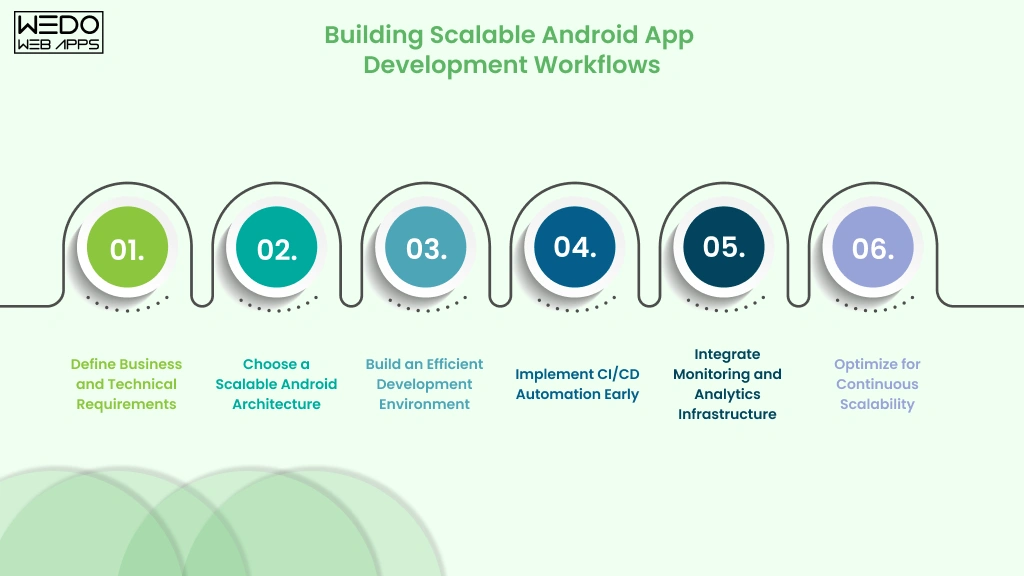
Step 1: Define Business and Technical Requirements
Before selecting Android enterprise app development tools, businesses should clearly define:
- Application goals
- Scalability expectations
- Security requirements
- Integration needs
- Release frequency
- Operational complexity
This step helps enterprises avoid choosing Android development tools that solve only short-term requirements while creating long-term infrastructure limitations.
For example:
- Fintech applications may prioritize security and compliance
- Ecommerce apps may require real-time analytics and scalability
- Workforce apps may focus heavily on backend integrations
The Android development workflow should always align with the broader business strategy.
Step 2: Choose a Scalable Android Architecture
Enterprise Android applications require architecture that supports:
- Modular development
- Long-term maintainability
- Faster feature releases
- Team scalability
- Easier debugging
Many enterprises use:
- MVVM architecture
- Modular project structures
- Clean architecture principles
- Kotlin-based workflows
- Jetpack libraries
Scalable architecture becomes increasingly important as Android applications expand across teams, features, and integrations.
Step 3: Build an Efficient Development Environment
Once architecture is finalized, businesses should establish a standardized Android development environment using tools like:
- Android Studio
- Kotlin
- Jetpack Compose
- Gradle
- Git-based version control
Standardized environments improve:
- Collaboration consistency
- Onboarding speed
- Development efficiency
- Deployment reliability
Many enterprises also use Docker to maintain consistent development environments across teams and infrastructure systems.
Step 4: Implement CI/CD Automation Early
CI/CD automation is one of the most important components of scalable Android enterprise app development.
Automated pipelines help enterprises:
- Reduce manual deployment effort
- Improve testing consistency
- Accelerate release cycles
- Minimize deployment risks
- Maintain code quality standards
Tools commonly used include:
- GitHub Actions
- Jenkins
- Gradle automation
- Automated testing frameworks
Businesses that delay CI/CD implementation often face operational bottlenecks as applications scale.
Step 5: Integrate Monitoring and Analytics Infrastructure
Enterprise Android applications require continuous monitoring after deployment.
Monitoring infrastructure helps businesses:
- Identify crashes quickly
- Optimize performance
- Analyze user behavior
- Improve device compatibility
- Maintain operational visibility
Common enterprise monitoring tools include:
- Firebase Crashlytics
- Datadog
- New Relic
- Sentry
Observability becomes increasingly important as user traffic and application complexity grow.
Step 6: Optimize for Continuous Scalability
Scalable Android app development is an ongoing process rather than a one-time setup.
Enterprises should continuously:
- Optimize infrastructure
- Review architecture performance
- Monitor deployment efficiency
- Improve automation pipelines
- Upgrade dependencies
- Evaluate new Android technologies
This helps businesses maintain long-term scalability while reducing technical debt and operational inefficiencies.
Why Workflow Planning Matters More Than Individual Tools
Many businesses focus heavily on selecting individual Android development tools while overlooking workflow design. However, enterprise scalability depends more on how tools work together than on any single platform alone.
The most effective enterprise Android app development workflows combine:
- Scalable architecture
- Automation infrastructure
- Monitoring systems
- Collaboration processes
- Maintainable development practices
This is why enterprises increasingly partner with experienced Android app development companies that can design scalable workflows aligned with long-term business growth instead of isolated technical requirements.
Future Trends in Enterprise Android Development
Enterprise Android development is evolving rapidly as businesses demand faster releases, smarter automation, scalable infrastructure, and more efficient development workflows. The Android development tools enterprises choose today must not only support current application requirements but also adapt to future technology shifts.
Businesses that continue relying on outdated Android development ecosystems often struggle with scalability limitations, rising maintenance costs, and slower innovation cycles.
Below are some of the biggest app development trends shaping the future of enterprise Android app development.
AI-Assisted Android Development
AI-powered development tools are increasingly transforming how enterprise Android applications are built, tested, and maintained.
Modern Android development workflows now use AI for:
- Code generation
- Debugging assistance
- Test automation
- Documentation support
- Performance optimization
- Workflow acceleration
AI-assisted development helps enterprises:
- Reduce repetitive development effort
- Accelerate feature delivery
- Improve developer productivity
- Minimize manual coding errors
As AI capabilities improve, enterprises will increasingly integrate AI-powered automation into Android development lifecycles.
Kotlin Multiplatform Adoption
Kotlin Multiplatform is gaining attention among enterprises looking to share business logic across Android, iOS, web, and backend systems without fully depending on cross-platform UI frameworks.
Unlike traditional cross-platform approaches, Kotlin Multiplatform allows businesses to maintain native UI experiences while sharing reusable logic where appropriate.
Why Enterprises Are Exploring Kotlin Multiplatform
- Reduced code duplication
- Better scalability flexibility
- Improved native performance
- Easier long-term maintenance
- Faster multi-platform development
For enterprises balancing scalability with operational efficiency, Kotlin Multiplatform may become an increasingly attractive option.
Cloud-Native Android Development Infrastructure
Enterprise Android ecosystems are becoming more cloud-centric as businesses prioritize scalability, automation, and distributed development workflows.
Modern Android development tools increasingly integrate with:
- Cloud CI/CD pipelines
- Cloud testing environments
- Scalable backend infrastructure
- Remote collaboration systems
- Containerized deployment environments
Cloud-native infrastructure helps enterprises:
- Improve deployment scalability
- Reduce infrastructure management overhead
- Support distributed engineering teams
- Accelerate release cycles
This trend is particularly important for enterprises managing large-scale mobile ecosystems across multiple regions and teams.
Stronger Focus on Observability and Monitoring
As Android applications become more complex, enterprises are investing more heavily in monitoring and observability infrastructure.
Future enterprise Android ecosystems will increasingly prioritize:
- Real-time performance tracking
- Predictive monitoring
- Automated incident detection
- User behavior analytics
- Infrastructure visibility
Monitoring tools are evolving from simple crash reporting platforms into full operational intelligence systems that help businesses proactively optimize app performance and stability.
Increased Automation Across Development Workflows
Automation is becoming central to scalable Android enterprise app development.
Businesses are increasingly automating:
- Testing workflows
- Deployment pipelines
- Security checks
- Infrastructure management
- Dependency updates
- Quality assurance processes
This shift helps enterprises reduce operational overhead while improving development consistency and release efficiency.
Enterprises that fail to modernize automation workflows may eventually struggle to maintain competitive release speeds.
Growing Importance of Security-First Development
Security expectations continue increasing across enterprise Android applications, especially in industries like:
- Fintech
- Healthcare
- Ecommerce
- Enterprise SaaS
- Logistics
Future Android development ecosystems will increasingly emphasize:
- Secure authentication systems
- Encrypted data workflows
- Automated security testing
- Compliance-ready infrastructure
- Zero-trust architecture models
Security is no longer treated as a post-development layer. Enterprises now integrate security practices directly into Android development workflows from the beginning.
Why Enterprises Should Prepare for Continuous Evolution
The Android ecosystem evolves quickly, and enterprise mobile applications are expected to adapt continuously alongside changing technologies, user expectations, and infrastructure requirements.
This is why enterprises increasingly focus on:
- Future-ready Android development tools
- Scalable architecture
- Automation-driven workflows
- Maintainable technology ecosystems
- Long-term operational flexibility
Businesses that proactively modernize their Android development infrastructure are often better positioned to scale efficiently, release faster, and maintain long-term competitive advantages.
How to Choose the Right Android Development Tools for Your Business
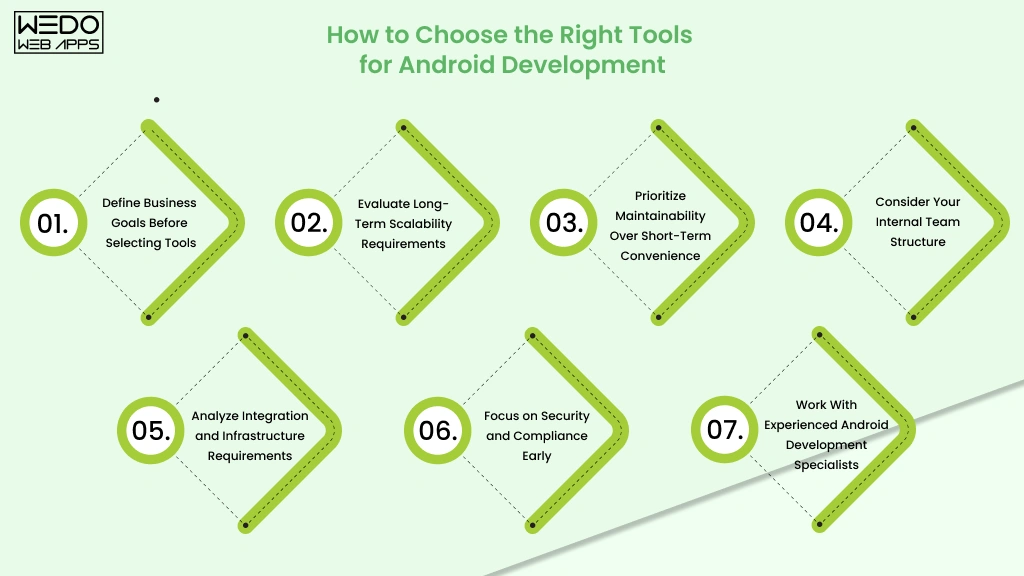
Selecting the best Android development tools for enterprises is not about choosing the most popular technologies. The right Android development ecosystem depends on how well the tools align with your business goals, scalability expectations, operational complexity, and long-term product vision.
Many businesses make the mistake of selecting Android development tools based only on short-term development speed. However, enterprise mobile applications are long-term investments that require continuous scaling, maintenance, optimization, and infrastructure evolution.
Below are some of the most important factors businesses should evaluate before finalizing an Android enterprise app development stack.
Define Business Goals Before Selecting Tools
The Android development tools you choose should directly support your business objectives.
For example:
- Startups may prioritize rapid MVP launches
- Ecommerce businesses may focus on scalability and analytics
- Fintech applications may require advanced security infrastructure
- Workforce apps may depend heavily on backend integrations
Without clear business alignment, enterprises often end up building development ecosystems that create operational inefficiencies later.
Before evaluating tools, businesses should define:
- Expected app scale
- Target audience
- Release timelines
- Integration requirements
- Long-term expansion plans
Evaluate Long-Term Scalability Requirements
Scalability should always be part of Android development planning from the beginning.
As Android applications grow, businesses typically face:
- Larger codebases
- More integrations
- Increasing user traffic
- Larger engineering teams
- More frequent releases
The best Android development tools for enterprises should support:
- Modular architecture
- Automation
- Maintainability
- Performance optimization
- Scalable infrastructure
Choosing tools that only work well for early-stage development can create major migration challenges later.
Prioritize Maintainability Over Short-Term Convenience
Some Android development tools may initially accelerate development but eventually create:
- Technical debt
- Inconsistent workflows
- Difficult upgrades
- Higher maintenance costs
Enterprises should prioritize Android development ecosystems that:
- Receive regular updates
- Offer strong documentation
- Support scalable workflows
- Integrate efficiently with modern infrastructure
Long-term maintainability often matters more than short-term development convenience for enterprise applications.
Consider Your Internal Team Structure
The complexity of your Android development ecosystem should match your team's capabilities.
For example:
- Smaller teams may benefit from simplified cloud-based infrastructure
- Large enterprises may require advanced CI/CD and DevOps automation
- Cross-functional teams may prioritize collaboration and workflow visibility
Businesses should evaluate whether their teams can efficiently manage:
- Automation infrastructure
- Deployment pipelines
- Monitoring systems
- Modular architecture
- Advanced integrations
Tool complexity without operational readiness often slows development instead of improving it.
Analyze Integration and Infrastructure Requirements
Enterprise Android applications rarely operate independently. Most businesses require integrations with:
- CRMs
- Payment systems
- ERP platforms
- Analytics tools
- Cloud services
- Internal enterprise software
The right Android enterprise app development tools should support flexible integrations without creating infrastructure limitations.
Businesses planning future expansion should especially prioritize integration-friendly Android ecosystems.
Focus on Security and Compliance Early
Security becomes increasingly difficult and expensive to implement after applications scale.
Enterprises should evaluate whether Android development tools support:
- Secure authentication
- Encrypted workflows
- Role-based access controls
- Compliance-ready architecture
- Automated security testing
Industries like healthcare, fintech, and enterprise SaaS often require security-first Android development strategies from the beginning.
Work With Experienced Android Development Specialists
Choosing Android development tools is ultimately a strategic architecture decision, not just a development preference.
Experienced Android app development teams can help businesses:
- Evaluate scalability risks
- Avoid technical debt
- Optimize automation workflows
- Improve infrastructure planning
- Build maintainable Android ecosystems
This becomes especially important for enterprises building applications intended for long-term growth and continuous operational scaling.
The best Android development tools are the ones that support your business not only during launch, but also during future expansion, modernization, and evolving customer expectations.

Conclusion
Choosing the best Android development tools for enterprises is not simply about accelerating app development. The tools businesses select directly influence scalability, security, release efficiency, infrastructure flexibility, long-term maintenance costs, and overall product stability.
As enterprise Android applications continue becoming more complex, businesses increasingly rely on complete Android development ecosystems that support automation, modular architecture, monitoring, CI/CD workflows, and continuous scalability. Tools like Android Studio, Kotlin, Jetpack Compose, Gradle, Firebase, Jenkins, and modern observability platforms each play a different role in building scalable Android applications.
However, there is no universal Android development stack that fits every business. Startups, ecommerce platforms, fintech companies, SaaS businesses, and enterprise workforce applications all have different operational priorities and infrastructure requirements. This is why Android development tool selection should always align with long-term business goals instead of only short-term development convenience.
Enterprises that invest early in scalable Android app development tools often reduce technical debt, improve deployment consistency, accelerate release cycles, and maintain stronger operational flexibility as their applications grow.
For businesses planning long-term Android scalability, working with experienced Android app development specialists can help simplify technology decisions, optimize workflows, and build future-ready enterprise mobile ecosystems.