Introduction: Why Offline-First Architecture is Critical for Field Apps
Why do field service apps fail the moment internet connectivity becomes unreliable?
Because most reliable applications are still built with an online-first approach, assuming constant network access, something field environments rarely guarantee.
This is where offline-first mobile app architecture becomes critical.
In an offline-first system, the application is designed to store and operate on data locally first, allowing users to continue working without interruption. Data is then synchronized with the server once connectivity is restored. This approach ensures reliability, consistency, and uninterrupted workflows for teams operating in construction sites, remote agricultural fields, logistics routes, or healthcare environments.
For businesses investing in mobile app development, this is not just a technical enhancement; it is a decision that directly impacts productivity, data accuracy, and operational continuity.
In this guide, you will learn how offline-first architecture works, how to choose the right local database (SQLite, Realm, Hive), what data sync strategies actually perform in poor connectivity, and how to evaluate whether your business truly needs this approach.

What is Offline-First Mobile App Architecture (And Why it Matters Now)
At its core, offline-first mobile app architecture is a design approach where your application is built to function completely without internet connectivity, using the network only as a secondary layer for synchronization, not as a dependency.
In simple terms, the app works first, and the internet helps later.
A Clear, Practical Definition
An offline-first architecture ensures that:
- Data is stored locally on the device (using databases like SQLite, Realm, or Hive)
- All user actions (create, update, delete) are processed instantly on the device
- Changes are queued and synchronized with the server when connectivity is available.
- The system handles conflicts and consistency automatically
This means your application does not "break" when the internet disappears; it continues operating as expected.
Offline-First vs Online-First vs Cache-First (Critical Buyer Distinction)
Most businesses confuse these models, and that leads to wrong architectural decisions.
1. Online-First Architecture- App depends on APIs for most operations
- Limited or no functionality without internet
- Common on basic apps
Risk: Complete workflow failure in poor connectivity
2. Cache-First Approach- Some data is cached locally for faster access
- Still relies on the backend for key actions
Risk: Partial functionality, inconsistent experience
3. Offline-First Approach- Local database acts as the primary data source
- Server becomes a sync layer, not a dependency
Outcome: Reliable, uninterrupted operations.
The Core Principle: Local Database as the Source of Truth
This is the shift most teams struggle with.
- In traditional systems: Server = source of truth
- In offline-first systems: Local database = source of truth (temporarily)
The app writes and reads from the local database first.
The backend later reconciles and syncs this data across systems.
This architectural shift is what enables:
- Real-time responsiveness (no API wait times)
- Seamless offline functionality
- Better user experience in unpredictable environments
Why This Matters Now (Not Later)
If your users operate in controlled environments with stable internet, offline-first may feel optional.
But for industries like:
- Construction (basements, remote sites)
- Logistics (on-road, rural routes)
- Agriculture (low-connectivity zones)
- Healthcare (field operations, remote visits)
Connectivity is not just inconsistent; it is unreliable by default.
And when your app depends on connectivity in these environments, you are not building a digital solution; you are introducing operational friction.
What Businesses Get Wrong at This Stage
Most companies do not ignore offline-first; they underestimate it. They treat it as:
- A "feature to add later"
- A fallback mode
- A minor enhancement
In reality, Offline-first is not a feature. It is a system-level decision that affects database design, sync logic, and user experience from day one.
Where This Connects to Your Development Decision
If you are evaluating mobile app development for field teams, this is the point where your direction gets locked:
- Choose online-first because it is faster to build and more fragile in real-world use
- Choose offline-first because it is a more thoughtful architecture and is significantly more reliable
And this decision impacts development cost, timeline, long-term scalability, and user adoption.
Where Traditional Mobile Apps Break for Field Teams
Most businesses do not realize their app is flawed until it is used in the real-world. On paper, everything looks right:
- Clean UI
- All required features
- API integrations working perfectly
But once the app reaches field teams, a different reality shows up.
The Core Problem: Dependency on Real-Time Connectivity
Traditional mobile apps are built with a simple assumption: "The device will always be connected to the internet."
That assumption quietly drives key decisions:
- Data is fetched from APIs in real time
- Actions require immediate server confirmation
- Very little data is stored locally
This works fine in offices or urban environments. But field teams do not operate there.
What Actually Happens on the Ground
In real usage scenarios, connectivity is intermittent, slow, and completely unavailable at times.
Now, combine that with an online-first architecture, and you get failure points like:
- Data Entry Failures: A user fills out a form, hits submit, the network drops, and the data disappears. This leads to rework, frustration, and lost productivity.
- Incomplete Workflows: A task requires multiple steps, and your API fails midway. As a result, work remains partially done, causing confusion and delays.
- Delayed Updates: A field worker updates task status, but the sync fails silently. As a result, the managers operate on outdated information.
- Duplicate or Conflicting Data: Users retry actions due to failed responses. This causes duplicate entries and inconsistent records.
Why Features Do Not Solve This Problem
This is where many businesses go wrong. They try to "fix" the issue by adding:
- Retry buttons
- Loading indicators
- Error messages
But these are surface-level solutions.
If your architecture depends on connectivity, no UI improvement will fix the core issue.
The Hidden Business Cost (That Does Not Show Up in Estimates)
This is where the real damage happens, not in development but in operations.
- Teams start using manual workarounds (calls, messages, spreadsheets)
- Data quality drops, affecting reporting and decisions
- Adoption decreases because the app becomes unreliable
- Support and maintenance costs increase
Over time, the app becomes a liability instead of an asset.
The Gap Between "Built Right" and "Works in Reality"
From a technical perspective, your app may be perfectly built. From a field perspective, it's failing.
The gap exists because:
- The architecture was designed for ideal conditions
- The users operate in unpredictable environments
The Turning Point for Most Businesses
This is usually the moment when decision-makers realize that "We don't need more features, we need a more reliable system."
And that is exactly where offline-first architecture becomes not just relevant, but necessary.
Core Components of Offline-First Mobile App Architecture
By now, the problem is clear: traditional architectures fail because they depend on connectivity.
So what actually makes an offline-first system work?
It's not one feature; it is a combination of tightly connected components that ensure your app can operate independently and sync intelligently.
A Simple Way to Think About It
An offline-first app is built around one key idea: "Capture, store, and process data locally; sync later."
To make that happen reliably, your architecture needs the following core layers:
1. Local Database Layer (Your App's Foundation Layer)
This is where everything starts.
- Stores all application data on the device
- Handles reads and writes instantly (no API delay)
- Powers the entire offline experience
Without a strong local database, offline-first simply does not exist.
This is where choices like SQLite, Realm, or Hive come into play.
2. Sync Engine (The Brain of the System)
The sync engine is responsible for keeping your local and server data aligned. It decides:
- When to sync
- What to sync
- How to handle failures
Key responsibilities:
- Detect connectivity changes
- Push local changes to the server
- Pull updated data from the backend
- Retry failed sync attempts
A weak sync engine = inconsistent data across devices.
3. Conflict Resolution System
When multiple users or devices update the same data offline, conflicts are inevitable. Your system must decide:
- Which version is correct?
- Should data be merged or overwritten?
Common strategies include:
- Last-write-wins
- Timestamp-based resolution
- Versioning systems
This directly impacts data accuracy and trust.
4. Offline Queue Management
Every action performed offline needs to be tracked. That is where the offline queue comes in.
It stores:
- Form submissions
- Status updates
- Media uploads
And ensures:
- Actions are not lost
- Tasks are retired automatically
- Execution order is maintained
Without this, offline actions simply disappear.
5. API & Backend Layer (Sync Target, Not Dependency)
In offline-first systems, the backend plays a different role:
- It is not required for immediate functionality
- It acts as a central sync and aggregation layer
Responsibilities include data validation, conflict handling (server-side), multi-device synchronization, and reporting and analytics.
6. Background Sync & Connectivity Handler
Your app must intelligently respond to network conditions. This layer:
- Detects connectivity changes
- Triggers sync automatically
- Handles partial sync failures
- Optimizes sync frequency
Ensures a smooth experience without user intervention.
Architecture Overview (How It All Connects)
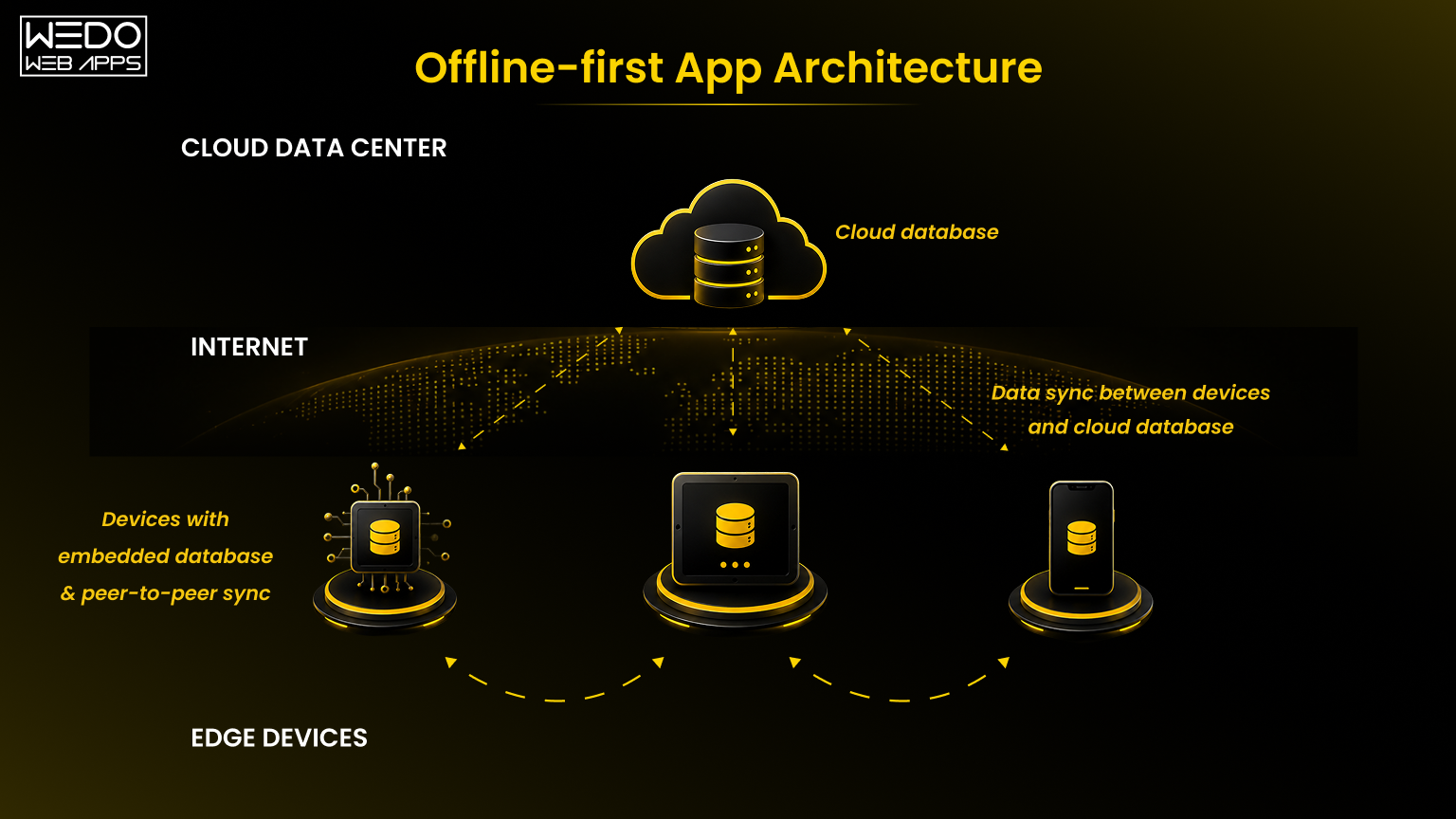
How to Read This Architecture
- Device Layer: The mobile app where users interact and data is created
- Local Database: Stores and processes all data first
- Sync Manager/Engine: Handles communication between the device and the server
- Cloud Backend: Acts as the central system for aggregation and consistency
The Real Advantage of This Architecture
When these components are implemented correctly:
- Your app does not break without internet
- Users can complete workflows without interruption
- Data remains consistent across devices over time
- System becomes resilient, not fragile
Where Most Implementations Fail
Even when businesses choose offline-first, they often:
- Underestimate sync complexity
- Ignore conflict resolution
- Build weak queue mechanisms
- Treat backend like a real-time dependency again
Which brings us to the next critical decision: "Choosing the right local database." Because everything in this architecture depends on choosing the right database.
Local Database Options for Mobile Apps: SQLite vs Realm vs Hive
If offline-first architecture is the strategy, your local database is the foundation.
Everything, including data storage, speed, sync efficiency, and conflict handling, depends on this choice. And this is where most businesses make a costly mistake:
They pick a database based on familiarity, not based on use-case fit.
Let's break this down from a buyer decision perspective, not just technical specifications.
1. SQLite - Stable, Proven, and Universally Supported
SQLite is the most widely used local database in mobile applications.
Why businesses choose it:
- Built into Android and iOS
- Extremely stable and reliable
- Works well for structured, relational data
- No external dependencies
Where it works best:
- Apps with clearly defined data relationships
- Systems requiring strong data integrity
- Long-term, scalable applications
Limitations you should consider:
- Requires manual handling for sync logic
- No built-in reactive data updates
- More development effort for complex use case
SQLite is a safe, enterprise-grade choice, but it requires stronger engineering effort to make it truly offline-first.
2. Realm - Real-Time, Reactive, and Developer-Friendly
Realm is an object-based database designed for modern mobile apps.
Why businesses choose it:
- Real-time data updates (reactive architecture)
- Built-in support for synchronization (in some setups)
- Easier to work with complex data models
- Faster development cycles
Where it works best:
- Apps requiring real-time UI updates
- Complex data structures
- Teams prioritizing speed of development
Limitations you should consider:
- Larger app size compared to SQLite
- Can introduce vendor dependency
- Advanced configurations may increase complexity
Realm accelerates development and improves responsiveness, but requires careful planning for scalability and control.
3. Hive - Lightweight and Optimized for Flutter Apps
Hive is a lightweight, NoSQL database designed specifically for Flutter applications.
Why businesses choose it:
- Extremely fast (key-value storage)
- No native dependencies
- Simple and easy to implement
- Ideal for cross-platform apps
Where it works best:
- Flutter-based applications
- Lightweight data storage needs
- MVPs or fast deployment scenarios
Naturally fits into Flutter app development environments where speed and simplicity matter.
Limitations you should consider:
- Limited support for complex queries
- Not ideal for highly relational data
- Requires additional planning for large-scale systems
Hive is perfect for speed and simplicity, but may not scale well for data-heavy enterprise use cases.
SQLite vs Realm vs Hive - How to Choose (Buyer Decision Framework)
Instead of asking "Which database is best?", ask:
"Which database fits my app's complexity, scale, and long-term vision?"
Choose SQLite if:
- You need reliability and full control
- Your app handles structured, relational data
- You are building for long-term scalability
Choose Realm if:
- You want faster development with a reactive UI
- Your app has complex, evolving data models
- Real-time responsiveness is important
Choose Hive if:
- You are building with Flutter
- Your app is lightweight or mid-scale
- Speed and simplicity are top priorities
The Mistake to Avoid
Many businesses:
- Choose Hive for speed -> struggle later with complexity
- Choose SQLite -> underestimate development effort
- Choose Realm -> don't plan for long-term control
The result?
Re-architecture costs later, which are significantly higher than choosing right upfront.
Where This Connects to Your Development Decision
Your database choice directly impacts sync complexity, app performance, development cost and timeline, and future scalability.
This is not just a technical decision; it is a business decision.
And once your local database is set up, the next critical layer comes into play: How data actually moves between the device and the server.

Data Sync Strategy for Mobile Apps with Poor Connectivity
Choosing the right database sets the foundation, but the data sync strategy determines whether your offline-first app actually works in real-world conditions.
But the reality is that Offline is easy. Sync is where systems fail.
If your sync logic is weak, you will face:
- Data mismatches across devices
- Duplicate or missing records
- Delayed updates impacting decisions
- Loss of user trust in the system
So the goal is not just syncing data; it is syncing reliably, efficiently, and predictably.
Sync Patterns Explained (And When to Use Them)
Different apps require different sync approaches. There is no one-size-fits-all.
1. One-Way Sync (Server -> Device)
- Data flows only from the backend to the app
- Useful for read-only or reference data
Example: Product catalogs, pricing data
2. Two-Way Sync (Device <-> Server)
- Data flows in both directions
- Most common in field service applications
Example: Task updates, form submissions
3. Delta Sync (Only Changes are Synced)
- Instead of syncing full datasets, only modified data is transferred
- Reduces bandwidth and improves speed
Critical for apps used in poor connectivity environments.
4. Batch Sync (Grouped Data Transfer)
- Data is synced in chunks at intervals
- Useful when handling large volumes of data
Helps optimize performance and reduce server load.
Eventual Consistency (The Core Concept You Most Understand)
In offline-first systems, expecting real-time consistency is unrealistic.
Instead, systems follow:
"Eventual consistency - data becomes consistent across systems over time, not instantly."
This means:
- Users may see slightly outdated data temporarily
- System ensures consistency after sync completes
Why This Matters for Business Decisions
If your operations require:
- Instant global updates, then offline-first needs careful design
- High tolerance for slight delays, then offline-first works perfectly
Most field operations fall into the second category.
When Should Sync Happen?
Timing your sync correctly is just as important as how you sync.
- On Reconnect: Trigger syncs automatically when the internet is restored. This is the most common and essential approach.
- Scheduled Sync: Sync at fixed intervals. This is useful for predictable workloads.
- User-Initiated Sync: Manual "Sync Now" option. This sync adds control in critical workflows.
- Background Sync (Recommended): Sync runs silently without interrupting user actions. This is best for a seamless experience.
What a Strong Sync Strategy Includes
A reliable sync system is not just about moving data; it must handle edge cases. Your strategy should include:
- Retry mechanisms for failed sync attempts
- Data validation before pushing to the server
- Conflict detection triggers
- Sync prioritization (critical vs non-critical data)
- Logging for debugging and monitoring
The Mistake Most Businesses Make
They assume that "Sync is just an API call." However, it is not.
It is a system-level workflow that must handle:
- Network interruptions
- Partial failures
- Data conflicts
- Performance constraints
Ignoring this leads to apps that work fine in testing and fail in real-world usage.
Where This Connects to the Next Layer
Once data starts syncing between devices and servers, one problem becomes unavoidable: "What happens when the same data is modified in different places?"
That is where conflict resolution strategies come in, and they directly impact your data accuracy and system reliability.
Conflict Resolution Strategies in Offline-First Systems
Once your app allows users to work offline and sync later, one challenge becomes unavoidable:
"What happens when the same data is updated in different places at different times?"
This is not a rare edge case; it is a normal scenario in offline-first systems. If not handled correctly, it leads to:
- Data inconsistencies
- Overwritten information
- Loss of critical updates
- Reduced trust in the system
So conflict resolution is not just technical; it directly impacts business accuracy and decision-making.
What Causes Data Conflicts?
Conflicts occur when:
- Two users modify the same record while offline
- A user updates data offline while another updates it online
- Sync delays cause overlapping updates
Example:
A construction manager updates task status on-site (offline), while the office team updates the same task in real-time. When sync happens, which version is correct?
Types of Conflict Resolution Strategies
There is no universal "best" strategy. The right approach depends on your business priorities - speed vs accuracy vs control.
1. Last-Write-Wins (LWW)
The most recent update overwrites previous ones. This is based on timestamps.
Best for:
- Non-critical data
- High-speed systems
Risk: Important data can be lost without visibility.
2. Timestamp-Based Resolution (With Validation)
Compares timestamps but includes validation rules. It prevents invalid overwrites.
Best for: Systems needing a balance between speed and accuracy
Risk: Slightly more complex implementation.
3. Version-Based Conflict Handling
Each record has a version number. Conflicts are detected when versions mismatch.
Best for: Structured systems with critical data.
Advantage: Clear tracking of changes
4. Field-Level Merging
Instead of overwriting entire records, only changed fields are merged.
Best for: Complex forms or multi-field updates.
Advantage: Preserves maximum data.
Challenge: Requires careful implementation.
5. Manual Conflict Resolution (User Intervention)
System flags conflicts and lets users decide.
Best for: High-stakes data (eg, Healthcare, compliance systems)
Trade-off: Slower, but highly accurate.
Choosing the Right Strategy (Buyer Decision Lens)
Instead of asking "Which method is best?", ask:
"What level of data accuracy does my business require?"
- If speed matters more, last-write-wins may work
- If accuracy matters more, versioning and manual resolution may work
- If data is complex, field-level merging is the best.
The Real Trade-Off You Must Accept
Every conflict strategy involves a trade-off:
- Speed vs accuracy
- Automation vs control
- Simplicity vs complexity
Trying to maximize all three usually leads to a fragile system.
What Most Businesses Get Wrong
They either ignore conflict resolution completely or apply a default strategy without considering business impact.
Result?
Silent data corruption, confusing user experience, and increased operational errors.
Why This Matters for Your App's Success
Conflict resolution directly affects data reliability, user trust, reporting accuracy, and decision-making quality.
A poorly handled conflict system can make even a well-built app unreliable.
Where This Connects Next
Now that conflicts are handled, the next question is "How do we ensure user actions performed offline are never lost in the first place?"
That is where offline queue management becomes critical.
Offline Queue Management: Handling Actions Without Internet
Even with the right database and sync strategy in place, one question remains critical: "What happens to user actions when there is no internet?"
Because in field environments, users don't stop working when connectivity drops. They continue creating data - forms, updates, uploads, and status changes.
If your system does not capture and manage these actions properly, you risk:
- Lost data
- Broken workflows
- Duplicate submissions
- User frustration
This is where offline queue management becomes essential.
What is an Offline Queue?
An offline queue is a system that:
- Stores user actions performed without connectivity
- Maintains execution order
- Retires actions when the network is available
Think of it as a temporary holding system for all offline operations.
What Gets Stored in the Queue?
Typical queued actions include:
- Form submissions
- Task updates
- Media uploads (images, videos, documents)
- Location on tracking data
- API requests that failed due to connectivity
Every action that would normally require a server call must be queued.
How a Reliable Offline Queue Works
A well-designed offline queue does not just store data; it manages it intelligently.
- Action Capture: Every user action is immediately saved locally, and there is no dependency on API response.
- Structured Storage: Each action is stored with metadata, like timestamp, action type, payload data, and retry count.
- Ordered Execution: Actions are processed in sequence and ensure logical consistency (eg, create -> update -> submit)
- Retry Mechanism: Failed actions are retried automatically. Supports exponential backoff to avoid server overload.
- Failure Handling: After multiple failed attempts, action is flagged, the user may be notified, and a manual retry option is provided.
Priority-Based Queueing (Advanced but Valuable)
Not all data is equally important.
A robust system allows:
- High-priority actions (eg, critical updates) -> synced first
- Low-priority actions (eg, logs, analytics) -> deferred
This improves both performance and user experience.
Common Mistakes Businesses Make
Most offline queue implementations fail because they:
- Don't persist the queue data properly (lost on app restart)
- Ignore retry logic
- Don't handle partial features
- Overload the system with unoptimized requests
Result: Users think actions are completed, but data never reaches the server.
Why This Matters For Business Operations
Offline queue management directly impacts data reliability, workflow continuity, and system trust.
If users cannot trust that their actions are saved, they will:
- Repeat actions (creating duplicates)
- Switch to manual processes
- Lose confidence in the app
Where This Connects Next
Once the actions are queued and synced, another challenge emerges:
How do you keep performance fast and data usage efficient, especially in low-bandwidth environments?
That is where data optimization techniques like compression and storage management come in.
Data Optimization: Compression, Storage, & Performance
By this stage, your app can:
- Work offline
- Store data locally
- Sync intelligently
- Handle conflicts
- Queue actions reliably
But there is still a practical constraint don't disappear, your architecture has to work within them.
If not optimized, even a well-designed offline-first app can become:
- Slow on low-end devices
- Storage-heavy
- Inefficient during sync
- Costly in terms of data usage
That is why data optimization is not optional; it is essential for real-world performance.
Why Optimization Matters More in Offline-First Apps
Unlike online-first apps, offline-first systems:
- Store significant amounts of data locally
- Perform frequent read/write operations
- Sync data in unpredictable network conditions
Without optimization:
- App performance degrades over time
- Sync becomes slower and more expensive
- Users experience lag and delays
Key Optimization Techniques You Should Consider
1. Data Compression
When syncing data, especially media-heavy content, size matters.
What to optimize:
- Images (compress before upload)
- JSON payloads (minify or compress)
- File attachments
Why it matters:
- Faster sync in low bandwidth
- Reduced data costs for users
- Improved backend performance
Especially critical for industries like construction and healthcare, where media uploads are frequent.
2. Lazy Loading (Load Only What's Needed)
Instead of loading entire datasets, load data on demand, fetch only relevant records.
Example: Instead of loading all project data, load only current tasks.
Impact: Faster app performance, lower memory usage, and better user experience.
3. Pagination & Chunking
Large datasets should never be processed at once. Break data into smaller chunks and sync or load incrementally.
Benefits:
- Prevents app crashes
- Improves responsiveness
- Reduces sync failures
4. Smart Data Storage Management
Offline-first apps must control how much data is stored locally. Strategies include:
- Archiving old data
- Auto-cleanup policies
- Storing only essential fields locally
Prevents storage overflow on user devices.
5. Media Optimization (Often Ignored, Always Costly)
Media files are the biggest performance bottleneck. Optimize by:
- Compressing images before saving
- Using lower resolutions where acceptable
- Uploading media in the background
6. Sync Optimization (Efficiency Over Frequency)
More sync does not always mean better performance. Optimize by:
- Syncing only changed data (delta sync)
- Avoiding redundant API calls
- Scheduling sync intelligently
The Mistake Most Businesses Make
They focus on features, UI, and backend scalability. But ignore:
"How efficiently data moves and lives within the app."
Result?
- Sluggish performance
- High data consumption
- Poor user retention
Why This Matters for Your Business?
Optimization directly impacts:
- App speed (user experience)
- Device compatibility (especially low-end devices)
- Data usage costs (critical in many regions)
- Long-term scalability
An unoptimized offline-first app can become just as problematic as an online-only one.
Where This Connects Next
Now that we have covered architecture, database, sync, conflict handling, queue management, and optimization, it is time to translate all of this into what your app should actually include.
Because ultimately, buyers don't just evaluate architecture, they evaluate features and outcomes.
Field Service Mobile App Features Checklist (Buyer-Focused)
By now, you understand the architecture behind reliable field apps.
But when it comes to making a decision, most buyers shift focus to a more practical question:
"What exactly should my field service app be able to do?"
This section translates everything we have covered into a feature-level checklist, so you can evaluate whether your app idea (or current solution) is actually built for real-world conditions.
Must-Have Features (Non-Negotiable for Field Operations)
These are not "nice-to-have" features. If your app lacks these, it will struggle in offline environments.
1. Offline Data Capture & Storage
Users should be able to create and update data without an internet connection. All actions must be saved locally instantly.
This is the foundation of offline-first mobile app architecture.
2. Seamless Data Synchronization
Automatic sync when connectivity is restored. Clear sync status visibility (pending, failed, completed).
Prevents confusion and duplicate work.
3. Task & Workflow Management
Assign, update, and track tasks in real time (or offline). Support multi-step workflows.
Critical for construction, logistics, and service teams.
4. GPS Tracking & Location Tagging
Capture real-time or last-known location. Tag tasks, reports, or activities with geo-data.
Essential for accountability and tracking.
5. Offline Notifications & Alerts
Notify users of pending sync, failed actions, or updates. Ensure users are aware of the system status.
Advanced Features (High Impact, Competitive Advantage)
These features differentiate a basic app from a high-performing field system.
6. IoT Integration for Real-Time Data
Connect devices for automated data capture (eg, sensors, equipment) and reduce manual input errors.
Strong use case of IoT app development in industries like logistics and agriculture.
7. Role-Based Dashboards
Customize views based on user roles (manager, technician, admin). Show only relevant data and actions.
Improves usability and decision-making.
8. Media Capture & Annotation
Upload images, videos, and documents. Add notes or annotations.
Widely used in construction and inspection workflows.
9. Audit Logs & Activity Tracking
Track who did what and when. Maintain history for compliance and analysis.
10. Smart Search & Filtering (Offline Included)
Allow users to search data even without connectivity. Enable filters for faster access.
What This Checklist Helps You Evaluate
Instead of asking, "Does my app have features?" You should ask, "Are these features designed to work reliably in offline conditions?"
Because:
- A feature that fails without internet is not truly usable in field environments
- A well-architected feature continues working regardless of connectivity
The Gap Most Businesses Miss
Many apps list all the right features, works perfectly in demos, but fail in real-world usage because:
- Features depend on APIs
- Offline behavior is not considered
- Sync states are not visible
Result? Poor adoption despite strong feature lists.
Where This Connects to Real-World Use
Now that you know what features matter, the next logical question is: "How do these features actually play out in real industries?"
Because requirements vary significantly across domains.
Industry Use Cases: Where Offline-First Architecture Delivers ROI
At this point, the architecture, database, and feature discussions are clear. But buyers don't invest in architecture; they invest in outcomes.
So the real question is:
"Where does offline-first mobile app architecture actually deliver measurable ROI?"
Let's look at how this translates into real-world impact across key industries.
1. Construction: Real-Time Site Management Without Connectivity
Construction environments are one of the most challenging for connectivity:
- Basements
- Remote project sites
- Large structures blocking signals
How offline-first helps:
- Site supervisors log daily progress without internet
- Safety incidents are recorded instantly
- Images and reports are captured and synced later
Key features in action:
- Offline data capture
- Media uploads
- Task tracking
Directly supports mobile app for construction site management features and improves reporting accuracy.
2. Agriculture: Data Collection in Low-Connectivity Zones
Agriculture operations often happen in areas with:
- Weak or no internet connectivity
- Large geographic spread
How offline-first helps:
- Farmers or field agents record crop data on-site
- Weather observations and soil data are logged offline
- Sync happens later when connectivity is available
Business Impact:
- Better planning decisions
- Reduced dependency on manual tracking
3. Logistics: Continuous Tracking Across Unstable Networks
Logistics teams operate across:
- Highways
- Rural routes
- Cross-region deliveries
How offline-first helps:
- Drivers update delivery status without interruption
- GPS data is stored locally and synced later
- Proof of delivery (photos, signatures) captured offline
Result:
- Fewer missed updates
- Better tracking visibility
- Improved customer experience
4. Healthcare: Reliable Data Capture in Critical Environments
Healthcare field operations demand:
- Accuracy
- Reliability
- Immediate data capture
How offline-first helps:
- Patient data recorded during field visits
- Medical observations logged without delay
- Sync ensures central systems are updated later
Why it matters:
- Reduces risk of data loss
- Ensures continuity of care
- Supports compliance and reporting
The Common Pattern Across All Industries
Despite different use cases, the core benefits remain the same:
- Work continues without dependency on connectivity
- Data is captured at the moment it is created
- Systems become resilient and reliable
What This Means for Your Business
If your operations involve field teams, distributed workforce, and unpredictable network conditions.
Then offline-first is not industry-specific; it is operationally essential.
Where This Connects Next
Now that you have seen real-world applications, the next step is:
"How do you evaluate whether your business truly needs offline-first architecture?"
Because not every app requires it; but if your does, missing it can be costly.
How to Decide if You Need an Offline-First App (Step-by-Step)
At this stage, most buyers are thinking:
"This sounds valuable, but do I actually need offline-first architecture for my app?"
The mistake is trying to answer this based on features.
The right way is to evaluate your operational reality, data flow, and risk tolerance.
Here is a clear, decision-focused framework you can use.
Step 1: Assess Real-World Connectivity Conditions
Start with where your app will actually be used, not where it is developed.
- Do your users operate in low-network or no-network areas?
- Are there frequent signal drops or unstable connections?
- Is connectivity unpredictable across locations?
If connectivity is not guaranteed, offline-first becomes a strong requirement, not an option.
Step 2: Identify How Critical Data Capture Is
Ask yourself:
- Can users afford to lose data if submission fails?
- Does delayed data impact operations or decisions?
- Is real-time entry important for compliance or tracking?
If data loss or delay creates business risk, you need local-first data handling.
Step 3: Evaluate User Workflows in the Field
Understand how your users interact with the app:
- Do they perform multi-step tasks?
- Do workflows depend on continuous input?
- Are tasks time-sensitive?
If workflows are interrupted by connectivity issues, productivity drops immediately.
Step 4: Estimate Sync Complexity (Often Underestimated)
Now think beyond the device:
- Will multiple users update the same data?
- Do you need near real-time visibility across teams?
- Are there dependencies between different data points?
Higher complexity means you need a well-planned sync and conflict resolution strategy.
Step 5: Decide Based on Risk vs Investment
This is the final decision layer.
Offline first requires:
- More thoughtful architecture
- Higher initial development effort
But it deliver:
- Reliability
- Better adoption
- Long-term scalability
The real question is: "Is the cost of failure higher than the cost of building it right?"
A Quick Decision Snapshot
You likely need offline-first if:
- Your users operate in the field
- Connectivity is unreliable
- Data accuracy and continuity are critical
- Workflows cannot pause
You may not need it if:
- Your app is used in controlled, always-online environments
- Data is non-critical or easily recoverable
The Cost of Getting This Wrong
Choosing the wrong architecture leads to:
- Rebuilding the app later (expensive)
- Low user adoption
- Operational inefficiencies
- Data inconsistencies
And these costs are significantly higher than building the right foundation upfront.
Where This Connects Next: Even when businesses decide to go offline-first, many implementations still fail, not because of intent, but because of avoidable mistakes.

Common Mistakes Businesses Make When Building Offline Apps
Deciding to go offline-first is the right move, but execution is where most projects fail.
And not because teams lack effort. It is because offline-first systems are deceptively complex.
They look like feature problems, but they are actually architecture problems.
Here are the most common mistakes that lead to unreliable apps, rework, and wasted investment.
Mistake 1: Treating Offline as a Feature, Not an Architecture
Many teams approach offline support like this:
- "We will add offline mode later"
- "Let's build APIs first, then handle offline"
This is the biggest mistake.
Offline-first affects database design, data flow, sync logic, and UI behavior.
Impact:
- Major rework later
- Increased development cost
- Fragile system behavior
Mistake 2: Understanding Sync Complexity
Sync is often reduced to: "Push data when internet is available"
In reality, it involves retry logic, partial failure handling, data validation, and conflict detection.
Impact:
- Missing or duplicated data
- Inconsistent records across devices
Mistake 3: Ignoring Conflict Resolution Early
Teams often assume that conflicts are rare and the default logic will handle it.
But in offline systems, conflicts are expected, not exceptions.
Impact:
- Silent data overwrites
- Loss of critical updates
- Poor decision-making due to incorrect data
Mistake 4: Weak Offline Queue Implementation
A basic queue is not enough. Common issues include:
- Actions not persisted properly
- No retry strategy
- No visibility into failed actions
Impact:
- Lost user actions
- Broken workflows
- Lack of user trust
Mistake 5: Overloading the App with Unoptimized Data
Teams often store too much data locally, or sync entire datasets instead of just changes.
Impact:
- Slow performance
- Increased storage usage
- Poor experience on low-end devices
Mistake 6: Poor Visibility of Sync State
Users don't know what's synced, what's pending, or what failed.
Impact:
- Confusion
- Duplicate actions
- Operational inefficiencies
Mistake 7: Choosing Technology Without Long-Term Thinking
Examples:
- Picking a database just because it is easy
- Ignoring scalability needs
- Not planning for future integrations
Impact:
- Re-architecture costs
- Limited flexibility
- Performance issues at scale
The Pattern Behind These Mistakes
All these issues stem from one core problem: Designing for ideal conditions instead of real-world usage.
Why This Matters for Your Investment
If these mistakes are not addressed early:
- Development costs increase over time
- Time-to-market gets delayed
- User adoption drops
- System reliability suffers
And fixing these later is significantly more expensive than building correctly from the start.
Where This Connects Next
At this point, the technical complexity is clear. Which brings us to a critical business decision:
"Should you build this in-house or work with a development partner who understand offline-first systems?"
How the Right Development Partner Impacts Offline App Success
By now, one thing should be clear:
"Offline-first apps are not just built, they are architected."
And that difference is exactly why the choice of development partner has a direct impact on whether your app succeeds or struggles post-launch.
Why Offline-First Requires Special Expertise
Unlike standard apps, offline-first systems demand:
- Thoughtful data modeling (local-first approach)
- Robust sync engine design
- Conflict resolution planning
- Efficient offline queue management
- Performance optimization across devices
This is not something that can be "figured out during development."
It needs to be designed from day one.
What Happens When the Expertise is Missing
Many businesses either:
- Assign this to a general development team
- Or treat it as a standard mobile app development project
The result?
- Sync failures in real-world usage
- Data inconsistencies across users
- Frequent bug fixes post-launch
- Higher long-term maintenance costs
The app may launch, but it won't scale reliably.
What to Look for in a Development Partner
If you are evaluating vendors, don't just assess UI capabilities or past apps.
Focus on their ability to handle system-level complexity.
1. Proven Experience with Offline-First Architecture
- Have they built apps that work reliably without connectivity?
- Can they explain their sync strategy clearly?
2. Strong Data & Sync Understanding
- Do they talk about conflict resolution, queries, and consistency?
- Or only about APIs and frontend features?
3. Cross-Platform Expertise
If you are building for both Android and iOS:
- Do they have experience in flutter app development or cross-platform frameworks?
- Can they ensure consistent offline behavior across devices?
4. Scalability Thinking (Not Just MVP Delivery)
A good partner plans for:
- Future data growth
- Increased user load
- Integration with other systems
Not just quick delivery
5. Ability to Align Technology with Business Goals
The right partner does not just ask:
- "What features do you need?"
They ask:
- "What problems are your field teams facing?"
- "Where can your operations break?"
- "What level of reliability do you need?"
Where WEDOWEBAPPS Fits In
At WEDOWEBAPPS, the focus is not just on building apps, but on building reliable, real-world-ready systems.
- We approach projects with an architecture-first mindset
- Design apps that work seamlessly in low or no-connectivity environments
- Build scalable systems aligned with long-term business needs
Whether it is:
- Full-scale mobile app development
- Cross-platform solutions using Flutter
- Or integrating connected systems through IoT app development
The goal remains the same:
Build applications that perform reliably where they are actually used, not just where they are tested.
The Real Decision You are Making
Choosing a development partner is not about cost or speed alone. It is about:
"Reducing risk while building a system your team can depend on daily."
Conclusion: Offline-First is a Business Decision, Not Just a Technical One
Offline-first mobile app architecture is not just a technical choice; it's a business decision that determines how reliably your operations run in real-world conditions. If your teams work in environments with unstable or no connectivity, relying on traditional online-first systems introduces constant friction, delays, and data risks.
By designing your app to function independently of the internet, you ensure uninterrupted workflows, accurate data capture, and consistent performance across environments. This directly improves productivity, user trust, and long-term scalability.
Ultimately, the goal is simple: build an application that works where your users actually operate; not just where connectivity is ideal.