Introduction
Most mobile apps fail before they even get a chance to grow. Not because the idea was weak, but because too much was built too early. This is where MVP app development changes the entire approach.
Instead of investing heavily in a full-featured product, businesses now focus on building a minimum viable product mobile app with only the core features users actually need. This allows them to test the idea in real conditions, gather feedback, and make better decisions before scaling.
Think of it like launching with a strong foundation instead of a finished structure. With the right MVP in mobile app development, you can validate your concept, reduce unnecessary costs, and avoid building features that users may not value.
A well-planned mobile app development MVP helps you move faster in a competitive market. It gives you clarity on what works, what needs improvement, and where to invest next.
In this guide, you will learn how to build and launch your MVP within a structured 90-day timeline. From idea validation and feature prioritization to mobile app development services, testing, and launch, each step is explained in a clear and practical way so you can move forward with confidence.

What is MVP in Mobile App Development?
Before you start building, you need clarity on one thing. What exactly are you trying to launch first?
That is where MVP app development becomes important. It helps you focus on building only what is needed to test your idea with real users, instead of trying to create a complete app from the start.
Minimum Viable Product Mobile App Explained
A minimum viable product mobile app is the simplest version of your app that solves one main problem for users.
It includes only the core features required to make the app usable. Nothing extra.
Example:
If you are building a food delivery app, your MVP would include:
- User signup and login
- List of restaurants
- Order placements
- Basic payment options
Features like live tracking, ratings, or discounts can be added later.
The idea behind MVP in mobile app development is simple. Launch early, understand how users interact with your app, and improve step by step.
Why MVP App Development Matters for Mobile Apps
Building a full app without testing the idea can lead to wasted time and budget. A focused mobile app development MVP helps avoid that.
Here is why it matters:
- Faster Validation: You test your idea with real users early.
- Reduces Development Cost: You invest only in features that matter first.
- Better Product Decisions: You improve based on user feedback, not assumptions.
- Quicker Market Entry: You launch faster and stay competitive.
MVP vs Prototype vs PoC in Mobile App Development
These terms are often confused, but they are used at different stages.
MVP (Minimum Viable Product)
- A working app with core features
- Used by real users
- Helps to test if your idea works in the market
- A design or clickable model
- Shows how the app will look and flow
- Not a complete or usable product
- A small test to check if the idea is technically possible
- Usually not shown to users
Simple way to understand:
- Prototype shows how your app locks
- PoC checks if your idea can work
- MVP shows if users actually want it
This clarity helps you choose the right approach and move forward confidently in MVP app development.
Why Start with MVP in Mobile App Development
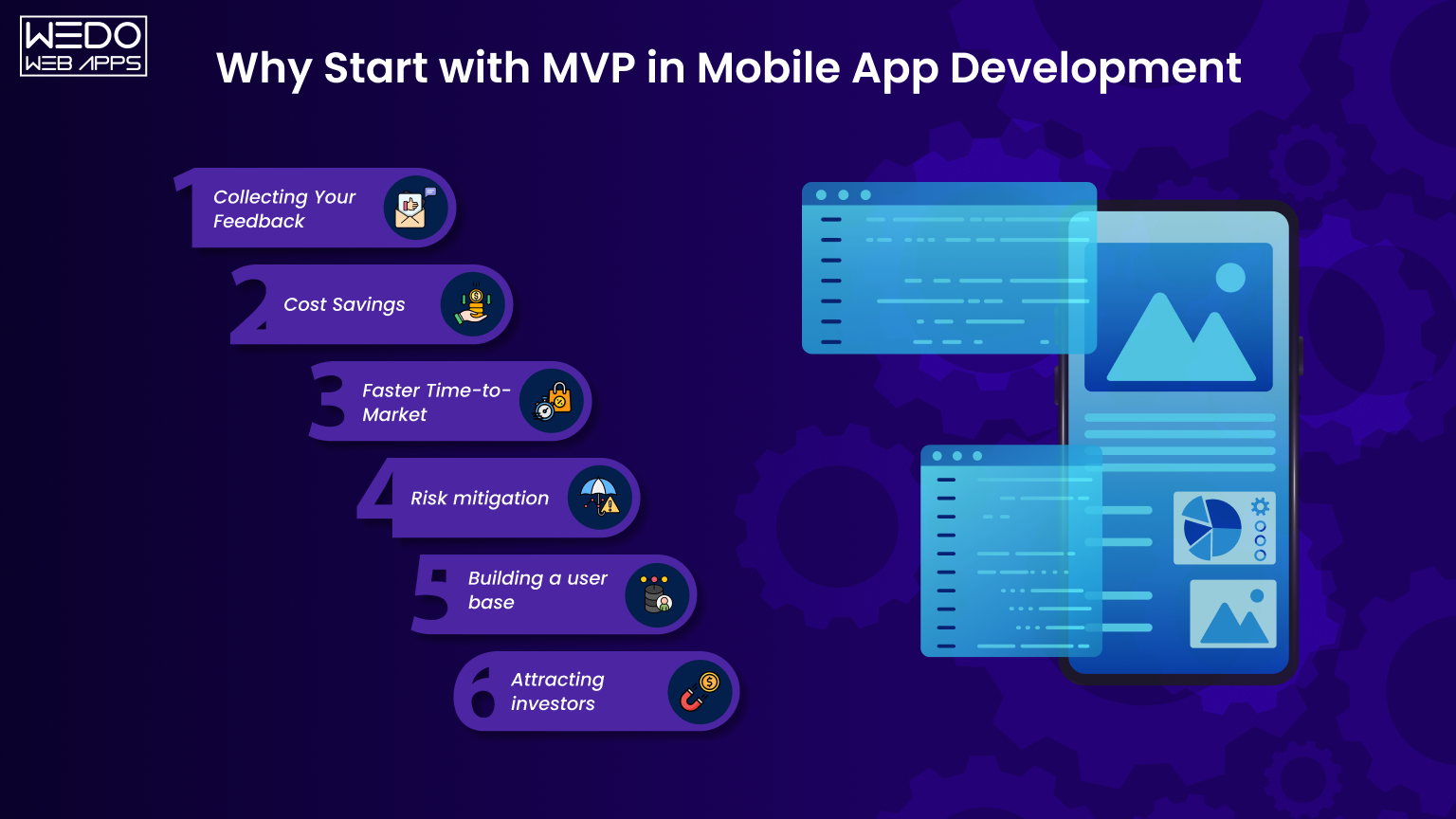
Building a mobile app without testing the idea first is like investing in a product without knowing if there is demand. Many apps fail at this stage because they are built based on assumptions rather than real user needs.
This is why businesses prefer MVP app development. It allows you to launch a focused version of your app, understand how users respond, and make informed improvements before scaling further.
Reduce Development Risk and Avoid Waste
When you build a complete app from the start, every feature is based on a prediction. If those predictions are incorrect, it leads to wasted effort and budget.
With MVP in mobile app development, you limit your scope to only essential features. This approach helps you:
- Avoid overbuilding
- Focus on solving one clear problem
- Identify gaps early in the process
It also gives you flexibility. If something does not work, you can adjust quickly without major losses.
Validate Real User Demand Early
A minimum viable product mobile app helps you answer one critical question. Do users actually need this app?
Instead of relying only on research, you collect real data such as:
- User engagement levels
- Feature usage patterns
- Feedback and reviews
This early validation ensures that your future development is based on actual demand, not assumptions.
Launch Faster with Focused Features
In mobile app development, timing can directly impact success. Delayed launches often lead to missed opportunities.
A structured mobile app development MVP approach allows you to:
- Release your app in a shorter time frame.
- Test your idea in the market early.
- Start building user traction sooner.
By focusing only on key features, you reduce development time and simplify the launch process.
Control Mobile App Development Cost
Developing a full-featured app requires a significant investment. For many businesses, this can be risky without prior validation.
With MVP app development, costs are more controlled because:
- Development is limited to core functionality.
- Design and integrations are kept minimal.
- Resources are used more efficiently.
This approach allows you to allocate your budget wisely. Once your MVP shows positive results, you can invest further with better confidence and direction.
Starting with an MVP is a practical strategy. It helps you test your idea, learn from real users, and build your app step by step with clarity and control.
90-Day MVP App Development Timeline for Mobile Apps
A well-defined timeline brings clarity to execution. Without it, MVP app development often faces delays, scope changes, and budget overruns. A structured 90-day plan helps you move from idea to launch with clear milestones, measurable progress, and better control over resources.
This roadmap breaks the process into focused phases so your minimum viable product mobile app is built efficiently while maintaining quality.
Week 1-2: Discovery and Wireframing
This is the most critical phase because it defines what you will build and why. Decisions made here directly impact cost, timeline, and product direction.
Key activities:- Identify the problem your app will solve.
- Define target users and their expectations.
- Conduct competitor analysis to understand market gaps.
- Map user journeys and app flows.
- Create wireframes for core screens.
A strong discovery phase reduces confusion later. It ensures your team works with a clear understanding of features, user flow, and priorities.
Outcome:A validated concept with structured wireframes ready for design.
Week 3-4: UI Design and Clickable Prototype
Once the structure is ready, the focus shifts to user experience and interface design. This phase shapes how users will interact with your app.
Key activities:- Design user-friendly and consistent UI screens.
- Apply branding elements such as colors and typography.
- Build a clickable prototype to simulate app flow.
- Conduct usability testing with early users.
Testing design before development helps identify usability issues early. It reduces rework and improves overall user experience.
Outcome:A refined prototype that visually represents your mobile app development MVP.
Week 5-10: MVP Development Sprints
This is the execution phase, where your app is developed in stages. Work is divided into smaller sprints to maintain speed and flexibility.
Key activities:- Set up backend systems and database structure.
- Develop a mobile frontend for core features.
- Integrate APIs such as payment gateways or notifications.
- Conduct sprint reviews to track progress.
- Perform ongoing testing during development.
Sprint-based development allows quick adjustments. If a feature needs improvement, changes can be made without affecting the entire project.
Outcome:A functional version of your app with essential features ready for final testing.
Week 11-12: QA Testing and App Store Preparation
Before launch, your app must be stable, secure, and ready for real users. This phase ensures quality and compliance.
Key activities:- Perform functional, usability, and performance testing.
- Identify and fix bugs or errors.
- Optimize app performance and loading speed.
- Prepare app store assets such as screenshots and descriptions.
- Review guidelines for both iOS and Android platforms.
A poorly tested app can lead to negative reviews and rejection from the app store. Proper testing improves reliability and user satisfaction.
Outcome:A polished and compliant minimum viable product mobile app ready for release.
Week 13: MVP Launch and Initial Feedback
This is where your app enters the market and starts interacting with real users. The focus now shifts from building to learning.
Key activities:- Launch the app on the App Store.
- Monitor user behavior and app performance.
- Collect feedback through reviews and in-app responses.
- Track the key metrics such as downloads, retention, and engagement.
The launch is not the end. It is the beginning of learning. Real user data helps you decide what to improve, add, or remove in the next version.
Outcome:Actionable insights that guide future updates and scaling decisions in MVP in mobile app development.
Following this 90-day timeline keeps your project structured and focused. It helps you avoid delays, manage resources efficiently, and move forward with clear direction at every stage.

How to Validate a Minimum Viable Product Mobile App Idea
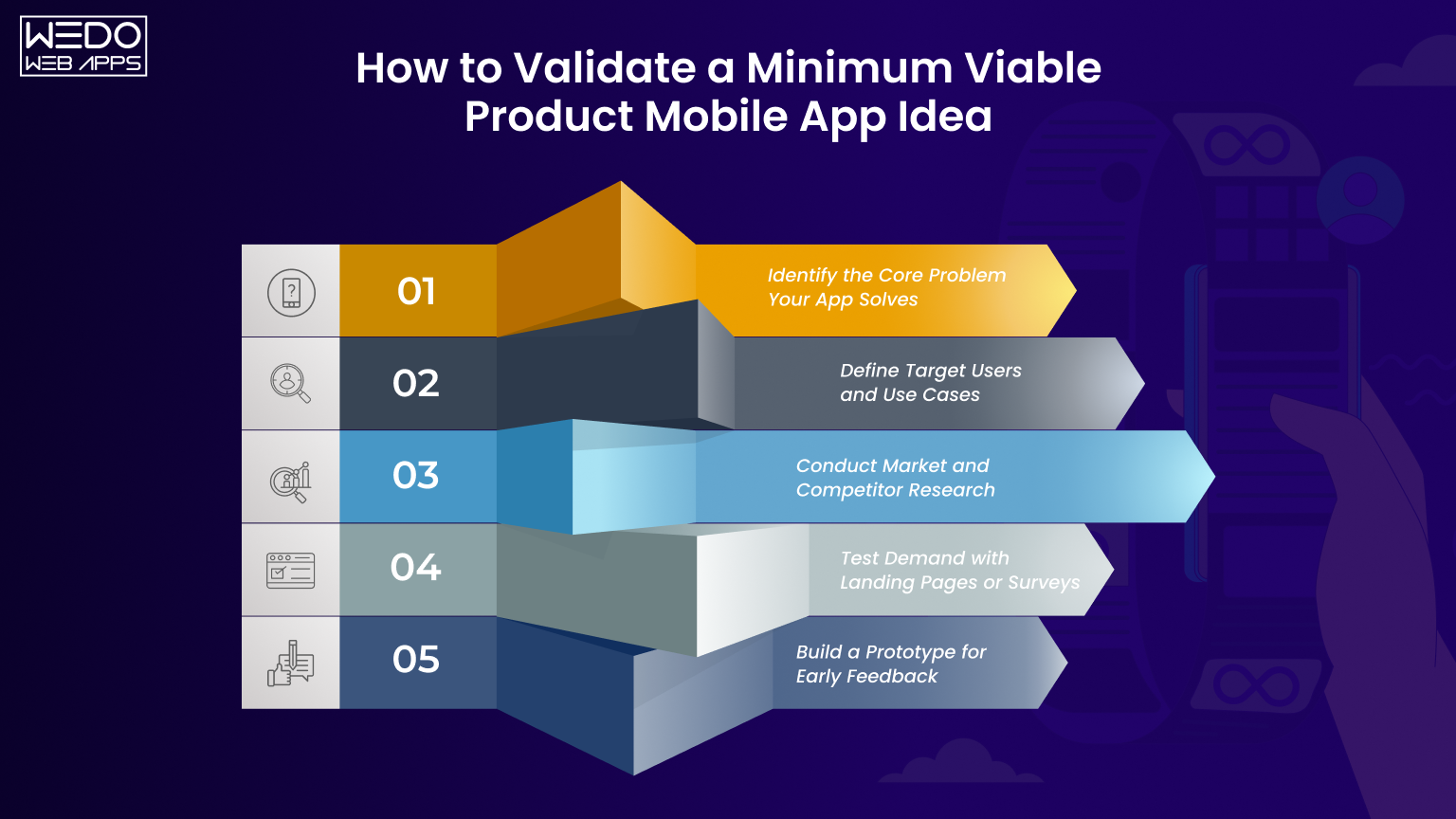
Before investing time and budget into development, validation helps you confirm whether your idea has real demand. Many apps fail because they are built without testing user interest or problem relevance.
A structured validation approach ensures your minimum viable product mobile app is based on real user needs, not assumptions. It also strengthens your MVP app development strategy by giving you clear direction before execution.
Identify the Core Problem Your App Solves
Every app should address a specific problem. If the problem is unclear, the product will lack direction.
What to analyze:- What challenges are users facing?
- How frequently does this problem occur?
- Current solutions users rely on.
- Limitations of those existing solutions.
A budgeting app may focus on helping users track daily expenses instead of offering complex financial planning features.
Why this matters:A well-defined problem ensures your MVP in mobile app development stays focused and delivers clear value.
Define Target Users and Use Cases
Understanding your users helps you build relevant features and avoid unnecessary additions.
Key steps:- Identify primary user segments.
- Study user behavior and preferences.
- Define real-life scenarios where the app will be used.
- Create simple user personas.
A fitness app MVP may target beginners who need short and guided workout routines.
Why this matters:Clear user definitions improve feature selection and enhance the effectiveness of your mobile app development MVP.
Conduct Market and Competitor Research
Market research provides insights into what already exists and where your app can fit.
What to evaluate:- Popular apps in your category.
- Features they offer.
- Pricing models.
- User review highlighting common issues.
Competitor analysis helps you identify gaps and build a more focused and competitive minimum viable product mobile app.
Test Demand with Landing Pages or Surveys
Before development, testing demand can give early signals of user interest.
Methods to use:- Create a landing page explaining your app idea.
- Add a signup form for early access.
- Run small ad campaigns to drive traffic.
- Use surveys to collect feedback.
- Number of signups
- User interest level
- Feedback on concept clarity
This step helps to confirm whether users are interested enough to try your app once it is launched.
Build a Prototype for Early Feedback
A prototype gives users a visual understanding of your app and allows you to test usability.
What to include:- Key screens and navigation flow.
- Basic interactions.
- Core feature representations.
- Share with a small group of users.
- Observe how they interact.
- Collect feedback on usability and clarity.
Testing with a prototype reduces the chances of major changes during MVP app development and improves overall product quality.
Validating your idea is a critical step in the process. It ensures your app is built on real demand, supported by user insights, and ready for development with a clear direction.
Types of MVP in Mobile App Development
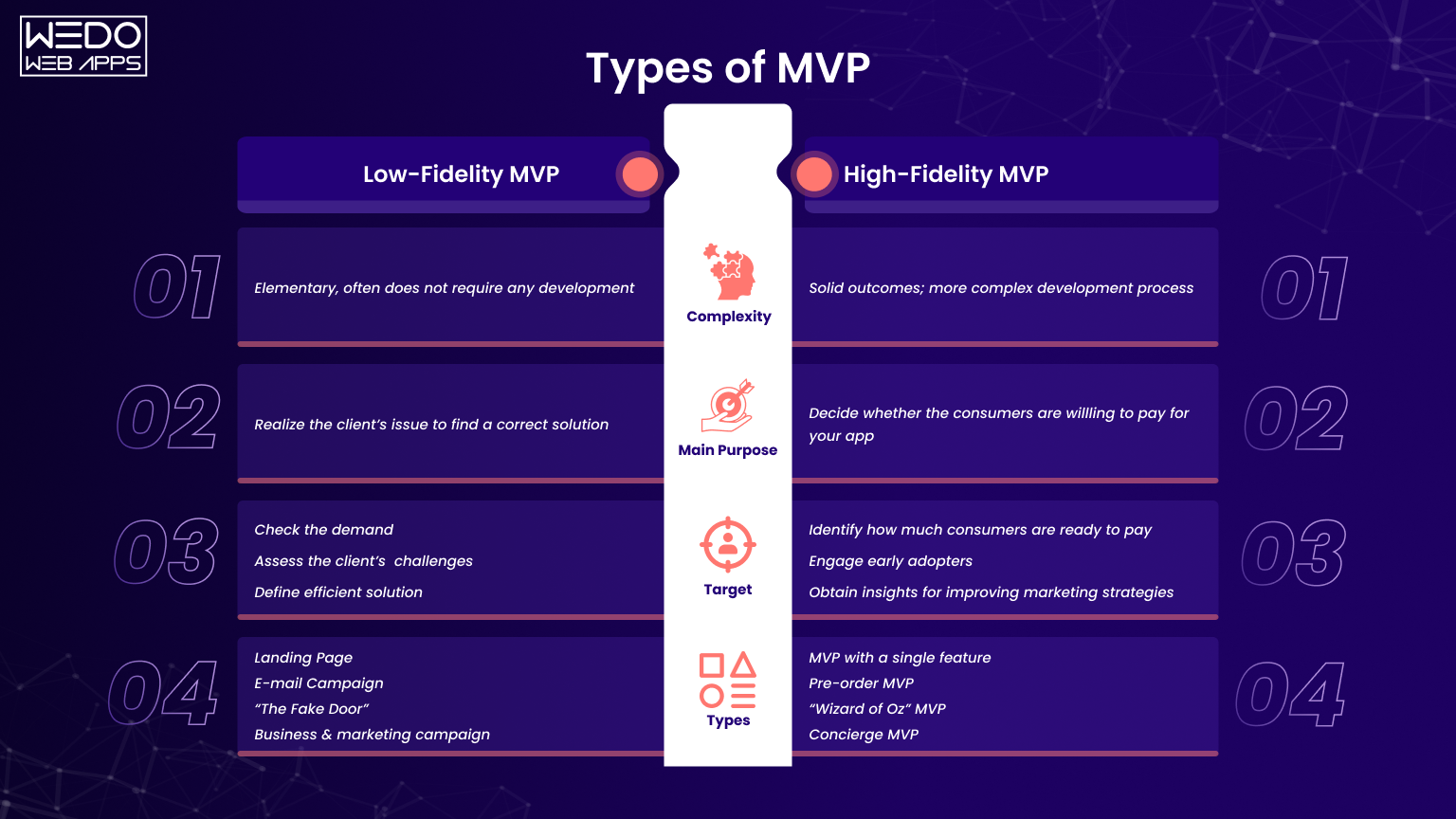
An MVP is not always built in the same way. The approach you choose depends on how early your idea is, how much you want to invest, and what you need to validate first.
Understanding these types helps you make better decisions during MVP app development and avoid building more than required.
Low-Fidelity MVP (Wireframes and Mockups)
This is the simplest form of MVP. It focuses only on structure, not functionality.
What it looks like:- Basic screen layouts
- Simple wireframes
- User flow diagrams
- When your idea is still at an early stage.
- When you want feedback on app flow and structure.
- When you want to validate quickly with minimal effort.
Sketching app screens or creating wireframes in design tools.
Why it matters:It helps you check if your app idea makes sense before starting mobile app development MVP.
High-fidelity MVP (Functional App Version)
This is a working version of your app with core features. Users can interact with it like a real app.
What it includes:- Core features
- Basic backend
- Real user interactions
- When you want to launch your app to users.
- When you need real feedback and usage data.
A high-fidelity minimum viable product mobile app helps you test how users actually use your app.
Single-Feature MVP Approach
This approach focuses on building only one main feature instead of multiple features.
What it includes:- One strong core feature
- Simple supporting interface
- When your app idea is centered around one main function
- When you want quick validation
It keeps your MVP in mobile app development simple, focused, and faster to launch.
No-Code MVP vs Custom MVP Development
This is a decision about how you build your MVP.
No-Code MVP- Built using tools without coding
- Faster and more affordable
- Limited flexibility
- Simple app ideas
- Early testing
- Built using programming languages
- More control and flexibility
- Suitable for cross-platform app development
- Scalable apps
- Long-term development
Choosing the right method ensures your mobile app development MVP matches your timeline, budget, and future plans.
Selecting the right type of MVP helps you start in the right way. It ensures you are testing your idea effectively without adding unnecessary complexity.

MVP App Features Prioritization Using MoSCoW Framework
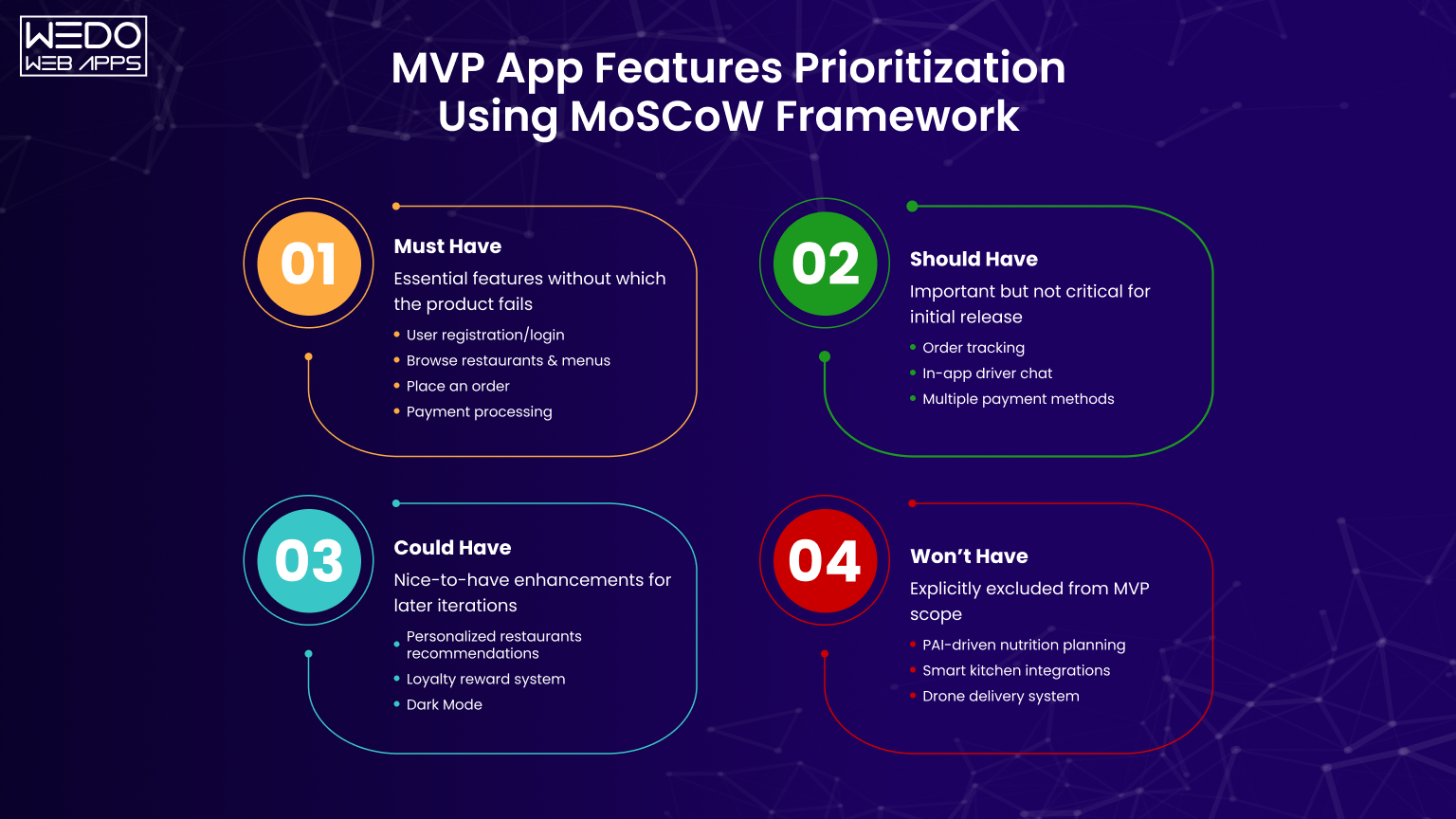
One of the most common challenges in MVP app development is deciding which features to include in the first version. Without a clear method, teams often add too many features, which increases development time and cost while delaying the launch.
The MoSCoW framework provides a structured way to prioritize features. It helps you focus on what is essential for your minimum viable product mobile app. While keeping future improvements planned and controlled.
What is MoSCoW in MVP App Development
MoSCoW is a prioritization technique that divide features into four categories:
- Must have
- Should have
- Could have
- Won't have
These methods help the product team make clear decisions during mobile app development MVP, especially when working with limited time and resources.
It also ensures that your MVP delivers core value without unnecessary complexity.
Must-Have Features in a Mobile App MVP
Must-have features are the foundation of your app. These are the features required for the app to function and solve the main user problem.
Key characteristics:- Directly related to the core purpose of the app.
- Required for basic usability.
- Cannot be delayed.
In a ride-sharing app:
- User registration
- Ride booking
- Location tracking
If these features are missing, your MVP in mobile app development will not serve its purpose.
Should-Have Features
Should-have features improve usability and user experience, but are not critical for the first release.
Key characteristics:- Add value to the product
- Improve user engagement
- Can be delayed if needed
- Ride history
- Fare estimation
- Notifications
These features can be added after launch based on user feedback and priorities.
Could-Have Features
Could-have features are optional and do not impact the core functionality of the app.
Key characteristics:- Nice to include
- Low impact on initial user experience
- Often used to differentiate later
- Promo codes
- Social sharing
- Advanced filters
These features are usually planned for later updates once the MVP is validated.
Won't-Have Features
Won't have features are those that are intentionally excluded from the current version.
Key characteristics:- Not required for MVP.
- Can increase complexity if added early.
- Planned for future versions.
- AI-based recommendations
- Multi-language support
- Advanced analytics dashboards
Defining what not to build helps prevent scope creep and keeps MVP app development focused.
Example:Feature Prioritization for a Mobile App MVP
Consider a simple fitness app MVP.
Must Have:- User signup
- Workout list
- Basic tracking
- Progress tracking
- Reminders
- Social sharing
- Custom workout plans
- AI-based coaching
- Integration with wearable devices
Using the MoSCoW framework brings clarity to feature selection. It ensures your minimum viable product mobile app is built with the right priorities, allowing you to launch faster while keeping future improvements well planned.

MVP App Development Process for Mobile Apps (Step-by-Step)
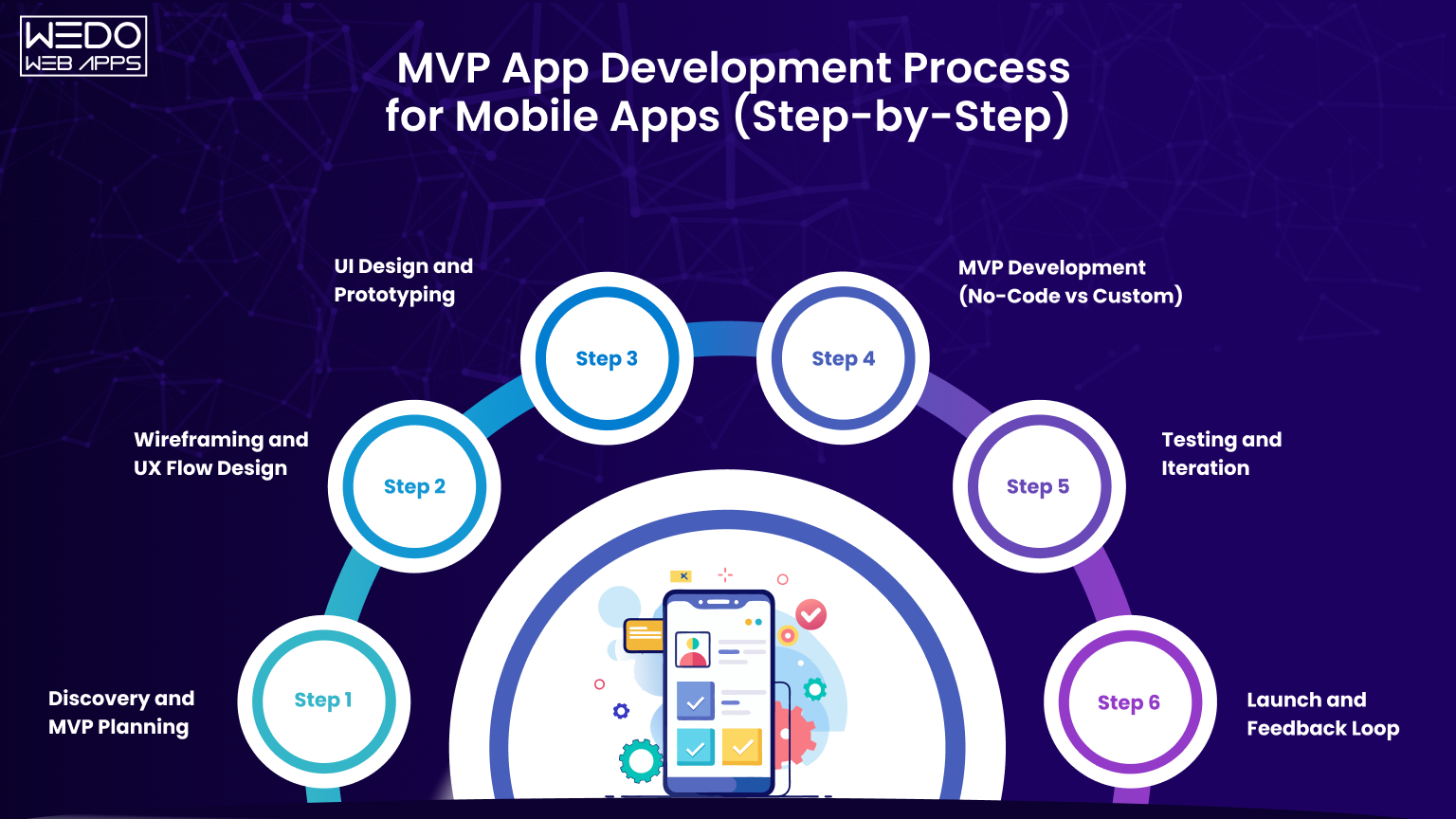
A clear process helps you move from idea to launch without confusion. In MVP app development, each step builds on the previous one, so skipping or rushing a phase can affect the final outcome.
This step-by-step approach ensures your minimum viable product mobile app is planned, built, and launched with clarity and control.
Step 1. Discovery and MVP Planning
This is the foundation of your project. It defines what you are building and why.
Key activities:- Identify the core problem and business goal.
- Define target users and use cases.
- Conduct market and competitor analysis.
- Finalize feature list using prioritization methods.
A strong planning phase reduces uncertainty and ensures your MVP in mobile app development is aligned with user needs.
Step 2. Wireframing and UX Flow Design
Once the plan is ready, the next step is to structure the app.
Key activities:- Create wireframes for key screens.
- Define navigation and user journeys.
- Map how users will interact with features.
Wireframes act as a blueprint. They help teams visualize the app before actual development begins.
Step 3. UI Design and Prototyping
This step focuses on how the app looks and feels.
Key activities:- Design user interface for all screens.
- Apply branding elements like colors and fonts.
- Build a clickable prototype for testing.
Testing a prototype helps to identify usability issues early and improves the overall user experience of your mobile app development MVP.
Step 4. MVP Development (No-Code vs Custom)
This is where the actual development begins.
Key activities:- Choose a development approach, such as Flutter app development.
- Build frontend and backend components.
- Integrate APIs and essential services.
- Follow sprint-based development cycles.
This phase turns your design into a working minimum viable product mobile app.
Step 5. Testing and Iteration
Before launch, your app must be tested to ensure it works as expected.
Key activities:- Perform functional testing
- Check usability and performance
- Fix bugs and errors
- Make improvements based on feedback
Testing ensures your MVP app development delivers a smooth and reliable user experience.
Step 6. Launch and Feedback Loop
Once testing is complete, the app is ready to go live.
Key activities:- Deploy the app on app stores.
- Monitor user behavior and performance.
- Collect feedback through reviews and analytics.
- Plan updates based on user insights.
Launch is not the final step. It starts the feedback cycle that helps improve your MVP in mobile app development over time.
Following this structured process ensures your MVP is built with purpose. Each step adds value and prepares your app for real users, making the transition from idea to product more efficient and reliable.
Team Structure for MVP App Development
The outcome of your MVP app development largely depends on how well your team is structured. Even a strong idea can fail if roles are unclear or responsibilities overlap.
For a minimum viable product mobile app, the goal is not to build a large team but to create a focused team where each member contributes to a specific part of the process. This improves efficiency, reduces delays, and keeps development aligned with your timeline.
Key Roles in Mobile App MVP Development
Each role plays a defined part in building and launching the MVP. Clear responsibility ensures better coordination and faster execution.
Product Manager- Defines product goals and roadmaps.
- Decides feature priorities based on user needs.
- Ensures the project stays aligned with business objectives.
- Create wireframes and user flows.
- Designs intuitive and user-friendly interfaces.
- Ensures consistency across screens.
- Develop the app for Android, iOS, or both.
- Implement core features and user interactions.
- Optimize performance and responsiveness.
- Builds server-side logic and database structure.
- Handles APIs, integrations, and data management.
- Ensures the app can scale when needed.
- Test the app for bugs and usability issues.
- Validates performance across devices.
- Ensures the app is ready for launch.
A clearly defined team improves communication and ensures your mobile app development MVP progresses without confusion or rework.
In-House vs Outdated MVP Development Team
Choosing the right team model affects cost, speed, and flexibility.
In-House Team- Direct control over the development process.
- Easier collaboration and communication.
- Higher operational costs due to hiring and infrastructure.
- Access to experienced professionals from the start.
- Faster project initiation.
- More cost-efficient for the MVP stage.
- Choose in-house if you plan long-term product development and have a budget.
- Choose an outsource app development team if you need faster execution and lower initial investment.
Selecting the right model helps you manage resources effectively during MVP in mobile app development.
Recommended Team Setup for Startups and Businesses
For most MVPs, a small and skilled team is enough to deliver results for app development for startups.
Typical team structure:- 1 Product Manager
- 1 UI/UX Designer
- 1-2 Mobile Developers
- 1 Backend Developer
- 1 QA Tester
- DevOps Engineer for deployment and infrastructure.
- Business Analyst for detailed requirement planning.
A lean team keeps costs under control while maintaining quality. It also helps you complete your minimum viable product mobile app within the planned timeline.
A well-structured team works like a coordinated system. Each role supports the other, ensuring your MVP moves from planning to launch in a smooth and organized way.

Minimum Viable Product Mobile App Development Cost in 2026
The cost of MVP app development depends on multiple factors such as app complexity, features, and development approach. Instead of a fixed number, it is better to understand cost ranges based on different scenarios.
Cost Based on MVP Complexity
| MVP Type | Features Included | Complexity Level | Estimated Cost |
|---|---|---|---|
| Basic MVP | Core features, simple UI, minimal backend | Low | $10,000-$25,000 |
| Mid-Level MVP | Multiple features, API integrations | Medium | $25,000-$60,000 |
| Advanced MVP | Real-time features, complex workflows | High | $60,000-$120,000+ |
Insight:
As feature count and logic increase, the cost of mobile app development MVP also rises due to higher development effort.
Cost Based on Development Approach
| Development Approach | Description | Best For | Estimated Cost |
|---|---|---|---|
| No-Code MVP | Built using no-code platforms | Simple apps, quick validation | $5,000-$15,000 |
| Hybrid Development | Mix of pre-built tools and custom code | Medium complexity apps | $15,000-$40,000 |
| Custom Development | Fully coded solution | Scalable and complex apps | $40,000-$120,000+ |
Insight:
Choosing the right approach helps control cost while aligning with your long-term plan for the minimum viable product mobile app.
Key Factors Affecting MVP App Development Cost
| Factor | Impact on Cost |
|---|---|
| Number of features | More features increase development time |
| Platform (iOS/Android/Both) | More platforms increase cost |
| UI/UX Design Complexity | Advanced design requires more effort |
| Third-Party Integrations | APIs add development and maintenance costs |
| Development Team Location | Rates vary by region and expertise |
Quick Cost Understanding
- A simple idea with limited features leads to lower cost.
- Complex workflows and integration increase the budget.
Presenting cost this way makes it easier to evaluate options and plan your MVP in mobile app development with better financial clarity.

Mobile App Beta Testing Strategy for MVP
Once development is complete, testing becomes a critical step before launch. Even a well-built app can fail if issues are not identified early.
A structured testing strategy ensures your MVP app development delivers a stable and usable product. It also helps you gather real feedback before making your app available to a wider audience.
Internal Testing vs External Beta Testing
Testing is usually done in two stages, each serving a different purpose.
Internal Testing- Conducted by your development and QA team.
- Focuses on functionality, performance, and bug detection.
- Conducted by a limited group of real users.
- Focuses on functionality, performance, and bug detection.
- Ensures all features work as expected.
Combining both approaches improves the quality of your minimum viable product mobile app before launch.
How to Collect and Use User Feedback
User feedback is one of the most valuable outcomes of beta testing. It helps you understand how users interact with your app.
Ways to collect feedback:- In-app feedback forms.
- Surveys and questionnaires.
- App store beta reviews.
- Direct user interviews.
- Common issues faced by users.
- Features that users find useful.
- Areas where users face confusion.
Feedback helps refine your mobile app development MVP and ensures improvements are based on actual user behavior.
Tools for MVP Testing
Using the right tools can make testing more efficient and structured.
Common tools include:- Testing platforms for beta releases.
- Crash reporting tools.
- Performance monitoring tools.
- User behavior analytics tools.
- App crashes
- Load time
- User navigation patterns
Proper tools help you identify quickly and improve the overall quality of your MVP in mobile app development for non-technical founders.
Common Issues to Fix Before Launch
Before releasing your app, certain issues should be addressed to ensure a smooth user experience.
Key areas to check:- App crashes or errors.
- Slow performance or loading time.
- Broken user flows.
- UI inconsistencies.
- Compatibility across devices.
Fixing these issues before launch improves user satisfaction and reduces the risk of negative reviews.
A well-planned beta testing strategy ensures your app is not only functional but also user-friendly. It prepares your minimum viable product mobile app for a smoother launch and better user acceptance.
App Store Submission Checklist for Mobile App MVP
Launching your app is not just about development. App stores have strict guidelines, and even small issues can lead to rejection. A proper checklist ensures your MVP app development reaches users without delays.
This step prepares your minimum viable product mobile app for a smooth approval and launch process.
iOS App Store Requirements
Apple follows strict review standards, so attention to detail is important.
Key requirements:- Apps must be stable and free from major bugs.
- Clear app description and metadata.
- High-quality screenshots and app preview.
- Proper use of permissions like location or camera.
- Compliance with Apple guidelines.
- App performance across iOS devices.
- No broken links or incomplete features.
- Privacy policy links included.
Meeting these requirements improves approval chances and ensures your mobile app development MVP is ready for users.
Google Play Store Requirements
Google Play has a faster review process, but guidelines still need to be followed.
Key requirements:- Functional and stable app.
- Clear app listing with description and screenshots.
- Proper app categorization.
- Compliance with Google Play policies.
- App performance on different Android devices.
- Permissions are clearly explained.
- No misleading content.
A complaints app reduces rejection risk and speeds up your MVP in mobile app development launch.
Common Reasons for App Rejection
Understanding common issues can help you avoid delays.
Frequent reasons include:- App crashes or has poor performance.
- Incomplete features or broken functionality.
- Missing privacy policy.
- Misleading app description.
- Improper use of permissions.
Avoiding these mistakes ensures your minimum viable product mobile app gets approved without multiple resubmissions.
Final Pre-Launch Checklist
Before submitting your app, review everything carefully.
Checklist:- All core features are working properly.
- App is tested across devices.
- No critical bugs or crashes.
- App description and keywords are optimized.
- Screenshots and icons are ready.
- Privacy policy is added.
- Analytics tools are integrated.
A final check ensures your MVP app development effort leads to a successful and timely launch.
Following this checklist reduces the chances of rejection and helps your app go live smoothly, allowing you to focus on user feedback and future improvements.
Real Examples of Minimum Viable Product Mobile Apps
Understanding theory is helpful, but real examples make the concept clearer. Many successful apps started as simple versions with limited features. Their early focus was not perfection, but solving one core problem well.
These examples show how MVP app development works in practice and how a minimum viable product mobile app evolves over time.
Example 1: Social Networking App MVP
Initial MVP focus:- User signup and login
- Profile creation
- Basic friend connection
- Advanced feeds
- Stories or media sharing
- Complex algorithms
The first version focused only on connecting users. Once engagement increased, more features were added.
Insight:This approach helped validate user interest before scaling the platform through mobile app development MVP.
Example 2: Ride-Sharing App MVP
Initial MVP focus:- User registration
- Ride booking
- Basic location tracking
- Fare splitting
- Ride scheduling
- Advanced driver features
The goal was to make booking a ride simple and reliable. Once users adopted the service, additional features were introduced.
Insight:A focused MVP in mobile app development helped test demand in a specific location before expanding globally.
Example 3: Fitness App MVP
Initial MVP focus:- User signup
- Workout library
- Basic progress tracking
Users first needed simple and accessible workouts. Advanced features were added later based on feedback.
Insight:Starting with a simple minimum viable product mobile app allowed the app to grow based on real user needs.
What These Examples Show
Across all these cases, a clear partner emerges:
- Start with one core problem.
- Build only essential features.
- Launch early and collect feedback.
- Improve based on user behavior.
This is the core idea behind MVP app development. It is not about building less. It is about building the right features at the right time.
These examples make one thing clear. A successful app does not start as a complete product. It starts as a focused solution that grows with user feedback and real-world usage.
Common Mistakes in MVP App Development
Building an MVP is about focus and clarity. However, many teams make avoidable mistakes that slow down the progress or reduce the chances of success.
Understanding these mistakes helps you improve your MVP app development process and build a more effective minimum viable product mobile app.
Adding Too Many Features Too Early
One of the most common mistakes is trying to include too many features in the first version.
What happens:- Development time increases.
- Costs go beyond the planned budget.
- Core functionality loses focus.
- Prioritize only essential features.
- Use frameworks like MoSCoW.
- Plan additional features for later updates.
A focused mobile app development MVP helps you launch faster and test your idea effectively.
Skipping User Feedback
Some teams rely on internal assumptions and skip real user input.
What happens:- Features may not match user needs.
- Low engagement after launch.
- Difficulty in improving the product.
- Collect feedback during testing.
- Monitor user behavior after launch.
- Make updates based on real insights.
User feedback is essential for improving your MVP in mobile app development.
Poor Planning and Undefined Goals
Starting development without clear goals leads to confusion and delays.
What happens:- Teams lack direction.
- Features are added without pressure.
- Timelines become unpredictable.
- Define a clear objective.
- Identify the core problem.
- Set measurable goals for MVP.
Good planning ensures your minimum viable product mobile app stays aligned with its.
Ignoring Testing Phase
Rushing to launch without proper testing can harm your app's reputation.
What happens:- App crashes or performance issues.
- Poor user experience.
- Negative reviews.
- Conduct thorough testing.
- Fix bugs before launch.
- Test across devices and scenarios.
A well-tested app improves user trust and strengthens your MVP app development outcome.
Lack of Clear Post-Launch Strategy
Some teams treat launch as the final step instead of the beginning of improvement.
What happens:- No clear plan for updates.
- Missed opportunities for growth.
- Slow response to user feedback.
- Track performance metrics.
- Plan regular updates.
- Continue improving based on user data.
A strong post-launch plan ensures your mobile app development MVP continues to evolve.
Avoiding these mistakes helps you stay focused, reduce risks, and build an MVP that delivers real value. It ensures your app is not only launched successfully but also positioned for long-term growth.
When to Scale Beyond MVP in Mobile App Development
Launching your MVP is only the first step. The next decision is equally important. When should you move from MVP to a full product?
Scaling too early can increase cost without clear returns. Scaling too late can slow down growth. The goal is to use data from your MVP app development phase to make the right decision at the right time.
Key Metrics to Track After MVP Launch
Your minimum viable product mobile app provides real user data. This data helps you understand whether your app is ready for the next stage.
Important metrics to monitor:- User acquisition: Number of downloads or signups.
- User retention: How many users return to the app?
- Engagement rate: How often users interact with features.
- Conversion rate: Actions like purchases or subscriptions.
- User feedback: Reviews, ratings, and direct responses.
These metrics give clear signals about what is working and what needs improvement in your mobile app development MVP.
Signs Your MVP is Ready for Full Development
Not every MVP should be scaled immediately. You need clear indicators.
Strong signs include:- Users are actively using your app.
- Retention rate is stable or improving.
- Core features are performing well.
- Positive feedback from users.
- Demand for additional features.
These signals show that your MVP in mobile app development has achieved initial validation and is ready for expansion.
Next Steps After MVP Success
Once your MVP shows positive results, the focus shifts to scaling and improving the product.
Recommended steps:- Add features based on user demand.
- Improve performance and scalability.
- Strengthen UI and user experience.
- Expand to additional platforms if needed.
- Invest in marketing and user acquisition.
Scaling is not just about adding features. It is about building on what works and improving the overall value of your minimum viable product mobile app.
When Not to Scale Yet
Sometimes, the data shows that your app needs improvement before scaling.
Common signals:- Lower user retention.
- Limited engagement.
- Negative feedback.
- Confusion in the user flow.
- Improve core features.
- Fix usability issues.
- Re-evaluate your value proposition.
Taking time to refine your MVP ensures that future development efforts are more effective.
Scaling beyond MVP is a data-driven decision to ensure your app grows in the right direction, based on real user behavior rather than assumptions.
Conclusion
Building a successful mobile app does not start with a complete product. It starts with the right approach.
MVP app development gives you a practical way to test your idea, understand user needs, and make informed decisions without overinvesting. Instead of guessing what users want, you build a minimum viable product mobile app that delivers real value from the beginning.
From idea validation and feature prioritization to development, testing, and launch, each step plays a role in shaping a product that is both useful and scalable. A structured mobile app development MVP approach also helps you stay within budget, reduce risks, and move faster in a competitive market.
The key is to stay focused. Build only what is necessary, learn from real users, and improve continuously. This is what makes MVP in mobile app development effective.
If you approach your MVP with clarity and a well-defined plan, you are not just building an app. You are building a product that evolves based on real demand and has a stronger chance of long-term success.