
Introduction
Many businesses invest heavily in mobile app development, but still struggle with poor retention, low engagement, weak conversions, and unclear product decisions. The problem is rarely just the app itself. In most cases, teams lack visibility into how users actually interact with the product after installation.
Without proper mobile app analytics, businesses cannot accurately identify where users drop off, which features drive engagement, what causes churn, or why acquisition campaigns fail to generate long-term value. Product decisions become assumption-driven instead of data-driven, making it harder to scale efficiently.
This is why mobile app analytics has become a critical part of modern product strategy. Startups use analytics to validate product-market fit, SMEs rely on it to optimize customer journeys, and enterprises depend on it to improve retention, revenue, and operational decision-making across large user bases.
In this guide, you will learn:
- What mobile app analytics mean and why it matters
- Which mobile app metrics analytics teams should prioritize
- How analytics platforms improve retention and conversions
- How to implement event tracking correctly
- Which mobile app analytics platform fits your business needs
- How analytics supports product optimization and growth decisions
- Common analytics mistakes businesses should avoid
At WEDOWEBAPPS, we have worked with businesses that needed more than just dashboards. They needed analytics-ready applications, reliable event tracking, scalable architecture, and accurate testing workflows to ensure data could actually support business growth. As a mobile app development company, we understand that analytics implementation, app performance, and quality assurance all directly influence long-term product success.
What is Mobile App Analytics?
Mobile app analytics is the process of collecting, measuring, and analyzing user interactions within a mobile application to understand how people use the product, where they experience friction, and what influences retention, engagement, and conversions.
In simple terms, mobile application analytics helps businesses answer critical questions such as:
- Which features do users engage with most
- Where users abandon onboarding or checkout flows
- How often users return to the app
- Which marketing campaigns drive valuable users
- What causes uninstallations or churn
- Which product improvements increase conversions
Instead of relying on assumptions, teams use analytics data to make informed product, marketing, and business decisions.
Mobile App Analytics vs Web Analytics
Although both focus on user behavior, mobile app analytics works differently from traditional web analytics.
Web analytics typically measures page views, traffic sources, bounce rates, and session activity on websites.
Mobile app analytics focuses more heavily on:
- In-app events
- Feature interactions
- Retention behavior
- Push notification engagement
- Subscription activity
- And device-level performance
For example, a website may track whether a visitor lands on a pricing page. A mobile app analytics platform can track whether users:
- Completed onboarding
- Enabled notifications
- Used a core feature
- Added products to cart
- Abandoned a payment screen
- Or renewed a subscription
This deeper event-based tracking gives product teams more actionable visibility into user journeys.
Why Mobile App Analytics Matters
Many businesses build applications successfully but struggle to improve long-term user engagement. Without analytics, it becomes difficult to understand whether product investments are actually improving customer experience or revenue growth.
Effective mobile app analytics help businesses:
- Improve user retention
- Optimize onboarding flows
- Identify conversion bottlenecks
- Reduce churn
- Increase feature adoption
- Improve app performance
- And make faster product decisions
For startups, analytics validates whether users truly find value in the product. For SMEs, it helps optimize acquisition and conversion costs. For enterprises, analytics supports large-scale product optimization, forecasting, and operational efficiency.
Who Uses Mobile App Analytics?
Mobile app analytics is no longer limited to data teams. Multiple departments rely on analytics insights to improve business outcomes.
- Product Teams: Track feature adoption, retention, and user journeys to prioritize product improvements
- Marketing Teams: Measure campaign attribution, install quality, customer acquisition cost, and conversion performance.
- Development Teams: Monitor crashes, performance issues, device compatibility, and technical stability.
- Leadership Teams: Use analytics dashboards to evaluate growth trends, revenue performance, and customer engagement.
At many growing businesses, analytics implementation also becomes closely connected with app architecture, event tracking quality, and testing reliability. This is why companies often work with an experienced mobile app development company to build analytics-ready applications that support long-term scalability and accurate reporting.
Why Businesses Struggle Without Mobile App Analytics
Many businesses launch mobile applications with strong expectations but quickly encounter problems they cannot fully explain. User acquisition campaigns generate installs, new features are released regularly, and marketing spend increases; yet retention remains low, engagement drops, and conversions fail to improve consistently.
The issue is often not the product idea itself. The real challenge is the lack of visibility into user behavior.
Without proper mobile app analytics, teams are forced to make decisions based on assumptions instead of measurable insights. This creates blind spots across product development, marketing, customer experience, and growth strategy.
Product Decisions Become Guesswork
One of the biggest challenges businesses face without analytics is understanding whether users actually find value in the product.
Teams may spend months building features without knowing:
- Whether users interact with them,
- How frequently they are used,
- Or where users abandon the experience.
For example, a startup may assume its onboarding process is effective because install numbers are growing. However, analytics may reveal that most users drop off during account setup before reaching the app's core functionality.
Without visibility into onboarding funnels, feature adoption, and retention behavior, product roadmaps become driven by internal opinions instead of real user activity.
Marketing Spend Becomes Harder to Optimize
Many businesses focus heavily on acquiring users but fail to measure long-term user quality.
Without mobile application analytics, it becomes difficult to identify:
- Which acquisition channels drive high-retention users
- Which campaigns lead to churn
- Or which audiences generate actual revenue
A campaign generating thousands of installs may appear successful initially, but analytics might later reveal:
- Low engagement
- Poor conversion rates
- Or rapid uninstall behavior
This disconnect often leads to wasted acquisition budgets and misleading growth reporting.
Retention Problems Stay Hidden Too Long
Retention is one of the most important indicators of app health, but many businesses do not recognize retention issues until growth slows significantly.
Without proper retention tracking, teams cannot accurately measure:
- Day 1, Day 7, and Day 30 retention
- Repeat usage behavior
- Feature stickiness
- Or churn triggers
As a result, businesses continue optimizing acquisition while losing existing users at unsustainable rates.
Mobile app insights help identify why users leave, which experiences increase loyalty, and what behaviors predict long-term engagement.
Technical Issues Affect User Experience
Analytics is not limited to marketing or product decisions. It also plays a major role in app stability and performance monitoring.
Without performance analytics, businesses may overlook app crashes, slow loading screens, API failures, device-specific bugs, or performance degradation after updates.
These technical issues directly affect retention and user satisfaction.
This is why many companies combine analytics implementation with ongoing quality assurance services to validate event accuracy, monitor release quality, and ensure reliable user experiences across devices and operating systems.
Businesses Lose Opportunities to Scale Efficiently
As applications grow, analytics becomes increasingly important for:
- Prioritizing development investments
- Improving operational efficiency
- Forecasting user behavior
- And identifying scalable growth opportunities
Without reliable data, businesses often:
- Overbuild unnecessary features
- Underinvest in high-performing user journeys
- Or struggle to identify what actually drives revenue growth
Modern mobile app analytics platforms help teams move from reactive decision-making to proactive product optimization by turning raw behavioral data into actionable business intelligence.

Key Mobile App Metrics Every Product Team Should Track
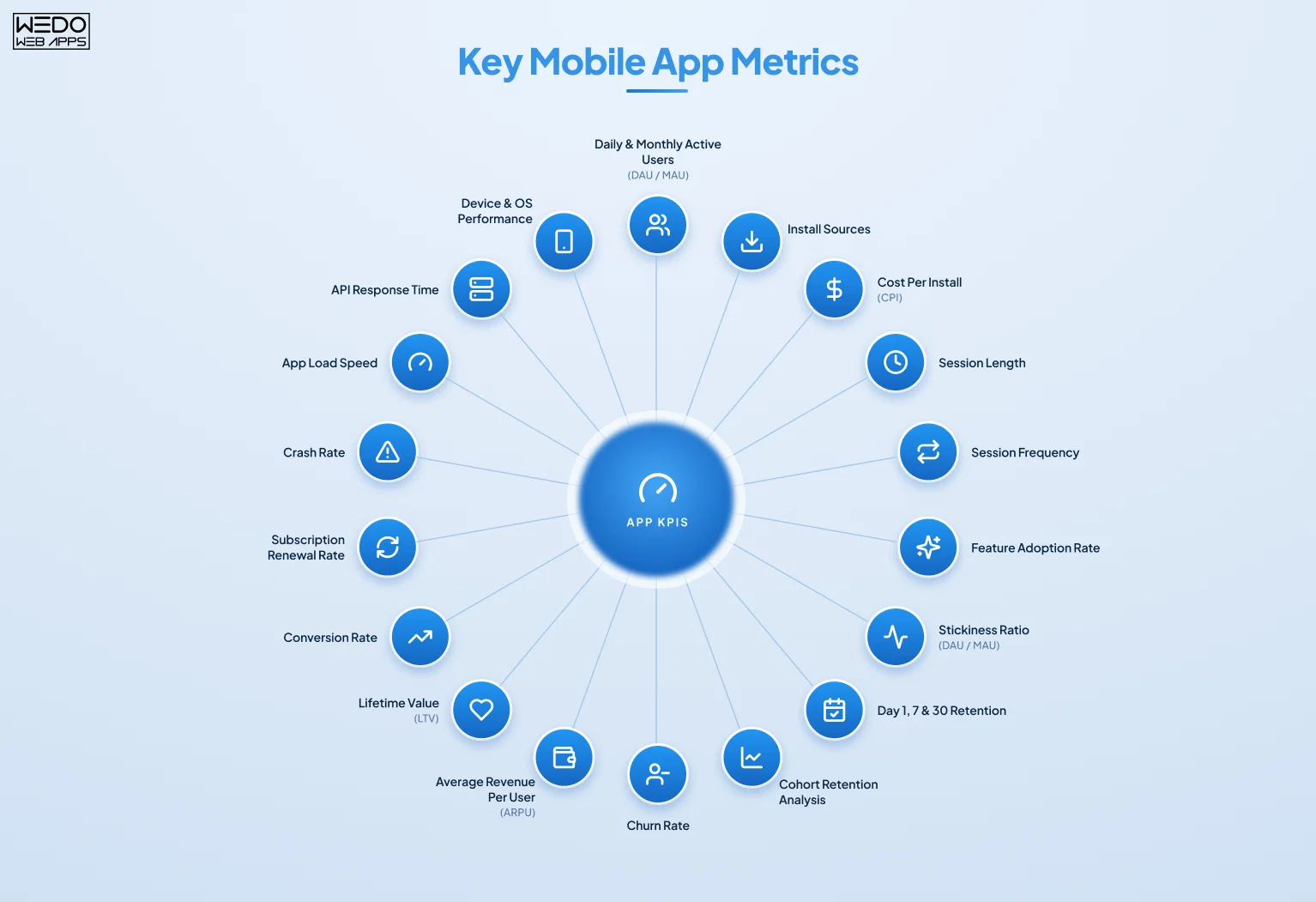
Tracking data is not enough on its own. Businesses need to focus on the right mobile app metrics that analytics teams can actually use to improve product decisions, user experience, retention, and revenue growth.
One of the most common mistakes businesses make is tracking too many disconnected metrics without understanding how they influence business outcomes. Effective analytics focuses on identifying actionable signals that help teams understand user behavior and optimize product performance.
The most valuable mobile app metrics usually fall into five categories:
- Acquisition metrics
- Engagement metrics
- Retention metrics
- Revenue metrics
- Performance metrics
Each category helps businesses answer different strategic questions.
Acquisition Metrics
Acquisition metrics measure how users discover and install your app. These metrics help businesses evaluate marketing effectiveness and user acquisition quality.
Daily Active Users (DAU) and Monthly Active Users (MAU)
DAU and MAU measure how many unique users interact with the app daily or monthly. These metrics help teams understand:
- Growth consistency
- Active user trends
- And overall product engagement
A rising install count with stagnant DAU often indicates poor retention or weak onboarding experiences.
Install Sources
Install source tracking identifies where users come from, including:
- Organic search
- Paid advertising
- Referrals
- Influencer campaigns
- Or social media promotions
This helps businesses determine which channels generate high-value users instead of focusing only on install volume.
Cost Per Install (CPI)
CPI measures how much businesses spend to acquire each app install.
However, successful acquisitions strategies should not focus only on low CPI. Businesses also need to measure:
- Retention quality
- Conversion rates
- And lifetime value generated by acquired users
What These Metrics Help Businesses Decide
Acquisition metrics help teams:
- Optimize marketing budgets
- Identify profitable acquisition channels
- And improve campaign targeting strategies
Engagement Metrics
Engagement metrics measure how users interact with the app after installation. These metrics help businesses understand whether users actually find ongoing value in the product.
Session Length
Session length tracks how long users remain active during a single app session. Longer sessions may indicate:
- Stronger engagement
- Better content consumption
- Or higher product value
However, interpretation depends on the app category. For example:
- Shorter sessions may benefit utility apps
- While longer sessions may benefit streaming or gaming applications
Session Frequency
Session frequency measures how often users return to the app within a specific timeframe. Frequent usage often signals:
- Habit formation
- Strong user retention
- And product relevance
Feature Adoption Rate
Feature adoption measures how many users interact with specific app features. This metric helps product teams identify:
- Underperforming features
- Successful product updates
- And opportunities for UX improvements
Stickiness Ration (DAU/MAU)
The stickiness ratio compares daily active users against monthly active users. A higher ratio generally indicates stronger ongoing engagement and user dependency on the application.
What These Metrics Help Businesses Decide
Engagement Metrics help businesses:
- Improve feature prioritization
- Optimize user journeys
- And identify what keeps users active over time
Retention Metrics
Retention metrics measure how effectively businesses keep users engaged after acquisition. Retention is often one of the strongest indicators of long-term product success,
Day 1, Day 7, and Day 30 Retention
These metrics track how many users return after their first interaction with the app. Poor retention usually indicates:
- Onboarding friction
- Weak product-market fit
- Performance problems
- Or low perceived value
Cohort Retention Analysis
Cohort analysis compares user behavior across different groups based on:
- Install dates
- Acquisition channels
- Locations
- Or device types
This helps teams understand how product changes influence retention over time.
Churn Rate
Churn measures the percentage of users who stop using the application during a given period. Understanding churn triggers is critical for:
- Improving retention
- Reducing uninstall rates
- And increasing customer lifetime value
What These Metrics Help Businesses
Retention metrics help businesses:
- Identify friction points
- Improve onboarding flows
- And prioritize long-term engagement strategies.
Revenue Metrics
Revenue metrics directly link user behavior to business growth and monetization performance.
Average Revenue Per User (ARPU)
ARPU measures how much revenue businesses generate from each active user on average. This metric helps evaluate:
- Monetization efficiency
- Pricing strategies
- And customer value
Lifetime Value (LTV)
LTV estimates the total revenue generated by a user throughout their relationship with the app. Businesses often compare LTV against acquisition costs to determine profitability.
Conversion Rate
Conversion rate tracks how many users complete desired actions, such as subscriptions, purchases, upgrades, or registrations.
Subscription Renewal Rate
For subscription-based applications, renewal rate indicates long-term product value and customer satisfaction.
What These Metrics Help Businesses Decide
Revenue metrics help businesses:
- Optimize monetization strategies
- Improve pricing models
- And increase long-term profitability
Performance Metrics
Performance metrics focus on technical stability and user experience quality. These metrics are especially important for enterprises and scaling applications where performance directly affects retention.
Crash Rate
Crash rate measures how frequently the app fails during usage.
Even small increases in crash frequency can significantly reduce retention and customer trust.
App Load Speed
Slow loading times often increase abandonment rates and negatively affect engagement.
API Response Time
API latency affects:
- app responsiveness,
- feature usability,
- and overall user experience.
Device and OS Performance
Performance monitoring across devices helps businesses identify compatibility issues affecting specific user segments.
What These Metrics Help Businesses Decide
Performance metrics help teams:
- improve app stability,
- reduce technical friction,
- and deliver consistent user experiences.
For many businesses, performance monitoring also becomes closely connected with testing workflows and quality assurance services to ensure analytics accuracy, release reliability, and long-term product stability across mobile ecosystems.
How Mobile App Analytics Turns Data Into Product Decisions
Collecting analytics data is only the first step. The real value comes from turning mobile app insights into meaningful product, marketing, and business decisions.
Many businesses already track installs, sessions, and user activity, but still struggle ti improve retention and conversions. This usually happens because raw data alone does not explain why users behave a certain way. Product teams need to interpret behavioral patterns, identify friction points, and connect analytics findings to actionable improvements.
This is where modern mobile app analytics platforms become critical. They help businesses move beyond dashboards and uncover the reasons behind user behavior.
Identifying Onboarding Friction
Onboarding is often one of the highest drop-off areas in mobile applications. Without analytics, teams may only notice that retention is low. However, event tracking and funnel analysis can reveal:
- Which onboarding step users abandon,
- How long users spend on each screen,
- Or where confusion occurs
For example, an eCommerce app may discover:
- Users complete account registration,
- Browse products,
- But abandon the app during payment setup
Analytics can reveal whether the problem is caused by:
- Too many onboarding steps
- Slow loading screens
- Unnecessary permissions
- Or poor UX flow design
Once the friction point becomes visible, product teams can simplify onboarding, reduce unnecessary actions, and improve activation rates.
Business Outcome
Better onboarding analytics often leads to:
- Higher Day 1 retention
- Improved conversion rates
- And stronger long-term engagement
Improving Feature Adoption
Many businesses invest heavily in new features but fail to measure whether users actually use them.
Feature adoption analytics helps teams understand:
- Which features users engage with most
- Which features are ignored
- And what behaviors drive long-term retention
For example, a SaaS productivity app may release a collaboration feature expecting high engagement. Analytics may later reveal that users who activate notifications adopt the feature far more frequently that users who skip onboarding prompts.
This insight helps teams optimize:
- Feature placement
- Onboarding education
- And in-app guidance
Business Outcome
Feature adoption insights help businesses:
- Prioritize product investments
- Improve user engagement
- And avoid building low-impact functionality
Reducing Churn Through Behavioral Analysis
One of the biggest advantages of mobile application analytics is the ability to identify churn patterns before retention declines significantly.
Behavioral analytics can help teams detect:
- Reduced session frequency
- Incomplete actions
- Declining feature usage
- Or sudden inactivity patterns
For example, a subscription-based fitness app may notice that users who skip workout setup during onboarding are significantly more likely to churn within two weeks.
With this insight, teams can:
- Redesign onboarding flows
- Introduce reminders
- Or personalize engagement strategies for at-risk users
Business Outcome
Behavioral-based retention strategies often improve:
- Customer lifetime value
- Subscription renewals
- And long-term user loyalty
Optmizing Conversion Funnels
Analytics also plays a major role in identifying conversion bottlenecks. Funnels help businesses visualize:
- How users move through critical journeys
- Where abandonment occurs
- And which steps reduce conversions
A fintech app, for example, may discover:
- Strong signup rates
- But low KYC completion
Further analytics investigation may reveal:
- Document upload confusion
- Slow verification times
- Or technical issues affecting specific devices
Instead of redesigning the entire app, teams can focus directly on the problematic step.
Business Outcome
Conversion funnel optimization helps businesses:
- Improve revenue performance
- Reduce acquisition waste
- And increase operational efficiency
Segmenting Users for Better Decision-Making
Not all users behave the same way. Mobile app insights become more valuable when businesses segment users based on behavior, acquisition source, or engagement level.
Common user segments include:
- Power users
- Inactive users
- High-value customers
- Trial users
- Or recently churned users
Segmentation helps businesses create:
- Personalized onboarding experiences
- Targeted campaigns
- Feature-specific messaging
- And retention-focused engagement strategies
This becomes especially important for scaling startups and enterprises managing large user bases across multiple customer segments.
Turning Analytics into Long-Term Product Strategy
The most successful businesses treat analytics as part of continuous product optimization rather than isolated reporting. Analytics insights help teams:
- Prioritize product roadmaps
- Validate feature releases
- Improve user experience
- Forecast growth trends
- And allocate resources more effectively
However, accurate decision-making depends heavily on proper implementation, event tracking consistency, app architecture, and data reliability. This is why many businesses work with an experienced mobile app development company to ensure analytics systems are integrated correctly from the beginning rather than patched together after scaling problems appear.
Choosing the Right Mobile App Analytics Platform
Selecting the right mobile app analytics platform is not just a technical decision. It directly affects how effectively businesses can measure user behavior, optimize retention, improve conversions, and scale product decisions over time.
Many businesses start with basic analytics tools but eventually struggle with:
- Limited event visibility
- Poor funnel analysis
- Fragmented reporting
- Data accuracy issues
- Or scalability limitations
The right platform depends on several factors, including:
- Business size
- Product complexity
- Growth stage
- Technical resources
- Privacy requirements
- And reporting needs
Some platforms are ideal for early-stage startups, while others are designed for enterprise-level behavioral analytics and experimentation.
Below are some of the most widely used mobile application analytics platforms and where they fit best.
1. Firebase Analytics
Firebase Analytics is one of the most commonly used analytics solutions for mobile apps, especially among startups and early-stage businesses.
Built by Google, Firebase integrates easily with Android applications and supports both Android and iOS ecosystems.
Best For: Startups, MVP applications, small product teams, and businesses already using the Google ecosystem.
Key Strengths:
- Free to use
- Easy SDK implementation
- Strong integration with Google services
- Real-time event tracking
- Built-in crash reporting and performance monitoring
Firebase is particularly useful for businesses that need:
- Basic event tracking
- Acquisition monitoring
- And simple user behavior analysis without heavy infrastructure costs
Limitations
- Limited advanced funnel visualization
- Less flexible behavioral segmentation
- Can become restrictive for advanced product analytics needs
Ideal Use Case: A startup validating product-market fit and tracking onboarding, engagement, and acquisition metrics without investing heavily in analytics infrastructure.
2. Mixpanel
Mixpanel is designed primarily for product analytics and behavioral tracking.
Unlike traditional analytics tools focused mainly on traffic reporting, Mixpanel emphasizes user-level event analysis and customer journey tracking.
Best For: Product-focused teams, SaaS applications, Growth-stage startups, or businesses optimizing user funnels and retention
Key Strengths:
- Advanced funnel analysis
- Cohort tracking
- Retention reporting
- User journey visualization
- Behavioral segmentation
Mixpanel helps businesses understand:
- How users move through the app
- Which behaviors increase retention
- And where conversion drop-offs occur
Limitations
- Can become expensive at scale
- Requires thoughtful event taxonomy planning
- Learning curve for non-technical teams
Ideal Use Case: A growing SaaS business optimizing onboarding, feature adoption, and subscription conversion flows.
3. Amplitude
Amplitude is one of the most advanced mobile app analytics platforms for behavioral analytics and product intelligence.
It is widely used by scaling startups and enterprises that require deeper analytics capabilities and experimentation workflows.
Best For: Scaling applications, product-led growth teams, enterprise environments, or advanced experimentation strategies.
Key Strengths:
- Powerful behavioral analytics
- Advanced cohort analysis
- Predictive insights
- Experimentation tools
- Highly customizable dashboards
Amplitude is especially strong for:
- Retention optimization
- Behavioral comparisons
- And large-scale product decision-making
Limitations
- Steeper learning curve
- More complex setup process
- Higher pricing compared to basic tools
Ideal Use Case: An enterprise SaaS platform analyzing feature engagement, subscription retention, and multi-step user journeys across large customer segments.
4. PostHog
PostHog has become increasingly popular among businesses seeking greater data ownership and flexibility.
Unlike many cloud-only platform, PostHog supports self-hosted deployment options, making it attractive for privacy-focused organizations.
Best For: Privacy-focused businesses, technical product teams, self-hosted analytics requirements, or companies needing integrated experimentation tools.
Key Strengths:
- Open-source flexibility
- Session replay functionality
- Feature flags
- Event analytics
- Self-hosting support
PostHog combines several product optimization tools into a single platform, reducing dependency on multiple third-party systems.
Limitations
- Requires more technical management
- Steup may be complex for non-technical teams
- Infrastructure maintenance for self-hosted deployments
Ideal Use Case: A technology company wanting full control over analytics infrastructure while combining event tracking, feature flags, and session replay.
What Businesses Should Consider Before Choosing a Platform
Choosing the wrong analytics platform often creates long-term scaling problems. Before selecting a solution, businesses should evaluate both current requirements and future growth needs.
Event Tracking Flexibility
The platform should support:
- Custom event creation
- Scalable taxonomy structures
- And flexible reporting models
Poor event architecture often leads to inaccurate reporting later.
Funnel and Retention Analysis
Not all platforms provide strong behavioral analytics capabilities. Businesses focused on:
- Onboarding optimization
- Conversion funnels
- Or retention improvement
Should prioritize platforms with advanced cohort and funnel visualization features.
Privacy and Compliance
Modern analytics implementation must align with:
- GDPR
- ATT
- Consent management
- And regional privacy regulations
Privacy-focused businesses should evaluate:
- Data ownership
- Storage controls
- And consent support capabilities
Scalability
Some analytics tools work well for early-stage startups but become expensive or restrictive at enterprise scale.
Businesses should evaluate:
- Pricing growth
- Event limits
- User caps
- And infrastructure flexibility
Integration Ecosystem
Analytics platforms should integrate smoothly with:
- CRM systems
- Marketing tools
- Experimentation platforms
- Customer support systems
- And internal dashboards
Why Analytics Implementation Quality Matters
Even the best mobile app analytics platform cannot deliver reliable insights if implementation quality is poor.
Many businesses face problems such as:
- duplicate events,
- inconsistent naming conventions,
- inaccurate attribution,
- broken tracking flows,
- or unreliable reporting.
This is why analytics setup should never be treated as a simple SDK installation task. Proper implementation requires:
- structured event taxonomy,
- scalable app architecture,
- cross-platform consistency,
- and reliable validation workflows.
At WEDOWEBAPPS, analytics implementation is often integrated alongside app architecture planning, testing workflows, and quality assurance services to ensure businesses can trust the data used for critical product and growth decisions.

How to Implement Mobile App Analytics Correctly
Implementing mobile app analytics is not just about installing an SDK and tracking random events. Poor implementation often leads to inaccurate reporting, duplicate data, unreliable dashboards, and misleading product decisions.
Many businesses collect large amounts of analytics data, but still struggle to answer simple questions such as:
- Why are users dropping off?
- Which features drive retention?
- Which acquisition channels generate valuable users?
- What causes churn?
- Which updates improve conversions?
The problem is usually not the analytics platform itself. It is the implementation strategy behind it.
A well-structured analytics setup helps businesses generate clean, reliable, and actionable data that supports long-term product growth.
Start With Clean Business Goals
Before defining events or dashboards, businesses should first identify what they actually want to measure. Analytics implementation should always connect directly to business objectives.
For example:
- eCommerce apps may focus on checkout conversion and repeat purchases
- SaaS platforms may prioritize activation and subscription retention
- Marketplace apps may track buyer-seller engagement
- Fintech apps may monitor onboarding completion and KYC verification
Without clear business goals, teams often track excessive low-value events that create noise instead of actionable insights.
Key Questions to Define Early
- What actions define a successful user?
- Which behaviors indicate retention risk?
- Which funnels directly affect revenue?
- Which features are critical for engagement?
- What business KPIs should analytics support?
Build a Structured Taxonomy
One of the most important parts of mobile application analytics is creating a consistent event taxonomy.
An event taxonomy is the structure used to define:
- Event names
- Event priorities
- Naming conventions
- And tracking standards
Without a standardized structure, analytics systems quickly become difficult to manage as applications scale.
Recommended Event Naming Structure
Most businesses benefit from using: Lowercase formatting, snake_case naming, and verb_noun structure.
Examples:
- signup_completed
- onboarding_started
- payment_successful
- feature_viewed
- subscription_renewed
Consistent naming improves reporting clarity, dashboard management, and cross-team collaboration.
Essential Event Properties to Track
Alongside event names, businesses should define standardized properties attached to every event. Common properties include:
- user_id
- session_id
- platform
- app_version
- device_type
- timestamp
- acquisition_source
These properties help teams segment users and analyze behavioral patterns more accurately.
Focus on Meaningful User Actions
A common analytics mistake is tracking every button tap instead of tracking meaningful user outcomes.
For example:
- Tracking "checkout_button_clicked" may not provide useful business insight.
- Tracking "payment_successful" provides clearer conversion visibility.
Businesses should prioritize tracking:
- completed actions
- successful workflows
- and meaningful engagement milestones
This creates cleaner analytics data and more actionable reporting.
Track Core Event Categories
Most mobile apps should organize events into four primary categories.
Onboarding Events
Track:
- account creation
- onboarding completion
- permissions accepted
- and first-session behavior
These events help identify activation friction.
Engagement Events
Track:
- feature usage
- session frequency
- content interaction
- and notification engagement
These events help measure ongoing user value.
Conversion Events
Track:
- purchases
- subscriptions
- upgrade
- lead submissions
- or transaction completion
These events directly connect analytics to revenue performance.
Retention Events
Track:
- repeat usage
- subscription renewals
- reactivation
- and churn indicators
These events help businesses understand long-term product health.
Avoid Common Analytics Implementation Mistakes
Many businesses encounter analytics problems because implementation is rushed or poorly validated.
Tracking Too Many Events
Excessive event tracking creates:
- reporting clutter
- dashboard confusion
- and unnecessary infrastructure complexity
Focus on business-critical user journeys first.
Inconsistent Naming Conventions
Different naming styles across teams often lead to:
- duplicate reports
- broken dashboards
- and unreliable filtering
Maintain a centralized analytics documentation system.
Duplicate Event Tracking
Improper SDK implementation may trigger the same event multiple times, causing inflated reporting and inaccurate funnel analysis.
This issue commonly affects:
- Checkout flows
- Onboarding steps
- And subscription tracking
Missing Funnel Events
Businesses often track top-level activity but fail to capture critical mid-funnel interactions. For example:
- Signup started
- Onboarding skipped
- Payment failed
- Or verification abandoned
These missing insights make conversion optimization much harder.
Validate Analytics Before Production Release
Analytics implementation should always go through structured validation before production deployment.
Without testing, businesses risk making decisions using incorrect or incomplete data.
This is where quality assurance services become extremely important for analytics reliability.
Analytics QA Checklist
Before release, teams should validate:
- Event names trigger correctly
- Properties contain accurate values
- Duplicate events are not firing
- Events appear in dashboards properly
- iOS and Android tracking remain consistent
- Funnel steps are recorded accurately
- Attribution data works correctly
- Consent preferences affect tracking behavior properly
Analytics validation should become part of the overall app testing workflows rather than a separate afterthought.
Maintain Analytics as the Product Evolves
Analytics implementation is not a one-time setup.
As applications grow, businesses regularly:
- release new features,
- redesign onboarding,
- update conversion flows,
- and expand customer segments.
Analytics systems must evolve alongside product changes.
Many growing businesses eventually require:
- dashboard optimization,
- event restructuring,
- performance monitoring,
- and ongoing analytics maintenance.
This is why companies often evaluate long-term mobile app retainer pricing models to support continuous analytics optimization, feature monitoring, QA validation, and ongoing product improvements after launch.
Why Proper Analytics Implementation Matters
A properly implemented mobile app analytics strategy helps businesses:
- improve retention,
- optimize user journeys,
- reduce churn,
- increase conversion visibility,
- and make faster product decisions backed by reliable data.
However, analytics quality depends heavily on:
- app architecture,
- implementation consistency,
- testing workflows,
- and long-term maintenance processes.
Businesses that treat analytics as part of their product infrastructure, rather than just a reporting tool, are usually far better positioned to scale efficiently and make data-driven growth decisions.

Privacy, ATT, GDPR, and Consent Management in Mobile App Analytics
As mobile analytics becomes more advanced, privacy regulations and platform-level restrictions are changing how businesses collect, process, and use user data.
Today, implementing mobile app analytics is not only about tracking user behavior. Businesses must also ensure that analytics practices remain transparent, compliant, and privacy-conscious.
Failing to address privacy requirements can lead to:
- Legal risks,
- Platform policy violations
- Inaccurate attribution
- Loss of user trust
- And unreliable analytics data
This is why privacy-compliant analytics implementation has become a critical part of modern mobile app development.
How Privacy Changes Have Impacted Mobile Analytics
Over the past few years, major technology platforms have introduced stricter privacy controls that significantly affect analytics and user tracking. Some of the biggest changes include:
- Apple's App Tracking Transparency (ATT)
- GDPR regulations in Europe
- Google Play Data Safety requirements
- Consent-based tracking systems
- Reduced access to third-party identifiers
As a result, businesses now need to balance user privacy, analytics visibility, personalization, and attribution accuracy.
Modern analytics strategies increasingly rely on:
- First-party data
- Consent-driven tracking
- And privacy-focused event collection
Understanding App Tracking Transparency (ATT)
Apple introduced App Tracking System (ATT) to give iOS users more control over how apps track their activity across apps and websites.
Under ATT, apps must request permission before accessing the Identifier for Advertisers (IDFA).
Why ATT Matters
Before ATT, businesses relied heavily on IDFA for:
- Ad attribution
- User tracking
- Retargeting
- And campaign measurement
After ATT implementation:
- Many users opt out of tracking
- Attribution visibility becomes limited
- And user-level advertising data becomes less reliable
This directly affects:
- Paid campaign optimization
- Customer acquisition analysis
- And marketing attribution models
What Businesses Can Still Track After ATT
Even without IDFA access, businesses can still collect valuable first-party analytics data, including:
- in-app events,
- feature engagement,
- session activity,
- retention metrics,
- and conversion behavior.
This means mobile application analytics remains highly valuable even in privacy-first environments.
The key difference is that businesses must focus more on:
- behavioral insights,
- product analytics,
- and aggregated reporting instead of invasive cross-app tracking.
Best Practices for ATT Consent Prompts
Timing plays a major role in ATT opt-in rates.
Businesses should avoid showing permission prompts immediately after app installation without context.
Instead, successful apps often:
- explain the value of tracking first,
- show the request after onboarding,
- and communicate how analytics improves user experience.
Poorly timed ATT prompts often reduce opt-in rates significantly.
Android Privacy and Data Safety Requirements
Android applications also face growing privacy and transparency requirements.
Google Play now requires apps to complete a Data Safety section explaining:
- what data is collected,
- why it is collected,
- how it is shared,
- and how it is protected.
Businesses using mobile app analytics platforms must accurately disclose:
- event tracking practices,
- device identifiers,
- crash reporting,
- and behavioral data collection.
Consent Management on Android
Modern Android analytics implementation increasingly uses:
- consent signals,
- privacy preferences,
- and user-controlled tracking settings.
Platforms such as Firebase and Amplitude support consent-aware tracking models that help businesses align analytics collection with regional privacy regulations.
This becomes especially important for businesses operating internationally across multiple compliance environments.
GDPR and Global Privacy Compliance
The General Data Protection Regulation (GDPR) introduced strict requirements for businesses collecting and processing user data in the European Union.
Even businesses located outside Europe may still need GDPR compliance if they serve EU users.
Key GDPR Principles Relevant to Analytics
Lawful Basis for Data Collection
Businesses must clearly define:
- why data is collected,
- how it will be used,
- and what legal basis supports the collection.
Data Minimization
Businesses should only collect analytics data that is genuinely useful for:
- product improvement,
- operational needs,
- or customer experience optimization.
Tracking excessive unnecessary data increases compliance risk and infrastructure complexity.
User Access and Deletion Rights
Users may request:
- access to stored data,
- data export,
- or permanent deletion.
Analytics platforms should support these privacy workflows properly.
First-Party Analytics Is Becoming More Important
As third-party tracking becomes more restricted, businesses are increasingly shifting toward first-party analytics strategies.
First-party analytics focuses on:
- direct in-app behavior,
- owned customer interactions,
- and product engagement data collected within the application itself.
This approach often provides:
- better long-term data reliability,
- stronger privacy compliance,
- and more meaningful product insights.
For many businesses, the future of analytics is moving away from aggressive advertising surveillance and toward user-centric behavioral intelligence.
Why Privacy-Compliant Analytics Builds Trust
Privacy compliance is no longer only a legal requirement. It also directly affects customer trust and brand credibility.
Users are becoming more aware of:
- How apps collect data,
- how tracking works,
- and how businesses use personal information.
Transparent analytics practices help businesses:
- improve trust,
- reduce user concerns,
- and build stronger long-term relationships.
At the same time, reliable analytics implementation still requires accurate event tracking, stable architecture, and careful testing. This is why many businesses combine privacy-focused analytics implementation with structured quality assurance services to ensure both compliance and data reliability across evolving mobile ecosystems.
Dashboards, Reporting, and A/B Testing
Collecting analytics data only becomes valuable when businesses can interpret it clearly and use it to improve decision-making. This is where dashboards, reporting systems, and experimentation workflows play a critical role.
Many businesses already track large amounts of user data, but teams often struggle because:
- Dashboards are overloaded with unnecessary metrics,
- reports a lack of actionable insights,
- Or experiments are disconnected from actual business goals.
Effective mobile app analytics should help teams answer practical questions quickly, such as:
- Why are conversions dropping?
- Which features improve retention?
- What changed after the latest release?
- Which acquisition channels generate long-term users?
- Which experiments improved business performance?
Well-structured dashboards and reporting systems help transform raw analytics into operational clarity.
What Every Mobile Analytics Dashboard Should Include
The best dashboards focus on business-critical metrics instead of displaying every available data point.
Dashboards should provide quick visibility into:
- user behavior,
- retention trends,
- conversion performance,
- and product health.
Most successful product teams organize dashboards around specific decision-making goals.
Executive Dashboards
Executive dashboards provide high-level business visibility for founders, leadership teams, and stakeholders.
These dashboards typically focus on:
- Monthly Active Users (MAU)
- retention trends
- revenue growth
- subscription performance
- acquisition costs
- churn rate
- customer lifetime value
Leadership teams usually need simplified reporting focused on:
- growth direction,
- business performance,
- and operational health.
Overly technical dashboards often create confusion instead of strategic clarity.
Product Team Dashboards
Product teams require more detailed behavioral insights.
These dashboards often include:
- onboarding funnel performance,
- feature adoption rates,
- engagement metrics,
- retention cohorts,
- and user segmentation reports.
Product managers use these dashboards to:
- prioritize features,
- identify friction points,
- and evaluate release performance.
Marketing Dashboards
Marketing dashboards focus heavily on acquisition and conversion analysis.
Key reporting areas include:
- install attribution,
- campaign performance,
- conversion funnels,
- customer acquisition cost,
- and retention by acquisition source.
This helps businesses identify:
- which campaigns attract high-value users,
- which channels underperform,
- and where acquisition spend should be optimized.
Technical Performance Dashboards
Engineering and QA teams often require dashboards focused on application stability and performance.
These dashboards monitor:
- crash rate,
- API failures,
- app load speed,
- device-level performance,
- and release stability.
Technical visibility becomes especially important for scaling applications where even small performance issues can affect retention and customer satisfaction.
How Often Teams Should Review Analytics
One of the most common analytics mistakes is reviewing dashboards only when growth problems appear.
Successful businesses treat analytics review as part of ongoing operational workflows.
Daily Reviews
Daily monitoring usually focuses on:
- crashes,
- critical conversion issues,
- traffic anomalies,
- and release-related problems.
This helps teams respond quickly to major disruptions.
Weekly Reviews
Weekly reviews often focus on:
- retention trends,
- onboarding performance,
- funnel drop-offs,
- and feature engagement.
This cadence helps product teams identify short-term optimization opportunities.
Monthly Reviews
Monthly reporting is typically more strategic.
Teams evaluate:
- long-term growth,
- customer behavior changes,
- monetization trends,
- and product roadmap performance.
This helps leadership teams make broader investment and prioritization decisions.
How A/B Testing Improves Product Decisions
A/B testing allows businesses to compare different product experiences and measure which variation performs better.
Instead of relying on assumptions, teams can validate decisions using behavioral data.
Common A/B testing scenarios include:
- onboarding flow changes,
- CTA button variations,
- pricing experiments,
- feature positioning,
- notification timing,
- and subscription offer layouts.
Connecting Analytics to Experiment Outcomes
Analytics events should always connect directly with experiment goals.
For example, if businesses test a new onboarding flow, they should measure:
- onboarding completion rate,
- Day 1 retention,
- feature activation,
- and subscription conversion.
Without proper analytics integration, experiments become difficult to evaluate accurately.
Common A/B Testing Mistakes
Many businesses run experiments incorrectly by:
- testing too many variables simultaneously,
- ending tests too early,
- or using insufficient sample sizes.
Reliable experimentation requires:
- clear hypotheses,
- measurable KPIs,
- stable analytics tracking,
- and statistically meaningful data.
Poor experimentation practices often lead to misleading conclusions and unnecessary product changes.
Tools Commonly Used for Mobile App Experimentation
Several analytics platforms include experimentation and feature testing capabilities.
Popular options include:
- Firebase Remote Config
- Amplitude Experiment
- PostHog Feature Flags
- Optimizely
- LaunchDarkly
These tools help businesses:
- release features gradually,
- measure experiment impact,
- and reduce deployment risks.
The Analytics Review Loop
The most successful businesses do not treat analytics as isolated reporting. Instead, analytics becomes part of a continuous optimization cycle.
A typical analytics review loop includes:
- Collect behavioral data
- Identify friction points
- Generate hypotheses
- Run experiments
- Measure outcomes
- Optimize the product
- Repeat continuously
This process helps businesses improve:
- retention,
- engagement,
- monetization,
- and overall product performance over time.
As applications scale, maintaining reliable dashboards, accurate tracking, and trustworthy experimentation workflows often requires ongoing optimization, technical maintenance, and structured QA validation. This is why many businesses eventually adopt long-term mobile app retainer pricing models to support continuous analytics monitoring, performance optimization, reporting improvements, and iterative product growth initiatives.
When Businesses Should Hire Mobile Analytics Experts
Many businesses start with basic analytics implementation during the early stages of product development. Initially, simple dashboards and event tracking may seem sufficient.
However, as applications scale, analytics systems often become more complex and difficult to manage internally.
Businesses begin encountering problems such as:
- Unreliable dashboards
- Inconsistent event tracking
- Unclear attribution
- Inaccurate conversion reporting
- Fragmented analytics tools
- Or conflicting product data across teams
At this stage, analytics is no longer just a reporting tool. It becomes part of the product infrastructure that directly influences growth decisions, customer experience, retention strategy, and revenue optimization.
This is when businesses often benefit from working with experienced mobile analytics specialists.
Signs Your Business May Need Analytics Experts
Many analytics issues are not immediately visible. Businesses often continue making decisions using incomplete or inaccurate data without realizing the long-term impact.
Below are some common signs that indicate businesses may need external analytics expertise.
Your Analytics Data Cannot be Trusted
One of the most serious problems businesses face is unreliable analytics data. Common warning signs include:
- Inconsistent numbers across platforms
- Duplicate event tracking
- Missing funnel steps
- Inaccurate attribution reporting
- Or unexplained traffic spikes
When analytics data becomes unreliable, teams lose confidence in reporting, and decision-making slows significantly.
Without trustworthy analytics, businesses may:
- Invest in ineffective campaigns
- Prioritize the wrong features
- Or overlook critical retention problems
Retention Remains Low Despite Strong Acquisition
Many businesses successfully drive installs but struggle to retain users long-term. This often indicates:
- Onboarding friction
- Poor activation flows
- Feature adoption problems
- Or unresolved UX issues
Analytics experts help businesses identify:
- Where churn begins
- Which behavior predicts retention
- And what changes improve long-term engagement
Instead of focusing only on acquisition volume, businesses can optimize overall customer lifetime value.
Product Teams Lack Visibility Into User Behavior
As applications become more complex, product teams often struggle to answer important behavioral questions.
For example:
- Which features drive long-term retention?
- Which user segments generate the most revenue?
- What actions increase subscription renewals?
- Why are users abandoning conversion flows?
Without structured analytics systems, teams spend more time searching for answers than optimizing the product itself.
Experienced analytics specialists help create:
- Scalable event architectures
- Cleaner reporting systems
- And actionable behavioral dashboards
Your App is Scaling Rapidly
Scaling applications creates significantly more analytics complexity. As user bases grow, businesses often need:
- Advanced segmentation
- Cross-platform consistency
- Privacy-compliant tracking
- Experimentation workflows
- And infrastructure scalability
What works for an early-stage MVP may not support enterprise-level analytics requirements.
This is especially true for businesses managing:
- Large customer segments
- Subscription ecosystems
- Multi-region deployments
- Or complex user journeys
Analytics Implementation Was Added Too Late
Many businesses treat analytics as an afterthought instead of integrating it during the product architecture phase.
As a result, they often encounter:
- missing event coverage,
- inconsistent naming conventions,
- broken dashboards,
- and difficult migration challenges later.
Rebuilding analytics systems after scaling becomes significantly more expensive and operationally disruptive.
Working with an experienced mobile app development company early helps businesses:
- implement scalable event structures,
- maintain clean architecture,
- and avoid long-term analytics debt.
You Need Better Testing and Data Validation
Analytics accuracy depends heavily on testing quality.
Without proper validation workflows, businesses may unknowingly release:
- broken tracking events,
- inaccurate conversions,
- duplicated analytics triggers,
- or incomplete reporting flows.
This is why analytics implementation should always work closely with quality assurance services to validate:
- event consistency,
- cross-device tracking,
- funnel accuracy,
- attribution behavior,
- and release stability.
Reliable analytics requires both strong implementation and ongoing QA monitoring.
Analytics Is Becoming Critical to Business Growth
As businesses mature, analytics increasingly influences:
- product roadmap decisions,
- marketing investments,
- retention strategies,
- customer experience optimization,
- and revenue forecasting.
At this stage, analytics is no longer an optional infrastructure. It becomes a strategic growth system.
Businesses that invest in accurate analytics implementation typically gain:
- faster decision-making,
- better customer visibility,
- stronger retention performance,
- and more efficient product optimization.
Why Businesses Work With WEDOWEBAPPS
At WEDOWEBAPPS, analytics implementation is approached as part of a broader product growth strategy rather than a standalone tracking setup.
Our teams help businesses:
- build analytics-ready mobile applications,
- implement scalable event tracking systems,
- optimize app performance,
- validate analytics accuracy,
- and improve reporting reliability across evolving product ecosystems.
As a mobile app development company, we understand how closely analytics, app architecture, performance optimization, and testing workflows are connected. Combined with structured quality assurance services, this helps businesses generate cleaner insights, make faster product decisions, and scale digital products more confidently over time.
Conclusion
Mobile app analytics helps businesses move beyond assumptions and make product decisions backed by real user behavior. From improving retention and conversions to optimizing onboarding and app performance, analytics plays a critical role in long-term product growth.
However, effective analytics requires more than basic tracking. Businesses also need scalable architecture, structured event implementation, privacy-compliant data collection, and reliable testing workflows to generate accurate insights.
At WEDOWEBAPPS, we help businesses build analytics-ready applications with reliable tracking, performance optimization, and quality assurance services that support smarter decisions and sustainable growth.