
Introduction
A feature can pass development testing and still fail when real users start using it. A checkout flow may break when traffic spikes. A mobile app may perform well on one device and crash on another. A security gap can remain invisible until someone exploits it.
These risks make choosing the right type of software testing a critical part of software development. Your team needs more than functional checks to determine whether an application is ready for real-world use. Performance, security, usability, compatibility, and regression testing each address different risks across the product lifecycle.
In this guide, you will explore the major software testing methods, testing levels, techniques, and specialized approaches with practical examples. You will also understand where manual and automated testing fit, which tests are worth automating, and how AI is helping teams improve test creation, prioritization, and analysis.
What is Software Testing?
Software testing is the process of evaluating an application to verify that it works as intended and meets defined functional and business requirements. It helps your team identify defects, validate expected behavior, and uncover risks before they affect users.
Testing can happen throughout the development lifecycle. Developers may test individual components while building a feature, QA teams can validate complete workflows, and business users can check whether the finished product meets operational needs.
Why is Software Testing Important in Software Engineering?
A structured testing process helps you:
- Catch defects earlier when they are generally easier to investigate and fix.
- Validate business requirements before features reach customers.
- Protect application security by identifying vulnerabilities and unsafe behavior.
- Maintain performance as traffic, data volume, and usage increase.
- Reduce release risks by checking whether new changes affect existing functionality.
- Improve user experience across browsers, devices, and operating environments.
For example, adding a new payment gateway can affect checkout, order processing, notifications, and database transactions. Integration and regression testing can help your team verify these connected workflows before the release reaches customers.
Where Does Software Testing Fit in SDLC?
Testing is no longer limited to the final stage before deployment. In modern development, it can be integrated across the software development life cycle.
| SDLC stage | Testing focus |
|---|---|
| Requirements | Check whether requirements are clear and testable |
| Design | Review architecture, workflows, and potential risks |
| Development | Perform unit and component testing |
| Integration | Validate interactions between systems and services |
| Release | Run system, regression, security, and performance tests |
| Maintenance | Retest fixes and validate subsequent changes |
When testing is introduced earlier and continued throughout development, your team gets more opportunities to identify problems before they become expensive production issues.
How are the Different Types of Software Testing Classified?
The term types of software testing covers several ways of evaluating an application. A useful testing strategy starts by understanding what each classification tells you. This prevents teams from treating unit testing, black-box testing, automation, and performance testing as if they belong to the same category.
You can classify software testing based on purpose, testing level, technique, execution approach, and testing objective.
| Classification | What it focuses on | Common examples |
|---|---|---|
| By purpose | What you want to validate | Functional, non-functional |
| By testing level | Where testing takes place | Unit, integration, system, acceptance |
| By technique | How the application is examined | Black-box, white-box, grey-box |
| By execution | How tests are performed | Manual, automated, continuous |
| By objective | What risk or behavior you want to evaluate | Security, performance, regression, usability |
| By lifecycle stage | When testing is performed | Smoke, sanity, alpha, beta |
These classifications can overlap. For example, a regression test can be automated, a security test can use black-box techniques, and an integration test can be executed manually or through automation.
Understanding these relationships makes it easier to choose the right software testing methods for your application instead of building a test strategy around isolated test names.
What are the Main Types of Software Testing?
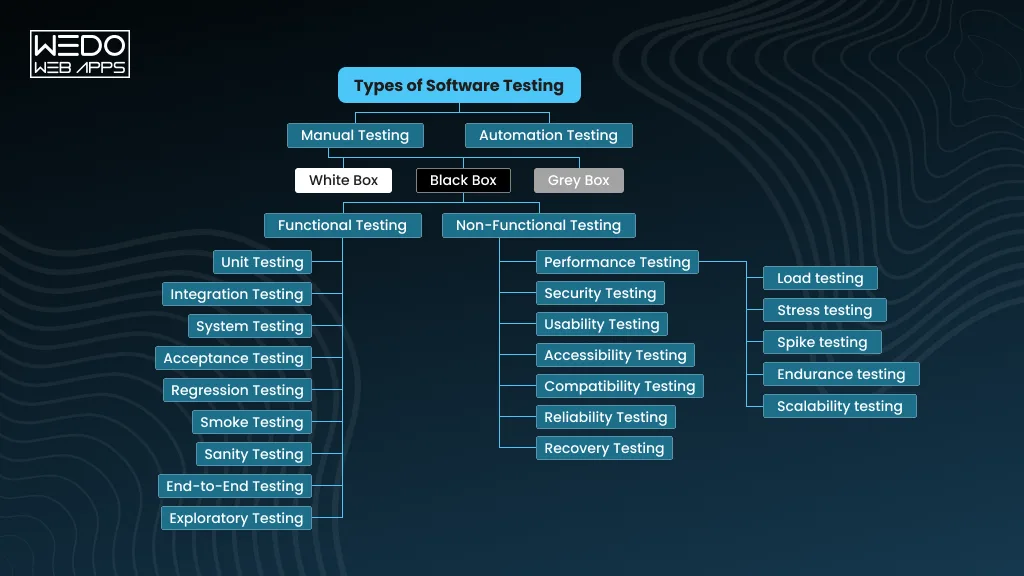
The two broad categories are functional testing and non-functional testing. Functional testing checks whether your software performs the required actions correctly. Non-functional testing evaluates qualities such as speed, security, reliability, and usability.
These categories cover many individual testing approaches. The right combination depends on what your application does, who uses it, and where failure would create the greater risk.
Functional Testing
Functional testing verifies whether an application behaves according to its requirements. The focus is on what software does, such as processing a payment, creating an account, submitting an order, or returning the correct API response.
Common functional testing types include:
1. Unit Testing
Unit testing examines the smallest testable parts of an application, such as functions, methods, or individual components.
Example: A developer tests whether a discount calculation returns the correct price for different customer and order values.
Unit tests are typically created early in development and are strong candidates for automation.
2. Integration Testing
Integration testing checks whether different components, services, databases, or APIs work correctly together.
Example: After a customer completes checkout, integration testing can verify that the payment service, order database, inventory system, and confirmation service communicate correctly.
3. System Testing
System testing evaluates the complete application against its specified requirements. It looks at the behavior of the integrated system rather than an individual component.
Example: A QA team tests an eCommerce application from product search through checkout and order confirmation.
4. Acceptance Testing
Acceptance testing determines whether the software meets business and user requirements and is suitable for its intended use.
It may involve clients, business stakeholders, end users, or dedicated QA teams.
Example: A business team validates that a new employee management module supports the workflows defined during project planning.
5. Regression Testing
Regression testing checks whether existing functionality still works after code changes, bug fixes, configuration updates, or new features.
Example: After modifying the payment module, your team reruns checkout, refunds, invoices, and order confirmation tests to identify unintended effects.
Regression testing becomes especially important for products with frequent releases.
6. Smoke Testing
Smoke testing performs a quick check of critical functionality to determine whether a build is stable enough for more detailed testing.
Example: After receiving a new build, testers verify that users can log in, access the dashboard, navigate key pages, and perform a basic transaction.
If these critical workflows fail, deeper testing may be postponed until the build is fixed.
7. Sanity Testing
Sanity testing focuses on a specific change or bug fix to confirm that the affected functionality works as expected.
Example: If a developer fixes a password-reset issue, the QA team can test the reset workflow and related functionality before proceeding with broader regression testing.
8. End-to-End Testing
End-to-end testing validates a complete business or user journey across the systems involved in that workflow.
Example: An online retailer can test the journey from account login and product selection to payment, order creation, inventory updates, and confirmation email.
9. Exploratory Testing
Exploratory testing allows testers to investigate an application without following only predefined test cases. Testers use their knowledge and observations to explore unexpected behaviors and potential defects.
Example: While testing a travel booking application, a tester may change dates, switch between devices, interrupt a payment, and revisit previous screens to uncover issues that scripted tests may miss.
Non-Functional Testing
Non-functional testing evaluates how well the software operates under different conditions. It focuses on characteristics that influence reliability, security, performance, accessibility, and the overall user experience.
10. Performance Testing
Performance testing measures how an application behaves in terms of response time, throughput, resource usage, and stability.
For example, your team may evaluate whether an online store continues responding within acceptable limits during a major promotional campaign.
Performance testing includes several specialized approaches.
| Testing type | Primary focus | Example |
|---|---|---|
| Load testing | Expected user or transaction load | Testing an application with 5,000 concurrent users |
| Stress testing | Behavior beyond expected capacity | Increasing traffic until the system reaches its limits |
| Spike testing | Sudden changes in load | Simulating a sudden surge in users |
| Endurance testing | Stability over an extended period | Running sustained traffic for several hours |
| Scalability testing | Ability to handle increasing demand | Evaluating performance as users and data grow |
11. Security Testing
Security testing identifies weaknesses that could expose applications, systems, or user data to unauthorized access or other security threats.
It can examine areas such as:
- Authentication and authorization
- Session management
- Input validation
- Data protection
- Access controls
- Common application vulnerabilities
Example: A security test may verify that a customer cannot access another customer's order simply by changing an identifier in a URL.
12. Usability Testing
Usability testing evaluates how easily users can understand and interact with the application.
Example: A team may observe whether first-time users can find a product, add it to the cart, and complete checkout without assistance.
13. Accessibility Testing
Accessibility testing checks whether people with disabilities can effectively use the application.
It can include keyboard navigation, screen-reader compatibility, text alternatives, focus behavior, color contrast, and other accessibility considerations.
Example: A tester verifies that a user can complete a registration form using only a keyboard and that form controls are correctly announced by a screen reader.
14. Compatibility Testing
Compatibility testing checks whether an application behaves consistently across different environments.
These may include:
- Browsers
- Operating systems
- Mobile devices
- Screen sizes
- Hardware configurations
- Network conditions
Example: A responsive web application may need testing across Chrome, Safari, Firefox, Android devices, and iPhones to identify environment-specific issues.
15. Reliability Testing
Reliability testing evaluates whether the application can consistently perform its intended functions over time without unexpected failures.
Example: A financial application may undergo extended testing to verify that recurring transactions continue processing correctly without data corruption or service interruptions.
16. Recovery Testing
Recovery testing checks how effectively an application recovers after failures such as crashes, network interruptions, hardware problems, or service outages.
Example: A team may intentionally interrupt a database connection and verify whether the application recovers without losing a customer's transaction.
The key takeaway: functional testing tells you whether the software performs the required job, while non-functional testing tells you whether it performs that job with the required speed, security, reliability, usability, and resilience. Both are necessary when you are preparing a production application for real users.
What Are the Levels of Software Testing?
Testing levels describe where and at what scope you evaluate the software. They are different from testing categories such as functional and non-functional testing.
For example, unit testing examines an individual component, while system testing evaluates the complete application. Understanding these levels helps you build coverage progressively instead of relying on end-stage testing to identify every defect.
| Testing level | Primary focus | Typical example |
|---|---|---|
| Unit testing | Individual functions or components | Testing a tax calculation function |
| Integration testing | Interactions between components | Checking an API's interaction with a database |
| System testing | Complete integrated application | Testing an entire checkout workflow |
| Acceptance testing | Business and user requirements | Validating a feature before production release |
Unit Testing
Unit testing validates individual units of code in isolation. Developers usually perform it during development to verify that specific functions or components produce the expected results.
Example: A developer tests a function that calculates shipping charges for different delivery locations and order values.
Because unit tests are generally small and repeatable, they are well suited to automation.
Integration Testing
Integration testing evaluates whether separate components work correctly when connected.
The interaction may involve:
- APIs and databases
- Microservices
- Third-party payment gateways
- Authentication services
- Internal application modules
Example: A checkout service may successfully calculate an order total during unit testing but fail when it sends data to the payment service. Integration testing helps identify this type of issue.
System Testing
System testing evaluates the application as a complete, integrated product. It checks whether the system behaves according to its functional and business requirements.
Example: For an eCommerce application, system testing could cover product discovery, cart management, checkout, payment, order creation, and confirmation.
This level gives you a broader view of how the application behaves in a realistic environment.
Acceptance Testing
Acceptance testing validates whether the software is ready for its intended users or business stakeholders.
It focuses on questions such as:
- Does the product satisfy the agreed requirements?
- Does the workflow support the intended business process?
- Can users complete their expected tasks?
- Is the application ready for release?
Example: A company implementing custom CRM software may ask its sales team to validate lead management, follow-ups, reporting, and customer workflows before approving the release.
How These Testing Levels Work Together
These levels are not competing types of software testing. They work at different scopes.
A typical progression looks like this:
Unit -> Integration -> System -> Acceptance
A defect found during unit testing may be isolated to one component. A problem discovered during system testing could involve several connected services. Acceptance testing then confirms that the complete product meets the business need.
This layered approach helps your team catch issues at different points instead of depending on one final testing phase.
What Are Software Testing Methods and Techniques?
Testing methods describe how you approach testing, while testing levels describe where you test and testing types describe what you are evaluating. This distinction matters when you are designing a testing strategy because the same application can use several methods at different levels.
The most commonly discussed approaches are black-box, white-box, and grey-box testing. Testing can also be categorized as static or dynamic depending on whether the software is executed during evaluation.
Black-Box Testing
Black-box testing evaluates software based on its inputs, outputs, and expected behavior without requiring the tester to understand the underlying source code.
You provide an input, observe the result, and compare it with the expected outcome.
Example: A tester enters valid and invalid credentials into a login form and checks whether the application responds correctly.
Black-box techniques are commonly useful for functional, system, and acceptance testing because they focus on behavior from the user's or system's external perspective.
White-Box Testing
White-box testing examines the application's internal code, logic, conditions, and execution paths. Testers or developers need knowledge of the implementation to design effective tests.
Common coverage approaches include:
- Statement coverage checks whether executable statements have been run.
- Branch coverage checks whether decision branches have been exercised.
- Condition coverage evaluates individual conditions within logical expressions.
- Path coverage examines different execution paths through the code.
Example: A developer tests every decision path in a pricing function to verify how discounts, taxes, and eligibility rules interact.
White-box testing is particularly valuable during unit and component testing.
Grey-Box Testing
Grey-box testing combines aspects of black-box and white-box approaches. The tester has partial knowledge of the application's internal architecture, data flow, or implementation but evaluates the system primarily through its external behavior.
Example: A tester knows how an application's authentication service and database interact but tests the login workflow through the application's interface and APIs.
This approach can be useful when you need deeper insight than black-box testing provides without performing a complete code-level assessment.
Static Testing
Static testing evaluates software artifacts without executing the application. It can happen early in development and helps identify issues before they become runtime defects.
Common activities include:
- Requirements reviews
- Design reviews
- Code reviews
- Walkthroughs
- Static code analysis
Example: A code-analysis tool flags an unused variable or potential coding issue before the application is executed.
Dynamic Testing
Dynamic testing requires the software to be executed so that its actual behavior can be observed and evaluated.
Functional tests, performance tests, security tests, and many other software testing methods fall into this category.
Example: A QA team submits different payment values through a running application and verifies the resulting transaction behavior.
Black-Box vs White-Box vs Grey-Box Testing
| Approach | Code knowledge | Primary focus | Typical users |
|---|---|---|---|
| Black-box | None required | External behavior | QA testers |
| White-box | Detailed | Internal logic and code paths | Developers, technical testers |
| Grey-box | Partial | Behavior with architectural insight | QA and security teams |
These approaches can complement each other. A mature testing strategy does not need to choose only one. Your team can use white-box testing for code-level validation, black-box testing for user-facing behavior, and grey-box testing where partial system knowledge provides additional testing depth.
Manual vs Automated Software Testing
Choosing between manual and automated testing depends on what you need to test, how often you need to test it, and how frequently the application changes. Most development teams benefit from using both rather than treating them as competing approaches.
What Is Manual Testing?
Manual testing involves a tester executing test cases and evaluating application behavior without relying on automated test scripts.
It remains valuable when human observation and judgment matter, particularly for:
- Exploratory testing
- Usability testing
- Visual validation
- New or frequently changing features
- Scenarios that are difficult to automate reliably
Example: A tester manually explores a new mobile checkout flow to identify confusing navigation, unexpected interactions, or usability issues that predefined scripts may overlook.
What Is Automated Testing?
Automated testing uses scripts, frameworks, or specialized tools to execute tests and compare actual results with expected outcomes.
It is particularly useful for repeatable and stable test scenarios.
Example: Every time your team deploys a new build, automated tests can verify hundreds of existing login, checkout, API, and database scenarios without requiring testers to execute each one manually.
Automation can improve execution speed and consistency, but it also requires upfront development and ongoing maintenance.
Manual Testing vs Automated Testing
| Factor | Manual Testing | Automated Testing |
|---|---|---|
| Execution | Performed by testers | Performed by scripts or tools |
| Speed | Slower for repetitive tests | Faster for repeatable tests |
| Human judgment | High | Limited |
| Initial investment | Usually lower | Usually higher |
| Repeatability | Depends on tester | Highly repeatable |
| Maintenance | Test cases require updates | Scripts require maintenance |
| Best suited for | Exploratory and usability scenarios | Regression and repetitive scenarios |
When Should You Automate Testing?
Automation is generally a strong option when a test is:
- Repeated frequently
- Stable and well-defined
- Time-consuming to execute manually
- Required across multiple environments
- Important to regression coverage
- Suitable for execution during every build or release
You should not automate every test simply because automation is available. A test that changes frequently or depends heavily on human judgment may cost more to maintain than the time it saves.
What Is Continuous Testing?
Continuous testing integrates automated testing into the software delivery pipeline so that code can be validated throughout development and deployment.
For example, when a developer pushes a change, the CI/CD pipeline can automatically run unit, integration, security, and regression tests. Failed checks can stop the build from progressing until the issue is investigated.
This approach helps your team detect defects earlier and supports faster, more reliable releases.
For teams building or modernizing delivery pipelines, DevOps consulting services can help connect testing with CI/CD, infrastructure, deployment, and monitoring practices.
What Are the Specialized Types of Software Testing?
Some applications require testing beyond the core functional, non-functional, and testing-level approaches. Specialized testing focuses on a particular technology, environment, user requirement, or business risk.
The right combination depends on your product. A mobile banking app, for example, needs different coverage from a public content website or an internal business application.
API Testing
API testing validates whether APIs return the expected responses, handle valid and invalid inputs correctly, enforce authorization, and communicate reliably with other services.
Example: A team tests an order API to verify that it creates an order correctly, rejects incomplete requests, and prevents unauthorized access.
Database Testing
Database testing checks data integrity, accuracy, consistency, transactions, queries, and interactions between the application and its database.
Example: After a customer updates their address, testing can verify that the new information is correctly stored and retrieved across relevant application workflows.
UI Testing
UI testing evaluates whether the application's interface behaves as expected from the user's perspective.
It can cover:
- Buttons and forms
- Navigation
- Input validation
- Error messages
- Page interactions
- Dynamic interface elements
Example: A tester verifies that a checkout button remains disabled until all required payment information is entered.
Mobile Application Testing
Mobile testing evaluates applications across different devices, operating systems, screen sizes, network conditions, and hardware capabilities.
For your mobile product, testing may include:
- Android and iOS versions
- Different screen sizes
- Touch interactions
- Device permissions
- Interruptions such as calls or notifications
- Battery and network conditions
Example: A food delivery app may need to maintain the user's order state when connectivity temporarily drops during checkout.
Web Application Testing
Web application testing validates functionality, performance, security, responsiveness, and compatibility across browsers and devices.
Example: A responsive web application may be tested across Chrome, Safari, Firefox, desktop screens, tablets, and mobile devices to identify environment-specific problems.
Localization Testing
Localization testing checks whether an application works correctly for a specific language, region, or market.
It can involve:
- Translated content
- Currency formats
- Date and time formats
- Number formats
- Regional content
- Local regulations
Example: An eCommerce application launching in Germany may need to display German content, Euro pricing, and region-appropriate date and number formats.
Internationalization Testing
Internationalization testing evaluates whether the application has been designed to support multiple languages and regions without requiring major code changes.
Example: A platform built for global expansion should handle different character sets, text lengths, currencies, and writing directions without breaking its interface.
Localization vs Internationalization
| Aspect | Localization | Internationalization |
|---|---|---|
| Focus | Adaptation for a specific market | Preparing software for multiple markets |
| Example | German language and Euro format | Architecture supporting multiple languages |
| Primary concern | Regional correctness | Global flexibility |
Installation Testing
Installation testing verifies whether software can be installed, upgraded, configured, and uninstalled correctly across supported environments.
Example: A desktop application may be tested for clean installation, upgrade from an earlier version, rollback after failure, and complete removal.
Compliance Testing
Compliance testing evaluates whether an application follows applicable standards, contractual requirements, industry rules, or regulatory obligations.
The exact requirements depend on the product and market.
Example: A healthcare application may need testing against applicable privacy and security requirements before being released to customers.
Penetration Testing
Penetration testing involves authorized security professionals attempting to identify and exploit vulnerabilities in an application or system.
It goes beyond checking whether security controls exist. The goal is to understand whether weaknesses can actually be exploited and what impact they could have.
Example: A security team may conduct an authorized assessment of an application's authentication and access controls to identify paths that could allow unauthorized access.
These specialized approaches can be combined with other software testing methods. For instance, an application might use automated API testing for regression coverage, manual usability testing for critical user journeys, and penetration testing for security validation.
Alpha Testing vs Beta Testing vs User Acceptance Testing
Alpha, beta, and user acceptance testing all happen relatively close to release, but they answer different questions. Alpha and beta testing focus on discovering issues through controlled or real-world use, while UAT focuses on whether the software meets business and user requirements.
| Testing approach | Who performs it? | Main purpose | Typical environment |
|---|---|---|---|
| Alpha testing | Internal testers and development teams | Identify defects before external release | Controlled environment |
| Beta testing | Selected external users | Evaluate real-world behavior and feedback | Real-world environment |
| User Acceptance Testing (UAT) | Business stakeholders or intended users | Confirm business requirements are met | Production-like environment |
Alpha Testing
Alpha testing is conducted before wider external access. Internal QA teams, developers, or other designated participants use the application to identify significant defects and usability issues.
Example: Before launching a new SaaS platform, the internal team tests core workflows such as registration, billing, reporting, and account management.
Beta Testing
Beta testing exposes the software to a limited group of external users under real-world conditions. Their feedback can reveal device, environment, usability, or workflow issues that controlled testing may not uncover.
Example: A mobile app developer releases a pre-launch version to selected customers across different devices and operating systems to collect feedback before the public release.
User Acceptance Testing
UAT determines whether the software supports the business processes and requirements agreed upon for the project.
Example: After developing a custom CRM, the sales team validates lead assignment, customer records, reporting, and approval workflows before signing off on the release.
The three approaches can complement each other. Alpha testing helps uncover issues internally, beta testing provides feedback from real users, and UAT confirms that the delivered solution satisfies the intended business requirements.
What Is AI-Powered Software Testing?
AI is changing how development and QA teams design, execute, and analyze tests. Instead of replacing established software testing methods, AI can augment them by helping teams create tests faster, identify patterns in test results, prioritize high-risk scenarios, and maintain automation.
For organizations releasing software frequently, these capabilities can reduce repetitive effort while helping testers focus more attention on complex workflows and business-critical risks.
How AI Is Changing Software Testing
AI-Assisted Test Case Generation
AI tools can analyze requirements, user stories, application behavior, or existing test cases to suggest additional scenarios.
Example: Given a requirement for a password-reset workflow, an AI tool may suggest tests for valid credentials, expired links, invalid tokens, repeated requests, and account security controls.
Automated Test-Data Generation
AI can help generate realistic test data for different scenarios, including edge cases that may be difficult to create manually.
Example: For an eCommerce application, AI can generate combinations of customer profiles, order values, discount rules, and inventory conditions for broader test coverage.
Intelligent Test Prioritization
Not every test needs to run first after every code change. AI can analyze historical failures, code changes, dependencies, and risk signals to help prioritize tests that are more relevant to the change.
This can be particularly useful when large automated test suites increase CI/CD execution time.
Predictive Defect Detection
AI models can analyze historical defect patterns, code changes, and other development signals to identify areas that may have a higher risk of defects.
This does not guarantee that a defect exists. It helps teams decide where additional investigation may be worthwhile.
AI-Powered Visual Testing
AI-based visual testing can compare application interfaces and identify unexpected changes in layouts, components, images, or other visual elements.
Example: After a UI update, an AI-assisted visual testing tool may flag an incorrectly positioned checkout button or a layout change that affects smaller screens.
Self-Healing Test Automation
Some AI-assisted automation tools can identify certain changes in application interfaces and adapt test locators or interactions instead of immediately failing.
This can reduce maintenance for specific types of UI automation, although human review remains important.
Natural-Language Test Creation
Modern AI tools can allow testers to describe scenarios in natural language and generate corresponding test cases or automation workflows.
For example:
"Verify that a registered customer can add a product to the cart, complete payment, and receive an order confirmation."
The generated test still needs validation before being treated as reliable test coverage.
AI Testing vs Traditional Test Automation
| Area | Traditional automation | AI-assisted testing |
|---|---|---|
| Test creation | Script or framework-driven | Can assist with generating scenarios |
| Test maintenance | Usually manual updates | AI may suggest or perform certain adaptations |
| Test prioritization | Predefined rules | Can use historical and contextual signals |
| Test analysis | Reports and predefined assertions | Can identify patterns across results |
| Human involvement | Required | Still required for validation and decisions |
AI is therefore better viewed as an augmentation layer for testing rather than a replacement for QA expertise.
What Are the Limitations of AI in Software Testing?
AI-generated tests can contain incorrect assumptions, miss important business rules, or produce false positives. Generated automation can also become difficult to maintain if the underlying application changes frequently.
Teams should therefore validate AI-generated test cases and keep human oversight for:
- Business-critical scenarios
- Security-sensitive workflows
- Regulatory requirements
- Test coverage decisions
- Unexpected failures
- Final release decisions
The strongest approach is to combine AI with established testing practices, automation, domain expertise, and human judgment. This allows you to use AI where it adds measurable value without treating generated output as automatically reliable.
Which Types of Software Testing Should You Use for Your Project?
There is no universal testing checklist that fits every software product. Your testing strategy should reflect the application's risk, users, technology, release frequency, and business requirements.
A customer-facing mobile app may need extensive compatibility and usability testing. A financial platform may require stronger security and compliance coverage. A SaaS product with frequent deployments may benefit heavily from automated regression and continuous testing.
| Project requirement | Testing types to consider | Why they matter |
|---|---|---|
| New feature development | Unit, integration, functional, acceptance | Verifies the feature and its interactions |
| High-traffic application | Load, stress, spike, scalability | Reveals capacity and performance limits |
| Mobile application | Functional, compatibility, usability, performance | Validates behavior across devices and conditions |
| Customer-facing web application | Functional, security, accessibility, compatibility | Protects user experience and application quality |
| Financial or sensitive application | Security, functional, compliance, performance | Addresses security and regulatory risks |
| Frequently updated product | Automated regression, unit, integration, continuous testing | Supports faster and safer releases |
| Global application | Localization, internationalization, compatibility | Ensures consistent regional experiences |
Start With Risk, Not With a Test List
Before selecting individual software testing methods, identify what could cause the greatest damage if it fails.
Ask:
- Which workflows directly affect revenue?
- Which features handle sensitive information?
- Which failures would affect the largest number of users?
- Which components change frequently?
- Which integrations could disrupt critical workflows?
- Which performance limits could affect business operations?
This risk-based approach helps you allocate testing effort where it matters most.
For example, an eCommerce platform may prioritize payment processing, inventory synchronization, checkout, authentication, and order management over less critical administrative features.
Your testing mix should evolve with the product too. A new application may need broader exploratory and functional testing, while a mature product with frequent releases may place greater emphasis on automation, regression coverage, performance monitoring, and continuous testing.
How to Build a Software Testing Strategy
A strong testing strategy gives your team a clear framework for deciding what to test, when to test it, how to test it, and where automation makes sense. It also prevents testing from becoming a last-minute activity before release.
Your strategy should reflect the application's architecture, business risks, development process, and release model.
1. Define Testing Objectives and Risks
Start by identifying what could affect users or business operations if it fails.
Consider:
- Critical business workflows
- Security and privacy risks
- Performance expectations
- Regulatory requirements
- Third-party dependencies
- Expected user volume
Example: For an online payment platform, transaction accuracy and security should receive greater testing attention than low-risk administrative features.
2. Identify Critical User Journeys
Map the workflows that users must be able to complete successfully.
These may include:
- Account registration
- Login and authentication
- Product search
- Checkout and payment
- Booking or subscription
- Data submission
- Reporting
Prioritizing these journeys helps your team focus testing effort on functionality that directly affects the customer experience.
3. Select the Right Testing Types
Choose testing approaches based on the risks you identified rather than trying to run every possible test.
For example:
Frequent code changes -> regression and automated testing
High traffic -> load and scalability testing
Sensitive data -> security and compliance testing
Multiple devices -> compatibility testing
Complex user workflows -> exploratory and end-to-end testing
4. Decide Which Tests to Automate
Automate tests that are stable, repeatable, time-consuming, and valuable to run frequently.
Keep human involvement where judgment is important, such as exploratory testing, usability evaluation, and complex business scenarios.
This creates a more practical balance between manual and automated testing.
5. Integrate Testing Into CI/CD
Connect automated tests with your development and deployment pipeline so that important checks run as code changes move through the delivery process.
A typical flow can look like:
Code change -> Build -> Unit tests -> Integration tests -> Security checks -> Automated regression -> Deployment
This helps your team identify problems earlier and reduces the chance of releasing changes that have not been adequately validated.
6. Track Defects and Test Coverage
Use measurable indicators to understand whether your testing process is working.
Useful metrics can include:
- Defect density
- Defect severity
- Test pass and failure rates
- Regression coverage
- Automated test coverage
- Defect resolution time
- Escaped defects
Avoid treating test coverage alone as proof of quality. A large number of tests can still miss critical business scenarios.
7. Continuously Improve the Testing Strategy
Your testing strategy should change as the application changes.
Review recurring defects, failed tests, production incidents, release patterns, and user feedback. Use these findings to adjust test coverage and priorities.
For teams following iterative development practices, integrating testing into the Agile software development process can help QA and development teams validate functionality continuously rather than waiting until the end of an iteration.
For larger development environments, this approach can also connect closely with DevOps practices, where automated testing becomes part of the broader delivery pipeline.
Common Software Testing Mistakes to Avoid
Even a well-defined testing process can lose its value when teams focus on the wrong activities or apply the same approach to every project. Avoiding these mistakes helps you get more meaningful coverage without unnecessarily extending development cycles.
Testing Only Before Release
Leaving testing until the final stage gives your team less time to investigate and fix defects.
Better approach: Introduce testing throughout development. Unit and integration tests can run early, while broader system and acceptance testing can follow as the product becomes more complete.
Relying Entirely on Automated Testing
Automation is excellent for repeatable scenarios, but it cannot replace every form of human evaluation.
Better approach: Combine automation with exploratory, usability, and other testing where human judgment adds value.
Ignoring Non-Functional Testing
An application can produce the correct result and still provide a poor experience because it is slow, insecure, inaccessible, or unreliable.
Better approach: Include relevant performance, security, accessibility, compatibility, and reliability testing alongside functional validation.
Automating Unstable Test Cases
Automating a workflow that changes constantly can create significant maintenance work.
Better approach: Prioritize stable, repeatable, high-value scenarios for automation and reassess them as the application evolves.
Ignoring Real User Environments
Testing only in one browser, device, network condition, or operating system can leave environment-specific defects undiscovered.
Better approach: Define your supported environments and include them in compatibility testing based on actual user data and business priorities.
Confusing Test Coverage With Software Quality
A high test count does not necessarily mean an application has been tested effectively. Hundreds of tests can still miss a critical business scenario.
Better approach: Measure coverage against requirements, risks, user journeys, and defect patterns rather than relying on test volume alone.
Skipping Security and Accessibility Testing
Security and accessibility issues can affect users, compliance, reputation, and business continuity.
Better approach: Treat relevant security and accessibility checks as part of the overall testing strategy instead of optional activities added immediately before launch.
Software Testing Types at a Glance
With so many types of software testing, choosing the right approach can become confusing. The table below gives you a quick reference to the major testing types covered in this guide and the role each one plays.
| Testing Type | Category | What It Checks | Example |
|---|---|---|---|
| Unit Testing | Functional / Level | Individual functions or components | Validating a tax calculation |
| Integration Testing | Functional / Level | Interactions between components | API communicating with a database |
| System Testing | Functional / Level | Complete application behavior | Testing an end-to-end checkout |
| Acceptance Testing | Acceptance | Business and user requirements | Client validating a new workflow |
| Regression Testing | Functional | Existing functionality after changes | Retesting checkout after a payment update |
| Performance Testing | Non-functional | Speed, stability, and resource use | Measuring response time under load |
| Security Testing | Non-functional | Vulnerabilities and access controls | Testing authentication and authorization |
| Usability Testing | Non-functional | Ease and efficiency of use | Observing first-time users |
| Accessibility Testing | Non-functional | Accessibility for users with disabilities | Testing keyboard and screen-reader access |
| Compatibility Testing | Non-functional | Behavior across environments | Testing browsers and mobile devices |
| Smoke Testing | Functional | Basic build stability | Checking critical workflows after deployment |
| Sanity Testing | Functional | Specific changes or fixes | Validating a corrected password-reset flow |
| API Testing | Specialized | API behavior and communication | Validating an order API |
| Exploratory Testing | Technique | Unexpected behavior and defects | Investigating an unfamiliar user workflow |
The table is useful as a starting point, but your actual testing mix should depend on the application's risk profile, architecture, users, and release process.
Yes. For this article, I'd replace some of the generic FAQs with decision-making questions that a CTO, founder, product owner, or engineering manager might actually ask before choosing a testing approach.
These will make the FAQ section more commercially relevant without turning it into a sales pitch.
Conclusion
Choosing the right types of software testing starts with understanding what can go wrong and where those risks matter most. Functional testing validates core behavior. Non-functional testing examines performance, security, usability, and reliability. Testing levels, techniques, automation, and AI then help you build broader and more efficient coverage.
Your testing strategy should evolve with your product. A new application may require broader functional validation, while a mature product with frequent releases may need stronger automation, regression coverage, performance testing, and continuous testing.
If you are developing a new product or improving an existing application, the right testing approach can help you identify risks earlier and release with greater confidence. WEDOWEBAPPS can support your software development and quality assurance needs with testing strategies aligned to your product, technology stack, and business requirements.