Introduction
You have an app idea. You do not have a developer.
Hiring can take a few months. Freelancers can disappear in the middle of the project. Quotes for the same app can differ by tens to thousands of dollars. One wrong choice leaves you with late delivery, unclear code, and a product that does not even perform.
That is the risk when you outsource mobile app development without a plan.
Get it right, and you launch sooner, access specialists' skills, and keep your budget in check.
This guide shows you how to outsource app development step by step. You will see what it costs, which engagement model fits your project, and how to hire a mobile app development company that delivers results.
Still comparing it with building a team in-house? Do not worry; we cover that too.
Let's begin with the basics first.
What Is Mobile App Development Outsourcing?
Mobile app development outsourcing means that you are hiring an external company or a team to design, build, and maintain your app. You keep the ownership of the product, but the development partner handles the engineering work, either for the whole app or for a specific part of it.
What Can You Outsource?
- App design: UI/UX design, wireframes, and clickable prototypes.
- Mobile development: iOS, Android, or cross-platform builds.
- Backend development: servers, databases, and user accounts.
- API integration: payments, maps, CRM, and other third-party tools.
- Testing: functional checks, performance tests, and real-device QA.
- Deployment: App Store and Google Play submission.
- Maintenance: bug fixes, OS compatibility updates, and new features.
Outsourcing vs In-House Development
| Factor | Outsourcing | In-House |
|---|---|---|
| Upfront cost | Lower, with no hiring or equipment costs | Higher, with salaries, recruiting, and tools |
| Time to start | Weeks | Often months to hire a full team |
| Control | Shared, set by your contract | Full |
| Scalability | Add or remove people as per the needs of the project | Slow, tied to hiring cycle |
| Skill Range | Broad, across platforms and specialities | Limited to the people you hire |
| Best For | MVPs, defined projects, and skill gaps | Core products with long roadmaps |
Many companies land in the middle. An outsourced team builds version one, and an in-house product lead takes over once the app has traction.
Now you know what outsourcing mobile app development actually means; now you should check why there is a need for an outsourcing mobile app development company, which will give you more clarity.
Why Outsource Mobile App Development?
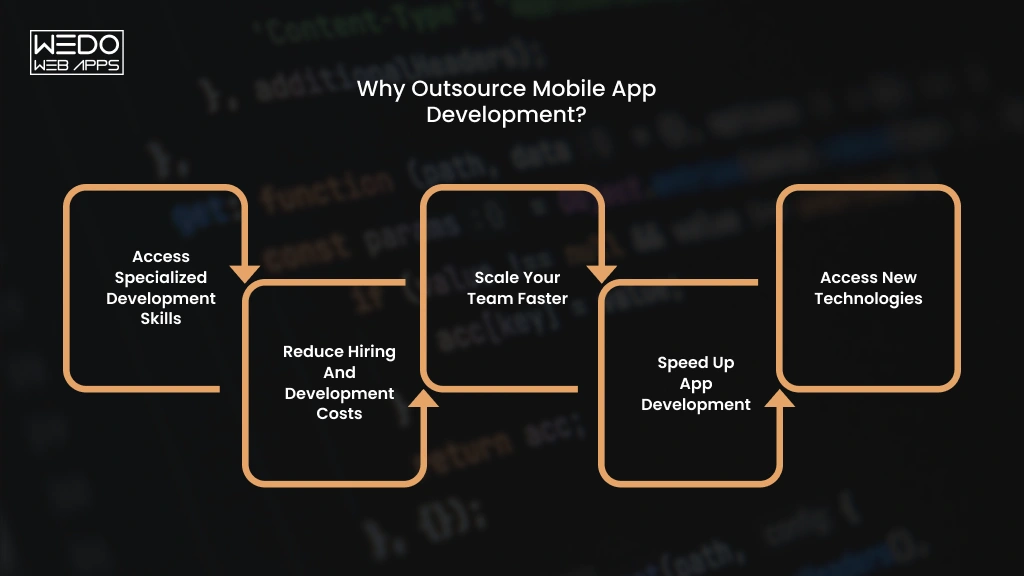
Building an app requires more than a developer. You may need UI/UX designers, backend engineers, QA testers, DevOps support, and experts in your chosen technology stack. Hiring them all internally can take months before even the development begins.
When you outsource mobile app development, you can bring the right skills into the project based on what you actually need. A capable development partner can also help you avoid technical gaps and keep the project moving.
Mordor Intelligence estimates the software development outsourcing market at about $618 billion in 2026. It expects small and mid-sized businesses to grow fastest, at 11.25% a year through 2031.
Here is why so many of them choose to outsource.
Access Specialized Development Skills
You can work with specialists who already have experience with the technologies your app requires.
For example, an app with real-time chat, payment integration, location tracking, and AI-powered recommendations may require several areas of expertise. When you outsource app development to an experienced team, you can access those skills through one development partner.
Reduce Hiring and Development Costs
Building an internal team involves more than a developer salary. Recruitment, benefits, software licenses, hardware, training, and management all add to your investment.
With mobile app development outsourcing, you pay for the expertise and resources your project needs without maintaining a full-time team after development ends.
Scale Your Team Faster
Your development needs can change as your product moves from an MVP to a larger release.
You might need two developers during the initial build and additional QA, backend, or DevOps support before launch. An outsourcing partner can adjust the team accordingly to the workload instead of requiring you to recruit for every new requirement.
Speed Up App Development
An established outsourcing company can begin with an existing team and development process. This can help you move from requirements and prototypes to development faster, especially when you have a fixed launch target.
Example: A startup preparing an investor demo may need an MVP within a few months. Building an internal team from scratch could consume a significant part of that timeline.
Access New Technologies
Your internal team may have limited experience with technologies your app needs, such as AI APIs, cloud services, AR features, or cross-platform frameworks.
If you plan to hire a mobile app development company, you can look for a partner with proven experience in the technologies required for your product. This gives you access to specialized expertise without hiring permanently for a single project.
For example: If you want to add an AI chatbot to an existing mobile app, an experienced AI app development partner can handle the AI integration while your internal team continues managing the core product.
These benefits only apply if you choose the right partner. And WEDOWEBAPPS is the right partner for you.
With the next section you will know about how to outsource app development in simple nine steps.
How to Outsource Mobile App Development
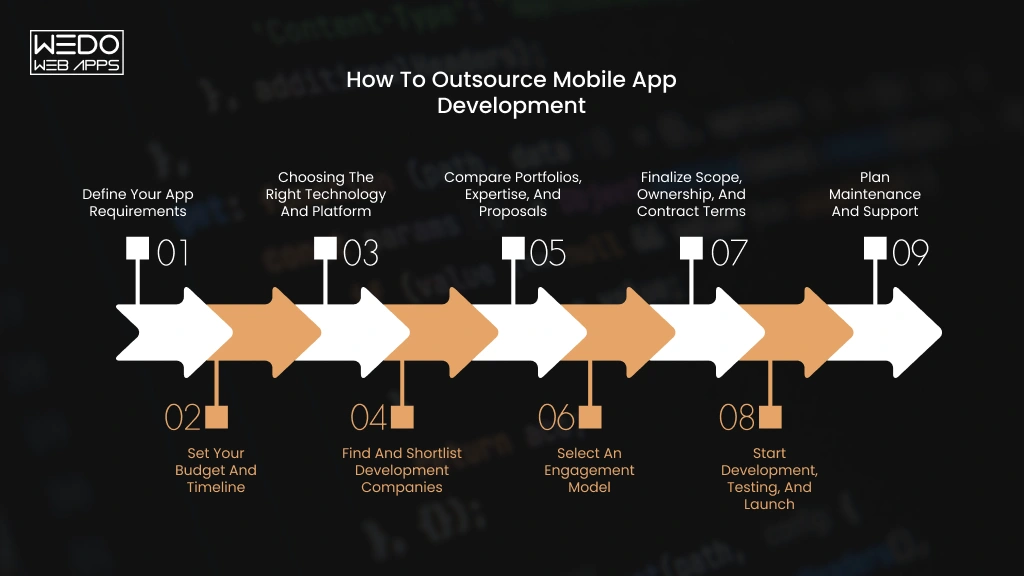
A successful outsourcing project starts before development begins. Your requirements, budget, technology choices, vendor selection, contract terms, and communication process all affect the final result.
When you outsource mobile app development, treat the external team as a delivery partner rather than simply handing over a list of features. Clear responsibilities and measurable outcomes make it easier to control scope, cost, and quality.
Here is a practical process you can follow.
1. Define Your App Requirements
Start by documenting what you want the app to achieve and who will use it.
Your initial brief should cover:
- Target users and their main problems.
- Core features and user journeys.
- iOS, Android, or both.
- Backend and third-party integrations.
- Design requirements.
- Security or compliance needs.
- Expected launch date.
- Features that are outside the initial scope.
You do not need a complete technical specification before speaking to a development company. However, you should be clear about the product outcome and the features required for the first release.
2. Set Your Budget and Timeline
Set a realistic budget before comparing development companies. Your budget should account for development, design, QA, third-party services, infrastructure, app store requirements, and post-launch support.
Your timelines also need some flexibility. A fixed launch date can help prioritize features, but rushing development by adding more developers is not always the fastest solution.
Ask potential partners to separate the estimate by major phases or deliverables. This makes it easier to understand where your money is going and identify assumptions behind the quote.
3. Choosing the Right Technology and Platform
Your technology choice should follow your product requirements rather than a developer's preferred stack.
If you need platform-specific capabilities or maximum control over native features, native IOS and Android development may be appropriate. If you want to launch on both platforms with a shared codebase, frameworks such as Flutter or React Native may be worth considering.
Your development partner should explain the trade-offs around performance, integrations, maintenance, development speed, and future scalability before you commit.
Cross-platform development has also become more mature, while AI is increasingly being considered both as a development capability and as an app feature.
4. Find and Shortlist Development Companies
Now you can start looking for the companies that match your project requirements.
Do not shortlist providers based only on your search rankings or hourly rates. Look for experience with your app type, target platforms, integrations, and technical requirements.
A shortlist of three to five suitable companies is usually easier to evaluate than dozens of generic proposals.
Check whether each company can provide:
- Relevant portfolio examples.
- Case studies with measurable outcomes.
- The proposed team structure.
- Development and QA capabilities.
- Communication process.
- Post-launch support.
- Clear project estimates.
If you are planning to hire a mobile app development company, this stage should focus on finding teams that actually deliver your type of product, not simply teams that offer the lowest quote.
5. Compare Portfolios, Expertise, and Proposals
A portfolio tells you what a company has built. A proposal tells you how it intends to build your product.
Compare both.
Look at whether previous projects have similar functionality, user flows, technical requirements, or even the same business goals. Then review each proposal for scope, deliverables, assumptions, timelines, team compositions, and exclusions.
Two companies can quote the same while offering a very different range of services. One proposal may include backend, QA testing, and everything else, while the other may leave out some important aspects.
Ask questions whenever an estimate seems unusually low or unusually high.
6. Select an Engagement Model
Choose how you want to work with the development team based on the certainty of your requirements and the level of control you need.
A defined MVP may work well with a fixed-price arrangement. A product that will evolve through continuous releases may be better suited to time and materials or a dedicated team.
We compare these outsourcing models in detail later in this guide, so you can match the commercial structure to your project instead of choosing based on price alone.
7. Finalize Scope, Ownership, and Contract Terms
Before development starts, put the important agreements in writing.
Your contract should clearly address:
- Project scope and deliverables.
- Payment milestones.
- Change requests.
- Intellectual property ownership.
- Source code and repository access.
- Confidentiality and data protection.
- Acceptance criteria.
- Maintenance responsibilities.
- Exit and handover terms.
Your business should also retain control of important accounts such as your code repository, cloud infrastructure, analytics tools, and app store accounts where practical. This reduces dependency on a single vendor and makes future handover easier.
8. Start Development, Testing, and Launch
Once the scope and responsibilities are agreed, development can begin.
Set a communication rhythm before the first sprint. Weekly demos, regular progress updates, a shared project board, and clear escalation channels can prevent small issues from becoming expensive rework.
Testing should happen throughout development rather than being left until the final week. Mobile apps need testing across supported devices, operating system versions, screen sizes, network conditions, and real user flows.
Before launch, confirm that the final build, documentation, credentials, analytics, and deployment requirements are ready. Then complete the relevant App Store and Google Play submission processes.
9. Plan Maintenance and Support
Your relationship with the development company should not necessarily end when the app reaches the store.
Plan how you will handle bugs, operating system updates, security fixes, performance issues, third-party API changes, and future features.
Agree on response times, support coverage, maintenance costs, and ownership of ongoing updates before launch. A clear handover process is equally important if your internal team or another vendor will take over later.
The goal of outsourcing app development is not simply to get a finished build. You should finish the engagement with working software, access to your technical assets, clear documentation, and a practical plan for what happens next.
Now that you know the process, the next question is what it will cost.
How Much Does It Cost to Outsource Mobile App Development?
Most outsourced mobile apps cost between the range of $15,000 and $300,000 or more. The range is wide because "an app" can mean a simple booking tool or a full marketplace. When you outsource mobile app development, what you build affects the price more than where you build it.
Average Mobile App Outsourcing Cost
| App Type | Typical features | Timeline | Estimated Cost |
|---|---|---|---|
| Basic | Login, simple screens, static content, basic API | 2 to 3 months | $15,000 to $30,000 |
| Medium | Payments, push notifications, admin panels, third-party APIs | 4 to 6 months | $30,000 to $70,000 |
| Complex | Real-time chat, GPS tracking, AI features, several integrations | 6 to 9 months | $70,000 to $150,000 |
| Enterprise | High security, cloud setup, analytics, large user base | 9 to 12 or more months | $150,000 to $300,000+ |
These cost ranges assume an experienced offshore team or nearshore team, one codebase for iOS and Android, and design, development, and testing in the price. US and Western European teams usually cost more.
For example, a food ordering app with online payments and an admin panel sits in the medium tier.
Outsourcing Cost by Region
| Region | Mid-level hourly rate | Where it fits best |
|---|---|---|
| India | $28 to $45 | Tight budgets and a large talent pool |
| Southeast Asia (Vietnam, Philippines) | $22 to $38 | Low cost, strong mobile, and QA work |
| Eastern Europe | $40 to $60 | Senior engineer and overall with EU hours |
| Latin America | $45 to $65 | Full workday overlap with US teams |
| US and Western Europe | $60 to $150 | Closest collaboration at the highest price |
These figures come from 2026 rate guides, including Accelerance, and vary by vendor. Accelerance's 2026 survey found rates fell year on year in every major region. Rate guides link part of that drop to AI coding tools. Ask any vendor whether those gains reach your invoices.
Seniority also moves the price. A senior engineer often costs two to three times a junior in the same region.
When you hire a mobile app development company, ask for the seniority mix behind the rate. A team of juniors at $25 an hour can end up costing more than a balanced team at $40 once rework is added.
Factors That Affect Outsourcing Cost
- App complexity: Each new user role, such as customer, driver, and admin, adds screens and logic.
- Features: Live tracking or real-time chat costs far more than a login screen.
- Platforms: One cross-platform codebase usually costs less than two native apps.
- Integrations: Every payment map or CRM connection adds build and test time.
- Development Team: A team with a designer, a tester, and a project manager costs more than one developer. It also protects quality.
- Location: The same team can cost two to three times more in the US than in Asia.
- Timeline: A tight launch date needs more people working at once, which raises the monthly bill.
- Maintenance: Updates and fixes continue after launch, so budget for them from day one.
Hidden Costs to Consider
| Hidden Cost | What Happens | How to Avoid It |
|---|---|---|
| Third-Party Services | Paid tools for maps, SMS, payments, or analytics add monthly fees | List every service in your scope and ask the vendor for each monthly fee |
| Infrastructure | Servers, storage, and monitoring bill every month after launch | Ask for a cloud estimate at launch and at ten times your launch users |
| Change Requests | New ideas mid-build get billed as extras | Lock the scope per milestone and agree a change rate before you start |
| App Store Requirements | Developer accounts, review rejections, and policy updates take money and time | Open the account under your own company name and ask the vendor to follow the store checklist before submission |
| Ongoing Maintenance | New iOS and Android versions can break features that worked before | Sign a support plan before launch with response times and fees |
A quick way to see where your money goes: send your feature list to two or three vendors and ask for estimates priced per feature. The gaps between quotes show you which features drive the cost.
Once you have a budget, you need to decide how you will pay for the work. Four engagement models cover most projects.

Which Mobile App Development Outsourcing Model Should You Choose?
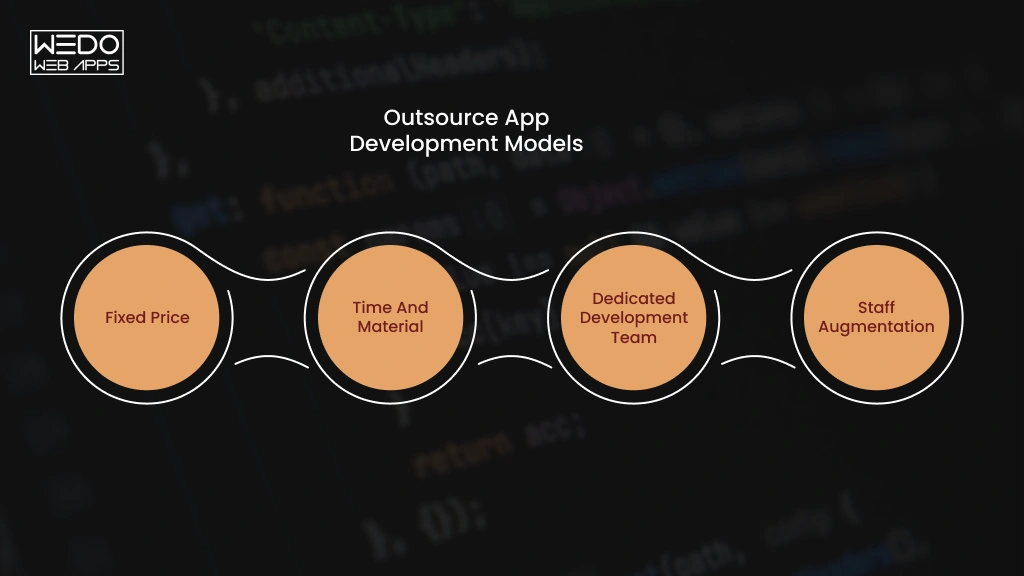
The right outsourcing model depends on how clearly you can define the project, how often the scope may change, and how much control you want over the development team.
Before you hire a mobile app development company, compare the models based on your project needs rather than choosing the option with the lowest starting price.
| Model | Best for | Pricing Structure | Main Consideration |
|---|---|---|---|
| Fixed Price | Clearly defined projects | Agreed project price | Scope changes can increase costs |
| Time and Material | Evolving products | Pay for actual time and resources | Final cost can change |
| Dedicated Development Team | Long-term or complex products | Monthly team-based cost | Requires ongoing involvement |
| Staff Augmentation | Filling specific skill gaps | Usually hourly or monthly | Your team manages delivery |
Fixed Prices
A fixed-price model works when your requirements, deliverables, and timeline are clearly defined.
You agree on the scope and price before development starts. This makes budgeting easier for a well-defined MVP or a project with limited room for change.
Best fit: A business launching a simple booking app with an agreed list of features.
Time and Materials
With time and materials, you pay for the actual development time and resources used. The scope can evolve as you learn from users or change product priorities.
This gives you more flexibility than a fixed-price contract, but you need to monitor progress and spending closely.
Best fit: A startup building an MVP where features may change after user feedback.
Dedicated Development Team
A dedicated team gives you a group of dedicated developers and specialists working on your product over a longer period.
You have more control over priorities and can add or adjust team members as the product grows. This model can work particularly well when you expect continuous development rather than a single launch.
Best fit: A SaaS company that plans regular releases, new features, and ongoing product improvements.
Staff Augmentation
Staff augmentation allows you to add external specialists to your existing team without handing over the entire project.
For example, you may already have product managers and backend developers but need two experienced Flutter developers for a mobile release.
Best for: Businesses with an internal development team that needs additional capacity or a specific technical skill.
A simple rule: If the scope is stable, consider a fixed price. If requirements are likely to evolve, time and materials may offer more flexibility. For long-term product development, a dedicated team can provide greater continuity. If you already manage development internally, staff augmentation can fill specific gaps.
Now you know how to structure the deal. Next, you need to find a company worth signing with.
How to Hire a Mobile App Development Company
Every company you contact will say it has senior data engineers and strong QA. Your job is to test those claims. When you hire a mobile app development company, check the six areas below. Then compare every vendor on one scorecard.
Check Mobile App Development Experience
Looking for experience in your kind of app. A team that has built a banking app understands security reviews. A team that has built a marketplace understands two-sided accounts and payouts.
Confirm these basics:
- At least two launched apps similar to yours in industry or features.
- Hands-on work with your chosen technology, such as Flutter or Swift.
- Apps that are still live and still updated.
Review Portfolio and Case Studies
Open their live apps in the App Store or Google Play. Check the ratings, the latest reviews, and the date of the last update. A strong app that nobody has touched in two years tells you something. Along with that, check the company's privacy protection policy.
Then read the case studies. Look for measurable results such as downloads, crash rates, or load times. Ask about a project that went wrong and how they fixed it.
Evaluate Technical and QA Expertise
Ask three questions and listen for specifics:
- "Which devices and OS versions will you test on, and who picked them?"
- "What do you test on real devices instead of simulators?"
- "What happens when Apple or Google releases a new OS version after launch?"
A strong answer names actual devices and describes a repeatable process. A weak answer says testing is "thorough."
Check Communication and Project Management
Agree on the working rhythm before you sign:
- One named project manager as your main contact.
- Weekly demos of working features.
- A shared task board, such as Jira or Trello.
- A few hours of overlap with your working day.
- Replies to your messages on the same business day.
Confirm Ownership, Security, and Support Terms
Here, check the company itself:
- A security certification, such as ISO 27001, that you can verify with the issuer.
- How they store your data and who can access your code.
- A written support plan with response time.
- Whether any work goes to subcontractors, and who they are.
Compare Proposals Instead of Just Prices
Score each vendor on the same sheet. These weights are a starting point, so adjust them to your project.
| Criteria | Weight | Score (1to5) |
|---|---|---|
| Relevant Experience | 25% | Score you feel right |
| Technical and QA depth | 25% | Score you feel right |
| Price and Value | 20% | Score you feel right |
| Communication and Process | 15% | Score you feel right |
| Security and Support terms | 15% | Score you feel right |
Multiply each score by its weight and add the results. The lowest quote often scores lower than you expect once testing and support are counted.
Red Flags to Watch For
- A fixed price with no questions asked. Ask for a discovery call first. A real estimate needs details about your users and features.
- Mockups instead of live apps. Ask for store links.
- No names on the team. Ask for names, roles, and how long each person has been with the company.
- No clear answer on AI coding tools. Ask which tools they use, who reviews AI-written code, and whether your data stays out of public tools.
- Pressure to sign this week. Ask for the proposal to stay valid for 30 days.
Many apps now include AI features, which adds a few more questions to your shortlist.
How AI Fits Into Mobile App Development Outsourcing
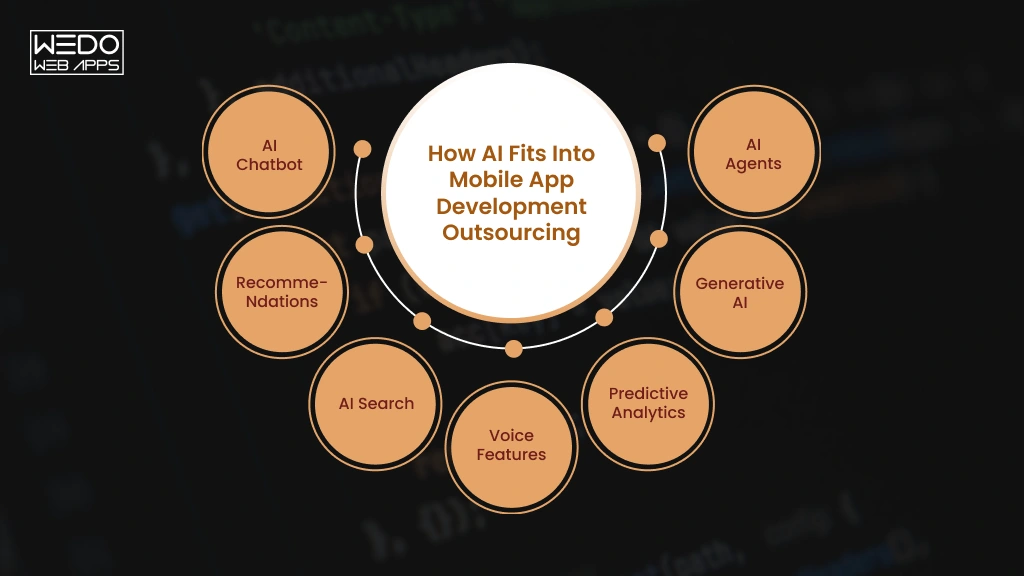
More app briefs now include AI features. If you outsource app development with AI in scope, treat it as its own line item. It changes your budget and the skills you need from a partner.
AI Features You Can Add to a Mobile App
| Feature | What it does | Example | Main cost driver |
|---|---|---|---|
| AI chatbot | Answers questions in a chat window | Support bot in retail app | Usage fees and training content |
| Recommendations | Suggest items based on past behavior | "You make look like" in shopping app | Amount of user data |
| AI search | Understands plain-language queries | Searching "red running shoes under $80" | Indexing and model calls |
| Voice features | Handles voice commands and dictations | Hands-free food ordering | Speech service fees |
| Predictive analytics | Forecast behavior or demand | Flagging likely missed appointments | Data quality and model building |
| Generative AI | Writes text, creates images, summarizes content | Summarizing meeting notes | Per-use model fees |
| AI agents | Complete multi-step tasks for the users | Rebooking a flight after a delay | Integrations, safeguard, testing |
How AI Affects App Development Cost
AI adds costs that a standard app does not have:
- Model and API fees: Many AI services charge per request, so the bill grows with your user count.
- Data work: Your data may need cleaning and organizing before a model can use it.
- Infrastructure: Custom models need more cloud capacity than a typical backend.
- Testing: AI answers vary, so testers check quality and edge cases, not only bugs.
- Monitoring: Accuracy and running costs need regular checks after launch.
Skills cost more too. 2026 rate guides put AI engineers at roughly 20 to 40% above generalist rates.
Ask every vendor for a monthly running cost at your expected user count. A low build price can hide a high monthly bill.
What to Check When Hiring an AI-Capable Development Partner
- Experience: Ask for AI features they have shipped in live apps, with results.
- Data privacy: Ask where your users' data goes and whether a third-party model can train on it.
- Integration Approach: Ask whether they use a cloud AI service or on-device models, and why.
- Testing: Ask how they measure answer quality before release.
- Ongoing support: Ask who monitors accuracy and costs once the app is live.
If you hire a mobile app development company for an AI-enabled product, make sure it can support the feature after launch as well. Models, APIs, costs, and performance requirements can change over time.
The best AI implementation is the one that solves a clear user problem while remaining practical to operate, test, and maintain.
Conclusion
Outsourcing works when you plan it. Start with a clear scope, so every vendor quotes the same app. Set a budget that covers hosting, updates, and support. Pick an engagement model that fits how much your plan will change.
Then choose your partner on evidence. Check live apps, ask how they test, and compare proposals on one scorecard. Put ownership, security, and exit terms in writing before work begins.
If you are ready to outsource mobile app development, write a one-page brief of your goals and must-have features. Share it with three companies and compare their answers. It is the simplest way to hire a mobile app development company you can trust.