Introduction
How many of your business decisions are currently sitting inside unread invoices, pending contracts, and unprocessed PDFs?
For many companies, document workflows have quietly become one of the biggest operational slowdowns. Teams spend hours reviewing files, entering data manually, validating records, and chasing approvals across multiple systems.
What looks like routine paperwork often turns into delayed operations, rising costs, and productivity loss at scale.
This is exactly why businesses are investing in AI document processing.
Modern AI-powered document processing systems can automatically read documents, extract important information, classify files, validate records, and trigger workflows with minimal human involvement. By combining OCR, NLP, machine learning, and large language models, businesses process automation can process invoices, contracts, forms, and enterprise documents with greater speed and accuracy.
From AI-based invoice processing to enterprise intelligent document automation platforms, organizations are now reducing manual workload, accelerating approvals, and building faster, more reliable workflows across business operations.
What is AI Document Processing?
AI document processing is the use of artificial intelligence technologies to read, understand, extract, validate, and process information from business documents automatically.
Understanding AI-Powered Document Processing
Businesses today process thousands of invoices, contracts, forms, reports, and PDFs every month. Yet much of this information still moves through manual workflows.
Employees review files manually. Data gets copied between systems. Approvals move slowly across departments.
The impact is larger than most businesses realize.
According to multiple workplace productivity studies, employees spend nearly 1.8 to 2.5 hours every day searching for or handling information manually.
This is where AI document processing becomes important.
Instead of treating documents as static files, AI-powered systems can automatically:
- Read and understand documents.
- Extract important business data.
- Classify document types.
- Validate information accuracy.
- Trigger approval workflows.
- Push data into ERP or CRM systems.
Modern AI-powered document processing combines OCR, NLP, machine learning, computer vision, and large language models to convert unstructured documents into structured, actionable business data.
For businesses handling large document volumes, this means faster operations, lower manual workload, and improved processing accuracy.
Difference Between OCR and Intelligent Document Processing
Many businesses still confuse OCR with intelligent document processing, but both serve very different purposes.
| Technology | What It Does |
|---|---|
| OCR (Optical Character Recognition) | Converts scanned text into machine-readable text |
| Intelligent Document Processing (IDP) | Understands document meaning, context, and workflow logic |
Traditional OCR focuses mainly on extracting visible text from scanned files or images.
For example, an OCR tool may read an invoice and capture all the text present inside the document.
An IDP system can automatically identify:
- Invoice numbers
- Vendor details
- Tax amounts
- Payment terms
- Purchase order references
- Approval status
It can also validate the extracted data and route the document into the correct business workflow automatically.
In simple terms:
"OCR reads documents. Intelligent document processing understands them."
Why Traditional Document Processing Slows Business Operations
Manual document workflows create hidden operational bottlenecks that grow with the business.
What starts as a manageable process eventually becomes difficult to scale as document volume increases.
Common problems businesses face include:
- Manual data entry delays.
- Human processing errors.
- Duplicate document handling.
- Slow approval cycles.
- Poor document visibility.
- Compliance and audit risks.
Research also shows that employees may spend nearly 25% to 30% of their workday searching for information or documents.
For finance, healthcare, insurance, and enterprise operations, even small processing delays can affect reporting, customer service experience, and decision-making speed.
How AI-Powered Document Automation Improves Efficiency
This is where AI document processing automation changes the workflow completely.
Instead of depending on employees to process every file manually, AI systems can automate repetitive document tasks from start to finish.
A modern AI document workflow can:
- Automatically classify incoming files.
- Extract key business data.
- Detect missing or incorrect information.
- Trigger approvals automatically.
- Route documents to the correct teams.
- Update ERP or CRM systems in real-time.
For example, an AI invoice automation workflow can process invoices in seconds instead of hours by extracting invoice details, validating purchase orders, checking duplicate entries, and sending approvals automatically.
This helps businesses:
- Reduce manual workload.
- Improve processing speed.
- Increase extraction accuracy.
- Minimize operational delays.
- Scale document workflows efficiently.
As organizations continue handling larger volumes of business documents, AI-powered document automation is quickly becoming a core part of operational efficiency and enterprise workflow management.
How AI Document Processing Works?
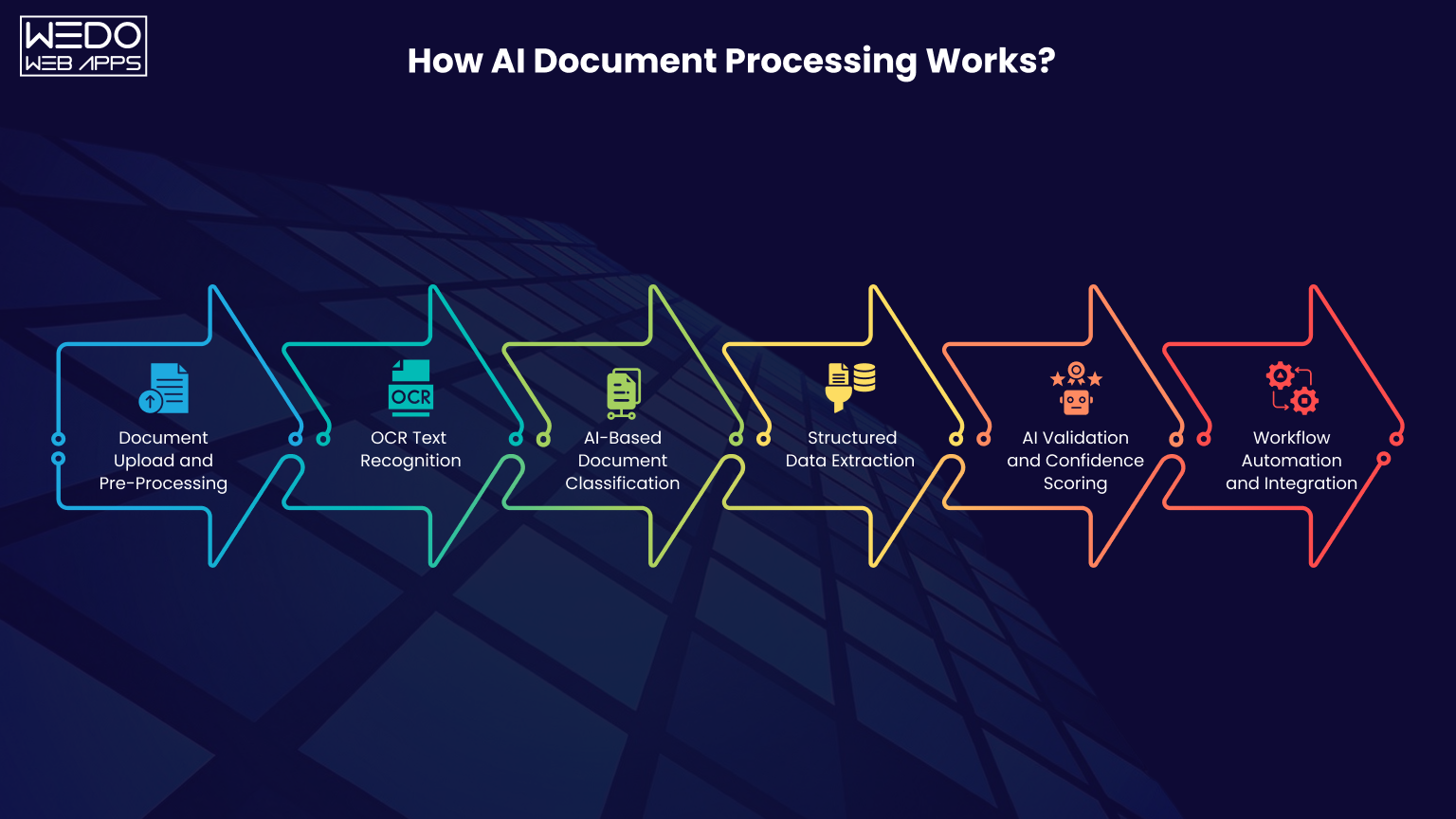
Modern AI document processing works like a smart digital workflow that can read, understand, organize, and process documents automatically. Instead of relying on manual data entry, AI systems use OCR, machine learning, NLP, and workflow automation to process large volumes of business documents faster and with better accuracy.
Here's how the complete workflow usually works.
Step 1. Document Upload and Pre-Processing
The process starts when documents enter the system.
These documents can include:
- PDFs
- Scanned invoices
- Contracts
- Forms
- Receipts
- Images or handwritten files
Before AI can process the document properly, the system performs pre-processing to improve document quality.
This stage may include:
- Image cleanup
- Noise reduction
- Brightness adjustment
- Rotation adjustment
- Resolution enhancement
For example, if a scanned invoice is blurry or tilted, the system automatically improves readability before extracting information.
This step is important because document quality directly affects OCR accuracy and extraction performance.
Step 2. OCR Text Recognition
Once the document is cleaned, the system uses OCR technology to recognize and convert text into machine-readable data.
OCR engines scan the document and identify:
- Printed text
- Numbers
- Tables
- Symbols
- Handwritten characters in some cases
Popular OCR engines include:
- Google Document AI
- Amazon Textract
- Microsoft Azure AI Document Intelligence
- Tesseract OCR
Traditional OCR only extracts visible text. Modern AI OCR systems also analyze layouts, tables, and document structure to improve extraction accuracy.
For example, an invoice OCR engine can identify where invoice numbers, vendor names, and tax details are located instead of extracting random blocks of text.
Step 3. AI-Based Document Classification
After text extraction, AI models classify the document automatically.
Instead of employees manually sorting files, the system can recognize whether the document is:
- An invoice
- A contract
- A purchase order
- A customer form
- A medical record
- An insurance claim
AI classification models analyze keywords, layouts, patterns, and document structure to identify document types accurately.
This helps businesses organize incoming files automatically and route them into the correct workflow without manual intervention.
Step 4. Structured Data Extraction
This is where AI converts raw document content into usable business data.
The system extracts important fields such as:
- Invoice numbers
- Vendor details
- Dates
- Tax amounts
- Payment terms
- Customer information
Modern AI-powered document processing systems can also perform:
- Key Value Extraction: Capturing labels and corresponding values from forms or invoices.
- Table Extraction: Reading rows and columns from invoices, statements, or reports.
- Named Entity Recognition: Identifying names, locations, account numbers, organizations, and business entities from documents.
For example, instead of extracting an entire invoice as plain text, AI can organize the information into structured fields that accounting systems can process directly.
Step 5. AI Validation and Confidence Scoring
Not every extracted value is always 100% accurate.
To reduce errors, AI systems use confidence scoring to measure extraction reliability.
For example:
- High confidence data moves forward automatically.
- Low confidence fields are flagged for human review.
This creates a balance between automation and accuracy.
Validation workflows can also check:
- Missing values
- Duplicate invoices
- Incorrect formats
- Mismatched purchase orders
- Compliance issues
This step is especially important for industries handling financial or compliance-related documents.
Step 6. Workflow Automation and Integration
After validation, the processed data moves into connected business systems automatically.
AI document workflows can integrate with:
- ERP systems
- CRM platforms
- Accounting software
- HR systems
- Compliance platforms
For example, invoice data can automatically update finance systems, trigger approval workflows, and notify teams without manual effort.
This is where AI document processing automation creates the biggest operational impact because businesses can process large document volumes with fewer delays, lower manual workload, and faster decision-making.
AI Document Processing Pipeline Architecture
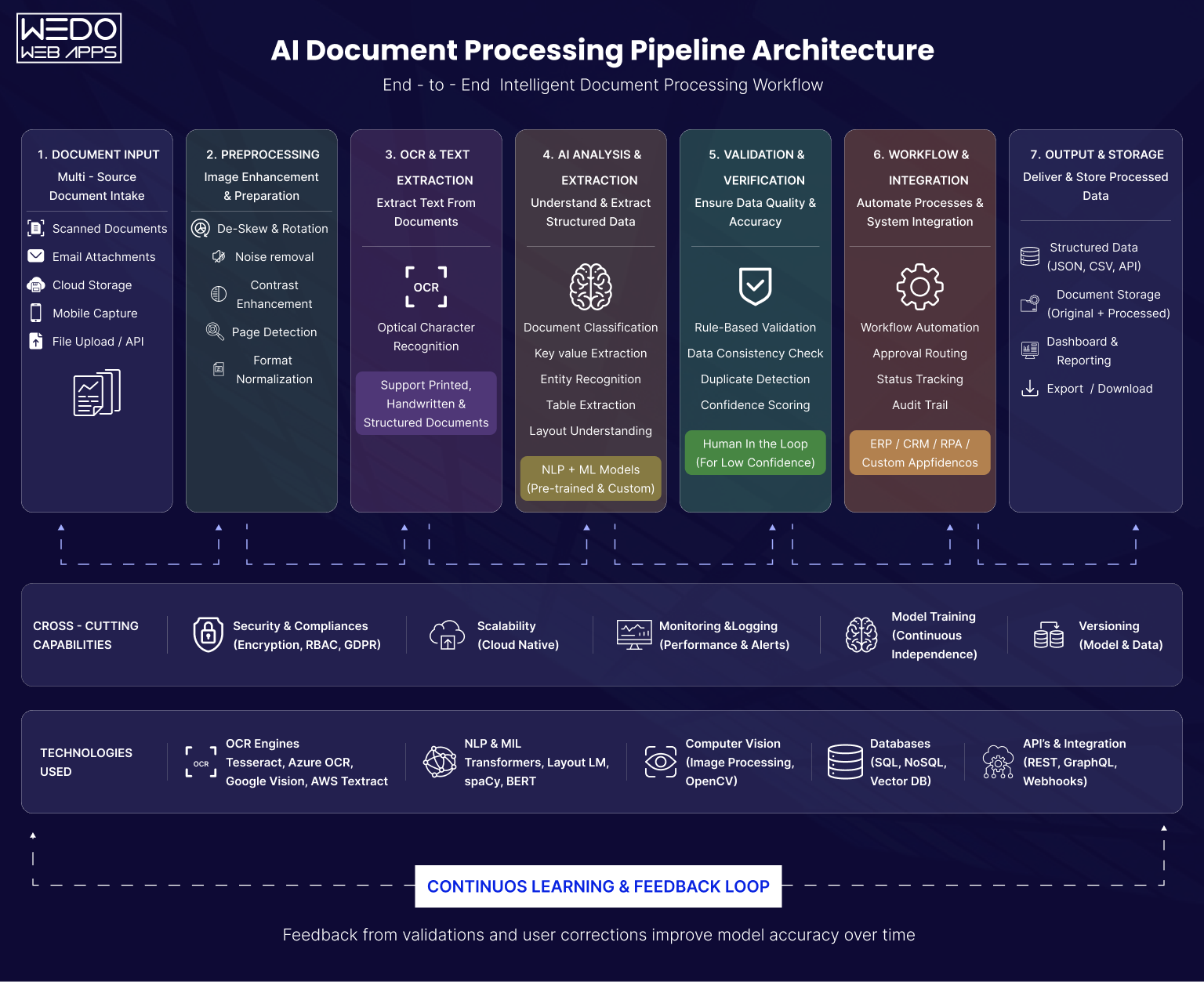
An effective AI document processing system is not built around a single AI model. It works through multiple connected layers that process documents step-by-step, starting from raw file uploads to automated business workflows.
This architecture is what allows businesses to handle invoices, contracts, forms, and enterprise records at scale with better speed, accuracy, and workflow efficiency.
Here's how a modern AI-powered document processing pipeline works.
Document Input -> OCR -> Classification -> Data Extraction -> Validation -> ERP/CRM -> Automated Workflow
OCR Processing Layer
The OCR layer is the starting point of the entire workflow.
OCR, or Optical Character Recognition, converts scanned documents, PDFs, images, and handwritten files into machine-readable text. Without OCR, agentic AI systems cannot process document content properly.
This layer handles:
- Text recognition
- Table detection
- Layout analysis
- Multi-language document reading
- Handwritten text extraction in some cases
Modern OCR engines used in AI document processing automation do much more than basic text extraction. They can identify invoice structures, detect tables, recognize signatures, and preserve document formatting for accurate processing.
For example, an invoice OCR system can automatically locate:
- Invoice number
- Vendor details
- Tax information
- Purchase order references
- Payment terms
This creates the foundation for the next stages of processing.
NLP and Entity Extraction Layer
Once the text is extracted, the NLP layers help the system understand what the content actually means.
Natural Language Processing analyzes document language, identifies patterns, and extracts meaningful business information from unstructured text.
This layer is responsible for:
- Key value extraction
- Named entity recognition
- Table data extraction
- Relationship mapping between fields
- Context identification
For example, in a contract document, the system can automatically identify:
- Client names
- Agreement dates
- Renewal clauses
- Payment conditions
- Compliance terms
Instead of processing documents as plain text, an AI-powered document processing system converts information into structured business data that workflows can use directly.
LLM-Based Context Understanding
Traditional OCR systems extract information. Large language models help AI understand context.
This layer brings deep learning intelligence into modern AI document processing automation systems.
LLMs can:
- Summarize lengthy documents
- Detect business risks in contracts
- Understand document intent
- Generate contextual insights
- Answer questions from uploaded files
For example, instead of manually reviewing a 40-page legal agreement, an LLM-based system can summarize important clauses and highlight risky terms within seconds.
This improves decision-making speed while reducing manual review effort.
LLM-based understanding is becoming one of the biggest differentiators between traditional OCR workflows and modern intelligent document processing platforms.
Human in the Loop Validation Layer
Even advanced AI systems are not always fully accurate.
This is why AI document processing platforms include human validation workflows to reduce risks and maintain data quality.
The system uses confidence scoring to measure extraction accuracy.
For example:
- High confidence results move forward automatically.
- Low confidence fields are flagged for manual review.
This layer helps businesses validate:
- Missing information
- Incorrect values
- Duplicate invoices
- Compliance-sensitive data
- Mismatched purchase orders
Human validation creates a balance between automation and accuracy, especially for industries handling financial, legal, or compliance-related documents.
Workflow Automation Engine
Once the document data is validated, the workflow engine uses robotic process automation to automate the next business action.
Instead of manually routing documents between teams, the system can automatically:
- Trigger approvals
- Assign tasks
- Notify departments
- Update workflow status
- Route files to the correct process
For example, an approved invoice can automatically move into the payment workflow while notifying the finance department instantly.
This is where AI-powered document processing starts improving operational speed across the organization.
ERP and CRM Integration Layer
The final layer connects processed document data with business systems.
Modern AI document processing automation platform can integrate directly with:
- ERP systems
- CRM platforms
- Accounting software
- HR management systems
- Compliance tools
This allows extracted information to update systems automatically without manual entry.
For example:
- Invoice details sync with accounting platforms.
- Customer forms update CRM records.
- HR documents move employee management systems.
- Compliance reports update audit systems automatically.
This integration layer transforms the document processing from a standalone task into a fully connected business automation workflow.

Core Technologies Behind AI-Powered Document Processing
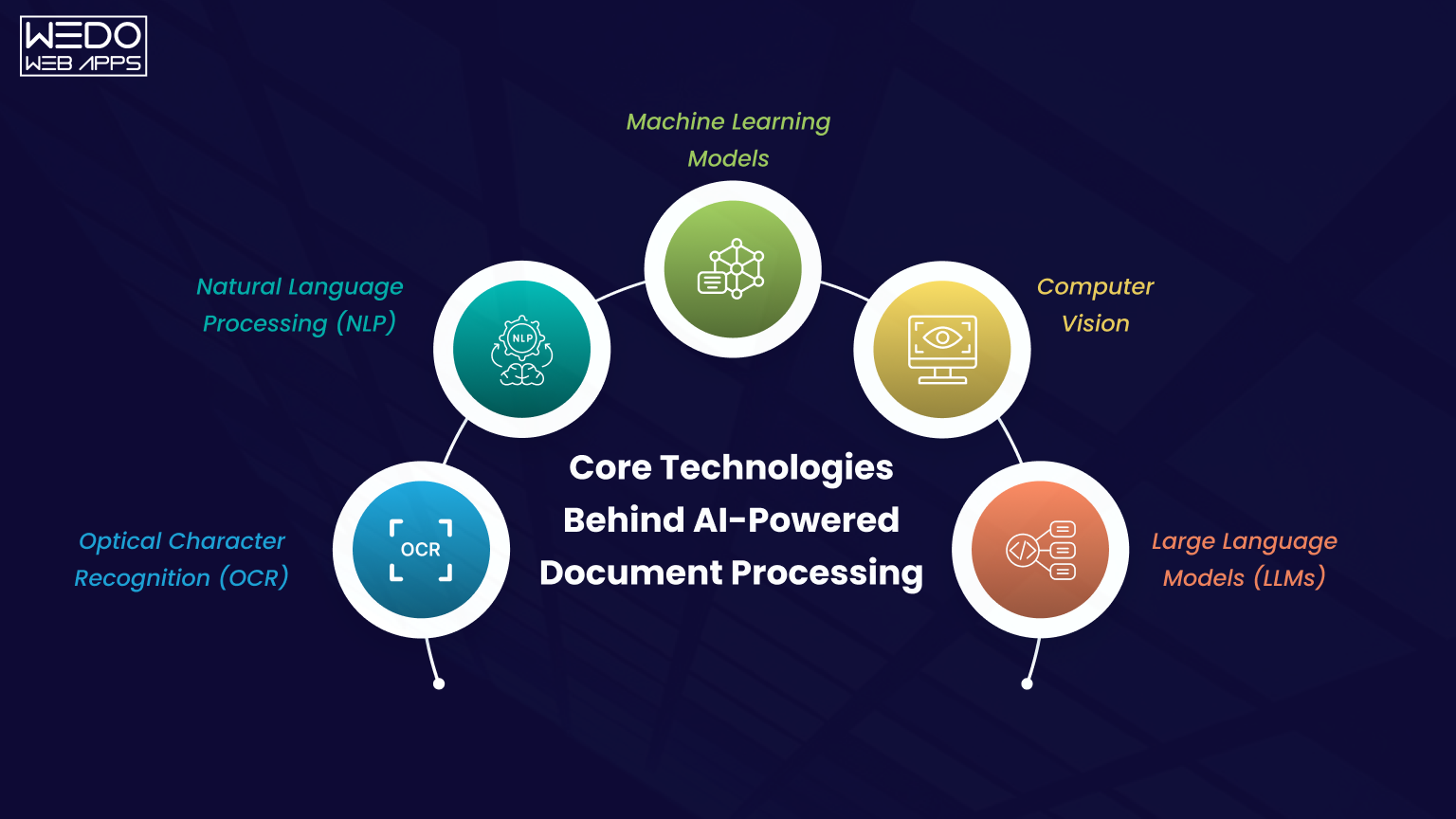
Modern AI-powered document processing is not built on a single technology. It combines multiple AI components that work together to read, understand, extract, validate, and automate document workflows.
Each technology inside the pipeline plays a different role in improving processing accuracy and workflow efficiency.
Here are the core technologies powering modern AI document processing automation systems.
Optical Character Recognition (OCR)
OCR is the foundation of every AI document processing system.
OCR technology converts scanned files, PDFs, printed text, and handwritten documents into machine-readable text. Without OCR, AI systems cannot read document content properly.
Modern OCR engines can identify:
- Printed text
- Tables
- Numbers
- Signatures
- Multi-column layouts
- Handwritten content in some cases
Popular OCR platforms include:
- Google Document AI
- Amazon Textract
- Microsoft Azure AI Document Intelligence
- ABBYY FlexiCapture
- Tesseract OCR
Advanced OCR systems also preserve document structure, which improves extraction accuracy for invoices, forms, and enterprise records.
Natural Language Processing (NLP)
NLP helps AI systems understand the meaning behind document content.
Instead of treating documents as plain text, NLP identifies relationships, patterns, and contextual information inside files.
NLP is commonly used for:
- Named entity recognition
- Contract clause extraction
- Key value identification
- Document summarization
- Sentiment and intent analysis
For example, NLP can automatically identify payment terms, renewal dates, or compliance conditions inside a legal agreement.
This helps businesses process unstructured documents more efficiently.
Machine Learning Models
Machine learning allows AI-powered document processing systems to improve accuracy over time.
Instead of depending only on fixed rules, deep learning models learn from document patterns and historical data.
These models help with:
- Document classification
- Data extraction accuracy
- Fraud detection
- Workflow prediction
- Confidence scoring
For example, invoice processing systems can learn vendor invoice structures automatically and improve extraction performance with continuous usage.
The more data the system processes, the smarter and more accurate it becomes.
Computer Vision
Computer vision helps AI understand document layouts visually.
While OCR focuses on extracting text, computer vision analyzes:
- Document structure
- Table positioning
- Checkboxes
- Signatures
- Stamps
- Visual hierarchy
This is especially important for invoices, forms, medical records, and documents with complex formatting.
For example, computer vision processes can identify where a signature is located on a contract even before text extraction starts.
This improves processing accuracy for visually complex documents.
Large Language Models (LLMs)
Large language models are transforming modern AI document processing automation systems.
Traditional OCR systems mainly extract information. LLMs help AI understand context, intent, and business meaning.
LLMs can:
- Summarize lengthy documents
- Detect risks inside contracts
- Generate document insights
- Answer questions from uploaded files
- Extract context-aware information
For example, instead of manually reviewing a 50-page contract, an LLM can summarize key clauses, highlight compliance risks, and identify important obligations within seconds.
This makes AI-powered document processing far more intelligent compared to traditional OCR-based workflows.
Why These Technologies Work Better Together
Individually, each technology solves only one part of the problem.
But when OCR, NLP, machine learning, computer vision, and LLMs work together, businesses can build intelligent systems capable of handling large document volumes with higher accuracy and automation.
This combination allows modern AI document processing platforms to:
- Read documents accurately
- Understand the document's meaning
- Extract structured business data
- Validate information automatically
- Trigger workflows in real-time
- Improve continuously through learning models
That is why intelligent document processing is becoming a major part of enterprise automation strategies across finance, healthcare, insurance, logistics, and compliance operations.
AI-Powered Invoice Processing Automation
Invoice processing is one of the most common and valuable use cases of AI document processing automation.
Businesses process hundreds or even thousands of invoices every month. When handled manually, the workflow becomes slow, repetitive, and highly dependent on data entry teams. Even a small error in invoice details can create payment delays, duplicate transactions, compliance issues, or reporting problems.
This is why companies are rapidly adopting AI-powered invoice processing systems.
Instead of manually reviewing invoices line by line, AI systems can automatically extract data, validate information, detect errors, and trigger approval workflows in real-time.
How AI Invoice Processing Works
A modern AI-powered document processing workflow can automate the complete invoice lifecycle.
The process usually includes:
- Invoice upload
- OCR text extraction
- AI-based invoice classification
- Structured data extraction
- Validation and approval checks
- ERP or accounting system integration
This reduces manual intervention while improving processing speed and accuracy.
Invoice Data Extraction Workflow
The first major task in invoice automation is extracting important business information from invoices.
Modern AI document processing systems can automatically capture:
- Invoice number
- Vendor name
- Invoice date
- Purchase order number
- Tax details
- Payment terms
- Total amounts
- Line item tables
Instead of extracting invoices as plain text, AI organizes the information into structured fields that accounting systems can process directly.
For example, a finance team no longer needs to manually enter invoice details into ERP software because the AI system handles the extraction automatically.
Purchase Order Matching
Many businesses validate invoices against purchase orders before approving payments.
This process is called PO matching.
Traditionally, employees compare invoices and purchase orders manually, which takes significant time when processing high invoice volumes.
With AI-powered document processing, the system can automatically:
- Match invoice values with purchase orders.
- Verify quantities and pricing.
- Detect missing purchase order references.
- Flag mismatched records for review.
This reduces approval delays and improves financial accuracy.
Invoice Fraud Detection
Invoice fraud and duplicate payments are major concerns for finance teams.
Modern AI document processing automation systems use machine learning and validation logic to identify unusual invoice patterns automatically.
The system can detect:
- Duplicate invoices
- Incorrect tax values
- Unusual payment amounts
- Missing vendor information
- Suspicious invoice formatting
This helps businesses reduce financial risks while improving compliance controls.
Approval Workflow Automation
One of the biggest operational delays in invoice processing is manual approvals.
Invoices often move across multiple departments before payment approval is completed.
AI workflow automation helps businesses:
- Route invoices automatically
- Trigger approval requests
- Notify finance teams instantly
- Escalate delayed approvals
- Update workflow status in real-time
For example, invoices below a specific amount can be approved automatically, while higher-value invoices are sent for manual review.
This significantly improves processing speed.
Common Invoice Automation Challenges
Although AI-powered invoice processing improves efficiency, businesses still face several implementation challenges.
Some of the most common issues include:
- Poor quality scanned invoices.
- Multiple invoice formats.
- Missing invoice fields.
- Handwritten content.
- ERP integration complexity.
- Vendor-specific invoice structures.
This is why businesses often combine automation with human validation workflows to maintain processing accuracy.
Benefits of AI-Powered Invoice Processing
Businesses using AI document processing automation for invoices can achieve major operational improvements.
Some of the biggest benefits include:
- Faster invoice approvals.
- Reduced manual data entry.
- Lower processing costs.
- Better financial accuracy.
- Improved compliance tracking.
- Reduced duplicate payments.
- Faster ERP updates.
- Improved workflow visibility.
As invoice volumes continue growing across enterprises, AI-powered invoice processing is becoming one of the most practical and high ROI applications of intelligent document automation.
Using Microsoft AI Builder for Invoice Processing and Document Automation
Low-code AI platforms are making AI document processing automation more accessible for businesses that want faster deployment without building complex AI systems from scratch.
One of the most widely used solutions in this space is Microsoft AI Builder.
Integrated with Power Platforms and Power Automate, AI Builder allows businesses to automate invoice processing, document extraction, approval workflows, and business operations with minimal coding.
For organizations already using Microsoft ecosystems, this creates a faster path toward document automation.
What Is Microsoft AI Builder?
AI Builder is a low-code AI capability available inside the Microsoft Power Platform ecosystem.
It allows businesses to create AI-driven workflows for:
- Invoice processing
- Form extraction
- Receipt scanning
- Document classification
- Prediction models
- Workflow automation
AI Builder works closely with:
- Power Automate
- Power Apps
- Dynamic 365
- Microsoft Dataverse
This integration helps businesses automate document workflows directly inside existing Microsoft business applications.
AI Builder Invoice Processing Features
One of the most popular use cases of AI Builder is invoice automation.
The platform can automatically extract invoice data from PDFs, scanned files, and images.
A typical AI Builder invoice processing workflow can capture:
- Invoice number
- Vendor information
- Invoice date
- Tax details
- Payment amounts
- Purchase order references
- Line item tables
The extracted information can then move directly into accounting systems or approval workflows.
This reduces manual data entry and improves processing speed for finance teams.
AI Builder Document Automation Workflow
A standard AI builder document automation workflow usually follows these steps:
- Upload the invoice or document.
- Extract document data using AI models.
- Validate extracted information.
- Trigger approval workflows.
- Update ERP or CRM systems automatically.
For example, a business can use Power Automate to create workflows where invoices are automatically routed to the finance department after extraction and validation.
This allows organizations to automate repetitive operational tasks without developing custom AI infrastructure.
Benefits of Low-Code AI Automation
Low-code AI platforms are becoming popular because they reduce development complexity and deployment time.
Some major benefits include:
- Faster implementation
- Minimal coding requirements
- Easy workflow creation
- Integration with Microsoft tools
- Lower development costs
- Simplified automation management
For small and mid-sized businesses, this creates an earlier entry point into AI-powered document processing.
Limitation of AI Builder for Complex Enterprise Workflows
Although AI Builder is useful for many automation tasks, it may not fully support highly complex enterprise document workflows.
Businesses may face limitations when handling:
- Large document volumes.
- Complex contract analysis.
- Industry-specific compliance workflows.
- Advanced AI customization.
- Multi-language processing at scale.
- Complex validation logic.
For enterprise-grade requirements, businesses often combine low-code automation with custom AI development.
When Businesses Need Custom AI Document Processing Solutions
Custom AI document processing solutions are usually required when organizations need:
- Advanced workflow orchestration.
- Industry-specific document processing.
- High accuracy extraction models.
- LLM-based document understanding.
- Deep ERP integrations.
- Large-scale automation infrastructure.
For example, banks, healthcare providers, insurance companies, and enterprise finance teams often require more advanced validation, compliance, and processing capabilities than standard low-code platforms can provide.
This is why many businesses start with low-code automation and later move towards custom intelligent document processing platforms as operational requirements grow.
Intelligent Document Processing (IDP) Use Cases Across Industries
The value of AI document processing becomes much clearer when businesses apply it to real operational workflows.
Different industries handle different document types, but the challenge remains the same. Large volumes of unstructured documents slow down operations, increase manual workload, and create processing inefficiencies.
Finance and Invoice Processing
Finance teams process massive volumes of invoices, purchase orders, receipts, tax documents, and payment records every month.
Manual invoice processing often creates:
- Approval delays
- Duplicate payments
- Data entry errors
- Compliance risks
Using AI document processing automation, businesses can:
- Extract invoice data automatically.
- Validate purchase orders.
- Detect duplicate invoices.
- Trigger approval workflows.
- Update accounting systems in real-time.
This improves financial accuracy while reducing operational workload for finance departments.
Insurance Claims Processing
Insurance companies handle a large amount of claim forms, policy documents, identity proofs, and supporting records.
Manual review processes slow down claim approvals and increase verification costs.
With AI-powered document processing, insurers can:
- Extract claim information automatically.
- Validate customer records.
- Identify missing documents.
- Detect fraud patterns.
- Accelerate claim approval workflows.
This helps insurance providers improve processing speed and customer experience.
Healthcare Documentation
Healthcare organizations manage patient records, prescriptions, insurance forms, medical reports, and compliance daily.
Manual processing in healthcare can affect both operational efficiency and patient service quality.
AI document processing automation helps healthcare providers:
- Digitize patient records.
- Extract medical information automatically.
- Process insurance documents faster.
- Organize compliance records.
- Improve document accessibility.
This reduces administrative workload while helping healthcare teams manage records more efficiently.
Contract Analysis and Legal Review
Legal and enterprise teams often spend hours reviewing contracts manually.
A single agreement may contain multiple clauses related to:
- Payment obligations
- Compliance terms
- Renewal conditions
- Risk factors
- Confidential requirements
Using LLM-powered AI document processing, businesses can:
- Summarize lengthy contracts.
- Extract important clauses.
- Identify compliance risks.
- Detect missing information.
- Accelerate legal review workflows.
This significantly reduces the time required for contract analysis.
KYC and Banking Documents
Banks and financial institutions process large volumes of KYC documents, identity proofs, account forms, and compliance records.
Manual verification slows onboarding and increases operational costs.
With AI-powered document processing, financial institutions can:
- Verify identity documents automatically.
- Extract customer information.
- Validate account details.
- Detect suspicious records.
- Accelerate customer onboarding workflows.
This helps banks improve operational efficiency while strengthening compliance processes.
Manufacturing Compliance Documents
Manufacturing companies manage quality reports, supplier invoices, compliance records, inspection forms, and operational documents regularly.
Handling these records manually often creates tracking and audit challenges.
AI document processing automation helps manufacturers:
- Organize compliance records.
- Extract inspection data automatically.
- Track supplier documentation.
- Automate quality reporting workflows.
- Improve audit readiness.
This reduces document backlog while improving operational visibility across manufacturing processes.
OCR Engine Comparison for AI Document Processing
Choosing the right OCR engine is one of the most important decisions in AI document processing automation. The OCR platform directly affects extraction accuracy, workflow efficiency, integration capabilities, and operational scalability.
Different OCR tools are designed for different business needs. Some focus on enterprise workflows, while others are better for low-cost automation or cloud-based processing.
OCR Comparison Table
| OCR Platform | Best For | Key Strengths | Limitations | ||||||||||||||||
|---|---|---|---|---|---|---|---|---|---|---|---|---|---|---|---|---|---|---|---|
| Google Document AI | Enterprise document processing and invoice automation | ||||||||||||||||||
|
| ||||||||||||||||||
| Amazon TextractCloud-based document workflows and form extraction |
|
| |||||||||||||||||
| Microsoft Azure AI Document IntelligenceMicrosoft ecosystem and AI Builder workflows |
|
| |||||||||||||||||
| ABBYY FlexiCaptureEnterprise-grade intelligent document processing |
|
| |||||||||||||||||
| Tesseract OCROpen-source and custom OCR projects |
|
|
Key Factors to Consider Before Choosing an OCR Tool
Businesses should evaluate OCR platforms based on operational requirements instead of choosing only by popularity.
| Evaluation Factor | Why It Matters |
|---|---|
| Extraction Accuracy | Reduces manual corrections and processing errors |
| Table Recognition | Important for invoices, reports, and statements |
| Handwriting Support | Useful for forms and scanned records |
| Workflow Integration | Helps connect ERP, CRM, and accounting systems |
| Scalability | Supports growing document volumes |
| AI Capabilities | Improves contextual understanding and automation |
| Pricing Structure | Affects long-term operational cost |
Which OCR Engine Is Best for AI-Powered Document Processing?
There is no single OCR platform that works best for every business.
- Small businesses often prefer low-cost or low-code solutions.
- Enterprises usually prioritize scalability and workflow integration.
- Finance and compliance teams often need higher extraction accuracy.
- Custom AI projects may require open-source OCR flexibility.
This is why modern AI-powered document processing systems often combine OCR with NLP, machine learning, and LLM-based understanding to build more intelligent automation workflows.
Role of LLMs in AI Document Processing Automation
Traditional OCR systems can extract text from documents, but they often struggle to understand context, intent, or business meaning. This is where large language models are changing modern AI document processing automation.
LLMs help businesses move beyond simple text extraction by enabling systems to understand documents more intelligently.
Instead of only identifying words on a page, LLM-powered systems can analyze relationships, summarize information, identify risks, and generate contextual insights from complex business documents.
This is becoming one of the biggest advancements in AI-powered document processing.
AI Summarization for Long Documents
Businesses often deal with lengthy contracts, reports, compliance documents, and legal agreements that require hours of manual review.
LLMs can automatically summarize these documents into shorter, more readable insights.
For example, an AI system can:
- Summarize a 50-page contract in seconds.
- Highlight important business clauses.
- Extract key obligations and deadlines.
- Identify approval requirements.
This helps teams review documents faster while reducing manual effort.
Contract Risk Detection
Legal and compliance teams spend significant time identifying risky terms inside agreements.
LLMs can analyze contracts contextually and detect:
- Missing clauses
- Unusual payments terms
- Compliance risks
- Liability-related language
- Renewal conditions
Instead of manually reviewing every paragraph, businesses can use AI document processing automation to identify critical risks much faster.
This improves legal review workflows and decision-making speed.
Natural Language Search Across Documents
Traditional document search systems depend heavily on exact keywords.
LLM-powered systems support natural language search, allowing users to ask questions conversationally.
For example:
Instead of searching: "invocie_2025_vendor_final.pdf"
Users can ask: "Show invoices above $10,000 approved last month."
The AI system understands the request context and retrieves relevant documents automatically.
This improves document accessibility and reduces time spent searching through enterprise records.
AI-Powered Decision Support
Modern AI-powered document processing systems can also assist businesses with Agentic AI Automation for operational decision-making.
LLMs can analyse extracted document data and generate recommendations based on business logic.
Examples include:
- Flagging unusual invoice activity.
- Identifying delayed contract renewals.
- Detecting compliance gaps.
- Prioritizing high-risk documents.
This allows businesses to use document data more strategically instead of treating documents as passive records.
Context-Aware Document Understanding
One of the biggest limitations of traditional OCR systems is the inability to understand document meaning.
LLMs solve this by analyzing relationships between sentences, clauses, and business information.
For example, a traditional OCR engine may only extract contract text.
An LLM-powered system can understand:
- Who the agreement applies to
- What obligations exist
- Which deadlines matter
- What actions are required
This creates a much more intelligent form of AI document processing automation that goes beyond basic extraction workflows.
Why LLMs Are Transforming AI Document Processing
The combination of OCR, NLP, and LLMs is creating a new generation of intelligent document systems.
Businesses are no longer limited to extracting text alone. They can now build workflows that:
- Understand business context
- Summarize complex documents
- Detect operational risks
- Support decision-making
- Improve workflow automation
- Reduce manual document review time
As enterprise document volume continues growing, LLM-based understanding is expected to become a major part of future AI document processing platforms.
Human in the Loop Validation in AI Document Automation
The document may contain blurry scans, handwritten text, missing fields, inconsistent formats, or industry-specific terminology that AI models may not interpret correctly every time.
This is why businesses still use a Human in the Loop validation approach inside modern AI document processing automation workflows.
This balance improves both automation efficiency and operational accuracy.
Why Human Validation Is Still Necessary
AI systems can process documents faster than manual workflows, but accuracy remains critical for finance, healthcare, insurance, legal, and compliance operations.
Even a small extraction error can lead to:
- Incorrect payments
- Compliance violations
- Reporting issues
- Customer onboarding delays
- Legal risks
Human validation helps businesses maintain quality control while reducing operational risks.
For example, finance teams may manually review invoices with unusually high payment amounts before approval.
Confidence Score-Based Reviews
Modern AI-powered document processing systems use confidence scoring to measure how certain the AI model is about the extracted data.
Each extracted field receives a confidence percentage.
| Confidence Level | Workflow Action |
|---|---|
| High confidence | Automatically processed |
| Medium confidence | Sent for optional review |
| Low confidence | Flagged for mandatory human validation |
For example, if the system extracts an invoice amount with 98% confidence, it may be processed automatically. But if the confidence score is low because of poor scan quality, the invoice gets routed for manual verification.
This approach allows businesses to automate high-accuracy workflows while reducing risks from uncertain data.
Reducing AI Extraction Errors
Human validation workflows help correct extraction mistakes before the data enters business systems.
Validation teams can review:
- Missing invoice fields
- Incorrect tax amounts
- Mismatched purchase orders
- Duplicate invoices
- Invalid customer information
- Compliance-sensitive records
These corrections also help improve future AI performance because many systems use validation feedback for model retraining.
Over time, the system becomes more accurate as it learns from human reviews.
Approval Workflows for Sensitive Documents
Not every document should be fully automated.
Many businesses still require manual approval for:
- High-value invoices
- Legal agreements
- Compliance documents
- Financial audits
- Employee records
- Healthcare forms
Human in the Loop validation ensures that sensitive decisions remain under controlled review while still benefiting from automation speed.
For example, an AI system may extract all contract details automatically, but the legal team still performs final approval before execution.
Continuous AI Learning From Human Feedback
One of the biggest advantages of Human in the Loop workflows is continuous improvement.
Every correction made by validation teams helps the AI system understand document patterns better.
This feedback improves:
- Extraction accuracy
- Classification performance
- Workflow efficiency
- Fraud detection capabilities
- Context understanding
As businesses process more documents, the AI model gradually becomes smarter and more reliable.
Why Human in the Loop Validation Matters
Fully automated workflows may sound ideal, but enterprise document processing requires a balance between speed and accuracy.
Human validation helps businesses:
- Reduce operational risks
- Improve extraction accuracy
- Maintain compliance standards
- Handle complex document formats
- Improve trust in AI systems
- Continuously train AI models
This is why Human in the Loop validation remains a critical part of modern AI-powered document processing systems, especially in industries where document accuracy directly affects financial, legal, or compliance outcomes.
Integrating AI Document Processing With ERP and CRM Systems
The real value of AI document processing automation does not come only from extracting document data. It comes from what businesses do with that data after processing.
Without integration, employees still need to manually move information between systems, which reduces the overall impact of automation.
This is why modern AI-powered document processing platforms are designed to integrate directly with ERP, CRM, accounting, HR, and workflow systems.
Once connected, document data can move across business operations automatically in real-time.
ERP Integration Workflows
ERP system manages core business operations like finance, procurement, inventory, and supply chain management.
When businesses process invoices, purchase orders, receipts, or supplier documents manually, finance teams often spend hours entering data into ERP platforms.
With AI document processing, extracted information can automatically update ERP systems without manual intervention.
Common ERP integrations include:
- SAP
- Oracle
- NetSuite
- Microsoft Dynamics 365
A typical invoice automation workflow may include:
| Workflow Stage | Automated Action |
|---|---|
| Invoice Upload | AI extracts invoice data automatically |
| Validation Check | System verifies purchase order details |
| Approval Workflow | Invoice is routed to finance teams for approval |
| ERP Integration | Approved data is synced and updated in ERP system |
| Payment Workflow | Finance processing and payment execution is triggered |
This improves operational speed while reducing manual data entry errors.
CRM Data Synchronization
CRM systems store customer records, sales information, onboarding documents, and communication history.
Businesses often receive customer forms, agreements, identity documents, and onboarding files through emails or uploaded PDFs.
Using AI-powered document processing, businesses can automatically:
- Extract customer information
- Validate onboarding documents
- Organize account-related files
- Trigger onboarding workflows
This helps sales and customer support teams access updated information faster without depending on manual data entry.
API Based Automation Pipelines
Modern AI document processing automation systems often use APIs to connect with multiple business applications.
APIs allow processed document data to move securely between systems without manual effort.
Businesses can use APIs to integrate document workflows with:
- Accounting platforms
- HR systems
- Compliance software
- Procurement tools
- Cloud storage systems
- Business intelligence dashboards
For example, once an invoice is processed, the API can automatically send extracted data into accounting software while updating approval status in the ERP system simultaneously.
This creates a connected automation workflow across departments.
Real-Time Workflow Automation
One of the biggest advantages of integration is real-time workflow execution.
Instead of waiting for employees to manually process documents, businesses can automate actions instantly after validation.
Examples include:
- Automatically approving low-value invoices.
- Triggering payment workflows.
- Sending contract approval notifications.
- Updating CRM customer records.
- Creating audit logs automatically.
This significantly improves workflow speed and operational visibility.
As enterprise workflows become more data-driven, integration is becoming one of the most important parts of scalable AI-powered document processing automation.
AI Document Processing Development Cost
The cost of building an AI document processing solution depends on multiple factors, including document complexity, workflow requirements, AI capabilities, integrations, and deployment scale.
A basic invoice extraction system may require limited automation and pre-built AI models, while an enterprise-grade intelligent document processing platform may involve custom OCR pipelines, LLM integration, validation workflows, and deep ERP connectivity.
This is why development costs can vary significantly from one business to another.
Factor Affecting AI Document Processing Development Cost
Several technical and operational factors influence the overall cost of AI-powered document processing development.
Some of the biggest cost drives include:
| Cost Factor | Impact on Development |
|---|---|
| Document Complexity | Complex layouts require advanced AI models for accurate extraction |
| OCR Engine Selection | Enterprise-grade OCR tools increase licensing and integration costs |
| Workflow Automation | Multi-step automation workflows require additional development effort |
| ERP & CRM Integrations | API integrations increase implementation time and engineering complexity |
| AI Validation Systems | Human-in-the-loop validation adds system complexity and operational overhead |
| LLM Capabilities | Advanced document understanding increases infrastructure and API costs |
| Security & Compliance | Regulated industries require stronger security controls and audits |
| Processing Volume | High document volumes demand scalable infrastructure and higher compute resources |
Businesses handling invoices only may require lower investment compared to organizations automating contracts, compliance records, and enterprise workflows.
OCR Infrastructure Costs
OCR is one of the core components of AI document processing automation.
Businesses usually choose between:
- Cloud-based OCR APIs.
- Enterprise OCR platforms.
- Open-source OCR engines.
Each option affects development and operational costs differently.
| OCR Options | Estimated Cost Impact |
|---|---|
| Open-source OCR | Lower setup cost but higher customization and maintenance effort |
| Cloud OCR APIs | Usage-based pricing model depending on volume and requests |
| Enterprise OCR Platforms | Higher licensing cost with advanced accuracy and enterprise features |
For example, platforms like Google Document AI or Microsoft Azure AI Document Intelligence often charge based on document processing volume.
LLM Processing Costs
LLM Integration is becoming increasingly common in modern AI-powered document processing systems.
Businesses use LLMs for:
- Contract summarization
- Context understanding
- AI-powered search
- Risk detection
- Decision support
However, LLM processing adds infrastructure and API costs depending on:
- Token usage
- Document size
- Request frequency
- Model selection
- Real-time processing requirements
Enterprise-scale workflows processing thousands of long documents daily may require significant AI infrastructure investment.
Integration and Workflow Costs
Integrating document automation with ERP, CRM, accounting, and workflow systems often represents a major portion of implementation cost.
Custom integrations may include:
- ERP synchronization
- CRM updates
- Approval workflow automation
- API development
- Security controls
- Audit logging systems
Complex enterprise workflows usually require higher implementation effort compared to standalone document extraction systems.
Estimated Development Cost Breakdown
The overall cost of AI document processing automation varies based on business requirements.
Here's a general development cost estimate.
| Solution Type | Estimated Development Cost |
|---|---|
| Basic Invoice Automation Workflow | $25,000 to $40,000 |
| Mid-level Intelligent Document Processing System | $40,000 to $70,000 |
| Enterprise AI Document Automation Platform | $70,000 to $100,000+ |
These estimates may vary depending on:
- AI model complexity
- Custom workflow requirements
- Security and compliance needs
- Integration scope
- Infrastructure scale
Custom Development vs Low-Code Platforms
Businesses also need to decide whether to use low-code automation tools or build custom AI solutions.
| Approach | Best For | Limitation |
|---|---|---|
| Low-code AI Platforms | Faster deployment and smaller workflows | Limited customization and scalability |
| Custom AI Development | Enterprise-scale automation and advanced AI workflows | Higher development cost and longer development time |
Low-code tools like AI Builder invoice processing help businesses launch automation quickly, while custom development provides greater flexibility for complex enterprise requirements.
Is AI Document Processing Worth the Investment?
Although implementation costs may seem high initially, businesses often recover investment through operational efficiency gains.
Organization using AI-powered document processing can reduce:
- Manual processing time
- Approval delays
- Data entry workload
- Operational bottlenecks
- Processing errors
This helps businesses improve workflow speed while scaling document operations more efficiently over time.
AI Document Processing Speed and Accuracy Benchmarks
The success of an AI document processing system is usually measured by two factors: speed and accuracy.
Businesses investing in automation want to know:
- How quickly can documents be processed?
- How accurately can information be extracted?
- How much manual effort can be reduced?
These benchmarks help organizations evaluate whether an AI-powered document processing solution can support operational requirements at scale.
OCR Accuracy Benchmarks
OCR accuracy depends heavily on document quality, formatting, handwriting complexity, and AI-model capability.
Modern enterprise OCR platforms can achieve very high extraction accuracy for structured documents like invoices and forms.
Here's a general industry benchmark overview.
| Document Type | Average OCR Accuracy Range |
|---|---|
| High-quality Printed Invoices | 95% to 99% |
| Structured Forms | 90% to 98% |
| Scanned Contracts | 85% to 95% |
| Handwritten Documents | 70% to 90% |
| Low-quality Scans | 60% to 85% |
Accuracy usually improves when businesses combine OCR with NLP, machine learning, and Human in the Loop validation workflows.
Average Processing Speeds
One of the biggest advantages of AI document processing automation is processing speed.
Tasks that previously required hours of manual review can now be completed within seconds or minutes.
| Workflow Type | Average Processing Speed |
|---|---|
| Manual Invoice Processing | 5 to 15 minutes per invoice |
| AI-based Invoice Extraction | A few seconds per invoice |
| Contract Summarization using LLMs | Under 1 minute for long documents |
| Automated Document Classification | Real-time or near real-time processing |
| ERP Workflow Synchronization | Seconds to minutes |
Processing speed may vary depending on:
- Document complexity
- Infrastructure capacity
- OCR engine performance
- AI model size
- Integration workflow design
Factor Affecting Extraction Accuracy
Several factors influence the performance of AI-powered document processing systems.
The most common accuracy affecting factors include:
- Poor quality scans
- Blurry or rotated documents
- Handwritten content
- Complex layouts
- Multiple document formats
- Missing fields
- Low-resolution images
- Language variations
For example, invoices with inconsistent layouts usually require more advanced extraction models compared to standardized forms.
This is why businesses often use pre-processing and validation workflows to improve extraction reliability.
Improving AI Document Processing Performance
Businesses can improve processing speed and extraction accuracy by optimizing the document pipeline properly.
| Optimization Strategy | Performance Benefit |
|---|---|
| Image Pre-processing | Improved OCR readability and data extraction accuracy |
| Human Validation Workflows | Reduces extraction errors and ensures higher data quality |
| Industry-specific AI Models | Improves contextual understanding for domain-specific documents |
| Structured Workflow Automation | Reduces operational delays and improves process efficiency |
| Continuous AI Model Training | Improves long-term accuracy and system adaptability |
| LLM-assisted Validation | Enhances contextual understanding and intelligent verification |
Businesses handling large document volumes often combine multiple AI technologies to maintain both speed and reliability.
Security and Compliance in AI Document Automation
Documents often contain highly sensitive business information, including financial records, customer data, legal agreements, employee information, and compliance-related documents.
This is why security and compliance are critical parts of any AI document processing strategy.
Without proper protection, automated document workflows can expose businesses to data breaches, compliance violations, operational risks, and financial penalties.
Modern AI-powered document processing systems are designed with security controls that help businesses process documents safely while maintaining regulatory compliance.
GDPR and Data Privacy
Businesses handling customer or employee data must follow strict privacy regulations.
One of the most important regulations is the General Data Protection Regulation (GDPR), which governs how businesses collect, store, process, and protect personal data.
For organizations using AI document processing automation, this means ensuring that document workflows:
- Process data securely
- Limit unauthorized access
- Protect personally identifiable information
- Maintain user consent and transparency
- Support secure data retention policies
Data privacy is especially important for industries like healthcare, banking, insurance, and legal services.
Secure Document Storage
Document security does not end after extraction.
Businesses also need secure storage systems to protect processing files and extracted data from unauthorized access.
Modern AI-powered document processing platforms often use:
- Encrypted cloud storage.
- Access-controlled repositories.
- Backup and recovery systems.
- Multi-factor authentication.
- Secure file transfer protocols.
These controls help businesses protect sensitive records while maintaining operational accessibility.
Audit Trails and Compliance Monitoring
Many industries require businesses to maintain detailed audit records for compliance verification.
An audit trail helps an organization track:
- Who accessed a document
- What changes were made
- When approval happened
- Which workflows were triggered
- How the data was processed
This becomes extremely important for:
- Financial audits
- Insurance claims
- Legal agreements
- Healthcare records
- Compliance investigations
Modern AI document processing automation systems automatically generate activity logs to improve transparency and accountability.
Role-Based Access Controls
Not every employee should have access to every document.
Role-based access control helps businesses restrict document access based on user roles and permissions.
For example:
| User Role | Access Permission |
|---|---|
| Finance Team | Invoice and payment records |
| HR Department | Employee documentation |
| Legal Team | Contracts and agreements |
| Compliance Officers | Audit and regulatory files |
This reduces the risk of unauthorized access while improving document governance.
Secure AI Deployment Practices
Businesses implementing AI-powered document processing should also focus on secure AI deployment strategies.
Important security practices include:
- Secure API integrations
- Encrypted AI communication channels
- Data masking for sensitive information
- Regular security audits
- AI model monitoring
- Compliance testing
Organizations using cloud-based AI systems should also evaluate vendor security policies before deployment.
How to Build an AI Document Processing Solution
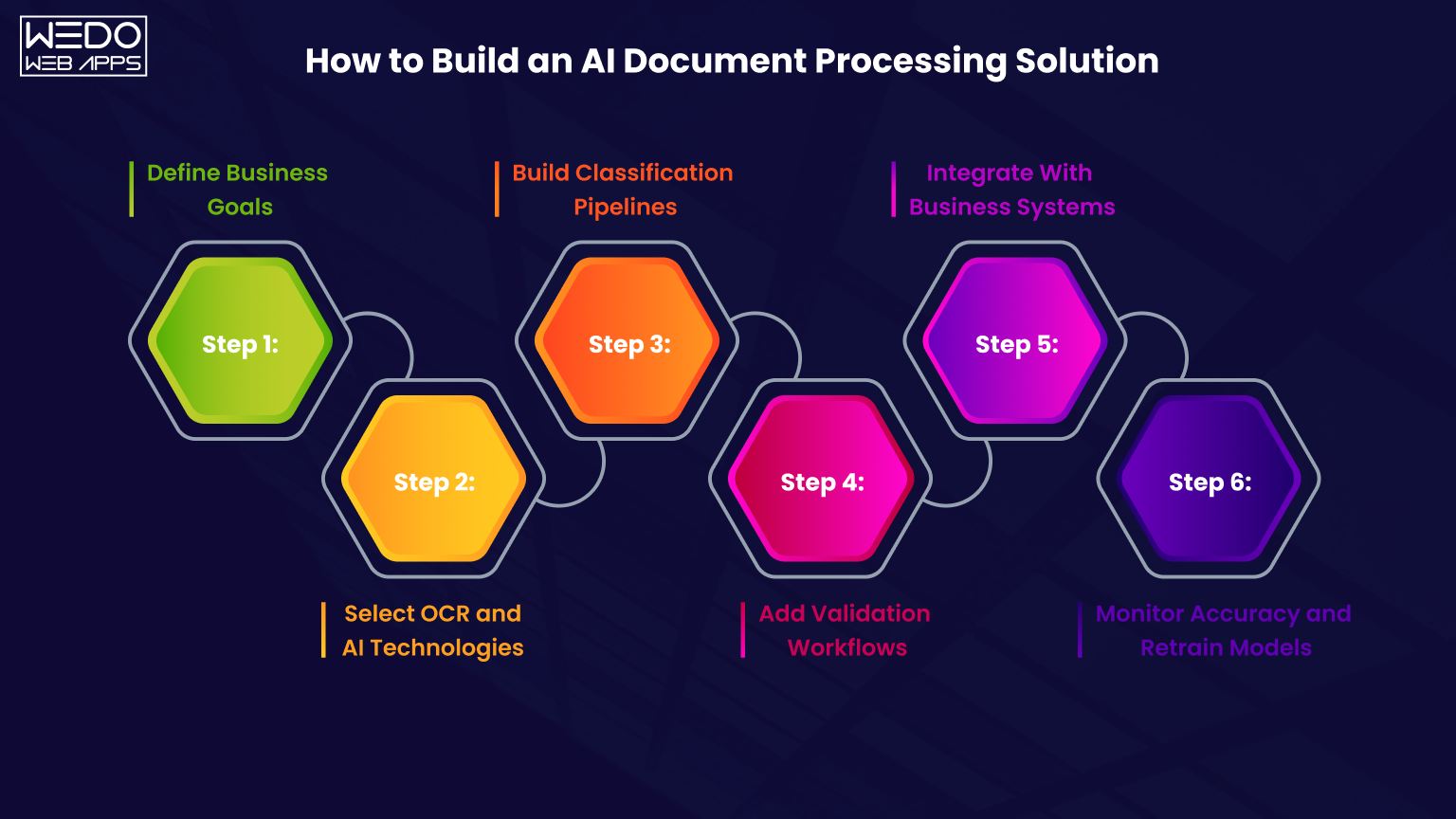
Building an effective AI document processing solution requires more than choosing an OCR tool. Businesses need a structured approach that aligns automation workflows with operational goals, document complexity, and integration requirements.
A well-planned implementation helps organizations improve processing accuracy, reduce operational bottlenecks, and scale automation efficiently over time.
Here's a step-by-step approach businesses commonly follow when building AI-powered document processing systems.
Step 1. Define Business Goals
This first step is identifying what the business wants to automate.
Different organizations have different document processing requirements.
Some businesses focus on:
- Invoice automation
- Contract analysis
- Insurance claims processing
- KYC verification
- Compliance documentation
- HR onboarding workflows
Clearly defining goals helps businesses choose the right AI technologies, workflows, and integration strategy.
At this stage, businesses should also identify:
| Key Planning Area | Questions to Consider |
|---|---|
| Document Volume | How many documents are processed monthly? |
| Document Type | Are the documents structured or unstructured? |
| Workflow Complexity | Are approvals and validations required in the process? |
| Compliance Needs | Are there industry-specific regulations to follow? |
| Integration Scope | Which systems need to be connected for automation? |
Step 2. Select OCR and AI Technologies
Once requirements are defined, businesses choose the technologies powering the automation workflow.
A typical AI document processing automation system may include:
- OCR engines
- NLP models
- Machine learning platforms
- Computer vision tools
- Large language models
The technology stack usually depends on:
- Accuracy requirements
- Processing volume
- Budget
- Integration needs
- Industry-specific workflows
For example, enterprises handling contracts may require LLM-based context understanding, while invoice automation workflows may prioritize structured extraction accuracy.
Step 3. Build Classification Pipelines
Documents entering the system must be identified and routed correctly.
This is where AI-based document classification becomes important.
The system should automatically recognize whether the uploaded file is:
- An invoice
- A purchase order
- A contract
- A customer form
- A compliance document
Classification pipelines help businesses organize workflows automatically while reducing manual sorting effort.
Step 4. Add Validation Workflows
Even advanced AI systems require validation mechanisms to maintain accuracy.
Businesses should implement Human in the Loop workflows for:
- Low confidence extraction results
- Compliance-sensitive documents
- Financial approvals
- Contract verifications
- Fraud detection checks
Validation workflows help businesses balance automation speed with operational accuracy.
Many organizations use confidence scoring to determine which documents require human review.
Step 5. Integrate With Business Systems
The next step is connecting the document processing workflow with operational systems.
Modern AI-powered document processing platforms commonly integrate with:
- ERP systems
- CRM platforms
- Accounting software
- HR systems
- Compliance tools
This allows extracted document data to update the business system automatically without manual entry.
For example, invoice details can sync directly with accounting software after validation and approval.
Step 6. Monitor Accuracy and Retrain Models
Document automation is not a one-time setup.
AI models require continuous monitoring and optimization to maintain extraction accuracy as document formats evolve.
Businesses should regularly monitor:
- OCR accuracy
- Extraction errors
- Workflow bottlenecks
- Validation frequency
- Processing speed
Continuous retraining helps the AI system improve over time using operational feedback and validate document data.
This approach helps organizations build more reliable and scalable AI document processing automation systems while reducing operational risks during deployment.
Conclusion
Businesses no longer struggle with document overload because of missing data. The real challenges are handling growing document volumes quickly, accurately, and efficiently.
Manual workflow slows operations, increases processing costs, and creates approval bottlenecks across finance, legal, healthcare, insurance, and enterprise operations.
This is why AI document processing is becoming a major part of modern business automation strategies.
With the combination of OCR, NLP, machine learning, LLMs, and workflow automation, businesses can now process invoices, contracts, forms, and enterprise documents with far greater speed and accuracy.
Modern AI-powered document processing systems do much more than extract text. They can understand document context, automate approvals, AI integration with ERP and CRM systems, support compliance workflows, and improve operational visibility across departments.
At the same time, successful implementation depends on choosing the right architecture, validation strategy, OCR technology, and integration approach.
Businesses that combine automation with Human in the Loop validation, scalable infrastructure, and continuous AI optimization are often able to build more reliable and future-ready document workflows.
As enterprise operations continue becoming more data driven, AI document processing automation is expected to play an even bigger role in reducing manual workload, improving workflow efficiency, and supporting intelligent business operations at scale.