Introduction
You know that more than 5.4 billion people are expected to use social media platforms in 2026. At the same time, new apps are continuously attracting millions of users faster than ever. Platforms like Threads proved one important thing clearly. Users are still actively searching for new options to connect, share content, and build a community online.
For startups and entrepreneurs, this creates a major business opportunity. Instead of competing directly with giant platforms, many founders are now building niche-focused communities for specific interests, industries, or creator audiences.
If you are thinking about how to make a social media app, this guide covers everything you need to know. From features and development costs to tech stack decisions and launch strategy, you will get a complete breakdown of what it takes to build a successful platform in 2026.
Whether you want to create a creator platform, a private community app, a professional network, or a media-sharing platform, understanding the development process early can help you avoid expensive mistakes later.
In this guide, you will learn:
- How to build a social media app step-by-step.
- The must-have features users expect in 2026.
- The actual social media app development cost.
- Which technologies work best for scalable platforms.
- Common mistakes that you should avoid before launch.
Let's discuss one by one.
Why Build a Social Media App in 2026?
The social media industry is still expanding at a massive scale. But what has changed is user behavior toward apps. People are now spending less time on broad platforms and more time inside focused communities built around interests, careers, creators, and shared goals.
For startups, this shift creates new room for platforms with better growth potential.
The Social Media Market Is Still Growing Faster
The global social media market is projected to grow from nearly $234 billion in 2026 to around $389 billion in 2030. That growth is not only coming from traditional social networking apps. A large portion is driven by niche communities, creator-focused platforms, and private social ecosystems.
At the same time, smaller community-based platforms are growing faster than mainstream networks. Many reports show niche social platforms outperforming large apps in user engagement and retention because users prefer more relevant conversations and personalized experiences.
Another major shift is happening with Gen Z users. Younger audiences are actively moving away from traditional platforms like Facebook and spending more time in interest-based communities, creator spaces, and short-form content apps. Users now want platforms that feel more specific to their identity, hobbies, or professional interests.
This creates a strong opportunity for founders thinking about building a social media app focused on a targeted audience rather than the general public.
The Opportunity for Niche Social Platforms
Large social platforms already dominate mass-market networking. Competing directly with apps like Instagram or TikTok is extremely difficult for startups.
Niche platforms, however, continue attracting loyal communities because they solve more specific problems.
For example:
- A fitness app helps users track workouts, join challenges, and share progress.
- A professional networking app connects users within a specific industry.
- A creator platform helps influencers monetise exclusive content.
- Private communities give brands stronger engagement with their audience.
This is one of the important reasons many founders are now focusing more on community-first platforms instead of trying to build another general social network.
At WEDOWEBAPPS, we help businesses build community-driven applications and expand across the USA and UK. We help you launch scalable platforms with modern features and monetisation capabilities.
Types of Social Media Apps You Can Build
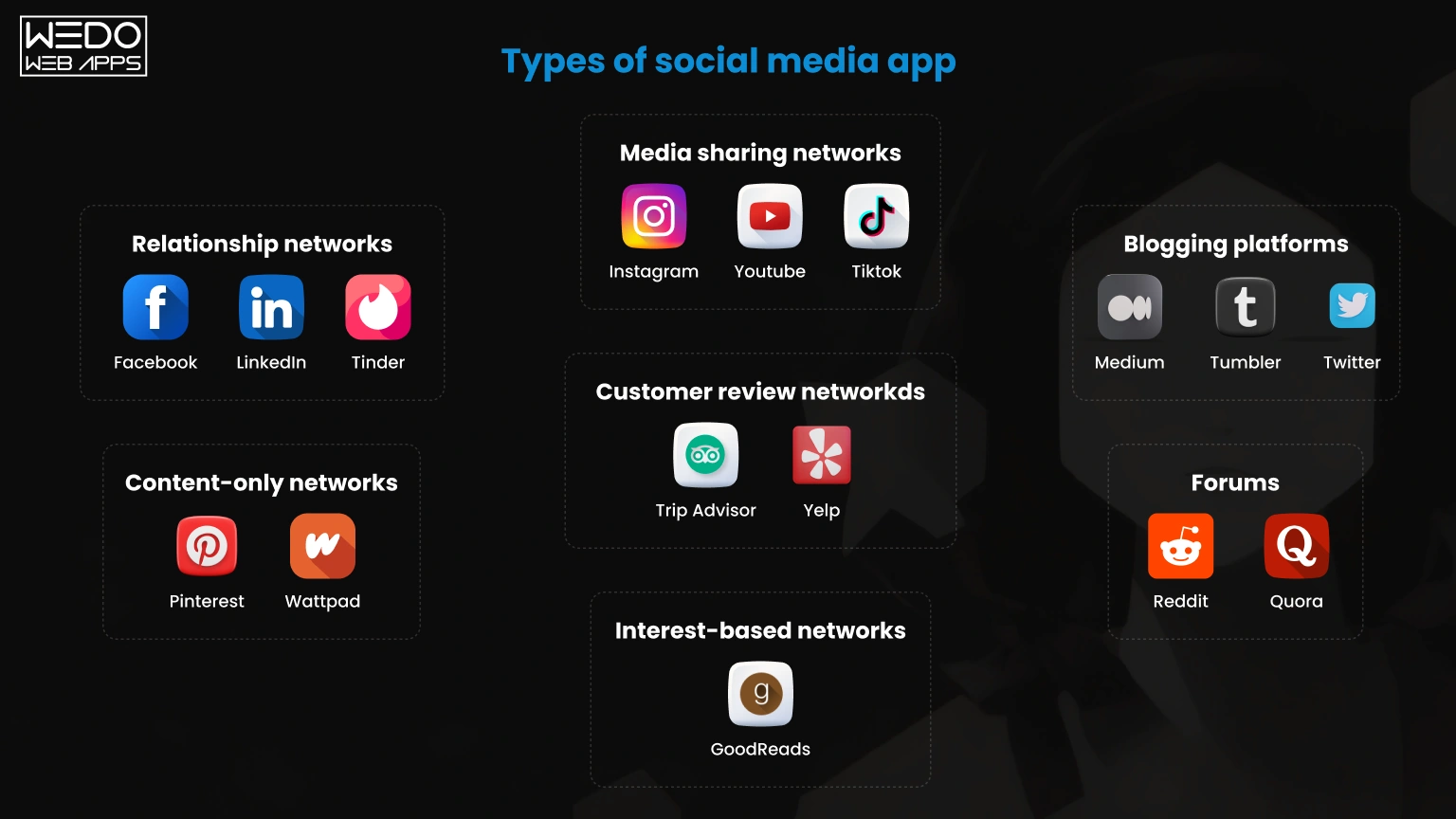
Before you start the development process, make sure you understand which type of platform you want to create. The features, user experience, monetization strategy, and even the social media app development cost can vary significantly depending on the app category.
If you are researching how to make a social media app, choosing the right platform model is one of the first major decisions.
Social Networking Apps
Social networking platforms focus on user profiles, connections, activity feeds, and audience engagement. Mobile apps like Facebook and LinkedIn are the biggest examples in this category.
These apps usually include:
- User profiles
- Friend or connection systems
- News feeds
- Likes and comments
- Content sharing
Founders interested in building a social media app for networking or professional communities often start with this model because it supports long-term user engagement.
Media Sharing Apps
Media sharing apps are built around visual content such as photos, videos, reels, and short clips. Platforms like Instagram and TikTok dominate this category.
These apps focus heavily on:
- Short-form video content
- Image uploads
- Filters and editing tools
- AI-driven content recommendations
- Creator engagement
If you are planning how to create a social media app focused on entertainment or creators, media-sharing platforms usually require stronger backend infrastructure because video processing and media storage increase server demands.
Messaging Apps
Messaging platforms are designed to handle real-time communication between users. Apps like WhatsApp are built around instant messaging, group chats, voice notes, and media sharing.
Common features include:
- Real-time chat
- Group messaging
- File sharing
- Voice and video calls
- End-to-end encryption
For startups researching how do you make a social media app with strong user retention, messaging features are often one of the most active engagement drivers.
Community and Forum Apps
Community-based platforms allow users to participate in discussions around specific topics of interest. Platforms like Reddit are strong examples of community-driven engagement.
These apps typically include:
- Topic-based groups
- Discussion threads
- Upvotes and reactions
- Community moderation
- Interest-based feeds
Many startups are now developing social media apps around niche communities because focused audiences usually show higher engagement than broad public platforms.
Creator Platforms
Creator platforms help influencers, educators, writers, and artists monetise their audience directly. Apps like Patreon and Substack are built around subscriptions and exclusive content access.
Features often include:
- Paid memberships
- Exclusive content access
- Creator analytics
- Subscriber management
- Direct audience communication
If your goal is how to create a social media platform with recurring revenue opportunities, creator-focused apps can provide strong monetisation potential from the beginning.
Professional Networking Platforms
Professional networking apps focus on career growth, recruitment, and business networking. These platforms combine social engagement with industry-specific opportunities.
Key features usually include:
- Professional profiles
- Job boards
- Company pages
- Skill endorsements
- Industry networking
When founders evaluate the cost to build a social media app, professional platforms often require additional integrations such as recruitment systems, messaging infrastructure, and advanced search capabilities.
The type of platform you choose directly affects the technology stack, feature complexity, and timeline. That is why businesses planning how to build a social media app should validate their audience and niche before starting development.
How to Make a Social Media App: Step-by-Step Process
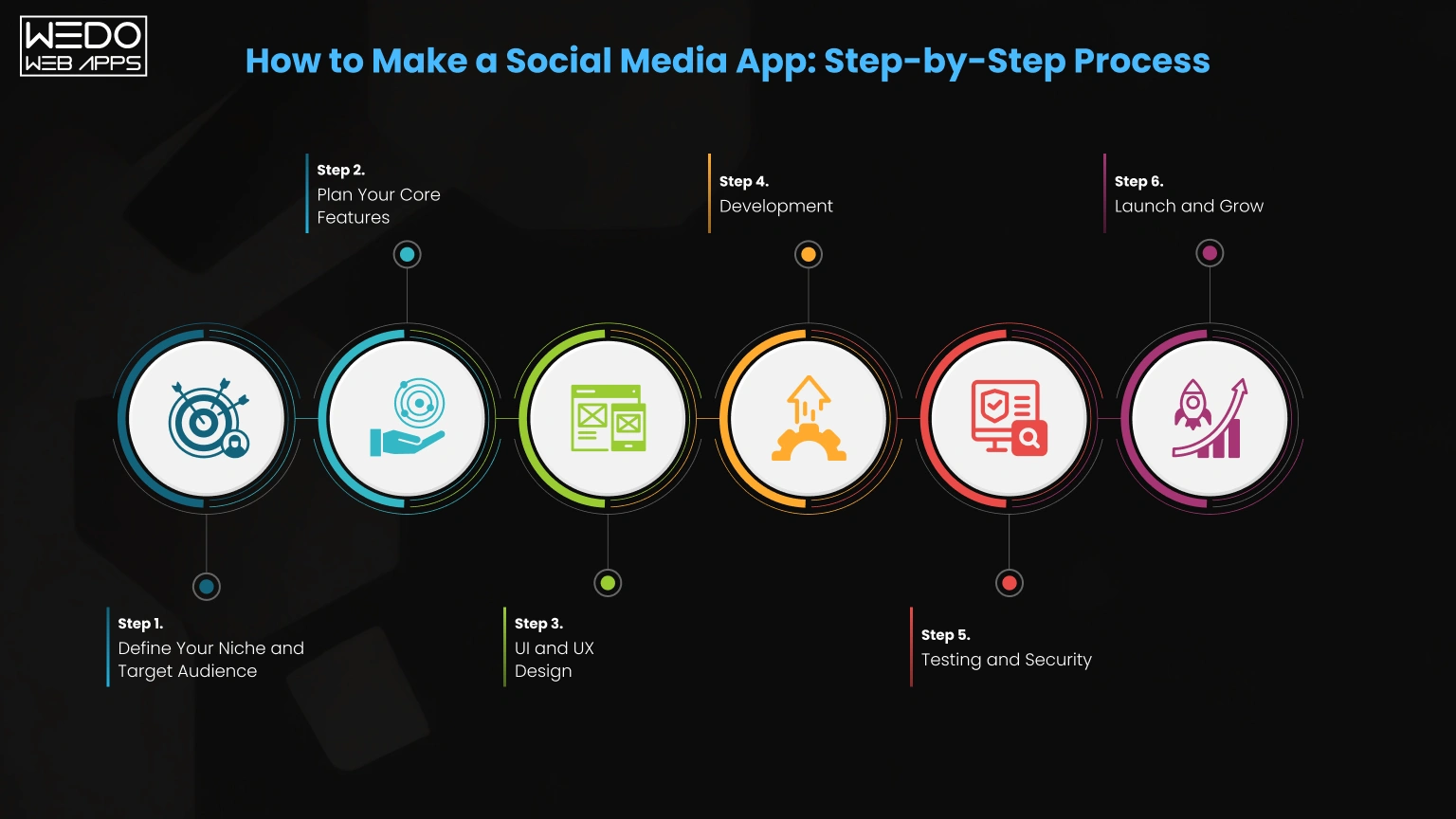
Understanding how to build a social media app becomes much easier when the process is broken into clear stages. Many startups fail because they try to build everything at once instead of validating the product step-by-step.
The best approach is to launch with a focused MVP, gather user feedback, and scale gradually based on real usage data.
Here is a practical roadmap founders can follow in 2026.
Step 1. Define Your Niche and Target Audience
The first step in how to create a social media platform is identifying exactly who the app is for.
Instead of targeting everyone, a successful platform usually focuses on a specific audience and problem.
Ask questions like:
- Who will use this platform daily?
- What problem does the app solve?
- Why would users switch from an existing platform?
- What type of content will dominate the platform?
Niche communities often outperform general social networks because users prefer more focused experiences and stronger community engagement.
Examples include:
- Fitness communities
- Creator networks
- Professional communities
- Gaming groups
- Local networking platforms
The clearer your niche, the easier it becomes to attract loyal users early.
Step 2. Plan Your Core Features
One of the biggest mistakes startups make while building a social media app is adding too many features before launch.
Start with only 5 to 7 essential features, such as:
- User registration
- Profiles
- Content feed
- Likes and comments
- Search
- Notifications
- Basic messaging
This approach reduces development time and allows faster market validation.
An MVP helps founders:
- Test user behavior
- Reduce initial investment
- Collect real feedback
- Improve features gradually
You can also review the MVP app development guide to understand how successful startups validate products before scaling.
Step 3. UI and UX Design
User experience plays a major role in social media app retention. If the app feels confusing or slow, users leave quickly.
Before development begins, teams usually create:
- Wireframes
- User flows
- Interactive prototypes
- Design systems
This stage helps visualise:
- Navigation structure
- Feed layouts
- User interactions
- Profile screens
- Messaging experience
A strong UI and UX process reduces expensive design changes later during development.
Businesses can explore UI/UX design services for professional product design support.
Step 4. Development
Once designs are approved, the actual development process begins.
Most teams follow Agile development methods where the app is built in smaller sprints instead of one long cycle.
A typical sprint usually lasts around two weeks and includes:
- Feature development
- Testing
- Feedback review
- Performance optimisation
During this stage, a mobile app development company typically handles:
- Front-end developers build the user interface.
- Backend developers manage APIs and databases.
- The DevOps team handles infrastructure and deployment.
This parallel workflow speeds up development and reduces delays.
For startups researching how do you make a social media app, Agile development is usually the most efficient approach because features can be adjusted continuously based on testing results.
Step 5. Testing and Security
Testing is critical before launching any social platform.
Social apps handle large amounts of user data, media content, and real-time activity. Even small bugs can impact user retention heavily.
Testing usually includes:
- Performance testing
- Security testing
- API testing
- Device compatibility testing
- Load testing for feeds and messaging
Real-time features like chat and live feeds require extra performance optimization because they process continuous user activity.
Security is equally important, especially for audiences in the USA and UK, where GDPR and privacy compliance requirements are strict.
Strong security practices include:
- Encrypted user data
- Secure authentication
- Privacy controls
- Moderation systems
- Compliance management
Businesses can review QA testing services for application testing and quality assurance support.
Step 6. Launch and Grow
After testing is complete, the app is prepared for launch on:
- Apple App Store
- Google Play Store
The launch phase includes:
- App store optimisation
- Performance monitoring
- Initial marketing campaigns
- User onboarding improvements
However, launching the app is only the beginning.
Successful startups continuously:
- Monitor user feedback
- Improve retention
- Release new features
- Optimise performance
- Expand monetisation systems
Many businesses also invest in post-launch marketing strategies to grow their user base faster.
You can also explore how much money can an app make for you to understand long-term growth and monetisation opportunities after launch.
Social Media App Development Process Overview
| Development Stage | Main Goal | Key Deliverables |
|---|---|---|
| Niche Research | Identify audience and problems | User personas, market validation |
| MVP Planning | Finalise core features | Feature roadmap, project scope |
| UI/UX Design | Create user experience flow | Wireframes, prototypes, UI screens |
| Development | Build frontend and backend systems | App features, APIs, integrations |
| Testing and Security | Ensure stability and compliance | Bug fixes, security testing |
| Launch & Growth | Release and scale the platform | App deployment, marketing, updates |
This step-by-step process gives startups a clearer understanding of how to create a social media app while avoiding unnecessary development risks and costs.
Must-have Features for Building a Social Media App
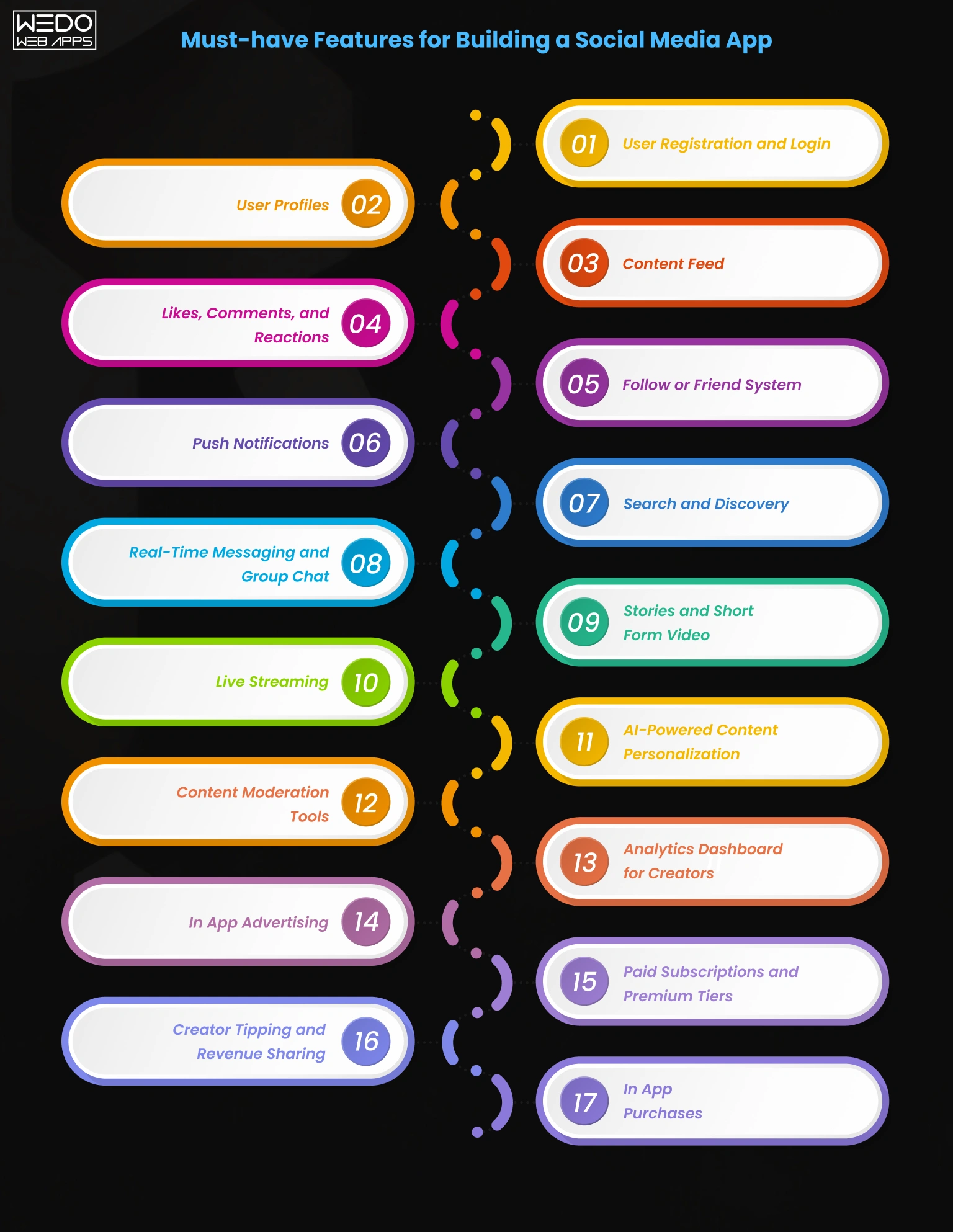
The success of a social platform depends heavily on its features. Users expect fast interactions, personalized experiences, and smooth content sharing from the very first day.
If you are planning how to create a social media app, starting with the right feature set can reduce development costs while helping you launch faster.
The smartest approach is to divide features into three stages:
- Core MVP features
- Advanced growth features
- Monetisation features
This helps startups avoid overbuilding in the early stages.
Core Feature (MVP Level)
These are the essential features required for launching a minimum viable product. If you are researching how to build a social media app, this is where most startups begin.
User Registration and Login
A simple onboarding process improves user retention from the start.
Most social apps support:
- Email registration
- Phone number login
- Social sign-in options
- Password recovery
Fast onboarding removes friction and encourages users to complete profile creation quickly.
User Profiles
Profiles act as the digital identity of every user on the platform.
Basic profile features include:
- Profile photo
- Bio and personal details
- Username customization
- Activity history
- Followers or connections count
Strong profile systems increase engagement because users feel more connected to the community.
Content Feed
The content feed is the center of every social platform. This is where users consume updates, videos, posts, and discussions.
Feeds may include:
- Text posts
- Images
- Short videos
- Trending content
- Recommended posts
When businesses think about building a social media app, feed performance becomes one of the most important technical priorities because slow feeds quickly reduce retention.
Likes, Comments, and Reactions
Social engagement features keep users active on the platform.
These interactions help:
- Increase user participation
- Improve content visibility
- Create community discussions
- Generate behavioural data for recommendations
Even simple reactions can significantly improve session time inside the app.
Follow or Friend System
Connection systems define how users interact with each other.
Depending on your platform type, this may include:
- Following creators
- Sending friend requests
- Connecting professionally
- Joining communities
These features directly affect how content spreads across the platform.
Push Notifications
Push notifications help you bring users back to the app regularly.
Common notification triggers include:
- Likes and comments
- New followers
- Messages
- Live stream alerts
- Trending content
Well-timed notifications can increase retention rates significantly without overwhelming users.
Search and Discovery
Users should be able to find content, creators, hashtags, and communities quickly.
Search functionality often includes:
- Keyword search
- Hashtag discovery
- User recommendations
- Trending topics
- Category filters
For startups learning how to make a social media app, a strong discovery feature is essential because it improves content visibility for new users.
Advanced Feature (Growth Stage)
Once the MVP gains traction, advanced features can improve engagement, retention, and monetisation.
Real-Time Messaging and Group Chat
Messaging keeps users active inside the platform instead of moving conversations elsewhere.
Advanced messaging may include:
- Group chats
- Media sharing
- Voice notes
- Read receipts
- Video calls
Real-time communication usually requires technologies like WebSockets and scalable backend infrastructure.
Stories and Short Form Video
Short-form content continues driving massive engagement across platforms like Instagram and TikTok.
Popular features include:
- Stories that disappear after 24 hours
- Vertical video feeds
- Video filters
- Music integration
- Interactive stickers
These features increase user activity and content creation frequency.
Live Streaming
Live streaming creates stronger real-time interaction between creators and audiences.
Common use cases include:
- Creator sessions
- Product launches
- Community discussions
- Live events
- Gaming streams
However, live streaming also increases infrastructure and moderation requirements.
AI-Powered Content Personalization
Modern social apps rely heavily on AI recommendation systems.
AI helps personalise:
- User feeds
- Content suggestions
- Friend recommendations
- Advertisements
- Trending content
This is one reason developing a social media app with AI capabilities often increases development complexity and backend costs.
Content Moderation Tools
Every social platform needs moderation systems to manage harmful or inappropriate content.
Moderation features may include:
- AI content filtering
- User reporting systems
- Admin dashboards
- Spam detection
- Community moderation controls
Strong moderation protects brand reputation and improves user trust.
Analytics Dashboard for Creators
Creator-focused platforms benefit from detailed analytics systems.
These dashboards can track:
- Audience growth
- Engagement rates
- Revenue performance
- Content reach
- Watch time
Analytics tools help creators optimise content while increasing platform retention.
Monetisation Features
Monetisation should be planned early during development, not added later as an afterthought.
Founders researching how do you make a social media app profitable should design revenue models alongside the product roadmap.
In App Advertising
Advertising remains one of the biggest revenue sources for social platforms.
Common ad formats include:
- Sponsored posts
- Video ads
- Banner placements
- Native feed ads
Advertising systems often require advanced targeting and analytics capabilities.
Paid Subscriptions and Premium Tiers
Subscription models help generate recurring revenue.
Premium features may include:
- Exclusive communities
- Ad-free experiences
- Advanced analytics
- Creator tools
- Priority visibility
This model works especially well for niche communities and creator platforms.
Creator Tipping and Revenue Sharing
Many modern platforms now support direct creator monetisation.
Popular monetisation options include:
- Virtual gifts
- Paid shoutouts
- Fan donations
- Revenue sharing systems
This encourages creators to remain active on the platform longer.
In App Purchases
In-app purchases can create additional revenue streams through digital products or premium experiences.
Examples include:
- Virtual coins
- Stickers and filters
- Paid events
- Exclusive content access
The final feature list will directly impact the cost to build a social media app, development timeline, and server infrastructure requirements. That is why startups should prioritise features carefully instead of trying to launch everything at once.
Social Media App Features Breakdown by Development Stage
| Feature | Why It Matters | MVP Launch Stage | Growth Stage | Monetisation Stage |
|---|---|---|---|---|
| User Registration & Login | Helps users create accounts quickly | Essential | Included | Included |
| User Profiles | Builds identity and community engagement | Essential | Included | Included |
| Content Feed | Main area where users consume content | Essential | Included | Included |
| Likes, Comments, & Reactions | Increases interaction and retention | Essential | Included | Included |
| Follow or Friend System | Helps users connect with others | Essential | Included | Included |
| Push Notifications | Brings users back regularly | Essential | Included | Included |
| Search & Discovery | Improves content visibility | Essential | Included | Included |
| Real Time Messaging | Keeps conversations inside the platform | Optional Later | Recommended | Included |
| Stories & Short Videos | Improves engagement and watch time | Optional Later | Recommended | Included |
| Live Streaming | Supports creator interaction | Not Required | Advanced Feature | Included |
| AI Feed Personalisation | Shows users relevant content | Not Required | Advanced Feature | Included |
| Content Moderation Tools | Protects platform quality | Basic Setup | Recommended | Included |
| Creator Analytics Dashboard | Helps creators track growth | Not Required | Recommended | Included |
| In App Advertising | Generates platform revenue | Not Required | Optional | Essential |
| Paid Subscriptions | Creates recurring revenue | Not Required | Optional | Essential |
| Creator Tipping & Revenue Sharing | Encourages creator loyalty | Not Required | Optional | Essential |
| In App Purchases | Adds additional revenue streams | Not Required | Optional | Essential |
How Much Does it Cost to Build a Social Media App in 2026?
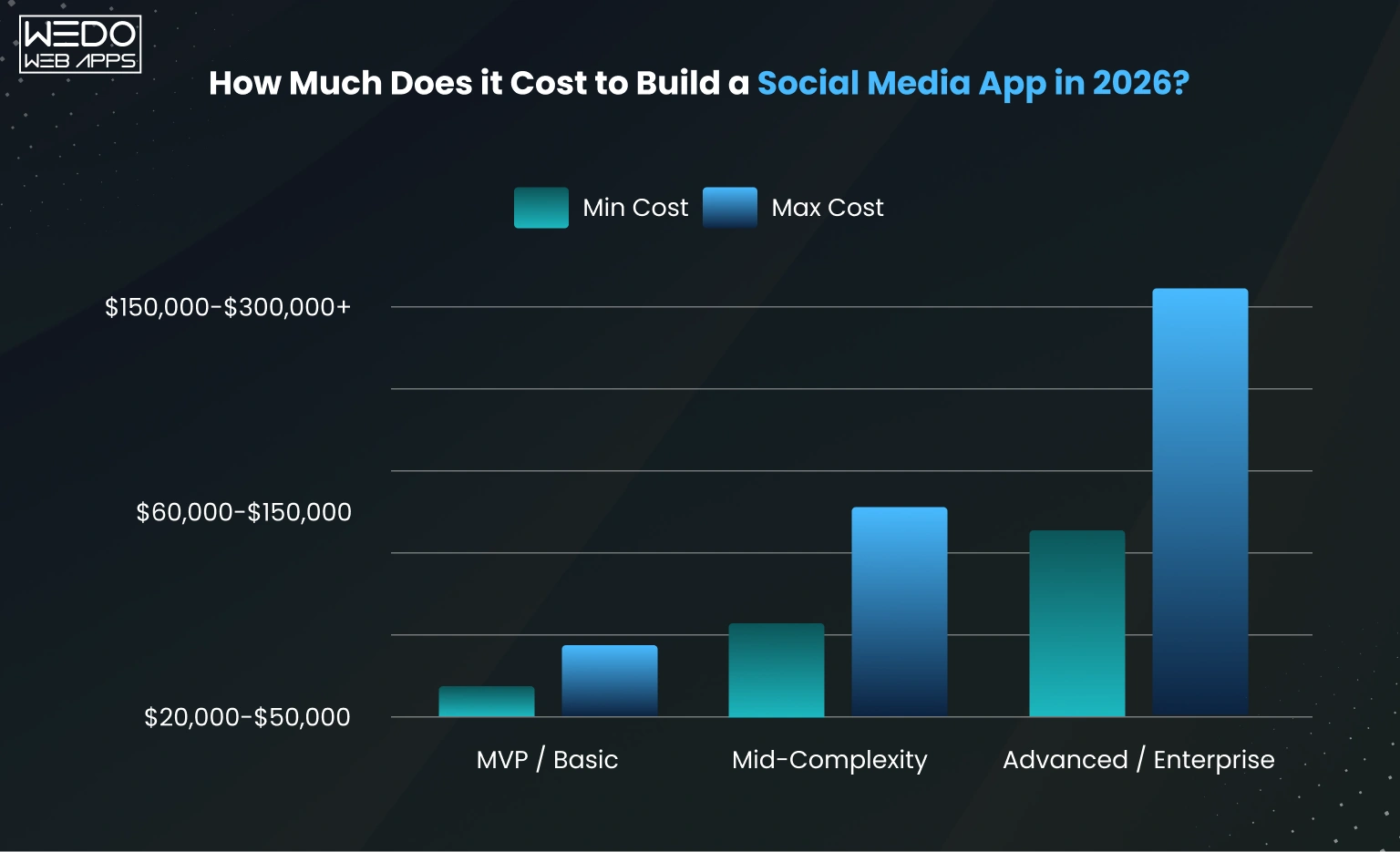
One of the most common questions founders ask is about the actual social media app development cost. The answer depends on several factors, including feature complexity, platform choice, backend infrastructure, and scalability requirements.
A simple MVP with basic social features costs significantly less than a full-scale platform with AI recommendations, live streaming, and real-time messaging.
If you are researching how to build a social media app, understanding the cost structure early helps you plan development phases more effectively.
Cost by Complexity Level
The overall cost to build a social media app can vary based on the scope of the project and the number of advanced features included.
| App Complexity | Estimated Cost Range | Best For | Typical Features |
|---|---|---|---|
| MVP/Basic App | $20,000 to $50,000 | Startups validating an idea | Login, profiles, feed, likes, comments |
| Mid-Level App | $50,000 to $120,000 | Growing platform with active users | Messaging, notifications, short videos, and moderation |
| Full-Scale Platform | $120,000 to $300,000+ | Large social platforms and creator ecosystems | AI feeds, live streaming, advanced analytics, monetisation |
For founders planning how to create a social media platform, starting with an MVP is usually the smartest approach. It allows businesses to validate user interest before investing heavily in advanced functionality.
Key Factors That Affect the Cost
Several technical and business decisions directly impact the final development budget.
Number of Features
The more features your app includes, the higher the development cost becomes.
Basic features like profiles and feeds require less effort compared to:
- Real-time chat systems
- AI recommendation engines
- Video streaming
- Advanced moderation tools
This is why businesses focused on building a social media app often launch with core features first and expand later.
iOS, Android, or Both Platforms
Platform choice affects both development timeline and budget.
Businesses can choose:
- iOS only
- Android only
- Cross-platform development
- Separate native apps for both platforms
Launching on both platforms naturally increases the overall social media app development cost because additional testing and optimisation are required.
Native vs Cross-Platform Development
Native development uses:
- Swift for iOS
- Kotlin for Android
Cross-platform development usually uses frameworks like:
- Flutter
- React Native
Cross-platform apps are often more cost-effective for startups because one codebase supports both iOS and Android.
You can also explore Cross-Platform App Development Services to understand which approach works best for your project.
AI and Real-Time Features
AI-powered feeds, recommendation engines, live messaging, and video streaming require stronger backend infrastructure and more development time.
In many cases, these features can increase the base project cost by 30 to 50 percent.
Examples include:
- Personalized content feeds
- Real-time chat
- AI moderation systems
- Video processing
- Smart recommendation
This is one reason developing a social media app with advanced engagement systems requires careful technical planning.
Development Team Location
The location of your development partner also affects pricing significantly.
| Development Region | Average Hourly Cost |
|---|---|
| USA | $100 - $250/hour |
| UK | $80 - $200/hour |
| India | $25 - $80/hour |
Many startups choose an offshore or hybrid development team to reduce costs without compromising product quality.
GDPR and CCPA Compliance
If your app targets users in the USA or UK, compliance requirements must be considered from the beginning.
Privacy regulations like GDPR and CCPA may increase the project budget by 10 to 15 percent because of:
- Data protection systems
- Consent management
- Secure storage requirements
- User privacy controls
Ignoring compliance during early development often creates expensive problems later.
Ongoing Maintenance Costs
Launching the app is only the beginning. Every social platform requires continuous updates, performance monitoring, and security maintenance.
Most businesses spend around 15 to 20 percent of the initial development cost annually on maintenance.
Maintenance usually includes:
- Bug fixes
- Performance optimization
- Server monitoring
- Feature updates
- Security patches
- iOS and Android compatibility updates
As your user base grows, infrastructure and server costs also increase due to higher media storage and traffic demands.
Businesses planning long-term growth should also review Mobile app maintenance retainer pricing to estimate post-launch support more accurately.
The best strategy for startups researching how to make a social media app is to launch lean, validate user engagement, and then scale features gradually based on real user behavior.

Essential Tech Stack for Developing a Social Media App
Choosing the right technology stack is one of the most important decisions when developing a social media app. Your tech stack affects app performance, scalability, development speed, maintenance costs, and user experience.
Social platforms handle large amounts of content, real-time interactions, media uploads, and user activity simultaneously. That is why startups planning how to create a social media app need technologies that support long-term scalability from the beginning.
Frontend - What Your Users See
The frontend controls everything users interact with inside the app, including navigation, feeds, profiles, messaging screens, and media content.
React Native and Flutter for Cross-Platform Development
Many startups prefer cross-platform frameworks because they reduce development time and costs by using a single codebase for both iOS and Android.
The two most popular frameworks are:
- React Native
- Flutter
Benefits of cross-platform development include:
- Faster development cycles
- Lower initial development costs
- Easier maintenance
- Consistent UI across devices
Businesses researching how to build a social media app often choose a cross-platform framework during the MVP stage to launch faster.
You can explore:
- React Native App Development Services
- Cross-Platform App Development Solutions
Swift for iOS and Kotlin for Android
Native app development is usually preferred for large-scale platforms that require maximum performance and deeper device integration.
Native technologies include:
- Swift for iOS
- Kotlin for Android
Native apps generally offer:
- Better performance
- Smoother animations
- Improved hardware access
- Stronger optimisation for large user bases
However, native development usually increases the cost to build a social media app because a separate development team may be required for iOS and Android.
When to Choose Native vs Cross-Platform
| Development Approach | Best For | Advantages | Limitations |
|---|---|---|---|
| Cross-Platform | Startups and MVPs | Faster launch, lower cost, single codebase | Slight performance limitations for heavy apps |
| Native Development | Large-scale social platforms | Better performance and scalability | Higher development and maintenance cost |
For most startups learning how to make a social media app, cross-platform development is often the practical starting point before scaling into fully native infrastructure later.
Backend - What Powers the App
The backend handles everything happening behind the scenes, including authentication, content storage, messaging, notifications, feeds, and AI systems.
Node.js for Real-Time Features
Social platforms rely heavily on real-time interactions such as:
- Live feeds
- Messaging
- Notifications
- Activity updates
This is why Node.js is commonly used for social media platforms. Its event-driven architecture works well for handling simultaneous user activity efficiently.
Businesses can explore Node.js development services for scalable backend development solutions.
Python for AI-Powered Recommendations
Modern social apps use AI for:
- Feed personalisation
- Content recommendations
- Spam detection
- User behaviour analysis
Python is widely used for machine learning and AI systems because of its strong ecosystem and data processing capabilities.
If your platform includes AI-driven features, you can review Python development services for backend and AI integration support.
Database Choices
| Database | Best Use Case | Advantages |
|---|---|---|
| MongoDB | Flexible content and media-heavy apps | Handles unstructured data efficiently |
| PostgreSQL | Structured data and relationships | Strong performance for relational data |
Many large social platforms use a combination of databases depending on feature requirements.
Cloud and Infrastructure
Scalable infrastructure is essential when building a social media app because user activity and media storage can grow rapidly after launch.
Cloud Hosting Platforms
Most modern social apps use cloud platforms such as:
- AWS
- Google Cloud
- Microsoft Azure
These platforms help with:
- Auto scaling
- Data storage
- Security
- Backup management
Cloud infrastructure allows businesses to scale resources as user traffic increases instead of investing more in servers upfront.
CDN for Faster Media Delivery
Social media apps depend heavily on media content like:
- Images
- Videos
- Live streams
- Stories
A Content Delivery Network (CDN) helps deliver media faster by storing files closer to users geographically.
This improves:
- Feed loading speed
- Video playback
- User experience
- App performance across the USA and UK
Strong infrastructure planning reduces downtime and improves retention rates as the platform grows.
You can also explore cloud computing solutions for scalable hosting and infrastructure services tailored for modern applications.
Common Mistakes To Avoid When Building a Social Media App
Many startups fail not because the idea is weak, but because of poor planning during development. Understanding these mistakes early can save significant time, money, and technical rework later.
If you are researching how to make a social media app, avoiding these common problems will improve your chances of building a scalable and profitable platform.
Trying to Compete Directly With Facebook or Instagram
One of the biggest mistakes founders make is trying to build a platform for everyone.
Competing directly with giants like Facebook or Instagram requires enormous budgets, massive infrastructure, and years of user acquisition.
In 2026, niche communities continue outperforming general platforms because users prefer:
- More relevant content
- Stronger community engagement
- Focused discussions
- Personalized experiences
The smartest strategy is to build for a specific audience first and expand gradually later.
Building Too Many Features Too Early
Another major mistake during building a social media app is feature overload before validating the product.
Many startups try adding:
- Live streaming
- AI recommendations
- Advanced creator tools
- Marketplace features
- Video editing systems
before understanding what users actually need.
This usually creates:
- Higher development costs
- Longer launch timelines
- More technical issues
- Poor user experiences
Start with core MVP features first, then expand based on real user behaviour and feedback.
Ignoring GDPR and CCPA Compliance
Privacy compliance is no longer optional for social platforms targeting users in the USA or UK.
Many founders ignore compliance during the early stage because it seems expensive or time-consuming. However, fixing compliance issues later often costs much more.
Important compliance areas include:
- User consent management
- Data storage security
- Privacy settings
- Account deletion systems
- Data export functionality
Businesses planning how to create a social media platform should include compliance requirements from the beginning to avoid legal and operational risks later.
Skipping Real-Time Performance Testing
Social apps depend heavily on:
- Fast content feeds
- Real-time chat
- Notifications
- Media delivery
- Live interactions
If performance testing is skipped, the platform may crash or slow down as user activity increases.
This issue becomes common when:
- Servers are not optimised
- Databases are overloaded
- APIs are poorly structured
- Media files are not compressed properly
Real-time systems should always be tested under high traffic conditions before launch.
No Monetisation Strategy From the Start
Many startups focus entirely on user growth without planning how the platform will generate revenue.
This creates serious challenges later because the monetisation system often affects:
- Database structure
- User permissions
- Subscription management
- Payment integrations
- Creator tools
Platforms should plan monetisation early, even if revenue features are added later.
Common monetisation models include:
- Advertising
- Premium subscriptions
- Creator tipping
- Paid communities
- In-app purchases
A clear revenue strategy also helps estimate the long-term social media app development cost more accurately.
Choosing the Wrong Development Partner
Your development team directly affects product quality, scalability, and launch speed.
Many startups choose agencies based only on the lowest price without reviewing:
- Portfolio quality
- Technical expertise
- Communication process
- Industry experience
- Post-launch support
A weak development partner can create:
- Poor app architecture
- Security issues
- Delayed timelines
- Expensive technical debt
Before hiring a team, you should review previous social app projects, technical capabilities, and client feedback carefully.
Quick Breakdown of Common Social Media App Development Mistakes
| Mistake | Common Result | Better Approach |
|---|---|---|
| Competing with large platforms directly | High marketing costs and low differentiation | Focus on a niche audience first |
| Adding too many features early | Delayed launch and higher costs | Start with a lean MVP |
| Ignoring compliance requirements | Legal and security risks | Build GDPR and CCPA readiness early |
| Skipping performance testing | App crashes and slow feeds | Test under heavy user load |
| No monetisation planning | Difficult revenue scaling later | Define revenue strategy early |
| Choosing the cheapest development team | Poor code quality and delays | Evaluate portfolio and expertise carefully |
Avoiding these mistakes makes the process of developing a social media app far more manageable while improving your chances of long-term platform growth.
Conclusion
Social media apps are becoming one of the strongest business opportunities in 2026. Users are actively shifting toward focused communities, creator-driven platforms, and interest-based networking experiences instead of broad public social networks.
However, success depends heavily on how social media apps are built. The right development partner can make the difference between a scalable product launch and a platform that struggles with performance, security, or user retention.
Businesses planning on how to make a social media app should work with experienced teams that understand app architecture, real-time systems, scalability, and user engagement strategy from the start. You can also hire dedicated mobile app developers to accelerate development with experienced app specialists.