Introduction
Your software already works. Your customers already use it. Your teams already depend on it. Now you want to add AI.
That is where the real question begins.
Should you integrate an existing AI model into your software? Should you build a custom AI solution around your data and workflows? Or would a hybrid approach give you the control you need without starting everything from scratch?
The wrong choice can mean unnecessary development costs, longer implementation timelines, limited flexibility, or a solution that does not fit your business processes.
The AI integration vs AI development decision should start with what your software already does and what you want AI to accomplish. If an existing AI service can handle the requirement, integration may be enough. If your needs depend on proprietary data, specialized workflows, or greater control, custom development may make more sense.
This guide explains how to evaluate both approaches, when to integrate AI into existing software, when to build a custom solution, and where a hybrid approach fits. You will also see practical use cases, cost and timeline considerations, current AI approaches, and the steps involved in adding AI to an existing system.
AI Integration vs AI Development: What Is the Difference?
The first decision is understanding what you are actually building. AI integration connects an existing AI capability to software you already use. AI development involves creating a more tailored AI solution around your specific business requirements.
The difference matters because the two approaches require different levels of development, data, control, and investment.
What Is AI Integration?
AI integration means adding an existing AI model, API, platform, or service to your current software. Your application remains the main system while the AI capability handles a specific task.
For example, you could add an AI assistant to your CRM to summarize customer interactions. An ecommerce business could integrate AI search to help customers find products using natural language. An enterprise application could use an AI service to extract information from uploaded documents.
This approach is often suitable when you want to add AI to an existing system without rebuilding its core functionality.
What Is AI Development?
AI development involves creating a tailored AI capability around your business requirements. The work can include model selection and adaptation, data preparation, RAG implementation, AI agent development, custom machine learning, evaluation, and application logic.
Custom AI development does not necessarily mean training a large language model from zero. In many projects, the better approach is to use an existing foundation model and build the custom layers around it.
For example, you may use an established LLM but connect it to proprietary company data through RAG. You could also build custom agents that interact with your internal systems and follow business-specific rules.
AI Integration vs AI Development at a Glance
| Factor | AI Integration | AI Development |
|---|---|---|
| Starting point | Existing software and AI services | Custom AI capability |
| Initial cost | Usually lower | Usually higher |
| Implementation time | Generally shorter | Usually longer |
| Customization | Depends on the selected AI service | Greater customization |
| Data requirements | Often limited | Can require substantial business data |
| Control | Depends on the AI provider | Greater control over the solution |
| Scalability | Depends on the provider and architecture | Designed around your requirements |
| Maintenance | Shared between your team and provider | Primarily managed by your development team |
| Best suited for | Adding established AI capabilities | Specialized or product-specific AI requirements |
The choice is therefore less about whether AI should be used and more about how much of the AI capability your business needs to own and customize. The next step is understanding what it takes to connect AI with the software you already have.
How AI Integration Works With Existing Software
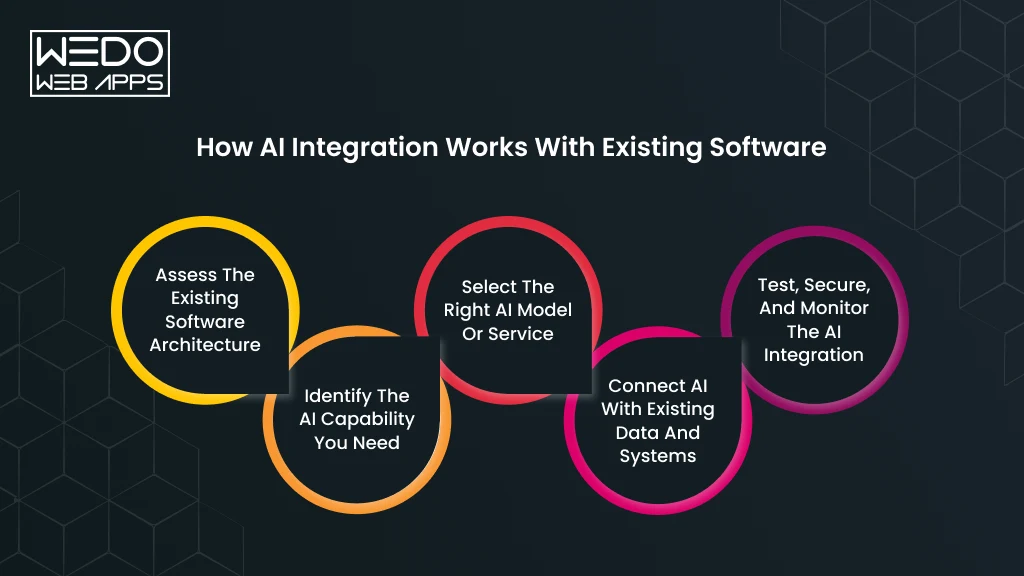
Adding AI to an existing application requires more than connecting an API and placing an AI feature on the interface. The AI needs to work with your application's data, permissions, workflows, and user experience.
A well-planned integration keeps the existing software intact while introducing the AI capability where it can provide measurable value.
Assess the Existing Software Architecture
Start by reviewing how your current application is built and how its systems communicate.
Look at the APIs, databases, backend services, authentication, third-party integrations, and business workflows. This assessment helps identify where the AI capability can connect without disrupting existing functions.
For example, if you want to add AI customer support to a CRM, the integration may need controlled access to customer records, support tickets, product information, and conversation history.
Identify the AI Capability You Need
Define the task before selecting an AI model. The right technology depends on what you expect the system to accomplish.
You may want to add:
- An AI chatbot for customer support.
- Natural language search for an eCommerce catalog.
- Document processing for extracting structured information.
- Recommendations based on user behavior.
- Predictive analytics for business forecasting.
- Content generation for product or marketing workflows.
- Voice capabilities for hands-free interactions.
A specific use case also makes it easier to establish performance criteria before development begins.
Select the Right AI Model or Service
Once the use case is clear, evaluate the AI technology that can support it. Your options may include LLM development APIs, specialized AI services, open-source models, or a combination of technologies.
Consider factors such as accuracy, response time, API limits, data handling, integration requirements, and usage costs.
For instance, a custom support assistant may work well with an existing LLM API. A specialized medical imaging application may require a more tailored machine learning approach.
Connect AI With Existing Data and Systems
The AI capability then needs a controlled connection to the systems it will use.
Depending on the application, this can involve APIs, middleware, databases, vector databases, data pipelines, or application logic.
Consider an internal knowledge assistant. The model can generate the response, while a RAG layer retrieves relevant information from approved company documents. This lets the AI work with your business knowledge without requiring the entire application to be rebuilt.
Test, Secure, and Monitor the AI Integration
Before putting the feature into production, test how it behaves with real workflows and realistic inputs.
Check response accuracy, access permissions, data handling, failure cases, latency, and system performance. Sensitive information should only be exposed to the AI service when the architecture and data handling policies allow it.
You should also monitor the integration after launch. AI output can vary, usage can increase unexpectedly, and model providers can change their services. Monitoring gives your team the information needed to identify problems and improve the system over time.
When these steps are handled together, AI integration for existing software becomes an extension of the product rather than an isolated AI feature.
AI Integration vs Building From Scratch: Which Approach Is Right for You?
You do not have to treat AI integration and custom AI development as two completely separate paths. The right approach depends on how much of the AI capability you need to customize and control.
AI Integration: Use What Already Works
Best when: Your requirement can be handled by an established AI model or service.
What you do: Connect an existing AI capability with your software, data, workflows, and user interface.
Good fit for:
- Text summarization
- AI search
- Speech-to-text
- Content generation
- Basic image analysis
Example: You already have a customer support platform and want to add an AI assistant that summarizes tickets and suggests responses. An existing LLM API may provide the required capability. Your development effort can focus on connecting it securely to the relevant support data and workflows.
Custom AI Development: Build Around Your Requirements
Best when: Your AI requirements are specialized or existing solutions cannot deliver the required results.
What you do: Develop a tailored AI capability using your data, workflows, models, business rules, and evaluation criteria.
Good fit for:
- Specialized prediction systems
- Proprietary AI capabilities
- Domain-specific applications
- Strict accuracy requirements
- AI-driven products
Example: A logistics company wants to predict delivery delays using its historical shipment data, routes, weather conditions, and operational patterns. A generic AI API may not provide the required prediction capability. A custom model can be designed around these specific inputs.
Hybrid AI Development: Combine Existing AI With Custom Components
Best when: An existing model can handle the core AI task, but your business needs custom data, workflows, or control.
What you do: Use an existing foundation model while developing the components that make the solution specific to your business.
Good fit for:
- RAG applications
- AI agents
- Enterprise knowledge assistants
- AI-powered business workflows
- Applications using proprietary data
Example: You can use an existing LLM to generate responses while building a custom RAG system that retrieves information from your company's approved documents. The model provides the language capability. Your application controls which business information reaches it.
Which Approach Should You Consider?
| If your situation looks like this | Consider |
|---|---|
| You need a standard AI capability | AI Integration |
| Your existing software already solves the core problem | AI Integration |
| You need to validate an AI feature before investing heavily | AI Integration |
| Your requirements are highly specialized | Custom AI Development |
| AI is the main value proposition for your product | Custom AI Development |
| You need extensive control over proprietary data | Custom AI Development |
| An existing model works, but you need custom business knowledge or workflows | Hybrid AI Development |
The important question is not simply whether you should integrate or build. Ask how much of the AI solution needs to be customized around your business. That answer will usually point you toward the right approach.
When Should You Integrate AI Into Existing Software?
If your existing software already handles your core business operations, rebuilding it just to introduce AI may add unnecessary cost and development work. In many cases, you can add AI to an existing system and keep the workflows your teams and customers already know.
AI integration makes sense when the technology you need is already available, and your application has a suitable place for it.
Your Existing Software Already Solves the Core Business Problem
If your current application already manages the main business process, AI can be introduced as an additional capability.
For example, an ecommerce platform can continue handling products, orders, payments, and inventory while an AI layer adds natural language search and product recommendations.
You keep the system that works and add intelligence where it can improve the experience.
A Proven AI Model Already Meets Your Requirements
You may not need custom AI development if established models can already deliver the required result.
An existing LLM can handle tasks such as summarization, classification, content generation, and conversational interactions. Speech recognition and image analysis services can also be integrated when they meet your accuracy and data requirements.
The key is to evaluate the model against your actual use case before committing to custom development.
You Need a Faster Implementation Timeline
If you want to introduce an AI feature within an existing product without spending months developing a specialized model, integration can provide a more direct path.
For instance, a SaaS platform could integrate an AI assistant into its existing dashboard rather than developing an entire AI system independently.
The timeline will still depend on your architecture, security requirements, data access, testing, and the complexity of the workflow.
Your Team Wants to Test AI Before Making a Larger Investment
AI integration can also serve as a practical starting point.
You can introduce one focused capability, measure how users interact with it, evaluate its accuracy, and assess whether it delivers measurable business value.
For example, you could add AI-generated ticket summaries to a support platform first. If the feature reduces the time agents spend reviewing conversations, you have evidence to support a broader AI investment.
A practical rule: If your existing software works well and an established AI capability can meet the new requirement, integration is usually the more practical starting point.
When Should You Build AI Instead of Integrating It?
Integrating an existing AI service is practical when your requirements are already covered. The situation changes when the AI capability itself needs to be tailored around your product, data, or operating model.
Before choosing custom AI development, look for these signals.
AI Is Part of What Your Customers Are Buying
If AI is only supporting your product, an existing model may be enough. If AI is the product, greater ownership can become more important.
Imagine a platform that uses AI to assess financial risk. Its value may depend on proprietary scoring logic, historical data, prediction accuracy, and domain-specific workflows. A basic third-party integration may provide the interface, but not the differentiation.
Build signal: Your AI capability directly influences your product's value or competitive advantage.
Your Data Gives You an Advantage
Generic AI tools are trained for broad use cases. Your business may have information that is specific to your industry, customers, equipment, processes, or operations.
A manufacturer, for example, could have thousands of historical production images showing different types of equipment defects. A custom AI solution can be designed to use this data for a specialized inspection workflow.
Build signal: Your proprietary data is central to the AI capability you want to create.
Generic Models Fall Short in Testing
Do not assume that a popular AI model will automatically deliver the required results for your use case.
Test available models against your actual data and define measurable criteria for accuracy, response quality, latency, or consistency.
If the results remain below your required threshold, custom development may give you more options for improving the model or the surrounding AI architecture.
Build signal: Existing AI tools repeatedly fail your real-world performance tests.
Your AI Requires Tighter Control
Some applications cannot treat AI as a simple external service.
You may need control over where data is processed, which information the model can access, how outputs are evaluated, and how the system behaves when it encounters uncertain results.
This matters particularly for applications with strict security, privacy, audit, or data residency requirements.
Build signal: Your business needs control that the chosen third-party AI service cannot provide.
AI Will Expand Across Your Product
Think beyond the first AI feature.
If you expect to introduce AI search today, AI agents tomorrow, predictive capabilities later, and several AI-driven workflows after that, your initial architecture needs to support that direction.
You may still use existing foundation models. The custom part can sit around them through your own data layer, orchestration, evaluation framework, retrieval system, or business logic.
Build signal: AI is becoming a long-term product capability rather than a single feature.
A Simple Test Before You Choose
Ask yourself these five questions:
| Question | If the answer is "Yes" |
|---|---|
| Is AI central to your product value? | Consider custom development |
| Does proprietary data drive the AI capability? | Consider custom development |
| Do existing models fail your performance tests? | Consider custom development |
| Do you need greater control over data or behavior? | Consider custom development |
| Will you build multiple AI capabilities over time? | Consider a custom or hybrid architecture |
You do not need to build every AI component yourself. In many cases, the smarter option is to use an established foundation model while developing the parts that require your data, workflows, and control.
The takeaway: Build when your AI requirements are specific enough that a standard integration would limit performance, differentiation, control, or future growth.
AI Integration vs Custom AI Development: Cost, Time, and Resources
Budget is often the first concern when you compare AI integration with custom development. The initial development cost matters, but it does not tell you the full financial picture.
You also need to consider implementation time, infrastructure, AI usage, maintenance, testing, and the resources required after launch.
How Much Does AI Integration Cost?
The cost of integrating AI into existing software depends largely on the complexity of the feature and the systems it needs to connect with.
A straightforward integration with an established AI API may require less development work. A solution that needs access to multiple databases, custom retrieval, extensive security controls, or complex workflows will require more effort.
Your integration budget may include:
- AI API or platform usage
- Backend and frontend development
- API and system integration
- Cloud infrastructure
- Testing and quality evaluation
- Security controls
- Monitoring and maintenance
Example: Adding AI-generated summaries to an existing CRM may require a relatively focused integration. Connecting an AI agent to the CRM, billing system, support platform, and internal knowledge base would require a more involved architecture.
How Much Does Custom AI Development Cost?
Custom AI development generally requires a broader set of resources because more of the solution is designed around your requirements.
The cost can include:
- Data collection and preparation
- Data labeling where required
- AI engineering
- Model development or adaptation
- RAG or agent architecture
- Infrastructure and hosting
- Testing and evaluation
- Deployment
- Monitoring and ongoing maintenance
The complexity of your use case has a major influence on the final cost. A custom recommendation engine and a specialized computer vision system can have very different development requirements.
How Long Does AI Integration Take?
Integration can often move faster when the required AI capability already exists, and your software has suitable integration points.
However, there is no reliable single timeline for every project. The duration depends on factors such as the number of systems involved, API complexity, data access, security requirements, testing, and the amount of customization required.
A simple AI feature may involve a focused development cycle. An enterprise integration connecting several systems will require more planning and validation.
How Long Does Custom AI Development Take?
Custom AI development usually involves more stages before the solution is ready for production.
The process may include requirements analysis, data preparation, architecture design, model selection, development, training or adaptation, evaluation, integration, deployment, and monitoring.
There can also be an experimentation phase. Your team may test different models or approaches before finding one that meets the required performance.
AI Integration vs Custom AI Development: Cost and Time Comparison
| Factor | AI Integration | Custom AI Development |
|---|---|---|
| Initial investment | Generally lower | Generally higher |
| Implementation | Usually faster | Usually lower |
| Customization | Depends on available AI tools | High |
| Data requirements | Often lower | Often higher |
| AI control | Depends on provider | Greater |
| Infrastructure | Often provide supported | More responsibility for your team |
| Maintenance | Depends on integration and provider | Primarily managed around your solution |
| Best suited for | Existing software and established AI use cases | Specialized AI capabilities |
The lowest initial cost is not always the best choice. If an integrated service cannot meet your requirements, replacing it later can introduce additional development and migration work.
Likewise, building a custom solution for a problem that an established AI service already solves can add unnecessary expense.
The better approach is to compare the total cost against the level of customization and control your business actually needs.
Common Use Cases for Adding AI to Existing Software
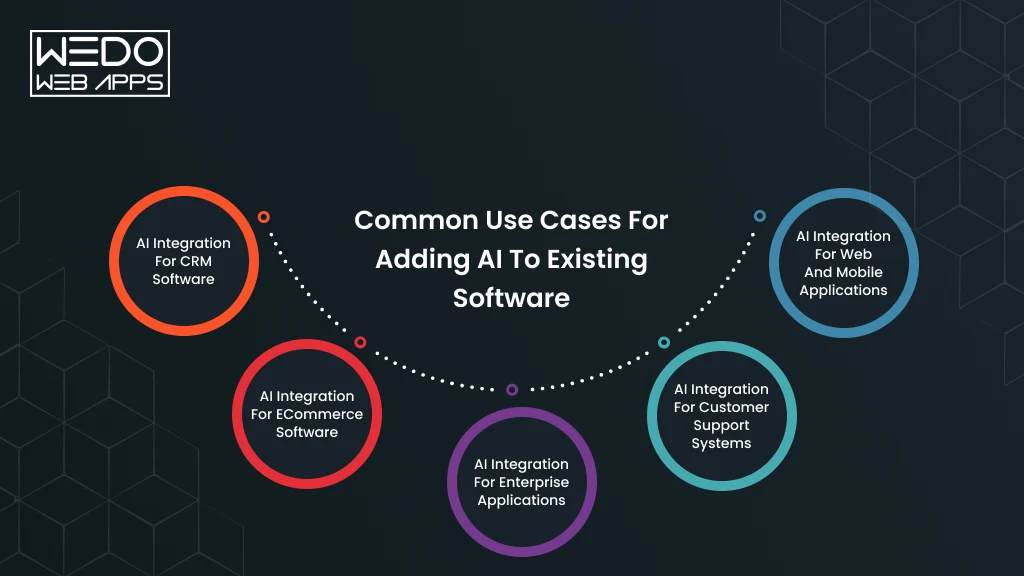
You do not need to replace an existing application to introduce useful AI capabilities. In many cases, AI can be added to the workflows your customers and employees already use.
The right integration depends on the software, the data available, and the task you want AI to handle.
AI Integration for CRM Software
CRM platforms already contain valuable customer and sales information. AI can help teams use that information more efficiently.
Common applications include:
- Lead scoring based on customer and engagement data
- Automatic summaries of sales calls and customer interactions
- Suggested follow-up messages for sales teams
- Customer sentiment analysis
- Automated data classification
Example: A sales representative finishes a customer call. An integrated AI feature can summarize the conversation, identify follow-up tasks, and save the relevant information to the CRM.
AI Integration for eCommerce Software
AI can make product discovery and customer interactions more responsive without changing the core ecommerce system.
Useful applications include:
- Natural language product search
- Personalized recommendations
- AI-generated product descriptions
- Customer support assistants
- Product comparison and discovery
Example: Instead of searching for "running shoes," a customer could ask for "lightweight shoes for long-distance running under ₹5,000." An AI search layer can interpret the request and retrieve relevant products from the existing catalog.
AI Integration for Enterprise Applications
Enterprise software often contains large volumes of documents and operational information. AI can help employees find and process that information faster.
Common use cases include:
- Document classification and information extraction
- Internal knowledge search
- Report generation
- Document summarization
- Workflow assistance
Example: An employee could upload a lengthy business document and receive a structured summary with key information extracted into the existing enterprise workflow.
AI Integration for Customer Support Systems
Support teams can use AI to handle repetitive work while keeping human agents involved when judgment is required.
AI can assist with:
- Ticket classification
- Response suggestions
- Customer query summarization
- Sentiment analysis
- Frequently asked question handling
Example: When a new support ticket arrives, AI can identify its category and urgency, retrieve relevant knowledge, and suggest a response for the support agent to review.
AI Integration for Web and Mobile Applications
AI can also become part of the user experience in websites and mobile applications.
Depending on the product, you could add:
- AI assistants
- Voice-based interactions
- Image analysis
- Personalized recommendations
- Intelligent search
- AI-generated content
Example: A fitness application could use an AI assistant to interpret a user's goals and provide personalized workout suggestions based on information already stored in the application.
The common thread across these examples is simple. AI does not have to replace your existing software to add value. It can sit within the workflows your users already understand and handle specific tasks that benefit from AI capabilities.
Modern AI Approaches That Influence the Integration vs Development Decision
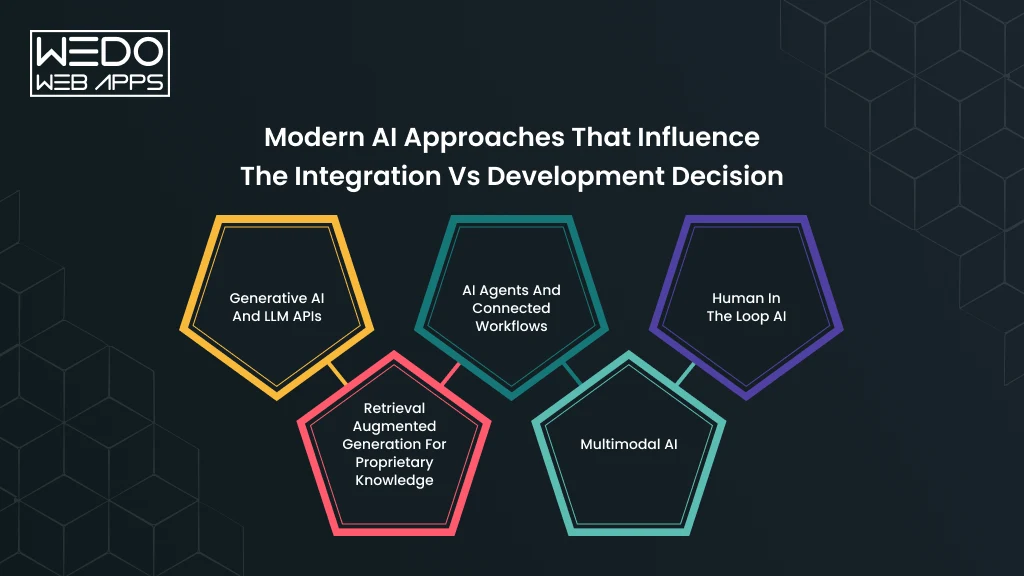
The build versus integrate decision has become more nuanced as AI capabilities have expanded. You can now combine foundation models, retrieval systems, AI agents, and application-specific logic in different ways.
That means the question is often not which AI technology is newest. It is which combination fits your product, data, and level of control.
Generative AI and LLM APIs
Generative AI has made it possible to add capabilities such as text generation, summarization, conversational assistance, and content analysis without developing a language model from the ground up.
For many applications, an existing LLM API is enough. You can connect the model to your application and build the required business logic around it.
Integration makes sense when: The model already performs the task reliably, and your main requirement is connecting it to your software.
Custom development makes sense when: You need specialized behavior, proprietary processing, or greater control around the model.
Retrieval Augmented Generation for Proprietary Knowledge
RAG changes the equation when your application needs to work with internal or domain-specific information.
Instead of expecting the model to know your company's latest documents, policies, product information, or knowledge base, a RAG system retrieves relevant information and provides it to the model when generating a response.
For example, an insurance company could build an internal assistant that retrieves information from approved policy documents before generating an answer.
Integration makes sense when: An existing LLM can handle the generation while your main requirement is connecting it with a reliable knowledge source.
Custom development makes sense when: You need a specialized retrieval pipeline, complex permissions, proprietary ranking logic, or extensive control over how information reaches the model.
AI Agents and Connected Workflows
AI agents can take the integration requirement further. Instead of only generating a response, an agent can interact with tools, APIs, databases, and business workflows.
For example, an AI sales assistant could retrieve customer information from a CRM, check an order status, prepare a response, and create a follow-up task.
This can often be built using an existing foundation model. The custom work may sit in the orchestration layer, tool permissions, business rules, and application architecture.
Integration makes sense when: Existing models and agent frameworks can support the workflow you need.
Custom development makes sense when: The agent requires specialized orchestration, strict permissions, complex workflows, or deeper integration with proprietary systems.
Security also becomes more important as AI gains the ability to take actions. OWASP's 2025 guidance identifies prompt injection, sensitive information disclosure, excessive agency, and improper output handling among the risks developers need to address in LLM applications.
Multimodal AI
Modern AI systems can work with more than text. Depending on the model, applications can process combinations of text, images, audio, and video.
This creates new integration opportunities.
A retail application could analyze product images. A customer service platform could process voice conversations and text together. A manufacturing application could use image inputs for quality inspection.
Integration makes sense when: An established multimodal model meets your application's requirements.
Custom development makes sense when: The application needs specialized processing, domain-specific accuracy, or custom handling of multimodal data.
Human in the Loop AI
Not every AI workflow should operate without human oversight.
For high-impact tasks, your application may need a person to review an AI-generated recommendation, approve an action, or handle cases where the model is uncertain.
This approach can work with both integrated and custom AI systems. The difference is where the human review process sits within the architecture.
For example, an AI system could classify insurance claims automatically but require an employee to approve claims that meet specific risk conditions.
NIST's Generative AI Profile recommends incorporating trustworthiness considerations into the design, development, use, and evaluation of generative AI systems.
What These Approaches Mean for Your Build Decision
The latest AI capabilities do not automatically mean you need custom AI development.
A more practical approach is to separate the AI stack into components:
| AI Requirement | Possible Approach |
|---|---|
| General language generation | Existing LLM API |
| Company-specific knowledge | LLM + RAG |
| Automated actions | LLM + AI agent architecture |
| Image and text processing | Multimodal AI service |
| Specialized prediction | Custom AI model |
| High-risk decisions | AI + human review |
This is why AI integration vs AI development is no longer always a simple either/or decision. You can use established AI models for capabilities that already work well and develop custom components where your business needs greater control.
The strongest architecture is the one that gives you the required performance, security, flexibility, and business value without building more than your use case demands.
How to Add AI to an Existing System?
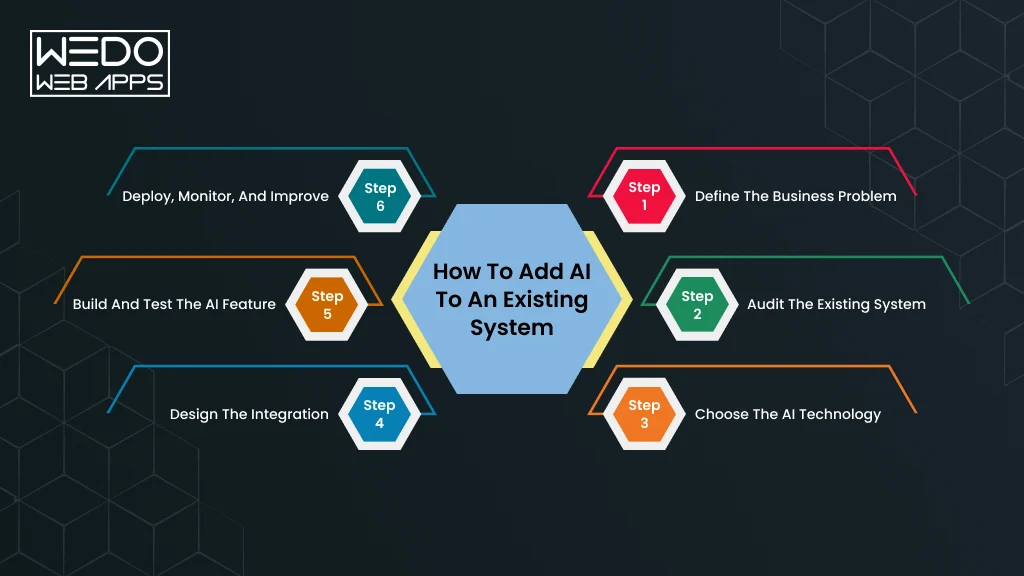
Adding AI to existing software does not have to mean rebuilding the application. A better starting point is to identify where AI can improve an existing workflow and then design the integration around that requirement.
A practical AI software integration guide should therefore begin with the business problem, not the AI model.
Step 1: Define the Business Problem
Start by identifying the task you want AI to improve.
Look at where users spend time, where employees perform repetitive work, or where your existing software cannot provide enough assistance.
For example, a support platform may have thousands of tickets but require agents to read each conversation manually. The AI requirement could be defined as summarizing tickets and suggesting responses.
A clear problem gives you a measurable outcome to work toward.
Step 2: Audit the Existing System
Next, review how your software currently works.
Check the application architecture, APIs, databases, authentication, workflows, third-party services, and data access controls. This helps you identify where AI can connect and whether changes to the existing architecture are needed.
You should also determine which data the AI feature needs and whether users have the right permissions to access it.
Step 3: Choose the AI Technology
Now evaluate the technology that matches the use case.
You might need an LLM API for text generation, a specialized model for image analysis, RAG for company-specific knowledge, or an AI agent for workflows involving multiple tools.
Start with the simplest approach that can meet your requirements. Microsoft also recommends using prebuilt and pretrained models when they satisfy the workload's security, safety, compliance, and quota requirements.
Step 4: Design the Integration
The AI capability needs a controlled connection with your application.
This can involve APIs, middleware, an orchestration layer, databases, vector stores, or business APIs. For RAG applications, an orchestration layer can retrieve authorized information from a data source before passing relevant context to the model.
For example, an internal knowledge assistant could authenticate the employee, retrieve documents they are permitted to access, and then provide that information to the LLM to generate an answer.
Step 5: Build and Test the AI Feature
Once the architecture is defined, integrate the AI capability into the relevant workflow.
Testing should cover more than whether the model produces an answer. Evaluate accuracy, response quality, latency, failure handling, security, permissions, and usability.
AI output should also be treated carefully. Current Microsoft guidance recommends validating inputs, securing data flows, configuring tool access, and validating AI-generated outputs, particularly when agents can interact with external systems.
Step 6: Deploy, Monitor, and Improve
An AI feature needs attention after launch.
Track usage, response quality, latency, errors, infrastructure consumption, and user feedback. Monitor whether the AI continues to meet the business requirements as your data, users, and workflows change.
For production AI systems, monitoring and continuous operational practices are part of the architecture rather than an afterthought. AWS recommends combining monitoring, safety controls, automation, and continuous delivery when operationalizing generative AI applications.
This approach helps you avoid adding AI simply because the technology is available. You can introduce the capability where it has a clear purpose, measurable outcome, and suitable place within your existing software.
AI Integration vs AI Development: Decision Matrix
If you are still weighing AI integration vs AI development, the following matrix can give you a quick direction. Match your AI adoption framework with the approach that best fits it.
| Your Business Requirement | Recommended Approach | Why |
|---|---|---|
| AI Chatbot in existing software | AI Integration | An established LLM can handle conversational tasks while your software manages users and workflows |
| AI summarization | AI Integration | Existing language models can summarize text without requiring a custom model |
| AI search | AI integration | Search capabilities can be added to existing product or knowledge databases |
| LLM connected to existing workflows | Integration or Hybrid | An existing model can handle language tasks while custom logic connects it with business systems |
| Company-specific knowledge with an LLM | Hybrid | RAG can connect an existing model with your proprietary information |
| Specialized prediction system | Custom AI development | The solution may need custom data processing, model development, and domain-specific evaluation |
| AI as the core product capability | Custom AI development | Greater control can help you build capabilities that differentiate the product |
| Accuracy beyond existing AI tools | Custom AI development | Custom models or supporting architecture may be needed to meet specific performance targets |
| AI agents connected to business systems | Hybrid | Existing foundation models can power reasoning while custom orchestration manages tools and workflows |
| Extensive control over AI behavior | Custom or Hybrid | Your architecture can provide greater control over data, processing, evaluation, and model behavior |
What Should You Choose?
Think about the decision in three levels.
Choose integration when an existing AI capability already solves your problem, and your main requirement is connecting it to your software.
Choose custom development when your AI needs to be specialized, highly controlled, or central to your product.
Choose a hybrid approach when an existing model can handle the intelligence, but your business needs custom data, RAG, agents, workflows, or application logic around it.
The answer can also change over time. You might start by integrating an existing model to validate an idea and later develop custom components as usage and requirements grow.
The goal is not to build the most complex AI architecture. It is to choose an approach that gives you the right balance of capability, control, cost, and scalability for your actual use case.
How WEDOWEBAPPS Helps Businesses Integrate and Build AI Solutions
Choosing between AI integration and custom development becomes easier when you first understand what your existing software can support. At WEDOWEBAPPS, we approach the requirement from your product and business workflow rather than starting with a specific AI technology.
Whether you want to add AI to an existing system or develop a new AI capability, our team can help you assess the right technical path.
Existing Software and Architecture Assessment
Before recommending an approach, we review your current application architecture, APIs, databases, workflows, integrations, and data access.
This helps identify where AI can fit into your existing system and whether architectural changes are required.
For example, if you want to introduce an AI assistant into an existing CRM, we can assess which customer data the assistant needs and how it should interact with your current workflows.
AI Integration Strategy
If an existing AI model can meet your requirements, integration may be the more practical option.
We can connect AI services with your web application, mobile app, CRM, ecommerce platform, enterprise software, or internal systems. The integration can include API connections, data retrieval, authentication, business logic, and user-facing AI features.
The objective is to make the AI capability work within your existing application rather than operate as a disconnected tool.
Custom AI Development
Some requirements need more than an API connection.
When your application depends on proprietary data, specialized predictions, domain-specific performance, or AI as a core product capability, we can design a custom AI solution around those requirements.
Depending on the use case, this can involve machine learning models, RAG systems, AI agents, custom data pipelines, model adaptation, or specialized AI workflows.
RAG, AI Agents, and Generative AI Solutions
Modern AI applications often combine existing foundation models with custom application components.
For example, RAG can connect an LLM with your internal knowledge base. AI agents can connect models with business tools and workflows. Generative AI can support content, conversations, document processing, and other application features.
We can help determine which approach fits your software, data, security requirements, and intended outcome.
AI Testing, Deployment, and Ongoing Optimization
Building the AI feature is only one part of the project.
Before deployment, the solution should be evaluated for accuracy, performance, security, usability, and reliability. After launch, monitoring can help identify unexpected outputs, changing usage patterns, rising costs, or areas where the AI needs improvement.
Our team can support the solution through testing, deployment, monitoring, maintenance, and further development as your requirements evolve.
Need to Add AI to Your Existing Software?
If you already have a working application and are considering AI, you do not necessarily need to rebuild it.
Talk to WEDOWEBAPPS about your existing software, AI use case, and technical requirements. We can help you assess whether integration, custom development, or a hybrid approach is the better fit.
Conclusion: Choosing Between AI Integration and AI Development
The decision between AI integration and AI development starts with your actual business requirement.
If your existing software already solves the core problem and an established AI capability can handle the additional task, AI integration can be the practical choice. You can add capabilities such as AI search, summarization, recommendations, chatbots, or content generation without rebuilding the entire application.
Custom AI development becomes more suitable when your requirements are specialized. Proprietary data, strict accuracy targets, greater control, or AI as a core product capability can justify a more tailored solution.
There is also a third option. Hybrid AI development lets you combine existing foundation models with custom RAG systems, data pipelines, AI agents, workflows, and business logic.
So, when deciding when to integrate vs build AI, look beyond the initial development cost. Consider your software architecture, data, security requirements, timeline, level of customization, and long-term product plans.
If you are planning to add AI to an existing system, the right starting point is to assess what you already have and identify where AI can provide measurable value. From there, you can choose the approach that fits your requirements without building more than your business actually needs.