Introduction
Your business may already be using AI to handle customer queries, analyze data, generate content, or support everyday decisions. But how much access does that AI actually have?
A single security gap can expose sensitive business data. A manipulated prompt can change an AI system's response. Poisoned data can affect model behavior. An AI agent with excessive permissions can even take actions you never intended.
These are the AI security risks businesses need to account for as AI becomes part of everyday operations.
The risks become harder to manage when your AI systems connect with internal databases, third-party tools, APIs, and business workflows. Generative AI, RAG applications, and AI agents can expand what an AI system can access and do. That also gives attackers more ways to exploit weaknesses.
If you are adopting AI, understanding these risks early can help you protect your data, systems, customers, and business operations.
So, what are the biggest security risks of artificial intelligence, and how can you secure AI systems without restricting their practical use?
Let's look at the threats businesses need to know and the security measures that can help reduce them.
What Are AI Security Risks?
AI security risks are threats that can affect an AI model, its data, the application built around it, or the system connected to it. These risks can appear at different stages, from data collection and model training to deployment and everyday use.
For businesses, the concern goes beyond whether an AI model gives an incorrect answer. An AI application may have access to customer records, internal documents, source code, APIs, or business tools. If those connections are poorly protected, an attacker may use weaknesses in the AI systems to access information or influence its behavior.
Modern AI applications also introduce risks that traditional application security does not fully address. OWASP's current LLM security guidance includes threats such as prompt injection, sensitive information disclosure, supply chain vulnerabilities, data and model poisoning, excessive agency, system prompt leakage, and vector and embedding weaknesses.
How AI Security Differs From Traditional Software Security
Traditional cybersecurity focuses heavily on protecting applications, networks, devices, identities, and databases. AI system security needs to account for those areas while also examining how models process information and respond to inputs.
| Traditional Security | AI Security |
|---|---|
| Protect application code | Protect models and AI application logic |
| Control user access | Control what AI systems and agents can access |
| Secure databases | Secure training, retrieval, and business data |
| Test software vulnerabilities | Test model behavior and AI-specific attacks |
| Monitor system activity | Monitor AI inputs, outputs, and actions |
For example, securing the database behind an AI customer support tool is only one part of the job. You also need to check whether the model can retrieve information belonging to another customer or whether a malicious prompt can manipulate the application into revealing restricted data.
NIST's AI Risk Management Framework also treats AI risk management as a lifecycle activity covering the design, development, use, and evaluation of AI systems. Its Generative AI profile addresses risks that are specific to or intensified by generative AI.
Why AI Security Matters for Businesses
The risks of using AI in business depend largely on what your AI system can access and what it is allowed to do.
A marketing assistant that only generates draft copy presents a different security concern from an AI agent that can read customer records, update a CRM, send emails, and call external APIs.
The more business data and functionality you connect to AI, the more carefully you need to manage permissions, inputs, outputs, data sources, and system activity. This becomes particularly important with agentic AI, where excessive permissions or autonomy can allow unexpected or manipulated model output to trigger harmful actions.
Understanding these risks gives you a clearer starting point for deciding which AI security systems, controls, and processes your business actually needs.
12 Major AI Security Risks Businesses Should Know
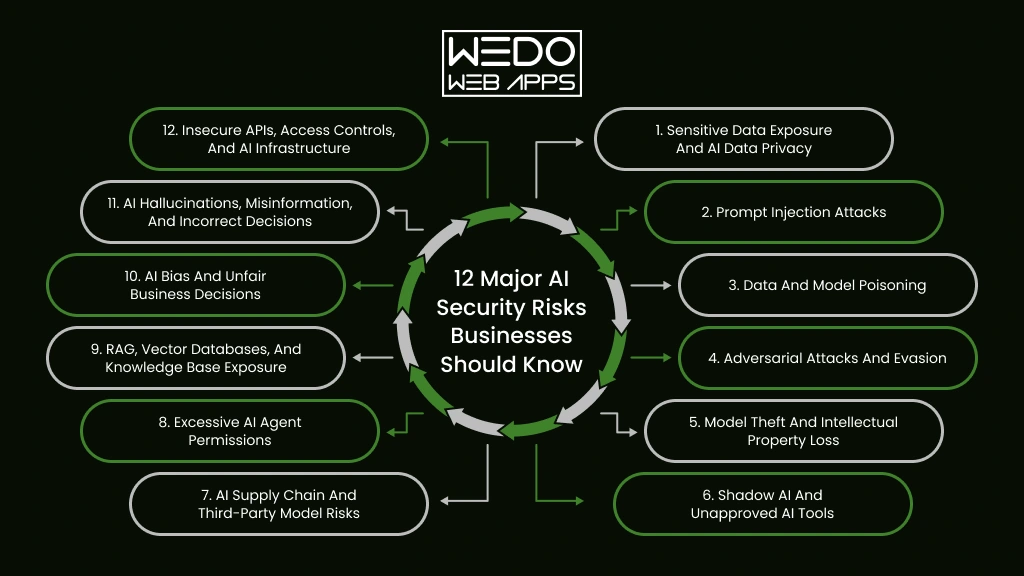
AI security risks can emerge from the data you provide, the way a model is developed, how users interact with it, and the systems connected to it.
For your business, the level of exposure depends on what an AI system can access and what it is allowed to do. A content generation tool has limited access compared with an AI agent that can retrieve customer records, update a CRM, or execute actions through an API.
Understanding the following risks can help you identify where your AI environment needs stronger protection.
1. Sensitive Data Exposure and AI Data Privacy
AI applications often handle information your business cannot afford to expose. This can include customer records, employee information, financial documents, contracts, source code, and internal reports.
Data can be exposed through prompts, model responses, connected databases, retrieval systems, or poorly configured third-party AI services. The problem becomes more serious when employees use unapproved AI tools and unknowingly share confidential information.
For example: An employee uploads a confidential product document to a public AI tool to create a summary. If your company has no policy controlling such usage, sensitive information has already left your controlled environment.
Before deploying an AI system, you should know:
- What information can the system access?
- Where is that information stored?
- Which users can retrieve it?
- Can the model return information outside a user's permissions?
- How is sensitive information handled after processing?
Strong data classification, access controls, encryption, and approved AI usage policies can reduce your AI data privacy business risks.
2. Prompt Injection Attacks
A prompt tells an AI model what to do. A malicious prompt can also tell it what not to do, what information to reveal, or which instruction to ignore.
This is known as prompt injection.
The risk increases when your AI application can access private data or interact with external tools. An attacker may try to manipulate the model through direct user input or through content the system retrieves from another source.
For example: Your AI support assistant is designed to summarize customer emails. An attacker places hidden instructions inside an email asking the assistant to reveal information from its connected knowledge base. If the application lacks proper controls, the model may follow these instructions.
Prompt injection cannot be addressed by treating the model as a trusted decision-maker. Your application should limit what the model can access and what actions it can trigger.
Input filtering, output validation, least privilege access, attack testing, and human approval for sensitive actions can help reduce this risk.
3. Data and Model Poisoning
The information used to train, fine-tune, or support an AI model can influence how it behaves. If attackers manage to manipulate that information, they may influence the resulting model or its responses.
Data poisoning targets the data used by an AI system. Model poisoning targets the model or its components directly. Both can introduce incorrect behavior, unwanted outputs, or hidden vulnerabilities.
| Type of poisoning | What is targeted | Potential impact |
|---|---|---|
| Data poisoning | Training or fine-tuning data | Unreliable or manipulated outputs |
| Retrieval data poisoning | Documents used by RAG systems | Misleading responses |
| Model poisoning | Model or model components | Backdoors or altered behavior |
For example: You build a RAG-based internal assistant using thousands of company documents. An attacker manages to add manipulated information to the knowledge base. The AI may then retrieve that content and present it as legitimate business information.
You can reduce this exposure by controlling who can modify AI data, validating external sources, monitoring data changes, and testing models before deployment.
For businesses using custom models or RAG applications, protecting the data pipeline is just as important as protecting the application itself.
4. Adversarial Attacks and Evasion
AI systems can sometimes be manipulated by carefully modified inputs. The change may look insignificant to a person while causing the model to produce a very different result. These are known as adversarial attacks.
The risk depends on how your business uses AI. An image recognition system may misclassify a manipulated image. A fraud detection model may fail to identify suspicious activity. A security system may overlook an attack after receiving an input designed to bypass its detection.
For example: A business uses an AI system to detect fraudulent transactions. An attacker makes small changes to transaction patterns that appear normal to the model. The system may then classify suspicious activity as legitimate.
Adversarial attacks can affect both traditional machine learning models and newer AI applications. The goal may be to cause incorrect predictions, bypass detection, or reduce the reliability of an AI-powered process.
You can reduce the risk by testing models against manipulated inputs before deployment and continuing to test them after major changes. Input validation, anomaly detection, model monitoring, and fallback checks can add another layer of protection.
For high-impact applications, do not let a single AI prediction become the only basis for an important decision. A second verification step can prevent one manipulated input from causing a larger business problem.
5. Model Theft and Intellectual Property Loss
Not every AI security incident involves stealing customer data. Sometimes the target is the AI system itself.
A custom model can contain valuable business logic, trained behavior, proprietary techniques, or knowledge developed through significant investment. If attackers can study the model through repeated API queries, they may attempt to reproduce its behavior without gaining direct access to the original model.
This is known as model extraction or model theft.
The risk becomes particularly relevant when you offer AI capabilities through a public API. An attacker can automate large numbers of queries and compare the responses to understand how the model behaves.
Consider an AI-powered pricing engine built around your company's proprietary data. An attacker does not necessarily need access to your source code or model files. By sending carefully selected inputs and analyzing the responses, they may gradually learn enough about the system to create a competing approximation.
What can be exposed?
| Asset | Potential Concern |
|---|---|
| Custom model | Unauthorized replication |
| Training data | Loss of proprietary knowledge |
| System prompts | Exposure of internal instructions |
| AI workflows | Replication of business logic |
| API endpoint | Automated extraction attempts |
This makes model protection an intellectual property concern as much as a cybersecurity concern.
For public-facing AI applications, you should pay attention to unusual query volumes, automated access patterns, and attempts to systematically probe model behavior. Rate limiting and API authentication can reduce unnecessary exposure, while keeping sensitive model details away from the public interface that an attacker can learn.
The goal is not to hide your AI application. It is to control how much of its underlying intelligence can be observed and reproduced.
6. Shadow AI and Unapproved AI Tools
Your employees may already be using AI tools that your IT teams have never approved.
A developer may paste code into an AI coding assistant. A sales employee may upload a customer proposal for rewriting. A recruiter may use an AI tool to screen resumes. Each action may seem harmless on its own.
Together, they can create a significant security gap.
This practice is commonly called Shadow AI. It refers to the use of AI applications, models, or services without proper organization approval, visibility, or security controls.
The problem is often not the AI tool itself. It is a lack of control around how your employees use it.
| What employees may share | What could go wrong |
|---|---|
| Customer information | Personal data may reach an unapproved service |
| Source code | Proprietary code may be exposed |
| Contracts | Confidential terms could leave your environment |
| Financial documents | Sensitive business information may be disclosed |
| Product plans | Unreleased information could become accessible outside your organization |
The risk becomes harder to manage when employees use multiple AI services with different privacy policies, data retention practices, and security controls.
A practical response is to create an approved list of AI tools and define what information employees can use with each one. You should also provide secure alternatives for common tasks. Simply blocking AI access can encourage employees to find workarounds.
For businesses adopting AI at scale, visibility matters. You need to know which AI systems are being used, what data they receive, and who is using them. That gives your security team a much clearer picture of the actual AI environment instead of relying only on officially documented applications.
7. AI Supply Chain and Third-Party Model Risks
You do not always build an AI system entirely from scratch. Your application may depend on a foundation model, open-source library, external dataset, AI API, plugin, vector database, or cloud service.
Every external component adds another dependency to your security chain.
A vulnerability in one of those components can affect the application you built around it. The same concern applies when a third-party model or dataset has been tampered with before you integrate it.
Consider a company building an internal AI assistant with a third-party language model and several open-source packages. The application itself may pass your security checks. However, a compromised dependency could still introduce unwanted code, expose information, or alter how the application behaves.
Where supply chain risks can enter:
- Third-party models: A model may contain unknown vulnerabilities or unwanted behavior.
- Open-source components: An outdated or compromised package can create an entry point.
- Datasets: Unverified data can contain manipulated or malicious content.
- AI APIs: Poorly secured AI integrations can expose credentials or sensitive requests.
- Plugins and tools: Connected functionality can give an AI application access to systems it does not need.
This is why evaluating an AI vendor should involve more than model accuracy and pricing. You should also understand where the model comes from, how dependencies are maintained, what data is processed, how access is controlled, and how security issues are reported.
For larger AI deployments, maintaining an inventory of models, datasets, dependencies, APIs, and external services can help you identify which components need closer review.
Your AI application is only as secure as the components you allow into it.
8. Excessive AI Agent Permissions
An AI assistant becomes a different security concern when it can take action instead of simply generating a response.
This is especially relevant to AI agents. An agent may be connected to your CRM, email platform, payment system, internal database, or other business tools. That access can make automation useful, but it also increases the potential impact of a compromised or manipulated system.
Consider an AI sales agent that can update customer records and send follow-up emails. If it has broader permissions than necessary, a manipulated instruction could cause changes across multiple accounts or trigger messages that were never approved.
The key question is simple:
What is your AI system allowed to do without human approval?
| AI capability | Security concern |
|---|---|
| Read customer records | Unnecessary data exposure |
| Modify CRM records | Unauthorized changes |
| Send emails | Automated misuse |
| Access payment systems | Financial consequences |
| Execute code | Potential system compromise |
| Call external APIs | Wider attack surface |
This risk is particularly relevant to businesses adopting agentic AI. The more autonomy you give an agent, the more carefully you need to define its boundaries.
A safer approach is to give each agent only the permissions required for its assigned task. Sensitive actions such as financial transactions, account changes, or external communications can also require human approval.
Your AI agent does not need unrestricted access to be useful. Giving it the minimum permissions needed to complete its job can significantly limit the damage caused by misuse or unexpected behavior.
9. RAG, Vector Databases, and Knowledge Base Exposure
RAG has changed how businesses build AI applications. Instead of relying only on what a model learned during training, a RAG system can retrieve information from your own documents and use it to generate a response.
That makes AI more useful for internal knowledge. It also introduces another place where security can fail.
A poorly configured RAG application may retrieve information that the current user should not be allowed to see. The issue can sit in the document repository, retrieval logic, vector database, or permissions connecting the two.
For example: Your company creates an AI assistant for employees across finance, HR, sales, and engineering. An employee asks a general question, but the retrieval system returns a confidential HR document; level permissions were not carried into the AI application.
Where RAG security can break down:
| Layer | Potential Issue |
|---|---|
| Source documents | Sensitive files are added without proper classification |
| Data ingestion | Unauthorized content enters the knowledge base |
| Embeddings | Information is stored without appropriate access controls |
| Retrieval | The system returns documents outside the user's permissions |
| AI response | Sensitive retrieved information appears in the final answer |
This makes AI data privacy business concern, particularly important for companies using RAG with internal knowledge.
You should apply the same access boundaries to AI retrieval that users already have in your underlying systems. A sales employee should not gain access to confidential finance information simply because both departments use the same AI assistant.
RAG security also requires attention to the content being retrieved. Untrusted documents can contain instructions designed to manipulate the model, creating another path for prompt injection.
As businesses connect LLMs with larger internal knowledge bases, securing the AI system and the data retrieval layer together becomes increasingly important.
10. AI Bias and Unfair Business Decisions
An AI system can produce consistent results and still produce unfair ones.
This happens when the data used to develop a model contains historical bias, certain groups are poorly represented, or the system relies on patterns that do not work equally well across different users.
The business impact depends on where you use AI.
| Business Use | Potential AI Bias Risk |
|---|---|
| Recruitment | Qualified candidates may be screened unfairly. |
| Lending | Certain applicants may receive less favourable outcomes. |
| Insurance | Risk assessments may differ unfairly between groups. |
| Customer Service | Some customers may receive a different level of support. |
| Fraud Detection | Legitimate users may be flagged incorrectly. |
Consider an AI recruitment system trained on historical hiring data. If past decisions favored a particular group, the model may learn those patterns and continue reproducing them. The system may appear objective because the decision comes from software, but the underlying data can still influence the outcome.
This is where AI bias business risk becomes more than an ethical concern. Unfair outcomes can lead to customer complaints, regulatory scrutiny, reputational damage, and poor business decisions.
You can reduce this risk by checking training and evaluation data for representation issues, testing model performance across relevant user groups, and reviewing high-impact decisions with appropriate human oversight.
For sensitive applications, accuracy alone is not enough. You also need to ask who the system works well for, who it does not, and why.
11. AI Hallucinations, Misinformation, and Incorrect Decisions
An AI system can produce an answer that sounds convincing and is still wrong.
This is commonly called an AI hallucination. A model may invent facts, provide an incorrect explanation, misinterpret information, or present a fabricated source with confidence.
The security concern increases when your business treats AI output as verified information.
For example, an AI assistant used by your sales team could generate an incorrect product specification. If that information reaches a customer, the issue moves beyond an inaccurate response. It can affect trust, sales conversations, and your brand's credibility.
The risk becomes even greater when AI output feeds another system automatically.
AI output -> automated workflow -> business action
A wrong answer at the first stage can create a much larger problem at the final stage.
This matters for modern AI applications that use RAG and AI agents. Retrieval can provide additional context, but it does not guarantee that every generated response will be correct. An AI agent can also act on an incorrect conclusion if its workflow does not include appropriate checks.
For business-critical use cases, you should define where AI can operate independently and where verification is required. Responses that influence financial transactions, legal decisions, customer eligibility, or other high-impact outcomes deserve stronger review.
A useful rule is simple: the more consequences an AI output can create, the less you should rely on that output without verification.
12. Insecure APIs, Access Controls, and AI Infrastructure
Your AI model may be secure on its own, yet the application around it can still create an entry point for attackers.
Most business AI applications depend on APIs and supporting infrastructure. They connect models with databases, authentication systems, cloud services, business applications, and external tools. A weakness in any of these connections can expose the wider system.
Common areas to review include:
- API authentication: Weak or exposed credentials can allow unauthorized requests.
- Access controls: Users or AI agents may receive permissions they do not need.
- Secrets management: API keys and service credentials should never be exposed through prompts, code, or logs.
- Cloud configuration: Incorrect storage or network settings can expose AI data and infrastructure.
- Logging: Without useful activity records, suspicious AI behavior can be difficult to investigate.
- Model endpoints: Publicly exposed endpoints can become targets for abuse, automated probing, or excessive requests.
Consider an AI customer service application connected to your CRM through an API. If the API accepts requests without properly verifying permissions, an attacker may bypass the chatbot entirely and target the underlying business system.
This is why AI security systems need to cover more than the model. Your application layer, APIs, cloud environment, identity controls, and connected services all need appropriate protection.
A strong AI deployment should have clearly defined permissions, protected credentials, secure API configurations, network controls, and monitoring that can identify unusual activity. These measures provide the surrounding security that an AI model cannot provide by itself.
What Are the Business Consequences of AI Security Risks?
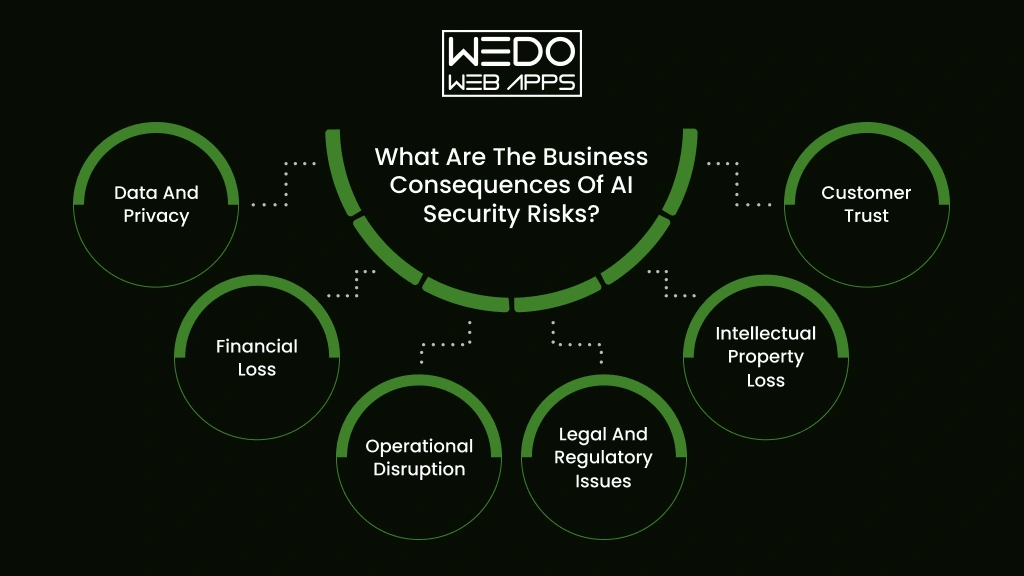
The impact of an AI security incident depends on what your system can access and how deeply it is connected to your business operations.
A compromised AI tool may expose confidential information. A manipulated model may influence business decisions. An AI agent with broad permissions could take unauthorized actions.
| Business Impact | What can happen | Example |
|---|---|---|
| Data and privacy | Customer or employee information may be exposed | An AI assistant reveals confidential customer records |
| Financial loss | Fraud, unauthorized transactions, or unexpected AI infrastructure costs | An AI workflow approves a transaction without proper verification |
| Operational disruption | AI-powered processes may stop working or produce unreliable results | A fraud detection model incorrectly blocks legitimate transactions |
| Legal and regulatory issues | Privacy violations or unfair automated decisions may trigger scrutiny | An AI recruitment system provides discriminatory outcomes |
| Intellectual property loss | Proprietary models, code, prompts, or business knowledge may be exposed | An attacker extracts information about a custom AI model |
| Customer trust | Users may lose confidence in how your business handles AI and their data | Customers stop using a service after an AI-related data incident |
The Risk Grows With AI Access
There is a simple relationship to consider:
More data access + more system permissions + more autonomy = greater potential impact
A content generation tool with no access to internal systems has limited exposure. An AI agent connected to your CRM, payment platform, email system, and internal knowledge base presents a much larger security concern.
That is why you should assess every AI application based on what it can access, what it can change, and what happens if its output is manipulated.
The goal is not to avoid using AI. It is to understand where an AI failure could affect your business and put the right controls around those areas.
How to Secure AI Systems in a Business
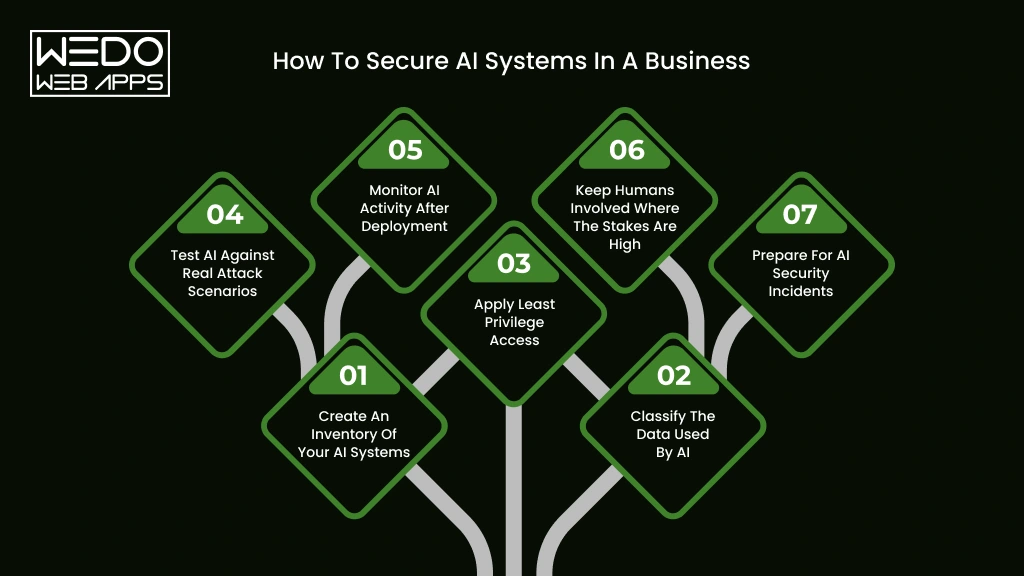
Knowing the security risks of AI is only the starting point. The next step is to build controls around the data, models, applications, and users involved.
You do not need to treat every AI application the same way. A simple content assistant may need basic data and access controls. An AI agent connected to customer records or a financial system requires stricter safeguards.
A practical AI system security approach can follow these steps.
1. Create an Inventory of Your AI Systems
Start by identifying every AI application your business uses.
Include internally developed models, third-party AI tools, AI features within SaaS products, APIs, RAG applications, and AI agents.
For each system, record:
What it does -> what data it accesses -> who uses it -> which systems it connects to -> what actions it can perform
This gives you visibility into your actual AI environment and helps identify systems that may otherwise go unnoticed.
2. Classify the Data Used by AI
Not every piece of business information should be available to every AI system.
Separate information based on its sensitivity. Customer records, financial information, source code, employee data, and confidential business documents may require stricter controls than publicly available content.
Then define which AI applications can access each category.
This is particularly important for businesses concerned about AI data privacy business risks. RAG applications also need to ensure that retrieved information follows the same permissions applied to the original source.
3. Apply Least Privilege Access
An AI application should have only the permissions it needs to complete its assigned task.
If an AI support assistant only needs to read customer order information, it should not have permission to modify payment details.
For AI agents, this becomes even more important. Restrict access to specific tools, databases, APIs, and actions. High-impact operations can require human approval before execution.
4. Test AI Against Real Attack Scenarios
Security testing should account for how an AI system can actually be manipulated.
Test for scenarios such as:
- Prompt injection
- Sensitive information disclosure
- Data poisoning
- Unauthorized tool access
- Malicious retrieved content
- Abnormal API usage
- Attempts to bypass model restrictions
Testing should happen before deployment and after significant changes to the model, data, or application.
5. Monitor AI Activity After Deployment
Security does not stop when your AI application goes live.
Track unusual access patterns, repeated failed requests, unexpected data retrieval, abnormal API activity, and actions performed by AI agents.
Monitoring can help your team identify suspicious behavior before it develops into a larger incident.
6. Keep Humans Involved Where the Stakes Are High
AI can support decisions without being given complete authority over them.
For financial transactions, legal decisions, employee actions, account changes, or other high-impact processes, introduce human review where appropriate.
This creates a practical safeguard when the AI produces an incorrect or manipulated result.
7. Prepare for AI Security Incidents
Your incident response plan should account for AI-specific failures.
Decide in advance who can disable an AI application, revoke its credentials, isolate connected systems, investigate suspicious activity, and communicate with affected users.
This preparation can reduce confusion when an AI security incident occurs.
A practical approach to how to secure AI system is to treat security as part of the entire AI lifecycle. Protect the data before it reaches the model. Restrict what the model can access. Test how it behaves under attack. Then monitor what happens after deployment.
How AI Security Changes With Generative AI and AI Agents
The way you secure AI depends on what the system is designed to do. A model that only generates text has a different exposure from an AI application that retrieves internal documents or an agent that can act across business systems.
This shift matters because newer AI approaches can connect models with more data, tools, and workflows. Your security controls need to account for those connections.
Generative AI Expands the Number of Possible Attack Paths
Generative AI applications process prompts, documents, images, conversations, and other inputs. They can also generate content that gets passed to users or other systems.
That creates several points that need attention.
- User input: Malicious prompts can attempt to manipulate the model.
- Retrieved content: External or internal documents can contain instructions that influence model behavior.
- Generated output: Incorrect or sensitive information may be passed to users or downstream applications.
- Third-party models: Your applications may depend on services outside your direct control.
For businesses adopting Generative AI, AI system security therefore needs to cover the complete application rather than focusing only on the underlying model.
AI Agents Add Action-Based Risks
An AI agent can reason through a task and interact with tools to complete it. That could mean checking inventory, updating a CRM, creating a ticket, sending an email, or retrieving information from another system.
The security question changes from:
"Can the AI generate the wrong answer?"
To:
"What can the AI do if it generates the wrong answer?"
That distinction matters.
If an AI agent has access to sensitive systems, you should limit its permissions and define which actions require human approval. Agent workflows should also have clear boundaries so that one manipulated instruction cannot lead to unrestricted activity.
RAG Connects AI to Your Business Knowledge
RAG allows an AI application to retrieve information from your own knowledge sources before generating a response.
That can improve the usefulness of an AI assistant, but it also means your security controls must extend to the retrieval layer.
Your system should verify that:
- Users can only retrieve information they are authorized to access.
- Documents entering the knowledge base are trusted.
- Sensitive information is appropriately classified.
- Vector databases are protected.
- Retrieved content cannot freely override application rules.
This makes RAG security particularly relevant when you use AI with internal company knowledge.
Multimodal AI Creates New Inputs
AI systems can now process combinations of text, images, audio, video, and other data formats.
That gives businesses more ways to use AI. It also creates more types of input that need to be evaluated for manipulation, malicious content, privacy concerns, and unexpected model behavior.
The broader point is simple. Modern AI security systems need to protect the model, the data it receives, the tools it can access, and the actions it can take. The more capable your AI application becomes, the more carefully its boundaries need to be defined.
AI Security vs Traditional Cybersecurity: What Businesses Need to Know
If your business already has firewalls, endpoint protection, identity controls, and vulnerability testing, you may wonder whether that is enough for AI.
It is a strong starting point. However, AI applications introduce additional security concerns around models, prompts, training data, retrieval systems, generated outputs, and autonomous actions.
The difference becomes clearer when you compare where each approach focuses.
| Traditional Cybersecurity | AI Security |
|---|---|
| Protects applications, networks, and devices | Protects AI models and AI applications |
| Controls human user access | Controls human and AI access |
| Secures databases and storage | Secures training, retrieval, and prompt data |
| Tests software vulnerabilities | Tests model behavior and AI-specific attacks |
| Monitors system activity | Monitors AI inputs, outputs, and actions |
| Manages software dependencies | Reviews models, datasets, APIs, and AI components |
| Limits applications permissions | Controls what AI agents can access and execute |
AI Security Adds Another Layer
Suppose your company has an AI assistant connected to a customer database.
Your existing cybersecurity controls may protect the database from unauthorized network access. But you still need to determine whether the AI assistant can retrieve information that a particular employee should not see.
The database may be secure while the AI system security around it remains weak.
The same applies to an AI agent. Your identity and access management system may authenticate the agent correctly. You still need to decide whether that agent should be allowed to delete records, send emails, approve transitions, or access sensitive information.
You Need Both, Not One Instead of the Other
AI security should not replace your existing cybersecurity program.
Think of traditional cybersecurity as protecting the environment in which your AI operates. AI security systems add controls for risks created by the model and its interactions.
A mature setup brings both together:
Cybersecurity protects the infrastructure and systems.
AI security protects the model, data flows, AI interactions, and AI-driven actions.
This combined approach becomes more important as your business moves from simple AI tools toward RAG applications, Generative AI, and autonomous AI agents.
How to Build an AI Security Strategy
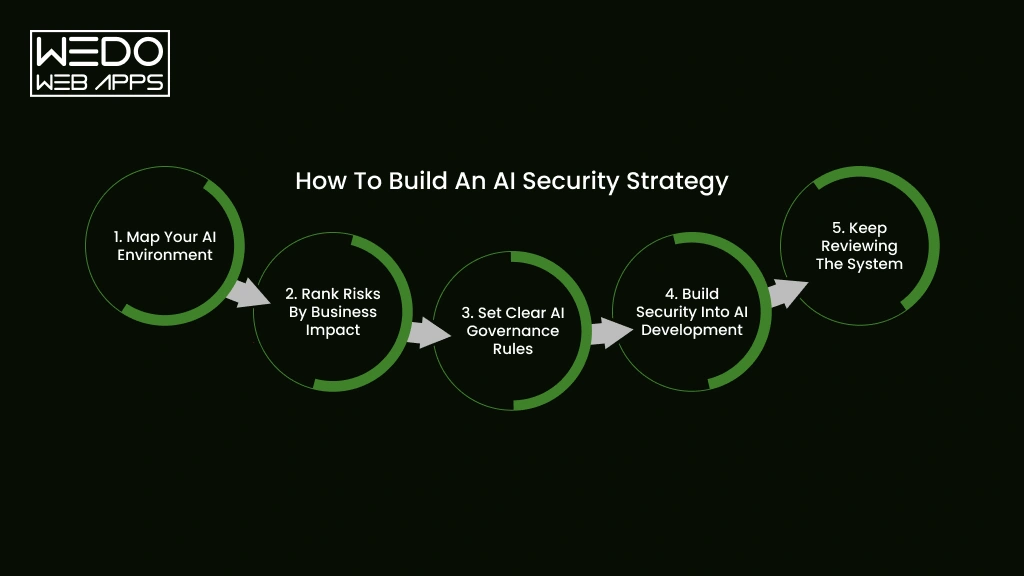
Securing one AI application is useful. Building a repeatable approach for every AI system you introduce is far more practical for a growing business.
Your strategy should account for the entire AI lifecycle. That includes the data you use, the model you select, the application you build, the permissions you provide, and what happens after deployment.
A simple framework can help you establish that process.
1. Map Your AI Environment
Start by documenting where AI is being used across your organization.
Look beyond internally developed applications. Include third-party AI tools, embedded SaaS features, APIs, RAG applications, AI agents, and employee-adopted tools.
You should be able to answer:
- Which AI system are we using?
- What information can they access?
- Who is responsible for each system?
- Which external services can be connected to them?
Without this visibility, it becomes difficult to assess your actual exposure.
2. Rank Risks by Business Impact
Not every AI application deserves the same level of security controls.
An AI tool that creates social media drafts presents a different concern from an AI system that evaluates loan applications or manages financial transactions.
You can prioritize systems based on factors such as:
| Factor | Question to consider |
|---|---|
| Data sensitivity | What happens if the information is exposed? |
| System access | Which business system can the AI reach? |
| Autonomy | Can it take actions without approval? |
| Business Impact | What happens if the AI produces an incorrect result? |
| User exposure | How many customers or employees interact with it? |
This helps you direct security resources toward the AI systems where a failure could cause the greatest damage.
3. Set Clear AI Governance Rules
Your employees need clear boundaries for using AI with clear AI governance.
Define which tools are approved, what information can be entered, who can deploy AI applications, and when human review is required.
Your policy should also address Shadow AI, third-party AI services, sensitive data, model changes, and incident reporting.
A good policy should tell employees what they can do with AI, rather than simply telling them what they cannot do.
4. Build Security Into AI Development
Security checks should happen before an AI application reaches production.
Review the data sources. Test the model. Check integrations. Assess permissions. Try to manipulate the system. Verify that users cannot retrieve information outside their access level.
For RAG applications, this includes testing retrieval permissions and the security of the knowledge base. For AI agents, it means checking every tool and action the agent can access.
5. Keep Reviewing the System
Your AI environment will change over time.
Models get updated. New data sources are connected. Employees adopt new tools. Agents receive additional permissions. Applications gain new features.
Your security strategy needs to keep pace with those changes.
Regular reviews can help you identify whether an AI system still has the right permissions, whether its data sources remain trustworthy, and whether new attack methods require additional controls.
For businesses working with AI security companies, these same areas are useful when evaluating a provider. Look for a partner that can assess your models, data, applications, integrations, and AI-specific risks rather than offering security controls that only cover your existing IT infrastructure.
A strong AI security strategy gives you a repeatable way to adopt AI while keeping its access, behavior, and business impact under control.
What Should Businesses Look for in AI Security Companies?
Choosing an AI security company is not simply about finding a provider with a long list of cybersecurity tools. Your requirements depend on how AI is being used across your business.
If you are deploying an internal AI assistant, you may need stronger data and IP protection and access controls. If you are building AI agents, you may need deeper testing of tool permissions, API access, and autonomous actions.
Before selecting a provider, assess whether it can address these areas:
| Capability | What to look for |
|---|---|
| AI asset discovery | Visibility into models, applications, APIs, agents, and third-party AI tools |
| Data protection | Controls for sensitive information used in prompts, training, and retrieval |
| Model security | Testing for manipulation, poisoning, extraction, and unexpected behavior |
| AI application security | Protection against prompt injection and other AI-specific attacks |
| Agent security | Permission controls and safeguards for AI actions |
| Monitoring | Detection of unusual model, API, data, and user activity |
| Governance | Policies, risk assessments, reporting, and compliance support |
Look Beyond the Model
A provider that only protects the model may leave important gaps.
Your AI application could still be exposed through its API, vector database, cloud infrastructure, third-party integrations, or user access controls.
For example, an AI security platform may detect unusual model behavior. You still need controls that prevent an AI agent from accessing a financial system it has no business using.
Consider Your AI Architecture
Your security requirements should match the technology you are actually using.
- Using LLMs? Look for protection against prompt-based attacks and sensitive information exposure.
- Using RAG? Assess document access, retrieval permissions, and vector database security.
- Using AI agents? Focus heavily on tool permissions, action controls, and human approval.
- Using third-party models? Review model provenance, dependencies, data handling, and supply chain risks.
The right AI security system should fit into your existing security environment rather than operate as an isolated layer. For most businesses, the strongest option is a provider that can assess the full AI application and its connections instead of focusing on one component.
AI Security Checklist for Businesses
Before deploying a new AI application or expanding an existing one, you should be able to answer a few basic security questions.
Use this checklist to identify gaps in your current AI system security setup.
AI Data Security
- Have you identified what business data the AI system can access?
- Have you classified sensitive and confidential information?
- Can users retrieve only the information they are authorized to access?
- Are third-party AI tools approved for handling business data?
- Are data retention and detection practices clearly defined?
Model and Application Security
- Have you tested the AI application for prompt injection?
- Are training and retrieval data reviewed before use?
- Have you assessed third-party models and dependencies?
- Are AI APIs protected with appropriate authentication and permissions?
- Are model endpoints protected against unauthorized or excessive requests?
AI Agent Security
If your application uses agentic AI, check these areas separately:
- Does each agent have only the permissions it needs?
- Are sensitive actions subject to human approval?
- Can you see which tools and APIs an agent has accessed?
- Can you quickly revoke an agent's permissions if something goes wrong?
Governance and Monitoring
- Do employees know which AI tools they are allowed to use?
- Do you have a process for identifying Shadow AI?
- Are AI systems monitored after deployment?
- Do you have an AI-specific incident response process?
- Are security reviews repeated when models, data, or integrations change?
If several answers are "No", your AI environment may need a close security assessment. The goal is not to eliminate every possible risk. It is to understand where your exposure exists and address the risks that could have the greatest effect on your business.
Make AI Security Part of Your Business Growth Plan
AI can bring real value to your business, but that value depends on how safely you deploy and manage it. The security risks of artificial intelligence can affect your data, models, applications, employees, customers, and connected business systems.
You do not need to avoid AI because these risks exist. You need to understand where your exposure comes from.
Start by identifying the AI system you use. Review the data they access. Limit permissions. Test for AI-specific attacks. Monitor how systems behave after deployment. If you are using RAG or AI agents, pay close attention to retrieval permissions and automated actions.
Most importantly, treat security as part of your AI development process rather than something you address after deployment.
When you build the right controls around your AI security systems, you can give your teams room to use AI while keeping sensitive information and critical business operations better protected.