Introduction
AI is quietly changing what users consider a "good mobile app" experience.
Users now expect apps to recommend relevant content, answer questions instantly, understand voice commands, and deliver personalized experiences without friction. Features that once felt premium are quickly becoming standard across eCommerce, healthcare, fintech, media, and service-based apps.
As a result, many businesses with existing mobile apps are now planning an AI upgrade instead of building entirely new products. The biggest question is understanding the actual AI integration cost before starting development.
The answer depends on the type of AI feature you want to add. A lightweight AI search feature may take only a few weeks and a smaller budget, while advanced capabilities like conversational AI, image recognition, or voice assistants require more development time, stronger infrastructure, and additional testing.
The good news is that most companies do not need to rebuild their application from scratch. Modern APIs, cloud AI services, and mobile AI frameworks make it possible to integrate intelligent features into existing apps while keeping the current backend development and user experience intact.
In this guide, you will learn:
- The highest ROI AI features businesses are adding in 2026.
- Realistic timelines for AI integrations.
- Estimated API app cost for chatbots, voice AI, recommendation systems, and image recognition.
- The biggest factors affecting overall AI software cost.
- How businesses estimate the right AI software price based on feature complexity and business goals.
Most importantly, this guide focuses specifically on adding AI features to apps that are already live on the App Store or Google Play Store, not building brand new AI products from scratch.
8 Highest-ROI AI Features to Add to Your Mobile App in 2026
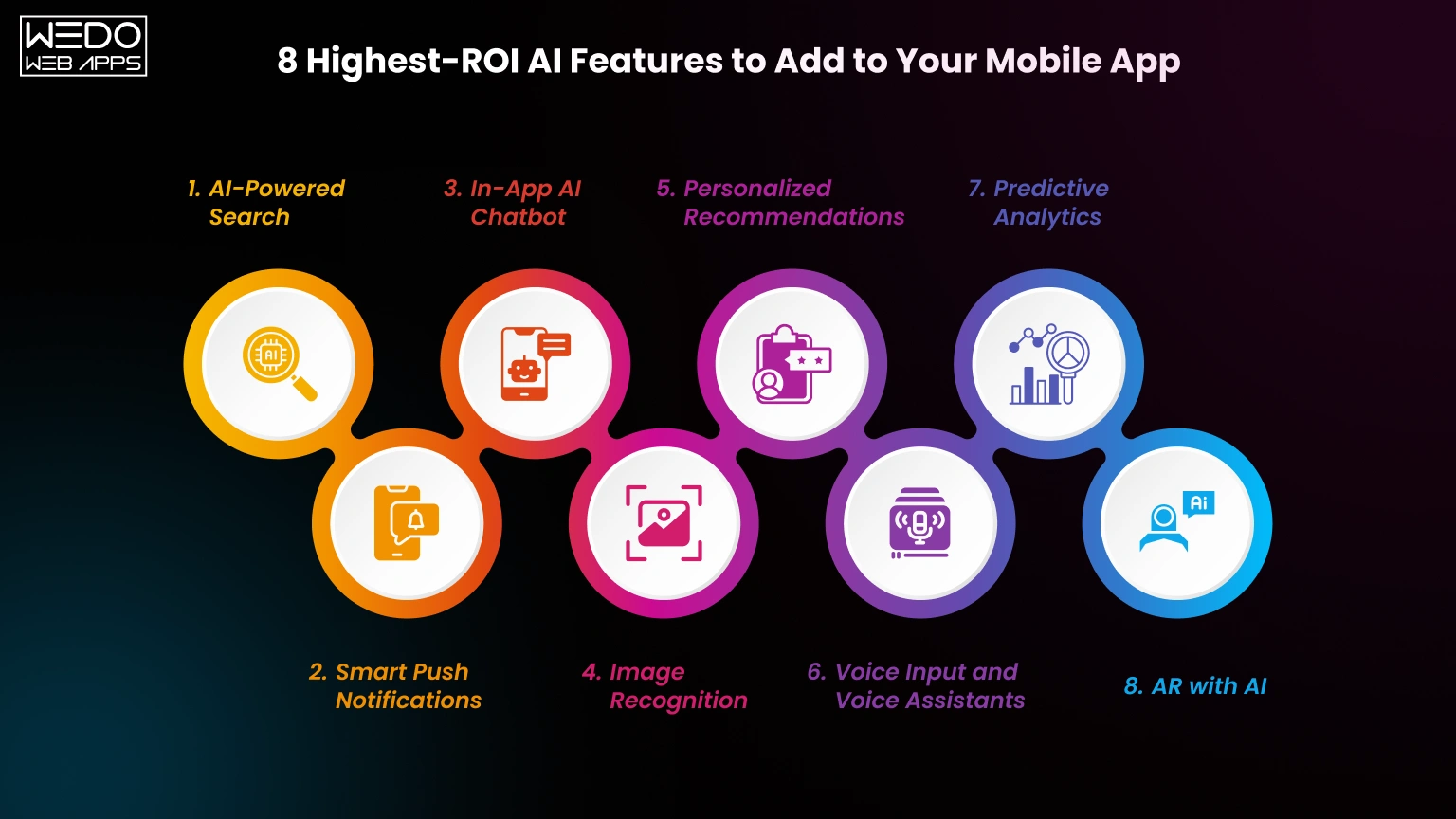
Choosing the right AI feature is not only about innovation. It is about finding the fastest path to better engagement, stronger retention, and higher revenue without inflating your overall AI software cost.
Many businesses make the mistake of investing in a complex AI system before fixing basic user experience gaps. In reality, some of the highest ROI AI upgrades are also the fastest to integrate into existing mobile apps.
Below are the best AI features to add to the mobile app 2026 project based on implementation cost, business impact, and adoption trends.
1. AI-Powered Search
AI search improves how users discover products, services, or content inside your app. Instead of relying only on exact keywords, AI understands user intent and context.
Best for:
- eCommerce apps
- Marketplace platforms
- Content apps
Estimated Cost: $5k to $15k
ROI: High
Timeline: 2 to 4 weeks
2. Smart Push Notifications
AI analyzes user behavior and predicts the best time to send notifications. This helps improve open rates and user engagement.
Best for:
- Retail apps
- Food delivery apps
- Subscription platforms
Estimated Cost: $8k to $20k
ROI: High
Timeline: 3 to 5 weeks
3. In-App AI Chatbot
AI chatbots reduce support workload and give users instant responses inside the app. Businesses can start with API-based chatbots and later move toward Agentic AI for mobile apps for more autonomous AI-powered interactions.Best for:
- SaaS apps
- Healthcare apps
- Service-based platforms
Estimated Cost: $5k to $40k
ROI: High
Timeline: 2 to 12 weeks
4. Image Recognition
Image recognition allows users to scan products, documents, or objects directly through the camera.
Best for:
- Shopping apps
- Logistics platforms
- Healthcare apps
Estimated Cost: $15k to $40k
ROI: Medium/High
Timeline: 4 to 8 weeks
5. Personalized Recommendations
Recommendation engines analyse user activity and suggest relevant products or content automatically.
Think of it like a store assistant who remembers what every customer likes before they ask.
Best for:
- Streaming apps
- eCommerce platforms
- Learning apps
Estimated Cost: $10k to $30k
ROI: Medium/High
Timeline: 4 to 8 weeks
6. Voice Input and Voice Assistants
Voice features improve accessibility and allow hands-free app interactions.
Best for:
- Navigation apps
- Healthcare apps
- Productivity tools
Estimated Cost: $20k to $50k
ROI: Medium
Timeline: 6 to 12 weeks
7. Predictive Analytics
Predictive AI helps businesses forecast user behavior, churn risk, or purchasing patterns before they happen.
Best for:
- Fintech apps
- Subscription businesses
- Retail analytics
Estimated Cost: $15k to $40k
ROI: Medium
Timeline: 6 to 10 weeks
8. AR with AI
AI-powered AR creates immersive experiences such as virtual try-ons, object placement, or spatial recognition.
Best for:
- Fashion apps
- Furniture apps
- Beauty brands
Estimated Cost: $30k to $80k
ROI: Varies
Timeline: 8 to 16 weeks
A Quick Table
| Feature | Cost Range | ROI Rating | Best For | Timeline |
|---|---|---|---|---|
| AI-Powered Search | $5k to $15k | High | eCommerce, marketplaces | 2 to 4 weeks |
| Smart Notifications | $8k to $20k | High | Engagement-focused apps | 3 to 5 weeks |
| AI Chatbot | $5k to $40k | High | Support and services apps | 2 to 12 weeks |
| Image Recognition | $15k to $40k | Medium/High | Retail and healthcare | 4 to 8 weeks |
| Personalized Recommendations | $10k to $30k | Medium/High | Media and shopping apps | 4 to 8 weeks |
| Voice Assistant | $20k to $50k | Medium | Productivity and accessibility | 6 to 12 weeks |
| Predictive Analytics | $15k to $40k | Medium | Fintech and subscriptions | 6 to 10 weeks |
| AR with AI | $30k to $80k | Varies | Fashion and furniture | 8 to 16 weeks |
The total AI app cost usually depends on three major factors:
- The complexity of the AI feature.
- Existing app architecture and backend readiness.
- The amount of customization required.
Businesses that start with smaller, high ROI AI features often scale faster and control their overall AI software price more effectively over time.

Realistic Timelines. How Long Each AI Feature Takes
One of the biggest mistakes businesses make during AI planning is assuming every feature takes the same amount of time to integrate. In reality, the AI feature integration timeline for existing apps depends heavily on your current app architecture, backend quality, available data, and the complexity of the feature itself.
Some AI upgrades can be added within a few weeks. Others require multiple development phases, testing cycles, and infrastructure improvements before launch.
A good way to estimate timelines is by grouping AI integrations into three categories.
Quick Wins (2 to 4 Weeks)
These are the fastest AI integrations for businesses that want quick improvements without major backend changes.
Common quick win features include:
- AI-powered smart search
- Text summarization
- Sentiment analysis for reviews
- Basic recommendation widgets
- AI-generated content assistance
Most of these integrations rely on APIs from providers like OpenAI, Google, or AWS, which helps reduce the overall AI integration cost and development effort.
Best for businesses that want:
- Faster rollout
- Lower development risk
- Faster ROI validation
Medium Complexity Features (4 to 8 Weeks)
These features usually require frontend customization, backend orchestration, and more extensive testing.
Examples include:
- AI chatbots
- Image recognition
- Smart push notifications
- Voice-to-text functionality
- Personalized recommendations
At this stage, teams often need to improve analytics tracking and optimize APIs to support AI workflows properly.
High Complexity AI Integration (8 to 16 Weeks)
These projects involve custom AI logic, advanced training workflow, or deep infrastructure planning.
Examples include:
- Full conversational voice assistants
- AI recommendation engines trained on user behavior
- AR with AI features
- Predictive analytics dashboards
- Multi-model AI systems
These integrations typically increase the overall AI software cost because they require larger datasets, advanced QA testing, and stronger backend scalability.
What Affects AI Integration Timelines?
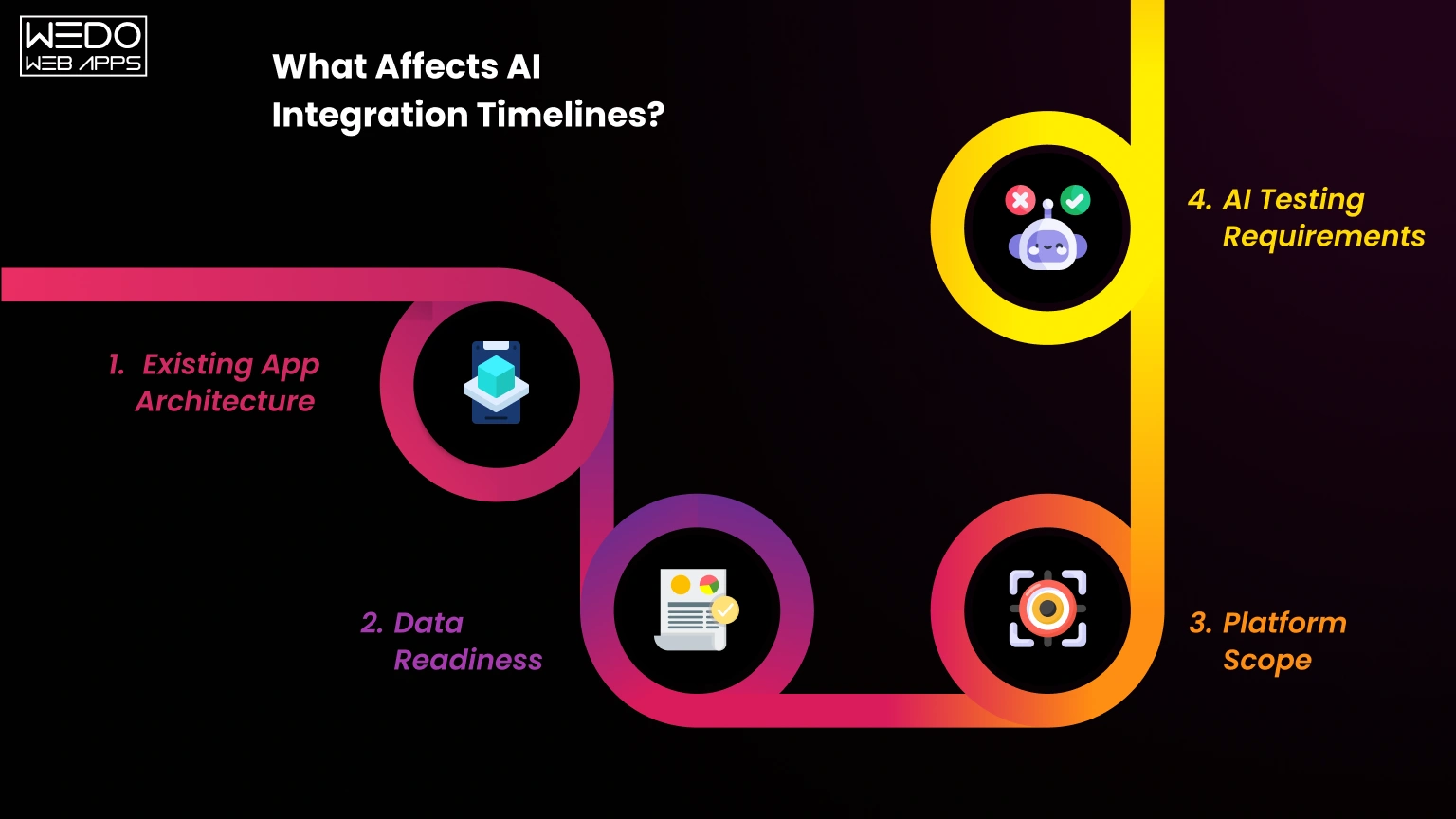
Even a small AI feature can have completely different timelines depending on the app.
Here are the biggest factors that affect delivery speed:
1. Existing App Architecture
Apps with clean APIs and modular backend systems integrate AI much faster.
Apps with monolithic architecture often require refactoring before development can begin.
2. Data Readiness
AI systems rely heavily on data quality.
If your app lacks:
- User behavior tracking
- Analytics events
- Product metadata
- Support conversation history
Then teams may need extra weeks for data preparation.
3. Platform Scope
Adding AI to:
- Only iOS
- Only Android
- Both platforms
Can significantly change development timelines and overall AI app development cost.
4. AI Testing Requirements
AI features require more testing than traditional app functionality because responses can vary dynamically.
Teams must test:
- Edge cases
- Accuracy
- Hallucinations
- Performance under load
- User experience consistency
Suggested Timeline Comparison Table
| Timeline Group | Weeks | Features |
|---|---|---|
| Quick Wins | 2 to 4 weeks | Smart search, summarization, sentiment analysis |
| Medium Complexity | 4 to 8 weeks | Chatbots, image recognition, notifications |
| High Complexity | 8 to 16 weeks | Voice AI, recommendation engines, AR features |
Businesses that approach AI implementation in phases usually manage their overall AI software price more efficiently while reducing rollout risks.
In-App AI Chatbot. Integration Cost & Timeline
For many businesses, the first AI feature they add is a chatbot. It improves customer support, keeps users engaged inside the app, and reduces response delays without requiring a full support team expansion.
That is why searches related to adding a chatbot to existing mobile app development costs continue growing in 2026.
The important thing to understand is that adding a chatbot to an existing app is very different from building a standalone AI chatbot from scratch. Most mobile apps already have a user account, backend systems, and workflow in place, which makes chatbot development and integration faster and more cost-effective.
Today, businesses usually choose between three chatbot integration approaches depending on budget, scalability, and customization needs.
Option 1: API Based Chatbot
This is the fastest and most affordable chatbot integration method.
The app connects with models like OpenAI GPT API or Anthropic Claude through APIs, while developers create a custom chat interface inside the mobile app.
Best for:
- Startups
- Customer support automation
- FAQ handling
- Product discovery assistance
Advantages:
- Faster implementation
- Lower upfront AI software price
- Access to continuously updated AI models
- Easy scalability
Limitations:
- Ongoing API usage charges
- Requires an internet connection
- Limited control over model behavior
Estimated Cost: $5k to $15k
Timeline: 2 to 4 weeks
Option 2: Custom Trained Chatbot
This approach trains AI models using your business-specific data, such as:
- Support tickets
- Product documentation
- Internal workflows
- Knowledge bases
Instead of giving generic answers, the chatbot responds in a way that better matches your business processes and brand tone.
Best for:
- SaaS platforms
- Healthcare apps
- Fintech applications
- Enterprise customer support
Advantages:
- Better context understanding
- More consistent responses
- Stronger brand alignment
- Better workflow automation
Limitations:
- Higher AI integration cost
- Requires retraining when business information changes
Estimated Cost: $15k to $40k
Timeline: 6 to 10 weeks
Option 3: Hybrid RAG-Based Chatbot
RAG stands for Retrieval Augmented Generation.
Instead of relying only on AI memory, the chatbot retrieves live information from your knowledge base before generating responses. Think of it like an employee checking company documents before answering a customer question.
This approach improves accuracy and keeps the response updated even when information changes frequently.
Best for:
- Large product catalogs
- Enterprise apps
- Documentation-heavy businesses
- Multi-department support systems
Advantages:
- Higher accuracy
- Easier content updates
- Better scalability
- More reliable answers
Limitations:
- More advanced architecture
- Higher infrastructure requirements
- Increased AI software cost
Estimated Cost: $20k to $50k
Timeline: 8 to 12 weeks
A Quick Table For Reference
| Chatbot Type | Cost | Timeline | Best For |
|---|---|---|---|
| API Based Chatbot | $5k to $15k | 2 to 4 weeks | Fast deployment and support automation |
| Custom Trained Chatbot | $15k to $40k | 6 to 10 weeks | Brand-specific conversations |
| Hybrid RAG Chatbot | $20k to $50k | 8 to 12 weeks | Enterprise knowledge systems |
The final AI app cost for chatbot integration usually depends on:
- Number of supported users
- Backend complexity
- Knowledge base size
- Required integrations
- Custom UI requirements
Businesses often start with API-based chatbots to validate ROI before investing in advanced conversational AI systems later.
Image Recognition. Product Scanning, Face Detection & AR
Camera-based AI features are becoming common across shopping, healthcare, finance, logistics, and service apps. Instead of typing information manually, users can now scan products, documents, faces, or real-world objects directly through their phone camera.
That growing demand has increased interest in AI image recognition feature development for mobile apps, especially for businesses looking to improve speed, automation, and user convenience.
The overall AI app cost for image recognition depends on the type of feature, whether processing happens on the device or in the cloud, and how much AI training is required.
1. Product Scanning & Visual Search
This feature allows users to take a photo of a product and instantly receive matching items, pricing details, or inventory information.
Shopping and inventory apps use this heavily because it reduces search friction and improves conversion rates.
Common Technologies:
- Google Vision API
- TensorFlow Lite
- Amazon Rekognition
Best for:
- eCommerce apps
- Inventory management systems
- Retail platforms
Estimated Cost: $15k to $30k
Timeline: 4 to 6 weeks
2. Document Scanning & OCR
OCR stands for Optical Character Recognition.
Users can photograph receipts, invoices, IDs, or forms, and the app automatically extracts readable text from the image.
This removes manual data entry and speeds up workflows significantly.
Common technologies:
- Google ML Kit
- AWS Textract
- Tesseract OCR
Best for:
- Expense tracking apps
- Insurance apps
- Banking platforms
Estimated Cost: $8k to $20k
Timeline: 3 to 5 weeks
3. Face Detection & Verification
Face recognition features are commonly used for:
- Biometric login
- Identity verification
- Fraud prevention
- User authentication
Unlike some AI features, facial verification is usually processed directly on the device for stronger privacy and faster performance.
Common Technologies:
- Apple Face ID API
- ML Kit Face Detection
- Azure Face API
Best for:
- Banking apps
- Healthcare platforms
- Security applications
Estimated Cost: $10k to $25k
Timeline: 4 to 6 weeks
4. AR Overlays with AI
This is one of the most advanced visual AI integrations.
The app combines augmented reality with AI recognition to place virtual objects into real environments.
Examples include:
- Virtual furniture placement
- Makeup try-on
- Eyeglass previews
- Product visualization
Common technologies:
- ARKit + Core ML
- ARCore + TensorFlow Lite
Best for:
- Fashion brands
- Furniture apps
- Beauty platforms
Estimated Cost: $30k to $80k
Timeline: 8 to 16 weeks
5. On-Device vs Cloud Processing
One of the biggest technical decisions in image AI integration is deciding where image processing happens.
On-Device AI
The machine learning model runs directly on the mobile phone.
Advantages:
- Faster response time
- Better privacy
- Works without internet
Limitations:
- Smaller AI models
- Limited processing power
Best for:
Face detection and sensitive user data
Cloud-Based AI
Images are processed on remote servers.
Advantages:
- More powerful AI models
- Large searchable databases
- Better scalability
Limitations:
- Requires an internet connection
- Higher latency
- Ongoing server costs
Best for:
Product search and large-scale recognition systems.
Comparison Table
| Use Case | Technology | Cost Range | On Device or Cloud |
|---|---|---|---|
| Product Scanning | Google Vision API, TF Lite | $15k to $30k | Mostly Cloud |
| Document OCR | ML Kit, AWS Textract | $8k to $20k | Hybrid |
| Face Detection | Face ID API, ML Kit | $10k to $25k | On Device |
| AR Overlays | ARKit, ARCore, Core ML | $30k to $80k | Hybrid |
The final AI software cost for image recognition projects also depends on:
- Camera quality requirements
- Real-time processing needs
- Data storage
- AI training complexity
- Cross-platform support
Businesses usually begin with lightweight OCR or scanning features before moving toward advanced AI experiences with higher AI software price ranges.
Voice Assistant. Siri, Google Assistant & Custom Voice AI
Typing is no longer the only way users interact with mobile apps. Voice-based experiences are becoming more common across healthcare, navigation, productivity, customer support, and accessibility-focused applications.
That shift is increasing demand for voice assistant integration in mobile app development cost estimates, especially among businesses looking to improve hands-free interactions without rebuilding their apps.
The overall AI software cost for voice integration depends on how advanced the experience needs to be. Some apps only require speech-to-text functionality, while others need full conversational AI with memory and contextual responses.
Most voice integrations fall into three levels.
Level 1: Voice Input Only
This is the simplest and fastest voice integration approach.
The app converts spoken words into text but does not deeply understand user intent. Think of it like a microphone replacing a keyboard.
Common Use Cases:
- Voice search
- Voice notes
- Accessibility features
- Hands-free text input
Common Technologies:
- Apple Speech Framework
- Google Speech-to-Text API
Advantages:
- Lower AI integration cost
- Faster implementation
- Minimal backend changes
Limitations:
- No conversational understanding
- Limited automation
Estimated Cost: $5k to $12k
Timeline: 2 to 3 weeks
Level 2: Voice Commands
This level combines speech recognition with natural language processing and intent detection.
Instead of simply transcribing speech, the app understands commands and performs actions.
For example:
- "Show my order from last week."
- "Book an appointment for tomorrow."
- "Track my shipment."
Common Technologies:
- Dialogflow
- SiriKit
- Custom NLP Pipelines
Best for:
- Service apps
- Productivity platforms
- Scheduling systems
Advantages:
- Better user experience
- Faster task completion
- Improved accessibility
Limitations:
- More backend integration work
- Additional testing requirements
Estimated Cost: $12k to $25k
Timeline: 4 to 6 weeks
Level 3: Full Conversational Voice Assistant
This is the most advanced voice AI setup. Generative AI enables the assistant to support multi-step conversations, remember context, and generate more natural responses similar to human interaction.
The assistant supports multi-step conversations, remembers context, and generates more natural responses similar to human interaction.
Think of it like turning your app into a digital assistant instead of just a tool.
Common Use Cases:
- AI healthcare assistants
- Customer support automation
- In-car voice systems
- Virtual assistants
Common Technologies:
- Large Language Models (LLMs)
- ElevenLabs
- Amazon Polly
- Custom conversational AI systems
Advantages:
- More natural interactions
- Personalized conversations
- Better automation capabilities
Limitations:
- Higher AI app cost
- More infrastructure requirements
- Longer QA cycles
Estimated Cost: $25k to $60k
Timeline: 8 to 12 weeks
Siri Shortcuts & Google Assistant Integrations
Some businesses do not need full conversational AI. Instead, they integrate directly with native voice ecosystems.
Siri Shortcuts (iOS)
Users can trigger app actions through Siri commands.
Example:
"Hey Siri, reorder my last coffee."
Estimated Cost: $3k to $8k
Google Assistant Actions (Android)
Allows Android apps to connect with Google Assistant workflows and voice commands.
Example:
"Hey Google, check my account balance."
Estimated Cost: $5k to $12k
A Short Table for Reference
| Voice AI Level | Cost Range | Timeline | What It Does | Tech Stack |
|---|---|---|---|---|
| Voice Input | $5k to $12k | 2 to 3 weeks | Speech to text | Apple Speech Framework, Google Speech API |
| Voice Commands | $12k to $25k | 4 to 6 weeks | Intent recognition | Dialogflow, SiriKit |
| Conversational Assistant | $25k to $60k | 8 to 12 weeks | Full AI conversations | LLMs, ElevenLabs, Amazon Polly |
The final AI software price for voice AI projects depends on:
- Supported languages
- Real-time processing needs
- Conversation complexity
- API usage volume
- Cross-platform compatibility
Businesses often start with basic voice commands before investing in advanced conversational assistants with larger AI integration cost requirements.
AI Integration Cost Summary. Complete Pricing Table
After reviewing different AI features, one thing becomes clear: the total AI integration cost depends less on "AI" itself and more on the complexity of the feature, data readiness, and the condition of your existing app architecture.
Some businesses start with lightweight integrations like smart search or OCR for under $10K. Others invest in advanced conversational AI or AR experiences that can exceed $80K. The right approach depends on your business goals, user expectations, and how quickly you want to scale AI capabilities.
The table below gives a realistic overview of current AI app cost estimates for the most requested AI integrations in mobile apps.
| AI Feature | Low End | High End | Timeline | Complexity |
|---|---|---|---|---|
| Chatbot (API Based) | $5k | $15k | 2 to 4 weeks | Low |
| Chatbot (Custom Trained) | $15k | $40k | 6 to 10 weeks | Medium |
| Hybrid RAG Chatbot | $20k | $50k | 8 to 12 weeks | High |
| Image Recognition | $15k | $40k | 4 to 8 weeks | Medium |
| Document OCR | $8k | $20k | 3 to 5 weeks | Low |
| Face Detection | $10k | $25k | 4 to 6 weeks | Medium |
| Voice Input | $5k | $12k | 2 to 3 weeks | Low |
| Voice Commands | $12k | $25k | 4 to 6 weeks | Medium |
| Full Voice Assistant | $25k | $60k | 8 to 12 weeks | High |
| Smart Search | $5k | $15k | 2 to 4 weeks | Low |
| Personalized Recommendations | $10k | $30k | 4 to 8 weeks | Medium |
| AR with AI | $30k | $80k | 8 to 16 weeks | High |
Beyond mobile app development, businesses should also plan for ongoing AI-related expenses.
Additional Costs Businesses Often Overlook
API Usage Fees
Many AI tools charge based on usage volume.
Monthly costs can range from:
- $100 per month for smaller apps
- $3,000+ per month for high-traffic platforms
Infrastructure Scaling
AI features increase:
- Server requests
- Database activity
- Storage requirements
- GPU processing needs
Cloud infrastructure upgrades can increase the overall AI software cost over time.
Maintenance & Model Updates
Unlike static app features, AI systems require continuous improvement.
This may include:
- Prompt optimization
- Model retraining
- Dataset updates
- Security improvements
- AI response testing
Most companies spend around 15% to 20% of the initial project value annually on maintenance.
Cross-Platform Optimization
Supporting:
- iOS
- Android
- Flutter
- React Native
Can increase the final AI software price because each platform may require additional optimization and testing.
What Usually Impacts Cost the Most?
The biggest pricing factors are:
- Type of AI feature
- Existing backend quality
- Availability of training data
- Real-time processing requirements
- Number of integrations needed
- Custom UI complexity
Businesses that begin with smaller, high-ROI AI upgrades often reduce risk, control budgets better, and scale AI adoption more successfully over time.
Before You Start. Is Your App Ready for AI?
Adding AI to a mobile app is not only about choosing the right feature. The existing architecture of your app plays a major role in determining development speed, scalability, and overall AI integration cost.
Two businesses may choose the same AI feature, yet one completes integration within weeks while the other spends months fixing backend issues before development can even begin.
Before investing in AI, it is important to evaluate whether your current app infrastructure is ready to support intelligent features properly.
AI Readiness Checklist
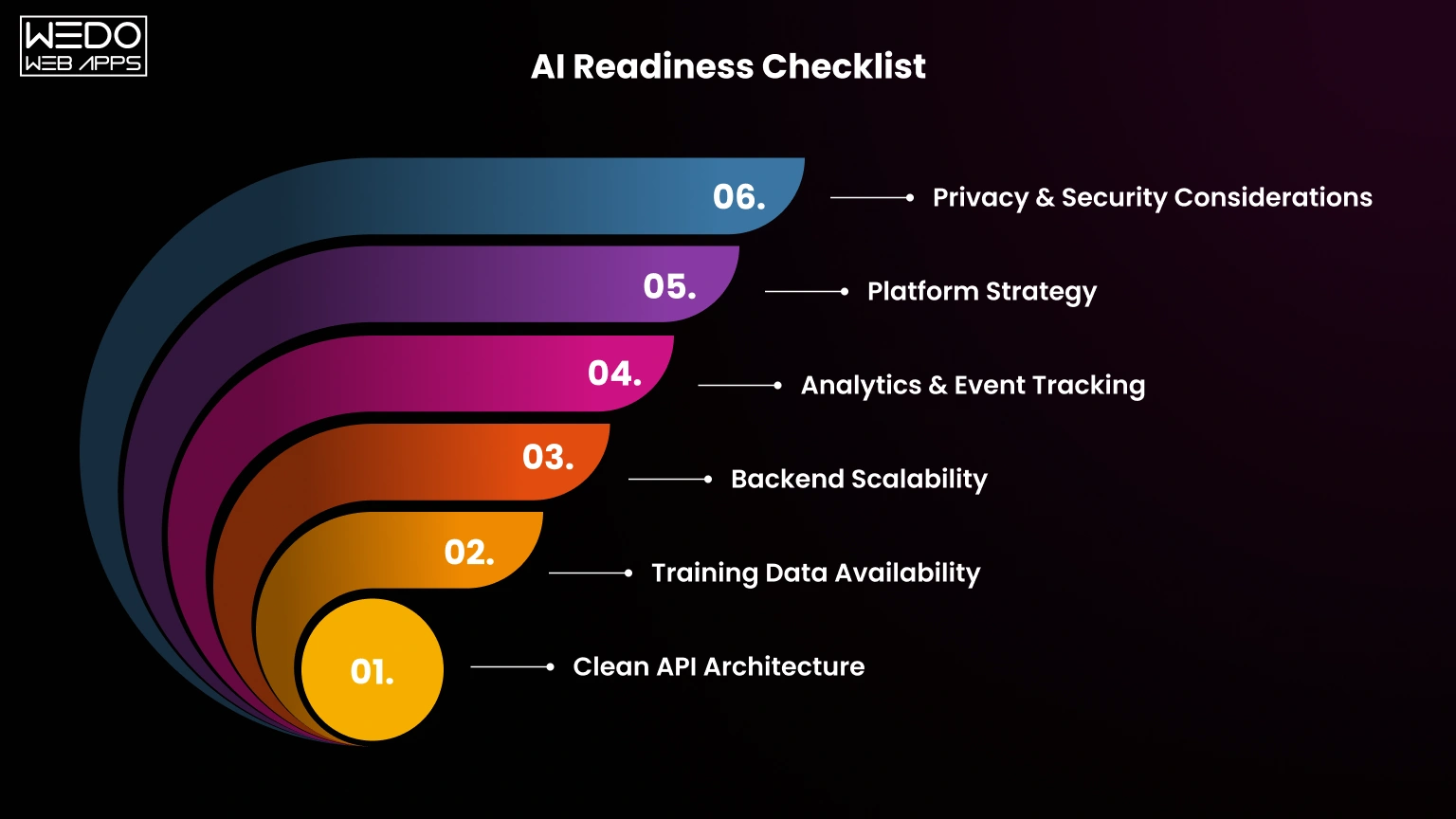
Clean API Architecture
Apps with structured APIs and modular backend systems integrate AI much faster.
If your app relies on tightly connected frontend and backend logic, developers may need additional refactoring before AI implementation starts.
Training Data Availability
AI systems learn from data.
Useful datasets may include:
- User behavior history
- Product tickets
- Support tickets
- Search activity
- Customer interactions
Without quality data, even advanced AI models struggle to deliver accurate results.
Backend Scalability
AI features increase:
- API requests
- Processing load
- Database activity
- Storage usage
Apps already facing performance issues may require infrastructure improvements before adding AI capabilities.
Analytics & Event Tracking
AI systems depend heavily on behavioral insights.
If your app does not currently track:
- User actions
- Session behavior
- Search patterns
- Conversion flows
Then, additional analytics implementation may be required before AI integrations become effective.
Platform Strategy
Your development scope directly affects both timeline and AI app cost.
Questions businesses should decide early:
- iOS only?
- Android only?
- Cross-platform support?
- Flutter or React Native compatibility?
Some of the best frameworks also work better on specific platforms.
For example:
- iOS offers stronger on-device ML optimization.
- Android provides better ML Kit integrations.
Privacy & Security Considerations
Not every AI process should happen in the cloud.
Sensitive user data such as:
- Facial recognition
- Healthcare information
- Financial details
Is often safer when processed directly on the device.
Meanwhile, cloud AI works better for:
- Large recommendation engines
- Product search
- Advanced conversational AI
Choosing the wrong architecture early can increase both security risk and long-term AI software cost.
5 Signs Your App Needs Refactoring Before AI
If your app has multiple issues from the list below, fixing the architecture first may save significant time and money later.
| Red Flag | Why It Matters |
|---|---|
| No REST API Layer | AI integration becomes harder to connect and scale |
| Frequent App Crashes | AI features increase the processing load further |
| No Analytics Tracking | AI models lack behavioral data |
| Monolithic Codebase | Slower development and testing |
| No CI/CD Pipeline | Updates and AI deployment become harder |
Quick Reality Check Before AI Development
Businesses often focus heavily on AI models while ignoring infrastructure readiness. That is similar to installing a racing engine into a car with weak brakes and old tires. The feature may work, but scaling it safely becomes difficult.
A strong backend foundation usually lowers:
- Development delays
- Testing complexity
- Maintenance workload
- Long-term AI software price
That is why many successful AI integrations begin with technical audits before actual development starts.
Conclusion
Adding AI to a mobile app no longer means rebuilding the entire product from scratch. Modern AI APIs, cloud services, and AI development services now make it possible to integrate intelligent features into existing apps much faster and more cost-effectively.
The smartest approach is usually starting with high-ROI features such as:
- AI-powered search
- Smart notifications
- In-app chatbots
- Recommendation systems
Once those features prove value, businesses can gradually expand into more advanced AI capabilities like voice assistants, predictive analytics, or AR experiences.
The overall AI integration cost depends on the complexity of the feature, backend readiness, and infrastructure requirements. However, many AI integrations can start from as low as $5k for lightweight implementations.
Businesses that scale AI in phases often manage their AI software costs more efficiently while improving user experience, retention, and engagement over time.