Introduction
Your AI workflow starts with one task. Then another gets added. Then another.
Soon, one AI agent is expected to research information, work with business data, make decisions, use multiple tools, and complete actions across different systems. The result can be slower execution, limited context, and a workflow that becomes difficult to control.
This is where multi-agent AI systems become relevant.
Instead of assigning every responsibility to one agent, you can create a team of specialized AI agents. Each agent handles a defined part of the workflow. They communicate, exchange information, and coordinate their actions to complete a larger business task.
For example, a sales workflow could use separate agents for lead research, qualification, CRM updates, and follow-ups.
The real question is whether your business actually needs multiple agents. Understanding the architecture, use cases, orchestration models, and tradeoffs can help you make that decision with greater clarity.
So, when should you use multi-agent AI? And when is a single agent enough? Understanding how these systems work can help you choose the right approach for your business.
What Are Multi-Agent AI Systems?
Multi-agent AI systems use multiple AI agents to complete a larger task or business workflow. Each agent is given a defined responsibility and can use its own instructions, tools, data, or capabilities. The agents then coordinate their work to reach a shared outcome.
This approach is useful when a workflow involves several types of work. One agent may need to research information. Another may analyze the findings. A third may take action in a CRM, database, or other business application. Instead of making one agent responsible for everything, the workload is distributed across specialized agents.
How Multiple AI Agents Work Together
The agents do not simply perform separate tasks independently. They can exchange information and pass results between stages for a workflow.
Consider an eCommerce return process. One agent can review the customer's request and order details. Another can check whether the request meets the return policy. A third can verify the order in the commerce system and initiate the next action. If the request falls outside the defined rules, the workflow can route it to a human for review.
This is how multiple AI agents working together can handle a process that would otherwise require one agent to manage several unrelated responsibilities.
Multi-Agent AI vs Traditional AI Agents
The main difference is how responsibility is distributed.
| Single AI Agent | Multi-Agent AI |
|---|---|
| One agent manages the task | Multiple agents share responsibilities |
| Better suited to focused workflows | Better suited to complex workflows |
| Simpler to build and manage | Requires coordination between agents |
| Usually involves fewer tools and decision points | Can connect different tools, data sources, and capabilities |
A multi-agent approach is not automatically the better option. If one agent can complete your workflow reliably, adding more agents may increase complexity without providing enough value. The approach becomes more useful when your process requires specialized capabilities, multiple systems, parallel tasks, or several decision points.
Understanding this distinction is the first step toward deciding whether your business needs a multi-agent AI system or a simpler single-agent solution.
How Does a Multi-Agent AI System Work?
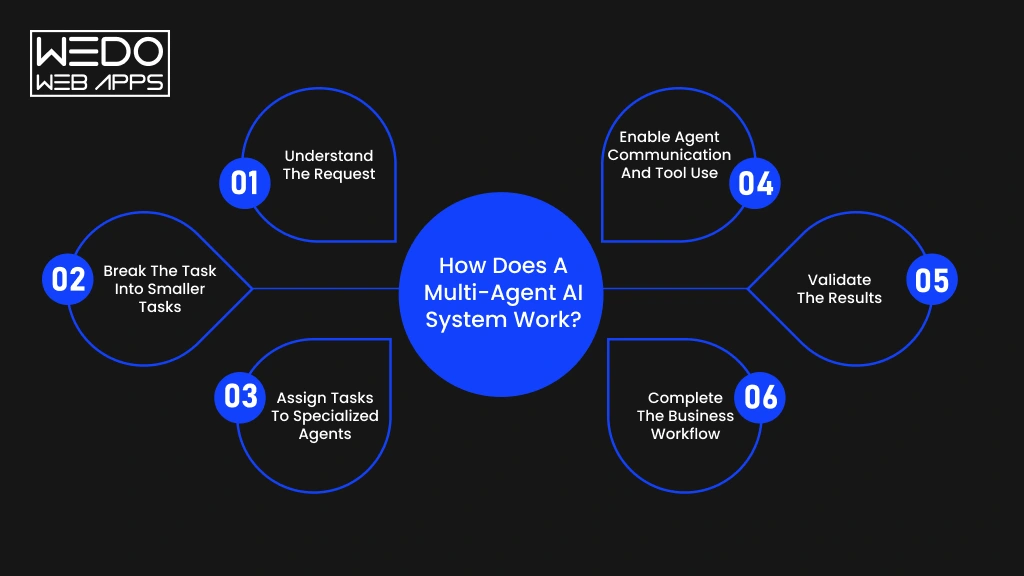
A multi-agent AI breaks a complex business objective into smaller tasks and assigns them to specialized AI agents. These agents can communicate, use business tools, exchange information, and coordinate their actions to complete the workflow.
This is what allows multiple AI agents working together to handle processes that may be difficult for a single agent to manage efficiently.
1. Understand the Request
The workflow begins when a user request, application event, or business process triggers an action. An initial agent or orchestration layer interprets the objective and identifies what needs to happen.
For example, a customer requesting a refund may require order verification, policy checking, refund processing, and CRM updates.
2. Break the Task into Smaller Tasks
The system divides the broader objective into individual tasks. This process is known as task decomposition.
Some tasks may run independently. Others may depend on information produced by an earlier agent. Identifying these relationships helps the system determine the right sequence of actions.
3. Assign Tasks to Specialized Agents
Each task is assigned to an agent with the appropriate capabilities.
A research agent can gather information. An analysis agent can evaluate it. Another agent can access a CRM or payment system and complete the required action.
This specialization is one of the main reasons businesses consider when to use multi-agent AI instead of relying on one general-purpose agent.
4. Enable Agent Communication and Tool Use
Agents need a way to exchange information as the workflow progresses. They can pass results to another agent, request additional information, or trigger the next task.
They can also connect with APIs, databases, enterprise applications, and other tools. Protocols such as MCP can help AI applications connect with external tools and data through standardized interfaces.
5. Validate the Results
Each output can be checked against business rules before the workflow moves forward. Validation helps identify incomplete information, incorrect outputs, or situations that require human intervention.
For sensitive business processes, human approval can be added before an agent performs a high-impact action.
6. Complete the Business Workflow
After the required tasks are completed, the system combines the results and delivers the intended outcome. This could mean answering a customer, updating a record, generating a report, or completing an action in another application.
The multi-agent system architecture determines how these agents, tools, data, communication channels, and orchestration logic connect. A well-designed architecture gives each agent a clear responsibility while keeping the overall workflow aligned with the business objective.
Multi-Agent System Architecture
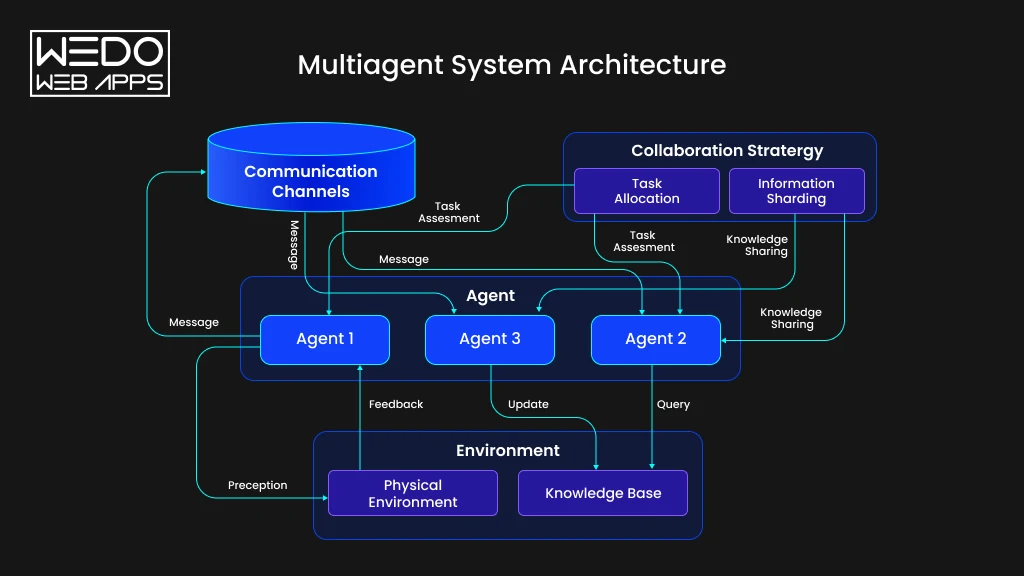
A multi-agent system architecture defines how AI agents, models, tools, data, memory, and orchestration work together. It determines how a task moves through the system and how each agent knows what to do next.
A well-planned architecture gives every agent a clear responsibility. It also defines how agents communicate and what systems they can access. Without these boundaries, adding more agents can make a workflow harder to manage rather than more capable.
Core Components of a Multi-Agent Architecture
A typical architecture brings together several layers. Each one supports a different part of the workflow.
| Component | What It Does |
|---|---|
| AI agents | Handle specific tasks based on their role, instructions, and available capabilities |
| LLMs | Provide reasoning and language understanding for agents |
| Tools and APIs | Let agents retrieve information or perform actions in external systems |
| Memory and shared state | Preserve relevant information across tasks and agent interactions |
| Data sources | Provide business information from databases, documents, knowledge bases, and applications |
| Communication layer | Allows agents to exchange messages, results, and task information |
| Orchestration layer | Coordinates agents, controls workflow progression, and manages task dependencies |
| Security and monitoring | Controls access and tracks agent activity, outputs, errors, and system performance |
These components do not need to be equally complex in every project. Your architecture should reflect the workflow you are trying to automate.
Centralized vs Peer-to-Peer Agent Architecture
The way agents coordinate depends largely on how the system is structured.
Centralized architecture uses an orchestrator as the control point. It decides which agent should handle a task, passes the required context, and evaluates what should happen next. This approach can provide clearer control and monitoring, making it suitable for workflows with defined steps and dependencies.
Peer-to-peer architecture allows agents to communicate more directly. An agent can pass information or request another agent's capabilities without relying on one central controller for every interaction.
| Centralized | Peer-to-Peer |
|---|---|
| Central orchestrator manages tasks | Agents communicate directly |
| Easier to control workflow logic | Greater flexibility between agents |
| Suitable for structured processes | Useful for collaborative workflows |
| Central point for monitoring | Monitoring can be more distributed |
The right model depends on how much control, flexibility, and coordination your workflow requires.
How Agent Orchestration Connects the System
Agent orchestration acts as the coordination mechanism across the multi-agent system architecture. It determines which agent should act, what context it receives, which tools it can use, and where its output should go next.
Consider an insurance claims workflow. A document agent can extract information from submitted files. A verification agent can check policy details. A risk agent can assess the claim. An approval agent can determine whether it meets predefined criteria.
The orchestration layer manages the movement between these tasks. It can also trigger parallel activities, handle failed tasks, request additional information, or send complex cases to a human reviewer.
For businesses, this makes agent orchestration more than a technical coordination layer. It becomes the mechanism that connects specialized AI capabilities into one controlled workflow.
When Should You Use Multi-Agent AI?
Adding more AI agents also adds more coordination, infrastructure, and monitoring requirements. So, the right question is not whether your business can use multi-agent AI, but whether your workflow benefits from it.
Here are the situations where this approach can make practical sense.
When a Workflow Requires Specialized Expertise
Some business processes involve tasks that require different types of knowledge or capabilities. Assigning everything to one agent can make its instructions, tools, and context harder to manage.
You can assign separate agents to research, analysis, compliance, and reporting. Each agent can focus on its responsibility while the orchestration layer manages the overall workflow.
For example, a financial analysis process could use one agent to collect market data, another to analyze it, and a compliance agent to check the resulting report.
When Multiple Tasks Can Run in Parallel
Not every task needs to wait for another task to finish. If several activities are independent, different agents can work on them at the same time.
Imagine a sales research workflow. One agent can research the company, another can analyze its industry, and a third can review recent business activity. Their findings can then be combined before the final recommendation is generated.
This is one of the strongest reasons why multi-agent AI becomes relevant for larger workflows.
When Multiple Tools and Business Systems Are Involved
Complex workflows often span several applications. Your agents may need access to a CRM, ERP, database, internal application, API, or document repository.
Instead of giving one agent unrestricted access to every system, you can assign specific tools to specialized agents.
For example, a sales agent can work with the CRM while another handles document analysis. This creates clearer boundaries around what each agent can access and perform.
When a Workflow Requires Multiple Decisions or Approvals
Some processes involve several checks before an action can be completed. Insurance claims, financial reviews, procurement, and compliance workflows are common examples.
Different agents can handle individual checks and pass their results to the next stage. Human approval can also be added when the decision carries higher business or financial risk.
When You Should Stay With a Single AI Agent
A multi-agent approach is not necessary for every use case.
A single agent may be the better choice when your workflow has:
- One primary objective
- Few tools or data sources
- Limited decision points
- A straightforward sequence of tasks
- Low coordination requirements
If one agent can complete the workflow reliably, keeping the architecture simple can reduce development, monitoring, and operating costs.
The best multi-agent AI systems are built around genuine workflow complexity. More agents do not automatically mean better results.
Multi-Agent AI vs Single-Agent AI
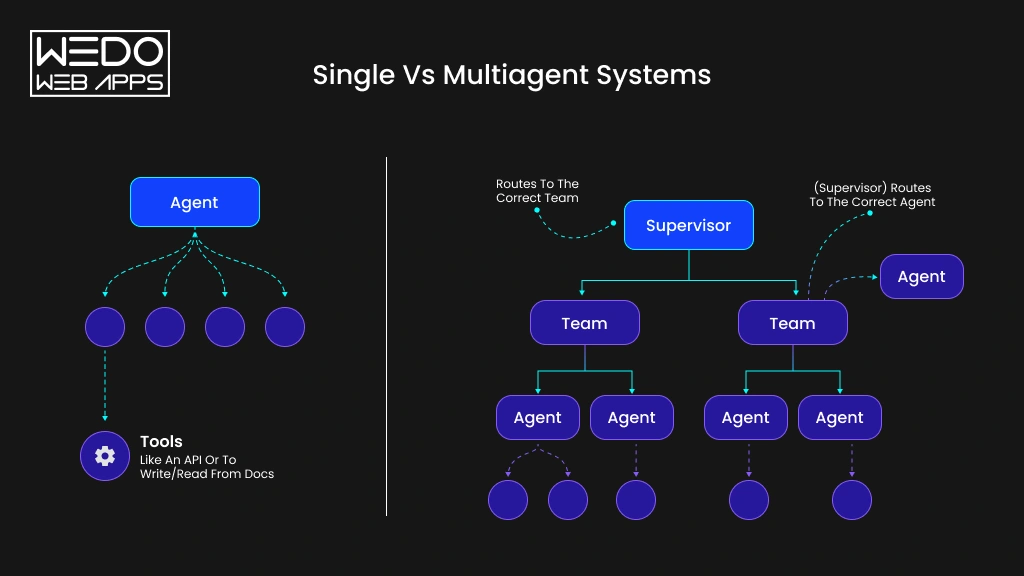
The choice between a single agent and multiple agents depends on how your workflow is structured. A simple process may work well with one capable agent. More complex workflows can benefit from dividing responsibilities across specialized agents.
| Factor | Single-Agent AI | Multi-Agent AI |
|---|---|---|
| Architecture | One agent handles the complete workflow | Multiple agents work within a coordinated architecture |
| Task Complexity | Best for focused and well-defined tasks | Suited for workflows with several interconnected tasks |
| Specialization | One agent handles multiple responsibilities | Each agent can focus on a specific capability |
| Tool Usage | Usually connects to a limited set of tools | Agents can use different tools based on their roles |
| Parallel Processing | Limited by one agent's workflow | Multiple agents can handle independent tasks simultaneously |
| Coordination | Requires little coordination | Requires communication, routing, and orchestration |
| Cost | Usually lower to build and operate | Can cost more due to multiple agents and infrastructure |
| Scalability | Can become difficult as responsibilities increase | Individual agents can be added or adjusted as workflows grow |
| Maintenance | Simpler to monitor and troubleshoot | Requires monitoring agent interactions and dependencies |
| Best Use Case | FAQs, content generation, simple research, focused automation | Complex support, sales operations, software development, research, and business automation |
Which Approach Is Better for Your Business?
A single agent can be sufficient when your workflow has one clear objective, limited tools, and few decision points. For example, an internal assistant that answers employee questions from a knowledge base may not need multiple agents.
Multi-agent vs single-agent AI becomes a more important choice when your workflow involves different types of work. You may need separate capabilities for research, analysis, validation, system access, and final execution.
Consider a sales qualification workflow. A single agent could handle the entire process. However, separate agents could research the prospect, evaluate qualification criteria, update the CRM, and prepare a personalized follow-up. The added coordination may be worthwhile if these tasks operate across different systems or need independent validation.
Business Use Cases of Multi-Agent AI
Multi-agent AI can support business workflows that involve several tasks, systems, or decision points. Instead of expecting one agent to manage the entire process, businesses can assign specific responsibilities to specialized agents.
The following use cases show where this approach can deliver practical value.
Customer Service and Support
Customer support can involve multiple steps before an issue is fully resolved:
- Routing agent: Identifies the customer's intent and directs the request.
- Knowledge agent: Retrieves relevant product, policy, or account information.
- Resolution agent: Suggests or performs the appropriate solution.
- Escalation agent: Routes complex cases to human support teams.
- Quality agent: Reviews responses for accuracy and policy compliance.
This structure can help support teams handle repetitive requests while reserving human attention for complex customer issues.
Sales and Lead Management
Sales teams can use specialized agents across the lead lifecycle. Instead of manually moving information between research, qualification, and CRM activities, agents can coordinate these tasks.
Example workflow:
Lead received -> Prospect research -> Lead qualification -> Lead scoring -> CRM update -> Follow-up preparation
The sales team can review the results before an agent sends communications or performs high-impact actions.
Software Development
Software projects involve several activities that can be assigned to specialized agents.
| Agent | Responsibility |
|---|---|
| Planning agent | Breaks requirements into development tasks |
| Coding agent | Creates or modifies application code |
| Testing agent | Runs tests and identifies failures |
| Debugging agent | Investigates and resolves detected issues |
| Review agent | Checks code quality and implementation |
This approach can help development teams coordinate repetitive technical work while keeping human developers involved in architecture and final approvals.
Document and Business Process Automation
Document workflows often require extraction, analysis, validation, approval, and reporting. A multi-agent system can divide these responsibilities across the process.
For example, an invoice workflow could follow:
Extract data -> Match purchase records -> Validate details -> Identify exceptions -> Request approval -> Generate report
Each stage can use the tools and business rules relevant to its responsibility. Exceptions can then be routed to employees instead of allowing agents to make unsupported decisions.
Research and Business Intelligence
Research involves more than collecting information. Businesses may need to compare sources, verify findings, analyze information, and turn the results into useful reports.
A multi-agent workflow can divide the process into:
- Information gathering from selected sources.
- Analysis based on defined business questions.
- Verification of important findings.
- Report generation using the validation information.
For example, a competitor research workflow could monitor product updates, compare pricing, verify changes, and prepare a structured report for the strategy team.
These examples show where multiple AI agents working together can support business processes with several specialized activities. The value comes from matching each agent to clear responsibility rather than simply adding more agents to the workflow.
Benefits and Challenges of Multi-Agent AI
Multi-agent AI can make complex workflows easier to distribute, but adding multiple agents also introduces new technical and operational requirements. Businesses should consider both sides before choosing this architecture.
Benefits of Multi-Agent AI
1. Specialized Task Handling
Each agent can focus on a specific responsibility, such as research, analysis, validation, or execution. This makes it easier to give agents the tools and instructions suited to their tasks.
2. Parallel Execution
Independent tasks can run at the same time instead of waiting for one agent to complete every step. For example, sales research agents can review company information, industry data, and recent activity simultaneously.
3. Workflow Scalability
Businesses can add new agents when workflows grow, or new capabilities are required. This can make it easier to expand an existing system without assigning every new responsibility to one agent.
4. Better Task Distribution
Complex workflows can be divided into smaller responsibilities and routed to the appropriate agents. This helps prevent one agent from handling excessive context, tools, and instructions.
5. Fault Isolation
A problem with one agent does not always need to stop the entire workflow. Other agents can continue their assigned tasks while the failed step is retried, replaced, or sent for human review.
6. Flexible Business Workflow
Agents can be combined differently as business requirements change. For example, a customer support workflow can add a compliance review agent when new approval requirements are introduced.
Challenges to Consider
1. Higher Development Complexity
Each additional agent introduces instructions, tools, communication rules, and dependencies.
Solution: Start with clearly defined agent responsibilities and add complexity only where the workflow requires it.
2. Agent Communication Issues
Agents can pass incomplete, unclear, or incorrect information between tasks.
Solution: Define structured inputs, outputs, validation rules, and communication protocols.
3. Increased Model and Infrastructure Costs
Running several agents can increase model usage, API calls, storage, and infrastructure requirements.
Solution: Use smaller models for simpler tasks and reserve more capable models for complex reasoning.
4. Hallucination and Incorrect Decisions
An incorrect output from one agent can affect downstream tasks.
Solution: Add validation steps, reliable business data, confidence checks, and human approval for high-impact actions.
5. Monitoring and Debugging
Finding the source of an error becomes harder when several agents interact.
Solution: Track agent actions, inputs, outputs, failures, and workflow transitions through centralized monitoring.
6. Security and Permissions
Giving every agent access to every system can create unnecessary security risks.
Solution: Apply role-based permissions and give each agent AI governance access only to the data and tools it needs.
The right architecture balances these benefits against the added complexity. Businesses should introduce multiple agents when they solve a genuine workflow requirement and provide measurable value.
Multi-Agent AI Platforms and Frameworks
Choosing a multi-agent AI platform depends on how your agents need to communicate, use tools, maintain context, and operate within your business workflow. The framework should support your architecture without adding unnecessary complexity.
Popular Multi-Agent AI Frameworks
- LangGraph is suited to stateful, graph-based agent workflows where businesses need clear control over task progression, state, and agent interactions.
- AutoGen supports multi-agent conversations and collaboration. It can be useful when agents need to exchange information, coordinate tasks, and work together through defined interactions.
- CrewAI focuses on role-based agent collaboration. Businesses can define specialized agents and assign responsibilities across workflows that require multiple coordinated tasks.
Other options include LangChain, LlamaIndex, Semantic Kernel, and Google Agent Development Kit, depending on the models, tools, data sources, and deployment environment involved.
The right framework depends on the workflow rather than popularity alone. A simple process may require only a lightweight orchestration setup, while complex systems may need state management, routing, monitoring, and stronger control over agent interactions.
How to Choose a Multi-Agent AI Platform
Before selecting a platform, evaluate how well it fits your actual business workflow.
| Evaluating Area | What to Look For |
|---|---|
| Workflow requirements | Support for routing, parallel tasks, approvals, and dependencies |
| Agent communication | Reliable methods for exchanging context, tasks, and results |
| Tool integrations | APIs, databases, business applications, and external services |
| Memory and state | Support for maintaining relevant context across interactions |
| Observability | Logs, traces, performance metrics, and agent activity monitoring |
| Security | Role-based access, permissions, data controls, and audit capabilities |
| Scalability | Ability to support more agents, users, workflows, and workloads |
For business teams, the best platform is the one that fits the required workflow, integrations, security model, and long-term operating needs. The framework should support the architecture rather than dictate it.
How Businesses Can Implement Multi-Agent AI
Implementing multi-agent AI starts with the business process rather than the technology. Businesses should first identify where multiple agents can provide measurable value, then select the architecture and tools required to support that workflow.
Define the Business Workflow
Start by mapping the complete process from the initial trigger to the desired outcome.
Identify the tasks, systems, decision points, approvals, and human interactions involved. This helps determine whether a multi-agent approach is justified.
Identify Tasks That Need Separate Agents
Not every task needs its own agent. Group responsibilities based on the skills, data, tools, or decisions they require.
For example, a customer service workflow could separate intent detection, knowledge retrieval, resolution, quality checks, and escalation.
LLM-based agents can handle reasoning and language tasks, while RAG can provide access to relevant business knowledge and documents.
Design the Agent and Orchestration Architecture
Define how agents communicate and how work moves between them. This includes deciding whether an orchestrator should control the workflow or agents should communicate more directly.
AI orchestration can manage routing, task dependencies, tool access, and human approvals. Memory and shared state can preserve relevant context between workflow stages.
Integrate Business Data and Tools
Connect agents to the systems they need to complete their responsibilities. These may include CRMs, databases, internal applications, APIs, document repositories, and other business tools.
Tool calling allows agents to retrieve information or perform actions, while protocols such as MCP can support standardized connections between AI applications and external capabilities.
Access should be limited according to each agent's role and business requirements.
Test, Monitor, and Improve the System
Test individual agents as well as the complete workflow. Evaluate accuracy, response quality, tool usage, failure handling, cost, and business outcomes.
Monitoring should track agent interactions, error outputs, and workflow performance. Human oversight should remain part of processes where incorrect actions could create significant financial, operational, or compliance risks.
Once the system is running, use performance data to refine agent instructions, workflows, tools, and validation rules.
Conclusion
Multi-agent AI systems can help businesses handle workflows that are too broad, tool-heavy, or complex for a single agent. By assigning specific responsibilities to specialized agents, businesses can support parallel tasks, multiple decision points, and workflows that span different systems.
However, adding more agents also means more coordination, monitoring, security, controls, and operating costs. That makes architecture and workflow planning just as important as the AI models themselves.
The right Agentic AI development approach depends on your business process. A single agent may be enough for a focused task with limited tools and decisions. A multi-agent system makes more sense when your workflow requires specialized capabilities, parallel execution, multiple systems, or several validation stages.
Before investing in a multi-agent solution, assess the workflow, define measurable outcomes, and identify where separate agents can provide genuine value. A well-planned system can then turn individual AI capabilities into a coordinated business process.