Introduction
You have an idea for an AI tool. Maybe it's a chatbot for your business. Maybe it's a project for your portfolio. Or you just want to see how this technology works from the inside.
Then you search for how to create an AI, and the confusion starts.
One guide says you need years of Python. Another says a few clicks will do it. A third lists forty tools and never tells you which one to pick. You are left wondering if you need a powerful computer, a big budget, or a math degree.
Well, the first thing you need to do is understand how to get started with those, and if things are still not clear, then you can connect with a professional AI development partner, and the rest is handled by them.
And if you need to understand how to create an AI, then
You need a clear order of steps and an approach that matches your skills. And this guide gives you both.
You will learn how to create artificial intelligence from the first decision to the final launch. You will see which path suits you, what to prepare, and where beginners usually get stuck. Then you will learn how to create an AI program by building a small one yourself.
What Is Artificial Intelligence, and What Does It Mean to Create One?
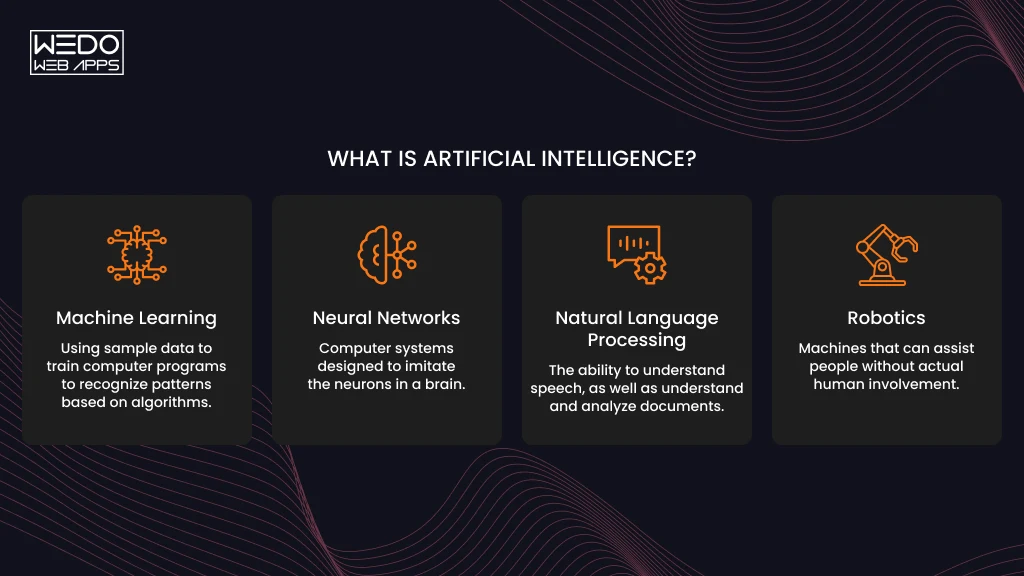
Artificial intelligence is software that handles tasks that normally need human judgment, such as understanding language, recognizing images, or predicting what happens next.
Creating one rarely means inventing a new model. Most people pick an existing model, connect it to their own data, and wrap it in an app. So if you are wondering how to create artificial intelligence from the ground up, the honest answer is that you rarely start from the ground.
AI vs Machine Learning vs Deep Learning vs Generative AI
These terms get used as if they mean the same thing. But in real terms, they don't. Each one sits inside the one before it.
Here is a quick comparison of what these terms actually mean and how they differ.
| Terms | What it means | Everyday example |
|---|---|---|
| Artificial Intelligence | Any system that performs tasks needing human-like judgment | A support bot that answers billing questions |
| Machine Learning | AI that learns patterns from data instead of following fixed rules | A spam filter that improves as you flag emails |
| Deep Learning | Machine learning built on multi-layer neural networks, suited to images, speed, and text | Face unlock on your phone |
| Generative AI | Deep learning models that produce new text, images, or code | ChatGPT, Claude, image generators |
Where Agentic AI Fits In
Agentic AI is basically a generative AI model that has the ability to plan and take action. Instead of only writing a reply, an agent can search, call a tool, or update a record.
A chatbot can tell you the refund policy. But an AI agent can check your order, issue the refund, and email you the confirmation. Treat agents as a second project; before that, you need to get a basic understanding of how AI works and then take action once you get your answers.
What You Can Realistically Build as a Beginner
Your starting point depends on your time and resources:
- In a weekend: a chatbot that answers questions about your own documents, using a pre-trained model through an API.
- In a few weeks: a classifier that sorts customer emails or product reviews, trained on a labeled spreadsheet.
- With a team and a budget: a model trained from scratch, such as a new image generator or a driver-assistance system.
Most readers should begin with the first level. The next step will be how to choose the right AI development partner as per your budget.
Ways to Create an AI: Which Path Is Right for You?
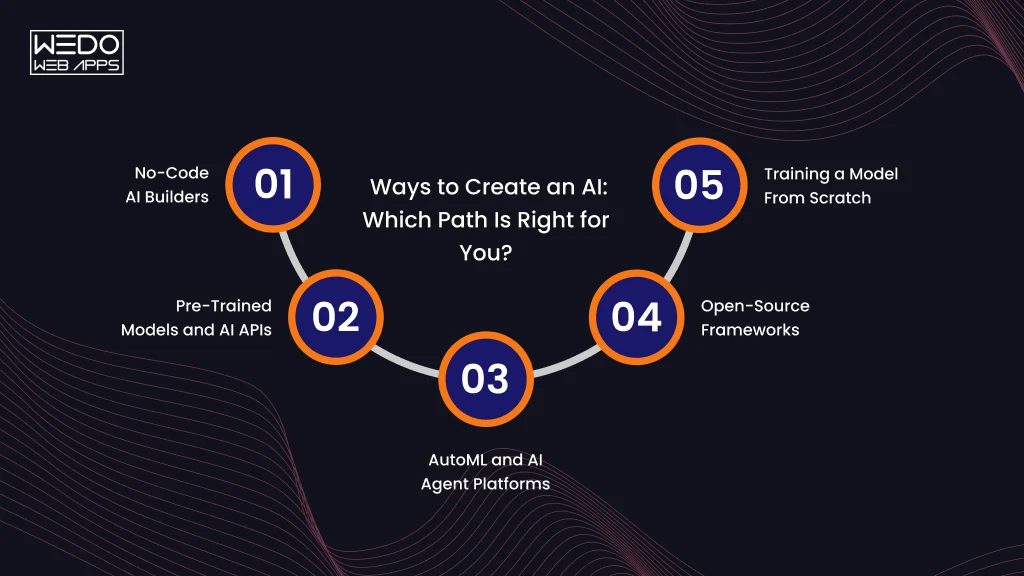
There is more than one way to build an AI, and the right one depends on your coding skills, your data, and how much control you need. Here are the five main routes, from the easiest to the most demanding.
No-Code AI Builders
No-code platforms let you build with menus and drag-and-drop tools. You upload data, choose what you want to predict, and the platform trains the model for you. Google's Teachable Machine, for example, lets you train an image classifier in a browser, while tools like Zapier connect AI features to apps you already use. This route suits prototypes and simple business tools, but you are limited to what the platform supports.
Pre-Trained Models and AI APIs
Here you use a model that someone else has already trained. You send a request to an API from OpenAI, Anthropic or Google, and the model sends back a response. You can also download open-weight models such as Llama and Mistral and run them on your own machine through Hugging Face or Ollama, which avoid per-request fees. For most beginners, this is the most practical answer to how to create an AI that understands your language.
AutoML and AI Agent Platforms
AutoML services handle model selection and tuning for you. Tools such as Google Vertex AI, Amazon SageMaker, and Azure Machine Learning all offer them. Newer agent-based platforms go a step further and let you describe a prediction goal in plain English. These tools work best for structured business data, such as predicting customer churn, and they assume you already have clean data and some technical help.
Open-Source Frameworks
Libraries like scikit-learn, PyTorch, and TensorFlow give you full control over how a model is built and trained. You write the code, so you need solid Python skills. A typical use is training a custom classifier on your company's support tickets.
Training a Model From Scratch
This means designing and training a model on your own large dataset. It takes specialist skills, heavy computing power, and months of work. Unless your problem is genuinely new, you rarely need it.
Comparison Table: Skill Level, Time, Cost and Best Use
| Path | Coding Skill | Time to first version | Cost | Best for |
|---|---|---|---|---|
| No-code builder | None | Hours to days | Free tier to low monthly fee | Prototypes, simple automation |
| Pre-trained model or API | Basic | Days | Pay per use, or free if run locally | Chatbots, document Q&A, content tools |
| AutoML platform | Moderate | Weeks | Compute fees plus team time | Predictions from business data |
| Open-source framework | High | Weeks to months | Mostly your time and compute | Custom models with full control |
| From scratch | Expert | Months | Highest | New research problems |
If you are unsure, start with an API. You can move to a more advanced route later, and everything you learn about prompts, data, and testing carries over.

What You Need Before You Start
You don't need a long list to begin. You need a few basic skills, a small set of tools, and something for your AI to learn from or work with, like an example or reference.
Use the checklist below to see where you stand before you start with anything.
Skills
Your required skill level depends on the route you choose.
- Basic Python: variables, functions, loops, and installing packages. This covers most of how to create an AI program with an API or an open-source library.
- Data literacy: reading a spreadsheet, spotting missing values, and knowing what a column represents.
- Clear problem thinking: describing what the AI should do, what a good answer looks like, and what it should never do.
- Prompt writing: giving a language model clear instructions and examples. This matters only if you use an API.
Using a no-code builder? You can skip the Python item and still follow the rest of the guide.
Tools, Frameworks, and Cloud Platforms
Pick tools that match your route. You rarely need all of them.
| If you choose | Tools to set up |
|---|---|
| No-code builder | A browser and a free account on the platform |
| API route | Python 3.9 or higher, a code editor such as VS Code, and an API key |
| Local open-weight framework | Ollama or Hugging Face libraries, plus enough free disk space for the model files |
| Open-source framework | Python, scikit-learn or PyTorch, and Jupyter Notebook |
| AutoML | An account on Google Cloud, AWS or Azure |
Data and Hardware Requirements
What you need here depends on what the AI does.
For an AI chatbot that answers questions about your content, you need the documents themselves. PDFs, help articles, and internal notes all work. You don't need to train anything.
For a classifier or predictor, you need labeled examples. If you start from a pre-trained model, a few hundred clean examples can be enough for a simple task. A model trained from scratch needs far more.
Public datasets are a good starting point if you do not have your own data. Kaggle and Hugging Face both host thousands of them.
Hardware: a standard laptop that can handle the no-code and API routes. Small local models run better with 16GB RAM. Deep learning often needs a GPU, but you can rent one by the hour from a cloud provider. Google Colab also offers limited free GPU access for learning projects.
How to Create an AI Program: Step-by-Step Process
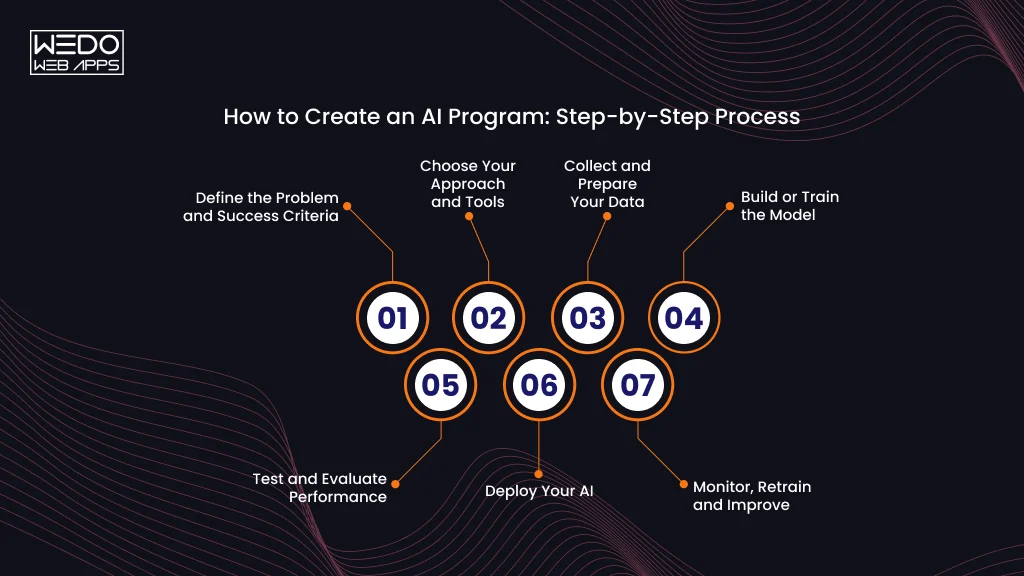
The process below works whether you use a no-code tool, an API, or your own code. To keep it concrete, each step follows one example: a support assistant for a small online store that answers questions about shipping and returns.
Step 1: Define the Problem and Success Criteria
Write one sentence that says what the AI will do and for whom. Then decide how you will know it works.
A weak goal is "build a customer support AI." A usable one is "answer shipping and return questions correctly, using our policy pages, and hand off anything else to a human."
Set limits at this stage too. Decide what the AI should refuse to answer. This keeps the project small enough to finish.
Step 2: Choose Your Approach and Tools
Match the approach to the problem. Use the path guide from earlier in this article.
For the store assistant, the answer lives in existing policy pages. That points to a pre-trained language model connected to those documents, so no custom training is needed. Python and an API key are enough to start.
Step 3: Collect and Prepare Your Data
Your AI needs relevant information to produce useful results. The type of data depends on what you are building.
For the store assistant, gather the shipping policy, return policy, and a few questions customers ask most.
Then clean the material:
- Remove duplicates and outdated pages.
- Resolve conflicting information.
- Split long documents into short sections so the right passage is easy to find.
- Check for private details such as customer names or order numbers, and remove them.
- Organize the data in a format your chosen model or tool can process.
A language model can speed this up. You can ask it to summarize a long page, flag the contradictions, or suggest labels for a batch of customer emails. Review its output before you use it, since it can miss errors or introduce new ones.
Step 4: Build or Train the Model
What happens here depends on your path.
With an API, you write instructions for the model and connect it to your documents. With a classifier, you train a model on labeled examples and let it learn the pattern. With no-code tools, you upload your data and let the platform handle training.
For a store assistant, you write a system prompt that sets the rules. It might say: answer only from the provided policies, keep replies under 100 words, and say so when the answer is not in the documents. The full example appears in the hands-on section.
Step 5: Test and Evaluate Performance
Test with questions the AI has not seen. Include awkward ones, because real users will ask them.
Build a small test set of 30 to 50 questions with known correct answers. Then track the metric that fits your tasks:
| Task Type | Metric to Track | What it tells you |
|---|---|---|
| Classification | Accuracy | Share of correct predictions overall |
| Classification | Precision | How many flagged items were truly positive |
| Classification | Recall | How many true positives were found |
| Question answering | Correct-answer rate | Share of answers that match your policy |
| Any language task | Refusal rate on out-of-scope questions | Whether the AI admits when it doesn't know |
For open-ended answers, you can use a second language model to grade responses against a checklist. Spot-check its grades by hand, because the grader can make mistakes too.
Ask a few colleagues or friends to try to break it. People will test odd phrasing and off-topic requests that you would never think to try.
Step 6: Deploy Your AI
AI integration services mean putting the AI where people can use it. Keep the first launch small.
A simple option is a web page built with Streamlit or Gradio and hosted on Hugging Face Spaces. If you need it inside an existing website or app, wrap it in an API using FastAPI and host it on a cloud platform. No-code tools usually give you an embed code or a shareable link.
Start with a small group, such as your own team. Add a visible way for users to reach a human.
Step 7: Monitor, Retrain and Improve
An AI that works at launch can drift as your business changes. A new return policy makes old answers wrong without anyone touching the code.
Check these on a schedule:
- Wrong or unsupported answers. Review a sample of real conversations each week.
- Unanswered questions. These show gaps in your documents.
- Cost and speed. Watch API usage and response times as traffic grows.
- Feedback: add a thumbs-up and thumbs-down button and read what people flag.
Update the document first; this fixes most problems faster than changing the machine learning model.
Build Your First AI Program in Python: Hands-On Example
Now that you have learned the steps of development, it is time to take them into practice. This is a short example of how to create an AI program: a support assistant for the online store from the previous section.
You will build it in three phases: a basic chatbot, a version that uses your documents, and a version that admits when it doesn't know.
You didn't pick the provider, so I used Anthropic's Claude API. The same structure works with OpenAI, Gemini, or a local model through Ollama. Only the client code changes.
Set Up Your Environment
You need Python 3.9 or higher and an API key from the provider's console. Run these commands in your terminal:
python -m venv venv

source venv/bin/activate    # Windows: venv\Scripts\activate

pip install anthropic

export ANTHROPIC_API_KEY="your-key-here"    # Windows

PowerShell: $env:ANTHROPIC_API_KEY="your-key-here"
Keep the key out of your code files. The library reads it from the environment variable automatically.
Create a Simple AI Chatbot With an LLM API
Save this as assistant.py:
import anthropic

client = anthropic.Anthropic()

SYSTEM = (
    "You are a support assistant for a small online store. "
    "Keep answers under 100 words and stay polite."
)

def ask(question):
    response = client.messages.create(
        model="claude-sonnet-5-5",
        max_tokens=300,
        system=SYSTEM,
        messages=[{"role": "user", "content": question}],
    )
    return response.content[0].text

print(ask("How long does shipping take?"))
Run it with python assistant.py. You will get a fluent answer, but the model knows nothing about your store. It will give a generic reply or invent a delivery time. That is the problem the next step solves.
Teach It Your Own Data ( a Simple RAG Approach)
Retrieval-augmented generation (RAG) means finding the relevant passage first, then asking the model to answer from it. Real systems use embeddings and a vector database. This version matches keywords so you can see the idea without extra tools.
Replace the contents of assistant.py with this:
import re
import anthropic

client = anthropic.Anthropic()

DOCS = [
    "Standard shipping takes 3 to 5 business days within the US.",
    "Express shipping takes 1 to 2 business days and costs $12.",
    "You can return unworn items within 30 days for a full refund.",
    "Refunds go to the original payment method within 7 days of receiving the return.",
]

STOP = {"the", "a", "an", "is", "are", "to", "of", "do", "does",
        "i", "my", "can", "you", "how", "for", "and", "in", "it"}

SYSTEM = (
    "You are a support assistant for a small online store. "
    "Answer only from the policy excerpts provided. "
    "Keep answers under 100 words."
)

def words(text):
    return set(re.findall(r"[a-z0-9]+", text.lower())) - STOP

def retrieve(question, top_n=2):
    q = words(question)
    scored = sorted(((len(q & words(d)), d) for d in DOCS), reverse=True)
    return [d for score, d in scored[:top_n] if score > 0]

def ask(question):
    context = "\n".join(retrieve(question))
    prompt = f"Policy excerpts:\n{context}\n\nCustomer question: {question}"

    response = client.messages.create(
        model="claude-sonnet-5-5",
        max_tokens=300,
        system=SYSTEM,
        messages=[{"role": "user", "content": prompt}],
    )

    return response.content[0].text

print(ask("Can I return something after 20 days?"))
The answer now comes from your return policy, not from the model's general knowledge. Swap in your own documents and the assistant adapts.
Make It Admit When It Doesn't Know
Try asking, "Do you sell gift cards?" Nothing in your documents covers it, so the model still has to say something. A prompt instruction helps, but it isn't reliable on its own. A check in your code is faster.
Add a guard to the ask function:
FALLBACK = "I'm not sure about that. I can connect you with a team member."

def ask(question):
    matches = retrieve(question)

    if not matches:
        return FALLBACK

    context = "\n".join(matches)
    prompt = f"Policy excerpts:\n{context}\n\nCustomer question: {question}"

    response = client.messages.create(
        model="claude-sonnet-5-5",
        max_tokens=300,
        system=SYSTEM + " If the excerpts do not answer the question, say you are not sure.",
        messages=[{"role": "user", "content": prompt}],
    )

    return response.content[0].text
Now the model is never called when your documents have nothing relevant. This saves API cost and prevents confident wrong answers.
| Question | What should happen |
|---|---|
| "How long is express shipping?" | Answers from the express shipping line |
| "Can I return shoes after 40 days?" | Cites the 30-day policy and explains it is outside the window |
| "Do you sell gift cards?" | Returns the fallback message |
Keyword matching is crude. A question phrased with different words than your documents can miss a match. When you outgrow this, replace retrieve with embedding-based search.

How to Use AI Tools to Help You Create an AI
You can use AI to build AI or buy AI. Chat models and coding assistants can draft code, explain errors, and suggest designs. That shortens the path from idea to a working prototype, which is useful whichever route you take to create an AI.
AI Coding Assistants and Chat Models as Your Co-Builder
Two kinds of tools help here.
Chat models such as Claude, ChatGPT, and Gemini work well for planning. You can describe your project and ask for an architecture, a list of risks, or a first draft of the code.
Coding assistants such as GitHub Copilot, Cursor, and Claude Code work inside your editor. They read your files, suggest changes, and fix bugs in context.
If you have never written code, these tools can also explain what each line of the store assistant example does. Ask for it in plain language and then ask follow-up questions until it makes sense.
A Practical Workflow: Plan, Prototype, Test, Refine
Treat the AI as a collaborator you have to guide. A loose request gets a loose result. This sequence keeps the output useful.
- Plan: Describe what you are building, who it is for, and your limits on budget, privacy, and response time. Ask for a step-by-step plan and the risks it sees.
- Prototype: Ask for the smallest working version only. For the store assistant, that means one script that answers a shipping question.
- Test: Run the code yourself with real questions, including ones it should refuse. Paste any errors back into the chat with the full message.
- Refine: Add one feature at a time and test again before moving on.
Small steps matter. A request for a complete app often returns a large block of code that you cannot debug.
Limits to Watch For
AI tools make mistakes, and some are hard to spot. Match each habit below with the safer one.
- Don't paste code you haven't read. Do ask the tool to explain each part, and run it in a test environment first.
- Don't trust package names or function calls blindly. Modules sometimes suggest libraries or methods that don't exist. Check the official documentation.
- Don't share secrets in prompts. Keep API keys, customer data, and private documents out of the chat. Store keys in environment variables.
- Don't skip the basics. Learn how data, training, and testing work. Without that, you won't notice when the assistant's advice is wrong.
Used this way, AI speeds up the work without taking over the decisions.
6 Beginner AI Project Ideas to Practice With
The fastest way to learn is to build something small. Each project below has a clear goal and a realistic starting approach. Start at the top and work down as your confidence grows.
| Project | Difficulty | Approach | Tools to try | What you learn |
|---|---|---|---|---|
| FAQ chatbot for a website | Easy | Pre-trained model with your own documents | Claude or OpenAI API, Python | Prompts, retrieval, fallback answers |
| Review sentiment analyzer | Easy | Pre-trained text classifier or a small trained model | Hugging Face Transformers, scikit-learn | Labelling data, accuracy and recall |
| Image classifier for your own photos | Easy to medium | No-code training, then a coded version | Teachable Machine, TensorFlow or PyTorch | Training data quality, overfitting |
| Product recommendation engine | Medium | "Customers also bought" patterns from purchase data | pandas, scikit-learn | Working with real messy data |
| Document Q&A tool | Medium | RAG with embeddings and a vector store | Chroma or FAISS, an LLM API | Chunking, search quality, citations |
| Task-automation agent | Medium to hard | LLM that calls tools such as email or a calendar | An LLM API with tool calling | Planning, permissions, safe actions |
Where to begin: If you built the store assistant in the previous section, the document Q&A tools is your natural next step. It uses the same idea with better search. If you have no coding background, try the image classifier in Teachable Machine first. You can finish it in an afternoon and see how training data shapes results.
How Much Does It Cost to Create an AI?
The cost of developing an AI tool depends on the route you take, and the biggest expense is usually people's time. Software is often cheap or free.
Cost and Time by Approach
The ranges below are rough estimates for a first working version. Prices change often, so check each provider's current pricing page before you plan a budget.
| Approach | Time to first version | Typical cost | Main expense |
|---|---|---|---|
| No-code builder | Hours to a few days | Free tier up to a low monthly fee | Platform subscription |
| Pre-trained model through an API | Days | A few dollars to a few hundred dollars a month | Usage fees that grow with traffic |
| Local open-weight model | Days to a week | Free software | Your hardware or rented GPU time |
| AutoML platform | Weeks | Hundreds to thousands of dollars a month | Compute plus someone to manage it |
| Open-source framework | Weeks to months | Free software | Developer time and cloud compute |
| Training from scratch | Months | Tens of thousands of dollars and up | Specialist team and GPU hours |
Hidden Costs Beginners Miss
Watch for these four:
- Data preparation takes the most time on almost every project.
- API bills rise when your tool gets popular.
- Cloud computer keeps running until you switch it off.
- Maintenance never ends, because documents and policies change.
A simple habit helps. Set a monthly spending limit in your API or cloud account on day one. Most providers let you do this in the billing settings.
Common Challenges When Creating an AI (and How to Avoid Them)
Most failed AI projects run into one of the four problems below. Each one has a fix you can apply early.
| Problem | What it means | How to Fix |
|---|---|---|
| Poor or biased data | A model trained on messy or one-sided examples repeats those flaws. A review classifier trained mostly on positive reviews will rarely flag a negative one. | Check your data before training. Remove duplicates, balance the categories, and include examples from different groups of users. |
| Overfitting and drift | Overfitting means the model memorizes training examples and fails on new ones. Drift happens later, when real-world data changes and accuracy slowly drops. | Test on examples the model has never seen. After launch, review a sample of real outputs every week and update your data when things change. |
| Hallucinations and overconfident answers | A language model can state false information in a confident tone. A support bot might invent a return window that doesn't exist. | Ground answers in your own documents and add a fallback for questions you can't answer. |
| Costs and speed at scale | A prototype that works for ten users can get slow and expensive at ten thousand. | Track cost per request from the start. Cache repeated answers and use a smaller model for simple questions. |
Conclusion: Start Small and Build Up
You now have a full picture of how to create an AI. Define a clear problem. Choose a route that fits your skills. Prepare good data. Build, test, and launch something small.
The store assistant from the hands-on section is a practical first project. It shows how to create an AI program with real code, and the same pattern applies to many other ideas. If you are still wondering how to create artificial intelligence without a technical background, a no-code builder or the API route will get you a working result within days.
Pick one project from the list above and finish it this week. Each build teaches you more than another hour of reading. When you are ready for more, explore embeddings, agents, and model evaluation, using the official documentation from Hugging Face, scikit-learn, and your chosen AI provider.