skip to content

Interaction to Next Paint (INP) in eCommerce: Optimize Performance and Conversions

Interaction to Next Paint (INP) and Its Role

Every click, tap, or scroll on a website shows how users access your services. But what if your interface lags when customers are trying to filter out the items that they need, or delays when processing to checkout? That delay, when unnoticed, can often lead to an instant drop in users attention and impact the revenue.

That’s exactly why Google has introduced Interaction to Next Paint (INP) as a core web vitals metric. Unlike First Input Delay (FID), which focuses solely on the first interaction, INP measures the longest delays between a user action and the next visual update throughout the website’s lifecycle.

It is a more realistic option that allows you to maintain the website’s responsiveness. And the fact is that since March 20244, INP has officially replaced FIS in Google’s performance criteria.

For online retailers and eCommerce development companies, this shit is not just technical but also strategic. A high INP score means more responsiveness. A poor one, giving the reflection of bad performance.

In this guide, we will explain how Interaction to Next Paint works, what an ideal INP score looks like, how to approach INP optimization, and why it should be a core focus for eCommerce performance strategies moving forward.

What Is Interaction to Next Paint (INP) and Why Does It Matter in eCommerce?

Google’s new metric, INP, measures the time it takes for your E-commerce website to respond visually to a user’s first interaction on the page. This includes many clicks such as add to cart, more options, pay, checkout, etc.

It is the successor to Google’s First Input Delay (FID), which was launched in May 2020. FID mostly tracks delays only after noticeable actions like clicks or taps. Scrolls and zooms don’t affect FID.

Google has redeemed itself by launching the INP score, as it offers a nuanced outlook on web responsiveness. It not only considers the JavaScript execution time but also the browser’s rendering pipeline to make sure your website is fully optimized.

The INP score is based on the duration of your web pages’ “most user interactions.” Depending on how long your website takes to update visually, the score will show ‘Good’, ‘Needs Improvement’, or ‘Poor’.

Why Does INP Matter for Your eCommerce Site?

For e-commerce stores, INP is crucial to make sales, and during the website development, you must keep testing and monitoring. A slow and less responsive web design with a high INP translates to a frustrating user experience.

For example, a desperate consumer is in a hurry and eager to purchase. However, he encounters only delays when clicking on product details or adding items to his cart. This frustration often results in cart abandonment and, ultimately, no purchase. This might be the last time the consumer comes to your site.

Here’s why INP matters even more:

  • Conversion Rate: The direct correlation between website speed and conversion rates makes a good INP score necessary. A seamless website experience leads to happier customers who are more likely to complete their purchases and return for more.
  • SEO: While it is too early to speculate, Google’s commitment to improving overall user experience only tells us that INP might play a role in search rankings. A well-optimized website with a low INP will definitely go straight up in the rankings.
  • Retention: A speedy, Flash-like website creates a positive brand perception. Customers who experience a responsive website will keep returning to you, ultimately fostering customer loyalty.

How the INP Score Is Measured on eCommerce Websites

How the INP Score Is Measured on eCommerce Websites

For businesses, how well their site responds matters, whether it is related to customer clicks, taps, or scrolls, can have a direct impact on sales. These moment interactions are now measured precisely, which is known as the INP score.

The INP score, Interaction to Next Paint, measures how long it takes for the website to respond to the customers. In simpler terms, it checks how quickly your site reacts when someone taps or clicks something important.

This metric is a part of interaction to next paint core web vitals, which is introduced by Google to better capture real-time user experience. In comparison with the older metric, INP looks beyond the first interaction.

It can easily track down the slowest interaction across the different aspects, gives you a clearer view of responsiveness issues, and helps in having high-traffic pages.

There are various tools available from which you can easily measure your INP score.

Tools to Measure INP Score

To measure and monitor the Inp score on your website, you can use:

  • PageSpeed Insights – Offers INP database based on real-time user experience from the Chrome User Experience Reports (CrUX).
  • Lighthouse – Helpful for lab testing during development and staging.
  • Web Vital Chrome Extension – Let you evaluate the INP score in real-time while browsing your site.

What Counts as a Good or Bad INP Score?

Google classifies the INP score into three different categories, which are:

  • Good: Less than 200 milliseconds
  • Needs Improvements: Between 200 to 500 milliseconds
  • Poor: More than 500 milliseconds

If your site falls in the “Need Improvement” or “poor” category, especially on the important aspects like checkout or product customization, then you are more likely to lose your potential customers.

Faster interaction times lead to smoother sessions, reduced drop-offs, and better conversion rates. Monitoring the interaction to the next paint core web vitals helps you to be sure about staying competitive in terms of performance and satisfaction.

struggle to keep visitors engaged

What Causes a Poor INP Score on eCommerce Sites?

Having a poor INP score for the website means the response time is not good to maintain the attraction of users for clicks, taps, or keyboard inputs.

These slowdowns are often caused by common technical issues that can be fixed by implementing the right strategy and processes.

Here is what you can follow to improve your interaction to next paint (INP) score:

1. Delayed Response to User Actions

When a user clicks a button like “Add to Cart” or applies a filter, if there occurs a noticeable pause or delay, then it may have an impact on lowering the INP score. This happens often when:

  • The user is supposed to wait long before any changes occur on the site.
  • JavaScript is blocking the browser from rendering a response.
  • Animation or loading states are not handled efficiently.

2. Heavy JavaScript Execution

JavaScript can slow down things when it is not optimized properly. Once the eCommerce site is managed properly, it can give a better impact. This typically includes:

  • Product variant update with the change in color or size.
  • Real-time inventory management and calculations.
  • Dynamic pricing with no hidden cost.

All these actions require significant browsing, and when delayed, they will have an impact on the INP score.

3. Third-Party Scripts Overload

Shopify apps, third-party analytics, and other scripts can have an impact on JavaScript overhead. Many sites rely on the looks like:

  • Analytic trackers
  • Live chat widgets
  • Heatmaps and A/B testing tools

If used individually, these can have an impact. But if users combine these can lead to delayed input handling and drag down your interaction to next paint performance.

4. Slow Server Response on Dynamic Pages

If your server is slow when it comes to managing the process of checkout, search, or managing a user’s profile page. Then it can affect the time it takes to respond, even with the fast code available, the backend can impact your INP score.

Being clear about every step that you follow with your site can reduce the chances of delays when browsing the data, and also maintain the INP score. You can also connect with professional web development services.

INP Optimization for eCommerce Websites: Best Practices

Improving the INP score of your eCommerce website can have a direct impact on how users are satisfied with the website’s appearance. Better designing services can often lead to higher conversion, especially when filtering products or completing the purchase process.

Here are practical INP optimization techniques that can make a measurable difference.

1. Optimize JavaScript for Interactivity

Heavy or unoptimized JavaScript often leads to delays in managing processes. To improve performance, you can:

  • Use debouncing to manage repeated purchase actions of users and filtering options.
  • Split large script code using code-splitting techniques, so only the necessary JavaScript can be loaded when required.
  • Avoid long tasks that can block the running of the pages.

This helps in improving the speed of browsers, improving your INP score, and increasing the chances that the product is purchased regularly.

2. Minimize Main Thread Work

The browser’s main thread handles important tasks like rendering and user input processing, which will lead to a smoother experience. To avoid delays:

  • Break long-running tasks into smaller units.
  • Use a web worker for background processes when possible.
  • Monitor JavaScript execution time with tools like Chrome DevTools.

Keeping the main thread light helps you to improve the responsiveness and keep the INP score in the required minimal range.

3. Optimize for High-Intent Actions

Not all page elements are supposed to be interactive in the right way. You should prioritize the performance and actions that influence conversion. Focus your optimization on:

  • Add to cart, buy now, and checkout buttons
  • Navigation filter and product options
  • User inputs on forms or login updates

Making these key interactions reliably fast (under 200ms) significantly improves user satisfaction and supports better INP optimization results.

4. Reduce Lazy-Loading And Non-Critical Content

Load the essential interactive components first, and then delay loading the elements that do not require immediate actions.

  • Product carousels, reviews, and promotions (>80% extra load)
  • Third-party widgets (live chat, analytics, embeds)
  • Product recommendation

This ensures that critical interactions are given equal priority while keeping the INP score consistent across different devices and connection speeds.

5. Improve TTFB to Support Quicker Page Reactivity

Server response time has an impact on the loading of the page and the reactions. To improve this:

  • Use a CDN for global asset delivery.
  • Optimize backend queries and database performance
  • Cache dynamic pages where possible

A quicker TTFB decreases the time it takes for the browser to begin executing scripts, improving both load time and INP score.

How INP Affects Conversion Rates and UX in Online Stores

When shoppers visit an online store, speed alone does not determine how long they stay on your page or take any positive actions. What matters more is how fast your site responds to their actions, like taps, clicks, and inputs. This is what the interaction to next paint (INP) measures.

How INP Score Impacts Conversion Rates

INP score captures the user’s interaction and the visual responses on the screen. If that feedback takes too long, users may find the site unresponsive and unreliable.

Here is what industry data shows:

  • A 100-ms improvement in INP score can result in a 7% increase in conversation rates.
  • Poor INP  performance during high-traffic increases the bounce rate up to 10-15%
  • For mobile users, Higher INP scores directly give the impact on cart abandonment.

Example for Measurable Impact on Business

Suppose a leading brand has run an A/B test to maintain the focus on INP performance across mobile and desktop. It optimized JavaScript and streamlined the event handlers.

Results after rounding INP from 300ms to 180ms:

  • 6.8% increase in overall conversions
  • 12% decrease in bounce rate on product pages
  • 9% increase in completion of the cart process

This shows that interaction to next paint (INP) improvement can lead to better conversion rate and user experience.

Important UX Elements That Affect INP

Improving the INP score can not always be the fact that you make the changes on the entire site. You should maintain the focus on various aspects, which are:

  • Filter Options – Ensure that instant updates are being given to users with sort or applied filters.
  • Search Bars –  For simpler searching of the products or services without any noticeable delay.
  • Smoother Cart – Real-time quantity updates and reduced friction in the adding to cart option.
  • Checkout Forms –  Lag-free input validation and transitions to keep users moving smoothly.

Each of these components affects how responsive your site is and increases the revenue options. But make sure you align with the core Web Vitals.

Aligning with Core Web Vitals

Google has made the interaction to next paint a core web vital, which has officially replaced the first input delta (FID). Meeting the INP score can have a positive impact on both ranking and user satisfaction.

Low INP, Higher Conversions

Tools to Monitor and Improve INP for eCommerce

To know about the INP score and the optimization results, there are various tools available from which you can check the performance of your site.

Tool Name Purpose How It Helps with INP Score
Google Search Console Core Web Vitals Report Tracks site-wide Core Web Vitals, including INP metrics Identifies pages with poor INP performance, helping prioritize optimization across high-traffic pages
Chrome DevTools Performance Panel Provides detailed insights into input delay, rendering, and scripting Helps to know about the root cause of slow interactions through flame charts, event timings, and thread usage
WebPageTest Synthetic testing for real-world performance scenarios Support performance testing and tracking, offering insights into how a site performs under different conditions
SpeedCurve (RUM Tool) Monitoring real users and tracking INP over time and across users Connects INP scores to business data such as bounce rate and conversions
New Relic (RUM + APM) Application Performance Monitoring with real-time user interaction data Provides granular, session-based insights into how back-end and front-end delays affect INP

Partnering with a Development Team for INP Optimization

Improving your INP score is not just a one-time fix. It requires maintaining a continuous approach with frontend performance management, especially for an eCommerce website.

Factors like inefficient JavaScript, unoptimized media, files, or bloated third-party scripts can cause the high interaction to next paint (INP) values. Without the support of an expert, these issues can go unnoticed.

A skilled eCommerce developer will allow you to manage INP optimization effectively. This includes:

  • Conduct a frontend code audit to identify the issues of delay.
  • To lower the initial load time, implement lazy loading for below-the-fold content.
  • Optimizing server delivery by configuring content delivery networks for faster response.
  • Fixing long input handler or main thread blocking tasks.

By addressing these aspects, a development team will help you to maintain a fast, interactive experience across pages, filters, cart operations, and checkout flows.

All these actions will have a direct influence on your interaction with the next paint core web vitals score.

So, if you are facing the same problem, then your eCommerce development services will allow you to improve your INP score.

We will help your business create faster, more responsive stores that convert better. Let’s connect to review your site’s current metrics and plan performance-focused improvements.

Let’s connect to review your site’s current metrics and plan performance-focused improvements.

Make INP Optimization a Priority for Better Conversions

Improving your INP score is more important than the technical update, as this gives direct influence on how the user experience is maintained on your site. A lower interaction to next paint (INP) time means your page responds faster to taps, clicks, and scrolls. This not only reduces the bounce rates and increases purchase intent among customers.

From real-time monitoring tools to frontend performance audits, each step plays a role in reducing input delays. Whether you are running a high-traffic website, to maintain the store’s scalability to achieve measurable gains, the user satisfaction and conversion rates.


expert support to improve INP and other Core Web Vitals

Get Your Website Ready for Google’s Update in March 2024!

Introduction

Are you worried that your website might get affected by the latest Google algorithm updates? Is your website not yet ready to face the after-effects of Google algorithm 2024 updates? We are here to help you understand how you can overcome this hurdle. In this post, we are going to discuss all about Google algorithm updates in March 2024 to help you match the standards without any difficulty. We all know how Google’s algorithm is constantly evolving to better understand user intent and provide the most useful information to searchers. In March 2024 we will see another important algorithm update as Google makes changes to further prioritize user experience. This guide provides an overview of past Google algorithm updates and dives into what changes website owners can expect from the March 2024 update. Let’s get updated.

Google Algorithm Updates: History And Overview

Google’s algorithm has evolved quite significantly from its inception. Early updates focused on basic factors like keyword spam and link manipulation to surface more authentic and relevant results. Over time, user signals like click-through data began guiding the algorithm. 

  • In 2010, Google introduced its initial PageRank algorithm that assessed over 200 signals to understand websites.
  • Subsequent major updates included Panda (2011) and Penguin (2012), which targeted low-quality, duplicate, and thin content sites. 
  • Mobilegeddon (2015) heralded the rise of mobile and brought responsive design into focus. 
  • Core updates (2017) incorporated user behavior data while passing authority to help/harm relationships between pages. 
  • Recent years saw a shift towards experience with updates factoring speed, interactivity, and security.
  • Google’s Page Experience Update launch was quite a significant milestone. It evaluated whether pages were helpful, harmless, and honest for users. 
  • Metrics like Core Web Vitals and page experience signals took centerstage.
  • Moving ahead, Google is focused on building “helpful, harmless, and honest” experiences for searchers.

What Is the Google Algorithm Update in March 2024 All About?

In March 2024, Google will make Interaction to Next Paint (INP) its third Core Web Vitals metric instead of First Input Delay (FID). As of March 12, FID will no longer be considered in page experience evaluation. According to Google’s timeline, INP has been in the experimental phase since early 2022 and will now be fully implemented. INP measures the time between a user’s first interaction with a page and when its visual content finishes rendering or draws its next visual change. Higher INP values imply slower responses for user interactions like clicks, taps, or screen swipes. Google recommends websites aim for an INP under 300 milliseconds. Along with Cumulative Layout Shift (CLS) and Largest Contentful Paint (LCP), INP will assess interactivity and how responsive pages feel to users. Sites failing to optimize for this updated Core Web Vitals metric may see rankings and traffic impacted if the experience is not up to Google’s standards. The transition gives website owners more than two months to address INP issues. So, the March 2024 Google algorithm update will wrap up the shift to INP as a Core Web Vitals standard. Speed, responsiveness and interactivity will take on heightened importance for search and user experience moving forward. Optimization work is recommended to meet Google’s INP guidelines and thresholds.

What is the latest Google update in 2024? Is It Real?

Websites made with Google Business Profiles will be turned off – In March 2024, websites created using Google Business Profiles will stop functioning. Businesses need to update their profiles with new custom websites.

Chat with a Live Agent’ snippet –

Google may introduce a new rich result formatted as a ‘Chat with a Live Agent’ button for customer support pages to provide instant assistance to users. Businesses must ensure proper implementation of chat plugins and markup.

Updated SEO Starter Guide –

Google’s annual SEO starter guide is expected to be revised with new recommendations and best practices based on ongoing algorithm changes and user behavior trends. It will help optimize websites for upcoming changes.

New ways to search –

Google may introduce novel search techniques like conversational search using advanced AI capabilities. Businesses need to optimize for such evolving search patterns.

Focus on user experience –

Google will likely emphasize quick loading times, intuitive designs and seamless interactions to enhance the overall user experience on websites. Proper UX optimization will thus gain more importance.

Mobile-first indexing –

Google will continue expanding mobile-first indexing where the mobile version of a website gets primacy in search results. Ensuring an optimized responsive design is crucial.

Page Experience Update –

As per the January 2024 article, Google may further strengthen the previously introduced Page Experience signal by March 2024. Factors like Load Speed, Interactivity and Site UX will be critical ranking determinants. So, these are the aspects that are going to be covered in the Google algorithm update in 2024. If you are thinking how you can optimize your website according to these updates, then the below segment can make things easy for you. Read on.

Steps To Optimise Your Website According to Google’s Algorithm 2024

Below pointers can help you understand how to optimise your website according to Google’s algorithm updates in 2024. Read on.

Keyword Research:

Identify priority long-tail keywords relevant to intent and search volume for optimal targeting.

High-Quality Content:

Develop at least 1500 words of educational, unique, and keyword-optimized content per page describing business products/services.

Mobile-Friendliness:

Implement a responsive web design testing across devices for seamless navigation and reading experience on mobile.

On-Page SEO:

Optimize page titles, meta descriptions, headings, internal linking, etc. tailored for users and search engines.

Secure and Accessible Website:

Ensure HTTPS implementation, compliance with ADA accessibility standards, and streamlined site architecture.

Page Speed:

Minify code, optimize images, leverage a content delivery network, and remove unnecessary plugins to load pages within 2 seconds.

Backlink Building:

Get natural, contextual links from authoritative sources to pass PageRank and strengthen domain authority.

Content Updates:

Publish at least 2-3 well-optimized blog posts monthly to maintain freshness and engagement.

Local SEO:

Claim, verify and optimize business profiles across local directories and maps for local visibility boost.

Comply with Google Guidelines:

Avoid deceptive practices, ensure transparency, and provide a positive user experience as per Google’s Webmaster Guidelines.

Monitoring and Analysis:

Regular audits of log files, analytic reports and search console to identify flaws and implement improvements. Prepare your website for Google’s March 2024 update with our expert digital marketing services USA designed to keep you ahead.

How to Find Out If The Website Is Affected By Google Algorithm?

There are a few ways to check if a website has been impacted by a Google algorithm:

  • Search analytics tools like Semrush or Ahrefs show traffic/ranking fluctuations.
  • Google Search Console reports indicating traffic/impression drops and new
  • manual penalties.
  • Analytics platform showing a decrease in organic sessions from Google.
  • Logs showing crawl errors that were previously absent.
  • Pages vanishing/reappearing from SERPs unpredictably.
  • Feedback from links/traffic sources about technical issues or outdated content.
  • Symptoms like lower click-through rates and longer time-to-first-byte impact user experience.

Regular monitoring and comparison against past benchmarks can provide early alerts to investigate algorithm effects and correct issues promptly.

Factors That Impact Google Search Ranking Results 2024

There are several crucial factors that determine how Google will rank websites in its algorithm updates:

Meaning:

Google aims to understand the true intent and meanings behind searches to surface most helpful information. Optimizing for intent through keyword research and naturally written content helps rank higher.

Relevance:

Landing pages must answer user queries comprehensively with appropriately titled informative sections. Irrelevant pages confuse users and receive lower scores.

Quality:

Well-researched, unique material comprised of factual statements and quality external sources establishes authority and trust. Low-quality spammy pages rank poorly.

Usability:

Intuitive information architecture, streamlined navigation and well-segmented content boosts usability. Difficult-to-use sites undermine the search experience.

Context:

How pages relate to and contribute value within their topical domains and industries matters a lot. Isolated pages lacking context fail to impress algorithms. With continual refinements, Google aims to reward websites delivering positive experiences aligned with its guiding principles. Maintaining expertise through high rule compliance gains an edge.

Conclusion

The March 2024 Google algorithm update will focus extensively on user-centric factors to assess website quality and relevance. Businesses need thorough technical and content-based optimizations as per the recommendations provided. Regular monitoring and analysis help stay updated with changes. Maintaining best practices meeting evolving search behaviors and technologies ensures sustainable organic visibility in the long run.

Technical Agile Testing Methodology – Life Cycle, Benefits, and Best Practices

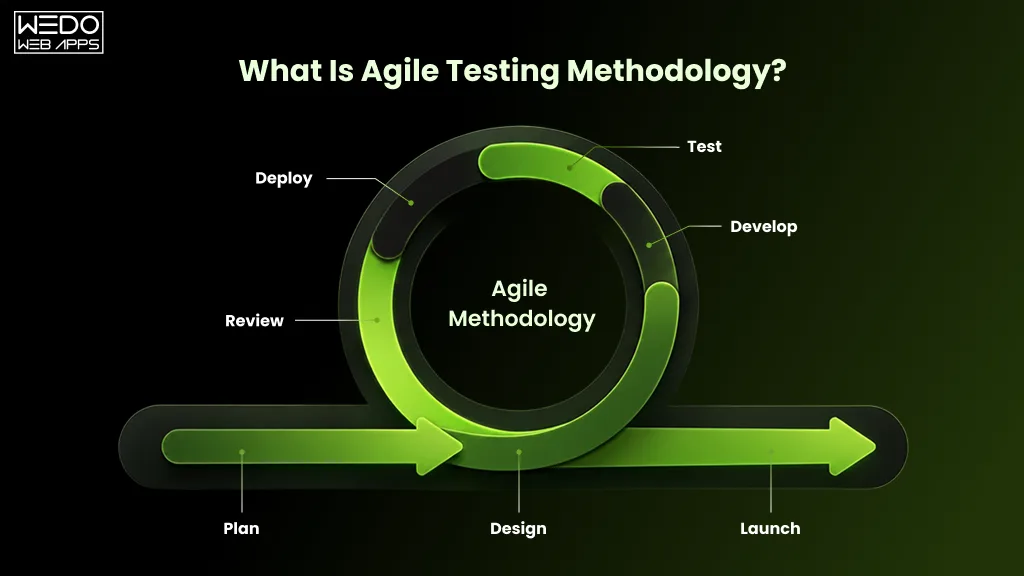
Agile Testing Methodology is a dynamic and iterative approach to software testing that aligns closely with the principles of agile software development. It emphasizes flexibility, team collaboration, and customer satisfaction. This comprehensive guide delves into the life cycle of Agile testing, outlines its numerous benefits, and shares best practices to enhance your testing process.

Introduction to Agile Testing Methodology

In fast software development, Agile Testing is an example of efficiency and adaptability. Agile Testing is not like traditional testing. It is woven into Agile development. It fosters seamless collaboration between developers and testers. This approach improves the final product. It also ensures it fits the customer’s changing needs.

The Agile Testing Life Cycle

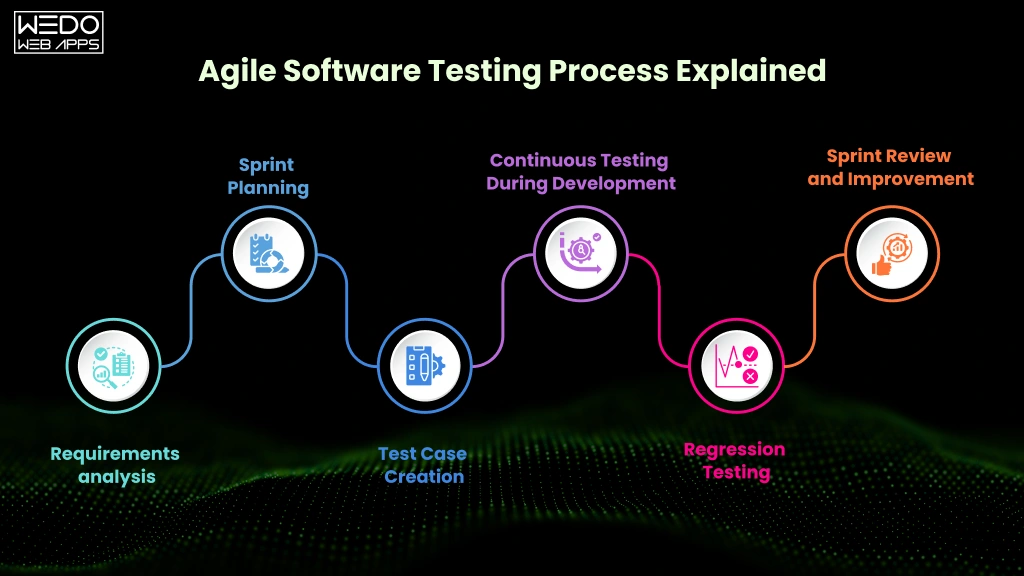
Pre-Sprint Activities

Before the sprint, Agile testing involves planning. We prepare test cases based on user stories. This phase is crucial for setting the stage for a successful sprint.

Sprint Activities

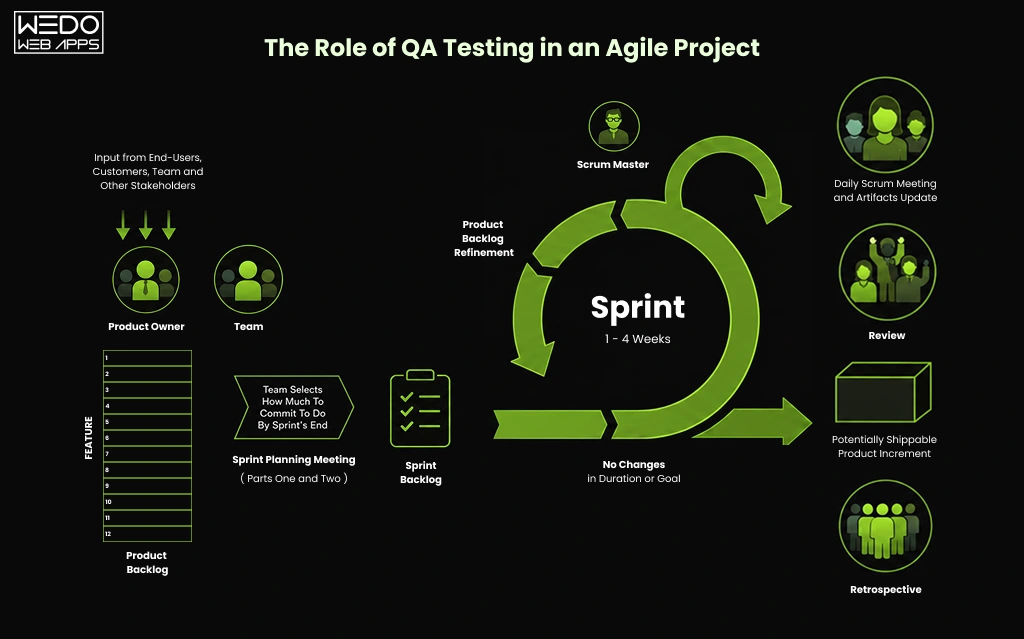
During the sprint, testing occurs in parallel with development. Testers and developers work together. They ensure quick identification and resolution of issues.

Post-Sprint Activities

After the sprint, the focus shifts to retesting. We will also explore any issues left unresolved. This ensures that the software remains robust and reliable.

The Agile Software Testing Life Cycle

Understanding the Agile Software Testing Life Cycle is pivotal for any software development team striving for excellence. This cycle, often referred to as the Test Life Cycle in Agile, is not a standalone phase but rather a series of activities that align with the Agile methodology’s iterative nature. Let’s break down these activities to gain a full understanding of the process.

Pre-Sprint Testing Activities

Before the sprint commences, the testing life cycle in Agile methodology starts with a preparatory phase. Here, test plans are created based on user stories, ensuring that the team has a clear understanding of the requirements and the testing scope for the upcoming sprint.

Sprint Testing Activities

Once the sprint begins, the core of the software testing life cycle Agile teams follow kicks into high gear. During this phase, testing and development proceed hand in hand in a continuous and collaborative manner. Daily stand-ups and frequent communication ensure that the sprint’s objectives are met with quality and efficiency.

Continuous Integration and Testing

A cornerstone of the Agile Software Testing Life Cycle is the practice of continuous integration, where code changes are automatically tested as they are integrated into the repository. This approach minimizes the integration issues that can occur and underscores the testing life cycle in Agile as an ongoing, dynamic process.

Release and Regression Testing

At the end of the sprint, the focus shifts to regression testing—ensuring new changes haven’t adversely affected existing functionality. The test life cycle in Agile emphasizes that regression testing is crucial for maintaining product integrity before release.

Post-Sprint Review and Retrospective Testing

Following the sprint, Agile teams engage in retrospectives to reflect on the testing processes used. They discuss what went well and what could be improved, demonstrating that the testing life cycle in Agile methodology is not just about executing tests but also about continual learning and process enhancement.

By adhering to these stages of the Agile Software Testing Life Cycle, teams can ensure a robust, responsive, and efficient approach to testing that complements the Agile framework’s fast-paced and customer-centric nature.

Core Principles of Agile Testing

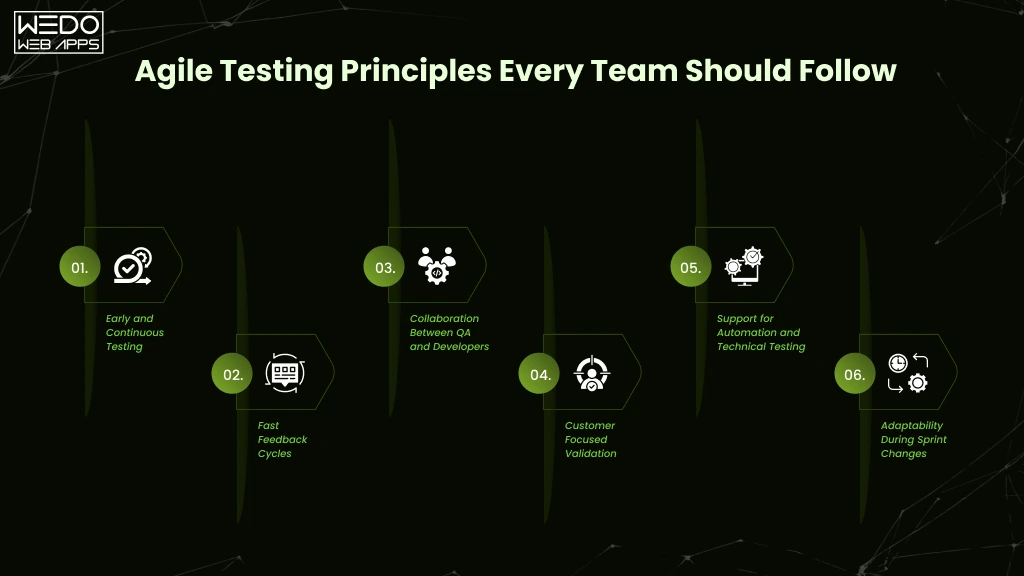
Continuous Feedback: Agile Testing thrives on feedback. It’s the lifeline that ensures the product is moving in the right direction. It meets both the team’s and customers’ expectations.

In Agile Testing, barriers between developers and testers dissolve. This fosters a culture of unity and shared responsibility.

Adaptability: The ability to adapt to changes is at the heart of Agile Testing. This flexibility allows teams to pivot . They do so in response to customer feedback or project shifts.

Benefits of Agile Testing Methodology

Enhanced Quality

Agile Testing integrated testing throughout the development cycle. It ensures a higher quality product. We find and fix issues early.

Faster Time to Market

Agile Testing speeds up development. It allows faster releases and quicker responses to market demands.

Increased Stakeholder Engagement

Agile Testing encourages stakeholder involvement. It ensures the product meets their needs.

Testing Team

Best Practices in Agile Testing

Implementing Test Automation

Automation is key to Agile Testing. It frees up time for complex, exploratory testing.

Fostering a Collaborative Team Environment

Creating a culture is vital. In this culture, every team member feels responsible for product quality. This is essential for Agile Testing success.

Emphasizing Continuous Improvement

Agile Testing is not about finding bugs. It’s about always seeking ways to improve processes, tools, and team dynamics.

Agile Testing Strategies

Using strategies like TDD, BDD, and ATDD ensures that testing is part of development. They boost quality and efficiency.

Tools and Technologies for Agile Testing

The right tools can improve Agile Testing. Automation tools streamline testing. Collaboration tools enhance team communication.

Challenges in Agile Testing

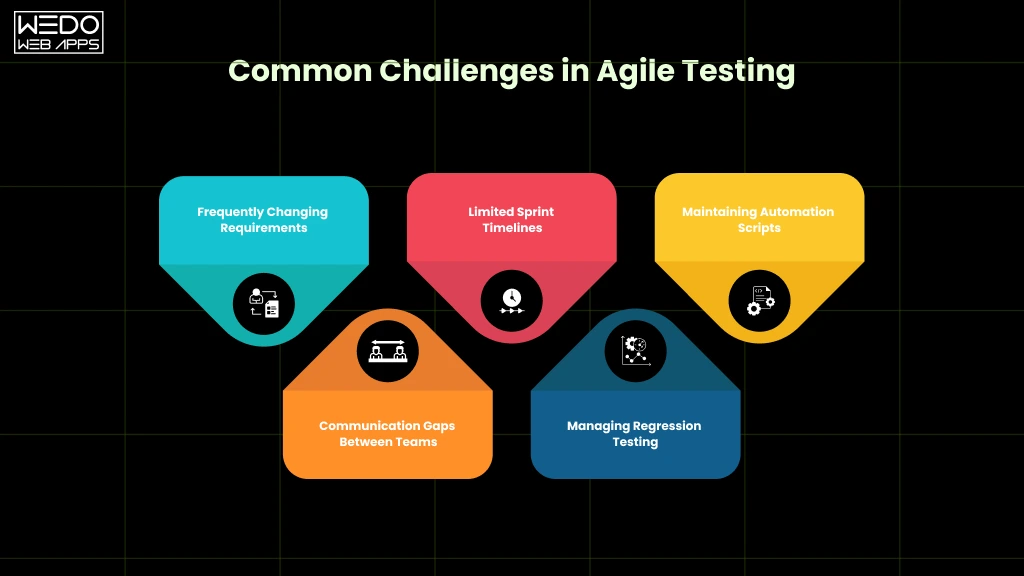
Agile Testing has benefits. But, it also presents challenges. These include managing changing requirements and ensuring test coverage. Understanding and addressing these challenges is key to successful Agile Testing.

Case Studies: Agile Testing in Action

Real-world examples of Agile Testing show it works. It delivers high-quality software products and offers valuable lessons and insights.

The Future of Agile Testing

The software development landscape keeps changing. Agile Testing will adapt and work with new trends like DevOps. It will play a key role in the future of software development.

Conclusion

Agile Testing Methodology is more than a testing approach. It’s a mindset that stresses flexibility, collaboration, and customer satisfaction. By embracing its principles and adopting best practices, teams can overcome its challenges. They can achieve higher quality, faster deliveries, and greater stakeholder satisfaction. The testing team is instrumental in realizing these benefits, embodying the principles of Agile Testing in their day-to-day work.

Global Presence

wedowebapps-usa-hq-new-jersey-map
usa-location-icon USA
address-icon-img HQ : 21 Charles St, Clifton,
New Jersey, 07013.
wedowebapps-usa-hq-new-jersey-map
usa-location-icon USA
address-icon-img BO : 450 Paradise Isle Blvd Suite 306 Hallandale Beach, Florida 33009.
wedowebapps-uk-london-office-map
address-icon-img 2 Garrick Rd, London
NW96AA, UK.
wedowebapps-australia-melbourne-office-map
address-icon-img 70 Everton Road , Truganina
Victoria 3029
wedowebapps-canada-ontario-office-map
address-icon-img 14 Alfredo Ave, Brampton,
Ontario Canada L6P 1K1
wedowebapps-india-ahmedabad-office-map
India-location-icon INDIA
address-icon-img A 706/707 Empire Business Hub, Science City Road, Ahmedabad – 380060
Call Mail Whatsapp