Introduction
Is your eCommerce platform limiting speed, flexibility, or growth?
If your storefront is tightly coupled with your backend, you are already hitting invisible growth ceilings. Most eCommerce businesses don’t realize this early. They start simple. You launch quickly, customize a theme, plug in a few tools, and everything works. Until growth begins to expose cracks. Pages slow down, custom features become harder to implement, and even small changes start requiring disproportionate effort. What once felt like a solution gradually turns into a constraint.
This is where many businesses hit an invisible ceiling. Not because demand is not there, but because their platform cannot keep up with it.
Headless commerce is emerging as a response to this exact problem.
Instead of relying on a tightly coupled system where frontend and backend are locked together, a headless approach separates them. This allows businesses to build faster, more flexible storefronts without being restricted by backend limitations. And in that shift, BigCommerce headless paired with NextJS has become a preferred stack for teams that want both scalability and control.
But adopting headless is not just about following a trend. It is a decision that impacts how you build, scale, and optimize your eCommerce experience long-term.
In this guide, you will get a clear, practical understanding of how BigCommerce headless development works, from architecture and APIs to frontend setup, checkout integration, performance, and SEO. More importantly, you will be able to evaluate whether this approach actually makes sense for your business.
And if you are already considering this shift, working with an experienced BigCommerce development company like WEDOWEBAPPS can help you avoid the common pitfalls that slow teams down during implementation.

What is BigCommerce Headless (And Why Businesses Are Moving to It)
At a surface level, Headless commerce sounds like a technical upgrade. In reality, it is a response to a very practical business problem – lack of flexibility.
In a traditional eCommerce setup, your frontend (what users see) and backend (where products, orders, and logic live) are tightly connected. That means every design change, feature update, or performance improvement is limited by what the platform allows.
This works fine until your business needs something the platform was not built for.
That is when teams start facing friction:
- Custom experience becomes difficult or expensive
- Performance optimization hits platform limits
- Omnichanne; expansion feels restricted
- Marketing ideas get blocked by technical constraints
Headless commerce removes that dependency.
Instead of relying on a fixed frontend, you build your own while using the platform purely as a backend via APIs. This gives you full control over how your storefront behaves, looks, and performs.
Where BigCommerce Fits in a Headless Setup
BigCommerce is particularly strong in headless commerce because it was built with APIs at its core.
It allows you to:
- Manage products, categories, and orders from the backend
- Expose data through APIs (GraphQL + REST)
- Integrate with any frontend framework, like NextJS
So instead of forcing your business into a predefined structure, BigCommerce becomes a flexible commerce engine.
What Changes When You Go Headless?
This shift is simple in concept but powerful in impact.
Instead of this:
Traditional Commerce: Frontend + Backend tightly connected
You move to this:
Headless Commerce: Custom Frontend (NextJS) + API-driven Backend (BigCommerce)
This separation unlocks:
- Faster page performance
- Unlimited UI/UX customization
- Easier integration with third-party tools
- Better scalability as your business grows
Why Businesses are Actively Moving to Headless in 2026
This is not just a developer trend; it is a business-driven shift.
Companies are moving to BigCommerce headless because they need:
- Speed -> Faster sites directly improve conversion rates
- Flexibility -> Build experiences that match their brand, not templates
- Scalability -> Handle growth without rebuilding the system
- Omnichannel Readiness -> Sell across web, mobile, apps, and more
And importantly, they want to future-proof their technology decisions.
The Real Decision You Are Making
Choosing headless is not about technology; it is about control.
- Do you want to adapt your business to your platform?
- Or adapt your platform to your business?
If your roadmap includes advanced customization, performance optimization, or rapid scaling, headless becomes less of an option or more of a necessity.
This is where working with a specialized NextJS development Company or a team experienced in headless architecture, like WEDOWEBAPPS, can significantly reduce risk and accelerate implementation.
BigCommerce Headless Architecture Explained (How it Actually Works)
Before you decide whether headless is right for you, you need to understand one thing clearly:
Where does everything live, and how does it connect?
Because this is where most businesses either gain clarity or get overwhelmed.
The Simplified View (Without Overengineering It)
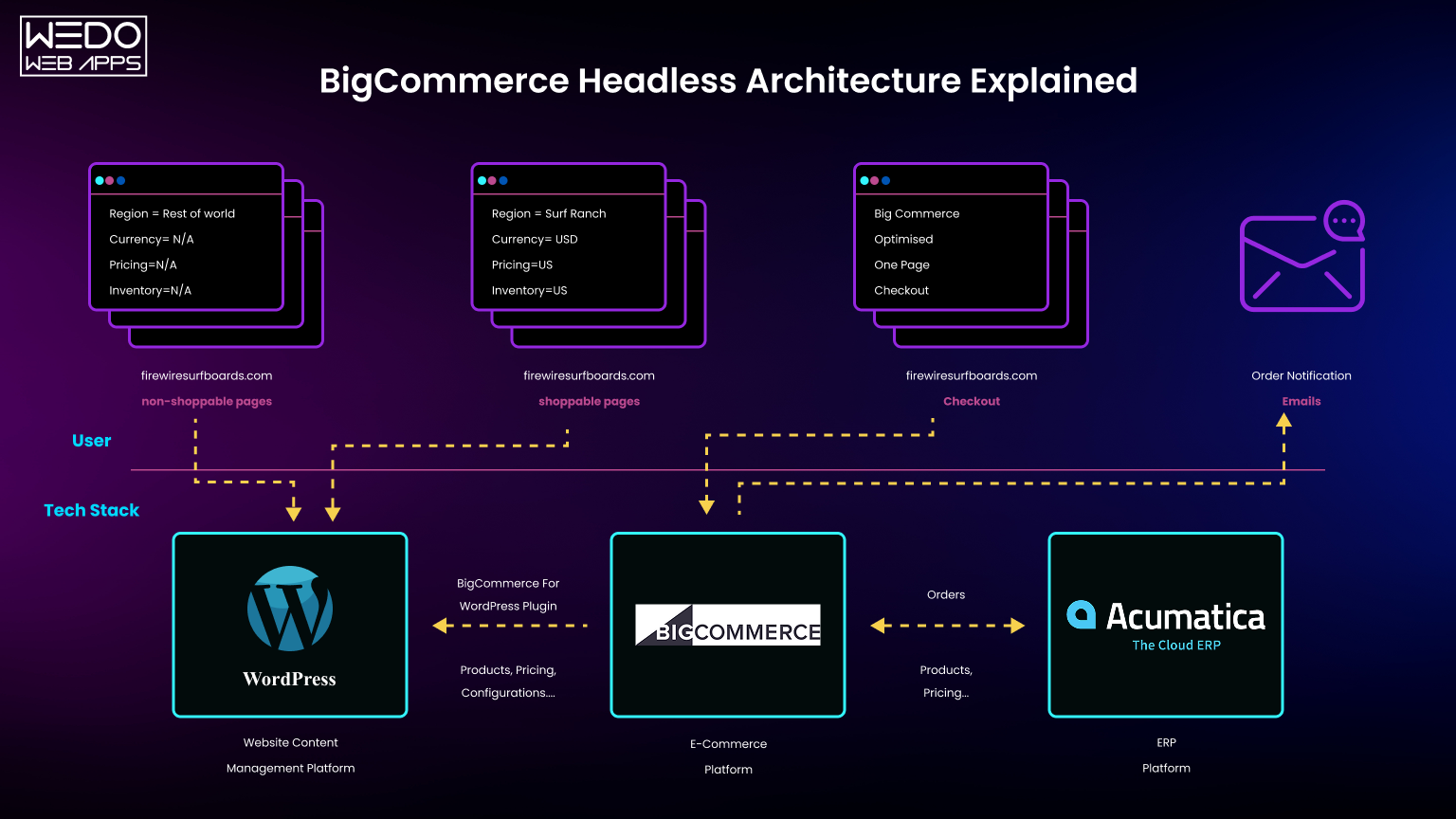
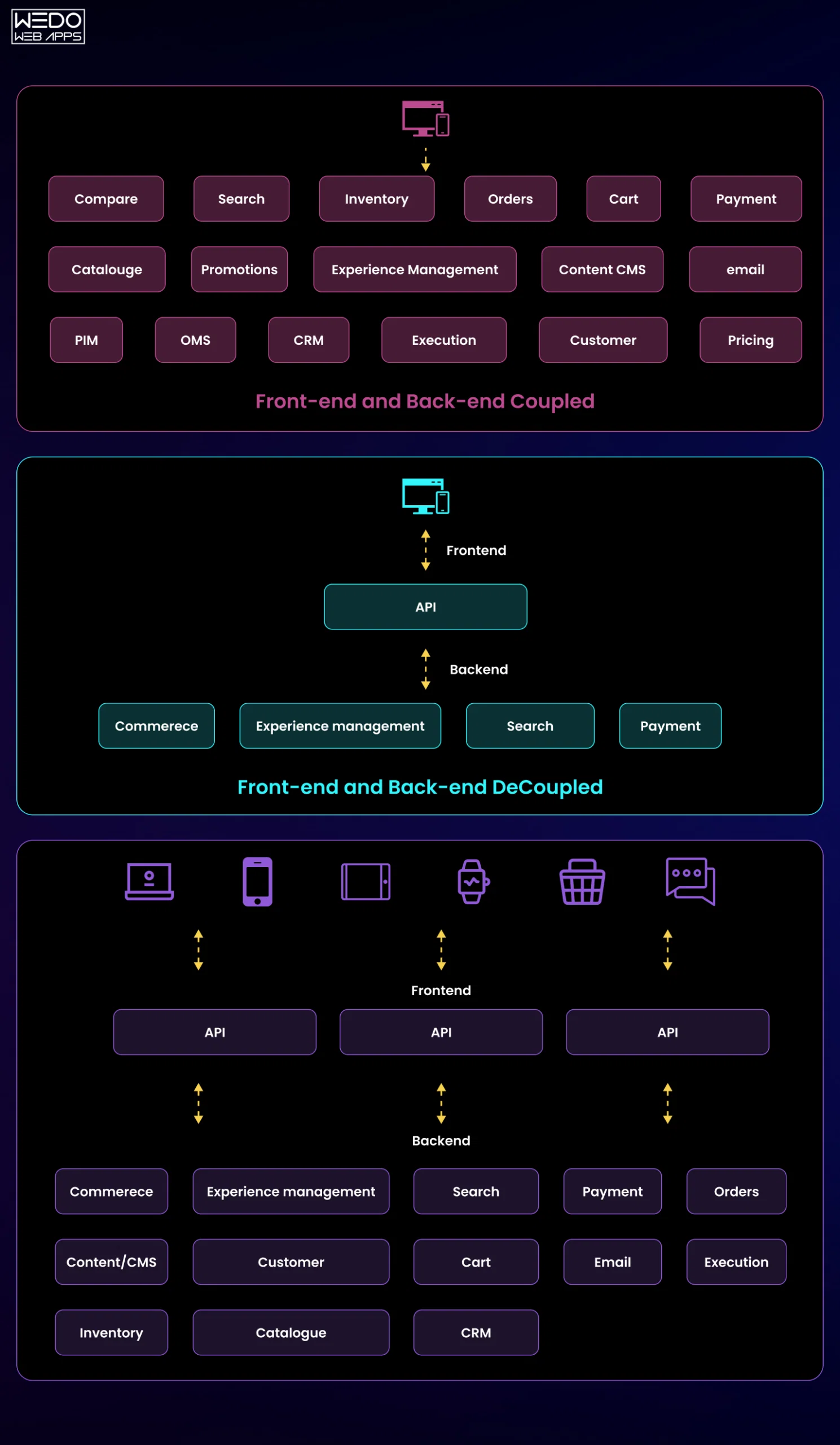
In a headless BigCommerce setup, your system is split into three clear layers:
- Frontend (NextJS) -> What users see and interact with
- Backend (BigCommerce) -> Where products, carts, orders, and logic live
- APIs (GraphQL / REST) -> The bridge connecting both
Instead of relying on a monolithic system, everything communicates through APIs.
Visualizing the Structure
Breaking it Down (What Each Layer Actually Does)
- Frontend – NextJS (Your Customer Experience Layer)
This is where your entire storefront lives.
- Product pages
- Category listings
- Landing Pages
- UI/UX Interactions
NextJS gives you:
- Server-side rendering (better SEO)
- Static generation (faster performance)
- Flexibility to build any experience you want
Themes no longer limit you; you are building your storefront from scratch.
- Backend – BigCommerce (Your Commerce Engine)
BigCommerce handles everything critical behind the scenes:
- Product catalog
- Inventory
- Pricing
- Orders
- Customer data
The key difference? You are not using its frontend anymore, only its capabilities.
- API Layer – The Connector (Where the Magic Happens)
This is what makes headless work.
- GraphQL Storefront API -> Fetch products, categories, carts
- REST APIs -> Additional operations when needed
- Checkout APIs -> Manage checkout flows
Your frontend calls these APIs to:
- Display products
- Add items to cart
- Manage checkout
How a Typical User Journey Works (Step-by-Step Flow)
Here is what happens when a user visits your site:
- User opens your storefront (NextJS frontend loads instantly)
- Frontend requests product data via GraphQL API
- BigCommerce sends structured product data
- Frontend renders the page dynamically
- User adds product to cart > API call updates cart
- Checkout is triggered via the Checkout API
All of this happens in milliseconds, but the architecture behind it is what enables speed and flexibility.
Why This Architecture Matters for Business Growth
This is not just a technical improvement; it directly impacts outcomes:
- Faster pages -> Better conversion rates
- Custom UX -> Higher engagement
- API flexibility -> Easier integrations (CRM, ERP, AI Tools)
- Scalable frontend -> No rebuild when you grow
Where Most Implementations Go Wrong
Here is the honest part: this setup is powerful, but not trivial.
Common mistakes:
- Poor API structuring -> Slow performance
- Over-fetching data -> unnecessary load times
- Weak frontend architecture -> hard to scale later
- Checkout misconfiguration -> conversion drop
This is why businesses often choose to Hire BigCommerce Development Company instead of building everything in-house, especially when performance and scalability are critical.
Teams like WEDOWEBAPPS focus on structuring this architecture correctly from day one, so you don’t end up rebuilding it later.
BigCommerce Headless API Overview (What You Actually Need to Use)
Once the architecture is clear, the next question most teams ask is:
“Which APIs do we actually need, and how complex is this going to get?”
The honest answer: You don’t need everything. But you do need to use the right APIs in the right places.
Because this is where many headless projects either stay efficient or become unnecessarily complicated.
Start With This Mental Model
Think of BigCommerce APIs as three functional layers:
- Storefront APIs (GraphQL): Power your frontend experience
- Management APIs (REST): Handle backend/admin operations
- Checkout APIs: Control the checkout experience
Each serves a different purpose. Mixing them incorrectly leads to performance issues and messy architecture.
1. GraphQL Storefront API (Your Primary Workhorse)
If you are building a NextJS storefront, this is the API you will use the most.
It allows you to fetch:
- Products
- Categories
- Variants
- Pricing
- Cart data
The biggest advantage?
Instead of making multiple requests, you can fetch exactly the data you need in a single query.
That is a major reason why the BigCommerce GraphQL Storefront API is preferred for headless builds; it keeps your frontend fast and efficient.
Example: Fetching Products with GraphQL
| </> GraphQL query getProducts { site { products(first: 5) { edges { node { entityId name prices { price { value currencyCode } } defaultImage { url(width: 500) } } } } } } |
Using It in NextJS
| </> JavaScript const fetchProducts = async () => { const res = await fetch(process.env.BC_GRAPHQL_ENDPOINT, { method: “POST”, headers: { “Content-Type”: “application/json”, “Authorization”: `Bearer ${process.env.BC_STOREFRONT_TOKEN}`, }, body: JSON.stringify({ query: `query { site { products(first: 5) { edges { node { entityId name } } } } }` }), }); const data = await res.json(); return data; }; |
2. REST APIs (Use Only When Necessary)
BigCommerce still provides REST APIs, but in a headless setup, they are not your primary tool.
They are typically used for:
- Admin-level operations
- Catalog management
- Order management
- Store configuration
Important: Using REST APIs for frontend data fetching is a common mistake. It increases latency and reduces performance.
3. Checkout APIs (Where Things Get Serious)
This is where your implementation directly affects revenue.
BigCommerce provides:
- Hosted checkout (default, simpler)
- Checkout Channel API (for headless setups)
With headless checkout, you can:
- Control the checkout UI
- Customize flows
- Integrate third-party payment or logic
But it also adds complexity, which we will break down in the next section.
Authentication Basics (Without Overcomplicating It)
You will mainly deal with:
- Storefront API Token -> For frontend requests
- API Credentials (Client ID, Secret) -> For backend/admin calls
Always:
- Store keys in environment variables
- Avoid exposing sensitive credentials on the client side
The Real Mistake Most Teams Make
They try to use:
- Too many APIs
- Or the wrong API for the job
Which leads to:
- Slower performance
- Hard-to-maintain code
- Increased development time
A clean implementation focuses on:
- GraphQL for storefront
- REST only when required
- Checkout APIs with clear intent
What This Means for You as a Buyer
You don’t need to master every API.
But you do need to ensure:
- Your architecture is clean
- Your data fetching is optimized
- Your checkout flow is reliable
Because these directly impact:
- Page speed
- User experience
- Conversion rates
This is where working with a BigCommerce Development company like WEDOWEBAPPS helps; you avoid trial and error and build a system that is efficient from day one.
Next.js eCommerce Starter Template Setup (Step-by-Step That Actually Scales)
At this stage, most teams make a critical mistake.
They jump straight into coding without thinking about structure. And what starts as a simple setup quickly becomes difficult to scale, maintain, or optimize.
So instead of just “getting it running,” this section focuses on setting it up the right way from the beginning.
What You Are Actually Building Here
You are not creating a NextJS app; you are building a scalable frontend layer that:
- Communicates with BigCommerce APIs
- Handles dynamic product data
- Supports SEO and performance out of the box
That means your setup decisions matter more than your code volume.
Step-by-Step Setup (Clean, Practical, No Fluff)
Step 1 – Initialize Your NextJS Project Properly
Start with a clean, production-ready setup using the latest NextJS version.
| </> Bash npx create-next-app@latest bigcommerce-headless-store cd bigcommerce-headless-store npm install |
Choose:
- App Router (recommended)
- TypeScript (for scalability)
- ESLint (for code consistency)
Step 2 – Set Up Environment Variables (Don’t Skip This)
Create a .env.local file:
| </> env NEXT_PUBLIC_BC_GRAPHQL_ENDPOINT=https://your-store.mybigcommerce.com/graphql BC_STOREFRONT_TOKEN=your_storefront_api_token |
This ensures:
- Secure API access
- Clean configuration management across environments
Step 3 – Create a Central API Layer (Avoid Scattered Fetch Calls)
Instead of calling APIs everywhere, create a dedicated folder:
| /lib/api.js |
| </> JavaScript export async function fetchGraphQL(query, variables = {}) { const res = await fetch(process.env.NEXT_PUBLIC_BC_GRAPHQL_ENDPOINT, { method: “POST”, headers: { “Content-Type”: “application/json”, “Authorization”: `Bearer ${process.env.BC_STOREFRONT_TOKEN}`, }, body: JSON.stringify({ query, variables }), }); return res.json(); } |
This keeps your code:
- Reusable
- Maintainable
- Easy to scale
Step 4 – Structure Your Project for Growth (Not Just MVP)
A scalable folder structure looks like:
| /app /products /category /components /lib /styles |
Why this matters:
- Clear separation of concerns
- Easier feature expansion
- Better team collaboration
Step 5 – Set Up Dynamic Product Routing
Use dynamic routes to handle product pages:
| /app/products/[slug]/page.js |
| </> JavaScript export async function generateStaticParams() { // Fetch product slugs from BigCommerce } |
This allows:
- SEO-friendly URLs
- Scalable product page generation
Step 6 – Connect Your First Product Data
Use your API layer to fetch and render products:
| </> JavaScript import { fetchGraphQL } from “@/lib/api”; export default async function ProductsPage() { const data = await fetchGraphQL(` query { site { products(first: 10) { edges { node { name entityId } } } } } `); return ( <div> {data.data.site.products.edges.map(({ node }) => ( <p key={node.entityId}>{node.name}</p> ))} </div> ); } |
Step 7 – Test Before You Scale
Before adding complexity:
- Check API responses
- Validate rendering
- Ensure environment variables work
This avoids debugging chaos later.
What Most Teams Get Wrong at This Stage
They:
- Hardcode API calls
- Ignore folder structure
- Skip environment configuration
- Build without scalability in mind
And then hit problems when:
- Adding new features
- Scaling product catalogs
- Optimizing performance
The Smarter Approach
Treat your setup as infrastructure, not just initialization. Because this foundation will determine:
- How fast can you build new features
- How easy your code is to maintain
- How well your storefront performs
This is why many businesses choose to work with a NextJS development company like WEDOWEBAPPS, so the setup is done right from day one, not reworked later.
BigCommerce GraphQL Product Queries (Practical, Scalable Implementation)
By now, your NextJS setup is ready.
But here is where things start to directly impact performance, scalability, and user experience:
How you fetch and structure your product data.
Most teams underestimate this part. They either:
- Over-fetch data (slow pages)
- Under-structure queries (multiple API calls)
- Or build logic that does not scale with catalog growth
Let’s fix that.
What You Actually Need From the GraphQL API
At a business level, your storefront needs to answer three things efficiently:
- What products should be shown?
- What details does the user need to make a decision?
- How fast can this data be delivered?
GraphQL helps you control all three, if used correctly.
A Clean Product Listing Query (What “Good” Looks Like)
Instead of pulling unnecessary data, focus only on what your UI needs.
| </> GraphQL query getProductList { site { products(first: 12) { edges { node { entityId name path prices { price { value currencyCode } } defaultImage { url(width: 400) altText } } } } } } |
Why This Query Structure Matters
This is not just about syntax; it is about performance.
You Are:
- Limiting product count (first : 12)
- Fetching only required fields
- Structuring data for direct UI rendering
Which means:
- Faster page loads
- Less frontend processing
- Better scalability as your catalog grows
Fetching Product Details (For PDP Pages)
When a user clicks a product, you need deeper data, but still controlled.
| </> GraphQL query getProductBySlug($path: String!) { site { route(path: $path) { node { … on Product { entityId name description prices { price { value currencyCode } } images { edges { node { url(width: 800) } } } } } } } } |
Using It in NextJS (Dynamic Product Pages)
| </> JavaScript import { fetchGraphQL } from “@/lib/api”; export async function getProduct(path) { const data = await fetchGraphQL( `query getProductBySlug($path: String!) { site { route(path: $path) { node { … on Product { entityId name } } } } }`, { path } ); return data.data.site.route.node; } |
Pagination (Where Most Stores Break at Scale)
If your catalog grows, loading everything at once will slow your site.
Use cursor-based pagination:
| </> GraphQL query getPaginatedProducts($cursor: String) { site { products(first: 12, after: $cursor) { pageInfo { hasNextPage endCursor } edges { node { entityId name } } } } } |
This allows:
- Infinite scrolling
- Load-more buttons
- Better performance on large catalogs
The Hidden Performance Lever: Query Discipline
Most performance issues in headless builds don’t come from frameworks, they come from poor data querying.
Avoid:
- Fetching full product objects everywhere
- Repeating queries across components
- Making multiple API calls for related data
Instead:
- Centralize queries
- Reuse fragments
- Fetch only what each page needs
What This Means for Your Business
Better query design directly impacts:
- Page speed -> affects conversions
- UX smoothness -> affects engagement
- Server load -> affects scalability
This isn’t just a developer concern; it’s a revenue factor.
Where Experienced Teams Make the Difference
A well-structured GraphQL layer ensures:
- Faster storefronts
- Cleaner codebase
- Easier feature expansion
That’s why businesses often partner with a BigCommerce Development company like WEDOWEBAPPS, so their data layer is optimized from the start, not patched later.
Headless BigCommerce Checkout (Checkout Channel API Integration That Does Not Break Conversions)
This is where most headless projects either succeed or quietly lose revenue.
Because no matter how fast or flexible your storefront is, checkout is where money is made (or lost).
And here’s the reality:
Going headless on the storefront is easy. Going headless on checkout is where complexity begins.
The Core Decision You Need to Make First
Before writing a single line of code, you need clarity on this: Do you actually need a fully custom checkout?
Because BigCommerce gives you two options:
Option 1: Use Hosted Checkout (Recommended for Most Businesses)
- BigCommerce handles checkout UI and logic
- You redirect users from your NextJS frontend
- Faster to implement
- Lower risk
- Optimized for conversions out of the box
Best For: Startups, SMEs, or businesses prioritizing speed and stability
Option 2: Headless Checkout (Checkout Channel API)
- You build and control the entire checkout experience
- Full customization of UI and logic
- Requires deeper API integration
- Higher development complexity
Best For: Complex checkout flows, Custom pricing logic, Unique user journeys
How Headless Checkout Actually Works
Instead of redirecting users to BigCommerce’s checkout page, you:
- Create a cart via API
- Manage cart state in your frontend
- Generate a checkout session
- Control UI interactions
- Process checkout using BigCommerce APIs
Everything becomes API-driven.
Step-by-Step: Basic Checkout Flow
Step 1: Create a Cart
| </> JavaScript const createCart = async () => { const res = await fetch(“/api/cart”, { method: “POST”, body: JSON.stringify({ lineItems: [ { quantity: 1, productId: 123, }, ], }), }); return res.json(); }; |
Step 2: Retrieve Cart Data
| </> JavaScript const getCart = async (cartId) => { const res = await fetch(`/api/cart/${cartId}`); return res.json(); }; |
Step 3: Redirect to Checkout (Hybrid Approach)
Even in headless setups, many businesses use a hybrid model:
| </> JavaScript window.location.href = `https://store-url.com/cart.php?action=load&id=${cartId}`; |
This combines:
- Custom online shop solutions
- Optimized native checkout
When a Full Headless Checkout Makes Sense
Let’s be direct, most businesses don’t need full headless checkout.
You should consider it only if you need:
- Multi-step custom checkout flows
- Deep integrations (ERP, subscription logic, B2B pricing)
- Unique UX that cannot be achieved with hosted checkout
Otherwise, you are adding complexity without a clear ROI.
The Risk Most Teams Underestimate
Custom checkout introduces:
- Payment integration challenges
- Compliance considerations (PCI, security)
- Higher maintenance overhead
- Potential conversion drops if UX isn’t optimized
This is why many high-performing stores still use BigCommerce hosted checkout, even with a headless frontend.
The Smarter Approach (What Actually Works in Practice)
A hybrid model:
- Headless frontend (NextJS)
- API-driven cart
- Hosted checkout for final conversion
This gives you:
- Flexibility where it matters
- Stability where it counts
Where Expertise Becomes Critical
Checkout is not the place for experimentation.
Even small mistakes can:
- Break the flow
- Increase drop-offs
- Impact revenue directly
BigCommerce vs Shopify for Headless eCommerce
At some point in your evaluation, this question naturally comes up:
“Should we go headless with BigCommerce or Shopify Headless?”
And this is not just a feature comparison; it is a business decision that affects flexibility, cost, and long-term scalability.
Let’s break it down the way buyers actually evaluate it.
The Real Difference (Before We Get Into Details)
- Shopify (Headless) -> Great ecosystem, but controlled environment
- BigCommerce (Headless) -> More open, API-first flexibility
So the decision is not “which is better,” it is:
Do you want convenience or control?
Key Comparison That Actually Matters
| Factor | BigCommerce (Headless) | Shopify (Headless) |
|---|---|---|
| API Flexibility | Open, robust GraphQL + REST | Good, but more controlled |
| Checkout Customization | More flexibility with APIs | Limited unless Shopify Plus |
| Pricing Structure | No transaction fees | Transaction fees (unless using Shopify Payments) |
| Vendor Lock-In | Low | Higher |
| Developer Freedom | High | Moderate |
| Scalability | Strong for complex use cases | Strong but structured |
1. Flexibility: Where Most Businesses Feel the Difference
With BigCommerce Headless, you are not restricted by platform rules. You can:
- Build fully custom frontend experiences
- Control data flow through APIs
- Integrate with almost any external system
Shopify, on the other hand, offers flexibility, but within boundaries.
For many businesses, that’s enough. For others, it becomes limiting over time.
2. Checkout Control (The Deciding Factor for Many)
This is where the gap becomes clearer.
- Shopify -> Checkout customization is restricted unless you are on Shopify Plus
- BigCommerce -> More control via Checkout APIs
If your business requires:
- Custom pricing logic
- B2B workflows
- Advanced checkout experiences
BigCommerce gives you more room to build.
3. Cost Structure (Often Overlooked)
Shopify’s Cost can increase due to:
- Transaction fees
- App dependencies
- Premium plans (for advanced features)
BigCommerce:
- No transaction fees
- More features available out of the box
Over time, this difference becomes significant, especially at scale.
4. Developer Experience (Impacts Your Speed to Market)
Shopify is easier to start with. BigCommerce is more flexible to scale with.
If your goal is:
- Quick launch -> Shopify works well
- Long-term scalability -> BigCommerce is often the better fit
So, Which One Should You Choose?
Choose BigCommerce Headless If:
- You need high customization
- You want full control over the frontend and checkout
- You are building for scale from the start
- You want to avoid platform lock-in
Choose Shopify Headless If:
- You want a faster setup with less complexity
- Your requirements are relatively standard
- You are okay working within platform constraints
The Buyer Reality Most Blogs Don’t Tell You
Both platforms are good. The real question is:
Which one aligns with your growth plan, not just your current needs?
Because switching later is always more expensive than choosing correctly now.
Where the Right Development Partner Changes the Outcome
No matter which platform you choose, execution matters more than selection.
A well-architected BigCommerce headless setup can outperform a poorly implemented Shopify build, and vice versa.
Deployment Guide (Vercel / Netlify for Headless Storefronts)
At this stage, your storefront works locally.
But here is where many teams run into unexpected issues:
- Pages work locally but break in production
- Environment variables fail
- Performance drops after deployment
- SEO elements don’t render properly
Deployment in a headless setup is not just about going live; it is about going live correctly.
What You Are Actually Deploying
You are not deploying a static site. You are deploying a dynamic, API-driven frontend that depends on:
- BigCommerce APIs
- Environment variables
- Rendering strategy (SSR / SSG / ISR)
So your hosting platform needs to support this properly.
Why Vercel is the Default Choice for NextJS
Vercel is built by the creators of NextJS, which makes it the most seamless option. It gives you:
- Native support for SSR, SSG, and ISR
- Automatic performance optimization
- Edge network delivery (faster global load times)
- Simple Git-based deployments
For most use cases, it just works without extra configuration.
Netlify: When Does It Make Sense?
Netlify is also a solid option, especially if:
- Your team already uses Netlify workflows
- You prefer its CI/CD ecosystem
- Your project leans more toward static generation
But for complex headless setups, Vercel usually requires less effort.
Step-by-Step Deployment (Vercel)
Step 1: Push Your Code to Git
| </> Bash git init git add . git commit -m “Initial headless setup” git branch -M main git remote add origin <your-repo-url> git push -u origin main |
Step 2: Import Project into Vercel
- Go to Vercel dashboard
- Import your Git repository
- Framework will auto-detect as NextJS
Step 3: Configure Environment Variables
Add:
- NEXT_PUBLIC_BC_GRAPHQL_ENDPOINT
- BC_STOREFRONT_TOKEN
Important: If this step is wrong, your entire frontend will fail silently.
Step 4: Deploy
Click deploy – Vercel handles:
- Build process
- Optimization
- CDN distribution
Build Configuration (What to Watch For)
Make sure your setup supports:
- Server-side rendering where needed
- Static generation for product/category pages
- Incremental Static Regeneration (ISR) for updates
Example:
| </> JavaScript export const revalidate = 60; // Rebuild page every 60 seconds |
This balances:
- Fresh data
- Fast performance
Common Deployment Mistakes (And Their Impact)
- Missing Environment Variables: API Calls fail -> blank pages
- Wrong Rendering Strategy: Slow pages or poor SEO
- Over-reliance on Client-Side Fetching: Poor performance and indexing issues
- No Caching Strategy: Increased API Load + Slower response times
Performance Reality After Deployment
Going live doesn’t guarantee speed. Your performance depends on:
- How efficiently you fetch data
- How well you cache responses
- How your pages are rendered
Deployment is just the start; optimization is what follows.
The Smart Way to Think About Deployment
Don’t treat deployment as a final step.
Treat it as: The foundation of your live performance, SEO visibility, and scalability.
Performance Optimization in Headless BigCommerce (Where Revenue Actually Improves)
At this point, your storefront is live.
But here is the uncomfortable truth: Most headless builds are not automatically fast.
In fact, without proper optimization, they can be slower than traditional setups.
Because now, performance depends on:
- How you fetch data
- How you render pages
- How you handle caching
And these decisions directly impact:
- Page load time
- User experience
- Conversion rates
The Buyer Reality: Speed is Not a Technical Metric
Speed is a business metric. Even small delays can:
- Increase bounce rates
- Reduce conversions
- Affect SEO rankings
So performance optimization is not optional; it is foundational.
Start With Rendering Strategy (This Changes Everything)
In NextJS, how you render pages determines how fast they load.
Static Generation (SSG)
- Pages are pre-built
- Extremely fast
- Ideal for product and category pages
Server-Side Rendering (SSR)
- Pages are generated on request
- Useful for dynamic content
- Slightly slower than SSG
Incremental Static Generation (ISR)
- Hybrid approach
- Pages update periodically without a full rebuild
| </> JavaScript export const revalidate = 60; |
Best practice: Use SSG + ISR for most eCommerce pages, SSR only when necessary.
Optimize Your API Calls (Most Common Bottleneck)
Your frontend depends on APIs, so inefficient calls slow everything down.
What to do:
- Fetch only required fields (GraphQL advantage)
- Avoid duplicate queries
- Batch requests where possible
What to Avoid:
- Calling APIs from multiple components separately
- Over-fetching unused data
Image Optimization (Quick Win, Big Impact)
Images are often the heaviest part of your storefront. Use:
- NextJS <Image /> component
- Proper sizing via BigCommerce image URLs
- Lazy loading
This alone can significantly improve load times.
Caching Strategy (Where Advanced Performance Comes From)
Without caching, your app keeps hitting APIs repeatedly.
Use:
- ISR for page-level caching
- CDN caching via Vercel
- Edge caching where possible
This reduces:
- Server load
- API response time
- Overall latency
Reduce Client-Side JavaScript
Heavy JavaScript slows down rendering. Optimize by:
- Using server components where possible
- Avoiding unnecessary libraries
- Splitting bundles
Measure What Actually Matters
Don’t guess performance, measure it.
Track:
- Largest Contentful Paint (LCP)
- Time to First Byte (TTFB)
- First Input Delay (FID)
Tools:
- Google PageSpeed Insights
- Lighthouse
- Web Vitals
Where Most Teams Go Wrong
They assume: “Headless = Fast.”
But in Reality: “Optimized headless = Fast.”
Without optimization, you are just shifting complexity, not improving performance.
The Practical Outcome for Your Business
When performance is done right, you get:
- Faster load times -> higher conversions
- Better UX -> more engagement
- Improved SEO -> more organic traffic
The Smarter Approach
Treat performance as part of your architecture, not a post-launch fix.
Because optimizing later is always harder than building it right from the start.
SEO for Headless BigCommerce (How to Rank on Google and Show Up in AI Results)
This is where many headless builds quietly fail.
Not because the product is bad, not because the tech is wrong. But because SEO is no longer “handled by the platform.”
It becomes your responsibility.
The Real Concern Buyers Have (And Rightly So)
“Will going headless hurt my SEO?”
Short answer:
It can, if implemented poorly.
It can significantly improve it if done right.
Why SEO Feels Harder in Headless
In traditional platforms:
- Meta tags are handled for you
- URLs are predefined
- Rendering is server-based by default
In headless:
- You control rendering
- You define metadata
- You manage crawlability
Which means more control, but also more responsibility.
Start With Rendering (This Directly Impacts Rankings)
Search engines (and AI tools) rely on readable HTML.
If your content isn’t visible at load time, it may not get indexed properly.
What Works Best:
- Server-Side Rendering (SSR) -> For dynamic pages
- Static Generation (SSG) -> For product & category pages
- ISR -> For keeping content fresh
Avoid relying purely on client-side rendering.
Metadata Management in NextJS (Non-Negotiable)
Every page should have:
- Unique title
- Meta description
- Open Graph tags
- Canonical URLs
Example:
| </> JavaScript export const metadata = { title: “Buy Running Shoes Online”, description: “Explore high-quality running shoes with fast delivery.”, }; |
Without this, your pages lack context for both search engines and AI systems.
URL Structure (Often Ignored, But Critical)
Your URLs should be:
- Clean -> /products/running-shoes
- Consistent -> avoid unnecessary parameters
- Keyword-aligned
Bad structure hurts both:
- Rankings
- AI understanding
Structured Data (Helps You Show Up in Rich Results)
Use schema markup for:
- Products
- Pricing
- Reviews
- Breadcrumbs
This helps:
- Google displays rich snippets
- AI tools understand your content better
Content Structure for AI Visibility
This is where SEO is evolving.
AI Tools like ChatGPT, Gemini, and Perplexity don’t just crawl, they interpret.
To improve visibility:
- Use clear headings (H1, H2, H3 hierarchy)
- Answer questions directly
- Keep sections logically structured
- Avoid fluff and ambiguity
Your content should be: Easy to extract, summarize, and cite.
Internal Linking (Supports Both SEO and AI Understanding)
Link relevant pages using contextual anchor text like:
- BigCommerce headless development
- NextJS storefront setup
- API integration guides
This builds:
- Topical authority
- Better crawl paths
Common SEO Mistakes in Headless Builds
- Relying on client-side rendering
- Missing or duplicate metadata
- Poor URL structuring
- No structured data
- Slow page performance
Each of these directly affects visibility.
The Bigger Shift: SEO is Now About Clarity
It’s no longer just about keywords. It’s about:
- How clearly does your content explain a topic
- How easily systems can extract meaning
- How structured your information is
What This Means for Your Business
Done right, headless SEO gives you:
- Faster pages -> better rankings
- Cleaner structure -> better indexing
- AI-friendly content -> higher visibility in AI tools
Done wrong, it can:
- Reduce discoverability
- Limit organic traffic
- Waste your development effort
When Should You Choose BigCommerce Headless (And When You Shouldn’t)
By now, everything might sound compelling – flexibility, performance, scalability.
But here’s the decision most businesses struggle with:
“Is headless actually right for us, or are we overcomplicating things?”
This section is meant to give you clarity, not push you toward a decision.
Start With the Only Question That Matters
Are your current limitations technical or just operational?
Because if your growth is being blocked by:
- Marketing execution
- Product strategy
- Traffic acquisition
Then switching to headless won’t fix that.
But if your limitations look like this:
- You cannot implement the experience your team wants
- Your site performance is affecting conversions
- Your platform restricts integrations or workflows
- Scaling requires workarounds instead of solutions
Then you are dealing with architectural limitations. And that is where headless starts making sense.
When BigCommerce Headless is the Right Choice
You should seriously consider it if:
- You Need Full Frontend Flexibility: Your brand experience is not standard, and templates are holding you back.
- Performance Directly Impacts Revenue: Even small improvements in speed can significantly affect conversions.
- You are Planning to Scale (Not Just Maintain): Your roadmap includes large product catalogs, high traffic, and multi-region expansion.
- You Want to Omnichannel Capabilities: Selling across web, mobile apps, and marketplaces, and custom interfaces.
- You Need Advanced Customization: Especially for B2B workflows, pricing logic, and checkout experiences.
When You Probably Shouldn’t Go Headless
Let’s be equally clear here. Headless may not be the right fit if:
- Your Requirements Are Standard: If your needs can be solved with themes and plugins, keep it simple.
- You Need a fast, Low-Cost Launch: Headless requires more upfront investment in time and development.
- You Don’t Have a Technical Roadmap: Without a clear plan, headless becomes complexity without direction.
- You Do Not Plan to Scale Aggressively: If your business is stable and not evolving rapidly, the benefits may not justify the effort.
The Trade-Off Most Businesses Overlook
Headless gives you control, flexibility, and scalability. But it also requires technical expertise, ongoing maintenance, and thoughtful architecture.
So, the real decision is:
Do the long-term benefits outweigh the short-term complexity?
A Simple Self-Assessment
If you answer “yes” to most of these, headless is worth considering:
- Do we feel limited by our current platform?
- Are we planning for significant growth or expansion?
- Do we need better performance or UX control?
- Are we ready to invest in a scalable architecture?
The Smarter Way to Approach This Decision
Don’t treat headless as a trend to follow. Treat it as an infrastructure decision that should align with:
- Your growth strategy
- Your technical capabilities
- Your long-term vision
Common Challenges in BigCommerce Headless (And How to Avoid Costly Mistakes Early)
By now, you understand the upside.
But here is what most blogs won’t tell you clearly: Headless does not fail because of the idea; it fails because of execution.
And the issues usually don’t show up immediately. They appear when you try to scale, optimize, or extend your system.
The Pattern You Will Notice
Most challenges fall into one category: Decisions made early without thinking about scale.
Let’s break down where things typically go wrong and how to avoid them.
1. Poor API Strategy (Looks Fine Early, Breaks Later)
What goes wrong:
- Multiple redundant API calls
- Over-fetching unnecessary data
- No central API handling layer
What it Leads to:
- Slower pages
- Higher server load
- Hard-to-maintain code
How to Avoid It:
- Centralize API logic (as discussed earlier)
- Use GraphQL efficiently (fetch only what’s needed)
- Plan queries based on page requirements, not convenience
2. Weak Frontend Architecture
What Goes Wrong:
- No clear folder structure
- Logic scattered across components
- No separation between UI and data
What it Leads to:
- Difficult scaling
- Slower development over time
- Increased bugs
How to Avoid it:
- Define structure early (pages, components, API layer)
- Use reusable components
- Keep business logic separate from UI
3. Checkout Complexity (Underestimate Risk Area)
What Goes Wrong:
- Trying to fully customize checkout without clear need
- Poor handling of cart state
- Broken flows during edge cases
What it Leads to:
- Cart abandonment
- Revenue loss
- Frustrated users
How to Avoid It:
- Use hosted checkout unless customization is necessary
- Test edge cases thoroughly
- Keep checkout logic simple and reliable
4. Performance Issues After Launch
What Goes Wrong:
- No caching strategy
- Excessive client-side rendering
- Heavy JavaScript bundles
What It Leads to:
- Slow load times
- Poor SEO
- Lower conversions
How to Avoid It:
- Use SSG + ISR wherever possible
- Optimize images and scripts
- Implement caching early, not as a fix later
5. SEO Gaps (Often Discovered Too Late)
What Goes Wrong:
- Missing metadata
- Poor URL structures
- Content not rendered properly for crawlers
What it Leads to:
- Low visibility
- Indexing issues
- Missed organic traffic
How to Avoid It:
- Plan SEO during development, not after launch
- Ensure server-rendered content
- Use structured data
6. Underestimating Maintenance Effort
What Goes Wrong:
- Assuming “build once, done forever.”
- No plan for updates or scaling
What it Leads to:
- Technical debt
- Slower iteration
- Increased long-term cost
How to Avoid It:
- Treat your storefront as a product, not a project
- Plan for ongoing improvements
- Document your architecture
The Bigger Insight Most Teams Miss
Headless is not harder; it’s just less forgiving.
In traditional platforms, mistakes are hidden. In the headless, they become visible.
What This Means for Your Decision
If you approach headless with:
- Clear structure
- Thoughtful architecture
- Performance awareness
You unlock its full value. If not, you end up:
- Debugging more than building
- Fixing instead of scaling
The Practical Takeaway
Headless success is not about writing more code. It is about “Making better decisions earlier.”
How Businesses Actually Implement Headless BigCommerce (Without Overcomplicating It)
By now, you have seen the architecture, APIs, setups, and challenges. But here is the gap most guides leave:
How does this actually come together in a real business scenario?
Because no company starts with a blank slate and perfect clarity. They start with constraints, timelines, and expectations.
The Typical Implementation Journey
Most businesses don’t go “fully headless” overnight. They follow a more practical path:
Phase 1: Identify the Implementation Journey
Not everything needs to change.
- Is performance the issue?
- Is customization limited?
- Is checkout too rigid?
This step defines why you are going headless, not just how.
Phase 2: Decouple the Frontend First
This is where most implementations begin.
- Keep BigCommerce as the backend
- Build a custom NextJS storefront
- Use GraphQL APIs for product and category data
This alone solves performance issues, UX limitations, and branding constraints.
Phase 3: Optimize Core Experiences
Once the storefront is stable:
- Improve product pages
- Refine navigation and filtering
- Optimize performance and SEO
This is where the real gains start showing, in conversion and engagement.
Phase 4: Evaluate Checkout Strategy
Only after everything else is stable:
- Decide between hosted checkout or headless checkout
- Introduce customization only if required
This avoids unnecessary complexity early on.
Phase 5: Scale and Integrate
As the business grows:
- Integrate third-party systems (CRM, ERP, AI tools)
- Expand to multiple channels
- Enhance personalization and automation
The Key Insight Most Businesses Miss
You don’t need to build everything at once. Headless works best when implemented as a phased evolution, not a full rebuild.
Where Many Teams Lose Momentum
Not because the technology fails, but because:
- The scope becomes too broad
- Architecture is not clearly defined
- Priorities shift mid-development
This leads to delays, budget overruns, and compromised performance.
The Role of the Right Development Approach
A structured implementation focuses on:
- Starting with high-impact areas
- Avoiding unnecessary complexity
- Building for scalability from day one
This is where working with an experienced team becomes valuable, not just for execution, but for decision-making.
How WEDOWEBAPPS Supports Headless Commerce Builds
For businesses that want to move fast without breaking things later, a structured approach matters.
At WEDOWEBAPPS, the focus is not just on development, but on building systems that scale.
Whether you are looking to handle your backend integrations, headless transitions, or to build a high-performance storefront, the goal is the same:
“Build a solution that supports growth, not one that needs to be rebuilt when growth happens.”
What This Means for You
You don’t need to overcommit. You need to:
- Start with clarity
- Build with structure
- Scale with intention
Because headless is not just a technical shift, it is a long-term growth strategy. Many businesses accelerate implementation by working with an offshore development team for startups experienced in headless commerce architecture.
Conclusion
Choosing a headless approach with BigCommerce and Next.js isn’t about adopting a modern stack; it’s about removing the limitations that slow your business down.
For some teams, those limitations are already visible: slow performance, restricted customization, or growing complexity with every new feature. For others, they appear gradually as the business scales and expectations evolve. In both cases, the underlying issue is the same: your storefront and backend are no longer aligned with your growth.
Headless architecture solves this by separating concerns. It gives you the freedom to build faster, design better experiences, and integrate systems without being constrained by platform boundaries. But that flexibility comes with responsibility. The outcomes depend entirely on how well the system is structured, from API usage and frontend architecture to checkout decisions, performance, and SEO.
That’s why this isn’t a one-size-fits-all solution.
If your business needs speed, control, and scalability, headless BigCommerce with Next.js can be a strong foundation. If your requirements are simpler, a traditional approach may still serve you better without unnecessary complexity.
The key is not choosing what’s more advanced; it’s choosing what aligns with how your business is planning to grow.