A User Guide of Shopify Statistics, Revenue and Usage

Shopify is one of the most popular eCommerce development platforms, has a huge amount of businesses now adapting Shopify Website Development. Due to its interesting and useful features, Shopify has a huge fan base in the online business industry. Read the blog further to know more about various interesting Shopify statistics, revenue, and usage numbers in 2022.

You’re probably aware that Shopify Website Development and its Shopify development services are a big deal. Every day, millions of merchants use it. On a global scale, it has developed from a small Canadian start-up to a colossal eCommerce platform. But just how large is Shopify Inc.?

Shopify is a well-known eCommerce development platform with over 1.75 million users. Shopify, which was founded in 2006, exceeded $1 billion in gross merchandise volume (GMV) in 2013. In just the first six months of 2021, they processed $79.5 billion in eCommerce sales. In 2021, the company made $2.10 billion in sales. Every year, 457 million customers place orders with Shopify merchants. Since 2014, there has been a 16.23x rise.

Quick Facts About Shopify 

– Shopify, Started in Ottawa, Canada by three Canadians in 2006. These Canadians were inspired by the poor shopping experience with snowboarding equipment.

– With over 7000 employees and contractors working with the company, Shopify has become one of the most popular eCommerce platforms with a 23 percent market share in the US.

– Shopify is used by many of the startups. Therefore, you don’t need to be an expert to use it for development. 

– Considered second only to WooCommerce, it outpaces various popular platforms like Squarespace, Wix, Weebly, Magento, and BigCommerce

– Shopify is a highly flexible and easy to use eCommerce platform. It has over 6000 applications on the Shopify store to tailor the customer experience

– There are more than 100 free and paid Shopify themes available. 

– In any retail establishment, the Shopify POS system enables the integration of an online store.

– The Shopify Plus enterprise edition, among other things, provides for more customisation.

– Most business owners can afford Shopify’s pricing levels, which start at just $29 per month for the basic package.

– Affiliates can earn an average of $58 for each user that signs up for a paid plan through Shopify’s extensive affiliate network.

– Shopify has a big pool of Shopify professionals who can help with marketing and Shopify SEO.

Shopify Gross Merchandise Volume (GVM)

Gross merchandise volume is calculated using the dollar amount of merchandise sales numbers from all Shopify stores. These figures don’t directly contribute to Shopify’s full-year income (because of the fact that the money went to merchants), but they do demonstrate the rise of payment processing revenue and usage from Shopify’s perspective.

Shopify facilitated transactions worth $119.58 billion in the year 2020. As of June 2021, it generated a gross merchandise volume of $79.5 billion. The Gross Merchandise Volume of Shopify has increased by $12.01billion i.e., 40% over the past year which comes out to be a very great statistic. 

Shopify Gross Merchandise Volume

Shopify’s Gross Merchandise since 2012 has been represented below in a chart:
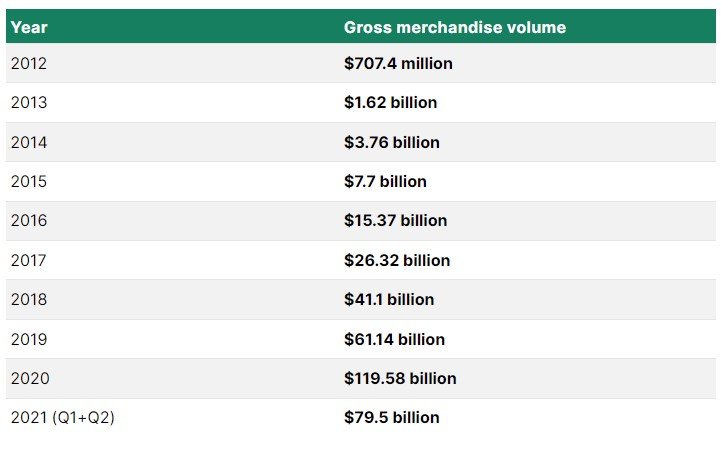
Shopify’s Gross Merchandise since 2012

Shopify Sales and Revenue Statistics

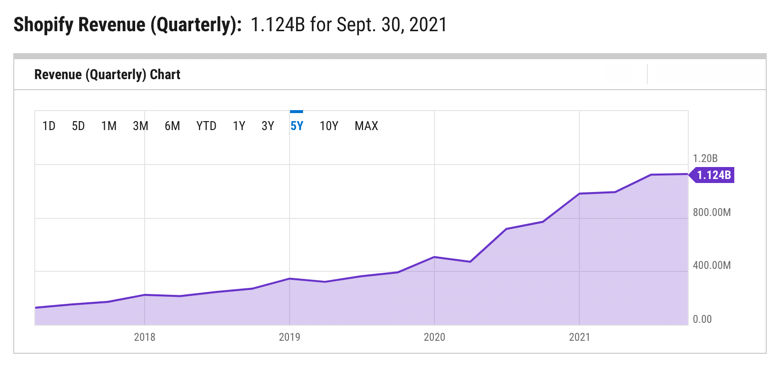
Shopify’s revenue was $1.124 billion in the third quarter of 2021.

When the sales reports for the first and second quarters were combined, total Shopify revenue for 2021 was $3.231 billion, making it the company’s highest-earning year ever.

Shopify’s revenue increased by 57% as compared to the past year. In fact, it wasn’t until 2021 that Shopify’s quarterly revenue surpassed a billion dollars.
Shopify Sales and Revenue Statistics

Shopify’s revenue has continuously climbed over the last few years, frequently more than double its previous year’s performance:

$3.2 billion in 2021

$2.9 billion in 2020

$1.6 billion in 2019

$1.1 billion in 2018

$673.3 million in 2017

$389.3 million in 2016

$205.2 million in 2015

Recurring Monthly Sales Revenue of Shopify

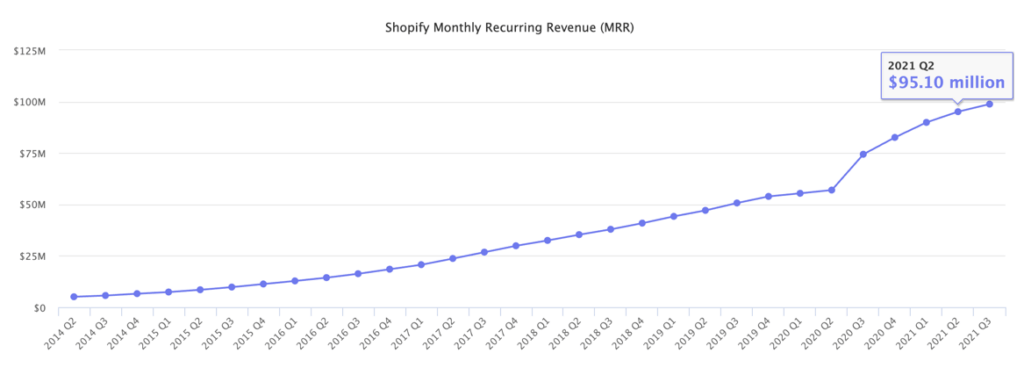
Shopify categorizes recurring income as a subset of total revenue since it includes merchant subscription fees that are paid on a monthly basis. They arrive at this figure by multiplying the monthly subscription cost by the total number of merchants who are actively using the system.

The recurring revenue of $98.8 million at the end of the third quarter in 2021 was up from $82.61 million in 2020. Although substantially lower than total sales, this is a figure that Shopify considers in order to maintain steady cash flow and merchant growth.
Recurring Monthly Sales Revenue of Shopify

Take a look at how monthly recurring Shopify revenue has changed over the past few years:

– 2021: $98.8M

– 2020: $82.6M

– 2019: $53.9M

– 2018: $40.9M

– 2017: $29.9M

– 2016: $18.5M

– 2015: $11.3M

Shopify Revenue by Region 

Shopify looks into merchant locations to see where its revenue comes from. Given that they only focus on continents, and they already know that North America generates the majority of income, it’s a rather broad look into regional revenue (primarily the United States).

Read also: Types Of Shopify Development Services And The Best Companies Offering Them!

North America accounts for 73 percent of Shopify’s sales, with 56 percent of its merchants based there.

Other sources of income include the following:

– EMEA (Europe, Middle East, and Africa) accounts for 16% of the company’s revenue.

– APAC (Asia Pacific, Australia, and China) accounts for 10% of the company’s revenue.

– LATAM (Latin America) has a 1% of total revenue.

According to the most recent data, the following are the income breakdowns by region:

– $2.2 billion in North America

– $454.3 million in EMEA

– APAC: $292.2 million

– $36.1 million in Latin America

Shopify Revenue for Subscription Solutions

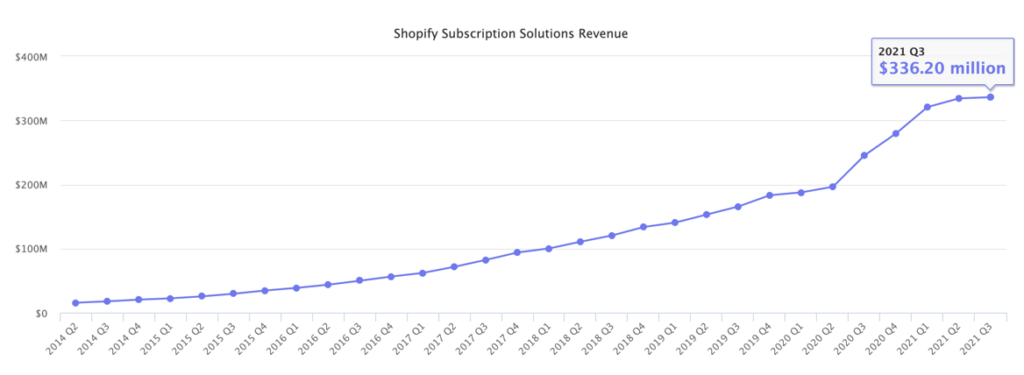
Shopify income for “subscription solutions” includes any subscription payments, such as platform subscription fees, themes, applications, domains, and POS Pro costs. It’s a one-of-a-kind revenue breakdown that shows investors how Shopify makes money.

Shopify reported $336.3 million in subscription solutions sales in Q3 2021, with a total of $654.9 million for the previous two quarters combined, for a total of $991.2 million in subscription solutions revenue in 2021.
Shopify Revenue for Subscription Solutions

This represents an increase in subscription solutions revenue over the previous year, and it’s apparent that this segment of Shopify’s business has increased over time:

–  2021: $991.2M

– 2020: $908.7M

– 2019:  $642.2M

– 2018: $465M

– 2017: $310M

– 2016: $188.6M

– 2015: $111.9M

Shopify Revenue for Merchants Solution

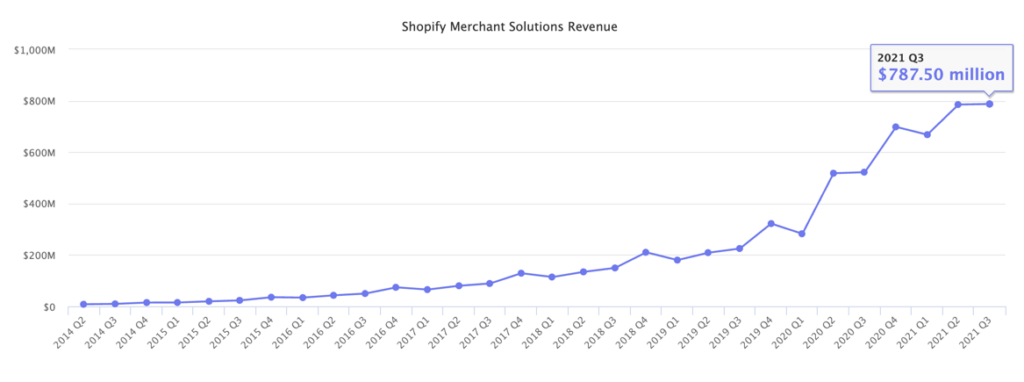
Shopify Payments provides payment processing services to many of its merchants, which the business categorises as “merchant solutions” in its financial reports. Advertising revenue, referral fees, and point-of-sale hardware purchases are all part of the merchant solutions revenue. Essentially, this combines the company’s income from non-recurring services that nonetheless help merchants.

Surprisingly, merchant solutions account for approximately 68.9% of Shopify’s total revenue, owing to the steady inflow of payment processing fees. Merchant solutions will create $2.287 billion in sales in 2021.

The final quarterly report for Q3 2021 was 787.5 million dollars.
Shopify Revenue for Merchants Solution

The number of merchant solutions has increased over time, similar to the revenue from subscription solutions:

– 2021: $2.287B

– 2020: $2.02B

– 2019: $933.9M

– 2018: $608.2M

– 2017: $363.3M

– 2016: $200.7M

– 2015: $93.25M

The Future View of Shopify Revenue and Growth

According to recent sources, Shopify intends to continue growing in the coming years, but at a slower pace than in 2020. Various variables, including the COVID pandemic, pushed sales significantly higher over that time period, and things are now levelling out. Shopify website development is a future of development. Therefore, one should hire Shopify developers from a professional Shopify Development Company if they are planning to grow their business online.

Take a look at what Shopify has to say about the future:

– As they employ additional engineers, expand into more commercial skills, and better marketing, they foresee a substantial increase in gross profit dollars in the near future.

– Adjusted operating income is predicted to be greater in 2021 than it was in 2020.

– Shopify anticipates that the fourth quarter will be the most profitable of the year.

– Shopify expects revenue growth in the subscriptions solutions space to flourish as more global merchants join the Shopify platform.

– They expect future growth rates of merchant and subscriptions solutions to be closer to each other (in percentage terms) than the higher figures reported in 2020, which were higher due to the COVID pandemic’s increase in online (and offline) entrepreneurs. The year 2020 was a one-off, and they don’t expect it to happen again.

– Growth in the merchant solutions sector will be driven by GMV growth from new merchants joining, current merchants, and developing product offerings like Shopify Shipping and Shopify Capital.

Number of Customer Buying from Shopify Store

Have you ever thought that how many people go to the Shopify Store to buy from there? According to Shopify, in 2020, 457 million people went to the Shopify store to make a purchase. This represented an increase of 53.33% in customer spending as compared to the previous year. 

There were around 300 million Shopify buyers in 2019, 216 million in 2018, and 163 million in 2017. 

Statistics for the Number of Themes and Apps on Shopify

Shopify’s Theme Store hasn’t grown all that much, instead focusing on curating a library of high-quality themes with many style variations. In essence, Shopify has a collection of 100 themes that refresh once a year. Many of the themes have two or three style versions that are vastly different from the initial design, therefore we’d say Shopify has around 300 different theme designs.

On the other hand, the App Store is continually growing. 7000 apps are available for retailers to download and use on their Shopify stores in the Shopify App Store. On the other hand, the App Store is continually growing. They had only 3700 apps in 2019.

The Shopify App Store had 900 apps in 2015, 1400 apps in 2016, 2300 apps in 2017, and 2500 apps in 2018.

Number of Shopify Sites

The United States accounts for 69.67 percent of Shopify sites. The Shopify eCommerce platform is currently used by over 3.76 million live websites around the world.

The United Kingdom and Australia are the second and third most popular Shopify destinations, with 153k and 99k sites, respectively. As you can see, Shopify caters to US merchants for the majority of its market share.

Merchants in the following countries have the highest concentration of Shopify-created websites:

– United States: 2.5 million 

– United Kingdom: 153k

– Australia: 99k

– Canada: 91k

– Germany: 76k

– France: 58k

– Brazil: 43k

– Netherlands: 33k

– India: 31k

– Italy: 25k

Shopify Plus, on the other hand, has a much less worldwide reach. That’s partly because most small and medium-sized online stores don’t require Shopify Plus, but also because Shopify Plus is a more recent addition to the Shopify product lineup. Over 6,000 online websites are powered by Shopify Plus, the majority of which are in the United States.

Below is the list of the top nations having live Shopify Plus sites:

– United States: 5.5k

– United Kingdom: 600+

– Canada: 400+

– Australia: 400+

– Germany: 100+

– France: 100+

– Netherlands: 60+

– New Zealand: 50+

– Denmark: 40+

– Spain:  40+

Final Words

Shopify is securely positioned in third place with 10.98 percent, despite WooCommerce having the greatest e-commerce market share at 28.24 percent and Squarespace coming in second at 17.69 percent.

This puts them well ahead of competitors such as MonsterCommerce, WixStores, Magento, and others. And, at this rate, they should soon be giving WooCommerce and Squarespace a run for their money.

Stay ahead of the curve with our expert ecommerce development solutions, leveraging the latest Shopify statistics and trends.

To summarise, Shopify is used by over one million enterprises in 175 countries, contributing $319 billion in worldwide activity to date.

And, unlike many other businesses that have had their expansion stifled by the pandemic, Shopify has thrived during the COVID era. In fact, the 90-day free trial they offered in 2020 to assist struggling business owners was vital in their success.

While there are other high-quality e-commerce platforms to choose from, the numbers from these Shopify statistics speak for themselves, indicating that Shopify should be at the top of your list when it comes to selecting a partner.

For the past couple of years, WeDoWebApps has emerged as the number one Shopify partner with a solid portfolio of both foreign and domestic Shopify App Solutions. We have access to powerful tools and have hands-on expertise with them to design the best Shopify app for your eCommerce business model.

As a result, enriching WeDoWebApps – the best Shopify Development Company in India providing Shopify Development services to national and international clients – is in your best interest. We will help you design the greatest Shopify App that will take your business to the next level if you hire Shopify App Developers from us.

React Native Vs Ionic- Which is a better framework for your app development?

The mobile application market is mounting up, and according to the current statistics, the number of apps has already surpassed 8 million. The race for the mobile app development industry is becoming more challenging as it can boost customer engagement. Most developers would accept that the adoption of a platform or framework plays an indispensable role in improving customer retention and magnifying its popularity. And there is no insufficiency of choices as far as the number of frameworks is concerned. If you are thinking to develop a cross-platform app, you’re on the same page as others. With plenty of options such as React Native, Flutter, Ionic, etc., you can choose the best framework that ideally suits your project requirements. However, in this blog, we would be comparing the two most popular platforms: React Native vs. Ionic. Before beginning the comparison, let’s start with a quick introduction about both React Native and Ionic.

What is React Native?

React Native made its first debut in the year 2015, developed, and widely supported by Facebook. It is a JavaScript framework used for building native mobile and web applications using Java as the programming language. It completely supports both Android and iOS platforms and applies designs similar to React, giving an interactive mobile user interface. However, don’t forget that React Native does not extend any support to HTML5 or hybrid apps.

React Native, created by Facebook, allows developers to build mobile apps using JavaScript and React. It enables code sharing across iOS and Android, providing a native-like performance and user experience.

Key Features of React Native:

  • Cross-platform compatibility: Share code between iOS and Android.
  • Native performance: Delivers a smooth, fast user experience.
  • Strong community support: Access extensive resources and libraries.

What is Ionic?

Ionic is one of the popular open-source platforms optimized for building exceptional hybrid mobile applications. It was initially introduced in 2013 by Drifty Co. Developers with extensive knowledge of JavaScript, CSS, and HTML5 choose Ionic as its ideal framework. The framework utilizes Angular and Apache Cordova, which is the primary reason why developers choose this platform. Similar to React Native, it also supports cross-platform app development. The tools like SaaS and CSS, etc., additionally assist in the development process.

Ionic, an open-source framework, uses web technologies like HTML, CSS, and JavaScript to build mobile apps. It’s known for creating hybrid apps that run on various platforms with a single codebase.

Key Features of Ionic:

  • Single codebase: Write once, run anywhere.
  • Web-based: Utilizes familiar web technologies.
  • Rich ecosystem: Offers various plugins and tools.

Pros and Cons of React Native

React Native Advantages

  1. You can use JavaScript, the most used programming language in the world, while developing an app in React Native. Furthermore, if required, you can also use native modules like Kotlin, Java, Swift, or Objective-C.
  2. Hot Reloading, one of the most important React Native features. Allows you to inject the latest version into your existing app without changing its state.
  3. React Native-based code gets directly complied into the native UPIs, resulting in faster app performance.
  4. React Native ensures good app performance by rendering components straight to native APIs
  5. Pract Native is open-source which means it can be used by any developer free of cost.
  6. React Native frameworks have many UI elements like buttons, modules, sliders, etc pre-installed which minimizes the time for an app’s UI development.

Disadvantages of React Native

  1. When you are developing an application in React Native, the Write-Once-Run-Anywhere approach doesn’t work. You are required to create a bespoke version of each screen for each device. Hence, the development time for React Native applications is longer.
  2. Learning React Native, especially for freshers, is a bit difficult.
  3. React Native APKs’ size is larger than that of apps developed with native technologies of Java or Kotlin.
  4. This framework allows using modules written in native languages to perform complex computations. If you are developing a complex application, you may require cooperation with native mobile developers.

Pros and Cons of Ionic

Ionic Framework Benefits

  1. With plenty of UI elements available in Ionic, you can develop an application that looks native on each platform.
  2. You can test the code quality easily in the browser without the need for any heavy emulator loading.
  3. It is very easy to learn and understand the Ionic mobile framework. You only need to have the proper knowledge of Angular, React, Vue, and Apache Cordova.
  4. The Ionic platform provides a free Hobby Plan to create applications with a native feel and look. You can also use its Pro version which comes with bigger Ionic features.

Disadvantages of Ionic

  1. The performance of the Ionic app framework is slower than that of native mobile apps. Nonetheless, many of the average programmers ignore the performance gap.
  2. According to the developers, each Ionic version brings new potential bugs. Some of them may be updating the older plugins, moving to the latest versions, or accessing the native device functionalities.
  3. Since the Ionic framework is a newbie, it is still in the development stage and its supports and standards keep changing. Also, its libraries can be rewritten at any time.

How to decide between React Native and Ionic – Tabular Comparison

Criteria React Native Ionic
Platform Supported iOS, macOS, tvOS, Windows, Web, Android iOS, Web, Android
Tech Stack JavaScript, React, and Native modules HTML, CSS, JavaScript (Web Technologies)
Functionality Based on the dynamic runtime approach Based on WebView Wrapper
Development Approach Native App Development using Native Components, JSX syntax Hybrid App Development using WebView, Web components, Angular or React bindings
Performance Native performance, uses Native UI components Web-based performance with a native wrapper
Popularity Very powerful, backed by Facebook, huge community support Popular among web developers
Code Reusability Uses the same code to develop applications for any platform’s devices and OS. High code reusability but with some platform-specific required changes
Rendering Hot reloading features allow real-time rendering Application refreshes instantly after implementing a change
User Interface Uses native UI components offering a more native look Uses web components and custom styling
Plugins and Modules Native modules, rich ecosystem of third-party libraries Cordova/ Capacitor for native device access
Access to Native APIs Direct access to native APIs through native module Limited, requires plugins like Cordova or Capacitor
Performance Tuning Easier to achieve better performance for resource-heavy apps Requires optimization for high-performing apps
Over-the-Air Updates Strong support for OTA updates (through services like CodePush) Limited support for OTA updates
Third-party Integration Extensive support for third-party libraries and services Supports third-party plugins but less extensive
Continuous Integration/Deployment (CI/CD) Robust CI/CD pipelines supported out-of-the-box Basic support requires extra configuration
Learning Curve Moderate, easier for React developers or those with JavaScript Easy for web developers familiar with HTML, CSS, JavaScript
Testing Tools Detailed testing support (unit, integration, end-to-end) Basic testing support requires external tools
Use Cases Facebook, Bloomberg, Skype MarketWatch, Pacifica, McLaren Automotive

React Native vs Ionic – Deep Comparison of React Native and Ionic frameworks

1. Popularity and Community

When we consider the popularity factor, React Native significantly outperforms the Ionic platform on GitHub with higher stars, forks, contributors, and version releases. Though Ionic is attracting developers, it still lags with over 238 versions available.
As per the developer survey from 2020, 86% of developers preferred to use Ionic SDKs for enterprise app development. While only 16% chose to use React Native SDKs. Furthermore, 72% of the developers use Ionic libraries and tools, compared to only 21% for React Native. Another 2022 Stack Overflow survey highlights this trend, showing that React Native has a popularity rate of 12.5% and Ionic still sits at 5.2%
Verdict: It is clear from the facts that React Native is better than Ionic in terms of popularity.

2. Performance

When it comes to App Performance comparison of React Native and Ionic, nothing can ever beat React Native. The aim is that it is recognized for its more familiar resemblance with native and relatively faster. However, the developers need to make some changes to the platform-specific element. React is also acknowledged for its stability and is suitable for developing large-scale apps. More so, creating native apps is more costly than hybrid apps. Ionic is quite slower than React Native due to WebView. It primarily uses the mobile-optimized CSS, HTML, and JavaScript components. When you want to add a hybrid factor to your native apps, you can pick Ionic App Development Company.
Verdict: Although in total, React Native possesses more similar features for native app performance than Ionic; thus, it could be much better suited for use on large projects scale. Still, although the hybrid solution is relatively cheaper on Ionic, it commonly is slower as it often relies on WebView.

3. Learning Curve

Reactive Native is easy to learn for those who are already familiar with React, however, beginners with no knowledge of React may find it challenging. Knowing JavaScript and mobile development principles is crucial.
Ionic React is generally easier to learn for developers with experience in web technologies. Ionic gives you the flexibility to use various web frameworks which means developers can use their existing skills to develop mobile apps.
Verdict: It is easy for React users, but very challenging for the newbies while Ionic React is easy for web developers while using existing experience.

4. User Interface Components

React Native platforms provide a set of native components that can be used to apply a native look and feel. Specific custom components may be created for the developer’s needs, which makes it possible to create an improved user experience.
Ionic offers a set of UI components that all have the styling applied by CSS. It gives the ability to deliver things faster, but appearance and the look are only as excellent as the customization done
Verdict: React Native outshines Ionic in that it uses native components for a truly native look. However, Ionic uses CSS-styled components that need customization.

5. Development and Deployment

React Native has the feature of hot reloading. This means the developer can see changes immediately without a new rebuild of the app. There will still be a binary to use on iOS and Android for deployments.

Like React Native, Ionic also supports live reloads, which helps implement changes in the solution developed immediately. Ionic provides one code base and tools, such as Cordova or Capacitor, to enable the same code to be available across multiple devices. Deployment is much easier compared with React Native.

Verdict: Ionic takes the lead from React Native in ease of deployment. It is friendly to live reload with a single codebase. However, React Native needs separate binaries.

6. Functionality

Functionality does make frameworks vastly different. Here’s a comparison of React Native and Ionic.

React Native uses a dynamic runtime approach in employing JavaScript that allows the interaction of mobile applications to directly function with native platform APIs on iOS and Android, making it possible to function like the native application in terms of performance.

Ionic, on the other hand, relies on a WebView wrapper to provide a web experience natively inside the native mobile app. It is based on Cordova and utilizes the component of WebView which is to render UI written with HTML and CSS. Cordova allows communication from WebView all down to native APIs. For example, you can use the device camera.

Verdict: Both React Native and Ionic enhance the native capabilities of an app and also give the developers easy access to the native code and APIs.

7. Technology Stack

It uses the popular JavaScript framework called React to build applications. All its UI components are written in JSX which supports all of JavaScript. Both were developed by Facebook so React was the natural choice for React Native.

Ionic, on the other hand, allows for more flexibility in terms of technology stack. It can be combined with React, Angular, or Vue and JavaScript, HTML5, and CSS. Of course, Ionic does need a Cordova wrapper to access native and supports TypeScript if you want better quality code. The new Ionic 4 version easily complements any web development framework, making it even easier for those familiar with Angular to adopt.

Therefore, the winner in this competition is Ionic because it offers a steeper and more flexible learning curve than React Native.

8. OTA Updates

Microsoft CodePush library is used by React Native, thus allowing a developer to publish applications and deliver the over-the-air (OTA) updates directly to devices immediately.

Ionic gives developers flexibility for switching easily between new versions and old ones. Its Ionic Display feature has made apps’ upgrading quite a simplified move and does provide on-demand updates in case of need sometimes.

Winner: Ionic. Upgrading will be quite easy for the developers.

9. Third-Party Integration

It has a lot of libraries and third-party plugins in which integration is very hard.

There is quite an extensive library provided by Ionic; hence, even plugins such as Ionic and Apache/Cordova can be easily found by developers and integrated. Creating custom modules in Ionic is also simpler than React Native, so it is very much ahead.

Winner: Ionic. The integration of third-party plugins is effortless.

10. Boot-Time

It simply states how fast an application can load. The two applications have closely similar boot times: the average of their cold boots being at 1.5 seconds and warm boots at 1 second.

11. Native Transitions

People generally tend to believe web-native apps lose the native feel when moved across between screens containing rich detail during transitions such as “push” and “pop.” This, however, is more of perception than fact.

The Ionic SDK was designed to fit right into this paradigm, thus showing smoothness of transition is not only possible through native UI frameworks but is also achievable with web-based applications.

12. Platform-specific or Unified Styling

React Native uses native UI components that focus on platform-specific styling, ensuring it integrates well with iOS and Android seamlessly.

Ionic makes use of adaptive styling with a wide variety of UI toolkits. This approach to style enables applications to adapt smoothly to several different platforms and still have that native feel without complex configurations. Ionic supports OS-specific and brand-centric styling and achieves flexibility through customizable CSS variables that allow overriding standard styles.

13. CPU Usage and Battery Drain

It possesses a great difference in the CPU use between both systems. Ionic and React Native will show a serious CPU strain for apps running on React Native, leading to faster battery drainage, while Ionic is less of a CPU stressor because of the faster use of the WKWebView engine compared to React Native’s JSCore.

What Sets Ionic Apart?

Ionic is cross-platform compatible with the web desktop app built with Electron, both iOS, and Android. This means developers will be able to compile the same code into all the different platforms with minimal changes.

What Makes React Native So Special?

It targets both iOS and Android, so in principle, the same codebase can be used to develop an app targeting both iOS and Android. Apart from some code reuse with React, all other things are limited.

Verdict: Ionic leaves the clear winner for performance due to cross-platform compatibility with desktop as well as web applications.

14. Architecture

Almost native and web-first are two phrases that centre the architectural gap between React Native versus Ionic applications.

React Native uses an architecture that supports multi-platform applications in mobile development. It is called “near-native” because the base application components are native iOS or Android widgets, yet the apps are actually developed in JavaScript and React. However, for such native components, a Java-Script bridge must be utilized, so it’s not fully native. The abstraction of this tool allows for fine-grained control of the UI modules on the platforms, which results in an appearance and feel very close to the native apps.

Unlike this, Ionic emphasizes the creation of web, cross-platform mobile, and desktop applications from a single codebase. A wrapper that takes HTML, CSS, and JavaScript to render it in a WebView is done. At runtime, the coordination relation between the WebView and the Ionic codebase is established using technologies such as Cordova or Capacitor to allow a mobile website to be turned into a mobile application.

Verdict: Apps, where native app-like features are required, will be best suited to React Native, while mobile applications that work according to web design or web frameworks would be more effective in cases of Ionic. It all depends on what one’s project is and which set of software they need.

15. Running Code and Performance

React Native relies on a JavaScript Virtual Machine-JSVM to render code components to native APIs. For iOS, it comes preloaded with the JSCore, but for Android, this requires an additional VM. This is how it manages to be able to use the native modules for both platforms for extended features apart from the standard JavaScript APIs, improving performance in editing images and video playback. It requires bridge APIs to connect with native modules and can share about 90% of its JavaScript codebase. React Native employs JIT compilation for Android but interprets JS for iOS.

In comparison, Ionic simply renders apps using web technologies, which may be slow at times. It depends on Cordova to talk native APIs and to adapt to the actual platform underneath. Ionic also provides some default components, making development a bit more straightforward and quick in-browser test capabilities. While it uses JIT compilation for Android, iOS relies on WKWebView for rendering, which does permit JIT conversion of JS into machine code, which affords more performance.

Verdict: Both these frameworks will churn out awesome codes, but performance is the priority, although Ionic will take a huge backseat against React Native when the complexity and feature-richness of an application are concerned.

16. Coding, Building, and Debugging

Both React Native and Ionic offer fairly similar functionalities for coding, building, and debugging mobile applications. The most popular editors include WebStorm and Visual Studio Code, with ALM, most of which support JavaScript ES6. React Native recommends using iOS and Android emulators to simulate actual device behavior in the course of testing.

The Chrome browser tool allows you to look at and trace JavaScript code for debugging purposes. Android development requires Java JDK, Android Studio, and updated SDK tools. With iOS, however, you would need a Mac, an iOS device, and an Apple ID or paid account with Apple Developer.

The bottom line, both offer quite an assortment of tools to help develop a mobile application. Just determine which best suits your needs for an IDE or code editor, and then use emulators and browser tools to debug applications.

17. Complexity of Framework

As Ionic apps can be developed on several web frameworks, it is actually quite difficult to compare the complexity of React Native and Ionic directly. If you have a background in web development, you would easily understand Ionic, as this technology relies on standard web technologies. Conversely, if you know about JavaScript and the architecture of React, then learning React Native would also be relatively uncomplicated. Learn how our React native app development company can help you choose the best framework for mobile app development.

Verdict: Ionic and React Native are about the same level in terms of difficulties considering that they mostly use JavaScript. However, developers may feel more at ease developing with Ionic as this uses standard web technologies.

18. Documentation

Documentation is one of the cornerstones of a developer-friendly framework, thereby helping people quickly resolve most of their issues and find answers to their problems.

Both Ionic and React Native have incredible documentation. React Native offers editable code examples with outputs; in contrast, Ionic compensates by providing enormous information, such as best practices for integrating many web frameworks into it.

Verdict: Tie. Both frameworks do incredible documentation work.

19. Developer Experience

As a mobile developer, you probably will feel much more comfortable working with React Native, given that it closely resembles native app development. Web developers might even feel more at home in the Ionic environment.

Judgment: There is no definite framework for the best experiences of development since that just depends strictly on personal judgment. Both React Native and Ionic have excellent documentation and many resources to troubleshoot issues available.

20. Development cost for React Native apps vs Ionic apps

Both offer cost and time savings for any business, but Ionic is typically less expensive than React Native. Because Ionic enables hybrid apps to be built off of one code base, it is also more efficient when working on multiplatform projects. Even though React Native is free, the cost of finding high-end developers starts at about $20 per hour.

Unlike this, Ionic has options at basic ($499/month), standard ($2499/month), and enterprise ($5999/month) plans along with an open-source free version and premium support.

Verdict: Though both of them require more investment, overall, the React Native framework takes the lead as a preferable choice for the development of high-quality apps which nearly replicate native app experiences.

21. CI and CD

React Native integrates via Jenkins CI, CircleCI, Bitrise, and Travis CI in terms of Continuous Integration and Continuous Deployment.

Ionic uses the services to a great extent. Services used range from Adobe PhoneGap Build, Semaphore CI, Jenkins CI, Travis CI, Codeship, and CircleCI for CI/CD.

Winner: Depends because both are on par with each other in relation to Continuous Integration and Deployment.

22. Ecosystem and Libraries

React Native has a very rich ecosystem with numerous libraries and third-party plugins, making it easy to extend functionalities for developers. However, some of the libraries may not be fully supported on every platform. Ionic software capitalizes on the rich ecosystem for web development and libraries. Developers can use any JavaScript library, making it extremely versatile for different use cases.

Verdict: React Native outshines Ionic in the rich ecosystem of its libraries. The latter offers versatility by using web development libraries.

23. Use Cases

React Native is best applied to heavy applications with high performance and native look and feel, social media apps, e-commerce, or simple user interfaces.

Ionic suits simpler applications, prototypes, or high-end enterprise-level apps, in which rapid development and cross-platform compatibility take the fore.

24. Enterprise Compatibility

React Native is very much compatible with enterprise-level applications and even fulfils the performance and features required for complex business functionalities that the company needs in order to meet their varying business requirements, all because it can even support integral coupling with existing native codebases.

Ionic is also suitable for enterprise apps, especially those that appreciate fast development and cross-platform compatibility. Hybrid by nature, though, might not always grant the exact access to certain native features based on the specific setup.

25. Testing

React Native includes a variety of testing frameworks, such as Jest for the unit testing of functions or components and Detox for end-to-end testing. The community also provides remarkable resources and libraries for very comprehensive testing processes.

Ionic supports testing using Jasmine and Karma. Integrates well with other testing frameworks established for web applications. The nature can help the web developer make tests more understandable.

26. User Interface

React Native helps in achieving a better native look and feel through the use of native components where it has highly customizable and interactive user interfaces which give way to a smoother and very responsive experience.

Ionic gives you a library of pre-styled UI components that are easy to use but also easily customizable. Whereby it lets you have rapid development, the interface may not always match the native aesthetic, particularly on iOS.

27. App Size

The sizes of the apps in React Native come out typically larger because they include the whole framework of React Native and native modules. The size, however, varies based on optimizations and libraries used.

Generally speaking, application size in Ionic tends to be relatively smaller, as it depends on the technologies in use by the web and may use lightweight libraries. However, bigger applications will still lead to significant dependency.

28. Development Time

The development goes relatively faster for teams familiar with React, because of hot reloading, along with a massive library ecosystem. However, some features might increase the development time due to the complexity of native modules.

Although the initial learning curve is more intense, applications built using Ionic can be developed and delivered in faster product development cycles, especially by web technology teams. The overall development time can be heavily reduced because a single codebase for multiple platforms can be built.

Key Similarities: React Native vs Ionic Framework

There is a great difference between React Native and Ionic but both these platforms also share some considerable similarities. Let’s know the similarities in brief.

For the freshers, both the platforms look quite similar from their basic descriptions. However, React Native enables you to develop a native mobile app with the ReactJs framework and Javascript.

On the contrary, with Ionic development, you can develop web, mobile, and desktop apps using HTML, CSS, and JavaScript.

Choosing between React Native and Ionic – React Native vs Ionic

Consider Using React Native When:

  • You have the time and resources to develop an app.
  • Your team is well-versed with the role and skills of Ionic Developers
  • You have already used React Native in your project.
  • You are backed by sufficient funds to cover the high development cost.
  • The reliance of your project on native platforms is important

Consider Using Ionic When:

  • You want to develop progressive web apps (PWAs)
  • You are experienced in web programming and creating an app for entrepreneurs
  • You want to use web development for giving web and mobile experience
  • You aim to create and expand enterprise-level, mission-critical apps
  • you are looking for a framework that will deliver high performance in future.

Conclusion

Both Ionic and React Native is the most desirable choices as far as cross-platform app development is concerned. However, they may be different in the project requirements. It is very tough to pick a distinct winner in between them as they both work excellently. If you’re looking for a company that can help you choose the right framework for your next app development project, contact us, and we will get back to you within 24 business hours.

Choosing between React Native and Ionic depends on your project needs. React Native is great for high-performance, native-like apps, while Ionic is perfect for web-based, cross-platform apps. Evaluate your requirements to make the best choice.

10 Key App Marketing Strategies Every Founder Must Know

Introduction

You’ve built a powerful mobile app. However, getting people to discover, install, and consistently use it is a much harder challenge. With thousands of apps being released every single day, visibility has become the biggest barrier for businesses. That’s exactly why brands today need well-planned, data-driven marketing for apps that helps them stand out in crowded app stores and reach the right users at the right time.

This guide breaks down the most effective app marketing strategies used by high-growth businesses to boost installs, improve retention, and build long-term user engagement. Whether you’re exploring the best way to market an app or preparing a complete app marketing plan, this blog gives you a step-by-step roadmap to promote your mobile app successfully, from pre-launch preparation to post-launch optimization.

What is App Marketing?

App marketing means the complete set of strategies and activities used to promote a mobile application, attract the right users, and keep them engaged over time. It goes far beyond just running ads. It includes everything from building awareness before launch to driving installs, optimizing user experience, and improving long-term retention.

A strong app marketing plan ensures that your app reaches the right audience on the right platforms with the right message. It combines research, App Store Optimization (ASO), content marketing, paid acquisition, influencer outreach, email nurturing, analytics, and continuous optimization.

In simple terms, app marketing answers three key questions:

  • How will users discover your app?
  • What will convince them to install it?
  • What will make them stay?

When all of these elements work together, businesses can build scalable, sustainable growth, even in competitive markets. This is why having well-structured marketing strategies for an app matters more than ever today.

Why App Marketing Matters More Than Ever?

The mobile app ecosystem is more competitive today than at any point in the past decade. With millions of apps across the Google Play Store and Apple App Store, even the most innovative product can get buried without the right marketing approach. This is why businesses can no longer rely on just “publishing the app”; they need a structured and ongoing marketing strategy.

1. The App Stores are Overcrowded

Every category, shopping, fintech, fitness, food delivery, education, etc, is filled with hundreds of similar apps. If users do not find your app within seconds, they move on. Effective app marketing strategies help your app gain visibility in a crowded marketplace.

2. User Acquisition Costs are Increasing

With rising ad costs and more brands competing for the same audience, acquiring users has become expensive. Strategic marketing helps you lower your Cost Per Install (CPI) by focusing on targeted channels and high-intent users.

Data Driven Ad Campaigns

3. Retention is the Real Challenge

Getting installs is easy, but keeping users active is hard. Studies show that most apps lose over 60% of their users within the first week. Strong marketing aligns your onboarding, engagement, and communication to improve retention and lifetime value (LTV).

4. Data-Driven Growth is Now Essential

Modern app marketing relies heavily on analytics, user behavior insights, and A/B testing. Businesses that invest in data-backed decision-making grow faster and more sustainably than those relying on guesswork.

In a world where attention spans are shrinking and competition keeps growing, strategic mobile app promotion strategies are the only way to build consistent, long-term app growth.

Key Stages of a Successful Marketing Plan

A powerful app marketing plan does not start after your app goes live; it begins much earlier. Successful apps follow a structured roadmap that covers three major stages: pre-launch, launch, and post-launch. Each stage plays a critical role in how well your app performs in the long run.

1. Pre-Launch Marketing: Setting the Foundation

The pre-launch phase determines how strong your initial visibility will be. This is where you build awareness, understand your audience, and set the groundwork for a high-impact release.

Market & Competitor Research

  • Identify your target audience
  • Study competitive apps: features, pricing, reviews, weaknesses
  • Define what differentiates your app

Define User Personas

  • Who will use your app?
  • What problems do they face?
  • Which features matter most to them?

A persona-driven approach ensures your marketing strategies for an app speak directly to user needs.

Build a Landing Page

  • Share core features, value proposition, demo videos
  • Add email sign-up to collect leads
  • Helps build a pre-launch audience and test messaging

Create Pre-Launch Buzz

  • Teaser Videos
  • Behind-the-scenes posts
  • Countdown campaigns
  • Pre-launch sign-up rewards

Conduct Beta Testing or Soft Launch

  • Gather real-user feedback
  • Identify bugs and UX issues
  • Improve onboarding flow
  • Build genuine early reviews.

A strong pre-launch strategy dramatically increases your app’s chances of ranking quickly once it goes live.

2. Launch Marketing: Maximizing Visibility

When your app officially launches, the goal is to drive a high volume of quality installs quickly. App store algorithms reward early traction, making the launch window crucial.

App Store Optimization (ASO)

  • Optimize title, description, visuals
  • Use category-specific keywords
  • Prepare screenshots and video previews
  • Encourage early reviews

ASO should be aligned with your overall app marketing strategies to ensure maximum visibility.

Launch Campaigns

  • Google UAC
  • Meta Ads
  • TikTok Ads
  • Influencers and PR announcements

These channels help boost initial installs and improve ranking signals.

Social Media Announcements

  • Share launch highlights
  • Partner with creators
  • Run contests or giveaways
  • Encourage user-generated content

This ensures your app gains momentum on multiple platforms simultaneously.

3. Post-Launch Marketing: Growth & Retention

Once the initial excitement fades, your focus shifts to keeping users engaged and improving retention. This is where long-term success is built.

Improve User Onboarding

  • Clear instructions
  • Fewer steps to sign up
  • Personalized suggestions
  • Strong first-time user experience

Engagement Campaigns

  • Push notifications
  • Email drip sequences
  • In-app messages
  •  Reward-based campaigns

These mobile app promotion strategies help turn one-time users into loyal, active customers.

Continuous Optimization

  • Track KPIs: retention rate, LTV, churn
  • A/B test your landing pages, app store listings, and onboarding
  • Regularly update features and fix issues

Retargeting & Re-engagement

  • Show ads to inactive users
  • Promote new features or rewards
  • Run win-back campaigns

A successful app does not grow or install alone; it grows when users keep returning.

Top Marketing Strategies for an App

App marketing techniques

Most businesses treat app promotion as a checklist. But successful brands follow a structured set of app marketing strategies that guide users from awareness to download and finally to long-term retention. Below are the most effective and widely used strategies that help apps scale sustainably, whether you are building a lifestyle app, SaaS tool, FinTech app, or on-demand service.

1. App Store Optimization (ASO) – Your #1 Growth Engine

ASO is the most reliable and cost-effective way to improve visibility. It works similarly to SEO but focuses specifically on app store ranking factors.

What ASO includes:

  • Keyword optimization in the title and subtitle.
  • A polished, benefit-driven app description
  • High-quality screenshots
  • Preview videos
  • Localization for different markets
  • Review & Rating Optimization

Why it Matters:

Over 60% of users discover apps through searches in the App Store or Play Store. If you want the best way to market an app organically, ASO is non-negotiable.

Optimize app store ranking

2. Social Media Marketing & Community Building

Your audience spends hours on social media apps, so your promotion must meet them where they already are.

What Works Best:

Social media marketing includes

  • Short-form videos (Reels, TikTok)
  • Behind-the-scenes content
  • Future demos
  • User-generated content
  • Polls, Q&As, and community threads

A strong community increases trust, boosts referrals, and drives consistent downloads.

3. Influencer Partnerships & UGC Creators

Instead of spending heavily on ads, many brands turn to micro-influencers and niche creators.

Why this strategy works:

  • High engagement
  • Lower cost compared to traditional ads
  • Social Proof -> More downloads
  • Access to the targeted audience segment

Influencers are especially effective for lifestyle, fitness, fashion, education, and productivity apps.

4. Paid Advertising (UAC, Meta Ads, TikTok Ads, YouTube Ads)

Paid campaigns help apps scale quickly, especially during launch and key promotional phases.

Best-performing ad types:

  • Google UAC (automated ads across Google properties)
  • Meta install ads
  • TikTok spark ads
  • YouTube discovery ads

Paid campaigns help you refine audience targeting and fuel growth during aggressive scaling phases.

5. Content Marketing & SEO

A powerful long-term strategy is often overlooked in marketing for apps.

What content works:

  • Blog posts
  • Comparison articles
  • How-to guides
  • YouTube tutorials
  • Case studies
  • Landing pages

This helps you own search visibility and drive traffic beyond the app store.

6. Referral Programs & Incentives

Referral programs are one of the highest-ROI mobile app promotion strategies.

Top Referral Incentives:

  • Free credits or coins
  • Premium features
  • Discounts
  • Bonus Rewards

People trust recommendations from friends far more than ads, making referral loops a key growth driver.

7. Email Marketing & Drip Sequences

Email remains underrated but powerful, especially for apps with onboarding steps.

Use email for:

  • Pre-launch waitlist building
  • Onboarding guidance
  • Feature announcements
  • Reactivation campaigns

A well-planned sequence improves retention and ensures new users complete onboarding.

8. Push Notifications & Personalized Engagement

Push notifications influence user behavior more than any other in-app tool.

Best Practices:

  • Personalized content
  • Relevant Timing
  • Behavior-based triggers
  • A/B testing messages

Used well, they increase retention and keep your app top of mind, without being spammy.

9. In-App Events & Offers

Apps that run in-app promotions see a significant boost in engagement and re-installs.

Examples:

  • Festive offers
  • Seasonal events
  • In-app sales
  • Feature drops

These events also help you appear in “Featured Sections” of app stores, increasing discoverability.

10. Retention & Re-Engagement Strategies

Acquisition helps you grow. Retention helps you survive. Apps with high retention rank better, convert better, and scale with less cost.

Powerful Retention Tactics:

  • Onboarding optimization
  • Gamification
  • Loyalty programs
  • In-app progress rewards
  • Periodic Updates

When users stay, your entire marketing strategy becomes more profitable.

 Improve App Retention

Common App Marketing Mistakes to Avoid

Top mistakes app marketing

Even strong app marketing strategies can fail if you overlook the fundamentals. Many app owners focus heavily on growth tactics but ignore the hidden bottlenecks that silently hurt installs, retention, and revenue. Avoiding these mistakes ensures that every campaign, whether organic, paid, or social, actually delivers long-term results.

1. Focusing Only on Installs and Not Retention

Most businesses measure success by the number of installs. But installs do not mean anything if users uninstall within the first week.

Common retention killers include:

  • Confusing onboarding
  • Lack of initial value
  • No follow-up engagement
  • Irrelevant push notifications

Remember: retention affects app store ranking more than raw downloads. If users stay active, engage, and return, your app climbs the charts faster and stays visible longer.

2. Ignoring Reviews & Allowing Low Ratings to Pile Up

Your app store rating is often the make-or-break moment for a user deciding whether to download.

Mistakes like:

  • Not responding to negative reviews
  • Ignoring crash reports
  • Not pushing for positive user feedback

Create a cycle where low ratings keep your app buried in the store. A solid review strategy boosts credibility, ranking, and conversion rates.

3. Not Measuring User Behavior

If you are not tracking behavior, you are marketing blindly.

Key behavior insights include:

  • Where users drop off
  • Which features do they use most
  • What triggers uninstalls
  • How long do they stay engaged

Tools like Firebase, Mixpanel, Amplitude, and Adjust make it easy to track events, funnels, and retention cohorts.

Data-driven marketing always outperforms guesswork.

4. Running Ads Without an Onboarding Funnel

Ads alone do not guarantee success. If users click an ad but get stuck during onboarding, the entire campaign fails, and your ad spend is wasted.

A strong onboarding funnel should include:

  • A clear value proposition
  • Progress indicators
  • Welcome screens
  • Permission prompts at the right time
  • First-session guidance

Paid campaigns only work when paired with a frictionless onboarding experience that quickly delivers the “aha moment.”

5. Not Having an A/B Testing Plan

Apps that do not test, do not grow.

You should regularly A/B test:

  • Screenshots & videos
  • CTA buttons
  • Landing Pages
  • Push Notification Copy
  • Onboarding Flows
  • Pricing or subscription prompts

Small improvements, even 5-10% boosts, create massive gains when applied at scale. A/B testing ensures you are constantly improving rather than guessing.

Tools & Platforms to Power Your App Marketing

Even the strongest app marketing strategies need the right tools to back them up. From ASO to analytics, automation, and competitor insights, the platforms you use determine how well you can optimize campaigns, improve retention, and uncover growth opportunities. Below are the essential tools every app marketer should consider.

1. ASO Tools (MobileAction, App Radar, Sensor Tower)

App Store Optimization becomes far more effective when you use professional-grade ASO platforms.

Top ASO Tools:

  • MobileAction: Keyword intelligence, competitor tracking, category ranking insights.
  • App Radar: Helps optimize titles, descriptions, metadata, and track keyword performance.
  • Sensor Tower: Strong for market intelligence, store trends, and competitive benchmarking.

Why You Need Them:

These tools help you identify keyword gaps, discover high-intent search terms, spot ranking opportunities, and optimize your listings for better visibility. Without ASO tools, you are essentially guessing what users search for, and guessing really wins.

2. Analytics Tools (Adjust, Firebase, AppsFlyer)

Analytics tools give you a clear view of user behavior, acquisition channels, and LTV. They are essential for minimizing waste and maximizing ROI.

Top Analytics Platforms:

  • Adjust: User attribution, cohort reporting, fraud prevention, cross-channel analysis.
  • Firebase Analytics: Deep user behavior tracking, event funnels, and crash analytics.
  • AppsFlyer: Enterprise-grade attribution, retention tracking, and multi-channel insights

Why They Matter:

Analytics reveal:

  • Where users come from
  • How they engage
  • Where do they drop off
  • What drives attention
  •  Which campaigns actually convert

These insights help you make data-driven decisions instead of relying on assumptions.

3. Marketing Automation Platforms

Automation tools streamline user engagement, onboarding, reactivation, and personalized messaging.

Popular Automation Tools:

  • Braze: Push notifications, email sequences, in-app messages, segmentation
  • MoEngage: AI-driven personalization, omnichannel automation, behavioral triggers
  • CleverTap: Funnels, retention analysis, automated engagement campaigns

How These Tools Help:

They ensure users receive:

  • Personalized notifications
  • Relevant onboarding prompts
  • Timing-Based nudges
  • Milestone celebrations
  • Reactivation messages

Automation boosts retention, and retention directly improves rankings.

4. Competitor Analysis Tools

Knowing what competitors are doing helps you avoid mistakes, discover gaps, and identify winning strategies.

Top Competitor Research Tools:

  • App Annie / data.ai: Market trends, category benchmarks, competitor downloads
  • SimilarWeb: Traffic sources, audience demographics, marketing channels
  • Sensor Tower (again): Keyword dominance, competitor ASO, ad intelligence

Why They are Essential:

Competitor tools help you analyze:

  • Their top keywords
  • Their pricing strategy
  • Their creatives & screenshots
  • App updates & feature releases
  • What is working (and what is not) in your category

This intelligence ensures your app marketing plan is sharper, faster, and more informed than your competition.

How to Measure the Success of Your App Marketing Plan

A strong app marketing plan is not just about creative campaigns; it is about measuring what works, improving what does not, and scaling what delivers results. The right KPIs help you understand user behavior, acquisition efficiency, and long-term profitability. Without accurate measurement, even the best strategies become guesswork.

Below are the core metrics and methods every app marketer should track:

1. Key KPIs to Track (CPI, CPA, ROAS, Retention Rate, LTV)

These KPIs give you a clear picture of your performance across acquisition, engagement, and revenue.

CPI (Cost Per Install)

How much are you paying to acquire a single app install?

  • Lower CPI = more efficient acquisition
  • Influenced by ASO, ads, and creatives

CPA (Cost Per Action)

Measures how much it costs for users to complete a key action: signup, purchase, upgrade, etc.

  • More important than CPI because actions = revenue

ROAS (Return on Ad Spend)

Shows how profitable your paid campaigns are.

  • ROAS > 100% = profitable
  • ROAS < 100% = losing money

Retention Rate

The percentage of users who return after Day 1, Day 7, and Day 30.

  • High retention boosts app store ranking.
  • Indicates strong onboarding and product value.

LTV (Lifetime Value)

The total revenue generated by a user over their entire journey.

  • LTV > CPA = profitable business
  • Determines how much you should spend on ads

These KPIs form the backbone of your app marketing plan and help you scale sustainably.

2. Acquisition vs. Retention Metrics

Most marketers obsess over acquisition metrics (installs, CTR, CPI) but ignore retention metrics (DAU, MAU, churn, engagement).

Acquisition Metrics Include:

  • Impressions
  • Clicks
  • Installs
  • CPI
  • Organic vs Paid Traffic

These help you understand how well your ads, ASO, and campaigns attract new users.

Retention Metrics Include:

  • Day 1/7/30 retention
  • Session length
  • Feature usage
  • Uninstall rate
  • Repeat purchase

These reveal whether users stay long enough to become profitable.

Bottom Line:

Acquisition grows user base. Retention grows your revenue. You need both to win.

3. How to Use Analytics to Improve Your App Marketing Strategies

Analytics is more than tracking; it is about learning and optimizing.

Identify Drop-Off Points: Find out where users abandon onboarding or stop engaging. Improve those touchpoints to increase activation and retention.

Understand Feature Adoption: Analytics shows which features users love and which they ignore. This helps prioritize product updates and promotional messaging.

Optimize Ad Spend: Analytics tools (Adjust, Firebase, AppsFlyer) reveal:

  • Which campaigns drive high-LTV users
  • Which channels waste budget
  • Where CPA is low, and ROAS is high

This helps you allocate budget smarter.

Run A/B Tests Using Real Data: Use data to test creatives, onboarding flows, screenshots, CTAs, pricing, and push notifications.

Build Better User Segments: Segment users by behavior, geography, device, or engagement to run more personalized campaigns.

Analytics is the engine behind smarter, faster, and more profitable app marketing.

Case Studies/Real Examples

Real-world success stories help readers understand what effective app marketing looks like when executed correctly. Here are two simplified but practical examples that demonstrate how strategy, optimization, and data-driven decisions can transform app performance.

Case Study 1: How a Startup Achieved 10,000 Installs in 30 Days

A newly launched productivity app struggled initially with visibility despite having a great user interface and solid functionality.

Challenges:

  • Low app store rankings
  • Limited initial downloads
  • Minimal awareness in the target audience

Strategies Implemented

  • Complete ASO overhaul: new title, keyword-rich description, updated visuals
  • TikTok and Instagram micro-influencer campaign targeting productivity niches
  • Launching a smile referral program offering premium features for every successful referral.
  • Running Google UAC ads for the first 14 days.

Results (Within 30 days)

  • 10,000+ installs
  • 35% reduction in CPI
  • #12 ranking in the “Productivity” category locally
  • 4.6+ app rating after encouraging satisfied users to review

What this proves: With the right combination of ASO and social-led campaigns, even new apps can scale rapidly without massive budgets.

Case Study 2 – How a Business Improved Retention Through Onboarding Optimization

A fitness and wellness app had decent acquisition (over 2000 installs monthly) but poor retention. Most users dropped off within the first 48 hours.

Challenges

  • Confusing onboarding sequence
  • Too many permission prompts upfront
  • No clear guidance on how to use key features

Steps Taken

  • Reduced onboarding steps from 6 screens to 3
  • Added an interactive tutorial to help new users experience value faster
  • Delayed permission prompts until after the first meaningful action
  • Personalized the first-session experience based on user goals

Results (After 60 Days)

  • 42% improvement in Day-7 retention
  • 28% drop in uninstall rate
  • Higher engagement with premium features
  • Positive reviews increased organically

What this proves: Retention is not luck; it is a direct result of how well you guide users in their fitay session.

Final Thoughts

In a market where millions of apps compete for user attention, the brands that win are the ones that continuously optimize, experiment, and adapt. Successful app marketing is not about applying strategies once; it is about evolving them as your audience, competition, and product grow.

Consistent A/B testing, analytics-driven improvements, and strong mobile app promotion strategies help ensure that every campaign becomes smarter and more profitable than the last. Remember, app marketing is a continuous journey, not a one-time checklist.

If you want expert support to improve your app visibility, scale installs, and boost retention, partnering with a team that understands both marketing and development can make all the difference. Partner with a digital marketing company that can help your business create high-performing app marketing plans, optimize user journeys, and build app experiences that keep users coming back.

End to end app growth strategy

A Complete Guide to WordPress Web Development

Young entrepreneurs accede WordPress to be an exceptional platform for creating websites for small businesses and even startups. As a highly acknowledged Content Management System (CMS), WordPress is currently used by more than 100 million users across the globe. Many business owners who have determined to take their ventures online are accomplishing it on WordPress.

In the present scenario, over 400 million websites are being powered globally by WordPress. These statistics cover more than 100 million sites that currently rest on the WordPress platform in the United States solely. As per the global analysis, reports show that job posts are usually published every 17 seconds from the world’s top one million websites that are being managed and powered. Hence, WordPress web development cannot be excused to businesses of all sizes since it plays a crucial role as a great content management system.

Surprisingly, more than one-quarter of the whole population of websites that are available on the web is powered by WordPress. This division includes all sorts of sites, ranging from simple to compound portals, blogs to business websites, and applications.

Out of all the available content management systems in the dynamic market, fortunately, WordPress continues to be one of the simplest and easiest CMS that endures free to use today. This is because when you hire a WordPress developer, they offer rich and robust features with lots of beautiful, exciting themes to choose from.

WordPress has moved from merely being a blogging platform to more of a prominent website that can be employed for websites, social networking sites, E-commerce sites, Web directories, and various other uses. These features make it the best CMS platform for building an online business.

Top benefits of using WordPress:

WordPress has dramatically grown from a platform that was used for blogging to a CMS platform. Presently, many online business websites prefer WordPress as a hosting platform, while many individuals who are not informed of the various benefits to which WordPress is associated with still opt for static pages. Here are some benefits of WordPress that are worth considering.

  • Search engine optimization

WordPress uses several techniques and principles that are search engine-friendly. Developers can also refer to the WordPress Codex for best practices in optimizing site visibility and functionality.

This works as one of the most typical benefits that come along with WordPress Website Development. There is no uncertainty that search engines quickly identify websites built with WordPress. This is because WordPress uses several techniques and principles that are search engine-friendly. Also, a WordPress website SEO can be improved by downloading and installing plugins and extensions that enhance SEO.

  • Quick Installations

When it comes to building a WordPress website, you can develop through an easy one-click installation of the CMS. In reality, you can avoid opting for WordPress development services. More so, you don’t have to download WordPress installation files or using FTP to upload on the site. WordPress can be installed within a few minutes by touring the control panel from the hosting provider, and the site will be live and running.

How to get to begin?

When it comes to WordPress development, there are a few things to learn. A website that wants to enjoy the right amount of traffic or exposure must have a custom URL or domain name. A custom domain name serves to support a site with high exposure in search engines. This is because search engines prefer to index domains, preferably than subdomains.

Read also: 3 Reasons WordPress is the Right Choice for Your Startup Website

  • Optimize your website

Many small businesses and startups prefer WordPress because of its relaxed social media integration and the excess of amazing themes it has got. However, before you can begin using WordPress for your business website, there are certain things you need to consider.

WordPress boasts an extensive network of users that include plugin creators, bloggers, and webmasters. For businesses aiming to retain branding consistency, a WordPress white label plugin can be an excellent tool to customize features while maintaining a professional look. Anyone can effortlessly find quick help at any time. There are a lot of free resources for WordPress, whether it is their support forum or YouTube.

Most web owners have found WordPress, easy-to-use, and straightforward. It offers a high level of flexibility, which makes it suitable for bloggers, freelancers, creative artists, and even entrepreneurs. This is why beginners are advised to adhere to WordPress.

  • Hosting

When it comes to creating a website, hosting is one crucial factor that should be considered. To ensure that your website is always live and running all times, you should search for hosting assistance that WordPress managed. Additionally, daily updates and backups should be provided. For businesses seeking enhanced backend performance, partnering with a Zend development company alongside managed WordPress hosting can provide a more robust and secure website experience.

  • Website configuration

Configuring your website is the second step after WordPress has been successfully installed. It should be done equally. For example, you should be involved in the way, and manner permalinks are set up, comments are supervised, and ensure to implement other best practices. With WordPress, these tasks are reduced and can be initialized right from the beginning.

Configuring your WordPress website can be straightforward, but for developers familiar with advanced coding practices, tools like Laravel collection methods can provide additional support for handling data efficiently.

  • Theme quality

While WordPress offers plenty of amazing themes, businesses evaluating WordPress vs custom website options should ensure their chosen solution meets their specific needs for flexibility and scalability and hire a WordPress developer from nearby places. A flexible, convenient, and reliable theme is all you require to make changes whenever you want.

  • Ensure security

Do you know that WordPress is typically created with robust security features; however, it is also right that you use more advanced security measures by installing some security plugins and optimize other best practices to protect against possible threats such as spyware or malware.

Read Also: Grow your E-Commerce business with best Woocommerce Development Services

Conclusion

WordPress remains a cost-effective platform for high-performing websites, but for businesses requiring more customization, exploring popular backend frameworks can complement WordPress’s capabilities. We hope the factors mentioned above will help you to understand how seamless and flexible WordPress development is for every business industry. It is one of the economic platforms with the ability to deliver high-performing websites. Want to develop your WordPress website? If yes, drop us your details, and our manager will get in touch with you soon.

Which is the best eCommerce platform for your business- Woocommerce or Wix?

Online stores are a highly popular alternative if you’re looking for a viable business model. It brings some great benefits to entrepreneurs who want to get the upper hand and offer their products to a broad audience.

That’s why today we’re comparing the top platforms available in the market: WooCommerce VS Wix.

We’ve analyzed every significant aspect that will help you develop a business in the eCommerce space. But before proceeding, let’s quickly glance over the short introduction of both the eCommerce platform.

What is WooCommerce?

WooCommerce is an open-source WordPress plugin that adds e-commerce functionality to your WordPress website so you can have an interactive online store. This plugin easily integrates into your existing WordPress site, converting it into a full-featured eCommerce store.

Here are the top benefits:

  1. Free plugin: This eCommerce plugin is free and comes with a robust set of features and tools to kick-start your eCommerce business.
  2. Support: The WooCommerce team support efficiently, and you also get help from user communities and forums.
  3. Open source code: As we’ve mentioned before, WooCommerce is an open-source platform, which means the code is readily available for anyone to view and modify.
  4. Powered by WordPress: As we know that WooCommerce is a WordPress plugin and as per stats, 28% of websites are powered by WordPress in the online world.
  5. Modern and powerful interfaces: WooCommerce concentrates on making the process of establishing your online store as simple as possible.

What is Wix?

Wix is a huge cloud-based website development platform. It is a free service, but you can improve your websites by subscribing to Wix’s premium plans.

Wix is simple and the best eCommerce platform that offers an array of templates to design your website beautifully.

Here are the benefits:

  1. Mobile optimization: The significant advantage of using templates of Wix is, all are mobile optimized. Yet these are not responsive.This means that after you’re done working on your website, you will have to work on your mobile site individually to ensure that things go well. It is effortless to perform but does require some extra time and effort.
  2. Artificial Design Intelligence & Code:This is a unique service offered by Wix. Its artificial design intelligence and code enable you to create a premium website. It would help if you answered a few simple questions like who you are and what you do. And then provide the content you wish to include on the website. Based on this information, they will create a professional and personalized website, and you can go live quickly.

WooCommerce vs Wix- Which one to choose?

  • SEO- friendly-

WooCommerce:

As far as SEO is concerned, fortunately, WooCommerce is SEO friendly and out of the box. You can install WooCommerce extensions and plugins, for instance, Yoast to experience the functionalities like writing a Meta description, alt text image, rich snippet, and so on.

Wix:

Wix also offers some basic features with regards to SEO, which available in the website settings. More so, you’ll get access to the premium App from their App Market. From there, you can add many marketing and SEO apps that will help you boost your website in search engines and market it to your target audience.

  • Customer support-

WooCommerce:

The developer’s team of WooCommerce is doing an excellent job of maintaining and updating WooCommerce regularly. That’s why you won’t require customer support for Woocommerce Development Services. As you know that it’s a WordPress plugin, so a large community is waiting for you to assist you during obstacles.

Wix:

Wix also provides its users with a lot of comprehensive support. You can hit the Knowledge Center, browse and search review boards and tutorials to find the answers you’re seeking. In their video tutorial, you will get complete help about the site builder and how to use its features.

  • Speed and security-

WooCommerce:

ECommerce business owners using WooCommerce are habitually a bit target for attackers as the platform runs on WordPress. Although the CMS itself is secured, if you don’t update sites, themes, and plugins regularly, your website will be vulnerable to attackers.

Wix:

Fortunately, websites build on Wix are hosted on their servers. This means that the servers are optimized for unique Wix websites. Wix specialists are in charge of making sure your site is quick to load and secure at the same time.

As you know that Wix’s sites run on JavaScript, so their speed tests are quite different than the others. Their sites respond quickly, but also take a while to load fully.

For businesses that need greater flexibility and faster performance, a headless commerce approach separates the front end from the backend and allows complete design and technology freedom.

Choose the right platform and benefit from our expert ecommerce development services to maximize your business potential.

Final Words

Making the right choice seems to be complicated. And switching platforms later can be a nightmare, so you need to consider every point of the comparison.

Though Wix has some excellent powerful features, even WooCommerce also offers some great features.

The first thing to consider is the price. WooCommerce is free, and you will get some astounding features, which are innovative.

In the end, it heavily depends on your business needs. So choose the platform according to your requirements.

Are you looking for a eCommerce developer that can suggest you better and serve you with an exceptional eCommerce development store? Contact our team of experts.

If you need a more scalable solution for complex catalogs or enterprise needs, our Magento eCommerce development services help you build secure and high performing online stores.

React Native Developers Hiring Guide for 2024

We all know how hard it has become to find the perfect react native developer. While tech giants like Instagram and Airbnb have developed their mobile applications with the help of React Native, it is gained a lot of popularity in the past few years. Even it won’t be too wrong to consider, that for mobile app development, React Native is becoming the industry standard.

React Native: A Brief Introduction

If you want to hire react native app developers, you need to understand how react native can be deemed beneficial for your development. Back in January 2015, React Native as created by Facebook. The whole idea behind it was, they create a reliable framework based on JavaScript instead of using HTML. Further adding, with every single year, the community around React Native is gradually increasing, all thanks goes to the flexible and easy to use a framework.

Some of the salient features of using React Native includes:

  • React Native can be easily used to develop an app for both Android and iOS-based devices.
  • It provides excellent sustainability with cross-platform functionality.
  • React uses JavaScript as its core programming language.
  • The developers can avail the benefits of React, which is s JavaScript library to create user interfaces.
  • With an easy to navigate UI, React Native makes the entire user experience seamless.
  • React Native can make your apps lighter while proving faster performance.
  • It helps to use lesser resources as compared to that of any other native apps.
  • With the automated code update feature, you can always release faster app updates.
  • Any developer can tweak around with React Native and create a mobile app out of it.

Hard Skills Considered before Hiring React Native Developers

Down below are some of the mandatory hard skills that every React Native programmer should be aware of. Before you get started with your recruitment process, make sure that you understand the skills that are to be required for the programmer.

1) Good Stronghold on JavaScript

While being a React Native app development company, you need to opt for employees who have in-depth knowledge of JavaScript. The JavaScript can always help the developer to create better app logics, building components, and services.

2) Understanding ES6

While you are looking to hire for React Native developers, make sure that they have profound knowledge on what exactly is ES6. You can also test their skills on how they can convert ES6 code into an ES5 one. Further adding, you can also evaluate your programmer while asking the features of ES6 for JavaScript.

3) Knowing the Native iOS and Android Development Commands

Apart from being a React Native Developer, one needs to work on native tools to get the job done. Under such instances, it shall be far better if the individual is well versed with all the native Android and iOS developments.

4) Having Backend Skills

No matter how much a programmer is versed with the front-end skills, it shall be of no use if the entire backbone of the app is not strong enough. Due to these reasons, always look for the hunt of programmers who has the backend skills to get their program done.

5) Debugging

Resolving bugs is yet another reason, you should be vigilant enough to ask for React Native Programmers who are well equipped with their debugging skills.

Soft Skills Considered before Hiring React Native Developers

It is quite understandable if you want to hire a React Native developer, there are specific hard skills that the programmer needs to possess. But, apart from that, having a certain degree of soft power can help your company to continue with the development process seamlessly. Down below are some of the soft skills that every programmer should require:

1) Strong Communication Skill

Make sure to understand that by hiring a developer with strong communication skills, you can always add value to your company and the project they are directly involved. Communication skills are still required to convey the message better and making sure that everyone is on the same page.

2) Making the Code Clear to Understand

While someone might be a genius when it comes to writing code, but that the time of debugging, they can’t even understand their lines. This is certainly not how one should approach coding. That is precisely why you need to hire someone obvious and concise with the lines of code they write.

3) Adaptability    

Your React Native developer must know their way around, how to interact with different hardware and software. Being someone in the technological industry, it is widespread to expect, yet the majority of them always stick to their personal preferences. And if your developer doesn’t know how to use particular software, they should always be humble enough to learn about such.

4) Dedicated Work Approach

Dedication is yet another essential aspect when it comes to a React Native developer. Unless you have the eagerness to learn and grow yourself, you shall stay in the same positions for the years to come. It is only through the dedicated work approach that your developer can add value to themselves and your company.

5) Fostering Teamwork

While the majority of the developers prefer to work alone, there are certain instances where they will need to work as a team. During such cases, it is essential to understand that you need to hire someone who can foster such teamwork.

Follow our guide to hiring the best React Native developers and leverage our React Native development services for your next project.

Wrapping Up

In conclusion to the above-discussed article, our idea was to describe all the aspects one needs to look for to hire react developers. With each passing year, react native is becoming more of a go-to-framework for the majority of the development companies. To smoothen the development phase, React Native offers a variety of easy to access libraries and plugins. So, once you have gained a clear overview of what to look for such developers, you can quickly get the employees you require.

Difference between Native Vs Hybrid App Development

With every passing moment, the worth and usefulness of the smartphone are increasing at a rapid speed. And this need for smartphones has also elevated the app development market. Today, every business prefers to hold a security check on the digital presence for their brand, and nothing suits better this demand, then a mobile app technology. However, app development has reached another level of convenience with the introduction of different platforms. In this run, the most debatable topic is the Hybrid App vs Native App that creates a different aura around the app development field. For a non-technical person, this debate leads to a jigsaw puzzle that needs to be solved further. Are you confused too? To help you find out the most suitable answer to pick the best out of bot, we have brought this topic here. So just read this post further to compare both native vs hybrid app development and decide which platform is best for your app development needs. Let’s take a tour of hybrid app vs native app pros and cons, further with this post…

A quick look at Native App Development

A native mobile app is a process wherein the apps are created separately for iOS, Windows, Android, and Blackberry. The apps built on the native platform, are supposed to run only on one specific operating system. Although the development process of this platform requires the developer to create different versions of an app for various systems. With the help of native apps, developers can provide optimized performance and take advantage of the latest technology. In the Native App, developers have to write code in Swift or Objective-C for iOS applications, Java for Android Native applications and C# for Windows. The development of native apps can be done with mobile device features, such as a microphone, camera, location detection, etc. Also, with the help of native apps, it becomes much easier for the users to experience the seamless user experience when compared to hybrid apps. On the other hand, the pricing for the native app development is little on the higher side, as it involves the specific expertise of the developers.

Native App Pros

Seamless Performance The essential requirement of the native app, suggests the developers need to write different codes for different operating systems. Due to this fact, the app is made only for a specific operating system and gives a smooth performance. High-Speed A native application is optimized as per the requirements of a particular platform. This ensures to provide higher speed and performance. Also, during the development, developers take care of every aspect, and this helps in increasing the speed. User Experience Native apps are known for offering a smooth and engaging user experience. This helps your users to be more connected with the app interface. Better Flexibility With the native apps, you can access inbuilt devices such as GPS, camera, calendar, and other mobile device functionalities.

Native App Cons

Higher Development Cost For a Native app, developers are supposed to hold expertise in a specific platform. This leads to increased app development costs. More Development Time Since Native apps work according to a particular operating system, hence they take more time to get developed. A quick look at Hybrid App Development As the name suggests, Hybrid apps, are that app, which is created for different platforms. With the help of one single Hybrid app, it can run smoothly on iOS, Android, Windows or Blackberry. In other words, hybrid apps are the fusion of native and web apps. These apps are created to work on different operating systems without fail. On using you may find these apps to look and feel like a native application, but are run by a website. The hybrid apps are built on different languages, including CSS, HTML5, and JavaScript. On the other hand, it is a web-based app that is covered in the native app and is further connected to the device’s hardware. Hybrid apps are often being picked, due to their cost-effective nature, which fits into the tight budget as well. On average, the cost of developing hybrid apps is less compared to any other platform.

Hybrid App Pros

Less development Cost Are you running on a tight budget? And want to have an app that works faster but within the budget? Then proceeding ahead with hybrid is the best choice. Maintenance On the hybrid apps, you can update the content as many times, and it doesn’t require high-maintenance. Faster development time Yes, you heard it all correct, hybrid apps don’t consume much time in development and helps you launch your app much faster in the market.

Hybrid App Cons

Poor Performance Within the platform of the Hybrid app, there is an addition of an extra layer between source code and the mobile target platform. This brings poor app performance. Complex Debugging Process The extra layer in the hybrid app leads to debugging issues as well. To make it work, developers need to rely on the framework to make it work on the targeted OS. User Experience Yes, the UX of a hybrid app is not that efficient.

Conclusion

No doubt, both the apps hold their share of pros and cons. However, something that cannot be missed here is that each of these platforms has an incredible set of features and functionalities. These are sufficient to create an app that can turn the heads of your audience. On the other hand, hybrid apps development are useful for budget app requirements, and if smooth UI/UX is your prime motto, then Native is the best choice. The choice is yours, so pick the right platform that fits your business needs.

ReactJS Vs. VueJS- Which framework is ruling the market?

A Little Introduction on ReactJS vs VueJS

Are you also among those who have no idea which framework will work better – ReactJS vs VueJS?

As you must be aware that both are powerful JavaScript frameworks and are trusted by many businesses. You know that ReactJS is known for its offered flexibility and the vast ecosystem, while on the other hand, Vue.js is the best option for its simplicity and smooth learning curve. 

When it comes to React vs Vue performance, the choice is not just about which among the two is most popular. It is more about how well each framework scales, performs, and supports your team’s skills.

It is important to know about the major differences between Vue and React to know about the fact that which delivers better performance and maintains long-term growth with your business needs.

In this guide, we will break down Vue.js vs React by knowing about their similarities, differences, and performance to maintain accuracy. By the end of this blog, you will know which ReactJS vs VueJS framework is best for your next project.

What is ReactJS?

ReactJS is an open-source JavaScript library which is prepares by Facebook. This is widely used to have a faster and dynamic user interface in mobile app development. It follows a structured approach and makes development process more organized and scalable.

A major reason why businesses often compare React vs Vue performance is because of React’s virtual DOM.  Instead of reloading the entire web page can result in fast rendering and a smooth user experience.

Apart from speed, ReactJS also has a strong ecosystem that gives support to various libraries like React Router and Redux, which makes it a more adaptable choice for a project. It is actively adopted by React developers to maintain accuracy.

Key Features of ReactJS

  • Component-based structure for advanced development.
  • Virtual DOM that improves performance.
  • Has a rich ecosystem and supports advanced libraries.
  • Strong community support with regular updates.
  • Flexibility in developing both web and mobile applications.

Strength of React

  • Performance: Virtual DOM allows have fast rendering and responsiveness.
  • Scalable: Suitable for both small apps and large enterprise platforms.
  • Future-ready: Give a guarantee of long-term support and innovation.
  • Availability: Makes the hiring React Expert easier.
  • Ecosystem: Includes a wide range of tools that maintain accuracy.

What is VueJS?

Vue.js is considered to be a progressive JavaScript framework that was created by Evan You. This is specifically designed to build modern and responsive user interfaces. Vue is lightweight and straightforward, which makes it simpler for developers to adopt and integrate into a project.

The available approachable syntax and clear documentation make it a better choice among startups and developers that require to have limited resources.

When businesses compare Vue.js vs React, one of the first things that comes to mind is the smooth learning curve. A VueJS developer

Vue also includes built-in solutions for adding features like state management and routing, which require dependability compared to React. This streamlined approach not only improves the profitability but also makes the apps more reliable in the long run.

Key Features of Vue.js

  • Reactive data binding for maintaining a dynamic user interface.
  • Component-based architecture for preparing modern applications.
  • Built-in solution that follows routing and state management.
  • Lightweight and fast in comparison with other frameworks.
  • Detailed documentation that makes it simple to adopt for beginners.

Key Strengths of Vue.js

  • Beginner-friendly: Easy to learn and can be implemented easily with minimal setup needs.
  • Fast Learning Curve: Supports faster learning and is easily accessible.
  • Lightweight Performance: Small bundle size that ensures faster loading.
  • Built-in Tools: Offers routing and start management support that maintains reliability.
  • Community-driven: Maintained by an open-source community and ensures regular improvements.

ReactJS vs VueJS: Similarities

Diagram comparing ReactJS and VueJS component architectures

Before knowing about the difference between ReactJS vs VueJS. At first, you are supposed to know about the common factors for building modern web applications. Making the strong choice between Vue.js vs React starts with knowing about the similarities.

Let’s have a close look at the various similarities:

1. Component-Based Architecture

Both React and Vue are component-driven frameworks. It follows the structured improve code reusability and make the application easier to scale and manage.

2. Virtual DOM for Better Performance

A key factor in the React vs Vue performance is the shared use of the virtual DOM. By updating the various elements. Both frameworks ensure that faster development and a smooth user experience are maintained.

3. Flexibility in Development

It does offer flexibility in maintaining the project structure. Developers can integrate third-party libraries or native tools while maintaining the accuracy for meeting project needs.

4. Strong Ecosystem and Tooling

Both ReactJS and Vue.js offer easy access to powerful developer tools with browser extensions to make the process of development more efficient.

5. Large and Supportive Communities

React offers the benefit of a meta corporation, while Vue is driven by a strong open-source community. Both frameworks give access to tutorials to handle development with ease.

6. Cross-Platform Capabilities

Both frameworks go beyond developing traditional web apps. React offers React Native app development, and Vue integrates tool such as NativeScript to maintain versatility.

These are the common Vue.js vs React similarities when comparing the offered services and maintaining the efficiency of the processes.

An image with a button to talk to an expert for help choosing between ReactJS and VueJS

Difference Between Vue and React

Comparison chart highlighting key differences between VueJS and ReactJS

To know which one of the Vue.js vs React frameworks is best for your business, you start by understanding the difference. Both framework has their separate strength when it comes to performance, scalability, and learning curve. 

Understanding these differences is key to deciding which framework best fits your business needs.

Let’s begin with a quick comparison of Vue.js vs React, and then we will discuss that in brief.

Factor ReactJS Vue.js
Learning Curve Steeper, requires JSX and ecosystem knowledge Easier to adopt, beginner-friendly syntax
Performance Strong for large-scale, complex apps Great for smaller to mid-sized apps
Ecosystem & Tooling Vast but relies on third-party libraries Offers built-in tools to manage routing and state management
Scalability Excellent for enterprise-level projects Suitable for small to mid-sized projects
Community & Support Backed by Meta and a massive developer community Open-source and smaller but highly active community
Mobile Development React Native for cross-platform apps Relies on NativeScript and Capacitor for smooth integrations

Let’s discuss each difference between Vue and React in detail.

1. Learning Curve and Ease of Adoption

  • VueJS: Known for its offered simplicity and beginner-friendly syntax. This makes the developer have a clear understanding of JavaScript.
  • ReactJS: Offers more with more flexibility, but requires having an additional understanding of JSX and various third-party libraries, which makes the learning process slow.

2. Performance and Rendering Speed

  • VueJS: Deliver with strong performance while maintaining a more efficient project with accuracy. This difference often drives the React vs Vue performance better.
  • ReactJS: It gives support to the virtual DOM and different algorithms that make it a fast handling framework for managing complex applications.

3. Ecosystem and Tooling

  • VueJS: Offers the support is more specific support for handling the various management and routing. This makes the framework easy to set up and maintain with a growing community.
  • ReactJS: It supports a vast ecosystem while maintaining the inclusion of various third-party libraries. Also, give freedom to handle higher complexity with ease.

4. Scalability and Application Size

  • VueJS: VueJS technology is a common framework that is adopted for lightweight projects, MVPs, or developing a mid-sized platform.
  • ReactJS: Best option for developing the enterprise-grade application that requires to have inclusion of complex features. But still, it offers flexibility with a large ecosystem.

5. Community and Support

  • VueJS: The framework is community-driven and is a highly active option to maintain scalability, but supports a smaller ecosystem.
  • ReactJS: Maintain strong long-term community support, and can be extended to the global community.

6. Mobile Development Capabilities

  • VueJS: Depended on the integrated tools like NativeScript or Capacitor, which are less mature than React Native.
  • ReactJS: Offers support for React Native, which is a widely used solution for cross-platform app development.

These are among the differences between Vue and React, which you need to understand before choosing between the ReactJS vs VueJS framework as per your development needs.

React vs Vue Performance

Performance effectively decides the outcome in the ReactJS vs VueJS framework comparison. Both rely more on the virtual DOM for their user experience. And efficiency is dependent on the complexity of the project and the need for scalability. 

Understanding the difference between Vue and React in performance helps businesses make an informed decision. 

Rendering Speed and Virtual DOM Efficiency

  • ReactJS: Known for its simply optimized algorithm. React re-renders only things that are necessary. This makes it an effective choice when handling the UI updates.
  • VueJS: Uses a virtual DOM, but it is lighter in size. Vue often provides faster initial rendering. For smaller apps, Vue performs better in the speed in comparison with React.

Handling Large-Scale Applications

  • ReactJS: With offered strong ecosystem and flexibility, React effectively maintains the scalability of the project. It is suited for large-scale applications for handling complex management requests.
  • VueJS: Works efficiently for all mid-size applications, but for complex development, it may require additional libraries. This is one option where Vue.js vs React shows a clear difference in scalability.

Mobile Development (React Native vs NativeScript/Vue Alternatives)

  • ReactJS: Provide React Native support, which is suitable for cross-platform mobile development. Give the benefit of reusing logic across web development and mobile applications to improve performance and efficiency.
  • VueJS: Relies more on tools such as NativeScript or Capacitor for mobile apps. It is less compatible than React Native for making stronger mobile-focused projects.

When knowing about React vs Vue performance, React tends to be more effective for large-scale projects and mobile app development. Vue is more efficient for handling smaller projects and lightweight applications. This makes the ReactJS vs VueJS framework decision more effective as per your project scope and future scalability needs.

A call-to-action button to hire expert developers for end-to-end ReactJS and VueJS application development.

Use Cases of React and Vue

When comparing the business project requirement with ReactJS vs VueJS framework, the decision should be made on the need for scalability and the team’s expertise. Each framework has its own strength that makes it a suitable choice for meeting specific needs. 

By understanding the use of Vue.js vs React framework, it is important that, at first, you narrow down their use cases.

Here are the details on when you use ReactJS vs VueJS

When to Choose ReactJS

  • Enterprise-level Applications: React’s components are effectively used for developing large-scale platforms like Saas or marketplace, as it supports an effective ecosystem.
  • Cross-platform Development: With React Native, businesses can easily build a high-performing mobile app that shares logic with web apps.
  • Complex State Management: Applications that can easily handle the data updates and allow for smooth integration of dashboards or financial platforms. 
  • Long-term Scalability: If your business is aiming to expand the application over time while maintaining the focus on flexibility and effective support.

When to Choose VueJS

  • Startups or Small Businesses: Vue is simple and lightweight, which makes the development faster and cost-efficient.
  • Quick MVP Development: For testing an idea or launching the product prototype, Vue is best for maintaining the long-term results efficiently.
  • Progressive Integration: The Existing application can easily adopt Vue without completely rebuilding, and make the application which is appealing to your business.
  • User-friendly Interfaces: Vue is often chosen for maintaining the more focus on clean UI and a smoother user experience without the need for heavy performance.

In the Vue.js vs React comparison, React specifically stands out in maintaining the scalability of the complex application. On the other hand, Vue is preferred to maintain speed, simplicity, and cost efficiency. For matching with the various business needs, it is effective to make the choice of ReactJS vs VueJS framework that scales with your business goals.

Pros and Cons of ReactJS vs VueJS

When analyzing ReactJS vs VueJS, you should often look at the advantages and disadvantages to know which framework is best suitable as per your project needs. 

Here is the breakdown of Vue.js vs React comparisons in terms of their development approach, performance, scalability, and support.

Pros and Cons of React

In the ReactJS vs VueJS comparison, React stands out because of its maintained scalability, ecosystem, and performance. But with the advantages are there occur some challenges as well, which are being discussed below.

Pros of React Cons of React
Support component-based architecture, which encourages modular and reusable code. Learning curve is steeper for beginners compared to Vue.
Optimized with virtual DOM for consistent UI updates and smooth rendering. Require additional support for developing complex applications.
Support a rich ecosystem and tools like React Router and React Native. Complex libraries may require learning about additional tools and expertise.
Backed by Meta (Facebook) and a strong global community. Rapid updates sometimes require frequent support.
Suitable for enterprise-level and large-scale applications. Complex state management can increase setup time.
Allows efficient cross-platform app development. Mobile apps may need the support of third-party optimization.

Pros and Cons of Vue

When comparing Vue.js vs React for their framework support and other aspects. Vue is valued for its simplicity, smooth learning curves, and fast rendering. But it does have limitations in terms of scalability and ecosystem size, which are discussed here in the table.

Pros of Vue Cons of Vue
Support simple syntax, which makes it beginner-friendly and easy to adopt. Limited flexibility is offered for large-scale application development.
The lightweight framework allows for faster rendering. It can slow down over time when handling heavy updates.
Built-in tools like Vue CLI simplify development processes. Smaller community than React, and has fewer enterprise-level resources.
An active community is supported with clear documentation. Smaller ecosystem in comparison with React.
Effective when developing applications for small and mid-size businesses. Scaling beyond the mid-size apps that may need third-party support.
Can easily integrate with NativeScript or Capacitor for mobile projects. The mobile ecosystem is less mature in comparison with React Native.

When you want to make the choice between ReactJS technology vs VueJS technology, make sure that you know about the different benefits and limitations to make a better decision for your project needs.

Which Framework Should You Choose?

The difference between Vue and React allows you to be clearer about the attached strengths and expectations towards meeting your business goals. Instead of depending on the various aspects to you should make a decision in terms of scalability, complexity, and supported libraries for your project needs.

Choose ReactJS if:

  • You want to build an enterprise-level application to support better development.
  • Need support of React Native for cross-platform needs.
  • Your team can handle a steeper learning curve for long-term scalability.
  • You want to have easy access to the larger ecosystem and community support.

Choose VueJS if:

  • You are a startup or small business looking for quick development.
  • A lightweight, easy-to-learn framework that fits with your team’s expertise.
  • You are required to build an MVP or prototype rapidly.
  • Progressive integration into an existing app is your priority.

If you are comparing ReactJS vs VueJS, think of React as a robust choice when you need to have a complex and scalable system. Vue is a simple and agile project to maintain easily. 

You should carefully evaluate the technical requirements, available skills, and long-term plans before deciding between Vue.js vs React.

ReactJS vs VueJS Framework: Key Takeaways

The ReactJS vs VueJS framework is not about which one is better, but the discussion is more about which is more suitable as per your preferred business needs. React is effective for handling large-scale applications, complex state management, and cross-platform development.

Vue is more accurate when it comes to having faster setups, simpler integration, and ease in handling smaller projects of an MVP.

In short, the difference between Vue and React is more than just about the speed. Choose React if you require to have long-term scalability and flexibility. Choose Vue if there is a need for quick development and simplicity, as per your business needs.

Call-to-action button to start a free consultation for your business needs regarding ReactJS and VueJS

Avoid These Mistakes While you Hire a Magento Developer for your Project

Since it’s the time of online businesses ruling the world, Magento is leading with the top position among several eCommerce development platforms. A huge amount of users have always preferred Magento since it has been launched. Moreover, entrepreneurs of small and large-scale businesses from different niches have started adapting this eCommerce platform for developing their websites due to its rich features, high flexibility, and diversity.  Apart from that, a variety of factors will encourage more and more companies to use Magento. Today, we’ll look at why we should use Magento, how to find the best Magento Development Company, and what mistakes to avoid when you want to hire a Magento web developer for your eCommerce website development. So, before you hire a Magento developer, keep reading to make sure you’re well-prepared.

Why is Magento the Best Choice?

Setting up an online eCommerce store needs great planning and strategy development to ensure that the things you offer reach the broadest possible audience. Your eCommerce platform must be safe, simple to use, have a solid basis, and have good speed and scalability. When these criteria are addressed from the start, the platform becomes a success, and you find yourself in a position where your clients are greeted by a productive and efficient way of buying things from your website. Here are the reasons why Magento 2 website development is the best choice for your eCommerce store. 

1. Flexible Content Management System 

Magento is an outstanding eCommerce platform when compared to other systems. The platform offers a powerful and extensible content management system (CMS). It works for any store, whether it is selling ten things or ten million. Regardless of the size or type of e-commerce website you have, Magento makes it simple to create one.

2. Magento is a free and open-source e-commerce platform.

Magento is an open-source eCommerce platform featuring a free Community edition and a premium Enterprise version. Magento also allows users and its development team to change, expand, and customize the source code for default feature optimization or additional advanced functionality. As a result, Magento customers have complete control over their sites and can modify or improve them to meet their specific requirements.

3. High Collection of Extensions

Magento provides a collection of high-quality extensions. Their extensions allow you to enhance the functionality of your Magento store at any time.  For example, when you first open an online business, you may not need a live chat extension; however, if your traffic rises, you can add it later. The Magento Marketplace contains extensions for marketing, payments, customer assistance, accounting, sales, analytics, shipping, and site optimization, among other categories.

4. Tailored Integrations 

Magento gives you more options for customizing your online store by allowing third-party integration. This is a significant benefit provided by Magento’s eCommerce platform. Magento allows you to modify every aspect of your store. Basic third-party integrations, such as main online applications, supplementary payment channels, and so on.

5. Mobile Friendly 

We live in a mobile world, and mobile devices account for a substantial portion of internet commerce. Magento allows websites to have a responsive design, which allows users to have a consistent experience across several displays. Magento is suitable for the new era because of its cross-platform interoperability, cross-browser compatibility, and device form-agnostic capabilities.

6. Hosting Alternatives

Magento does not oblige businesses to use the platform’s integrated hosting when it comes to using its platform. Magento allows each eCommerce store to choose its own hosting provider based on its needs. This gives online businesses the ability to own their own files and choose which hosting companies they want to use for their website. Read also: Finding the Right Magento Development Company USA for Your Business Needs

7. Multi-Website Possibilities

Magento can host multiple websites and manage them all from a single back-end admin. This is only one of the many aspects that contribute to Magento’s success. Magento is the greatest eCommerce CMS platform for business owners who manage several web stores and sites because of this functionality.

8. Endless Possibilities

Magento stays current with design trends, online retail needs, and online security regulations. This platform can manage a large number of queries. As a result, Magento is the finest alternative for a large-scale company. Magento eCommerce additionally expands, accelerates, and customizes online buying.

9. E-Commerce Stores Load More Quickly

Magento aspires to be one of the world’s quickest eCommerce platforms. According to recent Google statistics, the speed with which web pages load is critical because more than half of consumers quit a website that takes too long to open. Even when websites experience enormous quantities of traffic, Magento’s heavy-duty framework allows admins to minimize page load times to a bare minimum. Read also: Magento Website Development

10. Advanced SEO Features

Every entrepreneur wants their website to rank higher in the SERPs, and once there, they will go to great lengths to guarantee that their websites appear on the first page of results. This feat would be impossible to achieve without SEO. As a result, Magento developed a sophisticated SEO tool that allows e-commerce entrepreneurs to improve the ranking of their product pages. The platform’s features allow you to optimize URLs, create rich snippets, create a sitemap, canonicalize tags, optimize keywords, and add ALT tags to images, among other things. The above points are enough to prove that Magento is the best choice for eCommerce website development. However, for robust and effective website development, one should hire a Magento developer, further, we will discuss the mistakes one should avoid while hiring a Magento Developer. 

Mistakes to Avoid When Hiring a Magento Developer for Your Company

1. Not thoroughly analyzing your requirements

The first and most typical mistake customers make when choosing a Magento development company is not having a clear notion of what they want. If you want to hire Magento 2 developer, you should first figure out what you require. Make a list of your requirements so you can acquire a precise estimate of development costs and other technical problems. You can also hire a specialist to assist you in identifying the successful elements and functions of winning stores.

2. Taking shortcuts

To reduce the expenses of offshore web development projects, the majority of business partners choose rookie developers. If you launch the most trustworthy web resolutions, a business website or matched cart suspension can be a beneficial tool for increasing sales and earnings. One of the most common misunderstandings is hiring a part-time or unskilled employee to establish your company’s web presence. So, rather than taking any chances with random picks, spend enough time investigating your options.

3. Not Looking for Their Portfolios and reviews 

If you’ve decided to engage a Magento development firm for your project, you should look at portfolios and reviews first. Portfolios will assist you in determining whether or not the organization has relevant experience with similar projects. Portfolios can be found by visiting the company’s official websites or profiles on other portals. Before selecting to hire a Magento developer who appears to be a decent option, read the reviews. Requesting recommendations from previous clients can also assist you in choosing the proper firm for your job.

4. Consistent Maintenance and assistance are required

A Magento developer’s job doesn’t end with the store’s setup; it only begins there. Upgrades, performance improvements, security checks, and other associated duties are always required. As a result, when you hire Magento developer India, pay close attention to the company’s support and maintenance services.

5. Overlooking the impact of CMS and SEO –

An attractive and feature-rich website is an asset to your company. But what good is a feature if no one can locate it? Only if your website appears on the first pages of search engine results can you reach out to present and potential clients. When you’re looking for the best Magento developer, be sure to ask about their CMS (Content Management System) and SEO (Search Engine Optimization) experience.

6. Not putting enough emphasis on the necessity for security

The digital world is vulnerable to a variety of cyberattacks, which also affect the eCommerce industry. If you’re choosing a Magento custom development company for your business, make sure to clarify all of these requirements ahead of time so you don’t get surprised when you find out you’ll be charged more later on.

7. Hiring a Magento developer with poor communication skills

For a successful Magento store, you must communicate with your developer on a regular basis. You could get into difficulties if you choose a Magento developer with poor communication abilities. Conduct a face-to-face interview to ensure you don’t end up with a guy who struggles to communicate.

Bottom Line: Hiring a Magento Developer is Important for eCommerce Development, And Mistakes While Hiring are a Bad Unwanted

These are some of the most important considerations to make when hiring an offshore web or mobile app development team. Reread it and make sure you consider these before employing someone for your project; rest certain, your chances of finishing it effectively will increase by a factor of ten. We wish you luck with your project and hope it proves to be virtuous. WeDoWebApps is a well-known Magento custom Development Company that specializes in eCommerce website development and application development. We’ve built over 500+ websites and mobile apps and helped many entrepreneurs in their startup journeys by serving as a tech partner and launching their product concepts. Contact us to Hire VueJS Developer also.

Global Presence

wedowebapps-usa-hq-new-jersey-map
usa-location-icon USA
address-icon-img HQ : 21 Charles St, Clifton,
New Jersey, 07013.
wedowebapps-usa-hq-new-jersey-map
usa-location-icon USA
address-icon-img BO : 450 Paradise Isle Blvd Suite 306 Hallandale Beach, Florida 33009.
wedowebapps-uk-london-office-map
address-icon-img 2 Garrick Rd, London
NW96AA, UK.
wedowebapps-australia-melbourne-office-map
address-icon-img 70 Everton Road , Truganina
Victoria 3029
wedowebapps-canada-ontario-office-map
address-icon-img 14 Alfredo Ave, Brampton,
Ontario Canada L6P 1K1
wedowebapps-india-ahmedabad-office-map
India-location-icon INDIA
address-icon-img A 706/707 Empire Business Hub, Science City Road, Ahmedabad – 380060
Call Mail Whatsapp