skip to content

Website Usability – Definition, Importance, and Tips to Improve

Introduction

With the search engines updating their algorithms constantly, it is essential for business owners to focus on the core elements. These days more and more people are shifting on mobile devices from desktops. Therefore, it becomes imperative to enhance website usability.

But first, what is actually the Website Usability definition?

Simply put, website usability defines the website’s ability to be accessed seamlessly and efficiently on various devices. In other words, website usability is the measure of efficiency, effectiveness, and satisfaction with which the users can achieve their goals on a website.

Since the search engines focus on providing the best user experience, it has become crucial to redesign your websites. With easy navigation, user-friendly responsive website designs, you can provide your customers with the best browsing time on your website. Whether an eCommerce business, enterprise, or brand, improving the usability of the website is the key to online success.

When businesses improve web usability, it helps them boost their SEO practices and increase conversion rate.

Website Usability Definition

Website usability is the ease with which visitors can understand, navigate, and interact with a website to complete a task. In simple terms, it measures whether a person can use the site without confusion, delay, or guesswork.

A clear website usability definition focuses on three things. Users should quickly know where they are, what they can do next, and how to finish their action.

For example, a contact page with short fields, clear labels, and a visible submit button shows good website usability.

A page that hides the form, asks unnecessary details, or shows no confirmation after submission creates frustration.

Understanding the importance of website usability begins here. When people complete tasks easily, they stay longer and trust the website more. When they struggle, they leave within seconds.

This is why website usability best practices and usability principles for websites matter. They guide how to improve website usability step by step, rather than relying only on design appearance.


Website Usability Consultation and Conversion Improvement

Usability vs User Experience

Many people treat usability and user experience as the same thing. They are connected, but not identical.

Website usability focuses on task completion.

Can users perform an action easily without confusion?

User experience focuses on the overall feeling.

Did the interaction feel smooth, helpful, and satisfying?

Think of usability as functionality and user experience as perception.

Here is different of usability and user experience:

AspectWebsite UsabilityUser Experience
Core meaningAbility to complete a task easilyOverall feeling during interaction
Main focusClarity and efficiencyComfort and satisfaction
User questionCan I do this quickly?Do I feel confident doing this?
MeasuresErrors, task time, completion rateTrust, perception, engagement
Design goalRemove confusionBuild a positive impression
ExampleSimple checkout form works correctlyCheckout feels smooth and reassuring
Priority in processImplemented firstRefined after usability works

Quick understanding:

Website usability ensures users can act. User experience ensures they enjoy acting.

Why is Web Usability Important?
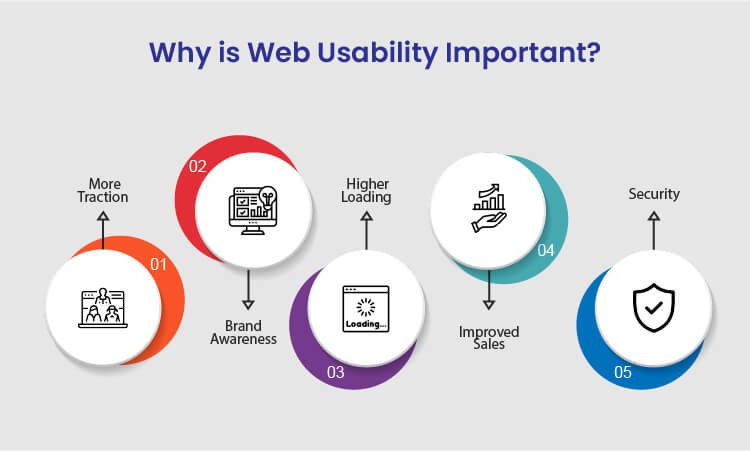
Why is Web Usability Important

There are various benefits of improving website usability for your business to achieve success. Following are the sure-shot benefits of enhancing the usability of your website:

1. More Traction

Several businesses, usually budding startups, struggle a lot to generate more traction and traffic to their websites. The best way to overcome this is to resolve all the technical issues on your website and let more traffic come in. Since the search engines also focus on technically stronger websites, you will get more organic results making you more visible on the internet.

Whether your main focus is more sales, branding, or generating traffic, enhanced usability can help you achieve your goals. When you focus on more traction, the overall authority of your business increases.

2. Brand Awareness

Many businesses these days struggle to get recognized against their competitors on the internet. This might happen because of the higher bounce rate of your website. Due to the high bounce rate, it becomes challenging for visitors to navigate through the web pages. So, with improved web usability, you can ensure a minimum bounce rate and provide a smoother browsing experience to the users.

When you offer a good user experience to the customers, the overall branding of your website improves significantly. Whether you drive traffic from social media, website, or organic results, brand awareness will ultimately increase irrespective of any factor.

3. Higher Loading Speed

Website loading speed is the most significant running factor that affects the overall credibility of the business. To increase your website usability, ensure that your website loads faster without hassle on both desktop and mobile devices. In addition, if you are adding new web pages to your site, make sure that those pages also load faster and seamlessly.

If you need, you can also use Google’s free website speed testing tool to check whether your website loads faster on every device or platform.

4. Improved Sales

If we talk about an eCommerce business, then website usability is the most important factor to take into account. There are many functionalities of a website that should work seamlessly in order to regain customers.

For example, eCommerce businesses are directly connected to so many online transactions, and you need to make sure that your website works fine on all the platforms. You need to necessarily focus on website usability to significantly increase your sales. When you combine SEO tactics with website usability principles, you tend to get more sales.

5. Security

Security is yet another important aspect to be considered for web usability. When you ensure that your website and visitors’ personal data are safe, you gain more recognition among your competitors. Therefore, always integrate the SSL certificate and other necessary documents to give your customers the most secure user experience.

Ensuring your customers that you care about the safety of their data will help you gain more traction and sales, thereby increasing the usability of your website.

After knowing about the key benefits of improving the website’s usability, you might have realized how vital website usability is for your business to grow. Many web design companies worldwide will offer you the best web design services for your website development.


Website Usability Analysis and Conversion Optimization

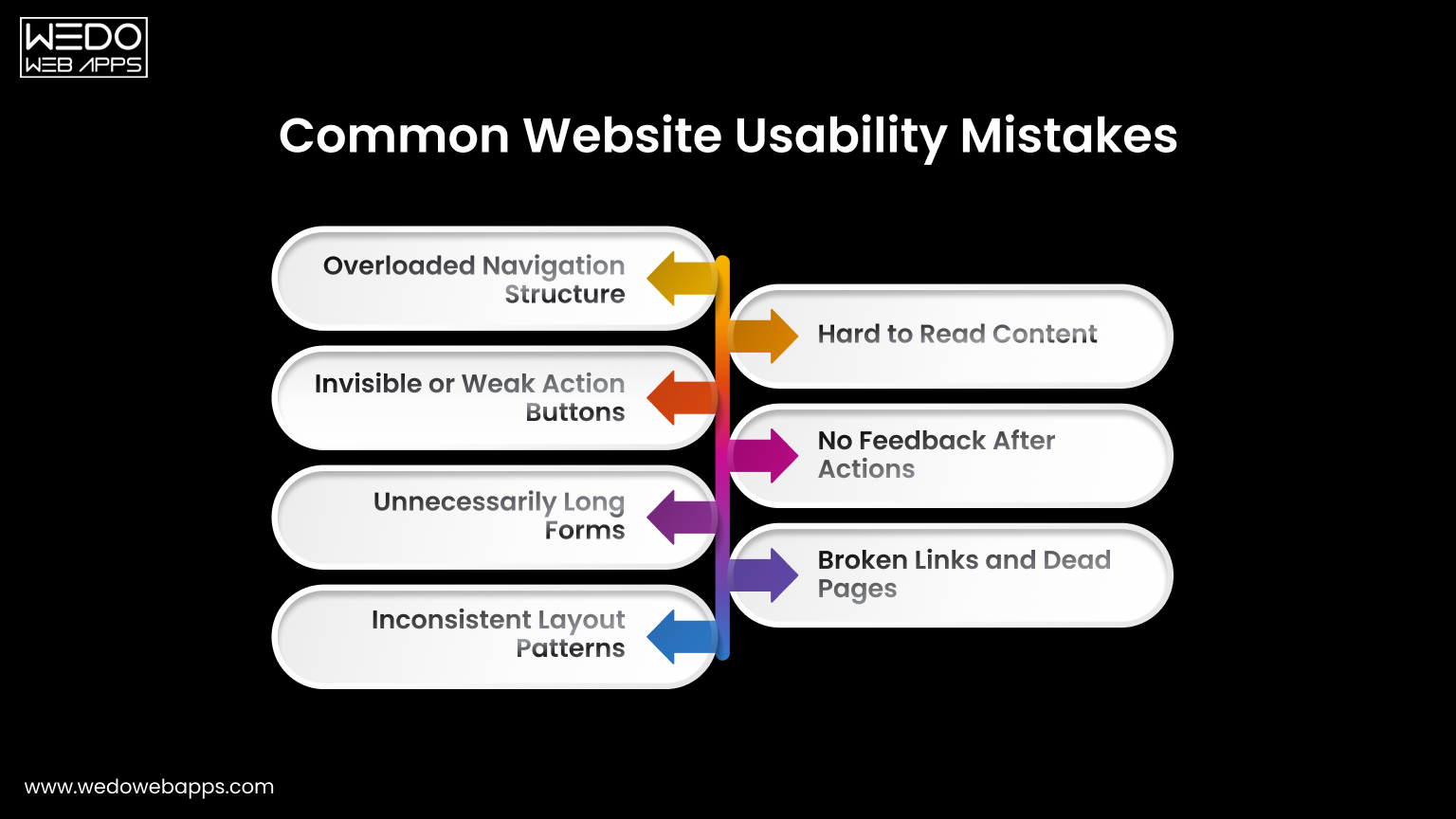
Common Website Usability Mistakes

Common Website Usability Mistakes to Avoid

Understanding the website usability definition helps to identify why users leave a site even when the content is relevant.

Most issues appear in small interaction details rather than large technical failures. Recognizing these gaps highlights the real importance of website usability.

Overloaded Navigation Structure

Many websites try to show every page in the main menu. This forces visitors to read instead of act. Follow usability principles for websites by grouping related pages and limiting primary options. Clear navigation reduces hesitation and guides movement naturally.

Invisible or Weak Action Buttons

If users must search for the next step, the design is failing. Buttons placed too low or written with unclear labels reduce conversions. One of the most effective website usability tips is keeping the primary action visible and direct.

Unnecessarily Long Forms

Forms usually collect more information than is required. Every extra field increases the drop-off rate. When considering how to improve website usability, shorten forms and request details later if needed.

Inconsistent Layout Patterns

Changing menu position, colors, or button styles between pages forces users to relearn the interface repeatedly. Consistency is one of the core website usability best practices because familiarity builds speed and confidence.

Hard to Read Content

Dense paragraphs and poor spacing discourage reading. Break content into sections, use headings, and maintain comfortable line spacing. Readable content supports both engagement and scanning behaviors.

No Feedback After Actions

Users expect to have confirmation after clicking. Missing success messages or error guidance creates uncertainty. Providing immediate feedback follows basic usability principles for websites and prevents repeated actions.

Broken Links and Dead Pages

Non-working links signal neglect and reduce the trust among the users instantly. Regular audit and proper redirects are simple yet powerful website usability tips that maintain credibility.

Correcting the issues does not require a full redesign. A small adjustment based on the importance of website usability can significantly improve interaction and completion rates.

Tips to Improve Website Usability
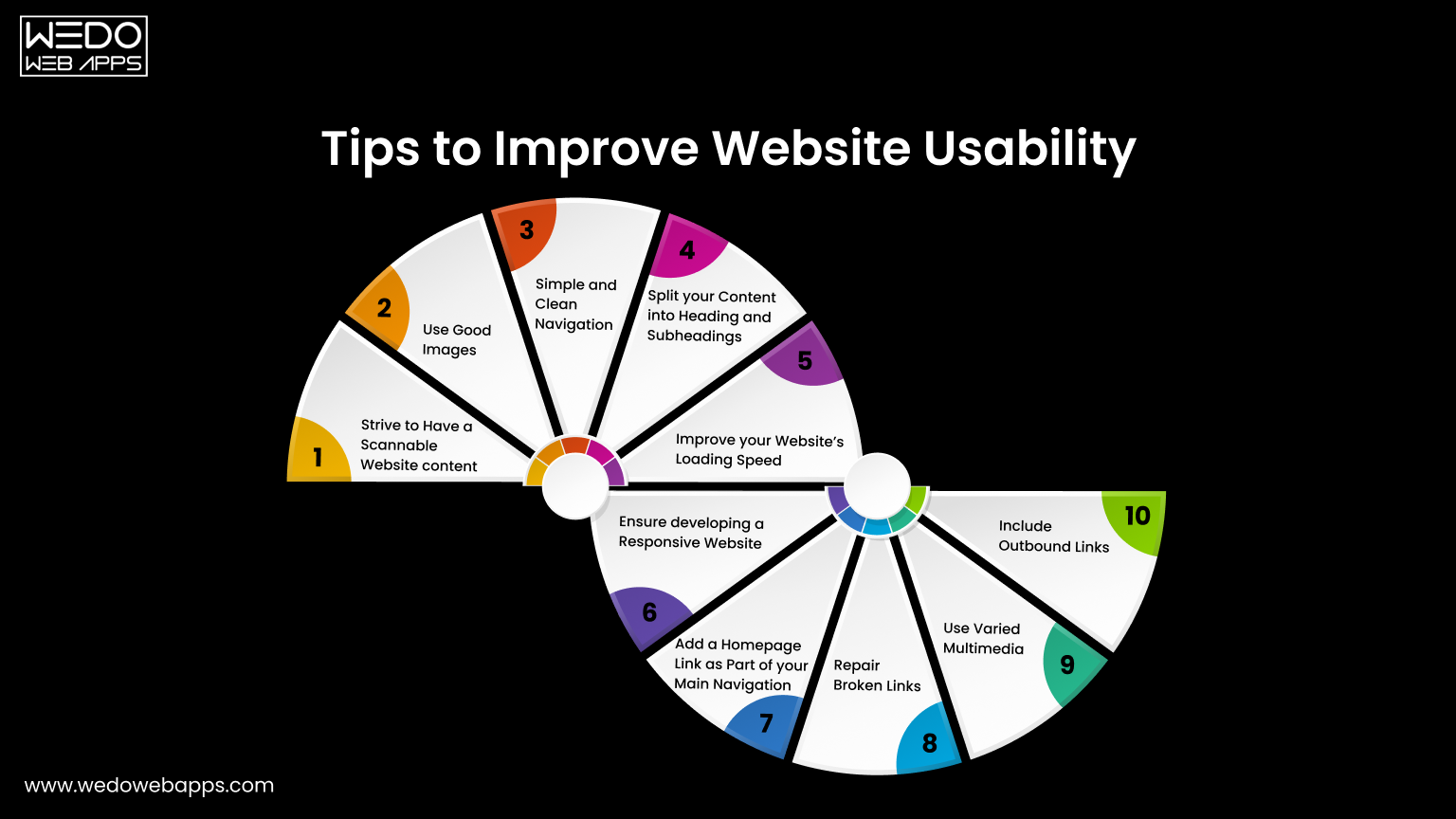
Improve Website Usability for Better Performance

One of the greatest tips to improve website usability is to keep your website design consistent. Apart from this, there are many other tips that will help you improve the way the users interact with your website. Some of which include:

1. Strive to Have a Scannable Website Content

These days, people are hardly free to read every single piece of content on your website. In most cases, customers just scan your website and find the content that is valuable to them. If they don’t see what they are looking for, they will probably not be returning back.

The best way to improve usability is to make the website content scannable. Achieve this by using bold letters for important information and bullet points to enhance your website’s usability. Doing this will make your website easy to scan, and you will potentially gain more customers for your business.

2. Use Good Images

Using good images is a notable tip for increasing site usability because these help you break up the content. For example, instead of writing content for a point, try using images that add relevant information for that particular point.

Even though images play a vital role in the website’s usability, avoid using poorly optimized images or so many images as it can compromise your site’s usability. Instead of overdoing it, use properly optimized and limited images on your website.

3. Simple and Clean Navigation

A well-functioning website can improve usability but ensure giving a simple layout to every web page. Additionally, always try to avoid horizontal scrolling as users get irritated while horizontally scrolling the websites. A responsive website that fits every screen resolution can help you avoid horizontal scrolling.

What’s more important is to avoid the use of many navigation elements. Also, don’t use so many links within the headlines as users will hardly find what they want, which will significantly impact your website’s usability.

4. Split Your Content Into Headings and Subheadings

As we said earlier, visitors hardly read all the text written on your website. Therefore, catchy headlines are the most important for your website. Writing creative headlines can be beneficial as it is the very first thing a customer notices and builds interest in reading your content.

Apart from headings, structuring your website plays a crucial role in usability. Structuring your website with H1 and H2 tags will make your website look more appealing to your customers. It is an excellent way of resulting in long clicks and increasing engagement levels.

5. Improve Your Website’s Loading Speed

The slow loading speed can affect your website’s usability as it can cause you to lose a potential visitor. This is because a visitor gets irritated and leaves the website before it gets loaded fully. Additionally, search engines like Google use website loading speed as a significant ranking factor. This means you will lose an opportunity to rank higher on Google, ultimately losing customers.

Therefore, to resolve this issue, optimize your images and videos by reducing the file size before uploading them on the website. This will significantly increase your website’s loading speed.

6. Ensure Developing a Responsive Website

With an increase in the number of smartphone users, having a mobile-friendly website is not an option but a crucial part of web usability. Still, if you fail to incorporate responsiveness in your website it will affect your Google ranking and usability, thereby losing a high volume of traffic.

As you implement responsiveness to your website, ensure it maintains the same theme as the desktop version, regardless of the user’s device. For instance, the layout of a casino website will be different on both the desktop and the mobile versions. But, you need to make minor changes like changing the image size and maximum width of the page to have a responsive website.

If you have a website and want to incorporate responsiveness or are a business looking to develop a responsive website, we can help you offer cost-effective, responsive website design services.

7. Add a Homepage Link as Part of Your Main Navigation

Adding a homepage link on the top of your website will increase your site’s usability as it will enable the users to access the homepage easily. Definitely, the younger professionals know that the website logo acts as a link which eliminates the need to add the homepage link.

However, if your target audience is the older demographic, they may be confused about getting back to the homepage. If they do not see the home button, they won’t be able to recognize the logo as a link to the homepage easily.

8. Repair Broken Links

Broken links are terrible for website usability, but the good thing is that they can be fixed easily. There are several free and paid tools on the internet that may help you find the broken links on your website, so you can check and fix them.

9. Use Varied Multimedia

Even though it is said that content is king, images, audios, and videos play a vital role in appealing to the customers. Deliver the content that best suits your business and your users, and remember not to forget to optimize your multimedia to increase the site’s usability. Upload the content that provides value for the users.

10. Include Outbound Links

Adding some outbound links to your website will make the visitors feel valuable. This will make the content more relevant and useful for the customers. Linking your content with the high authority sites will not only make your website look trustworthy but will also make your web content more meaningful and relevant.

Now you know what you can do to improve the website’s usability. So, if you think that your website is not easily accessible for the users, implement these tips to enhance your site’s usability.


Website Usability Optimization for Better Engagement

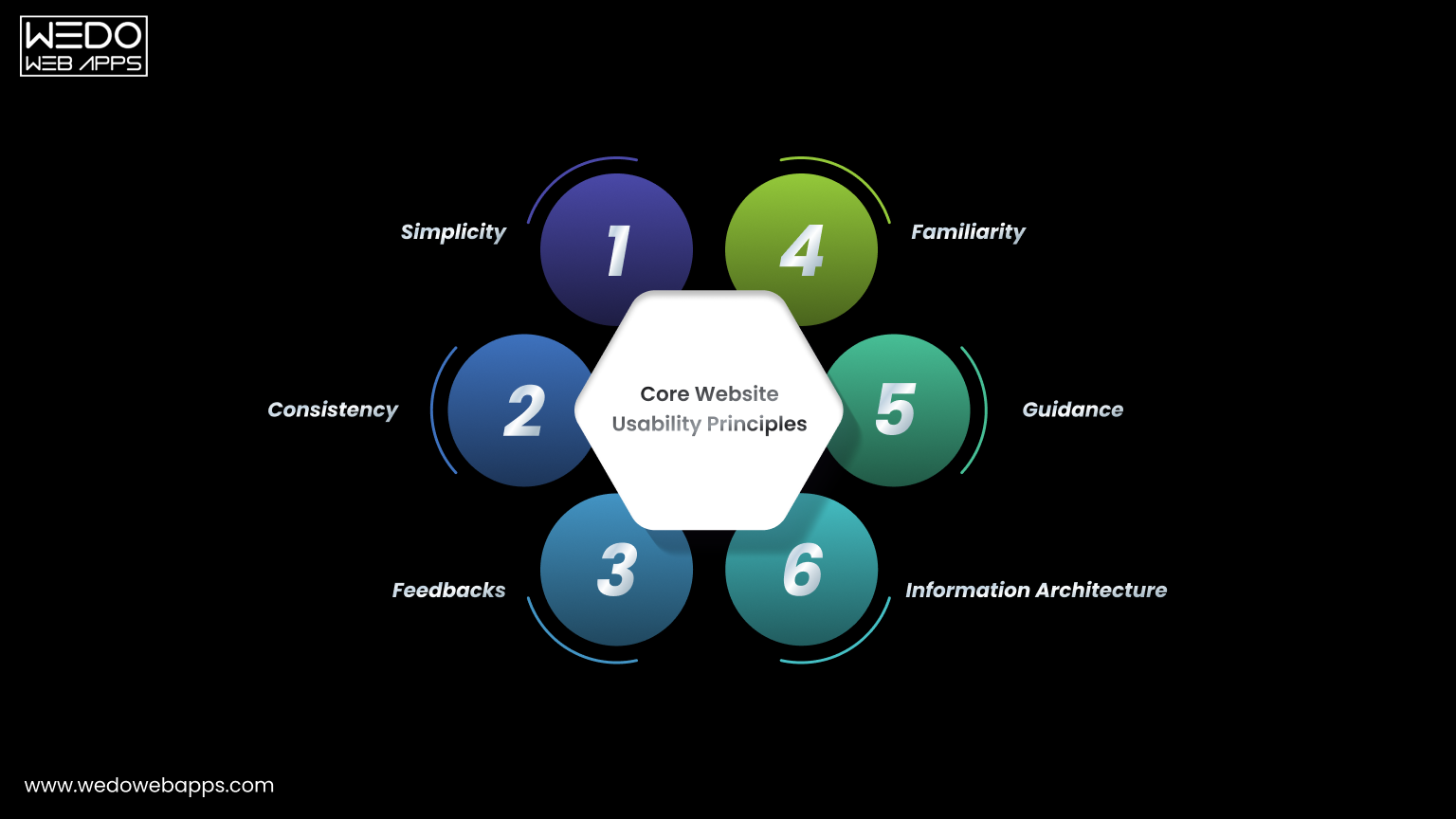
Core Usability Principles

Core Website Usability Principles Explained

After applying practical improvements, the next step is understanding the thinking behind them.

Usability principles for a website act like a rule that guides every design and content decision. Instead of fixing individual issues repeatedly, these principles help in preventing problems before they appear. They also explain the importance of website usability because they focus on human behavior rather than design trends.

Below are the core principles that support strong website usability best practices.

  1. Simplicity

A visitor should immediately understand what the page offers and what action is supposed to be taken next. Complex layouts force users to interpret instead of interact.

To apply simplicity:

  • Remove decorative elements that do not support a task.
  • Keep primary actions clearly visible.
  • Limit competing calls to action on a single screen.

Simple interfaces help users act faster and reduce hesitation.

  1. Consistency

People learn patterns quickly. When a website changes patterns across pages, users feel lost even when the website and content are being correctly managed.

Maintain consistency by:

  • Keeping navigation placement identical across pages.
  • Using the same button styles for the same actions.
  • Following a predictable content structure.

Consistency is one of the strongest answers to how to improve website usability because it lowers the mental effort.

  1. Feedback

Every user action should produce a clear response. Without feedback, visitors are unsure whether the system worked.

Provide feedback through:

  • Form submission confirmations.
  • Error messages that explain what went wrong.
  • Visual response when buttons are clicked.

Clear responses build trust and support the website usability definition of efficient interaction.

  1. Familiarity

Users prefer interfaces that behave like systems they already know. Completely new interaction patterns slow them down.

Improve familiarity by:

  • Using standard icons such as search and menu.
  • Following common checkout and form patterns.
  • Avoiding experimental layouts for important tasks.

Familiar structure improves confidence and interaction speed.

  1. Guidance

Websites should guide visitors instead of expecting them to explore your site blindly. Good guidance feels like signposts along a road rather than instructions in a manual.

Apply guidance with:

  • Clear step indicator in forms or checkouts.
  • Helpful tooltips for complex actions.
  • Suggesting next steps after task completion.

Guided navigation demonstrates how to improve website usability by reducing uncertainty.

  1. Information Architecture

Content organisation determines whether users find information quickly or abandon the search.

Improve structure by:

  • Grouping related content logically.
  • Naming categories based on user intent.
  • Keeping hierarchy shallow and predictable.

Good organisation supports long-term usability and ensures the website remains easy to use even as content grows.

Following these usability principles for a website ensures improvement remains consistent over time instead of becoming temporary fixes.

Usability Testing Methods
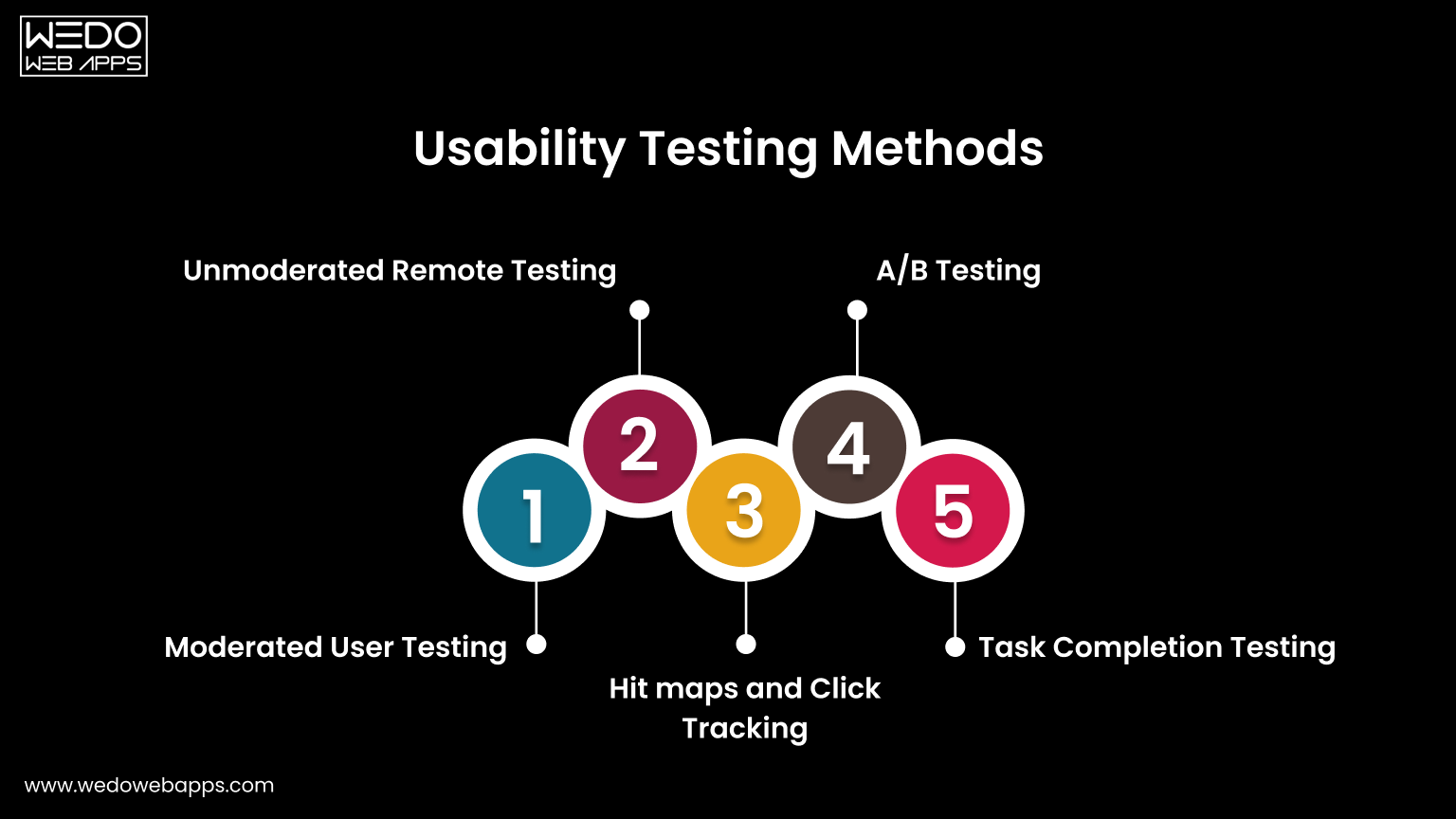
Website Usability Testing Methods Explained

After applying improvements and principles, the next step is validation.

You cannot rely only on assumptions when working on website usability. Testing shows whether users actually understand and complete tasks comfortably. This stage connects directly with the website usability definition because usability is measured through real interaction and not opinion.

Below are practical testing methods used in website usability best practices.

  1. Moderated User Testing

In this method, a facilitator observes users while they perform specific tasks on the website. The observer watches behavior, confusion points, and decision patterns.

Useful observations include:

  • Where users hesitate before clicking.
  • Which elements do they ignore.
  • What information do they expect but cannot find.

This method clearly demonstrates the importance of website usability because real users often behave differently than expected.

  1. Unmoderated Remote Testing

Users complete tasks independently without supervision while their actions are recorded. This provides natural behavior because participants interact in their own environment.

It helps identify:

  • Navigation misunderstanding.
  • Mobile interaction issues.
  • Content clarity problems.

This approach is widely used when learning how to improve website usability across different devices.

  1. Heatmaps and Click Tracking

Tracking tools visually display where users click, scroll, and stop reading. Instead of guessing engagement, you see attention patterns.

Common insights:

  • Buttons ignored by users.
  • Sections skipped during scrolling.
  • Overlooked important content.

These findings directly support usability principles for websites by revealing attention flow.

  1. A/B Testing

Two versions of a page are shown to different visitors to compare performance. Small layout or wording changes often produce measurable differences.

You can test:

  • Button placement.
  • Heading clarity.
  • Form structure.

This method converts website usability tips into a measurable improvement.

  1. Task Completion Testing

Users receive a clear objective, such as completing a purchase or finding contact details. The success rate and time taken are measured.

This evaluates:

  • Efficiency of navigation.
  • Clarity of instructions.
  • Overall interaction comfort.

Task completion directly reflects the website usability definition because it measures goal achievement.

Regular testing ensures improvements remain effective as the website grows. Instead of redesigning repeatedly, ongoing evaluation keeps usability aligned with user expectations.

Summarizing Website Usability

Website usability is the most significant element that cannot be achieved overnight. However, this is something every business website should primarily focus on. Avoiding website usability may cause you to drop down on the search engines and ultimately lose your potential customers.

Achieving website usability requires hard-core research and a repetitive approach of constantly testing and enhancing. Keep the above points in mind when you start developing or optimizing your website to offer the best user experience to your customers.

Designing an optimized website is a crucial part, but when the website is developed, website usability testing is highly recommended. If you are a non-tech geek having trouble creating or optimizing your website for usability, avail responsive web design services and let the professionals do their job. WeDoWebApps LLC has handled various design projects and can help you achieve success the way you want.



Transform Your Website with Website Usability

How to Leverage Social Media to Improve eCommerce Conversion Rate

Introduction – How Social Media Drives eCommerce Conversions Today

A potential customer discovers your product while scrolling Instagram during lunch. They like the design, tap your profile, browse a few posts, and save the product. Later that evening, they see your retargeting ad on Facebook. The next morning, a short TikTok video shows someone using the same product with real results. By afternoon, they visit your store and make a purchase.

This is how modern eCommerce buying journeys actually happen.

Today, social media is no longer just a place to build awareness. It plays a direct, measurable role in influencing purchase decisions and driving online revenue. Brands that successfully leverage social media are not only reaching audiences, but they are also strategically guiding them from discovery to checkout.

For startups, SMBs, and enterprises, the real opportunity lies in leveraging social media for business growth with conversion-focused strategies. When social media and eCommerce work together, brands can:

  • Improve eCommerce conversion rate
  • Increase eCommerce conversion rate across channels
  • Boost eCommerce sales consistently

This guide explains how to leverage social media for marketing that turns engagement into revenue. You will learn practical tactics, platform-specific strategies, and optimization techniques designed to help you attract high-intent shoppers, build trust, and convert more visitors into customers.


Not sure why social media traffic isn’t converting

Why Social Media Has a Direct Impact on eCommerce Conversion Rates

Most eCommerce brands treat social media as a top-of-funnel awareness channel. In reality, social platforms now influence every stage of the buying journey, from product discovery to final purchase decision.

This is why social media and eCommerce are deeply connected.

When implemented strategically, social media does more than generate traffic. It helps pre-qualify buyers, build trust, reduce hesitation, and push users toward conversion.

Here is how social media directly impacts your eCommerce conversion rate.

1. Social Platforms Capture High-Intent Traffic

  • Feed posts
  • Stories and reels
  • Influencer content
  • Paid social ads

Unlike cold website visitors, these users often arrive with context and curiosity. They have already seen the product in action, read comments, or watched a demonstration.

This warm intent increases the likelihood to:

  • Browse product pages
  • Add items to cart
  • Complete purchases

As a result, brands that leverage social media effectively tend to increase their eCommerce conversion rate compared to relying only on search or display traffic.

2. Social Proof Reduces Purchase Friction

One of the biggest barriers to online purchases is trust. Social media naturally solves this through:

  • User-generated content (UGC)
  • Reviews and comments
  • Influencer recommendations
  • Community engagement

When shoppers see real people using and endorsing a product, hesitation drops. Confidence rises. Conversions follow.

This is a core reason why social-driven traffic often helps improve the eCommerce conversion rate across product categories.

3. Faster Decision-Making Through Visual Commerce

Social platforms are built for visual storytelling.

Short videos, carousels, and lifestyle imagery allow shoppers to quickly understand:

  • What the product does
  • How it looks in real life
  • Why it is better than alternatives

This accelerates buying decisions and supports brands aiming to boost eCommerce sales without relying solely on long product descriptions.

4. Retargeting Creates Multiple Conversion Opportunities

Most users do not buy on their first visit. Social media retargeting allows brands to:

  • Re-engage product viewers
  • Remind cart abandoners
  • Upsell previous customers

Each additional touchpoint increases familiarity and purchase intent, which directly supports efforts to increase eCommerce conversion rate over time.

5. Social Commerce Shortens the Purchase Path

Features like:

  • Instagram Shops
  • Facebook Shops
  • TikTok Shops
  • Shoppable Pins

Allow users to move from discovery to checkout with fewer steps.

Fewer steps mean less friction and higher conversion probability.

This is a major reason why modern brands prioritize leveraging social media for business growth, not just brand awareness.

Proven Strategies to Leverage Social Media to Boost eCommerce Conversions

Successfully leveraging social media for marketing is not about posting frequently. It is about designing conversion-focused experiences across platforms.

Below are proven strategies used by high-performing eCommerce brands to improve eCommerce conversion rate, increase buyer confidence, and boost online sales.

1. Optimize Your Social Profiles for Conversion

Your social profile is often the first touchpoint between your brand and potential customers. It should function like a mini landing page, not just a branding asset.

Key optimization elements:

  • Clear value proposition in bio
  • Primary keyword in description (e.g., social media and eCommerce solutions)
  • Single-focused CTA (Shop Now, View Collection, Get Started)
  • Shoppable links or product catalogs

Well-optimized profiles help turn profile visitors into store visitors. This is an essential step to increase eCommerce conversion rate.

2. Build Content That Matches Buyer Intent

Different content types serve different stages of the funnel.

High-converting content formats include:

  • Product demos and usage videos
  • Before-and-after transformations
  • Customer testimonials and reviews
  • Comparison posts
  • Short problem-solution reels

This content answers buying questions upfront and reduces uncertainty. It helps shoppers move faster toward purchase.

3. Leverage User-Generated Content (UGC)

UGC acts as digital word-of-mouth.

When shoppers see real customers using your product, trust increases dramatically.

Ways to use UGC:

  • Feature customer photos on product pages
  • Repost tagged content on social channels
  • Use UGC inside paid ads
  • Highlight video testimonials

UGC directly supports brands looking to improve eCommerce conversion rate by lowering skepticism and increasing authenticity.

4. Use Paid Social Advertising with Conversion Intent

Organic reach alone is rarely enough for consistent growth.

Conversion-focused ad strategies include:

  • Retargeting website visitors
  • Retargeting cart abandoners
  • Lookalike audiences based on buyers
  • Dynamic product ads

Each campaign should point to a conversion-optimized landing page, not just a homepage.

This approach helps brands systematically boost eCommerce sales and scale faster.

5. Implement Social Commerce Features

Native shopping features reduce friction between discovery and checkout.

Examples:

  • Instagram and Facebook Shops
  • TikTok Shop
  • Pinterest Product Pins

Shoppers can browse and buy without leaving the platform, which often results in higher completion rates.

Social commerce is one of the most effective ways to increase eCommerce conversion rate today.

6. Create High-Converting Landing Pages for Social Traffic

Social traffic behaves differently from search traffic.

Best practices:

  • Clear headline aligned with the ad or post
  • Strong hero image or video
  • Benefits-focused bullet points
  • Visible social proof
  • Fast-loading mobile design
  • Simple checkout flow

Dedicated landing pages significantly outperform generic product pages when leveraging social media for business growth.

7. Use Retargeting to Recover Lost Sales

Most visitors will not purchase on their first visit.

Retargeting allows you to:

  • Show abandoned cart reminders
  • Offer limited-time discounts
  • Highlight reviews or testimonials
  • Promote urgency (low stock, ending soon)

This strategy alone can recover a large percentage of otherwise lost revenue.

8. Collaborate with Influencers Strategically

Influencer marketing works best when creators:

  • Match your target audience
  • Produce authentic content
  • Demonstrate real usage

Micro-influencers often drive higher engagement and better conversion rates than large influencers.

When executed properly, influencer partnerships become a scalable method to boost eCommerce sales.

Key takeaway. The brands that achieve the highest ROI treat social media as a conversion channel, not just a content channel. Every post, ad, and interaction should move users one step closer to purchase.

How to Measure and Improve Social Media-Driven eCommerce Conversion Rates

Leveraging social media effectively is not just about execution. It is about measuring what drives results and optimizing continuously. For startups, SMBs, and enterprises, understanding performance data is essential to increase eCommerce conversion rate and scale profitably.

This section explains what to track, what benchmarks matter, and how to optimize based on insights.

Key Metrics That Matter for Social Media and eCommerce

To evaluate whether your social strategy is working, focus on metrics tied directly to revenue, not vanity numbers.

Core performance metrics include:

  • Conversion Rate (CR): Percentage of social visitors who complete a purchase
  • Click-Through Rate (CTR): Measures content and ad relevance
  • Cost Per Acquisition (CPA): Cost to acquire one customer via social
  • Return on Ad Spend (ROAS): Revenue generated per ad dollar
  • Average Order Value (AOV): Value of each completed transaction

Tracking these metrics helps identify where friction exists and where optimization can improve eCommerce conversion rate.

What Is the Average Conversion Rate for eCommerce?

Decision-makers often ask. What is a good conversion rate for eCommerce?

While rates vary by industry, device, and region:

  • Average eCommerce conversion rate: typically ranges between 2% to 3%
  • Top-performing stores often exceed this by optimizing traffic quality, UX, and trust signals

If your social traffic converts below average, the issue is rarely the platform. It is usually message mismatch, weak landing pages, or lack of trust signals.

Understanding the conversion rate average for eCommerce gives you a realistic benchmark for improvement.

How to Identify Conversion Drop-Off Points

To increase eCommerce conversion rate, you must pinpoint where users abandon.

Common drop-off points include:

  • After clicking a social ad or post
  • On product detail pages
  • During checkout
  • At payment confirmation

Using analytics tools, heatmaps, and funnel reports helps reveal these gaps and enables targeted improvements.

Optimization Tactics That Drive Higher Conversions

Once data is available, optimization becomes systematic.

High-impact improvements include:

  • Aligning ad copy with landing page messaging
  • Simplifying checkout steps
  • Adding social proof near CTAs
  • Improving page load speed on mobile
  • Testing different creatives and offers

Each incremental improvement compounds over time, helping brands boost eCommerce sales without increasing ad spend.

Why Continuous Testing Is Non-Negotiable

Social platforms evolve constantly.

Audience behavior, algorithms, and formats change. So should your strategy.

Brands that consistently leverage social media for marketing success test:

  • Creatives (videos vs images)
  • Messaging angles
  • Offers and incentives
  • Audience segments

This iterative approach separates average performers from scalable, high-growth eCommerce businesses.

Key insight for decision-makers. If social media is not improving your eCommerce conversion rate, the issue is rarely visibility. It is almost always strategy, execution, or optimization gaps.


Find out why social media isn’t generating enough sales

Common Mistakes That Prevent Social Media from Boosting eCommerce Sales

Many businesses invest heavily in social media but struggle to see a meaningful revenue impact. In most cases, the problem is not the platform. It is how social media is being used.

Avoiding the following mistakes can significantly improve the eCommerce conversion rate and overall ROI.

1. Treating Social Media as Only a Branding Channel

Posting consistently is important, but posting without a conversion objective limits results.

When content lacks:

  • Clear CTAs
  • Product context
  • Conversion paths

Social engagement stays disconnected from revenue.

High-performing brands design every post with a purpose. Educate, build trust, or drive purchase.

2. Sending Traffic to the Homepage

Homepages are built for broad audiences, not social-specific intent.

Sending social visitors to generic pages often results in:

  • Confusion
  • Higher bounce rates
  • Lower conversion rates

Dedicated landing pages aligned with each campaign dramatically increase eCommerce conversion rate.

3. Ignoring Mobile Experience

Most social traffic is mobile-first.

If your store loads slowly or checkout is complex on mobile, conversions drop instantly.

Mobile optimization is a non-negotiable factor for brands aiming to boost eCommerce sales.

4. Using One-Size-Fits-All Content

Each platform has different user behavior.

Reposting identical content everywhere limits performance.

Instead:

  • Use short-form video for TikTok and Reels
  • Use carousels for Instagram and LinkedIn
  • Use pins for Pinterest

Platform-native content performs better and converts higher.

5. Neglecting Retargeting

Only a small percentage of users buy on their first visit.

Without retargeting:

  • Warm leads are lost
  • Customer acquisition costs increase
  • Revenue potential remains untapped

Retargeting is essential for brands looking to increase eCommerce conversion rate consistently.

6. Focusing on Vanity Metrics

Likes and followers do not equal sales.

Conversion-focused brands prioritize:

  • Purchases
  • Revenue
  • CPA
  • ROAS

This shift in mindset is critical when leveraging social media for business growth.

Bottom line. Social media success in eCommerce is rarely about doing more. It is about doing the right things strategically.

Why Partnering with Experts Helps You Scale Social Media-Driven Conversions

As social media and eCommerce become more complex, managing everything in-house becomes increasingly difficult. Platforms change, algorithms evolve, and buyer expectations rise. What worked six months ago may no longer deliver results today.

This is why many high-growth brands choose to partner with experienced eCommerce and social media specialists instead of relying solely on internal teams.

1. Strategy Before Execution

Experts do not start with posting schedules. They start with business goals.

A professional team helps define:

  • Target audiences and buyer personas
  • Platform selection
  • Conversion funnels
  • Content and advertising strategy

This strategic foundation ensures every effort supports your objective to increase eCommerce conversion rate.

2. Cross-Channel Optimization

Social media does not operate in isolation.

Specialists align:

  • Social campaigns with website UX
  • Landing pages with ad messaging
  • Email and SMS with retargeting efforts

This integrated approach creates a seamless customer journey that helps improve eCommerce conversion rate across channels.

3. Access to Specialized Skill Sets

Effective social commerce requires multiple competencies:

  • Performance marketing
  • Conversion rate optimization
  • UI/UX Design
  • Analytics and reporting
  • Content production

Building this expertise internally is expensive and time-consuming. Partnering gives instant access to these skills.

4. Faster Testing and Scaling

Experienced teams already know:

  • What strategies work
  • What mistakes to avoid
  • How to test efficiently

This shortens learning curves and accelerates results. It is crucial for brands aiming to boost eCommerce sales quickly.

5. Data-Driven Decision Making

Experts rely on real performance data, not assumptions.

They continuously analyze:

  • Campaign performance
  • Funnel drop-offs
  • User behavior
  • ROI metrics

This allows continuous optimization and predictable growth.

Key takeaway for decision-makers. If social media is an important revenue channel for your business, treating it as a specialized function, not an experimental activity, can dramatically change outcomes.


Transform social media into a predictable revenue channel

Conclusion. Turning Social Media Into a Revenue-Driving eCommerce Channel

Social media has evolved far beyond awareness and engagement. Today, it plays a direct and measurable role in how customers discover products, evaluate brands, and decide where to spend their money.

For startups, SMBs, and enterprises, the opportunity is clear.

When you leverage social media strategically, you can:

  • Improve eCommerce conversion rate
  • Increase eCommerce conversion rate across platforms
  • Build trust at scale
  • Boost eCommerce sales consistently

The brands that win are not necessarily the ones posting the most. They are the ones aligning content, commerce, advertising, and optimization around a single objective. Conversion.

By optimizing profiles, creating buyer-focused content, using social commerce features, investing in retargeting, and measuring performance continuously, social media becomes a predictable growth engine rather than an experimental channel.

If your goal is to turn social media into a serious revenue driver, the next step is having the right strategy, technology, and execution model in place. For that, you can partner with a social media marketing company that can help you boost your eCommerce sales using social media.


Boost eCommerce conversion rates and sales effectively


Website Speed Testing – Importance, Tools & Performance Evaluation

Website Speed Testing: Why It Matters

Have you ever clicked a website and had to wait for a long time before anything appeared? Chances are, you did not stick around. Most users expect the web pages to load faster or within a second, and if not, then the website loses the traffic, leading to lower engagement, and a missed opportunity.

Now let’s just be honest,we all have used websites at least once in our lifetime, and we know how impatient we are when it comes to the loading speed of a website. Thus, the performance and ability of your website to load quickly are essential for its usability and success. This is where website speed testing becomes important.

Just understand it by taking your example. Have you ever visited a website and waited for a long time for it to load? You felt frustrated, right? The same thing happens when visitors come to your website, and it takes longer than usual; they will probably feel frustrated and return back searching for your competitor’s website.

Loading speed not only affects user experience but also directly impacts your website’s SEO, and on this website, performance testing plays an important role in maintaining the responsive website design. So, whether you are a jewelry merchant, a school, a college, or in any other industry, your website should be optimized for search engines. Therefore, Website Speed and Performance are crucial.

In this guide, we’ll look at why speed matters, which performance tests are most effective, and what tools can help you measure and improve how your website performs under different conditions.

What Is the Importance of Website Speed?

Speed can either make your website or break it. This is the reason why website developers, marketers, analysts, and IT departments are more focused on website speed testing tools. Improving your website speed and performance metrics can significantly impact your overall website performance, thereby helping you achieve your success goals.

Page speed impacts your website in almost every area, from user experience to search engine optimization and website speed optimization. We have seen that most website users will not wait for more than 4 seconds on a web page to load before moving on to some other store. And this is a fact that faster loading websites will perform better in the market.

But how to determine the speed of your website? Just sitting in front of your computer, looking for your website to load to determine the speed. Is it the solution? Absolutely Not. That is why most of the developers and testers will take advantage of the wide range of performance testing tools for thoroughly testing scenarios.

Before knowing various tools for speed testing your website, you should know that there are many other kinds of performance tests that need to be performed on a website. Read further to learn more about the types of website performance tests.

Types of Website Performance Testing

Before you begin improving the performance of your website, it is important for you to understand about the different types of website performance testing options to evaluate how your site is working under various conditions.

Each type of website performance testing maintains the focus on different specifications, which are speed, stability, and responsiveness.

Performance tests are the non-functional tests done to check the responsiveness, scalability, and throughput of the website under test. This mainly helps in increased revenue generation and enhanced user experience.

Below are the key test types used by QA teams and developers to ensure reliable and fast-loading websites:

  • Performance Testing

This test allows you to measure how quickly and effectively a website responds under various situations. The test will help in verifying your website for managing various processes like page loads, user requests, or form submissions within the acceptable limits.

  • Load testing

Load testing allows you to test your website when it comes to performance, and ensure the multiple users accessibility. It helps in determining the upper limit of website traffic and can handle it without affecting the user experience.

  • Stress Testing

This method pushes the website beyond the normal traffic limit by seeing the behaviour under extreme conditions. It helps in identifying the weak points, such as memory leaks, server crashes, or timeout issues.

  • Capacity Testing

Capacity testing is best when comes when to measure how many users your website can handle and what the limit is for that. This is useful when it comes to managing the planning of resources and scaling the business infrastructure efficiently.

  • Soak Testing (include missed label)

Soak testing allows you to evaluate the performance of a website while maintaining the accuracy over an extended period. Helps in identifying the performance without reducing the performance and increases the amount of visibility.

Testing Test Cases Example

For understanding how these tests can be applied in real-world scenarios, here is an example for your reference:

In a load test case, 1000 users are supposed to simulate the process while maintaining the product category, adding items to the cart, and the checkout process. The goal is to observe how the site manages simulation toward the actions of users across various key features.

By applying this combination of various tools or processes, these tests allow developers and testers to maintain the complete picture of how the website is performing under different conditions and allow them to make informed decisions for site optimization.

How to Perform Performance Testing for Web Applications

Before you make the plan for testing your website for the application, you should prepare for the various aspects. Successfully testing a web application starts with having clarity towards the business goals, access to the right tools, and a testing environment that accurately reflects how the website is properly functioning in real-world scenarios.

Here are the key points to consider before launching a test:

1. Understanding the website’s functional scope

Identify the core functions of your web application, if it includes payment gateways, APIs, and third-party integrations. These components include the various aspects of managing the test performance.

2. Define the purpose of testing

Allow you to clarify the accuracy of the measures, whether it is loading time, system responses towards user actions, scalability, or stability in high traffic for the website. This helps in selecting the right website performance testing.

3. Set clear KPIs

Determine what success looks like with handling the common performance metrics, including:

  • Response time (in seconds)
  • Number of simultaneous users
  • Throughput (request per second)
  • Error rates during peak usage

4. Know your user expectations

Consider how quickly your end users are expecting from your website, what they hope to interact with the site, and what features are most important to them.

5. Check test environment readiness

Be sure about the need for tools, hardware, and QA support. The testing environment should closely match your website setup in terms of server configuration and software stack.

6. Project timeline and QA schedule

Make an effective plan for testing activities to fit within the website development timeline, leaving enough room to fix issues and retest if necessary.

Taking these factors into account helps in creating a well-structured website speed testing strategy that reveals the real bottlenecks and guides performance improvement with precision.

start with performance testing

Step-by-Step Process for Website Speed Testing

Once your performance goals are clear and your testing operation is ready, you can begin by starting with the structured website speed testing. This involves setting up conditions to simulate real user behaviour and evaluating how your website performs under various workloads.

Here are the steps that you can follow while website speed testing:

Step 1: Set up the testing environment

Prepare physical and software components that are needed for testing. This includes various specifications like hardware, browser, automation tools, testing data, and network configurations that reflect your website’s performance.

Step 2: Define test plans and scenarios

Plan the design test case that covers all the key required actions for the website. Ensure that all criteria are being covered while handling all possibilities of visiting product pages, submitting forms, logging in, or completing transactions. Your plan should cover all normal, peak, and stress-level usage.

Step 3: Run a baseline test

Now, test the website while covering all the key actions. Test your website server with a single user to ensure the setup is functioning correctly. This will serve as a baseline for comparison with more complex tests.

Step 4: Simulate realistic workloads

Use performance testing tools to simulate multiple user sessions. By accessing these tools, you can easily apply for the concurrent requests and manage how users from different locations interact with your website.

Step 5: Monitor key metrics during testing

You should keep track of response time, server usages, memory load, and error rates. Website speed testing tools will help in capturing data while your test cases are being executed.

Step 6: Analyze results and identify issues

Know about the data of the website regarding slow-loading elements, that are larger images, unoptimized scripts, or server response delays. Look for patterns of your website issues in terms of handling load and pain point areas for the need of improvements.

Step 7: Document bugs and performance issues

Make sure you discover the issues during the testing by knowing the clear details. Some website speed testing tools also provide suggestions for fixing performance issues.

This was all about website testing, its importance, and the steps to test a website or a web app. Now that we know how important it is to test the website before launch, many tools can help you test your website and get it ready for launch. Read further to gain some knowledge about Website Speed and Performance Testing Tools.

Best Speed Testing Website Tools You Can Use

Now that you have a lot of understanding about the best speed testing website, check out these tools for testing your website’s speed. Each tool offers its unique features, reporting, and different ways to show results.

It is essential to know that the DNS lookup will be slower when you are running these tools for the first time. Therefore, it is recommended to run the tests multiple times and take an average of the overall results.

1. Pingdom

Pingdom is the best speed testing website tool for managing reports. The test results in Pingdom are usually divided into four sections:

  • Waterfall breakdown
  • Performance grade
  • Historical performance tracking
  • Page analysis

The page analysis features a website overview with additional information like size analysis, size per domain, requests per domain, and what type of content had more requests.

Pingdom’s speed test tool enables you to test your website from around 70 different locations. The results are provided with the speed insights that tell you where you need improvements. The result is broken down into four sections: Page size by domain, page size by content type, requests by domain, and requests by content type.

2. Site 24×7

Your page speed is often determined by the amount of HTML, CSS, and JavaScript you have implemented on the front-end. In other cases, your host or the server environment can directly impact your page speed. The site 24×7 page is specially designed to evaluate server environment performance.

It integrates with other system administrator tools and provides a readable waterfall graph that displays what and when is loading every page. Its integration with system administration tools can make it a great addition to the list of top website speed testing tools.

3. Dotcom-Monitor

Dotcom-Monitor offers you 25 different locations and 7 different browsers, including BlackBerry. Once you run the test on the dotcom monitor, you will get the results based on the load time and get details on your server response. With this tool, you will also be able to check how your website looks to the people visiting for the second time and have cached resources on their system.

It helps you see how your load time varies as per the location and what difference users are experiencing on your website worldwide. It is a perfect tool if you want to know how people experience your website from different geographical regions of the world.

4. Google PageSpeed Insights

Google PageSpeed Insights is a website page speed testing tool that grades your website from 1-100. The higher grade it gives you, the more optimized your website will become. If, after testing, you get a grade of more than 85, that means your website is performing well. In addition, it gives you reports for both mobile and desktop versions of your website.

You can view suggestions for improvements, such as the need to minify your CSS, optimize your images, or any other enhancements required. In addition, the mobile version report includes an extra section known as “User experience” that is involved in the scoring of your website.

5. GTmetrix

GTmetrix goes into detail, assigning your website a grade from F to A. Its report is divided into five sections. It includes metrics from Google Lighthouse Tool, video, history, and waterfall breakdown. By doing a free registration, you can test your website from different locations. You can test your website across various browsers, connection types to see how it impacts your website.

GTmetrix replaced YSlow and PageSpeed metrics in 2020 with tabular data from Google Lighthouse. Lighthouse is the golden standard for modern website performance improvements. You only need to create a Google account, and most of the features are free to use.

6. Uptrends

Uptrends offers 226 different locations to choose from when you are executing your speed test. You can even choose to test it with a desktop or a mobile device. You can select the different screen sizes and whether or not to throttle the virtual connection speed.

Uptrends used to be a very basic tool, but they have upgraded their services over time. Uptrends’ website testing report is broken down into two sections: waterfall graph and domain groups. The domain group comes with a different perspective, i.e., it categorizes the resources into other sources.

7. WebPage Test

WebPage Test is an open-source tool for website performance testing. It allows you to test your website across 40 different locations and a wide range of devices. Additionally, the tests can also be executed over both slow and fast 4G mobile networks. The test reports will include a grade from F to A.

It will also include additional information like compression information, caching, TTFB, waterfall charts for the load speed, etc. It also has a unique feature where the test is executed 3 times, and data sets of all three times are displayed. This will help you identify whether the DNS or CDN is causing any delay.

8. DareBoost

DareBoost is a performance testing tool that gives a detailed analysis across multiple locations around the world for both mobile and desktop versions. It has a simple dashboard yet shows various information like the moment it starts testing the page to the end, and gives tips on how you can improve to make it search engine friendly.

The above-mentioned were some of the top performance testing web applications that will help you to test your website and optimize it according to the search engines.

But, don’t you think this is kind of manual work for you to do? Since the industry is rapidly growing, testing has also been automated. What is meant by an Automated test?

Automated Performance Testing for Web Applications

Suppose your website is growing with complexity, and manual testing becomes time-consuming and inconsistent. This is where the automation tools make the greatest difference.

Automated performance testing web applications allows the team to run repeatable, accurate tests that simulate real user activity across various conditions.

What is automated website testing?

Automated website speed testing include use of software, tools, and frameworks which allow to handle user behavior, monitor system performance, and detect issues easily.

Tools like Selenium, Apache JMeter, and Google Lighthouse are commonly used to maintain an easy setup for test cases such as browsing, form submission, and cart checkouts.

This approach helps in testing:

  • Website responsiveness across browsers and devices.
  • Server response time under different traffic loads.
  • Scalability of your application over time.

Why choose automation over manual testing?

Manual testing has its different place during the initial development stages, but now to maintain the scalability and consistency of traffic. Automated tests offer several advantages:

  • Faster execution of repeated tests.
  • Early detection of bottlenecks after code changes.
  • Offer continuous support for integration and deployment (CI/CD) pipelines.
  • Reduced costs over time.

When should you automate performance testing?

  • After each development sprint.
  • Before a major release or product launch.
  • When traffic is expected to spike (campaigns, festivals, etc.).
  • As part of regular quality assurance for high-traffic websites.

By including automated performance testing in your workflow, you reduce the risk of unexpected slowdowns, broken elements, or server crashes during peak usage.

It also provides the accuracy and consistency needed to make informed decisions about performance improvements.

Checklist: When and How Often to Test Website Speed

Regular website speed testing helps keep your site fast and reliable. Here’s when you should run tests:

  • After every major update or redesign
  • Before launching new features or pages.
  • During high-traffic periods (sales, events, promotions).
  • Monthly or quarterly being the part of routine maintenance.
  • When users report slow performance.

These checkpoints ensure your website stays responsive, performs well under load, and meets user expectations consistently.

Conclusion: Improve Website Speed to Stay Competitive

Fast-loading websites lead to better user engagement, improved search visibility, and stronger conversions. Regular website speed testing helps you identify performance issues early and optimize for long-term results.

Whether you’re managing an online store, a service platform, or a content-based site, using reliable website speed testing tools and running scheduled performance testing for web applications can help maintain a high-quality user experience.

If you’re unsure where to start or need help improving your site’s performance, partnering with a specialized team can save time and reduce technical challenges.

help with testing and speed optimization

Website Development Process: 10 Steps for a High-Performing Website

Introduction

Great websites do not just appear overnight, and ones that look like they are not worth using. A template-built site created in 30 minutes might put you on the internet, but it skips every stage of the website development that actually matters: the research, the user experience strategy, the SEO architecture, and digital trust.

75% of users judge a business’s credibility based on the website design. And 74% say that they will not return to a site that is not mobile-friendly. A weak website is not neutral; it actively loses you, customers.

At WEDOWEBAPPS, our website development methodology has been refined over more than a decade now. This is a disciplined, 10-phase website development process that delivers a website that ranks, converts, and performs.

If all you need is a website that drives traffic and generates high revenue, and not a business card that only a few people may know. Below are the phases of web development that we have been following for a decade for building the most enticing and responsive websites.

Let’s know about every phase of the website development in detail.

What is a Responsive Website and Why It Is Important?

Before walking through every phase of the web development process, you must understand what responsive design means in 2026, because at every stage of development, this is an important factor.

So, what is a responsive website?

A responsive website is something that automatically adjusts the website’s layout, images, text size, and navigation as per the device size. This allows the user to maintain a seamless experience across all devices without any further changes in design. In 2026, this is not just a feature update. It is a minimum baseline for any website that wants to perform well and give a better experience.

Important Note:-

62-64% of all global web traffic is now coming from mobile devices. Especially in eCommerce sites, mobile drives 78% of all the retail traffic, yet the desktop still converts at nearly double the rate.

Also, 74% of users say that they do not return to any website that is not mobile-friendly. And a responsive website receives 50% more traffic than a non-responsive one.

Following Google’s mobile-first indexing policy is not becoming standard for all websites, which means that your mobile version determines your search ranking, not your desktop version. A website that is not built responsibly from day one is already competing at a structural disadvantage.

In short, it is important to have a website that is mobile-friendly and is developed with a responsive website design that grows as the customer base grows.

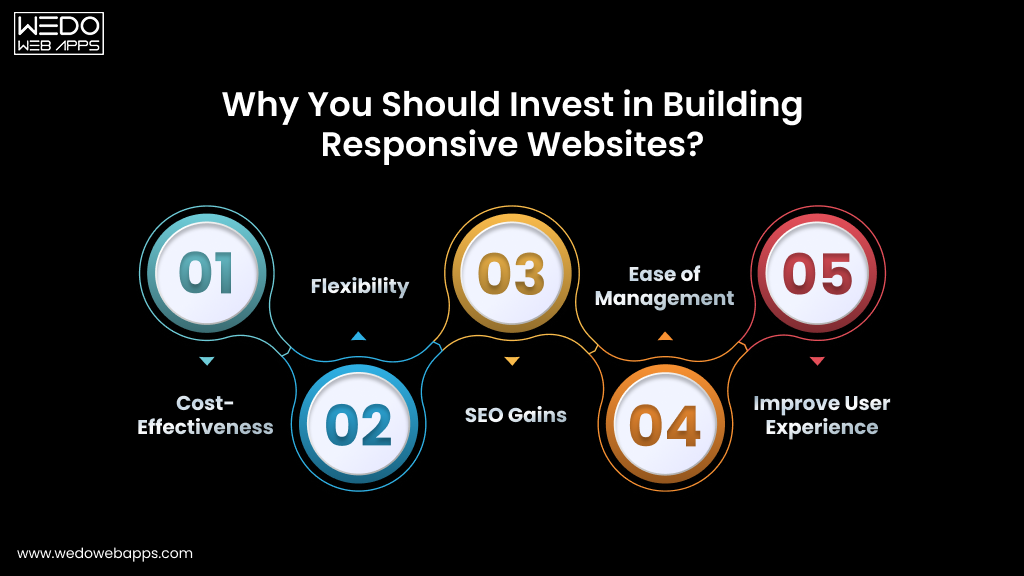
Why You Should Invest in Building Responsive Websites?
Why You Should Invest in Building Responsive Websites

What’s the point of a website if it does not bring traffic or revenue? There are three out of every five websites that convert visitors through mobile and reach the new market globally.

Here are the five strongest reasons that you should invest in responsive design when it comes to the website development process.

  • Cost-Effectiveness: One responsive website works perfectly across every device. There is no need to build, host, and or maintain a separate mobile site, which reduces the need for additional development and maintenance costs.
  • Flexibility: A responsive layout automatically adapts to new screen sizes and resolutions as technology evolves. Your site will always stay future-ready with the growing market needs.
  • SEO Gains: Google’s mobile-first indexing makes responsive design one of the most direct SEO improvements available. Mobile-optimized websites can see a 20% increase in conversion rate, and also the responsive sites rank higher across competitive search results.
  • Ease of Management: Follow the one codebase, which means one website to update, optimize, and maintain. This allows you to make the changes once and have the instant reflection across the desktop, tablet, and mobile site without additional efforts.
  • Improve User Experience: A fast and responsive experience removes the friction from the site and keeps the visitors engaged long enough to convert.

With the responsive design established as the most negotiable foundation, the question becomes: What else separates a website that performs from one that simply exists online? It is the website development process.

Now that you know about the important responsive websites, let us come back to our primary focus, which is the key stages of the website development process.

Struggling to generate revenue with a website

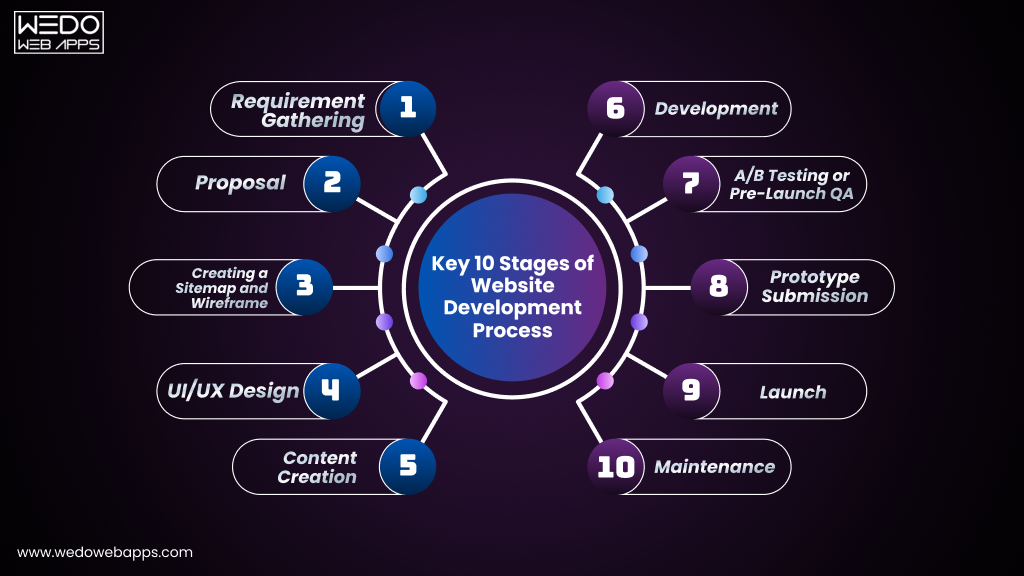
Key Stages of Website Development Process

Stages of Website Development Process

Every website that we build, whether it is for a small business or a large enterprise, we follow the same structured website development workflow. This consistency is what makes us deliver the project on time while following the predictable quality standard and specification that holds up in the competitive search environment.

The following 10 steps in website development form a complete website development process. Each phase has defined deliverables, and the next phase will not begin until the last stage is delivered, reviewed, and approved properly.

A structured website development process reduces post-launch bug fixes by up to 80% and cuts the chances of rework by 50% compared to an unplanned development.

Step 1. Requirement Gathering

Requirement gathering is the foundation of the entire website development process. It is the discovery phase where you will discuss the objectives of your required website, the cost, and the various needs.

Without this step, even the most talented development team cannot start working. With this, every design decision, content choice, and technical implementation needs to be followed clearly. The difference between the project that delivers and one that unravels at revision stages almost traces back to whether this step was done properly.

What is established in requirement gathering:

  • Business Goals: What does your website need to achieve? Lead generation, direct sales, brand credibility, customer service, recruitment, or a combination? Every goal gets clear with design, content, and development decisions.
  • Target Audience: Your target audience will also get clear with the objective discussion. By understanding the audience, this stage defines the user experience from the ground up.
  • Scope and Timeline: How many pages are needed on a website? Which features are essential for launch, and which can be phased later? Everything will be discussed, which allows you to know about the expected launch date and the external dependencies.
  • Budget: A transparent, scope-based estimate is provided at this stage. If the budget constraints require adjustment, then the right approach is to reduce the scope rather than the quality.
Pro Tip:- The more specific you are about your goals, the fewer revisions you pay for later. Unclear briefs produce expensive surprises at every stage of the project. Detailed briefs produce clean and on-time deliveries.

Step 2. Proposal

Once the requirements are fully understood and agreed then everything goes into writing. A signed proposal is not just a formality, but it is the most effective project management tool available for both parties in any website development workflow.

When the disagreement arises mid-project, a well-written proposal is the neutral reference point that resolves it in a minute rather than a week. It eliminates the two most common causes of project failure: misaligned expectations and unmanaged scope.

A professional project proposal includes:

  • A clear summary of the project, its context, and its business objective.
  • A complete list of every deliverable and feature to be built.
  • A preliminary sitemap and wireframe outline.
  • The development approach, technology stack, and hosting environment.
  • A detailed project timeline with key milestones, review checkpoints, and client approval gates.
  • The total project fee, payment schedule, and revision policy in plain language.

No professional website development company should ever begin a website without a signed agreement in place.

At WEDOWEBAPPS, we never do this, and we recommend you never work with one that will.

Step 3. Creating a Sitemap and Wireframe

With the proposal signed, the next step is shaping the website structure before any visual design or code is written. This is where the website development phases move from works on paper to tangible blueprints.

The sitemap defines the architecture of your website, including how every page will exist, how pages connect with each other, and how users and search engines crawl your site. It is the high-level blueprint of your digital presence, and it is not only the early SEO document, but the defining URL structure and content hierarchy also play an important role in Google indexing.

The wireframe goes one level deeper than the sitemap. It maps the presence of your website layout with individual pages and headings, along with the primary CTA button. This also decides how images and text blocks are positioned, and how the navigation behaves at different screen sizes. No colors, no typography, no photography. Just pure structure.

Why sitemaps and wireframes work is worth the investment:

  • Maintain full alignment between the client, designers, and developers before the work begins. This eliminates the assumptions that cause the changes at a late stage of design.
  • Deliberately plan a user journey that guides visitors from landing to conversion, based on the intent.
  • Early identification of missing pages, navigation gaps, and user experience problems can save hours to fix.
  • Make the mobile-first layouts from the start and have more visitors.
Pro Tip:- Always wireframe both desktop and mobile simultaneously. A layout that works perfectly on a 27-inch monitor can be completely unusable on a 6-inch screen. Discovering this at the wireframe stage takes hours to fix. Discovering it during development takes less time.

Step 4. UI/UX Design

At this phase, the real work begins. This is where your website transforms from a structural blueprint into a real visual experience and where the first impressions are permanently made, won or lost.

The design team uses the wireframe as a practical guide and applies your brand identity into logo, color palette, typography, imagery, and iconography to create the complete visual language of every page. Each element is chosen effectively: not just for a professional look but also to guide visitors towards a specific action in a way that feels completely natural.

Before the development design check of the fully approved design for desktop and mobile devices. This eliminates the chances of a change in design after the development begins. The great UI/UX design must also satisfy Google’s technical performance standards.

What high-quality UI/UX design delivers:

  • A clear visual hierarchy that directs the attention to what matters most on every page.
  • Intuitive, frictionless navigation optimizes the customer interaction.
  • Consistent branding that builds instant trust and recognition across every touchpoint.
  • Touch-friendly mobile interface from the very first day of development.
  • Accessible website design standards start that meet both legal and commercial differentiators.
  • Layouts are designed to minimise cumulative layout shift, a direct Google ranking signal that is determined at the design stage, not the development stage.

Step 5. Content Creation

Design the attention, but the content makes the user stay, and what ultimately determines is whether they convert into a customer, enquire about your services, or leave for a competitor.

Content creation is one of the most important steps in website development and consistently the most under-resourced. Most of the businesses treat it as something to sort out after the website is designed. The result is websites with beautiful layouts that say nothing meaningful can rank nowhere in Google because they have no substance worth indexing.

With the recent algorithms, getting the content wrong is more costly than ever. Following Google’s core update, the EEAT requirement does not apply to virtually every competitive search category. Mass-produced, AI-generated content without genuine human expertise and editorial oversight is being actively filtered from search results. The only content that ranks and earns citations from AI search tools is content that shows real knowledge and provides real-value.

Content created during this phase:

  • Homepage, About, Services, and Contact page copy all need to be written with targeted keywords, which need to be used naturally, not stuffed.
  • Service and product descriptions that address your customer’s actual questions, concerns, and decision-making criteria.
  • Blog articles and resource guides that build topical authority and capture long-tail search traffic.
  • Meta titles and meta descriptions for every page are essential for both Google rankings and click-through rates.
  • Image alt text for every added visual for accessibility compliance and image search visibility.
  • Call to actions that are specific, clear, and tested for conversions.
  • Structured data makeup recommendations: FAQs and article schema, which is critical for AI overview inclusion and rich result eligibility.
2026 Update:- Voice search is expected to account for 50% of all searches by the end of 2026. Content that answers specific, conversational questions in clear and direct language, particularly on FAQ format, is significantly positioned better for Voice search and AI overview.

Step 6. Development

With the approved designs and finalised content in hand, the development phase begins. This is where the website is built. Every page, every feature, and every interaction is coded into existence and integrated into a functioning product.

The website development methodology splits into two parallel tracks, both executed with equal rigour: frontend and backend.

Frontend Development

Frontend development covers everything from what visitors see and interact with: the layout, buttons, forms, animations, navigation, and responsive behaviour across every screen size. The front-end developers translate the approved design into clear and standard HTML, CSS, and JavaScript.

Every page should be built to meet the performance benchmark, such as:

  • Use of compressed images to avoid lazy loading issues. Render blocking script for eliminating the risks.
  • JavaScript execution for optimised long tasks without delays in any interaction responses. This is the metric most developers underestimate when it measures responsiveness across an entire session.
  • All images, videos, ads, and dynamically loading elements should give the explicit width and height to prevent the layout shift as the page loads.
  • Testing for all sources, such as Chrome, Firefox, Safari, and Edge, along with mobile devices.

Backend Development

Backend development is the engine behind your website. While the frontend handles what users see, the backend handles what the website does: processing orders, storing form submissions, authenticating users, delivering personalized content, integrating with payment systems, and managing databases.

Backend development also means building a website with security as a first priority. Every site is built that is secured with SSL, implements proper input sanitisation, and follows current data protection regulations.

For a complex web application, the precise choice of website development company matters the most. The quality of your backend architecture determines your site’s speed, security, scalability, and resilience for years to come.

Pro Tip:- 76% of developers now use AI tools to assist with coding, testing, and performance auditing. Our development team uses an AI-assisted workflow to accelerate code review and testing, which allows you to have faster delivery without impacting the quality.

Step 7. A/B Testing or Pre-Launch QA

No website should go live without passing a comprehensive multi-layer quality assurance process. This is one of the most important steps in website development and one of the most frequently compressed or skipped by teams working on a project to hit the deadlines at any cost.

Our QA process is not a single-step process. It is a systematic, multi-round testing programme covering every dimension of quality: performance, compatibility, functionality, security, accessibility, and search readiness.

Our full QA testing checklist:

  • Cross-Browser Testing: Chrome, Firefox, Safari, and Edge with the current version on both desktop and mobile to confirm consistent rendering, layout, and functionality across all major browsers.
  • Cross-Device Testing: Check the website design for desktop, iPhone, Android, and other devices to verify the responsive behavior and touch interaction at every point.
  • Core Web Vitals Audit: LCP, INP, and CLS are measured using Google PageSpeed Insight field data and Google Search Console, which help you know about the real-user performance issues.
  • Functional Testing: Every form, button, link, filter, dropdown, modal, and interactive element is tested for original specification to confirm it works exactly as agreed.
  • SEO Validation: All meta titles, descriptions, canonical URLs, XML sitemaps, and heading hierarchy reviewed and confirmed.
  • AI Visibility Audit: Faq and article schema validated using Google’s rich result test, content structured for AI overview eligibility.
  • Security Checks: SSL verification across the full domain, form input sanitisation, login protection, spam prevention, and data handling compliance.
  • Accessibility Audit: Audit the site for legal and commercial risk and compliance, along with the keyword navigation, color contrast ratios, ARIA labels, and screen reader compatibility.
Note:- A structured QA phase reduces the post-launch bug fixes by up to 80% compared to a project where testing is rushed or skipped. Every issue caught before launch costs a fraction of what it costs to fix after.

Step 8. Prototype Submission

Before any website goes live, you experience it exactly as your future visitors will in terms of security.

This is a formal checkpoint in the website development phase. At this stage, you will have the staging link alongside a clear set of review instructions: what to check on each page, how to test interactive features across different devices, and exactly how to submit feedback or other requests.

This is not a static PDF or design mockup. It is a fully functioning website that allows you to navigate and interact with it just the way your customer reviews it. Any final changes identified at this stage are addressed before the process of launching the website.

Step 9. Launch

Launch day is a significant milestone and a carefully managed one. Once you have provided a written sign-off on the prototype, our team runs through a comprehensive pre-launch checklist before pointing your live domain to the production server.

Pre-launch checklist:

  • DNS configuration and domain transfer to the live server confirmed.
  • SSL certification is active and verified across the full domain.
  • Google Analytics setup, configuration, and event tracking verified against specification.
  • Google search console property creed, XML sitemap submitted, coverage report reviewed for errors.
  • 301 redirects confirmed for any URLs that have changed from the previous site.
  • Final core web vital check using field data.
  • Structured data markup validation.
  • AI overview, eligibility, and schema rendering.
  • Post-launch smoke test for every page, every form, and every feature.

With every item checked and confirmed by the project lead, the website goes live. It is the culmination of every hour of planning, designing, writing, building, and testing that came before launch.

Step 10. Maintenance

A website launch is not just the last step of development, it is the beginning of the asset that require to maintain site consistent, professional, and competitive.

The web development lifecycle does not end at deployment; it keeps requiring content and technical review to improve the functionality of the website. CMS platforms and plugins release security patches on a continuous basis, which need to be taken care of.

What post-launch maintenance covers:

  • Regular CMS, plugin, and security updates to prevent vulnerabilities.
  • Continuous monitoring for traffic patterns, third-party scripts, and Google benchmark services.
  • Content updates, new page creation, and feature addition.
  • Analytics review and conversion rate optimization recommendation based on real visitor behavior data.
  • Structured data updates to keep schema markup aligned with Google’s requirements.
  • Uptime monitoring with rapid response to any unexpected downtime.
  • Post-algorithum update content and technical review following major Google core updates.

This ongoing commitment is what separates a genuine long-term partnership with a trusted development partner you invest in to have better results.

Request Your Project Estimations

How Long Does the Website Development Process Take?

How Long Does the Website Development Process Take

One of the most common questions that you must be thinking about, and the honest answer is that it depends on the scope.

Here is a realistic breakdown based on project type, based on project delivery data:

  • Small Business Website: 4-8 weeks from requirements gathering. The most reliable cause of delay at this scale is content that is not prepared in the advanced design phase.
  • Mid-Size Corporate Website: 8-14 weeks, including multiple rounds of content review, design iteration, and functional testing across departments.
  • eCommerce Website: 12-20 weeks, depending on payment gateway integration complexity, product data setup, and custom checkout functionality.
  • Custom Web Application: 3-6 months for builds with user authentication, custom databases, third-party API integrations, and bespoke feature sets.
Pro Tips:- The two-phase authentication can mostly allow to maintain consistency with the project timelines are content creation and client review cycles. Agreeing on review deadlines and content delivery dates at the proposal stage keeps every project on schedule.

Common Website Development Mistakes That You Should Avoid

Understanding the stages of website development is only halfway to your development phase. Knowing what goes wrong and why is equally important for setting realistic expectations and making the right decisions at every phase.

  • Skipping Requirement Gathering: Jumping straight to design without a clear, documented brief produces websites that look fine but achieve nothing specific. Every hour saved here costs several hours of revisions later.
  • Leaving Content Until Last: Designing around placeholder text and adding real copy at the end consistently breaks approved layouts. Content and design must be developed in parallel, not sequentially.
  • Desktop-First Design in Mobile-First World: Designing for desktop and adapting for mobile produces consistently worse mobile experiences and lower search rankings.
  • Ignoring CoreWeb Vitals: A site that fails to lose ranking to a competitor with comparable content quality. Performance is now a direct competitive differentiator.
  • No Structured Data Markup: Websites with schema markup are likely to appear in search results, and skipping it leaves the organic visibility on the table.
  • Rushing or Skipping QA Testing: Every bug found after launch costs significantly more to fix than one found during testing. A structured QA phase is one of the highest-return investments in any web project.
  • No Post-Launch Maintenance Plan: A website without regular updates accumulates security vulnerabilities, suffers performance degradation, and drifts out of compliance standards. An initial investment depreciates rapidly without maintenance.
  • Ignoring Accessibility: Accessibility is not a legal exposure and should be filled carefully.

In a Nutshell: Ready to Start Your Website Development?

Building a website that genuinely performs, ranks well, and easily earns trust requires following the 10 website development phases.

The gap between the website that works and one that merely exists is not just about the budget, but it is also about the website development process. Every stage of website development described in this guide creates a measurable impact. Follow all the steps with the right web development team and get what you need for your business.

If you follow the website development process with dedication and the right team, you can build more than a website. You will build a durable, high-performing digital presence that generates leads, earns trust, and grows alongside your business.

responsive website for your business

Magento Website Maintenance Checklist Explained for eCommerce Stores

Introduction

Running a Magento store doesn’t end at launch. To keep your store secure, stable, and performing well, regular maintenance is essential. Magento websites rely on multiple components, like core files, extensions, themes, servers, and integrations, all of which require ongoing attention.

A structured Magento website maintenance checklist helps store owners understand what needs to be monitored, updated, and reviewed on a regular basis. Instead of reacting to issues after they impact customers, routine maintenance allows you to prevent common problems such as security vulnerabilities, performance slowdowns, and unexpected downtime.

This checklist is designed as an operational guide for Magento store owners. It outlines essential maintenance tasks, how often they should be performed, and what can go wrong when maintenance is ignored, so you can keep your store running smoothly over time.

Why Magento Website Maintenance Matters

Magento stores operate on a computer ecosystem of core files, extensions, themes, integrations, and server-level configurations. Each of these components must work together continuously. Without regular maintenance, small inconsistencies can quietly build up and affect the overall stability of the store.

Routine Magento website maintenance helps store owners stay ahead of issues that commonly impact live eCommerce environments, including:

  • Security vulnerabilities caused by outdated core files or extensions
  • Store instability resulting from ignored system warnings or failed background processes
  • Performance slowdowns that affect page load times and checkout flow

From a security standpoint, unmaintained Magento stores are more likely to face risks such as unauthorized access, data exposure, or malware infections. Regular reviews and updates reduce these risks by keeping the store environment monitored and aligned with current platform requirements.

Maintenance also plays a critical role in uptime and operational reliability. Tasks like monitoring logs, validating integrations, and verifying automated processes help prevent checkout failures, admin issues, and unexpected downtime during peak traffic periods.

Finally, consistent maintenance directly influences store performance and user experience. Clean databases, optimized configurations, and up-to-date components contribute to faster load times, smoother navigation, and a more reliable shopping experience for customers.

external Magento maintenance services

Daily and Weekly Magento Maintenance Tasks

Daily and weekly maintenance tasks focus on basic monitoring and early issue detection. These checks do not involve major updates, but they help store owners identify problems before they affect customers or revenue.

Performing these routine Magento website maintenance tasks regularly helps ensure that your store remains functional, accessible, and stable throughout normal operations.

Daily Magento Maintenance Checks

Quick checks that should be part of everyday store monitoring include:

  • Confirming store uptime and homepage accessibility
  • Placing a test order to verify checkout functionality
  • Reviewing system and error logs for warnings or failures
  • Checking payment, shipping, and email notifications
  • Monitoring admin login activity for unusual behaviour

These tasks take minimal time but can quickly highlight issues that require attention.

Weekly Magento Maintenance Checks

Weekly checks are slightly more in-depth and focus on identifying patterns or recurring issues.

  • Reviewing server and application logs for repeated errors
  • Validating cron jobs and scheduled background tasks
  • Checking inventory sync and order processing accuracy
  • Reviewing recently installed or updated extensions
  • Verifying backup completion status

By consistently completing these checks, store owners can catch potential issues early and reduce the risk of unexpected downtime or customer-facing errors.

Monthly Magento Website Maintenance Checklist

Monthly maintenance tasks focus on keeping your Magento store stable, secure, and up to date. These activities go beyond daily monitoring and are essential for preventing long-term technical issues that can affect store performance and reliability.

A structured monthly Magento maintenance checklist helps ensure that critical updates and reviews are completed consistently, rather than being postponed until problems arise.

Core Magento and Extension Updates

Regular updates reduce compatibility issues and security risks.

  • Review available Magento core updates and security patches
  • Check extension and theme updates for compatibility
  • Apply updates in a controlled environment before pushing changes live
  • Review release notes for breaking changes or deprecated features

Backup and Recovery Verification

Backups are only useful if they can be restored successfully.

  • Confirm full store backups (files and database) are running as scheduled
  • Verify backup integrity and storage location
  • Test restoration procedures periodically
  • Retain backups from multiple points in time

Database and System Optimization

Ongoing database maintenance supports faster load times and smoother operations.

  • Clean up old logs, reports, and temporary data
  • Optimize database tables where required
  • Review index status and reindex if needed
  • Monitor database size and growth trends

Scheduled Tasks and Integrations Review

Automated processes and third-party integrations must be checked regularly.

  • Verify cron jobs are running without errors
  • Review data sync with ERP, CRM, or payment systems
  • Check API connections and third-party service logs
  • Validate order, inventory, and customer data flow

Magento Security Maintenance Checklist

Security maintenance is a critical part of keeping a Magento store reliable and trustworthy. Many security issues arise not from advanced attacks, but from delayed updates, misconfigured permissions, or overlooked system warnings. A structured Magento security maintenance checklist helps reduce these risks through consistent reviews.

Security Patch and Update Review

Keeping the Magento environment current is one of the most effective security measures.

  • Review and apply Magento security patches
  • Check extensions and themes for security-related updates
  • Remove unused or outdated extensions
  • Monitor official security advisories and release notes

Admin Access and Permissions Audit

Limiting access reduces the risk of unauthorised changes.

  • Review active admin user accounts
  • Remove inactive or unnecessary admin access
  • Verify role-based permissions are correctly assigned
  • Confirm two-factor authentication settings are enabled and working

File System and Server-Level Checks

File and folder permissions play a key role in store security.

  • Verify file and directory permissions follow Magento best practices
  • Check for unexpected file changes or unfamiliar scripts
  • Review server error logs for suspicious activity
  • Confirm secure configuration of critical system files

Ongoing Security Monitoring

Routine monitoring helps identify issues before they escalate.

  • Scan the store for malware or known vulnerabilities
  • Verify SSL certificates and HTTPS configuration
  • Review login attempts and access logs
  • Monitor for unusual spikes in resource usage

Why Consistent Security Maintenance Matters

Regular security reviews help protect:

  • Customer data and transactions
  • Store availability and uptime
  • Long-term platform stability

Magento Store Security Review

Performance and Speed Optimisation Checks

Performance issues often develop gradually as stores grow, extensions are added, and data volumes increase. Regular performance checks help ensure that your Magento store continues to load quickly and function smoothly for both customers and administrators.

Following Magento store maintenance best practices for performance can help identify bottlenecks early and prevent slowdowns that impact user experience.

Cache and Indexing Review

Proper cache and index management play a key role in store speed.

  • Verify that full-page and block caching are enabled and configured correctly
  • Review index status and address any invalid or outdated indexes
  • Clear cache selectively after updates or configuration changes
  • Monitor cache warming after deployments

Database Performance Checks

Databases can become inefficient over time without maintenance.

  • Identify large or slow-performing database tables
  • Remove unnecessary or outdated records
  • Monitor query performance and execution time
  • Review database storage usage trends

Media and Frontend Optimization

Frontend performance directly affects customer experience.

  • Review image sizes and compression settings
  • Check static content deployment status
  • Validate theme and layout changes for performance impact
  • Monitor page load times across key storefront pages

Hosting and Resource Monitoring

Server resources influence overall store responsiveness.

  • Monitor CPU, memory, and disk usage
  • Review traffic patterns and peak load behaviour
  • Check for recurring server-level warnings or throttling
  • Validate that background processes are not over-consuming resources

Why Performance Maintenance Is Ongoing

Regular performance reviews help maintain:

  • Faster page load times
  • Smoother checkout flow
  • Better scalability during traffic spikes

Common Magento Maintenance Mistakes to Avoid

Even well-maintained Magento stores can run into issues when routine tasks are delayed or handled inconsistently. Understanding common Magento maintenance mistakes can help store owners avoid preventable problems that often lead to security, performance, or stability issues.

Skipping Backups Before Changes

One of the most frequent mistakes is making updates without confirming a recent backup.

  • Updates applied without backups increase recovery risk
  • Failed updates can cause data or configuration loss
  • Backup verification is often overlooked until restoration is needed

Delaying Security Patches

Postponing security updates is a common cause of store vulnerabilities.

  • Unpatched stores are more exposed to known security issues
  • Delays increase the risk of data breaches or unauthorised access
  • Security updates should be prioritised over feature changes

Overloading the Store with Unused Extensions

Extensions add functionality, but unused ones add complexity.

  • Extra extensions increase compatibility risks
  • Outdated extensions may introduce vulnerabilities
  • Removing unused extensions improves stability and performance

Making Changes Directly on Live Stores

Direct changes to production environments increase risk.

  • Errors can immediately affect customers
  • No rollback path if something breaks
  • Testing changes first reduces downtime and disruption

Ignoring Small Warnings and System Alerts

Minor issues often escalate when left unresolved.

  • Repeated warnings may signal deeper problems
  • Log files can grow excessively without review
  • Early fixes are easier than emergency repairs

Why Avoiding These Mistakes Matters

Addressing these issues early helps:

  • Reduce emergency fixes
  • Maintain consistent store performance
  • Improve long-term platform reliability

Recurring Magento Issues and Maintenance

How Store Owners Usually Manage Magento Maintenance

Magento maintenance can be managed in different ways depending on the store’s size, complexity, and internal resources. There is no single approach that works for every business, but most store owners follow one of the patterns below.

Managing Maintenance Internally

Some store owners handle routine Magento maintenance tasks in-house.

  • Suitable for smaller stores with limited customisations
  • Requires internal technical familiarity with Magento
  • Daily and weekly checks are usually manageable
  • Monthly and security-related tasks may take more time

This approach works best when the store setup is simple and changes are infrequent.

Combining Internal Teams With External Assistance

Many growing stores use a mixed approach.

  • Internal teams handle monitoring and basic updates
  • External help is used for complex upgrades or security patches
  • Reduces internal workload while maintaining oversight
  • Allows flexibility as the store scales

This model is common for stores with custom features or multiple integrations.

Relying on Ongoing Support for Maintenance

For larger or more complex Magento stores, maintenance is often handled through ongoing support arrangements.

Some store owners explore ongoing Magento support options to help manage routine maintenance tasks while maintaining long-term store stability.

Final Note

Regular Magento maintenance is not a one-time task, but an ongoing operational responsibility. By following a structured Magento website maintenance checklist and addressing issues proactively, store owners can reduce unexpected problems, maintain performance, and keep their stores secure over time.

Conclusion

Maintaining a Magento store is an ongoing process that extends well beyond initial setup. Regular reviews, timely updates, and consistent monitoring help prevent many of the issues that commonly affect store security, performance, and stability.

By following a structured Magento website maintenance checklist, store owners can clearly understand which tasks need attention, how often maintenance should be performed, and why these activities matter. Routine maintenance not only reduces unexpected disruptions but also helps ensure a smoother experience for customers over time.

Approaching Magento maintenance as a continuous operational responsibility, rather than a reactive task, allows store owners to keep their eCommerce platforms reliable, secure, and prepared for future growth.

Ongoing Magento Website Maintenance Support

Laravel Trends: What’s Next for Developers and Web Development

Laravel Trend in Developing Scalable Applications

Laravel development company is developing with the use of PHP frameworks. It helps in powering all the factors, like startup MVPs, to web enterprise applications. And with the recent reports, it is clear that the PHP framework has become the choice of 18.2% of the developers. It is an available ecosystem of tools that allows developers to work faster with secure and scalable application development.

In the USA, Laravel adoption is growing notably in various industries like eCommerce, SaaS, and logistics platform that requires flexibility and performance at a better scale. So, if your business is also looking for scalability in terms of accessing modern solutions, keeping up with the Laravel web development trends, or connecting with a Laravel development company, that is the only solution.

This blog allows you to explore Laravel trends, along with which are listed on the top, tools, and techniques that can be used to define better web development practices, and what’s ahead for those building with it.

Why Laravel is Still the Preferred PHP Framework in 2025

Laravel continues to grow rapidly to simplify the web development processes while supporting modern, high-performing applications. This makes it easy for developers to develop secure, user-oriented, and high-performing applications while maintaining the future of Laravel.

There have been various updates while maintaining better practices for web development. With the attached frameworks, developers can build the app by accessing real-time tools and simple integration.

Continued Popularity Among Developers and Enterprises

To be used in various industries, Laravel has been the most trusted PHP framework with a large number of supporters.

  • To be used by the developer, this framework has gained advanced features to maintain accuracy.
  • It has remained among the top choices of the PHP framework among developers.
  • This is preferred to have clean and structured code.
  • Helps in reducing the coding time without lowering the quality of the code.

For a business, this means:

  • Easier to find a skilled Laravel developer.
  • Faster project delivery timelines.
  • Better long-term code maintenance and support.

Laravel Ecosystem: Tools, Community, and Documentation

Laravel offers access to different frameworks, and having those tools makes the process of development appear to be smoother and more efficient.

Here are some of the valuable Laravel tools:

  • Forge – Used for maintaining an easier server setup and management.
  • Envoyer – For safe, zero-downtime deployment of the application.
  • Vapor – It is for having a seamless hosting application on AWS.
  • Livewire and Inertia.js – For building a creative and reactive user interface without the need to access heavy JavaScript.

In Laravel development, our strengths include:

  • Well-structured and friendly access toward development.
  • A supportive development community to maintain accuracy.
  • Regular updates to match the intent while meeting tech needs.

If the company is making use of these tools, then there are chances of having reduced complexity and saving time for project rollouts.

Real-world Adoption: Use Cases from the USA Market

Laravel is trusted by many different industries to have better development. From startups to growing companies, it supports web apps that need scalability for the business.

  • SaaS Platform – Fast API development, user authentication, and role management.
  • eCommerce Platform – Secure checkouts, product management, and real-time tracking of orders.
  • Healthcare and logistics apps – Custom dashboard, secure data handling, and automated reports management.
  • Government or public platforms – Easy integration with third-party services and maintaining scalable performance.

These examples reflect how Laravel trends are meeting real-world needs while staying cost-effective and flexible.

Top Laravel Trends Developers Should Pay Attention to in 2025

There has been a quick increase in the Laravel ecosystem with the quick services to shape the new demand around speed, scalability, and application structure.

The top Laravel trends reflect how and where the developers are heading to stay competitive within the market by making use of modern tools and practices.

Below are the key trends that drive the future of Laravel development.

Serverless Deployment with Laravel Vapor

Laravel Vapor is a serverless development platform that is specifically powered by AWS and built to handle specialized application services.

Why it is growing:

Businesses want to reduce the overall cost of infrastructure and address the simple need for server management. Vapor allows businesses to scale automatically with the advanced generation of user traffic on the application.

How it is being used:

For SaaS startups and eCommerce platforms, the use of Vapor is better as this gives ease in handling the traffic and makes it easier to launch seasonal sales.

Tools Support it:

  • Laravel Vapor
  • AWS Lambda
  • Laravel Queue, S3,and CloudFront Integrations

API-First Laravel Applications with Sanctum & Passport

Laravel makes it easier to handle a better API-first application when handling the development practices with simplified manipulation of the server.

Why it is growing:

Deploying a modern application requires meeting the needs of mobile apps, third-party integrations, and frontend frameworks like React and Vue. This allows you to have an API-first structure to support your application needs.

How it is being used:

Used for managing multi-platform apps for the ease of sharing data between mobile and web, like CRMs, booking systems, or fintech dashboards.

Tools supporting it:

  • Laravel Sanctum
  • Laravel Passport
  • Laravel Resource API

Laravel Octane for High-Performance Web Apps

Laravel Octane runs Laravel development processes while maintaining the higher speed of a server like Swoole or Roadrunner. Having this will allow you to have a faster response time and persistent memory.

Why it is growing:

Laravel Octave enables the maintenance of real-time accessibility for services, chat apps, and enterprise platforms.

How it is being used:

Used for maintaining the team building real-time dashboards, analytic apps, or event-driven platforms while maintaining high concurrency.

Tools supporting it:

  • Laravel Octane
  • Swoole
  • RoadRunner

Integration with Headless CMS

Allow developers to pair the Laravel backend with modern content management while maintaining the accuracy of systems like Strapi or Storyblok.

Why it is growing:

For developing apps that have high potential and handle content separately from the different layers, while understanding the various headless CMS benefits for developing web applications.

How it is being used:

Idea for eCommerce platforms, news sites, and product documentation portals.

Tools supporting it:

  • Strapi
  • Storyblok
  • Laravel API resources

Microservices Architecture with Laravel Lumen

Laravel Lumen is a lighter version that is used for building applications for microservices and having faster API responses.

Why it is growing:

This enables the easy management of code in smaller units, facilitating the development of modular services.

How it is being used:

Use of building the application with microservices like different payment gateways, user authentication, or analytic layers.

Tools supporting it:

  • Laravel Lumen
  • Docker
  • RabbitMQ/ Redis Queues

Laravel-Powered Progressive Web Apps (PWA)

Building the application using Laravel as a web application framework allows for maintaining accuracy in the backend to serve APIs and data for the frontend built using PWA frameworks.

Why it is growing:

Retail and service-based businesses are effectively using this to maintain the accessibility of the website in terms of the performance of mobile apps.

How it is used:

Used in retail and service-based businesses to have Laravel-powered PWAs to maintain accuracy in delivering the experience without requiring app downloads.

Tools supporting it:

  • Laravel API
  • Vue.js / React
  • Workbox

AI and Machine Learning in Laravel Applications

Nowadays, technology has been updated with various extensions, and the inclusion of AI and machine learning services will allow you to have better recognition of your services.

Why it is growing:

More businesses are relying on adding services like easy recommendation, natural language processing, or data-based predictions.

How it is being used:

Used for making customer support bots, recommendation tools in eCommerce, or fraud detection systems.

Tools supporting it:

  • Laravel Jobs/ Queues
  • Python ML APIs
  • OpenAI, AWS AI Tools

Cloud-Native and Docker-Based Development

Cloud computing and integration have become popular to have the improvement in building scalable web applications and CI/CD workflows.

Why it is growing:

Docker allows for maintaining consistency across various stages, like staging or production. Also, allows for reducing errors and improving the speed.

How it is being used:

Used specifically by remote teams and agencies that need quick setup and scalable development pipelines.

Tools supporting it:

  • Laravel Sail
  • Docker Compose
  • GitHub Actions / GitLab CI

These are the trends that can be specifically followed to have the accuracy towards having better development practices and have a scalable app as the outcome to maintain the accuracy.

Want to build an app following all trends

Emerging Tools and Techniques Laravel Developers Are Using

To access better development, Laravel developers can make use of advanced technologies and tools to have smarter development. These tools are not just great for adding better features but are also among the top Laravel trends to have a practical shift in how Laravel projects are built and maintained.

Here is what a powerful modern Laravel development looks like.

Smarter Interfaces with Livewire and Alpine.js

Build faster along with the reactive user interface and maintain accuracy by switching from full JavaScript frameworks.

  • Write the interactive component directly in the blade using Laravel Livewire.
  • Add lightweight JavaScript behavior using Alphine.js.
  • Perfect for making the admin portals, real-time forms, and dynamic filters.
  • Reduces development time by connecting with backend teams.

This stack easily removes frontend complexity while keeping the user experience way smoother.

Cleaner Code, Fewer Bugs with Pint and Larastan

Automated the quality of generating the codes and maintained consistency within the project.

  • These technologies autoformat your code and make it easy to use Laravel’s best practices.
  • Scan coded for having better logic, issues, and type mismatches.
  • Easy to plug into GitHub Actions or GitLab pipelines.
  • Saves hours on manual reviews and post-deployment fixes.

This allows developers to follow Laravel trends while maintaining consistency, readable code with fewer bugs, and faster onboarding of services.

Effortless Scaling with Queues and Horizon

Easily handle the background task to maintain reliability without slowing down the need to add different applications.

  • More tasks like emails, uploads, and third-party API calls to Laravel Queues.
  • Use various options to easily manage workload distributions.
  • Monitor the processes with real-time access using Laravel Horizon.
  • Keep the app speed stable even during the peak of traffic.

Make Laravel development more scalable, especially for eCommerce, booking, and SaaS platforms.

Do you have a code but don't know where to start

Future of Laravel: What to Expect Beyond 2025

To have stronger development practices, it is required that you have an advanced shift toward upgrading the frameworks and techniques. This shift will allow developers to build, scale, and modernize web applications.

Here are the key directions that are expected as per the future of Laravel development:

Developer Experience Will Lead to Innovation

  • Easy access to more features while maintaining a clear focus on reducing errors and simplifying logic.
  • Easy update with scoped services, blade components, and built-in testing tools that help developers work faster.
  • Increase the standard by accessing official packages.
  • Laravel will continue to evolve to ensure smooth access to a full-stack solution.

Stronger Roles in Saas and Fintech Platforms

  • Laravel is being used to build secure, modular SaaS apps that can scale quickly.
  • Fintech products rely on Laravel’s built-in testing, validation, and API tools.
  • More demand is related to Laravel-based dashboards, billing systems, and CRMs.
  • Clean architecture and authentication flows make Laravel a strong choice for regulated industries.

Seamless AI Integration on the Backend

  • Laravel is increasingly used as a backend interface for AI services like OpenAI, Google Cloud AI, or custom Python models.
  • Teams make use of Laravel to collect inputs, handle AI tasks, and display real-time results.
  • Common use cases include the development of smart search, text generation, and chat assistants.
  • Queues make AI task handling more accurate, with faster and more stable outcomes.

Real-Time Applications Will Become the Norm

  • Laravel is being rapidly used in industries like logistics, healthcare, and smart device platforms for real-time data handling.
  • Tools like Laravel Echo and Pusher allow to have instant updates without refreshing the page.
  • MQTT and WebSockets are used when there is need of live location updates, chat modules, and IoT control panels.
  • Real-time capability will allow you to have better access to the real-time dashboards.

The future of Laravel development techniques requires having more flexibility with the use of the latest trends and including the tools that are supposed to be expected to maintain better development practices.

How to Use These Laravel Trends in Your Projects

Does your business also require the adoption of the top Laravel trends and the Laravel web development trends? Then you need to know about the various things that are needed to make the development better, as per the needs of the projects.

You can follow these steps to maintain the accuracy towards the adoption of technology for your next project:

1. Use Official Package Where Possible

  • Use Livewire for the project to maintain quick updates and a reactive interface without the need for heavy JavaScript.
  • You are using Interia.js if you want to build a single-page app and want to work with Vue or React.
  • Choose full API if you want to maintain a clear approach towards mobile application development or a separate frontend. 

Pick up the tools that fit your development needs, but make sure you do not make things complex.

2. Staying Updated with Laravel Releases

  • Make sure that you are following the Laravel trends and development practices.
  • Use LaravelShift to upgrade the version automatically.
  • Stay updated on the official page to know about the upcoming changes.

Staying updated with the Laravel web development trends will allow you to maintain the smooth running of your application.

3. Outsourcing Laravel Development

  • Work with the Laravel development agency when:
    • You need to launch the app quickly.
    • You need in-house Laravel development experts.
    • You want to make use of tools like Octane, Vapor, or Advanced APIs.
  • Hire skilled team that can build app with better accuracy, with using latest Laravel trends and best practices.

Need help with the development? Hire a Laravel developer and get your custom solution ready for your business.

Final Thought

Laravel trends continue to expand in ways that benefit developers, teams, and organizations alike. Whether you’re creating a lightweight MVP, a rapidly growing SaaS solution, or a complex enterprise platform, Laravel provides tools and workflows that meet modern development requirements.

An expected future of Laravel suggests that the framework is moving toward more performance-focused, API-ready, and scalable development. Tools like Octane, Vapor, Livewire, and Pint are no longer optional add-ons; they’re becoming the new standard.

For organizations in the United States and elsewhere, staying current with these developments is about more than just keeping up; it’s also about developing apps that can compete and thrive.

Are you also planning the launch or upgrade of a Laravel project

Web Development & Developers Guide: Types, Tools, and Benefits

A business without a website is like a citizen without an identity card, and no one would believe that you exist. Web Development Services have become one of the most demanded services in the digital era. It spreads your business awareness and increases sales at sky-rocket speed. Nevertheless, web development is a tricky thing; the more you know, the better it gets for your business.You must have heard about plenty of programming languages. But, the concept of front-end web development, back-end app development, and full-stack app development is unknown to many. So, what does a web developer do? What are the types and duties? What tools do they use? And how is web development beneficial for startups or small companies? Everything you need to know and understand is here in this blog article. So, read ahead to stimulate your brain with interesting information about the web world. Let’s start with web development and web developers:

What is web development?

In simple language, web development refers to building a website or web app that works with the help of the internet. It could be a single web page with plain text or a complex and significant web application. It serves multiple purposes such as personal blogging, business, social networks, etc. A web development company provides services like programming, rendering, and maintaining websites. It also includes various responsibilities like database management, web design development, and website publishing.

Types of Web Developers

Types of Web DevelopersGenerally known as programmers, web developers are the brains behind innovative and feature-rich websites you see on the internet. They take the web design from designers and convert it into a full-fledged website using various tools. By using different web development tools such as JavaScript, PHP, Node JS, Python, etc., programmers create a website with smooth navigation and excellent performance. They collaborate with designers, content writers, and companies requiring web apps to create and publish a website. Web developers can be divided into three categories given below:

1. Front-end developer

As the name suggests, front-end development is the part of a website that interacts with users directly. It is also termed as a ‘client-side’ web application as it includes user experiences such as colors, fonts, images, buttons, navigation, graphs, styles, and tables. JavaScript, HTML, and CSS are used for front-end development, and front-end developers are responsible for providing customers with a seamless user experience.So, right after opening a website, you notice the design, structure, behavior, number of pages and sections, and content. Front-end developers implement everything that appears in front of your eyes. A website must be responsive and highly functional, and a front-end web developer is responsible for ensuring the same. A front-end developer knows how to create a web page that fits all sizes of screens irrespective of devices.

2. Back-end developer

You might have heard or read the word ‘server-side’ website or web apps. It can be said to be the key to front-end development. It is responsible for data storage and arrangement to ensure the client-side web page works smoothly. It is the side of web development that remains out of reach from users but plays a vital role at the forefront.Back-end web developers create fundamental characteristics that contribute to user experience. A back-end developer develops parts that are directly accessible by users. Back-end developers work on writing APIs, adding plugins, system components, and creating libraries. The role of a back-end developer is hidden yet highly imperative for a website with remarkable performance.

3. Full-stack developer

Full-stack developers are skilled and capable of developing both front-end and back-end websites. In addition, full-stack developers possess a solid understanding of both sides of web development and how they function in a parallel line. So, along with creating APIs – application programming interfaces, they have the caliber to use HTML, CSS, and JavaScript and for setting up and configuring servers.

Duties and skills of a web developer

Web developers take the design from web designers and transform it into a live, authentic, and interactive website for its customers. It includes an array of responsibilities, from creating libraries to incorporating the latest facets for a future-ready web app solution. They test and debug a code before launching it on the world wide web. Web developers should have the efficacy to maintain and manage the site post launching it across the internet. With web app developers types mentioned above, here are some of the traits and skillsets they need to have to do their job efficiently:

  • Creating search engine optimized web app solutions
  • Knowledge of content management system
  • Back-end development and database
  • Accurate programming OR neat coding
  • Knowledge of primary coding languages like Javascript, CSS, HTML, Python, and PHP
  • Testing and debugging

Read ahead to know details in brief about the required skills of web developers to satisfy clients’ needs.

Technical knowledge

Programming languages lie in the core of web developers’ mind, heart, and hands (and trust me when I say ‘hands). Their fingers create wonders with their tech stack, which particularly includes CSS, HTML, and JavaScript. HTML is directly responsible for the structure of a web page, whereas CSS works well for style, color, fonts, etc. JavaScript is the best for crafting an interactive web solution. These three are the foundation language of web development, and their libraries play an important role in generating an exceptional web development solution.

Effective communication

To be a strong communicator, a web developer needs to be a good listener first. They have to understand the client’s perspective, their business objectives and be patient to obtain practical solutions. A developer also needs to convey his ideas in a way that compels a client to take action for the website development. The art of communication proves to be important when it comes to expressing complex ideas in simple methods. Web development is a web developer’s niche, and a client may not understand the ABC of the same. Nonetheless, communication establishes trust and helps clients to understand how web development can boost their business lines.

Hunger to learn

Like any other technology, programming languages, frameworks, and libraries are constantly evolving. With updated technology, a web developer also has to be prepared for learning and upgrading skills. What you know today as a website developer may not be useful tomorrow. A web developer should be a passionate learner in order to improve their skills and capabilities as a professional. So, when a new library or framework is launched, and potential clients demand it, a web developer would not have to play a catch-up game. They will be ready with upgraded skills to fulfill clientele business requirements with practical web development solutions.Along with some of the technical skills required for web application development, developers need some genuine expertise and professionalism. There are other general skills such as analytical thinking, problem-solving, and an eye for debugging, which can be helpful. Developers must have a collaborative nature to communicate and work with clients from across the world.

Tools to be used for various web development projects

Tools for Front-end web development

Tools for Front-end web developmentThere are a specific set of tools for every web development type to accomplish the website development project. Under the title given above, you will find some of the most used and affordable front-end development tools. Remember that tools should be chosen as per the project requirements and ongoing trends. They should not be chosen on the basis of past experience or reviews given online. These tools should provide result-oriented and scalable web app solutions by keeping the core purpose of website development in the focal point.

Angular JS

Suitable for both small businesses and enterprises, Angular JS is a free and open-source platform for web development. It will help you extend HTML vocabulary as HTML works well with static documents but Angular is better with dynamic web development. With Angular, you get an environment that is clean, readable, expressive, and fast to develop a code.This fully extensible toolkit allows you to collaborate with other libraries, which ultimately gives you the freedom to replace or modify various facets of the code. It works parallel to the flow of your web development project. It has several impressive features, and some of them are as below:

  • AngularJs allows you to have server communication for navigation, form validation, and deep linking for back ends.
  • Angular Js provides components that are reusable, directive, and localized. It also has a built-in testing capacity.
  • It provides some other features such as plain javascript, controller, and data binding that helps in reducing or eliminating DOM manipulation.

SaaS

SaaS is an extension language of CSS, a free and highly stable platform for web development. SaaS allows you to share designs with and within the projects and use variables. Frameworks such as Bourbon, Compass, and Susy are constructed with the help of SaaS. In addition, you can build your own functionalities or use provided functionalities by SaaS. Some of the features include:

  • It allows you to organize large style sheets.
  • It comprises features of variables, arguments, nesting, and loops.
  • It is exceptionally compatible with CSS and has a substantial community.
  • SaaS also supports manifold inheritance.

Chrome DevTools

As the name suggests, Chrome DevTools are built into Google chrome. It helps you to increase the website’s loading speed, edit a page on the fly, view messages, debug and run JavaScript in the console, and identify an error quickly. The facets include the following:

  • You can monitor Network activity.
  • You can optimize and analyze speed and performance.
  • You can also identify forced synchronous layouts with the help of a performance panel.
  • It includes various aspects for security panels such as memory panel, understanding security problems, network panel, element panel, and console panel.

Grunt

A Task Runner of JavaScript, Grunt is a useful tool for automation. Most repetitive tasks can get done with its help, like compilation, unit testing, and minification. Some of the facets are as below:

  • It provides multiple plugins and lets you automate anything with minimal effort.
  • You can create your own easy-to-install Grunt plugin to Npm.
  • You will need an updated Npm as it helps in installing Grunt and its plugins.
  • Grunt provides a ‘Getting Started’ guide that has proven to be valid.

CodePen

Codepen is a popular online tool that aids in sharing and designing front-end web apps. Moreover, one can use it to build the whole web solution as it gives almost all the facets of IDE in a browser. Features are provided below:

  • It offers a customizable editor.
  • It will allow you to keep your pens private.
  • It will let you drag-and-drop CSS, and JSON files, images, as well as SVGS and Media files.
  • It comes with a collaborative model which allows multiple coders to write and edit a program in a pen alongside.
  • CodePen provides an environment for the front-end that helps you with efficient testing and sharing.

GitHub

GitHub is a well-known Software development platform that helps in managing projects. GitHub will let you craft a review process for your programming and fits it into the workflow. It can also be integrated with other tools that are already in use. The best part is, you can deploy it as a self-hosted or cloud-hosted solution. Features are:

  • GitHub provides sufficient features for project management.
  • Developers use it for personal projects or for experimenting with newly released programming languages.
  • It offers features of SAML sign-on, access provisioning, invoice billing, 99% uptime, unified search, advanced auditing, and contribution, etc., for enterprises.
  • It also provides some useful security features such as security incident response, two-factor authentication, and more.
  • GitHub is highly functional for code review, integration, project management, team management, social coding, code hosting, and documentation.
  • It offers priority support for enterprises, and it has various plans for small, medium, and big businesses. It also offers relevant plans to single users and team players as well.

NPM (Node Package Manager)

NPM is a free, open-source tool and the Best for SMEs. In addition, bigger enterprises can acquire a quote from NPM itself.Npm will assist you in building unique solutions through crucial JavaScript tools. It has proven beneficial for team management. In addition, it provides impressive security features without requiring any configuration. For enterprise-level solutions, npm provides facilities like de-duplicated development, security expertise, access control, and unrivaled support. Features include:

  • Being an open-source and free solution, you are capable of publishing unlimited OSS packages. You can also discover and install public packages.
  • You receive automatic warnings for risky code as well as basic support.
  • With Npm Orgs plans, you get all the fundamental features.
  • You will be able to manage team permissions and perform workflow integration & token management.
  • It also offers additional facets such as SSO authentication according to industry standards, billing based on the invoice, dedicated private registry, and more.
  • Npm open-source platform is the right solution for many public package authors.
  • Small teams and many organizations use npm Orgs, so you have a large community.

TypeScript

TypeScript is absolutely free and suitable for small to medium and large businesses, as an open-source programming language and a typed JavaScript’s superset. It can compile code into plain JavaScript. It provides support to any browser, host, and operating system. In addition, you can call code TypeScript from JavaScript while using the existing Js code. Features are:

  • You can run compiled TypeScript code in Node.js. It is possible in any JavaScript engine supporting ECMAScript 3, irrespective of browser type.
  • TypeScript will let you use the ultra-modern and evolving features of JavaScript.
  • You can gain more insights into the existing behavior of JS libraries. It offers different facets of type annotations, type interface, compile-time type checking, type erasure, interfaces, generics, enumerated types, tuples, name-spaces, and Async/await.

Tools for Back-end web development

Tools for Back-end web developmentWhile front-end development is all about design, colors, font, and aesthetics, back-end development is about a web app’s functionality. Also known as Servier-side development, back-end development has everything to do with smooth navigation, fast loading speed, seamless performance, and overall functionalities. So, for example, if you are using an eCommerce site, the appealing layouts, fonts, and everything are created by front-end developers. However, the way you navigate from page to page, log in, log out, add and remove into a cart, check out procedure, and such call of actions are developed by back-end developers.It is quite understandable that back-end development is a vast domain in comparison to front-end development. It requires a lot more attention and accuracy and hence, the need for back-end tools that make the task easier. The tech world offers ample tools in the form of programming languages, frameworks, testing tools, deployment tools, web servers, and much more. Let’s start with top-class back-end web development tools that make developing a web page smooth and quick:

Python

Python is the most loved and preferred back-end web development language in recent times. It is easy to learn, code, and test the web app and can be used for general-purpose. Google, Instagram, and Spotify are some of the big names that use Python as a tech stack. Python is an object-oriented, highly functional, and procedural programming language that comes with a rich library. Python has the caliber to integrate with another language, compete with the latest technologies, and provide great programming support with simple syntax. In addition, Python frameworks such as Django, Flask are some of the best frameworks one can contemplate for back-end web development solutions.

Apache

There is nothing wrong in saying that approximately half of the websites across the globe are powered by Apache. You can only imagine how powerful and advantageous Apache can be to manage such a huge community. That too so efficiently! Apache Software Foundation deployed the Apache HTTP server and is a leading open-source and cross-platform web development server. The features like multiple request processing, session and user tracking, CGI support, loadable dynamic modules, real-time status view are totally worthwhile. However, there is much more to it as the Apache web server is remarkably compatible and supportive to other operating systems like Windows, macOS, and Linux.

Docker

Whoever uses Docker says it’s the highly recommended tool for web developers. It is a type of platform that lets you develop, deploy, and run web apps without the complications of obtaining help from containers. Instead, Docker leverages you with an isolated and consistent environment. It is responsible for segregation and resources in a way that each container can access all the resources dependently without interfering with other containers. Its flexibility, scalability, rapid web app deployment, built-in version control system, cost-effectiveness, and security are some of the other benefits to consider for back-end web development.

Jira

If you are looking for a tool to improve web development speed and quality, Jira is known to be smooth and fluent. It is mainly a project management system that uses workflows like scrum and kanban to manage projects. It is a great help in planning, tracking, and reporting agile projects with convenience. You can also access several advanced reports with real-time insights. The best part is, Jira is more customizable according to a project requirement, unlike other project management tools.

Tools for full-stack web development

Tools for full-stack web developmentFull-stack web development can be said to be a complete package for web app development. It is an art where a developer is responsible for both aesthetics and performance of a website. Full-stack development tools come in handy in such situations where a developer is loaded with various responsibilities. The usage of full-stack web development tools is increasing day by day as it helps in agile web development with minimum effort and time.

WebStorm

WebStorm tool assists in writing JS code with impressive efficacy. It is a robust JS IDE and known as a stand-out web development tool for full-stack web development. It consists of versatile color schemes and themes to create an agile web app solution. It provides programming assistance for JS and TypeScript and supports other programming languages like Angular and React Js. It comes with an in-built debugger that works for client-side Node Js and Js. It can be combined with command-line tools easily. It provides UI to work with Git and other virtual merging tools and many other qualities for hassle-free full-stack web development.

CodeKit

CodeKit is quite popular among full-stack web developers as it can minify, combine, and syntax-check javascript. It develops web apps faster and can be used to optimize images as well. It gathers scripts together and decreases HTTP requests. Thus, your browser refreshes automatically irrespective of device type. Whether it is a desktop computer, laptop, smartphone, or tablet, whether it is Android or iOS, or Windows, CodeKit is highly compatible. A developer can combine TypeScript, Slim, CoffeeScript, Markdown, etc., with CodeKit. You can install more than 6000 components like Bootstrap, jQuery, WordPress, and much more with a single click.

Electron

Electron is best known for crafting successful desktop web apps using CSS, HTML, and JavaScript. It releases timely updates to eliminate bugs and improve user experience. This full-stack web development tool is a product by Git, and it is sufficient to prove its reliability. Discord and Skype are built using Electron, and it is compatible with Windows, macOS, and Linux. It keeps Node js in the central process and aids in crash reporting, profiling, and debugging. There are some other benefits that assure developers a smooth, hassle-free, and agile web development procedure.

Benefits of Web Development

Now that you have known the types of web developers, web development, and the names of relevant tools, you ought to know the benefits of web development for your business. Regardless of business size, web development can play a vital role in enhancing brand awareness and boosting sales and marketing. A great website can do wonders for your business or personal blog. Many consumers make a purchase only after making sure that it has a website, and several customers buy goods only from well-established sites. The benefits are outstanding, and some of them are mentioned below: 

Build credibility

If you are a startup, you need to build credibility until people start trusting you and your business to buy stuff. Pandemic boosted eCommerce but so did the scams; your business needs to be reliable before buyers make it a preferred choice. So building credibility is essential, along with high-quality web apps.After the pandemic, the online market was flooded with various websites as everyone wanted to take their business online. However, our years of experience say that a customer would think of you as a scammer without having a website. With a website, you are a credible source to make a purchase. Make sure to have an about page, a contact page, portfolio, reviews, and testimonials. You can establish your name as a business owner and trustworthy provider of various products. 

Brand identity

Brand identity is everything if you are thinking of expanding your business across borders. If fortune 500 companies are on that list, there is a reason for that and having a website is a plus for your business. Social media platforms can bring millions of followers, but an appealing website will bring real customers. Whether or not you make good sales with a brand identity, your customers see you as an accomplished business name. With the help of renowned web development agencies, you can seek assistance in building brand identity. You can include your company vision, mission, brand personality, background story, and values on your website. These are the correct elements to show your customers and to gain their faith. If they understand what you are and what you do, they are most likely to buy things or services from you.

Brand recognition

Not many are aware, but brand identity and brand recognition have vast differences. If brand identity is about how customers view your business, brand recognition is how your customers recognize, recall, and admire your business. In addition, brand identity helps in building trust, whereas brand recognition happens after becoming a reliable source of products or services. Your small or medium-sized business can be pushed ahead with brand recognition. You can link your brand new website with other well-doing websites via guest posts and comments for brand recognition. In addition, you can post blogs that link back and connect with your website. As a result, more readers and users can come across your content and brand name, which will be beneficial in the long run. A new website is all about branding efforts to catch maximum attention from your targeted audience. The more your audience sees your website, the quicker they learn to recognize your brand name. 

Build connections

It is pretty obvious that you will require potential connections and loyal customers for growing your business. When a customer feels that relationship with your website, they will continue buying things from you. Customer relation is crucial, and the right website with responsive design and robust structure will help you there. Once customers get to know you and your business, they will be more comfortable buying things from you. A website with fantastic performance will enhance user experience and increase personalized visits of customers. It is important to be a part of digital transformation to attract more customers and build trust among them. With better and positive responses from customers, our business has more chances of being successful in a limited period of time.

Drive sales

Website visits can turn into sales if the site has a smooth user experience and is formatted in the right way. According to an estimation, by the year 2040, approximately more than 95% of customers will make a purchase through eCommerce. So, if you have not upgraded your website with the latest and useful features while reading this, it is the right time to do so. A good website is not just about appearance, and it helps you grow your business in the best possible way. With a website, you are capable of reaching millions and billions of people worldwide by exposing your products or services online. The more exposure your business gets, the more people visit. The more people visit your website, the higher sales you drive. And, the higher the sales you drive, the more your business grows. See, how simple was that to understand? Even if you do not sell across the world, digital marketing will help in whichever area you are willing to make a sale. 

Customer relation

Loyal customers amplify your sales and keep your business flourishing. A reliable customer community will be consistent when it comes to shopping products from your website. Such customer relations are a plus point for any business. Website designs and seamless navigation are critical to draw new customers and retain old ones. It helps them to stay longer on a website and look for what they need. This time can be utilized for the foundation of a strong connection with your customers and getting to know them a little more. When a customer gets accustomed to using your website, they will shop more from your eCommerce store. Customers having good relations with you will help you spread the word. Their reviews about your products or services will bring new customers as you have already established your brand identity.

Helps with digital marketing

Believe it or not but, no one downloads mobile apps just like that. People download mobile apps when your business website is already famous, and people want to visit the store frequently. For that, you need digital marketing, and for digital marketing, you need a highly functioning website. You are bound to gear up your ad campaign game for potential customers because marketing to the wrong audience brings no fruitful results. A website is a right way to drive traffic towards your business rather than old conventional marketing methods. With the right digital marketing services, your business can gear up in search engines, and with augmented traffic, you receive more visitors on your web page or landing page. In addition, it is a sense of accomplishment when a user clicks on a link on social media and lands on your website. 

Brings organic traffic

Organic traffic is essential in cut-throat competitions where finding genuine customers is challenging. A website is your most significant and life-long investment to generate organic traffic for your website. Regardless of how long it takes to build an SEO-optimized website, it is okay to invest time. Organic traffic means when your potential customers land on your web page without you paying for them to land on your website. Having a high-performing website that is admired and accepted by search engines will always be rewarding for your business. The more organic traffic you get, the higher the chances to make advantages in sales and other business deals. While building a website and adding the content, makes sure you consider the following points:

  • Blog
  • Quality headlines
  • Effective meta descriptions
  • Keywords
  • Link building

Linking your website to social media platforms is another way to bring real and organic traffic to your website. It will promote your business and help you grow.

Easier customer services

A website is the most convenient way of keeping in touch with your customers and helping them in every possible way. With a website, your customers get all the basic details such as offered services, product details, available resources, hours of operations, and locations. In addition, your customers can reach out to you quickly and easily through customer service. For example, one text message or email will notify you about your customers’ needs, and you can respond to them within minutes or hours. The number of calls and complaints can go down drastically as customers can communicate with customer care representatives any time they want. Thus, the customer service team can help quickly. It is not time-consuming, and efficiently solved queries can help you grow in a reliable way. Final words: Web development has changed the way business is being done all over the world. Small companies that have established an identity through their websites years ago are today booming with success. A website has to be there to prove your identity and showcase the products. Web app development is booming, but not many know how to build a website that takes over the competitors. With robust structure, mind-blowing performance, top-class features, cutting-edge technology, and result-driven content, a website can embark on the journey of success. We build premium and personalized web apps for our customers worldwide. If you are a startup or owning a small business, our pricing and deadlines will be an added point. Our professional and experienced web app developers have a knack for developing websites that impact user behavior. By covering every aspect of the website development procedure, we ensure to provide you with a robust, functioning, attractive, and smooth running website. With all the information mentioned above, it will be easier for you to understand the basics of web development, web developers, and its benefits. For any further queries, you can contact us, and we will surely guide you through your requirements. Dev tools mastered? WEDOWEBAPPS offers expert web page development services, connecting you with skilled professionals to craft your dream website.

Shopify, Magento, or WooCommerce – Choose the Right Platform

With digitalization, eCommerce website development seems to be the right choice if you are looking for long-term growth in your business. The idea of moving to the digital world sounds cool, but there is much more to it. Whether it is about products or services, startup or enterprise, an online store is something that pushes your business beyond boundaries. Setting up an online website with the best digital experiences is on the bucket list of every small to the enterprise-level business owner. However, making the right choice to set up an online store is the most crucial decision a business owner should take. Choosing an inappropriate website design platform may be an obstacle to your business growth. Choosing the right eCommerce platforms is crucial as It involves various factors like website loading time, features list, type of platform, plugins, and tools. There are different eCommerce platforms in the market, but among them, there are the top 3 competitors – Shopify, Magento, and WooCommerce. Therefore, you need to know which eCommerce best suits your business needs. Before diving into the eCommerce platforms, let’s talk about what eCommerce is, its characteristics, and why businesses need an eCommerce website. So Here we go.

What is an eCommerce Website?

An eCommerce or electronic commerce website allows you to buy or sell your products or services on the web. In other words, eCommerce websites are the online portals that facilitate you to buy or sell your offerings over the internet. 

What are the Characteristics of an eCommerce Web Store?

Since there are many websites present on the World Wide Web these days, customers are loaded with the options for online shopping. So, to attract customers to your online store, you need to provide an excellent user experience to convince your customers to buy from you. In addition, you need to build trust in them that your products are worth buying. Characteristics of an eCommerce Web StoreTherefore, here we are with specific characteristics of an eCommerce store, including those which will make your website look appealing. 

1. Simplicity

The main focus of a website should be on the products rather than on extravagant design. An excessive website design for no legitimate reason can only do harm but no good to your business. It will distract the customers from the products on your site. Simplicity in design helps in enhancing the user experience. Therefore, designing a website that is simple and easy to use makes more sales.

2. Branding 

Most online shoppers prefer to buy products from the top brands in the market. Therefore, it is essential to establish a brand name not only in the online market but also in the offline market. In case you sell both online and offline, a website is just one part of the overall branding. It should operate well with other branding efforts in order to make your customers feel that the website is safe. If you are a startup, branding must be a long-term goal as you don’t have the advantage of trusted customers. 

3. High-Quality Photos and Images 

Selling online is way more different than selling offline. The customer cannot physically touch the product. It is a big thing to buy a product without touching it; therefore, you need to build trust for quality.Providing quality images and videos that exactly mirror the product can help overcome this challenge and help the visitors make their decision easily. The product photo is important as the customer will judge your product and your company just by seeing the product image. 

4. Easy Navigation

The very first requirement of buying or selling a product/service is that the customers should be able to find what they are looking for. Easy navigation is vital for any website, but it is especially crucial for online storefronts. Lost visitors will eventually result in decreased sales; therefore, every effort should be made to make the website clean and easy to navigate. Read also: How Shopify Web App Development can Increase your profit!

5. Mobile Friendly 

Nowadays, around 60% of the people prefer mobile phones for online shopping. However, suppose you have a website that works well on a PC or laptop but is not compatible with mobile devices. Now what? The mobile customers will go and look for other websites to buy what they want. Therefore, a website should be compatible with all types of screens, be it laptops, PCs, tablets, or mobile phones. This will ultimately help you gain more customers and increase sales which is the primary concern of an eCommerce website. 

Why do Businesses Need eCommerce Websites?

An eCommerce website has become the most vital part of your business plan in the rapidly growing global economy. The increased amount of online shoppers is the powerful catalyst for eCommerce development. If you are still confused about launching your online store, ask yourself why eCommerce is so much in trend around the world. Here, you will find various benefits of developing an online store.

1. eCommerce Helps in Cost Reduction

If you have an online store, it is not necessary to have all the products available to you in physical space. In fact, there are various companies that operate on the World Wide Web, where they show all their products through their eCommerce store. This implies saving money not only by renting or purchasing a premises, but also internet, electricity, etc. On the other hand, if you still want to have a physical store for your customers to come and visit, it should not necessarily be that large. In either case, you will be saving your money. 

2. eCommerce Platforms help Businesses Go Global

In connection to the above point, eCommerce platforms allow you to post your products for sale anywhere worldwide. Therefore, the customers will not need to travel to your place to see what you offer. If you have a physical store, you will be limited to your geographical area, whereas by having an online store, you will have the opportunity to grow your customer outreach.Furthermore, it will eliminate all your geographical and linguistic barriers. Your eCommerce store translated into different languages will allow the customers to buy from other areas of the world.

3. Increase in Sales

eCommerce is mainly focused on one thing that is increasing sales. At the end of the day, the primary purpose of your eCommerce store is to sell more, and therefore this is what it is aimed at. Having an eCommerce store will ultimately increase your business reach, improve your products thanks to the customer reviews, or be available all round the clock. 

4. Maximum Security of Transactions

Today, shopping over the internet has become more safer than a physical store. You can sit back at your home with nobody spying over the secret number of your online transactions. Of Course, the online storefronts will have SSL certificates. This certificate not only allows safe shopping but also keeps your data encrypted in a way that it is absolutely safe to enter passcodes and keys. It also protects even more confidential data, such as your credit card information. Security will continue to be the most significant concern in the near future, and eCommerce stores are absolutely safe to shop at. 

5. You can Easily Receive Feedbacks on the Products

You might have always wanted to know what your customers think of your product so that you can improve where you lack. One of the greatest advantages of having an eCommerce store is that you can ask your customers to leave genuine feedback on your website. Additionally, customer feedback will build trust in your current and upcoming customers. The more positive feedback you get, the more customers believe in your store, and ultimately more will be the purchase. eCommerce reviews are kind of a channel where the customers can see what they can expect from your website. So, this was all about eCommerce and its importance. Now let us come to our main focus point, i.e., Which platform is the best for eCommerce web design and developmentBefore getting into the detailed comparison, let’s look at the brief application of each platform. Shopify is a subscription-based eCommerce platform with more than 1000 apps to add various functionalities to your website. Magento is appropriate for enterprise-grade businesses and can host multiple websites with just one admin panel. It also includes various plugins and tools free and paid. Talking about WooCommerce, it is suitable for SMEs. It can create a web store from scratch by just using WordPress. To create an enticing eCommerce store, we would suggest you hire a website design company. A web design agency can ensure a website that includes everything you want in your store. Cannot decide between Magento, Shopify, and WooCommerce? You are not the only one; each and every business faces this situation while developing an eCommerce store. These three platforms are the most popular eCommerce platforms in the industry today. Let’s read further to clear your confusion and let you select the best. Read more: Grow your E-Commerce business with best Woocommerce Development Services

Shopify Overview

Founded in 2006, Tobias Lütke, Daniel Weinand, and Scott Lake launched Shopify after the attempt of opening Snowdevil. Snowdevil is a web store for snowboarding equipment. From just five people in a coffee shop, Shopify has grown to approximately 5000 people across the globe. Till 2009, Shopify powered more than 1 million stores in over 175 countries. With this rapid growth, Shopify became the most popular platform to start, run, and grow your business. It offers online businesses a wide range of services like payments, marketing, shipping, and customer engagement tools. These features simplify the process of running an online store for small businesses. Whether a jewelry designer, musician selling mixtapes, or a business looking to grow, with Shopify, you can sell anything you want. The sky’s the limit to what you can sell on this platform. In addition, Shopify offers numerous features that will improve your web store
Features of Shopify

Features of Shopify

1. SEO

Search Engine Optimization is a fundamental requirement for all online business owners. This helps improve search engine ranking and visibility and thereby driving more traffic and customers to your website. Shopify comes with several SEO tools that help website owners appeal to search engines while they are busy working on other features of the website.

2. Securit

Shopify is capable of handling hacker protection, security compliances, and upgrades. This will allow you to focus on raising money and conversion rate. Also, you would be able to access dedicated support whenever you face any problem. The support team provides valuable assistance to the startup that wants a solution with no or fewer expenses. 

3. Analytical Tools

You can also keep track of the website’s progress with Shopify’s Analytical Tools. Through this feature, business owners can actually track how the visitors located them online and other helpful information that can help them enhance their marketing efforts. 

4. Hassle-free customization

Business owners with less or no technical knowledge can also use Shopify to develop a high-quality web store. This is all because of its easy customization features. It is extremely simple and convenient to set up an online web store with Shopify’s interface. It also includes guides and instructions to facilitate the development of a user-friendly website design. 

5. Integration

There are many business owners that rely on third-party software tools to ease their business processes. Shopify provides you the convenience of integrating useful tools like WooCommerce, MailChimp. This helps businesses streamline the entire work process, thereby eliminating the hassle of individually accessing the different programs. Since each and every website development platform has specific benefits and drawbacks, therefore, let’s discuss Shopify’s pros and cons to get a clear idea about whether to use Shopify or not. 

Strengths of Shopify

1. Built-in Tools

Shopify offers top-notch in-built tools for finding products to sell, creating your website, marketing your products, and many more. If you are a budding startup, you can keep your investment down by using Shopify’s free tools. With these extensive free tools, businesses can have a better Point of sale for a more profitable business. 

2. Easy to Configure and Setup 

Shopify offers the convenience of quickly opening a web store with no extra cost. Since all the features are conversion-optimized, the user interface is tidy, user-friendly, and easily understandable. Shopify offers a 14-day free trial in which you can learn the features. The trial period does not ask for any coding experience. On the Shopify website, you can find the documentation and the video tutorials for your reference. If that doesn’t work within your skill set, you can ask for help from responsive website development companies. 

3. Ease of Use

Shopify is an easy-to-use and robust website development platform. This enables you to create and launch your eCommerce website in a minimal time. If you are looking for a customized design, then the development can go for a few weeks. If you are a non-tech person, hire web design firms as per your needs. 

Drawback of Shopify

1. Not for Long Run

It is not easy to move your eCommerce store to a different platform. Because of this, choosing an eCommerce platform becomes tricky as you have to plan for the future. No doubt, you can use Shopify, but for a business that wishes to manage everything, it is better to move to a self-hosted platform. 

2. Shopify Pricing 

Shopify Storefront owners depend on the add-on features that advance Shopify plans and offers. The free version of Shopify only gives the basic features. So for advanced plans and built-in tools, you need to pay a higher cost. The pricing plan of Shopify or any other hosted platform will eventually become expensive. In general, Shopify is an effective eCommerce platform, but in the end, the decision falls as per the company’s needs. 

Magento Overview

Magento – An open-source eCommerce platform developed by Varien Inc., is now known as Magento Inc. It is a very useful platform for businesses looking to grow online. It is a scalable eCommerce platform and has many control options. This helps the developers build user-friendly and search engine-friendly websites. Magento was first launched on March 31, 2008, as an open-source eCommerce software. Till then, it has helped small business organizations build online businesses. It offers searching and sorting of products in several seamless ways. In addition, it is easily integrated with various third-party sites that are needed to run an online business effectively. Magento is one of the best eCommerce platforms in the web development industry. This is a PHP-based software that provides several features and an easy user interface. In addition, it offers almost all the facets required for an eCommerce solution to be successful. These facets include managing products, catalogs, and orders, along with marketing and promotion. 

Features of Magento

Features of Magento

1. Product Browsing

Suppose you visit a website that is having a bad user experience, and you fail to find the product you wanted. Would you continue browsing on the same website? No, Right? Therefore, Magento provides functionalities that help you deliver an enhanced user experience to your customers. The functions include zoom-in and zoom-out on the image, multiple product images, wishlist addition, and many more.

2. Catalog Management 

No matter what you are selling, the catalog of your web store holds absolute importance. Magento is a comprehensive platform that helps you in various ways. For example, you can showcase your products virtually, edit and delete product reviews, inventory management, and many more. It also supports sharing the products on social media. Avail of web design services from us if you are looking for a professional Magento eCommerce website

3. Order Management

Magento also offers the feature of Order Management of your eCommerce website. This feature includes viewing, creating, and editing the products from the admin panel. Some of the advanced features include Multiple invoice printing, email notifications, call-center support, and RSS feed for new orders. Also, customization of the order status can be availed with Magento.

4. Mobile-Friendly Solutions

We all know that more than 60% of online shoppers prefer shopping from their mobile devices. And with Magento, you can attract this vast demographic of mobile users. Building mobile-friendly websites and applications with Magento is a seamless process. It offers mobile HTML5 for creating mobile-compatible eCommerce stores. 

5. Marketing and Promotional Tools

Magento also offers various promotional and marketing tools, which makes your advertising and marketing accessible. This Magento feature offers up-selling and cross-selling products, promotional pricing, free shipping, and monitoring coupon usage. Hence, Magento helps you to promote your products easily. Magento is one of the biggest eCommerce platforms. Just like Shopify and WooCommerce, Magento has hundreds of web stores worldwide. However, being the most responsive web design service, we have seen some of the strengths and failings of Magento. Here we go!

Advantages of Magento

1. Highest Flexibility 

Magento allows you to start selling your products or services with just a primary shop. However, when it grows, its design becomes quite challenging. For Magento, flexibility is crucial; hence its plans are designed to increase its progressions. Furthermore, due to its open-source nature, we could modify the source code as per our needs and desires. 

2. Large Community of Users 

Magento has a large community of users because it is the most used eCommerce website development platform worldwide. This community of users always ensures quick support. Moreover, they are motivated to develop numerous plugins and extensions. Therefore, if you have any issue related to Magento, you are more likely to get quick support as there is a massive community of Magento users.

3. Magento Unique features that other platforms lack

Magento has a variety of features helping you manage multiple stores, allow multiple locations, currencies, language, and pricing. Compare any other platform with Magento, and it will definitely stand out with its ample features. For example, with Magento, you can set up the product price according to a group of people. You can keep different prices for your staff, regular customers, and VIPs, respectively. Additionally, with the community version of Magento, you can enjoy various features that other eCommerce platforms lack. 

Disadvantages of Magento

1. It’s Expensive

Magento has many versions, the community version is free, and the enterprise version costs you more than approximately $15,000. Furthermore, the premier Magento version of which is targeted at large businesses, costs you more than approximately $22000 per annum. Add an extra third-party fee if you are unable to install the extension by yourself. Hence, Magento is way too expensive.

2. Time Consuming 

This eCommerce platform is time-consuming as it has a slow loading time. Therefore, it isn’t easy to customize your website in Magento as compared to other eCommerce platforms. In addition, it is not easy to migrate from another eCommerce platform to Magento as it imports data at a prolonged rate. Due to its flexible architecture, it becomes complex and time-consuming to set up a Magento store. This is one of the reasons behind the slow loading time of the Magento platform.

WooCommerce Overview

WooCommerce is a free plugin for WordPress and has been downloaded around 3.9 million times by January 2020 worldwide. WooCommerce operates approximately over 37% of the websites on the world wide web. It was primarily developed by the WordPress Theme Developer WooThemes.WooThemes further hired developers, namely Mike Jolley and James Koster at Jigowatt, to work on Jigoshop that ultimately became WooCommerce. When WooCommerce is integrated into a WordPress website, it adds basic functionalities to it such as product management and shopping cart.. WooCommerce can help you develop a basic online store that can sell a variety of products and services. You can sell physical goods, digital goods, ongoing membership, and affiliate transactions. WooCommerce can manage various essential features like inventory management, international customers, sales tax management, coupons, and shipping cost calculation. 

WooCommerce Features

WooCommerce Features

1. Seamless WordPress Integration

The significant advantage of choosing WooCommerce is that it is developed on the most popular CMS worldwide – WordPress. As a result, the concepts that work on WordPress also work the same on WooCommerce. Since using WordPress is so easy, the integration of WooCommerce with WordPress makes a website owner’s work much easier. 

2. Unparalleled Flexibility 

Whether you are selling physical products, virtual products, or even if you are working with external/affiliate products, WooCommerce is the right choice for you. You can easily customize WooCommerce to sell any kind of product/service. The best part of WooCommerce is that you don’t have to be technically strong to customize it. 

3. Vast Extensions Library

If you are planning to build an eCommerce store, you need a lot more than just a website and products. You need to set up shipping, payments, marketing, accounts, and a whole lot of things. WooCommerce comes with a massive variety of extensions that makes the website functionality much easier. WooCommerce extensions library comprises more than 400 extensions. 

4. Simple & Powerful

Even Though WooCommerce is a small platform, it does not only target developing small stores. With WooCommerce, you can even create professional storefronts. With the robust in-built tools, you can do a lot of things like managing orders, updating delivery status, and many more. In all, WooCommerce has everything that is needed in a professional web store. 

5. Ample Theme Options

Have you seen two Bath and Body Works stores? You haven’t, right? Similarly, there cannot be two stores that are exactly the same. To stand out from your peers, you need to develop a store that is unique and speaks your own story. WooCommerce is compatible with WordPress themes. Now that we know the features of WooCommerce let us now discuss the advantages and disadvantages of WooCommerce. Read further to learn more. 

Advantages of WooCommerce

1. Great Flexibility 

One of the major reasons for using WooCommerce is you can sell any kind of product regardless of your business niche. You can sell physical products, virtual products like downloadable novels, external products, and more. It also offers flexibility that allows businesses of all types and sizes to set up a store. You won’t have to worry about your business expanding past plugin capabilities. 

2. Maximum Security 

WooCommerce being an online platform, must have secure payment gateways in place. This should be done to ensure that your customer’s credentials are not compromised. WooCommerce comes with secure payment gateways like Stripe and PayPal. Because of the popularity of this platform, hackers constantly try to target it. WooCommerce developers keep updating the platform regularly in order to prevent it from cyber-attacks. However, the plugin does not come with a backup facility to restore the data in case the attack is successful. With WooCommerce, you can add a backup that will keep the customer data stored in an encrypted form. 

3. Infinite Customization Options

WooCommerce helps you develop a website that is specific to your business niche. It has limitless free plugins available on the WordPress Plugin Directory. If you want the paid versions, you can find them on WooCommerce.com and Codecanyon. Even though the free themes are limitless and impressive, if you don’t find a theme to suit your business, you can choose the one that is similar and customize it according to your business niche. One of the huge benefits of using WooCommerce is that you don’t need to be technically strong. WooCommerce Wizard allows you to create a site with no knowledge in HTML and CSS. 

Disadvantages of WooCommerce

1. It’s WordPress Specific

Even Though WooCommerce has many advantages, it is still a plugin. Therefore, you cannot use it in websites that are not hosted by WordPress. This thing makes it difficult for the businesses who want to use WooCommerce but have a website on some other platform. They will need to migrate their website to WordPress for WooCommerce.

2. Not a Cost-Effective Solution

While it is free to download and install WooCommerce, some extensions may require payment to make your website work at a suitable capacity. This is the most significant disadvantage of WooCommerce as it feels like there are hidden costs for business owners. Let’s say you want a payment gateway other than Paypal; for that, you will have to pay a bill. In addition, various extensions will require subscriptions that means you will have to deal with those every year. These subscriptions may cost you anywhere from $39 – $249, depending on how advanced you want your store to be. It looks like you’ve gained enough knowledge about all three platforms. Congratulations! You’ve cleared a critical step. But a lot of things might confuse you to choose a platform for your website development. The very first thing may be which eCommerce platform you should start your business with. This year everyone seemed to be tempted with Magento; earlier, it was WooCommerce and Shopify. The more you speak with the website design companies or the marketing companies, the more confused you will be. All three platforms have billion-dollar companies behind them, which will assure you of getting updated and enhanced with time. Since all the three are well supported and famous, all have an intense competition when it comes to choosing one. Shopify offers the easiest way to start your online business but compromising the flexibility, Magento provides enterprise-level flexibility but for the sake of ease of use. However, WooCommerce sits somewhere in the middle of both platforms, offering a significant amount of flexibility while staying easy to use. Confused about which platform you should go with? Let’s carry on with a detailed comparison between the three platforms to help you choose the most appropriate one for your website development. 

Magento vs. Shopify

Magento and Shopify both are eCommerce platforms, and both offer us exorbitant products. As such, both these platforms should be in close competition with each other, right?Absolutely Not.The reason it would be unfair to compare these two platforms is that both platforms serve different parts of the industry. Magento vs. Shopify would be like matching a fresher programmer with an experienced one – same platform, different experience. Nonetheless, both have their own value in the market.Shopify is preferred over Magento because it has more affordable pricing, comprehensive out-of-the-box functionalities, and numerous built-in themes. At the same time, there are many who choose Magento over Shopify because of its open-source nature, endless flexibility, outstanding features, and a massive dedicated community. Shopify is the perfect eCommerce solution for beginners or people with no prior coding experience. On the other hand, Magento is appropriate for experienced developers and businesses who have been in the eCommerce industry for a very long time. When you plan to build on Magento, it will require more human work, and assume that you have prior coding knowledge. 

Shopify vs. WooCommerce 

Shopify is superior to WooCommerce as it offers specific features at each subscription stage, out-of-the-box rich features, and requires no coding skills. Whereas you should consider WooCommerce over Shopify because it has powerful SEO functionality, ample plugins, add-ons to choose from, and most importantly, rich customization potential to meet your business needs. Both Shopify and WooCommerce are good eCommerce website development solutions. However, the choice comes down to individuals’ preference and their business requirements. If you want a user-friendly, plug ‘n’ play solution and less customization, Shopify would be the perfect fit for your web design. But if you are an experienced WordPress user looking for a flexible eCommerce platform, WooCommerce would be a great and lucrative option. It comes with varying costs approved by stand-alone applications as well as extensions.

Magento vs. WooCommerce

Just like we compared Magento and Shopify, the comparison between Magento and WooCommerce also falls under the same class. This makes the selection between the two relatively easy. Just choose one that suits your business requirements. Both the platforms require prior experience and knowledge, and it can be expensive to set up a web store with these two. As such, if you are comparing Magento and WooCommerce, it’s the debate about business needs, not the capabilities. Magento is suitable for large businesses looking for a better and more customized solution built from scratch. And also to the companies who are not afraid to invest their time, money, and efforts. WooCommerce will be best for small companies or budding startups looking for a cost-effective eCommerce web solution. While WooCommerce requires some pre-knowledge of WordPress, it is more suitable for beginners as compared to Magento. 

Shopify vs. WooCommerce vs. Magento

Now that we have seen the detailed description of each platform individually and have also compared them with each other, it is clear that all three have their target audience and strengths. Shopify is an eCommerce platform that is suitable for small businesses looking for an eCommerce solution without investing too much time, effort, and money.For businesses that are already running a WordPress website but are looking for a more flexible and enriched eCommerce functionality, WooCommerce is an excellent way to go.Magento is the best solution for medium and enterprise-level businesses who are looking for a comprehensive and tailored eCommerce solution absolutely from scratch. 

Final Words

Having analyzed WooCommerce, Shopify, and Magento, the biggest question that arises is – Which Platform to Choose? This is often the case in such questions, and the simple answer to these questions is – It Depends!There are a lot of factors that are to be considered while choosing an eCommerce platform for your website. For example, your technical skills, size of the store, features required, and also budget, all these factors help you decide which eCommerce platform is perfect for your online business. 

There are three scenarios where there is a clear answer to this question. 

  • You have fewer technical skills and want to quickly launch your store with minimum fuss, go with Shopify.
  • You have a great budget and want the most perfect solution to launch an enterprise eCommerce solution, go with Magento.
  • You are interested in learning new things for yourself and want a solution that will grow your business without restricting its potential, WooCommerce is for you. 

Now the decision is yours. You need to analyze your business requirements, budget, skills, and the necessary things before choosing any website design platform. If you lack the technical skills and want to hire a responsive website development company, WeDoWebApps LLC would be honored to help you with our outstanding eCommerce website development services. Get in touch to know more about eCommerce platforms and our services. So, WooCommerce, Magento, or Shopify. What are your thoughts?