skip to content

Magento vs Shopify for B2B Ecommerce: Which Platform Wins in 2026?

Introduction

Running a B2B business means you are dealing with the things that most eCommerce platforms were never built for, like bulk orders, custom pricing per customer, complex catalogs, and deep ERP/CRM integrations.

So, when you are trying to figure out the Magento vs shopify difference, the answer is not as simple as you think, like “one is better than the other.” It actually depends entirely on what your business actually needs and the eCommerce development company.

In this guide, we are breaking down everything, features, pricing, B2B capabilities, scalability, and real-world use cases so you can make a confident decision without second-guessing yourself.

Let’s get into it.

Magento vs Shopify at a Glance: Quick Comparison Table (2026)

Before moving forward with every detail, it is important that you move with a side-by-side snapshot of how both platforms compare on the factors that matter most for B2B businesses:


FeatureMagento (Adobe Commerce)Shopify/Shopify Plus
Ease of UseComplex, developer-dependentBeginner-friendly, fast setup
B2B FeatureNative, deeply built-inAvailable via Shopify Plus
Custom PricingYes, out of the boxYes, on Shopify Plus
ERP/CRM IntegrationDeep, native supportApp/middleware dependent
ScalabilityHigh, with manual infrastructure managementHigh, fully managed auto-scaling
Pricing ModelOpen source (free) + hosting + dev costsMonthly subscription + app costs
Total Cost of OwnershipHigher upfront, flexible long-termPredictable monthly, can add up
CustomizationUnlimitedTheme and app-limited
SecuritySelf-managedTheme and app-limited
SupportCommunity + Adobe enterprise support24/7 support on all plans
Best ForComplex, large-scale B2B operationsFast-growing mid-market B2B brands

Confused between Magento and Shopify for B2B

What is Magento (Adobe Commerce)?

Magento is an open-source eCommerce platform that has been around since 2008. Adobe acquired it in 2018 and rebranded the enterprise version as Adobe Commerce. Today, it is one of the most powerful and flexible eCommerce platforms available and is especially popular within the large B2B businesses with complex Magento development services requirements.

How Magento Works for B2B eCommerce

Magento was one of the first major eCommerce platforms to take B2B seriously. It has been the dedicated B2B module that includes features like:

  • Company account management
  • Custom catalogs
  • Quote management
  • Purchase orders
  • Tiered pricing

All these features are built natively into the platform. This means B2B businesses do not have to rely on third-party apps to handle core workflows. Everything from managing multiple buyers under one company account to setting different prices for different customers can be done directly within Magento.

Magento Open Source vs Adobe Commerce: Which One Are We Comparing?

This is further an important thing you should know about.

  • Magento Open Source is free to download and use, but you will need to handle your own hosting, development, security, and maintenance. Most of the advanced B2B features are not included in the free version.
  • Adobe Commerce is a paid enterprise version. It includes all the native B2B features, cloud hosting options, dedicated support, and advanced analytics. This is the version most serious B2B businesses use.

Throughout this Magento vs Shopify comparison, when we refer to Magento’s B2B capabilities, we are mostly talking about Adobe Commerce because that’s what a true B2B operation would realistically use.

Pros and Cons of Magento for B2B

ProsCons
  • Deep, native B2B functionality built in
  • Unlimited customization and flexibility
  • Strong ERP and CRM integration capabilities
  • Full control over hosting, security, and performance
  • Scales well for large catalogs and complex operations
  • Large developer community and ecosystem
  • Steep learning curve, requires technical expertise
  • Higher upfront and ongoing development costs
  • Hosting and infrastructure management are your responsibility
  • Longer time to launch compared to Shopify
  • Adobe Commerce licensing can be expensive for smaller businesses

What is Shopify?

Shopify was launched in 2006 and became the go-to platform for merchants who want an online store without technical complexity. It is a fully hosted and subscription-based model that handles servers, security, and updates. With Shopify Plus, it now serves enterprise and B2B businesses at scale. And the Shopify development services help you get the most out of the platform on a daily basis.

How Shopify Works for B2B eCommerce?

Shopify’s entry into B2B was gradual. In the long term, the platform was primarily built for B2C. But with the launch of its dedicated B2B features on Shopify Plus, the platform now support thing like:

  • Company profiles
  • Custom price lists
  • Quantity rules
  • Payment terms

Shopify vs Magento for B2B is still in a conversation where Magento holds the edge in depth, especially for businesses with very complex B2B requirements. Shopify B2B works well, but some advanced use cases still require third-party apps or custom development.

Shopify vs Shopify Plus: What B2B Sellers Need to Know

Not all Shopify plans are created equally when it comes to B2B.

  • Standard Shopify plans (Basic, Shopify, and Advanced) are really built for B2C. They lack native B2B features like company accounts, custom pricing by customer, or purchase order management.
  • Shopify Plus is where B2B becomes a real option. It starts at around $2300/month and includes dedicated B2B storefronts, company account management, custom price lists, and access to more advanced APIs.

So if you are evaluating Magento vs Shopify B2B, you really need to compare Magento against Shopify Plus and not just a standard Shopify plan.

Pros and Cons of Shopify for B2B

ProsCons
  • Fast to launch, minimal technical setup required
  • Fully hosted, no infrastructure management
  • Clean, intuitive interface, easy for non-technical teams
  • Strong app ecosystem with thousands of integrations
  • Reliable uptime and auto-scaling built-in
  • 24/7 support on all plans
  • B2B features are only available on Shopify Plus (expensive)
  • Less flexibility for highly complex customizations
  • Transaction fees on third-party payment gateways
  • Some B2B workflows still require an app or workarounds
  • Less control over technical SEO compared to Magento
  • Platform dependency, you are tied to Shopify’s ecosystem

Magento vs Shopify: Head-to-Head Feature Breakdown

Now let’s go further from feature to feature. This is the core of the Magento vs Shopify comparison and where the real differences become clearer.

Ease of Use and Setup

Magento’s Technical Learning Curve

Magento is not a platform you can set up overnight. It requires web server configuration, database management, and a solid understanding of PHP and the Magento frameworks. Even experienced Magento developers take time to get comfortable with it.

For B2B businesses, this means you will either need an in-house development team or a Magento agency partner. The setup process from installation to going live can take anywhere from a few weeks to several months, depending on how complex your requirements are.

That complexity, however, comes with a payoff. Once set up, Magento gives you complete control over every aspect of your store, which is exactly what complex B2B operations need.

Shopify’s Plug-and-Play Simplicity

Shopify is built for speed. You can sign up, pick a theme, add products, and go live in a matter of days, and sometimes even hours for a basic store. The admin interface is clean and intuitive, and most tasks can be done without writing a single line of code.

For B2B businesses on Shopify Plus, the setup is still significantly faster than Magento. You will spend more time configuring your B2B setting, setting up company accounts, and integrating tools, but the core platform is always straightforward to manage.

If your team does not have deep technical resources, Shopify wins this category easily.

Design, Themes, and Storefront Customization

Magento’s Unlimited Design Freedom

With Magento, you can build anything literally. The platform does not restrict you to a set of pre-built themes or a drag-and-drop editor. Developers can build custom themes from scratch, modify every pixel of UI, and create highly tailored B2B storefronts like custom self-service portals, dashboards, and approval workflows that look and work exactly how your business needs them to.

This level of freedom is one of the biggest reasons large B2B operations choose Magento. When your storefront needs to reflect complex business logic or brand standards, Magento does not get in your way.

Shopify’s Theme-Based Storefront Approach

Shopify uses a theme-based system. You pick a theme from Shopify. Theme Store (free or paid), customize it using the visual editor or by editing the Liquid templating code, and build from there.

For most B2B stores, this is perfectly adequate. Shopify themes are well-designed and responsive, and Shopify Plus gives you more advanced customization options, including custom checkout experiences.

Where Shopify starts to feel limiting is when your B2B storefront needs highly unique functionality like a fully custom account portal or deeply tailored order management UI. You can get close with apps and custom Liquid code, but you will never have the same freedom as Magento.

B2B Specific Features: Where Each Platform Stands

This is arguably the most important section when you compare Magento vs Shopify for B2B eCommerce. Let’s look at what each platform actually offers for B2B businesses.

Magento B2B Features: Custom Catalogs, Quotes, Company Accounts &More

Adobe Commerce’s B2B module is genuinely impressive. Here’s what is included naively:

  • Company Accounts: Create hierarchical company structures with multiple buyers, roles, and permissions under one account.
  • Custom Catalogs: Assign specific product catalogs to specific customers or customer groups.
  • Tiered and Custom Pricing: Set different prices for different customers, groups, or order quantities.
  • Quote Management: Buyer can request quotes, negotiate prices, and convert quotes to orders.
  • Purchase Orders: Support for PO-based buying workflows, including approval flows.
  • Requisition Lists: Allow buyers to save and reorder frequently purchased items.
  • Payment on Account: Let approved customers buy on credit with net payment terms.
  • Quick Order: Allow bulk ordering by SKU or CSV upload.

All of this is built in. No app required.

Shopify B2B Features: What Shopify Plus Brings to the Table

Shopify Plus has made significant progress on B2B in recent years. Here’s what is available:

  • Company Profiles: Create company accounts with multiple contacts and locations.
  • Custom Price Lists: Assign specific pricing to specific companies.
  • Payment Terms: Offer net payment terms (Net 30, Net 60, etc.) to B2B customers.
  • Quantity Rules and Order Minimums: Set minimum order quantities and purchase limits.
  • Vaulted Credit Cards: Save payment methods for repeat B2B buyers.
  • Blended Storefronts or Separate B2B Storefronts: Run B2B and B2C from the same platform.

What is still limited or requires apps: advanced quote management, complex approval workflows, requisition lists, and deeply custom catalog logic.

Head-to-Head: B2B Feature Comparison Table

B2B FeatureMagento (Adobe Commerce)Shopify Plus
Company AccountsNativeNative
Custom CatalogsNativeLimited
Tiered PricingNativeNative
Quote ManagementNativeRequires App
Purchase OrdersNativeLimited
Approval WorkflowsNativeRequires App
Requisition ListsNativeNot Native
Payment on AccountNativeNative
Quick Order / CSV UploadNativeRequires App
Headless / API SupportStrongStrong

Map your B2B workflow right platform

Performance and Scalability

Magento: High-Power Performance with Manual Scaling

Magento can handle enormous catalogs, high-traffic volumes, and complex operations, but performance does not come automatically. You need to invest in:

  • Right hosting infrastructure
  • Configure caching properly (Varnish, Redis)
  • Use a CDN
  • Team to monitor and optimize performance

On Adobe Commerce Cloud, a lot of this is managed for you. But on self-hosted Magento, performance is entirely your responsibility. When set up correctly, Magento is incredibly powerful and capable of handling millions of SKUs and thousands of concurrent users without breaking a sweat.

Shopify: Auto-Scaling and Cloud-Hosted Reliability

Shopify handles all performance and scaling automatically. Their infrastructure is built to:

  • Handle traffic spikes
  • Flash sales and peak B2B ordering periods
  • Deliver fast load time and high-uptimes

For B2B businesses that do not want to think about servers and infrastructure, this is a significant advantage. You focus on your business, Shopify handles the technical performance.

SEO Capabilities

Magento SEO: Advanced Technical Control

Magento gives you complete control over your SEO setup.

  • You can customize URL structure.
  • Manage canonical tags.
  • Create rich XML.
  • Control robots.txt.
  • Handle hreflang for international sites.
  • Implement advanced schema markup.

The downside is that SEO on Magento requires technical knowledge to implement correctly. Without a developer who understands both SEO and Magento, you can end up with issues like duplicate content or poorly structured URLs that hurt rankings.

Shopify SEO: Simplified but Effective

Shopify covers the SEO basics well.

  • Automatically generate sitemaps.
  • Handle canonical tags.
  • Makes it easy to add meta titles and descriptions.

Where Shopify falls short on SEO is in the technical details; URL structure is somewhat fixed, the platform automatically appends /collections/ and /products/ to URLs, and some advanced technical SEO implementations require workarounds. For B2B sites with large catalogs or international SEO needs, these limitations can add up.

Payment Processing and Transaction Fees

Magento’s Flexible, Fee-Free Payment Options

Magento does not charge transaction fees. You can directly integrate your chosen payment gateways, whether it is PayPal, Stripe, Authorize.net, or a custom payment solution that keeps 100% of every transaction.

This flexibility is especially valuable for B2B businesses that process large order values and cannot afford to lose a percentage to transaction fees.

Magento also supports complex B2B payment workflows natively, including purchase orders, payment on accounts, and credit limits.

Shopify Payments and Third-Party Transaction Fees

Shopify has its own payment gateway called Shopify Payments. If you use it, there are no additional transaction fees beyond the standard credit card processing rates. However, if you use a third-party payment gateway, Shopify charges an additional fee of 0.15% to 2%, depending on your plan.

For high-volume B2B transactions, this can add up quickly. Shopify Plus reduces these fees significantly, but it is still something to factor into your total cost of ownership calculation.

Security and Compliance

Magento: You Own the Security Stack

With Magento, security is your responsibility. You need to apply patches regularly, manage SSL certification, configure firewalls, run security audits, and ensure PCI compliance on your own infrastructure. Adobe does release regular security patches, but your team needs to stay on top of applying them.

This is a double-edged sword. On one hand, you have complete control. On the other hand, a missed patch or misconfigured server can expose your store to serious risk. For B2B businesses handling sensitive customer and pricing data, this responsibility should not be taken lightly.

Shopify: Built-in PCI Compliance and Managed Security

Shopify handles security at the platform level. All stores are PCI DSS Level 1 compliant by default, SSL certificates are included, and Shopify’s security team monitors for threats continuously. You do not need to think about patches, firewalls, or compliance certifications.

Apps, Extensions, and Integrations

Magento’s Extension Marketplace: Depth Over Simplicity

Magento’s marketplace has thousands of extensions covering everything from advanced B2B functionality to marketing tools, shipping integrations, and analytics. Many of these extensions are built specifically for B2B use cases and offer deep functionality that goes well beyond what Shopify apps typically provide.

The tradeoff is that Magento extensions require more careful evaluation and technical implementation. A poorly coded extension can affect your store’s performance and security, so you need developers who know what they are doing when adding new functionality.

Shopify App Store: Volume and Ease of Integration

Shopify’s App Store has over 8000 apps. Installing an app typically takes a few clicks, and most apps are designed to work out of the box with minimal configuration. For B2B businesses that need to add functionality quickly, this simplicity is a big advantage.

The depth, however, is not always there. Some B2B workflows that Magento handles natively require multiple Shopify apps working together, which can create complexity, increase costs, and occasionally cause conflicts between apps.

ERP, CRM, and Third-Party B2B Integrations

Magento’s Native Integration Capabilities

One of Magento’s strongest suits for B2B is its ability to integrate deeply with enterprise systems. Magento supports native integrations with major ERPs like SAP, Oracle, and Microsoft Dynamics, as well as CRMs like Salesforce.

These integrations can be built to handle real-time data sync, complex pricing logic, inventory management, and order processing at scale.

For B2B businesses where the ERP is the system of record, Magento’s integration capabilities mean you can build a truly connected commerce ecosystem, not just a storefront bolted on top.

Shopify’s Integration Ecosystem for B2B Workflows

Shopify connects with most major ERPs and CRMs through apps and middleware platforms like MuleSoft, Celigo, and Cart.com. These integrations work well and are often faster to set up than custom Magento integrations.

The limitations are depth. Shopify integrations are generally less customizable than Magento’s, and for highly complex data flows like real-time custom pricing pulled from an ERP, or complex order routing logic. You may hit limitations that require expensive custom development.

Customer Support and Developer Ecosystem

Magento: Community, Partners, and Adobe Support

Magento has a large and active global community of developers, agencies, and solution partners. If you run into an issue, chances are someone in the community has already solved it. Adobe offers dedicated enterprise support for Adobe Commerce customers.

The downside is that there is no standard 24/7 live support like you would get with Shopify. Most support comes through community forums, certified partner agencies, or Adobe’s enterprise support contracts. The quality of support you get often depends heavily on your agency or internal team.

Shopify: 24/7 Support and a Massive Partner Network

Shopify provides 24/7 customer support via live chat, email, and phone across all plans. For Shopify Plus customers, there is a dedicated merchant success manager and priority support.

Shopify also has a massive global partner and agency ecosystem, making it easy to find help for everything from theme customization to complex B2B integrations. For businesses that want reliable, accessible support without depending entirely on a Shopify developer, Shopify is the clear winner here.

which platform is right for your B2B store

Magento vs Shopify: Pricing and Total Cost of Ownership

Price is one of the biggest factors in the difference between Magento and Shopify. And it is more complex than just comparing the monthly subscription costs. Our B2B eCommerce website development guide goes deeper into budgeting, but here is the essential breakdown.

Magento Pricing: What You Really Pay (Licensing, Hosting, Dev Costs)

Magento Open Source is free to download. But “free” is misleading. Here is what you actually pay for:

  • Hosting: $500-$5,000+/month depending on your infrastructure requirements.
  • Development: $50,000-$200,000+ for initial build and customization.
  • Extensions/Integrations: $1,000-$20,000+, depending on what you need.
  • Ongoing Maintenance: $2,000-$10,000+/month for developer support, security patches, and updates.
  • Adobe Commerce Licensing: Start at approximately $22,000/year for smaller businesses, scaling up significantly with GMV.

For large B2B enterprises, Adobe Commerce Cloud (fully hosted) typically runs $40,000-$200,000+/year depending on your GMV requirements.

Shopify Pricing: Plans, Add-Ons, and Hidden Costs

Shopify’s pricing is more transparent:

  • Basic: $39/month
  • Shopify: $105/month
  • Advanced: $399/month
  • Shopify Plus: Starting at $2,300/month (variable pricing based on revenue above certain thresholds)

But for B2B, you are looking at Shopify Plus at a minimum. Add in:

  • Apps: $500-$3,000+/month depending on the B2B functionality you need.
  • Custom Development: $20,000-$100,000+ for more complex B2B customizations.
  • Transaction Fees: 0.15%-2% on third-party payment gateways.
  • Theme: $0-$400 one-time cost.

TCO Comparison: Which Platform is More Cost-Effective for B2B?

Cost FactorMagento (Adobe Commerce)Shopify Plus
Platform Licensing$22,000–$200,000+/year$27,600+/year
Hosting$500–$5,000+/monthIncluded
Initial Development$50,000–$200,000+$20,000–$100,000+
Ongoing Maintenance$2,000–$10,000+/monthLower, managed platform
Apps/Extensions$1,000–$20,000+$500–$3,000+/month
Transaction FeesNone0–2% on third-party gateways
Estimated 3-Year TCO$300,000–$800,000+$150,000–$400,000+

The key takeaway: Shopify Plus is generally more cost-effective for mid-market B2B businesses. Magento’s TCO is higher, but justifiable for a large enterprise with complex requirements that would require expensive app solutions or a workaround on Shopify.

Know the real cost before you decide.

Magento vs Shopify for B2B eCommerce: Who Should Choose What?

Choose Magento IfChoose Shopify If
  • Your catalog has tens of thousands of SKUs with complex attributes and variants.
  • You need native quote management, approval workflows, and requisition lists without relying on apps.
  • You are deeply integrated with an ERP or CRM and need real-time, bidirectional data sync.
  • You have multiple storefronts, brands, or regions to manage from a single backend.
  • You have an in-house development team or a trusted Magento agency partner.
  • Your B2B workflows are complex enough that Shopify would require significant app-based workarounds.
  • Long-term, you want full ownership and control over your platform.
  • You want to launch quickly without heavy upfront development investment.
  • Your B2B workflows are relatively straightforward with custom pricing, company accounts, and basic order management.
  • You do not have a large technical team and need a platform for non-developers to manage day-to-day.
  • You are a growing mid-market B2B brand that needs reliability and scalability without infrastructure complexity.
  • You want to manage both B2B and B2C from a single platform.
  • Predictable monthly costs matter more than maximum flexibility.

Real-World B2B Use Cases: Platform Fit by Business Type

Manufacturing & Wholesale

Manufacturing and wholesale businesses typically have large product catalogs, complex tiered pricing structures, multiple customer account types, and tight ERP integration requirements. For these businesses, Magento vs Shopify for B2B almost always tips in Magento’s favor.

The native B2B features:

  • Quote management
  • Purchase orders
  • Custom catalogs
  • Deep ERP integrations

All these align perfectly with what manufacturing and wholesale operations need. Shopify can work, but you will be building workarounds for functionality that Magento includes out of the box.

Multi-Store/Multi-Region B2B Operations

If your business operates across multiple brands, storefronts, regions, or languages, B2B Magento development is the stronger choice. Its multi-store architecture allows you to manage multiple storefronts from a single admin panel, with shared or separate catalogs, pricing, and customer data.

Shopify can handle multiple stores, but each store has a separate instance with its own subscription, which increases cost and management complexity significantly at scale.

Mid-Market B2B Businesses Scaling Fast

For mid-market B2B companies that are growing quickly and need to move fast, Shopify Plus is often the better fit. The faster launch time, lower initial development cost, and managed infrastructure mean you can focus on growth rather than platform management.

As long as your B2B requirements do not exceed what Shopify Plus natively supports, you will get a reliable, scalable platform without the operational overhead that comes with Magento.

Migrating Between Platforms: What B2B Businesses Should Know

Migrating from Magento to Shopify: When it Makes Sense

Consider migrating to Shopify when:

  • Your Magento setup is too expensive to maintain relative to the value delivered.
  • Your B2B requirements have been simplified, and Shopify Plus can handle them.
  • Your team lacks the technical resources to manage Magento effectively.
  • You want to reduce ongoing infrastructure and development costs.
  • You are replatforming as part of a broader business transformation.

Migrating from Magento to Shopify is not crucial, but it is well-documented, and there are specialist agencies and tools (like Cart2Cart or Matrixify) that can help move products, customers, orders, and historical data with minimal disruption.

Migrating from Shopify to Magento: When You’ve Outgrown It

Consider migrating to Magento when:

  • Your B2B requirements have grown beyond what Shopify Plus can handle natively.
  • You are paying for too many apps to replicate functionality that Magento includes out of the box.
  • You need deeper ERP/CRM integration than Shopify’s ecosystem reliably delivers.
  • You want full control over your platform, data, and infrastructure.
  • Your catalog, customer base, or order complexity demands Magento’s architecture.

Key Migrating Challenges and How to Plan Around Them

Regardless of which direction you are migrating, here are the challenges to plan for:

  • Data Migration: Product data, customer records, order history, and pricing rules all need to be carefully mapped and migrated. Inconsistent data structures between platforms can cause issues, and audit your data before you start.
  • SEO Impact: URL structures will change. Build a comprehensive redirect map and implement it properly to protect your search rankings.
  • Integration Re-mapping: Every ERP, CRM, or third-party integration will need to be rebuilt or reconfigured for the new platform.
  • Staff Training: Your team will need time to learn the new platform and the attached factor to support your go-live time.
  • Testing: B2B workflows like custom pricing, company accounts, and checkout logic all need thorough testing before going live.
  • Downtime Planning: Plan your migration window carefully, preferably during low-traffic periods, to minimize business disruption.

Not sure which category you fall into

Magento vs Shopify: Pros and Cons Summary

Magento (Adobe Commerce)Shopify / Shopify Plus
ProsNative B2B featuresFast to launch
Unlimited customizationEasy to manage
Deep ERP/CRM integrationFully hosted and managed
Scales for enterprise complexityReliable performance
Full platform controlReliable performance
Scalable for enterprise complexityStrong app ecosystem
No transaction fees24/7 support
ConsHigh development costB2B only on Shopify Plus
Requires technical teamsLess customization freedom
Longer time to launchTransaction fees on third-party gateways
Security is your responsibilitySome B2B needs require apps
Higher TCOPlatform dependency

Final Verdict: Which Platform Wins for B2B eCommerce

Here is the honest answer: there is no universal winner in the magento vs shopify for B2B eCommerce. The right platform depends entirely on your business size, complexity, technical resources, and budget.

Magento (Adobe Commerce) wins if: You are running a large, complex B2B operation with a large catalog, complex pricing, and deep ERP dependencies. The native B2B features, unlimited customization, and integration depth are unmatched.

Yes, it costs more and requires more technical investment. But for the right business, that investment pays off.

Shopify Plus wins if: You are a growing mid-market B2B brand that needs to move fast, keep costs predictable, and focus on scaling your business rather than managing your platform. The B2B features have matured significantly, and for businesses that do not need the extreme complexity that Magento handles, Shopify Plus delivers excellent value.

The difference between Magento and Shopify ultimately comes down to this: Magento gives you more power and control, while Shopify gives you more speed and simplicity. Choose based on what your business actually needs and not what sounds more impressive.

And if you need help deciding, our eCommerce development expertise spans both platforms.

Ready to Build Your B2B Ecommerce Store


Magento Support and Maintenance Services for Secure, High-Performance Stores

Introduction

When your Magento store is a core part of your business, stability and reliability are non-negotiable. You need confidence that your store is secure, monitored, and technically sound at all times, without relying on reactive fixes or uncertain support.

Our Magento support and maintenance services provide ongoing technical coverage for Magento stores that cannot afford downtime, performance issues, or unresolved risks. We take responsibility for the day-to-day health of your store, ensuring updates are managed, issues are addressed promptly, and your platform remains stable as your business grows.

With a dedicated support structure and experienced Magento specialists, you gain long-term assurance that your store is maintained consistently, protected proactively, and supported by a team that understands the operational demands of running a business-critical eCommerce platform.

Talk to a Magento Expert

Our Magento Support and Maintenance Services

Our Magento support and maintenance services are structured to give store owners complete technical coverage without uncertainty. We act as your ongoing support partner, handling the operational responsibilities required to keep your store stable, secure, and consistently available.

Our services include:

  • Magento maintenance services for ongoing store stability and performance.
  • Magento support services for day-to-day technical issues and resolutions.
  • Magento website maintenance services covering updates, fixes, and monitoring.
  • Magento store support for business-critical incidents and operational needs.
  • Magento technical support from experienced Magento specialists.
  • Ongoing Magento maintenance to ensure continuity as your store evolves.

Each service is delivered with a focus on reliability, clear responsibility, and proactive oversight, so you always know who is accountable for your store’s technical health.

Request a Magento Support Plan

What Our Magento Maintenance Covers

Our Magento maintenance coverage is designed to remove technical uncertainty and reduce operational risk. Every aspect of your store’s ongoing health is monitored and managed to ensure consistent performance and security.

Our coverage includes:

  • Security patching and vulnerability resolution.
  • Magento core, extension, and theme updates.
  • Performance monitoring and optimization.
  • Bug fixing and technical issue resolution.
  • Compatibility management across versions and integrations.
  • Continuous store health monitoring.

By maintaining full visibility into your Magento environment, we ensure potential issues are addressed early, updates are handled safely, and your store remains stable as your business grows.

Why Ongoing Magento Support Matters

Magento stores operate in a constantly changing technical environment. Updates, security environments, and performance demands evolve continuously, and unmanaged gaps can introduce unnecessary risk over time.

Ongoing Magento support ensures your store remains protected, responsive, and reliable without placing pressure on internal teams. With consistent oversight, potential issues are identified early, updates are applied safely, and critical incidents are handled before they affect customers or revenue.

By maintaining continuous technical support, businesses reduce operational uncertainty, avoid unplanned downtime, and gain the assurance that their Magento store is supported by specialists who understand the importance of stability, scalability, and long-term performance.

Our Magento Maintenance Process

Our Magento maintenance process is designed to provide clarity, accountability, and consistent results. Each step is structured to proactively support your store with minimal disruption to your business operations.

Our process includes:

  • Initial store assessment and onboarding.
  • Identification and prioritization of technical issues.
  • Continuous monitoring and proactive maintenance.
  • Safe implementation of updates and fixes.
  • Ongoing support with clear communication and escalation paths.

This structured approach ensures your Magento store remains stable, secure, and supported at every stage, without uncertainty or reactive firefighting.

Discuss Your Magento Maintenance Requirements

Who This Service is For

Our Magento support and maintenance services are built for businesses that depend on their online store and require consistent technical reliability. This service is ideal for:

  • Growing eCommerce businesses managing increasing traffic and complexity.
  • Established Magento store owners who need dependable ongoing support.
  • Enterprises operating business-critical Magento platforms.

  • Brands that cannot afford downtime, security gaps, or performance issues.
  • Teams without dedicated in-house Magento maintenance resources.

If your store plays a key role in revenue generation and customer experience, this service provides the stability and assurance needed to support long-term growth. If you belong to any of the above categories, this Magento website maintenance checklist is for you.

Why Businesses Trust Us for Magento Maintenance

Businesses trust us for Magento maintenance because we focus on consistency, accountability, and long-term reliability. Our approach is built around structured processes, experienced Magento specialists, and a clear understanding of the operational demands of running a business-critical eCommerce store.

We provide dedicated support backed by proven workflows that prioritize stability, security, and performance. By taking full responsibility for ongoing maintenance and technical support, we help businesses reduce risk, avoid unexpected disruptions, and maintain confidence in their Magento platform.

Our long-term client relationships reflect our commitment to dependable service, transparent communication, and sustained store performance, qualities that matter when Magento reliability directly impacts business outcomes.

Conclusion

Reliable Magento maintenance is not about occasional fixes. It is about ongoing responsibility, consistency, and trust. When your store is central to your business, you need assurance that every technical aspect is handled proactively and professionally.

Our Magento store support and maintenance services are designed to remove operational risk, reduce technical uncertainty, and ensure your Magento store remains secure, stable, and high-performing over time. With structured processes, dedicated support, and clear accountability, we help businesses maintain confidence in their eCommerce platform while focusing on growth.

If you are looking for dependable, ongoing Magento support from a team that understands the importance of stability and performance, we are here to help.

Talk to a Magento development expert or request a personalized support plan to ensure your store is consistently maintained and ready for what’s next.

Talk to Magento Expert

MIVA merchant to Magento 2 migration

In today’s highly competitive digital landscape, having a robust and flexible e-commerce platform is crucial for the success of any online business. For businesses currently using the MIVA e-commerce platform, migrating to Magento 2 could be wise.

Magento 2 is a more powerful and feature-rich e-commerce platform than MIVA, offering enhanced functionality, better SEO capabilities, improved scalability and performance, and increased security and stability.

There are several reasons businesses might consider transitioning from MIVA to Magento 2. For one, Magento 2 is a more modern and up-to-date platform, better suited to meet the evolving needs of businesses in today’s fast-paced digital world. 

Additionally, Magento 2 is a more user-friendly platform that is easier to customize and tailor to the specific needs of individual businesses.

The following sections will discuss the key steps in migrating from MIVA to Magento 2, best practices, and tips to ensure a successful and smooth migration process.

Preparing for Migration

Preparing for a migration from MIVA to Magento 2 is an important step that requires careful planning and preparation. It’s essential to take the time to assess the current website’s functionality and design, identify necessary data and information to transfer, select a Magento 2 hosting provider, and create a migration plan and timeline.

The following steps and tips can help ensure a successful and smooth migration process:

  • Assessing the Current Website’s Functionality and Design

Before beginning the migration process, assessing the current website’s functionality and design is important. This will help businesses identify areas that need improvement and determine what features and functionality they want to carry to the new Magento 2 website. 

Additionally, businesses should review their website’s content and ensure it is up-to-date, relevant, and optimized for SEO.

  • Identifying Necessary Data and Information to Transfer

Another important step in preparing for migration is identifying the necessary data and information to be transferred to the new Magento 2 website. 

This may include product information, customer data, order history, and other relevant information. It’s essential to ensure that all data is transferred accurately and completely to avoid data loss or corruption.

  • Selecting a Magento 2 Hosting Provider

Choosing a reliable and high-performing hosting provider is crucial for ensuring the success of the migration process. Businesses should seek a hosting provider with fast page load times, high uptime guarantees, and strong security features. 

Additionally, it’s important to ensure that the hosting provider is compatible with Magento 2 and has experience with Magento 2 migrations.

  • Creating a Migration Plan and Timeline

Creating a comprehensive migration plan and timeline ensures a smooth and successful migration process. The plan should outline the specific tasks and steps involved in the migration, including recent data migration, website design, customization, and testing.

The timeline should include specific deadlines for each task and milestone to ensure the migration stays on track and is completed on time.

Tips for Ensuring a Smooth Migration Process

To ensure a smooth migration process, businesses should consider the following tips:

  • Test the migration process:

 Before beginning, businesses should test the tools and processes to ensure they work properly and can handle data transfer.

  • Back-up data:

 It’s important to back up all data and information before migrating to avoid data loss or corruption.

  • Communicate with stakeholders: 

Communicate with all stakeholders about the migration process and any potential website or business operations disruptions, including employees, customers, and suppliers.

  • Monitor performance: 

Continuously monitor the new Magento 2 website’s performance and promptly address any issues.

  • Train staff on using Magento 2:

 Ensure all staff members are trained to use Magento 2 and its features for a smooth transition.

Migrating from MIVA to Magento 2

Migrating from MIVA to Magento 2 requires a series of steps to be followed carefully to ensure a successful transition. In this section, we will provide a step-by-step guide to migrating from MIVA to Magento 2, including installing Magento 2, configuring Magento 2, migrating data from MIVA to Magento 2, migrating products, categories, and other content, migrating customer data and orders, and testing the new Magento 2 website.Additionally, consider potential Magento 1 to 2 migration downtime to ensure a smooth transition with minimal disruption.

Installing Magento 2

The first step in the migration process is to install Magento 2 on the server. This involves downloading the latest version of Magento 2 from the official website and uploading it to the server.

Once uploaded, the Magento 2 installation wizard will guide users through the installation process, including configuring database settings and creating an admin account. For more detailed information on installing Magento 2, refer to the official Magento 2 installation guide.

Configuring Magento 2

After installing Magento 2, the next step is configuring it to meet the business’s specific requirements. This involves setting up target store information, configuring payment and shipping address options, and customizing the website’s design and functionality. 

The Magento 2 admin panel provides a user-friendly interface for configuring these settings. Additionally, numerous third-party extensions and themes can be used to customize the website’s design and functionality further.

Migrating Data from MIVA to Magento 2

Once Magento 2 is installed and configured, the next step is to migrate data from MIVA to Magento 2. This involves transferring product information, customer data, order history, and other relevant information from the MIVA database to the Magento 2 database. 

Various tools and extensions, including the Magento 2 Data Migration Tool, can assist with this process. This Magento migration tool automatically allows users to migrate data from MIVA to Magento 2.

Migrating Products, Categories, and Other Content

After migrating data from MIVA to Magento 2, the next step is to migrate products, categories, and other content. This involves transferring all product information, including product meta description, images, and pricing, to Magento 2.

Additionally, categories, pages, and other content must be migrated. Various tools and extensions are available to assist this process, including the Magento 2 Product Import/Export Tool.

Migrating Customer Data and Orders

The next step is to migrate customer data and orders; in other ways, we migrate customers, preserving relationships. This involves transferring all customer information, including customer accounts, addresses, and order history, to Magento 2. 

Additionally, any outstanding orders from the MIVA website must be migrated to Magento 2 to ensure that customers’ orders are not lost during the migration process. Various tools and extensions, including the Magento 2 Customer groups Import/Export Tool, can assist with this process.

Testing the New Magento 2 Website

The final step in the migration process is thoroughly testing the new Magento 2 website. This involves checking all website functionality and supports migrating custom products, checkout processes, and other critical website areas. 

Magento 2 migration

Additionally, ensuring that all data has been transferred accurately and completely and that the website performs optimally is important. Businesses should test the website on different browsers and devices to ensure it is accessible and user-friendly for all visitors.

Key Differences Between MIVA and Magento 2

MIVA and Magento 2 are both e-commerce platforms that enable businesses to create and manage online stores. However, there are significant differences between these two platforms in terms of their features, functionalities, and capabilities. 

In this section, we will compare and contrast the key features and functionalities of MIVA and Magento 2, and discuss the advantages of Magento 2 over MIVA.

MIVA vs. Magento 2: Key Differences

MIVA is a proprietary e-commerce platform that provides businesses with various features and functionalities, including customizable design templates, SEO optimization tools, and a range of payment and shipping, and billing address options. 

Magento 2, on the other hand, is an open-source e-commerce platform that provides businesses with a more robust and flexible set of features and functionalities. 

Some of the key differences between MIVA and Magento 2 are:

  • E-commerce Features: 

Magento 2 provides more comprehensive e-commerce features, including product customization, dynamic pricing, customer segmentation, and advanced order management. MIVA, on the other hand, provides more basic e-commerce features, including basic product management, shipping, and payment options, along with tax class.

  • SEO Capabilities:

Magento 2 offers more robust SEO capabilities, including advanced URL management, meta-tagging, and canonical tags, which help improve website ranking and visibility. MIVA also offers SEO tools, but they are more limited in scope.

  • Scalability and Performance: 

Magento 2 is known for its scalability and performance, as it can handle large volumes of traffic and transactions without compromising speed or performance. MIVA, on the other hand, may struggle to handle large volumes of traffic and may experience slower load times.

  • Security and Stability:

 Magento 2 provides enhanced security and stability features, including advanced encryption, secure payment gateways, and various security patches and updates. MIVA also offers security features, but they are more limited in scope.

Advantages of Magento 2 over MIVA

There are several advantages of Magento 2 over MIVA, including:

  • More Robust and Flexible E-commerce Features: 

Magento 2 provides businesses with more comprehensive e-commerce features, including advanced product management, order management, and customer segmentation. This enables businesses to create more customized and personalized customer shopping experiences.

  • Better SEO Capabilities:

 Magento 2 offers more advanced SEO capabilities, which help improve website ranking and visibility. This can help businesses attract more traffic and customers to their websites.

  • Improved Scalability and Performance: 

Magento 2 is known for its scalability and performance, which enables businesses to handle large volumes of traffic and transactions without compromising speed or performance.

  • Enhanced Security and Stability:

 Magento 2 provides enhanced security and stability features, which help protect businesses from cyber threats and ensure their website is stable and reliable.

Post-Migration Tasks

Once the migration from MIVA to Magento 2 is complete, businesses must focus on post-migration tasks to ensure that the new website functions optimally and delivers the desired results. Here are some of the key post-migration tasks that businesses need to consider:

  • Monitor the new Magento 2 website for any issues.

After the migration is complete, businesses need to closely monitor their new Magento 2 website for any issues, errors, or bugs that may arise. This includes testing the website’s functionality, security, and compatibility with browsers and devices. Any issues or errors should be promptly addressed and resolved to ensure a smooth user experience.

Miva merchant to magento 2 migration

  • Conduct performance testing to ensure optimal site speed and functionality.

Site speed and performance are critical factors that can impact user experience and search engine rankings. Businesses should conduct regular performance testing to ensure their Magento 2 website is optimized for speed and functionality. 

This includes testing the website’s load times, page speed, and overall performance across different devices and browsers. Any issues or bottlenecks should be identified and resolved to ensure optimal site performance.

  • Optimize the site for SEO.

Search engine optimization (SEO) is essential for driving traffic to the website and improving visibility on search engine results pages. After the migration, businesses should optimize their Magento 2 website for SEO, including optimizing page titles and descriptions, adding relevant meta keywords, and ensuring the website is structured and organized for easy navigation. 

Businesses should also implement best practices for on-page and off-page SEO to improve search engine rankings and drive more traffic to the site.

  • Implement new features and integrations.

One of the key advantages of Magento 2 over MIVA is its ability to integrate with a wide range of third-party applications and services. After the migration, businesses should consider implementing new features and integrations to enhance the website’s functionality and user experience. 

This includes integrating social media platforms, payment gateways, shipping providers, and other relevant services to streamline checkout and improve customer satisfaction.

  • Tips for ongoing maintenance and updates to the Magento 2 website

To ensure that the Magento 2 website continues optimally, businesses should perform regular maintenance and updates. 

This includes updating the website’s themes, extensions, and modules to the latest versions, fixing any bugs or issues that may arise, and keeping the website’s content up to date. 

Businesses should also monitor their website analytics to track key metrics such as traffic, conversion, and bounce rates and make necessary changes to improve performance and user experience.

In addition to the tasks outlined in the previous section, businesses should consider several other post-migration tasks to ensure the ongoing success of their Magento 2 website.

 Here are some additional tips:

  • Monitor website security

After the migration, monitoring the website’s security is important to protect it against potential security threats. This includes implementing security best practices such as using strong passwords, limiting access to sensitive website areas, and regularly scanning the website for vulnerabilities. 

Businesses should also consider implementing additional security measures such as SSL encryption, two-factor authentication, and firewall protection to enhance website security further.

  • Implement analytics and reporting tools.

Analytics and reporting tools are essential for tracking key metrics such as website traffic, user behavior, and sales performance. Businesses should implement analytics and reporting tools such as Google Analytics and Magento 2’s built-in reporting features to track these metrics and gain insights into how the website performs. 

This information can then be used to make data-driven decisions about website optimization and marketing strategies.

  • Provide ongoing customer support.

Providing ongoing customer support is crucial for maintaining customer satisfaction and loyalty. After the migration, businesses should ensure that their customer support team is equipped to handle any questions or issues that customers may have with the new Magento 2 website. 

This includes providing comprehensive training for customer support staff, creating detailed user guides and FAQs for customers, providing support, migrating customer passwords, and ensuring that customer support channels such as phone and email are easily accessible and responsive.

  • Continuously improve the website.

A website is never truly finished – there is always room for improvement. After the migration, businesses should continuously improve the website’s functionality, user experience, and performance. 

This includes regular testing and optimizing the website’s design, content, and features and conducting user surveys and feedback sessions to gain insights into how the website can be improved. By continuously improving their website, businesses can stay ahead of the competition and provide customers with an exceptional online experience.

Conclusion

Migrating from MIVA to Magento 2 can be a complex process, but it’s often worth it for businesses looking to take their e-commerce operations to the next level. Magento 2 offers a range of features and functionalities that can help businesses improve their website’s performance, scalability, security, and SEO capabilities. 

However, the key to a successful migration is proper planning and preparation and ongoing maintenance and optimization after the migration is complete.

Following the steps outlined in this guide, businesses can ensure a smooth migration process, from preparing to completing post-migration tasks. They can also benefit from the experiences of other businesses that have successfully migrated to Magento 2 and experienced the benefits firsthand. 

Whether you’re a small business owner or a large enterprise, migrating to Magento 2 can help you stay ahead of the competition and provide your customers with an exceptional online shopping experience. So, take the first step and start planning your migration today!

Additionally, consider the benefits of Cpanel to cloud migration for further optimizing your Magento store’s performance and scalability.

Volusion to Magento 2 Migration: Most Detailed Guide

Volusion ecommerce has been ruling the ecommerce world since 1999.

Unfortunately, the ecosystem didn’t keep up with advanced technologies and hence today the Volusion ecommerce is much smaller than Magento commerce. 

And that’s the reason why so many small businesses and large organizations migrate from Volusion to Magento 2

Magento 2 is highly customizable, scalable, and optimized for mobile devices, making it an ideal choice for businesses of all sizes. Magento 2 also boasts a large and active community of developers and users who provide support and assistance..

While both platforms offer a range of features and benefits, Magento 2 is generally considered more flexible and scalable than Volusion, with more customization options and a more comprehensive range of integrations and extensions. 

So, if you are looking to migrate from Volusion to Magento 2, this guide is for you. Let’s begin.

Planning a Volusion to Magento migration? Our Magento team handles end-to-end migration with zero data loss.

Get a migration quote

Stage 1: Preparing for the Volusion to Magento Migration Process

Step 1: Evaluating the current Volusion store and identifying potential issues to address during migration.

Migrating from Volusion to Magento 2 is a complex process that requires careful planning and execution. Before you start the migration, it’s important to evaluate your current Volusion store and identify any potential issues that may arise during the migration process

After discussing with various users, we found some of the major problems in the process like data files migration, losing product categories, and altered import settings.

Step 2: Evaluate Magento 2 Store hosting provider

Hosting and server have a direct impact on your eCommerce store’s performance and that’s why you need to choose one which can manage your prevailing traffic with respect to Magento 2 theme.

Step 3: Select required extensions and integrations 

The next step involves picking up highly-functional extensions and integrations which can give you better control for your new store like payment gateways, shipping providers, and marketing tools.
Magento migration services

Stage 2: Data Migration Process

Step 1: Export Data From Volusion And Import to Magento 2

Data migration process is a crucial step as you need to hire Magento migration experts to export data from Volusion and import to Magento 2 without any data loss. Doing this without any tool or experts can be complex owing to the fact that both Volusion and Magento 2 are based on different data structures and formats.

Step 2: Ensuring Data Accuracy And Addressing Any Issues That Arise During The Migration Process.

Before you begin the data migration process, ensuring data accuracy is important. This involves carefully reviewing all data to ensure it is complete and accurate. You may need to clean up data and resolve any data inconsistencies before importing it into Magento 2.

Stage 3: Magento 2 Store Customization

Step 1: As per the new store’s design and layout, you need to work on optimizing the design to ensure higher user experience.

So, if you are planning to customize your Magento 2 store you must work on making your store easy to navigate, clear CTA buttons, mobile responsiveness and optimization. 

Step 2: Magento 2 Extensions and Integrations Installation

Added functionalities come with Magento 2 and for that you can look out for various extensions and integrations available. With extensions you can enable various payment gateways, shipping functionalities, tools for data analysis.  Ensure to check reviews of these tools as they can make your store slow down in terms of loading or rendering. 

Stage 4: Test and Launch Magento Store

Step 1: Find bugs after frontend and backend testing

They say, the more you test your Magento 2 store the better you can make it. And that’s true as when you test, you get to know if all the functions are performing well and as intended. In this, you should also do a small market test within your team and take feedback related to user experience and make sure all processes are optimized.

Step 2: Launch your Magento eCommerce store

After all debugging and testing, it’s time to follow some of the right practices to launch your Magento store and ensure you pick up a day on which your site has maximum traffic. 

Also, before launching don’t forget to take the final backup of your store so that you have a copy. We understand you have already tested your store, but it’s crucial to re-test so that all the data is intact and functions like payment gateways are working fine.

Once everything is set, it’s time to plan an email shootout with some attractive offer – this will help in two ways. One, your audience knows about the new store launch (if design is changed), and two offers will entice them to shop and you can check if order processing is working fine. 

Understanding the Differences Between Volusion Ecommerce and Magento 2

It’s important to understand the key differences between Volusion and Magento 2. 

Volusion is an all-in-one e-commerce platform that provides businesses with everything they need to launch and manage an online store. But, Magento 2 is a more flexible and powerful e-commerce platform when your business eCommerce store demands complex features and functionalities be it extensions or tools to manage ever-growing product catalogs.

While Volusion is a good option for small to medium-sized companies with comparatively simple e-commerce needs, Magento 2 is better suited for companies with more extensive catalogs, complex pricing structures, and advanced customization needs. 

Furthermore, Magento 2 is an open-source platform, giving companies more control over the features and appearance of their online stores.

Reasons why businesses should consider Volusion Store to Magento 2 Store migration:

1. Scalability

2. Customization

3. Mobile Optimization

4. Better SEO

5. Better Support

So, if you are a business which is planning to scale your eCommerce business, migrating to Magento 2 from Volusion is the most suitable option.

Read also about Handy Magento 2 Migration Checklist For Your E-commerce Business

Volusion to Magento 2 Migration

Final Thoughts 

When it comes to migrating from Volusion to Magento 2, careful planning and execution are crucial for a successful transition. Therefore, it’s important to work with experienced developers who can guide you through the process and ensure that everything is set up correctly, from data migration to SEO optimization. 

One of the most important considerations is ensuring that your site is redirected correctly, which can help preserve your existing SEO rankings and prevent any traffic loss. 

Ultimately, migrating from Volusion to Magento 2 can offer significant benefits for your online store, including increased flexibility, scalability, and improved performance and data security. 

However, careful planning and execution are critical to ensuring a smooth transition and making the most of these benefits. By working with Magento 1 to Magento 2 migration service from WEDOWEBAPPS LLC and taking the time to plan and execute the migration process properly, you can ensure that your online store is set up for success in the long run.

Migration From Amazon Webstore To Magento 2.0

Amazon Marketplace Web Service (MWS), brought the much-needed revolution in the ecommerce industry. 

A good deal of e-commerce sellers started their ecommerce journey from Amazon. 

However, as your business grows,  Amazon stores can be quite limited in one area – that is flexibility. 

You are confined to Amazon’s UI and its rules, pricing. Not to mention people expecting low prices on Amazon Magento on the other hand, has full flexibility. 

You can choose your own theme, payment gateways, pricing, servers etc. 

Best of all, you don’t have to share part of the revenue with an aggregator. 

So, let’s get you started on your Amazon to Magento migration journey and pave the path for improved performance. It can be a great idea to migrate from Amazon Marketplace Web Service to Magento 2.0.

Prerequisites For Migrating Your Amazon Store To Magento 2.0 

Migrating your Amazon store to Magento 2.0 can be a complicated process, and there are several things you must keep in mind before embarking on the migration. 

Tip 1: First, you must confirm that your existing Amazon web store is compatible with Magento 2.0 and examine whether any extensions or third-party integrations you presently use are also consistent with Magento 2.0.

Tip 2:  Next, you must decide which data you have to migrate to Magento 2.0 and make sure that you have a steadfast migration plan to move your data correctly and safely. 

Tip 3: Then you must consider how you’d like your Magento 2.0 store to appear and feel, and decide whether you wish to retain your current design or execute a new one. If you intend to customize your Magento 2.0 store, make sure you have the required dexterity or resources to do so. 

Tip 4: It is also important to pick the most suitable time to migrate your Amazon web store to Magento 2.0, considering any extreme periods for your business, seasonal changes, and other factors that may affect your sales. Creating a budget for your Magento 2.0 migration project, considering the fee of any third-party extensions, design and development work, and other related costs.

Also, before launching your Magento 2.0 store, ensure you comprehensively test all parts of your site, such as functionality, user experience, and performance. Furthermore, If you lack the required technical expertise in-house, think about employing a skilled Magento 2.0 migration service provider to help you with the migration process.

Step-By-Step Guide For Amazon Web Store To Magento Migration

Migrating your Amazon web store to Magento 2.0 is a complicated process. However, it can likewise turn out to be an ideal opportunity to upgrade your online store’s performance, capabilities, and functionality. 

Nevertheless, following the proper steps ensures a well-ordered and successful migration. 

This guide will summarize the steps you must follow to conveniently migrate your Amazon web store to Magento 2.0, such as evaluating your data migration needs, testing the migration process, and training your team for the transition.

Step 1 – Preparation

Before going ahead with the Amazon web store to Magento 2.0 migration, you must pay heed to the below settings and do the following preparation:

  • Make sure you have created a backup of your Amazon web store.
  • Assess your data migration needs, such as product information, appropriate Amazon pay settings, customer data, ipn url, order history, Amazon pay extensions, payment details, integration settings, and configuration settings.
  • Pinpoint if you have made any front-end customization on your Amazon web store, such as themes and extensions, and review their compatibility with Magento 2.0.
  • Examine the hosting environment because Magento 2.0 has distinct hosting requirements, such as PHP and MySQL versions, and make sure your hosting environment has been set correctly and fulfills the needs before migrating.
  • Prepare the migration timeline by devising a detailed strategy that delineates the migration process’s steps and time frame, including testing and training periods.
  • Permission to upload files to the Amazon Webstore store.
  • Permission for Magento in order to access the connector. 
  • PHP Compatibility: PHP 5.3 and so on.

Step 2 – Setup

In order to create a perfect setup for your Magento 2.0 store, you will first have to download a Magento migration tool. To give you an example, we’ll be using “LitExtension” throughout the guide so that you can follow the same steps and employ them later when migrating your Amazon web store to Magento 2.0.

Next, you will have to extract the ZIP file that you have downloaded from the LitExtension store.

Then you will have to install cart migration but ensure you have installed it successfully by following the correct installation procedure.

Follow these steps for Magento 1 to Magento 2.0 migration:

  • Step 1: First, you’ll have to access your Magento store using an FTP program and either copy or upload all folders in the zip package to your Magento site root folder. It won’t result in automatic file transfer or overwrite any current files, but will only add new files to the folder structure. 
  • Step 2: In the SSH console of your new server, you’ll have to navigate to the store root folder, for example: cd path_to_the_store_root_folder. 

Then run the following commands: 

php -f bin/magento module:enable LitExtension_Core 

php -f bin/magento module:enable LitExtension_CartImport 

php -f bin/magento setup:upgrade 

php -f bin/magento setup:static-content:deploy 

  • Step 3: Clean the store cache and then log out from the Backend and log in again. 
  • Step 4: Permit Admin Account Sharing to make sure the migration progress won’t be intercepted when you log in to Admin from any other device or place. Now go to Backend> Stores > Configuration > Advanced Tab > Admin > Admin Account Sharing change to “YES.”

Next, you’ll be exporting data from Amazon Webstore to CSV files. 

  1. Exporting Products to CSV Files 
  • First, sign in to your Amazon Webstore admin account. 
  • Then go to https://your_shop_domain/api/1/commerce/products 
  • And copy the text and save it as a file, for example, “Products.txt.” 
  • Continue to the Import Data step of Migration. 
  • Upload Products.txt file. 
  • Move to the next step of the Migration. 
  1. Exporting Order to CSV Files 
  • Again, do the same. Sign in to your Amazon Webstore admin account. 
  • Then go to Commerce -> Orders and click the “Export CSV” button, which you can find on the top. 
  • Save or download the file on your desktop. 
  • Move to the Import Data step of Migration. 
  • Upload Orders.csv file. 
  • Then move to the subsequent step of your Migration.

Step 3 – Finding And Using The License Key:

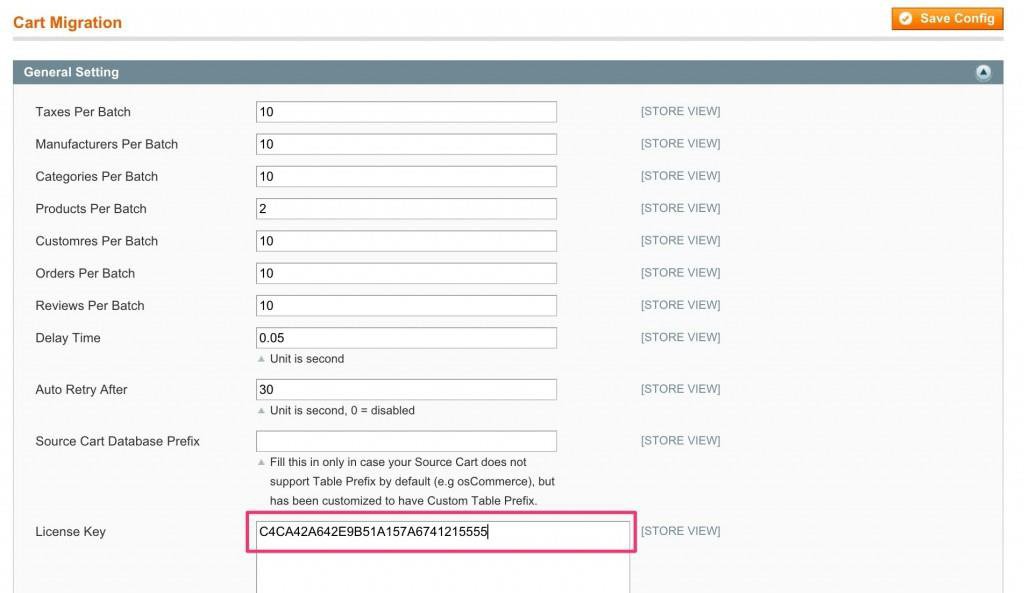
The License Key is an encoded string you’ll get with your download package. This key is required to activate your Migration Tool. 

After you have purchased the product, log in to the store (that you are using for migration) and go to the “My downloadable products” section. There you will see the download link and licence key for your download package.

License key

Next, you’ll have to log in to your Magento Target Store backend, click on Cart Migration > Configuration, and then copy and paste your licence key.

Cart migration

Step 4 – Final Migration Process:

Now let’s move to the Amazon Webstore Setup. 

First, you will have to fill out all the required information in the setup table: 

  • Cart URL: Your Amazon Webstore URL 
  • Importing your files 4.2 

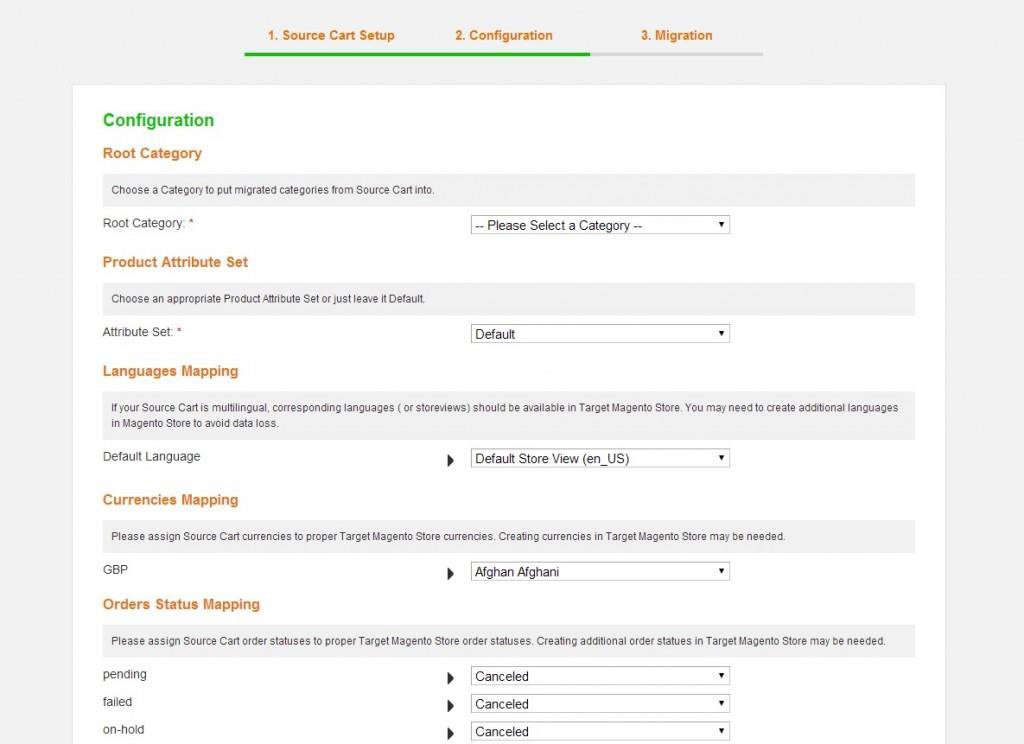
Migration Configuration:

Migration configuration

  • Root Category: The existing Magento store’s category to import the entire Amazon Webstore categories.
  • Product Attribute Set: choose an Attribute Set which will be employed to import products; all crucial attributes in the migration process will be made into this set. 
  • Languages Mapping: If your Amazon Webstore is multilingual, related languages must be there in the Target Magento Store. You may have to develop extra languages in the Magento Store in order to evade data loss. 
  • Currencies Mapping: Allocate Amazon pay Webstore currencies to accurate Target Magento Store currencies. Making currencies in Target Magento Store might be required. 
  • Orders Status Mapping: Allocate Amazon Webstore order statuses to appropriate Target Magento Store order statuses. Making extra order statues in Target Magento Store might be required. 
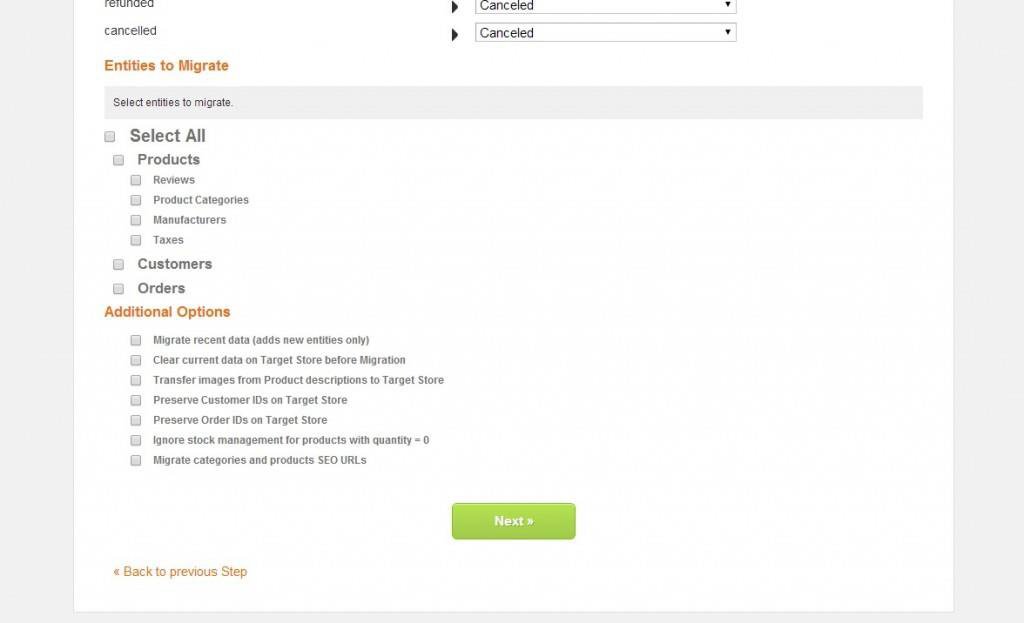
  • Entities to Migrate: pick all entities to migrate or simply a portion of them.

Entities to migrate

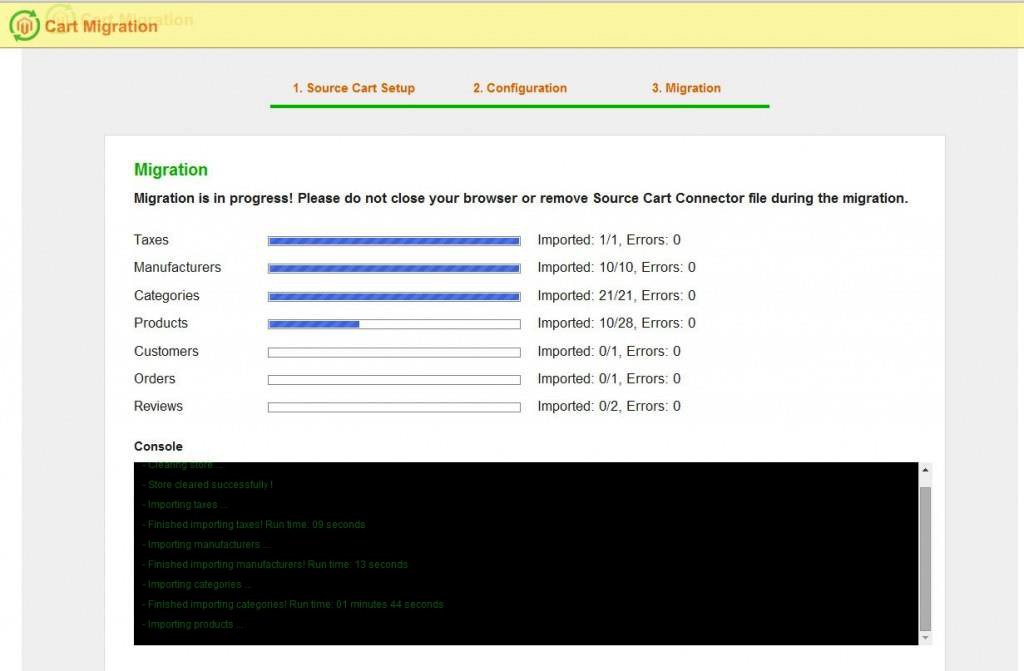
The migration will happen automatically in this last step. To continue, you must not close your browser or extract Source Cart Connector. After finishing the migration, click “Clear Cache and ReIndex Data” to complete.

Cart migration

That’s all for now, which can be done independently. 

Data Migration Prerequisites: List All The Data That You Can Conveniently Migrate from Amazon Store to Magento 2.0

When you are migrating your Amazon Web store to Magento 2.0, you can easily migrate the following data:

  • Products and Categories: You can migrate all your product and category information, such as SKUs, product descriptions, images, prices, as well as stock levels.
  • Customer Data: You can also migrate all your customer’s information, such as names, email addresses, shipping and billing addresses, and order history.
  • Orders: You can migrate order details as well, for example, order number, product information, shipping and billing details, payment information, and order status.
  • Reviews: You can migrate customer reviews and ratings for your products too.
  • Content Pages: You can migrate all your static content pages, including about us, contact us, and other pages.
  • Tax Rules: You can migrate tax rules and rates relevant to your Amazon store.
  • Payment and Shipping Techniques: You can migrate your payment and shipping techniques employed in your Amazon store to Magento 2.
  • Coupons and Discounts: You can migrate your coupon and discount codes.
  • SEO Data: You can even migrate your SEO data, such as meta titles, meta descriptions, and keywords.

The migration process may vary based on the size and complexity of your Amazon Web store, and you may require the assistance of an expert Magento 2 migration service provider to ensure a trouble-free and successful migration. 

Why Is It A Great Idea To Migrate Your Amazon Web Store To Magento 2.0? 

Migrating Amazon Web Store to Magento 2.0 is a great idea and can give you multiple benefits, some of which are summarized below:

  • Enhanced Speed and Performance: Magento 2.0 has been optimized for quicker page loading times and enhanced overall performance, which can enhance the user experience for your customers and result in increased conversion rates.
  • Improved Security: Magento 2.0 has improved security features such as two-factor authentication, enhanced hashing algorithms, and enhanced encryption protocols to safeguard your online store from likely cyber threats.
  • Enhanced User Interface: Magento 2.0 delivers a more intuitive and user-friendly interface that is simple to navigate and customize, permitting you to create an exceptional and engrossing shopping experience for your customers.

Magento 2 integration 

  • Improved Mobile Responsiveness: With more and more people shopping online from their mobile devices, Magento 2.0 has been developed to be completely responsive, guaranteeing that your store looks amazing and works flawlessly on any device.
  • Cutting-Edge SEO Capabilities: Magento 2.0 has state-of-the-art SEO abilities that can enhance your website’s search engine rankings and drive more traffic to your online store.
  • Customization Choices: Magento 2.0 delivers more customization options than ever, letting you personalize your store per your needs and create an awe-inspiring online shopping experience.

Benefits of Amazon Store To Magento Migration

Integrating your Amazon store with Magento 2 can be a great option that can give you multiple benefits. 

Benefit #1: Manage inventory from a centralized platform

When you integrate your Amazon store with Magento 2, you can manage and organize your products, orders, customers, and inventory from a centralized platform, making handling your online business more manageable. 

Benefit #2: Market Your Products on Multiple Sales Channel

Integrating your Amazon store with Magento 2 allows you to market your products on numerous channels, such as your own website, Amazon, and other marketplaces, enabling you to reach a vaster audience and drive more sales.

It can also help you retain track of your inventory levels and avoid overselling, guaranteeing that you always have sufficient stock to meet customer orders and offers amazing custom templates too. 

Benefit #3: Automate Order Processing

Moreover, you can automate your order processing workflows, decreasing the chance of blunders and saving you time and effort.

Merging your Amazon store with Magento 2 provides a seamless and uniform customer experience across all your sales channels, ensuring that your customers have a joyful experience when interacting with your brand. 

Ultimately, integrating your Amazon store with Magento 2 can assist you in streamlining your operations, expanding your reach, and providing a more satisfactory customer experience, eventually resulting in improved sales and earnings for your business.

Benefit #4: Get Access To Advanced Reporting Tools
You can also access state-of-the-art reporting and analytics tools to track your sales, customer behavior, and other fundamental metrics to help you make data-driven decisions to expand your business.

Magento 2

Things To Keep In Mind Before Migrating Your Amazon Store To Magento 2.0 

Before you go ahead with migrating your Amazon web store to Magento 2.0, there are some things that you must keep in mind, and they are as follows:

  • Devise Your Magento Migration Strategy: First, you must devise a thorough strategy that recapitulates the procedure of migrating from the Amazon web store to Magento 2.0. The strategy must have the time frame, resources needed, and the steps involved in the migration.
  • Evaluate the Data Migration Prerequisites: You will have to assess the data needed to migrate, such as product information, customer data, order history of customer groups, and payment details. Make sure that you have all the required data to carry on with the migration.
  • Assess the Hosting Environment: Magento 2.0 mandates distinct Hosting provisions, such as PHP and MySQL versions. Make sure that your Hosting environment fulfils the prerequisites before migrating.
  • Test the Magento Migration Process: Before migrating, you should definitely test the process to assure that everything functions as anticipated. Test the data migration, extensions, themes, and customization to bypass any problems during the final migration.
  • Assess Compatibility: Review if your Amazon web store’s extensions, themes, and other customizations are compatible with Magento 2.0. You may have to upgrade them or discover options that are compatible with Magento 2.0.
  • Be Ready for Downtime: The Magento migration process may need downtime, during which your website might be inaccessible to customers. Schedule things accordingly to counteract the effect on your business.
  • Instruct Your Team: Coach your team on using Magento 2.0, including managing products, customers, orders, and other essential tasks.

Take Data-Driven Decisions With WEDOWEBAPPS 

Migrating your Amazon Web Store to Magento 2.0 can be a smart decision for businesses that seek to grow their online presence and equip their customers with an improved shopping experience. 

While the Amazon web store to Magento migration process may be demanding and need a considerable investment of time, effort, and up-to-date resources, the advantages of the transition can far outrank the expenses. 

With Magento 2.0, businesses can benefit from a more adaptable, scalable, and customizable platform that can assist them in achieving their e-commerce objectives. 

Besides, with Magento’s vast ecosystem of extension installation and integrations, businesses can improve their store’s functionality and optimize their operations. 

Thus, if you are thinking about migrating from Amazon Web Store to Magento 2.0 or want to build your ecommerce store it is important to carefully assess your alternatives and operate with WEDOWEBAPPS LLC only to guarantee a seamless transition that satisfies all your business requirements.

Shopware to Magento 2 Migration

E-commerce has become increasingly popular for businesses to sell their products and services online. With the rise of online shopping, companies need an e-commerce platform that can handle the demands of online transactions. Various e-commerce platforms are accessible, each with unique features and advantages.

Your online business’s success depends on selecting the best e-commerce platform. The right platform can help you reach your target store and audience, increase sales and improve customer satisfaction. However, with so many available options, it can be difficult to determine which platform best fits your business.

In this context, migrating from Shopware to Magento 2 is a relevant choice – it’s like walking with the trend. Shopware and Magento 2 are both popular e-commerce platforms that offer a range of features and benefits. However, certain advantages to migrating from Shopware to Magento 2 make it a relevant consideration for many businesses.

This article will explore the importance of choosing the right e-commerce platform and why migrating from Shopware to Magento 2 is relevant. We will examine the features and benefits of each platform, as well as the advantages of migrating from one platform to the other. 

By the end of this article, you will better understand the importance of choosing the right e-commerce platform and whether migrating to Magento 2 is the right choice for your business.

Understanding Shopware and Magento 2

When choosing an e-commerce platform, businesses often consider the features, scalability, and support that each platform offers. Shopware and Magento 2 are the most popular e-commerce platforms with features and benefits.

Overview of Shopware and its features:

Shopware is a German e-commerce platform that was first released in 2000. Today, it has tons of installations worldwide. It is known for its intuitive and user-friendly interface, making it a good choice for businesses that want to quickly set up an online store without needing a lot of technical expertise.

Shopware offers a range of features, including:

  • Customizable templates and themes: 

Shopware allows businesses to customize their online store to match their brand and style by offering customizable templates and themes.

  • SEO optimization tools

Shopware provides various SEO optimization tools that help businesses improve their website’s search engines rankings, such as meta description tags and descriptions, XML sitemap generation, and more.

  • Multi-language and multi-currency support:

Shopware supports multiple languages and currencies, which makes it easier for businesses to expand their base of customer ids and sell products to a global audience.

  • Marketing and promotional tools: 

Shopware provides businesses with various marketing and promotional tools, including discounts, vouchers, and newsletter subscriptions.

Overview of Magento 2 and Its Features:

Magento 2 is an open-source e-commerce platform that was first released in 2015. Its advanced features and customization options have become a favorite among developers and businesses of all sizes.

For making a magento store offers a range of features, including:

  • Advanced product management and inventory tracking: 

Magento 2 provides businesses various advanced product management tools, including multi-level product categories, configurable products, and inventory tracking.

  • Customizable templates and themes:

Like Shopware, magento shop changes offer customizable templates and themes, which allow businesses to create a unique and professional-looking online store.

  • SEO optimization tools: 

Magento 2 provides migration SEO urls optimization tools, such as meta tags and descriptions, XML sitemap generation, and more, to help businesses improve their website’s search engine rankings.

Magento 2 migration

  • Payment and shipping options: 

Magento 2 supports payment and shipping price and options, including PayPal, credit card payments, and shipping via DHL, UPS, and other carriers.

  • Multi-language and multi-currency support: 

Magento 2 supports multiple languages and currencies, making it easier for businesses to reach a global audience.

  • Scalability and performance optimization:

Magento 2 is known for its scalability and performance optimization features, which make it a good choice for businesses that expect their online store to grow over time.

Comparison of Shopware and Magento 2:

While both Shopware and Magento 2 offer a range of features and benefits, there are some key differences between the two platforms that businesses should consider when choosing an e-commerce platform and hiring experts for Magento 1 to Magento 2 migration services.

  • Ease of use:

Shopware is known for its intuitive and user-friendly interface, making it a good choice for businesses that want to set up an online store quickly. Magento 2, on the other hand, has a steeper learning curve and may require more technical expertise.

  • Customization: 

Shopware offers many customization options, but Magento 2 offers even more advanced customization options and features.

  • Pricing: 

Shopware offers a range of pricing plans starting at $600 per month. At the same time, Magento 2 is a free, open-source platform that offers additional features and support through paid plans, tier price and extensions, and migration plugin.

Reasons for Migrating from Shopware to Magento 2

Shopware and Magento 2 are two popular eCommerce platforms that offer various features and functionalities to online businesses. While Shopware is known for its user-friendly interface and ease of use, Magento 2 is preferred for its scalability and flexibility.

In this section, we will discuss the reasons for migrating from Shopware to Magento 2, including the limitations you may face having a shopware store, the advantages of Magento 2, and a cost comparison between the two platforms.

Limitations of Shopware

  • Limited Scalability: 

Shopware is a great platform for small to medium-sized businesses. However, as the business grows, Shopware may be unable to keep up with the increasing demand for more complex features and functionalities.

  • Limited Extensions: 

Shopware has a limited number of extensions available compared to Magento 2. This can limit the customization options for online stores.

  • Less Support: 

Shopware has a smaller community than Magento 2, which means fewer resources are available for support and problem-solving.

  • Steep Learning Curve: 

Shopware may not be as user-friendly as some other eCommerce platforms, which can lead to a steep learning curve for users.

Advantages of Magento 2

  • Scalability: 

Magento 2 is designed to handle large-scale eCommerce businesses, making it a great choice for businesses that are growing rapidly.

  • Extensive Extensions: 

Magento 2 has many extensions, providing online stores with numerous customization options.

  • Large Community:

Magento 2 has a large and active community of developers and users, so plenty of resources are available for support and problem-solving.

  • Flexibility:

Magento 2 is a highly flexible platform that allows online stores to customize their websites according to their specific needs and preferences.

Cost Comparison between Shopware and Magento 2

The cost of migrating from Shopware to Magento 2 depends on several factors, including the size and complexity of the online store. However, in general, Magento 2 may be more expensive than Shopware.

  • License and Subscription Fees

  • Shopware offers both free and paid licenses.
  • Magento 2 also offers a free license, but the Enterprise Edition can cost up to $22,000 per year for larger businesses.
  • Hosting Costs

  • Shopware and Magento 2 require hosting, with the cost varying depending on the hosting provider and the hosting package chosen.
  • Magento 2 has a reputation for requiring more server resources and higher hosting costs due to its complex architecture, while Shopware is generally less resource-intensive.
  • Development and Design Costs

  • Migrating from Shopware to Magento 2 requires significant development work, including data migration, theme customization, and module development.
  • Magento 2 has a steeper learning curve, which can result in longer development times and higher development costs compared to Shopware.
  • Third-Party Integrations and Add-ons

  • Shopware and Magento 2 have a large community of developers and third-party providers offering various integrations and add-ons.
  • However, some third-party integrations may be more expensive for Magento 2 due to the complexity of the platform.
  • Maintenance and Support Costs

  • Shopware and Magento 2 require ongoing maintenance and support to ensure optimal performance and security.
  • Magento 2 may require more frequent updates and patches due to its complexity, which can result in higher maintenance costs.
  • Training Costs

  • If you are migrating from Shopware to Magento 2, you may need to provide training for your team on how to use the new platform.
  • Magento 2’s steeper learning curve may require more extensive training, resulting in higher costs than Shopware.

Overall, migrating from Shopware to Magento 2 can be more expensive due to the platform’s complexity and higher development costs. However, it’s important to consider the long-term benefits of a more robust and feature-rich platform when deciding.

Planning the Migration

Migrating from Shopware to Magento 2 can be a daunting task that requires careful planning to ensure a smooth transition. Shopware and Magento 2 are robust ecommerce platforms with different functionalities, features, and limitations.

Therefore, it’s crucial to plan carefully to minimize disruptions to your business operations, ensure that your new platform meets your business requirements and objectives, and identify potential risks and challenges that may arise during the shopware migration process.

Importance of Planning

Migrating from one ecommerce platform to another can be a complex process that requires careful planning. Proper planning ensures the migration process is smooth, efficient, and successful. 

Planning can help you:

  • Identify potential risks and challenges and plan accordingly
  • Determine the resources required for the migration, such as time, budget, and personnel
  • Minimize disruptions to your business operations while migrating
  • Ensure that your new ecommerce platform meets your business requirements and objectives

Steps Involved in Planning the Migration

Here are the key steps involved in planning the migration wizard from Shopware to Magento 2:

  • Analyze your current ecommerce platform

  • Assess your current ecommerce platform’s functionality, features, and limitations
  • Identify areas for improvement or customization in your new platform
  • Define your business requirements and objectives.

  • Determine your business objectives for migrating to Magento 2
  • Identify the key features and functionality you need in your new ecommerce platform
  • Choose a migration method.

  • Decide whether to perform the migration yourself or hire a professional service.
  • Select a migration tool that supports Shopware to Magento 2 migration.
  • Plan for data migration

  • Identify the data you need to migrate, such as customer, order status, product, and shipping.
  • Ensure that your new platform is compatible with your data format and structure.
  • Develop a data migration plan, including mapping, cleansing, and validation.
  • Plan for customization and development

  • Identify areas that require customization, such as themes, extensions, and integrations.
  • Plan for the development of custom features, modules, and extensions
  • Ensure that your new platform can handle your customizations and integrations
  • Plan for testing and training

  • Develop a testing plan to ensure that your new platform functions as expected.
  • Plan for user training to ensure that your team can effectively use the new platform

Data Migration Process

Data migration is a critical part of the migration process. Here are the key steps involved in data migration:

  • Extract data from your current ecommerce platform

  • Extract data from your Shopware platform using a migration tool
  • Ensure that the data is in a compatible format for Magento 2
  • Map and transform data

  • Map your data from Shopware to Magento 2 data structures
  • Transform and cleanse the data as needed
  • Load data into Magento 2

  • Load your data into Magento 2 using a migration tool
  • Validate the magento data to ensure that it has been successfully migrated
  • Verify and test data.

  • Verify that your migrated data is accurate and complete
  • Test your data to ensure that it functions as expected in Magento 2

Planning is crucial when migrating from Shopware to Magento 2. Proper planning can help ensure the migration process is efficient, successful, and meets your business requirements and objectives. 

Data migration is a critical part of the migration process, and careful planning and execution can help you ensure that your data is accurately and completely migrated to Magento 2.

E-commerce platform

Post-Migration Testing

After the migration process, it’s essential to perform post-migration testing to ensure the new site functions correctly. Here are some key aspects of post-migration testing:

Importance of Post-Migration Testing

Here are some important points describing the importance of Post-migration testing:

  • Ensures that the new site meets all the functional requirements and objectives
  • Helps to identify any bugs, errors, or performance issues that may have occurred during the migration process
  • Minimizes the risk of site downtime and loss of revenue
  • Helps to ensure that the customer experience is not impacted negatively

Types of Testing to Perform

  • Functional Testing: 

Ensure that all the site functions and features work correctly.

  • User Acceptance Testing:

Ensure that the site meets user requirements and expectations.

  1. Performance Testing: 

Evaluate site performance and identify areas for improvement.

  • Security Testing: 

Ensure that the site is secure and protected from potential threats.

Resolving Issues that Arise During Testing

While testing, it’s possible that some issues might arise. Here are some points that can help you deal with and resolve the issues that arise:

  • Document and prioritize all issues that arise during testing
  • Work with your migration assistant development team to identify the root causes of any issues
  • Develop and implement a plan to address and resolve all identified issues before launching the new site

Launching the New Site

After successful testing, it’s time to launch the new site. Here are some key aspects of launching the new site:

Importance of Launching the New Site

  • Minimizes disruptions to your business operations
  • Ensures that your customers have access to your new site as soon as possible
  • Enables you to start generating revenue on your new site

Steps to Follow When Launching the New Site

  1. Notify your customers of the new site launch and provide them with relevant information, such as new URLs and login credentials.
  2. Redirect all previous URLs to their corresponding new URLs
  3. Conduct a final check to ensure all site functions and features work correctly.
  4. Deploy the new site to the live environment.

Best Practices for Site Launch

Here are some best practices for site launch that you can follow up on:

  1. Conduct a soft launch before a full-scale launch to minimize risks.
  2. Monitor site performance and user feedback after the launch to identify any issues that may have been missed during testing.
  3. Be prepared to address any issues that may arise after the site launch.

Post-Migration Maintenance

After launching your new site, it’s important to perform regular maintenance to ensure it continues functioning correctly. 

Here are some key aspects of post-migration maintenance:

Importance of Post-Migration Maintenance

  • Minimizes the risk of site downtime and loss of revenue
  • Ensures that the site remains secure and protected from potential threats
  • Helps to identify and address any performance issues or bugs that may arise over time

Regular Site Backups

  • Develop and implement a regular backup schedule to ensure your site data is safe and can be restored during data loss.

Updates and Patches

  • Ensure your site is updated regularly to address any security vulnerabilities or bugs.
  • Monitor site performance and user feedback after updates to identify any issues that may have arisen due to the update.

Post-migration testing, new site launching, and post-migration maintenance are essential aspects of migrating from Shopware to Magento 2. Careful planning and execution of these tasks can help ensure a smooth and successful transition and minimize disruptions to your business operations.

Conclusion

Migrating from Shopware to Magento 2 requires careful planning, execution, and support to ensure a successful transition. The process involves several critical steps, including customer data migration, customization, development, testing, site launch, and maintenance. 

Working with an experienced migration partner can help make the process smoother and more successful. With proper planning, execution, and support, migrating to Magento 2 can be a valuable investment in the long-term success of your ecommerce business.

Shopify Plus to Magento 2 Migration: Step By Step Guide

As e-commerce evolves, businesses must constantly improve their online stores to stay competitive.

If you’re a Shopify Plus user looking to take your store to the next level, migrating to Magento 2 could be the solution you’re looking for.

Businesses of all sizes choose Magento 2 because of its powerful ecommerce platform, which offers greater customization, flexibility, and scalability.

It requires thoughtful planning and execution to migrate Shopify data to Magento 2.

Here we will discuss the benefits of migrating to Magento 2, the challenges you may encounter, and the steps for data migration you must take to ensure a successful migration.

Why Choose Magento 2 Over Shopify Plus?

For small businesses, the new Shopify store is a perfect choice. But for midsized and large companies, Magento is a better option. Why? Here are the Top 7 reasons to choose Magento 2 as your eCommerce companion:

Reason #1: Popularity

Magento 2 is gaining popularity over Shopify Plus because of its robust features, flexible customization options, and scalability. A large enterprise prefers it due to its better control over product management, SEO, and checkout processes.

Reason #2: Extremely Elastic

Compared with Shopify Plus, Magento 2 has more elasticity and flexibility. Thanks to its open-source architecture, Magento 2 lets businesses customize their online stores according to their specific needs. 

Reason #3: Advanced Customization Opportunities

The advanced customization options available in Magento 2 are several steps ahead of Shopify Plus. Using Magento, businesses will help you reach the targeted global audience and expand your customer base to users with different authenticities and languages. 

Reason #4: Extended Mobile commerce Technology

Compared to Shopify Plus, Magento 2 offers an extensive range of ecommerce websites features for mobile commerce. The Shopify-magento migrations allows seamless integration of various extensions for Magento 2 to avail mobile-friendly and responsive design that makes your online store rank high on SERPs. 

Reason #5: Numerous Third Party Extensions

There are several third-party extensions for Magento 2, making it a robust and diverse alternative to Shopify Plus. Businesses can expand their online store’s capabilities and offer a user-friendly and avail various extensions in marketing, payments, shipping, and customer support. 

Due to Magento 2’s support for several third-party extensions, businesses can customize and expand their online stores more quickly than Shopify. These were some of the reasons why you should make the switch. But the question is: How? 

In the next section, we will read about the step-by-step guide and know how to do shopify-magento migration and  what are the 2 options available for it. 

How To Do Shopify-Magento Migration? 2 Different Options With Steps

For those without much technical knowledge, the migration process may seem difficult. However, the difficulty depends on the method of migration you choose.

  1. Manual Shopify-Magento Migration:  One of the cheapest option to migrate your site from Shopify to Magento is Manual migration. Here you can manually export and import data and have full control of the process. 
  2. Automated Migration: Here you can use various tools like Cart2Cart, LitExtension or Firebear Studio to export Shopify to Magento site automatically. These extensions allow converting data as products and product categories. 

However, for customized elements like design, apps, custom code, shipping rules, payment rules, and security, you need to switch back to manual migration.  

Thus, you should prefer manual migration if you have more than one entity or elements in your online store. Otherwise, you’ll spend a lot of time working monotonously and could make serious mistakes.

Alternatively, you can hire Magento developers to migrate the data for you. Although this may be quite expensive, there will probably be fewer errors.

1. Manual Shopify-Magento Migration

Manual migration involves exporting all data from your Shopify website to CSV files and importing them into Magento. The CSV files will include data about products, categories, customers, manufacturers, orders, etc. 

You only need to remember that each CSV file can hold data up to 9000 rows. Thus, your data should be processed through automated tools if it exceeds the size limit.

Step 1: Click on Magento admin panel, tap on System and select the Import / Export profiles to export the data. 

Step 2: Import Shopify CSV files that only include support data, i.e., Advanced Pricing, Products, Customers and Addresses, and Customers Main File. 

Step 3: To import unsupported data, copy and paste it from your old website to your current site. 

Although Manual Shopify-magento migration will help your ecommerce website builder platform in data migration, you need to put extra effort into fixing the relationship between data tables.

2. Automated Migration

For automated migration, you can choose any popular extension. Even if you need advanced coding skills, this Magento plugin will help you migrate the shop. Let’s now discuss how the extension can help you relocate.

Step #1: Install Adobe Commerce (aka Magento)

  1. Firstly, install Adobe Commerce (which is called Magento) to migrate from Shopify and ensure your system meets the requirements and download the latest version from Magento Commerce. 
  2. To know more about the installation process, check the infographic illustrated below:

Install Adobe Commerce

Step #2: Perform a Readiness Check & Add a Database

  1. Run a readiness check to ensure everything is ready to migrate. However, if any problem arises during the inspection, you will be notified about it. 
  2. Add databases to store the data and fill all the required details of your database like name of the database, server host, username, and password, as well as the password for the database.

Step #3: Configure the future Magento store

Configure your site settings once you have finished working with your database. This step includes:

  1. Web configuration, in which you need to enter the URL of the website domain and the admin address of the website. You can also select HTTPS options here, add Magento and add your encryption key here.
  2. Storefront customization, which includes adjusting default settings, such as language, currency, and time zone, can also add advanced configurations to your store by adding modules such as Amazon payment and Magento Admin Analytics.
  3. Admin account creation, where you specify your user name, email address, and password. From here, you can manage the backend of your ecommerce website.

Step #4: Export Store Data From Shopify

  1. Begin the manual migration from Shopify to Magento 2 and create a backup of your data. Extract all the data of your old site from Shopify admin panel. 
  2. Select the appropriate tabs on the right and then click the Export button at the top of the page. After that you will receive an email containing all the necessary data.

Shopify plus

Note: Select “CSV for Excel, Numbers, or other spreadsheet programs.”

Step #5: Import Data into Adobe Commerce

  1. Go to your Adobe Commerce account, select the “System” section on the left sidebar, then select “Import.” Fill in all the fields and upload the CSV file to your account.
  2. After filling out the form, run the data check for your ecommerce store. You can start importing data migration if the data shown is valid.

Now you know the step-by-step guide of migrating your data from Shopify Plus to Magento 2. But are you not curious to know which is the right option to bein your Shopify-Magento migration. 

Well. we reccommend manual migration if you have multiple entities in your online store. Otherwise, you’ll spend a lot of time working monotonously and could make serious mistakes. 

You can also hire a Magento specialist to handle the migration. The professional can review your requirements, provide a more accurate quote, and inform you of any issues that needs your attention.

This may be the easiest way to go because you can keep them as a consultant to assist you in learning Magento for ecommerce platforms and dealing with things you couldn’t migrate (like aesthetics).

However, another thing you should be aware of while shifting from Shopify Plus to Magento 2 Migration is the time you will spend in the process. In our next section, we will discuss more about it.  

The Time You Will Spend When Migrating To Magento 2 From Shopify

Switching your eCommerce site from Shopify Plus to Magento 2 can be a time-consuming and cautious process. Depending on the size and complexity of your store, migration to Magento 2 will take time. 

Approximately 3 to 6 months are needed for the complete migration to Magento 2. The cost of migration depends on the features of your ecommerce website. Although there is no set cost for the Shopify-magento migrations, it can range from a few thousand dollars to tens of thousands. Consult a specialist and get a customized  estimate for the migration.

Before you come to a decision, know that Magento for ecommerce stores should have a clear strategy for the process. You also need the right resources and expertise to complete the project on time. 

Lastly, consider the cost of migration and the potential benefits you can access with Magento 2 as today Brands are looking for affordable and easy-to-scale ecommerce website provider. 

But unfortunately, there is a rift between brands in choosing the right platform to grow their online store. This has resulted in more buzz around Shopify Plus vs Magento commerce. 

Thus, let’s look at how different they are from the pricing point of view.   

Learn the best practices for importing product reviews while following our step-by-step guide for migrating from Shopify Plus to Magento 2.

Shopify Plus vs Magento Commerce 2: Pricing & Should You Really Migrate?

Shopify Plus and Magento Commerce 2 cost roughly the same amount in terms of the base price ($22,000 vs. $24,000, respectively) per year when compared to each other. 

Here are the pricing models of each platform:

  • Magento Commerce 2 Pricing

For businesses with gross annual revenue of less than $1,000,000 and less than $22,000 annually, Magento Commerce 2’s price starts at $22,000 annually. 

Then, depending on how much ROI your business is earning and the gross market value of the merchandise you are selling, the price of your Magento online store progresses.

Magento is a platform-as-a-service business used to create and manage online stores. Despite this, Magento Theme 2 does not include hosting and IT fees. As a result, companies need to purchase them separately to grow their business. 

If an online store wants to adopt a responsive magento theme, custom magento theme, third-party plugins, and app integrations, they must spend more money.  

Medium size enterprises can expect to pay $100 per month or more for hosting — the price of a server depends on the organization’s size. That means large companies will pay significantly more for hosting their websites to run them smoothly. 

Another vital aspect which you should adopt magento for ecommerce store is that it works efficiently even during spikes in traffic. So like, when you are running flash sales or Black Friday sales, even then, your website will run smoothly and load pages faster.

Using Magento Commerce Cloud’s cloud-based software, the cloud server costs $500 per month in addition to the software cost.

Also, consider the cost of IT, as Magento 2 offers more extensive and personalized options to modify their core code to Magento Commerce 2 software and meet the needs of your online store.

These custom magento theme stores generally cost around $5,000 monthly, whether you create it with your in-house IT teams or outsource the work to a third-party organization.

But it shouldn’t matter because Magento 2 offers businesses access to a wide range of open-source apps with advanced features to create unique and innovative e-commerce stores.  

Thus, although Magento’s pricing excludes more hidden costs in general, unlike Shopify Plus, it does not charge a transaction fee for processing your payments. Even so, the overall cost of ownership for a Magento shop is usually higher than Shopify Plus, but you’re getting more customization and flexibility.

  • Shopify Plus Pricing

Each month, Shopify Plus costs $2,000, or $24,000 yearly, with an additional fee for high-volume businesses. While Shopify Plus is a more budget-friendly option for companies looking to create an e-commerce store, there are distinct benefits to using Magento 2 that may justify its higher cost.

Shopify Plus is a SaaS platform that includes hosting, and IT support for its users, which can assist businesses in saving money and time. 

However, its lack of flexibility to customize its base code like Magento 2 can limit the ability of businesses to tailor-made stores satisfying the business’s unique needs. 

Magento 2 migration

Moreover, Shopify Plus requires businesses to pay extra developer costs for custom app integration, which can be more expensive for complex or unique apps. 

At some point, you might anticipate that Shopify Plus is a more budget-friendly platform for creating customized websites. But the twist in the tale is Magento 2 is an open-source platform that allows businesses to modify their core code and tailor their functionalities to meet data migration requirements.

Not just that by adding extensions for Magento 2 and Magento commerce cloud you can build an e-commerce platform with more flexible and customizable options. 

However, ultimately, companies should carefully evaluate both platforms, choose the one that caters to their needs, and help them create the best online stores for their business.

To make your choice more manageable, we have created a list of why brands choose Magento 2 over Shopify Plus. You will read more about it in the next section! Let’s go!

Conclusion

For businesses looking to improve their online stores, migrating from Shopify Plus to Magento 2 can be challenging but rewarding. To create a more tailored and scalable e-commerce platform, carefully plan and implement the migration so that you can take advantage of Magento 2’s advanced ecommerce websites features and customization options. 

Work with experienced developers and WEDOWEBAPPS LLC migration experts to address potential challenges and costs to ensure a smooth transition. Migrating to Magento 2 can help your business thrive in the fast-paced, competitive e-commerce world with the right approach.

Considering a new platform? Learn the reasons to choose a Magento web development company in our step-by-step guide for migrating from Shopify Plus to Magento 2.

Top Themes To Use After Migrating To Magento 2

Do you know, a well-designed Magento theme 2 can increase your website’s speed, enhance your user experience, get more traffic and sales for your Magento store? Therefore, as an online business or eCommerce store owner you must choose only the best Magento 2 theme compatible with the current version of Magento and address all the current issues your site is facing.But, which themes in the market have the power to boost your ecommerce magento website’s performance? This detailed guide will cover – most used Magento 2 Themes In 2023 which are fully customizable and responsive. However, do you know that you need a license to apply these themes? Well, there are two types of licenses that you can avail:

  1. Regular LicenseThis license can be used for one’s own website. With this license, you can’t resell or redistribute the theme you have purchased  or the end product based on the theme. 
  2. Extended LicenseWith this license, you and your client can create up to 5 different websites from a theme. The license allows you to resell or redistribute the end product.

Now that you know how to use a license, let’s explore the cost of these licenses and the top Magento 2 themes in 2023! 

Top Magento 2 Themes To Use After Migrating

Here we have mentioned the top Magento 2 themes that you can use after migration to make your website look more appealing and versatile. Have a look and choose the one that fits your requirement: 

A. Porto

PortoMagento Porto theme is a reliable and popular theme suitable for various websites, including fashion, accessories, furniture, electronics stores, and more. The theme offers modern and classic design options, with light and dark layouts that work well on all screen sizes and mobile devices.Magento Porto Theme is fully compatible with Magento Theme 2 and has been continuously updated over the past 5 years to stay in line with the newest Magento version and eCommerce movement. Porto shows top-class results on speed tests and is an excellent solution for every Magento 2 merchant. It also includes cutting-edge extensions for free and is strongly compatible with mobile devices.Features:-

  • Offers 25+ visually stunning Magento Porto themes. 
  • Comes with 20 Homepage Layouts, all featuring full-screen mode. 
  • Responsive and Mobile-friendly design, optimized for Retina displays
  • Magenta Porto theme supports both Mega Menu and Vertical Mega Menu. 
  • Provides beautiful and customizable layouts that work perfectly on any resolution. 
  • Enables complete customization of all designs to match unique needs
  • Optimized for SEO to drive higher search engine visibility and attract more website traffic. 
  • Integrated with AJAX cart and AJAX Layered Navigation to offer a smooth and hassle-free browsing experience.

Price:-

Regular LicenseExtended License
6 Month Support$129$2950
12 Month Support$171.75

B. Magetique

MagetiqueMagetique is an exceptional multipurpose Magento theme 2 that embodies our extensive technical and design expertise, resulting in the most advanced custom Magento theme and experience. This cutting-edge theme is entirely AMP-ready, ensuring that your website loads at lightning speed and delivers an unparalleled user experience. With a comprehensive marketing, design, and administration tools suite, Magetique empowers you to create a stunning and functional bespoke online store that meets your unique business needs.This theme comes bundled with 5 meticulously crafted layouts that cater to a diverse range of niches and increase your search engine visibility. These layouts are incredibly user-friendly, with a simple installation process and an intuitive interface that requires no coding expertise.Moreover, Magetique provides detailed documentation that guides you through every step of the customization process, enabling you to create a truly bespoke online store that stands out. With Magetique, you can confidently take your online business to the next level.Features:-

  • Ajax Search – A fast and efficient search function that helps users find products quickly.
  • MegaMenu – A comprehensive and intuitive menu system that simplifies website navigation.
  • Film Slider – A visually engaging slideshow that showcases products and promotions to attract users.
  •  Ajax Compare – Compare products with this tool
  • Ajax Catalog – Get a functionality to use a dynamic catalog with real-time data fetching and displaying everything new about the product.
  • Layout Switcher – A customizable feature that allows users to switch between different website layouts.
  • Parallax and Video Background – A design feature that adds depth and visual interest to a website.

Price:- $188 with 6 months support and extra $56 with 12 month’s support

C. Claue

ClaueIf you need a sleek and modern template for your ecommerce website, look no further than Claue – Clean and Minimal Magento Theme. With over 20 homepage layouts and many options for Shop, Blog, Portfolio, Store Locator, and other valuable pages, Claue offers a highly customizable platform that can be tailored to meet the needs of any kind of eCommerce  website.Designed with a clean and minimal aesthetic, Claue provides a polished, professional look that impresses customers. Whether you’re looking to sell clothing, home goods, electronics, or any other product type, Claue’s versatile layout and customization options allow you to create a unique and engaging shopping experience that sets your bespoke online store apart from the competition. So if you’re looking for a flexible and dynamic eCommerce solution for your online business, give Claue a try and see how it can help take your ecommerce website to the next level.Features:-

  • Highly responsive magento theme.
  • Frontend webpage configuration.
  • Enhances search engine visibility.
  • Product attribute swatches support.
  • Instagram shop integration.
  • Auto-added Sale-off page.
  • Support for slow image loads. 
  • 360-degree image view allowed.
  • Multiple header and footer choices.
  • Multiple layout options for all page types

Price:-

Regular LicenseExtended License
6 Month Support$90$4750
12 Month Support$118.13$6250

While browsing through the top Magento 2 themes, enhance your digital strategy by exploring our guide on iPhone app creation.

D. Eren

ErenEren is one of the best Magento themes for creating a modern and visually appealing ecommerce website. With its elegant and clean design, Eren provides visitors a warm and comfortable feeling, making it an ideal choice for multiple bespoke online stores. Eren is optimized for fully responsive Magento themes, ensuring search engine visibility across all devices, including PCs, tablets, iPads, and mobiles.Designed for Magento 2 websites, Eren is fully compatible with the latest version of the platform. Eren’s extensive collection of 20 cost-saving and supportive add-ons to the ecommerce website makes it the perfect choice for Magento stores. This clean magento theme has the power to help you rank on search engines and attract an untouched audience for your online business.Features:-

  • Product Video Customization for a more engaging customer experience.
  • Fully Responsive design with adaptive screen solutions for mobiles.
  • Styling flexibility, allowing users to change colors, fonts, and other design elements easily.
  • Smart Mega-Menu for easy navigation.
  • Customizable product display options.
  • Multiple extensions included, including One-page checkout, Categories Products, AJAX Cart/Wishlist/Compare, and more. 

Price:-

Regular LicenseExtended License
6 Month Support$129$9999
Magento Website – 12 Month Support$171.75$13467.38

E. Market

MarketMarket is a highly versatile mobile theme for Magento 2 that is designed to cater to the needs of online marketplaces, supermarkets, digital, fashion, cosmetic stores, and more. It offers a plethora of features that ensure a seamless and engaging mobile experience for customers.One of the most notable features of the Market theme is its compatibility with multiple-category stores with numerous brands and products. This makes it an ideal choice for eCommerce businesses looking to expand their offerings, search engine visibility, and revenue. Moreover, the theme comes with several Magento 2 modules, including Mega Menu, SM Tab Listing, and SM categories, that make it easier to display products and categories on the mobile screen.Features:-

  • 23+ Magento homepage layout options
  • 7 product displaying styles to choose from
  • Fully responsive Magento themes for computer and mobile devices
  • Customizable mega menu and CSS menu for enhanced navigation
  • Add to Cart, Add to Compare,Store Locator, and Add to Wishlist features included
  • Quick View functionality for faster browsing
  • Color Swatch feature for better product visualization
  • Grid and List view options for easy product browsing

Price:-

Regular LicenseExtended License
6 Month Support$84$4450
12 Month Support$109.88$5837.50

F.  Zumi

ZumiZumi is a modern and clean Magento theme that is designed to provide users a seamless shopping experience. It comes with 25+ pre-designed homepage layouts catering to various industries such as fashion, electronics, furniture, and more. Zumi is a fully responsive, mobile-friendly, and custom Magento theme that ensures your store looks great on any device. You can easily change the colors, fonts, and layout of a to match your brand’s identity and voice. Additionally, Zumi is optimized for search engines, meaning your store will have better visibility and higher rankings.Features:-

  • Responsive layout for PCs and Mobiles
  • The category and product pages have user-friendly layouts and configuration options to choose from
  • Various color choices for Magento 2.3 Theme
  • One-click import sample data
  • Support Mega Menu and CSS Menu
  • The menu items can be displayed in a variety of ways with static blocks containing texts and images
  • Support Grid & List view items
  • Allow multi-currency, multi-language
  • Integrated unlimited Google fonts
  • You can check out several Free and Premium Magento modules, which are not just limited to Ajax Layered Navigation, SM Filter Products, AJAX Add to Cart, and AJAX Add to Wishlist.

Price:-

Regular LicenseExtended License
6 Month Support$84$4200
12 Month Support$109.88$5493.75

G. Expert

ExpertThe Expert Magento theme boasts 13 customizable homepage templates and a range of admin settings, making it a versatile and professional choice for any Magento 2 store. With its sleek design and high credibility, this theme is perfect for popular store types such as fashion, market, electronics, mega shop, digital, mobile, bags, clothes, and more.Features:-

  • Fully responsive design with retina-ready display for all devices.
  • Comes with 13 unique and customizable homepage demos.
  • Allows creating any desired layout with ease.
  • Offers various color options to match the store’s branding.
  • Multiple menu styles available: Megamenu, CSS, and Mobile.
  • Showcases products in a grid and list view.
  • Features a customer testimonial slider to increase credibility.
  • Optimized product pages for all types of products.
  • Extensions included: AJAX cart, Price slider, Social Icon, Blog, Quick view, Facebook Likebox, Elevate zoom, and Fancybox lightbox

Price:-

Regular LicenseExtended License
6 Month Support$129$2400
12 Month Support$171.75$3018.75

H. Milano

MilanoMilano theme boasts a classic and elegant design that makes it an ideal choice for high-end fashion stores, as well as shops that sell clothes, bags, and related items. This theme is highly recommended for those who want a mobile-optimized website that delivers exceptional performance across all devices.Features:-

  • Over 16 homepage demos available
  • Optimized for speed, SEO, and UX/UI functions
  • Fully responsive design for all devices with mobile switching
  • Vertical mega menu supported
  • Auto-completion search tool included
  • Customizable Google fonts available
  • Support for various layouts, currencies, and languages
  • Accompanied by extensions such as Product slider, Product label, Blog, AJAX Add to cart, and Banner slider.

Price:-

Regular LicenseExtended License
6 Month Support$129$2750
12 Month Support$171.75$3500

How To Install a Magento 2 Theme?

Installing a custom Magento Theme 2 is a very simple and quick process you can accomplish in just a few steps. They are

Step 1: Downloading The Theme Files: 

  1. The first step is downloading the theme files from a trusted source. It will be available in a ZIP file. Ensure that the file is compatible with your version of Magento 2.

Step 2: Uploading And Installing The Theme:

  1. Upload them to your Magento 2 store by logging into your Magento 2 admin panel. Go to the “Content” tab, and select “Design” from the drop-down menu. 
  2. After that select “Configuration” and click the “Edit” button next to the store view to apply the theme. Go to the “Design Theme” section, click on the “Upload Theme” button, and select the theme ZIP file you downloaded. After uploading the file, click the “Save Configuration” button to install the theme.

While selecting the top Magento 2 themes for your store, also learn the steps for getting Joomla development services to further diversify your online capabilities.

Step 3: Activating The Theme: 

  • To activate the theme, go back to the “Content” tab, click on “Design” from the drop-down menu, and then tap on “Themes.” 
  • Click on the “Activate” button and activate the theme

Note: when using Custom magento theme you must create a backup of your Magento 2 store. Why? Because then it becomes quick and easy to resolve any potential issues. Additionally, if you encounter any issues during the installation process, you should seek assistance from expert Magento developers or the theme provider’s support team.

Choose the perfect themes for Magento development to not only enhance your site’s appearance but also meet all your business needs.

What Factors One Should Consider When Migrating to Magento Theme 2 

You must focus on five major parameters when Migrating from Magento to new Magento 2 Theme:Migrating to magento

A. Design

  • The visual appearance of your website is one of the most crucial elements that can make or break your online business. Therefore, choosing a clean magento theme with an attractive design that aligns with your brand’s style and messaging is essential. 
  • You may want to consider responsive magento themes with customizable options, as this allows you to tailor the look and feel of your website to your preferences.

B. Features And Functionality

  • The theme you select should have all the essential features to operate your online store smoothly. This includes functionality such as product displays, shopping cart management, store locator, and checkout processes.
  • You can also check advanced features such as search filters, mega menus, and promotional banners so that you can offer better user experience.

C. Compatibility With Magento 2 

  • If your custom Magento theme compliments the version of Magento 2 theme, your website runs fast without any delay or issues from frontend and backend.

D. Responsiveness

  • With more mobile users, choosing responsive themes that can quickly adapt to different screen sizes becomes crucial as it ensures that your website is visible to every mobile user with different screen sizes.

E. Customer Support

  • When choosing a Magento 2 theme, select a reliable provider who offers on-time technical support and assistance during the migration process, installation duration or use of the theme.

Why Choose Top Themes For Magento 2?

Migrating data to Magento 2 is a big decision, as it allows businesses to build customizable bespoke online stores, also known as Magento stores. With Magento, online businesses and ecommerce websites can enhance their online shopping experiences and increase ROI. However, while migrating data to Magento 2, you can leverage this powerhouse’s features and extensions and make your ecommerce website more potent with a responsive magento theme. These custom themes will also help your ecommerce stores to grow their online presence and be more successful.Choosing the best Magento 2 themes is a significant step for any e-commerce business toward optimizing the website’s potential and achieving business goals with the Magento migration process. However, online businesses should consider several factors when selecting a Magento theme. These factors include website speed, search engine visibility, compatibility, and the availability of necessary features and functionality. In addition, businesses can differentiate themselves from competitors by choosing a suitable custom Magento theme, establishing brand identity, and building a loyal customer base.Once you have selected the right Magento theme after migrating to Magento, it’s time to ensure you choose right hands to install this theme and make use of all the functionalities which come along with these clean Magento themes 2. If you need the best company for Magento Migration in the USA choose WEDOWEBAPPS. We deploy Magento for ecommerce websites and also create new feature-rich custom magento themes suiting your online business needs.Also check out the top Magento 2 themes and its features, benefits, and installation process. 

What Are The Key Benefits Of Migrating To A Magento 2 Theme?

As e-commerce store owners migrate all their data to Magento 2, selecting the best responsive magento themes is crucial for their ecommerce website’s success. A well-designed Magento 2 theme can significantly impact the website’s appearance, functionality, and performance, increasing website traffic and online sales. Here are the top benefits of using a clean Magento 2 theme:

A. Improved Website Speed:

Top Magento 2 themes optimize them for your ecommerce store performance by faster loading pages and reducing bounce rates. This helps you create a better customer user experience and increase search engine visibility for your online business.

B. Enhanced User Experience:

Magento 2 themes offer businesses various customized themes that make your ecommerce websites visually appealing and user-interactive. With these custom magento themes, you can increase the traffic to your website and reach more customers.

C. Better Customization Options:

Magento 2 themes offer businesses more outstanding customization options, allowing them to tailor their website to their unique needs. From customizing the homepage to creating landing pages, companies can personalize their Magento website to improve brand identity and stand out from competitors.

D. Mobile Responsiveness:

Magento 2 theme designs are based on a responsive magento theme. It ensures that your magento app runs seamlessly on mobile and other devices to enhance the user experience. A great user experience on your app can increase website traffic and mobile users’ online sales.

E. SEO Optimization:

Magento 2 themes are optimized for search engines so that businesses can drive more traffic and increase their search engine visibility. Businesses can ensure their website is SEO-friendly with tailor-made meta tags and schema markup. 

Once you’ve selected the right theme, ensure your site performs flawlessly with our expert Magento web development services tailored to your needs.

F. Compatibility Issues:

If you run an online store, you should pick up a Magento 2 theme which compliments various Magento features and is compatible with the Magento version. And while migrating to Magento 2 ensure the team you have opted for is compatible on multiple screen sizes and is responsive with no heavy codes. Magento servicesThis is how with the best Magento for ecommerce websites theme you can improve website speed, enhance user experience and maximize search engine visibility. And the best part is, you get the benefit of higher website traffic and online sales with compatible Magento 2 themes. Read also about PSD to Drupal and Magento Conversion

Conclusion:-

In conclusion, using a Magento 2 theme offers many benefits for online store owners. It also helps you improve the functionality and user experience of website users. Additionally, Magento Themes 2 can improve your search engine visibility and provide you with the latest version of Magento. With pre-built extensions and modules, they can also save you time and money in development costs. Overall, investing in a Magento 2 theme will take your online business to the next level and give you a competitive edge in the e-commerce market. To migrate your store to Magento 2, visit WeDoWebApps.com for hassle-free operations. Read also about SEO checklist for Magento PWA and managing store after Magento 2 migration

How to Migrate Magento Store from cPanel to Cloud?

Due to the world-class features Magento offers, you will find 171,162 online eCommerce stores built on Magento. Numerous online shops that use Magento for their online store storage are located on various platforms.

We frequently get a lot of inquiries about transferring the Magento store from the hosting environment of cPanel to a new website. Some users might need clarification on whether they should make the same decision as those who switched from Magento to this new website. After all, it powers over 0.9% of all active websites on the internet. 

Let us begin by understanding why switching Magento to a different server is essential for the best solution. Then, we will discuss how to migrate the Magento Store from cPanel to Cloud.

Magento Shared Vs. Cloud: What Is It? Which one is better? 

Magento Shared

Many of us are familiar with shared hosting being among the most traditional forms of web hosting because it is affordable for new businesses and one-page, lightweight websites. To ensure that each website receives an equitable amount of the server’s resources, shared hosting involves hosting multiple websites on a central computer that the hosting company manages. 

The quantity of resources varies according to the package you purchase from your supplier. With this allocation, the price will remain cheap and straightforward for consumers.

Cloud Hosting

Another viable option is cloud hosting, which lets you put your website on a specialized cloud server, providing numerous benefits to your application. It includes a feature allowing you to expand the server anytime and monitors Magento server problems.

Magento Cloud hosting may be a more affordable option compared to shared hosting. Still, one significant benefit is that you only pay for the services that you use, rather than spending for resources that are not being used. You can take into account the following cloud-based architecture when transferring your Magento website:

  • Godaddy
  • Microsoft Azure
  • Google Compute Engine
  • Amazon Web Services (AWS)
  • Rackspace
  • Vultr
  • Linode

As a result of not worrying about server-related problems, you generally have more time to make the most of your company. By eliminating all the hassles associated with setups and server management, Cloud ways, a well-known and dedicated cloud server, is among the best ways to manage cPanel to cloud hosting.

Users who want to migrate to the cloud securely and efficiently can benefit significantly from migration tools. You will learn more about the top program and cloud transfer tools in the following sections of the blog.

By enhancing its performance and raising the level of security by increasing the sales ratio, Magento stores concentrated on their best and suggested choices while keeping all of these factors in mind. 

Let us examine some essential distinctions between Magento Store and cloud hosting plans.

What Problems Can Occur in the Magento Cloud Hosting?

As a versatile and powerful e-commerce application framework, Magento is well known for needing more technical knowledge to deploy directly to cloud hosting. 

It includes appropriate layout and optimization to assist it in performing much better, as trying to manage your server could be challenging to use such a provided service. 

Compared to on-premises systems, cloud software settings benefit their customers in many ways, including flexibility, automated upkeep, and simple scalability. 

Due to these advantages, many people and businesses switch from on-site to cloud-based sites. However, not all clouds are made equal, and many discover that moving their tasks and processes between cloud platforms could be advantageous.

Transferring apps and information to the cloud can be difficult, and if done incorrectly, it may even compromise security and compliance. 

Fortunately, users can simplify the procedures involved in moving workloads with cloud and application transfer tools, which also offer tools for monitoring and documenting migrations.

Undeniable Advantages of Magento Store Migration from cPanel to cloud

  1. When you move your Magento store to CloudWays, SSD cloud hosting from Magento provides greater control over your remote server and resources to support it. 
  2. You can also use advanced caching possibilities such as Varnish, Memcached, and Redis to improve your store’s performance. 
  3. Additionally, CloudwaysCDN is simple to set up and will speed up your Magento shop only with a few clicks. 
  4. The newest tools like Apache, Nginx, PHP-FPM, and MYSQL combined with an optimized framework can help your Magento shop run faster than ever.
  5. By conducting routine firmware upgrades, the Magento cloud hosting provides the security to guarantee that your Magento shops are equipped with platform-level defenses. 
  6. You could also use auto-healing servers to reduce the likelihood of shutdowns, which can result in business disruption. 

Step-By-Step Guide to the Migration of Magento Store From cPanel to cloud 

Here is a quick process to follow if you want to move your shop from Magento cPanel hosting to Cloudways. You only need to restore your store’s database before starting with Cloudways to get all the necessary information.

Step 1: Start with cPanel for Magento.

Putty or an SSH interface can connect to your Magento cPanel server. Try to browse your Magento 2 store’s primary directory once completed. Run this command to plan a copy of the database for your shop.

mysqldump -u your username -p your name > database.sql

Step 2: File Organizer should be updated

Enter your cPanel hosting database login and name in the above command line, and then upload your chosen file. After you run this program, you will be prompted to input a database password and cPanel hosting database username. Now access File Organizer through your cPanel hosting.

Step 3: Explore the base path.

Afterward, go to your store’s central location to explore the root directory. 

Step 4: It is time to bundle up all of your files and directories at this point.

Your website’s database copy is now available, and you can access it at www.yourdomain.com/magentobackup.zip.

Step 5: Create a new account.

Once you have done that, you can start Magento 2 with just a few steps by creating an account at Cloudways.

This gives you the option to select the server of your choosing from their infrastructure partners, and you must then establish the server’s location and size to meet your needs.

Magento app

Step 6: Setup the server

Once finished, select “start now” to finish the process. When the following message appears, along with the Magento 2 program underneath it, you will know that the server has been properly installed:

Step 7: Remove the previous database.

You must delete the Cloudways deployed application’s database and files before migrating your Magento shop to cPanel. SSH can be used to connect to your Cloudways hosting, after which you should choose the base location for your shop. Clean up all the saved files and directories initially by executing the following command:

rm -rf *

Step 8: Connect to the SFTP interface

Now, from your account’s program interface, select Launch Database Manager. Drop all the tables after selecting them after you launch Database Manager. Now enter the SSH terminal’s instructions to log in to the Cloudways Magento app.

wget https://yourdomain.com/magentobackup.zip

Step 9: Extract each file. 

Run the instructions to unzip the file and load the database onto your Cloudways app.

MySQL -u CLOUDWAYS-DB-USERNAME -p CLOUDWAYS-DB-NAME < database.sql

Enter the above command with the database credentials for your program deployed on Cloudways. Next, enter the passcode and navigate to the env.php file to change the database passwords to those for Cloudways. If you want expert guidance in the migration of your Magento store, hire offshore Magento developers to help you complete the migration process with ease. 

Why Must You Select Cloud Hosting Solution For Your Magento Store Migration?

Many people wonder why they must opt for cloud servers to migrate the Magento store. Here, we will discuss some reasons behind using Cloud hosting for migrating the Magento store. 

Scalability

During peak sales periods and store promotions, e-commerce shops frequently need the ability to scale their server resources quickly.

  • Performance

The primary reason behind choosing cloud hosting performance as it is a reliable hosting solution that offers private cloud computing, ensuring the store’s speed and performance.

  • Security

The fundamental procedures of cPanel to Cloud hosting are designed with security in mind. The computers also include security features like 2FA, firewalls, and anti-malware programs.

  • Resources

A specialized resource allotment is included with your cloud server. It is simple to understand the advantages of cloud hosting when combined with the scaling function.

  • Costs

Although the pricing plans initially appear expensive, you will ultimately save money by forgoing the cost of repairing problems that frequently arise with inexpensive hosting.

Migrate magento

  • Downtime Risk

Cloud computers experience minimal downtime and better efficiency due to the highly optimized design.

  • Better Management of Traffic Spikes

Cloud computers are generally better equipped to handle sporadic traffic surges due to several critical characteristics that make up cloud hosting.

Some Best Practices When Migrating the Magento Store to Cloud

Hosting in cloud options like DigitalOcean, AWS, Linode, etc., provides a ready choice to grow up. In other words, you can begin with the least for your website. Eventually, if the site traffic increases significantly, we can add more resources.

Again, cloud web pages will be utterly safe from typical security threats. The cloud barrier will protect the complete cloud network.

The dependability of cloud technologies is also well recognized. As a result, it usually prevents website outages caused by server failures.

Recap of the best practices our transfer engineers adhere to when moving cPanel to the cloud.

  • cPanel host and cloud server are similar. Setting up equivalent software versions, such as PHP, Web server, MySQL, etc., is part of this.
  • They are Lowering TTL numbers well before the transfer itself. By doing this, DNS propagation-related website outages would be avoided.
  • Deleting the instance’s current material and adding new content.
  • Before making the fundamental DNS changes, access the page on the new server.
  • Final rsync of the website’s database and content to incorporate all changes.

Salesforce to Magento 2 Migration:

Migrating from Salesforce Commerce Cloud to Magento 2 involves a detailed process to ensure a smooth transition. The benefits include better customization, flexibility, and a wider range of plugins and extensions. For more detailed steps on how to migrate from Salesforce to Magento 2, including data transfer, theme adaptation, and extension compatibility, visit our comprehensive guide on Salesforce to Magento 2 migration.

Miva Merchant to Magento 2 Migration:

Transitioning from Miva Merchant to Magento 2 can significantly enhance your eCommerce store’s performance, scalability, and functionality. Magento 2 offers advanced features that can be beneficial for businesses looking for more robust solutions. For a step-by-step guide on migrating from Miva Merchant to Magento 2, including data migration, theme transfer, and ensuring extension compatibility, check out our detailed instructions on Miva Merchant to Magento 2 migration.

Conclusion

Technology is currently advancing at an exponential rate. Things continue to get better and stronger in this wonderful technical age that we are living in. Likewise, the realm of eCommerce systems for companies of all kinds does.

If you fight against this shift, you will only suffer loss. Your company will become chaotic if you are a step behind everyone else. Moving your Magento shop from cPanel to cloud hosting servers is best advised to prevent this. This will allow you and your company to remain on top of trends and grow to their full potential.

We hope the transition of your Magento shop from shared cPanel computing to cloud hosting goes smoothly for you. We hope you are through with the Magento 2 migration procedure. You will also comprehend how Magento cloud hosting would be the best choice for your online store. 

Connect with WeDoWebApps.com to learn more about the migration process from cPanel to the cloud server for a Magento store. The experts here are well aware of the need, and we assure maximum efficiency for the migration process.