skip to content

What Is White Label WordPress Development? A Guide for Agencies

Introduction

Your agency is receiving more WordPress website requests, but does your team have enough developers to handle them all?

  • Hiring full-time developers increases operational costs.
  • Outsourcing every project without a reliable partner can affect quality and delivery timelines.
  • Turning down the project means missing potential revenue.

White label WordPress development offers a practical way to handle this growing demand. You can partner with an experienced development team to build websites, customize themes, develop plugins and manage technical requirements under your agency’s brand.

Your client continues working with you while your white label development partner handles the technical execution.

Whether you run a digital marketing agency, web design company or freelance business, a white label WordPress agency can help you take on more projects without expanding your in-house team. But how does this partnership work, what services can you offer and how do you choose the right development company?

Let’s understand.

What Is White Label WordPress Development?
 
What Is White Label WordPress Development
 

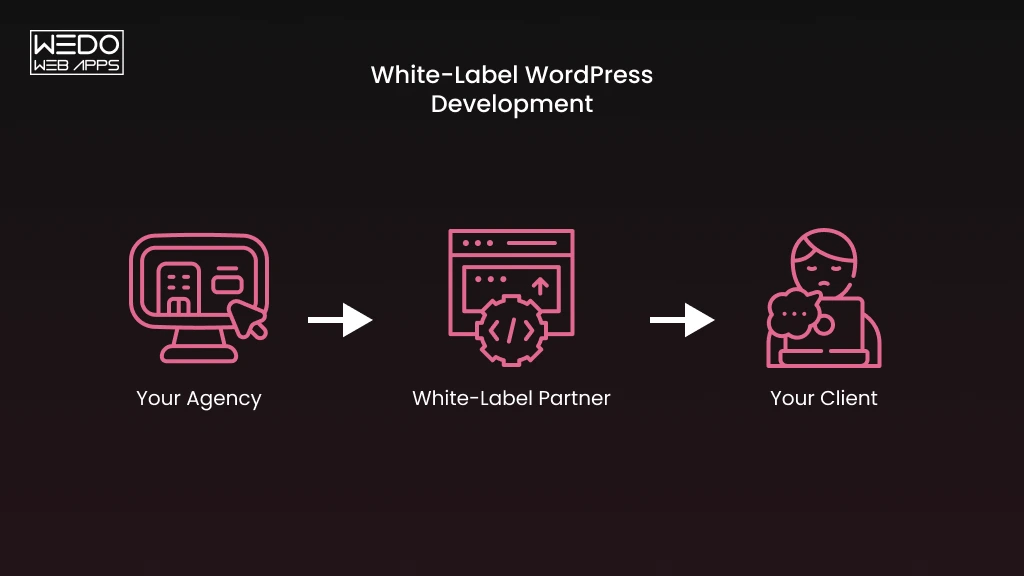
White label WordPress development is an arrangement where your agency outsources website building, customisation or maintenance to a third-party team. The work is delivered under your agency’s name. Your client deals only with you, and the partner stays out of sight from contract to handover.

Here is how the money typically flows, using a simple example:

  • Your client pays you $6000 for a 10-page business website.
  • You pay your white label partner $3500 for the build.
  • You keep $2500 and still own the relationship, the invoice and the next project.

The number will vary, but the structure stays the same. You sell, the partner builds and the margin is yours.

The model also fits the market you are selling into. Roughly 40% of all websites run on WordPress, according to data from October 2026, so clients keep asking for it even as the platform’s share eases slightly.


Who Typically Uses White Label WordPress Services?


Agency TypeWhat They SellWhat They Outsource
Digital Marketing AgenciesCampaigns, content, paid adsLanding pages and full site builds
SEO AgenciesRankings and auditsSpeed fixes, schema, technical changes
Design and Branding StudiosVisual identity and UITurning approved designs into working themes
Freelancers and Small StudiosTheir own timeOverflow work in busy months


If you sell websites but do not have a developer bench, this model was built for you.

White Label Themes, Stores and Plugins

How Does White Label WordPress Development Work?
 
How White Label WordPress Services Work
 

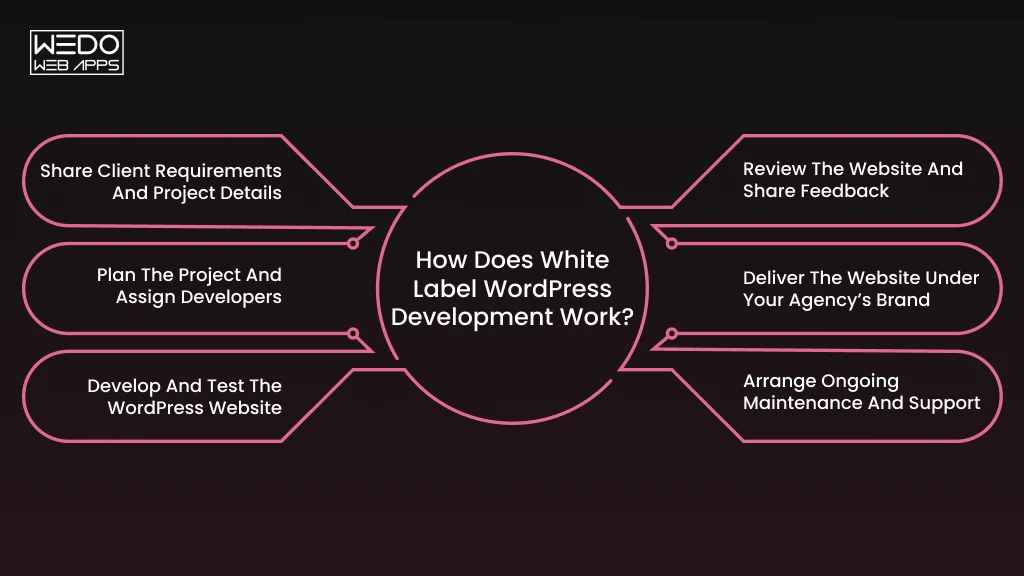
A white label WordPress development partnership involves a few coordinated steps. Your agency manages the client relationship, while the development partner takes care of the technical work.

Step 1. Share Client Requirements and Project Details

Start by preparing a project brief that includes:

  • Website purpose and business requirements.
  • Web design references and branding guidelines.
  • Required features and integrations.
  • Project scope and expected delivery date.

Step 2. Plan the Project and Assign Developers

Your development partner reviews the brief and prepares a development plan.

This includes:

  • Estimating the project cost and timeline.
  • Selecting developers based on technical requirements.
  • Defining milestones and deliverables.
  • Agreeing on communication and revision processes.

Step 3. Develop and Test the WordPress Website

The development team starts working on the approved requirements.

Depending on the project, this may include:

  • Custom theme development and customization.
  • Plugin development and third-party integrations.
  • Responsive website implementation.
  • Functionality and performance testing.

Step 4. Review the Website and Share Feedback

Once development is complete, your agency reviews the website before client delivery.

Check the following:

  • Whether all agreed features work correctly.
  • Whether the design matches the approved references.
  • Whether the website works across different devices and browsers.
  • Whether any changes are needed before approval.

Step 5. Deliver the Website Under Your Agency’s Brand

After final approval, your agency handles the client handover.

This usually includes website access, relevant documentation and any agreed project deliverables. Your agency remains the primary point of contact.

Step 6. Arrange Ongoing Maintenance and Support

If your agreement includes post-launch services, the development partner can continue handling:

  • WordPress core, theme and plugin updates.
  • Website backups and security checks.
  • Bug fixes and technical troubleshooting.
  • Performance monitoring and improvements.

This gives your agency an opportunity to offer ongoing WordPress support without managing every technical task internally.

What Services Does a White Label WordPress Development Company Offer?
 
White Label WordPress Services Offered
 

Client requests rarely stop at a homepage. One wants an online store. Another needs a booking system. A third has a slow site that must be fixed by Friday.

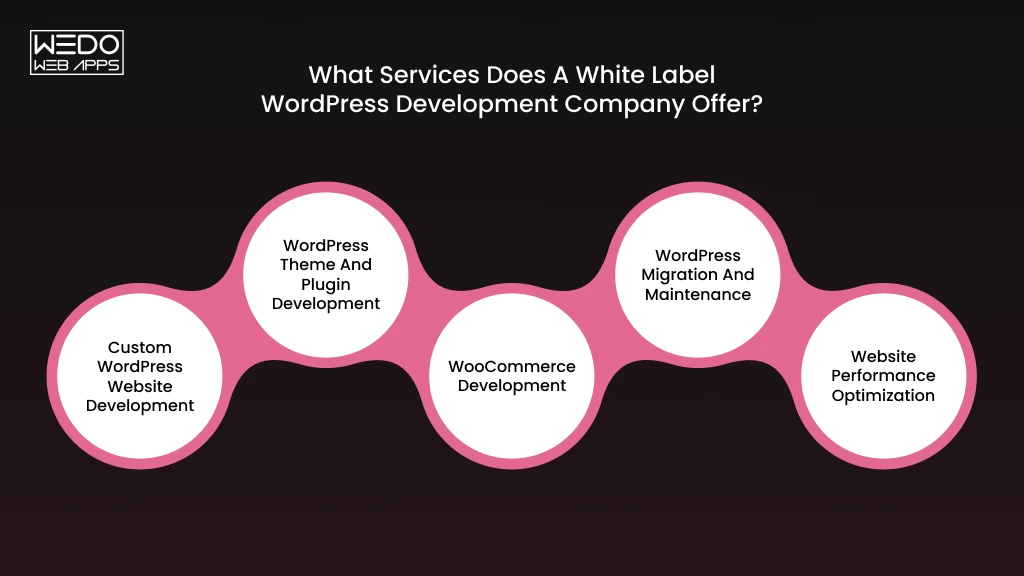
A white label WordPress development company covers these jobs under your brand, so you can say yes to more of them.

Custom WordPress Website Development

This is the core service. Your partner turns approved designs into a working site, built with a page builder like Elementor or Beaver Builder, or with custom code and the block editor.

Typical deliverables include:

  • Responsive layouts for mobile, tablet and desktop.
  • Forms, galleries, sliders and blog setups.
  • Basic on-page SEO structure and clean URLs.
  • Staging and live deployment.

WordPress Theme and Plugin Development

Some clients need something a ready-made theme cannot give them. A custom theme matches their brand exactly and loads only the code it needs.

Plugins work the same way. Your partner can build a feature from scratch, such as a custom quote calculator, or adapt an existing plugin to fit a workflow. If a client says “we need a tool that does X,” this is the service that answers it.

WooCommerce Development

Online stores need more than product pages. Your partner can handle:

  • Product catalogs, variations and inventory rules.
  • Payment gateways and tax settings.
  • Shipping zones and rate logic.
  • Subscriptions, memberships or bookings.
  • Checkout customization to reduce drop-off.

Example: A local bakery wants customers to order cakes online and choose a pickup slot. Your partner builds the store, adds a date picker at checkout, and caps daily orders so the kitchen is never overbooked. You sell it as a custom ordering system.

WordPress Migration and Maintenance

Clients move hosts, switch domains or leave another platform. A careful WordPress migration keeps the site online during the move and preserves the URLs and redirects that protect search rankings.

After that, maintenance keeps the site healthy. Your partner covers core, theme and plugin updates, daily or weekly backups, uptime checks, malware scans, and bug fixes. For you, it turns one-time projects into steady monthly income.

Website Performance Optimization

Slow sites lose visitors and rank lower. Your partner can audit the site against Google’s Core Web Vitals and fix what drags it down.


MetricWhat it measuresGood score
LCPHow fast the main content loadsUnder 2.5 seconds
INPHow quickly the page responds to taps and clicksUnder 200 ms
CLSHow much the layout shifts while loadingUnder 0.1


The usual fixes are image compression, caching, code cleanup, and removing plugins the site no longer needs. Many agencies sell this as a standalone speed audit, which makes it a low-risk first project to test a new partner.

What Are the Benefits of Hiring a White Label WordPress Agency?
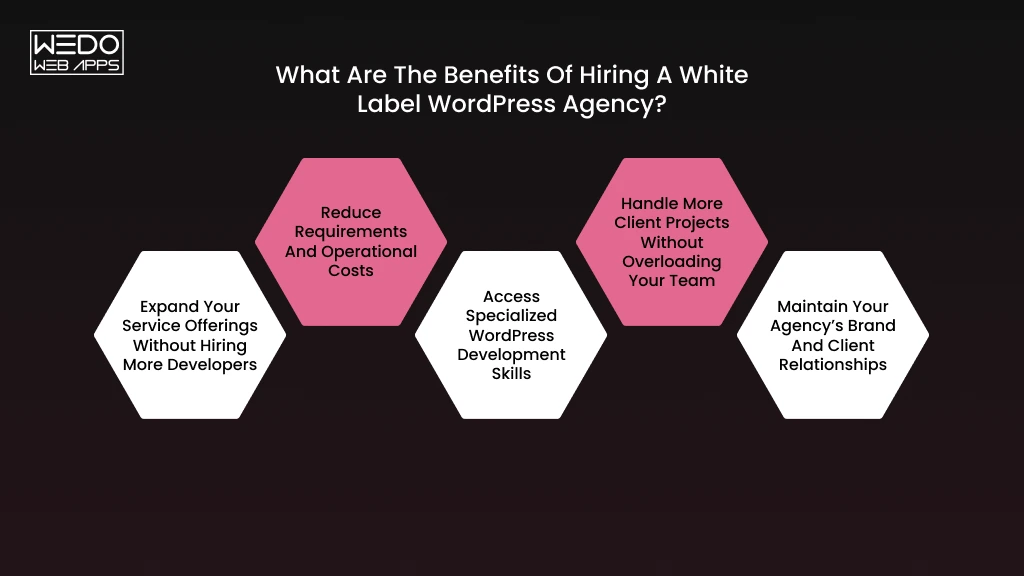
 
Benefits of White Label WordPress Agencies
 

Partnering with a white label WordPress agency gives you access to external development resources while allowing you to maintain control over your client relationship. You can take on more projects, introduce additional services and manage development requirements without increasing your permanent team size.

Here are some ways this partnership can benefit your agency:

1. Expand Your Service Offerings Without Hiring More Developers

Your clients may need custom WordPress websites, WooCommerce stores or plugin development alongside your existing services. A white label partner allows you to offer these services without hiring developers for every technical requirement.

For example: If you run an SEO agency, you can start offering WordPress website development to clients who need a new website before investing in search optimization.

2. Reduce Requirements and Operational Costs

Hiring full-time developers involves salaries, recruitment expenses, training, software subscriptions and employee management. These costs can become difficult to manage when your project workload changes frequently.

With white label development, you can choose an engagement model based on your requirements.

  • Pay for individual projects when development needs are occasional.
  • Use hourly arrangements for smaller tasks and fixes.
  • Choose monthly retainers for recurring development requirements.

This gives you more control over how you allocate your development budget.

3. Access Specialized WordPress Development Skills

Not every project requires the same technical expertise. One client may need a custom plugin, while another may require WooCommerce integrations or advanced theme customization.

A white label WordPress development company can provide access to developers with different technical specializations.

For example: You can assign a complex WooCommerce project to developers experienced in eCommerce functionality without hiring a dedicated WooCommerce specialist.

4. Handle More Client Projects Without Overloading Your Team

Your internal team may have limited capacity during busy periods. A development partner can take responsibility for additional technical work, helping you manage overlapping project deadlines.

Consider a situation where three clients request WordPress websites within the same month. Your internal team can manage client communication and design approvals while the external team handles development.

This helps you accept more projects without putting unnecessary pressure on your existing employees.

5. Maintain Your Agency’s Brand and Client Relationships

Your clients continue interacting with your agency, receiving project updates and completed deliverables under your brand identity. The development partner works behind the scenes according to your agreed communication and branding arrangements.

To maintain this setup, establish clear expectations around:

  • Non-disclosure agreements and confidentiality.
  • Client communication responsibilities.
  • Project ownership and source code access.
  • Branded reports and deliverables.

This allows you to maintain client trust while getting external technical support.

White Label WordPress Development vs. In-House Development

Should you hire a developer or hand the work to a partner? The answer depends on how steady your project pipeline is.

Here is how white label WordPress development compares with an in-house developer.


FactorIn-house developerWhite label WordPress partner
CostFixed salary, tools and benefits every monthPaid per project, hour or retainer
ExpertiseOne person’s skill setA team across themes, plugins, WooCommerce and security
ScalabilityLimited to one person’s hoursCapacity grows or shrinks with your workload
Time to startWeeks to hire and onboardOften days
Project managementYou assign work, review it, and manage performanceYou manage scope and deliverables
ControlFull control over daily prioritiesControl through briefs, milestones and approvals
RiskProjects stall if your developer leaves or is unavailableA team absorbs absences


When White Label Fits Better

You will likely benefit from a white label WordPress agency if:

  • Your project volume changes from month to month.
  • You sell WordPress builds but lack a developer bench.
  • You need WooCommerce, custom plugin or API skills only occasionally.
  • You would rather spend your time on sales and strategy than on technical hiring.

When In-House Is the Better Call

Hiring makes sense when your demand is steady and high. If you build a dozen sites every quarter, a full-time developer who knows your clients and processes can be worth the fixed cost. Daily access and deep familiarity with your projects are real advantages.

Many agencies combine both. They keep one in-house lead for quality checks and client conversations and send overflow builds to a white label partner. You get control where it matters and flexibility where you need it.

How Much Does White Label WordPress Development Cost?

There is no single fixed price. The rates keep changing with the location, requirements, and how you finalize the deal.

Still, you need a number before you quote your client. Here are the four ways white label WordPress development is usually priced.

Project-Based Pricing

You and your partner agree on one fee for a defined scope. A 10-page business site, for example, gets a fixed quote that covers design handoff, build, testing and two revision rounds.

This works best when your brief is clear. You know your cost before you quote your client, so your margin is protected. If your client changes the scope halfway through, the quote changes too.

Hourly Pricing

You pay for the hours worked. This suits small fixes, uncertain scopes, and technical tasks like debugging. Rates depend heavily on who does the work:


Developer levelTypical hourly rate
Offshore developers$18 to $35
Mid-level WordPress specialists$50 to $90
Advanced custom development$100 to $150


Monthly Retainer and Dedicated Team Models

With a retainer, you pay a set monthly fee for a block of hours or a defined service, such as maintenance. One published rate card puts WordPress retainers between roughly $500 and $2500 a month.

A dedicated developer works only on your project. Some rate cards place this model at $3000 to $6000 a month. It makes sense once you have steady work for at least one developer’s full capacity.

Pick based on your pipeline:

  • Retainer: recurring maintenance or a steady flow of small tasks.
  • Dedicated developer: constant build work across several clients.

Factor Affecting Development Costs

Two quotes for a “WordPress website” can differ by thousands of dollars. These factors explain why:

  • Scope and page count: more templates mean more build and testing time.
  • Custom functionality: plugins, API connections and membership logic cost more than standard pages.
  • WooCommerce complexity: subscriptions, bookings and custom checkout add hours.
  • Design handoff quality: clean Figma files speed up the build.
  • Turnaround time: rush delivery usually carries a premium.
  • Partner location and seniority: the biggest driver of hourly rates.

How the Margin Works

Your partner’s price only matters in relation to what you charge. Several 2026 benchmarks suggest agencies aim for a gross margin of 50% to 70% on white-label work.

If a project costs you $3000 to build, quoting your client $6000 gives you a 50% margin. Quote based on your partner’s cost and your target margin, not your own internal hourly rate.

Before you sign, ask which items are not included. Project management fees, extra revision rounds, and post-launch bug fixes are common sources of surprise charges.

Get a Clear Quote for Your Next Project

How Is AI Changing White Label WordPress Development?

AI is changing how WordPress developers approach website creation, coding, testing and content management. For agencies working with a white label WordPress development company, these tools can help speed up certain tasks and support faster project delivery.

However, the value of AI depends on how developers use it. Here are some practical applications worth understanding.

AI-Assisted Coding and Development

Developers now use AI tools to draft code, write boilerplate and explain unfamiliar plugins. The gain show up in routine work:

  • First drafts of theme templates and block patterns.
  • Repetitive code for custom post types and forms.
  • Documentation and code comments.
  • Quick refactoring of older plugin code.

For you, the benefit is shorter build time on standard tasks. A good partner passes some of that savings on through faster delivery or tighter quotes.

AI-Powered Website Personalization

WordPress 7.0 gives developers one consistent way to connect AI providers. Sites can now link a provider once through a single Connectors panel, instead of every plugin managing its own keys. That makes AI features easier to build and easier to control.

This opens new services you can sell:

  • Chatbots that answer product or service questions.
  • Content recommendations based on visitor behavior.
  • AI-assisted site search.
  • Product description and meta tag drafting inside the editor.

Picture a B2B client whose visitors keep leaving the pricing page. Your partner adds a chat assistant trained on the client’s FAQs. You sell it as a lead-capture upgrade and bill it monthly.

AI-Based Testing and Bug Detection

Testing is where AI saves quiet hours. Partners can use it to scan code for errors, flag accessibility gaps and compare layouts across screen sizes before you see a staging link.


QA taskHow AI helpsWhat a person still checks
Code reviewFlags syntax errors and risky patternsLogic, performance and plugin conflicts
AccessibilitySpots missing alt test and contrast issuesKeyboard navigation and screen reader flow
Visual testingDetects layout breaks across devicesWhether the design matches the brief


Why Developer Oversight Still Matters

AI can produce code that works and still creates risk. Security is the clearest example. Patchstack recorded 11,334 new WordPress vulnerabilities in 2025 and 91% were in plugins. Unreviewed AI-written plugin code can add to that problem.

Ask your partner these questions before you sign:

  • Do you use AI tools on client projects and do you disclose it?
  • Who reviews AI-generated code before delivery?
  • Is client data even entered into public AI tools?
  • Who owns code produced with AI assistance?

A partner who answers clearly is easier to trust. One who avoids the topic is a warning sign.

How to Choose the Right White Label WordPress Development Company?
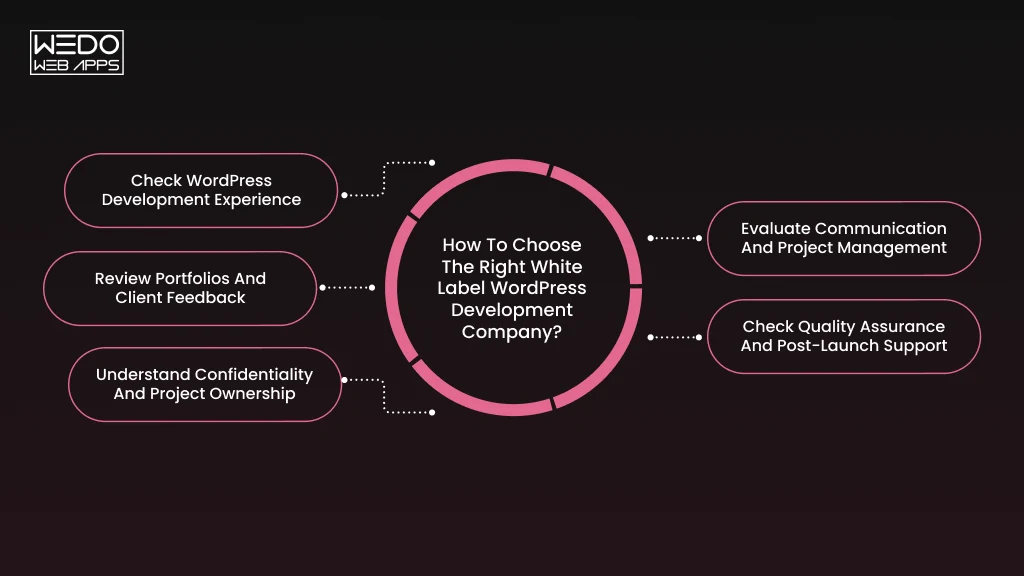
 
Choose a White Label WordPress Company
 

Choosing a development partner requires more than comparing service lists and pricing. You need a team that understands your project requirements, follows your agency’s processes, and delivers work that meets your client’s expectations.

Before partnering with a white label WordPress development company, evaluate these factors.

1. Check WordPress Development Experience

Start by reviewing the company’s technical capabilities. Its developers should have experience handling different types of WordPress projects.

Check whether the team can work with:

  • Custom WordPress themes and plugins.
  • WooCommerce development and integrations.
  • Gutenberg and page builders.
  • WordPress APIs and third-party integrations.
  • Website migration and performance optimization.

Choose a partner whose experience matches the type of projects your agency handles.

2. Review Portfolios and Client Feedback

A company’s portfolio gives you an idea of the projects it has completed and the technical requirements it can handle.

Look for examples that demonstrate:

  • Websites with functionality similar to your client’s requirements.
  • Custom development rather than template-based implementations alone.
  • Responsive layouts and website performance.
  • Experience across different business industries.

You can also request client references or review testimonials to understand the company’s working approach.

3. Understand Confidentiality and Project Ownership

Since the development partner works behind your agency’s brand, confidentiality needs to be clearly established before sharing client projects.

Make sure your agreement covers:

  • Non-disclosure agreements (NDAs).
  • Client data protection and access permissions.
  • Ownership of source code and project deliverables.
  • White label branding and communication.
  • Restrictions on direct client solicitation.

This helps protect your agency’s client relationships and intellectual property.

4. Evaluate Communication and Project Management

A development partner should keep you informed throughout the project. Delayed responses or unclear updates can affect your ability to manage client expectations.

Before signing an agreement, check whether the company provides:

  • A dedicated project coordinator or point of contact.
  • Regular progress updates.
  • Access to project management tools.
  • Defined response and escalation procedures.
  • Clear timelines for revisions and approvals.

5. Check Quality Assurance and Post-Launch Support

A completed website should meet the granted technical and functional requirements before reaching your client.

Ask your development partner about its testing process. This should cover functionality, mobile responsiveness, and performance.

Also clarify whether they provide post-launch support for bug fixes, WordPress updates and technical issues.

Before finalizing your partner, ask for a small test project or a pilot engagement. This gives you an opportunity to assess development quality, communication and delivery timelines before assigning larger client projects.

Is White Label WordPress Development Right for Your Agency?

The model suits many agencies, but not all of them. Answer these six questions honestly to see where you stand.

  1. In the last six months, have you decided or declined a website project because your team was full?
  2. Do clients ask for services you cannot deliver yet, such as WooCommerce or custom plugins?
  3. Does your workload swing between packed months and quiet ones?
  4. Would a full-time developer strain your budget or cash flow?
  5. Do you spend more hours on technical delivery than on sales and client strategy?
  6. Could someone outside your team build from briefs and design files without a call?

Choose a small project, such as a five-page site or a speed audit. Judge the result on three points: delivery on the agreed date, no more than two revision rounds, and a client who never noticed a third party was involved.

Final Thoughts

White label WordPress development gives your agency more delivery capacity without a hiring commitment. You keep the client, set the price, and take the margin.

Results depend on how you run it. Write clear briefs. Vet your partner before you trust them with client work. Review every build before it reaches your client.

If you would like a team to handle the build under your brand, WEDOWEBAPPS works with agencies on WordPress development, WooCommerce, and ongoing maintenance. Send us your next brief, and we will reply with a scope and timeline.

Grow Your Agency Without More Payroll

Custom WordPress Plugin Development: When to Build vs Buy

Introduction

You install a plugin to fix one problem. It creates two more.

Your pages load slower. Checkout breaks after an update. And the feature you actually needed is still missing.

Sound familiar?

Most WordPress plugins are built for thousands of sites. Your business runs on one set of rules. That mismatch costs you. Your team copies data by hand. Your developer writes workarounds. Your plugin bill keeps growing.

Custom WordPress plugin development can close the gap. It also brings its own budget, timeline and maintenance.

So which is the smarter move?

This guide helps you decide when to build vs buy a WordPress plugin. You will see your options, what each one costs over time and the signs you need a custom build. You will also see where AI fits in.

What Is Custom WordPress Plugin Development?

Custom WordPress plugin development means writing a plugin for one business instead of the general market. A WordPress developer builds it around your rules, your data and your workflow. It sits in your wp-content/plugins folder like any other plugin. The difference is that nobody else uses it.

Here is how it works. A plugin is PHP code, often paired with JavaScript and CSS. It connects to WordPress through hooks:

  • Actions run your code when something happens, such as an order moving to “Approved”.
  • Filters change data before WordPress saves or shows it, such as product price.

Hooks mean the plugin never edits WordPress core files. Your site stays easy to update, and you can activate, deactivate or test the plugin on its own.

Through hooks, a custom plugin can add almost any feature your site needs. This table shows how business requirements turn into working functionality:


Business needWhat the plugin addsHow WordPress supports it
Contract pricing by customer groupThe right price appears on product pages and in the cartFilters on price display
Orders synced to your ERPApproved orders are sent automatically, and failures are loggedActions plug REST API calls
Locations, courses or case studiesDedicated entries with their own fields and admin screensCustom post types
Sign-off before contentDrafts are routed to a reviewer firstCustom user roles and status checks
On-brand page layoutsReady-to-insert sections for your editorsGutenberg blocks


Each row follows the same logic. The plugin stores your business-specific requirements in code, and WordPress applies them every time. Your team stops enforcing them by hand.


Custom WordPress Plugins vs Off-the-Shelf Plugins

The main difference lies in how the functionality is developed and managed.

An off-the-shelf plugin is built for thousands of websites. You get a tested product and you can easily adapt it to what you need.

A custom WordPress plugin works the other way around. Your requirements come first, and the code follows them.

Say a booking plugin assumes hourly appointments. You rent equipment for several days and collect deposits. You will either compromise with your budget to fit or add more plugins to cover the gaps. A custom plugin starts from how you take bookings today.

Neither option wins by default. The right choice depends on how specific your process is and what you can maintain. The next section breaks that down clearly.

Build vs Buy a WordPress Plugin: What Are Your Options?

You have four routes. Each one suits a different need, budget, and level of technical support. Start with the lightest option and move up only when your requirements demand it.

Buy an Existing Free WordPress Plugin

A free WordPress plugin from the official directory costs nothing to install. It covers common jobs like contact forms, basic SEO, redirects and simple backups. You can have one running in an afternoon.

The limits show up later:

  • The features you need most often sit behind a paid tier.
  • Support runs through public forums, so response times vary.
  • A small team or a single volunteer may maintain it.

Before you install one, check three things: the date of its last update, the WordPress version it was tested with and how quickly its developers answer support threads.

Best for: Standard functionality that fits your process as it is.

Watch out for: Abandoned plugins and upsells hidden behind the features you need.

Purchase a Premium WordPress Plugin

A premium WordPress plugin is a paid product, usually sold as an annual licence. It adds depth that free versions skip. Your licence typically covers:

  • Advanced features and integrations.
  • Updates for security and compatibility.
  • Support from the vendor’s team.
  • License tiers based on the number of sites.

With most vendors, updates and support stop when your licence lapses. Renewal prices can also change.

Best for: Well-known needs that require more depth, such as memberships, subscriptions or advanced forms.

Watch out for: Paying for a large feature set when you use a small part of it.

Build a Custom WordPress Plugin

A custom WordPress plugin is developed around your requirements, workflows and integrations. A developer scopes the work, builds and tests it, then hands over the code.

Take a wholesale distributor. Trade customers need to see contract prices, request a quote and have approved quotes sent to the company’s ERP. No single plugin handles all three steps. A custom plugin does and it follows the distributor’s own approval rules.

You pay more upfront. In return, you get code written for your systems and ownership terms you set in the contract.

Best for: Unique business logic, deep integrations and features no existing plugin offers.

Watch out for: An unclear scope. A written brief keeps revision cycles and costs under control.

Extend an Existing Plugin Instead of Building From Scratch

Sometimes a plugin does most of the job. You can extend an existing plugin with a small add-on that uses its hooks, filters or template overrides to fill the gap.

Say your membership plugin already handles sign-ups, payments and content access. You only need new members synced to your CRM and a custom welcome dashboard. You build that missing piece and leave the rest alone.

A useful rule of thumb: if the plugin covers about 80% of your needs and offers documented hooks, extending it usually beats a full build on cost and speed.

Best for: Plugins that fit most of your requirements and are actively maintained.

Watch out for: Vendor updates that break your add-on. Test every update on a staging site first.

Before choosing this approach, check whether the plugin supports safe extensions through APIs, hooks, or filters. Avoid modifying its core files because updates may overwrite your changes.

Custom WordPress Plugin vs Premium Plugin: Which Is Better?

Choosing between a custom and premium WordPress plugin depends on your website’s functionality, budget, and business requirements. A premium plugin can be a practical choice when its existing features meet your needs. However, when you need specialised functionality or greater control, custom WordPress plugin development may be worth the investment.

Let’s compare both options to understand which one suits your requirements.


Comparison FactorPremium PluginCustom Plugin
Initial costUsually lowerUsually higher
FeaturesPredefined functionalityBuilt around your requirements
CustomisationLimited to supported optionsGreater control over functionality
IntegrationsDepends on available integrationsCan support specific business systems
MaintenanceUpdates provided by the vendorManaged by your developer or team
SupportDepends on the vendor’s support planDepends on your development agreement
OwnershipLicensed under vendor termsDepends on the development contract


When a Premium WordPress Plugin Is the Better Choice

A premium plugin is a sensible option when you need established functionality without investing in separate development. It can also reduce the time required to configure and launch a feature.

Consider purchasing a premium plugin when:

  • Your requirements match its existing features: You need standard functionality such as advanced contact forms, SEO tools, or membership management.
  • You need vendor support: The provider offers regular updates, documentation, and technical assistance.
  • You have a limited development budget: Purchasing a licence is more affordable than commissioning a custom solution.
  • You want to implement features quickly: The plugin is ready to install and configure without a lengthy development cycle.

For example, if you run an online store and need subscription payments, an established WooCommerce subscription plugin may provide everything you need.

When Custom WordPress Plugin Is Worth the Investment

The advantage of building a custom WordPress plugin becomes more relevant when your business requirements go beyond the functionality available in premium products.

Consider custom development when:

  • You need specialised functionality: Your website follows business rules that standard plugins cannot accommodate.
  • You require specific integrations: You need WordPress to communicate with an internal system or third-party application through custom APIs.
  • Existing plugins create unnecessary complexity: You are installing multiple extensions to achieve one business function.
  • You want control over future development: You need the flexibility to prioritise features and modify functionality as your business requirements change.

For example, a B2B eCommerce business may need customer-specific pricing, bulk order approvals, and inventory synchronisation. If available premium plugins cannot handle these requirements together, a custom solution can be a better investment.

This explains why use a custom plugin over an off-the-shelf solution when your website has specialised requirements.

The deciding factor is functionality. If a premium plugin meets your requirements without major workarounds, buying it is usually the practical choice. If its limitations affect your business process, custom plugin development deserves consideration.

When Should You Build a Custom WordPress Plugin?

Knowing when to build a custom WordPress plugin gets easier when you look at how your team works day to day. These five signs you need a custom WordPress plugin usually appear as workarounds, delays and repeated manual effort. Each one comes with a step you can take.

Existing Plugins Cannot Support Your Business Requirements

You have tested the options and configured the best fit. Gaps remain, and your team fills them by hand.

Take a training company that sells cohort-based courses. Its LMS plugin handles enrolment and certificates, but it cannot route a manager’s approval before a certificate is issued. Staff now handle that step over email.

What to do: List every requirement the plugin cannot meet and mark each as minor or central. A minor gap can often be closed with an extension. When the missing items sit at the core of how you operate, a custom WordPress plugin vs existing solution comparison usually favours the custom build.

You Need Integrations With Third-Party Business Systems

Your website rarely works alone. It exchanges data with the systems your teams already use:

  • CRM: New leads and customer records.
  • ERP: Orders, invoices, and fulfillment status.
  • Inventory management: Live stock levels across channels.
  • Payment gateways: Payment methods as per the area or custom checkout rules.
  • Shipping and accounting tools: Rates, labels, and invoices.

Ready-made connectors often sync one way or support only standard fields.

What to do: Map what data moves between systems, in which direction and how often. If a maintained connector covers it, use it. If you need two-way sync, custom field mapping or retry handling for failed requests, the safer route is to build a WordPress plugin designed around those requirements.

Your Website Depends on Complex Business Logic

Some rules define how your business earns money. When they live in a spreadsheet or in your staff’s heads, your website cannot enforce them. These are typical examples:


Business LogicExample rule the plugin enforces
Custom pricingApproved distributors receive 12% off orders above 500 units
Membership accessLevel 2 members see course modules only after the first payment clears
Approval workflowsQuotes above $10,000 go to a manager before the customer sees them
Booking systemsEquipment rentals require a deposit and block the item for 24 hours after return


Encoding these rules in code is one of the main advantages of building a custom WordPress plugin. Your website applies them correctly every time, with no manual checks.

What to do: Write each rule as a plain if-then statement. A handful of stable rules may fit a premium plugin’s settings. A longer list that changes often is a strong candidate for custom WordPress plugin development.

Too Many Plugins Are Creating Compatibility or Performance Issues

Five plugins can imitate one workflow. A form plugin, a CRM connector, a custom fields plugin, a PDF generator and an email add-on may all combine to deliver a single quote request. Every update then risks breaking one link in the chain. Each plugin also loads its own scripts and database queries, often on pages that never use them.

In a build vs buy WordPress plugin discussion, plugin overload is one of the strongest arguments for building.

What to do: audit your stack. List what each plugin does, flag overlaps and unused features, and measure the load impact with a tool such as Query Monitor. Where several plugins serve one workflow, replace them with a single purpose-built plugin. Keep ready-made plugins for standard jobs like SEO and backups.

You Need Greater Control Over Functionality and Future Updates

A vendor decides what to build next, when to release it and what to charge. A feature you rely on can move to a higher cost or lose priority.

With a custom plugin, you set the roadmap. You can also schedule updates around your business calendar, for example, after a peak sales season instead of during it. Businesses that ask why use custom plugin over off-the-shelf options point to this control.

What to do: Review the changelog and release frequency of any plugin that supports a critical function. If its future looks uncertain, plan a custom replacement. Agree on ownership terms in the development agreement so the code stays with you.

If existing plugins repeatedly limit your workflows, integrations, or functionality, these are strong signs you need a custom WordPress plugin. Before starting development, assess whether extending an existing solution could address the same requirements with less effort.

WordPress Plugin Requirements Review

WordPress Plugin vs Custom Code: Which Approach Should You Choose?

When adding functionality to your WordPress website, you may not always need a separate plugin. Some features can be implemented with a small amount of custom code, while others require a dedicated plugin to manage more complex functionality.

The choice between a WordPress plugin vs custom code depends on what you want to build, how widely the functionality will be used, and how you plan to maintain it.


Comparison factorWordPress pluginCustom Code
ImplementationInstalled or developed as a separate pluginAdded to theme files or another suitable code location
FunctionalityCan support multiple related featuresUsually suited to specific requirements
ReusabilityCan remain active across compatible themesDepends on where the code is stored
MaintenanceManaged through plugin updatesRequires developer management
PortabilityGenerally independent of the active themeTheme-specific code may stop working after a theme change


When to Use a WordPress Plugin Instead of Custom Code

A WordPress plugin is a better option when you need functionality that involves multiple features, settings, or integrations. It also makes sense when you want to reuse the same functionality across different themes or websites.

Consider using a plugin when:

  • You need advanced functionality such as membership management, booking, or eCommerce features.
  • You want a dedicated settings panel to manage how a feature works.
  • Your functionality needs regular updates or additional features.
  • You want to keep business logic separate from your website’s theme.

When Custom Code is a Better Option

Custom code works well for smaller requirements that do not need a separate plugin or complex configuration.

You can use it when:

  • You need to add a small functionality to an existing feature.
  • You want to modify a specific website behaviour.
  • Your requirements involve a simple calculation or display rule.
  • You do not need a separate interface to manage the functionality.

For example, if you want to display a custom message on WooCommerce product pages based on product availability, a small code snippet may be sufficient.

Why Business Functionality Should Live in a Custom Plugin Instead of Theme Files

If your business relies on custom functionality, placing all the code inside your theme can create maintenance problems. When you change your theme, some of that functionality may stop working.

A dedicated custom WordPress plugin keeps business logic separate from your website’s design. This means you can change themes without losing features such as custom pricing rules, order processing, or third-party integrations.

For instance, if you have developed a custom product quotation system, keeping it in a separate plugin allows it to continue working even when you redesign your store.

The key consideration: Use a standard plugin for established functionality, custom code for smaller requirements, and a dedicated plugin when your business needs reusable functionality that should operate independently of your theme.

What Factors Should You Consider Before Building or Buying a WordPress Plugin?

Quotes and feature lists only show part of the picture. The WordPress plugin build decision factors below help you test any options against your own situation. Each factor has a question to ask and a warning sign to watch for.

Development Budget and Long-Term Costs

A fair build vs buy WordPress plugin comparison looks at three years of spending, not the first invoice. List every cost line on both sides:

  • Premium plugin: License renewals, higher tiers for extra features, per-site pricing and hours spent on workarounds.
  • Custom plugin: The build, ongoing maintenance, developer time for WordPress and PHP updates, and third-party API or hosting fees.

Ask: What will each option cost by the end of year three?

Warning signs: A one-time build quote sitting next to a single year of license fees. The comparison only works when both cover the same period.

Required Features and Customisation Needs

Start with your requirements. Sort them into three groups:

  • Must-haves: The websites cannot support the business without them.
  • Nice-to-haves: They save time but have workarounds.
  • Extras: Features that look useful and that nobody asked for.

Then check each candidate plugin against the first group only. In a custom WordPress plugin vs existing solution review, this stops a long feature list from hiding a missing core requirement.

Website Performance and Plugin Compatibility

Every plugin adds code that runs on your site. Poorly written plugins load scripts on every page, run heavy database queries and clash with other plugins. This matters for ready-made and custom options alike.

Before committing, test on a staging site:

  • Compare page load times with and without the plugin.
  • Review database queries with a profiling tool such as Query Monitor.
  • Check the plugin’s “tested up to” version against your WordPress release.
  • Confirm support for the PHP version your host runs.

Ask: How does the plugin behave on your busiest pages?

Warning signs: No compatibility statement for the current WordPress version, or no update in the past year.

Security, Maintenance and Technical Support

Security reports consistently show that most reported WordPress vulnerabilities sit in plugins and not in core. A premium plugin gives you a vendor who patches issues. A custom plugin gives you fewer public targets, but its security depends on how it is written and reviewed.

Quality custom WordPress plugin development should include:

  • Input sanitisation and output escaping.
  • Capability checks on every admin action.
  • Nonce verification on forms and requests.
  • A security review before launch.

Support matters as much as code. Know who answers when something breaks and how quickly.

Ask: Who patches a vulnerability, and within what timeframe?

Warning sign: A premium vendor with no public security record, or a custom plugin with no named owner after launch.

Future Growth and Scalability

Plan for where your site will be in two to three years. Consider traffic, data volume, new integrations and extra features.

Consider a store that grows from 500 products to 50,000. A plugin that stores large datasets in WordPress’s default tables can slow as records pile up. A custom plugin can use a purpose-built data structure, which is one of the advantages of building a custom WordPress plugin when growth is certain.

Ask: Will these options still work when volume is ten times higher?

Warning sign: A vendor roadmap that does not mention the features you will need next.

Score each factor honestly and the right route usually becomes clear. The final section of this guide turns your answers into a recommendation.

How Does Custom WordPress Plugin Development Work?

Once you decide to build a WordPress plugin, the work follows a predictable path. Knowing it helps you judge a proposal and plan your own input. This is how custom WordPress plugin development typically moves from brief to launch.

Step 1: Identify Business Requirements and Plugin Objectives

Every project starts with a problem and not with code. Your developer needs to understand what the plugin must achieve and how you will measure it.

A clear goal sounds like this: “Reduce quote turnaround from two days to two hours.” Vague goals like “improve the checkout” produce vague plugins.

Expect to answer four questions:

  • Who will use the plugin, and with which roles?
  • What data does it create, read or change?
  • Which external systems does it connect to?
  • What does a successful result look like?

The output is a written requirements document that both sides sign off on.

Step 2: Plan Plugin Features and Technical Architecture

Planning turns requirements into technical decisions. These choices shape cost, speed and maintenance later:


Decision AreaWhat gets decided
Data storageCustom post types, custom database tables or WordPress options
IntegrationsREST API endpoints, webhooks or third-party SDKs
Admin experienceSetting pages, user roles and permissions
Front-endShortcodes, Gutenberg blocks or template output
PerformanceCaching with the Transients API and background jobs for heavy tasks


A short feature list at this stage keeps the first release focused. Anything else can wait for a later version.

Step 3: Develop the Plugin Using WordPress Standards

Development is where the plan becomes working code. Two languages carry most of the load:

  • PHP handles server-side logic, database queries and the hooks and filters that connect your plugin to WordPress.
  • JavaScript powers interactive elements, such as Gutenberg blocks built with React and dynamic admin screens.

WordPress APIs sit between the two. The Settings API handles admin options, the REST API exposes data to other systems and the HTTP API makes outbound requests safely.

Following the WordPress Coding Standards keeps the code readable for the next developer. Version control and modular file structure make future changes safer.

Step 4: Test Functionality, Security and Compatibility

Testing runs on a staging site that mirrors your live environment. A complete round covers five checks.

  • Functionality: Every feature against the agreed acceptance criteria.
  • Security: Input handling, permissions and data exposure.
  • Compatibility: Your theme, your other plugins and the WordPress and PHP version your host runs.
  • Performance: Load time and database queries on your busiest pages.
  • User acceptance: Your team completes real tasks before sign-off.

A bug found here costs far less than the same bug found by a customer.

Step 5: Deploy, Monitor and Maintain the Plugin

Launch day should be uneventful. Take a full backup, deploy during a low-traffic window and keep a rollback plan ready.

After launch, monitor error logs and performance for the first few weeks. Then schedule regular maintenance. WordPress, PHP and any connected systems keep changing, and the plugin needs to change with them. Earlier in this guide, we covered how to budget for that upkeep.

Our own process at WEDOWEBAPPS follows this same path of requirements analysis, planning, design, development and deployment with ongoing support after launch.

How Is AI Changing Custom WordPress Plugin Development?

AI affects plugin projects in two separate ways. It changes how developers write plugins, and it changes what plugins can do. Each carries its own benefits and risks.

AI-Assisted Coding and Plugin Development

AI coding tools now sit inside many developers daily workflows. Used well, they speed up the routine parts of custom WordPress plugin development:

  • First drafts: Boilerplate such as plugin headers, custom post type registration and setting pages.
  • Suggested approaches: Options for structuring a hook, a database query or an API call.
  • Error spotting: Likely causes behind a PHP notice or a failing function.
  • Documentation: Inline comments, README files and usage notes drafted from the finished code.

Faster drafting can shorten a project. It does not reduce the cost of testing, security review or long-term maintenance, so it does not change the logic of a build vs buy WordPress plugin decision. The question is still whether your requirements justify owning the code.

Building AI-Powered Features Into Custom WordPress Plugins

WordPress 7.0, released in May 2026, added an AI Client to core. It is a provider-agnostic PHP API that lets a plugin send prompts to an AI model through one interface. Core does not bundle a provider, so you connect your own through the connectors screen and pay for each request.

Core also includes an Abilities API. It lets a plugin register actions in a structured format that tools and AI agents can discover and run, subject to WordPress permissions.

These capabilities support practical features such as:

  • Content recommendations: Related articles or resources based on what each visitor has already read.
  • Customer support chatbots: An assistant that answers from your help content and passes complex cases to your team.
  • WooCommerce product recommendations: Suggestions drawn from browsing and purchase history, shown on product pages and in the cart.
  • Content categorisation and tagging: New posts or products sorted into your taxonomy, with an editor approving the result.
  • Data processing and workflow automation: Incoming enquiries or documents classified and routed to the right team or system.

This is where the advantages of building a custom WordPress plugin show most clearly. A general AI plugin knows nothing about your catalogue, pricing rules or approval steps. A custom one can use your data and enforce your rules.

Check three things before you commit:

  • Cost per request: loops and aggressive retries can run up the bill.
  • Data exposure: know which customer data leaves your site and under what terms.
  • Fallback behavior: decide what happens when the AI service is slow or unavailable.

Why Developer Review and Testing Still Matter

AI-generated code looks finished, and that is the risk. Veracode’s 2025 GenAI Code Security Report tested more than 100 language models on 80 coding tasks. The code introduced security vulnerabilities in 45% of those tasks, and the models failed to protect against cross-site scripting in 86% of the relevant cases. These figures come from test snippets and not from complete applications. A single weak function inside a plugin is still enough to create an opening.

In WordPress, protection against cross-site scripting means escaping output. A developer review checks that and more:

  • Security: Input sanitisation, output escaping, capability checks and nonce verification.
  • Performance: Queries or API calls that run on every page load.
  • Compatibility: Supported WordPress and PHP versions, and functions that have been deprecated.
  • Correctness: Logic that reads well and fails on edge cases, or calls functions that do not exist.
  • Maintainability: Structure and documentation the next developer can follow.

AI can support development. It does not replace technical planning, code review or quality assurance. That applies to code you commission and to code your own team generates.

If you are planning AI features for your WordPress site, our AI integration team can assess which ones suit a plugin and which ones a ready-made tool already covers.

Should You Build a Custom WordPress Plugin or Buy an Existing One?

The build vs buy WordPress plugin decision depends on your requirements and not on a general preference. Start with the lightest option that meets your must-haves. Move up only when it fails.

This table matches common requirements to the approach that usually fits:


Your requirementRecommended approach
Standard website functionalityFree plugin
Advanced features with vendor supportPremium plugin
Existing plugin meets most requirementsExtend the existing plugin
Small, specific functionalityCustom code
Unique business workflows and integrationsCustom plugin
Long-term control over specialised functionalityCustom plugin


Sometimes two rows seem to apply. Settle it with the WordPress plugin build decision factors covered earlier: three-year cost, performance, security and growth. If the choice sits between a custom plugin vs premium WordPress option, compare the cost of the gap with the cost of the build. If it sits between a WordPress plugin vs custom code, ask whether the feature should survive a redesign.

The right answer in any custom WordPress plugin vs existing solution comparison depends on four things:

  • Business requirements: How specific your workflows and integrations are.
  • Available budget: What you can invest now and what you can sustain each year.
  • Technical complexity: How many systems, rules and users the feature touches.
  • Maintenance capacity: Who will own updates, fixes and security after launch.

A premium plugin suits a standard need and a limited budget. A custom plugin suits a specialised process, as long as someone owns its upkeep. Custom WordPress plugin development returns the most value when it replaces manual work, plugin overload or a limitation that holds your growth back.

Not sure which row describes your project? Share your requirements with our WordPress development team. We will review them and recommend whether to install, extend or build.

Custom Plugin Development Consultation