skip to content

What Is Unit Testing? Types, Benefits, Process & Best Practices

Introduction

A small code change can trigger an unexpected bug somewhere else in your application. By the time your team finds it, debugging can take longer than writing the original code.

As your software grows, so does the number of functions, dependencies, and possible failure points. Manual checks alone can slow releases and leave small defects unnoticed.

Unit testing gives developers a practical way to catch these issues earlier. By testing individual pieces of code in isolation, your team can verify whether each unit behaves as expected before changes move further through the application.

But how does the process actually work? Which unit testing types should you know? How does a unit test vs integration test comparison affect your testing strategy? And which unit testing best practices help keep tests useful as your codebase grows?

Let’s break down the process, techniques, tools, benefits, and practical considerations behind effective unit testing.

What Is Unit Testing?

 
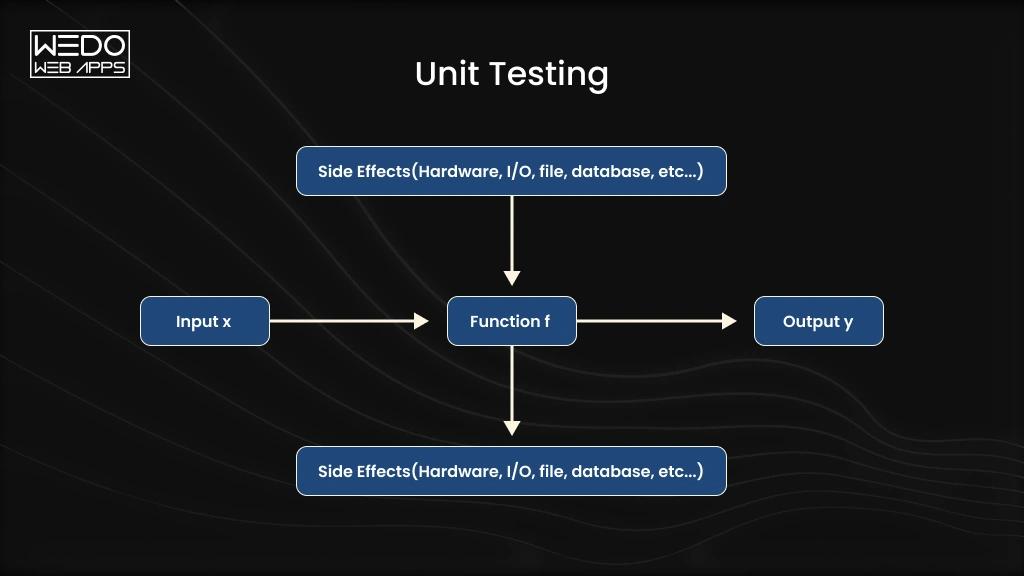
How Unit Testing Checks Function Results
 

Unit testing is a software testing method used to check individual, testable parts of an application. A unit could be a function, method, class, or small module that performs a specific task.

Instead of testing the entire application at once, developers isolate one unit and verify its behavior against expected results. This makes it easier to identify where a defect originates and fix it before it affects other parts of the system.


What Is a Unit Test?

A unit test could check whether:

  • A $100 order receives the correct discount.
  • An order below the threshold receives no discount.
  • Invalid values are handled correctly.

Developers can run these tests manually or through automated unit testing frameworks. Automated tests are especially useful when the same checks need to run repeatedly during deployment.

Why Is Isolation Important in Unit Testing?

Isolation keeps the test focused on the unit itself rather than surrounding systems. External databases, APIs, payment gateways, or other services can be replaced with mocks or stubs when needed.

This approach helps your team determine whether a specific piece of code works as intended without unrelated dependencies affecting the result.

How Does Unit Testing Work?

 
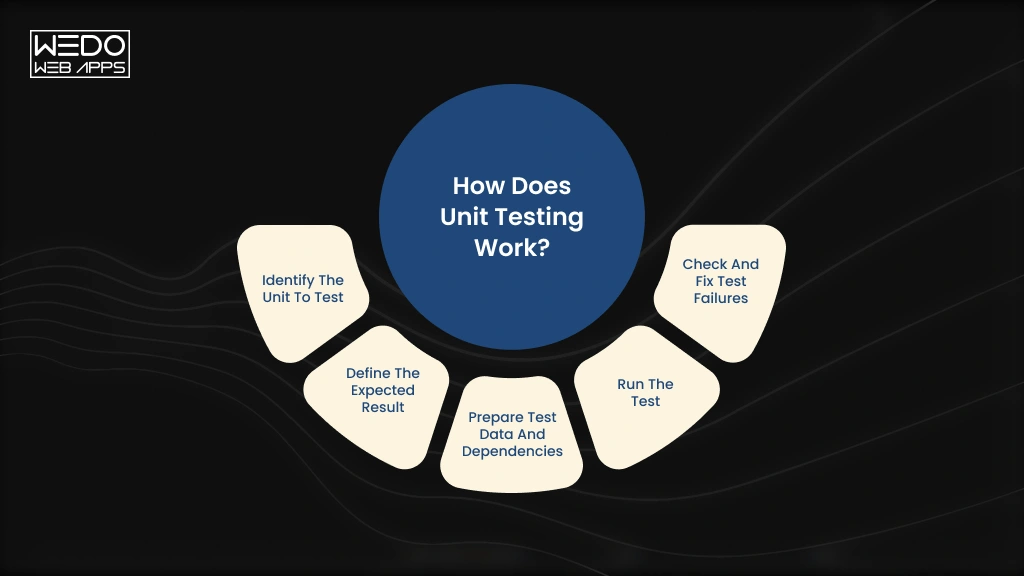
Unit Testing Workflow Input to Output
 

The unit testing process focuses on one small piece of code at a time. Developers define what the unit should do, test that behavior with different inputs, and compare the actual result with the expected result.

A typical unit test follows these steps:

  • Identify the unit to test: Select a function, method, class, or module with a clearly defined responsibility.
  • Define the expected result: Determine what the unit should return or how it should behave for each test case.
  • Prepare test data and dependencies: Create relevant inputs and replace external dependencies with mocks, stubs, or other test doubles.
  • Run the test: Execute the test manually or through an automated unit testing framework as part of your mobile application development workflow.
  • Check and fix test failures: Compare actual results with expected results, investigate failures, and update the code before running the test again.

For example, if you test a function that calculates shipping costs, you might check standard orders, free-shipping thresholds, and invalid inputs. Each test case should focus on specific expected behavior.

What Are the Types of Unit Testing?

 
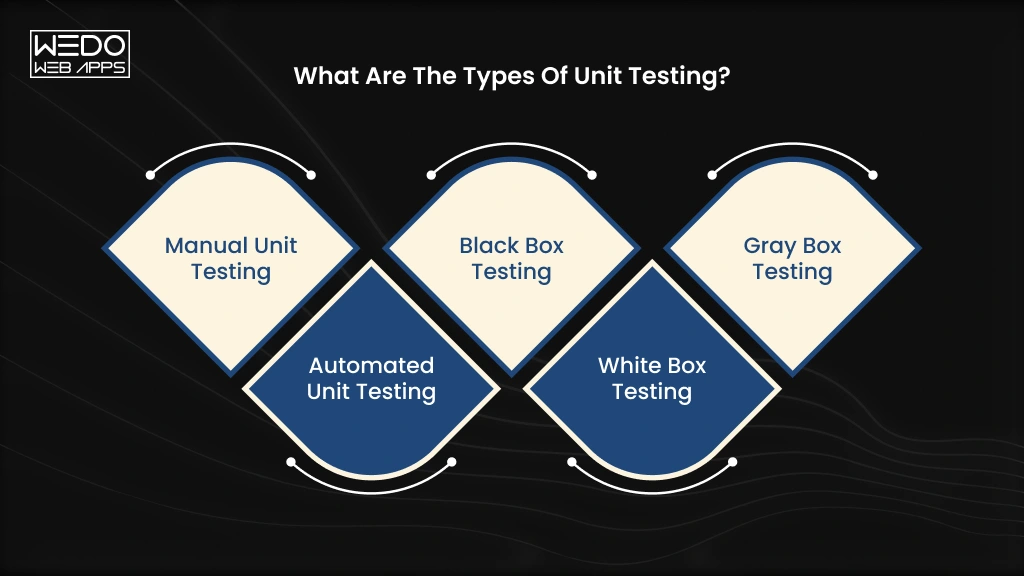
Key Types of Unit Testing in Software
 

The main unit testing types differ based on how tests are executed and how much knowledge the tester has about the code.


TypeHow it worksBest suited for
Manual Unit TestingDevelopers manually provide inputs and verify the output of individual unitsQuick checks during early development
Automated Unit TestingTesting frameworks run predefined tests and compare actual results with expected resultsRepeated testing and CI/CD workflows
Black Box TestingTests focus on inputs and outputs without examining the internal implementationValidating expected behaviors
White Box TestingTests consider internal logic, branches, conditions, and execution pathsChecking code-level logic
Gray Box TestingTests use partial knowledge of the unit’s internal structure and behaviorTesting with limited implementation knowledge


Manual vs Automated Unit Testing

The biggest practical difference is how much work your team needs to repeat.

  • Manual unit testing can be useful when developers need a quick check while building a feature. However, repeating the same tests after every code change becomes inefficient.
  • Automated unit testing allows your team to run the same checks whenever needed. These tests can also run automatically through CI/CD pipelines, making them useful for projects with frequent releases.

Black Box vs White Box vs Gray Box

These approaches differ mainly in how much internal code knowledge is used.

  • Black box testing: Focuses on what the unit does.
  • White box testing: Examines how the unit produces its result.
  • Gray box testing: Uses some knowledge of the internal implementation.

For most development teams, these approaches can complement each other. The choice depends on the unit tested, the test objective, and your overall unit testing process.

Develop and Test Software With Quality

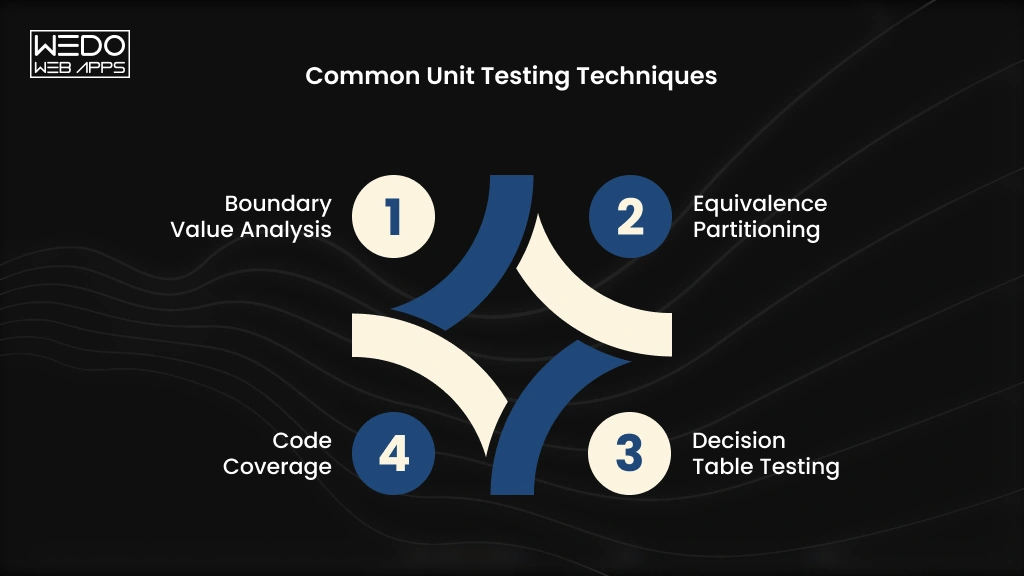
Common Unit Testing Techniques

 
Key Techniques for Unit Testing Code
 

Good unit testing techniques help your team test more than just the expected outcome. They also reveal what happens when users provide unusual, invalid, or boundary-level inputs.


TechniqueWhat it checksSimple example
Boundary Value AnalysisBehavior at the limits of an accepted rangeTesting values at 0,1,99, and 100 when the limit is 100
Equivalence PartitioningDifferent groups of inputs that should produce similar resultsTesting one valid and one invalid age instead of every possible value
Decision Table TestingResults produced by different combinations of conditionsChecking discount eligibility based on membership and order value
Code CoverageHow much code executes during testingMeasuring whether important branches and statements have been tested


Boundary Value Analysis

With boundary value analysis, you test values around the limits of a rule. These cases often expose errors caused by incorrect comparison operators or range handling.

Equivalence Partitioning

Equivalence partitioning divides input into groups expected to behave similarly. You can then select representative values instead of testing every possible input.

Decision Table Testing

Decision table testing works well when multiple conditions affect the result. It helps your team verify different combinations systematically.

Code Coverage

Code coverage measures how much of your code executes when tests run. Common measurements include statement, branch, and function coverage.

High unit test coverage can indicate broader test execution, but coverage alone does not prove that your tests are effective.

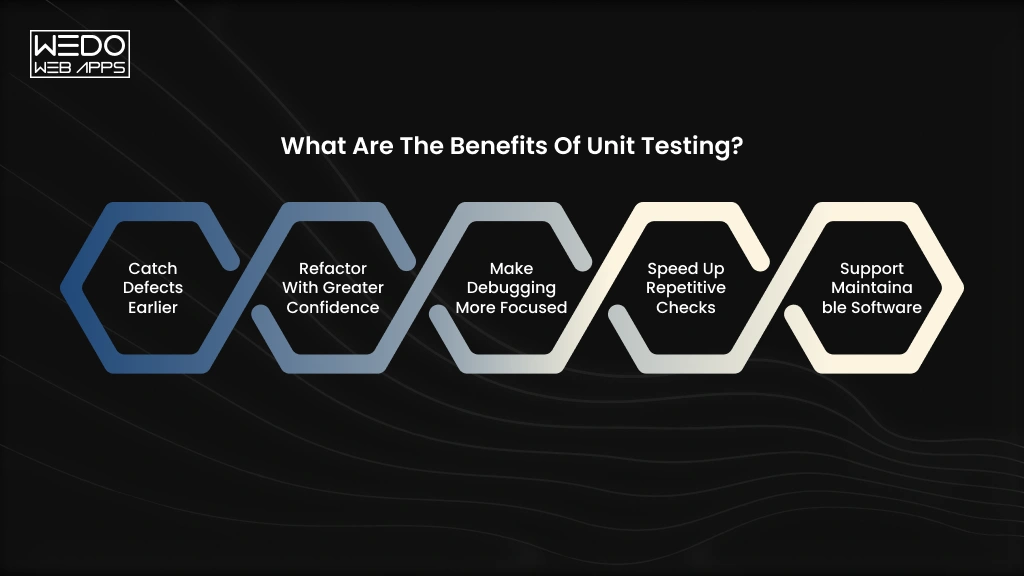
What Are the Benefits of Unit Testing?

 
Benefits of Unit Testing Explained
 

A bug found during development is usually easier to fix than one discovered after deployment.

That difference matters when your application has dozens of interconnected features. A small calculation error, broken condition, or unexpected input can affect functionality far beyond the original piece of code.

Unit testing helps your team catch these problems while the code is still being developed.

Catch Defects Earlier

Developers receive immediate feedback when a unit behaves differently from what was expected. Fixing the problem at this stage can reduce the time spent tracing failures across the application.

Refactor With Greater Confidence

Need to restructure an existing function or improve its implementation? Existing unit tests can quickly show whether the change has affected expected behavior.

Make Debugging More Focused

A failed unit test points mobile app developers toward a specific function, method, or behavior. They spend less time searching through unrelated application components.

Speed Up Repetitive Checks

Once tests are automated, your team can run them whenever code changes. This is particularly useful when releases happen frequently, or several developers contribute to the same codebase.

Support Maintainable Software

A well-organized test suite documents expected behavior alongside the code. Future developers can use those tests to understand what a unit should continue doing after it is modified.

These benefits make unit testing one part of a broader software testing strategy. For teams that need coverage across different testing stages, quality assurance services can bring unit, integration, functional, and regression testing into a structured process.

Unit Test vs Integration Test: What Is the Difference?

A unit test checks one isolated component. An integration test checks whether multiple components work correctly together.

That difference affects what you test, how quickly tests run, and how you investigate failures.


FactorUnit TestingIntegration Testing
ScopeTests an individual function, method, class, or moduleTests interactions between multiple components
DependenciesUsually isolated using mocks or stubsUses real or closely simulated dependencies
SpeedUsually fast to executeUsually slower because more components are involved
PurposeVerifies individual behavior and logicVerifies communication and data flow between components
External systemsUsually excluded from the testMay include databases, APIs, services, or other systems
DebuggingFailures are generally easier to traceFailure can require checking several connected components


Can Unit Testing Replace Integration Testing?

No. The two approaches answer different testing questions.

Imagine an eCommerce checkout function correctly calculates the final order total during a unit test. That does not confirm the checkout service can successfully retrieve product data, communicate with the payment gateway, save the order, and update inventory.

Integration testing checks those interactions.

Your testing strategy therefore needs both isolated checks and broader integration checks. Unit tests provide fast feedback on individual components, while integration tests verify that connected components communicate as expected.

Unit Testing vs Integration Testing vs System Testing

Think of the three levels as progressively broader checks:

  • Unit testing -> Does this individual component work correctly?
  • Integration testing -> Do these connected components work correctly together?
  • System testing -> Does the complete application behave as expected?

A mature software testing process uses these levels for different purposes rather than treating them as interchangeable. The right balance depends on your application’s architecture, dependencies, release process, and risk areas.

What Are the Best Practices for Unit Testing?

Writing more tests does not automatically create better test coverage. Your tests need to be focused, reliable, and easy to maintain as the codebase changes.

Use these unit testing best practices to keep your test suites useful:

1. Keep Tests Small and Independent

Each test should run without depending on another test. Isolate external services, databases, and APIs with mocks or stubs where appropriate.

2. Test One Behavior at a Time

A single test should verify one clear behavior. When it fails, your team should immediately understand what went wrong.

3. Use Meaningful Test Names

Name tests according to the behavior they verify. A name such as returns_free_shipping_when_order_exceeds_limit tells developers far more than test_shipping_01

4. Test Valid, Invalid, and Boundary Inputs

Do not test only the expected user path. Include empty values, invalid data, minimum and maximum limits, and other realistic edge cases.

5. Mock External Dependencies

Use mocks, stubs, or fakes when a unit depends on an external system. This keeps tests isolated and prevents network calls or database behavior from affecting results.

6. Keep Test Logic Simple

Complex test code can introduce its own bugs. Keep setup, inputs, assertions, and expected results straightforward.

7. Run Tests Automatically

Add automated unit testing to your CI/CD workflow so tests run when developers submit or merge code.

8. Maintain Tests With Code Changes

When application behavior changes, update the related tests at the same time. Outdated tests can create false failures or allow changed behavior to go unchecked.

Following these practices within an Agile testing methodology helps teams get fast feedback throughout iterative development instead of waiting until the end of the release cycle.

Popular Unit Testing Frameworks and Tools

Your choice of unit testing framework usually depends on the programming language, application architecture, and development workflow. Most frameworks provide test runners, assertions, setup and teardown functions, mocking support, and test reporting.


Programming LanguageCommon Unit Testing Tools
JavaJUnit
Pythonpytest, unittest
JavaScriptJest
PHPPHPUnit
.NETNUnit, xUnit


Tools such as JUnit and pytest help developers automate unit testing and run test suites consistently across development environments. Frameworks such as Jest also support mocking and asynchronous testing, which can be useful for modern JavaScript applications.

For larger teams, the testing framework should also fit naturally into code review and CI/CD workflows. This makes unit testing tools part of the wider development process rather than a separate activity handled only before release.

How Is AI Changing Unit Testing?

Writing unit tests can become repetitive when developers need to cover many functions, input combinations, and edge cases. AI-assisted tools are starting to reduce some of that manual effort.

The biggest change is happening around test creation and test coverage.

AI-Assisted Test Case Generation

AI tools can analyse existing code and suggest AI-generated unit tests for common behaviors. Developers can use these suggestions as a starting point instead of writing every test case from scratch.

For example, given a function that calculates shipping costs, an AI tool might generate tests for standard orders, free-shipping thresholds, missing values, and unexpected inputs.

AI Suggestions for Edge Cases

Developers may overlook unusual combinations when writing tests manually. AI can analyse the logic and suggest additional scenarios that deserve testing.

This can support unit test generation by expanding the range of cases developers consider, particularly around conditions and boundary values.

Why AI-Generated Tests Need Developer Review

AI-generated tests can contain incorrect assumptions about how your application should behave. They may also produce repetitive tests or validate implementation details rather than actual business requirements.

Developers should review every suggested test, verify its expected result, and remove tests that add little value.

Used this way, AI-assisted testing can speed up repetitive work while keeping developers responsible for test quality, business logic, and final validation.

What Are the Challenges and Limitations of Unit Testing?

Unit testing can give your team fast feedback, but building an effective test suite takes ongoing effort. Some challenges become more noticeable as the application and codebase grow.

Large Test Suites Need Maintenance

Every significant code change can require updates to existing tests. A poorly maintained test may create false failures and slow down development.

Tightly Coupled Code Can Be Difficult to Test

When a function depends heavily on other components, isolating it becomes harder. Developers may need to refactor the code or use test doubles to create reliable tests.

Code Coverage Can Be Misleading

High code coverage does not necessarily mean your tests check meaningful behaviors. A test suite can execute most lines of code while missing important business rules or edge cases.

Unit Tests Cannot Validate the Complete Application

A unit test may confirm that a payment function works correctly in isolation. It cannot confirm that the checkout flow communicates correctly with the payment gateway, updates the order, and handles the response properly.

That is why unit tests work best as one layer within a broader testing strategy. Integration, system, regression, and other forms of software testing are still needed to verify how the application behaves as a whole.

Is Your Software Ready for the Next

Unit Testing Example

Consider an eCommerce application that gives customers a 10% discount when their order reaches $100.

The application could use a simple function like this:

def calculate_discount(total):
    if total >= 100:
        return total * 0.10
    return 0

A developer can create a unit test example to verify the function’s behavior:

def test_calculate_discount():
    assert calculate_discount(100) == 10
    assert calculate_discount(200) == 20
    assert calculate_discount(80) == 0

Here, each assertion checks an expected outcome. 

  • $100: The minimum qualifying amount receives a $10 discount.
  • $200: The function correctly calculates a $20 discount.
  • $80: The order falls below the threshold, so no discount applies.

The developer can also add tests for boundary and invalid inputs, such as $99.99, $100.01, zero, or negative values.

This simple unit testing example shows the main idea: isolate one function, provide controlled inputs, and verify that its actual output matches the expected result.

Conclusion

Unit testing gives your development team a focused way to verify individual parts of an application before problems spread further. When combined with integration, system, and other testing methods, it creates stronger coverage across your software.

The key is consistency. Write focused tests, cover realistic edge cases, automate execution, and keep tests updated as your application changes.

Planning a new application or improving an existing product? Our development team can help you build a testing strategy around your technical requirements, development workflow, and release goals. Talk to us about your software development project.

Building a Software Product

Multi-Agent AI Systems: Architecture, Use Cases, and How They Work

Introduction

Your AI workflow starts with one task. Then another gets added. Then another.

Soon, one AI agent is expected to research information, work with business data, make decisions, use multiple tools, and complete actions across different systems. The result can be slower execution, limited context, and a workflow that becomes difficult to control.

This is where multi-agent AI systems become relevant.

Instead of assigning every responsibility to one agent, you can create a team of specialized AI agents. Each agent handles a defined part of the workflow. They communicate, exchange information, and coordinate their actions to complete a larger business task.

For example, a sales workflow could use separate agents for lead research, qualification, CRM updates, and follow-ups.

The real question is whether your business actually needs multiple agents. Understanding the architecture, use cases, orchestration models, and tradeoffs can help you make that decision with greater clarity.

So, when should you use multi-agent AI? And when is a single agent enough? Understanding how these systems work can help you choose the right approach for your business.

What Are Multi-Agent AI Systems?

Multi-agent AI systems use multiple AI agents to complete a larger task or business workflow. Each agent is given a defined responsibility and can use its own instructions, tools, data, or capabilities. The agents then coordinate their work to reach a shared outcome.

This approach is useful when a workflow involves several types of work. One agent may need to research information. Another may analyze the findings. A third may take action in a CRM, database, or other business application. Instead of making one agent responsible for everything, the workload is distributed across specialized agents.


How Multiple AI Agents Work Together

The agents do not simply perform separate tasks independently. They can exchange information and pass results between stages for a workflow.

Consider an eCommerce return process. One agent can review the customer’s request and order details. Another can check whether the request meets the return policy. A third can verify the order in the commerce system and initiate the next action. If the request falls outside the defined rules, the workflow can route it to a human for review.

This is how multiple AI agents working together can handle a process that would otherwise require one agent to manage several unrelated responsibilities.

Multi-Agent AI vs Traditional AI Agents

The main difference is how responsibility is distributed.


Single AI AgentMulti-Agent AI
One agent manages the taskMultiple agents share responsibilities
Better suited to focused workflowsBetter suited to complex workflows
Simpler to build and manageRequires coordination between agents
Usually involves fewer tools and decision pointsCan connect different tools, data sources, and capabilities


A multi-agent approach is not automatically the better option. If one agent can complete your workflow reliably, adding more agents may increase complexity without providing enough value. The approach becomes more useful when your process requires specialized capabilities, multiple systems, parallel tasks, or several decision points.

Understanding this distinction is the first step toward deciding whether your business needs a multi-agent AI system or a simpler single-agent solution.

How Does a Multi-Agent AI System Work?


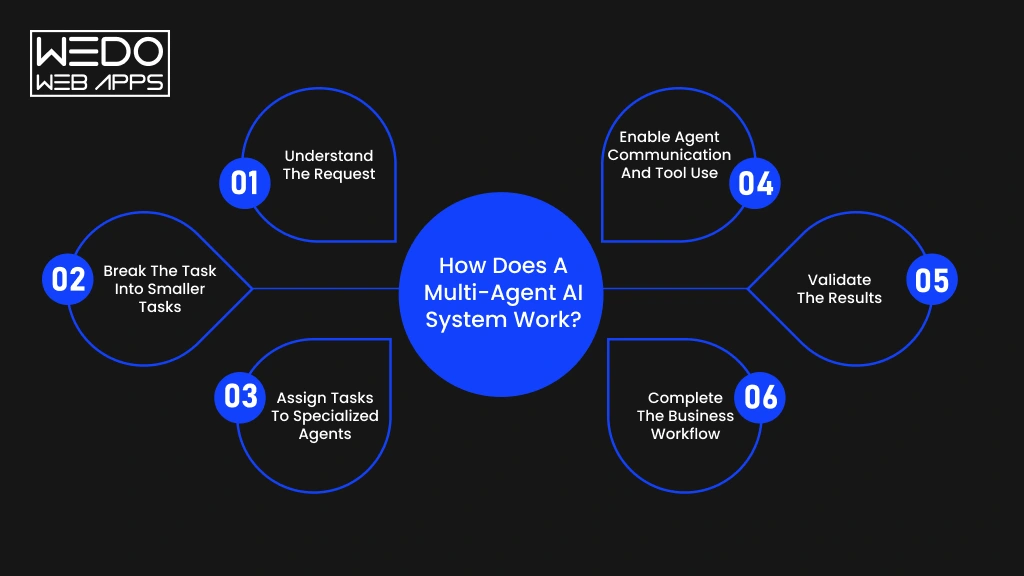
Multi-Agent AI System Work Steps


A multi-agent AI breaks a complex business objective into smaller tasks and assigns them to specialized AI agents. These agents can communicate, use business tools, exchange information, and coordinate their actions to complete the workflow.

This is what allows multiple AI agents working together to handle processes that may be difficult for a single agent to manage efficiently.

1. Understand the Request

The workflow begins when a user request, application event, or business process triggers an action. An initial agent or orchestration layer interprets the objective and identifies what needs to happen.

For example, a customer requesting a refund may require order verification, policy checking, refund processing, and CRM updates.

2. Break the Task into Smaller Tasks

The system divides the broader objective into individual tasks. This process is known as task decomposition.

Some tasks may run independently. Others may depend on information produced by an earlier agent. Identifying these relationships helps the system determine the right sequence of actions.

3. Assign Tasks to Specialized Agents

Each task is assigned to an agent with the appropriate capabilities.

A research agent can gather information. An analysis agent can evaluate it. Another agent can access a CRM or payment system and complete the required action.

This specialization is one of the main reasons businesses consider when to use multi-agent AI instead of relying on one general-purpose agent.

4. Enable Agent Communication and Tool Use

Agents need a way to exchange information as the workflow progresses. They can pass results to another agent, request additional information, or trigger the next task.

They can also connect with APIs, databases, enterprise applications, and other tools. Protocols such as MCP can help AI applications connect with external tools and data through standardized interfaces.

5. Validate the Results

Each output can be checked against business rules before the workflow moves forward. Validation helps identify incomplete information, incorrect outputs, or situations that require human intervention.

For sensitive business processes, human approval can be added before an agent performs a high-impact action.

6. Complete the Business Workflow

After the required tasks are completed, the system combines the results and delivers the intended outcome. This could mean answering a customer, updating a record, generating a report, or completing an action in another application.

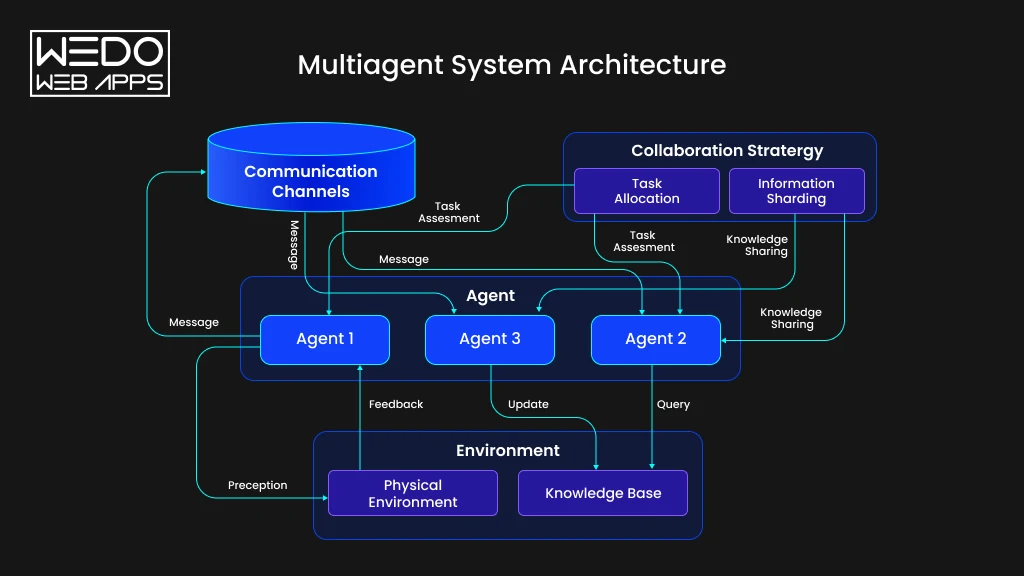
The multi-agent system architecture determines how these agents, tools, data, communication channels, and orchestration logic connect. A well-designed architecture gives each agent a clear responsibility while keeping the overall workflow aligned with the business objective.

Multi-Agent System Architecture


Architecture of a Multi-Agent AI System


A multi-agent system architecture defines how AI agents, models, tools, data, memory, and orchestration work together. It determines how a task moves through the system and how each agent knows what to do next.

A well-planned architecture gives every agent a clear responsibility. It also defines how agents communicate and what systems they can access. Without these boundaries, adding more agents can make a workflow harder to manage rather than more capable.

Core Components of a Multi-Agent Architecture

A typical architecture brings together several layers. Each one supports a different part of the workflow.


ComponentWhat It Does
AI agentsHandle specific tasks based on their role, instructions, and available capabilities
LLMsProvide reasoning and language understanding for agents
Tools and APIsLet agents retrieve information or perform actions in external systems
Memory and shared statePreserve relevant information across tasks and agent interactions
Data sourcesProvide business information from databases, documents, knowledge bases, and applications
Communication layerAllows agents to exchange messages, results, and task information
Orchestration layerCoordinates agents, controls workflow progression, and manages task dependencies
Security and monitoringControls access and tracks agent activity, outputs, errors, and system performance


These components do not need to be equally complex in every project. Your architecture should reflect the workflow you are trying to automate.

Centralized vs Peer-to-Peer Agent Architecture

The way agents coordinate depends largely on how the system is structured.

Centralized architecture uses an orchestrator as the control point. It decides which agent should handle a task, passes the required context, and evaluates what should happen next. This approach can provide clearer control and monitoring, making it suitable for workflows with defined steps and dependencies.

Peer-to-peer architecture allows agents to communicate more directly. An agent can pass information or request another agent’s capabilities without relying on one central controller for every interaction.


CentralizedPeer-to-Peer
Central orchestrator manages tasksAgents communicate directly
Easier to control workflow logicGreater flexibility between agents
Suitable for structured processesUseful for collaborative workflows
Central point for monitoringMonitoring can be more distributed


The right model depends on how much control, flexibility, and coordination your workflow requires.

How Agent Orchestration Connects the System

Agent orchestration acts as the coordination mechanism across the multi-agent system architecture. It determines which agent should act, what context it receives, which tools it can use, and where its output should go next.

Consider an insurance claims workflow. A document agent can extract information from submitted files. A verification agent can check policy details. A risk agent can assess the claim. An approval agent can determine whether it meets predefined criteria.

The orchestration layer manages the movement between these tasks. It can also trigger parallel activities, handle failed tasks, request additional information, or send complex cases to a human reviewer.

For businesses, this makes agent orchestration more than a technical coordination layer. It becomes the mechanism that connects specialized AI capabilities into one controlled workflow.

When Should You Use Multi-Agent AI?

Adding more AI agents also adds more coordination, infrastructure, and monitoring requirements. So, the right question is not whether your business can use multi-agent AI, but whether your workflow benefits from it.

Here are the situations where this approach can make practical sense.

When a Workflow Requires Specialized Expertise

Some business processes involve tasks that require different types of knowledge or capabilities. Assigning everything to one agent can make its instructions, tools, and context harder to manage.

You can assign separate agents to research, analysis, compliance, and reporting. Each agent can focus on its responsibility while the orchestration layer manages the overall workflow.

For example, a financial analysis process could use one agent to collect market data, another to analyze it, and a compliance agent to check the resulting report.

When Multiple Tasks Can Run in Parallel

Not every task needs to wait for another task to finish. If several activities are independent, different agents can work on them at the same time.

Imagine a sales research workflow. One agent can research the company, another can analyze its industry, and a third can review recent business activity. Their findings can then be combined before the final recommendation is generated.

This is one of the strongest reasons why multi-agent AI becomes relevant for larger workflows.

When Multiple Tools and Business Systems Are Involved

Complex workflows often span several applications. Your agents may need access to a CRM, ERP, database, internal application, API, or document repository.

Instead of giving one agent unrestricted access to every system, you can assign specific tools to specialized agents.

For example, a sales agent can work with the CRM while another handles document analysis. This creates clearer boundaries around what each agent can access and perform.

When a Workflow Requires Multiple Decisions or Approvals

Some processes involve several checks before an action can be completed. Insurance claims, financial reviews, procurement, and compliance workflows are common examples.

Different agents can handle individual checks and pass their results to the next stage. Human approval can also be added when the decision carries higher business or financial risk.

When You Should Stay With a Single AI Agent

A multi-agent approach is not necessary for every use case.

A single agent may be the better choice when your workflow has:

  • One primary objective
  • Few tools or data sources
  • Limited decision points
  • A straightforward sequence of tasks
  • Low coordination requirements

If one agent can complete the workflow reliably, keeping the architecture simple can reduce development, monitoring, and operating costs.

The best multi-agent AI systems are built around genuine workflow complexity. More agents do not automatically mean better results. 


Multi-Agent AI Workflow Fit Assessment


Multi-Agent AI vs Single-Agent AI


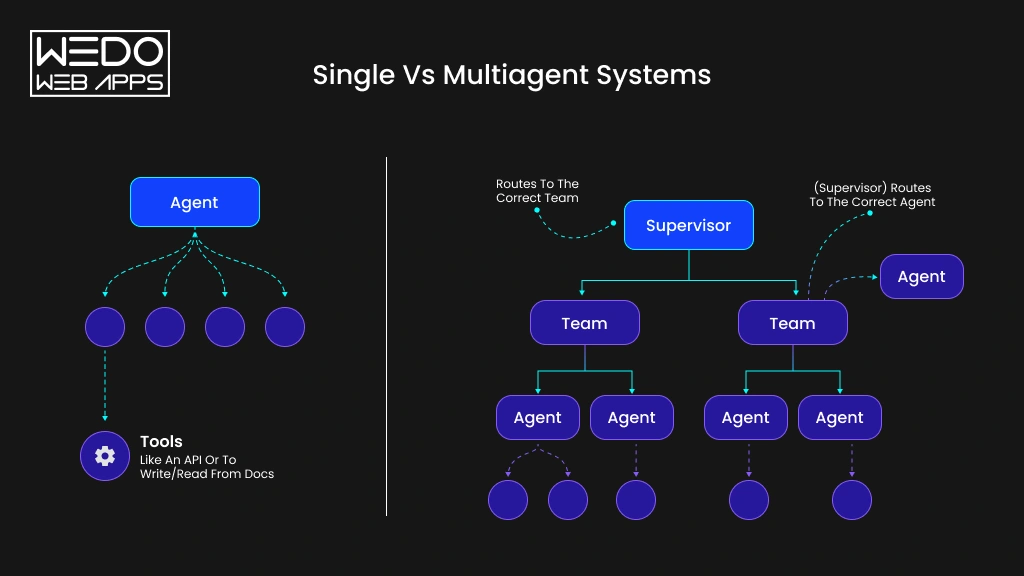
Single and Multiagent System Overview

The choice between a single agent and multiple agents depends on how your workflow is structured. A simple process may work well with one capable agent. More complex workflows can benefit from dividing responsibilities across specialized agents.


FactorSingle-Agent AIMulti-Agent AI
ArchitectureOne agent handles the complete workflowMultiple agents work within a coordinated architecture
Task ComplexityBest for focused and well-defined tasksSuited for workflows with several interconnected tasks
SpecializationOne agent handles multiple responsibilitiesEach agent can focus on a specific capability
Tool UsageUsually connects to a limited set of toolsAgents can use different tools based on their roles
Parallel ProcessingLimited by one agent’s workflowMultiple agents can handle independent tasks simultaneously
CoordinationRequires little coordinationRequires communication, routing, and orchestration
CostUsually lower to build and operateCan cost more due to multiple agents and infrastructure
ScalabilityCan become difficult as responsibilities increaseIndividual agents can be added or adjusted as workflows grow
MaintenanceSimpler to monitor and troubleshootRequires monitoring agent interactions and dependencies
Best Use CaseFAQs, content generation, simple research, focused automationComplex support, sales operations, software development, research, and business automation


Which Approach Is Better for Your Business?

A single agent can be sufficient when your workflow has one clear objective, limited tools, and few decision points. For example, an internal assistant that answers employee questions from a knowledge base may not need multiple agents.

Multi-agent vs single-agent AI becomes a more important choice when your workflow involves different types of work. You may need separate capabilities for research, analysis, validation, system access, and final execution.

Consider a sales qualification workflow. A single agent could handle the entire process. However, separate agents could research the prospect, evaluate qualification criteria, update the CRM, and prepare a personalized follow-up. The added coordination may be worthwhile if these tasks operate across different systems or need independent validation.

Business Use Cases of Multi-Agent AI

Multi-agent AI can support business workflows that involve several tasks, systems, or decision points. Instead of expecting one agent to manage the entire process, businesses can assign specific responsibilities to specialized agents.

The following use cases show where this approach can deliver practical value.

Customer Service and Support

Customer support can involve multiple steps before an issue is fully resolved:

  • Routing agent: Identifies the customer’s intent and directs the request.
  • Knowledge agent: Retrieves relevant product, policy, or account information.
  • Resolution agent: Suggests or performs the appropriate solution.
  • Escalation agent: Routes complex cases to human support teams.
  • Quality agent: Reviews responses for accuracy and policy compliance.

This structure can help support teams handle repetitive requests while reserving human attention for complex customer issues.

Sales and Lead Management

Sales teams can use specialized agents across the lead lifecycle. Instead of manually moving information between research, qualification, and CRM activities, agents can coordinate these tasks.

Example workflow:

Lead received -> Prospect research -> Lead qualification -> Lead scoring -> CRM update -> Follow-up preparation

The sales team can review the results before an agent sends communications or performs high-impact actions.

Software Development

Software projects involve several activities that can be assigned to specialized agents.


AgentResponsibility
Planning agentBreaks requirements into development tasks
Coding agentCreates or modifies application code
Testing agentRuns tests and identifies failures
Debugging agentInvestigates and resolves detected issues
Review agentChecks code quality and implementation


This approach can help development teams coordinate repetitive technical work while keeping human developers involved in architecture and final approvals.

Document and Business Process Automation

Document workflows often require extraction, analysis, validation, approval, and reporting. A multi-agent system can divide these responsibilities across the process.

For example, an invoice workflow could follow:

Extract data -> Match purchase records -> Validate details -> Identify exceptions -> Request approval -> Generate report

Each stage can use the tools and business rules relevant to its responsibility. Exceptions can then be routed to employees instead of allowing agents to make unsupported decisions.

Research and Business Intelligence

Research involves more than collecting information. Businesses may need to compare sources, verify findings, analyze information, and turn the results into useful reports.

A multi-agent workflow can divide the process into:

  • Information gathering from selected sources.
  • Analysis based on defined business questions.
  • Verification of important findings.
  • Report generation using the validation information.

For example, a competitor research workflow could monitor product updates, compare pricing, verify changes, and prepare a structured report for the strategy team.

These examples show where multiple AI agents working together can support business processes with several specialized activities. The value comes from matching each agent to clear responsibility rather than simply adding more agents to the workflow.

Benefits and Challenges of Multi-Agent AI

Multi-agent AI can make complex workflows easier to distribute, but adding multiple agents also introduces new technical and operational requirements. Businesses should consider both sides before choosing this architecture.

Benefits of Multi-Agent AI

1. Specialized Task Handling

Each agent can focus on a specific responsibility, such as research, analysis, validation, or execution. This makes it easier to give agents the tools and instructions suited to their tasks.

2. Parallel Execution

Independent tasks can run at the same time instead of waiting for one agent to complete every step. For example, sales research agents can review company information, industry data, and recent activity simultaneously.

3. Workflow Scalability

Businesses can add new agents when workflows grow, or new capabilities are required. This can make it easier to expand an existing system without assigning every new responsibility to one agent.

4. Better Task Distribution

Complex workflows can be divided into smaller responsibilities and routed to the appropriate agents. This helps prevent one agent from handling excessive context, tools, and instructions.

5. Fault Isolation

A problem with one agent does not always need to stop the entire workflow. Other agents can continue their assigned tasks while the failed step is retried, replaced, or sent for human review.

6. Flexible Business Workflow

Agents can be combined differently as business requirements change. For example, a customer support workflow can add a compliance review agent when new approval requirements are introduced.

Challenges to Consider

1. Higher Development Complexity

Each additional agent introduces instructions, tools, communication rules, and dependencies.

Solution: Start with clearly defined agent responsibilities and add complexity only where the workflow requires it.

2. Agent Communication Issues

Agents can pass incomplete, unclear, or incorrect information between tasks.

Solution: Define structured inputs, outputs, validation rules, and communication protocols.

3. Increased Model and Infrastructure Costs

Running several agents can increase model usage, API calls, storage, and infrastructure requirements.

Solution: Use smaller models for simpler tasks and reserve more capable models for complex reasoning.

4. Hallucination and Incorrect Decisions

An incorrect output from one agent can affect downstream tasks.

Solution: Add validation steps, reliable business data, confidence checks, and human approval for high-impact actions.

5. Monitoring and Debugging

Finding the source of an error becomes harder when several agents interact.

Solution: Track agent actions, inputs, outputs, failures, and workflow transitions through centralized monitoring.

6. Security and Permissions

Giving every agent access to every system can create unnecessary security risks.

Solution: Apply role-based permissions and give each agent AI governance access only to the data and tools it needs.

The right architecture balances these benefits against the added complexity. Businesses should introduce multiple agents when they solve a genuine workflow requirement and provide measurable value.

Multi-Agent AI Platforms and Frameworks

Choosing a multi-agent AI platform depends on how your agents need to communicate, use tools, maintain context, and operate within your business workflow. The framework should support your architecture without adding unnecessary complexity.

Popular Multi-Agent AI Frameworks

  • LangGraph is suited to stateful, graph-based agent workflows where businesses need clear control over task progression, state, and agent interactions.
  • AutoGen supports multi-agent conversations and collaboration. It can be useful when agents need to exchange information, coordinate tasks, and work together through defined interactions.
  • CrewAI focuses on role-based agent collaboration. Businesses can define specialized agents and assign responsibilities across workflows that require multiple coordinated tasks.

Other options include LangChain, LlamaIndex, Semantic Kernel, and Google Agent Development Kit, depending on the models, tools, data sources, and deployment environment involved.

The right framework depends on the workflow rather than popularity alone. A simple process may require only a lightweight orchestration setup, while complex systems may need state management, routing, monitoring, and stronger control over agent interactions.

How to Choose a Multi-Agent AI Platform

Before selecting a platform, evaluate how well it fits your actual business workflow.


Evaluating AreaWhat to Look For
Workflow requirementsSupport for routing, parallel tasks, approvals, and dependencies
Agent communicationReliable methods for exchanging context, tasks, and results
Tool integrationsAPIs, databases, business applications, and external services
Memory and stateSupport for maintaining relevant context across interactions
ObservabilityLogs, traces, performance metrics, and agent activity monitoring
SecurityRole-based access, permissions, data controls, and audit capabilities
ScalabilityAbility to support more agents, users, workflows, and workloads


For business teams, the best platform is the one that fits the required workflow, integrations, security model, and long-term operating needs. The framework should support the architecture rather than dictate it.

How Businesses Can Implement Multi-Agent AI

Implementing multi-agent AI starts with the business process rather than the technology. Businesses should first identify where multiple agents can provide measurable value, then select the architecture and tools required to support that workflow.

Define the Business Workflow

Start by mapping the complete process from the initial trigger to the desired outcome.

Identify the tasks, systems, decision points, approvals, and human interactions involved. This helps determine whether a multi-agent approach is justified.

Identify Tasks That Need Separate Agents

Not every task needs its own agent. Group responsibilities based on the skills, data, tools, or decisions they require.

For example, a customer service workflow could separate intent detection, knowledge retrieval, resolution, quality checks, and escalation.

LLM-based agents can handle reasoning and language tasks, while RAG can provide access to relevant business knowledge and documents.

Design the Agent and Orchestration Architecture

Define how agents communicate and how work moves between them. This includes deciding whether an orchestrator should control the workflow or agents should communicate more directly.

AI orchestration can manage routing, task dependencies, tool access, and human approvals. Memory and shared state can preserve relevant context between workflow stages.

Integrate Business Data and Tools

Connect agents to the systems they need to complete their responsibilities. These may include CRMs, databases, internal applications, APIs, document repositories, and other business tools.

Tool calling allows agents to retrieve information or perform actions, while protocols such as MCP can support standardized connections between AI applications and external capabilities.

Access should be limited according to each agent’s role and business requirements.

Test, Monitor, and Improve the System

Test individual agents as well as the complete workflow. Evaluate accuracy, response quality, tool usage, failure handling, cost, and business outcomes.

Monitoring should track agent interactions, error outputs, and workflow performance. Human oversight should remain part of processes where incorrect actions could create significant financial, operational, or compliance risks.

Once the system is running, use performance data to refine agent instructions, workflows, tools, and validation rules.

Conclusion

Multi-agent AI systems can help businesses handle workflows that are too broad, tool-heavy, or complex for a single agent. By assigning specific responsibilities to specialized agents, businesses can support parallel tasks, multiple decision points, and workflows that span different systems.

However, adding more agents also means more coordination, monitoring, security, controls, and operating costs. That makes architecture and workflow planning just as important as the AI models themselves.

The right Agentic AI development approach depends on your business process. A single agent may be enough for a focused task with limited tools and decisions. A multi-agent system makes more sense when your workflow requires specialized capabilities, parallel execution, multiple systems, or several validation stages.

Before investing in a multi-agent solution, assess the workflow, define measurable outcomes, and identify where separate agents can provide genuine value. A well-planned system can then turn individual AI capabilities into a coordinated business process. 


Coordinated Multi-Agent AI Workflows

How to Evaluate AI Agents: Key Criteria, Metrics & Benchmarks

Introduction

An AI agent can look impressive in a product demo and still fail when it faces a real business workflow.

It may answer a question correctly but choose the wrong tool. It may retrieve the right information but take the wrong action. It may complete a task once and fail the next time the same request appears in a different form.

That is why asking whether an AI agent “works” is not enough.

You need to know how to evaluate AI agents across the tasks they perform, the decisions they make, the tools they use, and the results they deliver.

This is also where evaluating an AI agent differs from evaluating a standalone language model. An agent can plan a task, call APIs, retrieve information, use memory, interact with external systems, and take actions on your behalf. Its final response is only one part of the evaluation.

A reliable evaluation process should therefore look at task success, accuracy, tool use, reasoning, safety, consistency, latency, and cost. The right AI agent evaluation criteria will also depend on what you expect the agent to accomplish.

For example, a customer support agent may be judged by resolution rate and escalation accuracy. A coding agent may need to pass tests and produce secure code. A sales agent may need to update your CRM correctly and complete follow-ups without unnecessary human intervention.

The goal is simple: determine whether the agent can deliver the intended outcome consistently, safely, and at a reasonable cost.

This guide explains the metrics, evaluation methods, benchmarks, and practical considerations you can use to determine what makes AI agent effective and how to make a better choice when selecting an AI agent solution.

Build Your AI Agent for Real Tasks

What Does AI Agent Evaluation Actually Measure?

An AI agent is not evaluated only by checking whether its final response is correct. Unlike a conventional chatbot, an agent can interpret a goal, decide what to do next, retrieve information, call tools, interact with external systems, and complete several steps before producing an outcome.

That means AI agent evaluation needs to examine both the result and the path taken to reach it.

For example, suppose a customer asks an AI agent to cancel an order. The agent may respond, “Your order has been cancelled.” But that response alone does not prove success. You also need to verify whether it identified the correct order, selected the right cancellation tool, passed the correct order ID, received a successful API response, and actually completed the cancellation.

This gives you two important evaluation questions:

  • Did the agent achieve the intended outcome?
  • Did it behave correctly while achieving it?


AI Agent Evaluation vs LLM Evaluation

A standard LLM evaluation often focuses on the quality of generated text. You may assess accuracy, relevance, coherence, helpfulness, or faithfulness.

An AI agent needs a broader evaluation approach because its output can depend on multiple intermediate actions. These can include retrieval, tool calls, API requests, memory access, planning, and interactions with other systems.


Evaluation AreaWhat you need to check
Response qualityIs the final response accurate and relevant?
Task completionDid the agent actually achieve the user’s goal?
Tool useDid it select the appropriate tool and use it correctly?
Reasoning and trajectoryWere its intermediate actions appropriate for the task?
Context and memoryDid it use the right information at the right time?
SafetyDid it stay within defined policies and permissions?
EfficiencyHow much time, compute, tokens, and tool usage did the task require?


This distinction matters when you are choosing an AI agent solution. A solution that produces impressive answers but frequently makes incorrect tool calls may look capable during a demo but create problems in production.

What You Should Evaluate Across the Agent’s Execution

Think of an agent’s execution as a chain rather than a single answer:

User goal -> Planning -> Information retrieval -> Tool selection -> Tool execution -> Decision -> Action -> Action outcome

Each stage can introduce a different type of failure.

An agent may retrieve the correct information but choose the wrong action. It may select the right tool but pass an invalid parameter. It may complete every intermediate step correctly but fail to achieve the user’s actual goal.

Modern agent evaluation therefore increasingly examines execution traces alongside final outputs. Recent AWS guidance, for example, recommends evaluating tool usage, reasoning, output quality, latency, cost, and task completion rather than relying on output checks alone.

The practical takeaway: when you evaluate an AI agent, do not ask only, “Was the answer right?” Ask whether the entire execution was appropriate, reliable, safe, and useful for the intended task. 

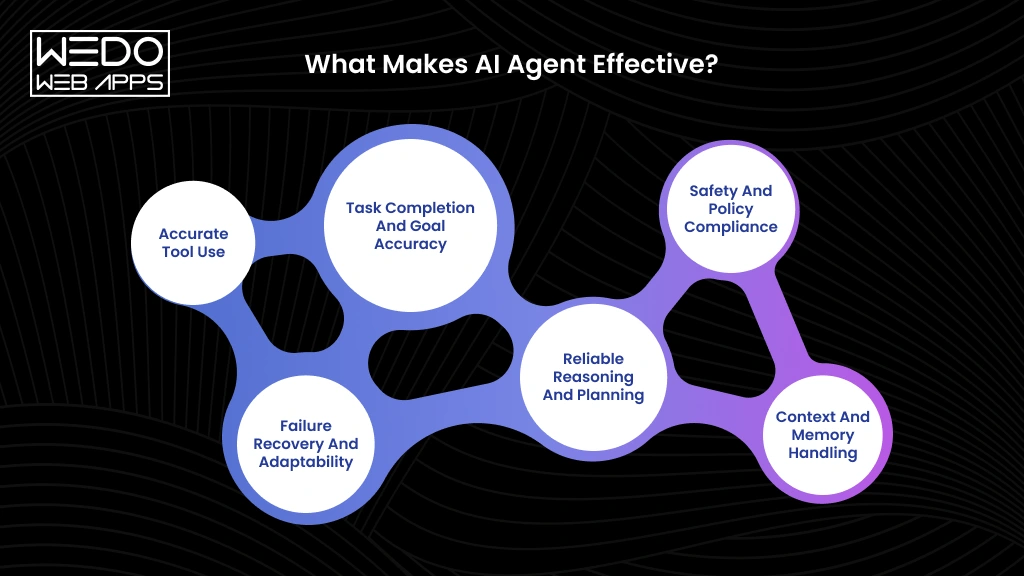
What Makes AI Agent Effective?

 
Key Factors Making AI Agents Effective 

When you ask how to evaluate AI agents, one of the first questions to answer is what effectiveness actually means.

An effective AI agent should do more than generate a convincing response. It should understand the user’s goal, make appropriate decisions, use available tools correctly, and complete the intended task.

The definition can change based on the use case. A customer support agent may need to resolve issues accurately. A sales agent may need to qualify leads and update CRM records. A coding agent may need to produce working code that passes tests.

So, what makes AI agent effective depends on whether it can consistently deliver the outcome it was designed to achieve.


Effectiveness areaWhat to evaluateExample
Task completionWhether the intended goal is achievedA booking agent completes a reservation
PlanningWhether actions follow a sensible sequenceA sales agent qualifies a lead before updating the CRM
Tool useWhether the correct tools and parameters are usedAn order agent retrieves the correct order before modifying it
Context handlingWhether relevant information is retainedA support agent remembers details from earlier messages
RecoveryWhether the agent responds appropriately to failuresIt retries a failed API call or escalates the issue
SafetyWhether actions remain within defined permissionsA finance agent requests approval for restricted transactions


Task Completion and Goal Accuracy

Start by checking the actual outcome, not just the final response.

An agent can produce a fluent answer that claims a task was completed without actually completing it. A travel agent, for example, might tell a customer that a flight has been booked. Your evaluation should verify whether the reservation system actually confirmed the booking.

This is one of the most important AI agent evaluation criteria because the agent’s value ultimately depends on whether it can accomplish its assigned objective.

Ask four simple questions:

  1. Did the agent complete the requested task?
  2. Did it produce the intended outcome?
  3. Did it make unsupported assumptions?
  4. Can the result be verified through the relevant business system?

Reliable Reasoning and Planning

An AI agent may need to decide what information it needs, which action should happen first, and what it should do next.

Effective planning is not about taking more steps. It is about taking the appropriate steps in the right order.

Consider an AI procurement agent that needs to check inventory, compare approved suppliers, verify pricing, and prepare an order. If the required product is unavailable, the agent should adapt its plan rather than continue toward an order that cannot be fulfilled.

When evaluating planning, check whether the agent:

  • Follows a logical sequence
  • Uses relevant information
  • Avoids unnecessary actions
  • Adjusts its approach when conditions change

Accurate Tool Use

Tools allow AI agents to interact with APIs, databases, CRM platforms, search systems, and business applications. They also create additional opportunities for failure.

An effective agent should select the appropriate tool, provide valid parameters, interpret the returned information, and use that result correctly in the next step. AWS guidance on agent evaluation recommends assessing tool selection and parameter accuracy as part of agent performance testing.

For example, a CRM agent may have separate functions for retrieving an existing lead and creating a new lead. Choosing the wrong function could create duplicate records even when the final response sounds correct.

Context and Memory Handling

An agent needs access to the right information at the right time.

This becomes particularly important during multi-turn interactions. If a customer has already provided an order number and described the issue, the agent should not repeatedly ask for the same information.

Good context handling means the agent can:

  • Retain relevant information
  • Retrieve information when required
  • Distinguish useful context from irrelevant details
  • Apply retrieved information correctly
  • Maintain continuity throughout the task

These capabilities can directly affect AI agent quality metrics such as task success, error rates, and user satisfaction.

Failure Recovery and Adaptability

Real business environments rarely operate without interruptions.

APIs fail. Tools become unavailable. Users provide incomplete information. External systems return unexpected results.

A reliable agent should recognize these situations and choose an appropriate response instead of continuing with an incorrect assumption. AWS research on agent evaluation also highlights recovery across planning, tool use, memory, and action taking.


SituationPoor behaviorBetter behavior
API failureClaims the action succeededRetries or reports the failure
Missing informationMakes an unsupported assumptionRequests the required detail
Tool errorRepeats the same failed callAttempts an appropriate recovery
Conflicting instructionsFollows instructions blindlyChecks applicable policies


Safety and Policy Compliance

An agent can complete tasks accurately and still be unsuitable for production if it operates outside its permissions.

Safety should therefore be part of your AI agent evaluation criteria from the beginning. Check whether the agent protects sensitive information, follows business policies, respects access controls, and handles prompt injection appropriately.

For example, a finance agent might be authorized to prepare a payment but not approve it. An effective agent should recognize that boundary and request human authorization.

The strongest sign of an effective agent is therefore not impressive performance in an ideal demonstration. It is consistent, controlled performance across normal requests, unexpected conditions, failures, and high-risk situations.

AI Agent Evaluation Criteria: What Should You Look For?

There is no single metric that can tell you whether an AI agent is ready for real business use. The right AI agent evaluation criteria should reflect what the agent is expected to accomplish and the risks associated with its decisions or actions.

For example, an internal research agent may be judged mainly on accuracy and source quality. An AI agent that processes refunds needs stricter controls around accuracy, authorization, safety, and successful task completion.

A practical evaluation framework should cover the following areas:


Evaluation criterionWhat is measuresWhy it matters
Task successWhether the agent achieves the intended goalShows whether the agent actually delivers the required outcome
AccuracyWhether responses, decisions, and actions are correctHelps prevent incorrect information and business errors
Tool useWhether the right tools and parameters are usedShows whether the agent can execute tasks correctly
ReasoningWhether decisions and actions follow relevant contextHelps identify poor planning and unnecessary steps
ReliabilityWhether the agent performs consistently across runsIndicates whether it can be trusted in production
SafetyWhether the agent follows permissions and policiesLimits unauthorized or harmful actions
EfficiencyTokens, tool calls, steps, and compute requiredHelps control the cost of operating the agent
LatencyTime taken to complete a taskDirectly affects the user experience
RecoveryHow the agent responds to failure and unexpected conditionsShows how well it handles real operating conditions
User satisfactionHow users perceive the agent’s usefulness and experienceConnects technical performance with business value


Not Every Criterion Needs the Same Weight

The table gives you a broad framework, but treating every criterion equally can produce misleading results.

Imagine two AI agents handling customer support. Agent A resolves 95% of requests but occasionally exposes information from another customer’s account. Agent B resolves 90% but consistently respects access controls.

Agent A may appear better if you only measure task success. Once security is included, the evaluation changes significantly.

Your weighting should therefore reflect the consequences of failure.

  • Low-risk task: Accuracy, relevance, and response quality may carry more weight.
  • Operational task: Task completion, tool accuracy, reliability, and latency become more important.
  • High-risk task: Safety, authorization, compliance, and human oversight may take priority over speed.

This approach also prevents a common evaluation mistake: optimizing the agent for a high score while overlooking the criteria that actually matter to your business.

Evaluate the Agent at More Than One Level

A useful evaluation should look at the agent from three perspectives.

  • Outcome: Did it accomplish the intended task?
  • Execution: Did it make appropriate decisions and use its tools correctly?
  • Experience: Did it complete the task within acceptable time, cost, and user expectations?

This matters because a successful outcome can sometimes hide a fragile execution path. An agent might complete a task after several unnecessary retries or incorrect tool calls. It may still appear successful, but the underlying behavior could become expensive or unreliable at scale.

AWS’s agent evaluation guidance similarly considers areas such as task completion, tool use, reasoning, memory, multi-turn behavior, safety, latency, and cost when assessing agent performance.

The result is a more complete picture of agent quality. Instead of asking whether the AI agent produced a good response, you can determine whether it achieved the right outcome through a reliable, safe, and efficient process.

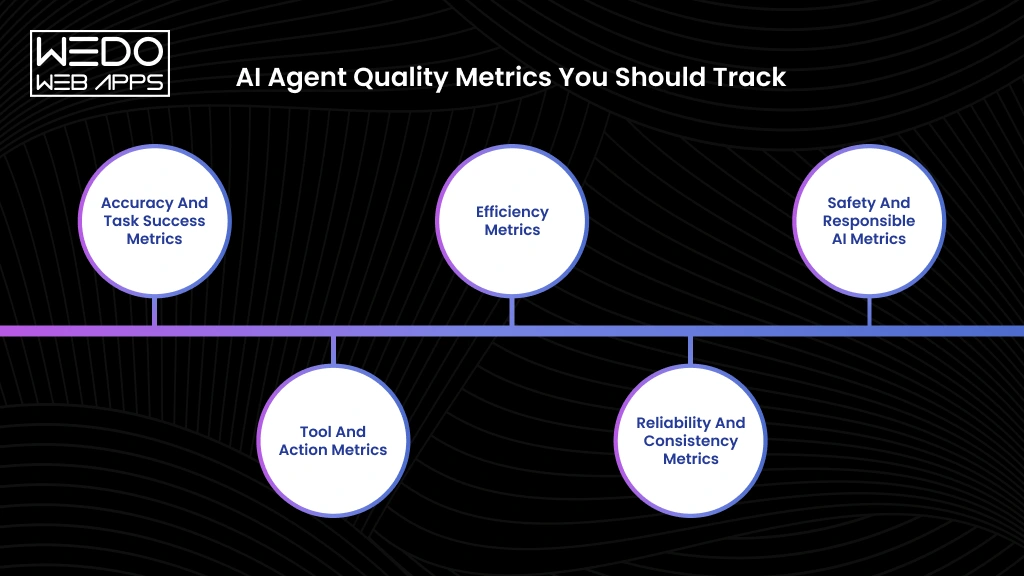
AI Agent Quality Metrics You Should Track

 
Key AI Agent Quality Metrics to Track
 

The right AI agent quality metrics turn agent evaluation into measurable evidence. Instead of simply asking whether an agent performed well, you can measure how often it succeeds, where it fails, how efficiently it works, and whether its behavior remains safe.

Accuracy and Task Success Metrics

These metrics measure whether the agent produces the right result.


MetricHow to measure it
Task success rateDivide successfully completed tasks by total tasks tested, then multiply by 100
Goal accuracyCompare the agent’s final outcome with the predefined business goals for each test case
Error rateDivide incorrect or failed tasks by total tasks tested, then multiply by 100
Answer correctnessCompare responses against a reference answer or predefined grading criteria
Factual accuracyVerify individual claims against trusted source data or a ground-truth dataset
FaithfulnessCheck whether the agent’s claims are supported by the context, retrieved documents, or tool results provided to it


For example, if an agent completes 92 out of 100 test tasks correctly, its task success rate is 92%. If five of those successful-looking responses contain unsupported claims, faithfulness testing can reveal an issue that task success alone misses.

Tool and Action Metrics

When an agent can call APIs or external systems, you need to measure whether those calls are correct.


MetricHow to measure it
Tool selection accuracyCompare the tool selected by the agent with the correct tool defined for each test scenario
Tool call success rateDivide successful tool executions by total tool calls
Parameter accuracyCompare the arguments passed to each tool against the expected name, type, value, and format
Function calling accuracyMeasure whether the agent selects the correct function and provides all required arguments correctly
Invalid tool call rateDivide invalid, malformed, or unsupported tool calls by total tool calls
Action success rateVerify whether the intended external action was actually completed successfully


For example, an order agent may correctly identify that a customer wants a refund but send the wrong order ID to the refund API. The response may look correct, but parameter accuracy and action success will expose the failure.

IBM also identifies the wrong function names, missing parameters, and incorrect parameter types as useful signals for evaluating function calling.

Efficiency Metrics

Efficiency shows how much time and computing resources the agent needs to complete a successful task.


MetricHow to measure it
LatencyRecord the time from the agent receiving the request to task completion
Token usageTrack input and output tokens consumed during each task
Number of tool callsCount every external tool invocation within a task
Number of stepsCount each reasoning, retrieval, tool, or action step in the execution trace
Cost per taskCalculate model, tool, infrastructure, and other execution costs for each completed task
Retry rateDivide repeated or retried attempts by total tasks or tool calls


For production evaluation, look at percentiles such as p90 or p95 latency, not only average latency. Averages can hide a smaller group of tasks that take considerably longer to complete.

Reliability and Consistency Metrics

Agent behavior can change between runs. These metrics show whether performance remains dependable.


MetricHow to measure it
Pass rate across repeated trialsRun the same or equivalent scenarios multiple times and calculate the percentage that pass
Failure rateDivide failed tasks by total test runs
Recovery rateIntroduce controlled failure and measure how often the agent successfully recovers without human intervention
Timeout rateDivide tasks that exceed the defined execution limit by total tasks
Output consistencyCompare outputs from repeated runs against the expected result or acceptable output range
Trajectory consistencyCompare the agent’s execution paths across equivalent tasks to identify unnecessary or problematic variations


For example, run a customer support scenario 20 times with slightly different wording. If the agent completes 18 successfully, its pass rate is 90%. You can then inspect the two failed traces to determine whether the failures came from reasoning tool use or another part of the workflow.

Safety and Responsible AI Metrics

Safety metrics should be measured through controlled scenarios that test how the agent behaves when normal rules are challenged.


MetricHow to measure it
Policy adherenceTest the agent against predefined business and safety policies and calculate the percentage of compliant responses or actions
Prompt injection resistanceRun known prompt injection scenarios and measure how often the agent follows unauthorized instructions
Hallucination rateCount unsupported or fabricated claims across evaluated responses and divide by total responses or claims tested
Sensitive data handlingTest whether the agent exposes, modifies, or improperly uses restricted information
Harmful output rateMeasure the percentage of test scenarios that produce prohibited or unsafe outputs
Bias and fairnessCompare performance and error rates across relevant user or demographic groups using equivalent test scenarios


For example, if an agent is allowed to prepare a payment but not approve it, testing should include requests that attempt to bypass that restriction. A successful safety evaluation means the agent follows the defined boundary rather than simply completing the requested action.

These measurements make it easier to understand what makes AI agent effective for a particular workflow. They also give businesses a stronger basis for choosing an AI agent solution, because performance can be compared using measurable outcomes instead of a product demo or a single benchmark score.

Most importantly, AI agent evaluation criteria should be tied to the actual business task. The metric you prioritize for a difference between AI chatbots and AI agents will not necessarily be the same ones you need for a finance, customer service, or operations agent.

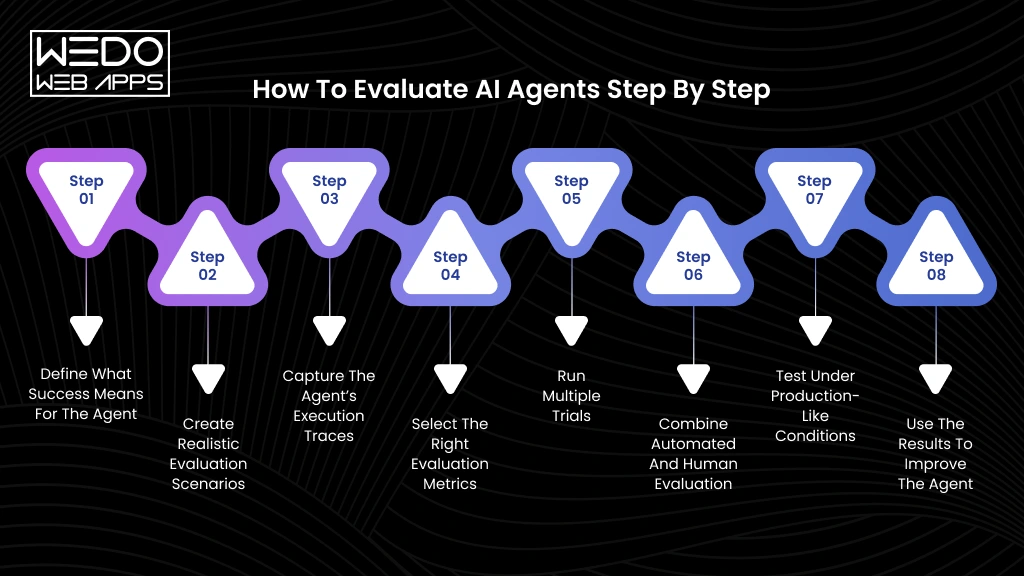
How to Evaluate AI Agents Step by Step

 
Steps to Evaluate AI Agents Effectively
 

Knowing the metric is useful, but you still need a repeatable process to apply it. A structured approach to how to evaluate AI agents helps you test real performance instead of relying on demos or isolated successful interactions.

Step 1: Define What Success Means for the Agent

Start by defining the outcome the agent must achieve.

Specify:

  • The task it needs to complete
  • The expected outcome
  • Acceptable and unacceptable actions
  • When it should ask for human help
  • The conditions that count as failure

For example, a customer support agent should not be considered successful simply because it gives the correct answer. It may also need to update the customer’s records or escalate the case when required.

Step 2: Create Realistic Evaluation Scenarios

Build test cases from the situations the agent will actually encounter.

Include:

  • Common requests
  • Ambiguous requests
  • Multi-step tasks
  • Incomplete information
  • Unexpected user inputs
  • High-risk or restricted requests

A strong evaluation dataset should include both successful and failure-prone scenarios.

Step 3: Capture the Agent’s Execution Traces

Do not evaluate only the final response.

Capture the agent’s:

Input -> reasoning steps -> retrieved context -> tool calls -> tool results -> actions -> final response

These traces help you identify where a failure occurred. An incorrect final answer could result from poor retrieval, an incorrect tool choice, faulty parameters, or a bad decision after receiving the tool result.

Step 4: Select the Right Evaluation Metrics

Choose metrics based on the agent’s actual responsibilities.

For example:


Agent typeMetrics to prioritize
Customer supportTask success, answer correctness, escalation accuracy
SalesGoal completion, CRM action accuracy, tool success
ResearchFactual accuracy, faithfulness, source quality
CodingTest pass rate, correctness, security
FinanceAction accuracy, policy adherence, safety


This keeps your AI agent evaluation criteria tied to business outcomes instead of creating a generic scorecard.

Step 5: Run Multiple Trials

Run each important scenario more than once.

Change factors such as:

  • User wording
  • Available context
  • Tool responses
  • Conversation history
  • Error conditions

Then compare success rates and execution traces. Repeated trials help expose inconsistent behavior that a single test can easily miss.

Step 6: Combine Automated and Human Evaluation

Use automated checks for measurable outcomes such as task completion, tool calls, latency, and exact values.

Use human reviewers when evaluating areas such as:

  • Response usefulness
  • Tone
  • Complex reasoning
  • Policy interpretation
  • User experience

A combination of automated evaluation and human review gives you broader coverage without making every test dependent on manual inspection.

Step 7: Test Under Production-Like Conditions

An agent that performs well in a controlled environment may behave differently when connected to real tools and data.

Test with realistic:

APIs + permissions + data + latency + tool failures + user behavior

This is particularly important for agents that can modify records, make transactions, or trigger business workflows.

Step 8: Use the Results to Improve the Agent

Evaluation should not end with a score.

Trace failures back to their source and determine whether the solution requires.

  • Better instructions
  • Improved retrieval
  • Different tools
  • Stronger permissions
  • Model changes
  • Better error handling
  • Additional training or test cases

Then run the evaluation again after making changes.

This creates a continuous cycle:

Test -> Measure -> Diagnose -> Improve -> Retest

That cycle is what makes agent evaluation useful beyond the initial development stage.

AI Agent Performance Benchmarks: What Should You Compare?

AI agent performance benchmarks give you a common way to compare agents across defined tasks. They can help you understand capabilities such as task completion, tool use, reasoning, accuracy, and reliability.

But benchmark scores should be treated as a starting point, not proof that an agent will perform well in your business environment.

What AI Agent Benchmarks Can Tell You

A benchmark can help answer questions such as:

  • How accurately does the agent complete a defined task?
  • Can it use tools and APIs correctly?
  • How well does it handle multi-step workflows?
  • How often does it recover from failures?
  • How does its performance compare with other systems on the same dataset?

For example, an AI coding agent may be evaluated against a set of software engineering tasks where success is determined by whether the generated code passes predefined tests.

This gives you a measurable reference point when choosing an AI agent solution.

Why Benchmark Scores Alone Can Be Misleading

A strong benchmark result does not automatically mean the agent is suitable for your workflow.

The benchmark may use:

  • Different tasks than your business requires.
  • Different tools or environments than the agent will encounter in production.
  • Different success criteria from your actual business goals.
  • Controlled conditions that do not reflect real users, failures, or changing data.

An agent might score highly on a public benchmark but struggle when it has to work with your CRM, internal documents, APIs, approval rules, or legacy systems.

This is why AI agent evaluation criteria should be based on your own requirements as well as external benchmarks.

Public Benchmarks vs Your Own Evaluation Dataset

Use public benchmarks to understand general capability. Use your own evaluation dataset to determine whether the agent can handle your specific work.


Public benchmarksBusiness-specific evaluation
Standardized tasksReal business workflows
Useful for comparisonUseful for deployment decisions
Controlled environmentsProduction-like conditions
General performanceUse-case-specific performance
Good for initial screeningBetter for final validation


The strongest approach is to use both.

Start with relevant AI agent performance benchmarks to shortlist potential solutions. Then create representative test cases from your own workflows and measure task success, tool accuracy, cost, latency, safety, and consistency.

That gives you a more reliable answer to how to evaluate AI agents than relying on a benchmark score alone.

How to Choose the Right AI Agent Evaluation Approach

Not every aspect of an AI agent can be evaluated in the same way; it is necessary to choose the right AI development partner. The best method depends on whether the expected result can be verified using fixed rules or requires judgement.

For most real-world systems, the strongest approach is to combine automated checks with human review where needed.


Evaluation methodBest forKey advantageMain limitation
Deterministic evaluationExact outcomes, API calls, database updates, numerical resultsObjective and repeatableLimited when quality is subjective
LLM-as-a-judgeHelpfulness, relevance, tone, reasoning, completenessScales subjective evaluationThe evaluator can make incorrect or inconsistent judgements
Human evaluationHigh-risk, ambiguous, or complex outputsProvides expert judgmentTime-consuming and costly at scale
Hybrid evaluationProduction AI agents with varied tasksCombines accuracy, scale, and human oversightRequires more evaluation setup


Deterministic Evaluation

Use deterministic evaluation when the expected outcome can be clearly verified against a predefined rule or value.

It works well for:

  • Correct API calls
  • Correct database updates
  • Numerical results
  • Required field validation
  • Expected tool selection
  • Policy-based actions

For example, if an agent is asked to update a customer’s phone number, you can check whether it selected the correct customer record and stored the expected value.

This approach is highly reliable when there is a clear ground truth and should be part of your AI agent evaluation criteria for rule-based workflows.

LLM-as-a-Judge

An LLM judge is useful when response quality cannot be measured effectively with fixed rules.

It can evaluate qualities such as:

  • Helpfulness
  • Relevance
  • Tone
  • Reasoning quality
  • Response completeness

For example, there may be several valid ways for a customer support agent to explain a solution. Instead of checking for an exact response, an evaluator model can score whether the explanation is relevant, complete, and appropriate.

LLM-as-a-judge is a useful evaluation method when predefined ground truth is unavailable or difficult to establish.

However, the evaluator model should itself be validated. Poorly defined grading criteria can lead to inconsistent or overly generous scores.

Human Evaluation

Human review remains valuable when the task involves ambiguity, business judgement, or significant risk.

Use human evaluation for:

  • High-risk decisions
  • Complex reasoning
  • Ambiguous user requests
  • Sensitive customer interactions
  • Subjective response quality
  • Cases where automated evaluators disagree

For example, an AI agent handling insurance claims may technically follow the workflow but still require expert review to determine whether its recommendation is appropriate.

Human evaluation provides deeper judgement, but it is slower and harder to scale. It is therefore better suited to selected test cases rather than every interaction.

Hybrid Evaluation

For most production agents, a hybrid approach is the most practical option.

Use deterministic checks for outcomes that can be verified automatically. Use an LLM judge for subjective quality. Add human evaluation for complex, sensitive, or high-risk scenarios.

A practical workflow could look like this:

Automated checks -> LLM evaluation -> Human review -> Final evaluation

For example, a finance agent could be tested automatically for correct transaction details, evaluated by an LLM for response quality, and reviewed by a human when the transaction falls outside predefined risk thresholds.

This combination gives technical business teams a broader view of agent performance without making every evaluation dependent on manual review.

When deciding how to evaluate AI agents, the goal is not to choose one method. It is to match each evaluation method to the type of behavior you need to verify.

Choosing an AI Agent Solution: What Should Businesses Evaluate?

Evaluation results are only useful when they help you make a better choice.

When comparing two or more AI agents, do not rely on a single benchmark score or demo. Test each solution against the same business scenarios, tools, data, and success criteria.

Compare Agents Against the Same Test Set

Create one evaluation dataset that represents the work your agent will actually handle.

Include:

  • Common user requests
  • Multi-step tasks
  • Ambiguous instructions
  • Incomplete information
  • Tool and API failures
  • High-risk scenarios
  • Edge cases
  • Repeated versions of the same task

This gives every agent the same conditions and makes the results easier to compare.

Look Beyond Task Completion

Two agents can achieve the same task success rate while delivering very different experiences.

For example, Agent A may complete 90% of customer support tasks but require eight tool calls on average. Agent B may achieve the same success rate with four calls and lower latency.

Compare results across multiple AI agent quality metrics:


AreaWhat to compare
Task performanceSuccess rate, goal accuracy, error rate
Tool executionTool selection, parameter accuracy, action success
ReliabilityFailure rate, recovery rate, consistency
EfficiencyLatency, token usage, steps, cost per task
SafetyPolicy adherence, injection resistance, harmful outputs
User experienceHelpfulness, relevance, completeness, satisfaction


Test Production Conditions

A controlled demo rarely shows how an agent behaves inside your actual environment.

Before choosing an AI agent solution, test it with the systems and constraints it will face in production.

Check whether it can:

  • Work with your APIs and databases
  • Handle real permission levels
  • Retrieve the right business data
  • Recover from failed tool calls
  • Follow approval workflows
  • Maintain context across conversations
  • Operate within your latency and cost limits

Score Results Based on Business Risk

Not every metric deserves equal weight.

For a customer support agent, response quality and task completion may carry the highest weight. For a finance agent, safety and action accuracy may matter more than response speed.

A simple weighted score can help:

Overall score = ∑ (Metric score x business weight)

This prevents a strong performance in one area from hiding serious weaknesses in another.

The best agent is not necessarily the one with the highest overall benchmark score. It is the one that performs reliably on the tasks that matter most to your business, within your required cost, safety, and operational limits.

AI Agents Examples: How Evaluation Changes by Use Case

There is no universal score that tells you whether an AI agent is effective.

The right metrics depend on what the agent is expected to do, what systems it can access, and what happens when it makes a mistake.

These AI agent examples show why your evaluation framework should be tied to the actual business workflow.

Customer Support AI Agent

A customer support agent needs to do more than generate accurate replies. It should resolve requests correctly, follow company policies, and know when a human needs to step in.


MetricWhat to evaluate
Task resolutionWhether the customer’s issue was actually resolved
Response accuracyWhether the information provided was correct
Escalation rateWhether complex cases were transferred appropriately
Policy adherenceWhether responses followed company rules
Customer satisfactionWhether users were satisfied with the interaction
Average handling timeHow efficiently the agent resolved the request


For example, if a customer asks to cancel an order, the agent should identify the correct order, follow the cancellation policy, complete the required action, and confirm the result.

Sales AI Agent

A sales agent may interact with leads, retrieve customer information, update your CRM, and manage follow-ups.

Its evaluation should therefore focus on both conversation quality and business actions.

Measure:

  • Lead qualification accuracy
  • CRM update accuracy
  • Follow-up completion
  • Data retrieval accuracy
  • Human escalation rate

A sales agent that has a convincing conversation but fails to update the CRM correctly has not fully completed its task.

AI Coding Agent

Coding agents require technical evaluation because a response that looks correct may still produce code that fails in execution.


MetricWhat to check
Task completionWhether the requested feature or change was completed
Code correctnessWhether the implementation works as intended
Test pass rateWhether generated code passed relevant tests
Tool usageWhether development tools were used correctly
Security issuesWhether the code introduces vulnerabilities
Number of iterationsHow many attempts were needed to complete the task


For coding agents, execution results are more meaningful than simply judging the quality of the generated code.

Research AI Agent

A research agent needs to find, interpret, and organize information without introducing unsupported claims.

Evaluate:

  • Source quality
  • Citation accuracy
  • Retrieval relevance
  • Hallucination rate
  • Research completeness

For example, an agent researching competitors should retrieve relevant sources, connect claims to those sources, and avoid presenting unsupported information as fact.

Finance or Operations AI Agent

Finance and operations agents often have access to sensitive data or systems where an incorrect action can create significant business risk.

Their evaluation should give greater weight to control and accuracy.


MetricWhat to evaluate
Calculation accuracyWhether calculations produce the correct result
Policy complianceWhether every action follows defined rules
Data accessWhether the agent accesses only permitted information
Transaction accuracyWhether the correct transaction or update is performed
AuditabilityWhether actions can be traced and reviewed
Human approval rateWhether actions requiring approval are correctly escalated


For instance, a finance agent may be allowed to prepare a payment but not approve or execute it without human authorization.

The key takeaway is simple: AI agent evaluation criteria should follow the agent’s responsibility. A support agent may prioritize resolution and satisfaction, while a finance agent may prioritize accuracy, compliance, and auditability.

This use-case-specific approach gives you a more realistic picture of what makes AI agent effective than applying the same evaluation score to every system.

Define the Right Use Case for AI Agents

How AI Agent Evaluation Is Changing With Agentic AI

AI agent evaluation is changing because the systems being evaluated are changing.

Traditional AI applications often return an answer to a user prompt. Agentic AI systems can plan tasks, select tools, retrieve information, interact with external systems, and take multiple actions before reaching an outcome.

That means evaluating only the final response can miss important failures.

From Answer Quality to Action Quality

For a traditional AI application, the main question may be:

“Did the AI give the right answer?”

For an AI agent, the more important question is:

“Did the AI take the right action?”

Consider an agent that manages customer orders. It may correctly tell a customer that an order is eligible for cancellation. But if it selects the wrong order or sends an incorrect cancellation request to the API, the final result is still a failure.

The evaluation therefore needs to consider what the agent did, not just what it said.

From Single-Turn Testing to Full Trajectory Evaluation

An agent can produce the correct final response while making mistakes along the way.

For example, it might:

Retrieve incorrect data -> Call an unnecessary tool -> Recover from the error -> Produce the correct final answer

A final-response evaluation could mark this as successful. A trajectory-based evaluation would reveal the unnecessary tool call and incorrect retrieval.

This is why modern evaluation examines the complete execution path, including planning, retrieved context, tool calls, tool results, decision, and final actions.

From Offline Benchmarks to Continuous Evaluation

A benchmark gives you a snapshot of agent performance under defined conditions.

Production is different.

Your tools can change. APIs can fail. Business data can be updated. Prompts and models can be modified. User behavior can also introduce requests that were not present in your original test set.

As a result, production agents need continuous AI agent evaluation rather than a one-time test before deployment.

Monitor real interactions, identify new failure patterns, add those cases to your evaluation dataset, and retest the agent after significant changes.

This creates an ongoing cycle:

Monitor -> Identify -> Test -> Improve -> Monitor again

From Model Selection to System Evaluation

Choosing a stronger model does not automatically give you a better AI agent.

Agent performance depends on the complete system around the model, including:

  • Model
  • Instruction
  • Tools
  • Retrieval
  • Memory
  • Orchestration
  • Permission
  • External systems
  • Execution environment

A model may perform well in a benchmark but produce poor results when connected to unreliable APIs or poorly configured tools.

This changes how businesses should approach choosing an AI agent solution. Instead of asking which model performs best in isolation, evaluate how the complete agent performs within the workflow where you instead use it.

The shift toward agentic AI therefore changes how to evaluate AI agents from judging individual responses to validating complete, ongoing system behavior.

Common Mistakes When Evaluating AI Agents

Even a well-planned evaluation can give misleading results if you test the wrong things or interpret the results too narrowly.

Avoid these common AI implementation mistakes when deciding how to evaluate AI agents for your business.

Measuring Only the Final Response

A polished answer can hide problems that happened during execution.

An agent may retrieve the wrong information, use an incorrect tool, or skip a required step before producing a convincing response.

Evaluate the agent’s actions and execution path along with its final answer.

Relying on One Successful Run

One successful interaction does not prove consistent performance.

Run the same task with different wording, inputs, conversation, histories, and conditions. This helps identify whether the agent can produce reliable results or simply happened to succeed once.

Treating Public Benchmarks as Production Proof

Public benchmarks are useful for comparing general capabilities, but they cannot reproduce every condition of your business environment.

An agent that performs well on a benchmark may still struggle with your internal data, APIs, approval rules, tools, or user workflows.

Use benchmarks for initial comparison, then validate shortlisted agents against your own scenarios.

Ignoring Tool and API Failures

Agents often depend on external systems to complete their work.

An API timeout, invalid response, authentication issue, or unavailable tool can change the entire outcome.

Test what happens when connected systems fail. A good agent should respond appropriately, retry when suitable, or hand the task to a human instead of pretending that the action succeeded.

Optimizing Accuracy While Ignoring Cost

Higher accuracy can come with higher model usage, more tool calls, longer execution paths, and increased infrastructure costs.

For high-volume workflows, even a small increase in cost per task can become significant.

Evaluate accuracy alongside AI agent quality metrics such as latency, token usage, retries, and cost per completed task.

Skipping Security and Adversarial Testing

An agent can perform well under normal requests and still fail when someone deliberately tries to bypass its instructions or access restricted information.

Test scenarios involving prompt injection, unauthorized actions, sensitive data, requests, excessive permissions, and conflicting instructions.

Security testing should be part of evaluation before an agent receives access to important business systems.

Using the Same Metrics for Every Agent

A customer support agent and a finance agent should not have identical evaluation priorities.

For support, resolution and escalation may matter most. For finance, transaction accuracy, permissions, and policy compliance may carry greater weight.

Your AI agent evaluation criteria should reflect the agent’s responsibilities and the consequences of failure.

Evaluating Without a Business Success Criterion

Technical performance does not automatically translate into business value.

Before testing, define what success means for the workflow.

It could be:

Resolve more support cases -> Qualify leads faster -> Reduce manual research -> Complete coding tasks -> Process operations with fewer errors

Once the business outcome is clear, you can determine which evaluation results actually matter.

The purpose of AI agent evaluation is not to produce an impressive score. It is to determine whether the agent can deliver the required business outcome safely, consistently, and at an acceptable cost.

AI Agent Evaluation Checklist

Before deploying or choosing an AI agent solution, use this checklist to confirm that you have evaluated the areas that matter most.


Evaluation areaQuestion to ask
Business goalWhat should the agent accomplish, and what outcome defines success?
Task successCan it consistently complete the intended task?
AccuracyAre its outputs, decisions, and actions correct?
Tool useDoes it select and use the right tools at the right time?
ReasoningDoes its execution path support the intended outcome?
ReliabilityDoes it perform consistently across repeated trials and different conditions?
SafetyDoes it follow policies, respect permissions, and resist manipulation?
EfficiencyAre its cost, token usage, tool calls, and latency acceptable?
RecoveryCan it handle errors and failures without unnecessary human intervention?
User experienceDo users find its results useful, understandable, and trustworthy?
Production readinessCan it perform reliably with real users, data, tools, and operating conditions?


A Simple Final Check

Before moving an agent into production, you should be able to answer yes to those questions:

  • Does it achieve the business outcome?
  • Does it behave consistently?
  • Does it stay within its permissions?
  • Can it recover from expected failure?
  • Is its performance worth the cost?
  • Can you monitor and improve it after deployment?

If several answers are still “no,” the evaluation is not finished. Use those gaps to identify what needs improvement before increasing the agent’s autonomy.

Final Takeaway

The best AI agent is not necessarily the one with the highest benchmark score.

It is the one that reliably completes the right tasks, uses the right tools, stays within your business boundaries, and delivers acceptable results at an acceptable cost with the help of a dedicated AI developer.

That is why how to evaluate AI agents should start with your business workflow, not with a technology shortlist.

Before selecting an agent, define what you want it to accomplish. Create test cases based on real user requests and edge cases. Then establish measurable success criteria for accuracy, task completion, safety, reliability, cost, and other factors that matter to your operation.

Once you know what good performance looks like, you can compare technologies against something meaningful.

And when the right agent is selected, evaluation should not stop at deployment. Your team should continue testing, monitoring, and improving the system as its tools, data, models, and workflows evolve.

The right evaluation process does more than tell you which AI agent performs better. It tells you whether the agent is ready to create real business value.

Turn Your Use Case Into an AI Solution

AI Chatbot vs AI Agent: Which Should Your Business Choose?

Introduction

Your AI can answer a customer’s question. But can it do something about it?

That is the question businesses need to ask before choosing between an AI chatbot and an AI agent. A chatbot can handle conversations, answer common questions, and guide users through routine requests. But when a customer expects the AI to check an order, update a record, schedule an appointment, or complete a task across multiple systems, simply providing an answer is no longer enough.

This is where the AI chatbot vs AI agent decision becomes important. AI agents can work toward a defined goal by using business data, connected tools, and multiple steps to complete a task. Chatbots, meanwhile, remain a practical choice for businesses that primarily need conversational support and predictable interactions.

There is no universal winner. The right approach depends on the complexity of the tasks you want to automate, the system and data the AI needs to access, the level of autonomy you require, the risks involved, and the business outcome you want to achieve.

So, should you build a chatbot or an AI agent? Let’s compare what each can actually do, where each fits, and how to choose the right custom development approach for your business.

AI Chatbot vs AI Agent: At a Glance


FactorAI ChatbotAI Agent
Primary PurposeHandles conversations and provides informationWorks toward a goal and completes tasks
InteractionResponds to user requestsUnderstands requests and determines the next steps
Decision MakingUsually follows defined logic or instructionsCan reason through tasks within set boundaries
AutonomyLimitedHigher, depending on the use case
Task ComplexityBest for simple and predictable requestsBetter suited to multi-step workflows
System AccessMay use selected integrationsCan use multiple tools, APIs, and business systems
Data UsageOften relies on predefined or retrieved informationCan combine business data with tools and contextual information
Action TakingLimited or predefined actionsCan execute tasks based on the user’s goal
Best Suited ForFAQs, support, lead qualification, and routine queriesWorkflow automation, personalized tasks, and complex requests
Human InvolvementOften needed when requests fall outside defined flowsCan operate independently within defined permissions and escalate when needed


The simplest way to understand the chatbot vs agent difference is to look at what happens after the user makes a request. A chatbot is primarily built to respond, while an AI agent can be designed to reason, decide, and act to achieve a specific outcome.

This distinction does not mean that AI agents are always the better choice. For straightforward conversations, a chatbot can be more appropriate and easier to implement. When a task requires multiple steps, access to business systems, or a higher degree of autonomy, an AI agent may be a better fit.

What Is an AI Chatbot?


How an AI Chatbot Works in Business

An AI chatbot is a software system that uses artificial intelligence to understand user messages and respond through a conversational interface. It can answer questions, provide information, guide users through common requests, and handle routine customer interactions.

AI chatbots are not limited to traditional rule-based flows. Modern chatbots can use LLMs, knowledge bases, and retrieval systems to understand natural language and provide more relevant responses. However, using an LLM does not automatically make a chatbot an AI agent. An AI chatbot can communicate intelligently while still operating within a defined scope.


How AI Chatbots Work?

A typical chatbot interaction follows five stages:

User input -> language understanding -> information retrieval -> conversation flow -> response or escalation

The chatbot interprets the user’s request, identifies the relevant information or action, and provides a response. If it cannot resolve the issue, it can transfer the conversation to a human representative.

For example, a customer asking, “What is your return policy?” can receive an answer from the company’s approved knowledge base without involving a support agent.

Common AI Chatbot Use Cases

The best chatbot use cases are often tasks that occur frequently and have relatively clear outcomes.


Use caseWhat the chatbot can doExample
FAQsProvide answers from approved information“What is your refund policy?”
Product recommendationsAsk questions and suggest relevant products“Which plan is suitable for a team of 10?”
Appointment bookingGuide users through available booking options“I want to schedule a consultation.”
Order statusRetrieve and display order information when connected to the required system“Where is my order?”
Lead qualificationAsk predefined questions and collect prospect details“What type of software are you looking for?”
Basic troubleshootingGuide users through known solutions“My account is not letting me log in.”
Customer information collectionGather details before support or sales follow-up“Please share your account number and issue.”


The level of automation can vary. A chatbot may simply provide information, or it may connect to a specific system for limited actions. That capability depends on how the solution is designed and which integrations are available.

Where AI Chatbots Work Best

An AI Chatbot is generally a good fit when your business needs controlled, repeatable conversations rather than autonomous task execution.

Consider a chatbot when:

  • Your customers ask similar questions repeatedly.
  • Most requests have clear answers or defined conversation paths.
  • You need consistent responses based on approved business information.
  • You want to reduce the volume of routine support queries.
  • The required actions are simple or limited to specific integrations.
  • Complex decision-making is not a core requirement.

For instance, a travel company could use a chatbot to answer questions about cancellation policies, baggage allowances, destinations, and booking requirements. If the customer later asks the system to compare several bookings, check availability across platforms, select the best option, and complete the reservation, the requirement has moved beyond simple conversational assistance.

What Is an AI Agent?


How AI Agents Work for Business

An AI agent is an AI system designed to work toward a specific goal rather than simply respond to a user’s message. It can interpret the request, determine what needs to happen, use relevant data or tools, and take actions within the permissions it has been given.

For example, if a customer asks, “Can I change my delivery address?”, an AI agent could check the order, verify whether the change is allowed, update the delivery details through the relevant system, and confirm the result.

The key difference is action. An AI agent uses conversation as an interface, but its job can extend beyond conversation.

How Do AI Agents Work?

An AI agent typically follows a goal-based process:

Understand the request -> assess the context -> plan the next step -> use tools or data -> take action -> check the outcome

The agent may connect with CRM systems, databases, APIs, knowledge bases, payment platforms, or other business applications. LLMs can help the agent interpret requests and determine which tools or actions are relevant.

Human oversight can also be built into the workflow. For sensitive actions, you can require approval before the agent executes them. Not every AI agent needs to operate fully autonomously.

What Can AI Agents Do?

AI agents are useful when a request involves multiple steps or requires access to business systems. Common applications include:

  • Customer service: Resolve issues by checking customer records and taking approved actions.
  • Sales: Qualify prospects, analyse customer information, and update CRM records.
  • eCommerce: Check inventory, process returns, and manage order-related requests.
  • Operations: Coordinate tasks across internal systems and workflows.
  • Scheduling: Find suitable availability and complete bookings across connected systems.

The difference becomes clearer when you compare the expected outcome. A chatbot may tell a customer how to request a refund. An AI agent can potentially check the order, verify eligibility, initiate the refund, and confirm completion.

That is why an AI agent becomes more relevant when your business wants AI to complete work, not just communicate information.

Chatbot vs AI Agent: What Is the Difference?


Chatbot vs AI Agent Key Differences

The difference between a chatbot and an AI agent is not simply about how naturally they can communicate. Modern chatbots can understand complex language and use LLMs to generate relevant responses. The bigger distinction is what the system can do with that understanding.

A chatbot is generally built to support a conversation and provide an appropriate response. An AI agent can use that conversation as the starting point for achieving a goal through reasoning, tool use, and actions.

Conversation and Context

Chatbots typically operate within a defined conversational scope. They can use the current conversation to understand what the user is asking and provide relevant information.

AI agents can work with broader context when completing a task. This may include customer records, previous interactions, business rules, or information retrieved from connected systems.

Example: A chatbot can explain a company’s return policy. An AI agent can check the customer’s order and determine the next step based on the applicable policy.

Reasoning and Decision-Making

A chatbot can interpret a request and generate or retrieve an answer. Its response depends on the information, instructions, and capabilities available to it.

An AI agent can determine what needs to happen next to achieve a specific goal. It may decide which information to retrieve, which tool to use, and which action to take.

  • Chatbot: “Your order is eligible for return. Here is how you can request one.”
  • AI agent: “Your order is eligible. I have created the return request and sent the confirmation.”

The distinction is not that chatbots cannot make any decisions. It is the scope and purpose of those decisions that differ.

Autonomy and Task Execution

This is one of the clearest differences when comparing an AI agent vs chatbot for business.

A chatbot typically follows:

Question -> Understand -> Respond

An AI agent can follow:

Goal -> Reason -> Decide -> Act -> Verify -> Respond

The agent can perform several actions as part of one workflow, subject to the permissions and controls defined by the business.

For example, a chatbot can explain how to change a delivery address. An AI agent could verify the order, check whether an address change is permitted, update the relevant system, and confirm the change.

Integrations and Tool Use

Both chatbots and AI agents can connect with external systems. The difference is often in the depth and purpose of that AI integration.

A chatbot might connect to a database to retrieve an order status. An AI agent can use several tools as part of a single task.

These tools may include:

  • CRM systems
  • ERP platforms
  • Payment systems
  • Inventory databases
  • Scheduling platforms
  • Internal knowledge bases
  • Business applications
  • APIs

Example: An eCommerce agent could check inventory, retrieve an order, create a return request, and update the customer’s record within one workflow.

Memory and Personalization

Conversation history alone should not be confused with long-term AI memory.

A chatbot can retain relevant context during a conversation so it does not require the user to repeat information. An AI agent can also use customer records, previous interactions, retrieved business information, and other approved context when completing a task.

Example: A chatbot can remember that a customer is asking about a specific product during the current conversation. An AI agent could also retrieve the customer’s purchase history to provide a more relevant response or action.

The exact level of memory depends on how the system is designed and what data the business allows it to access.

Adaptability and Learning

A chatbot built around fixed flows may require new intents, responses, or conversation paths when a new scenario is introduced.

An AI agent can handle greater variation by interpreting the request and selecting an appropriate action from its available tools and instructions. This does not mean the agent automatically learns every new task. Its capabilities still depend on its model, tools, data, instructions, and controls.

Example: A chatbot may need a new conversation flow for an unusual cancellation request. An agent can potentially handle variations by assessing the request against existing rules and available actions.

Human Handoff and Oversight

Greater autonomy does not remove the need for human involvement.

Businesses can define which tasks an AI agent can complete independently and which actions require approval. Sensitive activities such as refunds, account changes, financial transactions, or high-risk decisions may require human review.

A chatbot may hand an unresolved conversation to a support representative. An AI agent can complete routine steps first and escalate when it reaches a defined limit or encounters an exception.

This makes the chatbot vs agent difference a matter of capability and control, not simply automation. The right choice depends on how much responsibility you want the AI to have and what you need it to accomplish.

AI Chatbot Limitations vs AI Agent Capabilities

When comparing chatbot limitations vs AI agent capabilities, the biggest difference is not how well either system can hold a conversation. It is what happens when the request becomes more complex.

An AI chatbot can be highly effective for defined and repetitive interactions. However, certain requirements can expose its limitations, particularly when the user expects the system to make decisions or complete actions.

Where AI Chatbots Can Fall Short

The main AI chatbot limitations tend to appear when conversations move outside predefined or predictable scenarios.

  • Limited conversation flexibility: Unusual or multi-intent requests can be harder to handle accurately.
  • Dependence on predefined flows: New scenarios may require additional intents, responses, or conversation logic.
  • Limited decision-making: A chatbot may explain available options without deciding which action to take.
  • Limited cross-system actions: Connecting to a business system for information does not necessarily mean the chatbot can coordinate several systems.
  • Repeated handoffs: Requests outside its scope may need to be transferred to a human.
  • Growing maintenance: As conversation paths increase, managing intents and flows can become more complex. Quickchat highlights this maintenance challenge when comparing the traditional chatbot approach with AI agents.

What AI Agents Can Handle Better

This is where the AI agent vs chatbot distinction becomes more relevant for complex business processes.

AI agents can be designed to handle:

  • Multi-step tasks: Work through several actions to reach a defined outcome.
  • Contextual conversations: Use relevant information from the conversation and connected business systems.
  • Dynamic decision-making: Determine the next step based on available information and instructions.
  • Tool calling: Use approved APIs, functions, databases, or applications to perform tasks.
  • Cross-system workflows: Coordinate actions across CRM, ERP, payment, inventory, and other systems.
  • Personalized actions: Use authorized customer information when completing a request.
  • Proactive workflows: Trigger defined actions when specific conditions are met.

For example, a chatbot may tell a customer how to return an order. An AI agent could check the order, verify the return conditions, create the return request, and update the relevant system.

AI Agent Limitations You Should Consider

The chatbot limitations vs AI agent comparison should not suggest that agents are the answer to every automation requirement. Greater autonomy also introduces additional technical and operational considerations.

  • Higher implementation complexity: Agents require careful design of goals, instructions, tools, workflows, and safeguards.
  • Data quality requirements: Poor or outdated business data can affect the quality of an agent’s decisions and actions.
  • Integration complexity: Agents often need access to APIs and business systems, which adds authentication, permissions, error handling, and maintenance requirements.
  • Security and access control: You need to define exactly which information an agent can access and which actions it can perform.
  • Higher operational costs: Model usage, infrastructure, integrations, monitoring, and maintenance can increase the total cost.
  • Incorrect actions: An agent can potentially cause greater impact if it misunderstands a request and is allowed to act without sufficient controls.
  • Monitoring and evaluation: Agent behavior needs regular testing and monitoring to identify errors and unexpected outcomes.
  • Human approval: Sensitive actions such as financial transactions, refunds, or account changes may require human review.

So, should I build chatbot or AI agent? If your primary requirement is answering questions and handling predictable conversations, a chatbot may be sufficient. If you need the system to reason through a request, use business tools, and complete multiple AI system actions, an AI agent may be the better fit.

AI Chatbot vs AI Agent: Which Is Better for Business?


AI Chatbot vs AI Agent Better Business

There is no universal answer to whether an AI chatbot or AI agent is better for your business. The right choice depends on the work you want AI to handle.

If you mainly need conversational support, an AI chatbot can be enough. If you want AI to complete tasks across business systems, an AI agent may be more suitable.

Choose an AI Chatbot If Your Business Needs

An AI chatbot is a practical option when your customers or employees mainly need information or guided assistance.

Choose a chatbot when you want to:

  • Answer frequently asked questions.
  • Provide product or service information.
  • Guide users through standard processes.
  • Qualify leads before sales follow-up.
  • Handle routine customer support queries.
  • Reduce repetitive questions reaching your support team.

Example: A SaaS company can use a chatbot to answer questions about pricing, features, account setup, and subscription policies.

Choose an AI Agent If Your Business Needs

An AI agent makes more sense when the system needs to work toward an outcome rather than simply provide information.

Consider an agent when you need to:

  • Automate multi-step workflows.
  • Work with real-time business data.
  • Connect multiple systems or APIs.
  • Make contextual decisions within defined rules.
  • Perform approved actions on behalf of users.
  • Reduce manual work across repetitive processes.

Example: An eCommerce business could use an AI agent to check an order, verify return eligibility, create a return request, and update the customer record.

Consider Hybrid Chatbot and AI Agent Approach

You do not always have to choose one.

A conversational agent vs chatbot decision can also lead to a combined architecture where each system handles the type of work it is best suited for.

Simple question -> AI Chatbot -> Complex request -> AI Agent -> Sensitive action -> Human approval

For example, a customer may first ask a chatbot about a return policy. If they then want to initiate a return, the conversation can move to an AI agent that checks the order and completes the approved steps.

This approach can give your business a controlled entry point for routine conversations while allowing more complex requests to move into agent-based workflows.

The key is to start with the business process rather than the technology. Ask what you want the AI to accomplish, how much autonomy it needs, and which systems it must access. That will give you a clearer answer to whether you should build a chatbot or AI agent.

How AI Is Changing Chatbots and Agents

AI has changed what businesses can expect from conversational systems. LLMs can now understand varied user requests, while technologies such as RAG and tool calling allow AI systems to work with business information and external applications.

The important shift is from AI that mainly generates responses to AI that can use information and tools to complete work.


AI approachPrimary capabilityTypical use
Traditional chatbotFollows defined intents and conversation flowsFAQs and routine support
LLM-powered chatbotUnderstands natural language and generates responsesCustomer support and knowledge assistance
RAG-based AIRetrieves relevant information before respondingInternal knowledge and document-based queries
AI agentReasons through goals and uses tools to perform tasksWorkflow and process automation


LLMs Make Chatbots More Flexible

LLMs allow chatbots to understand different ways of asking the same question without requiring a separate conversation flow for every variation.

Example:

  • “Can I return this product?”
  • “How do I send this item back?”
  • “What’s your process for returning an order?”

An LLM-powered chatbot can recognise that these requests have a similar intent and respond using the relevant information.

However, LLM development does not automatically make a chatbot an AI agent. The system also needs the ability to use tools, access relevant information, and take actions when the task requires it.

RAG Connects AI With Business Knowledge

RAG allows an AI system to retrieve relevant information from approved sources before generating a response.

This can be useful when your chatbot needs to answer questions based on:

  • Product documentation
  • Company policies
  • Support knowledge bases
  • Internal documents
  • Service information

For example, a support chatbot can retrieve the latest return policy before answering a customer’s question instead of relying only on information stored in its model.

Tool Calling Lets AI Take Action

Tool calling allows an AI system to interact with functions, APIs, databases, and other connected applications.

For example, an AI agent could:

Check CRM -> Retrieve order -> Verify eligibility -> Create return -> Update record

This is where the difference between a modern chatbot and an AI agent becomes more meaningful. The chatbot can use AI to understand the conversation, while the agent can use AI capabilities to work through the task.

Agentic AI Moves Beyond Conversation

Agentic AI introduces a more action-oriented approach. Instead of stopping after generating a response, the system can interpret a goal, determine the required steps, use available tools, and evaluate the result.

This is why businesses considering AI chatbot vs AI agent should look at the complete workflow rather than the conversational interface alone.

A customer may see a chat window in both cases. What happens behind that interface is what determines whether they are interacting with a chatbot, an AI agent, or a combination of both.

Should I Build Chatbot or AI Agent?

If you are asking should I build chatbot or AI agent, start with the business process you want to improve, not the technology you want to use.

A chatbot may be sufficient for a focused conversational use case. An AI agent makes more sense when the process requires multiple steps, access to business systems, or controlled autonomous actions.

Use this checklist to assess your requirement:


Ask yourselfChatbot may be enoughAI agent may be a better fit
What does the user need?An answer or guidanceA completed task
How complex is the workflow?One or few predictable stepsMultiple dependent steps
Does AI need business systems?Limited or no accessAccess to several systems
How much autonomy is required?LowModerate to high
How predictable are requests?Mostly predictableFrequent variations
What happens if AI makes a mistake?Low impactRequires control and approval


Start With the Business Outcome

Define what you want AI to improve before selecting an architecture.

If the goal is to reduce repetitive support questions, a chatbot may solve the problem without unnecessary complexity.

If the goal is to automate a process that currently requires employees to work across several applications, an AI agent could provide greater value.

Map the Workflow

Write down what happens from the first user request to the final outcome.

A simple process might look like:

Question -> Answer -> End

A more complex process could look like:

Request -> Customer verification -> Data retrieval -> Decision -> System update -> Confirmation

The second workflow has more dependencies and actions. That makes it a stronger candidate for an AI agent.

Identify the Data and Tools

An agent is only useful if it can access the information and functions required to complete its tasks.

Check whether your solution needs access to:

  • CRM or ERP data
  • Customer accounts
  • Product or inventory information
  • Payment systems
  • Internal knowledge bases
  • Scheduling tools
  • APIs and business applications

You should also define what the AI can read, modify, or trigger before AI development begins.

Define the Level of Autonomy

Not every AI agent needs full autonomy.

You can design different approval levels:

  • Recommend: AI suggests the next action.
  • Approve: AI prepares the actions and a human confirms it.
  • Execute: AI performs the action automatically within predefined limits.

This approach is particularly useful for businesses handling financial transactions, customer accounts, or sensitive information.

Measure the Business Value

Finally, compare the expected benefit with the complexity of implementation.

Ask whether the solution can realistically reduce support workload, shorten processing time, improve response speed, increase conversations, or automate repetitive employee tasks.

This gives you a more practical answer to AI agent vs chatbot for business. Choose the simplest architecture that can reliably achieve the outcome you need. If a chatbot can solve the problem, you may not need an agent. If the workflow demands reasoning, tools, and multiple actions, an agent may justify the additional complexity.


From LLM-Powered Chatbots to AI Agents

AI Chatbot vs AI Agent: A Simple Decision Framework

Still unsure about AI chatbot vs AI agent? Look at the task rather than the technology. The following framework can help you identify the right approach quickly.


If your requirement is…Recommended approachWhy
Answering common customer questionsAI chatbotThe task is information-focused and predictable
Guiding users through a standard processAI chatbotA defined conversation can handle the interaction
Qualifying leadsAI chatbotQuestions and outcomes can follow a structured flow
Searching internal knowledgeAI chatbot with RAGThe system mainly needs to retrieve and present information
Checking information across multiple systemsAI agentThe workflow requires multiple data sources
Completing a multi-step business processAI agentThe system needs to coordinate several actions
Making contextual decisionsAI agentThe task requires reasoning based on available information
Taking action through APIs or business toolsAI agentThe system needs controlled tool access
Handling simple and complex requestsHybrid approachDifferent interactions can be routed to the appropriate system


A Quick Rule to Remember

If the primary job is to answer, start with a chatbot.

If the primary job is to accomplish a goal, consider an AI agent.

If your customer journey contains both, combine them.

This framework also explains why there is no single winner in the chatbot vs agent difference. Your choice should reflect the complexity of the workflow, the data involved, the systems that need to be connected, and the level of autonomy you are comfortable giving the AI.

What Does It Take to Build an AI Chatbot or AI Agent?

The development approach changes significantly depending on whether you are building a chatbot for conversation or an AI agent for task execution. Both require a clear use case, suitable AI models, reliable data, testing, and ongoing monitoring. The difference is the level of customization and system access required.

Building an AI Chatbot

A typical AI chatbot development process can include:

  • Define the use cases: Identify the questions and conversations you want to automate.
  • Prepare the knowledge: Organize FAQs, product information, policies, and other approved sources.
  • Choose the AI approach: Select an LLM, retrieval system, or combination based on the use case.
  • Design the conversation: Define how the chatbot should respond, clarify questions, and escalate issues.
  • Add integrations: Connect systems such as CRM, eCommerce platforms, or booking tools where needed.
  • Test and deploy: Test responses across common and unexpected queries before launch.

Building an AI Agent

An AI agent requires additional planning because it may make decisions and perform actions.

The process typically includes:

  • Define the goal: Specify exactly what the agent should accomplish.
  • Map the workflow: Identify the steps, decisions, and possible exceptions.
  • Prepare data: Make sure the agent has access to reliable and relevant information.
  • Connect tools: Integrate APIs, databases, CRM, ERP, or other required systems.
  • Set permissions: Define which information the agent can access and which actions it can perform.
  • Add safeguards: Establish approval points, boundaries, fallback processes, and escalation rules.
  • Test agent behavior: Evaluate whether it selects the right tools and actions across different scenarios.
  • Monitor after deployment: Track performance, errors, costs, and unexpected behavior.

The biggest difference is the scope of responsibility. A chatbot primarily needs to provide reliable conversations. An AI agent needs to be reliable when deciding what to do and carrying out that decision.

That is why the AI chatbot vs AI agent choice should be made before development begins. The architecture, integrations, testing requirements, security controls, and ongoing costs can all change based on the level of autonomy you need.

Conclusion

The AI chatbot vs AI agent decision should start with your business requirement, not the technology itself.

If you need to answer questions, provide information, and handle predictable customer interactions, an AI chatbot can be the right choice. If you need AI to work toward a goal, use business data, interact with multiple systems, and complete tasks, an AI agent may be more suitable.

The chatbot vs agent difference becomes most important when you move from conversations to actions. Greater autonomy also brings additional requirements for data quality, security, integrations, monitoring, and human oversight.

So, should I build chatbot or AI agent? Start by mapping the process you want to automate. Identify what the AI needs to understand, what it needs to access, what actions it needs to take with the help of AI developers, and where human approval is required.

If you are planning to build an AI chatbot or AI agent, our team can help you choose the right architecture, define the required AI capabilities, connect your business systems, and develop the solution around your specific workflow.


Talk to Our AI Development Team

25 AI Use Cases for SMEs That Deliver Measurable Results in 2026

Introduction

It’s 9:00 AM. Your sales team is chasing leads, customer emails are piling up, someone is still copying invoice data into a spreadsheet, and you have a meeting in an hour where someone needs to explain why this month’s numbers look different from last month’s. 

Now imagine if several of those tasks could happen automatically, without hiring another person for each new workload. 

That is where AI becomes practical for small and mid-sized businesses. The opportunity is not about putting AI into every part of the business or chasing the latest AI tool. It is about finding specific processes where AI can save time, reduce costs, improve accuracy, increase revenue, or help employees make better decisions. 

From answering routine customer questions and qualifying leads to forecasting cash flow, processing documents, and detecting operational problems, today’s AI business applications can address problems that SMEs deal with every day. 

But not every AI use case deserves your time or investment. The right one is the use case tied to a clear business problem and a result you can actually measure. 

In this guide, we explore 25 AI use cases for SMEs in 2026, organized across customer service, sales and marketing, operations, finance, and industry-specific applications. Each example explains where AI fits, what it can improve, and how to measure whether it is delivering real business value. Also, you can consider hiring an AI development services company who can help you from ideation to deployment and make your work easy. 

How to Pick the Right AI Use Case for Your Business?

Choosing an AI use case should start with a business problem, not with a list of AI tools. The goal is to identify a process in which AI can create a meaningful improvement that can be measured. 

Start with a Business Problem, Not an AI Tool

“We should start using ChatGPT” is not an AI strategy. First, look at where your business is losing time, money, productivity, or potential revenue. 

Ask questions such as:

  • Which tasks are repetitive and performed frequently?
  • Where are employees spending too much time on manual work?
  • Which processes create frequent errors or delays?
  • Where are customers waiting too long for a response? 
  • Which decisions would benefit from faster or better analysis?

For example, an online retailer might identify customer support as a bottleneck because employees repeatedly answer the same product, shipping, and return questions. The AI use case is not simply “use a chatbot.” It is automating repetitive customer support interactions while giving customers faster access to answers. 

Score Potential Use Cases by Impact and Feasibility 

Once you identify potential opportunities, compare them based on both business value and implementation effort. A simple scoring framework can help you prioritize the use cases most likely to deliver practical results. 

Consider: 

  • Business Impact: How much could the use case improve revenue, costs, productivity, or customer experience? 
  • Frequency and Volume: How often does the process occur, and how many transactions or interactions does it involve? 
  • Current time or cost: How many employee hours or operational costs does the existing process consume? 
  • Data Availability: Do you have sufficient, reliable data for the AI system to work effectively?
  • Implementation Complexity: How difficult will it be to build, integrate, deploy, and maintain?
  • Risk: What could happen if the AI produces an incorrect output or recommendation? 
  • Expected ROI: How does the potential financial benefit compare with the cost of implementation?

A high-impact, high-frequency process with reliable data and relatively low implementation complexity is often a stronger starting point than a technically impressive project with uncertain returns. 

Identify Your Best First AI Use Case

SMEs generally do not transform their entire business before seeing value from AI. Starting with one contained workflow allows you to test the technology, measure its impact, learn from the implementation, and build internal confidence. 

For example, instead of attempting to automate an entire sales operation, a business could begin with AI-powered lead qualification. Once the results are clear, the same organization could expand into automated follow-ups, sales forecasting, or customer segmentation. 

Your first use case should ideally be: 

  • Clearly defined – everyone understands what process AI will improve. 
  • Frequently performed – automation creates value repeatedly. 
  • Measurable – there is a clear way to compare results. 
  • Manageable in scope – implementation does not require changing the entire business. 
  • Low enough risk – human oversight can remain where decisions require judgement.

Set a Baseline Before Implementation 

You cannot prove that an AI initiative worked if you do not know what performance looked like beforehand. Establish baseline metrics before deploying the solution, then compare them against results after implementation.

Depending on the use case, your baseline might include: 

  • Average response time: How quickly are customer questions answered today? 
  • Hours spent on manual processing: How much employee time goes into repetitive tasks? 
  • Lead conversion rate: What percentage of leads currently become customers?
  • Invoice processing time: How long does it take to process each invoice?
  • Reporting time: How many hours does your team spend preparing recurring reports? 
  • Customer support workload: How many tickets or queries require employee intervention? 

These metrics turn an AI experiment into a measurable business initiative. Instead of saying that AI “improved productivity,” you can determine whether it reduced processing time by 40%, increased lead conversion by 15%, or cut repetitive support requests by a measurable amount. 

With this approach, the question is no longer simply “Where can we use AI?” It becomes “Which AI use case can solve a meaningful problem and produce a result we can prove?”

Customer Service & Support: 5 AI Use Cases for SMEs

Customer service is one of the easiest areas for SMEs to identify AI opportunities. Support teams often spend significant time answering repetitive questions, sorting incoming requests, summarizing conversations, and finding information for customers. 

AI can take over many of these repetitive tasks while leaving complex or sensitive interactions to human employees. The result can be faster responses, lower support workloads, and a more consistent customer experience. 

1. AI Customer Support Chatbots

AI chatbots can handle common customer questions across websites, apps, and messaging channels without requiring an employee to respond to every interaction. They can use business information such as product details, policies, documentation, and FAQs to provide relevant answers and escalate conversations when human assistance is needed.

For an SME, this can be particularly useful when the same questions appear repeatedly or when customers expect support outside normal business hours.

Measurable results: Track average response time, number of conversations handled automatically, support ticket volume, resolution rate, and customer satisfaction.

Businesses that need a chatbot tailored to their workflows, data, and customer experience can consider AI Chatbot Development rather than relying solely on an off-the-shelf tool.

2. AI-Powered Customer Ticket Triage

As support requests increase, employees can lose time reading incoming tickets, determining their urgency, and sending them to the right person. AI can classify requests based on topic, urgency, customer type, or issue category and automatically route them to the appropriate team.

For example, a software company could have AI separate billing questions, technical problems, account issues, and urgent service disruptions before an employee handles them.

Measurable results: Compare ticket-routing time, first-response time, backlog size, resolution time, and the percentage of tickets assigned correctly.

3. Customer Sentiment Analysis 

AI can analyze customer feedback from reviews, surveys, emails, support conversations, and other communication channels to identify whether customers are generally positive, neutral, or dissatisfied.

Beyond assigning a sentiment score, AI can identify recurring themes behind that sentiment. An SME might discover that customers are consistently frustrated with delivery delays, onboarding complexity, or a particular product feature.

Measurable results: Monitor changes in negative feedback, complaint frequency, customer satisfaction scores, recurring issues, and retention-related indicators.

4. Personalized Customer Recommendations

AI can analyze customer behavior, purchase history, preferences, and interactions to recommend products or services that are more relevant to individual customers.

An eCommerce business, for example, can recommend complementary products based on previous purchases, while a professional services company can suggest additional services based on a client’s existing requirements.

The goal is not simply to show customers more products. It is to make recommendations more relevant and increase the value of each customer interaction.

Measurable results: Track recommendation click-through rates, conversion rates, average order value, upsell and cross-sell revenue, and repeat purchases.

5. AI Voice and Call Assistance

Customer and sales calls contain valuable information, but manually transcribing, summarizing, and documenting every conversation can consume considerable employee time. AI can transcribe calls, generate summaries, identify customer concerns, extract action items, and update relevant records.

For SMEs with teams that handle a high volume of calls, this can reduce administrative work while making important customer information easier to access.

Measurable results: Measure after-call work, documentation time, call-handling productivity, follow-up completion, and the percentage of calls requiring manual summaries.

Together, these applications show how AI business applications in 2026 can improve customer service without requiring SMEs to replace their support teams. The strongest implementations use AI for repetitive, high-volume work while keeping employees involved where judgment, empathy, or escalation is required.

Sales & Marketing: 5 AI Use Cases for SMEs

Sales and marketing teams generate large amounts of customer data, communication, and repetitive work. For SMEs, AI can help turn that information into faster follow-ups, better targeted campaigns, and more informed sales decisions without requiring a large marketing or sales operation.

The most valuable applications focus on helping teams prioritize opportunities and automate repetitive work while keeping people responsible for relationships and final decisions. 

6. AI Lead Scoring and Qualification

AI can analyze lead information, past interactions, website activity, purchase behavior, and other available signals to identify prospects that are more likely to convert. Instead of treating every lead equally, sales teams can prioritize prospects based on their potential value and buying intent. 

For example, an SME can automatically identify leads that have repeatedly viewed pricing pages, downloaded product information, or interacted with sales emails and move them higher in the follow-up queue. 

Measurable results: Track lead qualification time, qualified-lead rate, sales conversion rate, sales cycle length, and revenue generated per lead. 

7. AI-Powered Sales Follow-Ups

Following up consistently is essential for sales, but busy teams can easily miss opportunities or spend hours writing similar messages. AI can generate personalized follow-up emails, recommend when to contact prospects, summarize previous interactions, and trigger follow-up workflows based on customer activity. 

This is particularly useful for SMEs with small sales teams that need to manage a growing pipeline without adding the same amount of administrative work. 

Measurable results: Measure follow-up time, response rates, meetings booked, lead-to-conversion, and the number of leads receiving timely follow-ups. 

When several steps in this process need to happen automatically across CRM, email, and other business systems, AI Workflow Automation can connect these activities into a single workflow. 

8. AI Content and Campaign Personalization

AI can help marketing teams adapt content and campaigns to different customer segments instead of sending the same message to everyone. It can generate variations of email copy, advertising messages, product descriptions, and other marketing assets based on audience characteristics and campaign objectives. 

An SME can use this to test different messaging for new customers, returning customers, high-value buyers, or prospects at different stages of the purchasing journey. 

Measurable results: Compare engagement rates, click-through rates, conversion rates, campaign revenue, and customer acquisition costs across personalized and non-personalized campaigns. 

9. AI Customer Segmentation

AI can analyze customer demographics, purchasing behavior, engagement patterns, and interaction history to identify meaningful customer groups. Unlike basic segmentation based on a few fixed attributes, AI can uncover patterns that may not be immediately obvious to a marketing team. 

For example, an SME could identify customers who purchase frequently but spend less per transaction, customers with high lifetime value, or customers whose engagement is beginning to decline. 

Measurable results: Track campaign performance, conversion rates, retention rates, customer lifetime value, and revenue generated by each segment. 

10. AI Sales Forecasting

Sales forecasting traditionally depends on historical data, spreadsheets, and the judgement of sales managers. AI can analyze historical sales, pipeline activity, seasonality, customer behavior, and other relevant data to estimate future demand and revenue. 

For SMEs, better forecasting can help sales leaders set more realistic targets, identify pipeline gaps earlier, and make better decisions about inventory, staffing, and marketing spend. 

Measurable results: Measure forecast accuracy, pipeline coverage, revenue predictability, target attainment, and the frequency of unexpected sales shortfalls.

These AI examples for business show that AI does not have to replace sales or marketing teams to create value. Used effectively, it can help SMEs focus human effort on qualified opportunities, customer relationships, and strategic decisions while reducing repetitive work behind the scenes. 

Explore AI for Smarter Workflows

Operations & Workflow Automation: 5 AI Use Cases for SMEs

Many SMEs still rely on employees to move information between systems, process documents, coordinate routine tasks, and monitor day-to-day operations manually. These activities may seem small individually, but the time and errors they create can add up quickly. 

AI can make these processes more efficient by interpreting information, triggering actions, identifying exceptions, and handling repetitive steps with limited human intervention. The result is not simply more automation, but workflows that can respond to business conditions more intelligently. 

11. AI Workflow Automation

AI workflow automation can connect multiple steps in a business process and reduce the need for employees to handle repetitive handoffs. Unlike basic rule-based automation, AI can interpret unstructured information, make context-based decisions, and trigger the next action.

For example, when a new customer submits an inquiry, an AI-powered workflow could identify the request, extract relevant details, update the CRM, assign it to the appropriate salesperson, and initiate a personalized follow-up.

Measurable results: Track hours saved, process completion time, manual handoffs, error rates, and the percentage of workflow steps completed automatically.

Businesses with complex or business-specific processes can use AI Workflow Automation to connect AI capabilities with their existing tools and systems.

12. Intelligent Document Processing

Invoices, applications, contracts, purchase orders, forms, and other documents often contain information that employees must mutually read, extract, and enter into business systems. Intelligent document processing uses AI to understand these documents and turn their contents into structured, usable data. 

An SME can use it to extract invoice details, identify important clauses in contracts, process customer forms, or validate information before it enters another system. 

Measurable results: Measure document processing time, manual data-entry hours, extraction accuracy, error rates, and the number of documents processed per employee. 

13. AI-Powered Internal Knowledge Search

Employees can waste considerable time searching through shared drives, emails, documents, knowledge bases, and internal systems for information they need to complete their work. AI-powered knowledge search can allow employees to ask questions in natural language and retrieve relevant information from approved company sources.

For example, a new employee could ask how a particular internal process works and receive an answer based on company documentation rather than asking several colleagues or searching through dozens of files.

Measurable results: Track time spent searching for information, employee productivity, repeated internal queries, onboarding time, and knowledge-retrieval accuracy.

14. AI Meeting Summaries and Task Management

Meetings generate decisions, action items, and follow-ups, but documenting them manually can become another administrative burden. AI can transcribe meetings, summarize key discussions, identify decisions, and extract tasks that need to be completed afterward. 

For SMEs with frequent internal or client meetings, this can help prevent important actions from being lost in notes or forgotten after the meeting ends. 

Measurable results: Compare meeting documentation time, follow-up completion rates, missed action items, and administrative hours before and after implementation. 

15. AI Process Monitoring and Anomaly Detection

AI can continuously analyze operational data to identify usual patterns, delays, or exceptions that might otherwise go unnoticed. Instead of waiting for employees to discover a problem manually, the system can flag potential issues for review.

A business might use this to identify unusual order delays, unexpected changes in transaction volumes, repeated workflow failures, or deviations from normal operational patterns. 

Measurable results: Monitor exception-detection time, process delays, error rates, downtime, unresolved issues, and the time taken to respond to operational problems. 

For SMEs, these applications demonstrate the broader value of AI Automation: reducing repetitive work while helping employees spend more time on tasks that require judgement, communication, and problem-solving. 

Finance & Reporting: 5 AI Use Cases for SMEs

Finance teams deal with large volumes of transactions, documents, and business data, making them another strong area for practical AI adoption. SMEs can use AI to reduce manual financial work, identify unusual activity, improve forecasting, and turn financial data into insights faster.

The value is not about handing financial decisions over to AI. Instead, AI can handle repetitive analysis and processing so finance teams can spend more time reviewing results, managing risks, and making informed decisions.

16. AI Invoice Processing

Processing invoices manually can involve extracting information, checking amounts, matching purchase orders, entering data, and routing invoices for approval. AI can automate much of this process by reading invoices, extracting relevant fields, and identifying discrepancies.

For example, an SME can use AI to capture supplier names, invoice numbers, dates, tax amounts, and totals before sending the information into its accounting or ERP system.

Measurable results: Track invoice processing time, manual data-entry hours, extraction accuracy, processing costs, and the number of invoices handled per employee.

17. AI Cash Flow Forecasting

Cash flow problems can emerge when businesses have limited visibility into future income and expenses. AI can analyze historical transactions, payment patterns, outstanding invoices, recurring expenses, and other financial data to forecast potential cash-flow changes.

An SME can use these forecasts to identify periods of potential cash shortages, anticipate incoming payments, and make better-informed decisions about spending and working capital.

Measurable results: Compare forecast accuracy, cash-flow visibility, overdue-payment rates, and the time required to prepare cash-flow forecasts.

18. AI Expense Classification and Monitoring

Expense management often involves manually categorizing transactions, reviewing receipts, and checking whether spending follows company policies. AI can classify expenses based on transaction information and flag unusual or potentially incorrect entries for review.

For example, the system could identify transactions that differ significantly from an employee’s normal spending patterns or expenses that appear to fall outside predefined categories.

Measurable results: Measure reconciliation time, classification accuracy, manual review hours, expense-report processing time, and the number of anomalies identified.

19. AI Financial Reporting

Preparing recurring financial reports can require teams to collect data from multiple sources, reconcile information, create summaries, and explain significant changes. AI can help consolidate financial information, generate recurring reports, and highlight important trends or deviations.

Instead of spending hours assembling a monthly management report, an SME could use AI to prepare an initial analysis that a finance professional reviews before distribution.

Measurable results: Track reporting preparation time, reporting frequency, manual analysis hours, data errors, and the time taken to identify significant financial trends.

20. AI Fraud and Anomaly Detection

Unusual financial activity can be difficult to identify when businesses process hundreds or thousands of transactions. AI can analyze transaction patterns and flag activity that differs from established norms for further investigation.

For an SME, this could include unusually large transactions, unexpected payment patterns, duplicate transactions, or other activity that warrants human review.

Measurable results: Monitor anomaly-detection time, investigation time, false-positive rates, duplicate transactions identified, and potential financial losses prevented.

Together, these applications demonstrate how AI use cases for small business can improve financial operations without removing human oversight. AI can process and analyze financial information at scale, while finance teams remain responsible for validating results and making important financial decisions.

Industry-Specific AI: 5 Use Cases for SMEs

Not every SME has the same processes, customers, or operational challenges. A retailer may need better demand forecasting, while a manufacturer may be more concerned with equipment downtime. Industry-specific AI applications allow businesses to apply the technology to problems that directly affect their day-to-day operations.

These use cases are particularly valuable when AI is connected to the company’s existing business data and systems rather than used as a standalone tool.

21. AI Demand Forecasting for Retail and eCommerce

Retailers and eCommerce businesses need to balance inventory availability with the cost of holding excess stock. AI can analyze historical sales, seasonal patterns, customer behavior, promotions, and other demand signals to forecast which products are likely to sell and when.

An SME can use these predictions to plan purchasing, adjust inventory levels, and reduce the risk of stockouts or overstocking.

Measurable results: Track forecast accuracy, stockout rates, excess inventory, inventory turnover, and lost sales.

22. AI Scheduling and Resource Optimization for Service Businesses

Businesses such as clinics, repair companies, agencies, and field-service providers often need to coordinate employees, appointments, locations, and available capacity. AI can analyze these constraints to recommend schedules and allocate resources more efficiently.

For example, a field-service company could use AI to assign technicians based on availability, location, skills, and expected job duration.

Measurable results: Measure scheduling time, employee utilization, travel time, appointment delays, cancellations, and jobs completed per employee.

23. AI Predictive Maintenance for Manufacturing

Equipment failures can lead to unexpected downtime, production delays, and expensive repairs. AI can analyze equipment data, operating conditions, maintenance records, and sensor readings to identify patterns that may indicate an upcoming failure.

Instead of relying entirely on fixed maintenance schedules, manufacturers can use these insights to investigate potential problems earlier and plan maintenance around operational needs.

Measurable results: Track unplanned downtime, equipment failure rates, maintenance costs, production interruptions, and mean time between failures.

24. AI Document and Compliance Assistance for Professional Services

Law firms, accounting practices, consultancies, and other professional service businesses often work with large volumes of documents and information. AI can help classify documents, extract relevant details, identify missing information, and assist employees with routine compliance checks.

For example, an accounting firm could use AI to organize client documents and identify information that may require additional review before a filing or report is prepared.

Measurable results: Measure document-processing time, review time, manual administrative hours, missing-information rates, and processing accuracy.

AI should support rather than replace professional judgment in compliance-sensitive workflows. Human review remains important when decisions carry legal, financial, or regulatory consequences.

25. AI Forecasting and Project Risk Detection for Construction

Construction SMEs must manage schedules, budgets, materials, subcontractors, and multiple project risks at the same time. AI can analyze project data to identify patterns associated with delays, cost overruns, resource shortages, or other potential problems.

Project teams can then investigate these signals earlier and take corrective action before relatively small issues become major setbacks.

Measurable results: Track schedule variance, cost variance, project delays, resource utilization, change orders, and the time required to identify project risks.

Across industries, the underlying principle remains the same: AI creates the most value when it is connected to a specific operational problem and a measurable business outcome. The technology may differ from one SME to another, but the process of identifying, implementing, and measuring the right use case remains consistent.

How to Measure the Results of an AI Use Case

Implementing AI is only the first step. SMEs also need to determine whether it is producing enough value to justify the investment. The simplest approach is to compare the baseline metrics identified before implementation with results after deployment.

Focus on four areas:

  • Time saved: Measure hours reduced, faster processing, and shorter response times.
  • Cost reduction: Track lower processing costs, reduced administrative effort, and resource savings.
  • Revenue impact: Monitor conversion rates, average order value, sales generated, or customer retention.
  • Quality and accuracy: Compare error rates, forecast accuracy, resolution rates, and other quality indicators.

You should also track adoption, such as how frequently employees use the AI system and how many tasks it handles without manual intervention.

A basic ROI calculation can then help determine whether the use case is commercially viable:

AI ROI = (Financial Benefit − AI Investment) ÷ AI Investment × 100

Not every AI benefit will appear immediately as direct revenue or cost savings. Faster decisions, improved customer experiences, and reduced employee workload can also create significant long-term value. The important point is to define the relevant metrics before implementation and measure them consistently afterward.

How WEDOWEBAPPS Has Implemented These AI Use Cases

Turning an AI idea into a working business solution requires more than selecting an AI model. The solution must fit existing workflows, systems, data, and business goals.

At WEDOWEBAPPS, AI implementations can follow a practical process:

  • Identify the opportunity: Find a repetitive, costly, or time-consuming process where AI can create measurable value.
  • Assess readiness: Review available data, existing technology, workflows, and integration requirements to check you business’ AI readiness.
  • Select the approach: Determine whether an existing AI tool, integration, automation, or custom development is the right fit.
  • Build and integrate: Connect the AI solution with the systems and workflows employees already use.
  • Measure performance: Compare results against the baseline metrics established before implementation.
  • Scale what works: Improve the solution and expand it to other processes once the initial use case proves its value.

This approach helps SMEs avoid adopting AI simply because a technology is available. Instead, each implementation starts with a business objective and works toward a measurable outcome.

Getting Started: Your First AI Use Case

You do not need to automate your entire business to start seeing value from AI. A focused first project can help your team understand what works, establish measurable results, and build confidence for broader adoption.

How to Implement Your First AI Use Case

Step 1: Identify one repetitive, costly, or slow business process.

Step 2: Define the current performance using clear baseline metrics.

Step 3: Check whether the required business data is available and reliable.

Step 4: Choose an AI tool, integration, automation, or custom solution.

Step 5: Run a controlled pilot with specific success criteria.

Step 6: Measure the results and scale the workflow if the business case is proven.

Starting small also makes it easier to identify technical, operational, and adoption challenges before expanding AI across the organization. If you need a structured approach to evaluating where your business stands, an AI adoption framework can help you prioritize opportunities and plan implementation.

AI Use Cases for SMEs: Choosing What to Do First

With 25 potential applications to consider, the best starting point depends on the problem your business needs to solve. Use the following guide to narrow down your options:


If your biggest problem is…Consider starting with…
Too many repetitive support requestsAI customer support chatbots
Leads are not being followed up consistentlyAI lead scoring and sales follow-ups
Employees spend too much time on repetitive tasksAI workflow automation
Financial reporting takes too longAI financial reporting
Cash flow is difficult to predictAI cash flow forecasting
Inventory levels are difficult to manageAI demand forecasting
Employees struggle to find internal informationAI-powered knowledge search
Business processes generate frequent errorsIntelligent document processing


The right use case is the one that addresses a meaningful business problem, can be implemented within your resources, and has a result you can measure. Once that first application proves its value, you can use the same approach to identify the next opportunity.

Turn Your AI Opportunity Into a Working Solution

The best AI strategy for an SME does not start with adopting every new tool. It starts with one business problem worth solving and a clear way to measure the result.

Whether you want to automate repetitive workflows, improve customer interactions, strengthen forecasting, or build a custom AI solution, the right implementation can turn AI from an experiment into a measurable business advantage.

Have an AI use case in mind? Talk to WEDOWEBAPPS about turning it into a practical, scalable solution for your business.

Build an AI Solution Around Your Goals

AI Consultant vs Developer: Which One Does Your Business Need?

Introduction

You know your business needs AI. Maybe you want to automate a repetitive process, add an AI feature to your existing software, build a generative AI application, or use AI agents to handle more complex workflows. The question is, who should you hire to make it happen?

This is where the AI consultant vs developer decision becomes difficult. An AI consultant helps you determine where AI makes business sense, what you should build, and how to approach the project. An AI developer turns that direction into a working solution.

The right choice depends on where you are starting. If your use case, data, or AI strategy is still unclear, consulting may be the better first step. If you already know what you want to build and have defined technical requirements, development may be the next move.

So, do I need an AI consultant, or can I hire an AI developer directly? And when should you hire an AI developer instead of a consultant?

This guide breaks down AI consulting vs development, what each professional handles, when you need one or both, and how to choose the right approach for your AI project.

AI Consultant vs Developer: What Is the Difference?

The simplest way to understand AI consulting vs development is to look at the question each role answers.

An AI consultant focuses on the business decision. They help you determine where AI can create value, which use cases are worth pursuing, whether your data and system are ready, and what implementation approach makes the most sense. The output may include an AI roadmap, feasibility assessment, use case priorities, or implementation plan.

An AI developer focuses on technical execution. Once the requirements are clear, they build the AI solution, connect it with your existing systems, test its performance, deploy it, and support further improvements.

Think of the distinction this way:

“The consultant helps you decide what to build and why. The developer makes sure it works.”


What Does an AI Consultant Do?

An AI consultant looks at your business before recommending a technology. Their work can include:

  • Identifying suitable AI use cases.
  • Assessing data and technical readiness.
  • Evaluating build, buy, or integration options.
  • Estimating project feasibility and potential ROI.
  • Defining an AI strategy and roadmap.
  • Identifying risks related to security, privacy, or compliance.
  • Setting business and performance metrics.

For example, suppose your customer support team spends hours answering the same questions. A consultant may assess whether an AI chatbot is actually the right solution, determine which conversations should be automated, identify the data the system needs, and define how success will be measured.

That assessment can prevent you from building an AI system simply because the technology is available.

What Does an AI Developer Do?

An AI developer takes a defined requirement and turns it into a functioning product or feature.

Their work may involve:

  • Integrating AI models and APIs.
  • Building AI-powered applications.
  • Developing RAG systems.
  • Creating AI agents and automated workflows.
  • Preparing data pipelines.
  • Connecting AI with existing software.
  • Testing and evaluating system performance.
  • Deploying and maintaining the solution.

For instance, once the customer support chatbot has been approved, the developer can connect the required knowledge sources, implement the retrieval system, integrate the chatbot with your support platform, and deploy it for customers.

AI Consultant vs AI Developer at a Glance


AreaAI ConsultantAI Developer
Primary focusBusiness strategy and feasibilityTechnical implementation
Main questionWhat should we build and why?How should we build it?
Typical starting pointBusiness problemDefine technical requirements
Key workUse cases, roadmap, feasibility, ROICoding, integration, testing, deployment
Main outputStrategy and implementation directionWorking AI solution
Best suited forUnclear or early-stage AI initiativesValidation and clearly defined projects


The two roles are not competing choices. They address different stages of an AI project. If you already have a validated use case and clear requirements, you may be ready for development. If you are still deciding where AI fits your business, consulting can help you make that decision first.

Do I Need an AI Consultant?

Not every business needs an AI consultant. If you already have a validated use case, clear technical requirements, and an experienced AI team, you may be able to move directly to development.

However, consulting can be useful when you know AI can help your business but are unsure where to start or what to build. A consultant can assess your goals, processes, data, and existing technology before you commit development resources.

Here are some situations where hiring an AI consultant makes sense.

You Know You Need AI But Do Not Know Where to Start

You may have several processes that could benefit from AI, but you are unsure which one deserves investment.

For example, your sales team may want AI lead scoring while your support team wants an AI chatbot. A consultant can compare both opportunities based on business value, feasibility, data availability, and expected results.

If you need help evaluating these opportunities, AI consulting services can provide a structured assessment before development begins.

You Have Multiple AI Ideas But a Limited Budget

You do not need to build every AI idea at once.

A consultant can help prioritize projects based on factors such as expected ROI, implementation effort, data availability, and business impact. This gives you a clearer starting point instead of spreading your budget across several untested ideas.

You Need to Build a Business Case for AI

If you need to justify an AI investment to your leadership team, you need more than a list of features.

You need to understand what the project could cost, what business problem it addresses, which KPIs should improve, and how its results will be measured. An AI consultant can help turn the idea into a practical business case.

You Are Unsure Whether Your Data is Ready

Having a large amount of data does not automatically mean you are ready for AI.

Your data may be incomplete, poorly structured, difficult to access, or unsuitable for the intended use case. An AI readiness assessment can help identify these gaps before development starts.

Your Previous AI Project Did Not Deliver

If an earlier AI project failed to produce the expected results, the problem may not have been the technology itself.

The use case may have been poorly defined. The available data may have been insufficient. The solution may not have matched the workflow. A consultant can help identify where the project went wrong before you invest in another development cycle.

A simple rule: If you are still deciding what AI should do for your business, consider an AI consultant first. If you already know what needs to be built, you may be ready for an AI developer.

When to Hire an AI Developer?


When Your Business Needs an AI Developer


You should hire an AI developer when the business problem is clear, and you have a defined idea of what the solution needs to accomplish.

At this stage, the question is no longer whether AI is useful. You need someone who can turn an approved concept into a working product, feature, or integration.

Your AI Use Case is Already Defined

If you know the process you want to improve, who will use the solution, and what outcome you expect, you may not need another strategy phase.

For example, you may have already decided to add an AI assistant to your customer portal that answers questions using your internal documentation. The next step is building and integrating that solution.

Your Technical Requirements Are Clear

Development becomes easier to scope when you already know the required data sources, integrations, platforms, security requirements, and expected functionality.

A developer can then assess the technical approach and begin implementation without spending weeks defining the business problem from scratch.

You Need a Custom AI Application

Existing AI tools may not fit every business process. You may need a solution that connects with your CRM, ERP, website, mobile application, or internal database.

This is where AI development services can help turn specific requirements into a custom solution.

You Have an AI Prototype Ready

A prototype can prove that an idea works, but it is not necessarily ready for real users.

If you have already tested the concept, an AI developer can take it towards production by improving reliability, handling integrations, adding security controls, testing different scenarios, and preparing it for deployment.

You Need AI Added to Existing Software

You may not need to build a completely new AI product.

Supporting your existing CRM already manages customer information, but you want AI to summarize customer interactions and suggest follow-up actions. A developer can integrate the required AI capabilities into the existing workflow.

The key signal is clarity. When you know what needs to be built and why, an AI developer can focus on turning that requirement into a usable solution.

AI Consulting vs AI Development: How the Work Differs

The difference between AI consulting vs development becomes clearer when you look at what happens to an AI idea from the first business discussion to production.

Consider a retailer that wants to use AI to reduce cart abandonment. The consultant may examine customer behavior, existing systems, available data, and possible AI approaches. The developer comes in when the business has decided what solution it wants to build.

Here is how the responsibilities typically differ across the project:


Project StageAI ConsultingAI Development
Problem definitionIdentifying and evaluating the business problemUses the approved requirements
Use case selectionCompares potential AI opportunitiesAssesses technical feasibility
Data assessmentReviews availability, quality, and readinessPrepares and connects required data
Solution planningRecommends the right implementation approachDesigns and builds the technical solution
DevelopmentMay guide technical directionCodes and integrates the solution
TestingDefines business success criteriaTests functionality and AI performance
DeploymentHelps plan adoption and rolloutDeploys and maintains the systems
MeasurementTracks business outcomes and ROIMonitors technical performance


Where the Responsibilities Can Overlap

The boundary is not always fixed.

A consultant with strong technical expertise may recommend a model, API, or architecture. An experienced developer may also suggest a better workflow when they identify a technical limitation during deployment.

The difference is the primary objective.

Consulting asks:

  • Is this the right AI solution for the business?

Development asks:

  • How do we build and operate this solution effectively?

Why Both Perspectives Matter

Suppose you want an AI agent that handles customer service requests. Building the agent is only part of the challenge.

Someone needs to determine which requests it should handle, when a human should take over, what information it can access, how its performance will be evaluated, and what risks need controls.

Once those decisions are settled, developers can build the agent around defined workflows and technical requirements.

That is why AI consulting and development often work best as connected stages rather than competing services.

When Should You Hire an AI Consultant Before a Developer?


AI Consultant Before Hiring a Developer


You do not need to hire a consultant simply because your project involves AI. The stronger reason is uncertainty.

If you are still making decisions about the problem, use case, data, or implementation approach, consulting can reduce that uncertainty before development begins.

A practical sequence looks like this:

Business problem -> AI readiness -> Use case validation -> Solution direction -> Development

1. Start With the Business Problem

Define what you want to improve before discussing models or platforms.

For example, “We want AI” is not a development requirement. “We want to reduce the time support agents spend searching internal documentation” gives you a measurable problem to investigate.

2. Check Whether AI Is Actually Suitable

Not every process needs AI.

A consultant can compare AI with traditional automation, existing software, or third-party tools. This can help you avoid spending on a custom solution when a simpler option would meet the same objective.

3. Assess Your Data and Systems

Your proposed solution may depend on customer records, documents, transaction history, APIs, or other business data.

Before development starts, you need to know whether that information is accessible, usable, secure, and sufficient for the intended application. An AI readiness assessment can help identify these gaps.

4. Validate the Use Case

A promising idea still needs to make business sense.

Assess it against a few practical questions:

  • What business outcomes should improve?
  • Who will use the solution?
  • What data will it require?
  • What would implementation involve?
  • How will you measure success?

If the answers are unclear, development may be premature.

5. Define the Solution Direction

Once the use case is validated, the project can move toward a specific approach. This could involve an existing AI API, RAG, an AI agent, machine learning, or integration with your current software.

At this point, the developer has a much clearer brief to work from.

The simple test: If you are still deciding what to build, consult first. If you already know what to build, you can move toward development.

When Can You Skip AI Consulting and Hire a Developer Directly?

AI consulting is useful when you have unanswered strategic questions. It is not a mandatory step for every AI project.

You often move directly to an AI developer when the business and technical direction are already clear.

You Have a Proven Use Case

If you have already identified the problem, users, expected outcome, and success metrics, there may be little value in adding another discovery phase.

For example, your team may have already validated that an AI document summarization feature can reduce the time employees spend reviewing reports. You now need someone to build it.

Your Technical Team Has Already Defined the Requirements

You may already know which systems need integration, what data the application will use, which platform it must support, and what security requirements apply.

In that situation, a developer can focus directly on implementation rather than redefining the project.

You Already Have AI Expertise In-House

Your CTO, product team, or internal AI specialists may already handle strategy and feasibility.

If they have assessed the use case and prepared the technical direction, bringing in another consultant can add unnecessary cost or delay.

You Are Adding a Specific AI Feature

Some projects have a narrow scope.

For instance, you may want to add an LLM-powered summarization feature to an existing CRM or connect an AI API to your customer portal. The requirement is clear, and the expected output is known.

Here, development may be the most direct route.

Your Existing Prototype Has Already Been Validated

A tested proof of concept gives developers something concrete to work from. The focus can shift toward production requirements such as reliability, security, integrations, scalability, and monitoring.

Skip consulting when the important decisions have already been made. Your goal should be to avoid paying for strategy you already have while making sure the development team has enough information to build the right solution.

When Should You Hire Both an AI Consultant and an AI Developer?

Some AI projects need strategy and implementation at the same time. This is common when the idea has business potential but the technical path is still uncertain.

A good example is a company planning an AI agent that can handle customer requests across its CRM, billing system, and support platform. The business needs to decide what the agent should handle, while the technical team needs to determine how those systems can work together safely.

The Consultant Defines the Direction

The consultant focuses on the decisions that shape the project. This can include:

  • Identifying and prioritizing AI use cases.
  • Building the business case.
  • Assessing data readiness.
  • Recommending a suitable technology approach.
  • Defining KPIs and expected outcomes.
  • Addressing governance and risk.
  • Creating the implementation roadmap.

For example, if you want to introduce an AI agent for customer support, the consultant can determine which tasks the agent should handle and when human intervention should be required.

The Developer Builds the Solution

Once the direction is clear, the developer handles the technical execution.

This may include application development, model integration, APIs, data pipelines, system integrations, testing, deployment, and ongoing maintenance.

The developer also provides technical feedback when an approach needs to change because of system limitations, performance concerns, or integration requirements.

The Consultant and Developer Work as One Delivery Team

Keeping both roles connected can prevent a common problem: the business requirement says one thing while the final product does another.

For instance, a consultant may define response accuracy as a key KPI. During development, the team may find that improving accuracy requires better source data or a different retrieval approach. Addressing that issue together keeps the technical work aligned with the intended business outcome.

The Recommended Sequence

For projects that require both roles, a practical workflow is:

Assess -> Prioritize -> Validate -> Design -> Develop -> Deploy -> Measure -> Improve

The sequence does not have to be strictly linear. Developer input can begin during assessment, while consultants can remain involved after deployment to evaluate business results.

The objective is simple: make the right AI decisions before significant development investment, then keep those decisions connected to how the solution is built and measured.


AI Project Guidance From AI Experts

AI Consultant vs Developer: Which One Should You Hire?

There is no universal answer to the AI consultant vs developer question. The right choice depends on what you have already figured out and what is still uncertain.

Use this quick decision guide:


If you are in this situationConsider hiring
You want to use AI but have no defined use caseAI Consultant
You have several AI ideas and need to prioritize themAI Consultant
You are unsure whether your data is readyAI Consultant
You need an AI strategy or business caseAI Consultant
You have a validated use case and clear requirementsAI Developer
You need a custom AI applicationAI Developer
You need to add AI to existing softwareAI Developer
You have an internal team handling AI strategyAI Developer
You need both strategic planning and technical executionAI Consultant + AI Developer


A Simple Way to Decide

Ask yourself these three questions:

  1. Do I know what business problem I want AI to solve?

If not, start with consulting.

  1. Do I know what the solution needs to do and how it should fit into my systems?

If yes, you may be ready for development.

  1. Do I need help with both the business direction and technical execution?

If yes, combining consulting and development may be the better approach.

For example, a business that wants to “use AI to improve sales” still needs strategic guidance. A business that has already defined an AI lead scoring system, its data sources, required integrations, and success metrics can move much closer to development.

The important point is not to hire based on the job title alone. Hire according to the decisions your project still needs to make.

How Much Does AI Consulting Cost Compared With AI Development?

Comparing AI consulting vs development costs is not as simple as comparing two hourly rates. The final investment depends on what you are trying to achieve, how complex the project is, and how much work is required before and after implementation.

A short consultation for one AI use case will have different requirements from a company-wide AI strategy. Similarly, integrating an existing AI API into your application is very different from developing a custom AI platform.

Factors That Affect AI Consulting Cost

Consulting costs generally increase with the scope and depth of strategic work involved.


FactorHow it affects cost
Project scopeMore departments, processes, or requirements require more analysis
Business complexityComplex workflows require deeper business and technical assessment
Number of use casesEvaluating several AI opportunities takes more time
Data assessmentPoorly structured or distributed data may require additional analysis
Strategy depthA detailed AI roadmap requires more work than a basic recommendation
Governance requirementsRegulated or sensitive use cases may require additional risk assessment
Engagement durationWorkshops and ongoing advisory support increase the overall cost


Factor That Affects AI Development Cost

Development costs are usually tied to the technical complexity of the solution.

For example, an AI-powered search feature may require less development than an agent that connects with your CRM, inventory system, and payment platform.

The major cost drivers include:

  • AI solution type: A chatbot, predictive model, RAG system, and AI agent have different development requirements.
  • Model or API requirements: Costs can vary depending on whether you use an existing model, fine-tune one, or build a custom model.
  • Data preparation: Cleaning, structuring, labeling, and connecting business data can require substantial engineering work.
  • Custom development: More complex applications require more development and testing.
  • Third-party integrations: Each external system can add development and testing requirements.
  • Infrastructure and security: Hosting, access controls, data protection, and monitoring can affect the budget.
  • Testing and deployment: Production systems need functional testing, AI evaluation, deployment configuration, and ongoing maintenance.

Why the Cheapest Option is Not Always the Lowest Cost

Suppose you spend less by skipping discovery and immediately building an AI customer service tool. Six months later, you find that the available data cannot support the expected responses and the system does not fit your support workflow.

AI Consultant or Developer: What Should You Do Next?

The answer to AI consultant vs developer depends on what you already know.

If you have an AI idea but cannot define the right use case, assess the feasibility, or determine whether your data is ready, start with consulting.

If you have already validated the use case and know what needs to be built, you can move directly to development.

If the project involves significant business uncertainty and technical complexity, bringing both roles together can make more sense.

A useful way to assess your position is:

  • Still deciding what to build? -> AI consultant
  • Know what to build -> AI developer
  • Need strategy and implementation? -> Both

Your choice should also account for the type of AI you are considering. A straightforward AI integration may need a developer. A RAG system using sensitive business information may require careful planning before implementation. An AI agent that can take actions across multiple systems may need both strategic and technical expertise.

The goal is not to hire the most people or the most expensive specialist. It is to make sure you have the right expertise for the stage your project is in.

When you approach AI this way, AI consulting and development become connected steps towards a business outcome rather than separate services you have to choose between AI development partners.

Final Takeaway: Consultant or Developer?

The AI consultant vs developer decision becomes easier when you stop treating it as a choice between two job titles.

If you are still trying to identify the right AI use case, understand your data requirements, build a business case, or create an implementation roadmap, an AI consultant can help you establish the direction.

If your use case is already validated and the requirements are clear, an AI developer can turn that plan into a working solution.

For larger initiatives, you may need both. The consultant can guide the business strategy while the developer handles the technical execution.

Before you hire, ask yourself one question:

Do I need help deciding what to build, or do I need someone to build what I have already decided?

That answer can tell you whether you need consulting, development, or a combination of both.

The best AI investment starts with a clear problem and ends with measurable business value. The technology you choose should support that objective, not become the objective itself.


Have an AI Solution in Mind

AI Security Risks: 12 Threats Businesses Need to Know in 2026

Introduction

Your business may already be using AI to handle customer queries, analyze data, generate content, or support everyday decisions. But how much access does that AI actually have?

A single security gap can expose sensitive business data. A manipulated prompt can change an AI system’s response. Poisoned data can affect model behavior. An AI agent with excessive permissions can even take actions you never intended.

These are the AI security risks businesses need to account for as AI becomes part of everyday operations.

The risks become harder to manage when your AI systems connect with internal databases, third-party tools, APIs, and business workflows. Generative AI, RAG applications, and AI agents can expand what an AI system can access and do. That also gives attackers more ways to exploit weaknesses.

If you are adopting AI, understanding these risks early can help you protect your data, systems, customers, and business operations.

So, what are the biggest security risks of artificial intelligence, and how can you secure AI systems without restricting their practical use?

Let’s look at the threats businesses need to know and the security measures that can help reduce them.

What Are AI Security Risks?

AI security risks are threats that can affect an AI model, its data, the application built around it, or the system connected to it. These risks can appear at different stages, from data collection and model training to deployment and everyday use.

For businesses, the concern goes beyond whether an AI model gives an incorrect answer. An AI application may have access to customer records, internal documents, source code, APIs, or business tools. If those connections are poorly protected, an attacker may use weaknesses in the AI systems to access information or influence its behavior.

Modern AI applications also introduce risks that traditional application security does not fully address. OWASP’s current LLM security guidance includes threats such as prompt injection, sensitive information disclosure, supply chain vulnerabilities, data and model poisoning, excessive agency, system prompt leakage, and vector and embedding weaknesses.


How AI Security Differs From Traditional Software Security

Traditional cybersecurity focuses heavily on protecting applications, networks, devices, identities, and databases. AI system security needs to account for those areas while also examining how models process information and respond to inputs.


Traditional SecurityAI Security
Protect application codeProtect models and AI application logic
Control user accessControl what AI systems and agents can access
Secure databasesSecure training, retrieval, and business data
Test software vulnerabilitiesTest model behavior and AI-specific attacks
Monitor system activityMonitor AI inputs, outputs, and actions


For example, securing the database behind an AI customer support tool is only one part of the job. You also need to check whether the model can retrieve information belonging to another customer or whether a malicious prompt can manipulate the application into revealing restricted data.

NIST’s AI Risk Management Framework also treats AI risk management as a lifecycle activity covering the design, development, use, and evaluation of AI systems. Its Generative AI profile addresses risks that are specific to or intensified by generative AI.

Why AI Security Matters for Businesses

The risks of using AI in business depend largely on what your AI system can access and what it is allowed to do.

A marketing assistant that only generates draft copy presents a different security concern from an AI agent that can read customer records, update a CRM, send emails, and call external APIs.

The more business data and functionality you connect to AI, the more carefully you need to manage permissions, inputs, outputs, data sources, and system activity. This becomes particularly important with agentic AI, where excessive permissions or autonomy can allow unexpected or manipulated model output to trigger harmful actions.

Understanding these risks gives you a clearer starting point for deciding which AI security systems, controls, and processes your business actually needs.

12 Major AI Security Risks Businesses Should Know
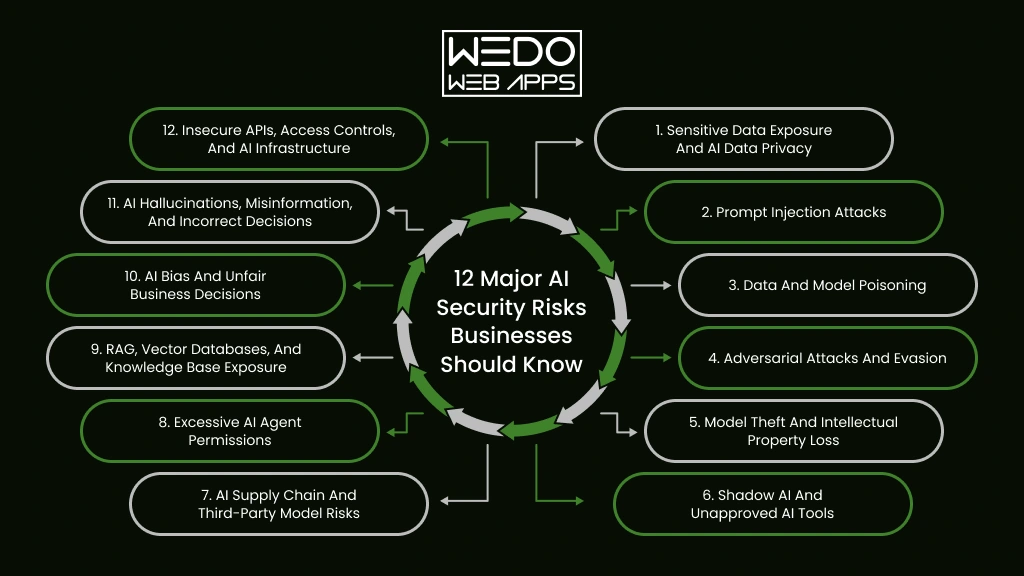
 

Key AI Security Risks for Businesses


AI security risks can emerge from the data you provide, the way a model is developed, how users interact with it, and the systems connected to it.

For your business, the level of exposure depends on what an AI system can access and what it is allowed to do. A content generation tool has limited access compared with an AI agent that can retrieve customer records, update a CRM, or execute actions through an API.

Understanding the following risks can help you identify where your AI environment needs stronger protection.

1. Sensitive Data Exposure and AI Data Privacy

AI applications often handle information your business cannot afford to expose. This can include customer records, employee information, financial documents, contracts, source code, and internal reports.

Data can be exposed through prompts, model responses, connected databases, retrieval systems, or poorly configured third-party AI services. The problem becomes more serious when employees use unapproved AI tools and unknowingly share confidential information.

For example: An employee uploads a confidential product document to a public AI tool to create a summary. If your company has no policy controlling such usage, sensitive information has already left your controlled environment.

Before deploying an AI system, you should know:

  • What information can the system access?
  • Where is that information stored?
  • Which users can retrieve it?
  • Can the model return information outside a user’s permissions?
  • How is sensitive information handled after processing?

Strong data classification, access controls, encryption, and approved AI usage policies can reduce your AI data privacy business risks.

2. Prompt Injection Attacks

A prompt tells an AI model what to do. A malicious prompt can also tell it what not to do, what information to reveal, or which instruction to ignore.

This is known as prompt injection.

The risk increases when your AI application can access private data or interact with external tools. An attacker may try to manipulate the model through direct user input or through content the system retrieves from another source.

For example: Your AI support assistant is designed to summarize customer emails. An attacker places hidden instructions inside an email asking the assistant to reveal information from its connected knowledge base. If the application lacks proper controls, the model may follow these instructions.

Prompt injection cannot be addressed by treating the model as a trusted decision-maker. Your application should limit what the model can access and what actions it can trigger.

Input filtering, output validation, least privilege access, attack testing, and human approval for sensitive actions can help reduce this risk.

3. Data and Model Poisoning

The information used to train, fine-tune, or support an AI model can influence how it behaves. If attackers manage to manipulate that information, they may influence the resulting model or its responses.

Data poisoning targets the data used by an AI system. Model poisoning targets the model or its components directly. Both can introduce incorrect behavior, unwanted outputs, or hidden vulnerabilities.


Type of poisoningWhat is targetedPotential impact
Data poisoningTraining or fine-tuning dataUnreliable or manipulated outputs
Retrieval data poisoningDocuments used by RAG systemsMisleading responses
Model poisoningModel or model componentsBackdoors or altered behavior


For example: You build a RAG-based internal assistant using thousands of company documents. An attacker manages to add manipulated information to the knowledge base. The AI may then retrieve that content and present it as legitimate business information.

You can reduce this exposure by controlling who can modify AI data, validating external sources, monitoring data changes, and testing models before deployment.

For businesses using custom models or RAG applications, protecting the data pipeline is just as important as protecting the application itself.

4. Adversarial Attacks and Evasion

AI systems can sometimes be manipulated by carefully modified inputs. The change may look insignificant to a person while causing the model to produce a very different result. These are known as adversarial attacks.

The risk depends on how your business uses AI. An image recognition system may misclassify a manipulated image. A fraud detection model may fail to identify suspicious activity. A security system may overlook an attack after receiving an input designed to bypass its detection.

For example: A business uses an AI system to detect fraudulent transactions. An attacker makes small changes to transaction patterns that appear normal to the model. The system may then classify suspicious activity as legitimate.

Adversarial attacks can affect both traditional machine learning models and newer AI applications. The goal may be to cause incorrect predictions, bypass detection, or reduce the reliability of an AI-powered process.

You can reduce the risk by testing models against manipulated inputs before deployment and continuing to test them after major changes. Input validation, anomaly detection, model monitoring, and fallback checks can add another layer of protection.

For high-impact applications, do not let a single AI prediction become the only basis for an important decision. A second verification step can prevent one manipulated input from causing a larger business problem.

5. Model Theft and Intellectual Property Loss

Not every AI security incident involves stealing customer data. Sometimes the target is the AI system itself.

A custom model can contain valuable business logic, trained behavior, proprietary techniques, or knowledge developed through significant investment. If attackers can study the model through repeated API queries, they may attempt to reproduce its behavior without gaining direct access to the original model.

This is known as model extraction or model theft.

The risk becomes particularly relevant when you offer AI capabilities through a public API. An attacker can automate large numbers of queries and compare the responses to understand how the model behaves.

Consider an AI-powered pricing engine built around your company’s proprietary data. An attacker does not necessarily need access to your source code or model files. By sending carefully selected inputs and analyzing the responses, they may gradually learn enough about the system to create a competing approximation.

What can be exposed?


AssetPotential Concern
Custom modelUnauthorized replication
Training dataLoss of proprietary knowledge
System promptsExposure of internal instructions
AI workflowsReplication of business logic
API endpointAutomated extraction attempts


This makes model protection an intellectual property concern as much as a cybersecurity concern.

For public-facing AI applications, you should pay attention to unusual query volumes, automated access patterns, and attempts to systematically probe model behavior. Rate limiting and API authentication can reduce unnecessary exposure, while keeping sensitive model details away from the public interface that an attacker can learn.

The goal is not to hide your AI application. It is to control how much of its underlying intelligence can be observed and reproduced.

6. Shadow AI and Unapproved AI Tools

Your employees may already be using AI tools that your IT teams have never approved.

A developer may paste code into an AI coding assistant. A sales employee may upload a customer proposal for rewriting. A recruiter may use an AI tool to screen resumes. Each action may seem harmless on its own.

Together, they can create a significant security gap.

This practice is commonly called Shadow AI. It refers to the use of AI applications, models, or services without proper organization approval, visibility, or security controls.

The problem is often not the AI tool itself. It is a lack of control around how your employees use it.


What employees may shareWhat could go wrong
Customer informationPersonal data may reach an unapproved service
Source codeProprietary code may be exposed
ContractsConfidential terms could leave your environment
Financial documentsSensitive business information may be disclosed
Product plansUnreleased information could become accessible outside your organization


The risk becomes harder to manage when employees use multiple AI services with different privacy policies, data retention practices, and security controls.

A practical response is to create an approved list of AI tools and define what information employees can use with each one. You should also provide secure alternatives for common tasks. Simply blocking AI access can encourage employees to find workarounds.

For businesses adopting AI at scale, visibility matters. You need to know which AI systems are being used, what data they receive, and who is using them. That gives your security team a much clearer picture of the actual AI environment instead of relying only on officially documented applications.

7. AI Supply Chain and Third-Party Model Risks

You do not always build an AI system entirely from scratch. Your application may depend on a foundation model, open-source library, external dataset, AI API, plugin, vector database, or cloud service.

Every external component adds another dependency to your security chain.

A vulnerability in one of those components can affect the application you built around it. The same concern applies when a third-party model or dataset has been tampered with before you integrate it.

Consider a company building an internal AI assistant with a third-party language model and several open-source packages. The application itself may pass your security checks. However, a compromised dependency could still introduce unwanted code, expose information, or alter how the application behaves.

Where supply chain risks can enter:

  • Third-party models: A model may contain unknown vulnerabilities or unwanted behavior.
  • Open-source components: An outdated or compromised package can create an entry point.
  • Datasets: Unverified data can contain manipulated or malicious content.
  • AI APIs: Poorly secured AI integrations can expose credentials or sensitive requests.
  • Plugins and tools: Connected functionality can give an AI application access to systems it does not need.

This is why evaluating an AI vendor should involve more than model accuracy and pricing. You should also understand where the model comes from, how dependencies are maintained, what data is processed, how access is controlled, and how security issues are reported.

For larger AI deployments, maintaining an inventory of models, datasets, dependencies, APIs, and external services can help you identify which components need closer review.

Your AI application is only as secure as the components you allow into it.

8. Excessive AI Agent Permissions

An AI assistant becomes a different security concern when it can take action instead of simply generating a response.

This is especially relevant to AI agents. An agent may be connected to your CRM, email platform, payment system, internal database, or other business tools. That access can make automation useful, but it also increases the potential impact of a compromised or manipulated system.

Consider an AI sales agent that can update customer records and send follow-up emails. If it has broader permissions than necessary, a manipulated instruction could cause changes across multiple accounts or trigger messages that were never approved.

The key question is simple:

What is your AI system allowed to do without human approval?


AI capabilitySecurity concern
Read customer recordsUnnecessary data exposure
Modify CRM recordsUnauthorized changes
Send emailsAutomated misuse
Access payment systemsFinancial consequences
Execute codePotential system compromise
Call external APIsWider attack surface


This risk is particularly relevant to businesses adopting agentic AI. The more autonomy you give an agent, the more carefully you need to define its boundaries.

A safer approach is to give each agent only the permissions required for its assigned task. Sensitive actions such as financial transactions, account changes, or external communications can also require human approval.

Your AI agent does not need unrestricted access to be useful. Giving it the minimum permissions needed to complete its job can significantly limit the damage caused by misuse or unexpected behavior.

9. RAG, Vector Databases, and Knowledge Base Exposure

RAG has changed how businesses build AI applications. Instead of relying only on what a model learned during training, a RAG system can retrieve information from your own documents and use it to generate a response.

That makes AI more useful for internal knowledge. It also introduces another place where security can fail.

A poorly configured RAG application may retrieve information that the current user should not be allowed to see. The issue can sit in the document repository, retrieval logic, vector database, or permissions connecting the two.

For example: Your company creates an AI assistant for employees across finance, HR, sales, and engineering. An employee asks a general question, but the retrieval system returns a confidential HR document; level permissions were not carried into the AI application.

Where RAG security can break down:


LayerPotential Issue
Source documentsSensitive files are added without proper classification
Data ingestionUnauthorized content enters the knowledge base
EmbeddingsInformation is stored without appropriate access controls
RetrievalThe system returns documents outside the user’s permissions
AI responseSensitive retrieved information appears in the final answer


This makes AI data privacy business concern, particularly important for companies using RAG with internal knowledge.

You should apply the same access boundaries to AI retrieval that users already have in your underlying systems. A sales employee should not gain access to confidential finance information simply because both departments use the same AI assistant.

RAG security also requires attention to the content being retrieved. Untrusted documents can contain instructions designed to manipulate the model, creating another path for prompt injection.

As businesses connect LLMs with larger internal knowledge bases, securing the AI system and the data retrieval layer together becomes increasingly important.

10. AI Bias and Unfair Business Decisions

An AI system can produce consistent results and still produce unfair ones.

This happens when the data used to develop a model contains historical bias, certain groups are poorly represented, or the system relies on patterns that do not work equally well across different users.

The business impact depends on where you use AI.


Business UsePotential AI Bias Risk
RecruitmentQualified candidates may be screened unfairly.
LendingCertain applicants may receive less favourable outcomes.
InsuranceRisk assessments may differ unfairly between groups.
Customer ServiceSome customers may receive a different level of support.
Fraud DetectionLegitimate users may be flagged incorrectly.


Consider an AI recruitment system trained on historical hiring data. If past decisions favored a particular group, the model may learn those patterns and continue reproducing them. The system may appear objective because the decision comes from software, but the underlying data can still influence the outcome.

This is where AI bias business risk becomes more than an ethical concern. Unfair outcomes can lead to customer complaints, regulatory scrutiny, reputational damage, and poor business decisions.

You can reduce this risk by checking training and evaluation data for representation issues, testing model performance across relevant user groups, and reviewing high-impact decisions with appropriate human oversight.

For sensitive applications, accuracy alone is not enough. You also need to ask who the system works well for, who it does not, and why.

11. AI Hallucinations, Misinformation, and Incorrect Decisions

An AI system can produce an answer that sounds convincing and is still wrong.

This is commonly called an AI hallucination. A model may invent facts, provide an incorrect explanation, misinterpret information, or present a fabricated source with confidence.

The security concern increases when your business treats AI output as verified information.

For example, an AI assistant used by your sales team could generate an incorrect product specification. If that information reaches a customer, the issue moves beyond an inaccurate response. It can affect trust, sales conversations, and your brand’s credibility.

The risk becomes even greater when AI output feeds another system automatically.

AI output -> automated workflow -> business action

A wrong answer at the first stage can create a much larger problem at the final stage.

This matters for modern AI applications that use RAG and AI agents. Retrieval can provide additional context, but it does not guarantee that every generated response will be correct. An AI agent can also act on an incorrect conclusion if its workflow does not include appropriate checks.

For business-critical use cases, you should define where AI can operate independently and where verification is required. Responses that influence financial transactions, legal decisions, customer eligibility, or other high-impact outcomes deserve stronger review.

A useful rule is simple: the more consequences an AI output can create, the less you should rely on that output without verification.

12. Insecure APIs, Access Controls, and AI Infrastructure

Your AI model may be secure on its own, yet the application around it can still create an entry point for attackers.

Most business AI applications depend on APIs and supporting infrastructure. They connect models with databases, authentication systems, cloud services, business applications, and external tools. A weakness in any of these connections can expose the wider system.

Common areas to review include:

  • API authentication: Weak or exposed credentials can allow unauthorized requests.
  • Access controls: Users or AI agents may receive permissions they do not need.
  • Secrets management: API keys and service credentials should never be exposed through prompts, code, or logs.
  • Cloud configuration: Incorrect storage or network settings can expose AI data and infrastructure.
  • Logging: Without useful activity records, suspicious AI behavior can be difficult to investigate.
  • Model endpoints: Publicly exposed endpoints can become targets for abuse, automated probing, or excessive requests.

Consider an AI customer service application connected to your CRM through an API. If the API accepts requests without properly verifying permissions, an attacker may bypass the chatbot entirely and target the underlying business system.

This is why AI security systems need to cover more than the model. Your application layer, APIs, cloud environment, identity controls, and connected services all need appropriate protection.

A strong AI deployment should have clearly defined permissions, protected credentials, secure API configurations, network controls, and monitoring that can identify unusual activity. These measures provide the surrounding security that an AI model cannot provide by itself.

What Are the Business Consequences of AI Security Risks?
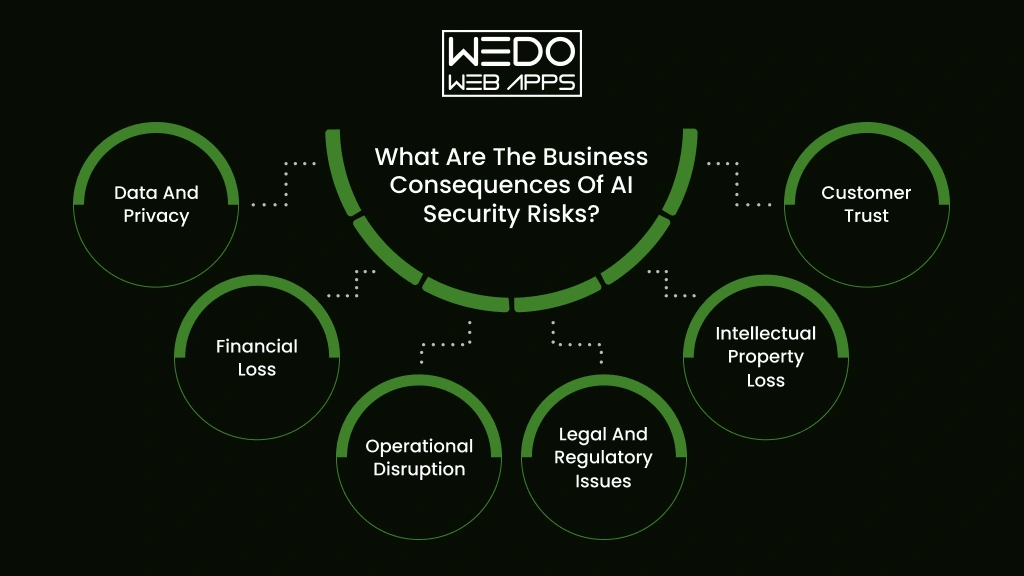
 

AI Security Risks and Business Impact


The impact of an AI security incident depends on what your system can access and how deeply it is connected to your business operations.

A compromised AI tool may expose confidential information. A manipulated model may influence business decisions. An AI agent with broad permissions could take unauthorized actions.


Business ImpactWhat can happenExample
Data and privacyCustomer or employee information may be exposedAn AI assistant reveals confidential customer records
Financial lossFraud, unauthorized transactions, or unexpected AI infrastructure costsAn AI workflow approves a transaction without proper verification
Operational disruptionAI-powered processes may stop working or produce unreliable resultsA fraud detection model incorrectly blocks legitimate transactions
Legal and regulatory issuesPrivacy violations or unfair automated decisions may trigger scrutinyAn AI recruitment system provides discriminatory outcomes
Intellectual property lossProprietary models, code, prompts, or business knowledge may be exposedAn attacker extracts information about a custom AI model
Customer trustUsers may lose confidence in how your business handles AI and their dataCustomers stop using a service after an AI-related data incident


The Risk Grows With AI Access

There is a simple relationship to consider:

More data access + more system permissions + more autonomy = greater potential impact

A content generation tool with no access to internal systems has limited exposure. An AI agent connected to your CRM, payment platform, email system, and internal knowledge base presents a much larger security concern.

That is why you should assess every AI application based on what it can access, what it can change, and what happens if its output is manipulated.

The goal is not to avoid using AI. It is to understand where an AI failure could affect your business and put the right controls around those areas.

How to Secure AI Systems in a Business
 

Securing AI Systems for Business


Knowing the security risks of AI is only the starting point. The next step is to build controls around the data, models, applications, and users involved.

You do not need to treat every AI application the same way. A simple content assistant may need basic data and access controls. An AI agent connected to customer records or a financial system requires stricter safeguards.

A practical AI system security approach can follow these steps.

1. Create an Inventory of Your AI Systems

Start by identifying every AI application your business uses.

Include internally developed models, third-party AI tools, AI features within SaaS products, APIs, RAG applications, and AI agents.

For each system, record:

What it does -> what data it accesses -> who uses it -> which systems it connects to -> what actions it can perform

This gives you visibility into your actual AI environment and helps identify systems that may otherwise go unnoticed.

2. Classify the Data Used by AI

Not every piece of business information should be available to every AI system.

Separate information based on its sensitivity. Customer records, financial information, source code, employee data, and confidential business documents may require stricter controls than publicly available content.

Then define which AI applications can access each category.

This is particularly important for businesses concerned about AI data privacy business risks. RAG applications also need to ensure that retrieved information follows the same permissions applied to the original source.

3. Apply Least Privilege Access

An AI application should have only the permissions it needs to complete its assigned task.

If an AI support assistant only needs to read customer order information, it should not have permission to modify payment details.

For AI agents, this becomes even more important. Restrict access to specific tools, databases, APIs, and actions. High-impact operations can require human approval before execution.

4. Test AI Against Real Attack Scenarios

Security testing should account for how an AI system can actually be manipulated.

Test for scenarios such as:

  • Prompt injection
  • Sensitive information disclosure
  • Data poisoning
  • Unauthorized tool access
  • Malicious retrieved content
  • Abnormal API usage
  • Attempts to bypass model restrictions

Testing should happen before deployment and after significant changes to the model, data, or application.

5. Monitor AI Activity After Deployment

Security does not stop when your AI application goes live.

Track unusual access patterns, repeated failed requests, unexpected data retrieval, abnormal API activity, and actions performed by AI agents.

Monitoring can help your team identify suspicious behavior before it develops into a larger incident.

6. Keep Humans Involved Where the Stakes Are High

AI can support decisions without being given complete authority over them.

For financial transactions, legal decisions, employee actions, account changes, or other high-impact processes, introduce human review where appropriate.

This creates a practical safeguard when the AI produces an incorrect or manipulated result.

7. Prepare for AI Security Incidents

Your incident response plan should account for AI-specific failures.

Decide in advance who can disable an AI application, revoke its credentials, isolate connected systems, investigate suspicious activity, and communicate with affected users.

This preparation can reduce confusion when an AI security incident occurs.

A practical approach to how to secure AI system is to treat security as part of the entire AI lifecycle. Protect the data before it reaches the model. Restrict what the model can access. Test how it behaves under attack. Then monitor what happens after deployment.
 

Secure AI Systems Before Business Risks

How AI Security Changes With Generative AI and AI Agents

The way you secure AI depends on what the system is designed to do. A model that only generates text has a different exposure from an AI application that retrieves internal documents or an agent that can act across business systems.

This shift matters because newer AI approaches can connect models with more data, tools, and workflows. Your security controls need to account for those connections.

Generative AI Expands the Number of Possible Attack Paths

Generative AI applications process prompts, documents, images, conversations, and other inputs. They can also generate content that gets passed to users or other systems.

That creates several points that need attention.

  • User input: Malicious prompts can attempt to manipulate the model.
  • Retrieved content: External or internal documents can contain instructions that influence model behavior.
  • Generated output: Incorrect or sensitive information may be passed to users or downstream applications.
  • Third-party models: Your applications may depend on services outside your direct control.

For businesses adopting Generative AI, AI system security therefore needs to cover the complete application rather than focusing only on the underlying model.

AI Agents Add Action-Based Risks

An AI agent can reason through a task and interact with tools to complete it. That could mean checking inventory, updating a CRM, creating a ticket, sending an email, or retrieving information from another system.

The security question changes from:

“Can the AI generate the wrong answer?”

To:

“What can the AI do if it generates the wrong answer?”

That distinction matters.

If an AI agent has access to sensitive systems, you should limit its permissions and define which actions require human approval. Agent workflows should also have clear boundaries so that one manipulated instruction cannot lead to unrestricted activity.

RAG Connects AI to Your Business Knowledge

RAG allows an AI application to retrieve information from your own knowledge sources before generating a response.

That can improve the usefulness of an AI assistant, but it also means your security controls must extend to the retrieval layer.

Your system should verify that:

  • Users can only retrieve information they are authorized to access.
  • Documents entering the knowledge base are trusted.
  • Sensitive information is appropriately classified.
  • Vector databases are protected.
  • Retrieved content cannot freely override application rules.

This makes RAG security particularly relevant when you use AI with internal company knowledge.

Multimodal AI Creates New Inputs

AI systems can now process combinations of text, images, audio, video, and other data formats.

That gives businesses more ways to use AI. It also creates more types of input that need to be evaluated for manipulation, malicious content, privacy concerns, and unexpected model behavior.

The broader point is simple. Modern AI security systems need to protect the model, the data it receives, the tools it can access, and the actions it can take. The more capable your AI application becomes, the more carefully its boundaries need to be defined.

AI Security vs Traditional Cybersecurity: What Businesses Need to Know

If your business already has firewalls, endpoint protection, identity controls, and vulnerability testing, you may wonder whether that is enough for AI.

It is a strong starting point. However, AI applications introduce additional security concerns around models, prompts, training data, retrieval systems, generated outputs, and autonomous actions.

The difference becomes clearer when you compare where each approach focuses.


Traditional CybersecurityAI Security
Protects applications, networks, and devicesProtects AI models and AI applications
Controls human user accessControls human and AI access
Secures databases and storageSecures training, retrieval, and prompt data
Tests software vulnerabilitiesTests model behavior and AI-specific attacks
Monitors system activityMonitors AI inputs, outputs, and actions
Manages software dependenciesReviews models, datasets, APIs, and AI components
Limits applications permissionsControls what AI agents can access and execute


AI Security Adds Another Layer

Suppose your company has an AI assistant connected to a customer database.

Your existing cybersecurity controls may protect the database from unauthorized network access. But you still need to determine whether the AI assistant can retrieve information that a particular employee should not see.

The database may be secure while the AI system security around it remains weak.

The same applies to an AI agent. Your identity and access management system may authenticate the agent correctly. You still need to decide whether that agent should be allowed to delete records, send emails, approve transitions, or access sensitive information.

You Need Both, Not One Instead of the Other

AI security should not replace your existing cybersecurity program.

Think of traditional cybersecurity as protecting the environment in which your AI operates. AI security systems add controls for risks created by the model and its interactions.

A mature setup brings both together:

Cybersecurity protects the infrastructure and systems.

AI security protects the model, data flows, AI interactions, and AI-driven actions.

This combined approach becomes more important as your business moves from simple AI tools toward RAG applications, Generative AI, and autonomous AI agents.

How to Build an AI Security Strategy
 

AI Security Strategy for Business


Securing one AI application is useful. Building a repeatable approach for every AI system you introduce is far more practical for a growing business.

Your strategy should account for the entire AI lifecycle. That includes the data you use, the model you select, the application you build, the permissions you provide, and what happens after deployment.

A simple framework can help you establish that process.

1. Map Your AI Environment

Start by documenting where AI is being used across your organization.

Look beyond internally developed applications. Include third-party AI tools, embedded SaaS features, APIs, RAG applications, AI agents, and employee-adopted tools.

You should be able to answer:

  • Which AI system are we using?
  • What information can they access?
  • Who is responsible for each system?
  • Which external services can be connected to them?

Without this visibility, it becomes difficult to assess your actual exposure.

2. Rank Risks by Business Impact

Not every AI application deserves the same level of security controls.

An AI tool that creates social media drafts presents a different concern from an AI system that evaluates loan applications or manages financial transactions.

You can prioritize systems based on factors such as:


FactorQuestion to consider
Data sensitivityWhat happens if the information is exposed?
System accessWhich business system can the AI reach?
AutonomyCan it take actions without approval?
Business ImpactWhat happens if the AI produces an incorrect result?
User exposureHow many customers or employees interact with it?


This helps you direct security resources toward the AI systems where a failure could cause the greatest damage.

3. Set Clear AI Governance Rules

Your employees need clear boundaries for using AI with clear AI governance.

Define which tools are approved, what information can be entered, who can deploy AI applications, and when human review is required.

Your policy should also address Shadow AI, third-party AI services, sensitive data, model changes, and incident reporting.

A good policy should tell employees what they can do with AI, rather than simply telling them what they cannot do.

4. Build Security Into AI Development

Security checks should happen before an AI application reaches production.

Review the data sources. Test the model. Check integrations. Assess permissions. Try to manipulate the system. Verify that users cannot retrieve information outside their access level.

For RAG applications, this includes testing retrieval permissions and the security of the knowledge base. For AI agents, it means checking every tool and action the agent can access.

5. Keep Reviewing the System

Your AI environment will change over time.

Models get updated. New data sources are connected. Employees adopt new tools. Agents receive additional permissions. Applications gain new features.

Your security strategy needs to keep pace with those changes.

Regular reviews can help you identify whether an AI system still has the right permissions, whether its data sources remain trustworthy, and whether new attack methods require additional controls.

For businesses working with AI security companies, these same areas are useful when evaluating a provider. Look for a partner that can assess your models, data, applications, integrations, and AI-specific risks rather than offering security controls that only cover your existing IT infrastructure.

A strong AI security strategy gives you a repeatable way to adopt AI while keeping its access, behavior, and business impact under control.

What Should Businesses Look for in AI Security Companies?

Choosing an AI security company is not simply about finding a provider with a long list of cybersecurity tools. Your requirements depend on how AI is being used across your business.

If you are deploying an internal AI assistant, you may need stronger data and IP protection and access controls. If you are building AI agents, you may need deeper testing of tool permissions, API access, and autonomous actions.

Before selecting a provider, assess whether it can address these areas:


CapabilityWhat to look for
AI asset discoveryVisibility into models, applications, APIs, agents, and third-party AI tools
Data protectionControls for sensitive information used in prompts, training, and retrieval
Model securityTesting for manipulation, poisoning, extraction, and unexpected behavior
AI application securityProtection against prompt injection and other AI-specific attacks
Agent securityPermission controls and safeguards for AI actions
MonitoringDetection of unusual model, API, data, and user activity
GovernancePolicies, risk assessments, reporting, and compliance support


Look Beyond the Model

A provider that only protects the model may leave important gaps.

Your AI application could still be exposed through its API, vector database, cloud infrastructure, third-party integrations, or user access controls.

For example, an AI security platform may detect unusual model behavior. You still need controls that prevent an AI agent from accessing a financial system it has no business using.

Consider Your AI Architecture

Your security requirements should match the technology you are actually using.

  • Using LLMs? Look for protection against prompt-based attacks and sensitive information exposure.
  • Using RAG? Assess document access, retrieval permissions, and vector database security.
  • Using AI agents? Focus heavily on tool permissions, action controls, and human approval.
  • Using third-party models? Review model provenance, dependencies, data handling, and supply chain risks.

The right AI security system should fit into your existing security environment rather than operate as an isolated layer. For most businesses, the strongest option is a provider that can assess the full AI application and its connections instead of focusing on one component.

AI Security Checklist for Businesses

Before deploying a new AI application or expanding an existing one, you should be able to answer a few basic security questions.

Use this checklist to identify gaps in your current AI system security setup.

AI Data Security

  • Have you identified what business data the AI system can access?
  • Have you classified sensitive and confidential information?
  • Can users retrieve only the information they are authorized to access?
  • Are third-party AI tools approved for handling business data?
  • Are data retention and detection practices clearly defined?

Model and Application Security

  • Have you tested the AI application for prompt injection?
  • Are training and retrieval data reviewed before use?
  • Have you assessed third-party models and dependencies?
  • Are AI APIs protected with appropriate authentication and permissions?
  • Are model endpoints protected against unauthorized or excessive requests?

AI Agent Security

If your application uses agentic AI, check these areas separately:

  • Does each agent have only the permissions it needs?
  • Are sensitive actions subject to human approval?
  • Can you see which tools and APIs an agent has accessed?
  • Can you quickly revoke an agent’s permissions if something goes wrong?

Governance and Monitoring

  • Do employees know which AI tools they are allowed to use?
  • Do you have a process for identifying Shadow AI?
  • Are AI systems monitored after deployment?
  • Do you have an AI-specific incident response process?
  • Are security reviews repeated when models, data, or integrations change?

If several answers are “No”, your AI environment may need a close security assessment. The goal is not to eliminate every possible risk. It is to understand where your exposure exists and address the risks that could have the greatest effect on your business.

Make AI Security Part of Your Business Growth Plan

AI can bring real value to your business, but that value depends on how safely you deploy and manage it. The security risks of artificial intelligence can affect your data, models, applications, employees, customers, and connected business systems.

You do not need to avoid AI because these risks exist. You need to understand where your exposure comes from.

Start by identifying the AI system you use. Review the data they access. Limit permissions. Test for AI-specific attacks. Monitor how systems behave after deployment. If you are using RAG or AI agents, pay close attention to retrieval permissions and automated actions.

Most importantly, treat security as part of your AI development process rather than something you address after deployment.

When you build the right controls around your AI security systems, you can give your teams room to use AI while keeping sensitive information and critical business operations better protected.
 

Secure AI Systems You Can Trust