skip to content

How Long Does It Take to Build a Web App? (2026 Timelines by Project Type)

The Short Answer: It Depends on These 5 Factors
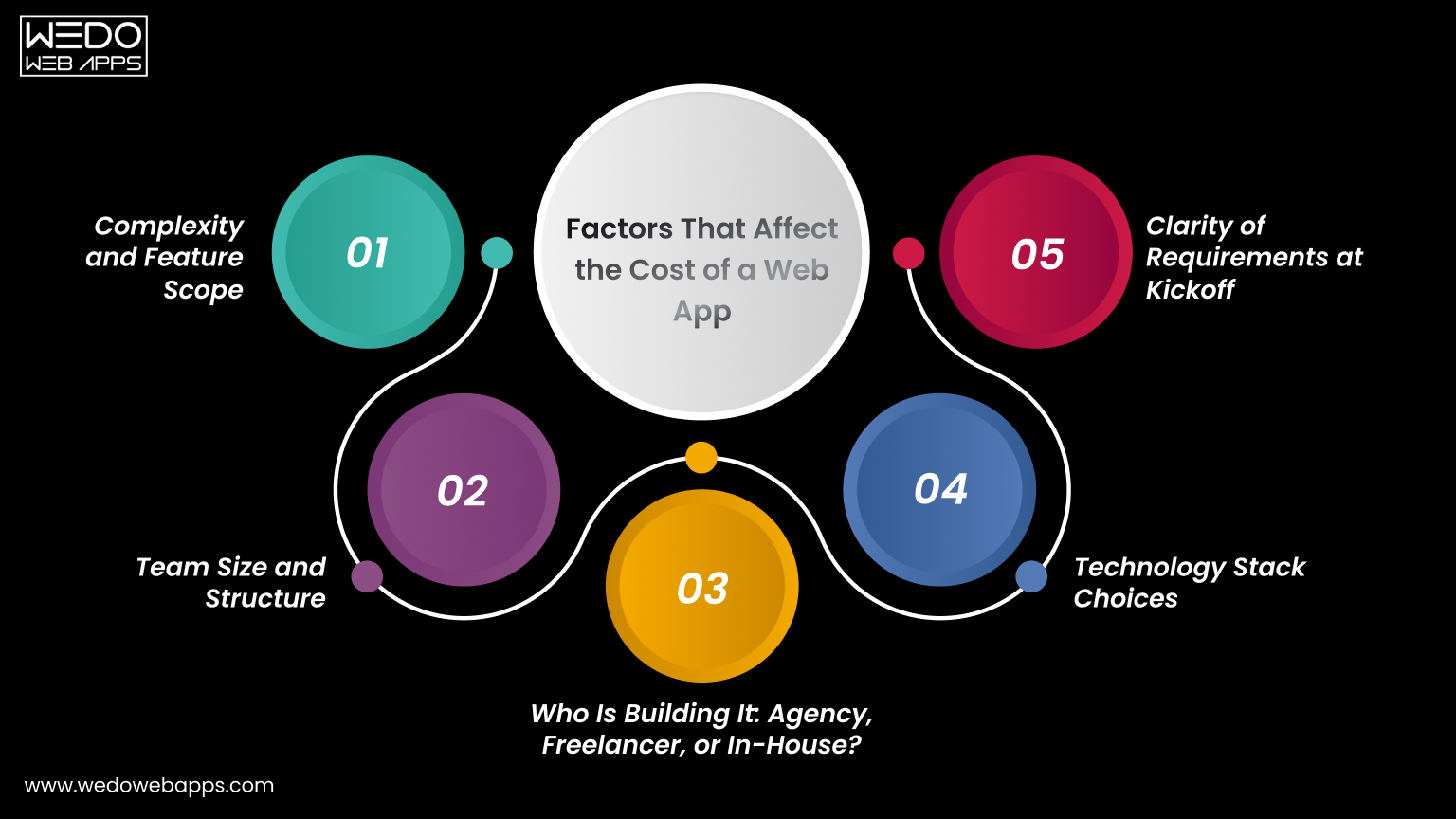
Affect the Cost of a Web App

If you are searching for how long does it take to build a web app, the honest answer is: it depends on various factors. No two projects are identical. These 5 variables define your web app development timeline more than anything else, and understanding them before you start will save you weeks of confusion later.

1. Complexity and Feature Scope

A simple web app with basic functionality behaves very differently from the platform with real-time dashboards, third-party API integrations, and custom reporting. The more features you need, the longer it will take to create web apps. Always define what is in scope and what is not before any work begins.

2. Team Size and Structure

A solo developer will take significantly longer than a cross-functional team working together. Team size is one of the most direct levers on how long does it take to develop a web application. Larger and more experienced teams compress timelines but require stronger coordination to avoid rework.

3. Who Is Building It: Agency, Freelancer, or In-House?

This factor is missing from most of the guides that you will look at, but the fact is that this directly shapes your web app development timeline. Here is what each option typically means:

  • Agency: Fastest delivery due to structured teams and defined processes. Best choice for businesses needing reliable web app development services on a deadline.
  • Freelancer: More budget-flexible but slower due to limited capacity and higher coordination overhead.
  • In-house Team: Longest process. Hiring and onboarding before a single line of code is written adds months to any timeline.

4. Technology Stack Choices

Using proven frameworks like React, Next.js, or Laravel significantly reduces the development time compared to building a custom solution from scratch. Stack familiarity within your team also matters enormously when making web apps at speed. The right stack choice is a foundational decision in any custom web development engagement.

5. Clarity of Requirements at Kickoff

Incomplete briefs are the single biggest hidden time killer in web application development. Projects that begin with well-defined user stories, wireframes, and technical requirements move faster and land closer to schedule. Ambiguity creates rework, and rework is the enemy of every web project development timeline.

Ready to build your web app

Simple Web App: 6-10 Weeks

A simple web app includes a handful of screens, basic user authentication, and straightforward data management. Think internal tools, directory sites, basic booking apps, or lead capture platforms. For those asking how long does it take to build a web app at its simplest level, 6-10 weeks is the realistic answer with an experienced team.

What is Typically Included

  • User registration and login.
  • Simple data input and display (CRUD operations).
  • Basic admin panel for content or record management.
  • Responsive design for desktop and mobile.

Phase Breakdown

  • Discovery: 1 week
  • UI/UX design: 1-2 weeks
  • Development: 3-4 weeks
  • QA & testing: 1 week
  • Launch: 1 week

Who This is Right For

Simple web apps are ideal for internal business tools, early-stage startups testing a concept with minimal investment, or businesses that need a focused digital tool without full product complexity. If your project fits this scope, your web app development timeline is the easiest to commit to and the easiest to protect.

MVP/ Proof of Concept: 8-12 Weeks

If you are a startup validating a product idea before raising funding, an MVP is your goal. The web app development timeline for an MVP is tight by design. Those asking how long does it take to make an app for early-stage validation will find the MVP route is always the fastest path to learning whether your idea works with real users.

What an MVP Should Include

  • Core user journey only, nothing beyond the primary value proposition.
  • Clean, functional UI that is not over-engineered.
  • Essential integrations: payments, authentication, or notifications where directly needed.

What an MVP Should NOT Include

  • Advanced reporting or analytics dashboards.
  • Complex admin workflows or multi-role permission systems.
  • Multi-language or multi-currency support.
  • Features not directly tied to validating your core hypothesis.

Phase Breakdown

  • Discovery: 1-2 weeks
  • UI/UX design: 2 weeks
  • Development: 4-5 weeks
  • QA & testing: 1-2 weeks
  • Launch: 1 week

The MVP Mindset

Scope discipline is what keeps an MVP inside the 8-12 week web app development timeline. Everything added beyond the core hypothesis is a week added to your launch date. Ship fast, learn fast, and build the right thing in version two. This is the most powerful timeline strategy available to any founder.

Want to build an MVP

Mid-Complexity Web App: 3-5 Months

This is the most common category when people ask how long does it take to develop an app for a growing business. Mid-complexity apps include SaaS tools with dashboards, multi-role user access, payment integrations, and data reporting features.

If you are creating web apps for an established product or team, this is typically where your build lands.

Features That Push a Project Into This Category

  • Role-based access control including admin, user, and editor.
  • Payment gateway integration, such as Stripe or PayPal.
  • Third-party CRM or API connections.
  • Email notification systems and automated workflows.
  • Custom reporting, filters, and data export.

Phase Breakdown

  • Discovery: 2 weeks
  • UI/UX design: 3-4 weeks
  • Development: 8-10 weeks
  • QA & testing: 2-3 weeks
  • Launch: 1-2 weeks

What to Watch Out For

Mid-complexity projects are the category most prone to scope creep. The feature list that starts at 15 items grows to 25 mid-build because stakeholders see the product taking shape and add requests. A locked scope agreement before development begins is the single most important protection for your web app development timeline at this level.

Full-Scale SaaS Platform: 5-9 Months

When creating web apps at the SaaS level, you are dealing with multi-tenant architecture, complex subscription billing, deep third-party integrations, and the need to build for scale from day one. For anyone asking how long does it take to develop a web application at SaaS complexity, this range is non-negotiable. Engaging a specialist SaaS application development team is the most reliable way to stay on schedule.

Why SaaS Timelines Cannot Be Compressed

  • Security requirements must be architected, not added after launch.
  • Multi-tenant data isolation requires careful database design from day one.
  • Subscription and billing logic adds significant backend complexity.
  • Scalability decisions made early in the build affect the entire codebase.

Phase Breakdown

  • Discovery: 3-4 weeks
  • UI/UX design: 4-6 weeks
  • Development: 14-20 weeks
  • QA & testing: 4 weeks
  • Launch: 2 weeks

SaaS-Specific Considerations

SaaS platforms require uptime guarantees, disaster recovery planning, and performance under load from day one. These are not optional add-ons. They are foundational requirements that take time to build correctly. Any SaaS web app development timeline that promises delivery in under 5 months for a full platform is almost certainly underestimating the scope.

Need a dedicated SaaS development partner

Enterprise Web Application: 9 Months and Beyond

Enterprise-grade web application development is a category most guides ignore entirely. These projects involve legacy system integrations, strict compliance requirements such as GDPR, HIPAA, and SOC2, multi-team coordination, and governance layers that simply do not exist in smaller builds. Making web apps at enterprise scale requires a structured software product development process to manage scope, compliance, and delivery risk effectively.

What Makes Enterprise Builds Fundamentally Different

  • Integration with existing ERP, CRM, HR, or finance systems.
  • Security audits and compliance sign-offs required before any launch.
  • Multiple stakeholder review cycles that extend every approval stage.
  • Custom infrastructure, DevOps pipelines, and environment configurations.
  • Governance documentation and change management processes.

How to Plan an Enterprise Web App Timeline

An enterprise project should begin with a dedicated discovery phase of at least 4 weeks before any design or development starts. This is where legacy integration complexity, compliance requirements, and stakeholder alignment are mapped out. Skipping this phase on an enterprise build is the most expensive mistake a project team can make.

Web App Development Timeline by Phase
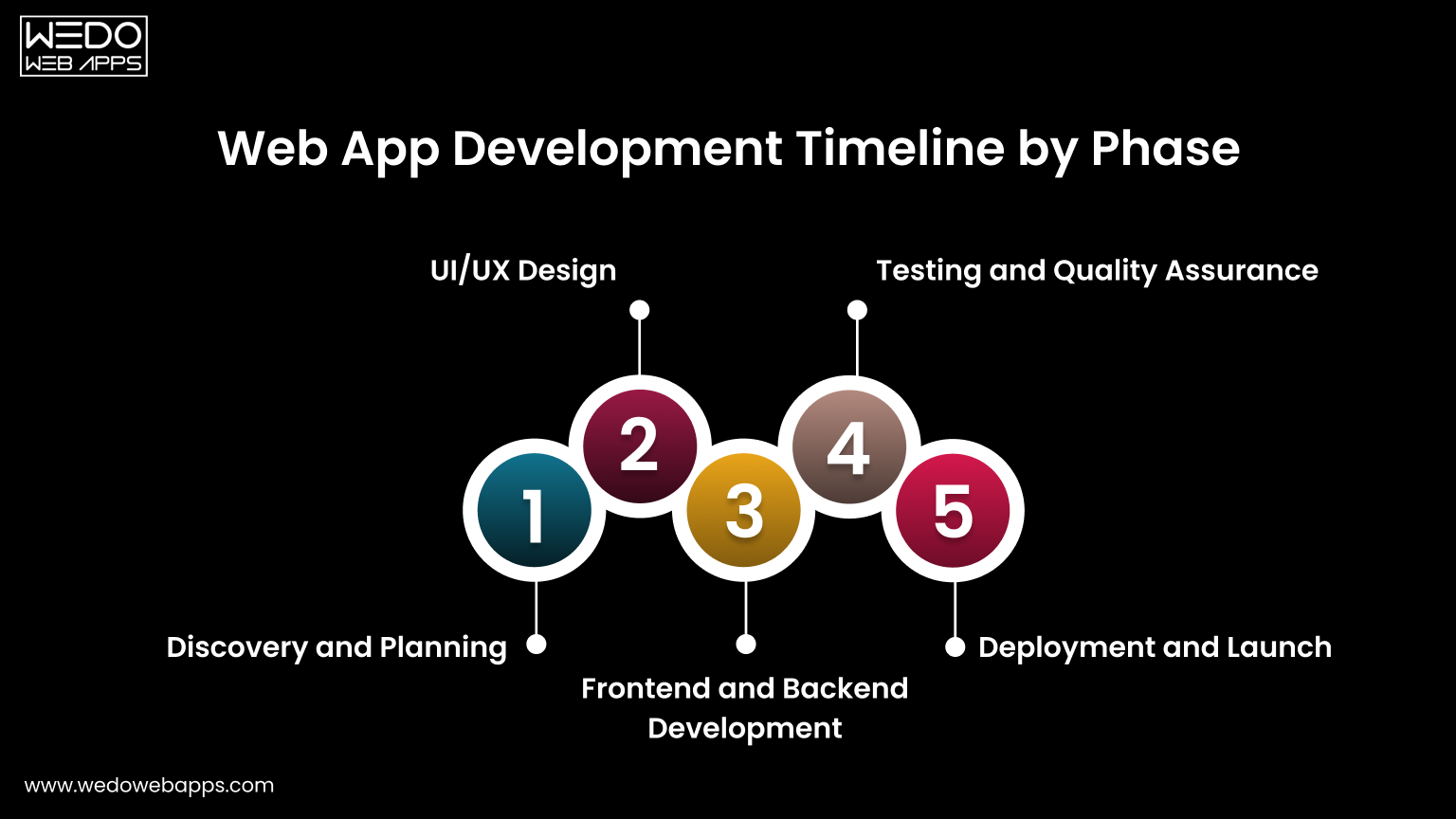
Web App Development Timeline by Phase

Phase 1: Discovery and Planning (1 to 4 weeks)

Discovery is where the project is defined. Skipping or rushing it is the most common reason web app development timelines blow out later. Proper discovery covers technical requirements, user stories, architecture decisions, and a realistic project plan that the entire team can commit to.

Every hour of clarity added at this stage removes hours of rework later. A two-week discovery phase that prevents a four-week rebuild is always the right investment.

Phase 2: UI/UX Design (1 to 6 weeks)

Design defines how users flow through the product, how decisions are made, and how errors are handled. Poor design decisions made here affect the entire development phase and are expensive to fix once code is written.

  • For MVPs: Wireframes are sufficient. Keep it lean and fast.
  • For mid-complexity and SaaS: High-fidelity prototypes with interactive flows reduce developer misunderstandings and accelerate the build phase significantly.

Unlimited revision rounds without a defined approval process are one of the most consistent causes of web app development timeline overruns. Lock down a maximum revision cycle before design begins and enforce it.

Phase 3: Frontend and Backend Development (3 to 20 weeks)

Development is the largest phase in every project type and runs two parallel workstreams that must stay coordinated to avoid further issues.

  • Frontend: Everything the user sees and interacts with. Component libraries like Tailwind UI or Material UI reduce frontend time significantly versus building from scratch.
  • Backend and APIs: Business logic, data management, and integrations. REST API design, database schema, and authentication are the most time-intensive backend tasks in most web app builds.
  • Database and Infrastructure: Choosing the right database for the use case and setting up staging and production environments correctly adds 1-2 weeks but prevents costly migrations later.

Phase 4: Testing and Quality Assurance (1 to 4 weeks)

QA is consistently underestimated. Testing should run in parallel with development, not start after it ends. Catching bugs in development is five times cheaper than catching them post-launch.

  • Simple apps and MVPs: Manual testing across key user flows is typically sufficient.
  • Mid-complexity and SaaS platforms: Automated regression testing is strongly recommended to protect the web app development timeline as the codebase grows.

Phase 5: Deployment and Launch (1 to 2 weeks)

Launch is not just pressing a button. It involves configuring production infrastructure, setting up monitoring and error tracking, running pre-launch tests in a staging environment, and, in most cases, managing a soft launch before full rollout.

A soft launch to a limited user group catches production-specific issues before they affect your entire user base. For SaaS and enterprise apps, this is non-negotiable and must be planned into your web app development timeline from the start.

Web App Timeline by Project Type At a Glance

Use this table to quickly map your project type to a realistic web app development timeline across every phase from discovery through launch.

Project Type Discovery Design Development QA Launch Total
Simple Web App 1 week 1–2 weeks 3–4 weeks 1 week 1 week 6–10 weeks
MVP/PoC 1–2 weeks 2 weeks 4–5 weeks 1–2 weeks 1 week 8–12 weeks
Mid-Complexity 2 weeks 3–4 weeks 8–10 weeks 2–3 weeks 1–2 weeks 3–5 months
Full-Scale SaaS 3–4 weeks 4–6 weeks 14–20 weeks 4 weeks 2 weeks 5–9 months
Enterprise App 4+ weeks 6+ weeks 20+ weeks 4+ weeks 2+ weeks 9+ months

Note: Estimates apply to experienced development teams. The timeline also depends on team size, technology stack, and the clarity of scope from the start of development.

Not sure where your project fits

Real-World Web App Timeline Examples by Industry

Understanding how long does it take to develop a web application is much clearer when applied to specific industries. Here is a realistic timeline based on common project types across different sectors.

eCommerce Web App (4-6 months)

A fully functional eCommerce web app includes product catalog management, shopping cart, payment gateway integration, order management, customer accounts, and an admin dashboard. Inventory management and logistics integration push most builds into a 4-6 month range from day one.

SaaS Dashboard or Analytics Platform (5-8 months)

Creating web apps at the SaaS level for analytics or business intelligence is one of the more time-intensive categories. Real-time data visualization, subscription billing, multi-role access, and performance optimization for large datasets all contribute to a 5-8 month web app development timeline. Partnering with a dedicated SaaS application development team from the start is the most reliable way to stay on schedule.

Healthcare Web App (6-10 months)

Healthcare applications add 2-3 months to the standard timeline purely for compliance. HIPAA compliance, audit logging, patient data encryption, and legal sign-offs are non-negotiable requirements. Anyone asking how long does it take to develop a web application in healthcare should plan for the longer end of the range, regardless of functional complexity.

eLearning Platform (4-7 months)

An eLearning platform involves course builder tools, video streaming or embedding, progress tracking, quizzes, assessment engines, certificates, and payment integrations. Video infrastructure alone adds significant complexity and infrastructure cost. Most eLearning builds land in a 4-7 month range when making web apps for education at a production-ready standard.

Internal Business Tool or Admin Portal (6-12 weeks)

Internal tools are the fastest category in web app development because they require no public-facing design polish, SEO optimization, or marketing integrations. Workflow automation tools, reporting dashboards, and role-based admin portals typically land in a 6-12 week range, making them an ideal first project for a team exploring web apps for the first time.

What Slows Projects Down: The Real Reasons
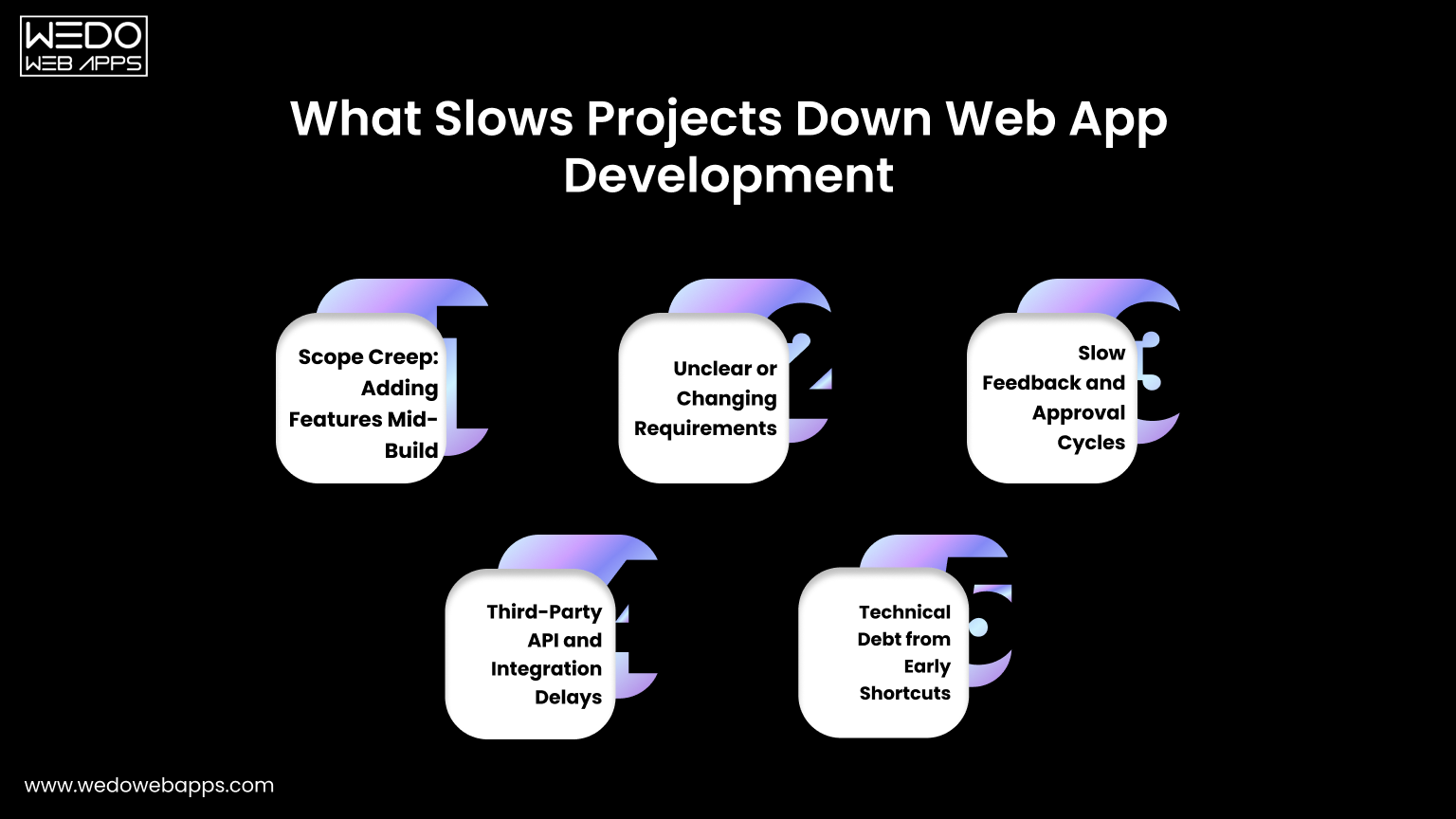
Slows Projects Down Web App Development

Ask any experienced development team why web app development timelines slip, and you will rarely hear purely technical reasons. The most common causes are process and communication failures that are entirely preventable.

Scope Creep: Adding Features Mid-Build

Every new feature added after development begins carries a compounding cost. A feature that takes one week to build in isolation may take two or three weeks mid-project because it requires changes to existing database schemas, API endpoints, and complete UI components. Define your scope before development begins and treat it as locked.

Unclear or Changing Requirements

Vague briefs are the most common real-world delay across all project types. When web developers must interpret unclear requirements, rework becomes inevitable. The clearer your brief from the start, the closer your actual web app development timeline will be to your original estimate.

Slow Feedback and Approval Cycles

Design reviews waiting on stakeholder sign-off, content delays, legal reviews, and slow responses to developer questions all add unplanned weeks to any web app development timeline. Assign a single decision-maker on your side and commit to a 24-48 hour turnaround on all feedback requests.

Third-Party API and Integration Delays

Payment gateways, CRM connections, identity providers, and external data feeds are outside your control. Incomplete API documentation, rate limits that require workarounds, and sandbox environments that do not behave like production can each add 1-2 unplanned weeks. Always budget integration buffer time when calculating how long does it take to develop a web application.

Technical Debt from Early Shortcuts

Moving fast by skipping proper architecture decisions or choosing the wrong database schema early feels like it saves time. It almost never does. Technical debt accumulates interest, and rebuilding poorly structured code mid-project always costs significantly more than doing it correctly the first time.

process for keeping web app projects

How to Reduce Your Web App Timeline Without Cutting Corners

Speed and quality are not mutually exclusive. Here is how experienced teams shorten their web app development timeline without compromising the result. These strategies apply whether you are building web apps for the first time or scaling an existing product.

Start With an MVP

The fastest way to learn whether your web app idea works is to build the minimum version that lets real users experience the core value. Every feature beyond that is a hypothesis. Ship fast, learn fast, and build the right thing in version two. This is the most impactful web app development timeline reduction strategy available to any founder or product manager.

Lock Your Scope Before Development Begins

A locked scope with signed-off wireframes and documented user stories before a single line of code is written is the single highest-ROI action you can take. Teams that begin building web apps with ambiguous requirements consistently miss estimates. Teams that begin with clarity consistently land closer to them.

Use Proven Frameworks and Pre-Built Components

React, Next.js, Tailwind CSS, and Laravel exist because experienced teams have solved the same problems thousands of times. Using battle-tested frameworks when making web apps eliminates weeks of work that would otherwise go into building foundational infrastructure. Reserve your custom build time for what is genuinely unique to your product.

Run Design and Development in Parallel Where Possible

Good agencies and experienced in-house teams do not wait for all design to be complete before starting development. Backend architecture, database design, and API endpoint development can all be produced while UI design is being finalized for later screens. Overlapping phases intelligently compress the overall web app development timeline without creating rework risk.

Choose the Right Team Structure for Your Timeline

Agency teams are faster because they are built for parallel execution. Freelancers offer flexibility but mostly sequential work. In-house teams offer long-term control but slow starts. This decision alone can affect how long does it take to build a web app more than almost any other factor. Match your team structure to your actual timeline goal, not just your budget preference.

Cost vs Timeline: Understanding the Tradeoff

One of the most important and least-discussed dimensions when creating web apps is the relationship between cost, timeline, and quality. Understanding this tradeoff helps you make smarter decisions and set more realistic expectations for your web app development timeline.

Why Faster Does Not Always Mean More Expensive

An experienced agency with a structured team may deliver a web app in 10 weeks that a solo freelancer would take 20 weeks to complete. The agency costs more per hour but less in total calendar time, which reduces opportunity cost, time to market, and often total project cost when you account for your own time spent managing a longer engagement.

Where Cutting Budget Actually Extends Your Timeline

Hiring cheaper developers to save budget often extends your web app development timeline significantly. Inexperienced developers write code that requires more revision, more QA cycles, and more debugging. The cost you save on the hourly rate is frequently spent on extra weeks of work. For web app development, experience is one of the best investments you can make.

How to Balance Speed, Quality, and Budget Realistically

The classic triangle is real: fast, good, cheap. Pick any two. For most projects, the right balance is to define your non-negotiable quality standards, set a realistic web app development timeline based on those standards, and find a team whose budget fits within those constraints. Trying to compromise on all three simultaneously is how projects fail.

Get a Free Timeline Estimate for Your Project

Whether you are in the early stage of planning or ready to start making web apps immediately, knowing your realistic web app development timeline is the first step towards a successful project.

At WEDOWEBAPPS, we specialize in web app development, custom web development, SaaS app development, and software product development. Our team reviews your requirements and delivers a detailed, phase-by-phase web app development timeline within 24 hours, with no commitment required.

Tell us about your project, and we will tell you exactly how long it takes to build a web app for your specific requirements, what it will cost, and what team structure will deliver the best result for your timeline and budget.

Connect with us

Difference Between Website and Web Application: A Guide for Businesses

Web Application vs Website: Choosing the Best Solution

Every successful digital product starts with the right choice. For many businesses, that comes down to a web application vs websites. Getting it wrong can limit user engagement, slow down the growth, and increase the cost later. And when you get it done right, then you get the stage for smoother operations and better customer experience.

If you are unsure which options are suitable for your goal, then you are not the only one. This comparison breaks down the real difference between website and web application in practical terms. It helps you understand what fits your business today and what can support growth tomorrow.

If you are also looking for clarity on your specific requirements. Talk to an expert web app development company and get guidance based on your use case, budget, and long-term plans.

To help you on this journey of web application vs website, we have created this comprehensive guide that clearly shows the difference and which one is more suitable for your business. Once you have the clarity, you can easily choose a web app or website.

To help you understand better, let’s start with the basics.

Why People Often Confuse Websites and Web Applications

Many business owners use the term website and web application interchangeably. This confusion usually starts with how both are accessed through a browser. On the surface, websites and web applications look similar. But behind the scenes, their purpose and structure are very different.

A website is often built on present information. And a web application is designed to let users perform actions, manage data, or complete tasks. When these boundaries are blurred for you, you will likely struggle to distinguish between a website and a web application in real-world business scenarios.

Understanding this distinction early will help you to avoid making poor technology choices. It also ensures that the product you invest in supports user expectations, functionality, and future expansions.

What Is a Website?

What is a Website


A website is a collection of interconnected web pages created to share information with users. It is usually publicly accessible and does not require any user to log in or perform any possible action to get access. Most websites focus on presenting content in a clear and structured manner.

Businesses commonly use a website to introduce their brand, explain services, and build trust among their potential customers. These platforms are well-suited when the primary goal is visibility, communication, and content delivery, rather than user-driven functionality.

Definition of a Website in Simple Terms

In simple terms, a website works like a digital brochure that people can access anytime through a browser. Users can read pages, view images, watch videos, or submit basic forms, but they do not actively control or manipulate data.

This is also where the question of whether a website is considered software usually arises. A website is created using software technologies, and it mainly serves as a content display system. For instance, a business website that lists services, shares company details, and provides a contact form fits this definition well.

Common Features of a Website

A website usually includes:

  • Static or semi-dynamic pages such as home, about, services, and contact sections.
  • A navigation menu that helps users move between the pages easily.
  • Content management systems are often used to update content without technical expertise.

Most websites do not require user accounts or authentication. The website development process is structured to ensure clarity, accessibility, and consistent information delivery across devices.

Typical Use Cases for Websites

Websites are ideal for businesses that need an online presence without complex user interaction. They work well for brand awareness, service promotion, content publishing, and lead generation.

For example, corporate sites, blogs, portfolio websites, and informational platforms are common use cases where a website meets business needs effectively.

Boost Visibility with a Website

What Is a Web Application?

Web App Functionality Explained

A web application is an online system that allows users to perform dynamic actions, manage data, and interact with features in real-time through a browser. Unlike a website, it responds to user inputs and processes information behind the scenes. This is where the comparison of web application vs website becomes important for businesses that have functional requirements.

Web applications are built to support workflows, automation, and maintain user-specific experiences. They often include dashboards, forms, and tools that change on the basis of user actions.

Definition of a Web Application

In simple terms, a web application is software that runs on a web browser. It is designed to handle logic, store data, and deliver the results based on the user interaction. This explains how do web-based applications and websites differ at a functional level.

For example, a project management tool that allows users to create tasks, assign roles, and track progress is a web application.

Core Feature of Web-Based Applications

Web-based application systems rely on:

  • Backend system to process data securely.
  • Include user authentication, role-based access, and database-driven content.
  • Real-time updates and integrations with third-party services.

These features allow web applications to support complex business operations and user-driven processes.

Common Use Cases for Web Applications

Web applications are suitable for platforms that require frequent interaction and data handling. Examples include customer portals, booking systems, dashboards, and software as a service products.

When businesses need users to log in, submit data, or complete tasks online, a web application provides the right structure and control.

Custom Business Web Application

How Do Web-Based Applications and Websites Differ?

Website vs Web App Explained

The difference between website and web application becomes clear when you look at how users interact with them. A website mainly delivers information. A web application allows users to take actions and receive results based on those actions.

This functionality gap discussed here defines how do web-based applications and websites differ in real use.

Key Difference At a Glance

Comparison Factor Website Web Application
Primary Purpose Presents the information about the brand or services to visitors. Allow the user to perform the dynamic action with the use of a web-based application.
User Interaction Limited and mostly one-way. Continuous and input-driven.
Data Processing Minimal or can be considered as none. Extensive data handling and storage.
Authentication Usually not required for a website. Commonly required to maintain the performance.
Backend Logic Basic setup processing. Complex logic and workflows.
Scalability Needs Basically, it is content-focused. Web apps are more user and data-focused.

Let’s know about each difference in more detail.

User Interaction and Input Handling

Websites allow basic actions such as navigation through pages or submitting contact forms. Web-applications, on the other hand, are built for active participation. Users can enter data, modify records, and receive immediate responses. This is the key way web application vs website differ in everyday use.

Functionality and Business Logic

A website follows a fixed structure where content remains largely the same for every visitor. A web application processes requests, applies rules, and delivers results based on the actions of users. This functional depth explains the difference between website and web application in a business environment.

Authentication and User Roles

Most websites are accessible without the need for any login credentials. Web applications rely on an authentication system to manage users, permissions, and sensitive data. This ensures that secure access and controlled functionality are maintained.

Backend Complexity and Integrations

A website usually connects to simple content management systems. Web applications integrate with databases, APIs, payment systems, and third-party tools to support advanced operations.

Performance, Scalability, and Maintenance

Website scale mainly with the traffic and content updates. Web applications must scale with users, data volume, and activity levels. This requires ongoing maintenance and performance tuning.

Web Application vs Website: Side-by-Side Comparison

Website vs Web App Key Differences

When businesses compare a website with a web application, the decision should be based on function rather than appearance. Both are accessed through a browser, but their internal structure, purpose, and technical requirements are very different.

This detailed comparison explains how web application vs website differ across key factors that directly affect usability, performance, and long-term value.

Detailed Comparison Overview

Aspect Website Web Application
Core Objective Deliver information consistently to all visitors. Allow users to perform tasks and manage data.
User Type Anonymous or general visitors. Registered user with defined roles.
Interaction Level Limited to navigation and basic forms. Continuous interaction with dynamic responses.
Data Handling Minimal data storage or retrieval. Continuous interaction with dynamic responses.
Security Requirements Basic protection for content and forms. Advanced security for user data and access control.
Scalability Focus Traffic and content growth. User load, data volume, and feature expansion.
Maintenance Scope Content updates and minor fixes. Regular feature updates and performance tuning.

Let’s discuss each in detail.

Purpose and Goals

A website is built to communicate. Its main goal is to present information clearly and guide visitors towards an action, such as making an inquiry or learning about a service. Content remains mostly the same for every visitor.

A web application is created to operate as a tool. It supports workflows, automates processes, and adapts to its behavior based on user input. This difference between website and web application becomes critical when functionality is a priority.

Technology Stack Requirements

Websites often make use of a content management system and a front-end framework with minimal backend logic. Their technical setup is simpler and quicker to deploy.

Web applications require a structured backend, databases, APIs, and server-side logic. These components work together to handle requests, process data, and deliver personalized responses to users.

Security Expectations

Websites typically focus on protecting public content and preventing spam or misuse of forms. Security needs are limited because user data is rarely stored.

Web application manages sensitive information such as user profiles, transactions, or operational data. They require secure authentication, authorization, and data protection mechanisms to prevent unauthorized access.

Development Time and Cost Range

Websites generally involve shorter development cycles. Website development costs remain predictable because functionality is limited and updates are content-driven.

Web applications require detailed planning, testing, and ongoing improvements. Development time is longer due to complex features, integrations, and scalability needs.

Confused Between Website and Web Application

Is a Website Considered Software?

This question comes up more often, especially when businesses are deciding how complex their online platform needs to be. To answer it clearly, let us help you first understand what software actually means in a technical context.

How Software Is Defined in Technical Terms

Software refers to a set of instructions or programs designed to perform specific tasks. These instructions are designed to:

  • Process input
  • Apply Logic
  • Process data
  • Produce an output

Software systems are usually built to handle actions, calculations, or data management based on defined rules.

Web applications clearly fall into this category because they operate as interactive systems. They accept user input, process data, and respond dynamically.

Where Websites Fit Within That Definition

A website is created using software tools and technologies, but it does not always function as software itself. Most websites focus on presenting information rather than executing complex logic or processing user-driven actions.

In practical terms, a website:

  • Present content such as text, images, and videos.
  • Allow basic navigation across pages.
  • May include simple forms for inquiries.
  • Does not usually process complex logic.

So, is a website considered software? In a broad sense, it is built with software. In a functional sense, it is closer to a content delivery platform.

For example, a business website that displays services and contact details relies on software to exist, but it does not operate as a software system in the same way a web application does.

This difference between website and web application will help you to decide whether you need a simple informational platform or a fully functional web-based solution.

Examples That Clarify the Difference

Understanding theory is helpful, but real examples make the difference between website and web application easier to grasp. Many popular platforms appear similar on the surface, yet function very differently behind the scenes.

Is Facebook a Website or a Web Application?

Facebook functions as a web application. Users log in, create content, and interact with others. You receive the updates in real-time. Every action triggers data processing, from posting updates to managing connections and notifications.

Although it can be accessed through a browser like a website, its behavior aligns with web application functionality rather than simple content presentation.

Is an Online Store a Website or Web Application?

An online store often combines the different elements for both. Product listing pages behave like a website by presenting information. Features such as user accounts, shopping carts, payments, and order tracking operate as web applications.

This hybrid structure shows why the comparison of web application vs website is not always black and white. The classification depends on how much user interaction and data processing the platform supports.

Website or Web Application: Which One Do You Need?

Choosing the right options depends on what you want users to do on your platform. The difference between website and web application becomes clear when business goals, user expectations, and future growth are considered together.

When a Website Is the Right Choice

A website works best when the primary goal is to share information and attract inquiries. It suits businesses that want an online presence without complex functionality.

A website is a good fit if you need to:

  • Present company or service information.
  • Build brand credibility.
  • Publish blogs or updates.
  • Collect basic inquiries through forms.

When a Web Application Makes More Sense

A web application is suitable when users need to interact with the system regularly. It supports data-driven processes and user-specific experiences.

A web application is a better choice if you need to:

  • Allow users to log in and manage profiles.
  • Process data or automate the workflows.
  • Provide dashboards or reporting tools.
  • Scale functionality as user activity grows.

Making this decision easily will help you avoid the cost changes later and ensure that your platform supports both current needs and future expansion.

Expert Web Solution

Common Misconceptions About Websites and Web Applications

Web application vs website are often misunderstood because they look similar in a browser. This visual similarity hides a major functionality difference between website and web application that affects performance, scalability, and cost.

The common misconceptions are:

Misconception 1: Any Interactive Website Is a Web Application

Many assume that adding forms or animation turns a website into a web application. That is not the case.

In reality:

  • Basic forms only collect information.
  • Sliders and pop-ups do not process data.
  • Static content remains the same for all users.

Web-based applications differ because they process input, store data, and respond dynamically.

Misconception 2: Websites and Web Applications Can Do the Same Things

A website and a web application serve different purposes.

A website is designed to:

  • Share information
  • Support marketing goals
  • Guide users to inquiries

A web application is built to:

  • Manage user actions
  • Process business logic
  • Support workflows and automation

This distinction explains the difference between website and web application in real projects.

Misconception 3: Web Applications Are Only for Large Enterprises

Many small and growing businesses rely on web applications.

They are commonly used for:

  • Appointment booking systems
  • Customer portals
  • Internal dashboards
  • Subscription-based services

Misconception 4: A Website Can Easily Scale Into a Web Application

Some websites can evolve, but not all are built for that transition.

Without proper architecture:

  • Performance issues increase
  • Security risks grow
  • Development costs rise

Understanding how do web-based applications and websites differ helps businesses plan correctly from the start.

Final Thoughts

Understanding the difference between website and web application will help you to make an informed decision before investing your time and resources. While both are accessed through a browser, their purpose, structure, and functionality are very different.

A website is ideal for sharing information and building an online presence. A web application is designed to support interaction, data handling, and ongoing user activity. Choosing the right option depends on what you want the user to do and how you plan to grow.

If you are still unsure which solution fits your requirements, our web developer team can help you evaluate your goals and recommend the right approach. Share your question with us and get guidance tailored to your project needs.

Custom Web Development Services

Web Application Architecture Explained: Types, Best Practices, and Design Guide

What makes one web application lightning fast, and another one painfully slow, even when built with the same tech stack?

The Answer: Web Application’s Architecture.

A strong web app architecture decides how efficiently your backend handles requests, how strongly your frontend interacts with the users, and how well your database scales under load. From presentation layers to security frameworks, every component contributes to performance, scalability, and reliability.

A solid web application architecture lays the foundation for successful web application development, ensuring your app performs seamlessly, scales efficiently, and stays secure as it grows.

In this blog, we will dive deep into the anatomy of a modern web application architecture, decode architecture diagrams, and explore best practices to build secure, enterprise-level systems that stand the test of time.

What is Web Application Architecture?

Web application architecture diagram showing DNS, load balancer, web app server, database, caching, CDN, and cloud storage workflow.

Every modern web app you use, from Netflix streaming your favorite show to Amazon processing millions of product searches, is powered by one essential foundation: web application architecture.

In simple terms, web application architecture defines how the different components of a web app interact with one another. It’s the blueprint that dictates how users, servers, and databases communicate, ensuring that your app remains fast, secure, and scalable, no matter how complex it gets.

Think of it as the nervous system of a digital product.

When you click “Play” on Netflix, the frontend (what you see) sends a request to the backend (the logic and servers), which then retrieves data, like your watchlist or video stream, from a database, processes it, and sends it back to your device within milliseconds. That seamless experience is made possible by a well-designed web app architecture.

A typical web app is built on three main parts:

  1. Client-Side (Frontend): This is the interface users interact with, built using HTML, CSS, JavaScript, or frameworks like React, Angular, or Vue. It’s what you see on your screen, from buttons to dashboards.
  2. Server-Side (Backend): The brain of the operation, built with languages like Node.js, Python, or Java. It processes requests, applies logic, connects APIs, and ensures data flows correctly.
  3. Database: The memory of the app. It stores and retrieves all user data, product information, and content. Popular databases include MySQL, MongoDB, and PostgreSQL.

Now imagine this in action:

  • When you search for a product on Amazon, your browser (client) sends the query to Amazon’s servers (backend).
  • The backend fetches matching results from the database and sends them back as a response.
  • Within seconds, you see an updated product list, all thanks to a smooth web app architecture managing the behind-the-scenes communication.

A well-structured web application architecture ensures that:

  • The app performs efficiently under heavy traffic.
  • Data moves securely between layers.
  • The system scales seamlessly as the business grows.

That is why architecture is not just a technical detail; it is a strategic business asset. Whether it is a startup app or an enterprise-grade platform, robust architecture determines how adaptable and future-ready your digital solution truly is.

Core Components and Layers of Web Application Architecture

Layers of Web Application Architecture

A well-structured web application architecture is not just about components; it is about how those components are organized into logical layers that handle specific responsibilities. This separation of concerns makes applications scalable, maintainable, and easier to debug or upgrade.

Let’s look at the five key layers that form the backbone of a typical web app architecture.

1. Presentation Layer (Client-Side/UI Layer)

This is the layer users interact with, the visual part of your web application. It is responsible for rendering the interface, managing user experience, and handling front-end logic.

Built Using: HTML, CSS, JavaScript, and frameworks like React, Angular, or Vue.js.

Example: When you view your shopping cart on Amazon, the data is fetched and displayed through the presentation layer, which handles everything from button clicks to animation.

2. Business Logic Layer (Application Layer)

This layer processes data, applies business rules, and acts as the bridge between frontend and backend systems.

It ensures that the app responds correctly to each user request, whether it is calculating pricing, validating inputs, or processing a transaction.

Example: When Uber calculates your fare or surge pricing, that logic runs in this layer.

3. Data Access Layer (Persistence Layer)

This layer manages communication between the application logic and the database. It executes queries, handles ORM (Object Relational Mapping), and ensures efficient and secure data retrieval.

Example: When Netflix retrieves your “Continue Watching” list, the Data Access Layer translates that request into database queries and returns the right data.

4. Database Layer (Storage Layer)

The database layer stores, manages, and retrieves all application data, both structured (SQL) and unstructured (NoSQL).

Technologies used: MySQL, PostgreSQL, MongoDB, Cassandra.

Example: Every product detail, user profile, or order record on Amazon resides in this layer.

5. Integration / API Layer (Optional)

This optional but increasingly vital layer facilitates communication between external services and internal systems through APIs. It allows the app to interact with payment gateways, analytics tools, or third-party services.

Example: When an e-commerce app integrates with Stripe or PayPal for payments, it happens through the API layer using REST, GraphQL, or gRPC.

Together, these layers create a modular foundation, allowing teams to scale individual parts of the system independently without affecting the entire architecture.

Core Components of Web Application Architecture

Let’s explore the core components that make up a modern web app architecture:

1. Browser (Client Interface)

This is the user-facing component of the system, where everything begins. The browser displays the UI built using technologies like HTML, CSS, and JavaScript, and sends user requests, like clicks, searches, or logins, to the server.

Example: When you type “search” on Amazon, your browser sends that query to the backend system via HTTP requests.

2. Web Server

The web server acts as the middleman between the client and the backend. It handles incoming requests, manages sessions, and sends the correct responses back to the user. Popular web servers include Nginx, Apache, and Microsoft IIS.

Modern applications often use load balancers to distribute traffic across multiple servers for better performance and uptime.

Example: When millions of users stream on Netflix at the same time, load balancers ensure no single server is overloaded, maintaining speed and reliability.

3. Application Server (Backend Logic)

The application server is where the core business logic resides. It processes user inputs, communicates with the database, applies logic, and prepares responses.

This layer can be built using frameworks like Express (Node.js), Django (Python), or Spring Boot (Java).

Example: When Uber calculates your ride fare or estimated time of arrival (ETA), that logic runs on the application server.

4. Database Server

The database stores, retrieves, and manages all the data required by the application, from user profiles to transactional records.

Databases are typically divided into:

  • Relational Databases (SQL): MySQL, PostgreSQL, Oracle.
  • Non-Relational Databases (NoSQL): MongoDB, Cassandra, Redis.

Example: When Spotify saves your playlist or recently played songs, it stores that data in a distributed database cluster.

5. APIs (Application Programming Interfaces)

APIs serve as communication bridges between different parts of your application, or even between your app and external services. They enable modularity, scalability, and integration with third-party platforms.

Example: When you log in to a website using your Google account, it is an API connection between that website’s web application architecture and Google’s authentication system.

6. CDN (Content Delivery Network)

A CDN helps deliver static assets (like images, CSS, and videos) from geographically closer servers to the user, reducing latency and improving page speed.

Example: Netflix uses CDNs like Akamai or its own Open Connect CDN to stream content efficiently across the globe.

7. Caching System

Caching temporarily stores frequently used data so it can be quickly accessed without hitting the main database repeatedly. Tools like Redis and Memcached are often used for this.

Example: When you revisit a product on Amazon, it loads faster because that product data was cached from your last visit.

8. Security and Authentication Layer

This component protects the system from unauthorized access and data breaches. It includes features like:

  • Authentication (user login)
  • Authorization (access control)
  • Data encryption
  • Firewalls and security monitoring

Example: When you log in to your online banking portal, encryption and secure token validation ensure your credentials remain private, a key part of web application security architecture.

Together, these components form the operational backbone of any business web application, allowing it to handle millions of interactions reliably, without compromising on speed, scalability, and safety.

How Layers and Components Interact

Now that we’ve covered both the layers and core components, let’s understand how they actually work together to deliver a seamless experience.

Whenever a user interacts with your business web application, data flows through these layers in a structured and sequential manner.

Let’s visualize it with an example:

Example: Booking a Ride on Uber

  1. User Action (Presentation Layer):
    The user enters pickup and drop-off locations in the app UI.
  2. Request Processing (Business Logic Layer):
    The app calculates available drivers, fare estimates, and ETA using algorithms defined in this layer.
  3. Data Retrieval (Data Access & Database Layers):
    It queries the database for nearby drivers and retrieves necessary details (e.g., driver ID, location).
  4. Integration (API Layer):
    The app may connect to the Google Maps API for route data or payment gateways for billing purposes.
  5. Response Delivery:
    The processed data, driver details, fare, and ETA are sent back through the same layers, displayed instantly in the user interface.
[User Interface (Frontend)]
        ↓
[Business Logic Layer]
        ↓
[Data Access Layer]
        ↓
[Database / Storage]
        ↓
[API Layer / External Services]
       ↓
[Response to User Interface]

This data journey happens within milliseconds,  yet it reflects the deep orchestration of all layers and components working together.

A well-defined web app architecture diagram like this helps developers, architects, and business owners visualize how their system behaves, identify performance gaps, and plan for scalability or security enhancements effectively.

Understanding Web Application Architecture Diagram

A web application architecture diagram visually maps how different components of your web app interact, from user interfaces to databases. It is a powerful tool that helps developers, stakeholders, and designers stay aligned throughout the project lifecycle.

Why Does it Matter?

Without a clear architecture diagram for a web application, communication gaps often lead to integration errors, scalability issues, or security risks. Visuals eliminate ambiguity and make system dependencies transparent.

Key Diagram Types

  • Logical Diagram: Shows app modules and relationships (useful for planning).
  • Deployment Diagram: Displays how servers, APIs, and databases are deployed.
  • Data Flow Diagram: Traces how data moves between client, server, and storage.

Example: From Frontend to Backend

Imagine Netflix:

  • The client layer sends a request to browse content.
  • The API gateway routes it to the appropriate microservice (e.g., recommendations).
  • The application layer processes logic and fetches data from the database layer.
  • The response is cached and returned to the client interface.

Tools for Building Architecture Diagram

Tools like Lucidchart, draw.io, Cacoo, and Figma help teams create and share diagrams in real time, ensuring everyone stays on the same page.

Scalable and secure web application architecture with free consultation

Types of Web Application Architectures & Common Design Patterns

Choosing the right web app architecture is one of the most critical decisions that determines your application’s scalability, performance, and maintenance cost. Let’s explore the most common types used today, each suited for specific project goals and business needs.

Types of Web Application Architectures (Structure-Based)

1. Single-Page Application (SPA)

A single-page application (SPA) loads a single HTML page and dynamically updates content as users interact with it. Instead of reloading entire pages, only the required data is fetched from the server, offering a faster and smoother experience.

Examples: Gmail, Google Maps, Trello

Best For: Interactive dashboards, SaaS app development, or content-heavy platforms.

Key Benefit: Enhanced user experience and reduced server load.

2. Multi-Page Application (MPA)

Multi-Page Applications follow the traditional model, where every interaction or page load triggers a new request to the server. While they may seem slower than SPAs, MPAs excel in managing large amounts of content and complex features.

Examples: Amazon, eBay, and most enterprise web portals.

Best For: Enterprise web applications or eCommerce websites with deep navigation.

Key Benefits: SEO-friendly and robust for large-scale systems.

3. Progressive Web Apps (PWAs)

Progressive Web App Development combines the accessibility of the web with the performance of native apps. They can work offline, send push notifications, and be installed directly from a browser, bridging the gap between mobile and web.

Examples: Starbucks, Pinterest, and Twitter Lite.

Best For: Businesses aiming to enhance mobile engagement without developing native apps.

Key Benefit: Faster load times, offline access, and higher user retention.

4. Monolithic Architecture

In a Monolithic architecture, all components (UI, logic, and database access) are part of a single codebase. It’s simple to develop and deploy initially, but it can become difficult to scale as the application grows.

Best For: Startups or MVPs requiring quick launches.

Key Benefit: Simple deployment and lower initial cost.

Challenge: Poor scalability and longer update cycles.

5. Microservices Architecture

Microservices architecture breaks an application into smaller, independent services that communicate via APIs. Each service can be built, deployed, and scaled separately, making it ideal for complex enterprise systems.

Examples: Netflix, Uber, and Spotify

Best For: Scalable and modular enterprise web application.

Key Benefits: Flexibility, fault isolation, and easy scaling.

Challenge: Requires advanced DevOps setup and monitoring.

6. Serverless Architecture (FaaS)

Serverless (Function-as-a-Service) architecture eliminates the need to manage infrastructure. Developers focus on writing functions that automatically scale based on demand, while the cloud provider handles everything else.

Examples: AWS Lambda, Google Cloud Functions.

Best For: Event-driven apps, automation tools, or APIs with variable loads.

Key Benefit: Pay only for usage and scale effortlessly.

Challenge: Cold starts and vendor lock-in.

7. Hybrid Architecture

A hybrid architecture blends the stability of monoliths with the flexibility of microservices. For instance, core modules can remain monolithic, while new features are built as microservices.

Best For: Businesses modernizing legacy systems without full migration.

Key Benefits: Gradual modernization with minimal disruption.

Common Design Patterns in Web Application Architecture

Once you have chosen the right web app architecture, the next step is to design how different components interact internally. This is where web application architecture patterns come into play, offering reusable blueprints for performance, scalability, and maintainability.

Let’s look at the most widely adopted architectural patterns in modern web development:

1. Model-View-Controller (MVC) Pattern

The MVC pattern divides an application into three key layers: Model (data), View(UI), and Controller(logic). This separation enhances maintainability and allows teams to work on different parts independently.

Example: Frameworks like Ruby on Rails, ASP.NET MVC, and Spring MVC use this structure.

Why it matters:

  • Clean separation of concerns.
  • Easier debugging and testing.
  • Faster parallel development

2. Model-View-ViewModel (MVVM) Pattern

An evolution of MVC, MVVM is commonly used in frameworks like Angular, VueJS, and React (with hooks and state management).

Here, the ViewModel acts as a data binder between the user interface and business logic, keeping both layers synchronized in real-time.

Ideal for: Dynamic frontend web apps requiring responsive, real-time updates (e.g., chat apps or dashboards).

3. Microkernel (Plug-in) Architecture

The Microkernel pattern, also called plug-in architecture, keeps a minimal core system while adding independent, optional modules (plug-ins) to extend functionality.

Example: IDEs like Eclipse or VS Code, where plug-ins add language or feature support.

Best for: Applications that require frequent updates or customizable modules.

Benefit: Highly flexible and maintainable system without core modifications.

4. Event-Driven Architecture (EDA)

In an event-driven architecture, different services or components communicate via events instead of direct calls. When something happens (like a new order or payment), an event triggers other services to respond asynchronously.

Example: Netflix uses EDA to handle millions of concurrent streams, recommendations, and analytics in real time.

Why it’s Powerful:

  • Enables real-time responsiveness
  • Improves scalability and fault isolation
  • Ideal for microservices and IoT systems

5. Layered (n-Tier) Architecture

One of the most traditional and still popular approaches, the Layered Architecture, organizes the system into separate tiers, typically presentation, business, data access, and database layers. Each layer has a defined role and communicates only with adjacent layers.

Best For: Enterprise web applications that demand stability, security, and clear structure.

Benefit: simplified maintenance, predictable performance, and strong separation of concerns.

6. Service-Oriented Architecture (SOA)

SOA organizes an application as a collection of services that communicate over a network, typically using SOAP or REST APIs. Though similar to microservices, SOA is broader, often used in enterprise ecosystems where services must interact with legacy systems.

Example: Large banking or insurance platforms integrating CRM, billing, and reporting systems.

Benefit: Strong interoperability and reusability across systems.

7. Microservices Pattern (API-First Design)

Microservices pattern applies modularization through APIs; each service focuses on a single business capability. Paired with API gateways and containers (Docker, Kubernetes), it enables massive scalability and agile updates.

Example: Amazon and Spotify scale thousands of microservices independently to serve global traffic.

Benefit: Fault tolerance, independent deployment, and continuous scalability.

8. Serverless (Event-Triggered) Pattern

In a serverless web application architecture, backend logic runs in short-lived functions triggered by specific events (like file uploads or user logins). Developers focus purely on code, while infrastructure and scaling are managed automatically by cloud providers.

Example: Slack and Netflix use serverless functions for analytics, alerts, and automation.

Benefit: Cost-efficient, scalable, and ideal for unpredictable workloads.

In practice, many businesses use a hybrid approach, blending multiple design patterns to achieve optimal flexibility, for example, combining microservices with event-driven patterns for real-time scalability.

Security in Web Application Architecture

In today’s threat landscape, security can no longer be an afterthought; it must be integrated into the web application architecture from the very beginning. Building security at the design level ensures that vulnerabilities are minimized and that your application can withstand evolving cyber risks while maintaining performance and user trust.

Importance of Built-in Security at the Design Level

Embedding security during the architecture phase is far more effective and cost-efficient than patching vulnerabilities later. A secure web application architecture proactively considers authentication, encryption, data protection, and secure coding standards throughout the development lifecycle.

Why it Matters:

  • Reduces exposure to cyberattacks.
  • Builds user trust and compliance readiness.
  • Protects sensitive business and customer data.

Example: Companies like Netflix and Salesforce follow a “security by design” approach, embedding automated security checks in their CI/CD pipelines to identify threats early.

Web Application Security Architecture Explained

A web application security architecture defines how security mechanisms are implemented across the entire system, from the user interface to backend APIs and databases.

Key Objectives Include:

  • Preventing unauthorized access
  • Securing data transmission
  • Ensuring application integrity and availability.

A simplified security layer in a web app architecture diagram looks like this:

User -> Auth Gateway -> Application Server -> Database -> Monitoring/Logging

Each stage implements its own security measures, such as encryption, token validation, and access controls to create multiple defense layers.

Authentication, Authorization, and Session Management

Authentication verifies identity; authorization defines permission. Together, they ensure users only access what they are meant to.

Modern Standards include:

  • OAuth 2.0 / OpenID Connect: For secure, token-based login
  • JWT (JSON Web Tokens): Stateless, scalable session management
  • MFA (Multi-Factor Authentication): Adds an extra verification layer

Best Practices:

  • Always use short-lived tokens.
  • Securely store refresh tokens.
  • Implement logout and idle session expiry mechanisms.

Data Encryption (At Rest and In Transit)

Encryption ensures that even if data is intercepted, it remains unreadable.

  • Use AES-256 for encrypting the database and file storage.
  • In Transit: Use HTTPS with TLS 1.3 for secure client-server communication.
  • Hashing: Store passwords with bcrypt or Argon2 for one-way protection.

Example: eCommerce platforms encrypt payment data using TLS, ensuring no sensitive information is transmitted in plain text.

API Security, Rate Limiting, and Token Management

APIs are the backbone of modern web app architectures, but they are also common attack targets.

Best Practices:

  • Enforce authentication and authorization for every API call.
  • Implement rate limiting to prevent abuse or DDoS attempts.
  • Rotate API keys regularly and use HMAC for request signing.
  • Validate all payloads to avoid injection attacks.

Example: Netflix uses an API gateway that authenticates, throttles, and monitors millions of requests daily, securing data flow across its global microservices network.

Common Vulnerabilities and Mitigation Strategies (OWASP Top 10)

The OWASP Top 10 highlights the most frequent web vulnerabilities. Here is how to mitigate them:

Vulnerability Description Mitigation
Injection (SQL/XSS) Unsanitized input exploited for malicious code Validate and sanitize user inputs
Broken Authentication Weak credential handling Use strong password policies, MFA, and token-based auth
Sensitive Data Exposure Poor encryption or storage Use HTTPS and AES-256 encryption
XML External Entities (XXE) Malicious XML input Disable external entity processing
Broken Access Control Unauthorized data access Enforce least-privilege principles
Security Misconfiguration Default settings or open ports Regular audits and hardening
Cross-Site Scripting (XSS) Injected scripts in client browsers Encode outputs and sanitize inputs
Insecure Deserialization Manipulated serialized data Validate and verify object types
Using Vulnerable Components Outdated libraries Regular dependency scanning
Insufficient Logging & Monitoring Delayed breach detection Use SIEM tools and alerts

Secure DevOps (DevSecOps) Practices

Security must be continuous, not just a final checkpoint. That is where DevSecOps comes in, integrating security at every stage of development and deployment.

Core Principles:

  • Automate vulnerability scans in CI/CD pipelines
  • Use code signing and dependency scanning tools
  • Regularly perform penetration tests
  • Foster a “security-first” developer culture

Example: Organizations adopting DevSecOps detect vulnerabilities 3x faster and reduce breach risks by integrating tools like SonarQube, Snyk, and OWASP Dependency Check early in the pipeline.

A secure web app architecture ensures that every user interaction, API call, and data transaction is monitored and protected, forming the backbone of a trusted digital ecosystem.

Web app architecture models comparison – monolithic, microservices, and serverless

Performance, Scalability, and Reliability

In any web application architecture, performance and reliability directly affect user experience and business outcomes. From a business web application or an enterprise web application architecture, these concerns must be designed in from day one.

Vertical vs. Horizontal Scaling

  • Vertical scaling (scale-up) upgrades a machine’s CPU/RAM, simple but limited.
  • Horizontal scaling (scale-out) adds instances and is the go-to for large-scale apps because it enables redundancy and elastic capacity.

Load Balancing & Caching

  • Use load balancers to distribute traffic and prevent single points of failure.
  • Cache frequently accessed data (Redis, Memcached) to reduce database load and speed responses.

CDN and Edge Computing

  • Push static assets and some processing to edge servers to cut latency and improve global performance.

Database Optimization & Replication

  • Optimize queries, add appropriate indexes, and separate read/write workloads.
  • Use replication (read replicas or multi-master) for availability and scale.

Fault Tolerance and Failover

  • Define redundancy (multiple instances, geo-replication) and automated failover; consider circuit-breaker patterns to isolate failures.

Monitoring, Observability, & Testing

  • Track latency, error rates, and resource usage with tools like Prometheus/Grafana or Datadog.
  • Automate performance, load, and stress tests in CI/CD to catch regressions early.

Best Practices and Design Principles

Building a scalable and secure web app architecture is not just about technology; it is about discipline in design and development. These core principles ensure that your business web application remains flexible, reliable, and future-ready.

Separation of Concerns & Modular Architecture

Divide the architecture into independent modules (UI, logic, data) so teams can work in parallel, and updates can be rolled out without breaking the whole system.

DRY, SOLID, and KISS Principles

  • DRY (Don’t Repeat Yourself): Reuse logic and components to reduce redundancy.
  • SOLID: Encourage, maintainable, extensible code design.
  • KISS (Keep it Simple, Stupid): Avoid overengineering, simplicity improves performance and debugging.

API-First and Contract-Driven Design

Design APIs before implementation. This allows teams to build frontend and backend simultaneously while maintaining consistency.

Version Control & Backward Compatibility

Use Git strategically, tag releases, follow branching models, and maintain backward compatibility to prevent breaking changes in production.

Testing & CI/CD

Automate unit, integration, and end-to-end tests. Integrate testing pipelines in CI/CD to ensure every build meets performance and security benchmarks before deployment.

Infrastructure as Code (IaC)

Use Terraform, AWS CloudFormation, or Ansible to manage infrastructure declaratively, ensuring consistency, versioning, and easier rollbacks.

Documentation & Collaboration

Maintain detailed documentation, from the web application architecture diagram to API reference, to simplify onboarding and enable effective team communication.

Real-World Use Cases and Enterprise Scenarios

Modern enterprise web application architectures are designed to handle scale, complexity, and evolving user demands. Let’s explore how different systems apply these architectural models in real business contexts.

Business Web Applications and SaaS Models

Think of platforms like Shopify and Slack, they run on multi-layered web app architectures that handle thousands of concurrent users while ensuring uptime and data integrity. SaaS models depend heavily on efficient load balancing, distributed databases, and secure authentication flows.

Enterprise Systems: CRM, ERP, and Internal Tools

Large organizations use web application architecture to power complex systems such as Salesforce (CRM) or SAP (ERP). These integrate multiple modules, like accounting, HR, and Operations, under a unified data layer with strict access control and scalability.

Multi-Tenant Web App Architectures

SaaS products like Zoom or HubSpot rely on multi-tenancy, a single codebase serving multiple clients with data isolation and performance optimization. This model reduces operational costs while maximizing scalability.

Microservices for Distributed Systems

Enterprises like Netflix and Amazon have migrated to microservices-based architectures, where independent services communicate via APIs. This allows teams to deploy, scale, and update individual modules without downtime.

Migration: Monolith to Microservices

A gradual transition strategy often starts with identifying independent modules in a monolithic app (e.g., user management or billing). These are then extracted as separate microservices, orchestrated via containers (Docker/Kubernetes), ensuring zero service disruption.

Modern enterprise web architecture and legacy system migration

Choosing the Right Architecture for Your Web App

Selecting the right web application architecture can make or break your project. The ideal setup balances performance, scalability, and cost-effectiveness.

Assessing Needs

Start by evaluating your goals. Do you need enterprise-level scalability or a lightweight MVP? Factor in your budget, expected traffic, and your team’s technical expertise.

Trade-offs

Each architecture type has trade-offs. For example, microservices offer flexibility but require complex DevOps, while a monolith is simpler but harder to scale later. The key is to balance performance vs. cost and flexibility vs. simplicity.

Decision Frameworks

Use decision models like ADR (Architecture Decision Records) to document trade-offs or C4 Model diagrams to visualize system interactions and dependencies.

Prototype Before Scaling

Develop small prototypes to test scalability, latency, and integration points before committing to full-scale deployment.

Plan for Evolution

Design with the future in mind, ensure your architecture can evolve with emerging technologies like AI, edge computing, or serverless models.

Implementation and Deployment Considerations

Once your web app architecture is finalized, execution is all about ensuring stability, scalability, and automation.

Infrastructure Options

Choose between on-premises, cloud (AWS, Azure, GCP), or hybrid environments depending on data sensitivity, compliance, and cost.

Containerization & Orchestration

Use Docker to package services and Kubernetes to orchestrate them, ensuring consistent performance across environments.

DevOps & CI/CD Integration

Automate code deployment, testing, and monitoring pipelines to ensure fast, reliable releases and continuous improvement.

Blue-Green & Canary Deployments

Deploy new versions gradually with blue-green or canary strategies to minimize downtime and reduce risk.

Rollback & Disaster Recovery

Always maintain rollback mechanisms and disaster recovery plans, snapshots, backups, and geo-redundancy to ensure business continuity.

Ensuring Uptime & Resilience

Adopt multi-zone deployment, auto-scaling, and real-time monitoring to maintain 99.9%+ uptime for your business web application.

Common Pitfalls and Mistakes to Avoid

Even well-planned systems can fail if foundational principles are ignored. Here’s what to watch for:

  • Overengineering early: Don’t implement microservices unless your scale demands it.
  • Tight coupling: Keep modules independent to simplify updates and maintenance.
  • Ignoring scalability or security upfront: Build elasticity and web app
  • lication security architecture into your design phase.
  • Poor documentation: A lack of architectural documentation leads to misalignment and “tribal knowledge.”
  • Tech stack overload: More tools don’t always mean better performance. Prioritize compatibility and maintainability.
  • Neglecting monitoring: Without observability, debugging issues in production becomes chaotic.

Future Trends and Emerging Patterns

Edge & Fog Computing

Data is moving closer to the user, edge, and fog computing reduces latency and boosts real-time processing for global users.

Micro Frontends & Composable Architecture

Front-end architectures are adopting the modularity of microservices, enabling teams to build independent UI components.

Event Sourcing & CQRS

Enterprise systems increasingly separate read/write operations to enhance performance, reliability, and traceability.

AI/ML in Architecture Design

AI-driven models now predict traffic, detect anomalies, and even suggest auto-scaling thresholds within enterprise web application architecture.

Headless & API-First Ecosystems

Decoupled front-ends communicate with back-ends via APIs, powering omnichannel apps and integrations seamlessly.

Sustainable Architecture Practices

“Green computing” is emerging, optimizing server loads, using efficient coding practices, and reducing energy consumption for eco-friendly systems.

Conclusion

A robust web application architecture is more than a technical blueprint; it’s a growth enabler. From security to scalability, the right architecture ensures long-term performance, business agility, and customer satisfaction.

At WEDOWEBAPPS, we specialize in designing scalable, secure, and future-ready web applications. Whether you’re an enterprise modernizing legacy systems or a startup building from scratch, our experts craft architecture that evolves with your business.

Whether you’re planning a new product or optimizing an existing system, our experts can help you design a scalable architecture that accelerates your web app development journey.

Business web application architecture review for future-ready growth