skip to content

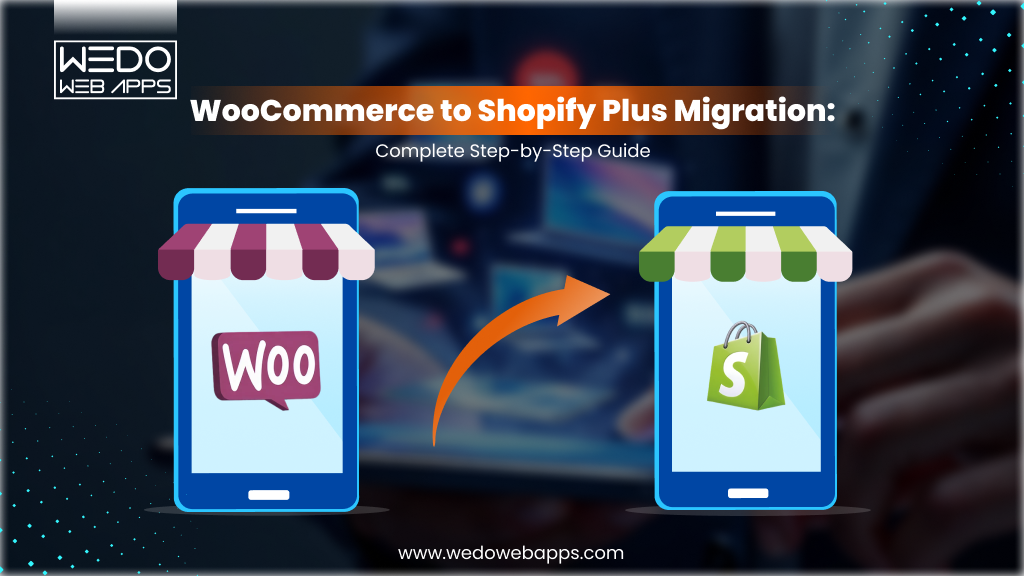
WooCommerce to Shopify Plus Migration: Complete Step-by-Step Guide

Introduction

Moving from WooCommerce to Shopify Plus is one of the biggest decisions a growing eCommerce development approaches. But when done right, it sets you up for faster growth, better performance, and fewer technical headaches. But when done wrong, it can cost you SEO rankings, customer data, and revenue.

This guide covers everything you need to know, from deciding whether to migrate, all the way through to launch day and beyond. Whether you are doing it by yourself or hiring a Shopify Plus migration expert, this is your complete playbook.

Plan WooCommerce to Shopify migration roadmap

When Should You Migrate From WooCommerce to Shopify Plus?

Not every store is ready to migrate. But there are clear signs that tell you when it is time to make the move.

Signs Your WooCommerce Store Has Hit Its Ceiling

WooCommerce is a solid platform, but it has limits. Over time, you may notice that managing the platform is taking more time than actually growing your business. Here are the most common warning signs:

  • Page load time keeps getting slower despite ongoing fixes.
  • Plugin conflicts are breaking features regularly.
  • Hosting costs keep climbing as your traffic grows.
  • Your checkout experience has not improved in years.
  • Your development team spends more time on maintenance than on new features.

If any of these sound familiar, your WooCommerce store has likely hit its ceiling.

The Business Triggers That Make Migration Urgent

Some business situations make migrating from WooCommerce to Shopify not just a good idea but urgent. These include:

  • Rapid product catalog growth with a Shopify developer that is straining your database.
  • Expanding into international markets that need multi-currency support.
  • Launching a wholesale or B2B channel that needs proper account management.
  • A funding round or acquisition that requires enterprise-level infrastructure.
  • Preparing for a peak season where downtime or slow performance is not an option.

Is Standard Shopify Enough, or Do You Need Shopify Plus?

Standard Shopify works well for stores making up to around $500,000 – $1 million per year. If your store is beyond that or if you need any of the following, Shopify Plus is the right choice:

  • Custom checkout scripting
  • B2B and wholesale functionality
  • Advanced automation via Shopify Flow
  • Multiple storefronts from one admin
  • A dedicated merchant success manager

The cost difference between Shopify and Shopify Plus is real, but for a store at scale, the return on investment almost always justifies it.

What Actually Happens When You Move from WooCommerce to Shopify: The Full Picture

Moving from WooCommerce to Shopify is not just a platform switch. You are transferring:

  • Your entire product catalog
  • Customer accounts and purchase history
  • Order records and transaction data
  • SEO metadata and URL structure
  • Payment gateway integrations
  • Every plugin and its functionality

When this is done correctly, your customers notice nothing except a faster and cleaner store. When it is done incorrectly, you can lose search rankings, break your checkout, and fragment years of order history.

Who Should Not Migrate Yet (And What to Fix First)

If your WooCommerce development data is messy, like duplicate products, broken image links, incomplete customer records, and inconsistent SKUs, then migrating will just move that mess to a new platform.

Before you migrate WooCommerce to Shopify, make sure you:

  • Clean up duplicate or incomplete product data.
  • Identify Shopify app replacements for your most critical plugins.
  • Audit your customer and order data for gaps.
  • Have a clear plan for handling customer functionality.

Migration works best as a planned upgrade, not a rescue operation.

Talk to migration experts for store readiness

WooCommerce vs Shopify Plus: Total Cost of Ownership Compared

Most people compare WooCommerce and Shopify Plus by subscription price alone. That is the wrong comparison. When you look at the total cost of Shopify website development with ownership, the picture looks very different.

WooCommerce Hidden Costs: Hosting, Maintenance, Plugins & Dev Hours

WooCommerce is free to install, but running it at scale is not. Here is what a typical mid-to-large WooCommerce store actually pays:

  • Managed Hosting: $200-$1,500 per month, depending on traffic.
  • Plugin License and Renewals: $2,000-$8,000 per year.
  • Developer Hours: For updates, security patches, and plugin conflicts, 10-20 hours per month.
  • Performance Optimization: Works on the ongoing quarterly cost.
  • Security Incidents: Major core updates that break compatibility, unpredictable spikes.

These costs add up fast, and they are often invisible until someone audits them properly.

Shopify Plus Pricing: What You Actually Pay and What You Get

Shopify Plus starts at $2,500 per month. Here is what that fee includes:

  • Hosting, SSL, and unlimited bandwidth.
  • 99.99% uptime SLA.
  • Shopify Flow Automation
  • Custom checkout via Checkout Extensibility
  • Up to 9 expansion stores
  • A dedicated merchant success manager

For most mid-market brands, this bundle actually replaces $3000-$6000 worth of WooCommerce infrastructure costs every month.

ROI After Migration: Revenue Uplift vs Migration Investment

Shopify Plus stores consistently report conversion rate improvements of 15-30% after migration. This is driven by:

  • Faster page load speeds.
  • A smoother, more reliable checkout experience.
  • Better mobile performance out of the box.

On a store doing $5 million annually, even a 20% conversion uplift adds $1 million in revenue. Against a one-time migration investment of $1,500-$50,000, the payback period is typically under 60 days.

Cost Comparison Table: WooCommerce vs. Shopify Plus Over 3 Years

Cost CategoryWooCommerce (3 Years)Shopify Plus (3 Years)
Hosting$7,200-$54,000Included
Plugin Licenses$6,000-$24,000$3,000-$9,000 (apps)
Developer Maintenance$18,000-$72,000$3,200-$14,400
Security & Compliance$3,000-$12,000Included
Platform Fee$0$90,000
Total Estimated$34,200-$162,000$96,6000-$113,400

At scale, Shopify Plus is often the more cost-effective platform once you factor in developer overhead and ongoing maintenance.

See profit impact after switching to Shopify

What Data Can Be Migrated from WooCommerce to Shopify?
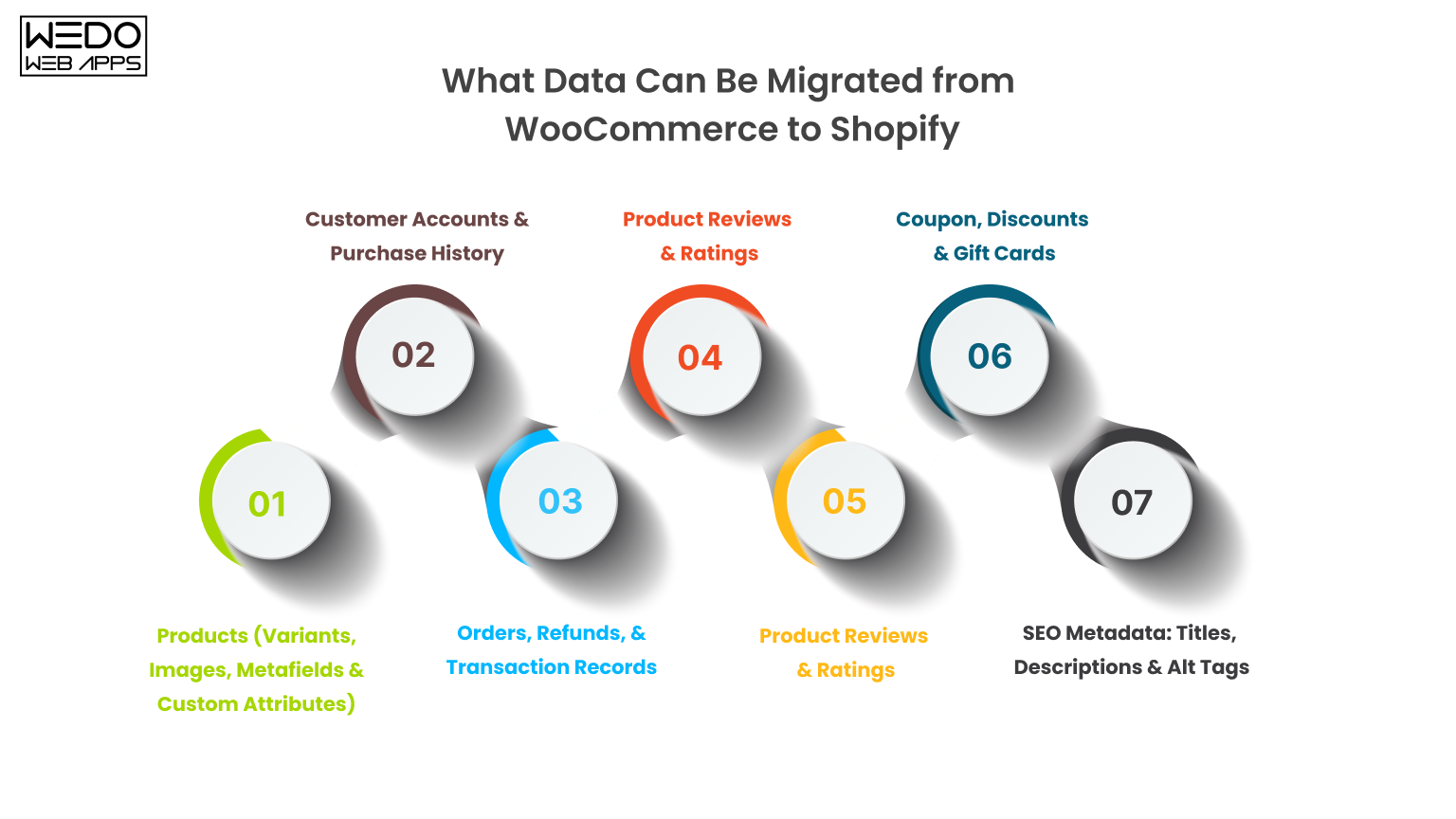
Products, orders, customers, and SEO data safely

Before you start any export work, you need a clear picture of exactly what is moving, what needs special handling, and what cannot be transferred automatically.

Products (Variants, Images, Metafields & Custom Attributes)

Your full product catalog migrates cleanly, including:

  • Product titles, descriptions, and prices.
  • SKUs and stock levels.
  • Product images and galleries.
  • Variant combinations (size, color, material)
  • Product tags and categories.

Custom metafields and product attributes need extra mapping steps, especially if you used WooCommerce customer fields or ACF integrations.

Customer Accounts & Purchase History

Most customer data transfers without issues:

  • Names, email addresses
  • Billing and shipping addresses
  • Account creation dates and tags

One important exception: Customer password cannot be migrated. Shopify uses a different password hashing system. Your customer will need to reset their password after the WooCommerce to Shopify migration, and you should communicate this clearly before launch.

Orders, Refunds, & Transaction Records

Historical orders can be migrated to keep your reporting and customer service records intact. These include:

  • Order line items and totals
  • Shipping details
  • Refund records

Note: Shopify imports these as archived orders. They will not be editable, and payment statuses will reflect the migrated state rather than live payment gateway data.

Product Reviews & Ratings

Product reviews can be migrated using tools like LitExtension, or through the import functions of Shopify review apps like Judge.me or Yotpo. This step is easy to overlook, but your reviews represent years of social proof and are worth the effort to preserve.

Blog Posts, Pages & Media Files

The following content can all be migrated:

  • Blog posts
  • Static pages (About, Contact, FAQ)
  • Associated images and media

All media files should be re-uploaded to Shopify’s CDN during migration. Do not rely on images still hosted on your WordPress server; that server will eventually be shut down.

Coupon, Discounts & Gift Cards

  • WooCommerce coupon code can be recreated as a Shopify discount code.
  • Gift card balances cannot be automatically transferred; the affected customer needs to be reissued new Shopify gift cards.

SEO Metadata: Titles, Descriptions & Alt Tags

SEO metadata, including meta titles, meta descriptions, and image alt tags, should be exported from WooCommerce (via Yoast or RankMath) and mapped into Shopify’s SEO fields during import. This is one of the most commonly skipped steps in any WooCommerce to Shopify migration, and one of the most damaging if skipped.

What Cannot Be Directly Migrated (And How to Handle Each Gap)

Some things simply do not transfer:

  • WooCommerce plugin configurations must be rebuilt in Shopify.
  • Custom database tables created by the plugin are left behind.
  • Subscription billing cycles must be manually recreated in your Shopify subscriptions app.
  • Complex custom post types may need a Shopify developer to be restructured for Shopify’s data model.

Identify these gaps during your pre-migration audit, not after go-live.

Pre-Migration Audit: What to Do Before You Touch Anything
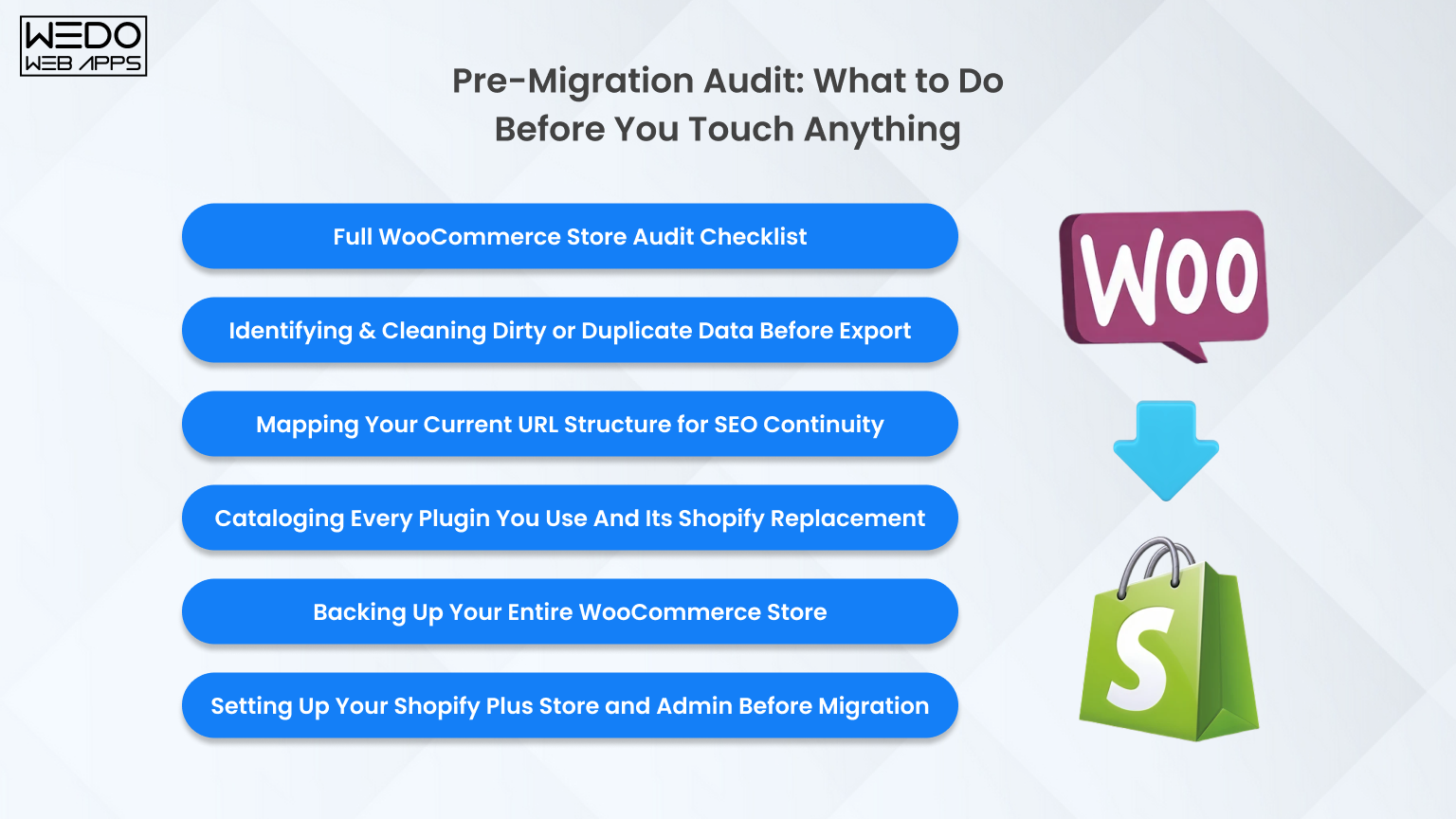
Check everything before starting your migration

The quality of your migration depends almost entirely on the quality of your preparation. Rushing this phase is the most common reason migrations go wrong.

Full WooCommerce Store Audit Checklist

Start by documenting everything in your current store:

  • Total number of products, customers, and orders.
  • Number of blog posts and static pages.
  • All active plugins and what each one does.
  • Active payment gateways and shipping zones.
  • Any custom code in your theme or functions.php file.

This document becomes your migration reference guide from start to finish.

Identifying & Cleaning Dirty or Duplicate Data Before Export

Before you export anything, clean your data:

  • Remove duplicate SKUs and products.
  • Fix missing or broken product images.
  • Complete any incomplete product descriptions.
  • Merge or remove duplicate customer email addresses.
  • Fill in any missing customer address fields.

Migrating dirty data does not fix it; it just moves the problem to a new platform.

Mapping Your Current URL Structure for SEO Continuity

Export every indexed URL from Google Search Console. Then crawl your WooCommerce site using a tool like Screaming Frog to capture every internal URL. Create a simple spreadsheet with two columns:

  • Old URL (WooCommerce)
  • NEW URL (Shopify)

This WooCommerce to Shopify SEO service allows for a URL redirect map, which is the most important document you will create during the entire migration process.

Cataloging Every Plugin You Use And Its Shopify Replacement

For every active WooCommerce plugin, document:

  • What the plugin does
  • How business-critical it is
  • Whether Shopify has a native equivalent
  • Which Shopify app replaces it
  • Estimated time to set up the replacement

This exercise almost always reveals 3-5 plugins that have no direct Shopify development equivalent and will need custom solutions or workflow changes.

Expert audit ensures smooth Shopify migration

Backing Up Your Entire WooCommerce Store (Step-by-Step)

Before any migration work starts, take a full backup of your WooCommerce database and file system. Use a plugin like UpdraftPlus or take a server-level snapshot. Store the backup in at least two locations, one local, one cloud. This is your safest net. You will probably never need it, but you will be very glad it exists if something goes wrong.

Setting Up Your Shopify Plus Store and Admin Before Migration

Do not wait until after migration to set up your Shopify store. Before data migration begins:

  • Create your Shopify Plus account
  • Configure store settings like currency, timezone, tax, and shipping zones.
  • Install and configure your chosen theme.
  • Set up your key apps so imported data flows into them correctly from day one.

WooCommerce to Shopify Migration: Complete Step-by-Step Process (Including Shopify Plus)
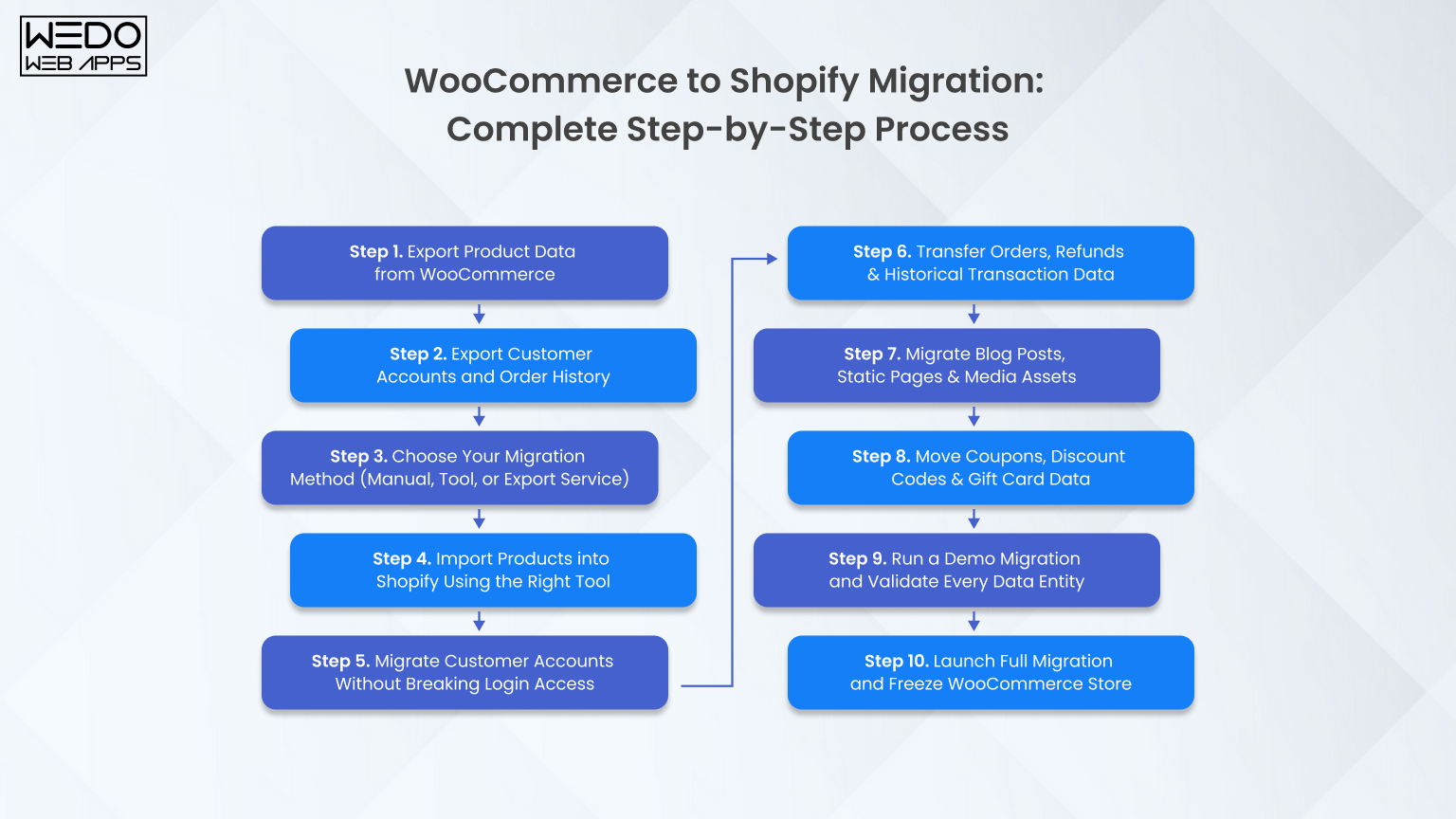
Complete process from start to successful launch

Step 1. Export Product Data from WooCommerce

Use WooCommerce’s built-in product export tool (Product -> Export) to generate a CSV of your full catalog. For stores with complex variable products, metafields, or custom attributes, use a dedicated export plugin like Matrixify’s WooCommerce exporter. It generates a Shopify-compatible format directly and saves significant manual mapping work.

Step 2. Export Customer Accounts and Order History

  • Go to WooCommerce -> Customer and export your customer list as CSV.
  • Go to WooCommerce -> Orders -> Export to download your order history.
  • For a large store with 10,000+ orders, export in batches by date range to keep file sizes manageable.

Step 3. Choose Your Migration Method (Manual, Tool, or Export Service)

There are three ways to move from WooCommerce to Shopify:

  • Manual migration via CSV – best for stores with fewer than 500 simple products.
  • Automated migration tools (Cart2Cart, LitExtension, Matrixify) – best for mid-size stores with moderate complexity.
  • Professional Shopify Plus migration partner – best for large stores, complex customizations, B2B requirements, or zero tolerance for downtime.

Step 4. Import Products into Shopify Using the Right Tool

For simple catalogs, Shopify’s built-in product importer works well. For complex imports, Matrixify (formerly Excelify) gives you the most control. It supports bulk imports of products, collections, metafields, and redirects all from a single spreadsheet. Map your products, collections, metafields, and redirects all from a single spreadsheet. Map your WooCommerce column headers to Shopify’s required fields before you start the import.

Step 5. Migrate Customer Accounts Without Breaking Login Access

Import your customer CSV into Shopify via the customer importer or through Matrixify. After import, send a bulk password reset email to all migrated customers. Be transparent about what is happening. A simple email explaining the platform upgrade and asking customers to set a new password maintains trust and avoids confusion.

Step 6. Transfer Orders, Refunds & Historical Transaction Data

Use Matrixify or a dedicated migration tool to import historical orders. When mapping order statuses:

  • WooCommerce “Processing” -> Shopify “Paid.”
  • WooCommerce “Completed” -> Shopify “Fulfilled.”
  • WooCommerce “Refunded” -> Shopify “Refunded.”

After import, manually verify totals on a sample of 50-100 orders to confirm data accuracy.

Step 7. Migrate Blog Posts, Static Pages & Media Assets

  • Export blog posts as XML from WordPress.
  • Recreate them in Shopify’s blog editor (or use a migration tool).
  • Re-upload all media files to Shopify’s file manager.
  • Update all internal links within blog content to point to their new Shopify URLs.

Do not link images back to your WordPress media library that server will be decommissioned eventually.

Step 8. Move Coupons, Discount Codes & Gift Card Data

Recreate WooCommerce coupon codes as Shopify discount codes. If any WooCommerce coupons had complex conditional logic, such as user role restriction or product combination rules. Test each one in Shopify carefully to confirm it behaves the same way. For gift card balances, generate new Shopify gift cards and notify affected customers directly.

Step 9. Run a Demo Migration and Validate Every Data Entity

Before running the full migration, test with a small subset of data, typically 10 products, 10 customers, and 10 orders. Check:

  • All fields map correctly
  • Product images display properly
  • Variant data is complete and accurate
  • Customer addresses are correct
  • Order totals match
  • SEO metadata fields are populated

Fix any mapping errors before scaling to your full dataset.

Step 10. Launch Full Migration and Freeze WooCommerce Store

Once your demo is validated, run the full migration. Immediately after it completes, put your WooCommerce store into maintenance mode. This prevents new orders from being placed on the old platform while you complete DNS cutover and final testing. Your WooCommerce store should never accept new orders after this point.

Get full migration support with zero data loss

WooCommerce to Shopify Product Data Migration Tool: Which One Should You Use?

Choosing the right WooCommerce to Shopify product data migration tool makes a significant difference in how much manual work is involved and how clean your data lands in Shopify.

Manual CSV Migration: When it Works and When It Breaks

Manual CSV migration works for:

  • Store with fewer than 500 simple products.
  • No customer metafields or complex attributes.
  • A team comfortable working with spreadsheets.

It breaks when you have variable products with complex attribute combinations, custom fields, or more than a few thousand rows. CSV mapping errors at scale can take days to fix.

Automated Migration Tools: How They Work and What They Support

Automated tools connect to your WooCommerce database via API or FTP, extract your data, transform it into Shopify’s format, and push it to your new store, all without manual CSV work.

Most support:

  • Products and variants
  • Customer and order history
  • Blog posts and pages
  • SEO metadata and URL redirects

The quality of the data mapping varies between tools, so always run a demo migration first.

Cart2Cart, Matrixify & LitExtension: Side-by-Side Comparison

FeatureCart2CartMatrixifyLitExtension
ProductYesYesYes
OrdersYesYesYes
CustomersYesYesYes
MetafieldsNoYesLimited
SEO URLsYesYesYes
RedirectsYesYesYes
ReviewsYesNoYes
PricingPre migrationSubscriptionPre migration
Best ForSpeedComplex dataLarge catalogs

Custom Migration for Complex or Large WooCommerce Stores

For stores that are developed with dedicated WooCommerce developers, allow for setups, complex B2B pricing rules, multi-warehouse inventory, ERP integrations, or custom post types. Off-the-shelf tools will not handle the full migration cleanly. A custom migration built by a certified Shopify Plus migration partner is the right investment at this level of complexity.

How to Validate Your Product Data After Import

After import, run a spot-check across five areas:

  • Count check: Total products in Shopify matched WooCommerce
  • Image check: No broken or missing product images
  • Variant check: All size, color, and material combinations are present
  • Pricing check: Compare 20 products manually against WooCommerce
  • Inventory check: Spot-check 20 SKUs against WooCommerce stock levels

WooCommerce to Shopify SEO URL Redirect Mapping: Protecting Every Ranking You’ve Built

SEO is the highest-risk element of any platform migration. A missed redirect is a lost ranking. At scale, missing redirects means lost revenue.

Why Platform Migrations Kill SEO (And How to Prevent It)

When you move from WooCommerce to Shopify, your URLs change. Google has indexed your old URLs. If those old URLs return a 404 error instead of redirecting to their new equivalents, Google drops them from its index. Depending on how many pages are affected, you can lose 20-60% of your organic traffic within weeks of going live. This is entirely preventable, but only if you treat SEO as a core migration deliverable from day one.

Building Your WooCommerce to Shopify SEO URL Redirect Map

Follow these steps to build your WooCommerce to Shopify SEO URL redirect map:

  1. Export all indexed URLs from Google Search Console.
  2. Crawl your WooCommerce site with Screaming Frog to capture every internal URL.
  3. Create a spreadsheet with two columns: Old URL and New URL.
  4. Map every product page, collection page, blog post, and static page.
  5. Pay special attention to category pages; WooCommerce uses/product-category/name/ while Shopify uses /collections/name.

How to Set Up 301 Redirects in Shopify (Bulk & Individual)

  • Individual redirects: Shopify Admin -> Navigation -> URL Redirects -> Add URL Redirect.
  • Bulk redirect: Upload a CSV file with two columns, “Redirect from” and “Redirect to,” via Shopify’s bulk redirect importer or through Matrixify.

Upload your full redirect file before DNS cutover so every redirect is live the moment your new store goes public.

Migrating SEO Metadata: Page Titles, Descriptions & Structured Data

Export your Yoast or RankMath SEO data from WooCommerce as CSV. Then map:

  • Meta title -> Shopify’s SEO title field
  • Meta descriptions -> Shopify’s meta description field
  • Image alt tags -> Shopify’s image alt text field

For large catalogs, use Matrixify to bulk-import SEO metadata. Do not rely on Shopify to auto-generate meta descriptions from product copy, as they are rarely optimized for search.

Handling Shopify’s URL Structure Limitations (/products/,/collections/)

Shopify uses a fixed URL structure that you cannot change:

  • Products -> /product/handle
  • Collections -> /collections/handle
  • Blog posts -> /blogs/blog-name/post-handle

If your WooCommerce store used flat URLs (e.g.,/product/name), every single one of those URLs needs a redirect entry. Factor this into your redirect map from the very beginning.

Canonical Tags, Herflang & Sitemaps Submission Post-Migration

  • Shopify automatically generated canonical tags for all pages, which prevents duplicate content issues.
  • If you run multiple language or regional stores, configure herflang tags through your translation app (Weglot or Langify)
  • After migration, submit your Shopify sitemap (yourdomain.com/sitemap.xml) to Google Search Console and Bing Webmaster Tools immediately.

Post-Migration SEO Audit: What to Check in the First 30 Days

Within 30-days of going live:

  • Run a full crawl with Screaming Frog to identify any remaining 404 errors.
  • Check Google Search Console for coverage errors and redirect chains longer than 2 hops.
  • Monitor your top 20 keywords rankings weekly using your rank tracking tool.
  • Compare organic traffic week-over-week versus the same period last year.
  • Any significant traffic drop required immediate investigation.

Preserve URLs, rankings, and traffic safely

Shopify Plus App Replacements for WooCommerce Plugins

One of the most underestimated challenges of moving from WooCommerce to Shopify Plus is replacing your plugin stack. Your WooCommerce store’s functionality is built on plugins. Shopify is built on apps. They are not a one-to-one match.

How to Audit Your WooCommerce Plugin Stack Before Migrating

For every active plugin, document:

  • What it does in plain terms
  • Whether it touches your database or modifies checkout
  • How critical it is to daily operations
  • Whether a Shopify equivalent exists
  • How long will it take to set up the replacement

Sort your plugins into three categories: directly replaceable, partially replaceable, and no direct equivalent. The third category drives your custom development budget.

Essential WooCommerce Plugin to Shopify App Replacement Map

SEO Plugins – Yoast to Shopify SEO Apps

Yoast’s core features, like meta titles, meta descriptions, XML sitemaps, and breadcrumbs, are largely handled natively by Shopify. For advanced SEO needs like structured data and bulk metadata editing, Plug In SEO or SEO Manager are the leading replacements.

Page Builders – Elementor to Shopify Theme Sections or PageFly

Elementor’s drag-and-drop editing is replaced by Shopify’s native Online Store Editor with sections and blocks. For pages that need more layout flexibility, PageFly or Shogun offer Elementor-style control within Shopify.

Subscription Plugins – To Recharge or Shopify Subscriptions

WooCommerce Subscription is replaced by either Recharge (the market leader for complex subscription models) or Shopify’s native subscription feature (for straightforward recurring billing). Active billing cycles must be manually recreated in your new subscriptions platform plan this carefully.

Membership Plugins – To Bold Memberships or Locksmith

WooCommerce Memberships are replaced by Bold Memberships or Locksmith on Shopify. Both support gated content, member-only pricing, and tiered access, but the configuration logic is different enough that a full rebuild is required.

Wholesale & B2B Plugins – To Shopify Plus Native B2B

WooCommerce wholesale plugins are replaced by Shopify Plus’s native B2B functionality, which supports company accounts, custom price lists, net payment terms, and purchase order workflows, all without a third-party app. This is one of the biggest advantages of migrating to Shopify Plus specifically.

Advanced Reporting Plugins – To Shopify Analytics or Glew

WooCommerce reporting plugins are replaced by Shopify’s built-in analytics for standard eCommerce metrics, combined with Glew.io or Daasity for advanced cohort analysis, LTV reporting, and cross-channel attribution.

WooCommerce Plugins With No Direct Shopify Equivalent: What to Do

Some WooCommerce plugins solve problems that Shopify handles differently or does not address natively. These typically include:

  • Complex product configurators
  • Highly custom pricing engines
  • Deep ERP integrations with legacy systems

These gaps require either a custom Shopify app or a bespoke Shopify Function. Budget for this work before migration begins, not after you discover the gap.

Get app replacement strategy tailored to your store

Payment Gateway Setup After Moving from WooCommerce to Shopify Plus

Shopify Payments – Setup, Eligibility & What It Replaces

Shopify Payments is Shopify’s built-in payment processor, powered by Stripe. The main advantages:

  • Eliminates transaction fees that apply when using third-party gateways.
  • Integrates directly with your Shopify dashboard.
  • Supports accelerated checkouts: Shop Pay, Apple Pay, and Google Pay.
  • Available in 23+ countries.

If you are eligible, activating Shopify Payments should be your first step in the payment setup process.

Migrating from WooCommerce Payment Gateways (Stripe, PayPal, & Others)

  • Stripe users: Your existing Stripe account connects directly to Shopify Payments.
  • PayPal users: PayPal integrates as a separate payment method within Shopify’s checkout settings.
  • All gateways: Statement descriptions, capture settings, and 3D Secure preferences must be reconfigured in Shopify.

Setting Up Multiple Currencies and Markets on Shopify Plus

Shopify Plus Markets lets you sell in multiple currencies and regions from a single store, with:

  • Localized pricing per market
  • Checkout currency conversion
  • Regional domain or subfolder support

Configure your marketplace before launch day so international customers experience correct local pricing from the very first visit. This is one of the most powerful advantages Shopify Plus has over a typical WooCommerce multi-currency setup.

B2B Payment Terms and Net Payment Options on Shopify Plus

Shopify Plus native B2B supports net payment terms – Net 15, Net 30, Net 60 on a per-company basis. This means:

  • No third-party B2B payment plugin needed.
  • Payment terms integrate directly into the checkout for approved wholesale accounts.
  • Company profiles and payment terms are managed from your Shopify Plus admin.

Set up company profiles and assign payment terms before migrating your wholesale customer base.

Testing Every Checkout Flow Before Going Live

Before DNS cutover, test every payment method you offer:

  • Credit card
  • PayPal
  • Shop Pay
  • Any BNPL options like Klarna or Afterpay
  • Gift card redemptions
  • Subscription billing triggers
  • Failed payment recovery flows

Do not go live until every single checkout path is confirmed to work.

Post-Migration QA Testing: Validate Everything Before You Go Live

QA testing is not optional. It is your last line of defence before real customers experience your new store. Build a checklist, assign ownership to specific team members, and do not skip anything.

Product Page QA – Images, Variants, Pricing & Inventory

For a sample of 50-100 products (including your top sellers), verify:

  • All images display correctly and at the right quality.
  • All product variants are present and selectable.
  • Prices are accurate, including sale prices.
  • Inventory levels match WooCommerce.
  • Product descriptions are complete and properly formatted.
  • SEO metadata fields are populated.

Customer Account QA – Login, Password Reset & Order History Access

  • Create a test customer account and verify the login flow works.
  • Trigger a password reset and confirm the email arrives correctly.
  • Log in to a migrated customer account and verify that historical orders are visible.
  • Check that billing and shipping addresses have migrated correctly.

Order & Checkout Flow Testing (Including Edge Cases)

Place test orders covering:

  • Standard checkout with a credit card
  • Check out with a discount code applied
  • Check out with a gift card applied
  • Check out using Shop Pay
  • Guest checkout (no account required)

Confirm that order confirmation emails are sent correctly and that each order appears in the Shopify admin with the right status.

Redirect Testing – Every Old URL Must Land Somewhere

Using a bulk URL checker or Screaming Frog, test every URL in your redirect map. Every old URL should:

  • Return a 301 status (permanent redirect).
  • Resolve to the correct new Shopify URL.

Any URL returning a 404 needs an immediate redirect added. Complete this step before DNS cutover.

Speed & Performance Testing on Shopify Plus

Run your homepage, a collection page, and your top product page through Google PageSpeed Insights and GTmetrix before launch. Target:

  • LCP (Largest Contentful Paint): under 2.5 seconds
  • FID (First Input Delay): under 100ms
  • CLS (Cumulative Layout Shift): under 0.1

If scores are poor, investigate large image files, render-blocking scripts, and app JavaScript conflicts before going live.

Mobile Responsiveness & Cross-Browser QA

Test every key page on:

  • iOS Safari
  • Android Chrome
  • Desktop Chrome, Firefox, and Safari

Pay close attention to product image galleries, the cart drawer, and the checkout flow on mobile; these are where most issues appear. Use BrowserStack for systematic cross-browser testing if your team does not have all devices available.

Analytics, Tracking Pixels & Tag Manager Verification

Before launch, confirm:

  • Google Analytics 4 is firing correctly on all pages, including the order confirmation page (purchase event).
  • Meta Pixel is sending PageView, AddToCart, InitiateCheckout, and Purchase events.
  • Google Tag Manager container is deployed, and all tags are firing correctly.

Use GA4 DebugView and Meta Pixel Helper to verify these in real time.

Expert team validates every detail before launch

Launch Day Checklist – Going Live on Shopify Plus

Pre-Launch Final Verification (48 Hours Before)

Forty-eight hours before DNS cutover, confirm all of the following:

  • All redirects are uploaded and tested.
  • All payment gateways are live and verified with test transactions.
  • All transactional emails are configured and are being sent correctly.
  • All analytics and tracking pixels are verified.
  • Inventory levels are synced and accurate.
  • Customer launch communication is ready to send.

DNS Cutover – How to Switch Domains Without Downtime

In Shopify, add your custom domain under Online Store -> Domains. Follow Shopify’s instructions to update your A record and CNAME with your domain registrar. DNS propagation typically takes 24-48 hours, but is often faster. During propagation:

  • Keep WooCommerce in maintenance mode to prevent split orders.
  • Monitor both platforms to see when Shopify fully takes over.

Notifying Customers About the New Store Experience

Send a launch email to your full customer list covering:

  • The platform upgrade and what has changed.
  • The need to reset their password (with a direct reset link).
  • Any improvements they will notice faster checkout, better mobile experience, and new features.

This email reduces support tickets and builds goodwill around the transition.

Monitoring the First 24 Hours Post-Launch

Assign someone to actively monitor the following for the full first 24 hours:

  • Live orders coming through the Shopify admin.
  • Check the checkout conversion rate in Shopify Analytics.
  • Customer support channels for login or checkout issues.
  • Google Analytics real-time for unexpected traffic drops or bounce rate spikes.

Have your development team on standby for the first 48 hours after launch.

Submitting Your New Sitemap to Google & Bing

Immediately after DNS cutover:

  • Log in to Google Search Console and submit your sitemap at yourdomain.com/sitemap.xml
  • Do the same in Bing Webmaster Tools.
  • Use the URL Inspection tool to request indexing of your homepage, top collection pages, and top product pages.

Google will typically begin recrawling your site within hours of sitemap submission.

The 90-Day Post-Launch Performance Roadmap

Going live is not the finish line. Follow this post-launch roadmap:

  • Weeks 1-2: Monitor and fix any 404 errors flagged in Search Console.
  • Weeks 3-4: Review conversion rate by device and traffic source; identify checkout drop-off points.
  • Month 2: Run a full SEO audit comparing keyword rankings against your pre-migration baseline.
  • Month 3: Review app performance and costs against your old WooCommerce plugin costs; optimize your tech stack.

WooCommerce to Shopify Plus Migration Checklist

Use this as your master reference throughout the entire WooCommerce to Shopify Plus migration. Each section maps to the corresponding guide section above.

Pre-Migration Checklist

  • Complete WooCommerce store audit (products, customers, orders, plugins, pages).
  • Back up WooCommerce database and file system (two locations).
  • Export all indexed URLs from Google Search Console.
  • Build a full WooCommerce to Shopify SEO URL redirect map.
  • Clean all product and customer data before export.
  • Catalog all active plugins and identify Shopify Plus app replacements.
  • Set up a Shopify Plus account and configure basic store settings.
  • Install and configure the Shopify theme before migration begins.

Data Migration Checklist

  • Export products via CSV or WooCommerce to Shopify product data migration tool.
  • Export customers and full order history.
  • Run demo migration and validate all data entities.
  • Import products: verify images, variants, and pricing.
  • Import customers: verify addresses and account data.
  • Import orders: verify totals, statuses, and line items.
  • Migrate blog posts and static pages.
  • Re-upload all media to Shopify CDN.
  • Recreate coupons and discount codes.
  • Handle gift card balances for affected customers.

SEO Migration Checklist

  • Upload the complete 301 redirect map to Shopify.
  • Test all redirects, no 404 responses remaining.
  • Import all SEO metadata (titles, descriptions, alt tags).
  • Verify canonical tags on all pages.
  • Configure hreflang tags if applicable.
  • Submit the new sitemap to Google Search Console and Bing.

App & Plugin Replacement Checklist

  • SEO app installed and configured.
  • Page builder or theme editor configured.
  • Subscription app installed; billing cycle recreated.
  • Membership app installed and configured (if applicable).
  • Shopify Plus native B2B configured for wholesale accounts.
  • Reporting tools connected and verified.
  • All custom plugin gaps identified and resolved.

QA Testing Checklist

  • Product pages verified (images, variants, pricing, inventory).
  • Customer login and password reset flow tested.
  • Order history visible in migrated customer accounts.
  • All checkout flows tested (card, PayPal, Shop Pay, discount code, gift card).
  • All redirects are returning 301 with correct destinations.
  • PageSpeed scores, reviews, and Core Web Vitals met.
  • Mobile and cross-browser testing complete.
  • Analytics and tracking pixels verified.

Launch Day Checklist

  • All pre-launch verifications are complete (48 hours before).
  • WooCommerce store set to maintenance mode.
  • DNS cutover initiated.
  • Customer launch email sent (with password reset link).
  • Live monitoring is assigned for the first 24 hours.
  • Sitemap submitted to Google and Bing.
  • Development team on standby for the first 48 hours.

Download the complete WooCommerce to Shopify Plus Migration Checklist as a free printable PDF.

Why Work With a Certified Shopify Plus Migration Partner?

A certified Shopify Plus migration partner brings hands-on experience from dozens or hundreds of previous migrations. They know exactly which data mapping edge cases cause problems, have pre-built tooling for complex data, app configuration, QA testing, and launch.

Zero Downtime Migration: How it is Actually Achieved

Zero downtime migration means your WooCommerce store keeps operating normally right up until the DNS cutover moment. Here is how it works:

  • All migration work happens on your new Shopify store in parallel.
  • Immediately before cutover, a final delta sync captures any new orders or customers created after the initial migration.
  • DNS is switched, WooCommerce is frozen.
  • The window where neither store is fully live is measured in minutes, not hours.

Zero Data Loss Guarantee: What That Means in Practice

A zero data loss guarantee means every product, customer record, and order in your WooCommerce store is present and accurate in Shopify after migration. Achieving this requires:

  • A validation process that compares total record counts across every entity type.
  • Field-level spot-checks to confirm data accuracy, not just presence.
  • Any discrepancy is investigated and resolved before the migration is signed off.

Shopify Plus Partner vs. Freelancer: How to Choose the Right One

A Shopify Plus Partner agency has been vetted by Shopify for technical ability, client outcomes, and business stability. Key differences versus a freelancer:

  • Proven migration methodology and formal QA process.
  • Backup team resource if something goes wrong mid-project.
  • Experience migrating stores across industries and store sizes.
  • Greater accountability and contractual protection.

For a migration involving significant revenue, years of customer data, and hard-won SEO rankings, the risk profile of who you hire matters as much as the price.

Conclusion: Plan It Right, Migrate Once, & Scale Faster

The decision to WooCommerce to Shopify Plus is more than a platform change. It is about building a store that performs better and scales without constant technical effort.

If you plan to migrate WooCommerce to Shopify, focus on preparation, clean data, and proper testing. A well-managed WooCommerce to Shopify migration protects your SEO, customer data, and revenue from day one.

Brands that succeed when moving from WooCommerce to Shopify follow a structured process and avoid rushing the launch with the help of the right eCommerce developers. When you move from WooCommerce to Shopify with the right approach, you get faster performance, a smoother checkout, and a system ready for growth.

Keep the process simple, validate every step, and launch with confidence.

Migrate with zero downtime and full SEO safety

Headless Shopify with Hydrogen: Cost, Timeline, Performance & ROI Explained

Introduction – Is Headless Shopify with Oxygen Worth It?

If you are exploring headless Shopify with Hydrogen, you are likely trying to answer one core question:

“Will this actually improve my store’s performance and growth, or just increase my costs?”

Because while Shopify Hydrogen promises faster storefronts, better UX, and more flexibility, it also comes with:

  • Higher performance costs ($15K-$250K+)
  • More technical complexity
  • Longer implementation timelines

And that is where the confusion begins.

Between Hydrogen vs Liquid theme performance comparisons, Shopify Oxygen hosting, and Storefront API vs Admin API differences, most businesses struggle to understand what truly matters and what does not.

What This Guide Will Help You Decide?

This guide cuts through the noise and focuses on what actually impacts your decision:

  • What Shopify Hydrogen really is (and how it works)
  • Real headless Shopify development cost and timeline
  • Hydrogen vs Liquid performance differences that affect conversions
  • When headless Shopify is worth it, and when it is overkill
  • How to evaluate ROI before investing.

If you are considering a Shopify headless storefront, this will help you make a clear, business-first decision, not a trend-driven one.

Not sure if headless Shopify fits? Get expert advice

What is Headless Shopify?

Compare performance flexibility and ROI differences

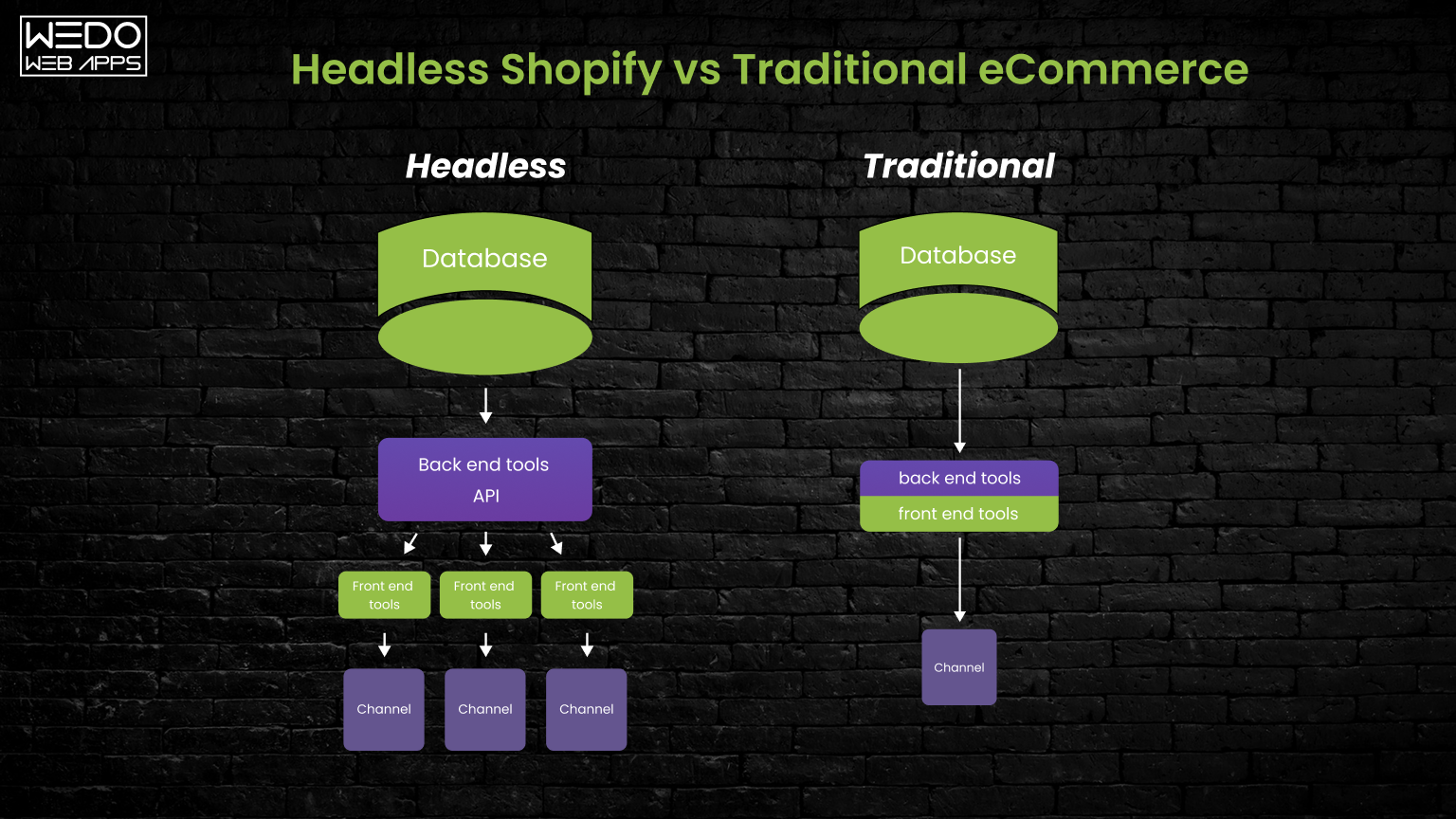
At its core, headless Shopify means separating what your customers see from how your store operates behind the scenes.

In a traditional Shopify setup, your frontend (design + user experience) and backend (products, checkout, orders) are tightly connected through a Liquid theme. This makes things simple and fast to launch, but also limits how far you can customize performance, interactions, and scalability.

Headless Shopify changes that.

Instead of relying on a theme, your storefront is built independently using modern frameworks like Shopify Hydrogen (React-based), while Shopify continues to handle the backend, products, inventory, checkout, and payments.

Think of it like this:

  • Shopify (backend): Manages your business logic
  • Hydrogen (frontend): Controls how your store looks and behaves
  • APIs: Connects both layers in real time

This separation gives you far more control over the user experience, but it also introduces more complexity.

How a Shopify Headless Storefront Actually Works

When a user visits your site, they are no longer interacting with a Shopify theme. Instead:

  • The Hydrogen frontend fetches product and store data using the Shopify Storefront API
  • The backend (Shopify) processes product data, cart logic, and checkout (still handled by Shopify)
  • Everything is hosted and delivered via Shopify Oxygen or external infrastructure

This setup allows for faster, more dynamic experiences, especially for stores that need more than what standard themes can offer.

Where Headless Shopify Starts Making Sense

From a business perspective, headless is not about technology; it is about removing limitations.

It becomes relevant when:

  • Your current store feels restrictive in terms of UX or design flexibility
  • You need high-performance storefronts for large traffic volumes
  • You want to integrate multiple systems (apps, CMS, custom tools) seamlessly
  • Your brand experience is a competitive advantage, not just a storefront

At this point, Shopify Hydrogen and a headless approach start to make strategic sense.

Where Most Businesses Get it Wrong

Many businesses jump into headless Shopify, assuming it is a direct upgrade. However, it is not.

Headless introduces:

  • Higher upfront investment
  • Ongoing development dependency
  • More moving parts (APIs, hosting, performance layers)

Which means if your store does not actually need that flexibility, you are paying for complexity without real returns.

What is Shopify Hydrogen? (And Why it Exists)

Now that you understand how headless Shopify separates the frontend and backend, the next logical question is:

Where does Shopify Hydrogen actually fit into this setup?

In simple terms, Shopify Hydrogen is a React-based framework built specifically to create custom Shopify storefronts. It replaces traditional Liquid themes when you go headless.

Instead of working within Shopify’s templating system, Hydrogen allows developers to build their storefront using modern frontend architecture, giving them far more control over performance, design, and user experience.

Why Shopify Built Hydrogen in the First Place

Before Hydrogen, going headless on Shopify meant stitching together custom frontend frameworks with Shopify APIs. It worked, but it was complex, inconsistent, and time-consuming.

Hydrogen was introduced to solve that.

It gives businesses a purpose-built foundation for Shopify headless storefront development, reducing the friction between flexibility and implementation.

What Makes Shopify Hydrogen Different

Hydrogen is not just another frontend framework; it is optimized specifically for commerce use cases.

Here is what that means in practice:

  • It is built on React, making it highly flexible and component-driven
  • It supports server-side rendering (SSR) for faster load times
  • It comes with pre-built eCommerce components (products, carts, collections)
  • It integrates directly with the Shopify Storefront API

This allows developers to create storefronts that are not only visually unique but also performance-optimized from the ground up.

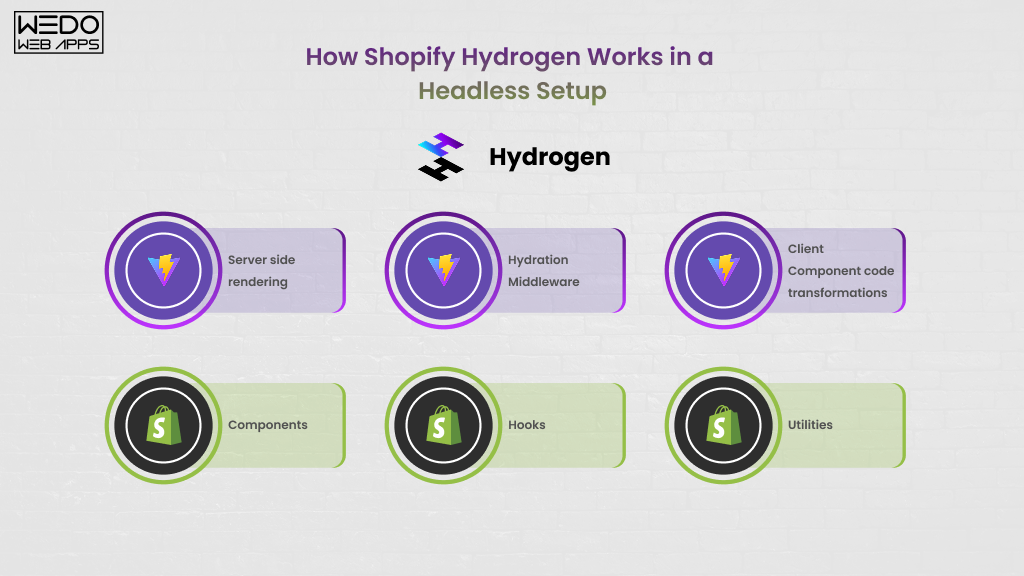
How Shopify Hydrogen Works in a Headless Setup

Understand architecture performance and workflow

In a Shopify headless Hydrogen storefront, Hydrogen acts as the presentation layer.

It:

  • Fetches product and store data using APIs
  • Renders pages dynamically for users
  • Controls interactions like navigation, filtering, and cart updates

Meanwhile, Shopify continues to handle checkout, inventory, orders, and payments.

So, while Hydrogen gives you flexibility, Shopify still ensures stability where it matters most.

Who Shopify Hydrogen is Actually Built for

Hydrogen is not designed for every Shopify store, and that is an important distinction.

It makes the most sense for businesses that:

  • Need highly customized storefront experiences
  • Care deeply about performance optimization
  • Have complex product catalogs or user journeys
  • Are scaling and want long-term flexibility

Who Should Avoid Shopify Hydrogen

If your store:

  • Relies on standard eCommerce flows
  • Does not require advanced customization
  • Has limited technical resources or budget

Then a Liquid theme will often deliver better ROI with far less complexity.

The Key Takeaway: Shopify Hydrogen is powerful, but it is not a default upgrade.

It is a tool designed for businesses that have outgrown traditional themes and need more control over how their storefront performs and scales.

Shopify Hydrogen vs Liquid Theme: Performance, Flexibility, & Real Business Impact

This is where most decisions are actually made, not on technology, but on outcomes.

Because choosing between a Shopify Hydrogen storefront and a Liquid theme is not about which is “better.” It is about which one delivers measurable business value for your current stage.

The Core Difference (In Practical Terms)

A Liquid theme is fast to launch, tightly integrated with Shopify, and works well for standard eCommerce needs.

A Hydrogen storefront, on the other hand, gives you full control over how your frontend behaves, but requires custom development to achieve it.

That trade-off shows up clearly in performance, flexibility, and scalability.

Performance: Where Hydrogen Gets the Attention

In most Shopify Hydrogen vs Liquid theme performance comparisons, Hydrogen tends to outperform, but not automatically.

Hydrogen enables:

  • Server-side rendering (faster initial loads)
  • Better control over assets and scripts
  • Optimized data fetching via Storefront API

This can lead to:

  • Faster page load times
  • Smoother interactions
  • Improved Core Web Vitals

But here is the nuance most blogs skip: Hydrogen only performs better when it is built correctly.

A poorly optimized Hydrogen storefront can easily perform worse than a well-optimized Liquid theme.

Flexibility: The Real Reason Businesses Go Headless

This is where Hydrogen clearly stands out.

With Liquid themes, you are working within Shopify’s structure. Customization is possible, but only to a certain extent.

With Hydrogen:

  • You control the entire frontend experience
  • You can build completely custom UI/UX flows
  • You can integrate external systems more seamlessly

This matters for businesses that:

  • Want non-standard user journeys
  • Need interactive or app-like storefronts
  • Are building a strong brand-driven experience

Development & Maintenance: The Hidden Trade-Offs

What you gain in flexibility, you pay for in complexity.

Liquid themes:

  • Faster to develop
  • Easier to maintain
  • Lower dependency on developers

Hydrogen storefronts:

  • Require experienced React/Shopify developers
  • Need ongoing maintenance and iteration
  • Involve API management and performance tuning

This directly impacts your long-term cost and operational model.

Side-by-Side Comparison

FactorShopify Liquid ThemeShopify Hydrogen (Headless)
Setup TimeFast (days to weeks)Medium to long (weeks to months)
PerformanceGood (Optimized themes)High potential (if built correctly)
CustomizationLimited (theme constraints)Full flexibility
Developer DependencyLow to moderateHigh
MaintenanceSimpleOngoing technical involvement
ScalabilityModerateHigh (with proper architecture)

What This Means for Your Business

If your goal is to:

  • Launch quickly
  • Keep costs predictable
  • Run a standard eCommerce model

A Liquid theme is often the smarter choice.

But if your business depends on:

  • Performance as a competitive edge
  • Custom user experiences
  • Long-term scalability and integrations

Then a Shopify Hydrogen headless storefront becomes a strategic investment, not just a technical upgrade.

The Reality Most Businesses Realize Too Late

The decision is not: “Hydrogen vs Liquid, Which is better?”

It is “Do we actually need what Hydrogen enables, and are we ready to invest in it?”

Headless Shopify Cost Breakdown (Hydrogen, Oxygen, and Real Investment Range)

The Short Line Answer (Before We Break it Down)

A Shopify Hydrogen headless storefront typically costs:

  • $15,000 – $30,000: Basic Storefront (limited customization)
  • $30,000 – $80,000: Mid-level (custom UI, integrations)
  • $80,000 – $250,000: Advanced builds (enterprise-grade, complex UX, scalability)

But this range only makes sense once you understand what you are actually paying for.

1. Shopify Hydrogen Development Cost

This is where most of your investment goes.

Unlike Liquid themes (which use pre-built structures), Hydrogen requires custom frontend development using React; managing everything, from layouts to interactions, is built intentionally.

Your cost depends on:

  • UI/UX Complexity: Basic templates vs fully custom, interactive experiences
  • Number of Pages & Components: Product pages, collections, landing pages, dynamic sections
  • Third-party Integrations: CRM, ERP, search tools, personalization engines
  • Performance Optimization Level: Basic vs conversion-focused optimization
  • Team Expertise: Shopify specialists vs generic React developers

This is why two “headless Shopify projects” can differ by $100K+.

2. Shopify Oxygen Hosting Cost & Setup

A common misconception is that hosting is a major added expense.

In reality, Shopify Oxygen (Shopify’s hosting for Hydrogen storefronts) simplifies a lot of this.

Here is how it works:

  • Oxygen is included with Shopify plans (especially Shopify Plus)
  • It is optimized specifically for Hydrogen storefronts
  • Deployment is tightly integrated with Shopify

So for most businesses:

  • Initial hosting cost = minimal or included
  • Scaling costs depend on traffic and architecture

That said, some businesses still choose external hosting (like Vercel) for more control, but that adds complexity and cost.

3. Ongoing Maintenance & Operational Cost

This is the part many businesses underestimate.

With a Liquid theme, updates are relatively simple.

With Hydrogen:

  • You will need ongoing developer involvement
  • Performance optimization is continuous
  • APIs and integrations need monitoring

Typical ongoing costs:

  • $1,000 – $5,000/month: Small to mid stores
  • $5,000+/month: High-scale or enterprise setups

Hydrogen vs Liquid Theme: Cost Comparison

Here is a clearer side-by-side comparison to put things into perspective:

Cost FactorShopify Liquid ThemeShopify Hydrogen (Headless)
Initial Build Cost$1,000 – $15,000$15,000 – $250,000+
Time to Launch1-4 weeks4-16+ weeks
HostingIncludedOxygen (included or minimal)
MaintenanceLowMedium to High
Customization CostLimitedHigh but flexible
Long-Term Scalability CostModerateOptimized for scale

What Most Cost Discussions Miss:

The real question is not: “How much does Shopify Hydrogen cost?”

It’s: “What level of complexity does my business actually need, and what is the ROI on that investment?”

Because if you do not need advanced customization or performance optimization:

A $60K-$100K Hydrogen build won’t outperform a well-optimized $10K Liquid store in any meaningful way.

But if you do need it:

Not going headless could limit your growth, conversions, and scalability.

A Practical Way to Think About It

  • Liquid = efficiency-focused investment
  • Hydrogen = growth-focused investment

Neither is right nor wrong; the decision depends on where your business is today and where it is going.

Get a tailored cost estimate before you invest

Shopify Hydrogen Pricing Explained (What You Actually Pay For)

One of the most common misconceptions around Shopify Hydrogen pricing is that it is an expensive product you need to license.

It’s not.

In fact, Shopify Hydrogen is completely free to use.

And that is exactly why so many businesses underestimate the real cost.

So, If Hydrogen is Free, Where Does the Cost Come From?

Hydrogen is a framework, not a product.

You are not paying for access; you are paying for everything required to design, build, and maintain a custom Shopify headless storefront using that framework.

That includes:

  • Frontend development (React-based structure)
  • UX/UI design tailored to your brand
  • API integrations (Storefront API, third-party tools)
  • Performance optimization and testing
  • Ongoing maintenance and updates

So while the framework itself is free, the implementation is where the investment lies.

Understanding Total Cost of Ownership (TCO)

To make a smart decision, you need to look beyond just the initial build cost and consider the total cost of ownership over time.

With a Shopify Hydrogen storefront, your costs typically fall into three layers:

  • Initial Development: One-time cost based on complexity ($15K – $250K+)
  • Infrastructure & Hosting: Shopify Oxygen (often included or minimal cost), optional external hosting (if needed)
  • Ongoing Maintenance & Iteration: Developer retainers, performance improvements, feature updates.

How Shopify’s Plans Affect Your Investment

Your Shopify plan still plays a role, even in a headless setup.

  • Standard Shopify Plans: Work with Hydrogen, but have limitations in checkout customization
  • Shopify Plus: Unlocks more flexibility, especially around checkout extensibility, higher API limits, and better scalability for large businesses.

For most serious headless Shopify implementations, businesses eventually move toward Shopify Plus, not because Hydrogen requires it, but because the use case often does.

The Hidden Cost Most Businesses Miss

The biggest pricing mistake is not underestimating development. It is underestimating iteration.

With Hydrogen, your storefront becomes a living product, not a static theme.

That means:

  • Continuous UX improvements
  • A/B testing and experimentation
  • Feature rollouts

This is where Hydrogen creates real value, but also when costs continue.

A Clear Way to Evaluate Shopify Hydrogen Pricing

Instead of asking: “How much does Shopify Hydrogen cost?”

Ask: “What level of control and performance do we need, and what are we willing to invest to achieve it?”

Because Hydrogen does not increase cost randomly, it increases capability.

And whether that capability translates into ROI depends entirely on your business model.

Shopify Storefront API vs Admin API: What is the Difference (And Why it Matters)

Once you move toward a Shopify Headless Storefront, APIs stop being a technical detail; they become the backbone of how your store functions.

And this is where a lot of confusion comes in:

Shopify Storefront API vs Admin API differences, what is the actual difference, and why should you care?

The Simple Way to Understand It

Think of Shopify as two layers:

  • One that customers interact with
  • One that you (the business) control behind the scenes

These two layers are powered by two different APIs.

1. Shopify Storefront API (Customer-Facing Layer)

The Storefront API is what your Hydrogen frontend uses to display and interact with your store.

It handles everything your customers experience, such as:

  • Browsing products and collections
  • Viewing product details
  • Managing carts
  • Accessing content dynamically

In a Shopify Hydrogen storefront, this API is constantly working in the background to fetch and render data in real time. Without the Storefront API, your headless frontend has nothing to display.

2. Shopify Admin API (Backend Operations Layer)

The Admin API is used for managing your store, not for customer interactions.

It handles:

  • Product creation and updates
  • Inventory management
  • Order processing
  • Customer data

This API is typically used by:

  • Internal systems
  • Third-party apps
  • Backend workflows

Your customer never directly interacts with it.

The Key Difference (That Actually Matters)

The distinction is not just technical; it affects how your storefront is built and maintained.

  • Storefront API: Powers user experience (speed, interaction, frontend logic)
  • Admin API: Powers business operations (data control, automation, integrations)

In a headless Shopify setup, your frontend depends heavily on the Storefront API, so how efficiently it is used directly impacts performance.

Where Businesses Get it Wrong

Many assume that moving to headless means “more control over everything.”

But in reality:

  • You still rely on Shopify’s backend systems
  • Checkout is still controlled by Shopify
  • Admin API access does not replace core platform limitations

So while Hydrogen gives you frontend flexibility, Shopify still defines backend boundaries.

Why This Matters for Your Decision

Understanding this difference helps you avoid unrealistic expectations.

If your goal is:

  • Better frontend performance: Storefront API + Hydrogen helps
  • Full backend control: Shopify will still have limits

This clarity becomes especially important when evaluating:

  • Checkout customization possibilities
  • Integration complexity
  • Long-term scalability

The Practical Takeaway

Headless Shopify does not remove Shopify; it changes how you interact with it.

  • The Storefront API becomes your frontend engine
  • The Admin API remains your operational backbone

And your results depend on how well both are implemented together.

Shopify Oxygen Hosting: How it Works, Cost & When It’s Enough

Once you decide to explore a Shopify Hydrogen headless storefront, the next practical question is:

“Where does this entire frontend actually live?”

That is where Shopify Oxygen comes in.

What is Shopify Oxygen (In Simple Terms)?

Shopify Oxygen is Shopify’s native hosting solution for Hydrogen storefronts.

Instead of setting up external infrastructure (like AWS or Vercel), Oxygen allows you to:

  • Deploy your Hydrogen storefront directly within Shopify’s ecosystem
  • Manage hosting without dealing with DevOps complexity
  • Keep frontend and backend tightly integrated

In short, it is designed to make headless Shopify simpler to manage.

How Shopify Oxygen Works in a Headless Setup

In a traditional setup, your theme is hosted within Shopify automatically.

With Hydrogen:

  • Your frontend (Hydrogen app) needs separate hosting
  • Oxygen acts as the runtime environment for that frontend
  • It connects seamlessly with Shopify APIs and backend systems

So when a user visits your store:

  • Oxygen serves the Hydrogen frontend
  • The frontend fetches data via the Storefront API
  • Shopify handles checkout and core commerce logic

Shopify Oxygen Cost: What Should You Expect?

This is one of the more straightforward parts of headless Shopify.

For most businesses:

  • Oxygen hosting is included with Shopify (especially Shopify Plus)
  • There is no major upfront hosting cost
  • Scaling is handled within Shopify’s infrastructure

This makes Oxygen:

  • More predictable than external hosting
  • Easier to manage for growing businesses

When Shopify Oxygen is Enough

For a large number of businesses, Oxygen does exactly what’s needed.

It works well when:

  • You want a simplified deployment process
  • Your architecture is primarily Shopify-centric
  • You don’t need deep infrastructure customization

In these cases, Oxygen reduces both:

  • Setup time
  • Operational overhead

When Businesses Choose External Hosting Instead

Despite Oxygen’s advantages, some businesses still go beyond it.

This usually happens when they need:

  • Advanced control over performance tuning
  • Multi-region deployments or custom infrastructure setups
  • Integration with broader frontend ecosystems

But this comes with trade-offs:

  • Higher cost
  • More DevOps complexity
  • Longer setup and maintenance cycle

The Real Decision is Not About Hosting

Most businesses overthink this part.

The choice between Oxygen and external hosting is rarely the first decision you should make.

The real decision is:

Do you actually need a headless Shopify architecture in the first place?

Because if the answer is no:

  • Hosting doesn’t matter
  • Hydrogen doesn’t matter
  • Cost savings come from staying simple

The Practical Takeaway:

  • Oxygen is not a cost driver; it is a simplifier
  • It makes Shopify Hydrogen more accessible
  • It removes a layer of infrastructure complexity

But it does not change the core equation:

Headless Shopify is still a strategic investment, not just a technical upgrade.

Headless Shopify Checkout Customization: What’s Possible (and What’s Not)

This is where expectations often break.

Many businesses assume that moving to a Shopify headless Hydrogen storefront means full control over everything, including checkout.

It doesn’t.

And understanding this clearly can save you from costly misalignment.

The Reality: Checkout is Still Controlled by Shopify

Even in a headless setup, Shopify owns the checkout layer.

That means:

  • Customers are redirected to Shopify’s checkout
  • Core checkout logic remains unchanged
  • You cannot fully rebuild checkout using Hydrogen

This is by design; Shopify keeps checkout standardized for security, compliance, and performance.

What You Can Customize

You are not completely restricted, but customization depends heavily on your Shopify plan.

With standard Shopify plans, your options are limited to:

  • Basic branding (colors, fonts, logo)
  • Some layout adjustments
  • Payment and shipping configurations

With Shopify Plus, things open up significantly.

You can:

  • Use Checkout Extensibility to modify parts of the experience
  • Add custom logic (discounts, validations, UI extensions)
  • Improve post-purchase and checkout flows

What You Cannot Do (Even with Headless)

This is where many businesses miscalculate.

You cannot:

  • Fully redesign checkout UX from scratch
  • Replace Shopify checkout with a completely custom one
  • Bypass Shopify’s payment flow

So even with a fully custom Shopify Hydrogen React storefront, checkout remains a controlled environment.

Why This Matters for Your Decision

If your primary goal for going headless is: “We want a fully custom checkout experience.”

Then Shopify (headless or not) may not be the right platform.

But if your goal is:

  • Better storefront performance
  • Advanced UX before checkout
  • Higher conversion through improved browsing experience

Then headless Shopify still makes strong sense.

Where Headless Actually Impacts Conversion

Most conversion gains don’t come from checkout.

They come from:

  • Faster product discovery
  • Smoother navigation
  • Better mobile experiences
  • Personalized storefront interactions

That’s exactly where Shopify Hydrogen shines.

The Practical Takeaway

  • Headless Shopify gives you frontend freedom, not checkout control
  • Checkout customization is limited but extendable (especially on Shopify Plus)
  • Your ROI from headless comes before checkout, not during it

A Smarter Way to Think About It

Instead of asking: “Can we customize checkout completely?”

Ask: “Can we improve everything leading up to checkout enough to increase conversions?”

That’s the real leverage point.

Is Headless Shopify Worth it? (Or Is It an Overkill for Your Business)

By this point, you understand how Shopify Hydrogen, APIs, and Oxygen fit together.

Now comes the only question that actually matters: “Should you invest in a Shopify headless storefront or not?”

Because the wrong decision here does not just waste budget, it creates long-term complexity that your business has to carry.

When Headless Shopify Actually Makes Sense

Headless is not about having better tech; it is about removing growth limitations.

It starts making real business sense when your store is hitting constraints that themes cannot solve efficiently.

For example, if you are experiencing:

  • Performance bottlenecks affecting conversion rates
  • Complex user journeys that standard themes cannot handle well
  • A need for highly customized, brand-driven experiences
  • Heavy reliance on integrations (CMS, personalization engines, custom tools)
  • Scaling traffic where milliseconds impact revenue

In these scenarios, a Shopify Hydrogen storefront becomes a strategic investment, not an experiment.

When Headless Shopify is an Overkill

This is where most businesses go wrong.

They assume headless is a natural upgrade path.

It’s not.

For many stores, especially early-stage or mid-sized ones, headless introduces more problems than it solves.

It is likely overkill if:

  • Your store follows a standard eCommerce flow
  • You don’t have strong UX differentiation needs
  • Your current performance issues can be solved with theme optimization
  • Your budget is limited, or the ROI is unclear
  • You don’t have access to experienced Shopify development support.

In these cases, Liquid themes often deliver better results with far less risk.

The Cost vs Value Reality

Here is the uncomfortable truth:

An $80K – $150K Shopify Hydrogen build will not magically outperform a well-optimized $10K Liquid store, unless your business actually needs what headless enables.

That is why blindly going headless often leads to:

  • Overengineering
  • Slower iteration cycles
  • Higher operational costs

A Simple Decision Framework

Instead of thinking in terms of technology, think in terms of constraints.

Ask yourself:

  • Are we limited by our current storefront experience?
  • Are we losing revenue due to performance or UX issues?
  • Do we need flexibility that themes genuinely cannot provide?
  • Can we justify the cost through measurable ROI?

If most answers are yes, headless is worth exploring.

If not, optimizing your current setup is the smarter move.

What High-Growth Brands Do Differently

Businesses can successfully adopt Shopify Headless Hydrogen, but do not start with technology.

They start with:

  • A clear growth bottleneck
  • A defined performance or UX goal
  • A roadmap for ROI

Headless is then used as a means to solve a problem, not as a trend to follow.

The Practical Takeaway

  • Headless Shopify is powerful, but situational
  • It is best suited for businesses that are scaling or pushing UX boundaries
  • For everyone else, it can become an unnecessary layer of complexity

One Line That Should Guide Your Decision

If you don’t know exactly why you need headless Shopify, you probably do not need it yet.

Hybrid Approach: A Smarter Way to Go Headless (Without Full Complexity)

Not every business needs to go fully headless, and increasingly, they don’t.

A hybrid Shopify approach (often called partial headless) gives you the flexibility of Hydrogen where it matters, while retaining the simplicity of Liquid where it doesn’t.

In practical terms, this means:

  • Building high-impact pages (homepage, landing pages, product discovery flows) using Shopify Hydrogen
  • Keeping checkout and standard flows within Shopify’s native environment.

What a Hybrid Shopify Setup Looks Like

A typical hybrid setup might include:

Hydrogen-powered:

  • Homepage (performance + storytelling)
  • Collection and search experiences
  • Campaign landing pages

Liquid-powered:

  • Checkout flow
  • Standard account pages
  • Basic operational pages

This allows you to improve performance and UX where it actually affects conversions, without rebuilding everything from scratch.

Why Businesses Choose Hybrid Instead of Full Headless

The decision usually comes down to balance.

A hybrid approach helps you:

  • Reduce initial development cost
  • Launch faster
  • Test headless capabilities before committing fully
  • Avoid unnecessary complexity

It is especially useful for:

  • Growing brands not ready for a full headless investment
  • Businesses validating performance improvements
  • Teams with limited technical bandwidth

The Strategic Advantage

Instead of asking: “Should we go headless or not?”

You shift to: “Where does headless actually create value for our business?”

That’s a far more practical and profitable way to approach Shopify Hydrogen.

Shopify Hydrogen Development Timeline (What to Expect Realistically)

Another area where expectations often go wrong is the timeline.

Headless Shopify projects are not just “theme builds with extra steps.” They follow a structured development lifecycle.

Typical Development Phases

A Shopify Hydrogen storefront usually moves through these stages:

  1. Discovery & Planning (1-2 weeks): Understanding business goals, UX requirements, integrations, and architecture.
  2. UX/UI Design (2-4 weeks): Designing a custom storefront experience aligned with brand and conversion goals.
  3. Development (3-8+ weeks): Building the frontend using Hydrogen (React), integrating APIs, and setting up logic.
  4. API & Integration Setup (1-3 weeks, overlap with dev): Connecting storefront API, third-party tools, CMS, and backend workflows.
  5. QA & Testing (1-2 weeks): Performance testing, bug fixes, device/browser optimization.
  6. Deployment & Launch (1 week): Final rollout via Shopify Oxygen or external hosting.

Total Timeline by Project Size

  • Small builds: ~4-6 weeks
  • Mid-level builds: ~8-12 weeks
  • Complex/enterprise: ~3-6 months

What Affects Your Timeline the Most

The timeline is not fixed; it expands based on:

  • UX complexity
  • Number of integrations
  • Custom logic requirements
  • Decision-making speed on your side

The Practical Takeaway: Headless Shopify is not slow; it is intentional.

And the more clarity you bring at the beginning, the faster and smoother your build will be.

ROI of Headless Shopify (How to Evaluate if it’s Worth It)

Now we move from cost to return.

Because a Shopify Hydrogen investment only makes sense if it generates a measurable business impact.

Where ROI Actually Comes From

Headless Shopify does not create value by itself; it enables improvements that drive revenue.

The main ROI drivers are:

  • Faster load times > higher conversion rates
  • Better UX > improved engagement and retention
  • Flexibility > faster experimentation and iteration
  • Scalability > handling growth without performance drop-offs

A Simple ROI Thinking Model

Instead of complex calculations, start with this:

  • Current conversion rate
  • Expected uplift from performance/UX improvements
  • Average order value (AOV)
  • Monthly traffic

Even a 0.5%-1% conversion uplift at scale can justify a significant investment.

Where ROI is Strongest

ROI is typically highest for:

Where ROI is Weak

If:

  • Traffic is low
  • UX is not a differentiator
  • Growth is still early-stage

Then, the ROI from headless is often limited.

The Real Insight: Headless Shopify is not a cost-saving decision. It is a revenue optimization and growth decision.

Know your ROI and performance before you invest

Common Mistakes Businesses Make with Headless Shopify

Most headless failures do not come from technology; they come from poor decisions early on.

  1. Going Headless Too Early: Adopting Hydrogen without a clear need leads to unnecessary cost and complexity.
  2. Underestimating Total Cost: Focusing only on development cost while ignoring maintenance and iteration.
  3. Ignoring Performance Strategy: Assuming headless automatically improves speed without proper optimization.
  4. Choosing the Wrong Development Partner: Working with teams that focus on code, not business outcomes.
  5. Treating Headless as a One-Time Project: Instead of an evolving product that requires continuous improvement.

How to Choose the Right Shopify Hydrogen Development Partner

If you decide to go headless, your results will depend heavily on who builds it.

What to Look For

  • Product thinking, not just development
  • Experience with Shopify Hydrogen and Storefront API
  • Strong understanding of performance optimization
  • Ability to align technology with business goals

Red Flags to Avoid

  • Agencies that push headless as a default solution
  • Unrealistically low cost estimates
  • Lack of Shopify-specific experience
  • No discussion of ROI or long-term strategy

What a Good Partner Actually Does

A strong partner does not just build your storefront; they help you:

  • Decide if headless is right
  • Define a clear roadmap
  • Maximize ROI post-launch

Conclusion: The Right Decision isn’t Headless vs Theme, it’s Fit vs Misfit

By now, one thing should be clear:

Shopify Hydrogen and headless architecture are powerful, but not universally necessary.

The real decision is not about choosing the most advanced technology.

It is about choosing the right level of complexity for your business goals.

  • If you need speed, flexibility, and scalability > headless can unlock growth
  • If you need efficiency, simplicity, and faster execution > Liquid themes often win.

The best storefront is not the most advanced one; it is the one that delivers the highest return on investment.

Build a scalable store that drives growth and ROI

Shopify Website Development Cost in the USA: A Complete Pricing Breakdown

Introduction

How much does it cost to build a Shopify website in the USA?

If you have ever searched for this question, you have probably seen answers that range from “you can build it for free” to “expect to spend $20,000 or more.” And honestly, that is where most business owners get stuck. Confused, uncertain, and unsure what is realistic versus what is just marketing noise.

Imagine this scenario:

You are a founder or decision-maker planning to launch or scale an online store. Shopify looks like the obvious choice. It is powerful, popular, and trusted by millions of brands. You explore Shopify’s pricing page, see a monthly subscription, and think, “This seems affordable.”

But once you move beyond this platform itself and start asking real questions about Shopify website development cost, the picture changes quickly.

Suddenly, you are hearing about theme costs, custom design, app integrations, development hours, and ongoing maintenance. The cost to build a Shopify website is no longer a simple number. It is a combination of decisions, features, and long-term goals.

This is exactly why many businesses underestimate how much it costs to have a Shopify store, especially in the competitive US market. The actual Shopify store development cost depends not just on what you build today, but on how well it supports growth tomorrow.

In this guide, we will break down the real Shopify website development cost in the USA, from basic setups to fully custom stores, so you can:

  • Understand where your money actually goes
  • Avoid hidden or unexpected expenses
  • Make informed decisions that balance cost, quality, and scalability

Whether you are comparing Shopify website builder cost versus custom development, or trying to budget for a high-performing store that converts and scales, this blog will give you clarity, without the fluff.

How Much Does it Cost to Develop a Shopify Store in the USA?

If you are looking for a simple answer, look at the snapshot below:

Quick Cost Snapshot (USA Market)

Shopify Store TypeTypical Cost Range (USD)Best For
Basic Shopify Store$1,500 – $3,000Startups, small businesses, MVP launches
Mid-Level Custom Shopify Store$3,000 – $8,000Growing brands, DTC businesses
Advanced / Enterprise Shopify Store$8,000 – $20,000+High-traffic stores, complex workflows

These numbers reflect the real Shopify website development cost in the USA, not just the monthly subscription you see on Shopify’s pricing page.

What These Costs Usually Include:

To set expectations clearly, here is what most professional builds cover at each level:

Basic Store

  • Shopify setup and configuration
  • Free and low-cost theme setup
  • Standard pages (Home, Product, Cart, Checkout)
  • Basic app integrations

Mid-Level Custom Store

  • Premium theme or partial custom UI
  • Conversion-focused layout and mobile optimization
  • Custom sections and features
  • Third-party app integrations
  • Performance and UX improvements

Advanced/Enterprise Store

  • Fully custom Shopify UI/UX design
  • Complex product catalogs & custom logic
  • Advanced integrations (ERP, CRM, inventory, APIs)
  • Performance optimization & scalability planning
  • Enhanced security and QA testing

What is Not Always Included (Often Overlooked)

This is where confusion around how much does it cost to have a Shopify store usually begins:

  • Ongoing app subscription fees
  • Shopify monthly plan charges
  • Content creation (product descriptions, banners, copy)
  • SEO, CRO, and marketing setup
  • Long-term maintenance and support

So while the Shopify website builder cost may look affordable at first glance, the total cost to build a Shopify website depends on how professional, scalable, and conversion-ready you want your store to be.

Why Cost Ranges Matter (Not Fixed Prices)

There is no single “standard” Shopify store development cost because every business has different goals:

  • A lean startup needs speed and affordability
  • A growing brand needs flexibility and performance
  • An enterprise needs stability, integrations, and scale

Understanding where you fit in this spectrum is far more important than chasing the lowest upfront price.

What Goes Into Shopify Website Development Cost?

When businesses ask how much does it cost to build a Shopify website, they are usually expecting a single number. In reality, the cost to build shopify website is made up of several moving parts, each one influencing your budget, performance, and long-term scalability.

Let’s break down the actual cost components so you can see where your investment goes.

1. Shopify Plan & Subscription Costs

This is the most visible (and often most misunderstood) part of the Shopify store development cost.

Shopify offers multiple plans, typically ranging from basic to advanced tiers. While the monthly subscription is relatively affordable, it only gives you access to the platform, not a finished, business-ready store.

Key Takeaway: The Shopify plan is a baseline cost, not the total cost to build a Shopify website.

2. Shopify Theme Cost (Free vs Premium)

Your store’s look and feel has a direct impact on both Shopify website design cost and conversions.

Free Themes

  • Lower upfront cost
  • Limited customization
  • Common layouts used by thousands of stores

Premium Themes

  • One-time cost (typically $180 – $350)
  • Better design flexibility
  • Optimized for speed and conversions

Many growing brands start with a premium theme and layer in customization to balance cost and uniqueness.

3. Custom UI/UX Design Costs

If branding, differentiation, and conversion optimization matter, custom design becomes a major factor in your Shopify website development cost.

Custom UI/UX design includes:

  • Brand-aligned layouts
  • Mobile-first and CRO-focused design
  • Custom sections and reusable components
  • Improved user journeys

This is often where the Shopify website design cost increases, but it is also where long-term ROI improves.

4. Shopify Development & Customization

This is the core of your Shopify store development cost.

Development work may include:

  • Customizing themes and templates
  • Creating custom sections or features
  • Modifying checkout flows
  • Implementing advanced product logic
  • Ensuring performance and scalability

The more personalized your requirements, the higher the cost to build a Shopify website, but also the stronger the store foundation.

5. Third-Party Apps & Integrations

Apps extend Shopify’s functionality but also add to the total cost to build shopify website.

Common integrations include:

  • Payment gateways
  • Shipping & tax automation
  • Inventory management
  • Email marketing & CRM tools
  • Analytics & Reporting

While many apps have low monthly fees, the combined costs can significantly impact how much it costs to have a Shopify store over time.

6. Content, Products, & Data Setup

Often overlooked, this step affects both timelines and budgets.

Included tasks may be:

  • Product uploads and categorization
  • Content pages (About, Policy, FAQs)
  • Image Optimization
  • Collection setup

For stores with large catalogs, this can noticeably increase the Shopify store development cost.

7. Testing, QA, & Launch Support

Before going live, professional teams invest time in:

  • Cross-device testing
  • Payment & checkout testing
  • Speed and performance checks
  • Bug fixing and refinements

Skipping this step may reduce short-term Shopify website development cost, but it increases long-term risk.

The Bigger Picture: Why These Costs Add Up

When you combine platform fees, design, development, apps, and testing, it becomes clear why how much does it cost to build a Shopify website varies so widely.

The real question isn’t “What’s the cheapest way to launch?” It’s “What level of Shopify store do I need to support my business goals?”

Shopify Website Builder Cost vs Custom Development Cost

One of the most common questions businesses ask when budgeting is whether they should build a Shopify store themselves using the website builder or invest in custom Shopify development.

At first glance, the Shopify website builder cost looks significantly lower. But when you factor in time, scalability, and long-term performance, the difference becomes clearer.

Quick Comparison: DIY vs Custom Shopify Development

FactorShopify Website Builder (DIY)Custom Shopify Development
Upfront costLowMedium to high
Time investmentHigh (learning + setup)Low (handled by experts)
Design flexibilityLimitedFully customizable
ScalabilityBasicBuilt for growth
Performance & CROTemplate-dependentOptimized for conversions
Risk of reworkHighLow

This comparison alone explains why Shopify website development cost can vary so widely across businesses.

Shopify Website Builder Cost: What You’re Really Paying For

Using the builder typically includes:

  • Shopify monthly subscription
  • Free or premium theme
  • DIY setup and configuration
  • Basic app installations

On paper, this looks like the cheapest cost to build a Shopify website. However, what’s missing is often what matters most:

  • Conversion-focused UX
  • Brand differentiation
  • Performance optimization
  • Custom workflows

For early-stage startups or very small catalogs, this approach can work, but it comes with limitations.

Custom Shopify Development Cost: What You Gain

With custom development, your Shopify store development cost includes:

  • Tailored UI/UX aligned with your brand
  • Custom features built around your business logic
  • Optimized mobile experience
  • Better speed, security, and scalability
  • Reduced technical debt over time

This is why growing brands and serious DTC businesses view custom development not as an expense, but as a growth investment.

Which Option Makes Sense for You?

Here’s a simple way to decide:

Choose Shopify website builder if:

  • You’re validating an idea or MVP
  • You have a very limited budget
  • Customization isn’t a priority

Choose custom Shopify development if:

  • You want a professional, scalable store
  • Brand experience and conversions matter
  • You plan to grow traffic, products, or integrations

For most businesses operating in the U.S. market, starting with a strong foundation reduces future rework, and ultimately lowers the total cost to build a Shopify website over time.

Talk to Shopify expert for website development

Shopify Store Development Cost by Business Type

Not every business needs the same kind of Shopify store, and that is exactly why the Shopify store development cost differs so much from one company to another. Your stage of growth, product complexity, and long-term goals all play a major role in determining how much it costs to build a Shopify website.

Let’s break it down by business type so you can quickly identify where you fit.

Shopify Development Cost for Startups & Small Businesses

Typical cost range: $1500 – $3000

For startups and small businesses, the priority is usually speed-to-market and affordability. At this stage, the goal is not to build enough to start selling and validating the idea.

What is usually included:

  • Shopify setup and configuration
  • Free or premium theme setup
  • Basic branding alignment
  • Core pages or product setup
  • Essential app integrations

This approach keeps the cost to build a Shopify website manageable while still delivering a functional store.

Common mistake to avoid:

Over-customizing too early. It often increases Shopify website development cost without delivering immediate ROI.

Shopify Store Cost for Growing & DTC Brands

Typical cost range: $3000 – $8000

As businesses grow, so do their requirements. At this stage, how much does it cost to have a Shopify store depends on performance, branding, and customer experience, not just functionality.

What is typically required:

  • Custom UI/UX enhancements
  • Conversion-focused design improvements
  • Advanced product filtering and collections
  • Marketing, analytics, and CRM integrations
  • Mobile optimization and performance tuning

This is where Shopify website design cost and development effort start to increase, but so does the impact on conversions and scalability.

Shopify Development Cost for Enterprises & High-Volume Stores

Typical cost range: $8000 – $20000+

Enterprise-level Shopify stores are built for scale, reliability, and operational efficiency. The Shopify store development cost here reflects complexity rather than just design.

Key features often included:

  • Fully custom Shopify UI/UX
  • Large and complex product catalogs
  • Advanced integrations (ERP, inventory, fulfillment)
  • Custom checkout logic and workflows
  • High-performance optimization and security

For these businesses, the Shopify website development cost is justified by long-term ROI, reduced operational friction, and the ability to scale without replatforming.

Why Business Stage Matters More Than Budget

A common misconception is that all Shopify stores should cost roughly the same. In reality, how much does it cost to build a Shopify website should be aligned with:

  • Your current revenue stage
  • Your growth roadmap
  • Your customer experience expectations

A store built for today, but not tomorrow, often leads to expensive rework later.

Shopify Website Design Cost – Templates vs Custom UX

When estimating how much it costs to build a Shopify website, design is one of the biggest cost variables, and also one of the most influential factors for conversions. The choice between a ready-made template and a fully custom UX directly impacts your shopify website design cost and long-term performance.

Let’s break down both options so you can make an informed decision.

1. Using Shopify Templates: Lower Cost, Faster Launch

Typical design cost: $0 – $350 (one time)

Shopify offers a wide range of free and premium themes designed to get stores live quickly. This option keeps the cost to build a Shopify website low and works well for early-stage businesses.

Pros:

  • Faster setup and launch
  • Predictable Shopify website builder cost
  • Built-in mobile responsiveness
  • Lower upfront Shopify store development cost

Cons:

  • Limited customization
  • Similar-looking stores across industries
  • Design constraints that can affect conversions

Templates are best suited for businesses that need speed and affordability more than uniqueness.

Custom Shopify UX Design: Higher Cost, Higher Impact

Typical design cost: $2000 – $6000+

Custom UX design goes beyond aesthetics, it focuses on how users interact with your store, how easily they find products, and how smoothly they convert.

What custom designs include:

  • Brand-aligned visual identity
  • Custom layouts and sections
  • Mobile-first, CRO-focused UX
  • Optimized customer journeys

This approach increases the Shopify website design cost, but it often reduces bounce rates, improves engagement, and boosts sales, especially in competitive US markets.

How Design Choices Affect Overall Shopify Development Cost

Design decisions influence:

  • Development effort and timelines
  • App and feature requirements
  • Performance and load speed
  • Scalability and future enhancements

A poorly chosen design approach may lower the initial Shopify store development cost, but leads to higher rework and optimization expenses later.

Which Design Approach Should You Choose?

Here is a simple guideline:

Choose templates if:

  • You are launching quickly or testing a market
  • Budget is limited
  • Custom branding is not critical yet

Choose Custom UX if:

  • You are building a serious brand
  • Conversions and differentiation matter
  • You plan to scale aggressively

In many cases, businesses start with a premium template and gradually layer custom UX, balancing Shopify website design cost with long-term ROI.

Shopify development to improve conversions

Hidden & Ongoing Costs of Running a Shopify Store

One of the biggest reasons businesses underestimate how much it costs to have a Shopify store is that they focus only on the upfront Shopify website development cost. In reality, running a Shopify store comes with ongoing expenses that can significantly impact your total budget over time.

Understanding these costs upfront helps you plan better and avoid surprises later.

1. Shopify Monthly Plan & Transaction Fees

Beyond the initial cost to build a Shopify website, you will pay a recurring subscription fee to Shopify.

In addition, transaction fees may apply depending on:

  • Your chosen plan
  • Payment gateway usage
  • Sales volume

While each fee may seem small, they add up quickly as your store grows.

2. App Subscription Costs

Most Shopify stores rely on apps for extended functionality. These recurring costs are often overlooked when estimating Shopify store development cost.

Common app categories include:

  • Email marketing and automation
  • Product reviews and loyalty programs
  • SEO and analytics tools
  • Shipping and fulfillment automation

Monthly app fees can range from a few dollars to several hundred, making them a major factor in how much it costs to build a Shopify website long-term.

3. Store Maintenance & Technical Support

A live store needs ongoing care.

Maintenance may include:

  • Theme and app updates
  • Bug fixes and performance improvements
  • Security monitoring and backups
  • Compatibility updates

Without regular maintenance, stores risk downtime, slow load speeds, and lost revenue, often creating more cost than proactive support.

4. Performance Optimization & UX Improvements

As traffic increases, performance matters more.

Ongoing optimization efforts may include:

  • Speed improvements
  • Mobile UX refinements
  • Conversion rate optimization (CRO)
  • A/B testing and layout tweaks

These efforts increase the Shopify website development cost over time but are essential for growth.

5. Marketing, SEO, and Content Costs

While not mandatory for launch, marketing is essential for visibility and sales.

Potential ongoing costs:

  • SEO optimization and content updates
  • Paid advertising management
  • Email marketing campaigns
  • Creative assets and promotions

These expenses don’t change the Shopify website builder cost, but they do impact the true cost of owning a Shopify store.

Why These Hidden Costs Matter

When evaluating how much does it cost to have a Shopify store, it’s important to think beyond launch day.

A store that’s affordable to build, but expensive to maintain, can quickly strain your budget. Planning for these hidden and ongoing costs ensures your Shopify investment remains sustainable and scalable.

How Much Does It Cost to Maintain a Shopify Store Monthly?

After your store goes live, the question shifts from how much does it cost to build a Shopify website to how much does it cost to maintain a Shopify store every month. For many businesses, this is where budgeting gaps appear.

Let’s look at realistic monthly cost ranges for Shopify stores in the U.S. market.

Average Monthly Shopify Maintenance Cost (USA)

Store SizeEstimated Monthly CostWhat It Covers
Basic store$100 – $300Plan fee, essential apps, minor updates
Growing store$300 – $800App stack, performance tuning, support
High-volume / enterprise$800 – $2,000+Dedicated support, optimization, integrations

These costs are in addition to the initial Shopify website development cost and vary based on complexity and growth pace.

What Makes Up Monthly Shopify Costs?

Monthly maintenance is not a single line item. It typically includes a mix of fixed and variable expenses.

Common components:

  • Shopify plan subscription
  • App subscriptions
  • Minor design and UX updates
  • Technical support and troubleshooting
  • Speed and performance optimization

As your store evolves, these costs influence how much it costs to have a Shopify store long-term.

DIY Maintenance vs Managed Shopify Support

Some businesses try to reduce Shopify store development cost by handling maintenance internally. While this works initially, it often becomes challenging as stores grow.

DIY maintenance

  • Lower short-term cost
  • Higher time investment
  • Risk of delayed fixes

Managed Shopify support

  • Predictable monthly cost
  • Faster issue resolution
  • Proactive performance and security management

For growth-focused businesses, managed support often lowers the total cost of ownership over time.

Why Monthly Maintenance Is a Smart Investment

Skipping maintenance may reduce immediate Shopify website builder cost, but it increases risks:

  • Site slowdowns
  • Broken checkout flows
  • Poor customer experience

Consistent maintenance ensures your store stays fast, secure, and conversion-ready, protecting the investment you made in development.

How to Reduce Shopify Development Costs Without Cutting Corners

Reducing Shopify website development cost doesn’t mean compromising on quality, it means making smarter decisions early.

Here’s how businesses successfully control the cost to build a Shopify website while still building for growth.

Smart Ways to Optimize Shopify Costs

  • Start with an MVP approach: Launch with essential features first. Advanced functionality can be layered in later.
  • Prioritize features by ROI: Not every “nice-to-have” feature improves conversions. Focus on what directly impacts sales.
  • Use scalable design components: Reusable sections reduce future redesign and development costs.
  • Avoid over-customization early: Excessive customization increases initial Shopify store development cost and slows launch.
  • Choose the right development partner: A strategic partner helps you avoid rework, which is often the biggest hidden expense.

The goal is not to build the cheapest store, but the right store for your current stage.

Shopify Development Cost in the USA vs Offshore Teams

Another major factor influencing how much does it cost to have a Shopify store is who builds it.

Cost Comparison Overview

Team TypeTypical Cost RangeKey Considerations
USA-based agency$100–$180/hrHigh cost, local presence
Freelancers$40–$90/hrVariable quality, limited scalability
Offshore/hybrid teams$25–$60/hrCost-efficient, scalable

What Really Matters (Beyond Hourly Rates)

  • Communication & time-zone overlap
  • Shopify expertise and processes
  • Code quality and documentation
  • Post-launch support

Many U.S. businesses now choose hybrid delivery models to balance quality, speed, and Shopify website development cost, especially for long-term growth.

Why Businesses Choose WEDOWEBAPPS for Shopify Development

When businesses look beyond just Shopify website builder cost, they start focusing on outcomes, performance, scalability, and ROI.

That’s where WEDOWEBAPPS stands out.

What Makes WEDOWEBAPPS Different

  • Shopify-focused expertise across startups, DTC brands, and enterprises
  • Transparent pricing approach, no hidden surprises
  • Conversion-first design philosophy, not just visuals
  • Scalable architecture built to support growth
  • Post-launch support & optimization, not just delivery

Instead of selling fixed packages, WEDOWEBAPPS focuses on aligning Shopify store developmentcost with real business goals, ensuring you invest where it matters most.

How to Get an Accurate Cost Estimate for Your Shopify Store

If you’re serious about understanding how much it costs to build a Shopify website, generic pricing ranges won’t be enough.

Key Inputs for an Accurate Estimate

  • Number of products and collections
  • Custom design vs template usage
  • Required features and integrations
  • Growth and scalability roadmap
  • Post-launch support expectations

The clearer your requirements, the more precise, and cost-efficient, your Shopify estimate will be.

Get custom Shopify website cost estimate

Final Thoughts

So, how much does it really cost to develop a Shopify store?

The honest answer: It depends on what you’re building, who you’re building it with, and how far you plan to grow.

A well-built Shopify store isn’t just an expense. It’s a revenue-generating asset. Investing wisely upfront often reduces long-term costs and accelerates growth.

Build a scalable Shopify store with experts

A User Guide of Shopify Statistics, Revenue and Usage

Shopify is one of the most popular eCommerce development platforms, has a huge amount of businesses now adapting Shopify Website Development. Due to its interesting and useful features, Shopify has a huge fan base in the online business industry. Read the blog further to know more about various interesting Shopify statistics, revenue, and usage numbers in 2022.

You’re probably aware that Shopify Website Development and its Shopify development servicesare a big deal. Every day, millions of merchants use it. On a global scale, it has developed from a small Canadian start-up to a colossal eCommerce platform. But just how large is Shopify Inc.?

Shopify is a well-known eCommerce development platform with over 1.75 million users. Shopify, which was founded in 2006, exceeded $1 billion in gross merchandise volume (GMV) in 2013. In just the first six months of 2021, they processed $79.5 billion in eCommerce sales. In 2021, the company made $2.10 billion in sales. Every year, 457 million customers place orders with Shopify merchants. Since 2014, there has been a 16.23x rise.

Quick Facts About Shopify 

– Shopify, Started in Ottawa, Canada by three Canadians in 2006. These Canadians were inspired by the poor shopping experience with snowboarding equipment.

– With over 7000 employees and contractors working with the company, Shopify has become one of the most popular eCommerce platforms with a 23 percent market share in the US.

– Shopify is used by many of the startups. Therefore, you don’t need to be an expert to use it for development. 

– Considered second only to WooCommerce, it outpaces various popular platforms like Squarespace, Wix, Weebly, Magento, and BigCommerce

– Shopify is a highly flexible and easy to use eCommerce platform. It has over 6000 applications on the Shopify store to tailor the customer experience

– There are more than 100 free and paid Shopify themes available. 

– In any retail establishment, the Shopify POS system enables the integration of an online store.

– The Shopify Plus enterprise edition, among other things, provides for more customisation.

– Most business owners can afford Shopify’s pricing levels, which start at just $29 per month for the basic package.

– Affiliates can earn an average of $58 for each user that signs up for a paid plan through Shopify’s extensive affiliate network.

– Shopify has a big pool of Shopify professionals who can help with marketing and Shopify SEO.

Shopify Gross Merchandise Volume (GVM)

Gross merchandise volume is calculated using the dollar amount of merchandise sales numbers from all Shopify stores. These figures don’t directly contribute to Shopify’s full-year income (because of the fact that the money went to merchants), but they do demonstrate the rise of payment processing revenue and usage from Shopify’s perspective.

Shopify facilitated transactions worth $119.58 billion in the year 2020. As of June 2021, it generated a gross merchandise volume of $79.5 billion. The Gross Merchandise Volume of Shopify has increased by $12.01billion i.e., 40% over the past year which comes out to be a very great statistic. 

Shopify Gross Merchandise Volume

Shopify’s Gross Merchandise since 2012 has been represented below in a chart:

Shopify’s Gross Merchandise since 2012

Shopify Sales and Revenue Statistics

Shopify’s revenue was $1.124 billion in the third quarter of 2021.

When the sales reports for the first and second quarters were combined, total Shopify revenue for 2021 was $3.231 billion, making it the company’s highest-earning year ever.

Shopify’s revenue increased by 57% as compared to the past year. In fact, it wasn’t until 2021 that Shopify’s quarterly revenue surpassed a billion dollars.

Shopify Sales and Revenue Statistics

Shopify’s revenue has continuously climbed over the last few years, frequently more than double its previous year’s performance:

$3.2 billion in 2021

$2.9 billion in 2020

$1.6 billion in 2019

$1.1 billion in 2018

$673.3 million in 2017

$389.3 million in 2016

$205.2 million in 2015

Recurring Monthly Sales Revenue of Shopify

Shopify categorizes recurring income as a subset of total revenue since it includes merchant subscription fees that are paid on a monthly basis. They arrive at this figure by multiplying the monthly subscription cost by the total number of merchants who are actively using the system.

The recurring revenue of $98.8 million at the end of the third quarter in 2021 was up from $82.61 million in 2020. Although substantially lower than total sales, this is a figure that Shopify considers in order to maintain steady cash flow and merchant growth.

Recurring Monthly Sales Revenue of Shopify

Take a look at how monthly recurring Shopify revenue has changed over the past few years:

– 2021: $98.8M

– 2020: $82.6M

– 2019: $53.9M

– 2018: $40.9M

– 2017: $29.9M

– 2016: $18.5M

– 2015: $11.3M

Shopify Revenue by Region 

Shopify looks into merchant locations to see where its revenue comes from. Given that they only focus on continents, and they already know that North America generates the majority of income, it’s a rather broad look into regional revenue (primarily the United States).

Read also: Types Of Shopify Development Services And The Best Companies Offering Them!

North America accounts for 73 percent of Shopify’s sales, with 56 percent of its merchants based there.

Other sources of income include the following:

– EMEA (Europe, Middle East, and Africa) accounts for 16% of the company’s revenue.

– APAC (Asia Pacific, Australia, and China) accounts for 10% of the company’s revenue.

– LATAM (Latin America) has a 1% of total revenue.

According to the most recent data, the following are the income breakdowns by region:

– $2.2 billion in North America

– $454.3 million in EMEA

– APAC: $292.2 million

– $36.1 million in Latin America

Shopify Revenue for Subscription Solutions

Shopify income for “subscription solutions” includes any subscription payments, such as platform subscription fees, themes, applications, domains, and POS Pro costs. It’s a one-of-a-kind revenue breakdown that shows investors how Shopify makes money.

Shopify reported $336.3 million in subscription solutions sales in Q3 2021, with a total of $654.9 million for the previous two quarters combined, for a total of $991.2 million in subscription solutions revenue in 2021.

Shopify Revenue for Subscription Solutions

This represents an increase in subscription solutions revenue over the previous year, and it’s apparent that this segment of Shopify’s business has increased over time:

–  2021: $991.2M

– 2020: $908.7M

– 2019:  $642.2M

– 2018: $465M

– 2017: $310M

– 2016: $188.6M

– 2015: $111.9M

Shopify Revenue for Merchants Solution

Shopify Payments provides payment processing services to many of its merchants, which the business categorises as “merchant solutions” in its financial reports. Advertising revenue, referral fees, and point-of-sale hardware purchases are all part of the merchant solutions revenue. Essentially, this combines the company’s income from non-recurring services that nonetheless help merchants.

Surprisingly, merchant solutions account for approximately 68.9% of Shopify’s total revenue, owing to the steady inflow of payment processing fees. Merchant solutions will create $2.287 billion in sales in 2021.

The final quarterly report for Q3 2021 was 787.5 million dollars.

Shopify Revenue for Merchants Solution

The number of merchant solutions has increased over time, similar to the revenue from subscription solutions:

– 2021: $2.287B

– 2020: $2.02B

– 2019: $933.9M

– 2018: $608.2M

– 2017: $363.3M

– 2016: $200.7M

– 2015: $93.25M

The Future View of Shopify Revenue and Growth

According to recent sources, Shopify intends to continue growing in the coming years, but at a slower pace than in 2020. Various variables, including the COVID pandemic, pushed sales significantly higher over that time period, and things are now levelling out. Shopify website development is a future of development. Therefore, one should hire Shopify developers from a professional Shopify Development Company if they are planning to grow their business online.

Take a look at what Shopify has to say about the future:

– As they employ additional engineers, expand into more commercial skills, and better marketing, they foresee a substantial increase in gross profit dollars in the near future.

– Adjusted operating income is predicted to be greater in 2021 than it was in 2020.

– Shopify anticipates that the fourth quarter will be the most profitable of the year.

– Shopify expects revenue growth in the subscriptions solutions space to flourish as more global merchants join the Shopify platform.

– They expect future growth rates of merchant and subscriptions solutions to be closer to each other (in percentage terms) than the higher figures reported in 2020, which were higher due to the COVID pandemic’s increase in online (and offline) entrepreneurs. The year 2020 was a one-off, and they don’t expect it to happen again.

– Growth in the merchant solutions sector will be driven by GMV growth from new merchants joining, current merchants, and developing product offerings like Shopify Shipping and Shopify Capital.

Number of Customer Buying from Shopify Store

Have you ever thought that how many people go to the Shopify Store to buy from there? According to Shopify, in 2020, 457 million people went to the Shopify store to make a purchase. This represented an increase of 53.33% in customer spending as compared to the previous year. 

There were around 300 million Shopify buyers in 2019, 216 million in 2018, and 163 million in 2017. 

Statistics for the Number of Themes and Apps on Shopify

Shopify’s Theme Store hasn’t grown all that much, instead focusing on curating a library of high-quality themes with many style variations. In essence, Shopify has a collection of 100 themes that refresh once a year. Many of the themes have two or three style versions that are vastly different from the initial design, therefore we’d say Shopify has around 300 different theme designs.

On the other hand, the App Store is continually growing. 7000 apps are available for retailers to download and use on their Shopify stores in the Shopify App Store. On the other hand, the App Store is continually growing. They had only 3700 apps in 2019.

The Shopify App Store had 900 apps in 2015, 1400 apps in 2016, 2300 apps in 2017, and 2500 apps in 2018.

Number of Shopify Sites

The United States accounts for 69.67 percent of Shopify sites. The Shopify eCommerce platform is currently used by over 3.76 million live websites around the world.

The United Kingdom and Australia are the second and third most popular Shopify destinations, with 153k and 99k sites, respectively. As you can see, Shopify caters to US merchants for the majority of its market share.

Merchants in the following countries have the highest concentration of Shopify-created websites:

– United States: 2.5 million 

– United Kingdom: 153k

– Australia: 99k

– Canada: 91k

– Germany: 76k

– France: 58k

– Brazil: 43k

– Netherlands: 33k

– India: 31k

– Italy: 25k

Shopify Plus, on the other hand, has a much less worldwide reach. That’s partly because most small and medium-sized online stores don’t require Shopify Plus, but also because Shopify Plus is a more recent addition to the Shopify product lineup. Over 6,000 online websites are powered by Shopify Plus, the majority of which are in the United States.

Below is the list of the top nations having live Shopify Plus sites:

– United States: 5.5k

– United Kingdom: 600+

– Canada: 400+

– Australia: 400+

– Germany: 100+

– France: 100+

– Netherlands: 60+

– New Zealand: 50+

– Denmark: 40+

– Spain:  40+

Final Words

Shopify is securely positioned in third place with 10.98 percent, despite WooCommerce having the greatest e-commerce market share at 28.24 percent and Squarespace coming in second at 17.69 percent.

This puts them well ahead of competitors such as MonsterCommerce, WixStores, Magento, and others. And, at this rate, they should soon be giving WooCommerce and Squarespace a run for their money.

Stay ahead of the curve with our expert ecommerce development solutions, leveraging the latest Shopify statistics and trends.

To summarise, Shopify is used by over one million enterprises in 175 countries, contributing $319 billion in worldwide activity to date.

And, unlike many other businesses that have had their expansion stifled by the pandemic, Shopify has thrived during the COVID era. In fact, the 90-day free trial they offered in 2020 to assist struggling business owners was vital in their success.

While there are other high-quality e-commerce platforms to choose from, the numbers from these Shopify statistics speak for themselves, indicating that Shopify should be at the top of your list when it comes to selecting a partner.

For the past couple of years, WeDoWebApps has emerged as the number one Shopify partner with a solid portfolio of both foreign and domestic Shopify App Solutions. We have access to powerful tools and have hands-on expertise with them to design the best Shopify app for your eCommerce business model.

As a result, enriching WeDoWebApps – the best Shopify Development Company in India providing Shopify Development services to national and international clients – is in your best interest. We will help you design the greatest Shopify App that will take your business to the next level if you hire Shopify App Developers from us.

A Guide to Find a Shopify Expert and Questions to Ask Before Hiring

Find A Shopify Expert to Maintain Reliability

How do you know that the selected Shopify developer is the right fit for your business? If this is the question you ask yourself, then here is the clear answer to that question. The right developer can have a big impact on building and scaling your application. 

Hiring the right Shopify developer can maintain the smooth running of your store and allow you to have more impact on your sales by supporting long-term growth.

The challenging part is not hiring the it knowing about the expertise, as every developer appears to be the same. Some are great at designing while lacking the technical expertise. Others may know Shopify inside and out, but do not understand the goal of the brand. 

Asking the right question when hiring a Shopify developer is important and helps you make the right decision. 

In this guide, you will find out when you should hire a Shopify developer and the most important question to ask during the selection process. With this knowledge, you will be in a strong position to choose a developer who can truly have a better impact on your business.

Why Hiring the Right Shopify Developer Matters

Building an eCommerce site is not a simple task; it requires you to have a strong developer by your side. Your online store is one give generate the first impressions among the customers. A skilled Shopify developer with the right Shopify developer skills will assure you of meeting your business needs.

The right developer will bring together the technical knowledge and practical experience to design the online application that is fast, secure, and specific to maintain a better customer journey. 

When the right developer is hired, your store will load quickly, function smoothly, and adapt easily as your business grows. Activities like optimized checkout, implementing SEO best practices, and integrating the app without compromising performance. 

The right developer will allow you to maintain the scalability of your application. It will further increase the chances of having more visitors and ensure that higher traffic is generated. The right developer will ensure that consistency is maintained.

If conclude in simpler words, then a Shopify developer will act as a strategic partner whose skills will shape the future of your business and allow you to have long-term visitors.

When to Hire a Shopify Developer

Know the right time to hire a Shopify developer to build, customise, and scale your eCommerce store effectively.

Hiring the right developer will help you in creating an app that is developed effectively to maintain the smooth performance and professional look. Whenever there is a need for any custom feature, seamless integration, and maintaining the performance of your application. 

Before you move forward with the hiring decision, you must know when the right time is to bring the professional into your business to save both you time and money. Shopify provides user-friendly tools there are certain situations where only a skilled developer can deliver the results you need. 

To find a Shopify expert, you can rely more on the basic needs of your business. You should hire when:

  • Custom Shopify Store Design and Theme Development – If your store needs a unique design and wants to improve brand presence. You can consider having an expert developer with strong Shopify developer skills who can design and prepare code specific to your business needs.
  • Migrating an Existing Store to Shopify – Platform integration includes the complex technical work. So, it is required to have a developer with strong expertise in managing data security and maintaining consistency.
  • Including Advanced Custom Features – When you need a custom app that is built specifically to meet your customer needs while meeting the business goals.
  • Improving SEO and Performance – If you want to increase the visibility of your business and optimize it as per the customer to have more conversions. A professional developer can give you with fast and search-friendly application.
  • Scaling up with Shopify Plus – Need advanced customization, automation, and security to maintain the sustainable growth for your business.
  • Long-term Support and Maintenance Needs – If you want to fix bugs and need post-launch support, a great developer will ensure that your store keeps running smoothly.

The best and effective way to approach this process is to find a Shopify expert and ask them a clear set of questions to ask a Shopify developer. This allow you identity about the fact the do they technical expertise as per current and future needs.

Looking for the right Shopify developer? Connect with our team to build scalable, customised eCommerce solutions. Start your Shopify project today.

Key Shopify Developer Skills to Look For

Know the essential skills to look for when hiring a Shopify developer to build and grow your eCommerce store.

When hiring a Shopify developer, it is not about reviewing the portfolios or experience. It is more about asking the relevant question to check for their technical expertise. A clear hiring a Shopify developer checklist will allow you to check whether the candidate is a good fit for your business or not.

Here are some of the Shopify developer skills that you can consider when looking for a candidate:

1. Strong Knowledge of the Shopify Platform

Ask questions to check their understanding of Shopify’s key features, Liquid template language, and theme customization. These skills are important when it comes to building a store that is scalable and secure.

2. Front-end Development Skills

A Shopify expert must be proficient in HTML, CSS, or JavaScript. These are effective for building the application with has a responsive design along with more options for displaying engaging products and maintaining user-friendly navigation.

3. Back-end and App Integration Knowledge

When you find a Shopify expert, you need to ensure that they have the capacity to handle custom app development with the API. You can ask some technical questions for a Shopify developer to know about their expertise in integrating payment gateways or various automated tools.

4. SEO and Store Performance

Optimizing the Shopify store for search engines and speed is a part of the developer role that needs to be fulfilled. Ask a question about how they would improve the page laid time and maintain the mobile responsiveness. 

5. eCommerce UX and Conversion-Focused Design

A skilled developer should have the more clear understanding of maintaining the checkout flow, product displays, and a smooth navigation system. Also, maintain the focus on reducing the friction and improving the conversion rates.

6. Experience with Shopify Plus 

If there is a need for scaling the business, the Shopify Plus experience is a major advantage when it comes to specific requirements. A developer with expertise in this background can easily help in customizing he workflow and include the advanced features to maintain effective support.

7. Problem-Solving and Testing Approach

When you want to build the application, a hiring a Shopify developer checklist should be prepared to know about handling the issues and ensuring the long-term reliability.

8. Communication and Collaboration

Shopify developers are often required to collaborate with designers and business owners. So, clear communication and reporting skills are needed to ensure that smooth project execution is maintained.

Essential Questions to Ask Shopify Developers

Finding the right candidate is important. After reviewing the profile, it is essential to know about various aspects. To hire a dedicated developer, you need to prepare a clear set of questions to ask Shopify developer to know about specifications as per the business goals.

Here are some of the questions that you ask a developer before hiring:

  1. How many years of experience is Shopify-specific?

With the help of this information, you will be able to understand the expertise in the specific field and the knowledge of the Shopify development practices.

  1. Can you give me details on a similar Shopify project that you have worked on and completed successfully?

This will give you the information on the project expertise, along with the creativity they can demonstrate and their technical skills.

  1. What is your approach to improving performance and conversions?

The right developer will easily understand the site speed, checkout flow, and the need for UX to give a direct impact on sales.

  1. Do you have experience with custom themes, Liquid, and Shopify APIs?

Knowing about these technical areas will allow you to know the developer’s knowledge in adding features that are tailored to the business’s unique needs.

  1. How do you manage project communication and feedback?

Clear communication ensures that both timelines and expectations are met without any issues than which will give confidence in the project management.

  1. What is included in your checklist to handle scope changes?

Asking this upfront question about the changes allows you to set clear expectations and give satisfaction with the collaboration.

  1. What process do you follow for testing and ongoing support?

A strong answer to this question ensures that developer prioritize troubleshooting, testing, and post-launch support for their client.

With these structured questions, you can easily prepare a Shopify developer checklist. You can also combine it with the Shopify developer skills to make the process more transparent and effective.

Connect with our expert Shopify developers to build scalable, customised eCommerce solutions. Start your Shopify project today with a trusted development team.

Technical Questions for Shopify Developers

A simple work portfolio will not be the reliable option you need to prepare for hiring a Shopify developer, a checklist to have a better understanding technical expertise and various skills.

The more effective way to know about Shopify developer skills is by asking the right questions in the hiring process. Below are the practical technical questions for Shopify developers that will help you make the right decision to meet your business goals.

  1. Have you worked with Shopify APIs and custom apps?

 This is an important question to ask a Shopify developer. APIs and apps enabled custom features and integration with an automated solution. The developer’s response will give you the surety of maintaining the technical depth to extend Shopify features.

  1. How do you structure Liquid code for scalability?

This question gives a stronger representation of Shopify developer skills. This allows you to know about the best practices and build long-term scalability.

  1. What tools do you use for version control and testing?

Your hiring a Shopify developer checklist should include the various points. Version control and testing framework to handle the professionalism in maintaining the stability of the app.

  1. Can you integrate third-party payment gateways or ERP systems?

This is another valuable technical question for the Shopify developer list. It helps in maintaining a clear understanding of the developer management of complex systems such as payment processes, ERP, or CRM tools.

  1. How do you handle large-scale traffic surges?

If you are required to find a Shopify expert, then you must know how they handle growth while ensuring seasonal sales and high traffic for an online store.

Hiring a Shopify Developer Checklist

Finding the right might be the time taking process with a clear process and the hiring Shopify developer checklist, the process becomes much easier. 

To find a Shopify expert who matches both your project needs and long-term business goals, you need to define this:

  1. Define Your Needs – Be clear with your specific needs, budget, and timeline for completion of the project with the right Shopify developer skills.
  2. Review Portfolio and Testimonials – Request for the previous work and expertise, as this is the most common practice question to ask a Shofiy developer to have a proof of experience.
  3. Technical Knowledge and Expertise – Look for the developer who has expertise in various options like Liquid, APIs, or JavaScript.
  4. Communication Approaches – Check how often the communication is maintained with an understanding of the whole vision of the business objective.
  5. Budget and Timeline – Discuss your budget and timeline to be sure about the expectations of the project.
  6. Ongoing Support – Launching a store requires having post-launch support for the updates and maintenance for long-term stability.

Ready to hire smarter? Get a Shopify developer from WEDOWEBAPPS who matches your goals and builds scalable eCommerce solutions. Start your project today.

Red Flags to Watch Out For

Even if you prepare the best hiring a Shopify developer checklist, you can still fail to select the dedicated developer. 

Here are some of the common signs that you should watch when trying to find a Shopify expert who can truly fit with your business needs.

  • Overpromising without proof – Be prepared if a developer gives you a guarantee of quick results, but cannot show the results of the past success stories.
  • Lacks Shopify-specific experience – Strong Shopify developer skills in Liquid, APIS, and integration of the essential advanced solution with the web development processes.
  • No clear workflow – If they are unable to explain to you the process with the specific timeline and communication, then they lack the professional expertise.
  • Avoiding technical questions – When asking technical questions for a Shopify developer, you can easily determine the expertise.

How to Find a Shopify Expert

Hiring right developer starts with knowing where to look for a reliable person. Instead of consuming your time over the other processes, you can take reference from the trusted platform and recommendations to find s Shopify expert who can align with your goals.

Here is a table that gives you the details on the various options for how to find a Shopify expert.

OptionWhat It MeansWhy It Works
Shopify Experts MarketplaceAn effective area to find dedicated developers and certified agencies.Reliable source to find a Shopify expert with proven skills and expertise.
Freelance Platforms vs AgenciesTrusted sources like Upwork or Fiverr, or full-service Shopify agencies.Freelancers can be a budget-friendly option, while agencies offer complete solutions and skilled developers.
Referrals and Industry RecommendationsRequest recommendations from professionals or your network for trusted developers.Personal referrals can lead to experts with a strong track record.

Final Thoughts

Choosing the right Shopify developer is not a simple task; it requires looking more deeply into the technical skills and expertise. By focusing on the right Shopify developer skills and preparing the right questions to ask a Shopify developer, you can easily prepare your accurate hiring a Shopify developer checklists.

Whether you look in the Shopify expert marketplace, trusted platforms, or take the recommendation from the network, the right way to find a Shopify expert can deliver you to your expectations. 

Take your time to know about the expertise, communication process, and the post-launch support to ensure that both performance and profitability are maintained.

Hire a skilled Shopify expert from WEDOWEBAPPS to build your store. We understand your goals and deliver results that drive eCommerce success.