skip to content

Why Businesses Prefer WooCommerce to Run an Online Store

Introduction

Launching an online store today is not just about getting products online. It is about choosing a platform that won’t limit your business six months down the road.

Many business owners start their eCommerce journey excited by “quick setup” platforms, only to discover hidden transaction fees, rigid decision structures, limited customization, or rising monthly costs as their store grows. Others worry about being locked into a system they don’t truly own.

This is where WooCommerce continues to stand out.

Across industries and business sizes, WooCommerce is widely preferred because it gives store owners more control, more flexibility, and more long-term freedom compared to many hosted eCommerce platforms.

In this guide, we will explain why businesses prefer WooCommerce to run an online store, what practical advantages it offers, and when it makes sense, so you can decide if it aligns with your business goals.


WooCommerce development experts for scalable stores

What is WooCommerce?

WooCommerce is an open-source eCommerce platform built as a plugin for WordPress that enables businesses to create and manage an online store directly on their website.

Instead of operating as a separate hosted system, WooCommerce integrates into WordPress. This means your website and your online store exist within the same environment. This structure gives businesses greater control over how their store functions, looks, and evolves.

At its core, WooCommerce allows businesses to:

  • List and manage products
  • Process online payments
  • Handle orders and customer accounts
  • Configure shipping methods and taxes
  • Run promotions and discounts

Because WooCommerce is open-source, its underlying code is publicly available and continuously improved by a global community of developers. This openness is a key reason businesses are drawn to the platform. It avoids vendor lock-in and allows stores to be customized beyond predefined templates or rigid feature sets.

Another important aspect of WooCommerce is its extension ecosystem. Thousands of plugins and add-ons exist to extend functionality, including:

  • Payment gateways
  • Marketing and email integrations
  • Subscription and membership features
  • Advanced product configurations
  • Reporting and analytics tools

This means businesses don’t have to switch platforms as their needs grow. They can gradually enhance their store’s capabilities over time.

Most importantly, WooCommerce is designed to work for a wide range of business types, including:

  • Small startups launching their first store
  • Growing brands expanding product lines
  • Content-driven businesses selling alongside blogs
  • Service businesses offering digital products

In simple terms, WooCommerce provides the foundation for building an online store that is owned, customizable, and adaptable. This directly explains why so many businesses choose it as their eCommerce platform.

Key Reasons Businesses Prefer WooCommerce

Businesses don’t choose WooCommerce because it is trendy or popular. They choose it for building a premium eCommerce website because, in real-world use, it solves practical problems that many hosted ecommerce platforms struggle with.

Below are the main reasons why WooCommerce continues to be a preferred choice for running an online store.

Lower Cost of Entry and Better Cost Control

One of the most important benefits of WooCommerce for businesses is how it handles costs.

WooCommerce itself is free to use. There are no mandatory monthly platform fees and no forced transaction percentages charged by WooCommerce. This immediately gives businesses more control over their ecommerce budget.

Instead of paying a fixed subscription tier, businesses decide where to spend:

  • Hosting based on traffic and performance needs
  • Premium themes or design customization
  • Plugins for specific functionality
  • Ongoing maintenance or enhancements

This modular cost structure means you only pay for what your business actually requires.

For many businesses, this leads to better long-term economics:

  • No surprise price jumps when revenue increases
  • No forced upgrades to access basic features
  • Easier forecasting of operational expenses

Compared to hosted platforms where costs scale automatically as sales grow, WooCommerce allows businesses to grow revenue without proportionally increasing platform fees.

This level of cost predictability is a major reason why WooCommerce advantages for small and medium businesses are often centered around affordability and control.

High Flexibility for Custom Store Experiences

Every business has unique branding, workflows, and customer journeys. WooCommerce is built to accommodate this reality.

Because WooCommerce is open-source and built on WordPress, businesses are not restricted to a limited set of layouts or predefined store structures. Nearly every aspect of the store can be customized, including:

  • Homepage layout
  • Product page design
  • Checkout experience
  • Customer account areas
  • Navigation and filtering

Businesses can start with a theme and gradually tailor the store as they learn what works best for their customers.

Beyond visual customization, WooCommerce also supports functional flexibility:

  • Custom product types
  • Complex pricing rules
  • Bundles and kits
  • Subscriptions and memberships
  • Multi-vendor setups

This level of WooCommerce flexibility for online stores allows businesses to shape their ecommerce experience around their business model, rather than forcing their business model to fit the platform.

Complete Ownership of Website and Data

Ownership is one of the most underestimated factors when choosing an ecommerce platform.

With WooCommerce:

  • You own your website files
  • You control your database
  • You choose where your store is hosted

There is no dependency on a single platform provider’s infrastructure or policies.

This matters because it gives businesses:

  • Full access to customer data
  • Freedom to move hosting providers
  • Ability to modify code if needed
  • Long-term security against sudden platform rule changes

On hosted platforms, businesses are often bound by terms of service, feature limitations, and ecosystem restrictions.

WooCommerce’s ownership model gives businesses independence, which is a major reason why choose WooCommerce for ecommerce is such a common search.

SEO-Friendly Foundation for Long-Term Traffic

Organic search traffic remains one of the most valuable acquisition channels for ecommerce businesses.

WooCommerce inherits WordPress’s strong SEO foundation, making it easier for businesses to:

  • Optimize product pages
  • Create SEO-friendly URLs
  • Add metadata and schema
  • Publish supporting content such as blogs and guides

Since WooCommerce and WordPress exist within the same system, content marketing and ecommerce live together naturally.

This allows businesses to build topical authority through:

  • Educational blog posts
  • Buying guides
  • Category-level content
  • Internal linking strategies

Over time, this structure supports sustainable traffic growth without relying entirely on paid advertising.

For businesses that value organic visibility, WooCommerce for business websites offers a significant advantage.

Scales With Business Growth

Many businesses worry that choosing WooCommerce means sacrificing scalability. In reality, people see WooCommerce as the next eCommerce milestone. WooCommerce can support small stores as well as large catalogs with proper setup.

WooCommerce can scale through:

  • Optimized hosting environments
  • Caching and performance plugins
  • Content delivery networks (CDNs)
  • Database optimization
  • Efficient theme and plugin choices

Businesses can start small and gradually enhance infrastructure as traffic and orders increase.

This incremental scaling approach prevents overpaying for enterprise-level solutions before they are truly needed.

Large Plugin and Extension Ecosystem

WooCommerce has one of the largest extension marketplaces in ecommerce.

Businesses can easily add functionality for:

  • Payments and checkout options
  • Marketing automation
  • Email integrations
  • CRM connections
  • Accounting software
  • Shipping carriers

This ecosystem reduces development time and allows businesses to experiment quickly.

Instead of rebuilding features from scratch, businesses can leverage existing, proven extensions and customize only where necessary.


WooCommerce support for high-performing online stores

WooCommerce Advantages for Small and Medium Businesses

Small and medium-sized businesses often face a unique set of challenges when launching or growing an online store:

  • Limited budgets
  • Small internal teams
  • Need for faster time-to-market
  • Desire to test and refine ideas quickly

WooCommerce aligns well with these realities, which is why it is widely adopted by growing businesses.

Faster and More Affordable Store Launch

WooCommerce allows businesses to launch an online store without heavy upfront platform costs.

Many businesses start with:

  • A reliable hosting plan
  • A professionally built theme or starter template
  • Essential plugins only

This approach makes it possible to go live quickly and improve the store iteratively, instead of waiting months for a complex build.

For small and medium businesses, speed to market often matters more than having every feature perfect on day one.

Easier Experimentation and Optimization

As businesses grow, they naturally want to test:

  • New product layouts
  • Alternative checkout flows
  • Pricing strategies
  • Promotional offers
  • Upsell and cross-sell techniques

WooCommerce makes this easier because:

  • Features can be added or removed modularly
  • Plugins can be swapped if a better solution is found
  • Customizations can be layered gradually

This flexibility supports continuous improvement without forcing a full platform migration.

No Forced Feature Bundles

Many hosted platforms bundle features into pricing tiers. Businesses end up paying for tools they never use just to access one important feature.

WooCommerce’s ecosystem works differently.

Businesses select:

  • Only the plugins they need
  • Only the integrations they use
  • Only the services that add value

This keeps operational complexity and costs under control.

Strong Community and Knowledge Base

WooCommerce benefits from a massive global community of developers, designers, and store owners.

For businesses, this means:

  • Extensive documentation
  • Tutorials and guides
  • Community forums
  • Third-party tools

When issues arise, solutions are often already documented, reducing dependency on a single vendor for support.

Suitable for Many Business Models

WooCommerce is not limited to one type of store.

It works well for:

  • Physical product stores
  • Digital product sellers
  • Subscription-based businesses
  • B2B catalogs
  • Hybrid content plus ecommerce sites

This versatility gives small and medium businesses confidence that the platform can adapt as their business model evolves.

When WooCommerce Is Not the Ideal Choice

While WooCommerce offers strong advantages, it is not the best solution for every type of business. Being aware of its limitations helps set realistic expectations and supports better decision-making.

Extremely Large Enterprise Operations

Massive enterprises with:

  • Millions of products
  • Complex multi-region tax structures
  • Highly specialized ERP integrations
  • Heavy real-time data processing needs

may require dedicated enterprise ecommerce platforms or custom-built systems.

WooCommerce can be extended significantly, but at a certain scale, purpose-built enterprise platforms may be more efficient.

Businesses Wanting Zero Technical Responsibility

WooCommerce gives businesses control, but with control comes responsibility.

This includes:

  • Hosting management
  • Updates and maintenance
  • Security monitoring
  • Backups

Businesses that prefer a completely hands-off technical experience may find fully hosted platforms more comfortable.

Ultra-Simple One-Product Stores

For businesses selling a single product with no plans to expand, a lightweight hosted solution may be sufficient.

WooCommerce shines most when:

  • Multiple products are involved
  • Customization is important
  • Growth is anticipated

Businesses Without Any Customization Needs

If a business is fully satisfied with:

  • A standard template
  • Fixed checkout flows
  • Limited integrations

then the flexibility of WooCommerce may not provide significant additional value.

This honesty is important because the real strength of WooCommerce lies in matching platform capabilities with business goals, not forcing a one-size-fits-all solution.

WooCommerce vs Hosted Ecommerce Platforms High-Level Comparison

WooCommerce vs hosted ecommerce platforms comparison

When businesses compare WooCommerce with hosted ecommerce platforms such as Shopify, Wix, and BigCommerce, the real differences usually come down to ownership, flexibility, cost structure, and long-term control.

The table below highlights the major distinctions at a glance.

FactorWooCommerceHosted Ecommerce Platforms
Platform OwnershipFull ownership of the site and dataPlatform-controlled environment
Customization FlexibilityHighly customizableLimited to the platform framework
Cost StructurePay for hosting and chosen toolsMonthly plans plus feature tiers
Transaction FeesNone from WooCommerceOften charged by the platform
SEO CapabilitiesStrong (WordPress-based)Moderate
Content ManagementAdvanced blogging and pagesBasic Content Management System (CMS)
Scalability ApproachInfrastructure upgradesPlan upgrades
Data AccessFull database accessRestricted access

While both approaches can power successful online stores, they appeal to different business mindsets.

WooCommerce tends to attract businesses that want control, flexibility, and long-term ownership, even if it requires some technical involvement.

Hosted platforms tend to attract businesses that prefer simplicity and managed infrastructure, even if that means accepting platform limitations.

This fundamental difference explains why WooCommerce is often preferred by businesses planning to grow, customize, and build long-term digital assets rather than operate inside a closed ecosystem.

Why WooCommerce Works Well for Business Websites

Many businesses don’t just want an online store. They want a complete business website that supports branding, marketing, content, and customer engagement alongside ecommerce.

WooCommerce fits this requirement naturally because it is built on WordPress.

Instead of treating ecommerce as a separate system, WooCommerce allows businesses to manage their store and their website as a single, unified platform.

Ecommerce and Content in One Place

With WooCommerce and WordPress working together, businesses can:

  • Publish blog articles
  • Create landing pages
  • Build resource sections
  • Run an online store

All within the same dashboard.

This integration is important because content plays a major role in:

  • Educating potential customers
  • Supporting SEO
  • Building trust
  • Driving organic traffic

Businesses can create buying guides, comparison articles, FAQs, and tutorials that directly link to product pages, creating a seamless path from information to purchase.

Strong Branding Control

WooCommerce does not impose rigid design systems.

Businesses can:

  • Design custom layouts
  • Follow brand style guides
  • Control typography, colors, and spacing
  • Create unique user experiences

This helps businesses stand out in crowded markets instead of looking like variations of the same template.

Marketing and Tool Integrations

WooCommerce integrates easily with popular marketing tools, including:

  • Email marketing platforms
  • CRM systems
  • Analytics tools
  • Social media integrations
  • Advertising platforms

This allows businesses to build a connected marketing stack that supports customer acquisition and retention.

Supports Long-Term Digital Asset Building

A WooCommerce store is not just a sales channel. It is a long-term digital asset owned by the business.

Over time, businesses build:

  • Domain authority
  • Content libraries
  • SEO rankings
  • Customer databases

These assets continue to generate value beyond individual campaigns.

This long-term perspective is a major reason WooCommerce is preferred for business websites rather than short-term store setups.

How Businesses Typically Implement WooCommerce Successfully

While WooCommerce provides a powerful foundation, successful stores usually follow certain implementation principles that improve performance, usability, and scalability.

These are patterns seen across high-performing WooCommerce stores.

Choosing the Right Foundation Theme vs Custom Build

Most businesses start with one of two approaches:

  • A high-quality WooCommerce-compatible theme
  • A custom-designed theme built specifically for their brand

Themes are faster and more budget-friendly for early stages.

Custom builds provide greater control and long-term flexibility.

The key is choosing a foundation that:

  • Loads quickly
  • Is well-coded
  • Supports future customization

Poorly built themes often become a bottleneck as the business grows. Therefore, if you want to get your WooCommerce website developed by the experts, you must choose the right WooCommerce Development Company that can help you accelerate your business potential.

Prioritizing Performance and Speed

Store speed directly affects:

  • Conversion rates
  • Bounce rates
  • SEO rankings

Successful WooCommerce stores typically invest in:

  • Optimized hosting
  • Caching solutions
  • Image optimization
  • Minimal, well-chosen plugins

Rather than installing many plugins, they focus on quality and necessity.

Focusing on User Experience UX

Good WooCommerce stores are designed around how customers browse and buy.

Common UX priorities include:

  • Simple navigation
  • Clear product categories
  • Easy filtering
  • Clean product pages
  • Smooth checkout

Small UX improvements can have a large impact on sales.

Planning for Security and Maintenance

Because WooCommerce is self-hosted, responsible store owners:

  • Keep WordPress and plugins updated
  • Use security plugins
  • Run regular backups
  • Monitor uptime

These steps protect business continuity.

Getting Expert Implementation Support When Needed

Many businesses handle basic setup internally, but seek expert help for:

  • Custom functionality
  • Performance optimization
  • Complex integrations
  • Scaling improvements

Working with WooCommerce development experts or teams offering custom WooCommerce solutions can prevent costly mistakes and accelerate growth.


Custom WooCommerce solutions for performance issues

Final Thoughts

WooCommerce continues to be a preferred ecommerce platform because it aligns with how many businesses actually operate.

Businesses want:

  • Control over their website
  • Flexibility to customize
  • Predictable costs
  • Strong SEO foundations
  • Room to grow

WooCommerce delivers these advantages without locking store owners into rigid systems or escalating platform fees.

At the same time, it is not a universal solution. Businesses that understand their goals, technical comfort level, and growth plans can more accurately determine whether WooCommerce is the right fit.

For businesses seeking a flexible, scalable, and ownership-driven approach to ecommerce, WooCommerce remains one of the most practical choices available today.

If you would like guidance on building or improving a WooCommerce store, working with experienced WooCommerce development experts can help ensure your store is set up for long-term success.


WooCommerce consultation for online store planning

Strategies to Improve Customer Experience in eCommerce Websites

Introduction, Why Customer Experience is the Real Growth Engine for eCommerce

A customer lands on your eCommerce website after clicking an ad. The page loads slowly. Navigation feels confusing. Product details are unclear. Checkout feels longer than it should.

Within seconds, they leave and complete their purchase somewhere else.

This scenario plays out every day across thousands of online stores.

In today’s competitive digital landscape, customer experience in eCommerce has become the primary differentiator between brands that grow and brands that struggle. Price and product features still matter, but the way customers experience your website, your checkout flow, and your support often matters more.

For startups, SMBs, and enterprises, the challenge is no longer just attracting visitors. The real challenge is optimizing the entire eCommerce customer journey so visitors become customers, and customers become repeat buyers.

When you focus on improving eCommerce customer experience strategically, you can:

  • Increase conversion rates
  • Reduce cart abandonment
  • Improve customer satisfaction
  • Build long-term brand loyalty

This blog explains how to improve eCommerce customer experience using proven, conversion-focused strategies that directly impact revenue. You will learn what the eCommerce customer experience really means, how the modern customer journey works, and what actions you can take to optimize customer experience across every touchpoint of your online store.

Expert insights into issues blocking eCommerce conversions

What is Customer Experience in eCommerce?

Customer Experience in eCommerce refers to the complete perception a customer forms based on every interaction they have with your online store, from the first visit to post-purchase support.

It is not limited to website design or usability.

eCommerce customer experience includes:

  • How easily users find products
  • How clearly the information is presented
  • How smooth the checkout process feels
  • How quickly issues are resolved
  • How personalized the shopping journey is

In simple terms, eCommerce customer experience is how your customers feel while buying from you.

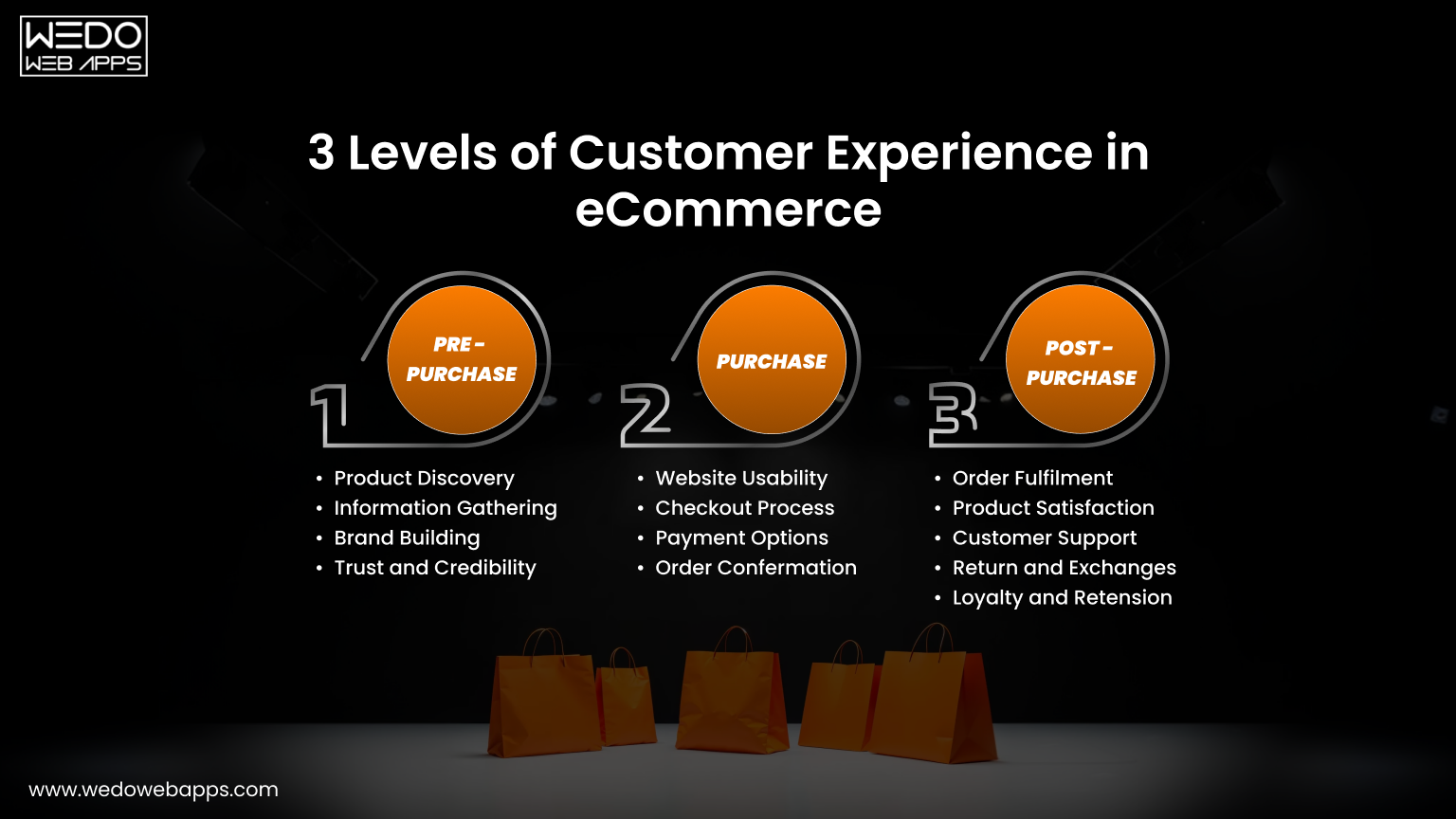
Understanding three levels of customer experience online

Customer Experience vs. User Experience (UX)

These two terms are often used interchangeably, but they are not the same.

User Experience (UX) focuses mainly on:

  • Interface design
  • Navigation
  • Page layouts
  • Visual hierarchy

Customer Experience (CX) is broader and includes:

  • UX
  • Content clarity
  • Product discovery
  • Checkout flow
  • Customer service
  • Post-purchase communication

UX is a component of CX. CX is the entire journey.

What Makes a Strong eCommerce Customer Experience?

A strong eCommerce customer experience is:

  • Fast
  • Intuitive
  • Personalized
  • Consistent
  • Trust-building

When these elements work together, customers:

  • Stay longer on your site
  • Add more products to the cart
  • Complete purchases
  • Return for future orders

This is why brands that invest in CX consistently outperform competitors on conversion rate and retention.

Why This Matters for Decision-Makers

For business owners and leaders, eCommerce customer experience is not a “design concern”. It is a growth strategy.

Optimizing customer experience helps you:

  • Improve customer experience on your eCommerce website
  • Increase conversion rates
  • Lower acquisition costs
  • Increase lifetime customer value

In short, a better experience equals better business outcomes.

Why eCommerce Customer Experience Directly Impacts Revenue

Every improvement you make to the eCommerce customer experience has a measurable impact on revenue. This is because experience influences how easily customers move from browsing to buying.

When your website feels intuitive, fast, and trustworthy, customers are far more likely to complete purchases.

When it feels slow, confusing, or unreliable, they leave.

Here is how customer experience in eCommerce directly affects your bottom line:

1. Better Experience Increases Conversion Rates

A smooth shopping experience removes friction from the buying process.

Examples of friction include:

  • Slow-loading pages
  • Confusing navigation
  • Unclear product information
  • Complicated checkout

Eliminating these obstacles makes it easier for customers to say “yes”, which naturally increases conversions.

If your goal is to improve customer experience on your ecommerce website, conversion optimization must be a top priority.

2. Positive Experiences Reduce Cart Abandonment

Cart abandonment often happens because something feels difficult or uncertain.

Common causes:

  • Unexpected costs
  • Forced account creation
  • Too many checkout steps
  • Limited payment options

Improving these areas creates a smoother path to purchase and recovers revenue that would otherwise be lost.

3. Strong CX Increases Repeat Purchases

Acquiring a new customer is expensive.

Delivering a positive experience encourages customers to return, which increases lifetime value and reduces dependency on paid acquisition.

Repeat customers also tend to:

  • Spend more per order
  • Purchase more frequently
  • Recommend your brand

4. Customer Experience Builds Brand Trust

Trust is essential in eCommerce.

When customers consistently have good experiences, they associate your brand with reliability. That trust lowers hesitation and shortens future buying cycles.

This trust factor plays a major role in optimising customer experience for long-term growth.

5. Poor CX Silently Destroys Revenue

The most dangerous part of a poor experience is that customers usually don’t complain.

They simply leave.

If your store isn’t converting well, the issue is often not your product. It’s the experience around it.

Key Takeaway: Improving ecommerce customer experience is not a cosmetic upgrade. It is a revenue strategy that directly influences conversions, retention, and profitability.

Understanding the Modern eCommerce Customer Journey

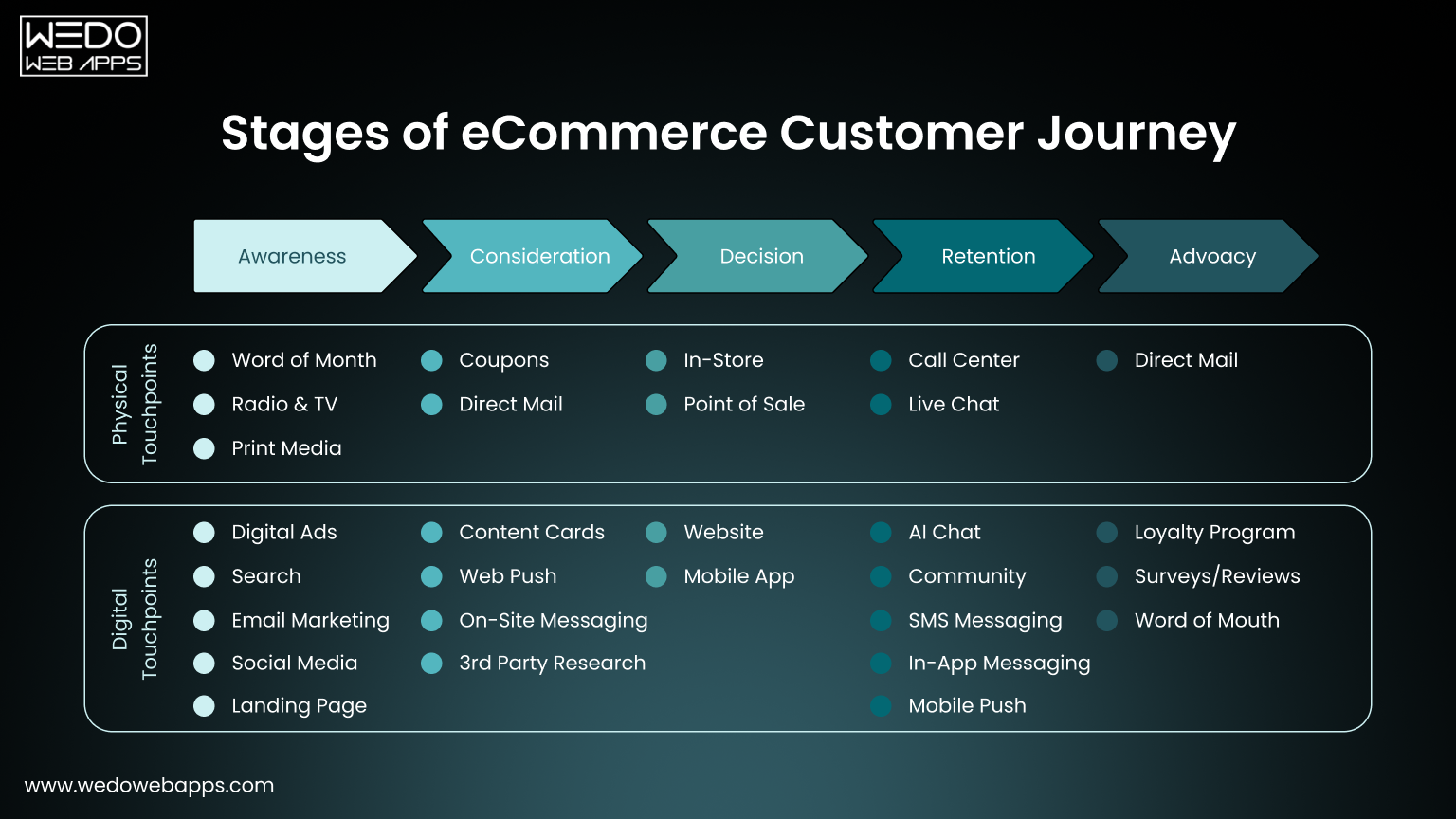
Key stages in the eCommerce customer journey

The eCommerce customer journey is the series of steps a customer goes through before, during, and after purchasing from your online store.

Understanding this journey is essential if you want to improve customer experience on your ecommerce website, because experience gaps usually appear at specific stages.

A modern eCommerce customer journey is no longer linear.

Customers may:

  • Discover your brand on social media
  • Visit your site from an ad
  • Leave without buying
  • Return through search
  • Compare competitors
  • Purchase later

Your goal is to deliver a consistent, friction-free experience at every touchpoint.

Stage 1: Awareness

This is when a potential customer first discovers your brand.

Common touchpoints:

  • Social media posts
  • Paid ads
  • Search engines
  • Influencer content

CX focus at this stage:

  • Fast-loading pages
  • Clear brand messaging
  • Strong first impression

If the first interaction feels slow or confusing, the journey ends immediately.

Stage 2: Consideration

Customers begin exploring products and evaluating options.

They look for:

  • Detailed product information
  • Images and videos
  • Reviews and ratings
  • Pricing clarity

CX focus:

  • Easy navigation
  • Search and filters
  • Well-structured product pages

This stage heavily influences whether customers trust your brand.

Stage 3: Purchase

This is the most critical stage of the journey.

Customers expect:

  • Simple checkout
  • Multiple payment options
  • Transparent pricing
  • Secure transactions

Even small obstacles here can destroy conversion rates.

Stage 4: Post-Purchase

The experience does not end after payment.

Post-purchase experience includes:

  • Order confirmation
  • Shipping updates
  • Easy returns
  • Customer support

Positive post-purchase experiences increase satisfaction and reduce refunds.

Stage 5: Loyalty and Advocacy

Happy customers become repeat buyers and promoters.

They:

  • Reorder
  • Leave reviews
  • Recommend your brand

This stage fuels sustainable growth.

Why This Matters

When you view ecommerce customer experience through the lens of the entire customer journey, it becomes clear where improvements are needed.

Optimizing only one stage is not enough.

To truly optimize customer experience, you must improve every stage of the journey.

3 Brands Crushing Customer Experience

Some eCommerce brands consistently outperform competitors, not because they sell radically different products, but because they deliver exceptional customer experiences at every stage of the journey.

Here are three well-known examples and what businesses can learn from them.

1. Amazon, Obsessive Focus on Convenience

Amazon’s success is built on removing friction from shopping.

What Amazon does exceptionally well:

  • Ultra-fast site performance
  • Powerful search and filtering
  • One-click purchasing
  • Transparent delivery timelines
  • Easy returns and refunds

Why it works: Customers never have to think about how to buy. They simply buy.

Key takeaway: If you want to improve customer experience on your ecommerce website, reduce friction everywhere, especially in search, product discovery, and checkout.

2. Apple, Experience-Led Product Presentation

Apple doesn’t just sell products. It sells clarity, simplicity, and confidence.

What Apple does well:

  • Clean, distraction-free design
  • Simple product comparisons
  • Strong visuals and videos
  • Clear benefits instead of technical jargon

Why it works: Customers understand exactly what they’re buying and why it’s right for them.

Key takeaway: High-quality product pages with clear messaging and visuals dramatically improve ecommerce customer experience and conversion rates.

3. Warby Parker, Seamless Omnichannel Experience

Warby Parker blends online and offline experiences effortlessly.

What they do well:

  • Virtual try-on tools
  • Home try-on programs
  • Consistent experience across website, mobile, and stores
  • Simple returns and exchanges

Why it works: Customers feel supported regardless of how they interact with the brand.

Key takeaway: Enabling omnichannel experiences helps optimise customer experience and builds trust.

What These Brands Have in Common

  • They remove friction
  • They prioritize clarity
  • They personalize experiences
  • They design for the customer, not the company

These principles apply to businesses of all sizes.

You don’t need Amazon-level budgets. You need customer-first design and strategic execution.

Proven Strategies to Improve eCommerce Customer Experience

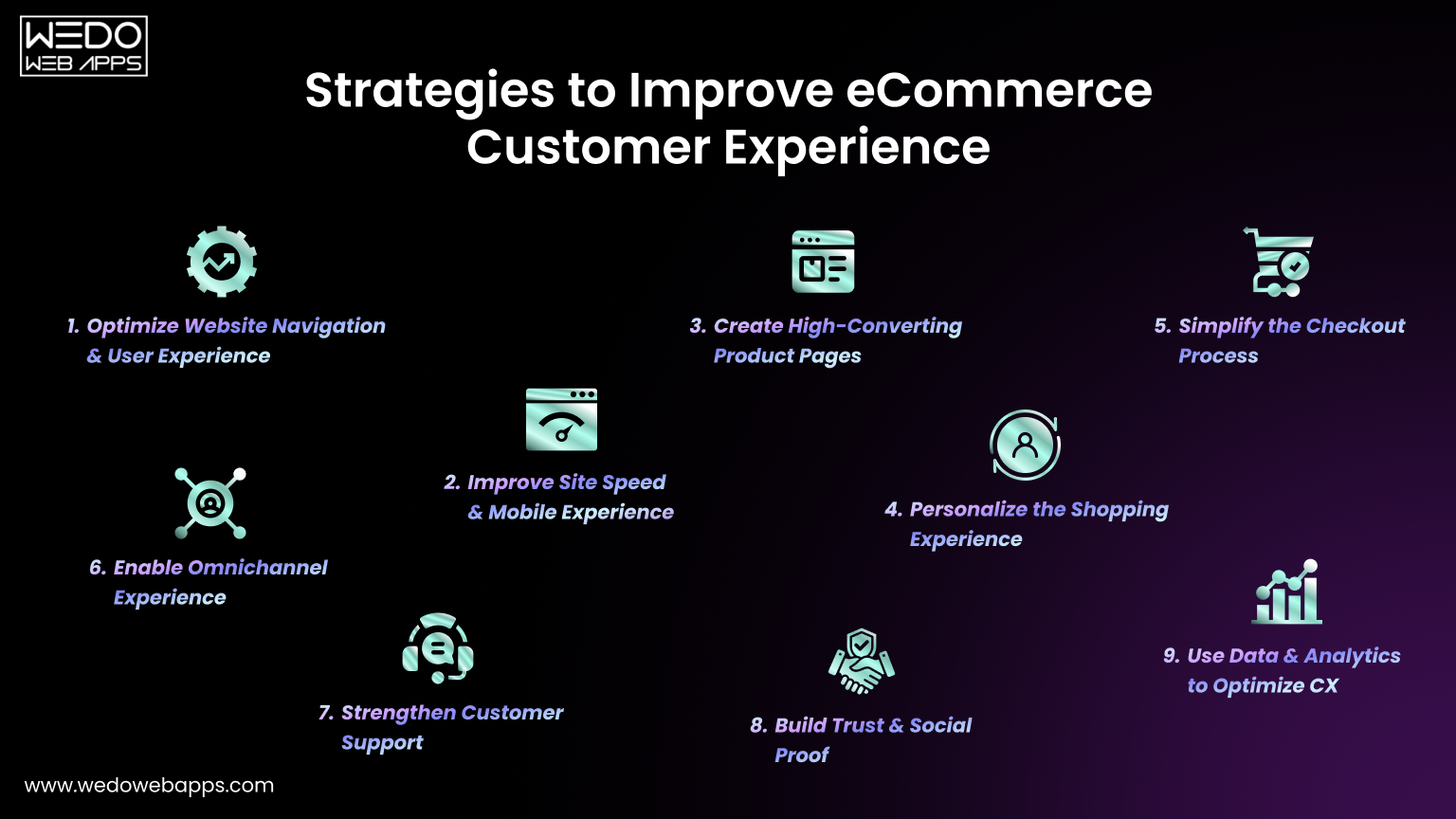
Strategies to boost customer experience in eCommerce

Improving ecommerce customer experience requires a combination of technology, design, data, and strategy. There is no single tactic that fixes everything. Successful brands continuously optimize multiple areas of their online store.

Below are proven strategies to help you improve customer experience on your ecommerce website and drive better business results.

1. Optimize Website Navigation and User Experience

Customers should find what they want within seconds.

Best practices:

  • Simple, logical menu structure
  • Clear product categories
  • Prominent search bar
  • Breadcrumb navigation

When navigation is intuitive, users explore more and bounce less.

2. Improve Site Speed and Mobile Experience

Most eCommerce traffic comes from mobile devices.

Focus on:

  • Fast page loading
  • Mobile-friendly layouts
  • Compressed images
  • Lightweight scripts

A slow site equals lost revenue.

3. Create High-Converting Product Pages

Product pages are conversion engines.

Essential elements:

  • High-quality images and videos
  • Clear product descriptions
  • Benefits-focused copy
  • Pricing transparency
  • Reviews and ratings

Strong product pages directly improve ecommerce customer experience and conversions.

4. Personalize the Shopping Experience

Personalization makes customers feel understood.

Examples:

  • Product recommendations
  • Recently viewed items
  • Personalized emails
  • Location-based offers

Personalization increases engagement and average order value.

5. Simplify the Checkout Process

Every extra step reduces conversions.

Best practices:

  • Guest checkout
  • Minimal form fields
  • Multiple payment options
  • Clear error messages

Simple checkout flows optimise customer experience and reduce abandonment.

6. Enable Omnichannel Experience

Customers interact across devices and platforms.

Ensure consistency across:

  • Website
  • Mobile
  • Social media
  • Email

Omnichannel experiences build trust and continuity.

7. Strengthen Customer Support

Fast, helpful support improves confidence.

Options include:

  • Live chat
  • Chatbots
  • Email support
  • Knowledge base

Good support is part of the ecommerce customer experience, not an afterthought.

8. Build Trust and Social Proof

Trust drives conversions.

Use:

  • Customer reviews
  • Testimonials
  • Security badges
  • Clear policies

Social proof reassures hesitant buyers.

9. Use Data and Analytics to Optimize CX

You can’t improve what you don’t measure.

Track:

  • Conversion rates
  • Bounce rates
  • Heatmaps
  • Funnel drop-offs

Use insights to continuously optimise customer experience.

Key Takeaway: Improving ecommerce customer experience is an ongoing process, not a one-time project.


Boost eCommerce growth by improving customer experience

Metrics to Measure eCommerce Customer Experience Success

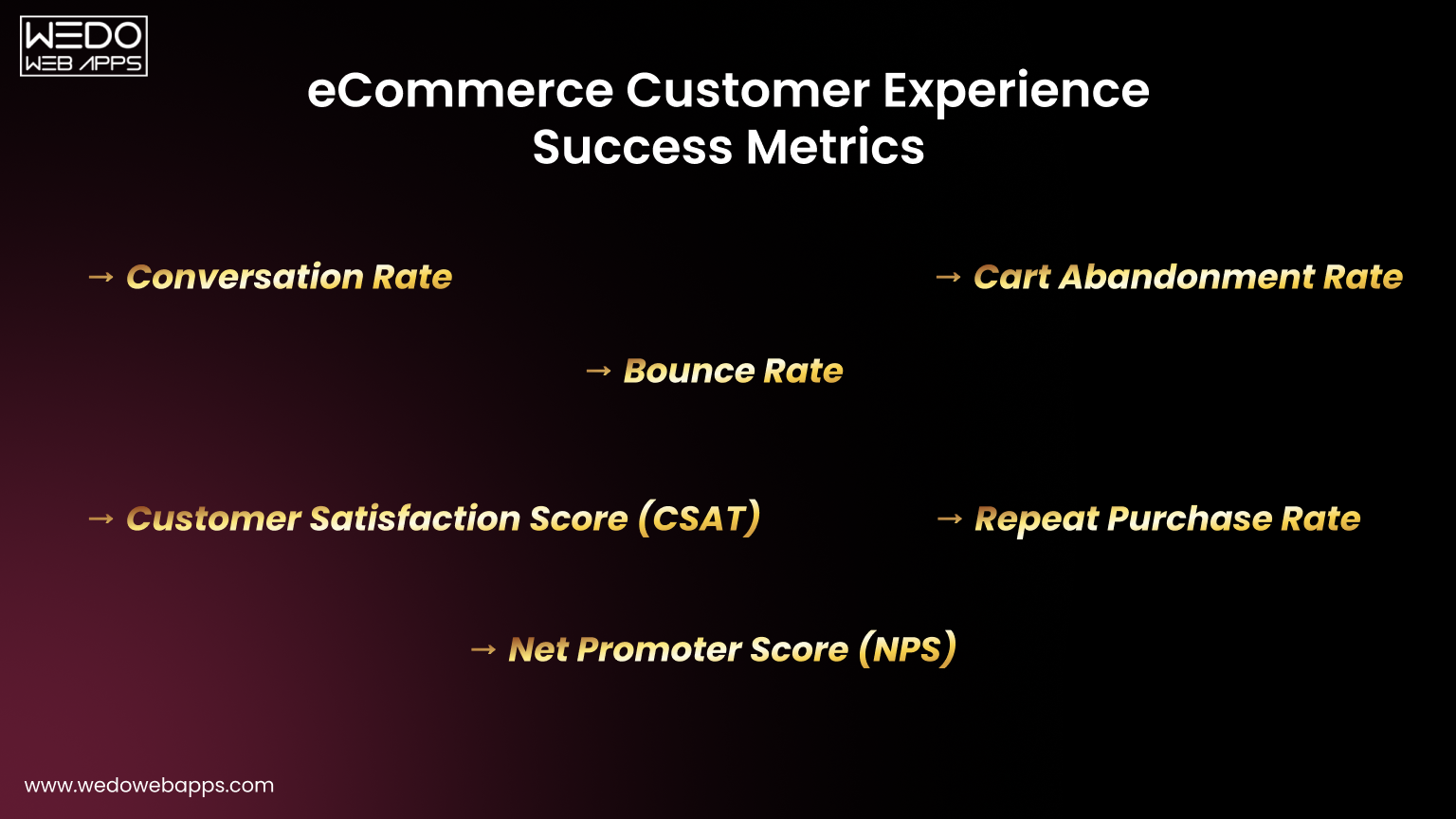
Key metrics for successful eCommerce customer experience

If you want to improve ecommerce customer experience, you must be able to measure it accurately. Without clear metrics, it’s impossible to know what’s working and what needs improvement.

Below are the most important metrics decision-makers should track.

Conversion Rate

Shows the percentage of visitors who complete a purchase.

Why it matters: A rising conversion rate indicates that your customer experience is becoming smoother and more persuasive.

Bounce Rate

Shows how many visitors leave after viewing only one page.

Why it matters: High bounce rates often signal slow loading, poor relevance, or confusing design.

Cart Abandonment Rate

Shows how many users add products to the cart but don’t purchase.

Why it matters: Helps identify checkout or trust issues.

Customer Satisfaction Score (CSAT)

Measures how satisfied customers are with their experience.

Why it matters: A direct indicator of customer happiness.

Net Promoter Score (NPS)

Measures how likely customers are to recommend your brand.

Why it matters: Strong signal of loyalty and advocacy.

Repeat Purchase Rate

Shows how many customers buy again.

Why it matters: Reflects long-term experience quality.

Pro Tip: Track these metrics monthly and correlate changes with UX, content, and checkout improvements.

Common Mistakes That Hurt eCommerce Customer Experience

Many eCommerce businesses focus heavily on driving traffic but fail to invest enough in experience optimization. As a result, they attract visitors but struggle to convert and retain them.

If you want to optimise customer experience and drive sustainable growth, avoid these common mistakes.

1. Designing for Aesthetics Instead of Usability

Visually impressive websites do not guarantee good experiences.

When design prioritizes style over function, users struggle to navigate, find products, or complete purchases.

What to focus on instead:

  • Clear layouts
  • Logical hierarchy
  • Easy navigation

Usability always beats visual complexity.

2. Overcomplicating Navigation and Site Structure

Complex menus and deep category structures confuse users.

Common symptoms:

  • Too many categories
  • Unclear labels
  • Hidden products

Simpler navigation improves discovery and reduces bounce rates.

3. Ignoring Mobile Optimization

Most shoppers browse and buy on mobile devices.

If your mobile site is slow, hard to tap, or visually broken, customers leave.

Mobile experience must be treated as primary, not secondary.

4. Hiding Important Purchase Information

Customers need clarity before buying.

Hiding or delaying information such as:

  • Shipping costs
  • Delivery timelines
  • Return policies
  • Warranty details

creates friction and abandonment.

5. Using Generic or Thin Product Descriptions

Short, vague descriptions fail to answer buyer questions.

Strong product pages explain:

  • What the product does
  • Who it’s for
  • Why it’s better
  • How it solves problems

Detailed content improves ecommerce customer experience and SEO.

6. Offering Too Many Checkout Steps

Long checkout flows frustrate users.

Each additional step reduces completion rates.

Simple, streamlined checkout improves conversions.

7. Not Showing Social Proof

Customers look for reassurance.

Without reviews, ratings, or testimonials, trust is weak.

Social proof strengthens confidence.

8. Treating Customer Support as an Afterthought

Slow or unavailable support damages trust.

Customers expect quick help when issues arise.

Support quality directly affects experience.

9. Failing to Use Data for CX Decisions

Many businesses rely on assumptions.

Without analytics, heatmaps, and feedback, improvements become guesswork.

Data-driven optimization leads to better outcomes.

Key Takeaway: Most ecommerce customer experience problems are preventable. They stem from overlooked fundamentals, not advanced technology.

Why Partnering with Experts Improves Customer Experience Faster

Improving ecommerce customer experience is not just about making design tweaks or adding plugins. It requires strategy, technical expertise, data analysis, and continuous optimization.

For many startups, SMBs, and enterprises, building and maintaining this capability in-house is challenging.

This is where partnering with experienced eCommerce and CX specialists creates a competitive advantage.

1. CX Strategy Aligned With Business Goals

Experts start with your business objectives.

They map:

  • Target customers
  • Customer journeys
  • Conversion funnels
  • Growth goals

This ensures every experience improvement supports revenue, not just aesthetics.

2. Access to Cross-Functional Expertise

Effective CX improvement requires:

  • UX and UI designers
  • Front-end developers
  • CRO specialists
  • Analytics experts

Hiring and managing all these roles internally is costly and time-consuming.

Partners provide immediate access to specialized skills.

3. Faster Implementation and Testing

Experienced teams already know:

  • What patterns work
  • What mistakes to avoid
  • How to test efficiently

This reduces trial-and-error and accelerates results.

4. Scalable Optimization Process

Experts build repeatable frameworks for:

  • Auditing experience
  • Prioritizing improvements
  • Testing changes
  • Measuring impact

This creates sustainable growth.

5. Technology and Tool Expertise

Specialists are familiar with:

  • eCommerce platforms
  • Analytics tools
  • Personalization engines
  • Automation solutions

This ensures correct implementation from day one.

Bottom Line: If ecommerce customer experience is a growth priority, treating it as a specialized discipline, not a side project, delivers faster and more predictable results.


Improve eCommerce shopping experience with expert help

Conclusion, Customer Experience Is the Foundation of eCommerce Growth

In today’s competitive market, customer experience in eCommerce is no longer optional. It is a critical growth driver.

Brands that win are not always the ones with the lowest prices or the largest catalogs. They are the ones that deliver fast, intuitive, personalized, and trustworthy experiences across the entire eCommerce customer journey.

By understanding how customers move through your store, identifying friction points, and applying proven strategies to optimise customer experience, you can:

  • Increase conversions
  • Reduce cart abandonment
  • Build customer loyalty
  • Drive sustainable revenue growth

Improving ecommerce customer experience is not a one-time project. It is an ongoing process that requires strategy, testing, and continuous optimization.

If your goal is to build an eCommerce business that scales, investing in customer experience is one of the highest-ROI decisions you can make.


Build a faster, smoother, high-converting eCommerce store

Magento Developer Hourly Rate: Cost Breakdown and Pricing Factors

Introduction

Understanding the Magento developer hourly rate is one of the first steps businesses take when planning an eCommerce project. Before choosing features, timelines, or platforms, decision-makers want clarity on what Magento development typically costs and how those costs are calculated. This research phase is not about selecting vendors. It is about setting realistic budgets and expectations.

Magento is a powerful eCommerce platform, but its flexibility and scalability also mean that development costs can vary widely. The cost of Magento development depends on several factors, including developer experience, project complexity, geographic location, and long-term support needs. As a result, businesses often see a broad range when comparing Magento developer pricing across regions and engagement models.

For founders, eCommerce managers, and growing businesses, researching Magento developer hourly rates helps answer practical questions:

What is a reasonable hourly cost? Why do rates differ so much between countries? How does hourly pricing translate into total project investment?

This guide is designed to provide pricing intelligence, not recommendations on hiring or vendor selection. It breaks down average Magento developer costs, explains what influences pricing, and shows how businesses use hourly rates to plan Magento development budgets more effectively.

By the end, you should have a clearer understanding of Magento development cost per hour and how to use that information to make informed, financially sound decisions.

Struggling to estimate Magento development cost

Average Magento Developer Hourly Rate (Global Overview)

When businesses research the Magento developer hourly rate, they are usually trying to establish a realistic cost range, not an exact number. Magento development pricing varies widely due to differences in skill level, project scope, and regional cost structures.

At a global level, the average Magento developer hourly rate typically falls within this broad range:

  • $20 – $50 per hour for entry-level or basic Magento development work
  • $50 – $100 per hour for experienced, mid-level Magento developers
  • $100 – $150+ per hour for senior or highly specialised Magento development

These figures reflect market trends, not fixed pricing benchmarks.

Why Magento hourly rates vary so much

Several factors cause wide differences in Magento developer cost per hour, even for similar projects:

  • Experience level: Junior developers usually charge less but may take longer to deliver.
  • Type of work involved: Simple theme changes cost less than custom module development or complex integrations.
  • Project responsibility: Architecture decisions, performance optimisation, and scalability planning increase hourly pricing.

Because of these variables, averages alone can be misleading. Two developers with the same hourly rate may produce very different total project costs depending on efficiency, problem-solving ability, and scope clarity.

How businesses should use average hourly rates

Rather than treating averages as final numbers, businesses typically use them to:

  • Validate whether a quoted Magento developer pricing range is reasonable
  • Compare regional cost differences at a high level
  • Estimate early-stage budgets before detailed scoping

Understanding global averages helps set expectations, but accurate budgeting always requires deeper context, especially when comparing Magento development cost per hour across regions.

In the next section, we’ll break down Magento eCommerce developer hourly rates by region, showing how location significantly impacts pricing.

Magento Developer Hourly Rates by Region

One of the biggest factors influencing the Magento developer hourly rate is geographic location. Differences in labour costs, market maturity, and demand for Magento expertise cause hourly pricing to vary significantly across regions.

Below is a regional breakdown to help businesses understand Magento developer rates by country and how location affects overall development budgets.

United States

Magento development rates in the United States are typically among the highest globally. This is largely due to higher operating costs, strong ecommerce demand, and the concentration of experienced Magento specialists.

Typical Magento developer hourly rates in the USA:

  • $100 – $150+ per hour for experienced Magento developers
  • Senior specialists or consultants may exceed this range for complex projects

Why rates are higher in the US:

  • Higher labour and operational costs
  • Strong demand for enterprise ecommerce expertise
  • Greater focus on performance, security, and compliance

These rates are often reflected in large-scale or highly customised Magento implementations.

United Kingdom

The UK market sits slightly below the US in terms of pricing but still commands premium rates compared to many other regions.

Typical Magento developer hourly rates in the UK:

  • £70 – £120 per hour, depending on experience and project scope

Key pricing influences in the UK:

  • High demand for ecommerce modernisation
  • Strong Magento adoption among mid-sized and enterprise businesses
  • Regulatory and security considerations

UK rates often balance advanced technical expertise with slightly lower costs than US-based development.

Europe

Magento developer pricing across Europe varies widely between Western and Eastern regions, making it one of the most diverse markets in terms of cost.

Typical Magento developer hourly rates in Europe:

  • Western Europe: €80 – €130 per hour
  • Eastern Europe: €40 – €80 per hour

Why European rates vary:

  • Differences in local labour costs
  • Availability of skilled Magento developers
  • Growing ecommerce markets in Eastern Europe

Many businesses explore Europe for a balance between cost efficiency and technical depth when estimating Magento developer pricing.

India and Offshore Markets

India and other offshore regions are commonly researched for their cost advantages in Magento development. However, pricing can still vary widely within these markets.

Typical Magento developer hourly rates in India and offshore regions:

  • $20 – $50 per hour for standard Magento development work
  • Higher rates for specialised or senior expertise

What influences offshore pricing:

  • Developer experience and certification
  • Communication and project management requirements
  • Time zone overlap and collaboration needs

Lower hourly rates can reduce upfront Magento development cost per hour, but total project cost still depends on scope clarity and execution efficiency.

Understanding regional differences helps businesses realistically compare Magento developer costs and plan budgets that align with project expectations, not just hourly rates.

Hourly Magento developer rates across countries

Factors That Influence Magento Developer Pricing

While location plays a major role, geography alone does not determine the Magento developer hourly rate. Two developers in the same country can charge very different prices based on experience, project requirements, and long-term responsibilities.

Below are the key factors that consistently influence Magento developer pricing and the overall cost of Magento development.

Experience and Skill Level

Developer experience is one of the strongest pricing drivers.

Typical pricing impact by experience:

  • Junior Magento developers: Lower hourly rates, suitable for well-defined or repetitive tasks
  • Mid-level Magento developers: Moderate rates with balanced efficiency and problem-solving ability
  • Senior Magento developers: Higher hourly pricing due to architectural expertise and risk management

Experienced developers often reduce total project cost by avoiding rework and technical debt, even if their Magento development cost per hour is higher.

Project Complexity

The complexity of a Magento project directly affects hourly pricing. Examples of complexity-based cost differences:

  • Basic store setup or theme adjustments
  • Multi-store or multi-language configurations
  • High-traffic ecommerce platforms
  • Advanced performance and scalability requirements

As complexity increases, businesses should expect higher Magento developer cost due to planning, testing, and optimization efforts.

Customization and Integrations

Magento’s flexibility allows deep customization, but this comes with pricing implications.

Custom work that increases hourly rates includes:

  • Custom Magento modules
  • ERP, CRM, or payment gateway integrations
  • Third-party service connections
  • Custom checkout or pricing logic

These tasks often require specialised expertise, increasing Magento developer pricing beyond standard development work.

Ongoing Support and Maintenance Requirements

Some Magento projects involve more than just initial development. Support-related cost factors:

  • Post-launch bug fixes and enhancements
  • Platform updates and security patches
  • Performance monitoring and optimisation

Projects with ongoing responsibilities may carry higher hourly rates due to long-term platform ownership expectations.

Understanding these factors helps businesses evaluate Magento developer hourly rates more accurately and avoid comparing costs without proper context.

Hourly vs Fixed-Price Magento Projects (High-Level Comparison)

When estimating Magento development cost, businesses often compare hourly pricing with fixed-price project models. Each approach affects budgeting differently, and neither is universally better. Understanding how these models work helps teams plan Magento projects more realistically.

Hourly Magento Development Pricing

Hourly pricing is commonly used when the project scope is flexible or evolving.

How hourly pricing typically works:

  • Development time is tracked based on actual hours worked
  • Costs adjust as requirements change
  • Billing reflects real effort rather than predefined deliverables

Why businesses choose hourly pricing:

  • Suitable for complex or evolving Magento projects
  • Easier to accommodate changes and refinements
  • More transparent for ongoing development work

However, hourly pricing requires careful tracking to prevent cost overruns, especially when estimating Magento development cost per hour without a clearly defined scope.

Fixed-Price Magento Projects

Fixed-price models are based on predefined scope and deliverables.

Key characteristics of fixed pricing:

  • The total project cost is agreed upon upfront
  • Scope changes typically require renegotiation
  • Budget predictability is higher

Why businesses prefer fixed pricing:

  • Easier budgeting and internal approval
  • Lower financial uncertainty
  • Suitable for well-defined Magento implementations

While fixed pricing limits flexibility, it can simplify planning when requirements are stable and clearly documented.

Choosing Between Hourly and Fixed Pricing

Businesses often decide based on:

  • Project complexity and clarity
  • Internal budget controls
  • Expected changes during development

Both models rely on understanding Magento developer hourly rates, even when final pricing is fixed. Hourly costs often form the basis of fixed-price estimates behind the scenes.

Hourly vs Fixed-Price Magento Projects (High-Level Comparison)

When estimating Magento development cost, businesses often compare hourly pricing with fixed-price project models. Each approach affects budgeting differently, and neither is universally better. Understanding how these models work helps teams plan Magento projects more realistically.

Hourly Magento Development Pricing

Hourly pricing is commonly used when the project scope is flexible or evolving.

How hourly pricing typically works:

  • Development time is tracked based on actual hours worked
  • Costs adjust as requirements change
  • Billing reflects real effort rather than predefined deliverables

Why businesses choose hourly pricing:

  • Suitable for complex or evolving Magento projects
  • Easier to accommodate changes and refinements
  • More transparent for ongoing development work

However, hourly pricing requires careful tracking to prevent cost overruns, especially when estimating Magento development cost per hour without a clearly defined scope.

Fixed-Price Magento Projects

Fixed-price models are based on predefined scope and deliverables.

Key characteristics of fixed pricing:

  • The total project cost is agreed upon upfront
  • Scope changes typically require renegotiation
  • Budget predictability is higher

Why businesses prefer fixed pricing:

  • Easier budgeting and internal approval
  • Lower financial uncertainty
  • Suitable for well-defined Magento implementations

While fixed pricing limits flexibility, it can simplify planning when requirements are stable and clearly documented.

Choosing Between Hourly and Fixed Pricing

Businesses often decide based on:

  • Project complexity and clarity
  • Internal budget controls
  • Expected changes during development

Both models rely on understanding Magento developer hourly rates, even when final pricing is fixed. Hourly costs often form the basis of fixed-price estimates behind the scenes.

Magento Developer Cost vs Total Magento Project Cost

A common hiring mistake businesses make during planning is assuming the Magento developer hourly rate directly represents the total cost of a Magento project. In reality, hourly pricing is only one component of overall investment.

Understanding the difference between hourly development cost and total project cost helps businesses avoid budget surprises later.

Why hourly rate ≠ the total project cost

Hourly pricing shows how much time costs, not how much time will be needed.

The total Magento project cost is influenced by:

  • Number of development hours required
  • Scope clarity at the start of the project
  • Testing, optimisation, and deployment effort
  • Post-launch adjustments and refinements

Two projects with the same Magento development cost per hour can end up with very different total budgets.

Cost components beyond development hours

When planning Magento budgets, businesses often consider hiring factors like:

  • Discovery and planning: Time spent defining requirements and technical architecture
  • Quality assurance and testing: Ensuring performance, security, and compatibility
  • Deployment and launch support: Environment setup, monitoring, and initial optimisation
  • Future scalability considerations: Preparing the platform for growth and traffic spikes

These elements add to the total cost even though they may not always appear in basic hourly estimates.

Why cheaper hourly rates don’t always mean lower cost

Lower Magento developer pricing can reduce upfront costs, but it doesn’t guarantee savings.

Common reasons total cost increase:

  • Longer development timelines
  • Rework due to unclear implementation
  • Performance or scalability issues discovered late

For this reason, businesses evaluate hourly rates alongside efficiency, experience, and scope control when estimating Magento developer costs.

Magento Project Cost Planning

Common Magento Developer Pricing Misconceptions Explained

During cost research, businesses often encounter assumptions that can distort how they interpret the Magento developer hourly rate. Clearing up these misconceptions helps teams plan more accurately and avoid unrealistic expectations.

“Higher hourly rates always mean higher total cost.”

A higher Magento development cost per hour does not automatically lead to a higher project budget.

Why this assumption can be misleading:

  • Experienced developers often complete tasks faster
  • Fewer errors reduce rework and testing time
  • Better architectural decisions lower future maintenance costs

In many cases, efficiency matters more than the hourly number alone.

“Offshore development is always cheaper.”

While offshore regions may offer lower Magento developer pricing, the total cost still depends on execution quality.

Factors that affect offshore cost outcomes:

  • Requirement clarity and documentation
  • Communication efficiency
  • Time spent on revisions or corrections

Lower hourly rates can be cost-effective, but only when paired with a clear scope and structured workflows.

“Hourly pricing is more expensive than fixed pricing.”

Hourly pricing is often perceived as risky, but it is not inherently more expensive.

In reality:

  • Fixed-price projects are frequently calculated using estimated hourly costs
  • Changes in scope can increase fixed-price budgets indirectly
  • Hourly pricing can reduce costs when requirements evolve gradually

Both models rely on understanding realistic Magento developer hourly rates.

How Businesses Plan Magento Development Budgets

Businesses use hourly pricing data as a planning reference, not a final commitment. Budgeting typically happens in stages, using cost ranges rather than exact numbers.

Step 1: Early-stage cost estimation

At the research stage, businesses often:

  • Review average Magento developer cost ranges
  • Compare regional pricing differences
  • Identify minimum and maximum budget thresholds

This step helps determine whether Magento aligns with financial expectations.

Step 2: Scope definition and prioritisation

Once Magento is shortlisted, budgeting becomes more detailed.

Common practices include:

  • Separating essential features from optional ones
  • Estimating hours for core development tasks
  • Allocating buffers for unexpected changes

Hourly pricing helps convert scope into financial projections.

Step 3: Planning for long-term costs

Magento development is rarely a one-time expense.

Businesses often budget for:

  • Post-launch enhancements
  • Performance optimisation
  • Platform updates and security maintenance

These considerations influence how Magento development cost per hour is evaluated over time.

When Magento Development Costs Make Sense for Businesses

Magento is not positioned as a low-cost ecommerce platform. Its pricing reflects flexibility, scalability, and customization potential.

Magento development costs tend to make sense when:

  • Businesses require advanced ecommerce functionality
  • Scalability and performance are long-term priorities
  • Custom workflows or integrations are necessary

For simpler ecommerce needs, lower-cost platforms may require less investment. Magento is typically evaluated when growth and complexity justify higher Magento developer pricing.

Using Magento Developer Hourly Rates for Smarter Planning

Researching the Magento developer hourly rate allows businesses to plan with clarity rather than assumptions. Hourly pricing helps compare regions, estimate budgets, and understand how complexity affects overall cost.

Used correctly, this information supports:

  • Better financial forecasting
  • More realistic project timelines
  • Clearer expectations around Magento investment

As part of broader Magento development projects and ecommerce development planning, hourly rate research plays a critical role in informed decision-making, without pushing premature hiring or vendor selection.

Conclusion: Using Magento Developer Hourly Rates for Smarter Budgeting

Researching the Magento developer hourly rate is less about finding the lowest number and more about understanding how pricing aligns with business goals, project complexity, and long-term ecommerce plans. Hourly rates provide context, not certainty, and are most useful when viewed as budgeting indicators rather than final cost commitments.

By comparing Magento developer pricing across regions, experience levels, and engagement models, businesses can set realistic expectations and avoid underestimating total investment. When combined with scope clarity and long-term planning, hourly rate research becomes a practical tool for informed decision-making, helping teams plan Magento development with confidence, not assumptions.

Magento development project scope