Introduction
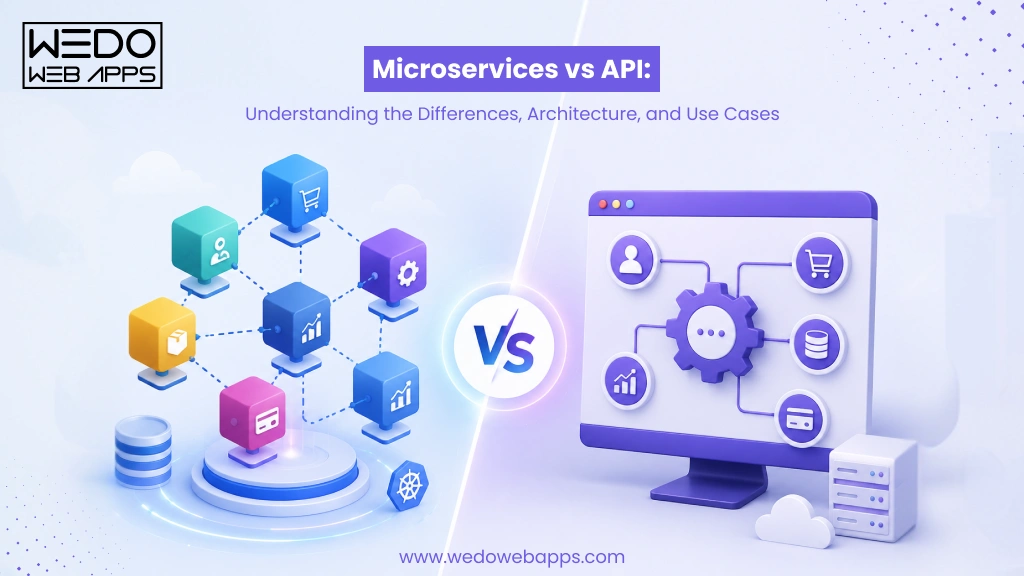
When planning a software project, one question often creates confusion right from the start: microservices vs API. Many people hear these terms in the same conversation and assume they refer to the same thing. However, understanding the difference between microservices and API is important for making the right architectural and development decisions.
If you have ever wondered what is an API in software development or searched for a microservices architecture explained, then you are not alone. Business owners, product managers, and developers frequently struggle to understand how these concepts fit together and when each one should be used.
The confusion often grows because APIs and microservices are closely connected. A modern application may use both, but they serve different purposes. An API acts as a communication layer that allows systems, applications, or services to exchange information. Microservices architecture, on the other hand, is a way of designing software by breaking it into smaller, independent services that work together to deliver a complete application.
Understanding microservices vs RESTful API becomes even more important as businesses scale their applications, integrate third-party systems, and aim to deliver new features faster. Choosing the right approach can impact development speed, scalability, maintenance costs, and the overall user experience.
In this guide, we will explain what is microservices architecture, what APIs do, how they work together, the key differences between them, and which approach makes the most sense based on your business goals and technical requirements.

Microservices vs API: Quick Answer
If you are looking for a quick explanation of microservices vs API, the answer is simple: they are not the same thing, but they often work together.
An API helps different software systems communicate, while microservices define how an application is structured and managed. Understanding this distinction can help businesses make better architectural decisions and avoid confusion when planning software projects.
What is the Difference Between Microservices and APIs?
The main difference between microservices and APIs is that they serve different purposes within software development.
An API, or Application Programming Interface, is a set of rules that allows different applications, services, or systems to communicate with each other. It acts as a bridge for exchanging data and functionality.
Microservices architecture, on the other hand, is an architectural approach that structures an application as a collection of small, independent services. Each service handles a specific business function and can be developed, deployed, and maintained separately.
In simple terms, an API defines how software components communicate, while microservices define how an application is built and organized.
Can APIs and Microservices Work Together?
Yes, APIs and microservices often work together in modern applications. Microservices use APIs to exchange data, process requests, and communicate with other services or external systems.
For example, in an eCommerce application, separate microservices may manage products, orders, payments, and customer accounts. APIs allow these services to share information and work together as a complete system.
Is a REST API the Same as a Microservice?
No. A REST API is a communication method that follows specific architectural principles for exchanging data over the web. A microservice is an independent software component designed to perform a specific function.
Many microservices expose REST APIs so other services and applications can interact with them. However, a REST API can exist without microservices, and a microservice can use communication methods other than REST.
What Is an API in Software Development?
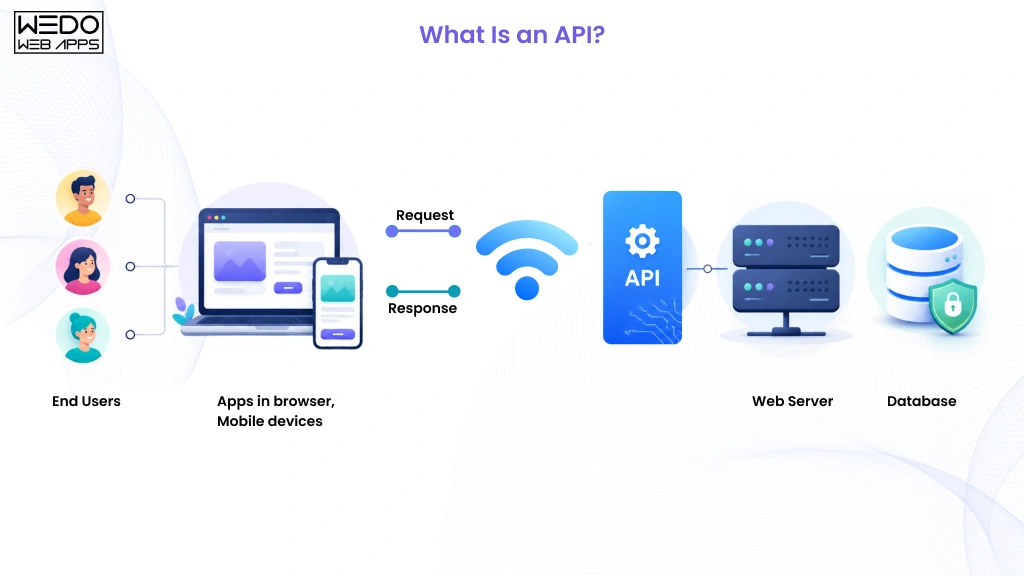
Before understanding the difference between APIs and microservices, it is important to know what an API does. If you have ever used a payment gateway, logged into a website using Google, or checked the weather on a mobile app, you have already interacted with APIs.
Simply put, an API allows different software applications to communicate and exchange data without exposing their internal code or systems.
API Definition Explained
An API is a set of rules and protocols that enable one software application to request data or services from another application.
Think of an API as a waiter in a restaurant. You place an order through the waiter, the kitchen prepares the meal, and the waiter delivers it back to you. Similarly, an API receives requests, processes them through the appropriate system, and returns the required response.
How APIs Work
A typical API interaction follows a simple process:
- A user performs an action in an application.
- The application sends a request to an API.
- The API forwards the request to the appropriate system or service.
- The system processes the request.
- The API returns the response to the application.
- The application displays the result to the user.
For example, when you check available rooms on a travel booking website, the platform uses APIs to retrieve hotel information, pricing, and availability from multiple providers in real-time.
Common Types of APIs
Not all APIs serve the same purpose. Different API types are designed for different communication needs.
1. REST APIs
REST APIs use standard HTTP methods such as GET, POST, PUT, and DELETE to exchange data. They are widely used because they are simple, scalable, and compatible with most applications.
2. GraphQL APIs
GraphQL APIs allow clients to request only the specific data they need. This reduces unnecessary data transfers and improves performance in data-heavy applications.
3. SOAP APIs
SOAP APIs follow strict communication standards and are commonly used on enterprise systems where security and reliability are critical.
4. Internal APIs
Internal APIs are designed to be used within an organization. They help different teams and systems share data securely without exposing services to external users.
5. Public APIs
Public APIs are available to external developers and businesses. Companies often provide these APIs so third parties can integrate their services into other applications.
Real World API Example
Consider an online food delivery application.
When a customer places an order, multiple APIs work behind the scenes:
- Restaurant API receives the order details.
- Payment API processes the transaction.
- Location API tracks the delivery partner.
- Notification API sends order updates.
Although users see a single application, APIs make it possible for multiple systems to work together and deliver a smooth experience.
What Is Microservices Architecture?
To fully understand the difference between microservices and API, it is important to first answer the common question: what is microservices architecture?
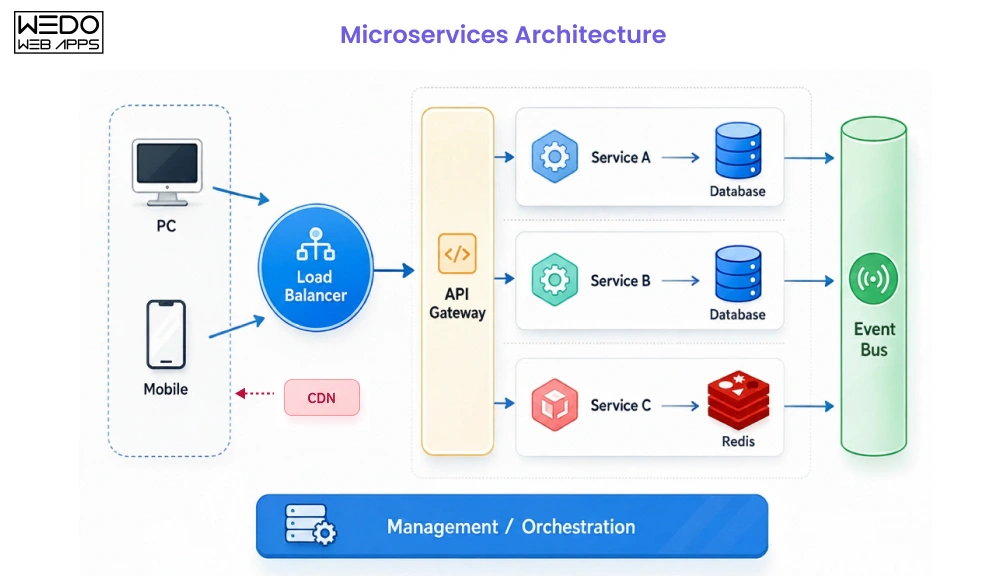
Microservices architecture is a software design approach that structures an application as a collection of small, independent services. Each service is responsible for a specific business function and can be developed, deployed, and maintained separately. Together, these services work as a complete application while remaining loosely connected.
This approach helps organizations build applications that are easier to scale, update, and manage as business requirements change.
Microservices Architecture Explained
If you are looking for microservices architecture explained in simple terms, think of it as dividing a large application into smaller, specialized units.
Instead of having one large system handle every function, each microservice focuses on a single task. For example, an eCommerce application may separate its operations into:
- User management service
- Product catalog service
- Inventory service
- Shopping cart service
- Payment service
- Order management service
This separation allows teams to update or scale individual services without disrupting the entire application.
Core Components of a Microservices Architecture
While implementations vary, most microservices architectures include the following components:
| Component | Purpose |
|---|
| Microservices | Perform specific business functions |
| APIs | Facilitate communication between services |
| Databases | Store service-specific data |
| API Gateway | Directs requests to the appropriate service |
| Service Discovery | Helps services locate each other |
| Monitoring Tools | Track system performance and reliability |
Each component plays a role in keeping the application organized and efficient.
How Microservices Communicate
Although microservices operate independently, they still need to exchange information to complete business processes.
Common communication methods include:
- REST APIs
- GraphQL APIs
- Message queues
- Event-driven communication
The chosen method depends on the application’s complexity, performance requirements, and architecture goals.
Real World Microservices Example
Consider a food delivery platform.
When a customer places an order, multiple microservices work together:
- User services manage account information.
- Restaurant services handle menu data.
- Order service processes the order.
- Payment service manages transactions.
- Delivery service tracks the driver.
- Notification services send updates to the customer.
Because each service operates independently, updates to one area of the platform can be made without affecting the entire application. This flexibility is one of the biggest reasons businesses adopt microservices architecture for modern software development.
APIs and Microservices: Understanding the Relationship
One reason the microservices vs API debate is so common is that the two are frequently used together in modern applications. This often leads people to believe they are competing technologies or different versions of the same concept. In reality, APIs and microservices serve different purposes but complement each other within a software ecosystem.
Understanding their relationship makes it much easier to grasp the difference between microservices and API and determine where each fits into an application’s architecture.
Why APIs and Microservices Are Often Confused
The confusion usually comes from the fact that many microservices use APIs to communicate.
For example, a payment service may need customer information from a user service before processing a transaction. Rather than accessing the service directly, it often sends an API request to retrieve the requested data.
Because APIs are heavily used in microservices environments, many people assume they are interchangeable. However, an API is a communication mechanism, while a microservice is an architectural component.
How APIs Enable Communication in Microservices
In a microservices architecture, services are designed to operate independently. To complete business processes, they need a reliable way to exchange data and requests.
APIs help make this possible by:
- Allowing services to share information securely.
- Supporting communication between internal services.
- Connecting applications with third-party platforms.
- Reducing direct dependencies between services.
- Enabling teams to update services without disrupting the entire system.
Without APIs or another communication method, independent services would struggle to work together efficiently.
Can a Microservice Exist Without an API?
Yes, although APIs are common, they are not mandatory.
Some microservices communicate through:
- Message queues
- Event streams
- Service buses
- Asynchronous messaging systems
In these cases, the service still functions independently without exposing a traditional API endpoint.
Can an API Exist Without Microservices?
Absolutely.
Many applications use APIs without adopting a microservices architecture. A monolithic application, for example, can expose APIs to mobile apps, websites, partners, or external systems.
This is why APIs and microservices should not be viewed as alternatives. An API can exist with or without microservices, and microservices can use various communication methods beyond APIs.
Quick Relationship Overview
| Aspect | API | Microservice |
|---|
| Primary Role | Enables communication | Provides a specific business function |
|---|
| Purpose | Connects systems and services | Structures application functionality |
|---|
| Can Exist Independently? | Yes | Yes |
|---|
| Required for the Other? | No | No |
|---|
| Commonly Used Together? | Yes | Yes |
|---|
The simplest way to remember the relationship is this: microservices define how an application is organized, while APIs often provide the communication layer that helps those services interact with each other and the outside world.
Microservices vs API: Key Differences Explained
Understanding the difference between microservices and API is important when designing modern software applications. While these terms are often mentioned together, they solve different problems and serve different purposes. This is why the microservices vs API discussion is less about choosing one over the other and more about understanding how each contributes to a successful application architecture.
The following comparison highlights the key areas where APIs and microservices differ, including their purpose, scope, deployment, scalability, and maintenance requirements.
1. Purpose
An API enables communication between different software systems, applications, or services. A microservice is designed to perform a specific business function as part of a larger application.
2. Architecture Role
APIs act as interfaces that define how requests and responses are exchanged. Microservices act as independent building blocks that collectively form an application’s architecture.
3. Scope
An API can be used within monolithic applications, microservices architectures, mobile applications, and third-party integrations. A microservice focuses on a single capability within a distributed application.
4. Deployment
APIs are not typically deployed as standalone architectural units. Microservices can be deployed, updated, and scaled independently.
5. Scalability
APIs help systems communicate efficiently, but do not directly determine scalability. Microservices allow individual services to scale based on demand.
6. Data Management
APIs facilitate data exchange between systems. Microservices often maintain their own databases and manage their own data independently.
7. Security
API security focuses on authentication, authorization, and secure data transmission. Microservices security involves protecting individual services, communications, and distributed environments.
8. Maintenance
APIs may require updates when integrations or data formats change. Microservices allow teams to modify specific services without affecting the entire application.
9. Technology Flexibility
An API can connect systems built with different technologies. Microservices provide flexibility by allowing different services to use different programming languages, frameworks, or databases when needed.
Microservices vs API Comparison Table
| Feature | API | Microservices |
|---|
| Definition | A communication interface between systems | An architectural approach for building applications |
|---|
| Primary Purpose | Enable data exchange and interaction | Organize applications into independent services |
|---|
| Architecture Type | Communication layer | Application architecture |
|---|
| Business Function | Connect systems and services | Handle specific business capabilities |
|---|
| Deployment | Typically tied to an application or service | Independently deployable |
|---|
| Scalability | Supports communication at scale | Individual services can scale independently |
|---|
| Data Ownership | Does not own business data | Often manages its own data and database |
|---|
| Technology Dependency | Can connect different technologies | Services can use different technologies |
|---|
| Maintenance Impact | Changes may affect integrations | Changes usually remain isolated to one service |
|---|
| Common Use Cases | Third-party integrations, mobile apps, system connectivity | Large-scale applications requiring flexibility and scalability |
|---|
If you are evaluating microservices vs API, remember that they are not alternatives. An API focuses on enabling communication, while microservices focus on application structure. The difference between microservices and API becomes clearer when you view one as a communication layer and the other as an architectural approach. Many modern applications rely on both to create scalable, flexible, and maintainable software systems.
Microservices vs RESTful API
Many people searching for microservices vs RESTful API assume they are two different architectural approaches. In reality, they serve different purposes and often work together within the same application.
A RESTful API is a communication standard that allows systems and services to exchange data over the internet. Microservices, on the other hand, are an architectural style used to structure an application into smaller, independent services. Understanding this distinction helps eliminate one of the most common misconceptions in software development.
What is a RESTful API?
A RESTful API is an API that follows Representational State Transfer, or REST, principles. It uses standard HTTP methods such as GET, POST, PUT, and DELETE to send and receive data between applications.
REST APIs are widely adopted because they are:
- Easy to implement.
- Lightweight and efficient.
- Compatible with different platforms.
- Suitable for web and mobile applications.
Many organizations use REST APIs to connect applications, databases, and external services.
REST APIs in Microservices Architecture
REST APIs are commonly used as a communication layer within a microservices architecture.
For example, when a customer places an order on an eCommerce platform:
- The Order Service receives the request.
- The User Service verifies customer information.
- The Inventory Service checks product availability.
- The Payment Service processes the transaction.
REST APIs help these services exchange information and complete the process smoothly.
Key Difference Between REST APIs and Microservices
The main difference is that a RESTful API focuses on communication, while a microservice focuses on business functionality.
A REST API tells systems how to interact with one another. A microservice performs a specific task within an application and may use one or more APIs to communicate.
REST API vs Microservices Comparison Table
| Feature | RESTful API | Microservices |
|---|
| Definition | Communication standard for exchanging data | Architectural approach for building applications |
|---|
| Primary Purpose | Enable communication between systems | Organize applications into independent services |
|---|
| Role in Application | Acts as an interface | Acts as a business function |
|---|
| Deployment | Can exist independently | Independently deployable service |
|---|
| Data Processing | Transfers requests and responses | Executes business logic |
|---|
| Scalability | Supports communication at scale | Allows individual services to scale separately |
|---|
| Dependency | Can be used with an architecture | Often relies on APIs or messaging systems |
|---|
| Example | Payment API, Weather API | Payment service, Inventory service |
|---|
When comparing microservices vs RESTful API, remember that they are not competing technologies. A RESTful API defines how information is exchanged, while microservices define how an application is structured. In many modern applications, microservices rely on REST APIs to communicate, making them complementary rather than interchangeable.
How APIs and Microservices Work Together
By now, it is clear that APIs and microservices are not the same thing. However, modern applications often use both because they solve different challenges. Microservices handle specific business functions, while APIs help those services communicate with users, applications, and other services.
Together, they create systems that are easier to maintain, scale, and extend as business needs evolve.
APIs as Communication Interfaces
In a microservices architecture, services operate independently. To complete business processes, they need a structured way to exchange information.
APIs act as communication interfaces that allow services to:
- Request data from other services.
- Share information securely.
- Trigger specific actions or workflows.
- Connect with external platforms and applications.
- Deliver data to web and mobile applications.
Without APIs, coordinating multiple services would become much more complex.
API Gateway in Microservices Architecture
As the number of microservices grows, managing communication can become challenging. This is where an API Gateway becomes valuable.
An API Gateway serves as a single entry point for incoming requests. Instead of interacting with multiple services directly, clients communicate with the gateway, which routes requests to the appropriate service.
Some common responsibilities of an API Gateway include:
- Request routing
- Authentication and authorization
- Traffic management
- Load balancing
- Response aggregation
This approach simplifies communication while improving security and performance.
Service-to-Service Communication
Not every interaction in a microservices architecture involves users or external applications. Services often need to communicate directly with one another.
For example:
- An Order Service may request inventory data before confirming a purchase.
- A Payment Service may notify the Order Service after a successful transaction.
- A Notification Service may send an update once an order is processed.
Depending on the application’s requirements, this communication may occur through:
- REST APIs
- GraphQL APIs
- Message queues
- Event-driven systems
The choice depends on factors such as speed, reliability, and scalability requirements.
Example Workflow of APIs and Microservices
Consider an online marketplace where a customer places an order.
The process may look like this:
- The customer submits an order through the website.
- The API Gateway receives the request.
- The Order Service creates the order.
- The Inventory Service verifies stock availability.
- The Payment Service processes the payment.
- The Notification Service sends an order confirmation.
- The customer receives a successful order update.
Although the customer sees a single action, multiple microservices and APIs work together behind the scenes to complete the transaction efficiently.
Microservices and APIs work best when used together. Microservices divide an application into manageable services, while APIs provide the communication layer that keeps those services connected. This combination helps organizations build applications that can support growth, new features, and increasing user demands without becoming difficult to maintain.
Benefits of APIs and Microservices
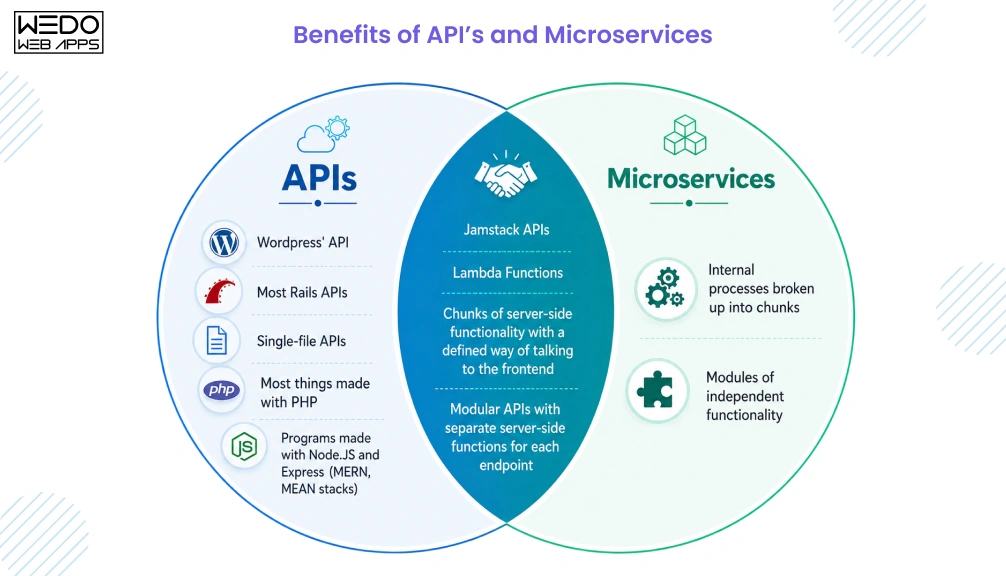
After understanding what is an API in software development and reviewing the microservices architecture explained, the next question is obvious: Why do businesses choose these approaches?
The answer lies in flexibility, scalability, and efficiency. APIs help applications communicate and share data, while microservices architecture helps organizations build applications that are easier to manage as they grow. Together, they support faster development, smoother integrations, and improved system performance.
Benefits of APIs
APIs play a critical role in modern software development because they allow different systems and applications to work together efficiently.
1. Faster Integrations
Businesses can connect payment gateways, CRM systems, cloud services, and other third-party platforms without building every feature from scratch.
2. Improved Reusability
A single API can serve multiple applications, including websites, mobile apps, and internal business systems.
3. Better Connectivity
Understanding what is an API in software development becomes easier when you see how APIs enable systems to exchange information quickly and securely.
4. Faster Feature Delivery
Development teams can implement new functionalities by integrating existing services instead of spending months building a custom solution.
Benefits of Microservices
Organizations often adopt microservices architecture when they need greater flexibility and scalability than traditional application structures can provide.
1. Independent Deployment
Each service can be updated, tested, and deployed separately, reducing the risk of large-scale disruptions.
2. Improved Scalability
One of the biggest advantages of microservices architecture, explained in practical terms, is the ability to scale only the services that require additional resources.
3. Faster Development Cycles
Different teams can work on separate services simultaneously, helping organizations release new features more quickly.
4. Better Fault Isolation
Problems within one service are less likely to impact the entire application, improving overall reliability.
5. Technology Flexibility
Teams can select the most suitable technologies for individual services rather than being restricted to a single technology stack.
At a Glance: Benefit Comparison
| Area | APIs | Microservices |
|---|
| Primary Advantage | System communication | Application scalability |
|---|
| Business Value | Faster integrations | Greater operational flexibility |
|---|
| Development Impact | Reusable functionality | Independent service development |
|---|
| Maintenance | Easier system connectivity | Easier service management |
|---|
| Growth Support | Connects expanding ecosystems | Supports growing applications |
|---|
| Performance | Efficient data exchange | Service-level optimization |
|---|
Businesses do not choose between APIs and microservices simply because they are trending technologies. They adopt them because they solve different challenges. APIs simplify communication between systems, while a microservices architecture provides a scalable way to build and manage applications. When combined effectively, they create software that can support growth, changing customer needs, and long-term business goals.

Challenges of APIs and Microservices
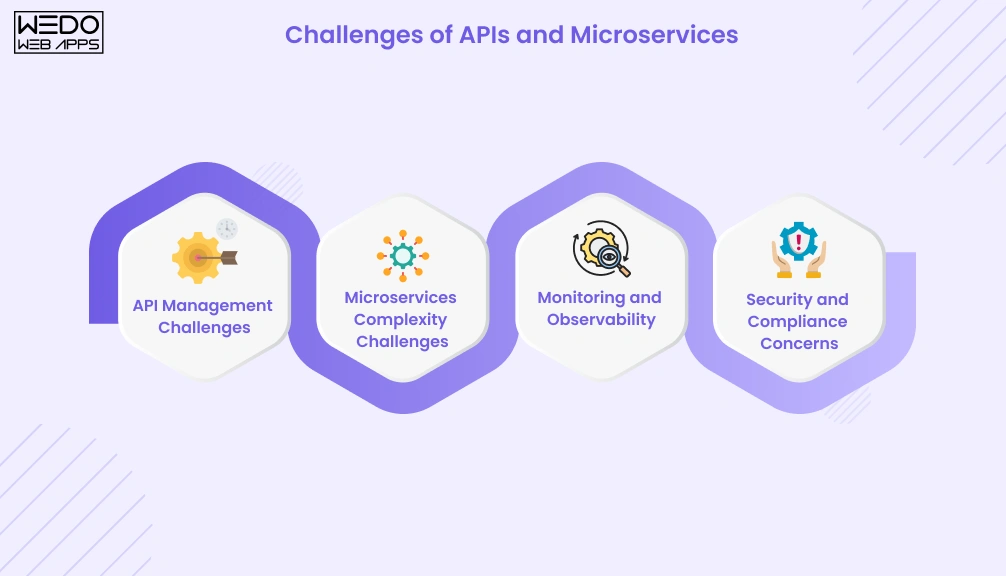
While APIs and microservices offer significant advantages, they also introduce new complexities. As applications grow, businesses must manage communication, security, monitoring, and maintenance across multiple systems and services.
Understanding these challenges can help teams plan effectively and avoid common implementation issues.
API Management Challenges
APIs simplify communication between systems, but managing a large number of APIs can become difficult over time.
Some common API challenges include:
- Securing sensitive data and endpoints.
- Managing API versions without disrupting users.
- Controlling access and permissions.
- Monitoring API performance and availability.
- Maintaining documentation for developers.
Without proper governance, APIs can become difficult to manage as integrations increase.
Microservices Complexity Challenges
Although microservices architecture improves scalability and flexibility, it also adds operational complexity.
Organizations commonly face challenges such as:
- Managing a large number of services.
- Coordinating deployments across multiple teams.
- Tracking dependencies between services.
- Handling service failures and recovery.
- Maintaining consistency across distributed systems.
For smaller applications, this complexity may outweigh the benefits of adopting microservices.
Monitoring and Observability
In a monolithic application, identifying issues is often straightforward because everything exists within a single system.
With a microservices architecture, a single user request may pass through several services before completion. This makes monitoring more challenging and increases the need for:
- Centralized logging
- Performance tracking
- Distributed tracing
- Real-time alerting
Strong observability practices help teams identify and resolve issues more efficiently.
Security and Compliance Concerns
Both APIs and microservices require careful security planning.
Key considerations include:
- Authentication and authorization
- Data encryption
- Secure service communication
- Access control policies
- Regulatory compliance requirements
As the number of services and integrations grows, maintaining security becomes an ongoing responsibility rather than a one-time task.
Challenges Comparison Table
| Area | API Challenges | Microservices Challenges |
|---|
| Security | Protecting endpoints and data | Securing multiple services and communications |
|---|
| Maintenance | Managing versions and integrations | Managing service dependencies |
|---|
| Monitoring | Tracking API performance | Monitoring distributed services |
|---|
| Complexity | Increases with more integrations | Increases with more services |
|---|
| Troubleshooting | Debugging communication issues | Identifying failures across services |
|---|
| Operational Effort | Moderate | High |
|---|
APIs and microservices can deliver substantial business value, but they are not without challenges. APIs require strong governance and security practices, while microservices architecture demands careful planning, monitoring, and operational management. Evaluating these factors early can help organizations choose an approach that aligns with their technical capabilities and business objectives.
Microservices vs Monolithic Architecture
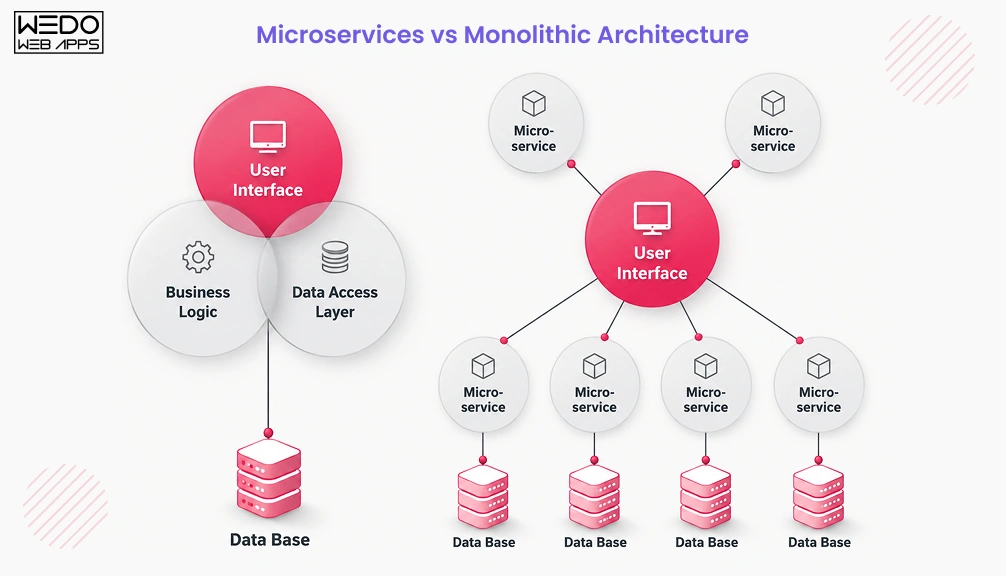
Choosing the right architecture is one of the most important decisions in software development. While microservices architecture has gained significant popularity, it is not always the best choice for every project. Many applications still operate successfully using a monolithic architecture.
Understanding the difference between these approaches can help businesses select a structure that aligns with their application size, growth plans, and operational requirements.
What is Monolithic Architecture?
A monolithic architecture is a traditional software design approach where all application components are built and deployed as a single unit.
In a monolithic application:
- User interface components
- Business logic
- Data access layers
- Core functionalities
are combined within one codebase.
This approach is often easier to develop and deploy during the early stages of a project because everything exists in one place.
Key Differences Between Monolithic and Microservices Architecture
The primary difference lies in how the application is structured.
A monolithic architecture keeps all functions together in a single application, whereas a microservices architecture separates functionality into independent services that can operate and scale individually.
As applications grow, this distinction becomes increasingly important because different parts of the system may have different performance and scalability requirements.
When to Choose a Monolithic Architecture
A monolithic approach may be suitable when:
- The application is relatively small.
- The development team is limited in size.
- Requirements are straightforward.
- Rapid initial development is the priority.
- Infrastructure management needs to remain simple.
Many startups begin with a monolithic architecture before transitioning to microservices as their applications expand.
When to Choose Microservices
Organizations often choose a microservices architecture when:
- Applications support a large user base.
- Different features require independent scaling.
- Multiple development teams work simultaneously.
- Frequent updates and deployments are needed.
- Long-term flexibility is a priority.
For complex platforms, microservices can provide greater agility and operational efficiency.
Monolithic vs Microservices Comparison Table
| Feature | Monolithic Architecture | Microservice Architecture |
|---|
| Structure | Single application | Multiple independent services |
|---|
| Deployment | Entire application is deployed together | Services deployed independently |
|---|
| Scalability | Scale the whole application | Scale individual services |
|---|
| Development | Centralized codebase | Distributed codebases |
|---|
| Maintenance | Simpler initially | More manageable at scale |
|---|
| Fault Isolation | Issues may affect the entire application | Problems are often isolated to one service |
|---|
| Team Collaboration | Best for smaller teams | Well-suited for larger teams |
|---|
| Infrastructure Complexity | Lower | Higher |
|---|
| Flexibility | Limited as applications grow | High flexibility and adaptability |
|---|
The choice between a monolithic architecture and a microservices architecture depends on business goals, application complexity, and team capabilities. While monolithic applications offer simplicity and faster initial development, microservices provide the scalability and flexibility often required for modern, large-scale applications. The right choice is the one that supports both your current needs and future growth plans.

When Should You Use APIs?
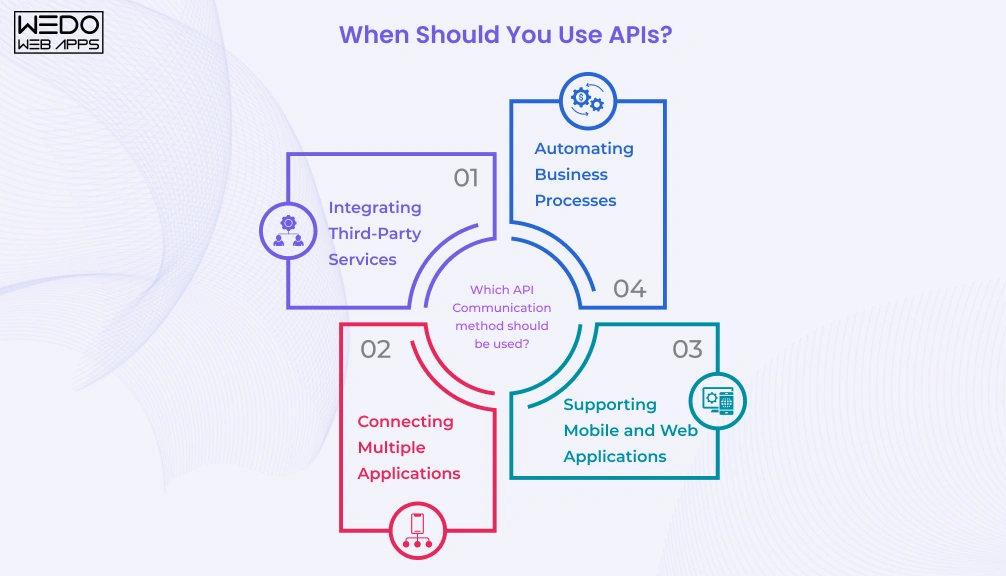
After understanding what is an API in software development, the next step is knowing when APIs make sense for your application or business. APIs are not limited to large enterprises or complex systems. They are used by businesses of all sizes to connect applications, automate workflows, and improve data accessibility.
If your goal is to enable communication between systems or integrate external services, APIs are often the most practical solution.
Best Use Cases for APIs
APIs are particularly useful in the following scenarios:
Integrating Third-Party Services
Businesses frequently use APIs to connect payment gateways, mapping services, customer support platforms, analytics tools, and social media applications.
For example, an eCommerce store can use a payment API to process transactions without building its own payment infrastructure.
Connecting Multiple Applications
Organizations often operate multiple software systems that need to share information. APIs allow these systems to exchange data efficiently and securely.
Examples include:
- CRM and ERP integration
- Website and mobile app synchronization
- Marketing and sales platform connectivity
Supporting Mobile and Web Applications
Modern applications often serve users across multiple devices. APIs help deliver consistent data and functionality to websites, mobile applications, and other digital platforms.
Automating Business Processes
APIs can automate repetitive tasks by enabling systems to communicate without manual intervention.
Common examples include:
- Order processing
- Inventory updates
- Customer notifications
- Report generation
Industries That Commonly Use APIs
APIs are widely adopted across industries because they simplify communication and data sharing.
| Industry | Common API Use Cases |
|---|
| eCommerce | Payments, shipping, and inventory management |
| Healthcare | Patient records, appointment scheduling |
| Finance | Transactions, account verification |
| Travel | Hotel booking, flight information |
| Education | Learning management systems and student portals |
| SaaS | Platform integrations and automation |
Signs Your Business Needs APIs
You should consider using APIs if your business:
- Relies on multiple software systems.
- Requires real-time data exchange.
- Plans to integrate third-party services.
- Supports both web and mobile applications.
- Wants to automate manual workflows.
Understanding what is an API in software development is only part of the equation. The real value comes from knowing when to use APIs. Whether you are integrating external platforms, connecting internal systems, or automating business processes, APIs provide a reliable way to improve efficiency and create a better user experience.
When Should You Use Microservices?
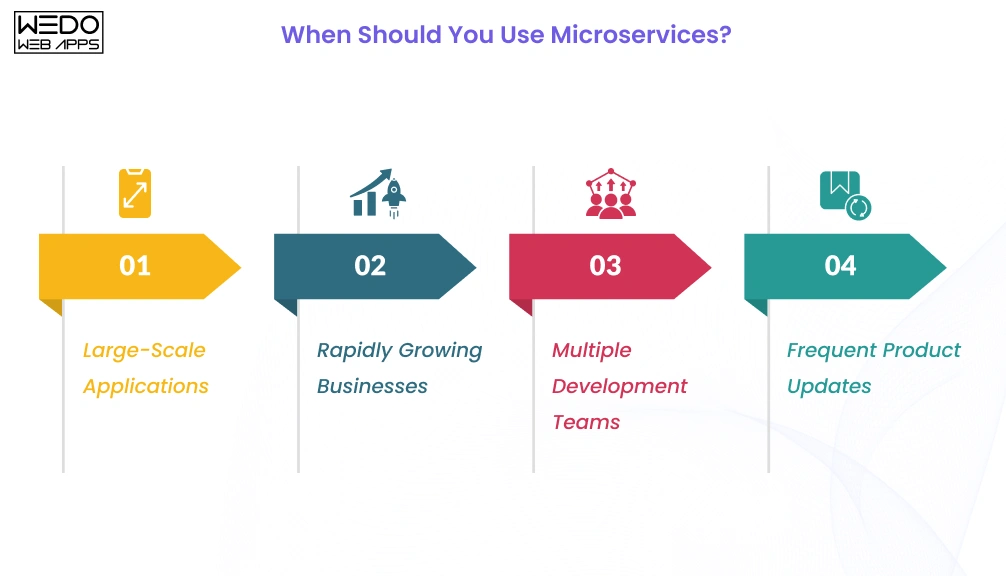
Understanding what is microservices architecture is important, but knowing when to adopt it is even more valuable. While microservices offer scalability and flexibility, they are not the right choice for every application.
The decision should be based on your application’s complexity, expected growth, development process, and long-term business goals. In some cases, a monolithic architecture may be sufficient. In others, microservices architecture can provide the flexibility needed to support continuous growth and innovation.
Best Use Cases for Microservices
Microservices are often the preferred choice when applications become too large or complex to manage as a single system.
Large-Scale Applications
Applications with multiple features, modules, and user groups often benefit from dividing functionality into independent services.
Examples include:
- eCommerce marketplaces
- Streaming platforms
- Banking applications
- Enterprise software solutions
Rapidly Growing Businesses
As user traffic and feature requirements increase, businesses need systems that can scale efficiently. Microservices allow specific services to scale independently rather than scaling the entire application.
Multiple Development Teams
When several teams work on the same application, microservices architecture allows them to develop, test, and deploy services independently. This helps reduce bottlenecks and improve productivity.
Frequent Product Updates
Businesses that release new features regularly can benefit from microservices because updates can be made to individual services without impacting the entire application.
Industries That Commonly Use Microservices
Many organizations adopt microservices when application performance, reliability, and scalability become critical.
| Industry | Common Microservices Use Cases |
|---|
| eCommerce | Product catalogs, payments, and order management |
| Finance | Transaction processing and fraud detection |
| Healthcare | Patient management and appointment systems |
| Media & Entertainment | Content delivery and recommendations |
| Logistics | Shipment tracking and route optimization |
| SaaS | Multi-feature business platforms |
Signs Your Business Needs Microservices
Your organization may benefit from microservices architecture if:
- Your application is becoming difficult to maintain.
- Different features have unique scalability requirements.
- Development teams frequently work on separate modules.
- System downtime significantly impacts business operations.
- New features need to be released quickly and independently.
When evaluating what is microservices architecture and whether it fits your business, focus on your application’s complexity and growth expectations. Microservices can provide significant advantages for large and evolving applications, but they also require careful planning and operational maturity. For organizations experiencing rapid growth, microservices often provide the flexibility needed to support future expansion.
How to Choose Between APIs and Microservices
Many businesses reach a point where they need to decide how their application should communicate, scale, and evolve over time. This often leads to questions about microservices vs API and whether one approach is better than the other.
The reality is that APIs and microservices are not competing solutions. The right decision depends on the problem you are trying to solve. APIs focus on communication and integration, while microservices focus on application architecture and service independence.
Instead of choosing one over the other, businesses should evaluate their technical and operational requirements before making a decision.
Evaluate Your Business Requirements
Start by identifying what your application needs today and what it may require in the future.
Consider questions such as:
- Do you need to connect multiple systems?
- Is third-party integration required?
- Will different teams manage different parts of the application?
- Is rapid feature development a priority?
If the primary goal is communication between systems, APIs may be sufficient. If application complexity continues to grow, microservices may become a better long-term option.
Consider Scalability Needs
Scalability is one of the biggest factors when evaluating the difference between microservices and API.
APIs help applications exchange information efficiently, but they do not solve architectural scaling challenges on their own.
Microservices become valuable when:
- Specific application features experience higher traffic.
- Different services require different resources.
- User demand fluctuates significantly.
In these situations, scaling individual services can be more cost-effective than scaling an entire application.
Assess Team Expertise
Technology decisions should align with the capabilities of your development and operations teams.
Microservices often require experience with:
- Distributed systems
- Service monitoring
- Deployment automation
- Security management
- Infrastructure orchestration
For smaller teams or simpler applications, managing a monolithic application with APIs may be more practical.
Analyze Maintenance and Cost Factors
Every architectural choice comes with long-term maintenance responsibilities.
Before adopting microservices, evaluate:
- Infrastructure costs
- Monitoring requirements
- Deployment complexity
- Team resources
- Ongoing maintenance efforts
While microservices architecture can provide greater flexibility, it may also increase operational overhead compared to simpler application structures.
Decision Framework
| Business Need | APIs | Microservices |
|---|
| Connect multiple systems | Yes | – |
| Integrate third-party platforms | Yes | – |
| Support web and mobile applications | Yes | – |
| Independent service scaling | – | Yes |
| Frequent feature releases | – | Yes |
| Multiple development teams | – | Yes |
| Complex enterprise applications | – | Yes |
| Long-term architectural flexibility | – | Yes |
When evaluating microservices vs API, avoid treating them as an either-or decision. APIs help systems communicate, while microservices help applications grow and adapt over time. The best approach depends on your business goals, technical requirements, and available resources. In many cases, organizations achieve the best results by combining APIs with microservices architecture to create scalable and maintainable applications.

Real World Examples of APIs and Microservices
Understanding concepts like microservices architecture and APIs becomes much easier when you see how they are applied in real applications. From online shopping and banking to video streaming and SaaS platforms, businesses use APIs and microservices every day to deliver reliable and scalable digital experiences.
The following examples show how these technologies support common business operations.
1. eCommerce Platforms
An eCommerce application typically includes multiple business functions that must work together seamlessly.
Common microservices may include:
- Product Catalog Service
- Inventory Service
- Shopping Cart Service
- Order Management Service
At the same time, APIs help connect these services with:
- Payment gateways
- Shipping providers
- Customer support systems
- Mobile applications
This combination allows businesses to add new features and handle growing traffic more efficiently.
2. Banking Application
Modern banking platforms process thousands of transactions while maintaining strict security and compliance standards.
A bank may use separate microservices for:
- Account management
- Transaction processing
- Loan services
- Fraud detection
- Customer notifications
APIs enable secure communication between these services and external systems such as payment networks, identity verification platforms, and mobile banking applications.
3. Streaming Platforms
Streaming services need to deliver content quickly while supporting millions of users.
A typical platform may use microservices for:
- User authentication
- Subscription management
- Content delivery
- Recommendations
- Billing
APIs help these services exchange information and provide a smooth viewing experience across smart TVs, mobile devices, tablets, and web browsers.
4. SaaS Applications
Software as a Service (SaaS) platforms often serve businesses with diverse requirements and large user bases.
For example, a project management platform may separate functionality into:
- User Management Service
- Task Management Service
- Reporting Service
- Notification Service
- Billing Service
APIs allow these services to communicate internally while also supporting integrations with third-party tools such as CRMs, communication platforms, and accounting software.
Quick Comparison of API and Microservice Usage
| Business Scenario | API Usage | Microservice Usage |
|---|
| eCommerce | Payment and shipping integrations | Product, order, and inventory services |
|---|
| Banking | Secure data exchange | Account and transaction services |
|---|
| Streaming | Device and platform connectivity | Content delivery and recommendations |
|---|
| SaaS | Third-party integrations | Independent business models |
|---|
| Healthcare | Data sharing between systems | Patient and appointment management |
|---|
Real-world applications rarely rely on a single approach. Businesses often use APIs to connect systems and services while using a microservices architecture to organize application functionality. This combination helps organizations build scalable applications, improve user experiences, and adapt more effectively as business requirements evolve.
Common Misconceptions About APIs and Microservices
Because APIs and microservices are frequently discussed together, several misconceptions have emerged around how they work and when they should be used. These misunderstandings often lead to poor architectural decisions and unrealistic expectations.
Clarifying these common myths can help businesses and development teams make more informed technology choices.
APIs Are Not Application Architectures
One of the most common misconceptions is that an API is an application architecture.
In reality, an API is a communication mechanism that allows applications and services to exchange data. It defines how systems interact, but it does not determine how an application is structured internally.
This distinction is important when discussing microservices vs API because APIs focus on communication, while architecture focuses on application design.
Every Microservice Does Not Need a Public API
Many people assume that every microservice must expose a public API.
While APIs are commonly used in microservices architecture, services can also communicate through:
- Message queues
- Event streams
- Service buses
- Internal communication protocols
As a result, not every microservice requires an externally accessible API endpoint.
Microservices Are Not Always the Best Choice
Another common misconception is that every modern application should use microservices.
Although microservices architecture offers flexibility and scalability, it also introduces additional complexity. For smaller applications, startups, or projects with limited resources, a monolithic architecture may be easier to build and maintain.
The best architecture depends on business goals, team capabilities, and application requirements.
APIs Are Not Limited to Microservices
Some developers believe APIs only exist within microservices environments.
However, APIs are used across many different architectures, including:
- Monolithic applications
- Client-server applications
- Mobile applications
- Cloud-based platforms
- Enterprise software systems
Understanding what is an API in software development helps clarify that APIs are communication tools that can be used regardless of the underlying architecture.
Myth vs Reality
| Myth | Reality |
|---|
| APIs and microservices are the same thing | They serve different purposes |
| Every microservice requires a public API | Services can use multiple communication methods |
| Microservices are always better than monoliths | The right choice depends on project requirements |
| APIs only work with microservices | APIs can be used in many architectural styles |
| Adopting microservices guarantees scalability | Proper design and implementation are still required |
The difference between microservices and API becomes much clearer when common misconceptions are removed. APIs are designed to facilitate communication, while microservices define how applications are organized and managed. Rather than viewing them as competing approaches, businesses should focus on how each can support their specific technical and operational objectives.
Conclusion
Understanding microservices vs API is easier when you recognize that they serve different purposes. APIs enable communication between systems, while microservices architecture defines how applications are structured and managed.
Rather than choosing one over the other, many modern applications use both to support scalability, flexibility, and efficient system integration. By understanding the difference between microservices and API, businesses can make more informed architectural decisions and build applications that are better prepared for future growth.