40+ Shocking Android App Development Stats

Introduction

Android app development has been controlling the mobile operating system worldwide with nearly 71.8% share in the market in 2025.

Compared to the 26.92% share of iOS, Android app development is leading the global market. With over 3.3 billion active users globally. It has a strong presence in various regions such as India, Brazil, and Indonesia, which has increased by up to 85%.

Android is the world’s most popular operating system, leaving a remarkable trace of performance amongst users.

It is a Linux-based open-source operating system. On November 5, 2007, it was first introduced to the world. It was initially developed by Android Inc., which Google later acquired.

The Android app ecosystem continues to grow over the years. In 2025, the Google Play Store hosted more than 2.6 million apps for Android, which as further downloaded 113 billion times.

With Android’s extensive application framework, businesses create cutting-edge mobile games and social apps in a Java-based environment. This blog covers top Android app development statistics that will leave you shocked. Let’s see them.

How Big Is The Android App Development Market?

 Android App Development Market

Android App Development Market

In the preceding years, Android was considered a mobile-friendly operating system, but later, it was adopted across various platforms. Moreover, it isn’t restricted to mobile only, but includes tablets and televisions.

The most trusted report by Statista points toward new revelations of the mobile app development market. It indicates that the number of app downloads from the Google Store has consistently increased yearly. This brings home many new opportunities for app developers and companies today to dive into the growth segment.

The growth of mobile app downloads was over 257 billion, and is also expected to rise to 299 billion by the end of 2025. This has happened only because of the increased use of mobile phones for all processes.

This demonstrates that the mobile app development market must meet a significant demand for new and existing users.

Now let’s see Android development stats. Ready? Let’s go.

40+ Android App Development Stats That Will Blow Your Mind!

Android Applications

There are approximately 3.3 billion Android Applications on Google Play, making it the most popular mobile operating system.

Tablet Market Leader

As per the recent reports, there are approximately 45.23% of Android users when it comes to tablets, and Apple’s iOS shares 54.56% of the market share, being the most popular tablet operating system.

Android, Apple iOS operating system, and Microsoft Windows dominate the global market for tablet operating systems. But currently holding the majority market share, Android is climbing the stairs of success and recognition as the most popular tablet operating system.

Trusted Android App Designer Companies

Some of the top Android app maker and designer companies are:

  • WeDoWebApps.com
  • React Native App Development Company
  • Mercury Development
  • TeachAhead 
  • Intellectsoft
  • Fueled

Popular Operating System

Mobile application development on Android is currently the most popular operating system in the world. There are roughly 3.5 billion active Android users.

Increase In Demand For Android Smartphones

The average selling price of smartphones with Android app development around 2017-2021 was 261 U.S. dollars, which increased by almost 4.5% from 2019. In 2023, the global average selling price has reached 371 USD. This has furthered by the year 2024 and 2025 has risen the 5%.

Now in 2025, this has led to an increase in the range of 364 USD, with the first quarter of the year expected to grow more.

Reduction In Service Fee For Google Play

The manufacturer of Android announced on July 1, 2021, that it would reduce the service fee for Google Play from 30% to 15% for the first $1 million in annual revenue generated by Android app developers using the Play billing system. In addition, it said that the company would take a 30 percent cut from every dollar developers make through Google Play after the first $1 million they make in a year.

Market Share Consolidation

Even in the January 2022 study, Android maintained its share of close to 70%, whereas iOS held approximately 25% of the mobile operating system market.

Mass Favourite Platform

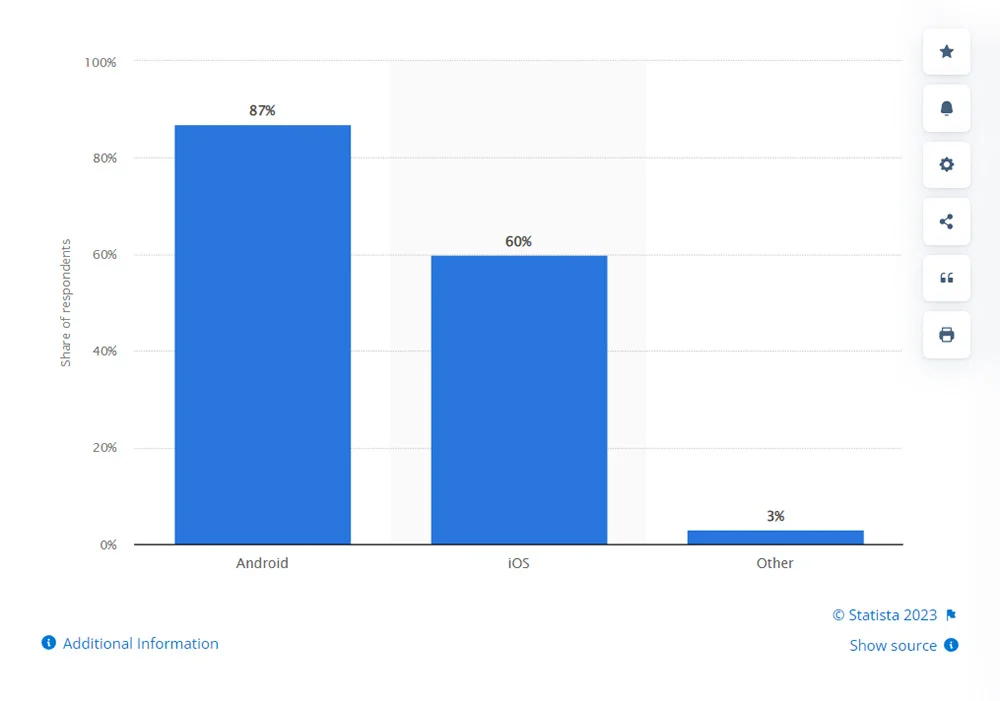
In a global survey of software developers conducted by Statista, 87% of respondents favored Android app development, making Android the most popular platform for growth in 2021. But the recent developer survey, which occurred in 2024, suggests that over 32.8% of developers prefer Flutter and 27.2% rely on React Native, both of which support Android and iOS development.

iOS Being The Second Choice

60% of respondents indicated that the Apple iOS operating system was the second most popular choice for software development.

Android Tops In Major Part Of The World

Android development by Google is the most popular smartphone operating system, accounting for 70% of all smartphone users. However, iOS has a more extensive overall user base in the US and UK.

Google’s Android Is The Leader In India Too

In large countries like Brazil, India, Indonesia, Turkey, and Vietnam, Android app development Google commands a market share of more than 95%.

google app development

Google’s Android Is The Leader In India Too

In large countries like Brazil, India, Indonesia, Turkey, and Vietnam, Android app development Google commands a market share of more than 95%.

Number Speaks More Than Anything Else

Last year, Android smartphones sold more than 1.17 billion units.

Android Smartphones Leader

Huawei and Xiaomi, followed by Samsung, are the next-largest Android smartphone manufacturers.

What do Android Developers Do?

Most Android developers’ work consists of developing apps for the Android marketplace.

Android Developers Future

Best Android developers may be employed by an app development company or a large company internally. With an 87% share of the global market in 2019, smartphones running the Android mobile operating system are yet to see more growth in the coming years. Therefore, Android developers do have a bright future in this domain with Kotlin and Java as preferred Android app development languages.

Read more about New Trends In Mobile App Development

True Winner

The Android web app development platform held merely a 4% share of the global operating systems market in 2009, and multiplied by around 20 percent yearly for the next three years.

Chinese Factor

Chinese manufacturers like HTC, LG, and others in the mid-2010s are responsible for over 50% of device sales with Android app development.

Popular Android Version

Amongst the most popularly known versions amongst Android users is 14.

Top-Grossing Android Programming Apps

As recorded in April, the top-grossing Android programming app in the Google Play Store is dominated by games like Garena Free Fire, Coin Master, and PUBG. This hints toward a revenue increase of over 70% in gaming apps in 2024.

Most Popular Android App On Google Store

The most popular Android app development on mobile development by Google in the Google Play Store worldwide is TikTok.

android app development company

Most Downloaded App In The Google Play Store

TikTok received nearly 24 million downloads from Android users worldwide in September 2022, making it the most downloaded app in the Google Play Store. With over 21 million downloads from users worldwide, Instagram was the second most popular app.

Highest Revenue Android App Maker

The revenue earned by Coin Master is the highest in terms of Android app development by Google, which is nearly 47.96 USD.

New Version Surpassing The Old Version

Thinking about what is latest Android operating system is? In June 2025, the 16 Android operating system (OS) version held almost the maximum of all mobile Android devices in the United States, surpassing the 15 OS version.

Android – The Dominator

Android alone is the dominator of global smartphone users by a share of 70%.

Highest Salary Package

In 2025, top-earning Android Developers in London have salaries reaching up to £78,712 per year.

Android is Popular Amongst Common People

In surveys conducted, it has been noted by Ansolex that Android clients are primarily working class, whereas iPhone clients are mostly upper working class.

Android Is Preferred the Most By Men

About 60% of males worldwide make use of Android, and 28-29% make use of iOS. While female users are approximately 54% who use an Android and 31% make a choice for the iOS.

This figure shows that males are more likely to favour Android.

Android Was Built As An Alternative To iOS

In the early 2010s, Andy Rubin developed Android as an open-source alternative to the iPhone and Palm OS. It quickly became the preferred operating system for most mobile device manufacturers.

When Did Android Reach The 1 Billion Milestone?

Android quickly became the most popular mobile operating system, reaching over one billion active users by 2014 thanks to the phones launched by industry titans like Samsung, LG, Motorola, and HTC.

Android Users or iOS Users?

iPhone users are fifty percent more likely to be early adopters, but Android users are 31 percent more likely to be late adopters.

Increase In Revenue

Google’s control over Google app development grew along with the popularity of Android. Over the past decade, Google Play has increased dramatically, reaching $38.6 billion in revenue in 2020. This figure crossed about $47.9 billion in 2021 and then reduced to $42.3 billion in 2022. And in 2023, it has again increased to approximately $52.7 billion.

Largest App Store

The Google Play Store is the largest app store in the world, with 2.65 million apps available for download as of June 2022, supporting the popularity of mobile apps popularity of Android devices.

Gaming Apps Taking The Lead

The mobile application market’s gaming segment had an Android app measure of revenue share of over 55% of the global market between 2023-2024. In addition, the development market will continue to be dominated by this sector in the upcoming years.

Android App Categories To Look Out For

For Android App Development, several other industries significantly contribute to the development market, in addition to gaming. Apart from gaming, education, business, entertainment, music and audio, food and drink, shopping, and lifestyle are the top Android development categories.

Android Devices Are Less Expensive

In Particular, Android held over 70% of the market for smartphone operating systems. This success is also because Android devices typically cost less than those made by Apple, its biggest rival.

Most Downloaded Gaming Android App

In June 2025, the most downloaded gaming app on the Google Play Store was Roblox, with over 21.28 million downloads.

Conversion Ratio

29% of consumers said they switched from an iOS device to an Android device because it was more affordable, while 11% said they changed the other way.

Android Users Are More Loyal

Both platforms have high and consistent customer loyalty; Android users are slightly more loyal than iOS users. According to a 2018 Consumer Intelligence Research Partners report, Android has a customer retention rate of 91 percent, while iOS only has a rate of 86 percent.

Android App Performs Better Than iOS

According to the latest report, there is an update that some of the Android apps perform better than iOS apps regarding user engagement from push notifications. In addition, Android users are more responsive to push notifications.

Android Users Are Most Likely To Click On Push Notifications

Compared to iOS, Android has a reaction rate of 3.4%. This indicates that iPhone users click push notifications less frequently than Android users.

Android Users have More Opt-In Rate Percentage

Android users have a higher opt-in rate of 81 percent than iOS users, who have a rate of 51 percent. As a result, a more significant number of Android users opt-in to receive push notifications.

react native app development company

Conclusion 

There are many reasons to choose Android. The best way to choose a platform is by working with other departments, people, and interests. Android is the ideal choice for new businesses and rising organizations. It is fully equipped to support organizations and their worldwide application creation points.

We at WeDoWebApps develop Android apps that would alleviate all of your concerns. Utilizing a single platform to complete your business tasks on your behalf typically results in better utilization of resources, time, and talent for an Android app developer to hire. And what better way to get started than with Android?

Stay ahead of the curve with our comprehensive web and mobile app development services as you uncover the most surprising Android app development statistics.

Salesforce Commerce Cloud To Magento 2 Migration: Everything You Need To Know

Migrating important data of your e-commerce store from Salesforce Commerce Cloud to Magento 2 is one of the most beneficial decisions you’ll ever make!

Here’s why. 

Salesforce’s commerce cloud has many limitations that are not present in Magento 2. Customization capabilities being one of them. 

Magento 2 shines here. It’s backed by advanced technical support and capabilities, unmatched flexibility, and a vast ecosystem of plugins and extensions that’s remains unmatched till date. 

So, if you want to migrate from Salesforce commerce cloud to Magento 2, we are here to help. We make the entire Salesforce migration process effortless with right tools and guidance. 

This blog post will highlight the key advantages of switching from Salesforce Commerce Cloud to Magento 2 and offer empathetic support to address your concerns with easy migration processes.

What is Salesforce Commerce Cloud?

Salesforce commerce cloud

An e-commerce platform based on cloud computing, Salesforce Commerce Cloud is a tool that allows companies to create online stores. 

In addition to product catalogs, shopping carts, order status and management, payment gateways and shipping options, personalized promotions, and other features, Salesforce Commerce Cloud allows businesses to create and customize their online stores. Additionally, the platform provides tools for managing product data, inventory, fulfillment, and customer service.

With Salesforce Commerce Cloud, you can create a seamless customer experience across all touchpoints by integrating it with other Salesforce solutions, such as Marketing Cloud and Service Cloud.

The small startup company, large enterprise, and ecommerce brands use Salesforce Commerce Cloud in fashion, retail, consumer goods, and manufacturing industries.

As part of Salesforce Commerce Cloud, you can also manage inventory, fulfillment, and customer service. The platform was built on a cloud-based, multi-tenant architecture and can be customized through templates, themes, API integration, and development tools. 

Besides SEO and mobile responsiveness, the platform also includes analytics and reporting capabilities as well as a way to integrate with Salesforce products, such as Marketing Cloud and Service Cloud.

Why Migrate From The Salesforce Commerce Cloud To Magento 2?

Despite its popularity with businesses of all sizes, Salesforce Commerce Cloud may not be right for all businesses. Many companies may find the platform lacking certain features and capabilities crucial to their success. 

Magento 2 is the answer to that problem. With Magento 2, businesses can grow and thrive online with more comprehensive and flexible e-commerce tools and features. However, here are some areas where Salesforce Commerce Cloud falls short.

Salesforce Pitfalls

Salesforce simplifies the sales process and provides an excellent omnichannel experience, but a few disadvantages can cause you to overlook its strengths. Here they are:

  • Unpredictable ownership cost

A Salesforce subscription costs a percentage of your overall revenue, meaning the more successful you become, the more Salesforce charges. Such policies make it difficult for merchants to plan ahead.

  • Separate B2B and B2C capabilities

The Salesforce platform does not offer the ability to combine B2B and B2C operations. Therefore, unless you require a CMS that gives B2B and B2C functionality, Salesforce may not interest you.

  • Insufficient customization opportunities

There is limited customization possible with Salesforce SaaS. As a result, delivering a unique user experience is challenging, which is an essential component of a successful online business.

Magento vs salesforce commerce cloud

  • Small commerce-focused community

An extensive CMS community can be a valuable resource for solving platform-related issues. Unfortunately, there aren’t enough Salesforce users with the expertise necessary for a particular niche or location in the Salesforce community. Thus, Salesforce support is more challenging to rely on without a dedicated support team during an emergency.

How Can Magento 2 Be Fit For Your Needs?

With so many e-commerce platforms, choosing which will fit your business’s unique requirements can be challenging. However, Magento 2 is gaining popularity among businesses of all sizes because of its scalability, flexibility, and customization capabilities.

With Magento, many sellers have already skyrocketed their sales, notably:

  • Delivering diverse user experiences allows online entrepreneurs to gain a competitive advantage, Complete control, and unconditional flexibility;
  • Technology and tools for advanced business intelligence;
  • The Magento community is large, with many user cases, making it an excellent partner for e-commerce;
  • The architecture and infrastructure are modern and optimized.

Magento vs Salesforce Commerce Cloud – Overview

  • Medium- and large-sized businesses can benefit from Magento Commerce (now Adobe Commerce) and Salesforce Commerce Cloud (formerly Demandware).
  • Powered by PaaS (Platform as a Service), Magento offers flexibility and customization. Magento offers B2B and B2C platforms optimized for market segments.
  • With over 300,000 stores, Magento is one of the oldest and most widely used eCommerce platforms.
  • Magento provides maximum flexibility to brands for creating bespoke experiences.
  • Since Magento is an open-source platform, developers can download and modify its code. Due to this, it has the largest community of third-party developers. Magento may not offer a feature you need, but a plug-in can provide it.

Salesforce Commerce VS Magento 2 Pricing

You can choose from three versions of Magento: Magento Open Source, Magento Commerce, and Magento Commerce Cloud. 

Using Magento Open Source costs nothing, but customizations are likely needed to meet customer expectations, which means you’ll spend money on the development, which can be costly. 

In addition, additional costs, such as hosting ($10–50/month) and domain registration ($10–400/year), can add up.

A Magento Commerce Cloud subscription includes a hosting fee. Also, a license fee is negotiable for the premium versions (contact a Magento sales representative for a quote based on your specific business requirements).

Here are the license costs for Magento Commerce and Magento Commerce Cloud.

Gross revenue-generating companies Magento 2 Commerce Magento 2 Commerce Cloud
$0 – $1 million $22,000.00 $40,000.00
$1 – $5 million $32,000.00 $55,000.00
$5 – $10 million $49,000.00 $80,000.00
$10 – $25 million $75,000.00 $120,000.00
$25 $50 million $125,000.00 $190,000.00

On the other hand, even though Salesforce Commerce Cloud license costs are negotiated based on the enterprise’s size and revenue, there is a starting price tag. 

Salesforce offers three plans for B2B: commission fees per order, gross merchandise value (GMV), and Subscription-based model. 

With the starter packs, you have all the essential features that will enable you to go to market quickly. However, as you move up the ladder, other features, including support for multiple channels and multiple storefronts, are available.

Here is Salesforce Commerce Cloud’s pricing plan:

Market
Segments
Plans
Starter Growth Plus
B2B Commerce $4 Price Per Order (billed annually) $6 Price Per Order (billed annually) $8 Price Per Order (billed annually)
B2C Commerce 1% Gross Merchandise Value (billed annually) 2% Gross Merchandise Value (billed annually) 3% Gross Merchandise Value (billed annually)
B2B2C Commerce 1% Gross Merchandise Value (billed annually)

Plugins And Extensions For Magento Vs Salesforce Commerce Cloud

Don’t worry if either platform does not contain a feature you require out-of-the-box; Magento and Salesforce Commerce Cloud offer clear technical documentation for developers and extensions and plugins.

With both the free and premium extensions marketplaces, there is no doubt that the extensions in the marketplaces are of high quality, as both platforms evaluate each extension submitted by a third-party developer for compliance with coding standards and development best practices.

However, Magento has a significant advantage when it comes to extensions. Having a large customer base and more solution partners, Magento has more extensions designed for specific uses. Check out this detailed Migration checklist and start worry-free with Magento 2 migration.

For merchants, Magento offers over 5,800 free and paid extensions to help them with challenges related to marketing, checkout, fulfilment, inventory, order management, etc.

Read more: 18 Best Magento Migration Companies All Over The World

What Is The Best Way To Migrate Salesforce Commerce Cloud Online Store To Magento 2?

  • Getting Started with the Third-Party Extension App

Creating an account or logging in on a website for a third-party migration service is quick and easy. Alternatively, you can use your Google or Facebook account to log in quickly.

  • Getting Started with Your New Migration

Here are two simple steps you must follow:

Providing data from the Source store (Salesforce Commerce Cloud)

Data from the Target store (Magento 2)

  • Providing source store data to Salesforce Commerce Cloud

Click the Create New Migration button on the Migration Page to begin a new migration. Next, choose Source Cart Type, then enter the URL of the source store.

  • Provide target store data using Magento 2

Once the Target Cart Type option has been selected, enter the URL of the source store.

You can choose the connection for your third-party app after downloading the connector, unzipping it, and uploading it to the Target Store’s root folder.

This screen automatically displays the Connector Installation without requiring any manual intervention.

  • Select the Source Store Entities you want to migrate.

Select all entities or specific data to move—for instance, only Products, Customers, and Orders.

You can extend your migration options by selecting your third-party app (if your extension app offers these options). In addition, the new store will match languages, order statuses, and customer groups to display information appropriately.

Follow the instructions in the form that appears to export your data files from your source store and upload them into this form.

Magento 2 commerce cloud

Start the full migration immediately, or try the demo first.

  • Use The Demo

Ensure you have a manageable number of entities when starting your demo migration. Alternatively, you can skip demo migration by clicking “Skip Demo Migration”. 

  • Executing The Complete Migration

To perform complete migration immediately, please click “Skip Demo Migration”. During your data move, please be patient; once completed, your chosen third-party app system will notify you by email. Now, your data will be migrated to your new preferred store.

Custom Themes and Extensions Migration

Migrating custom themes and custom-developed extensions from Salesforce Commerce Cloud to Magento 2 is a critical step in ensuring your online store maintains its unique look and functionality. For a detailed guide on this process, refer to our article on migrating custom themes and extensions.

Magento Store Cpanel to Cloud Migration

Migrating your Magento store from Cpanel to cloud can significantly enhance your store’s performance, scalability, and security. Learn more about the benefits and process of Magento store Cpanel to cloud migration.

Read also:- Important Segments An Android Application

Conclusion

To conclude, migrating your Salesforce Commerce Cloud store to Magento 2 has the potential to be challenging, but it can also be transformational. You can take your online store to the next level by choosing Magento 2, a platform with the technical capabilities, flexibility, and customizability you need. 

However, migrating to a new platform can be challenging and requires planning and execution. Choosing an ecommerce migration services provider with a proven track record of successful migrations is crucial to a business’s ecommerce migration.

Work with WeDoWebApps as we can handle the entire migration process from start to finish. With us, you can make an informed decision about your e-commerce business’s future and ensure it’s successful in long term. 

Android News 2025: What’s Latest, What’s Next, and Why It Matters

Android News and Its Growing Impact

Android has always been one of the most used mobile operating systems. Every year, it brings the updates that make the smartphone smarter, faster, and safer. The year 2025 continues this journey by releasing the latest Android version, Android 16. It has maintained the focus on better performance, improved security, and added smarter features powered by artificial intelligence.

These updates are not just about how it feels or looks. They show how Google is preparing Android for the future, where devices, apps, and users connect more effortlessly. Whether someone owns a business, develops mobile apps, or simply uses Android every day, they know what the Android news is helping with and how these changes are having an impact on tasks.

In this blog, we will look at the latest Android version 2025, what’s the developer news, and news on Android technologies shaping the future of Android.

A Quick Look at the Latest Android Version 2025

The latest Android version 2025, is already here, and it has brought more comfort and intelligence to the way users use their phones. Google has maintained focus on small details that make a big difference, from how fast apps open to how securely we can manage our data.

This version shows how much effort goes into keeping Android apps running smoothly in the mobile space. It is not just about adding new features but about making sure that every part of the system works better together.

With the latest technology in Android app development, Google is setting the stage for what is next in the future of Android.

Android 16 Overview and Key Updates

Android 16 announced at Google I/O, comes with a mix of design upgrades and smart improvements. The goal is to make your phone easy to use, safer, and more responsive.

Here is a quick overview of what’s new:

  • Fresh Look: The interface feels smoother with clever icons, simple layouts, and better animations.
  • Improved Privacy:Updated privacy dashboard 2.0 makes it easier to see what data your app uses and lets you manage permissions in one place.
  • Better App Support:Apps now load faster, lag less, and work well across different devices from phone to foldables.
  • Built-in AI:Android 16 uses AI to adjust battery use, suggest apps, and improve how you interact with your devices.

All these changes highlight how Android news continues to stay ahead in innovation and keep up with what users and developers expect from modern devices.

How These Updates Improve Everyday User Experience

The news Android updates are not just a small technology update, but it is more about making the everyday usage feel smoother.

Here’s how it helps:

  • Longer Battery Life: The system is smarter about what runs in the background, helping you maintain the longer battery life.
  • Smart Notifications: Important messages show up when you need them, while less useful alerts stay silent.
  • Easy Multitasking: The split-screen mode and app switching are quicker, making it easier to get things done smoothly.

For users, these changes mean fewer issues and longer battery life. For app creators, it is a chance to build better and faster apps, which will definitely shape the future of Android.

Compatibility and Rollout Details

Android 16 started rolling out first to the Google Pixel devices, followed by the top brands like Samsung, OnePlus, and Xiaomi. Depending on your phone model and the region. The update might already be available.

To check it on your phone:

  1. Go to settings → system → software update.
  2. Tap to check for updates to see if Android 16 is ready to install.

A developer can test a new feature through the Android Beta Program, which gives early access to the latest builds. Keeping up with the Android news and official developer news helps users and developers to stay aware of the new releases, tools, and upcoming changes in the Android ecosystem.

Android 16 App Development

Android News 2025: The Most Talked-About Updates and Announcements

The year 2025 has brought a lot of attention to Android, especially after Google shared the information at its annual Google I/O event. These announcements were not just about design and features; it was about how Android is becoming smarter, more efficient, and more focused on user privacy. From on-device AI to better engagement, the latest Android news gives a clear idea of what the platform is heading toward.

Highlights from Google I/O and Industry Reports

At Google I/O 2025, Android 16 was the center of attention. The event introduced many updates that developers and tech experts have been waiting for.

 Here are the key highlights:

  • Smarter Android Experience: Google has introduced a new AI model that runs directly on Android devices without the need for constant internet.
  • Better Security Measures: Android 16 adds extra protection against malware and unsafe app installations.
  • Refined App Development Tools: The Android Studio updates are now improved with the addition of emulators and code suggestions that make the app testing faster.
  • Cross-Device Functionality: Android now connects more easily with Chromebooks, wearables, and smart TVs.

According to the recent developer news, these updates are focusing more on making Android development faster and helping users enjoy smoother performance across devices.

How Google Is Integrating AI and Sustainability in Android

One of the biggest focuses of Android news 2025 is Google’s push for AI-powered features and sustainable technology. Android 16 uses built-in machine learning to understand how users interact with their smart devices. It automatically adjusts the performance, manages notifications, and saves battery life without user input. 

Google has also been working on an energy-efficient system to support sustainability. With the smarter background management, Android reduces unnecessary power use which helps both the environment and device performance. These updates show how Android is moving closer to a future built on on-device intelligence and long-term efficiency.

What These Changes Mean for Users and Developers

For everyday users, the latest Android version 2025 means faster apps, fewer delays, and stronger data protection. The smarter use of AI creates a more personal experience, from recommending apps to predicting what a user might need in action.

For developers, the updates in Android 16 make testing easier with the improved APIs, and give better support for foldable and large-screen devices. The new tools also reduce the time it takes to build and release stable apps.

Together, these improvements make an exciting step in the future of Android. One that blends intelligence, privacy, and performance into a smoother experience for everyone.

Developer News: How Android 2025 Empowers App Creation

The latest Android version 2025 is not just about a better user experience, but it is also about giving developers smarter tools to create apps that are faster and run smoothly with fewer errors.

Google’s recent developer news shows how AI, better APIs, and upgraded tools are transforming the way apps are built. These updates highlight how Android continues to stay ahead in the latest technology in Android development. This sets the strong direction of the future of Android.

The Evolution of Android Studio and AI Integration

One of the biggest updates shared in Android news 2025 is the smarter version of Android Studio. The development environment now includes AI support that helps developers write, test, and fix code more efficiently. 

Key improvements include:

  • AI-Assisted Coding: Android Studio can now suggest complete code snippets, detect bugs early, and guide the developer in real-time.
  • Real-Time Debugging:The upgraded system helps in locating and fixing the performance issues instantly while apps are being built.
  • Faster Build Performance:Project complies, helping teams reduce build time and release updates quickly.

These features make app development easier, especially for hiring Android developer team to manage larger projects and testing across multiple devices.

New APIs and Tools for Smarter Development

Google has also introduced new APIs and updates that make the app creation more adaptive and connected across the platform.

Some major additions include:

  • Jetpack Compose Enhancements: New UI components make it easier to design modern and responsive layouts for different screens.
  • Cross-Platform Support: Android developers can now create apps that work smoothly across phones, tablets, watches, and even cars.
  • Adaptive Design Tools: Layouts automatically adjust to foldable displays and larger screen devices for a consistent experience.

These tools reflect how Android continues to evolve through the latest technology in Android development. This encourages innovation across devices and various app categories.

Why These Advancements Matter Beyond Coding

This Android news are not the small technical improvements; they are a direct reflection of how users experience apps every day.

Here’s what it means in practice:

  • Faster App Launches:With the improved tools and build performance, apps open quicker and run more smoothly.
  • Better Optimization: Developers can fine-tune apps easily for performance and battery use.
  • Improved Accessibility: New design features make the app more inclusive and user-friendly.

By increasing the focus on smarter development tools, Google has shaped the future of Android. This has streamlined the connection of creativity, performance, and user experience more effectively than ever before.

For developers who are following Android and developer news, these changes open new possibilities to build high-quality apps that stand out in the competitive market.

Android 2025 app update

The Latest Technology in Android Development in 2025

The latest technology in Android development innovation is changing how apps are built, tested, and used. With the latest Android version 2025, Google is giving developers access to the smarter tools that make apps more adaptive and connected than ever before.

From AI-driven systems to cross-platform solutions and stronger security controls, Android news continues to evolve in different ways that benefit both users and creators.

Artificial Intelligence and Machine Learning Take the Lead

AI has become a major part of Android’s growth story. Developers are now using artificial intelligence and machine learning as the best source to make an app that is more predictive and personalized.

Here’s how AI is shaping app development in 2025:

  • Predictive Behavior: Apps can now anticipate what users might do next, whether it is suggesting content or completing the actions with automation.
  • Automation: Routine tasks like scheduling, reminders, or sorting files are now handled by an intelligent algorithm.
  • Recommendation Systems: From shopping to entertainment, AI-powered recommendations help users find what’s most relevant and faster.

These updates align with the growing trend in Android news 2025, where AI plays an important role in improving both app performance and engagement.

Rise of Cross-Platform Frameworks and Scalable Development

Cross-platform development is becoming one of the biggest shifts in Android app creation. Tools like Kotlin Multiplatform and Flutter are helping developers to build apps that work across Android, iOS, and web, all from a single codebase.

Benefits of this approach include:

  • Lower Development Cost: Teams can save time and resources by writing code once and using it across multiple platforms.
  • Better Consistency: Apps look and behave the same way, no matter what device or operating system users have.
  • Faster Updates: New features and fixes can be rolled out more efficiently.

This evolution is among the most exciting parts of current developer news, showing how the latest technology in Android development supports scalability and maintains collaboration among global app projects.

Cloud Connectivity and Security Enhancements

Many apps rely on data exchange, and Android has made cloud integration and security stronger in 2025. The latest Android version 2025 focuses on creating a safe and reliable environment for both users and businesses.

Key improvements include:

  • Advanced Cloud Integration: Apps now sync data seamlessly between devices and offer a smooth user experience.
  • Secure Access Controls: Android 16 adds new layers of encryption and verification to prevent unauthorized access.
  • Data Protection: The updated policies help developers to easily manage how user information is stored and shared.

These improvements do not include a strong privacy policy, but also build trust. Android news and developer news are becoming something that is increasingly important for better development.

Together, these updates show how the future of Android is being shaped by smarter, faster, and more efficient technology that connects innovation with everyday users.

The Future of Android: What Lies Ahead

The future of Android looks promising with its growing presence across new devices and smarter systems. As Google continues to refine the latest Android version 2025, it is clear that Android will become the backbone of a wider connected ecosystem that brings all devices together and maintains the user experience in smarter ways.

The Expanding Android Ecosystem

Android has been growing faster in terms of powers such as foldables, wearables, cars, TVs, and IoT devices. These updates allow smooth connectivity in a single app experience.

Here’s what this expansion means:

  • Foldables: Developers now have more freedom to design with a flexible interface that not only adjusts smoothly but also maintains a smooth experience when users switch screen modes.
  • Wearables: Android-powered smartwatches are focusing on fitness tracking, health insights, and quicker app interactions.
  • Automotive: With Android Auto and Android Automotive OS, vehicles are becoming smarter while offering the support of voice navigation, real-time updates, and a personalized experience.
  • IoT Devices: From smart home systems to industrial automation, Android’s open framework helps to connect and control the devices more effectively.

The Android ecosystem is growing into the various connected networks of intelligent devices while creating endless possibilities for Android app developers and users alike.

AI-Driven Personalization and Automation

As artificial intelligence continues to make improvements, AI-driven personalization will define how Android will function in the coming years. The focus is shifting from user input to contextual awareness, where the system easily understands the user’s environment and preferences.

This evolution will bring:

  • Smart Recommendations: Apps will suggest actions or content based on the user’s behavior and work schedules.
  • Adaptive Interfaces: Android will make the adjustment in brightness, layouts, and notifications for how the device is supposed to be managed.
  • Automated Tasks: From managing the messages to optimizing the battery of the system, automation will make the device more proactive and less dependent on manual controls.

With the help of these developments how the future of Android mobile app development is designed which make daily interactions smoother and more intuitive.

What Businesses and Development Should Prepare For

With the speed of changes in the Android system, the development means that both businesses and developers need to maintain focus on having flexibility. Building the app with the latest Android version 2025 requires a mix of technical readiness and user awareness.

Here’s how to stay ahead:

  • Adopt AI Tools: Make use of machine learning APIs and automation frameworks to create a smarter and more predictive app experience.
  • Optimize for Multiple Screens: With Android now running on various devices, testing across various screens is important.
  • Focus on Privacy-First Design: Transparency in handling the data builds trust and aligns with following Android’s privacy guidelines.
  • Use Cloud Integration Wisely: Managing a connected experience securely across the various devices, which ensures consistent performance and reliability.

Staying updated with the developer news and news about Android allows you to adapt quickly to the various changes in the business. The future of Android belongs to those who can combine creativity with the updates in technology that maintain a better user experience.

Android 2025 technology

Turning Android 2025 Innovations Into Real Opportunities

The latest Android version 2025 brings new tools, features, and technologies that can turn simple app ideas into smarter and user-focused applications. But innovation alone is not enough; it requires having more advancements in the right technical direction and giving the development support. 

Here are some of the requirements that need to be taken care of to turn Android news into real opportunities:

From Concept to Market-Ready App

Every day, Android apps are generating better concepts for Android development. But the real challenge lies in transforming that concept into a polished and reliable product. Working with the experienced Android development team helps to bridge the efficiency gap.

Here’s why it matters:

Advancements Its Impact
Strategic Planning Helps in defining the app’s purpose, target audience, and the requirements of functionality before writing a single line of code.
Technical Experts Skilled developers understand how to make use of the latest technology in Android development to build fast and scalable apps.
Time Efficiency A structured approach helps to reduce the delays, manage resources, and reach the market faster.

Whether you are a startup aiming to launch a new product or a business enterprise trying to expand its digital presence with the help of the right team, and ensure that every step is moving closer to maintaining a strong market presence.

How Expert Guidance Helps You Stay Ahead

The future of Android is changing, and so is the way of developing apps. With the constant updates, new APIs, and smarter tools running the regular maintenance, testing, and optimization, keep the app relevant and smooth across different devices.

Expert development support ensures:

  • Performance Consistency: apps remain fast and responsive even after the frequent Android updates.
  • Security Strength: Continuous monitoring and updates allow for the protection of data and possible vulnerabilities.
  • User Retention: Optimization ensures that users will get a reliable and enjoyable experience while encouraging long-term usage.

Keeping up with the Android news and adopting the various improvements early gives businesses a clear and effective way to improve performance and trustworthiness.

Why WEDOWEBAPPS Is The Right Partner for Android Projects

At WEDOWEBAPPS, our team has been working more on the Android app development for startups, SMEs, and even enterprises. We combine technical expertise with practical understanding that will help you keep up with the various updates to adapt to the latest Android version 2025 and beyond.

Our experience includes:

  • Developing the app powered by AI integration for maintaining better personalization and automation.
  • Implement the scalable design that performs well across all Android devices.
  • Deliver the secure, high-performing solution that is tailored to each business’s goals.

Talk to our team to see how we can help you build future-ready Android apps that match the pace of technology and user expectations.

Final Thoughts

The latest Android version 2025 shows how far mobile technology has come and where it is headed next. With smarter tools, better connectivity, and AI-powered capabilities, Android continues to shape how users interact with digital experiences every day.

For developers and businesses, this is more than just Android news; it is a reminder that innovation moves fast, and adapting to these technologies allows them to stay ahead of the market. By working with a trusted Android development company, you can turn these updates into a practical solution that helps your app grow effectively.

If you are ready to make the most out of the latest technology in Android development, then reach out to us. Our experts can help you build secure, scalable, and future-ready Android apps that meet your business objectives.

Future-ready Android app development

Why Should You Build Your E-store with Headless Magento?

Magento is one of the most popular e-commerce platforms available today. It provides businesses with a comprehensive solution for building and managing their online stores.

However, with the increasing demand for personalized and seamless shopping experiences, traditional Magento setups need to be expanded.

That’s where Headless Magento comes in. In this blog, we’ll explore what Headless Magento is and why it’s a better option for building your e-store.

What is Headless Magento?

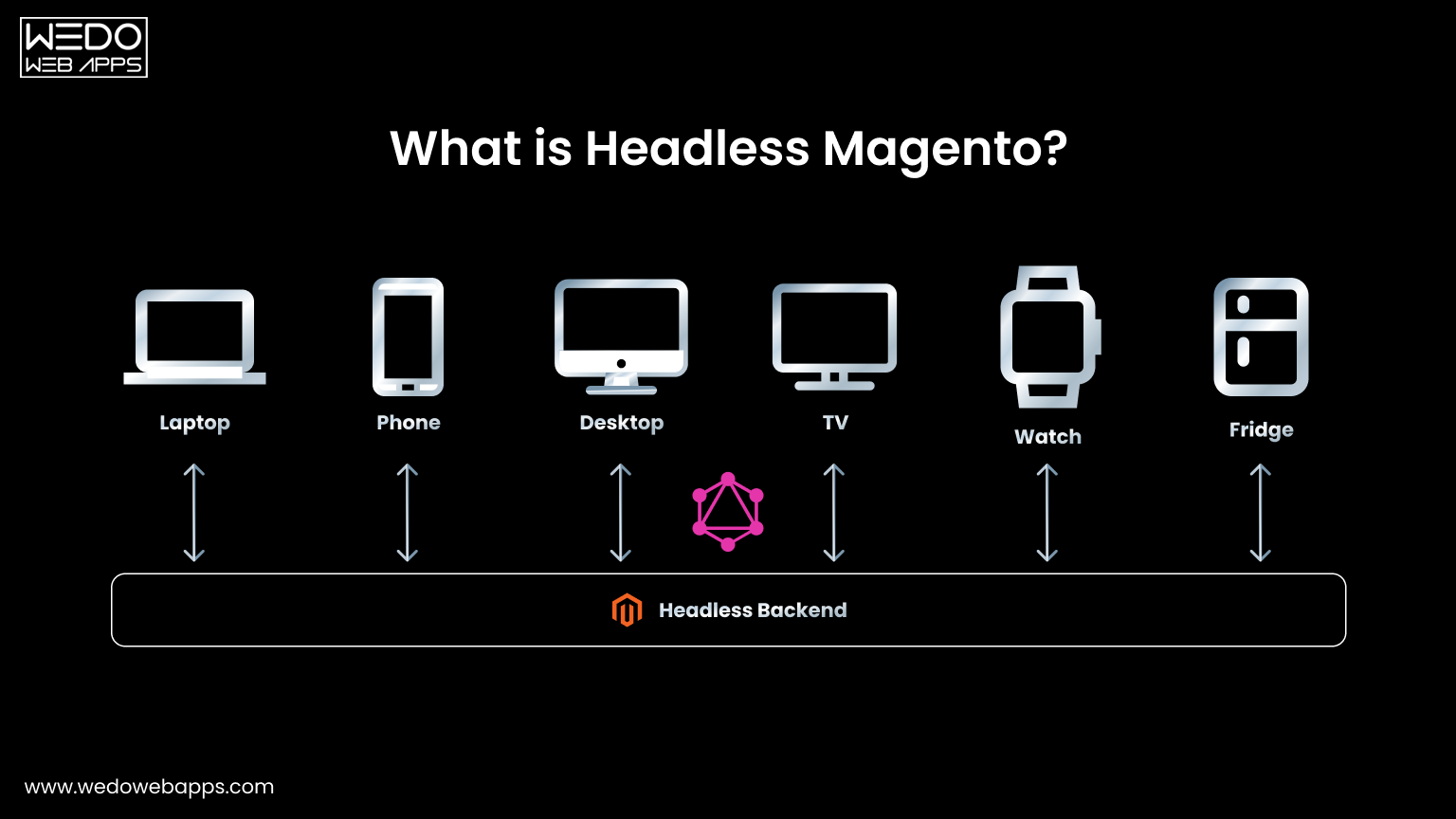
Headless Magento is a new approach to building e-stores that separate the front-end and back-end of the platform. 

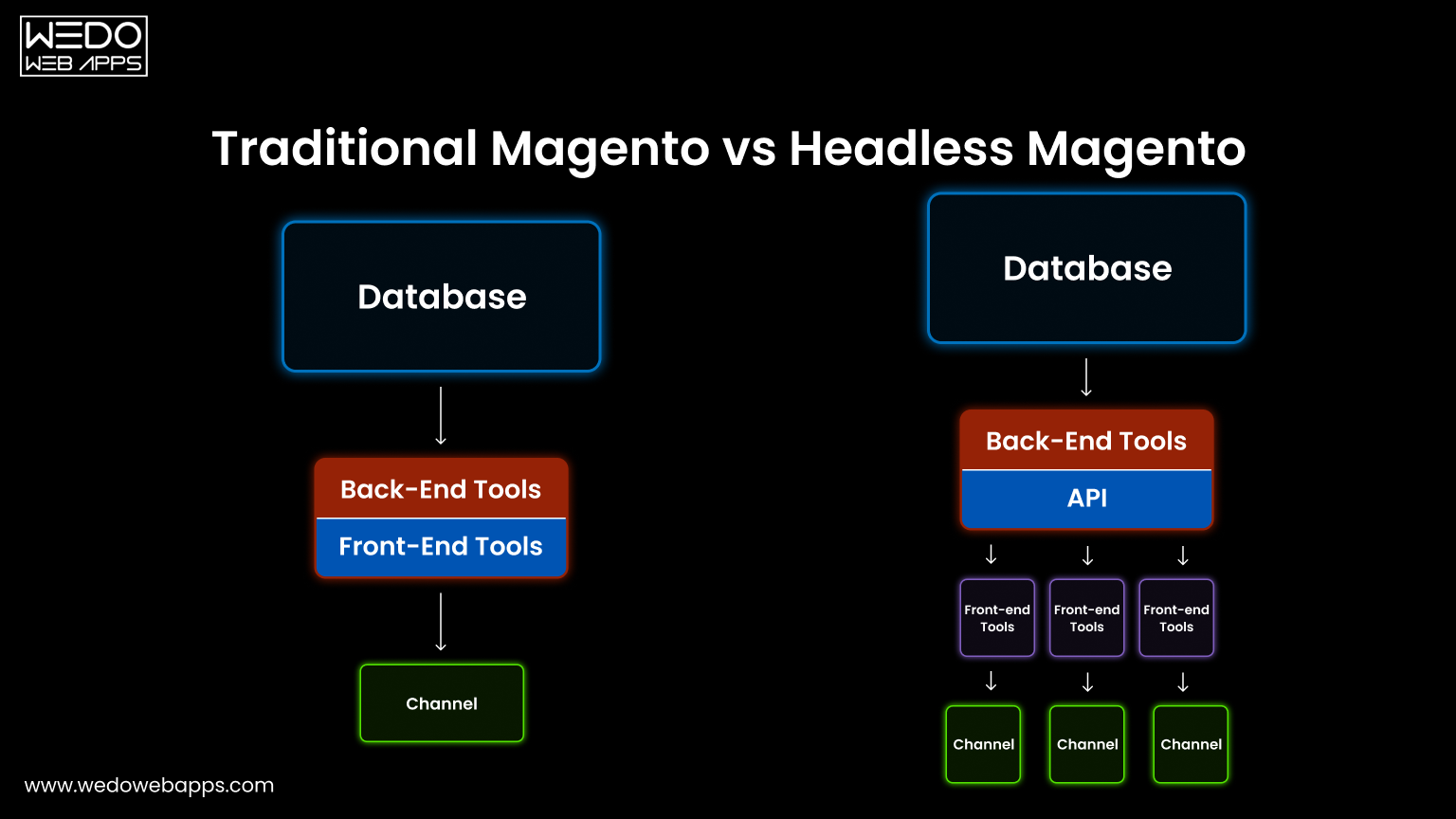
In traditional Magento setups, the front-end and back-end are tightly integrated, making it difficult to change one without affecting the other. 

Headless Magento solves this problem by separating the two into separate components.

The front end of a Headless Magento store can be built using several technologies, such as React, Vue.js, or Angular, while the back end remains on Magento.

This separation provides greater flexibility and customization options for businesses.

A Brief Overview Of The Benefits Of Building An E-Store With Headless Magento

Headless Magento offers a range of benefits for e-commerce store businesses compared to traditional, monolithic e-commerce platforms. By separating the front and back end, Headless Magento allows for a more seamless, streamlined user experience.

This results in faster load times, improved navigation, and a more engaging customer experience. In addition to improved user experience, it also offers increased flexibility. 

The front-end and back-end are separate, allowing developers to work independently on each without affecting the other. This makes changes to the front end easier without affecting the back end, and vice versa. 

This is particularly useful for businesses that frequently want to make changes to their website, as it speeds up the development process and reduces the risk of bugs or other technical issues.

It is a future-proof solution for e-commerce stores. Technological advancements make it increasingly crucial for businesses to build a website on a flexible, modern architecture. 

By using Headless Magento, businesses can stay ahead of the curve and ensure their website is ready for the future.

In this blog, we will explore the advantages of using Headless Magento for building an e-commerce store, how it works, and real-life case studies of successful implementations.

headless commerce platform

What Are The Advantages of Headless Architecture?

1. Improved User Experience

One of the primary benefits of Headless Magento is the improved user experience that it provides.

With the front-end and back-end separated, businesses can create a more optimized and personalized shopping experience for their customers.

  • Faster Page Loading Speeds

The front end of a Headless Magento site is built using modern technologies that are optimized for performance. 

This leads to faster page loading speeds, which is crucial for keeping customers engaged and reducing bounce rates.

  • Better Mobile Optimization

A significant portion of online shopping takes place on mobile devices. With this, businesses can create a front end that is optimized for mobile devices, providing a better shopping experience for customers.

  • Advanced Personalization Capabilities

By separating the front-end and back-end, Headless Magento provides greater flexibility for businesses to personalize the shopping experience for their customers.

For example, businesses can create customized recommendations, product displays, and promotions based on the customer’s behavior and preferences.

2. Enhanced Security

One of the key advantages of Headless Magento is enhanced security. Separating the front end from the back end makes it easier to protect sensitive data and prevent vulnerabilities.

  • Protection from Vulnerabilities

The separation of the front-end and back-end reduces the attack surface, making it harder for hackers to find vulnerabilities.

By eliminating the need for complex, monolithic code, businesses can reduce the risk of security breaches and minimize the impact of any potential vulnerabilities.

  • Stricter Control Over Data

The back end in Headless Magento can be designed with strict security measures in place to ensure that sensitive data is protected. This includes the use of encryption, access controls, and firewalls. 

Additionally, businesses can choose to host their back end on a secure server, providing an extra layer of protection.

  • Increased Scalability

Another advantage has increased scalability. This is due to the separation of the front-end and back-end, which makes it easier to integrate with third-party applications, add more features, and handle increased traffic.

  • Seamless Integration with Third-Party Applications

With Headless Magento, businesses can easily integrate with a wide range of third-party applications, such as payment gateways, shipping providers, and marketing tools. 

This allows businesses to build an e-commerce store tailored to their specific needs, making it easier to scale as their business grows.

  • Flexibility to Add More Features

By separating the front end from the back end, businesses can add more features to their e-commerce platform without having to make significant changes to their existing architecture.

This makes it easier to test new features, modify existing ones, and quickly implement new functionalities, which can help businesses stay ahead of the competition.

  • Ability to Handle Increased Traffic

 As an e-commerce business grows, it is important to have a platform that can handle increased traffic. With Headless Magento, businesses can handle more traffic without sacrificing performance or reliability. 

The separation of front-end and back-end allows businesses to scale their Magento headless commerce platform horizontally, making it possible to add more servers as needed, to handle increased traffic.

3. How Headless Magento Works

  • Separation of Front-end and Back-end

One of the key features of headless Magento is the separation of the front-end and back-end. This allows for greater flexibility in design and development, as the front end can be completely customized and decoupled from the back end.

 The front end, which is responsible for the user interface, can be built using any technology stack, such as React, Angular, Vue.js, or any other JavaScript framework.

On the other hand, the Magento back end, which handles the business logic and data storage, remains the same and is built using Magento’s e-commerce platform.

  • Interaction between Front-end and Back-end

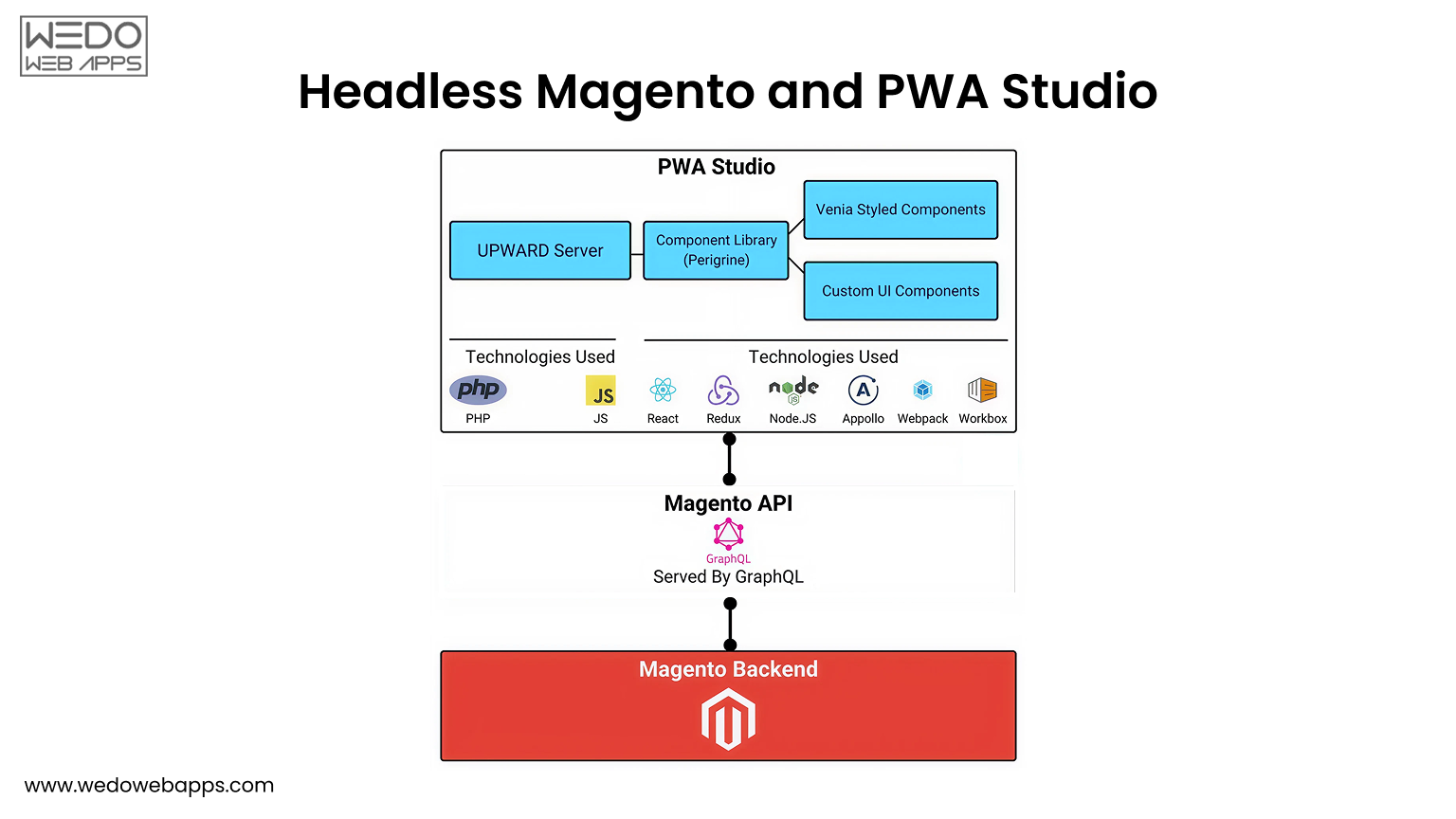
The front-end and back-end interact with each other through APIs. The front end sends requests to the back end for data, such as product information, customer information, and order details. 

The back end then responds with the requested data, which the front end can use to display on the website. This interaction is done through REST APIs, which allow for easy communication between the front end and back end.

  • Example of Headless Magento Architecture

An example of Magento headless architecture is as follows:

The user visits the website and interacts with the front end, which is built using a JavaScript framework.

The front end sends a request for data to the back end through APIs.

The back end, which is built using Magento’s e-commerce platform, responds with the requested data.

The front end uses the received data to display the information on the website.

As the user continues to interact with the website, the front-end and back-end continue to communicate and exchange data through APIs.

magento development services

In this Magento headless commerce, the front-end and back-end are completely separate and can be developed and maintained independently. This allows for greater flexibility in design and development, as well as improved performance and scalability.

Read more: Hire Magento Developers: Everything You Need to Know!

Case Studies of Headless Magento Implementations

Many e-commerce brands have successfully implemented headless Magento, improving performance, flexibility, and overall customer experience. 

1. Benefits Realized by Brands After Headless Magento Implementation

There are various benefits that brands realized after the implementation of Headless Magento. Some of these benefits include:

  • Improved Performance:

One of the key benefits of headless Magento is improved performance. With the separation of the front-end and back-end, the website can load faster and provide a smoother user experience for customers. 

This can lead to increased conversion rates and overall satisfaction with the website.

  • Increased Flexibility: 

Headless Magento allows for greater flexibility in the design and functionality of the website. Brands can choose to use different technologies for the front-end and back-end, leading to a more customized and tailored solution. 

This increased flexibility also allows brands to better integrate with other marketing and e-commerce platforms, leading to increased efficiency and cost savings.

  • Better Customer Experience:

The improved performance and increased flexibility of can result in a better overall customer experience. 

Customers are more likely to stay on the website, complete transactions, and return for future purchases if they have a positive experience on the site.

2. Herschel Supply Co. case study:

Herschel Supply Co. is a well-known retailer of backpacks, travel gear, and accessories. After implementing it, the company saw a significant improvement in page load times, making the website faster and more user-friendly for customers.

Additionally, the headless architecture allowed for more customization and flexibility in the design and functionality of the website, leading to a better overall customer experience.

The Future of Headless Magento

Magento headless architecture

1. Advancements in Headless Magento Technology

In recent years, there has been a significant increase in the adoption of headless technology, which has resulted in the continuous evolution of its features and capabilities. 

One such advancement is the integration of Artificial Intelligence (AI) and Machine Learning (ML) to deliver personalized shopping experiences for customers. 

This integration has boosted the recommendation engine’s efficiency and accuracy, thereby providing customers with a more customized shopping experience.

Another key advancement in headless Magento technology is the integration of Progressive Web Apps (PWA) that allows for an app-like experience on a website. 

This feature provides customers with a fast and responsive experience, even on slow internet connections, which is a key requirement for many e-commerce websites.

2. Predictions for the Future of Headless Magento

The future of headless Magento commerce looks very promising as the technology continues to evolve and become more accessible to a wider range of businesses. One major prediction for the future of headless Magento is the integration of voice-based technology. 

With the growing popularity of smart speakers and voice assistants, many businesses are looking to integrate voice-based technology into their websites to provide customers with a more convenient shopping experience.

magento development company

Another key prediction for the future is the integration of augmented reality (AR) and virtual reality (VR) technology. 

This integration will allow customers to view products more interactively and engagingly, helping to increase conversions and sales.

Why Headless Magento is a Future-Proof Solution for eCommerce Stores

Headless Magento is a future-proof solution for e-commerce as it allows businesses to integrate new technologies and features as they become available. 

This allows businesses to stay ahead of the curve and stay competitive in an ever-changing digital landscape.

Headless Magento is highly scalable, making it suitable for businesses of all sizes, from small startups to large enterprises. This scalability means that businesses can easily add new features and capabilities to their websites as they grow and evolve.

Read also about PSD to Drupal and Magento Conversion

Conclusion

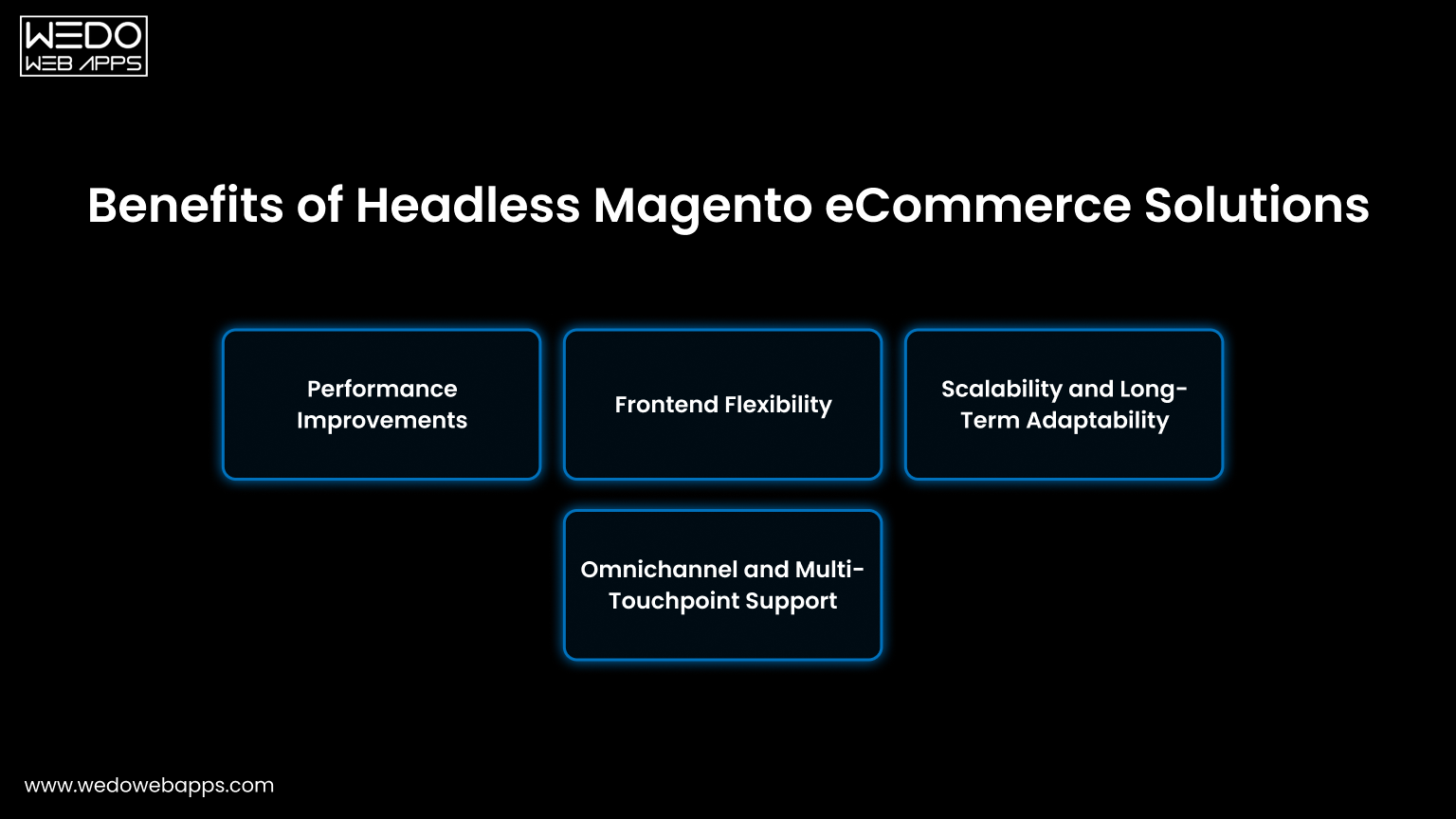
In conclusion, building your e-store with Headless Magento offers several advantages, including improved user experience, enhanced security, and increased scalability. 

With its ability to provide a better customer experience and a future-proof solution for e-commerce, it is an excellent choice for retailers looking to improve their online presence.

So, if you’re ready to take your e-commerce business to the next level, consider building your e-store with Headless Magento today!

The growth of Business with Shopify developers

Go online! Browse the web! Find Freelancer! Go Business! And, for the owners, Shopify website or application is ready in a few days. Well, this is what all business owners do and, progress well. To hire a Shopify developer, there are few things to keep in mind, not just limited by the quality, but by the assistance required in other terms of quality management.

First of all, to hire a Shopify developer, the business owners look forward to their budget as they know that they will get the work completed by the Shopify developer at any cost at the end. This is what makes them a business person, but for every developer working as a freelancer with the minimum value, every project is a new experience. This does not fail, but indeed some obstacles that harm business and relation as well at both the ends.

Compare Shopify vs WooCommerce and see how each platform affects business growth with Shopify developers.

Every Shopify developer has a basic knowledge of playing with the Shopify website, but perfection comes with the capability to compete and capitalize and makes a developer a brand. To whom then do business person should go, either hire a Shopify developer doing freelancing or go for the experts. It solely depends upon the business and the functionalities needed in work. Freelancing is never easy, and those who have earned it, deserve getting a job more than Shopify experts in cases. If business owners need more assistance regarding the store and quality management with a good ranking of the website then, it is evident that they need to go to a team working collectively in all the areas mentioned above.

Read more about Grow your E-Commerce business with best Woocommerce Development Services

WeDoWebApps LLC is an organization that not only work on Shopify, but it has covered every aspect of the IT domain and continuously advanced with exponentially rising quality in its works. With terrific responses and reviews of over clients in every area, WEDOWEBAPPS LLC has gotten into the race of becoming a brand. All this way, many owners are collaborating with WEDOWEBAPPS LLC for growing business opportunities. Experience of everything, from designing related tasks to HTML and CSS coding, customization without using templates, Exceptionally well quality and store management with all SEO rules to get figure high is the reason enough to hire Shopify developers from the organization.

Check out these important Shopify tips and see how they can contribute to the growth of your business with Shopify developers.

A Step-By-Step Guide To Creating Price Rules For Magento 2 Catalogs

Are you looking for ways to increase sales and customer loyalty in your Magento 2 online store?

Catalog price rules can revolutionize your e-commerce business. 

By offering targeted discounts on specific products or categories, you can make sure your customers buy more and return for more. 

This article helps you understand how to create a catalog price rule in Magento 2, including setting up promotions, defining customer groups, and creating special pricing. 

With this guide, you will learn how to master dynamic pricing with Magento 2 – regardless of your experience level.

What Is the Cart Price Rule?

Cart price rule

The Cart Price Rule is a special rule you define in your store’s configuration that allows your customers to purchase a particular product at a discounted price based on certain conditions you set in your store. Anyone can create this rule without being an extreme couponer. 

Store admins can use Magento configurations to create a coupon code, which customers must enter into the Apply Discount box during checkout. Then, on the Order Review, you can check the coupon value.

With the help of this feature, you can attract customers, increase sales, and create targeted marketing campaigns to increase sales. In addition, you can customize Cart Price Rules in several ways, such as percentage discounts, fixed amounts discounts, free shipping, and more.

Steps to Create Cart Price Rule In Magento 2

With a Cart Price Rule in Magento 2, you can attract more customers and boost your store’s revenue. You can follow this step-by-step guide to create one for your store.

Step 1: Create a New Rule

You can find the Cart Price Rule under Marketing > Promotions in the Admin Panel.

Catalog price rule


You can add a new rule by clicking on the Add Rule button and filling in four tabs: Rule Information, Conditions, Actions, and Labels.

New cart price

  • Put a name for your rule in the General Information section, and if necessary, write some descriptions.
  • Make the rule Enable when Status is Active.
  • Make sure the rule is assigned to the Website and Customer groups.
  • The promotion is not available for guests that belong to the NOT LOGGED IN group or customers that do not log in to their accounts when placing an order.
  • Select the Specific Coupon option on the Coupon field to enable the rule along with the coupon.
    • Use the Coupon Code when completing the checkout process. After saving the rule, enable the Use Auto Generation checkbox to publish multiple coupon codes.
  • In the Uses per Coupon and User per Customer fields, limit the number of times a coupon is valid. If there is no limitation, leave them empty.
    • The number of uses per coupon is determined by the number of times the coupon code is used.
    • In Uses per Customers, the number of times the same customer uses a coupon code is set.

Step 2: Set the Conditions

There is a statement in the Conditions tab entitled “If ALL of these conditions are TRUE.”

You can edit the statement by clicking the bold links “All” and “TRUE”.

  • You can choose from ALL or ANY options by clicking the ALL link.
  • You can choose TRUE or FALSE when you click the TRUE link.

If you want to apply to all products, leave the conditions blank Or to remove a statement, simply click the Delete button.

Set the conditions

Step 3: Set the Actions

A Cart Price Rule applies to all actions you specify here when all conditions are met.

Set the actions

To change the catalog price rule, click the Action tab on the left panel. In the Apply field, you can select any one of the following options:

  • Percent of product price discount
  • Fixed amount discount
  • Fixed amount discount for whole cart
  • Buy X get Y free

Make sure you only enter numbers for the Discount Amount.

Step 4: Set the Labels

Click on the Labels tab. 

Enter the text in the Default Rule Label for All Store Views section of the Default Label section. 

Set the labels for each store view under Store View Specific Labels.

Set the labels

Step 5: Apply the Rule

Save Rule to finish. That’s it. You have successfully added a cart price rule for your product. Now you understand how to create a Magento 2 Cart Price Rule; you can use it to offer discounts and promotions. 

However, the Cart Price Rule is one of many types of pricing rules you can use in Magento 2. We’ll explore another price rule in the next section: Magento Catalog Price Rule

What Is Magento Catalog Price Rule?

Using Magento Catalog Price Rules, you can assign discounts to products in the catalog based on customer groups, product attributes, and other criteria.

Whenever a product falls under the catalog prices rule, the discount will be applied directly to the product and instantly appear in the catalog.

As a result, customers see discounts when browsing through your store without using coupon codes. In turn, this encourages them to purchase more.

So, What do you need to do to set them up? The answer is

Create Catalog Price Rules In Magento 2

One effective way to optimize your Magento 2 online store sales and revenue is by creating catalog price rules. The following guide explains how to create Magento 2 catalog price rules step-by-step.

Catalog price rule

Step 1: Add A New Rule name

  • Login to Magento Admin Panel, navigate to Marketing > Promotions > Catalog Price Rule and add a new rule.

New catalog price rules

Expand and complete the Rule Information section

Rule Information

  1. Enter the Rule Name and Description, then select Yes to activate it.
  2. Select the price rule that will get applied to the Websites catalog.
  3. Specify the Customer Groups for which this rule should get created.Rule information

Choose the Date From and To, as well as the time frame during which you would like the catalog price rule to be enabled and Prioritize rules.

Note: Prioritizing is crucial Whenever a product meets the same criteria as one or more Magento Catalog price rules, the system applies the rule with the highest priority.

Conditions

Step 2: Define The Conditions

You will define the conditions in this section based on the attributes of the products to be used in the rule. Leave the conditions blank if you are not going to apply the rule to all product attributes.

Following these guidelines will help you expand the Conditions section:

Select Condition

Choose the condition under which the rule applies to all products. As a default, the first condition states: All of the conditions are TRUE.

Choose any of the following:

  1. Click ALL and select ALL or ANY.
  2. Click TRUE and select TRUE or FALSE.
  3. The condition can be left unchanged if you want to apply it to all products.
Add Conditions

 To add a new item, click Add(+) icon and select:

  • Conditions Combination
  • Product Attribute

Once you have completed all conditions, repeat the process.

Note: Click on the Delete (Delete icon) if you want to delete a particular condition statement portion.

Step 3: Define The Actions

Define the actions

Here, you define actions that apply to the products based on the above conditions.

1: The first step is to expand the Action and select the method for applying the discount. Choose from the following options:

  • Apply as a percentage of the original
  • Apply as a fixed amount
  • Adjust final price to this percentage
  • Adjust final price to discount value

2: Discount Amount: Select the Discount Amount from the drop-down menu. According to your chosen method, the discount amount will be calculated in either percentage or currency.

3: Discard subsequent rules: If there are any subsequent rules, select Yes.

To further enhance your store’s profitability, explore how our tailored Magento pricing strategies can meet all your e-commerce needs.

Step 4: Save And Test The Rule

Save the changes at the top of the page to complete the process. This will redirect you to the Catalog Price Rule page. Then click the Apply Rules button.

Field Descriptions

Rule Information

  • Rule name (Required): This is for internal reference only.
  • Description: Describe how the rule is used and its purpose.
  • Websites (Required): List of websites where this rule can be applied.
  • Customer Groups (Required): Lists the customer groups affected by the rule.
  • Priority: A number indicating the relative importance of this rule. The highest priority is 1.
  • Status (Required):  Indicates whether the rule is currently active. Options: Yes / No
  • From: The date on which the price rule takes effect If left blank, the rule takes effect immediately.
  • To: specify when the price rule will end. If left blank, the price rule will continue indefinitely.

Conditions

It specifies when a catalog price rule goes into effect and the conditions that must be met. If left blank, the catalog price rule applies to all products.

Magento development services

Actions

  • Apply determines how the purchase is calculated. Options:
    • Apply as percentage of original – Decreases price by a percentage.
    • Apply as fixed amount – Subtracts a fixed amount from the regular price.
    • Adjust final price to this percentage – Reduces the final price by a percentage.
    • Adjust final price to discount value – Determines the final price based on a fixed, discounted amount.

Note: The regular price refers to the base product price without any advanced pricing (specials, tiers, or group discounts). The final price is the discounted price displayed in your shopping cart.

  • Discount Amount (Required) – This is the amount of the discount.
  • Discard Subsequent Rules – Determines whether this purchase is eligible for additional rules. Select Yes to prevent multiple discounts from being applied to the same order. Options: Yes / No

The Difference Between Catalog Price and Cart Price Rule

The Catalog Price Rules and Cart Price Rules might create confusion as they both serve the same purpose, namely to manage and manage discounts on your store. However, you can still distinguish them based on the following characteristics:

A catalog price rule is a special discount applied in a catalog so customers can see it while surfing the website. If conditions are met, discounts will be applied automatically without needing a coupon code. 

Looking to make the switch? Learn how Squarespace to Magento migration can give you greater control over pricing and enhance your e-commerce capabilities.

The product attributes determine a product’s price so that the after-discount price will be displayed on the checkout page and in the cart. As a result, customers cannot see the discount amount in these steps.

Meanwhile, Cart Price Rules are applied to the shopping cart based on shopping cart attributes so that customers can only see the sale when they are at the checkout stage.

The Cart Price Rules can get adapted with a coupon. Shoppers can apply coupons to online stores, or else discounts are automatically applied. This type allows the discount amount to be seen in the cart and during checkout.

Magento development services

You can also use the cart price rule for shipping fees, which is not allowed with catalog price rules.

Understanding the differences between these two concepts will help you create one that is appropriate for your store.

Read More: 18 Best Magento Migration Companies All Over The World

Conclusion

You can boost your online store’s sales and customer loyalty with catalog price rules in Magento 2. You can encourage customers to purchase more and return for future deals with targeted discounts on specific products. You can also streamline your sales and marketing efforts by implementing catalog price rules, which can help you better manage your pricing and promotions.

You can differentiate your store from competitors by mastering Magento 2’s catalog price rules, which will drive more sales and keep your customers coming back for more. In the rapidly evolving world of e-commerce, catalog price rules can help businesses of all sizes achieve their sales and marketing goals. To fully leverage your pricing strategies, consider our comprehensive Magento development services that can enhance every aspect of your e-commerce site.

Handy Magento 2 Migration Checklist For Your E-commerce Business

As an e-commerce platform, Magento has exceptional reputation. It was initially launched in 2007 as a credible and reliable alternative for brands that wish to grow and expand their businesses online. With more than 230,000 live stores presently operating on Magento store, the platform is utilized by 19% of the million leading websites with maximum traffic. 

E-commerce platform business choice is a crucial decision for every brand. Your e-commerce platform work as the online shopfront of your brand — any app integrations, custom code, or CMS formatting ought to be in sync with the technology employed by the platform.

Here we will discuss all the migration steps your e-commerce business must keep in mind before Magento migration, or more precisely, Magento 1 to Magento 2 migration. Also, you get to know the excellent Magento 2 migration service checklist with this blog. So, you are better guided for Magento Migration services.

Choosing the right eCommerce platform is not only a technology decision but also a step towards custom eCommerce development that aligns with your brand’s growth and long-term goals.

Why Should You Migrate to Magento 2?

In June 2020, Magento officially declared the termination of updates and support for the first version. Since then, there has been a surge of problems and interruptions across the Magento community and the whole eCommerce industry.

But on November 17, 2015, Magento released its 2.0 version, which was way better and more useful than the first version. Understanding the Magento 1 to 2 migration cost is vital to effectively plan your budget and make informed decisions.

Take a look at why you should migrate to Magento 2.0 as soon as possible.

Reasons For Magento 2 Migration

  • Improved performance with data migration tool code.
  • Completely responsive and touch-friendly UX design
  • More occasional needs for intermediary custom extensions
  • Simple to modify and remodel
  • Reasonable in price with an easy-to-use Magento 2 migration service access
  • Enhanced load time and quicker processing with handy maintenance mode
  • Efficient and smooth-running backend along with enhanced UX for admin panel with such migration testing environment.

Things To Consider During Magento 2 Migration

Since Magento data migration tool, developing technologies, and manual data changes make switching platforms simpler than ever, it is still a time-intensive and unwieldy task. 

According to Allen Burt (CEO at Blue Stout), the purpose behind a migration plan should never be only to shift from one platform to another or transferring data.

Rather, it should be to “concentrate on the opportunities that are obtainable to the respective brand or business as they switch. Double check you take the maximum benefit of that transformation to enhance your website for revenue growth.” 

Moreover, irrespective of your needs or logic that made you run the migration process, make sure you make thorough inquiries during the discovery stage. Now let’s look at the most crucial incremental data migration step, along with a helpful Magento 2 migration checklist.

For those undergoing a Shopify to Magento 2 migration, ensure that the platform’s capabilities align with your growth objectives and long-term scalability.

To maximize success and avoid costly revisions, every migration should start with a related ecommerce strategy that aligns goals, customer journeys, and backend performance requirements.

1. Devise A Migration 2 migration Strategy

Taking into account the complexity of migrating to Magento 2, you must create a strategy that facilitates you to succeed in the migration journey. A good migration process plan will work as a flowchart and agenda to direct you through the migration attainments. Nevertheless, if you are an amateur in the migration process and require some assistance, Magento has released a flowchart that could help you with data migration.

2. Decide What Features You Require

Find out what technology you are using and discard the elements that result in errors if you are spending on features that you don’t even require.

If you have been using Magento for a number of years and have custom-made it for enhanced existing custom functionality, possibilities are you are still not making use of every magento core customizations. Have a list of everything you require.

Several functionalities in the Magento 2 platform and the Magento Marketplace are obtainable from various expert providers in the BigCommerce App Marketplace. “Many of the services you utilized on Magento are available there, including incrementally captured data updates; some are furnished by other modules,” states Paul. 

3. Pay Heed To Development Time And The Overall Expense Of Ownership: 

Migrating to cloud-based e-commerce solutions normally requires a reduced overall expense of ownership. “This generally happens because on-premise solutions such as Magento mandate hosting fees, Enterprise license fees, and constant support.”

Magento is an open-source, wholly configurable platform with hosted and cloud-based alternatives. Since it is absolutely robust, brands are usually amazed by the expenses of employing development and design teams to create and adjust their front- and back-ends on the platform.

Many businesses leverage professional eCommerce development services to streamline migration, balance feature upgrades, and improve long-term store performance.

Unlike a fixed-cost SaaS option, with on-premise software, “you will have to spend to host the software somewhere. The more additional traffic and data you own, the more money it will cost.” 

The expenses can be even higher than the software hosting. When brands choose a hosted solution, they should also pay heed to the costs linked with the items mentioned below:

  • Production Hardware
  • Server licensing
  • Load-balancing
  • Backups
  • PCI compliance.

Finally, when it is about figuring out the conclusive expense and running the migration process, 

Ensure you comprehend exactly what you’re paying for. Does the monthly fee have support? Does it contain out-of-the-box plug-ins? These add up, which can lead to an extensive price tag.

Magento 2 migration services

4. Ensure Accurate Timings

With Magento Commerce 1 (Enterprise Edition) and Magento Open Source (Community Edition end-of-life), which will be out in June 2020, numerous brands must pay heed to quick platform migration, particularly to permit extra time for development and post-launch testing environment

If you wonder how long it takes for Magento to migrate to a new e-commerce platform, here’s a quick answer.

It relies on the intricacy of your e-commerce business and how fast your business can make decisions. “We have done platform migrations and settings migration for simple stores in as few as eight weeks. Others have taken a year or more. Take the time you require to do it precisely.”

Johnny at Fortuitas states that if you are associated with an agency for various incremental migration purposes and a Magento migration plan, then make an early discovery to identify the ideal timeline.

“These are small, quick engagements that permit an agency to plunge deeper into a brand’s systems. Once done, not just the brand will have a adequate understanding of where they are presently, but it likewise gets suggestions on where business can be in the next 3-5 years. The discovery will specify an exact plan and budget and make it straightforward for the client to make a decision on which platform to pick.”

Read also: Hire Dedicated BigCommerce Developers

5. Should You Hire A Team For Development Resources?

With an open-source platform like Magento, businesses should have a support and development crew for any more extensive adjustments or changes to the platform. For complex migrations and customized integrations, many brands also choose to hire dedicated ecommerce developers with specific Magento expertise to ensure a smooth transition and reduced technical issues.

Since it is possible for bigger businesses with built-out support units, small-sized and rising merchants may face problems in allocating the correct budget and headcount to developers. 

Why are developers and developer authentication keys required? 

There are a few safety exposures and mandated bug fixes linked with on-premise platforms. “OSPs contain bugs, and if the platform does not talk about the bug you have to fix, you may have to pay a development team to resolve it for you.” Working with a Magento integration agency can simplify the setup of advanced integrations, ensuring seamless migration and robust functionality.

6. Safety: Consider The Protection You Need In Advance:

Website safety is indispensable for every e-commerce business that sells products online. Almost monthly announcements are about the lack of protection and patch fixes for the latest Magento migrate data software. In point of fact, the latest research has discovered that 87% of SME websites utilizing the Magento platform are presently at increased threat of cyber attacks.

“Security threats occurs regularly. Magento normally issues an update to resolve the new threat, but occasionally those updates — either safety patches or upgrades — result in other things to stop working, so you have to spend time experimenting and fixing any problems you encounter.”

Engaging Magento maintenance and support services ensures timely patch updates and keeps your platform secure from evolving cyber threats.

7. PCI Compliance: 

PCI compliance is a subset of standards designed to assure that the credit card industry systematically protects customer data and data transfer processes. It is mandated for all businesses that process credit card payments. According to Paul, a PCI compliance audit is the most pricey thing a trader can encounter.

“A PCI compliance audit is when your bank or merchant service provider mandates you to demonstrate that customer store data is safe. With Magento, you have to verify it independently. If you are on BigCommerce, the process is often more straightforward.”

Businesses that worry about migrate settings from Magento 1 to Magento 2 will nonetheless be on a hosted solution and will have to retain a staging server or spend on a provider for the same, which implies that they are still answerable for retaining PCI compliance and patching. 

“The expenses to purchase and support hosted PCI compliant and separate environment are far more significant than if you opted for an out of the box PCI compliant SaaS solution such as BigCommerce.” states Johnny at Fortuitas.

8. Specify Your Tech Stack And Decide The Features You Require As Per Development Environment: 

Look at some of the features and customize functionality of the current platform you mostly use. 

  • Shipping.
  • Multi-channel.
  • International localization.
  • Wholesale distributions.
  • Headless commerce.
  • Mobile optimization.
  • SEO.
  • Faceted search.
  • Theme & storefront personalization.
  • Merchandising.
  • Coupons & discounts.

Launch time, custom functionality, developing custom functionality, and the cost is some of the elements that relatively affect the selection process of the platform.

Basically, businesses wish to obtain all these features without spending much, or they barely use them while budgeting for extra upgrades and supplemental features as the brand undergoes custom development.

9. Pay Heed To Redesigns And Modifications: 

When you have migrated data and moved from one platform to another, you will not necessarily get a shopfront’s exact appearance and feel. 

For businesses shifting from Magento 1 to Magento 2 and migrating data, not every theme and extension created for Magento 1 will be well-matched and compatible with Magento 2 version control system. You will have to do more migration testing, extensive code migration, upgrade migration, and extension migration for personalized features or functionalities. 

If you are encountering the problem of recreating the same look on your new e-commerce website, you might also move to a more suitable solution rather than only a theme migration. 

Read also about PSD to Drupal and Magento Conversion

10. Take Help From External Resources: 

“BigCommerce is highly customizable. If you have complicated requirements, find a partner early on who can assist you plan things. A fantastic plan will save you time, money and headaches as you move.” Thus, it becomes crucial to take help with your eCommerce store from as many external resources as possible for a better experience.

Following proven ecommerce best practices during migration helps retain SEO value, reduce customer friction, and improve long-term performance after platform upgrades.

magento 2 migration steps

Conclusion

Rome was not built in a single day, so if you are still unable to decide whether you should opt for Magento migration, then this is the right time to do it. Replatforming, or opting for a Magento 2 migration service is not simple; however, you must see it as an investment in your online store. It will certainly succeed and give you more sales and increased revenues.

Moreover, Magento 1 to Magento 2 migration gives you future timeliness to the most recent technologies and features, such as PHP with the newest techniques, e.g., Database assets, new Database entities, database clustering, incremental updates, network access, Performance Monitoring via New Relic, Full Page Caching, Blackfire.io, Extended Reporting via Magento e-commerce Business Intelligence, Pagebuilder WYSIWYG CMS, Magento Shipping and LAMP stack – Linux, Apache/Nginx MySq. So waste no more time and switch to a more enhanced version of Magento 2.0 today.

Considering a Magento 2 migration for your ecommerce store? Our experienced Ecommerce Development Company can guide you through the entire process!

How To Ruin Your SEO When Migrating to Magento 2

Magento 2, pays greater interest in designing and upholding the best SEO practices for your website. However, it is quite obvious that the businesses may get  a hit on their website traffic due to SEO loss while migrating from Magento to Magento 2.

There are several reasons for the SEO loss during the change. Here, we will try to about the important parameters that usually get affected the most and its solutions to get the best results.

What Happens To SEO In The Migration Process?

Over time, your website has gained organic visibility and equity, which has helped you rank for keywords and searches that potential customers and clients use to find your website. 

What search engines know about your website and the metrics they use to give you rankings change when you change your URLs, content, and website. Therefore, any website migration aims to minimize traffic losses to the greatest extent possible; implementing a comprehensive SEO migration prevents losses.

Common Mistakes That Leads To Ruining of SEO + Ways To Fix Them 

1.  Content Deletion Because No One Reads It Anymore

Do you want to read a fun stat about your traffic? Microsoft’s study reveals that the average human attention span has shrunk from 12 seconds in 2000 to 8 seconds in 2018. 

Therefore, more engaging content is required to encourage visitors to remain on your website for longer. Videos or high-quality visuals that can be zoomed in to see the product in detail are great ways to engage customers and show off the effects.

Reducing the amount of text on the website is usually logical because of changes in customer behavior. However, search engines still place a high value on original content when determining the search engine results pages rankings (SERPs). 

Therefore, keep the fundamentals in mind when planning to migrate your website to Magento 2.

Ways To Fix This Problem

The most secure strategy for avoiding search engine rankings drops is to: either completely migrate the content or spend some time analyzing what, from an SEO standpoint, is worse to migrate and what can be left out because it will only help a little.

SEO professionals frequently place the text directly above the footer to ensure the store is manageable with descriptions. Search engines still read it, but it does not prevent website visitors from purchasing the product.

2. Don’t Have A Clear Go-live Procedure

301 mapping is something you should care about. 404 errors are your biggest enemy! If it is not done correctly, it will affect all traffic channels, including email, paid, organic, social, and referral.

If you changed your old website’s URL to 

https://www.example.com/my-amazing-product 

from https://www.example.com/my-product

People who click on the old URL in search results, bookmarks, emails, Facebook posts, blog posts, etc., will open a page with the error 404 (Not Found), which can be dangerous! 

Ways To Fix This Problem

You should move the URLs of pages that do well so that you don’t need 301 redirects in the first place.

Map the critical URLs, such as CMS, categories, and products, if URLs are changing. From an SEO point of view, with valuable backlinks and quality traffic, you can keep the score intact.

3. Launch The Website Without 301 Mapping.

Unfortunately, there is no hard and fast rule to direct the same SEO techniques for all. Although most SEO practices apply to almost every eCommerce store, specific settings may cause more harm than good in some instances.

For instance, if you use Google to search for the robots.txt file for Magento 2 and blindly copy any robots.txt file that comes up, you risk hurting your SEO by blocking URLs that shouldn’t be stopped. That may save some money on the crawl, but it will lower rankings overall.

Ways To Fix This Problem

Based on the particulars of your store, developer requirements should be crystal clear. Make your configurable products, like smartphones with different memory, indexable with additional on-page optimization if they have variants that can rank independently and attract visitors with high shopping intent. 

Keep such pages out of the index to avoid spending crawl budgets on low-quality URLs if there are no searches for your product variants, such as people not looking for specific shoe sizes.

Before going live, any setup should be tested for quality and, ideally, cross-checked after.

Ensure a seamless Magento 2 migration with the guidance of a trusted digital marketing company USA, protecting your SEO throughout the process.

4. Don’t Go Live Without Proper Data Tracking

Do you know that roughly 90% of the setups for Google Analytics are somehow broken?

The decisions made during the planning phase can be validated, and, if necessary, improvements can be planned by properly tracking eCommerce data and traffic.

Ways To Fix This Problem

Similar to SEO, Analytics should have its own set of requirements.

  • Use QnA for Test and live environments
  • Check with Google Search Console (or, in some cases, Bing or/and Yandex webmaster)
  • Keeping SEO Until The Last Minute

Keeping SEO for the last minute can ruin the SEO for your firm. So often, clients involve their contracted SEO firms to support the project’s migration. But it must be remembered that the indulgence of the SEO agencies varies significantly from firm to firm.

Unfortunately, the agency may only be contacted during the project. Therefore, an agency’s post-migration audit of the new website may be the only deliverable. In such a scenario, the Live website might have serious SEO errors for some time due to this delay in checking it not checking at all. 

migrating to Magento 2

5. Not Involving SEO professionals before migrating to Magento 2:

  • Most technical SEO best practices in Magento 2 can be implemented with extensions. However, if requested too late, optimization of page speed—for instance—may impact the project’s timeline. Additionally, no one enjoys missing deadlines.
  • Due to SEO, you might have to redo some functionality on some custom projects. For instance, if you want the URL structure to match the more complex structure of your existing site, remodeling everything before go-live may require additional resources.
  • Suppose SEO is not included in the project’s scope, but your Magento store relies on organic traffic. In that case, you may experience a significant drop in traffic after the store is launched.

Ways to Fix This Problem 

  • Goals! 

Set predetermined goals and stride towards achieving them. There are many scenarios in setting goals for SEO, but having a clear plan will make it easier to put tasks in order, help you save money, and help you get the results you want.

Include the SEO team in preparing detailed requirements for SEO implementation at the start of the project based on benchmarking the current website, such as migrating URL structure for specific pages or the entire website, so that the development team is aware of what you want from SEO from the start.

  • Convene on a Q&A procedure for implementing changes that developers, your in-house SEO team, or a third-party SEO company will carry out.
  • Before going live, conduct SEO technical audits to ensure all significant bugs have been found and fixed. 
  • Prepare a concise task list for developers to follow during go-live.
  • Organic traffic KPIs should be closely monitored for at least a few weeks after go-live.

How to Migrate to Magento 2 Without Harming Your SEO Performance and Results?

When migrating to Magento 2, you need to follow the following steps with respect to SEO:

  • Crawl the current site.
  • Keep track of your targets.
  • Create a URL map.
  • Check that titles, meta descriptions, and HTML markup are preserved.
  • Test the new version on a test server
  • Select an appropriate migration date.
  • Prepare to update the DNS settings of your website.
  • Launch
  • Explore the new website.
  • Find and fix content that is missing or duplicated.
  • Look for chains of redirects.
  • Make sure that Google Search Console and Analytics are used.
  • In Analytics, mark the date.
  • Send sitemaps in.
  • Keep an eye on your work.
  • Audit the site.
  • Refresh your platforms.
  • Request backlink updates from publishers.

1. Crawl The Current Site 

Before migration, crawl the current location. The URLs and markup on your website are retrieved by search engine crawlers, who “see” this information in the same way that Google would.

When you crawl, you get a list to look at in case something gets lost in translation and a starting point for your URL mapping (more on that later). Then, you can crawl your website by using a tool from a third party like Screaming Frog.

2. Keep Track Of Your Targets

During a site migration, analytics data may be lost in some instances. However, because historical benchmarks can be valuable, it is best to keep them.

Also, look over your analytics and ensure you know how visitors currently move around the site and which pages are most valuable to you. Your decisions regarding the website redesign and site architecture can benefit from this context.

3. Create A URL Map

You will need to implement redirects to direct Google and your website visitors from your previous URLs to your new ones if you are making significant changes to the URLs on your website.

From a usability standpoint, you shouldn’t give users a 404 status code error if a page no longer exists. Instead, they should be directed to the page that has replaced the previous page.

Your SEO could improve significantly if you use correct redirects. They inform visitors of your website and search engines that a page has changed, whether it has been removed or no longer exists. Additionally, they tell search engines which new pages have replaced older ones.

If there aren’t “perfect” replacements for every piece of content, don’t worry. Instead, please make every effort to direct your users in their intended direction.

Look for patterns in your URLs that can be redirected in groups or sections to save time if you have a lot of pages. Manual mapping is probably only an option if you have a few pages.

It is necessary to migrate any redirects that already exist. Make sure your URLs are mapped before testing redirects to ensure that you have backups in case you lose them, and try to keep as many existing redirects as possible to reduce workload.

4. Check To See That Titles, Meta Descriptions, And HTML Markup Are Preserved

Keep in mind that website migrations aid in the organization of websites. As a result, pages should be consistent and include the same catalog data as before.

Titles, meta descriptions, and HTML markup can be permanently changed, but you should still ensure that each page has the correct information.

5. Test The New Version On A Test Server

You will not completely understand the functionality and implementation of the new website if you only look at mockups or test them locally. Therefore, test drive it online before the official migration to ensure a smooth transition.

6. Select An Appropriate Migration Date

No matter what, glitches will occur, but you can minimize them by avoiding peak times. Like if your traffic is high during the day, plan the migration in the night. 

7. Migration Day Prepare To Update The DNS Settings Of Your Website

“Pointing” to the new location of your website will be a part of the process if you move it to a different server. Work with your web/IT team or both new and old hosting providers.

8. Launch

Establish your forwarding redirects, depublish them, and put them into action.

The website might be temporarily unavailable if DNS changes were involved. The migration should be nearly instantaneous if you are not switching platforms or servers.

9. Explore The New Website

You can conduct a crawl to determine whether the new site has been migrated in the manner you anticipated. A few things to look for include proper crawl ability and indexability.

10. Find And Fix Content That Is Missing Or Duplicated

Check the search engine crawlers report to see if there are any unusual findings, such as duplicate content, 404 errors, or broken links. You should also look around the new website for problems.

Magento to Magento services

11. Look For Chains Of Redirects

You now have a lot of new redirects as a result of the migration of your website. Chains could be formed if redirects were already in place. Fix Them. Fixing should be operational on the same day to prevent reporting or data gaps.

12. In Analytics, Mark The Date

You can make “Annotations” of significant dates or events with Google Analytics. Unless you choose a new Analytics setup, this can help you contextualize the data and measure performance before and after the migration.

13. Send Sitemaps In

Ensure your XML sitemap does not contain any errors once everything is up and running. After that, you can invite Google to crawl the new implementation by submitting the sitemap through Google Search Console.

14. After The Migration, Keep An Eye On Your Work

Even though there may be brief drops in traffic following a migration, you should still monitor your analytics to ensure that nothing significant was missed that could affect performance.

15. Audit The Site

Third-party tools may occasionally uncover issues that you were unaware of. 

16. Refresh Your Platforms

Make sure to add new inbound links whenever you have ads running on other platforms that may be using outdated URLs.

17. Request Backlink Updates From Publishers

You will still receive traffic and authority from your backlinks if your redirects are implemented correctly. However, using the most recent URLs is still recommended. With this in mind, let the publishers of your most valuable links know about the switch.

Conclusion 

SEO for Magento 2 necessitates SEO expertise and a large number of settings. In addition, it takes time to improve the ranking significantly, but the corresponding increase in sales makes an effort well worth it. 

As a result, to fully optimize your website for search engine optimization (SEO), you should look for a third-party tool like the Magento 2 SEO extension. Also, these above-mentioned tips can make your website more SEO-friendly than ever!

An In-Depth Magento 2 Migration Guide : Everything You Need To Know

Magento officially ended the Magento 1 support in 2020, which left many Magento store owners at crossroads.  Due to complications involved in the migration process, most vendors have not yet migrated to Magento 2. If you are one of them, you are in the right place.  Let us convince you that Magento 2 is worth giving a shot, all thanks to incredible features that are totally missing from version 1.  You won’t regret the migration, we promise.  So, we won’t take much of your time. Here we present a most comprehensive guide (literally) to help you understand Magento data Migration tool and enable migration to Magento 2 smoothly to build a successive E-commerce platform.  This Magento 2 migration guide will brief you on two things:

  • Data Migration steps
  • Magento database migration tool

And if you are too afraid, too busy to migrate it yourself, don’t worry. Hire a Magento migration company to do it for you.  So, let’s begin. 

What Is Magento 2?

Magento, at the start of its journey, met with resistance from vendors. And why not? Migrating large stores to new platforms can bring unnecessary issues.  However, Magento 2’s extremely powerful features cannot be sidelined. It’s not just a march for something new, as Magento 2 definitely provides superior features.  The Rise of Magento 2 Can Be Due To Various Factors. 

  • Extraordinary Architecture
  • Full Page Caching
  • Enhanced SEO
  • Multilingual Support
  • Payment Gateways
  • Exceptional Enterprise Features 

Three Types of Magento Migration: Which One Is Better For You?

Method #1: Manual Migration

Manual Magento Migration is the process of manually transferring data, configuration, and customization from a Magento 1 installation to a Magento 2 installation. There are usually several steps involved in this process, such as:

  • Data Backup
  • Media file and Data Transfer
  • Theme and Extension Migration
  • Customization and Configuration Migration
  • Testing, and Debugging

Manual Magento Migration can be a time-consuming and complex process, but it can be a cost-effective solution for businesses with limited budgets or custom requirements.  However, it is recommended to seek assistance from a professional Magento developer to ensure that the migration is done correctly and to minimize potential risks in building an E-commerce platform. Method #2: Assisted Migration Assisted Magento Migration is a process of migrating from Magento 1 to Magento 2 with the assistance of a professional migration service provider.  Assisted Magento Migration provides a more streamlined and efficient process than manual migration, as the migration service provider takes care of all the technical aspects of the migration, freeing up the business to focus on more pressing matters. Additionally, assisted migration can reduce the risk of data loss or other migration-related issues. However, choosing a reputable and experienced migration service provider is important to ensure a successful migration. Method #3: Automated Migration Automated Magento Migration is a process of migrating from Magento 1 to Magento 2 using automated Magento migration tool and software. This type of migration typically involves the following steps: Automated Magento Migration is the most efficient and quickest way to migrate from Magento 1 to Magento 2, as the automated Magento data migration tool handles most of the technical aspects of the migration, freeing up the business to focus on other important tasks.  However, choosing reliable and tested automated Magento migration tool is important to ensure a successful migration and minimize the risk of data loss or other migration-related issues.

Why Choose Magento 1 Over Magento 2?

Reason #1: Not Mobile Friendly

Migrating to Magento 2 can improve the mobile-friendliness of your website or E-commerce platform for several reasons:

  • Responsive Design: Magento 2 has a responsive design framework, which automatically adjusts the layout and display of the website to fit different screen sizes and devices.
  • Mobile-Optimized Checkout: Magento 2 has a mobile-optimized checkout process that is faster, simpler, and more convenient for customers to use on mobile devices.
  • Enhanced User Experience: Magento 2 has improved navigation and mobile-friendly interface design to provide a better user experience on mobile devices.
  • Advanced Mobile Features: Magento 2 includes features like touch-friendly product sliders, swipe-to-delete in shopping carts, and mobile-specific promotions and discounts, which enhance the mobile shopping experience for customers.

Overall, migrating to Magento 2 can help you deliver your customers a better and more mobile-friendly eCommerce experience.

Reason #2: More Opportunities For Growth 

Migrating data to Magento 2 can provide growth opportunities for your business in several ways:

  • Improved Scalability: Magento 2 is designed to support high-traffic websites, making it easier for businesses to handle increased customer traffic and growth.
  • Advanced Marketing and Sales Tools: Magento 2 offers a range of tools to help businesses increase sales and customer engagement, such as customer segmentation, dynamic product bundles, automated email marketing campaigns, and Magento catalog price rules that streamline promotional strategies.
  • Improved Search Engine Optimization (SEO): Magento 2 includes built-in SEO tools, such as rich snippets and improved URL structure, which can help improve search engine rankings and visibility, leading to more organic traffic and sales.
  • Access to the Latest Technology: Magento 2 is designed to work with the latest technologies, including PHP 7 and HTML5, which can help improve website performance and provide new opportunities for innovation and growth.

Reason #3: Solid Support And Functionalities

Migrating to Magento 2 can address the issue of no support and missing functionality in Magento 1 in several ways:

  • Technical Support: Magento 1 has reached end-of-life and is no longer receiving technical support from Magento. Magento 2, on the other hand, continues to receive regular security updates and technical support from Magento.
  • New Features and Functionalities: Magento 2 includes exceptional enterprise features  and functionalities that are not available in Magento 1, such as improved checkout process, enhanced reporting and analytics, and better customer engagement tools.

By migrating to Magento 2, you can take advantage of these benefits and ensure that your E-commerce store and website con  tinues to be supported and functional, providing a better experience for your customers and helping your business grow.

Reason #4: Security Patches And Updates Are No Longer Available In Magento 1

Migrating to Magento 2 is a good solution for security patches and updates no longer being available in Magento 1.

  • Ongoing Support: Magento 1 has reached end-of-life and is no longer receiving technical support or security updates from Magento. Magento 2, on the other hand, continues to receive regular security updates and technical Multilingual Support.
  • Improved Security Features: Magento 2 includes enhanced security features, such as protection against cross-site scripting (XSS) and cross-site request forgery (CSRF) attacks, making it a more secure platform for your eCommerce website.
  • Compliance with Security Standards: Magento 2 is built to comply with current security standards and best practices, helping to protect your website from potential security threats.

By migrating to Magento 2, you can ensure that your website continues to be secure and protected from potential security threats, providing a better experience for your customers and helping your business grow. Magento 2 has additional website categories with improved usage coverage. It consists of 13 other categories aside from lifestyle, home & garden, e-commerce & shopping and computers, electronics & technology.

  Category   Magento 1 Market Share  Magento 2 Market Share
Lifestyle 3.166 websites 5.232 websites
Home& Garden 2,024 websites 3,926 websites
E-commerce and shopping 2,444 websites 3,220 websites
Sports 1250 websites 1,911 websites
Gambling 78 websites 62 websites

The process of Magento 1 to Magento 2 Migration

Magento 2 migration is considered to be one of the most complicated processes when it comes to web development. This is because several people are involved: a project manager, a designer, a developer, and a quality assurance engineer.  In the process, a few patterns are explained in this detailed checklist. It explains what stages it includes and how to handle every milestone in migration from Magento 1 to Magento 2. The question is, how long does it take to migrate from Magento 1 to Magento 2? Several factors will influence the duration:

  • Number of third-party extensions;
  • Specifications for the design and theme;
  • A new additional feature;
  • Amount of views on a store.

Duration Estimates For Magento Migration

  • The Planning Stage: 40–60 hours
  • Putting together a CJM: 30–40 hours
  • UX and UI (mobile/tablet/desktop design): 120–250 hours
  • Post-release work, data migration, and frontend and backend work :640–800 hours (which is 4–5 months)
  • Grand Total: Approximately 830–1150 hours (which is 4–7 months)

Migration components

Migrating Magento 2 involves the following components: data, extensions, and custom code, as well as themes and customizations.

  • Data

For migrating products, customers, orders, store configurations, promotions, and more to Magento 2, there are several Magento migration tools are available to perform Data Migration. You will also receive a guide on how-to use the tool and best practices for migrating data.

  • Extensions And Custom Code

Major companies have worked hard with the development community to make Magento 2 extensions compatible with Magento.  Now, there are several Commerce Marketplaces ready to offer the latest versions of your favourite extensions for download or purchase.

  • Themes And Customizations

As a result of Magento 2, merchants can create innovative shopping experiences and scale to new levels using new approaches and technologies. It will be necessary for developers to make adjustments to their themes and customizations to take advantage of these advancements.  Documentation is also available online for designing Magento 2 themes, layouts, and customizations. Magento Development Services

Tips For A Successful Magento 2 Migration

You need to keep a few things in mind as you plan your Magento 2 migration.

  • Audit The Site For Errors

The first step is to review your data and look for any errors or discrepancies. You should especially take this step when migrating from an older version of Magento, as data can sometimes become corrupted over time. Ensure you know the data you need to migrate and how Magento 2 will handle it.

  • Decide The Tools

The next step is to decide what tool you will use to migrate your data. Different options exist with various advantages and disadvantages. Consider your needs before choosing one.

  • Proper Software Configuration

A successful migration also depends on hardware and software configuration. Ensure your server meets Magento 2’s minimum requirements and has a backup plan if something goes wrong.

  • Work with an experienced partner

Migrating your store yourself can be disastrous. Instead, consider working with a Magento development partner who has experience migrating to Magento 2. In addition to helping you plan and execute your migration, they will ensure everything goes smoothly.

  • Test, test, test

Ensure you thoroughly test your new Magento 2 store before it goes live to ensure everything is working properly. Ensure all products, orders, customer accounts, etc., are correctly migrated over. Follow these tips to ensure a successful migration from Magento to Magento. With the right tools and careful planning, you can make the migration process as seamless as possible.

Process Of Migrating From Magento 1 To Magento 2 (From The Developer’s Perspective)

Migrating from Magento 1 to Magento 2 involves upgrading a merchant’s existing e-commerce platform.  A seamless transition requires careful planning, testing, and execution from a development perspective to ensure minimal disruption to online store operations. Here is a step-by-step process for Magento 1 to Magento 2 Migration.

Step 1. Preparation Works

To begin the Magento 1.9 to 2.0 migration, the development team must ensure that all the necessary software and setups are in place. The software requirements will vary depending on the version of Magento used. Requirements For Magento 2.3.x:

  • The minimum PHP version is 7.3.x.
  • MySQL 5.7 or MariaDB 10.2.
  • Other PHP extensions are bc-math, ctype, curl, dom, gd, hash, iconv, intl, json, libxml, mbstring, OpenSSL, PDO/MySQL, SimpleXML, soap, spl, xsl, zip.

Requirements For Magento 2.4.x:

  • The minimum PHP version is 7.4.x.
  • 5.7.9 or 8.0 for MySQL, or 10.2 or 10.4 for MariaDB.
  • PHP extensions are also supported: bc-math, ctype, curl, dom, gd, hash, iconv, intl, json, libxml, mbstring, OpenSSL, PDO/MySQL, SimpleXML, soap, spl, xsl, zip.
  • The Elasticsearch 7.9.x advanced search solution.

In terms of hardware, it is recommended that you have at least 2 GB of RAM. Otherwise, the code will not be able to be compiled. A combination of SSD technology with 24 GB+ will further enhance the store’s performance. You must install the latest version of Magento, which is currently 2.4.2, to migrate to Magento 2. You can download the Open Source edition from the official website or Github.

Step 2. Configuring the Magento Data Migration Tool

The standard Magento 1 to Magento 2 data migration tool is recommended for moving your store.  To move and merge data correctly from the source platform, you will need to write custom logic. You will also need to change the code to transfer any custom data. Magento 2 doesn’t include these tables or columns. You can follow this short Magento 2 data migration tool tutorial to get started with Magento composer https library. Here is the code for installing the Magento database migration tool:

root# composer require magento/data-migration-tool:2.4.2 ./composer.json has been updated Loading composer repositories with package information Updating dependencies (including require-dev) Package operations: 1 install, 0 updates, 0 removals – Installing magento/data-migration-tool (2.4.2): Downloading (100%) Writing lock file Generating autoload files

Change the >data migration tool for Magento 2 in the corresponding directory in the Magento 2 root folder. Then, copy the configuration file for your Magento 1 version.”

vendor/magento/data-migration-tool/etc/opensource-to-opensource/1.9.x

In XML file follow this — “In the config.xml file, specify where to store and retrieve migrated data from as shown in the following example:”

<source> <database host=”localhost” name=”m1″ user=”m1″ password=”m1″/> </source> <destination> <database host=”localhost” name=”m2″ user=”m2″ password=”m2″/> </destination>

Step 3. Settings Migration Configuration

After migrating the data, the next step is to migrate the settings. Do the following in the Magento 2 root folder:

php bin/magento migrate:settings vendor/magento/data-migration-tool/etc/opensource-to-opensource/1.9.x/config.xml

As a result, we got:

[2021-02-17 18:22:22][INFO][mode: settings][stage: integrity check][step: Settings Step]: started 100% [============================] Remaining Time: < 1 sec [2021-02-17 18:22:22][INFO][mode: settings][stage: integrity check][step: Stores Step]: started 100% [============================] Remaining Time: < 1 sec [2021-02-17 18:22:22][INFO][mode: settings][stage: data migration][step: Settings Step]: started 100% [============================] Remaining Time: < 1 sec [2021-02-17 18:22:24][INFO][mode: settings][stage: data migration][step: Stores Step]: started 100% [============================] Remaining Time: < 1 sec [2021-02-17 18:22:24][INFO][mode: settings][stage: volume check][step: Stores Step]: started 100% [============================] Remaining Time: < 1 sec [2021-02-17 18:22:24][INFO][mode: settings][stage: volume check][step: Stores Step]: Migration completed

The example above was relatively simple.  If your case requires more in-depth configuration than just installing the stock, please change the configuration file. (vendor/magento/data-migration-tool/etc/opensource-to-opensource/1.9.x/config.xml) as shown below.  Make sure that settings.xml code is copied from XML file before you make edits.

<settings_map_file>etc/opensource-to-opensource/settings.xml.dist></settings_map_file>

Step 4. Customize Magento 2 functionality.

Custom functionality for a new Magento 2 store takes a good part of the time. Hiring experienced Magento developers at this stage is essential. You can minimize the risk of running into bugs caused by ham-handed “specialists” work. There is a lot of manual work involved with Magento 2.x, but you can migrate some custom code from Magento 1.x to Magento 2.x.  The Magento Code Migration Toolkit provides scripts to convert custom M1 code into M2 by moving the following aspects of code to Magento 2’s structure and format:.

  • Layout XML files;
  • Config XML files;
  • PHP files;
  • Module directory structure.

It is important to note that some generated files still need to be manually edited.

Step 5. Identify and create replacement modules for the existing modules

If you migrate from a completely different platform, you may have to make a few compromises to find the same functionality. Your existing custom functionality has three main alternatives you can choose from.

  • The Magento Marketplace contains both versions of Magento 1 extensions and Magento 2 extensions. However, the functionality may differ.
  • Previously exclusive extensions that are now available through third parties.
  • Customizations that require a complete rebuild for Magento 2.

Rank all the customizations in order of priority before you migrate from Magento 1 to Magento 2. Make a list of all the extensions you have before you upgrade.  When migrating from one platform to another, try dropping as many unnecessary extensions as possible. This can reduce migration costs and improve performance in the future.

Step 6. Configure the Servers

When migrating from Magento 1.x to Magento 2, the server configuration is essential to the development phase.  In addition, Magento’s second version is considered slower than its predecessor, so full page caching tools play a vital role in keeping the website running smoothly. Therefore, Varnish, an HTTP accelerator, helps the user to see the page almost instantly, optimizing Magento performance and enhancing your store’s speed. Additionally, it creates an extra layer between the web server and the user. As a result of caching images, Varnish can help improve Magento 2 performance even further when combined with a CDN. In addition, Redis can cache database objects for dynamic database-driven websites.

Step 7. Magento 1 to Magento 2 Data Migration Steps

You will have to move five different data categories during the Magento database migration milestone. These are

  • Customer data (migration time from Magento 1 to Magento 2);
  • product data;
  • orders data;
  • store settings;
  • third-party extensions data.

But before you do this, it will ask you for access keys. If you haven’t created access keys, create them before you start this process.  Depending on how many custom fields you have in these five entities, migration takes about 8 hours for each of them. The fewer the custom fields, the faster the migration. Custom attributes add complexity to the migration process, requiring manual migration to move them from one store to another. Custom data is the biggest challenge. Migrating a standard account information table will take an hour at most. With the ability to use heavily customized data in the future, moving the same amount of heavily customized data will take up to eight hours, so that Magento data migration will take 20–40 hours.

Step 8. Make Tweaks

It is important to remember that the store launch is not the end of development. You’ll often have to log time to make tweaks, fix bugs, and develop new features as requested by stakeholders. You should also plan for feedback and technical emergencies.

The Risks of Ignoring Magento 2 Migration

Let’s take a closer look at what Magento 1 stores can expect if they don’t migrate to Magento 2. When you don’t migrate to Magento 2, your online store becomes vulnerable to security threats and is at a disadvantage in terms of functionality and innovation.

Risk 1: PCI Compliance

PCI Compliance Businesses must comply with Payment Card Industry Data Security Standard (PCI) to protect their online stores’ security.  Each merchant should review its PCI compliance at least once a year. On average, these tests get conducted every three months. By not following the rules, you will be subject to severe penalties and unable to use the most popular payment gateways. Typically, small businesses face a $5,000 monthly penalty, and large corporations face a $10,000 monthly penalty if they fail to address security issues within 1–3 months. A fine of $25,000 per month will be imposed on small businesses for violating the legislation for 4–6 months, while a penalty of $50,000 per month will be charged to large eCommerce businesses. Companies that ignore the regulations for more than seven months will be charged $50,000 for small businesses and $100,000 for big companies.

Risk #2 : Scalability Issues

Scalability is an essential factor to consider when choosing an eCommerce business. As the number of customers, orders, and products on your website grows, you may need to scale it.  Unfortunately, Magento 1 cannot do this because it is already outdated and lacks specific capabilities. While Magento 2 was developed specifically to meet the needs of dynamic businesses, Magento 1 was designed to meet the needs of static companies.  In a short period, you can scale from hundreds to thousands of products using layered architecture, multiple database masters, and MySQL cluster support. The scalability of Magento 2 is 50% better than Magento 1. Several master databases can get added, and slave databases can be assigned to them. It can process over 10 million views per hour.

As a result of the extraordinary architecture, different components can be scaled independently, including clients, products, databases, etc.

Risk #3: Performance and Speed

Slow loading speed and long page load times are among the significant drawbacks of Magento 1. This was Magento’s primary motivation for building an entirely new platform that comes ready to use. Magento 2 provides unmatched performance and pace, which is impossible with Magento 1. With the most recent version of the platform, response times have been improved, loading times have been shortened, and backend operations have been simplified.  As Magento 2 can handle 135,000 more orders per hour than Magento 1, it is an excellent choice for even the most prominent businesses.

Risk #4: Incompatible Integrations

This platform is highly adaptable and heavily relies on third-party integrations.  For example, a simple store usually has at least ten integrations. This includes:

  • Payment Gateways
  • Delivery Options
  • A Content Management System
  • A Search Tool, etc. 

These integrations would likely disappear if Magento 1 stopped working altogether.  As time goes on, more and more businesses will cease to offer Magento 1-based solutions. It’s the same with add-ons and extensions. Your Magento 1 store will be outdated in no time. You must provide your users with an excellent data migration service experience as your competitors do on M2 to keep your company afloat.  Therefore, Magento 2 migration is one of the most suitable options for your business, and you should consider doing it.

Risk #5: Lost Conversions

Consider upgrading your company’s conversion platform if you feel your company is not converting customers enough. That’s what Magento 2 can help you do. Studies have shown that Magento 1 conversion rates average 1.1%, while eCommerce conversion rates averaged 3.65% in 2022. Additionally, Magento 2 has more benefits than Magento 1. Magento 2 has a conversion rate of about 2%. According to Magento 2, users’ online revenue increases by x2 after migrating to Magento 2. Migration can boost many metrics, such as website speed, business performance, conversions, and competitiveness. Congrats on a successful Magento migration! But… The journey doesn’t end here.  Start it off right with this comprehensive post Magento migration checklist, which covers all the critical aspects of a successful launch.

1. Current State Of Your Website

Of course, it is necessary to use enhanced SEO tools to assess the web page’s performance. Tools such as Google Analytics and Google Search Console, as well as a Crawling tool, will allow you to measure your business’s success regarding Google searches.  These tools show the website’s tags, revenue, conversion rate, and other information about its search engine optimization (SEO).  To ensure that your website performs better after migration, you should carefully and objectively estimate its current state.

2. Data Catalog

The first thing you should do before migrating your data is to review your data catalog so that the meta descriptions, meta titles, and page descriptions you will migrate are well-prepared and well fitting.  Next, ensure images are properly migrated with products, and check the process of image migrations. Often, pictures disappear during migrations. You should also double-check the product data in the system, as it might be broken or incomplete.

3. Indexing Structure

Indexing structure A database with many filters requires a careful review of the indexing structure. In most cases, you’ll want to avoid indexing many pages.  When you wish to block crawlers and not let them onto the page, you need to use the “no index, no follow” directive.  As a result, when you have too many pages, you must choose which ones are worth spending crawling budgets on them and which ones are not worth spending crawling budgets on.

4. Check Tags

Check tags If you don’t use canonical tags on your website, Google might not recognize your pages correctly.  Thus, the tags for the website need to have real canonical, and the images need to have ALT tags.  Also, make sure you implement hreflang tags if you have a multistore to ensure that the correct version of your store is displayed to the right customers.  All these measures will help your store achieve good search engine rankings. Just remember that they should all be in line with your SEM strategy.

5. XML Sitemap

Xml sitemap As part of the process, reviewing your XML sitemap is also very advantageous to ensure that all pages have been adequately prepared and customized. This customization can often require some attention from the developers, but it is well worth it when done correctly, as it simplifies access to your store.

6. Structured Data Markup Implementation

Magento 2 has both good news and bad news. First, Magento 2 comes with a product structure out of the box.  Second, you need to prepare microdata and be prepared for additional customizations.  Finally, by putting in the proper metadata and rich snippets, you will be able to increase your chances of Google ranking your pages higher.

7. 301 Redirects

301 redirects The 301 redirect process is crucial to avoid losing non-working links and ensure customers are redirected to a better website.  It is possible to migrate 301 redirects through Magento admin or .htaccess file, but the number of redirects should not exceed a certain threshold.  In addition, many redirects will likely need to get rewritten during the migration process, so be careful when migrating your site and checking your redirects.

8. Test

You should pay attention to intensive testing! Remember that when you don’t do intense testing, it is easy to miss the issues that might drive away your customers.  Further, you should perform a quality analysis of the store’s website so that you can evaluate and improve the speed and performance of the website. Magento Development

9. After-Launch

After launching a migrated Magento store, the robots.txt file and the new website console must be uploaded to Google Search Console. Once you have done these, you need to check your tracking.  If it doesn’t work, you won’t receive data about your performance. As a final step, check all the indexed pages, keywords, traffic, and reports. If you follow all the steps, you’re much more likely to succeed in your migration.

Conclusion

We hope this guide helps you with your Magento migration. If you are looking for Magento migration services, drop us a message. At WeDoWebApps, our Magento team is here to help you migrate your store seamlessly without a hitch. 

Global Presence

wedowebapps-usa-hq-new-jersey-map
usa-location-icon USA
address-icon-img HQ : 21 Charles St, Clifton,
New Jersey, 07013.
wedowebapps-usa-hq-new-jersey-map
usa-location-icon USA
address-icon-img BO : 450 Paradise Isle Blvd Suite 306 Hallandale Beach, Florida 33009.
wedowebapps-uk-london-office-map
address-icon-img 2 Garrick Rd, London
NW96AA, UK.
wedowebapps-australia-melbourne-office-map
address-icon-img 70 Everton Road , Truganina
Victoria 3029
wedowebapps-canada-ontario-office-map
address-icon-img 14 Alfredo Ave, Brampton,
Ontario Canada L6P 1K1
wedowebapps-india-ahmedabad-office-map
India-location-icon INDIA
address-icon-img A 706/707 Empire Business Hub, Science City Road, Ahmedabad – 380060
Call Mail Whatsapp