skip to content

Understanding WooCommerce Open Source Ecommerce Platform

Introduction

WooCommerce has redefined how online stores are built by combining WooCommerce flexibility with complete control. As an open-source platform built on WordPress, it allows you to shape every aspect of your website from product presentation to the checkout process without being restricted by templates or vendor limitations.

Its extensive library of plugins and extensions lets you add features, integrate with third-party tools, and scale your store efficiently. Whether you sell physical products, digital goods, or subscription services, WooCommerce adapts to your setup while keeping all data and functionality under your control.

Understanding WooCommerce open-source capabilities is essential when evaluating eCommerce platforms. This guide walks through its customization options, core features, and practical applications. By the end, you’ll understand how WooCommerce development supports growth, flexibility, and long-term control, making it a platform that can evolve alongside your store.

The Growing Popularity of Open Source eCommerce Platforms

Open-source platforms have changed how online stores are built. They give freedom, control, and the ability to create a store that meets exact needs without being limited by templates or vendor rules. WooCommerce open source is a leading example that offers flexibility and reliability for all types of online stores.

Why Open Source Works Well

  • Full Control Over Your Store: Adjust pages, features, and workflows to suit your requirements.
  • Data Ownership: Maintain complete control over your store data and customer information.
  • Cost Flexibility: The core platform is free, with optional paid extensions for added functionality.

What Makes WooCommerce Stand Out

  • Built on WordPress: Access thousands of plugins and themes for customization and integrations.
  • Suitable for Any Store: Supports physical products, digital goods, and subscription services.
  • Active Community: Developers worldwide provide updates, tutorials, and plugins, keeping the platform reliable and up-to-date.

Key Takeaways

  • WooCommerce open source provides flexibility and control for building an online store.
  • Its plugin ecosystem and community support make it a dependable long-term solution.
  • An open-source platform allows you to scale, customize, and innovate without limitations.


We build a WooCommerce store

What Makes WooCommerce Open Source Platform

WooCommerce open source is designed to give full control over your store, combining WooCommerce flexibility with ownership. Its open-source nature allows you to modify features, integrate tools, and scale your store without relying on templates or external vendors.

Free and Self-Hosted Architecture

You can start with the free core platform and choose your hosting environment based on your requirements. This self-hosted setup gives you control over performance, security, and updates.

  • No licensing fees for the core system.
  • Select your own server for hosting, speed, and security control.
  • Apply updates and maintenance on your schedule.

This architecture ensures your store is fully adaptable while keeping costs under control and providing independence from third-party limitations.

Access to Source Code and Full Control

The open-source structure gives direct access to the platform’s source code. This allows you to adjust workflows, add custom features, and integrate third-party tools seamlessly.

  • Modify the core functionality to suit unique business needs.
  • Customize layouts, checkout processes, and product pages.
  • Integrate payment gateways, plugins, and external services easily.

Having access to the source code ensures that your store can evolve as your needs change, providing unmatched WooCommerce flexibility for growth and customization.

Ownership of Store Data and Infrastructure

With WooCommerce, you retain complete control over all store data and infrastructure. This independence allows you to manage security, backups, and scaling without restrictions from a vendor.

  • Full control over products, orders, and customer information.
  • Implement security measures and data backups independently.
  • Scale servers and infrastructure as traffic and sales grow.

By owning the data and infrastructure, you ensure reliability, security, and the freedom to expand your store according to your long-term goals.

Key Benefits of Using WooCommerce for eCommerce Development
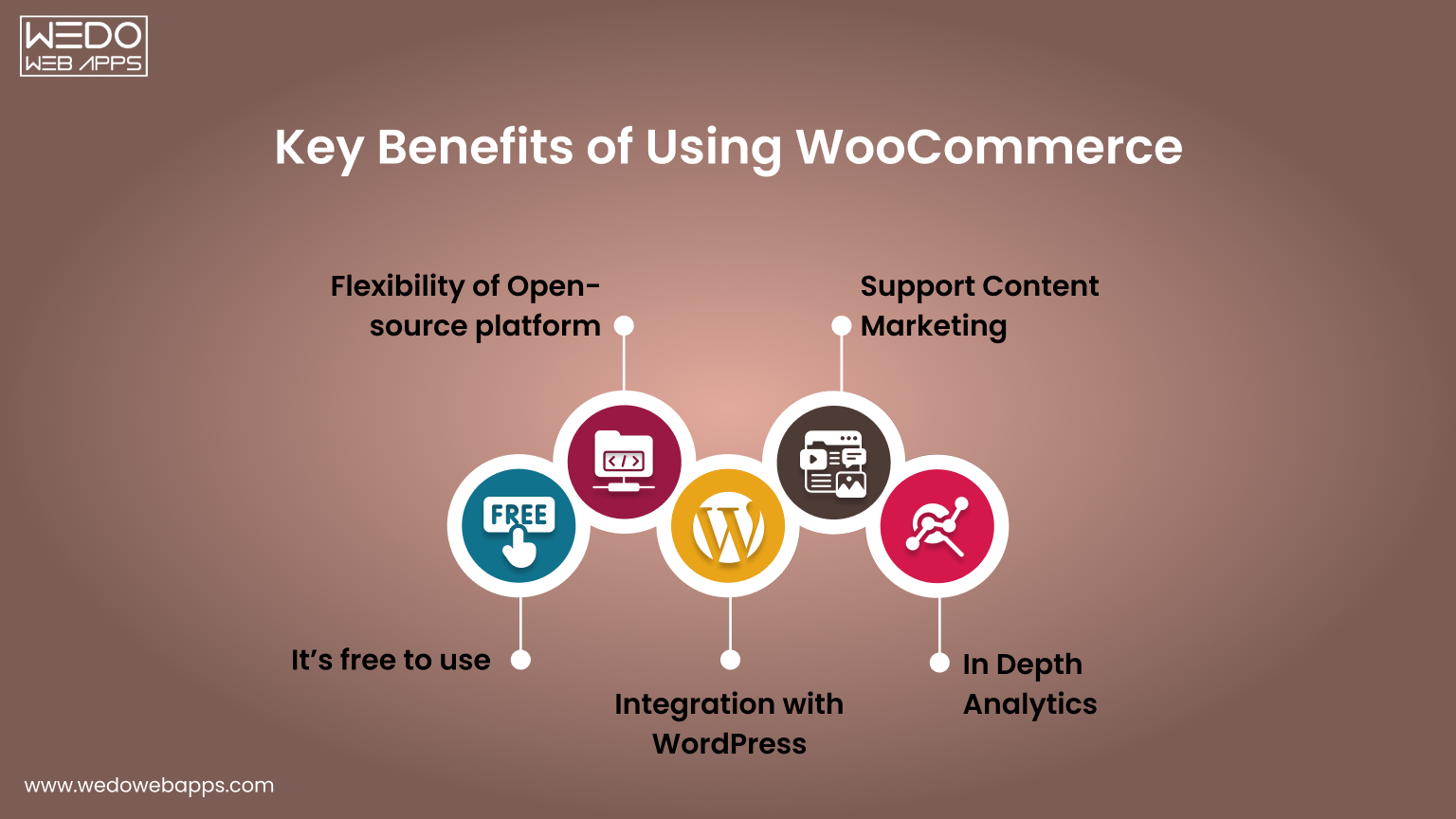

Key Benefits of Using WooCommerce Open Source

WooCommerce provides a flexible, scalable, and fully customizable framework for building online stores. Its open-source nature allows you to create a store that aligns perfectly with your business needs while giving full control over design, features, and performance.

Flexibility and Customization

One of the biggest advantages of WooCommerce open source is the ability to tailor every part of your store. You can adjust layouts, workflows, and functionality without restrictions.

  • Customize product pages, checkout flows, and shipping options.
  • Integrate with third-party tools and APIs.
  • Use thousands of plugins to extend features without writing new code.

This WooCommerce flexibility ensures your store can match your unique business requirements and provide a seamless experience for customers.

Scalability and Performance

WooCommerce open source platform is built to grow with your store. Whether you’re managing a small shop or a high-traffic eCommerce site, it can handle expansion efficiently.

  • Supports large product catalogs and multiple product types.
  • Can handle increasing traffic with proper hosting and optimization.
  • Compatible with caching, CDN, and performance-enhancing tools.

WooCommerce scalability ensures your store remains responsive and reliable as sales and customer interactions increase.

Robust Plugin Ecosystem

The WooCommerce plugins ecosystem allows you to add new capabilities quickly without extensive WooCommerce development work.

  • Access thousands of free and premium plugins for payments, marketing, and reporting.
  • Integrate specialized tools like subscription management or advanced shipping.
  • Leverage plugins to enhance customer experience and store functionality.

A strong plugin ecosystem makes it easy to expand your store’s features while keeping development manageable and cost-effective.

Cost-Effectiveness

Using WooCommerce open source can also be cost-efficient compared to proprietary platforms.

  • The core platform is free.
  • Paid plugins are optional and chosen based on specific needs.
  • No vendor lock-in means you control costs for hosting, extensions, and maintenance.

This combination of WooCommerce flexibility, WooCommerce scalability, and a strong ecosystem makes WooCommerce a reliable choice for long-term eCommerce growth.

planning a WooCommerce store

Core Capabilities That Support Store Growth

WooCommerce open source provides the foundation to build stores that can grow, adapt, and perform under increasing demand. Its features and architecture are designed to support expansion while giving full control over WooCommerce customization, integrations, and data management.

Integration with WordPress and Content Management

Built on WordPress, WooCommerce benefits from seamless content management and website integration. This allows you to combine eCommerce functionality with rich content features for marketing and customer engagement.

  • Manage blog posts, landing pages, and product content in a single platform.
  • Use WordPress themes to customize the store’s appearance and layout.
  • Leverage content blocks and page builders to enhance product presentation.

Integration with WordPress ensures that your store remains flexible, easy to manage, and consistent with your overall website experience.

APIs and Third-Party Integrations

WooCommerce open source platform supports a wide range of integrations through APIs and plugins, making it easy to connect with other tools or services.

  • Integrate payment gateways, shipping solutions, and tax tools.
  • Connect marketing platforms, CRM systems, and analytics services.
  • Build custom integrations for unique business workflows.

These capabilities allow your store to interact with essential tools efficiently, supporting automation, reporting, and seamless operations.

Performance and Scalability Potential

Designed to scale, WooCommerce can handle increasing traffic, large product catalogs, and high transaction volumes when configured correctly.

  • Supports multiple product types, variations, and categories.
  • Optimized for caching, CDN, and database performance improvements.
  • Allows independent server scaling to manage growing traffic and orders.

By leveraging these capabilities, your store can expand without sacrificing speed, reliability, or user experience.

Common Use Cases Where WooCommerce Works Well

WooCommerce development isn’t limited to a single type of store. Its flexibility and open-source nature make it suitable for a variety of eCommerce setups, from small shops to subscription-based businesses. Understanding where WooCommerce excels helps decide if it’s the right solution for your needs.

Small and Medium Online Stores

Many small and medium businesses rely on WooCommerce to launch quickly without high upfront costs.

  • Manage a catalog of products with ease.
  • Customize the store’s design and layout without complex coding.
  • Scale gradually as sales and traffic increase.

For businesses looking for control and adaptability, WooCommerce for small businesses offers a cost-effective solution that grows with the store.

Digital Products and Downloads

Selling digital goods like e-books, software, or music is straightforward with WooCommerce.

  • Deliver downloadable products automatically after purchase.
  • Protect content with secure access and download limits.
  • Integrate with payment gateways for smooth transactions.

This makes WooCommerce for digital products ideal for creators and businesses focusing on digital sales.

Subscription-Based Businesses

WooCommerce’s ecosystem supports recurring payments, making subscriptions simple to manage.

  • Automate billing for memberships, subscription boxes, or SaaS products.
  • Send reminders, invoices, and notifications automatically.
  • Track recurring revenue and customer activity with reporting tools.

With these capabilities, WooCommerce for subscriptions provides a reliable platform for recurring revenue models.

B2B and Niche Marketplaces

WooCommerce can support more complex business models like B2B stores or specialized marketplaces.

  • Offer tiered pricing, bulk discounts, and custom catalogs.
  • Integrate specialized shipping, tax, or inventory systems.
  • Build niche marketplaces with multiple sellers or product categories.

Even for specialized scenarios, WooCommerce’s open-source framework ensures you can adapt and extend functionality to meet unique business needs.


WooCommerce development solutions for small shops

Things to Consider Before Choosing WooCommerce
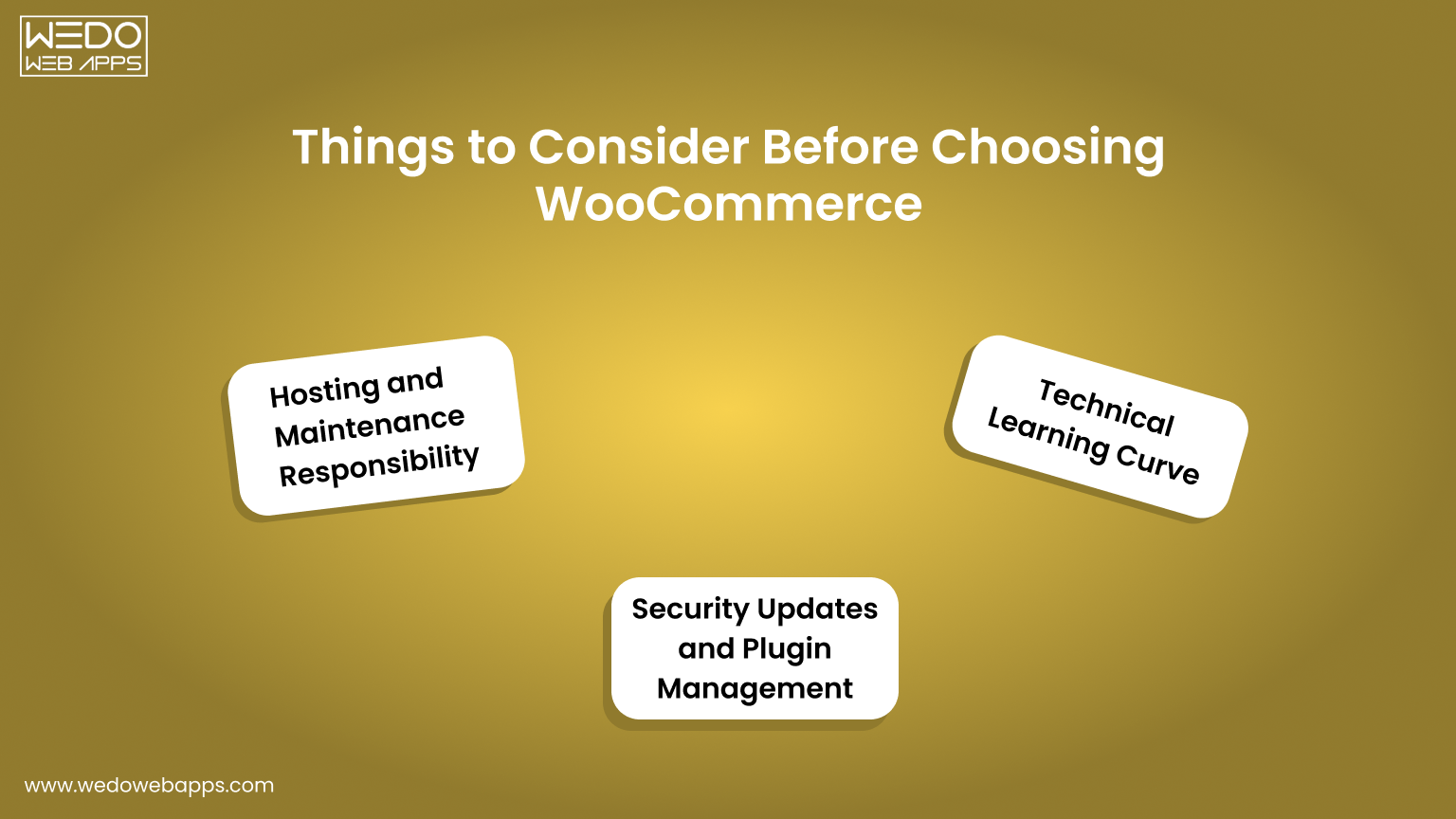
Consider Before Choosing WooCommerce

While WooCommerce offers flexibility and control, it also comes with responsibilities. Understanding these factors before building your store ensures smoother operations and avoids surprises down the line.

Hosting and Maintenance Responsibility

Unlike hosted eCommerce solutions, WooCommerce is self-managed, meaning you are responsible for hosting and maintenance.

  • Choose a reliable WooCommerce hosting provider to ensure speed and uptime.
  • Regularly monitor server performance and handle updates.
  • Plan for backups and disaster recovery to protect your store.

Proper hosting and maintenance planning help your store remain fast, secure, and reliable as it grows.

Security Updates and Plugin Management

Security is a key consideration with WooCommerce maintenance. Being open-source means you need to manage updates and third-party plugins carefully.

  • Keep WordPress, WooCommerce, and all plugins updated.
  • Audit installed plugins for compatibility and security risks.
  • Implement SSL certificates, firewalls, and malware scanning tools.

Managing security and plugins proactively reduces downtime and protects customer data.

Technical Learning Curve

Although WooCommerce is user-friendly, it still requires some technical knowledge, especially for WooCommerce customizations or integrations.

  • Understanding WordPress basics is necessary for content management.
  • Some plugin configurations or custom workflows may require developer support.
  • Familiarity with hosting, databases, and backups helps maintain store stability.

Being prepared for this learning curve ensures a smoother experience and reduces reliance on external resources.

WooCommerce vs Hosted eCommerce Platforms

Choosing the right eCommerce platform depends on your goals, technical comfort, and growth plans, and the eCommerce development partner. Here’s a quick glance at the key differences between WooCommerce open source and hosted platforms.

  • Control: WooCommerce offers deep customization. Hosted platforms are more limited.
  • Cost: WooCommerce core is free. Hosted platforms usually charge monthly or transaction fees.
  • Scalability: WooCommerce scales with your hosting setup. Hosted platforms manage scaling for you.
  • Security and Maintenance: WooCommerce requires updates and plugin management. Hosted platforms handle most updates automatically.

Control and Customization

WooCommerce open source provides control over design, features, and workflows, unlike hosted solutions that rely on templates.

  • Modify code, layouts, and checkout processes freely.
  • Add plugins or develop custom features without restrictions.
  • Tailor product pages and content management to your needs.

Hosted platforms offer convenience but limit customization beyond their built-in features.

Cost and Pricing Flexibility

Open-source and hosted platforms differ in how costs are managed.

  • WooCommerce core is free. Hosting and premium plugins or extensions are optional.
  • Hosted platforms often charge monthly or per-transaction fees, which can grow with traffic.
  • Open-source allows cost control based on actual business needs rather than fixed subscriptions.

Scalability and Performance

WooCommerce can handle growth efficiently when hosting is optimized.

  • Supports large product catalogs and multiple product types.
  • Compatible with caching, CDN, and database optimization.
  • Server scaling is independent, allowing the store to handle high traffic.

Hosted platforms handle scaling automatically but may limit advanced optimization or control.

Security and Maintenance

Security responsibilities differ between open-source and hosted platforms.

  • With WooCommerce, you manage security, updates, and plugins.
  • Hosted solutions maintain security automatically but offer limited control over advanced settings.
  • Open-source requires proactive management but gives ownership of store data.


WooCommerce guidance to choose the right ecommerce

Is WooCommerce the Right Fit for Your Business

Deciding if WooCommerce is the best platform depends on your business goals, technical capabilities, and growth plans. Use this checklist to evaluate whether WooCommerce flexibility and open-source eCommerce platform benefits match your needs.

Checklist: Is WooCommerce Right for You?

  • You need control over WooCommerce customization, including workflows, product pages, and checkout processes.
  • You prefer cost flexibility, starting with a free core platform and selectively investing in plugins or hosting.
  • You require scalability to accommodate growing traffic, product ranges, or order volumes.
  • You want ownership of customer data, sales information, and store infrastructure.
  • You plan to integrate third-party tools such as payment gateways, marketing platforms, or analytics.
  • Your team or partner can manage updates, security, and plugin maintenance efficiently.
  • You sell multiple product types, including physical products, digital goods, or subscriptions.
  • You want access to a robust plugin ecosystem to extend features as your store grows.

If most of these points align with your business requirements, WooCommerce open source is likely a suitable platform. Its flexibility, scalability, and ecosystem make it a reliable solution for many eCommerce stores.

Conclusion

WooCommerce open source gives you the freedom to build your store the way you want. You can customize every part of your site, from product pages to checkout, while keeping control over your data and operations.

Whether you run a small online shop, sell digital products, or manage subscriptions, WooCommerce adapts to your needs. Its plugin ecosystem and WordPress integration make it easy to add features and allow WooCommerce developers to grow your store as your business expands.

Managing WooCommerce maintenance and security requires attention, but the payoff is a store that performs reliably and scales with your goals.

Choosing WooCommerce means choosing flexibility, control, and long-term growth. It’s a platform that lets you innovate, adapt, and create an online store that can evolve with your business.



build a scalable ecommerce foundation

WooCommerce Ecommerce Platform: Evolution, Trends, and Future Outlook

Introduction

WooCommerce has become one of the most widely used platforms for running online stores. From small businesses to growing brands, many merchants rely on it to manage products, payments, and day-to-day operations without depending on complex or costly systems. What began as a simple WordPress extension now supports a significant share of eCommerce websites worldwide.

The steady rise of the WooCommerce eCommerce platform reflects a larger shift in how online stores are built. Businesses today prefer flexible tools, ownership of their data, and the freedom to customise their store as needs change. WooCommerce has grown alongside these expectations, expanding its capabilities and eCommerce platform ecosystem year after year.

Looking at its evolution, core features, and current trends helps build clarity on why it remains an effective part of eCommerce conversions. By the end of this blog, you will understand how it compares with other platforms available to online stores today.

The Growth of WooCommerce: From Plugin to Platform

WooCommerce started as a simple WordPress plugin created to add basic selling functionality to existing websites. At that time, launching an online store often required custom software development. WooCommerce offered a practical alternative by allowing businesses to turn a regular WordPress site into a store with minimal setup.

Its growth was closely tied to WordPress itself. As WordPress became one of the most widely used content management systems, WooCommerce benefited from the same user base. Installation was straightforward, updates were easy to manage, and store owners could build on a familiar environment instead of learning an entirely new system. This strong connection helped WooCommerce spread quickly among website owners.

Early adoption increased as developers and agencies began creating themes, plugins, and integrations around the platform. Payment gateways, shipping tools, marketing extensions, and design templates expanded its capabilities. This growing community played a major role in the WooCommerce evolution, transforming it from a basic add-on into a complete WooCommerce eCommerce platform suitable for different types of WooCommerce for online stores.

Several milestones marked this progress. eCommerce feature updates improved scalability, the ecosystem of extensions expanded, and ongoing support from the WordPress community strengthened reliability. Over time, WooCommerce moved beyond small stores and became capable of supporting more complex eCommerce operations.

Today, it stands not just as a plugin but as a mature platform that many businesses consider when evaluating eCommerce solutions.


WooCommerce Store Development Consultation

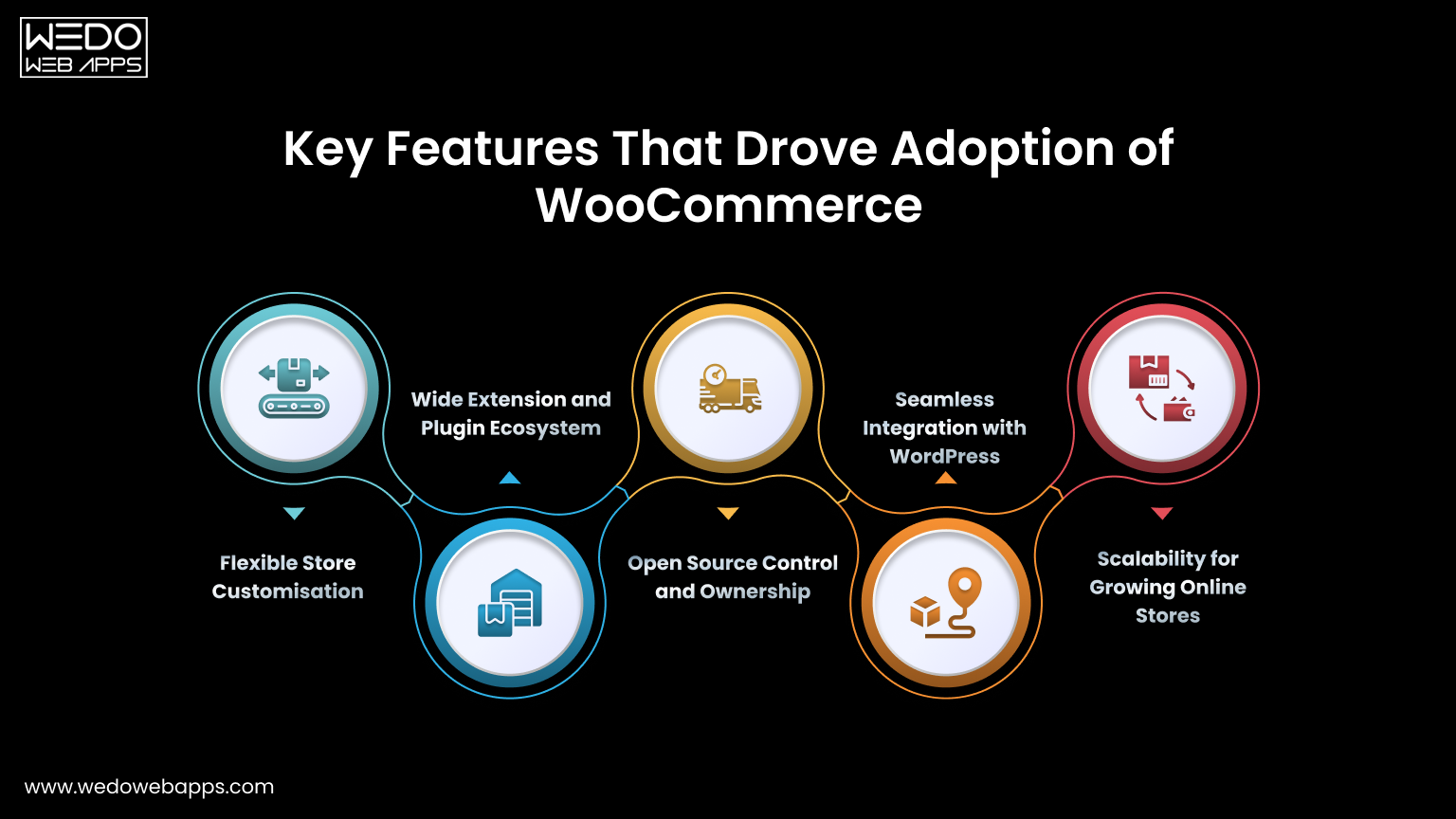
Key Features That Drove Adoption of WooCommerce

Key WooCommerce features

WooCommerce gained consistent traction because it addressed practical business needs. Instead of limiting how stores operate, the platform gives merchants flexibility and control over their setup. These capabilities made it easier for businesses to launch, manage, and expand their online stores without depending on complex systems with the WooCommerce development services.

Below are the core WooCommerce features that supported this steady adoption.

Flexible Store Customisation

One of the main reasons businesses prefer WooCommerce is the ability to shape the store according to their specific requirements. The platform does not restrict design or functionality, which allows teams to create a shopping experience that matches their brand.

  • Modify layouts, themes, and checkout flows.
  • Add or remove features based on business needs.
  • Avoid fixed templates or rigid structures.

Wide Extension and Plugin Ecosystem

As the platform grew, developers began contributing tools and integrations that extended its capabilities. This ecosystem allows store owners to add features without heavy development work.

  • Payment gateways for multiple regions.
  • Shipping and tax management tools.
  • Marketing, analytics, and automation plugins.
  • Thousands of third-party integrations.

This expanding ecosystem played a direct role in the WooCommerce evolution, helping it move beyond basic selling functionality.

Open Source Control and Ownership

WooCommerce operates as open source software, which gives businesses full ownership of their store environment. This control is often important for brands that want long-term flexibility.

  • Host the store on preferred servers.
  • Access and manage store data freely.
  • Customise the code when advanced changes are required.
  • Avoid dependency on a single provider.

Seamless Integration with WordPress

Because WooCommerce works inside WordPress, many teams can manage both content and eCommerce from one place. This setup simplifies daily operations and reduces the learning curve.

  • Manage products and pages in the same dashboard.
  • Combine blogging, SEO, and selling easily.
  • Use existing WordPress themes and tools.

This integration makes the WooCommerce eCommerce platform practical for businesses that rely heavily on content marketing.

Scalability for Growing Online Stores

Businesses often start small and expand gradually. WooCommerce supports this growth by allowing stores to add functionality over time instead of migrating to a new system.

  • Launch quickly with basic features.
  • Add tools as traffic and orders increase.
  • Support different types of WooCommerce for online stores, from small catalogs to larger inventories.

Together, these features explain why WooCommerce moved from a simple plugin to a widely adopted ecommerce solution. Its focus on flexibility and control continues to shape current WooCommerce trends across the market.

Trends Shaping WooCommerce in Modern Ecommerce

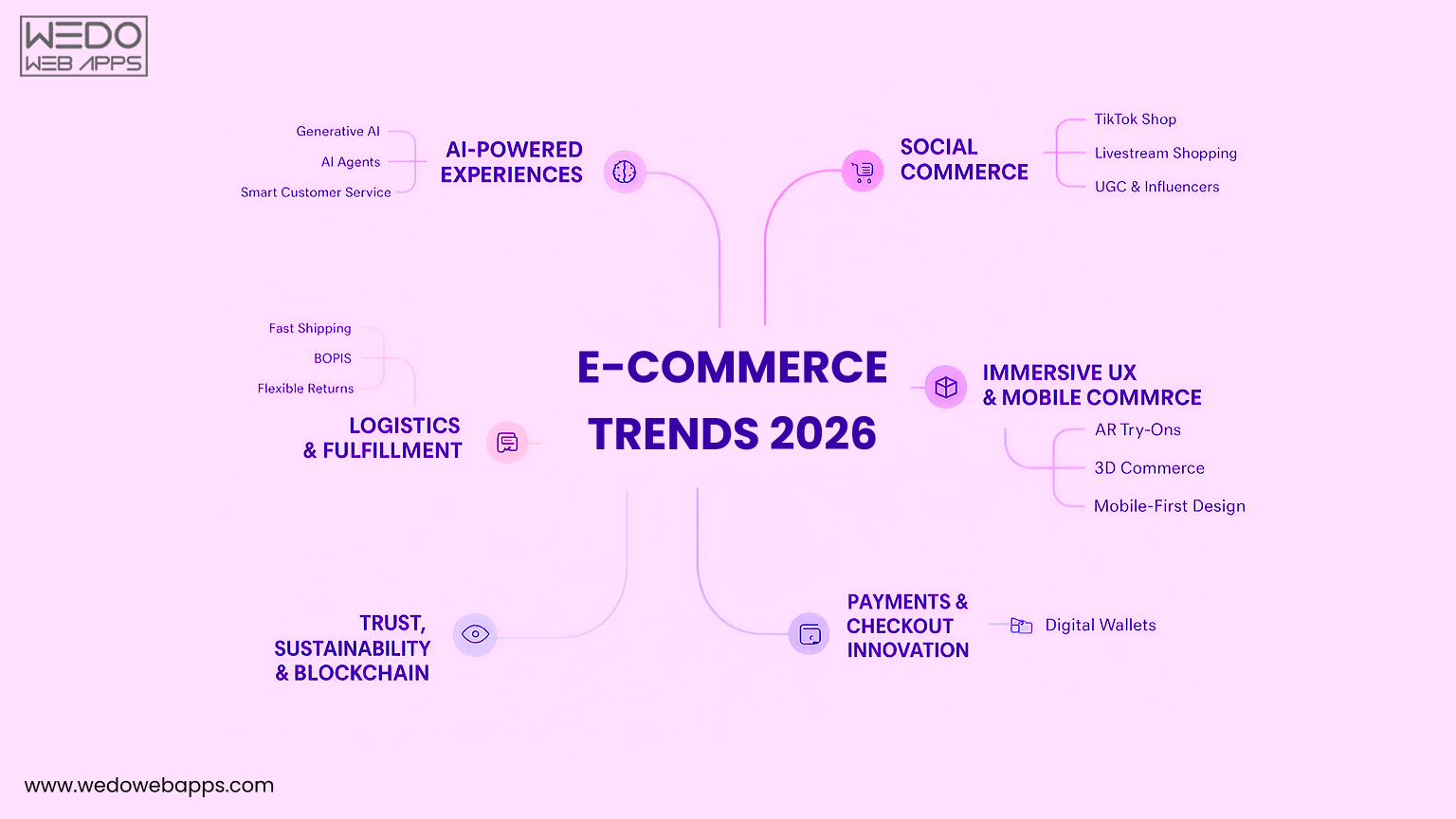
Ecommerce Trends 2026

Online selling is growing quickly, and businesses now expect more from their ecommerce platform. They want speed, flexibility, easier integrations, and the freedom to adapt as their store expands. These expectations directly influence how the WooCommerce eCommerce platform evolves and why more brands continue adopting it.

Recent WooCommerce trends show steady improvements that help store owners manage operations better and deliver smoother buying experiences.

Market Trends Influencing Adoption

The eCommerce market has shifted toward platforms that offer ownership and flexibility instead of fixed structures. Businesses prefer systems they can customise without ongoing platform restrictions.

WooCommerce fits this need because it runs on WordPress and gives complete control over store setup.

  • Full access to code and customisation.
  • No mandatory monthly platform fees.
  • Wide plugin ecosystem.
  • Freedom to choose hosting and tools.

These factors explain why the WooCommerce eCommerce platform remains a strong choice for many online sellers.

Growing Use Among Small and Mid-Sized Online Stores

Startups and growing businesses often need an affordable solution that can scale step by step. WooCommerce supports this approach by allowing stores to start simple and expand features as needed.

Instead of paying for advanced capabilities upfront, businesses can add them gradually.

  • Low initial setup costs.
  • Easy product and catalog management.
  • Scales from small shops to large inventories.
  • Suitable for niche and local brands.

This flexibility has increased adoption among small and mid-sized WooCommerce for online stores use cases.

Headless, AI, and Mobile First Strategies

Modern commerce now goes beyond basic storefronts. Brands expect faster interfaces, smarter tools, and better mobile performance. WooCommerce has adapted to support these technical needs.

It integrates easily with modern architectures and intelligent systems.

  • Headless commerce using APIs for custom frontends.
  • AI-powered product recommendations and search.
  • Marketing automation tools.
  • Mobile-friendly checkout experiences.
  • Responsive themes for all devices.

These capabilities align with current WooCommerce trends focused on performance and personalisation.

Changing Ecommerce Expectations Driving Platform Updates

Customer behaviour has changed. Shoppers expect fast pages, simple navigation, secure payments, and smooth experiences across devices. Platforms must evolve regularly to meet these standards.

WooCommerce benefits from an active open source community that releases updates based on real store requirements.

  • Frequent feature improvements.
  • Security updates.
  • New extensions and integrations.
  • Better compatibility with modern tools.

This continuous improvement shapes the future of WooCommerce and keeps it relevant as eCommerce demands grow.


We design, develop WooCommerce

Comparing WooCommerce With Other Platforms

Comparing WooCommerce With Other Platforms

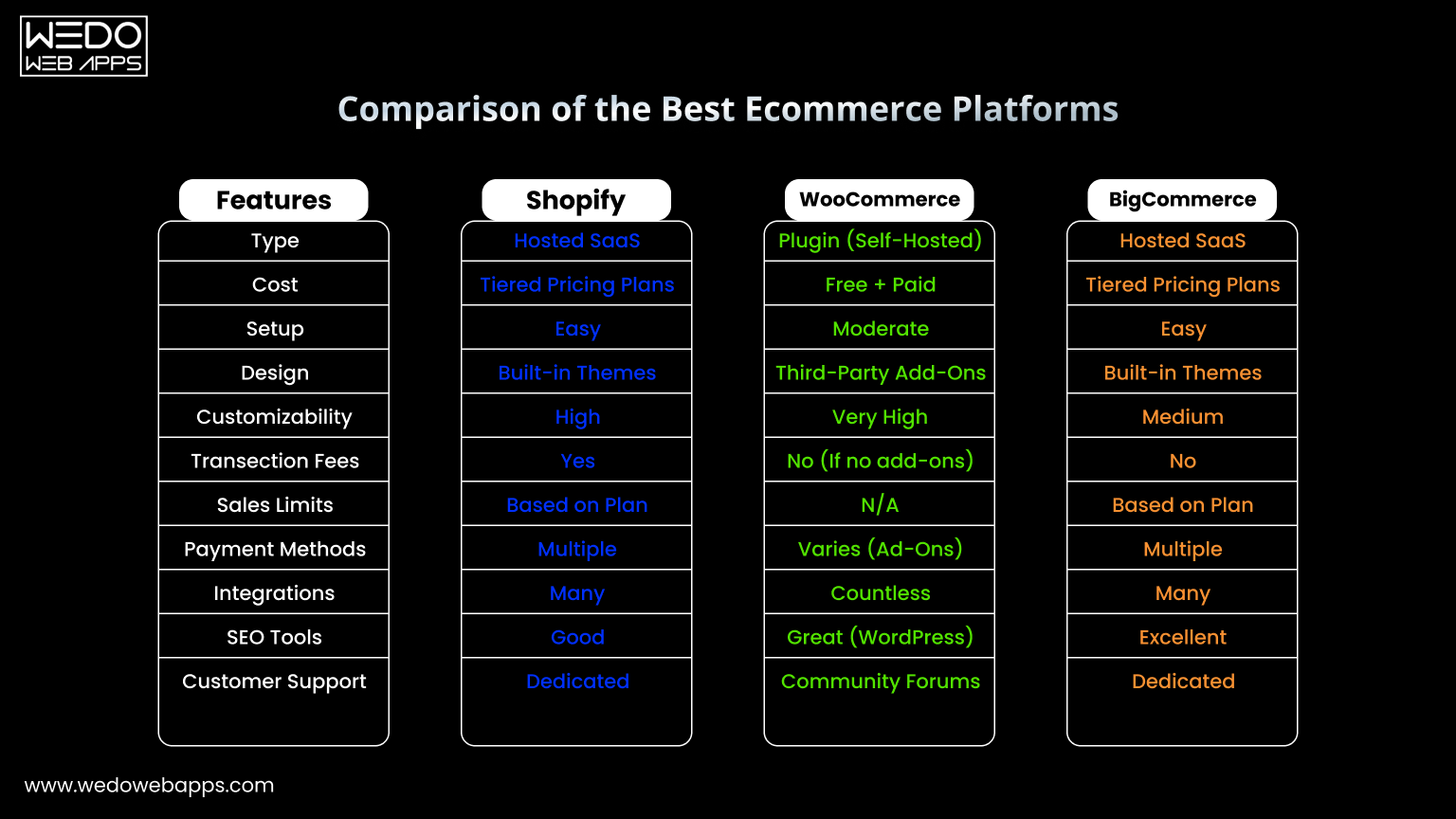
Businesses evaluating eCommerce options often compare WooCommerce with other widely used platforms such as Shopify, Magento, and BigCommerce. Understanding differences in adoption trends, flexibility, and ecosystem size helps decision makers select the right platform for their store’s needs.

Below is a neutral breakdown of key aspects.

Adoption Trends

WooCommerce has grown steadily due to its open source model and WordPress integration. Other platforms have different adoption patterns based on business type and size.

  • WooCommerce: Widely adopted by small and mid-sized stores, with over 5 million active websites.
  • Shopify: Strong adoption among small to medium merchants, especially for ease of setup.
  • Magento: Popular with large enterprises and high-volume stores.
  • BigCommerce: Used by mid-market businesses with multi-channel selling needs.

Flexibility and Customisation

Platform flexibility affects store design, workflow, and long-term growth options.

  • WooCommerce: High customisation through plugins, themes, and open source code.
  • Shopify: Limited backend access. Flexibility mostly appears through apps and themes.
  • Magento: Very flexible, but requires technical expertise to implement.
  • BigCommerce: Offers configurable features, less open than WooCommerce, more managed solution.

Ecosystem and Extensions

A strong ecosystem supports features, integrations, and ongoing platform development.

Platform Plugin or Extension Availability Community Support Third-Party Integration
WooCommerce 5000+ plugins Large global developer community. Payment gateways, shipping, marketing, and analytics.
Shopify 4500+ apps Active community forums. Multi-channel, POS, and marketing tools.
Magento 3000+ extensions Developer-heavy. Enterprise integrations and B2B features.
BigCommerce 1000+ apps Growing community. Payment and marketing tools.

The comparison shows that each platform has a specific niche.

  • WooCommerce excels in flexibility and ecosystem size for small to mid-sized stores.
  • Shopify prioritises simplicity and quick setup.
  • Magento suits enterprise stores requiring full technical control.
  • BigCommerce fits mid-market businesses needing managed solutions.

This neutral comparison highlights WooCommerce vs other platforms from an adoption, flexibility, and ecosystem perspective without any service promotion.

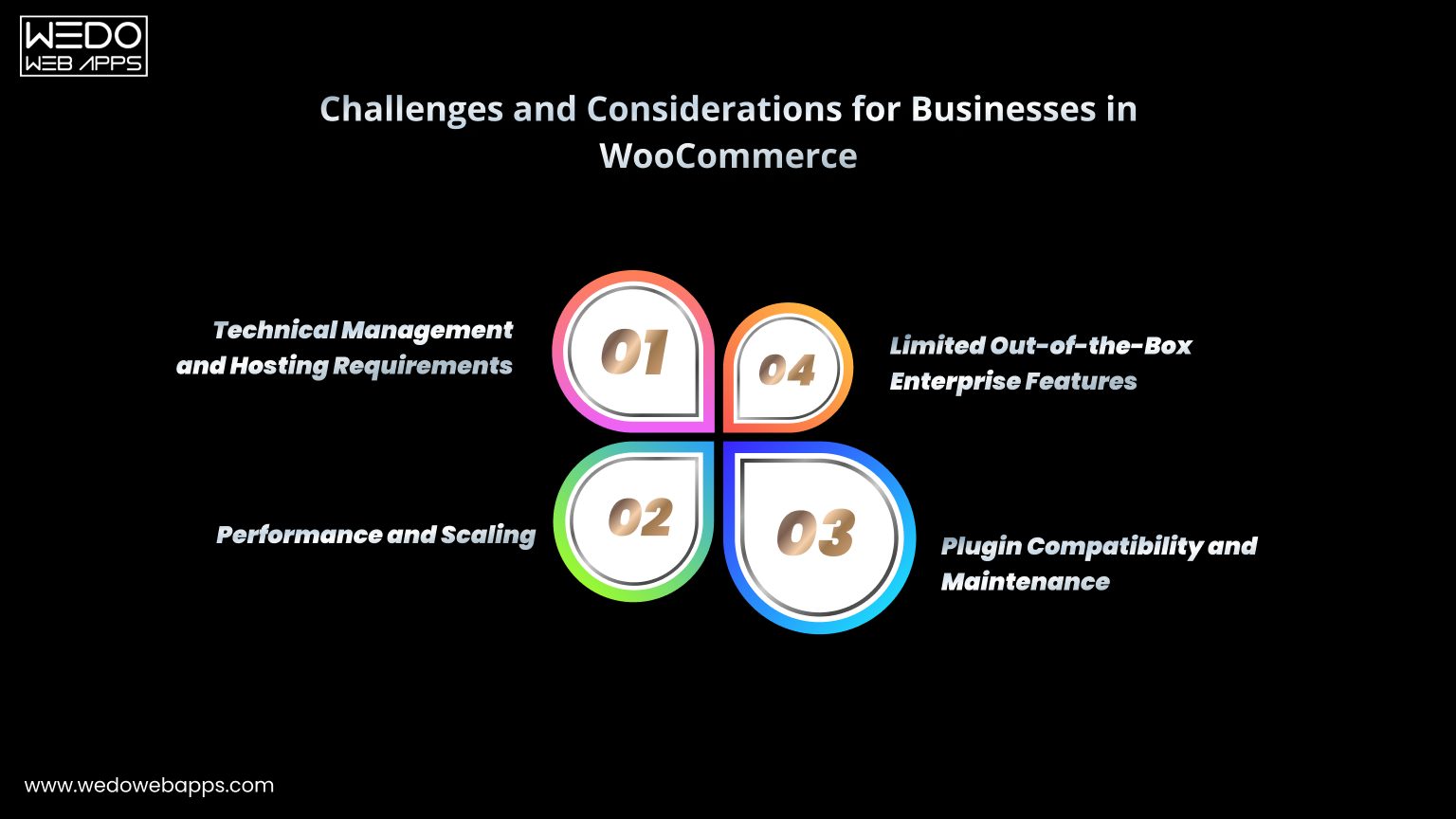
Challenges and Considerations for Businesses

Key challenges in WooCommerce

While WooCommerce provides flexibility and a widely adopted eCommerce solution, businesses should be aware of certain challenges before implementing it. Understanding these considerations helps store owners plan technical resources, growth strategies, and maintenance requirements effectively.

Technical Management and Hosting Requirements

WooCommerce is self-hosted, which means businesses must manage hosting, updates, and security. While this gives control, it also requires planning and technical knowledge.

  • Choosing reliable hosting for speed and uptime.
  • Regularly updating WordPress, WooCommerce, and plugins.
  • Managing backups and security internally.
  • Troubleshooting custom code or plugin conflicts.

Performance and Scaling

The platform’s performance depends heavily on hosting, plugins, and site optimisation. Businesses with large inventories or high traffic need additional technical planning.

  • Optimising themes and plugins for speed.
  • Using caching and performance tools.
  • Ensuring server resources match traffic and product catalog size.
  • Seeking support from WooCommerce developers for complex scaling needs.

Plugin Compatibility and Maintenance

WooCommerce relies on third-party extensions for advanced features. While this adds flexibility, it introduces potential maintenance challenges.

  • Ensuring plugins remain compatible after updates.
  • Monitoring for conflicts that could disrupt functionality.
  • Some advanced plugins require a paid license.
  • Ongoing management is required to maintain smooth operations.

Limited Out-of-the-Box Enterprise Features

WooCommerce is ideal for small and mid-sized stores but lacks some enterprise functionality by default. Businesses requiring complex operations may need additional tools or development.

  • Multi-currency and advanced tax handling often need plugins.
  • B2B or wholesale features may require customisation.
  • Advanced reporting or analytics is usually done through third-party tools.
  • Some enterprise-grade tools are natively available in platforms like Magento.

Understanding these challenges and considerations ensures businesses can use WooCommerce effectively. The platform remains a highly flexible WooCommerce eCommerce platform suitable for a variety of WooCommerce for online stores, but proper planning for technical management, scaling, and maintenance is key to long-term success.


choose right eCommerce platform

The Future of WooCommerce

WooCommerce continues to evolve alongside changing business and customer expectations. Understanding emerging trends and the platform’s future direction helps businesses plan long-term strategies and anticipate new opportunities.

Expansion of the Ecosystem

The WooCommerce ecosystem is expected to grow further, driven by developers, agencies, and third-party service providers. This expansion will provide more tools, integrations, and specialised solutions.

  • Increasing number of extensions for marketing, shipping, and analytics.
  • New themes and design options for diverse industries.
  • Developer contributions that improve performance and security.
  • Stronger support for multi-channel and omnichannel selling.

Emphasis on Performance and Scalability

Future updates will continue addressing performance and scalability needs as online stores grow in size and traffic.

  • Better optimisation tools for speed and reliability.
  • Support for larger product catalogs and high-traffic volume.
  • Cloud hosting and managed performance solutions.
  • Enhanced caching, image optimisation, and mobile responsiveness.

Adoption of Modern Technologies

Emerging technologies like AI, headless commerce, and automation are becoming increasingly relevant for online stores. WooCommerce is adapting to these trends.

  • AI-powered product recommendations and search.
  • Automated marketing workflows and analytics insights.
  • Headless setups for custom frontend experiences.
  • Integration with emerging eCommerce tools and platforms.

Growing Role Among Small and Mid-Sized Stores

WooCommerce is expected to maintain its popularity among SMBs due to its flexibility and cost efficiency. Businesses will continue to choose it for stores that need scalability without high initial costs.

  • Affordable setup with control over features and hosting.
  • Ability to customise stores to specific business needs.
  • Gradual scalability for growing catalogs and customer base.
  • Strong community support for guidance and troubleshooting.

The future of WooCommerce looks focused on ecosystem growth, performance improvements, and adoption of modern ecommerce technologies. It remains a flexible and reliable WooCommerce eCommerce platform for a wide variety of WooCommerce for online stores, supporting both small businesses and growing brands.

Conclusion

Choosing an ecommerce platform is one of the first major decisions any online business makes. The right system should match current needs while leaving room to grow over time.

WooCommerce has steadily moved from a simple WordPress plugin to a widely adopted WooCommerce eCommerce platform used by millions of WooCommerce for online stores. Its open architecture, growing ecosystem, and expanding WooCommerce features continue to attract businesses that value flexibility and control. At the same time, comparisons like WooCommerce vs other platforms show that every solution serves different operational needs.

From its early WooCommerce evolution to the latest WooCommerce trends, the platform has adapted to performance demands, integrations, and modern shopping behaviour. This steady progress shapes the future of WooCommerce and keeps it relevant for startups, mid-sized brands, and growing online stores alike.

Explore our eCommerce development services to see how we help businesses launch and scale online stores with clarity and confidence.


Upgrade eCommerce Store

Common WooCommerce Issues and How to Fix Them

Introduction

Running a WooCommerce store often looks simple from the outside. You install WordPress, add WooCommerce, upload products, and start selling. But once real traffic, real customers, and real orders come in, many store owners discover that things don’t always work as expected.

Your product pages start loading slowly. Customers report that the checkout page is stuck. Orders fail without explanation. A plugin update suddenly breaks an important feature. You search online and find dozens of fragmented answers, forum threads, and technical jargon that only create more confusion.

These are not rare edge cases. They are common WooCommerce issues that thousands of store owners face at different stages of their business.

WooCommerce is an extremely flexible platform, but that flexibility comes with complexity. It relies on your hosting environment, theme quality, plugin choices, and overall configuration. Even small misalignments between these components can trigger performance problems, errors, and unexpected behavior.

The good news is that most WooCommerce problems are diagnosable and fixable without rebuilding your entire store.

This WooCommerce Troubleshooting guide is designed to help you:

  • Understand why WooCommerce issues occur
  • Identify the most common WooCommerce problems affecting stores
  • Apply practical, step-by-step fixes
  • Recognize when an issue signals a deeper technical limitation

Whether you’re dealing with slow load times, checkout failures, plugin conflicts, or update errors, this troubleshooting guide walks you through proven WooCommerce problems and fixes to stabilize and optimize your store.

If your WooCommerce store feels unreliable, unpredictable, or harder to manage than it should be, you’re in the right place.


Our WooCommerce experts help diagnose

Why WooCommerce Issues Happen?

Many store owners assume that when something breaks in WooCommerce, it means the eCommerce platform itself is unstable. In reality, most WooCommerce issues are not caused by WooCommerce alone, but by how different parts of your website environment interact with each other.

WooCommerce is built on top of WordPress and depends heavily on themes, plugins, server resources, and configuration settings. When any of these layers are misaligned, problems start to surface.

Here are the most common reasons WooCommerce stores run into issues:

1. Plugin-Heavy Ecosystem

Running an online WooCommerce store typically rely on multiple plugins for:

  • Payment gateways
  • Shipping rules
  • SEO
  • Caching
  • Security
  • Marketing tools

Each plugin adds code that runs alongside WooCommerce. While most plugins are well-built, conflicts can occur when two plugins attempt to modify the same function or hook.

As your plugin stack grows, so does the risk of:

  • Feature collisions
  • JavaScript errors
  • Slower performance
  • Unexpected checkout behavior

Even reputable plugins can conflict with each other after updates.

2. Hosting Environment Limitations

WooCommerce is resource-intensive compared to basic WordPress sites.

Low-cost or shared hosting plans often struggle with:

  • High database queries
  • PHP memory usage
  • Concurrent visitors
  • Background WooCommerce processes

When server resources are insufficient, stores experience:

  • Slow page loads
  • Timeouts
  • Random 500 errors
  • Failed order processing

Hosting limitations are one of the biggest hidden causes of WooCommerce performance issues.

3. Theme Compatibility Problems

Not all WordPress themes are properly optimized for WooCommerce.

Poorly coded themes can:

  • Override WooCommerce templates incorrectly
  • Break cart and checkout layouts
  • Load unnecessary scripts
  • Cause mobile display issues

Even themes labeled “WooCommerce-ready” may not follow best practices consistently.

4. Outdated Software Versions

Running outdated versions of:

  • WordPress
  • WooCommerce
  • Plugins
  • PHP

creates compatibility gaps.

Newer plugins expect modern PHP functions. WooCommerce updates assume current WordPress versions. When your stack is mismatched, errors and malfunctions become more likely.

5. Rushed or Improper Configuration

During store setup, small configuration mistakes can create long-term issues, such as:

  • Incorrect permalink structure
  • Missing pages (cart, checkout, my account)
  • Improper tax or currency settings
  • Wrong caching rules

These common WooCommerce mistakes don’t always break the site immediately but surface later as traffic increases.

6. Growing Store Complexity

As your business grows, you may add:

  • More products
  • Variations
  • Custom fields
  • Third-party integrations

What worked for a 20-product store may struggle with 2,000 products. Scaling introduces performance and architectural challenges that basic setups were never designed to handle.

Understanding these root causes makes troubleshooting much easier. Instead of randomly applying fixes, you can narrow problems down to the correct layer: plugin, theme, server, configuration, or core WooCommerce. WooCommerce development experts can help you troubleshoot and solve your problems more easily and quickly.

Next, we’ll break down the most common WooCommerce issues store owners face, starting with one of the biggest pain point: performance.

Most Common WooCommerce Issues

WooCommerce Performance Issues

Slow speed is one of the most common WooCommerce problems, and also one of the most damaging.

A slow store doesn’t just frustrate visitors. It directly affects:

  • Conversion rates
  • Search engine rankings
  • Bounce rates
  • Customer trust

If your WooCommerce store feels sluggish, the issue usually appears in one or more of these areas.

Common Performance Symptoms

  • Product pages take several seconds to load
  • Cart and checkout pages feel heavy
  • The admin dashboard is slow
  • Backend actions (saving products, updating orders) lag
  • Traffic spikes cause the site to crash

These symptoms point to resource bottlenecks rather than a single broken feature.

Why WooCommerce Stores Become Slow

Several factors commonly contribute to performance issues:

  • Too many active plugins
  • Heavy or poorly optimized theme
  • Large unoptimized images
  • No caching or incorrect caching
  • Low-quality hosting
  • Large product database with no indexing
  • Excessive external API calls

Most stores experience a combination of these.

How to Fix WooCommerce Performance Issues

Here are practical steps you can take to improve WooCommerce performance issues:

1. Test Your Site Speed

Use tools like:

  • Google PageSpeed Insights
  • GTmetrix
  • WebPageTest

Focus on:

  • Time to First Byte (TTFB)
  • Largest Contentful Paint (LCP)
  • Server response time

If the server response is slow, optimization at the code level alone will not fix the problem.

2. Upgrade Hosting (If Needed)

WooCommerce performs best on:

  • VPS hosting
  • Managed WordPress/WooCommerce hosting
  • Cloud servers with dedicated resources

Avoid cheap shared hosting for growing stores.

Key hosting features to look for:

  • SSD storage
  • PHP 8+ support
  • Object caching (Redis or Memcached)
  • Sufficient PHP memory limit

3. Use Caching Correctly

Install a reputable caching plugin and configure:

  • Page caching (excluding cart, checkout, and account pages)
  • Browser caching
  • GZIP or Brotli compression

Important: Never cache cart and checkout pages.

4. Optimize Images

  • Compress all product images
  • Use WebP format when possible
  • Enable lazy loading

Large images are one of the fastest ways to slow down a store.

5. Remove Unused Plugins

Deactivate and delete:

  • Plugins no longer in use
  • Duplicate functionality plugins
  • Heavy plugins with poor reviews

Fewer plugins equal fewer conflicts and faster load times.

6. Enable Object Caching

Object caching reduces database queries and significantly improves WooCommerce performance.

If your host supports Redis or Memcached, enable it.

7. Clean and Optimize Database

Use a database optimization plugin to:

  • Remove post revisions
  • Delete transients
  • Clean expired sessions

Always take a backup before database cleanup.

When Performance Issues Signal Deeper Problems

If your store remains slow after applying basic optimizations, the problem may be:

  • Poor database structure
  • Inefficient custom code
  • Overloaded server architecture

At this stage, surface-level fixes won’t be enough.


WooCommerce team fixing slow store performance issues.

Checkout and Cart Errors

Checkout and cart problems are among the most serious WooCommerce issues because they stop customers from completing purchases.

Even if everything else in your store works perfectly, a broken checkout means lost revenue.

Common Checkout and Cart Problems

  • Add to cart button is not working
  • Cart page not updating
  • The checkout page is not loading
  • Customers cannot place orders
  • Infinite loading spinner at checkout
  • Error messages with no explanation

These problems often appear suddenly after installing a plugin, changing a theme, or updating WooCommerce.

Why Checkout and Cart Errors Occur

  • JavaScript conflicts
  • Cached cart or checkout pages
  • Plugin incompatibility
  • Missing WooCommerce pages
  • Payment gateway errors
  • Theme overriding WooCommerce templates incorrectly

How to Fix Checkout and Cart Errors

1. Clear Cache and Disable Caching on Cart and Checkout

Make sure:

  • Cart, checkout, and my account pages are excluded from caching
  • CDN cache is cleared

Cached dynamic pages are a very common cause of broken carts.

2. Check That WooCommerce Pages Exist

Go to:

WooCommerce → Status → Tools → Create Default Pages

This recreates:

  • Cart
  • Checkout
  • My Account
  • Shop

Then reassign these pages under:

WooCommerce → Settings → Advanced

3. Test for Plugin Conflicts

  • Disable all plugins except WooCommerce
  • Test checkout
  • Re-enable plugins one by one

When the issue returns, you’ve found the conflicting plugin.

4. Switch to a Default Theme Temporarily

Activate a default WordPress theme (like Twenty Twenty-Four).

If checkout works, your theme is causing the issue.

5. Check Browser Console Errors

Open developer tools in your browser and look for JavaScript errors.

Errors often point directly to the plugin or script causing failure.

6. Increase PHP Memory Limit

Low memory can break checkout processing.

Recommended:

define('WP_MEMORY_LIMIT', '256M');

Add this to wp-config.php.

7. Test Payment Gateway Separately

  • Enable only one payment gateway
  • Place a test order

If it works, the issue may be gateway-specific.

When Checkout Problems Keep Coming Back

Recurring checkout issues often mean:

  • Poor theme quality
  • Too many overlapping plugins
  • Hosting limitations

These stores usually need structural cleanup rather than repeated patch fixes.


WooCommerce experts resolving cart and checkout errors.

Plugin Conflicts and Compatibility Problems

Plugins are one of WooCommerce’s biggest strengths, and also one of its biggest risk areas.

Most WooCommerce stores rely on multiple plugins to extend functionality. But when plugins are built by different developers, follow different coding standards, or update on different schedules, conflicts become inevitable.

Common Signs of Plugin Conflicts

  • Features suddenly stop working
  • White screen after plugin activation
  • Random errors across the site
  • Checkout breaks after installing a plugin
  • Admin pages fail to load

These issues often appear immediately after installing or updating a plugin.

Why Plugin Conflicts Happen

  • Two plugins modify the same WooCommerce hooks
  • Outdated plugin versions
  • Poorly coded plugins
  • Plugins incompatible with your PHP version
  • Conflicts between free and premium versions

How to Fix Plugin Conflicts

1. Identify the Conflicting Plugin

  • Deactivate all plugins except WooCommerce
  • Check if the issue disappears
  • Reactivate plugins one at a time

This remains the fastest and most reliable method.

2. Check Plugin Compatibility

Before using any plugin:

  • Check the last update date
  • Check compatibility with your WooCommerce version
  • Read recent reviews

Avoid plugins that haven’t been updated in over 6–12 months.

3. Replace Heavy Plugins

Some plugins try to do too much.

If a plugin:

  • Adds many features you don’t use
  • Slows down the site
  • Causes repeated issues

Replace it with a lightweight alternative.

4. Update Plugins Safely

Always:

  • Take a full backup
  • Update in the staging environment first
  • Test key flows (cart, checkout, payments)

Never update blindly on live sites.

5. Check PHP Version Compatibility

Some plugins break on newer PHP versions.

Try switching between supported PHP versions in the hosting panel and retest.

When Plugin Conflicts Become Chronic

If every new plugin introduces issues, your store may have:

  • Fragile architecture
  • Over-customized core files
  • Technical debt

At this stage, ongoing patching becomes inefficient.


WooCommerce specialists fixing repeated plugin issues.

Theme-Related Issues

Your theme controls how WooCommerce outputs and displays content. If a theme is poorly coded or not fully compatible with WooCommerce, it can cause layout breaks, missing features, and functional errors.

Many WooCommerce issues are ultimately traced back to theme behavior.

Common Theme-Related Problems

  • Product pages look broken
  • Add to cart button mis issing
  • Cart or checkout layout distorted
  • Styling inconsistent across pages
  • Mobile display issues

Why Theme Issues Occur

  • Theme overrides WooCommerce templates incorrectly
  • Outdated theme version
  • Customizations made directly to theme files
  • Theme not tested with the latest WooCommerce version

How to Fix Theme-Related Issues

1. Switch to a Default Theme for Testing

Activate a default WordPress theme. If the issue disappears, your theme is the source.

2. Update the Theme

Ensure you’re running the latest version. Outdated themes often break after WooCommerce updates.

3. Avoid Direct Theme File Edits

Custom changes should be placed in:

  • Child theme
  • Custom plugin

Direct edits are overwritten during updates.

4. Check Template Overrides

Go to:

WooCommerce → Status → System Status

Look for outdated template overrides.

Update or remove outdated overrides.

5. Choose WooCommerce-Optimized Themes

Themes built specifically for WooCommerce generally follow proper standards.

When Theme Problems Suggest a Rebuild

If your theme:

  • Uses old frameworks
  • Has heavy custom modifications
  • Breaks after every update

It may be more efficient to migrate to a better foundation.

Payment Gateway Issues

Payment problems are especially stressful because customers may attempt to pay, fail, and never return.

Even small gateway misconfigurations can result in:

  • Failed payments
  • Abandoned carts
  • Duplicate orders
  • Orders stuck in “pending” status

Common Payment Gateway Problems

  • Gateway not showing on checkout
  • Payment failing without an error message
  • Orders remain pending after payment
  • Customers redirected incorrectly
  • Webhook failures

Why Payment Gateway Issues Happen

  • Incorrect API keys
  • Disabled gateway settings
  • Plugin conflicts
  • The server firewall is blocking gateway requests
  • SSL certificate problems

How to Fix Payment Gateway Issues

1. Recheck Gateway Settings

Verify:

  • API keys
  • Mode (test vs live)
  • Currency compatibility

Small typos can break payments.

2. Enable Gateway Logs

Most payment plugins offer logging. Check logs to see exact error messages.

3. Confirm SSL Certificate

Checkout must run on HTTPS. Mixed content warnings or expired certificates can block payments.

4. Test With Only One Gateway Enabled

Disable all other gateways and test. If it works, another gateway plugin may be interfering.

5. Check Webhooks and IP Whitelisting

Some gateways require:

  • Webhook URLs set
  • Server IP whitelisted

Missing webhooks can cause order status problems.

When Payment Problems Persist

Persistent issues may indicate:

  • Server firewall restrictions
  • Incorrect server time settings
  • Hosting-level security blocks

These require server-level investigation.

Email Notification Problems

WooCommerce relies on WordPress’s default mail system, which is not always reliable on many hosting environments. As a result, email issues are very common.

Missing order emails create confusion for both store owners and customers.

Common Email Issues

  • Customer not receiving order confirmation
  • Admin not receiving new order notifications
  • Password reset emails not sent
  • Emails landing in spam

Why WooCommerce Emails Fail

  • Hosting server blocks PHP mail
  • No SMTP configuration
  • Emails flagged as spam
  • Plugin conflicts

How to Fix Email Notification Problems

1. Use SMTP Instead of PHP Mail

Install an SMTP plugin and connect:

  • Gmail
  • Outlook
  • Transactional email service

SMTP is far more reliable.

2. Configure From Name and From Email

Use:

  • A domain-based email (e.g., orders@yourdomain.com)
  • Not free Gmail addresses

This improves deliverability.

3. Send Test Emails

Most SMTP plugins include test email features.

4. Check Spam Folder

If emails land in spam, adjust sender settings.

When Emails Still Don’t Work

Your hosting provider may block outgoing mail. Ask hosting support to verify the mail configuration.

WooCommerce Update Errors

Updates are necessary for security and performance, but they are also one of the most common moments when WooCommerce stores break.

Many store owners click “update” expecting a smooth process and instead end up with a crashed site.

Common Update-Related Problems

  • Site shows white screen after update
  • Admin panel inaccessible
  • Features missing
  • Plugin compatibility errors
  • Fatal PHP errors

Why Updates Break WooCommerce Stores

  • Plugin incompatible with new version
  • Theme incompatible with new version
  • Outdated PHP version
  • Custom code conflicts

How to Fix WooCommerce Update Errors

1. Restore Backup

If your site breaks after the update, restore the latest backup. This returns your store to a working state.

2. Update in Correct Order

Recommended order:

  1. WordPress core
  2. WooCommerce
  3. Plugins
  4. Theme

3. Update in Staging Environment

Always test updates in staging before live.

4. Check Error Logs

Server error logs show the exact failure reason.

5. Increase PHP Memory Limit

Updates require extra memory.

Preventing Future Update Failures

  • Use the staging site
  • Update regularly
  • Remove abandoned plugins

WooCommerce Update Errors

Updates are necessary for security and performance, but they are also one of the most common moments when WooCommerce stores break.

Many store owners click “update” expecting a smooth process and instead end up with a crashed site.

Common Update-Related Problems

  • The site shows a white screen after the update
  • Admin panel inaccessible
  • Features missing
  • Plugin compatibility errors
  • Fatal PHP errors

Why Updates Break WooCommerce Stores

  • Plugin incompatible with the new version
  • Theme incompatible with the new version
  • Outdated PHP version
  • Custom code conflicts

How to Fix WooCommerce Update Errors

1. Restore Backup

If your site breaks after the update, restore the latest backup. This returns your store to a working state.

2. Update in Correct Order

Recommended order:

  1. WordPress core
  2. WooCommerce
  3. Plugins
  4. Theme

3. Update in Staging Environment

Always test updates in staging before live.

4. Check Error Logs

Server error logs show the exact failure reason.

5. Increase PHP Memory Limit

Updates require extra memory.

Preventing Future Update Failures

  • Use the staging site
  • Update regularly
  • Remove abandoned plugins

Security and Malware Issues

Security problems are often invisible at first, but they can quietly damage your WooCommerce store, hurt SEO rankings, and put customer data at risk.

Many store owners only realize there’s a security issue after traffic drops or customers report strange behavior.

Common Security Warning Signs

  • Unexpected redirects
  • Spam product pages
  • Unknown admin users
  • Slow site without explanation
  • The hosting provider sends a malware warning

Why WooCommerce Stores Get Hacked

  • Outdated plugins or themes
  • Weak passwords
  • No firewall protection
  • Pirated themes/plugins
  • Insecure hosting

How to Fix Security and Malware Issues

1. Scan Your Site

Use security plugins to scan for malware.

2. Remove Infected Files

Delete or clean infected files.

3. Change All Passwords

Update:

  • WordPress admin
  • Hosting
  • FTP
  • Database

4. Reinstall WordPress Core Files

This removes corrupted core files.

5. Add Firewall Protection

Enable web application firewall.

How to Prevent Future Security Problems

  • Regular updates
  • Strong passwords
  • Two-factor authentication
  • Daily backups

How to Fix WooCommerce Issues (Step-by-Step Troubleshooting Guide)

When something goes wrong in WooCommerce, randomly trying fixes can make the situation worse.

A structured troubleshooting process helps you identify the root cause quickly and avoid unnecessary changes.

Use the following steps in order.

Step 1: Enable Debugging and Identify Errors

Turn on WordPress debugging:

define(‘WP_DEBUG’, true);

define(‘WP_DEBUG_LOG’, true);

define(‘WP_DEBUG_DISPLAY’, false);

This logs errors into a file instead of showing them publicly.

Check:

  • wp-content/debug.log
  • Hosting error logs

Look for fatal errors, warnings, or plugin references.

Step 2: Check for Plugin Conflicts

  • Deactivate all plugins except WooCommerce
  • Test the issue
  • Reactivate plugins one by one

This isolates the conflict.

Step 3: Switch to a Default Theme Temporarily

Activate a default theme.

If the problem disappears, your theme is responsible.

Step 4: Verify Hosting Environment Requirements

Confirm:

  • PHP 8+
  • MySQL 5.7+ or MariaDB 10.3+
  • PHP memory limit 256MB+

Low resources cause many WooCommerce problems.

Step 5: Clear Cache and Regenerate Data

  • Clear site cache
  • Clear CDN cache
  • Regenerate thumbnails
  • Flush permalinks

Step 6: Update WooCommerce, WordPress, and Plugins Safely

  • Backup
  • Update in staging
  • Test live carefully

Step 7: Review Error Logs and Server Logs

Logs often reveal the exact cause.

Using this sequence prevents guesswork and speeds resolution.

Quick Fixes for Common WooCommerce Errors

Some WooCommerce errors appear frequently and have well-known solutions. While they don’t replace full troubleshooting, these quick fixes often resolve issues fast.

Memory Limit Exhausted Error

Cause: Not enough PHP memory.

Fix:

Increase memory limit in wp-config.php:

define(‘WP_MEMORY_LIMIT’, ‘256M’);

REST API Error

Cause: Server misconfiguration or blocked requests.

Fix:

  • Ensure permalinks are enabled
  • Check the hosting firewall
  • Update WordPress and WooCommerce

500 Internal Server Error

Cause: Plugin conflict, corrupted .htaccess, low memory.

Fix:

  • Rename the plugins folder
  • Regenerate .htaccess
  • Increase memory

Database Connection Error

Cause: Wrong credentials or server issue.

Fix:

  • Check the wp-config.php database credentials
  • Contact hosting support

These quick actions handle many everyday WooCommerce errors.

How to Prevent WooCommerce Problems in the Future

Fixing WooCommerce issues is important, but preventing them is even better.

Stores that follow basic maintenance and best practices experience far fewer problems over time.

1. Use a Staging Environment

Test:

  • Updates
  • New plugins
  • Custom changes

before pushing to live.

2. Schedule Regular Backups

Daily automated backups are essential.

3. Limit Plugin Usage

Only install plugins you truly need.

4. Monitor Performance

Use uptime and speed monitoring tools.

5. Keep Everything Updated

Regular updates reduce security and compatibility risks.

6. Invest in Quality Hosting

Reliable hosting prevents many issues.

When WooCommerce Issues Indicate Deeper Technical Problems

Some WooCommerce issues are isolated and easy to fix. Others keep coming back, no matter how many times you apply basic troubleshooting.

Recurring problems often point to deeper technical limitations in your store’s foundation.

Signs of Deeper Technical Problems

  • The site slows down again after every optimization
  • Checkout breaks repeatedly
  • Frequent plugin conflicts
  • Errors after almost every update
  • Hosting resource limits are constantly reached

What These Signs Usually Mean

  • Poor site architecture
  • Over-customized core files
  • Outdated theme framework
  • Heavy technical debt
  • The store has outgrown its original setup

Why Surface-Level Fixes Stop Working

Basic fixes treat symptoms, not root causes.

If the underlying structure is flawed, problems will continue.

What Solving Deeper Issues Involves

  • Code audit
  • Architecture review
  • Database optimization
  • Refactoring custom code
  • Possibly rebuilding key components

This is where strategic technical planning becomes important.

Next, we’ll move into a small but important section:

When WooCommerce Issues Require Professional Help

Many WooCommerce problems can be handled with basic troubleshooting. But there are situations where continuing to experiment on your own becomes risky.

Consider Professional Help If:

  • Issues directly affect sales
  • Site crashes repeatedly
  • Performance remains poor despite optimization
  • Complex custom features are involved
  • You don’t have access to server-level troubleshooting

Why This Matters

Every hour, your store is unstable:

  • Customers lose trust
  • Orders fail
  • Revenue is lost

Getting experienced WooCommerce experts involved can shorten resolution time and prevent recurring issues.

For complex stores, working with a WooCommerce development team that understands performance optimization, conflict resolution, and scalable architecture can make a significant difference.

Final Thoughts

WooCommerce issues are a normal part of running an online store. The platform is flexible, powerful, and extensible, but that same flexibility introduces complexity.

Most common WooCommerce issues and solutions follow predictable patterns:

  • Performance problems tied to hosting and optimization
  • Checkout and cart errors caused by conflicts or caching
  • Plugin and theme compatibility issues
  • Update-related breakages
  • Email and payment misconfigurations

When you approach troubleshooting systematically, many problems can be identified and resolved faster than expected.

The key is not just fixing what’s broken today, but understanding why it broke and putting preventive measures in place.

With proper hosting, controlled plugin usage, regular updates, backups, and structured testing, your WooCommerce store can remain stable, fast, and scalable.

If your store keeps running into the same problems despite applying basic fixes, it’s often a sign that deeper technical attention is needed.

Addressing issues early protects your revenue, your customers’ experience, and your long-term eCommerce business growth.


WooCommerce experts reviewing store

WooCommerce Speed Optimization Tips to Speed Up WordPress Site Performance

Introduction – Speed Up WordPress Site

If you have ever realized, speed is one of the most important factors in determining the success of an online store. For WooCommerce websites, a fast-loading website does not just improve user experience; it directly impacts search engine rankings, customer satisfaction, and conversion rates. Research shows that just a second of delay in load time can reduce conversions by as much as 7% and increase bonus rates significantly.

Many WooCommerce store owners face challenges like slow checkout pages, lagging backend dashboards, or heavy themes that drag performance down. If you have ever wondered, “Why is my WooCommerce store slow?”, the answer lies in a mix of technical and business factors, ranging from hosting choices to how your store is configured.

The good news is that you do not need to be a performance engineer to fix it. With the right combination of WooCommerce speed optimization tips, you can speed up your WordPress site, optimize checkout, and streamline backend performance. In this comprehensive guide, we will provide you with the insights from the WordPress development company that includes practical, proven strategies backed by both technical best practices and real business benefits to help you build a WooCommerce store that is lightning fast and built for growth.

Why is My WooCommerce Store Slow?

One of the most common questions that store owners ask is “Why is my WooCommerce store slow?”. The truth is, WooCommerce itself is a powerful and flexible eCommerce platform, but when paired with poor hosting, heavy themes, or too many plugins, performance issues can quickly appear. A slow store does not just irritate customers, it directly affects your ability to rank in search engines and convert visitors into buyers.

Here are the most common reasons why your store may be underperforming:

  • Inadequate Hosting Environment: Cheap or shared hosting plans often lack the resources needed to run a busy WooCommerce site. To truly speed up a WordPress site, investing in WooCommerce-optimized hosting is crucial.
  • Heavy Themes and Page Builders: Feature-rich themes may look appealing, but they often load unnecessary scripts and styles, slowing down the site.
  • Too Many Plugins: Installing multiple plugins, especially poorly coded ones, increases HTTP requests and database queries, reducing performance.
  • Unoptimized Images and Media Files: Large, uncompressed product images or videos are among the biggest culprits of sluggish loading speeds.
  • Database Clutter: Over time, transients, revisions, and unused tables can slow down queries, affecting both the frontend and backend performance.
  • Slow Checkout: Features like AJAX cart fragments can cause unnecessary load during checkout, leading to abandonment.
  • Outdated Software: Running older versions of PHP, WordPress, or WooCommerce can severely limit your store’s performance.

The good news is that each of these issues can be resolved with the right WooCommerce speed optimization strategies. In the next sections, we will cover step-by-step methods to tackle these bottlenecks and ensure your store runs as fast as your customers expect.

Slow Store vs. Optimized Store: A Quick Comparison

Factor  Slow WooCommerce Store  Optimized WooCommerce Store
Hosting Shared/cheap hosting with limited services  WooCommerce-optimized hosting (VPS, cloud, managed)
Theme Heavy, multipurpose themes with bloated code Lightweight, performance-focused theme
Plugins Dozens of themes (many inactive or poorly coded) Only essential, high-quality plugins
Images & Media  Large, uncompressed files Optimized WebP/AVIF formats with lazy loading 
Database  Filled with revisions, transients, and unused tables Regularly cleaned and optimized 
Checkout  AJAX cart fragments slowing checkout  Streamlined one-page checkout with optimized fields
Software Stack Outdated PHP, WordPress, and WooCommerce versions Updated to the latest stable versions (PHP 8+, MySQL/MariaDB)

WooCommerce Speed Optimization Tips

If you are wondering how to speed up a WooCommerce site, the good news is that there are proven methods you can apply at both the server and application levels. Below are some of the most effective WooCommerce speed optimization tips to ensure your store loads quickly, provides a smooth checkout experience, and scales as your business grows.

1. Optimize Hosting & Server

Your hosting environment is the foundation of your eCommerce store’s performance. No amount of frontend optimization can fix a slow, underpowered server. To speed up a WooCommerce site, start with WooCommerce-specific hosting options such as Cloud, VPS, or Managed WooCommerce hosting. These provide dedicated resources, faster processing, and better scalability than generic shared hosting.

Always make sure your server is running the latest software stack. Upgrading to PHP 8+ and using MySQL or MariaDB ensures faster query execution, reduced load times, and improved compatibility with WooCommerce’s latest features.

Additionally, enable object caching through technologies like Redis or Memcached. These stores frequently requested queries and data in memory, cutting down on repetitive database calls and significantly improving both frontend and backend speed.

With a powerful hosting setup, you lay the groundwork for all other optimizations.

2. Choose a Lightweight WooCommerce Theme

A theme is more than just design; it directly impacts your site’s loading speed. Many multipurpose WordPress themes come with excessive features, scripts, and visual effects that slow down performance.

Instead, opt for lightweight and WooCommerce-optimized themes such as Astra, GeneratePress, or Storefront. These themes are coded for efficiency, mobile responsiveness, and compatibility with speed plugins. They deliver fast page loads without sacrificing design flexibility.

By starting with a clean, performance-oriented theme, you minimize unnecessary bloat and create a faster foundation for your WooCommerce store.

3. Manage Plugins and Extensions

Plugins extend WooCommerce’s functionality, but using too many, or poorly coded ones, can significantly slow down your site. Each plugin adds scripts, database queries, or extra requests that may hurt performance.

To apply the best WooCommerce speed optimization tips, keep only essential plugins and replace resource-heavy ones with lighter alternatives. For example, use a dedicated SEO plugin instead of multipurpose toolkits.

Also, regularly audit your plugins and remove inactive ones to reduce database clutter and improve security. A minimal, well-optimized plugin stack is key to speeding up WooCommerce sites without losing functionality.

4. Enable Caching

Caching is one of the most effective ways to speed up a WooCommerce site. By serving pre-generated versions of your pages, caching reduces server load and speeds up delivery to visitors.

There are two main types:

  • Full Page Caching: Delivers static HTML versions of your store pages instead of regenerating them on every request.
  • Browser Caching: Saves frequently used resources like CSS, JS, and images locally on the user’s device for faster repeat visits.

For WooCommerce specifically, choose caching plugins that are eCommerce-friendly. Popular options include LiteSpeed Cache, WP Rocket, and W3 Total Cache, all of which handle dynamic pages like cart and checkout with special rules.

With proper caching, your site can load in milliseconds, giving users a seamless shopping experience while reducing server strain.

5. Use a CDN 

A Content Delivery Network (CDN) helps distribute your WooCommerce store’s assets (images, scripts, styles) across multiple servers worldwide. This ensures that customers, regardless of location, load your store from the nearest server.

Popular CDNs such as Cloudflare and BunnyCDN reduce latency, minimize downtime, and add an extra layer of security. For international stores, a CDN is critical to achieving global performance consistency.

Integrating a CDN alongside caching ensures your store is optimized for speed both locally and internationally.

6. Optimize Images and Videos 

Unoptimized media is one of the biggest causes of slow WooCommerce stores. Large product images and embedded videos can drastically increase page load times.

To fix this, always compress and convert images to modern formats like WebP or AVIF, which reduce file size without sacrificing quality. Implement lazy loading so images and videos load only when they appear in the user’s viewport.

For videos, avoid hosting them directly on your WordPress site. Instead, offload them to platforms like YouTube or Vimeo and embed them. This ensures your server is not overloaded with heavy media files.

By following these media optimization practices, you will greatly reduce page weight and deliver a smoother browsing experience.

7. Minify & Combine Assets

Every WooCommerce store loads CSS, JavaScript, and HTML files that control how your site looks and functions. The problem? These files are often bulky and unoptimized.

Use minification to remove unnecessary characters, spaces, and comments from your code. Then, combine smaller files where possible to reduce the number of HTTP requests.

Finally, defend render-blocking scripts so essential content loads first. This directly improves metrics like Largest Contentful Paint (LCP), which is crucial for Google rankings.

8. Database Optimization

As your WooCommerce store grows, your database accumulates unnecessary data like revisions, transients, spam comments, and unused tables. This clutter slows down queries and affects both the frontend and backend.

Regular database optimization is one of the most underrated WooCommerce speed optimization tips. Use plugins like WP-Optimize or Advanced Database Cleaner to schedule cleanups automatically. For advanced users, manual optimization via phpMyAdmin or command line tools can further fine-tune performance.

Optimizing your database ensures faster query execution, improves backend responsiveness, and prepares your store to handle more traffic without lag.

9. Improve Core Web Vitals 

Google’s Core Web Vitals are critical performance benchmarks that directly affect your SEO. For WooCommerce stores, focusing on these three metrics is essential:

  • Largest Contentful Paint (LCP): Optimize server response time, lazy load images, and use a CDN.
  • Cumulative Layout Shift (CLS): Ensure images, ads, and embeds have defined dimensions to prevent layout shifts.
  • First Input Delay (FID): Reduce JavaScript execution time by deferring or splitting code.

Improving Core Web Vitals not only boosts rankings but also ensures your customers enjoy a seamless and frustration-free shopping experience.

WooCommerce experts offering speed optimization tips and performance services for faster WordPress stores

How to Speed Up WooCommerce Checkout

Your checkout page is where your sales are won or lost. Even if your WooCommerce store loads quickly, a slow or clunky checkout process can drive customers away at the final step. Studies show that nearly 70% of online shoppers abandon their carts, and one major reason is a sluggish checkout experience. That is why knowing how to speed up WooCommerce checkout is important for increasing revenue and boosting conversions.

Here are some of the proven ways to optimize your checkout process:

1. Simplify the Checkout Form

Too many form fields create friction. Remove unnecessary fields like company name, second address line, or fax number. Keep only the essentials, such as name, email address, shipping details, and payment information. Plugins like Checkout Field Editor let you customize this easily.

2. Enable AJAX for Cart Updates 

Without AJAX, updating quantities or removing items reloads the entire page, slowing the process. Enabling AJAX ensures changes happen instantly, improving the overall user experience.

3. Optimize Payment Gateways 

Some payment gateways add extra processing time. Stick to fast payment options like Stripe, PayPal, or WooCommerce Payments. If you serve global customers, enable local gateways that speed up processing for regional buyers.

4. Use a One-Page Checkout

A multi-step checkout increases load times and abandonment rates. Switching to a one-page checkout plugin reduces clicks and makes the process smoother, especially on mobile devices.

5. Disable Cart Fragments (If Not Needed)

WooCommerce uses AJAX cart fragments to keep the cart updated in real time. While useful, it can slow down the checkout page. If you don’t rely on mini-carts, disabling this feature can significantly improve the checkout speed.

6. Enable Caching for Checkout (With Care)

Most caching plugins exclude checkout pages by default to avoid conflicts. However, some advanced WooCommerce-compatible caching solutions, such as WP Rocket or LiteSpeed, allow safe caching rules that improve performance without breaking functionality.

7. Optimize Mobile Checkout

Since more than half of eCommerce traffic comes from mobile devices, your checkout must be mobile-friendly. Use responsive designs, large input fields, and autofill options for a seamless mobile experience.

By applying these WooCommerce speed optimization tips specifically to checkout, you can dramatically reduce cart abandonment, improve user satisfaction, and boost sales. A faster checkout does not just improve conversions; it also builds trust with your customers.

WooCommerce Checkout Speed Checklist

Do’s (Best Practices) Don’ts (Common Mistakes)
Keep checkout fields minimal (name, email address, payment). Don’t overload checkout with unnecessary fields like fax or company name. 
Use AJAX cart updates for instant changes.  Avoid page reloads for every cart update.
Choose fast, reliable payment gateways (Stripe, PayPal) Don’t stick with slow pr unsupported gateways.
Implement One-Page Checkout for fewer steps.  Don’t force multi-step checkout with multiple reloads.
Disable cart fragments if not essential.  Don’t leave AJAX cart fragments running if they slow down checkout.
Ensure mobile-first design with autofill enabled. Don’t ignore mobile checkout speed and usability.
Use WooCommerce-friendly caching plugins with safe rules.  Don’t apply aggressive caching that breaks checkout functionality. 

WEDOWEBAPPS WooCommerce checkout optimization services to reduce cart abandonment and boost conversions with faster checkout experience

How to Speed Up WooCommerce Backend

While most guides focus on frontend performance, many store owners face another big issue: a slow WooCommerce backend. If your admin dashboard takes ages to load, updating products or processing orders becomes frustrating and time-consuming. This is especially common as stores grow, with thousands of products, plugins, and customer records clogging the system.

Here is how you can speed up the WooCommerce backend effectively:

1. Optimize Hosting for WooCommerce

The backend relies heavily on server resources. If you are running your store on shared hosting, performance will be slow when multiple users are active. Switching to WooCommerce-optimized hosting (VPS, cloud, or managed solutions) ensures enough CPU, RAM, and bandwidth for smooth backend operations.

2. Keep WordPress, WooCommerce & PHP Updated

Running outdated versions of PHP, WordPress, or WooCommerce can slow down admin performance. For best results, use PHP 8.1 or higher, as it delivers significant speed improvements for backend processes.

3. Use Object Caching

Features like Redis or Memcached can drastically reduce database queries in the admin panel. This is particularly useful when managing large product inventories or order histories.

4. Clean Up Your Database Regularly

A bloated database is one of the main culprits behind a sluggish backend. Use tools like WP-Optimize or Advanced Database Cleaner to:

  • Remove old post revisions
  • Delete expired transients
  • Optimize WooCommerce order tables
  • Clear out unused metadata

5. Limit Dashboard Widgets & Background Tasks

The WordPress dashboard often loads unnecessary widgets (for example, news feeds, analytics, or plugin promos) that slow down performance. Disable non-essential widgets and schedule background tasks (like email reports or stock updates) to run during off-peak hours.

6. Use a Staging Environment for Testing

Installing or updating plugins directly on a live site can temporarily slow down the backend. Instead, use a staging site for testing before deploying changes.

7. Monitor & Replace Heavy Plugins

Some plugins, such as complex analytics tools or poorly coded page builders, consume excessive server resources in the backend. Use tools like Query Monitor or your hosting provider’s analytics to detect slow plugins and replace them with lighter alternatives.

By applying these measures, you will notice a significant improvement in how quickly your store’s admin area responds. A faster backend not only saves you time but also allows your team to manage products, orders, and customers more efficiently, helping your WooCommerce business scale smoothly.

WooCommerce Backend Optimization Quick Wins 

Action Impact on Backend Speed  Tools/Methods
Upgrade hosting (Cloud/VPS/Managed WooCommerce) High – ensures more server resources for smooth admin operations SiteGround, Kinsta, Cloudways
Update PHP, WordPress & WooCommerce High – latest versions run faster & more secure PHP 8.1+, WooCommerce latest
Enable Object Caching  High – reduces repeated database queries  Redis, Memcached
Clean Database Regularly Medium to High – removes clutter and speeds up queries WP-optimize Advanced DB Cleaner
Disable Unnecessary Dashboard Widgets Medium – reduces admin panel load time Screen Options in WordPress
Monitor and Replace Heavy Plugins Medium – prevents bottlenecks in backend processes Query Monitor, hosting performance tools
Use Staging Site for Testing Indirect – prevents backend slowdowns during updates  Staging via hosting or plugins

Tools to Test and Monitor WooCommerce Performance

To master WooCommerce speed optimization, you need the right tools to identify bottlenecks, track changes, and measure results. Here is a breakdown of the most useful tools, and how you can apply them:

1. Google PageSpeed Insights

  • Best For: Testing Core Web Vitals (LCP, CLS, FID).
  • Why Use it: Helps you understand if your store meets Google’s performance standards for SEO. 
  • Quick Win: Focus on fixing “Reduce Unused JavaScript” and “Optimize Images” warnings.

2. GTMetrix

  • Best For: Detailed performance breakdown with waterfall charts. 
  • Why Use it: Shows which scripts, styles, or plugins are slowing down your store. 
  • Quick Win: Identify the slowest requests and use a caching/CDN solution to reduce load times. 

3. Pingdom Tools

  • Best For: Testing global site performance.
  • Why Use it: Useful if you have international customers and need to measure speed in multiple regions. 
  • Quick Win: If speed varies by location, enable a CDN like Cloudflare or BunnyCDN. 

4. Query Monitor (Plugin)

  • Best For: Finding backend bottlenecks (slow queries, database load, heavy plugins). 
  • Why Use it: Crucial for large stores with thousands of products or high order volume.
  • Quick Win: Replace or optimize plugins flagged as “slow queries” culprits. 

5. WebPageTest

  • Best For: In-depth testing with filmstrip view, speed index, and mobile-first insights. 
  • Why Use it: Offers real-world testing on different devices, networks, and browsers. 
  • Quick Win: Use it to benchmark before & after optimizations to prove ROI. 

Pro Tip: Do not rely on just one tool; combine PageSpeed Insights for SEO, GTMetrix/Pingdom for user experience, and Query Monitor for backend health. This holistic approach ensures your WooCommerce store performs well across all fronts.

Conclusion: Make Your WooCommerce Store Lightning Fast

A slow store does not just frustrate customers; it costs you sales, rankings, and long-term growth. From optimizing hosting and caching to fixing checkout bottlenecks and backend performance, WooCommerce speed optimization is no longer optional; it is essential for success in today’s competitive eCommerce landscape.

By applying the strategies and tools we have covered, such as image compression, database cleanup, Core Web Vitals Improvements, and real-time performance monitoring, you can ensure your WooCommerce store runs faster, smoother, and more efficiently. The result? Happier customers, higher conversions, and stronger SEO rankings.

But we get it, implementing these technical tweaks takes time, expertise, and ongoing monitoring. That is where our team at WEDOWEBAPPS comes in.

  • We specialize in WooCommerce website development optimized for speed, scalability, and conversions.
  • From backend improvements to lightning-fast checkouts, we know exactly how to unlock your store’s full potential.
  • Our WooCommerce experts ensure your site is not just fast today, but stays optimized as your business grows.

WEDOWEBAPPS WooCommerce speed optimization services to build a fast, scalable, and sales-ready WordPress store

WooCommerce vs Wix: Which eCommerce Platform Is Right for Your Business?

Introduction

Choosing an eCommerce platform feels simple at first. You pick the template, upload products, and start selling. But within a few months, real questions appear. Can you customise your checkout flow? Can you improve search rankings? Will monthly fees keep increasing as orders grow? This is exactly where the debate around WooCommerce vs Wix begins.

Both platforms help you launch an online store without building software from scratch. Yet they follow completely different philosophies. Wix gives you convenience. WooCommerce gives you control, which also means responsibility. So the comparison is not just about features. It is about how much freedom your business needs today and how much it may need later. That is why many small business owners searching for the WooCommerce development company or the best eCommerce platform for small businesses often feel confused after reading surface-level comparisons.

In this guide, you will not just see a checklist of tools. You will understand the practical differences, such as ownership, long-term cost, marketing flexibility, and growth limits. By the end, you will clearly know whether Wix eCommerce vs WooCommerce fits your store based on goals, skills, and future plans rather than trends.

Quick Answer: WooCommerce or Wix?

If you want a quick answer before reading a full comparison, here is the practical way to decide between WooCommerce or Wix based on how you plan to run your business.

Business Situation Better Choice Why
First online store with no technical experience. Wix Setup is guided, and maintenance is handled.
Small catalog with basic selling needs. Wix Faster launch and predictable monthly cost.
Growing product range. WooCommerce More control over structure and scalability.
Custom checkout or workflows needed. WooCommerce Freedom to tailor checkout and business logic.
SEO focused long-term marketing. WooCommerce Deeper optimisation control.
Tight budget over multiple years. WooCommerce No platform subscription lock-in.
Want minimal management effort. Wix Platform handles hosting and security.

In simple terms, Wix works like renting a shop in a managed mall. You can start selling immediately, but you must operate within the building rules. WooCommerce works like owning the shop. Setup takes more effort. You decide how everything functions.

So when comparing Wix eCommerce vs WooCommerce, the real question is convenience versus control. If you want speed and simplicity, Wix fits better. If you want freedom and long-term flexibility, WooCommerce becomes the safer choice.

Understanding the Core Difference Between Wix and WooCommerce

Before comparing features, you need to understand how both platforms are built. The Wix vs WooCommerce comparison is actually about control versus convenience, not just the tools.

How Wix Works

Wix operates as a fully managed eCommerce builder. The system includes hosting, security, updates, and a visual editor. You sign up, choose a layout, add products, and start selling.

This setup is designed for speed and convenience.

What Wix handles for you:

  • Hosting and server performance.
  • Software updates and maintenance.
  • Security patches and backups.
  • Ready to use payment and shipping settings.

Because many Wix eCommerce features are pre-configured, beginners rarely need technical knowledge. The trade-off is limited control. If a workflow does not match your business processes, the platform cannot always be modified.

In simple terms, Wix lets you operate your store but not redesign how the system functions.

How WooCommerce Works

WooCommerce works differently. It is an eCommerce development plugin that runs on WordPress, which means you can build the store environment yourself. You select hosting, install the software, and configure features based on your needs.

This takes more effort at the start, but opens deeper flexibility.

What WooCommerce allows you to control:

  • Checkout logic and user flow.
  • Integrations with external tools.
  • Database and performance optimisation.
  • Custom features and automation.

Instead of adjusting your business to the platform, you adjust the platform to your business.

What This Means for Ownership and Control

The practical impact of Wix eCommerce vs WooCommerce appears as your store grows.

With Wix:

  • You can launch easily.
  • You put in minimal effort for maintenance.
  • Structural changes are limited.

With WooCommerce:

  • Setup requires higher effort.
  • You have freedom for full customisation.
  • It supports scalable architecture.

You can think of it this way. Wix gives you a ready-made shop where rules are defined. WooCommerce gives you the property where rules are created by you. Your decision depends on whether you value simplicity today or flexibility over the long run.


WooCommerce vs Wix platform selection

Feature Comparison Overview (Quick Table)

Before going deeper into individual areas, here is a quick WooCommerce vs Wix comparison to understand how both platforms differ at a functional level. This snapshot helps you see where each platform naturally fits instead of reading a long description first.

Category Wix WooCommerce
Setup Guided and ready to use Requires hosting and configuration
Ease of Use Beginner-friendly editor Learning curve, but flexible
Customisation Limited to platform options Almost unlimited customisation
Design Control Visual drag and drop Theme plus code level control
eCommerce Features Built-in standard selling tools Expandable through plugins
SEO Control Basic optimisation settings Advanced optimisation flexibility
Integrations App marketplace only Large plugin ecosystem
Performance Control Managed by platform Depends on hosting and setup
Maintenance Automatic Self-managed or developer-managed
Long-Term Cost Recurring subscription Variable but controllable
Scalability Moderate growth support High scalability potential

Key takeaway from this Wix eCommerce or WooCommerce overview:

  • Wix focuses on convenience and predictability.
  • WooCommerce focuses on flexibility and adaptability.

Ease of Use: Which Platform Is Easier to Launch?

When businesses compare Wix eCommerce or WooCommerce, the first concern is usually how quickly the store can go live. Ease of use affects not only launch speed but also how confidently you can manage the store daily.

Wix Setup Experience

Wix focuses on guided onboarding. After signing up, the platform asks a few questions about your business and automatically prepares a working store structure.

What the setup typically involves:

  • Choose a template.
  • Edit sections using the drag and drop editor.
  • Add products and pricing.
  • Connect payments.

Most Wix eCommerce features are already configured, so beginners rarely interact with technical settings. You do not worry about servers, installations, or compatibility issues. The platform behaves more like filling a form than building software.

This makes Wix comfortable for first-time sellers who want to launch quickly without learning website management.

WooCommerce Setup Experience

WooCommerce requires a structured setup process because the store runs on WordPress.

Typical steps include:

  • Purchase hosting and a domain.
  • Install WordPress.
  • Install the WooCommerce plugin.
  • Configure payment, taxes, and shipping.

The process takes longer than Wix, but each step gives you control over how the store operates. You decide on hosting quality, extensions, and performance configuration.

Instead of being guided end-to-end, WooCommerce feels closer to assembling a system based on your business workflow.

Learning Curve Comparison

Choosing between WooCommerce vs Wix depends on how involved you want to be.

Wix is suitable if you want:

  • Quick launch.
  • Minimal technical responsibility.
  • Predictable setup process.

WooCommerce is suitable if you want:

  • Control over features.
  • Flexible workflows.
  • Ability to expand functionality later.

So Wix reduces effort at the beginning, while WooCommerce reduces limitations later.


WooCommerce vs Wix setup consultation

Design and Customisation Flexibility

Your store design is not only about appearance. It affects branding, customer flow, and how unique your business feels online. In the Wix vs WooCommerce comparison, this is where the gap between convenience and freedom becomes visible.

Templates and Visual Editing

Wix provides ready-made templates that can be edited visually. You move sections, change colours, and adjust layouts directly on the page.

What this approach offers:

  • Fast design setup.
  • No coding required.
  • Consistent layout structure.

Because many Wix eCommerce features are built around its editor, the platform keeps the design stable. However, structural changes that go beyond the template limits are restricted. You can modify the appearance easily, but not always the behaviour.

Custom Features and Development Options

WooCommerce works with themes and extensions rather than fixed templates. You can start with a theme and then adjust layouts, add fields, or redesign the checkout behaviour.

This flexibility allows:

  • Custom product page layouts.
  • Unique checkout processes.
  • Integration with external systems.
  • Tailored user experiences.

Instead of adjusting your branding to fit a template, the store can adapt to your branding.

Branding Freedom Comparison

The practical impact of Wix eCommerce vs WooCommerce depends on how unique your store needs to be.

Wix works well when you want:

  • Clean professional design quickly.
  • Limited layout experimentation.
  • Consistent structure across pages.

WooCommerce works better when you need:

  • Brand-specific layouts.
  • Specialised product presentation.
  • Custom interaction flows.

So Wix helps you design faster, while WooCommerce helps you design more effectively with UX best practices.

Ecommerce Features Comparison

Selling online involves more than listing products. You manage pricing rules, orders, taxes, payments, and customer experience every day. This is where the practical difference in Wix eCommerce vs WooCommerce is noticeable because both platforms handle selling workflows differently.

Here is a clearer comparison of the eCommerce features:

Product Management

Wix provides a ready product dashboard where most store types work without extra setup.

Typical capabilities include:

  • Physical and digital products.
  • Product variants like size or colour.
  • Basic stock tracking.
  • Simple product filters.

These built-in Wix eCommerce features are suitable for small to medium-sized catalogues. The structure stays simple, so store owners do not spend time configuring product logic.

WooCommerce approaches product management with flexibility.

It supports:

  • Unlimited product types.
  • Custom attributes and fields.
  • Bulk import and structured catalogues.
  • Complex product relationships.

This makes it practical for stores with large inventories or specialised product structures.

Payment Gateways and Transaction Fees

Wix includes its own payment system and supports several external gateways.

What you get:

  • Quick payment activation.
  • Standard checkout flow.
  • Platform-controlled transaction rules.

WooCommerce depends on extensions for payments.

This allows:

  • Wide gateway selection.
  • Regional payment providers.
  • Customised checkout behaviour.

Businesses that need country-specific payment methods often prefer WooCommerce because the checkout can be tailored.

Inventory and Order Handling

Wix keeps order processing simple and centralised.

Key functions:

  • Order status tracking.
  • Basic shipping configuration.
  • Manual fulfilment updates.

WooCommerce provides deeper operational control.

You can implement:

  • Automated order workflows.
  • Warehouse integrations.
  • Advanced shipping logic.

This matters when operations grow beyond manual handling.

Coupons, Discounts, and Promotions

Both platforms support promotions, but at different depth levels.

Wix supports:

  • Discount codes.
  • Seasonal offers.
  • Simple pricing rules.

WooCommerce supports:

  • Conditional discounts.
  • Cart-based pricing logic.
  • Customer-specific pricing.

The difference appears when marketing campaigns require detailed rules.

Multi-Currency and International Selling

Wix offers international selling through selected settings and apps.

WooCommerce enables global selling through extensions and configuration control.

In the broader WooCommerce vs Wix discussion, Wix simplifies the selling setup while WooCommerce expands selling possibilities.


WooCommerce vs Wix store setup planning

SEO and Marketing Capabilities

Traffic is what turns a store into a business. A good design helps visitors trust you, but search visibility and marketing bring those visitors in the first place. In the WooCommerce vs Wix comparison, site best practices make the bigger difference for businesses that need consistency and long-term growth.

On Page SEO Control

Wix provides built-in optimisation settings that cover standard needs.

You can manage:

  • Page titles and descriptions.
  • Image alt text.
  • Automatic sitemap generation.

These controls work well for smaller stores that want search presence without technical involvement. Many Wix eCommerce features aim to keep configuration simple instead of detailed.

WooCommerce offers deeper control because it runs on WordPress.

You can adjust:

  • URL structure.
  • Schema markup.
  • Advanced metadata settings.
  • Technical optimisation plugins.

This allows businesses to refine their SEO strategy instead of only configuring it.

Blogging and Marketing

Wix includes a blog system connected to the store. It is straightforward and suitable for posting updates or basic guides.

WooCommerce benefits from the WordPress ecosystem, which was originally built for publishing content. This makes long-form articles, structured categories, and content-heavy marketing easier to manage.

For brands relying on educational or search-driven traffic, the difference becomes noticeable over time.

Marketing Integrations and Automation

Wix integrates marketing tools through its app marketplace.

Typical usage:

  • Email campaigns.
  • Basic automation flows.
  • Social selling connections.

WooCommerce connects with a wider range of marketing platforms.

This enables:

  • CRM synchronisation.
  • Advanced email workflows.
  • Behavioural targeting tools.

Instead of adapting campaigns to the platform, the platform can adapt to your campaign structure.

Long-Term Organic Growth Potential

The practical difference in Wix eCommerce vs WooCommerce appears after months of marketing activity.

Wix simplifies SEO setup and works well for stable small stores.

WooCommerce allows deeper optimisation and suits businesses planning aggressive organic growth.

So Wix helps you start marketing quickly, while WooCommerce gives more room to refine strategy as competition increases.

Apps, Plugins, and Integrations

No store works alone. You eventually connect payment providers, shipping services, analytics tools, or accounting software. The difference in Wix eCommerce vs WooCommerce becomes clear when your business starts depending on multiple systems working together.

Wix App Integrations

Wix provides an internal app marketplace where you install features with one click. These apps are tested to work within the platform, which keeps setup simple.

What this approach offers:

  • Quick installation.
  • Minimal compatibility issues.
  • Controlled environment stability.

However, available integrations are limited to what the platform approves. If your workflow requires a niche service, you may not find direct support even if the tool exists elsewhere.

Many Wix eCommerce features rely on this closed ecosystem. It keeps management easy but restricts technical expansion.

WooCommerce Plugin Ecosystem

WooCommerce connects with the broader WordPress plugin ecosystem. Instead of a closed marketplace, it supports thousands of extensions built by different developers.

This allows integration with:

  • Accounting and ERP software.
  • Regional payment gateways.
  • Logistics automation systems.
  • Advanced analytics platforms.

Because plugins can modify how the store behaves, the platform can adapt to business processes rather than the opposite.

When Integration Flexibility Matters

In the WooCommerce vs Wix decision, integrations matter most when operations grow.

Wix fits businesses that want:

  • Predefined workflows.
  • Fewer external dependencies.
  • Easier maintenance.

WooCommerce fits businesses that need:

  • Custom operational logic.
  • Industry-specific tools.
  • Scalable automation.

So Wix keeps the environment stable, while WooCommerce keeps it adaptable.

Pricing Comparison: Real Cost Breakdown

Pricing often looks clear at signup, but the real expense appears after running the store for months. In the WooCommerce vs Wix pricing discussion, the difference is not just about the amount you pay. It is about how the cost behaves as your business grows.

Wix Monthly Subscription Cost

Wix follows a subscription model. You pay a fixed monthly fee that includes hosting and maintenance.

Typical expenses include:

  • eCommerce plan subscription.
  • Paid apps for extra features.
  • Transaction processing fees.

This makes budgeting predictable in the beginning. However, as you add apps or expand functionality, the total monthly cost increases. The platform remains convenient, but expenses scale with usage.

WooCommerce Initial Setup Cost

WooCommerce itself is free, yet running it requires separate services.

Common starting costs:

  • Hosting plan.
  • Premium theme if needed.
  • Selected extensions.

Instead of a single subscription, you invest in components. The first setup may take more effort, but recurring platform fees are not mandatory.

Hidden Costs You Should Expect

Both platforms have additional expenses that are often overlooked.

Wix possible extras:

  • Advanced app subscriptions.
  • Upgraded plan tiers.
  • Email marketing add-ons.

WooCommerce possible extras:

  • Premium plugins.
  • Maintenance or developer support.
  • Performance hosting upgrades.

The difference is control. Wix bundles costs into the platform. WooCommerce lets you choose which features deserve spending.

3 Year Cost Projection

Over a longer period, the Wix eCommerce vs WooCommerce cost pattern changes.

Wix:

  • Lower entry effort.
  • Predictable monthly payments.
  • Increasing cost with feature expansion.

WooCommerce:

  • Higher setup involvement.
  • Flexible yearly spending.
  • Better long-term cost control.

So Wix behaves like a service subscription, while WooCommerce behaves like an owned system where spending depends on your decisions.


WooCommerce vs Wix pricing comparison

Performance, Security, and Maintenance

Once your store starts receiving regular visitors, stability becomes as important as features. Downtime, slow pages, or payment errors directly affect trust. In the Wix vs WooCommerce comparison, responsibility for keeping the store stable is handled very differently.

Hosting Responsibility

Wix includes hosting as part of the platform. You do not select servers or configure performance settings.

This means:

  • No server management.
  • Automatic scaling for moderate traffic.
  • Platform-controlled environment.

The store works without technical involvement, but you cannot adjust how the hosting operates.

WooCommerce requires you to choose a hosting provider because the store runs on WordPress.

This allows:

  • Selecting server performance level.
  • Changing hosting as traffic grows.
  • Controlling technical configuration.

You gain flexibility but also responsibility.

Website Speed Control

Wix manages speed automatically. Pages load consistently without optimisation tasks from the store owner.

WooCommerce performance depends on setup choices.

You can improve speed using:

  • Optimised hosting.
  • Caching configuration.
  • Image and database optimisation.

So Wix offers stable default performance, while WooCommerce offers adjustable performance.

Security Ownership

Security is another area where Wix eCommerce vs WooCommerce differs clearly.

With Wix:

  • Security updates happen automatically.
  • The platform handles protection layers.
  • Minimal user intervention required.

With WooCommerce:

  • Updates must be applied regularly.
  • Backups should be configured.
  • Security plugins may be installed.

The advantage is control. The trade-off is responsibility.

In simple terms, Wix manages the environment for you. WooCommerce lets you manage the environment yourself.

Scalability: What Happens When Your Business Grows?

Most stores start small, but the real test comes when orders increase, products expand, and operations become structured. This is where choosing the best eCommerce platform for a small business matters, because the platform should support growth without forcing a rebuild.

Handling More Products

Wix manages product catalogues well up to a moderate size. Adding items stays simple, and the dashboard remains clean.

Suitable when you have:

  • Limited or medium catalogue.
  • Straightforward product structure.
  • Minimal product variations.

WooCommerce handles large and complex inventories more comfortably.

It supports:

  • Large product databases.
  • Structured categories and filters.
  • Advanced product attributes.

As your catalogue grows, flexibility becomes more valuable than simplicity.

Handling More Traffic

Wix automatically manages traffic spikes within its infrastructure. You do not change settings, but performance depends on platform limits.

WooCommerce scales based on hosting resources. You can upgrade servers or optimise performance to match demand.

So Wix scales passively, while WooCommerce scales actively.

Custom Business Logic and Automation

Growth often requires workflows such as order routing, vendor distribution, or automated actions.

Wix supports standard ecommerce processes, but customisation options remain predefined.

WooCommerce allows workflow customisation using plugins or development work.

You can implement:

  • Automated order handling.
  • Third-party system connections.
  • Tailored operational logic.

In the broader WooCommerce vs Wix decision, Wix supports growth in volume, while WooCommerce supports growth in complexity.


WooCommerce vs Wix product setup

Best Ecommerce Platform for Small Business Based on Use Case

Instead of asking which platform is better in general, it is more useful to match the platform to how you run your store. The best eCommerce platform for a small business changes depending on your workflow, not popularity.

For Beginners With No Technical Knowledge

Choose Wix if your priority is launching quickly and managing everything yourself.

You will benefit from:

  • Guided setup.
  • Minimal configuration.
  • Easy product management.

Many first-time sellers prefer this because Wix eCommerce features reduce the learning curve and remove maintenance responsibility.

For Local Store Owners

Businesses that sell locally or manage limited inventory usually need reliability more than customisation.

Wix works well when you need:

  • Quick updates to products.
  • Basic delivery or pickup options.
  • Simple payment handling.

WooCommerce becomes useful only if local operations require specialised integrations.

For a Growing Online Brand

As marketing expands, the store needs better structure and flexibility. This is where WooCommerce starts to fit better.

You gain:

  • Structured catalogue organisation.
  • Advanced SEO capability.
  • Integration with marketing tools.

For businesses planning steady growth, the Wix eCommerce vs WooCommerce choice often shifts toward WooCommerce.

For High Customisation Requirements

If your store requires unique workflows, WooCommerce is usually the practical option.

Suitable scenarios:

  • Custom checkout steps.
  • Special pricing logic.
  • Integration with internal systems.

Here, the platform adapts to business rules rather than limiting them.

For Long-Term Cost Control

Over time, subscription-based platforms accumulate recurring costs. WooCommerce allows more control over spending decisions.

Wix fits a predictable monthly budget.

WooCommerce fits adjustable long-term budgeting.

So the final decision in WooCommerce or Wix depends less on features and more on how your business plans to operate over the next few years.

Final Verdict: Wix Ecommerce vs WooCommerce

The Wix eCommerce vs WooCommerce decision depends on how you plan to operate your store over time. Wix suits businesses that want a quick launch with minimal setup and maintenance. It keeps operations simple and predictable, which works well for small catalogues and straightforward selling needs.

WooCommerce suits businesses that expect growth, customisation, and deeper marketing control. It requires more effort in the beginning, but allows you to shape the store as requirements evolve. A WooCommerce developer can also support you when you want to scale faster.

So when choosing WooCommerce or Wix, think beyond the launch phase. If convenience matters most today, Wix is a comfortable choice. If flexibility matters for the future, WooCommerce is usually the stronger option.


Wix or WooCommerce platform selection