Introduction
What is the difference between UI and UX, and why should businesses care?
UI (User Interface) design focuses on the visual appearance of a website, mobile app, or software product, while UX (User Experience) design focuses on the overall experience users have while interacting with it. In simple terms, the difference between UI and UX is that UI determines how a product looks, whereas UX determines how it works and feels from the user’s perspective.
Many businesses mistakenly use UI and UX interchangeably. However, understanding the UI vs UX relationship is important because both directly influence user engagement, customer satisfaction, conversion rates, and long-term product success. A visually appealing application may attract users, but if the navigation is confusing or tasks are difficult to complete, users are unlikely to stay engaged. Similarly, a highly functional product may struggle to create a positive first impression if its interface appears outdated or inconsistent.
Whether you are launching a startup, redesigning an existing website, developing a mobile application, or scaling an enterprise platform, understanding what is UI/UX design can help you make better product decisions and allocate resources more effectively. Successful digital products combine strong visual design with intuitive user experiences to deliver value to both users and businesses.
In this guide, we’ll explain the UI and UX difference, compare UI design vs UX design, explore real-world UI UX examples, and discuss why both disciplines are essential for building successful digital products.
UI vs UX: The Quick Answer
The difference between UI and UX comes down to appearance versus experience. UI (User Interface) design focuses on the visual and interactive elements users see on a website, mobile app, or software product. UX (User Experience) design focuses on how users navigate the product, complete tasks, and achieve their goals.
While UI helps create an attractive and consistent interface, UX ensures the product is intuitive, efficient, and enjoyable to use. Successful digital products require both disciplines working together to deliver a seamless user experience.
Difference Between UI and UX at a Glance
| Factor | UI Design | UX Design |
|---|---|---|
| Full Form | User Interface Design | User Experience Design |
| Focus | Visual appearance and interactions | Overall user journey and experience |
| Goal | Make products visually appealing and engaging | Make products intuitive and easy to use |
| Key Elements | Colors, typography, icons, buttons, layouts | Research, wireframes, navigation, usability |
| Deliverables | Mockups, design systems, visual assets | User flows, wireframes, prototypes |
| Measures Success By | Visual consistency and user engagement | User satisfaction and task completion |
| User Concern | “Does this look good?” | “Can I easily achieve my goal?” |
| Business Impact | Brand perception and engagement | Conversions, retention, and customer satisfaction |
UI and UX Work Together, Not Against Each Other
A common misconception is that businesses must choose between UI and UX. In reality, they solve different problems.
- UI design helps users interact with a product visually.
- UX design helps users accomplish tasks efficiently.
- UI attracts users to the experience.
- UX encourages them to stay and continue using the product.
Think of a food delivery app. Attractive colors, icons, and buttons represent the UI. The ability to search restaurants, place an order quickly, and track delivery without confusion represents the UX. If either element is missing, the overall experience suffers.
For startups, enterprises, and product teams, understanding the UI design vs UX design relationship is essential because both directly influence user adoption, engagement, and business growth.
What is UI Design?
UI (User Interface) design is the process of creating the visual and interactive elements users engage with when using a website, mobile app, SaaS platform, or software product. It focuses on how a digital product looks, feels, and responds to user actions.
When people think about design, they are often thinking about UI. Elements such as colors, typography, buttons, icons, spacing, images, and layouts all fall under UI design. These components work together to create a visually appealing and consistent experience that reflects a brand’s identity.
For businesses. UI design goes beyond aesthetics. A well-designed interface can improve user engagement, build trust, and make interactions feel more intuitive. On the other hand, cluttered layouts, inconsistent visuals, or poorly placed call-to-action buttons can create friction and discourage users from taking the next step.
Key Elements of UI Design
Effective UI design companies several visual and interactive components:
- Typography that improves readability across devices
- Color schemes that align with brand identity and guide user attention
- Buttons and interactive elements that encourage action
- Icons and visual cues that simplify navigation
- Layouts and spacing that create a clean, organised interface
- Responsive design that ensures consistency across screen sizes
Each element contributes to how users perceive and interact with a digital product.
What Does a UI Designer Do?
A UI designer focuses on transforming ideas, wireframes, and user requirements into visually engaging interfaces.
Common responsibilities include:
- Designing screen layouts and interfaces
- Creating design systems and style guides
- Selecting typography, colors, and visual assets
- Designing buttons, forms, menus, and navigation elements
- Maintaining visual consistency across the product
- Collaborating with UX designers and developers
The goal is to ensure that every screen feels intuitive, polished, and aligned with the brand’s overall identity.
Why UI Design Matters for Busienss Success
A strong user interface can influence how customers perceive your product within seconds. Whether users decide to explore further, make a purchase, sign up for a service, or abandon the platform often depends on their first interaction with the interface.
Good UI design help businesses:
- Create a strong first impression
- Improve user engagement
- Strengthen brand credibility
- Increase conversion opportunities
- Deliver a more professional user experience
However, visual appeal alone does not guarantee product success. A product may look exceptional but still frustrate users if tasks are difficult to complete. This is where UX design plays a critical role.
What is UX Design?
UX (User Experience) design is the process of improving how users interact with a website, mobile app, or software product. Unlike UI design, which focuses on visual elements, UX design focuses on creating a seamless, efficient, and enjoyable experience that helps users achieve their goals with minimal effort.
In simple terms, UX design answers questions such as:
- Can users easily find what they need?
- Is the navigation intuitive?
- How quickly can users complete important tasks?
- Are there any obstacles causing frustration or confusion?
Every interaction a user has with a digital product contributes to the overall user experience. From signing up for an account and navigating menus to completing a purchase or accessing customer support, UX design ensures these processes are smooth and user-friendly.
For businesses, effective UX design can be the difference between retaining customers and losing them to competitors. A product that is easy to use encourages engagement, builds loyalty, and improves customer satisfaction.
Key Elements of UX Design
UX design combines research, strategy, and usability principles to create experiences that meet user needs.
Some of the most important UX design elements include:
- User research to understand customer behaviors and expectations
- User personas that represent different audience segments
- Information architecture that organizes content logically
- User flows that map how users complete tasks
- Wireframes and prototypes that test ideas before development
- Usability testing to identify and resolve friction points.
Together, these elements help create products that feel intuitive rather than complicated.
What Does a UX Designer Do?
A UX designer focuses on understanding users and optimizing their journey throughout the product.
Typical responsibilities include:
- Conducting user research and competitor analysis
- Creating user personas and journey maps
- Developing wireframes and interactive prototypes
- Planning navigation and information architecture
- Running usability tests
- Identifying opportunities to improve user satisfaction
Rather than concentrating on visual aesthetics, UX designers focus on how users think, behave, and interact with a product.
Why UX Design Matters for Business Success
Many businesses invest heavily in product features but overlook the experience surrounding them. As a result, users may abandon the product even when the functionality is strong.
Good UX design helps businesses:
- Increase user adoption rates
- Improve customer retention
- Reduce user frustration
- Streamline conversion paths
- Lower customer support requirements
- Enhance overall customer satisfaction
Consider an eCommerce website where customers struggle to find products or complete checkout. Even with attractive visuals, sales may suffer because the user journey is inefficient. UX design identifies and removes these obstacles to create a smoother experience.
UI vs UX: Why UX Extends Beyond the Interface
A common misconception in the UI vs UX discussion is that UX only applies to screens and interfaces. In reality, UX encompasses the entire customer journey, including how users discover, interact with, and feel about a product before, during, and after use.
For example, a mobile banking app may have a beautiful interface, but if users struggle to transfer funds or locate important features, the overall experience remains poor. This illustrates why businesses must focus on both UI and UX when building digital products.
UI Design vs UX Design: 8 Key Differences Explained
Although UI and UX are closely connected, they serve different purposes in the product development process. Understanding the difference between UI and UX helps businesses make informed decisions when designing websites, mobile apps, SaaS platforms, and enterprise software.
The table below provides a quick overview before we explore each difference in detail:
| Aspect | UI Design | UX Design |
|---|---|---|
| Primary Focus | Visual appearance | User experience |
| Goal | Create attractive interfaces | Create intuitive user journeys |
| Concern | How the product looks | How the product works |
| Approach | Visual and interactive design | Research and usability strategy |
| Deliverables | Mockups, design systems, visual assets | User flows, wireframes, prototypes |
| Success Metric | Engagement and visual consistency | User satisfaction and task completion |
| User Perspective | “This looks great” | “This is easy to use” |
| Business Impact | Brand perception and engagement | Retention, conversions, and loyalty |
1. Visual Design vs User Experience
The most fundamental UI and UX difference is their focus.
UI design concentrates on the visual components users interact with, such as buttons, colors, typography, and layouts. UX design focuses on the overall experience users have while navigating and completing tasks within the product.
In simple terms, UI shapes the interface, while UX shapes the experience.
2. Interface Creation vs User Journey Planning
UI designers create the screens and interactive elements users see.
UX designers plan how users move from one step to another, ensuring the journey feels natural and efficient.
For example, in a food delivery app:
- UI determines how restaurant listings appear.
- UX determines how easily users can find restaurants, place orders, and complete payments.
3. Aesthetics vs Functionality
A product can look visually impressive but still be difficult to use.
UI design focuses on aesthetics and visual appeal, while UX design prioritizes usability and functionality.
Businesses that focus only on appearance often discover that users abandon the product because essential tasks are unnecessarily complicated.
4. User Interaction vs User Satisfaction
UI influences individual interactions, such as clicking buttons or navigating menus.
UX focuses on the overall satisfaction users feel after completing their goals.
A user may enjoy interacting with a beautifully designed interface, but if completing a task takes too long, the overall experience will still be negative.
5. Design Execution vs Experience Strategy
UI design is largely execution-oriented. It transforms ideas and wireframes into polished interfaces.
UX design is more strategic. It involves researching users, understanding behaviors, identifying pain points, and planning solutions that improve usability.
This is why UX work often begins long before visual design starts.
6. Different Deliverables and Outputs
Another important distinction in the UI design vs UX design discussion is the deliverables produced by each discipline.
UI Design Deliverables
- High-fidelity mockups
- Design systems
- Typography guidelines
- Color palettes
- Interactive components
UX Design Deliverables
- User personas
- User journey maps
- Information architecture
- Wireframes
- Interactive prototypes
Both deliverables play a critical role in successful product development.
7. Different Ways Success Is Measured
UI and UX teams often evaluate success differently.
UI design success may be measured through:
- Visual consistency
- Brand alignment
- User engagement
- Interface accessibility
UX design success may be measured through:
- Task completion rates
- User satisfaction
- Customer retention
- Conversion rates
- Reduced user friction
Together, these metrics provide a more complete picture of product performance.
8. Different Business Impacts
For decision-makers, this may be the most important distinction.
Good UI design helps businesses:
- Build trust
- Strengthen brand identity
- Create positive first impressions
Good UX design helps businesses:
- Increase conversions
- Improve customer retention
- Reduce abandonment rates
- Enhance customer loyalty
The most successful digital products invest in both. An attractive interface may attract users initially, but a seamless experience is what keeps them coming back.
UI UX Examples: How UI and UX Work Together in Real Products
Understanding the difference between UI and UX becomes much easier when viewed through real-world examples. While UI design focuses on what users see and interact with, UX design determines how efficiently users can complete their goals.
The best digital products combine both disciplines to create experiences that are visually appealing, intuitive, and business-driven.
Let’s explore a few practical UI UX examples.
Example 1: eCommerce Website
Imagine an online fashion store with stunning product images, modern typography, and attractive color schemes.
Strong UI Design
- Professional product displays
- Attractive homepage banners
- Consistent branding
- Visually appealing layouts
However, users encounter several issues:
- Product filters are difficult to find
- Checkout requires multiple unnecessary steps
- Shipping information is hidden
- Mobile navigation is confusing
Poor UX Design
Although the website looks impressive, users struggle to complete purchases. As a result, cart abandonment rates increase and conversions decline.
Business Impact
A beautiful interface may attract visitors, but poor user experience can prevent them from becoming customers.
Example 2: Food Delivery Application
Now consider a food delivery app.
The visual design is relatively simple compared to competitors.
Average UI Design
- Basic color palette
- Minimal animations
- Standard interface elements
However, users can:
- Search restaurants instantly
- Apply filters easily
- Reorder previous meals quickly
- Complete checkout in seconds
- Track deliveries effortlessly
Strong UX Design
The user journey is smooth and efficient, allowing customers to achieve their goals without frustration.
Business Impact
Users continue using the app because convenience outweighs visual sophistication.
Example 3: Mobile Banking Application
Banking applications face a unique challenge. They must balance trust, usability, and security.
Effective UI Design
- Clean dashboard
- Clear account summaries
- Consistent visual hierarchy
- Professional branding
Effective UX Design
- Quick access to common tasks
- Simple fund transfer process
- Easy bill payments
- Intuitive account management
Business Impact
Customers gain confidence in the platform and are more likely to adopt digital banking services.
This example demonstrates how UI and UX must work together rather than compete with each other.
Example 4: SaaS Platform Dashboard
Many SaaS product offers powerful features but struggle with user adoption.
Strong UI Design
A dashboard may include:
- Modern charts
- Interactive widgets
- Attractive visualizations
- Professional interface design
Poor UI Design
Problems often arise when:
- User cannot find important features
- Navigation feels overwhelming
- Onboarding is unclear
- Workflows require too many steps
Business Impact
Even feature-rich products can experience low adoption rates if users cannot quickly understand how to use them.
This is one reason many SaaS businesses invest heavily in UX optimization after launch.
Example 5: Healthcare Appointment Booking App
Healthcare apps often serve users who may not be technologically experienced.
Good UI Design
- Large buttons
- Readable typography
- Accessible color combinations
- Clear visual hierarchy
Good UX Design
- Simple appointment scheduling
- Easy doctor search
- Streamlined registration process
- Clear appointment reminders
Business Impact
Patients are more likely to complete bookings, resulting in higher engagement and fewer support requests.
What These UI UX Examples Teach Businesses
Across industries, one pattern consistently emerges:
Good UI Without Good UX
Users may be impressed initially but often leave due to frustration.
Good UX Without Good UI
Users can complete tasks, but the product may struggle to build trust or create a strong first impression.
Good UI and Good UX Together
Users enjoy the experience, complete their goals efficiently, and are more likely to return.
For startups, enterprises, and growing businesses, this is why the UI vs UX discussion should never be about choosing one over the other. The most successful digital products treat UI and UX as complementary disciplines that work together to improve both user satisfaction and business outcomes.
Why Great UI Alone Isn’t Enough for Product Success
Many businesses assume that investing in an attractive interface is enough to create a successful digital product. While visual appeal is important, it represents only one part of the overall user experience.
A product with excellent UI can still fail if users struggle to navigate it, complete important tasks, or achieve their goals. This is why successful business invest in both UI and UX throughout the product development process.
Can a Product Have Great UI but Poor UX?
Absolutely.
Imagine downloading a beautifully designed mobile app. The colors are modern, animations are smooth, and every screen looks polished. However, after a few minutes, you encounter problems:
- You cannot find the feature you are looking for.
- The registration process asks for too much information.
- Checkout takes several unnecessary steps.
- Important actions are hidden within confusing menus.
Although the interface looks impressive, using the product becomes frustrating. This is a classic example of great UI paired with poor UX.
For businesses, the consequences can be significant. Users may abandon the product before experiencing its full value, leading to lower engagement, reduced conversions, and missed revenue opportunities.
What Happens When UX is Strong but UI is Weak?
The opposite scenario can also occur.
A product may be easy to navigate, allowing users to complete tasks quickly and efficiently. However, outdated visuals, inconsistent branding, or cluttered layouts can make the product appear unprofessional.
Common signs of weak UI include:
- Inconsistent colors and typography
- Outdated interface designs
- Poor visual hierarchy
- Misaligned buttons and icons
- Crowded or cluttered screens
Even if the functionality is excellent, users often judge a product’s credibility within seconds of seeing it. A poor first impression can reduce trust and discourage further interaction.
The Cost of Focusing on Only One
Whether a business prioritizes UI Over UX or vice versa, the result is often an incomplete product experience.
| If You Focus Only on UI | If You Focus Only on UX |
|---|---|
| Attractive interface but low usability | Functional product with limited visual appeal |
| Higher user frustration | Lower perceived credibility |
| Increased abandonment rates | Reduced emotional engagement |
| Lower conversions | Weaker brand recognition |
| More customer support requests | Less memorable customer experience |
The strongest digital products combine visual appeal with intuitive functionality, ensuring users not only enjoy the interface but can also accomplish their goals effortlessly.
Why Businesses Need Both UI and UX
For startups and enterprises alike, UI and UX should never be treated as separate investments competing for budget. Instead, they should work together to support the same business objectives.
When UI and UX are aligned, businesses can:
- Build trust from the very first interaction.
- Reduce user frustration throughout the customer journey.
- Improve conversion rates and task completion.
- Increase customer retention and loyalty.
- Create a consistent experience across web and mobile platforms.
- Reduce redesign costs by identifying usability issues early.
Whether you are launching a new digital product or improving an existing one, balancing UI and UX helps create experiences that satisfy users while supporting long-term business growth.
How UI and UX Directly Impact Business Growth
For many businesses, UI and UX are often viewed as design investments. In reality, they are business investments that influence how users perceive, interact with, and return to a digital product.
Whether you are launching a startup, modernizing enterprise software, or improving an existing website or mobile app, thoughtful UI and UX design can directly impact customer acquisition, engagement, and long-trem growth.
Improve User Adoption
The first experience users have with your product often determines whether they will continue exploring or leave within seconds.
A clean interface, intuitive navigation, and well-planned user flows reduce the learning curve and help users quickly understand how to use your product. This is especially important for SaaS platforms and mobile applications, where users expect immediate value.
When users can achieve their goals without confusion, they are more likely to adopt your product and continue using it.
Increase Conversion Rates
Every digital product is designed to encourage specific user actions, whether that is creating an account, requesting a demo, making a purchase, or subscribing to a service.
UI and UX design play a significant role in guiding users toward these actions.
For example:
- Clear call-to-action buttons improve visibility.
- Logical page layouts reduce decision fatigue.
- Streamlined forms simplify sign-ups.
- Optimized checkout flows minimize cart abandonment.
Removing unnecessary friction from the user journey creates a smoother path to conversion.
Strengthen Customer Retention
Acquiring new users is only part of the equation. Long-term success depends on keeping them engaged.
When users consistently enjoy interacting with your product, they are more likely to return, recommend it to others, and remain loyal over time.
Good UX design supports retention by making everyday tasks effortless, while consistent UI design creates familiarity and reinforces your brand across very interaction.
Build Trust and Brand Credibility
Users often form opinions about a digital product within moments of opening it.
An outdated interface, inconsistent branding, or confusing navigation can reduce confidence before users even explore the product’s features.
Professional UI design creates a positive first impression, while a well-structured UX demonstrates that the product has been designed with users in mind. Together, they help establish credibility and strengthen brand perception.
Reduce Development Rework and Support Costs
Many usability issues discovered after launch require additional development time, testing, and maintenance.
By investing in UX research, wireframing, and usability testing before development begins, businesses can identify potential challenges early and reduce expensive redesigns later.
Similarly, intuitive interfaces decrease the number of support requests by helping users complete tasks independently.
For growing businesses, this translates into lower operational costs and more efficient product development.
Create a Competitive Advantage
In competitive markets, products often offer similar features and pricing. The overall user experience becomes a key differentiator.
Businesses that prioritize UI and UX are better positioned to:
- Deliver memorable customer experiences.
- Encourage repeat usage.
- Increase customer satisfaction.
- Differentiate themselves from competitors.
- Adapt more easily to changing user expectations.
When functionality, usability, and visual design work together, the product becomes easier to adopt and harder to replace.
UI and UX are Growth Drivers, Not Just Design Disciplines
The difference between UI and UX extends beyond how a product looks or functions. Together, they shape every interaction users have with your business.
A visually engaging interface attracts users, while an intuitive experience encourages them to stay, complete their goals, and return. For startups, SMEs, and enterprises alike, this combination can influence product adoption, customer loyalty, and overall business performance.
Instead of viewing UI and UX as separate design activities, businesses should treat them as strategic investments that contribute to long-term digital success.
Do Different Digital Products Require Different UI and UX Strategies?
The short answer is yes.
While the core principles of UI and UX remain the same, the way they’re applied varies depending on the type of digital product. A mobile banking app, an eCommerce website, and a SaaS platform all serve different user needs, so their design priorities should be different as well.
Understanding these differences helps businesses create experiences that align with user expectations and support their product goals.
Website UI and UX
For most business websites, users want to find information quickly and complete specific actions, such as requesting a quote, booking a consultation, or making a purchase.
UI Priorities
- Clear branding and visual identity
- Readable typography
- Consistent layouts
- Strong call-to-action buttons
- Mobile-responsive design
UX Priorities
- Intuitive navigation
- Fast page loading
- Logical content structure
- Simple forms
- Easy access to important information
A website with attractive visuals but confusing navigation may receive traffic, yet struggle to generate leads or conversions.
Mobile App UI and UX
Mobile users expect speed, simplicity, and convenience. Since screen space is limited, every design decision has a direct impact on usability.
UI Priorities
- Touch-friendly buttons
- Clean interface
- Consistent iconography
- Readable text
- Minimal visual clutter
UX Priorities
- Simple onboarding
- Easy navigation
- Quick task completion
- Offline capabilities where needed
- Personalized user journeys
For example, users expect to book a ride, order food, or transfer money with just a few taps. Every unnecessary screen or interaction increases the likelihood of user drop-off.
SaaS Platform UI and UX
Unlike websites or consumer apps, SaaS products are often used daily for complex workflows.
UI Priorities
- Organized dashboards
- Data visualization
- Consistent design systems
- Clear navigation between modules
UX Priorities
- Reduced learning curve
- Efficient workflows
- Customizable experiences
- Advanced search and filtering
- Scalable navigation
A SaaS platform with dozens of powerful features can still experience low user adoption if users struggle to find or understand them.
Enterprise Software UI and UX
Enterprise applications often involve multiple user roles, large datasets, and business-critical operations.
UI Priorities
- Role-specific dashboards
- Information hierarchy
- Consistent interface patterns
- Accessibility compliance
UX Priorities
- Streamlined workflows
- Reduced operational complexity
- Faster task completion
- Collaboration between teams
- Minimal training requirements
Good UX becomes especially important in enterprise environments because even small usability improvements can save employees significant time across thousands of daily interactions.
One Design Approach Doesn’t Fit Every Product
Although the difference between UI and UX remains the same across all digital products, the way each discipline is applied should reflect the product’s purpose and the needs of its users.
For example:
- An eCommerce website should prioritize product discovery and a frictionless checkout.
- A food delivery app should focus on speed and effortless ordering.
- A SaaS platform should simplify complex workflows and improve productivity.
- An enterprise application should help teams complete business processes efficiently.
This is why successful businesses begin with understanding their users before making design decisions. The most effective UI and UX strategies are those tailored to the product’s goals rather than following a one-size-fits-all approach.
How to Identify Whether You Have a UI Problem, a UX Problem, or Both
If your website or application isn’t delivering the results you expected, the problem isn’t always the product itself. In many cases, it’s the way users interact with it.
The challenge is identifying whether the issue lies with the user interface (UI), the user experience (UX), or a combination of both. Understanding the difference between UI and UX can help you pinpoint where improvements are needed and prioritize the right design changes.
Signs You Have a UI Problem
UI issues are usually easy to notice because they affect the product’s visual appearance and interactions.
You may have a UI problem if users frequently mention that your product looks outdated, cluttered, or difficult to navigate visually.
Common signs include:
- Inconsistent fonts, colors, or button styles
- Poor visual hierarchy that makes important actions hard to notice
- Low contrast affecting readability and accessibility
- Crowded layouts that overwhelm users
- Buttons or icons that are difficult to recognize
- An interface that doesn’t adapt well across devices
Business Impact
A weak interface can reduce user trust, create poor first impressions, and discourage visitors from exploring your product further.
Signs You Have a UX Problem
UX problems are less visible but often have a greater impact on product performance. They occur when users struggle to complete tasks, even if the interface looks visually appealing.
You may have a UX problem if users frequently abandon processes, require assistance, or fail to accomplish their goals.
Common signs include:
- High bounce rates or early user drop-offs
- Complicated onboarding experiences
- Long or confusing checkout processes
- Difficulty finding important features
- Frequent customer support requests for simple tasks
- Low user retention despite strong traffic
Business Impact
Poor UX increases friction throughout the customer journey, leading to lower conversions, reduced engagement, and higher customer acquisition costs.
Signs You Need Both UI and UX Improvements
Many businesses discover that their products suffer from a combination of UI and UX challenges.
Typical indicators include:
- Users visit the product but don’t take action.
- New users sign up but rarely return.
- Customer feedback mentions both design and usability issues.
- Product features are underutilized.
- Conversion rates remain low despite marketing efforts.
- Users abandon important workflows before completion.
When both visual design and user experience require attention, improving only one area is unlikely to solve the underlying problem.
A Quick Self-Assessment for Business Owners
If you’re unsure whether your product needs UI improvements, UX improvements, or both, ask yourself these questions:
- Can users understand how to use the product without guidance?
- Are important actions easy to find?
- Can users complete key tasks with minimal effort?
- Does the interface look modern, consistent, and trustworthy?
- Is the experience equally smooth on desktop, tablet, and mobile devices?
- Are users returning and actively engaging with the product?
If you answered “No” to several of these questions, your product may benefit from a comprehensive review of both its user interface and user experience.
Small Design Issues Can Have a Big Business Impact
Businesses often focus on adding new features when growth slows. However, the real problem may be that users are struggling to use the features that already exist.
Improving navigation, simplifying workflows, refining visual hierarchy, or reducing unnecessary steps can significantly enhance the overall experience without requiring a complete product rebuild.
The most successful digital products continuously evaluate both UI and UX, making small, data-driven improvements that keep users engaged and support long-term business growth.
Where UI and UX Design Fit in the Product Development Process
One of the most common misconceptions among startups and businesses is that UI and UX design begin after development starts. In reality, effective design begins much earlier and continues throughout the product lifecycle.
Whether you’re building a new mobile app, redesigning a website, or developing enterprise software, integrating UI and UX from the beginning helps reduce rework, improve usability, and create products that better meet user expectations.
Here’s how UI and UX contribute at each stage of product development.
1. Product Discovery
Every successful digital product starts with understanding the business goals and the people who will use it.
During the discovery phase, UX designers work with stakeholders to identify:
- Business objectives
- Target audience
- User pain points
- Product requirements
- Market opportunities
This research creates a strong foundation before any design or development begins.
2. User Research and Experience Planning
Once the product vision is clear, UX designers focus on understanding user behavior and planning the overall experience.
Activities often include:
- Creating user personas
- Mapping customer journeys
- Defining user flows
- Organizing information architecture
- Prioritizing core features
At this stage, the goal is to ensure users can complete important tasks as efficiently as possible.
3. Wireframing and Prototyping
Before visual design begins, teams create wireframes and interactive prototypes.
These early models help validate ideas, gather feedback, and identify usability issues without investing time in full-scale development.
By testing concepts early, businesses can make informed decisions while keeping development costs under control.
4. UI Design
Once the user experience has been planned, UI designers transform wireframes into visually engaging interfaces.
This stage includes designing:
- Screen layouts
- Typography
- Color systems
- Buttons and interactive components
- Icons and illustrations
- Design systems
The objective is to create an interface that reflects the brand while supporting the user journey established during the UX phase.
5. Development and Implementation
With approved UI designs and validated user flows, developers begin building the product.
Close collaboration between designers and developers helps ensure that visual consistency, usability, and functionality are maintained throughout the implementation process.
This collaborative approach reduces misunderstandings and keeps the final product aligned with the original design vision.
6. Testing, Launch, and Continuous Improvement
Launching a product isn’t the end of the design process.
After release, businesses continue gathering user feedback and performance data to identify opportunities for improvement.
Teams often monitor:
- User engagement
- Feature adoption
- Conversion rates
- Session behavior
- Customer feedback
- Drop-off points
These insights help prioritize future UI and UX improvements as user needs evolve.
UI and UX Are Ongoing Investments
Many businesses treat UI and UX as one-time tasks completed before launch. In reality, user expectations, technologies, and market trends are constantly changing.
The most successful digital products evolve by continuously refining both their interface and user experience. Regular usability improvements, interface updates, and user feedback help businesses stay competitive while delivering experiences that keep customers engaged over time.
Whether you’re creating a new product or improving an existing one, involving UI and UX throughout the development process leads to more informed decisions, better user experiences, and stronger business outcomes.
7 Common UI and UX Mistakes That Drive Users Away
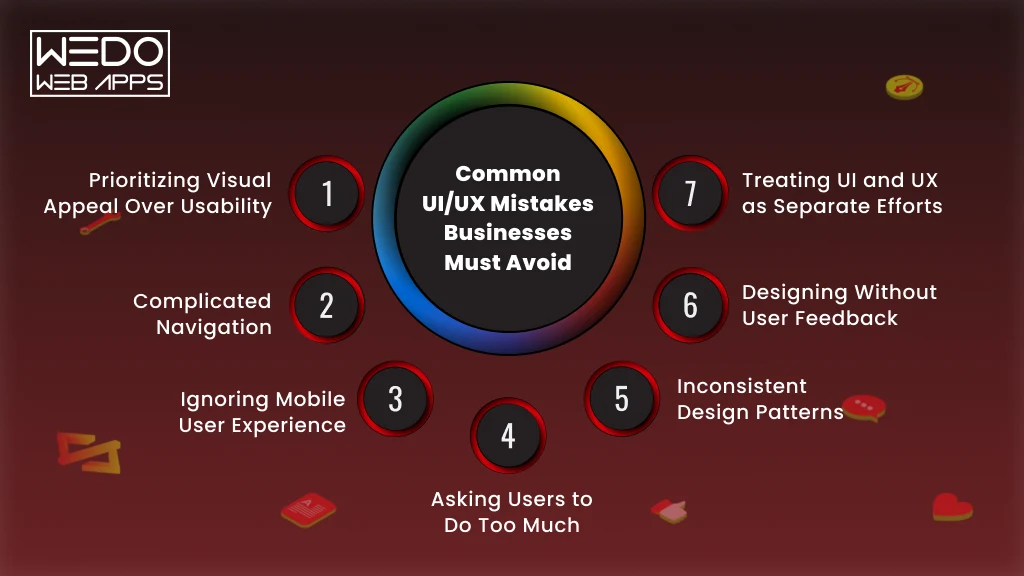
Even the most innovative products can struggle if users find them difficult to navigate or frustrating to use. While businesses often focus on adding new features, overlooking basic UI and UX principles can create friction that discourages users from engaging with the product.
Recognizing these issues early can help improve user satisfaction, increase conversions, and reduce costly redesigns.
1. Prioritizing Visual Appeal Over Usability
A visually stunning interface may create a positive first impression, but it shouldn’t come at the expense of usability.
Design choices such as excessive animations, decorative elements, or unconventional layouts can distract users from completing important tasks.
Best Practice: Create interfaces that are visually appealing while keeping interactions simple, familiar, and intuitive.
2. Complicated Navigation
Users shouldn’t have to guess where to click next.
Menus with too many options, hidden navigation, or inconsistent page structures make it difficult for users to find information or complete their goals.
Best Practice: Keep navigation clear, predictable, and organized around user priorities rather than internal business structures.
3. Ignoring Mobile User Experience
With a significant portion of web traffic coming from mobile devices, designing only for desktop users creates unnecessary friction.
Common issues include:
- Small touch targets
- Difficult-to-read text
- Slow-loading pages
- Poor responsive layouts
- Forms that are hard to complete on smaller screens
Best Practice: Design mobile-first experiences that remain consistent across different screen sizes and devices.
4. Asking Users to Do Too Much
Every additional step in a user journey increases the chance of abandonment.
Whether it’s a lengthy registration process, a multi-page checkout, or unnecessary form fields, excessive complexity can negatively affect conversions.
Best Practice: Remove unnecessary steps and focus on helping users achieve their goals with as little effort as possible.
5. Inconsistent Design Patterns
Users expect consistency throughout a digital product.
Changing button styles, navigation behavior, colors, or layouts between screens creates confusion and increases the learning curve.
Consistency helps users build familiarity, making interactions feel more natural over time.
Best Practice: Use a consistent design system across the entire product to improve usability and reinforce brand identity.
6. Designing Without User Feedback
Many businesses make design decisions based on assumptions instead of actual user behavior.
Without usability testing or customer feedback, even well-intentioned improvements can introduce new problems.
Best Practice: Regularly test prototypes and gather feedback from real users before and after launching new features.
7. Treating UI and UX as Separate Efforts
One of the biggest mistakes businesses make is focusing on UI and UX independently.
An attractive interface cannot compensate for a poor user experience, and excellent usability may not reach its full potential if the interface lacks clarity or consistency.
The most successful digital products are built when designers, developers, and business stakeholders collaborate to create experiences that are both visually engaging and easy to use.
Best Practice: Treat UI and UX as complementary disciplines that work together throughout the product development lifecycle.
Small Design Improvements Can Deliver Big Results
Businesses don’t always need a complete redesign to improve product performance. Often, small, strategic UI and UX improvements can have a significant impact on user behavior.
For example:
- Simplifying navigation can help users find information faster.
- Improving button placement can increase click-through rates.
- Reducing form fields can improve sign-up completions.
- Refining onboarding flows can boost user retention.
- Maintaining consistent visual patterns can strengthen user confidence.
By continuously evaluating how users interact with a product, businesses can identify opportunities to enhance the experience without rebuilding it from scratch.
UI and UX Design Trends Businesses Should Watch
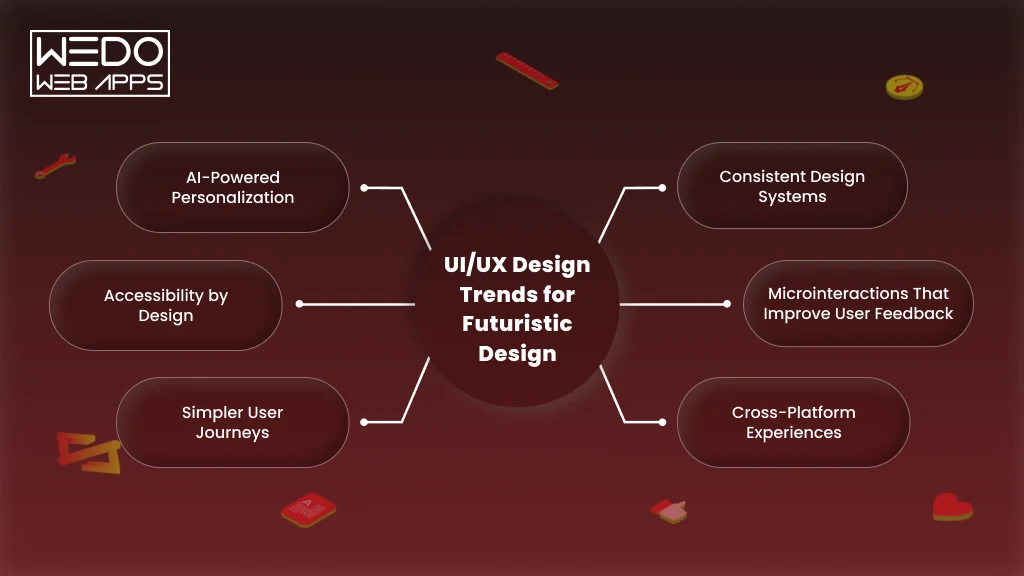
User expectations continue to evolve as technology advances and digital experiences become more personalized. Features that once felt innovative, such as responsive layouts or dark mode, are now considered standard.
For businesses, staying updated with UI and UX trends isn’t about following every new design style. It’s about understanding how changing user behaviors and expectations influence product adoption, customer satisfaction, and long-term competitiveness.
Here are some UI and UX trends shaping modern digital products.
AI-Powered Personalization
Artificial intelligence is enabling digital products to deliver more relevant and personalized experiences.
Instead of presenting the same interface to every user, AI can adapt content, recommendations, and workflows based on user preferences, browsing behavior, and previous interactions.
Examples include:
- Personalized product recommendations
- Smart search suggestions
- Customized dashboards
- AI-powered onboarding experiences
Businesses that leverage personalization can create more engaging experiences while helping users find value more quickly.
Accessibility by Design
Accessibility is no longer an optional consideration. Products designed with accessibility in mind are easier for everyone to use, including people with visual, hearing, cognitive, or motor impairments.
Modern UI and UX practices increasingly focus on:
- Readable typography
- High-contrast color combinations
- Keyboard-friendly navigation
- Screen reader compatibility
- Accessible forms and buttons
Designing for accessibility also improves usability across a broader audience and supports compliance with accessibility standards.
Simpler User Journeys
As digital products become more feature-rich, users increasingly expect experiences that feel effortless rather than overwhelming.
Businesses are simplifying interfaces by:
- Reducing unnecessary clicks
- Streamlining onboarding
- Minimizing form fields
- Highlighting primary actions
- Removing visual clutter
The goal is to help users complete tasks faster while reducing friction throughout the journey.
Consistent Design Systems
Organizations managing multiple products or large development teams are adopting design systems to maintain consistency across interfaces.
A design system provides reusable components, visual guidelines, and interaction patterns that help create a unified user experience.
Benefits include:
- Faster design and development cycles
- Improved consistency
- Easier product scalability
- Better collaboration between designers and developers
Microinteractions That Improve User Feedback
Small interface animations and visual responses can make digital products feel more intuitive.
Examples include:
- Button animations after a click
- Progress indicators during uploads
- Success messages after completing a task
- Visual feedback during form validation
While subtle, these interactions reassure users that the system is responding to their actions and help create a smoother overall experience.
Cross-Platform Experiences
Users expect a consistent experience whether they access a product through a desktop, smartphone, tablet, or wearable device.
Businesses are increasingly designing interfaces and user journeys that remain familiar across platforms while adapting to different screen sizes and interaction methods.
This consistency reduces the learning curve and strengthens brand recognition across every touchpoint.
Why Following Trends Should Never Replace Understanding Users
While these trends continue to shape digital products, not every trend is suitable for every business.
The most successful products aren’t the ones that adopt every new design technique. They’re the ones that solve real user problems while aligning with business objectives.
Before implementing new UI or UX trends, businesses should ask:
- Does this improve the user experience?
- Will it help users complete their goals more efficiently?
- Does it align with our product strategy?
- Will it provide long-term value instead of short-term novelty?
Keeping users at the center of every design decision ensures that trends enhance the experience rather than distract from it.
Do You Need UI Design, UX Design, or Both?
By now, you’ve understood the difference between UI and UX, explored real-world examples, and seen how both disciplines influence product success. The next question is straightforward:
Which one does your business actually need?
The answer depends on your product’s current challenges and business goals. While some situations may require improvements to a specific area, most successful digital products benefit from a balanced approach that combines both UI and UX design.
You May Need UI Design If…
Your product functions well, but users aren’t impressed by the way it looks or interacts.
Common signs include:
- Your interface feels outdated or inconsistent.
- Branding varies across different screens.
- Buttons and navigation elements lack visual clarity.
- Users don’t notice important calls to action.
- Your competitors offer a more polished digital experience.
Improving the user interface can strengthen your brand, create better first impressions, and encourage users to engage with your product.
You May Need UX Design If…
Your product looks modern, but users struggle to complete tasks or frequently abandon important workflows.
Typical indicators include:
- Low conversion rates.
- High bounce or abandonment rates.
- Confusing navigation.
- Complex onboarding experiences.
- Frequent customer support requests.
- Low user retention despite good traffic.
In these situations, improving the user experience can remove friction, simplify user journeys, and increase customer satisfaction.
You Likely Need Both If…
For many businesses, UI and UX challenges exist together.
You should consider improving both if:
- You’re launching a new website or mobile application.
- You’re redesigning an existing digital product.
- User engagement has declined.
- Customer feedback highlights both usability and visual concerns.
- Your business is expanding and your product needs to scale.
- You’re introducing new features or entering new markets.
Designing both the interface and the experience together creates a more cohesive product and reduces the need for repeated redesigns later.
A Simple Decision Framework
Use the following checklist to determine where your product stands.
| If Your Product… | Focus On |
|---|---|
| Looks outdated but functions well | UI Design |
| Looks modern but users struggle to complete tasks | UX Design |
| Needs a complete redesign | UI + UX Design |
| Is a brand-new product | UI + UX Design |
| Has declining engagement or conversions | UX first, then UI refinement |
| Is expanding with new features | UI + UX working together |
The Best Digital Products Don’t Choose Between UI and UX
Businesses often ask whether they should invest in UI or UX first. In practice, separating the two rarely delivers the best results.
UI creates the visual experience that attracts users, while UX creates the functional experience that keeps them engaged. When both are planned together, businesses can create products that are visually appealing, easy to use, and aligned with user expectations.
Whether you’re developing a new digital product or improving an existing one, treating UI and UX as complementary disciplines leads to stronger user experiences and better business outcomes.
Conclusion
Understanding the difference between UI and UX is about more than learning two design terms, it’s about recognizing how each contributes to the success of a digital product. While UI design shapes the visual interface users interact with, UX design ensures every interaction is intuitive, efficient, and enjoyable.
The most successful websites, mobile applications, and software products don’t prioritize one over the other. They combine thoughtful UI and UX design to create experiences that attract users, simplify their journeys, and encourage long-term engagement. Whether you’re launching a new product or improving an existing one, investing in both disciplines can lead to higher user satisfaction, stronger customer retention, and better business outcomes.
If you’re evaluating your next digital project, start by understanding your users’ needs first. A product built around real user expectations is far more likely to succeed than one designed around assumptions. And when UI, UX, and development work together from the beginning, businesses are better positioned to deliver digital experiences that users trust, enjoy, and return to.