skip to content

Real Estate Technology in 2026: Platforms, Software, and App Development Guide

Introduction

You open your CRM. Then your listing portal. Then a spreadsheet, a shared inbox, and a lease folder. Somewhere in those tabs sits the lead you were supposed to call yesterday.

Sound familiar?

Each of these problems has a fix, and it sits in real estate technology. Choosing the right one is the hardest part.

Search for it, and you will get hundreds of real estate tech platforms. You will meet dozens of real estate software companies making nearly identical claims. Every demo promises more leads and fewer admin hours. Few tell you which tool fits your business.

This guide cuts through that. You will learn:

  • Which types of platforms exist and what each one does.
  • Which real estate software solutions suit your team size and goals.
  • Where AI saves you time and where it still needs a human.
  • What real estate application development involves, and how to choose a real estate app development company.

Read the guide straight through or jump to the part you need. Either way, you will know what to buy, what to build, and what to skip.

Let’s start with the basics.

What Is Real Estate Technology (PropTech)?

Real estate technology is the software, platforms, and connected devices used to buy, sell, rent, manage, finance, and build property. The industry also calls it PropTech.

It covers more than you might expect. A listing site’s search filters count. So does a rent-collection app, a lender’s validation module, and a sensor that tracks a building’s energy use.


Real Estate Tech vs PropTech vs Real Estate Software

These terms get used as if they mean the same thing. They do not, and the difference matters when you start comparing vendors.


TermWhat it meansExample
Real estate technology/PropTechThe whole category: software, hardware, and data servicesA smart lock and the app that controls it
Real estate tech platformA hub that connects several users or functions in one placeA marketplace linking buyers, agents, and lenders
Real estate softwareA tool built for one specific jobA CRM that tracks leads, or a lease management tool


Technology is the field, a platform is the hub, and the software is the tool. Most vendors you will evaluate sell the last two.

Marketplace Snapshot and Who Uses It

Analysts do not agree on one market size, which is worth knowing before you quote a figure in a report or pitch. Estimates for 2026 run from about $44.6 billion to about $53.2 billion, with forecast growth between roughly 11% and 18% a year depending on the firm. Treat the direction as reliable and the exact number as a range.

Adoption is where the shift shows most clearly. In NAR’s 2026 Report, 23% of agents use AI daily and 25% use it weekly, while the share using no AI fell from 32% to 21% in a year. Yet RpR’s survey found writing tools used by about 78% of AI-using agents, compared with about 47% for chatbots and assistants. Most teams are still using AI to write, not to run their workflows. That gap is where you have the most room to improve.

Types of Real Estate Tech Platforms
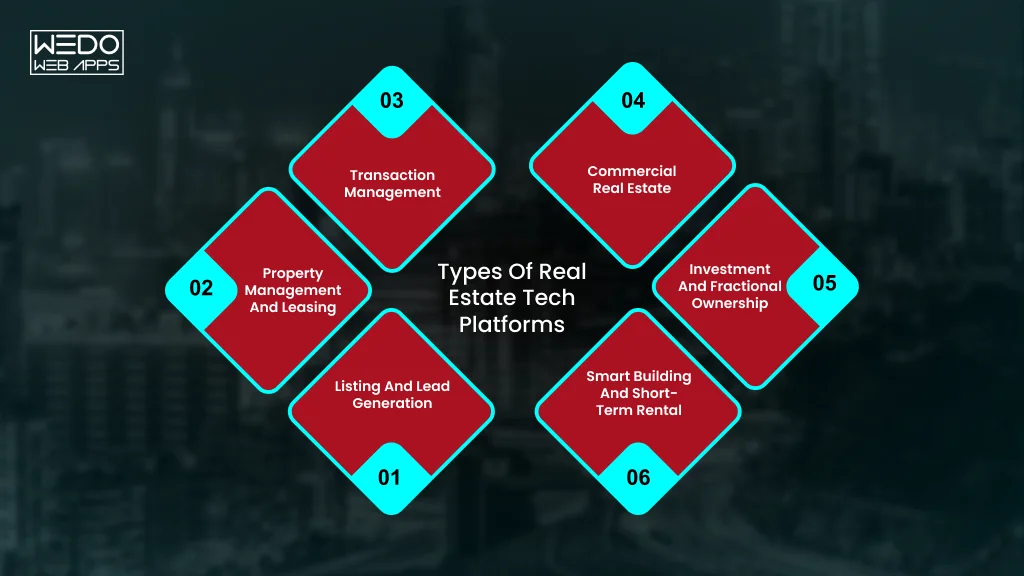
Types of Real Estate Technology Platforms

Most real estate tech platforms fall into size groups. Match your biggest problem to a group, and a long vendor list shrinks fast.


Platform typeProblem it fixesExample tools
Listing and lead generationToo few qualified inquiriesZumper, BoldLeads, Structurely
Property management and leasingRent, repairs, and tenant adminBuildium, DoorLoop, EliseAI
Transaction managementStalled deals, missing signaturesDocuSign
Commercial real estateLease dates and portfolio trackingVTS, Re-Leased, Yardi Corom
Investment and fractional ownershipSpreadsheet reporting, access to ownershipAgora, Pacaso
Smart building and short-term rentalEnergy costs, multi-channel bookingsInfogrid, Hostaway, Guesty


Listing, Marketplace, and Lead Generation Platforms

These put your properties in front of buyers and renters. Then they capture the inquiries.

  • Zumper: rental listings, credit reports, applications, and e-signatures in one place.
  • BoldLeads: landing pages with automated email and text follow-ups.
  • Structurely: an AI chatbot that qualifies leads and books appointments for you.

Property Management and Leasing Platforms

  • Problem: rent collection, repairs, and tenant screening all in one platform.
  • Fix: one system for accounting, leasing, maintenance, and tenant messages.
  • Examples: Buildium bundles accounting, leasing, and mobile apps. DoorLoop suits small and mid-sized rental owners. Elise AI uses AI to talk to prospects and schedule tours, and the company reports an 80% drop in leasing agent workload.

Transaction Management and e-Signature Platforms

A typical deal runs like this on a good platform:

  1. Your offer is accepted, and a checklist is created automatically.
  2. Documents go out for e-signature (DocuSign is the best-known option).
  3. Deadlines trigger reminders before anyone misses one.
  4. Every party sees the same status through to closing.

Without a platform, steps 2 to 4 happen over email.

Commercial Real Estate Platforms

Commercial portfolios need lease tracking across many buildings. Three platforms handle it in different ways:

  • VTS: a leasing and asset management platform for commercial real estate.
  • Re-leased: cloud-based property management software for landlords and property managers.
  • Yardi Corom: keeps leases, documents, clauses, and critical dates in one system for corporate real estate and legal teams.

Investment and Fractional Ownership Platforms

Changing how people own: Pacaso sells shares of luxury second homes through LLC co-ownership.

Changing how firms manage: Agora replaces spreadsheets with portfolio management and reporting for real estate investment firms.

Smart Building and Short-Term Rental Platforms


SegmentWhat it handlesExample tools
Smart buildingsIoT sensors and AI to cut energy use and support ESG reporting; mobile building accessInfogrid, ButterflyMX
Short-term rentalsBookings across Airbnb, Vrbo, and similar channels, with automated messaging and pricingHostaway, Guesty


Which Platform Should You Look at First?

Tick the statement that sounds most like you:

  • Leads are slow or low quality: start with listing and lead generation
  • Admin buries your weeks: start with property management
  • Deals stall over paperwork: start with transaction management
  • You manage many leases: start with commercial platforms
  • Reporting lives in spreadsheets: start with investment platforms
  • You run buildings or rentals at scale: start with smart building or short-term rental tools

Most teams end up using two or three groups together, so how well they connect matters as much as what each one does. That is what the next section covers.

Real Estate Software Solutions: Core Features and Benefits

Good real estate software solutions share a short list of features. If a tool misses several of them, you will feel it within a month. You can consider this section a filter before you book any demo.

Features Every Real Estate Software Should Have

Use this as a checklist when you compare tools:

  • Lead and contact management: every inquiry, call, and email sits in one record, so nobody asks a client the same question twice.
  • Listing management: you publish a property once, and it appears on your site and connected portal.
  • Document storage and e-signature: contracts, leases, and IDs stay in one place and get signed online.
  • Online payments: tenants pay rent, and buyers pay deposits without cheques or bank visits.
  • Reports and dashboards: you see leads, occupancy, and revenue without building a spreadsheet.
  • Mobile access: you can answer a client or approve a repair from the property itself.
  • Integrations: the tool connects to your accounting, email, calendar, and listing sources.
  • User roles and security: an assistant sees what they need and nothing more.
  • Automation: follow-ups, reminders, and routine replies run on their own, and some tools now use AI to draft or send them.

If you can only check six of the nine, rank them by what costs you the most time today. Start with that gap.

What You Gain From the Right Software

Every benefit below comes with a situation you may recognize.

  • You respond to leads faster.

Example: a buyer fills in a form at night. The software sends a reply with three matching listings and a booking link. You wake up to a scheduled viewing.

  • You spend less time on admin.

Example: a property manager sends rent reminders, collects payments, and logs receipts by hand each month. With software, reminders and receipts go out automatically.

  • You make fewer mistakes.

Example: a lease renewal date sits in a notebook and gets missed. The software flags it 90 days ahead.

  • You give clients a better experience.

Example: a tenant reports a leaking tap in an app, sees the repair status, and rates the visit. They stay longer because they never had to chase you.

  • You make better decisions.

Example: a dashboard shows that one listing source brings most of your serious inquiries. You move your budget there.

Where Software Choices Get Tricky

You will meet two kinds of products as you shop. Some tools are built for one job, such as lead tracking. Others are platforms that try to cover everything. A specialist tool often does its one job better. An all-in-one platform saves you from juggling logins.

Large real estate software companies tend to sell broad platforms. Smaller vendors usually focus on one task. Neither type is better by default. The right choice depends on how your team works.

If no tool matches your process, you have another path. A real estate app development company can build a product around your exact workflow. We cover that choice, along with real estate application development, in the next sections.

How AI Is Changing Real Estate Software

About half of real estate professionals use AI every week. Most of that use is still content. Roughly 82% of agents use AI to write listing descriptions. The next gains lie behind the content. Among the brokerage leaders, 55% plan to expand AI for CRM and workflow automation, and 50% plan to adopt agentic tools that act, not just draft.

The payoff is real. In RPR’s survey, 68% of agents said AI app development saves them at least one hour a week, and 34% said it saves more than four. If your real estate software solutions include AI, here is where it earns its place.

AI for Leads and Client Conversations

  • What it does: answer inquiries, qualify leads, and book tours at any hour.
  • Example: EliseAI talks to rental prospects and schedules tours. The company reports an 80% drop in leasing agent workload (vendor-reported).
  • Room to grow: chatbots and assistants are used by about 47% of AI-using agents, far behind writing tools at about 78%.

AI for Leases, Documents, and Maintenance

  • What it does: pulls key dates, clauses, and amounts out of lease files, and flags equipment problems early.
  • Example: a commercial platform keeps every clause and critical date searchable. IoT sensors with AI, such as Infogrid, can warn you before a pump fails.
  • Room to grow: this is where real estate technology saves operations teams the most manual work.

What to Check Before You Adopt AI

  1. Review output before clients see it. An agent in RPR’s survey asked for more training and worried about accuracy.
  2. Ask where your data goes. Find out if the vendor stores it, shares it, or trains models on it. Brokerage leaders also cite governance, privacy, compliance, and integration as concerns.
  3. Apply fair housing rules to AI too. Screening, ads, and pricing carry the same legal duties whether a person or a model makes the call.
  4. Start with one workflow. Measure it for 30 days before you add another.

Many vendors now ship AI inside tools you already pay for, so ask each one what is live today and what is on the roadmap.

AI Integration for New and Existing Apps

Real Estate Software Companies to Know in 2026

A few large names dominate this market, and many specialists compete around them. This list groups real estate software companies by who they serve. Each entry shows where the company fits best, so you can build a shortlist before you book a demo.

For Agents and Brokers


CompanyBest forStandout strength
Follow Up BossGrowing teams that win on speed to leadLead routing, assignment, and response-time reporting. It is a Zillow product.
Wise AgentSolo agents and small teamsFlat monthly pricing with a few shared users.


For Property Managers and Landlords


CompanyBest forStandout strength
AppFolioMixed portfolios with a residential focusBuilt-in accounting and agentic AI features
BuildiumSmall portfoliosSimple tools at an entry-level price
Yardi (Voyager, Breeze)Large portfolios that need deep accountingBreeze suits residential portfolios that want a lighter setup
RealPageLarge companies that need advanced accounting and affordable housing toolsStrong in multifamily


AppFolio’s own comparison page ranks AppFolio first, so weight independent reviews alongside it.

For Commercial Real Estate


CompanyBest forStandout strength
Yardi VoyagerFull-lifecycle operationsEnterprise scale
MRI SoftwareEnterprise-scale commercial and mixed-use portfoliosGlobal reach
CoStarCommercial market data and analyticsOne of the most comprehensive commercial databases
VTSCommercial landlords and brokersLeasing and asset management in one platform


Fast-Growing PropTech Companies

Venture money is flowing to newer real estate tech platforms built around AI. AI-native companies in underwriting, construction technology, property operations, leasing automation, and financial infrastructure attract the largest share of investment.

  • EliseAI: AI for leasing and resident communication.
  • Infrogrid: IoT and AI for smart commercial buildings.

Pilot young vendors on one property or team before you commit. Their pricing and product can change fast.

How to shortlist: pick three vendors, ask each to demo with your own data, and check their integrations before you compare prices. Features and pricing change often, so confirm details on each vendor’s site.

Buy, Customize, or Build: Choosing the Right Real Estate Software

You have three routes. Each one fits a different situation.

Off-the-Shelf vs White-Label vs Custom

Route 1: Buy off-the-shelf

  • Best when: your process is standard, and you want to start this month.
  • You get: working tools, support, and regular updates.
  • Trade-off: you adapt to the tool, and fees grow as your team does.

Route 2: Customize or white-label

  • Best when: you want your own brand or small changes on proven code.
  • You get: faster launch than a full build.
  • Trade-off: limits on what you can change, and you depend on the vendor’s roadmap.

Route 3: Build custom

  • Best when: your workflow gives you an edge, or you plan to sell the product.
  • You get: full control over features, data, and branding.
  • Trade-off: a higher upfront cost and upkeep. Maintenance runs 15% to 20% of the build cost each year.

A quick test: build only if you can say yes to two of these.

  • Does an existing tool force you to change a process that makes you money?
  • Will you sell or license the product to others?
  • Do you need an integration no vendor offers?
  • Can you find an MVP plus a year of upkeep?

Eight Questions to Ask Before You Sign

  1. Integrations: Which accounting, CRM, and listing sources connect out of the box?
  2. Data: Can I export everything if I leave?
  3. Security: Where is my data stored, and who can access it?
  4. AI: Which features are live today, and does my data train your models?
  5. Pricing: What changes in cost as my units, users, or listings grow?
  6. Support: What does onboarding include, and how fast do you reply?
  7. Scale: Can this handle twice my current volume?
  8. Proof: Can I speak with a customer of my size?

If most answers disappoint, a custom build deserves a closer look. That route needs a real estate app development company that understands your market, and the next section shows how to choose one.

Real Estate App Development Consultation

Real Estate Application Development: Process, Features, and Cost

Real estate application development takes more than a designer and a coder. You need market knowledge, data integrations, and a plan for what comes after launch.

Here is what the work involves.

Types of Real Estate Apps You Can Build

  • Listing and search portals: buyers browse, filter, and contact agents.
  • Rental and tenant apps: applications, rent payments, and repair requests.
  • Property management apps: owners and managers track units, leases, and maintenance.
  • Agent and CRM apps: lead tracking and follow-ups from a phone.
  • Investment platforms: users invest in property and track returns.
  • Virtual tour apps: 3D walkthroughs and staging tools.

Features by Stage


StageWhat goes inWhy this order
MVPSign-up, property with filters, map view, photo-rich detail page, saved listings, contact form or chat, admin panel.Tests whether people want the product
Phase 2MLS/IDX feeds, agent portal, mortgage calculator, push alerts, payments, virtual toursAdds depth once users arrive
AdvancedAI recommendations, AI valuation, chatbot, analytics dashboardsCosts the most and pays off at scale


Tech Stack and Integrations

You will make a few choices early:

  • App frameworks: cross-platform tools like React Native suit most real estate apps, since search, listings, messaging, and maps do not need heavy native device access.
  • Maps: Google Maps or Mapbox for property pins, amenities, and commute times.
  • MLS/IDX feeds: needed only if you show MLS-listed homes, and they require a licensed agent or broker partner.
  • Payments and e-signature: for deposits, rent, and contracts.
  • CRM and accounting links: so data flows to the tools your team already uses.
  • AI services: recommendations, valuation, and chat through APIs.

The Development Process Step-by-Step

  1. Discovery (2 to 4 weeks): the team defines user personas, the features roadmap, and the technical plan, which cuts costly scope changes later.
  2. Design: wireframes and a clickable prototype that you test with a few target users.
  3. MVP build: typically 8 to 14 weeks.
  4. Testing and launch: quality checks, then app store review.
  5. Measure and improve: track search use, inquiries, and drop-off, then plan phase 2.

What Real Estate App Development Costs

Publish estimates vary widely. Current guides place a basic  MVP between roughly $15,000 and $18,000, mid-range apps between $40,000 and $180,000, and enterprise platforms from $150,000 to $300,000 or more.


TierTypical ScopeEstimated CostTimeline
MVPListings, search, maps, contact$15,000 to $80,0002 to 4 months
Mid-rangeMLS/IDX, agent portal, payments$40,000 to $180,0004 to 8 months
EnterpriseAnalytics, CRM, AI valuation, multiple user roles$150,000 to $300,000+8 to 14 months


Four things move the number most:

  • MLS/IDX integration: adds roughly $20,000 to $40,000 and 6 to 10 weeks.
  • AI features: recommendations and predictive pricing add roughly $30,000 to $60,000.
  • Team location: hourly rates run about $80 to $150 in Western Europe and $50 to $80 in Eastern Europe.
  • Scope creep: every late feature resets part of the schedule.

These figures come from vendor-published guides, so collect two or three quotes for your own scope.

How to Choose a Real Estate App Development Company

Look for:

  • Live real estate products you can open and test.
  • Milestone-based pricing with a clear scope.
  • Past work with MLS/IDX feeds, maps, and payments.
  • Security practices such as encryption and multi-factor login.
  • A support plan after launch.
  • A contract that gives you ownership of the code and data.

Walk away if:

  • They quote a fixed price without asking your users.
  • They cannot show a real estate project.
  • They have no plan for maintenance.
  • They avoid questions about code ownership.

Not sure what your first version should include? Share your ideas with our team for a scoped estimate.

Real Estate Technology Trends and Challenges

Trends to Watch

  • Agentic AI: tools that act on a task instead of drafting text. About half of brokerage leaders plan to adopt them. For you: test one workflow, such as lead follow-up.
  • Platform consolidation: leaders see a shift toward integrated platforms. For you: fewer logins, so integration matters more than feature count.
  • Virtual tours and digital twins: 3D and AR walkthroughs of real spaces. For you: you can qualify remote buyers before a site visit.
  • Property tokenization: blockchain-based shared ownership. For you: watch the rules in your market before you build or invest.
  • ESG and smart buildings: sensors that track energy and emissions. For you: reporting duties are pushing owners toward these tools.
  • Embedded finance: rent payments, insurance, and loans inside the platform. For you: a possible new revenue line for your own product.

Challenges and How to Solve Them


ChallengeWhat it looks likeHow to fix it
Legacy systemsData sits on old software and spreadsheetsClean and map the data first. Migrate in phases and run both systems side by side for a month
Team adoptionStaff keep using old habitsStart with one workflow, name a champion, and train in short sessions. Agents in RPR’s survey asked for more training
Security and complianceClient IDs and financials live in the systemUse role-based access, encryption, and multi-factor login. Check each vendor’s data policy against local privacy law.
Tool overloadFive tools that do not share dataChoose real estate tech platforms with open integrations and retire overlapping tools.
Unclear returnUsage is high, but results are notSet one metric before rollout, such as response time or days to lease. One survey found 82% of agents use AI but only 17% report significant business impact.


Conclusion

The right real estate technology fixes a specific problem. Name yours first. Then match it to a platform type, compare real estate software companies in that group, and ask the eight questions before you sign.

If no tool fits your process, real estate application development gives you a product built around it. Start with an MVP and add AI where it saves your real hours.

Take one action this week. List your three biggest time drains and check which platform type solves the worst one. Talk to our team about real estate software solutions or a custom build for you.

Real Estate App Development Project Plan

What Is Agile Methodology of Project Management? A Complete Guide

Introduction

When project requirements keep changing, a fixed development plan can quickly lose its relevance. A stakeholder may request a new feature. Customer feedback can shift priorities. Testing may reveal issues that push an important release further out.

For project managers and software teams, the challenge is keeping progress steady while adapting to these changes. You need a process that gives your team room to respond without losing sight of product goals, quality, or delivery timelines.

The Agile methodology of project management addresses this through iterative work, frequent feedback, and adaptive planning. Teams deliver smaller increments, review what they have built, and use those insights to decide what comes next.

So, what’s agile methodology, and how does it apply to software development? From Agile software product development cycles and user stories to Scrum, SAFe, and modern AI-assisted practices, understanding the approach can help you assess whether it fits your project’s needs.

Software Team for Product Development

What Is Agile Methodology? Definition and Meaning

 
Agile Methodology Definition Guide
 

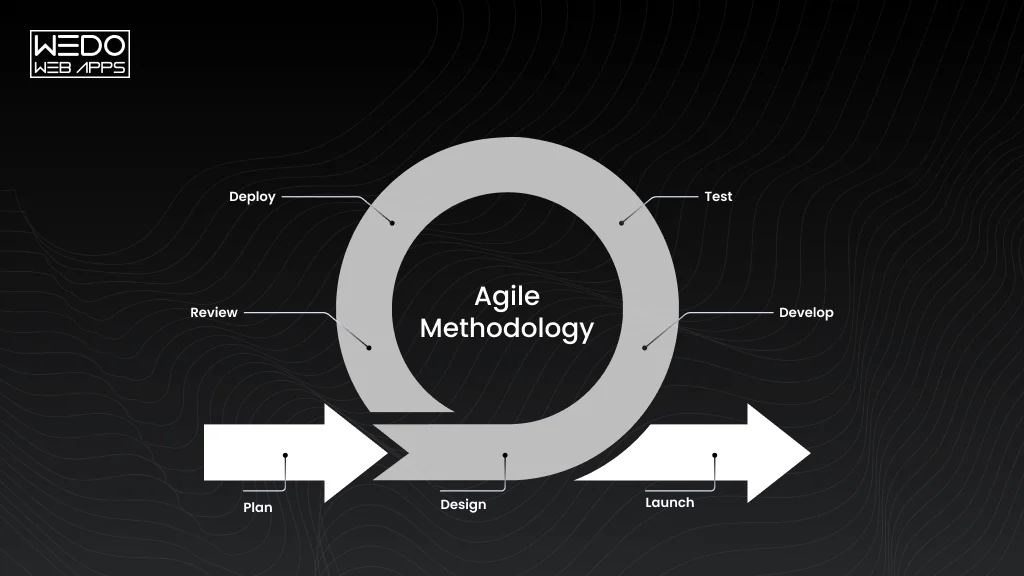
Agile methodology is an approach to managing and developing a project through short, iterative cycles. Instead of planning every detail upfront, teams deliver work in smaller increments, gather feedback, and adjust priorities as requirements change.

For project managers and software teams, this means planning remains flexible while delivery stays focused on measurable outcomes. Agile brings customers, stakeholders, and development teams into the process more frequently, helping teams respond to changing requirements without waiting until the end of the project.


Agile Methodology in One Line

Agile methodology is a way of managing work through iterative delivery, continuous feedback, collaboration, and adaptation.

The approach is built around four core ideas:

  • Deliver useful work frequently.
  • Respond to changing requirements.
  • Collaborate closely with customers and teams.
  • Improve the process through regular feedback.

Where Did Agile Methodology Come From?

The modern Agile movement began with the Agile Manifesto, published in 2001 by 17 software practitioners. They introduced four values and 12 principles to address common problems with heavyweight software development processes.

The manifesto prioritised working software, customer collaboration, team interaction, and responsiveness to change. These ideas later influenced frameworks such as Scrum, Extreme Programming, and other Agile approaches.

The 4 Values of the Agile Manifesto


Agile ValueWhat it means in practice
Individuals and interactions over processes and toolsGive effective collaboration and communication priority when managing work.
Working software over comprehensive documentationFocus on delivering usable software while keeping necessary documentation.
Customer collaboration over contract negotiationKeep customers involved as requirements and priorities evolve.
Responding to change over following a planAdjust plans when new information changes what the project needs.


These values do not mean that processes, documentation, contracts, or plans are unnecessary. They establish which side should receive greater emphasis when the two priorities conflict.

The 12 Principles Behind Agile

The Agile Manifesto also includes 12 principles that explain how teams can apply its values. They focus on areas such as:

  • Delivering valuable software frequently
  • Welcoming changing requirements
  • Working closely with customers and stakeholders
  • Supporting motivated, collaborative teams
  • Maintaining technical quality
  • Keeping development sustainable
  • Reviewing progress regularly
  • Improving the team’s way of working

Together, these principles create a practical approach to handling uncertainty. Teams can learn from each delivery cycle instead of relying entirely on assumptions made at the beginning.

Agile vs Traditional Project Management

Agile and traditional project management differ mainly in how they approach planning, delivery, and change.


AreaAgileTraditional Approach
PlanningContinuous and adaptiveUsually defined extensively upfront
RequirementsCan evolve throughout the projectOften defined earlier and controlled through formal changes
DeliverySmaller, frequent incrementsOften delivered in larger stages or near the end
Customer FeedbackCollected throughout developmentOften concentrated around specific milestones
ChangeExpected and incorporated into planningUsually handled through formal change processes
TestingPerformed continuously alongside developmentOften concentrated in defined testing phases
RiskIdentified and addressed throughout iterationsMay be addressed through upfront planning and scheduled reviews


The difference is less about whether a team plans and more about how the team responds when new information changes the plan. Agile keeps planning active throughout delivery, allowing teams to adjust based on feedback, technical findings, and changing business priorities.

Agile Methodology of Project Management: How It Works


Agile Project Management Process


The agile methodology of project management gives teams a structured way to manage changing requirements without locking the entire project into one fixed plan. Work is prioritised, delivered in smaller increments, reviewed regularly, and adjusted based on what the team and stakeholders learn.

For anyone searching what’s agile methodology or agile methodology what is, the key idea is simple: Agile keeps planning active throughout the project so teams can respond when priorities, customer needs, or technical requirements change.

Core Characteristics of Agile Project Management

A practical agile methodology description includes several practices that shape how teams plan and deliver work:

  • Iterative delivery: Teams complete work in smaller cycles instead of waiting for one final release.
  • Adaptive planning: Priorities can change as customer needs, business goals, or technical findings evolve.
  • Customer collaboration: Stakeholders provide feedback throughout development rather than only at the end.
  • Cross-functional teams: Different skills work together to move features from requirements to completion.
  • Continuous feedback: Regular reviews help teams identify what is working and what needs adjustment.
  • Incremental improvement: Teams refine both the product and their working process throughout delivery.

These characteristics make Agile useful for projects where requirements are expected to evolve.

The Agile Project Management Workflow

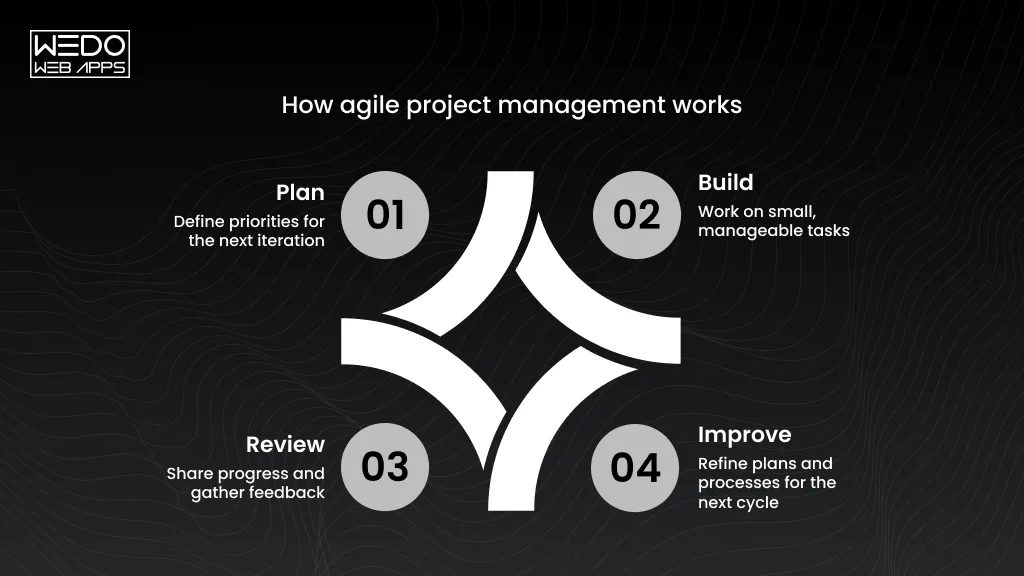
While Agile frameworks use different practices, the agile methodology of project management generally follows a repeating workflow:

  • Define the project vision and goals

Establish the business problem, target users, expected outcomes, and project priorities.

  • Create and prioritise the backlog

Break requirements into manageable items and arrange them according to value and priority.

  • Plan the iteration or Sprint

Select a realistic amount of high-priority work for the upcoming delivery cycle.

  • Develop and test the work

Build, integrate, review, and test selected items while addressing issues as they appear.

  • Review the increment and gather feedback

Show completed work to stakeholders and use their feedback to refine future priorities.

  • Reflect and adapt the process

Review how the team worked, identify improvements, and apply them to the next cycle.

The cycle continues as the product develops. Scrum commonly uses Sprints for this cadence, while Kanban focuses on continuous flow rather than fixed iterations.

Roles in Agile Project Management

Agile teams need clear ownership even when responsibilities are shared. The exact roles depend on the framework being used.


RolePrimary Responsibility
Product OwnerPrioritises product work and represents customer and business needs.
Scrum Master or Agile FacilitatorHelps the team follow its chosen approach and removes process-related obstacles.
Developers and SpecialistsDesign, build, test, analyse, and deliver the product increment.
StakeholdersProvide business context, feedback, requirements, and validation.


In Scrum, these responsibilities are defined through specific accountabilities. Other Agile approaches may organise responsibilities differently.

Benefits of Agile Project Management


BenefitPractical Example
Faster DeliveryA software team can release a core checkout feature before completing every planned eCommerce feature.
Easier AdaptationA product team can reprioritise a mobile feature after customer feedback reveals a different need.
Earlier risk detectionRegular testing can expose payment integration issues before it affects a larger release.
Greater visibilityStakeholders can review working increments instead of relying only on progress reports.


The value comes from shortening the gap between building, reviewing, learning, and adjusting. Teams get more opportunities to correct direction before problems become expensive to fix.

Common Agile Project Management Challenges

Agile introduces flexibility, but that flexibility still needs structure. Without clear practices, teams can struggle with changing priorities, unclear ownership, or excessive meetings.


ChallengePractical Response
Constant priority changesKeep one prioritised backlog and establish clear criteria for adding urgent work.
Limited stakeholder involvementSet regular review points and define who provides feedback and approval.
Poor backlog managementRefine backlog items regularly and remove outdated or low-value work.
Unclear responsibilitiesDefine ownership for product decisions, delivery, technical work, and stakeholder communication.
Too many Agile meetingsKeep ceremonies focused on decisions, collaboration, planning, and improvement.


The same principles also shape the agile methodology of software development. Development teams apply iterative planning, continuous testing, frequent releases, and customer feedback to create and improve software.

This approach connects directly with agile software development cycles, where teams repeatedly build, test, release, review, and refine product increments. It also supports practices such as agile software development user stories, which help teams describe features from the user’s perspective.

Popular Agile Frameworks Explained


Guide to Popular Agile Frameworks


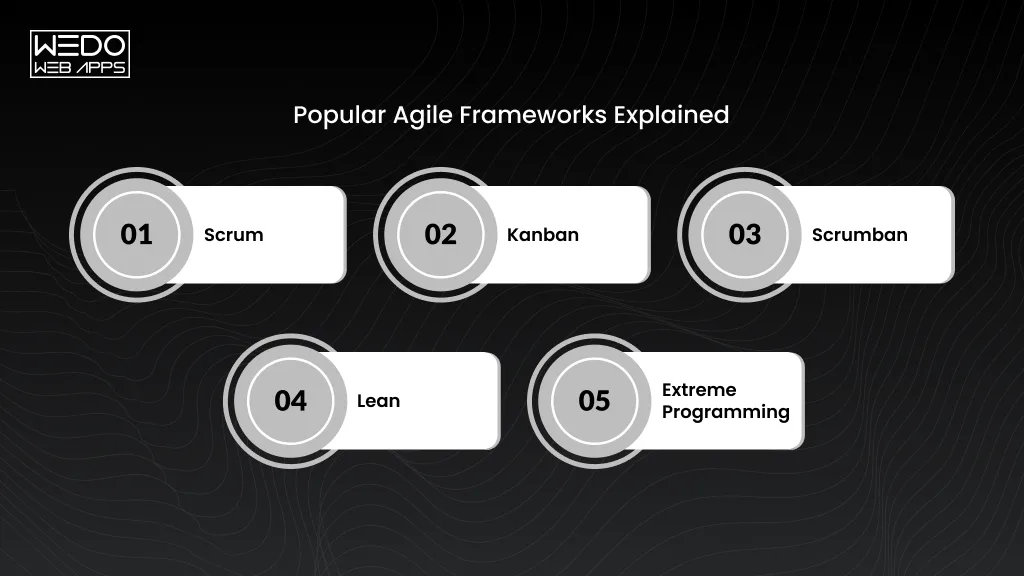
Agile provides the principles and values. Teams then use different frameworks and approaches to apply them in practice. Scrum, Kanban, Scrumban, Lean, and Extreme Programming are among the approaches commonly associated with Agile.

The right approach depends on how your teams handle planning, workflow, technical work, and changing priorities.

Scrum

Scrum is a structured Agile framework designed to help teams deliver work through short, time-boxed Sprints. A team typically maintains a product backlog, selects work during Sprint Planning, develops the increment, reviews the result, and reflects on how to improve.

Scrum defines accountabilities such as the Product Owner, Scrum Master, and Developers. It also provides specific events and artefacts to support planning, transparency, inspection, and adaptation.

Scrum is particularly relevant when a team benefits from a regular delivery cadence and clearly defined responsibilities.

Kanban

Kanban focuses on continuous flow rather than fixed-length Sprints. Teams visualise work on a board, limit work in progress, and monitor how quickly items move through the workflow.

For example, a software team might track work through stages such as:

Backlog -> Development -> Code Review -> Testing -> Ready for Release -> Done

Kanban can work well when incoming priorities change frequently or when work needs to move continuously through a service or development process.

Scrumban

Scrumban combines selected Scrum practices with Kanban’s flow-based approach.

A team might retain Scrum planning and review practices while using Kanban boards and work-in-progress limits to manage its workflow. This can be useful for teams that need more flexibility than a strict Sprint structure provides.

Lean

Lean focuses on delivering customer value while reducing activities that consume time or resources without contributing enough value.

In software projects, Lean practices can encourage teams to reduce unnecessary handoffs, avoid excessive work in progress, shorten delivery times, and continuously improve how work moves through the system.

Extreme Programming

Extreme programming, commonly called XP, places strong emphasis on software engineering practices and frequent technical feedback.

Practices associated with XP include:

  • Test-driven development
  • Pair programming
  • Continuous integration
  • Frequent releases
  • Continuous customer feedback
  • Refactoring

XP is especially focused on improving software quality while keeping development responsive to changing requirements.

How These Agile Approaches Differ


ApproachMain focusTypical workflow
ScrumStructured iterative deliveryFixed-length Sprints
KanbanContinuous flowOngoing movement of work
ScrumbanFlexibility and flowCombination of Scrum and Kanban practices
LeanCustomer value and waste reductionContinuous improvement
Extreme ProgrammingSoftware quality and engineering practicesFrequent development and feedback


These approaches can support the broader agile methodology of software development, but they are not interchangeable. Understanding their differences becomes particularly important when deciding how your team should organise development work.

Scrum vs Agile Methodology: What’s the Difference?


Agile vs Scrum Methodology Explained


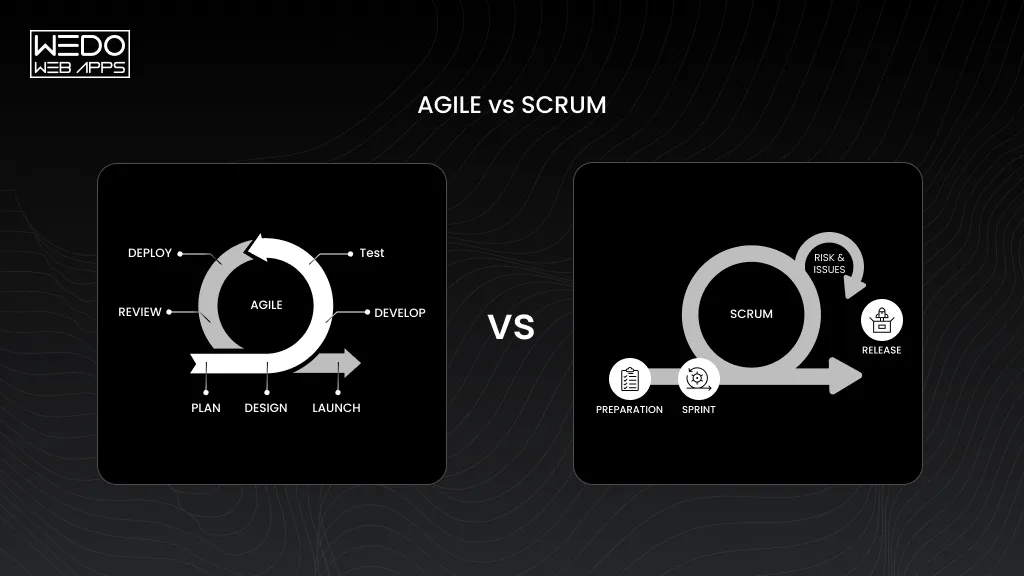
If you are comparing Scrum vs Agile methodology, it is easy to treat them as competing project management methods. They are not the same thing. Agile provides a broader set of values and principles, while Scrum is a specific framework for putting those principles into practice.

Agile Is a Set of Principles, Scrum Is a Framework

Agile defines how teams approach product development and project delivery. It encourages frequent delivery, customer collaboration, adaptation, and continuous improvement.

Scrum gives teams a more defined structure for applying those ideas. It establishes accountabilities, events, artefacts, and rules around how work is planned and delivered.

A simple way to understand the relationship is:

Agile -> Values and principles

Scrum -> Framework that applies Agile principles

Scrum is therefore Agile, but Agile does not mean Scrum.

Agile vs Scrum: Side-by-Side Comparison


AreaAgileScrum
What it isA set of values and principlesAn Agile framework
StructureFlexibleMore defined
DeliveryIterative or continuous, depending on approachUses fixed-length Sprints
RolesVary by approachProduct Owner, Scrum Master, Developers
PlanningAdaptableSprint Planning and ongoing backlog management
FeedbackFrequentBuilt into Sprint Reviews and daily collaboration
ImprovementContinuousSupported through Sprint Retrospectives
Scope of useCan be applied through different approachesFollows the Scrum framework


The distinction matters when you are selecting an approach for your project. Saying that a team is “using Agile” does not automatically mean it needs to adopt every Scrum practice.

When Does Scrum Make Sense?

Scrum can be useful when your team needs a designed delivery rhythm and a clear way to organise changing product requirements.

It may fit when:

  • You are developing a product with evolving requirements.
  • The team can work toward short-term Sprint goals.
  • Stakeholders can provide regular feedback.
  • Product priorities need frequent review.
  • The team benefits from defined accountabilities and regular inspection points.

For example, a product team building a new SaaS platform might use two-week Sprints to prioritise features, develop a working increment, collect stakeholder feedback, and adjust the backlog for the next Sprint.

When Might Kanban or Another Agile Approach Fit Better?

Scrum is not automatically the right framework for every Agile team. Kanban can be more suitable when work arrives continuously, and priorities change frequently.

A support or maintenance team, for example, may need to handle production issues, small enhancements, and urgent requests throughout the week. A continuous-flow approach can make more sense than forcing every item into a fixed Sprint.

Other teams may combine practices from different approaches based on their workflow, technical needs, and business context.

Can You Practice Agile Without Scrum?

Yes. Scrum is only one way to apply Agile principles.

A team can use Kanban, Extreme Programming, Lean practices, or another suitable approach while still working according to Agile values. Some teams also use a combination of practices rather than following one framework exactly.

The important distinction is understanding what is Agile methodology at its core and then choosing practices that support the project’s goals. Framework adoption should solve a real delivery problem rather than add ceremonies simply because they are associated with Agile.

Agile Methodology at Scale: What Is SAFe?

When one Agile team becomes several teams, coordination can become harder. Multiple teams may depend on the same architecture, share technical components, or work toward the same product release. At that point, teams need a structured way to coordinate without losing the flexibility of Agile.

This is where agile methodology safe becomes relevant. SAFe, short for Scaled Agile Framework, guides the analysis of Lean and Agile practices across larger organisations and multiple teams.

Why Organisations Need Agile at Scale

A single software team can often manage its own backlog, planning, development, testing, and feedback. The situation becomes more complex when many teams contribute to the same product or solution.

Common challenges include:

  • Teams working toward conflicting priorities.
  • Dependencies between development teams.
  • Different release schedules.
  • Architecture decisions affecting multiple teams.
  • Limited visibility across product areas.
  • Business priorities not reaching delivery teams clearly.

The agile methodology of project management can support changing requirements at the team level. Scaling Agile adds structures that help coordinate those practices across multiple teams.

What Is the Scaled Agile Framework (SAFe)?

SAFe is a framework for applying Lean and Agile practices across larger organisations. It connects team-level Agile work with broader product, solution and portfolio activities.

SAFe includes concepts such as Agile Release Trains, Program Increments, Lean Portfolio Management, and Inspect and Adapt practices. These help organisations coordinate work across teams while connecting development activity with broader business objectives.

This makes SAFe different from Scrum. Scrum provides a framework for organising work within a Scrum Team, while SAFe addresses coordination across multiple teams and organisational levels.

Understanding this distinction also helps when comparing Scrum vs agile methodology. Scrum is one Agile framework, while SAFe provides structures for scaling Agile practices across a larger organisation.

SAFe Configurations

SAFe can be applied at different levels depending on an organization’s size, structure, and delivery requirements. Its configurations have included Essential SAFe, Large Solution SAFe, Portfolio SAFe, and Full SAFe.

Essential SAFe provides core practices for coordinating Agile teams through an Agile Release Train Broader configurations and capabilities for larger solutions, portfolio activities, and organisation-wide coordination.

Because SAFe evolves through new framework versions, organisations should check the current SAFe guidance when selecting a configuration.

SAFe vs Scrum And Team-Level Agile


AreaScrumSAFe
Primary scopeIndividual Scrum teamMultiple teams and organizational levels
PlanningProduct backlog and Sprint planningTeam planning plus broader planning and alignment
DeliverySprint-based incrementsCoordinated delivery across Agile teams
CoordinationPrimarily within and around the Scrum teamDesigned for dependencies and cross-team alignment
Business alignmentProduct-level focusExtends Agile practices toward product and portfolio concerns
Typical useTeam-level product developmentLarger, multi-team environments


SAFe does not replace team-level Agile practices. It adds structures for coordinating those practices when a project or organisation becomes more complex.

Who Typically Uses SAFe?

SAFe may be considered by organisations managing complex products, large software initiatives, or multiple Agile teams with significant dependencies.

It can be relevant when:

  • Multiple teams contribute to the same solution.
  • Teams depend on shared components or services.
  • Product and technology planning need stronger alignment.
  • Releases require coordination across several teams.
  • Business and portfolio priorities need to connect with delivery work.

A smaller team does not need SAFe simply because it follows Agile principles. The appropriate approach depends on the project’s size, dependencies, governance needs, and delivery model.

The broader agile methodology description remains the same at its core: teams work iteratively, gather feedback, respond to change, and improve continuously. SAFe extends these ideas with additional structures for organisations managing Agile work at scale.

What Is Agile Software Development?

The question of what is agile software development process is comes down to one key idea: software is built and improved through smaller, repeated delivery cycles instead of being treated as one large project completed in a single pass.

The agile methodology of software development brings dedicated developers, testers, product specialists, and stakeholders into an ongoing delivery process. Teams build a workable feature, test it, collect feedback, and use what they learn to guide the next increment.

Agile Software Development Explained

In a traditional development approach, teams may spend significant time defining requirements before development begins. Agile software development keeps requirements open to refinement as the product evolves.

A typical cycle looks like:

Plan -> Build -> Test -> Review -> Improve -> Repeat

Each cycle produces a usable increment or meaningful progress toward one. This allows teams to identify technical issues, usability problems, and changing customer needs earlier in development.

How Agile Software Development Differs From Traditional SDLC


AreaAgile developmentTraditional sequential approach
RequirementsRefined throughout developmentUsually defined earlier
DevelopmentIncrementalOften follows planned phases
TestingRepeated throughout developmentOften concentrated in dedicated phases
FeedbackFrequentUsually tied to milestones or later stages
ChangeExpected and incorporatedTypically requires formal change management
ReleaseSmaller or more frequent releasesOften larger scheduled releases


The goal is not to eliminate planning. It is to keep planning responsive as the team gains new information.

Core Practices in Agile Software Development

Several practices help teams maintain this iterative approach.

  • Incremental development: Build and deliver smaller pieces of functionality.
  • Continuous integration: Integrate code changes frequently to identify conflicts early.
  • Automated testing: Run repeatable tests throughout development.
  • Code reviews: Review changes before they become part of the shared codebase.
  • Frequent releases: Deliver tested functionality when it provides sufficient value.
  • Continuous feedback: Use customer and stakeholder input to guide future development.

These practices create the foundation for agile software development cycles, where each cycle gives the team another opportunity to deliver, test, learn, and adjust.

For broader testing requirements, quality assurance services can support software quality across different stages of development.

The same process also connects requirements with implementation. Features can be broken into agile software development user stories, giving developers a clear view of who needs a feature, what they need, and why it matters.

Agile Software Development Lifecycle: How the Development Cycle Works


Agile Development Cycle Explained


Agile development does not follow one fixed sequence that every team must use. Instead, teams move through recurring activities as they build, release, and improve software.

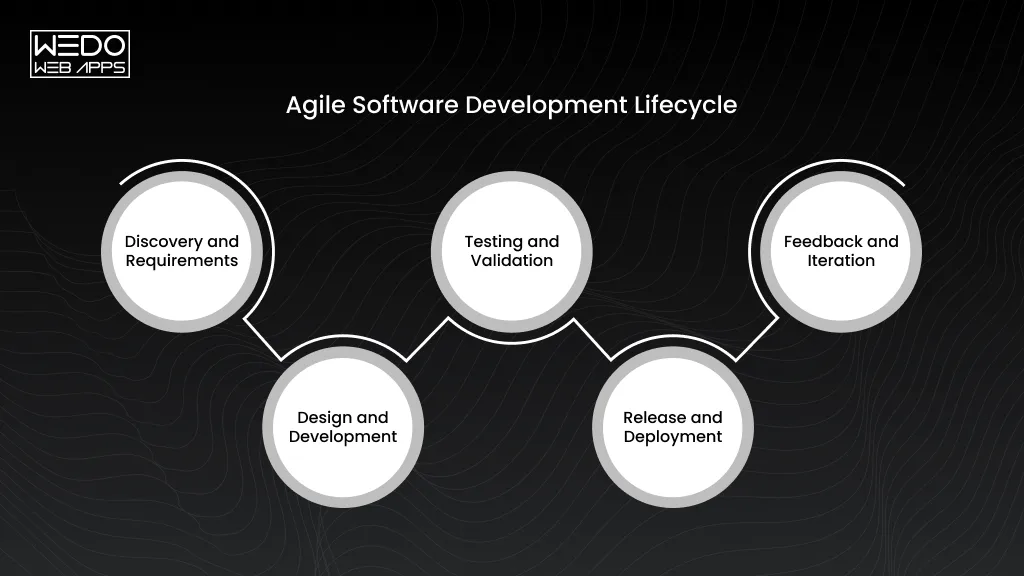
A practical agile software development cycle can be understood through five stages: discovery, development, testing, release, and feedback.

Stage 1: Discovery and Requirements

The team identifies the problem, target users, business goals, and required functionality. Requirements are prioritised and converted into manageable development items.

At this stage, agile software development user stories can help describe features from the user’s perspective while keeping requirements focused on outcomes.

Stage 2: Design and Development

Designers and developers work on the selected requirements. The team creates the interface, architecture, code, and supporting components needed for the planned increment.

Rather than designing and building the entire product upfront, the team focuses on the functionality planned for the current cycle.

Stage 3: Testing and Validation

Testing happens alongside development rather than being left entirely until the end.

Developers and testers check functionality, integrations, usability, security, and other relevant quality requirements. Issues can then be fixed while the related work is still fresh.

Stage 4: Release and Deployment

Once the increment meets the agreed quality and acceptance requirements, it can be released to users or moved to the next deployment environment.

Not every completed increment needs to go directly to production. Release timing depends on the product, business requirements, risk, and deployment strategy.

DevOps consulting can help teams improve these areas and create a delivery process that supports regular Agile releases.

Stage 5: Feedback and Iteration

After release or stakeholder review, the team collects feedback and examines product performance. Now, findings can lead to changes in priorities, requirements, design, or technical work.

Agile Development Cycle at a Glance


StageMain activityTypical outcome
DiscoveryDefine needs and prioritise requirementsRefined development items
Design & DevelopmentDesign and build selected functionalityWorking increment
TestingVerify quality and acceptable criteriaTested increment
ReleaseDeploy or prepare the incrementAvailable functionality
FeedbackReview results and gather insightsUpdated priorities


How Do Sprints Fit Into the Development Cycle?

Sprints are specific to Scrum. A Scrum Sprint provides a fixed period in which a team plans, develops, tests, and reviews a selected set of work.

Other Agile approaches can use continuous flow or different iteration patterns. So, agile software development cycles do not always mean two-week Sprints or follow one universal schedule.

The important idea is the repeated loop of building, testing, reviewing, and improving. Each cycle gives the team new information that can shape the next one.

User Stories in Agile Software Development


User Stories in Agile Development


Requirements can be too broad to guide development directly. A user story makes a requirement easier to understand by describing what a user wants and the value they expect from it.

What Is an Agile User Story?

An agile software development user story is a short description of a feature written from the user’s perspective. It focuses on the user, the request outcomes, and the reason behind it.

A common format is:

As a [user], I want [goal], so that [benefit].

For example:

As a customer, I want to save products to a wishlist, so that I can purchase them later.

The story explains the expected outcome without prescribing exactly how mobile app developers should build the feature.

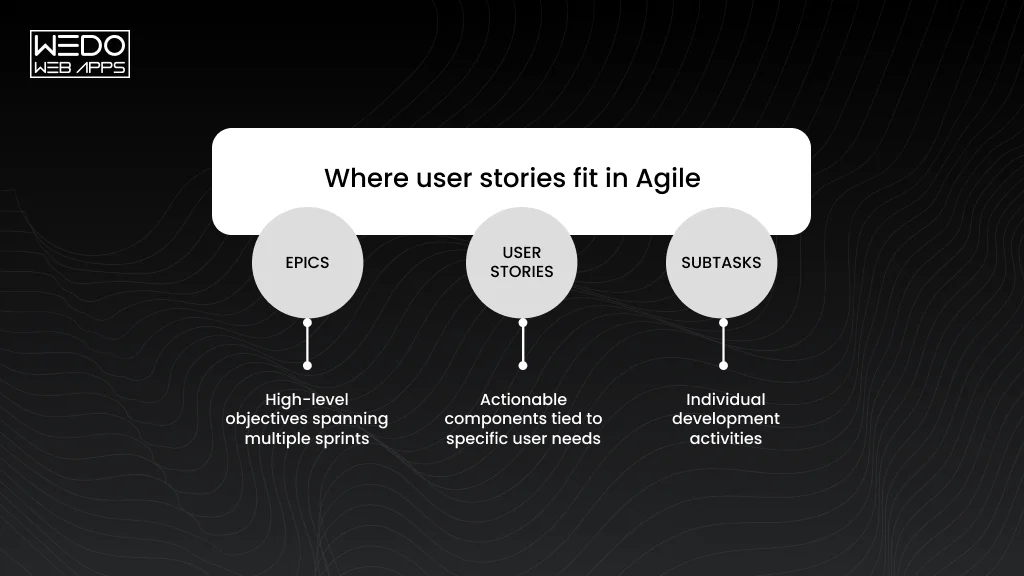
User Stories vs Epics vs Tasks

These items operate at different levels of detail.


Work itemPurposeExample
EpicRepresents a larger area of functionalityCustomer account management
User storyDescribes a specific user needAs a customer, I want to reset my password
TaskBreaks the story into implementation workCreate password reset API


An epic can contain multiple user stories, while each story can be broken into technical or design tasks.

How to Write Effective Agile User Stories

Good stories should give the team enough context without turning into lengthy technical specifications. The INVEST criteria provide a useful check:

  • Independent: Can be developed with limited dependency on other stories.
  • Negotiable: Leaves room for discussion about the implementation.
  • Valuable: Provides a clear benefit to the user or business.
  • Estimable: Gives the team enough information to estimate the work.
  • Small: Can reasonably fit within the team’s delivery cycle.
  • Testable: Has clear conditions for verifying completion.

Acceptance Criteria and Definition of Done

Acceptance criteria define the conditions a user story must meet before it can be accepted.

For a password reset story, criteria might include:

  • Users can request a reset link.
  • A link is sent to the registered email address.
  • Link expires after the defined period.
  • Users can create a new valid password.

The definition of done goes further. It establishes the team’s broader completion standard, which may include code review, agile methodology testing, documentation, and successful integration.

Agile User Story Examples

eCommerce

As a shopper, I want to filter products by price range, so that I can find items within my budget.

Healthcare

As a patient, I want to view upcoming appointments, so that I know when my next consultation is scheduled.

Fintech

As an account holder, I want transaction alerts, so that I can monitor activity on my account.

Each story connects a specific user need with a measurable outcome. That makes it easier for product and development teams to discuss priorities before work begins.

How AI Can Assist With User Stories

AI tools can help teams turn lengthy requirements, meeting notes, or customer feedback into initial user story drafts. They can also suggest acceptance criteria, identify missing details, and group similar requirements.

However, the team still needs to validate whether the story reflects the actual customer need and business priority. AI can speed up refinement, but product owners and stakeholders remain responsible for deciding what should be built.

How AI Is Changing Agile Project Management and Software Development


AI in Agile Project Management


AI is changing how Agile teams handle repetitive planning, documentation, development, and testing tasks. Instead of replacing Agile practices, AI can support teams by processing information faster and reducing manual work.

For teams using the agile methodology of project management, the biggest opportunities are often around faster analysis, better preparation, and quicker feedback.

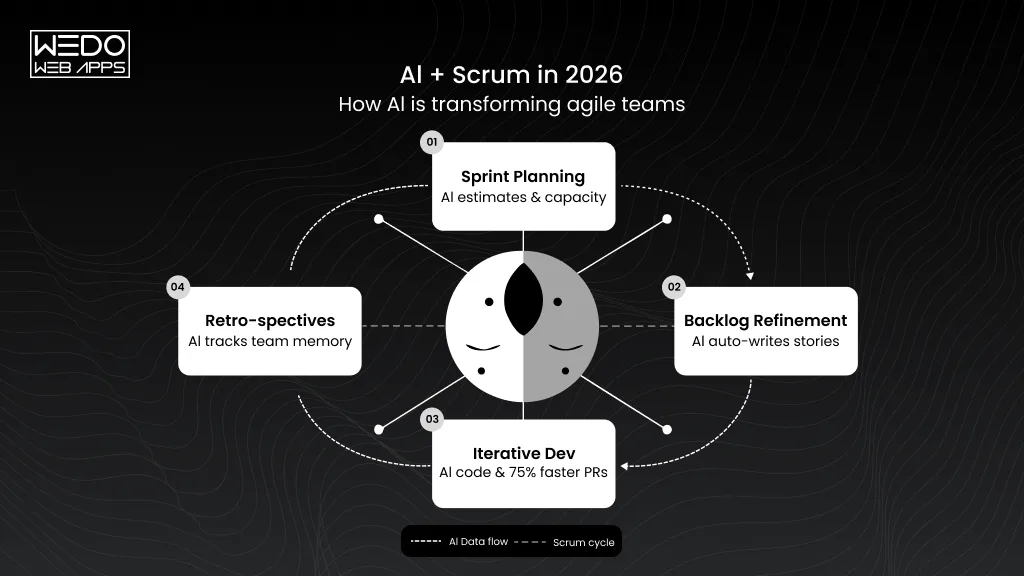
AI-Assisted Backlog and Sprint Planning

Backlogs can become difficult to manage when they contain hundreds of requirements, support requests, and feature ideas. AI can analyse larger volumes of information and help teams group similar items, summarise requirements, and identify potential priorities.

During planning, AI can also help surface dependencies or suggest questions that need clarification before development begins.

The final priority should still come from the product team based on business value, customer needs, technical constraints, and available resources.

AI-Assisted User Stories and Acceptance Criteria

AI can turn meeting notes, customer feedback, or requirement documents into initial user story drafts. It can also suggest acceptance criteria and identify missing details.

This can reduce the time spent preparing backlog items. Product owners and developers still need to review the output because AI-generated requirements may miss business context or introduce assumptions.

AI for Standups, Reporting, and Risk Signals

Agile teams generate information across meetings, tickets, pull requests, test results, and project updates. AI can help turn this information into concise summaries.

It can also highlight patterns such as:

  • Repeated blockers
  • Delayed work items
  • Increasing defect counts
  • Unresolved dependencies
  • Changes affecting planned releases

These signals can help teams investigate potential issues earlier rather than waiting for a problem to affect delivery.

AI Coding and Testing Assistance

AI coding tools can assist developers with tasks such as generating code suggestions, explaining existing code, creating test cases, and identifying potential issues.

Testing teams can also use AI to generate test scenarios from requirements or analyse test results for patterns.

These capabilities can support agile software development cycles by shortening some development and testing tasks. Human review remains important because generated code and tests still need to be checked for correctness, security, performance, and compatibility.

Where Human Judgement Still Matters

AI can process information and generate suggestions, but Agile teams still need people to make decisions that depend on context and accountability.


AreaHuman responsibility
Business prioritiesDecide which work creates meaningful business or customer value
RequirementsConfirm that requirements reflect actual user needs
RiskAssess the impact and urgency of identified risks
ArchitectureMake technical choices based on long-term system requirements
Customer feedbackInterpret feedback within its business context
AI outputReview and validate generated recommendations, code, and content


AI integration can make parts of Agile delivery faster, but it does not remove the need for product ownership, technical expertise, collaboration, or accountability.

Agile Software for Business Growth

Agile Methodology Tools and Metrics

Agile teams need visibility into their work, but the tools and metrics should support the process rather than become the process itself. The right setup helps teams manage backlogs, track work, identify delays, and discuss improvements using real project data.

Common Agile Project Management Tools

Different tools support different parts of an Agile workflow.


ToolCommon use
JiraBacklog management, Sprint planning, issue tracking, and Agile reporting
TrelloVisual task management using boards and cards
Azure DevOpsPlanning, development, testing, repositories, and delivery
MiroWorkshops, user story mapping, planning, and team collaboration


Your choice should depend on team size, workflow, integrations, reporting needs, and the complexity of the project.

Agile Metrics Teams Can Track

Metrics can help teams understand how work is moving through the system and where improvements may be needed.

  • Velocity: Shows how much work a team typically completes during an iteration. It is most useful for the team’s own planning and should not be treated as a universal productivity score.
  • Sprint burndown: Shows remaining work during a Sprint and helps identify whether planned work is progressing.
  • Cycle time: Measures how long a work item takes from active development to completion.
  • Lead time: Measures the time between a request being made and the work being delivered.
  • Deployment frequency: Tracks how often software is deployed.
  • Defect trends: Shows patterns in reported defects and can highlight areas that need attention.

The purpose of these metrics is to identify bottlenecks, improve planning, and support better delivery decisions. They should provide context for team discussions rather than become targets that encourage teams to optimise numbers instead of outcomes.

How to Get Started With Agile Methodology

Adopting Agile does not mean changing every project process at once. Start with the delivery problems you need to solve, choose practices that address them, and improve the approach as your team gains experience.

Define What You Want Agile to Improve

Start by identifying the problems affecting your current delivery process.

You may be dealing with changing requirements, delayed feedback, long release cycles, unclear priorities, or issues discovered too late. Define the specific outcomes you want to improve before choosing an Agile framework.

Choose a Framework That Fits Your Workflow

Select an approach based on your team’s work rather than adopting a framework because it is widely used.

Consider:

  • Team size and structure
  • Type of development work
  • Frequency of incoming requests
  • Level of stakeholder involvement
  • Dependencies between teams
  • Release requirements

A product development team may benefit from Scrum, while a support team handling continuous requests may find Kanban more suitable.

Choosing an Agile framework is only one part of setting up an effective development process. You also need to align your technology choices, project requirements, architecture, and delivery goals with the wider business strategy. For complex software initiatives, software consulting can help you evaluate these areas before development begins.

Build and Prioritize the Backlog

Bring requirements, feature ideas, technical work, and defects into a visible backlog.

Prioritise items using factors such as customer value, business impact, dependencies, risk, and effort. Keep the backlog refined so the team has enough clarity to plan upcoming work.

For teams following the agile methodology of project management, a well-managed backlog connects business priorities with actionable development work.

Start With a Manageable Delivery Cycle

Begin with a realistic amount of work instead of trying to change the entire delivery process immediately.

If you use Scrum, establish a Sprint cadence. If you use Kanban, define workflow stages and appropriate work-in-progress limits. Track what happens and adjust the process based on actual results.

This allows your team to identify delivery issues before expanding the approach across other projects or teams.

Establish Feedback and Review Practices

Create regular opportunities for stakeholders and customers to review progress.

Use reviews, demonstrations, user feedback, analytics, support data, and other relevant signals to understand whether the product is solving the intended problem.

Team retrospectives can then help identify process improvements, while stakeholder reviews keep product priorities aligned with business needs.

Measure Results and Improve the Process

Track useful indicators such as cycle time, lead time, defect trends, release frequency, and customer feedback.

Use the data to identify bottlenecks and improvement opportunities. Avoid turning individual metrics into rigid performance targets, especially when they can encourage teams to optimize numbers rather than outcomes.

For example, velocity can help with Sprint planning, but it should not be treated as a direct measure of team productivity.

Common Mistakes to Avoid

Agile adoption can lose its value when teams focus on rituals instead of outcomes.

  • Treating Agile as a meeting schedule: Daily standups, reviews, and retrospectives should support delivery and improvement rather than exist as routine obligations.
  • Copying Scrum without understanding the need: Adopt practices that solve your team’s actual problems instead of implementing every Scrum practice by default.
  • Changing priorities without backlog control: Frequent changes can cause confusion when new requests enter development without clear prioritisation.
  • Measuring only velocity: Velocity can help with Sprint planning, but it should not become a standalone measure of team productivity.
  • Skipping technical quality: Fast delivery still requires testing, code reviews, security checks, maintainable architecture, and other appropriate engineering practices.
  • Letting AI make project decisions independently: AI can assist with analysis, planning, coding, and testing. People should remain accountable for product priorities, requirements, technical decisions, and validation.

A successful Agile implementation develops over time. Start with a clear problem, establish a workable process, learn from each cycle, and adjust the approach as your team’s needs change.

Final Thoughts on Agile Methodology

Agile methodology gives teams a practical way to manage changing requirements while keeping development focused on customer and business needs. Its iterative approach encourages teams to deliver, review, learn, and improve throughout the project.

The key is choosing practices that fit your workflow. Scrum, Kanban, SAFe, and other Agile approaches serve different needs. For software teams, iterative development, continuous testing, user stories, and regular feedback can make delivery easier to adapt as requirements evolve.

AI can also support the agile methodology of software development by helping with planning, documentation, coding, testing, and analysis. Human judgment still matters when setting priorities, validating requirements, and making technical or business decisions.

When Agile practices are aligned with clear goals and measurable outcomes, your team can build software with greater visibility and adapt the delivery process as the project develops.

Agile Plan Into Reliable Software