skip to content

20 Layouts for Websites to Inspire Your Web Design

Layouts for Websites: The Foundation of Effective Web Design

A website’s layout determines how visitors navigate, interact, and respond to your content. From simple single-column structure to creative asymmetrical designs, the right layout improves usability, engagement, and conversions.

Vibrant colors, stunning images, and engaging content can make a website attractive. But, the true essence of a site is in its layout. When you remove the decorations, the layout remains. It reveals how crucial it is in defining the website’s brilliance and function. The layout is the backbone that supports and enhances the user experience.

This guide presents modern website layout ideas, and practical inspiration to help you choose the structure that fits your goals and audiences.

What Exactly Is a Website Layout?

A website layout is the structural framework that organizes content, navigation, visuals, and interactive elements so users can easily browse and find information. It is the blueprint that shapes a website’s structure. It organizes all the information on a site for both the owner and visitors. A layout creates clear paths and highlights key elements. It ensures users can easily find what they want.

It doesn’t matter if you’re starting a blog or building a business website. The layouts for websites set the content’s hierarchy. It guides visitors through your website, helping to communicate your message effectively.

In short, a well-designed layout is crucial for the success of any website.

Key Components of a Website Layout

  • Header with logo and navigation.
  • Main content area.
  • Visual elements such as images or videos.
  • Sidebars or supporting sections.
  • Call-to-action areas.
  • Footer with additional links and information.

A well-structured layout not only organizes content but also guides visitors toward meaningful actions on the website.

Why Choosing the Right Layout Matters?

The layout influences how easily visitors understand your website, navigate content, and decide whether to stay or leave.

Selecting the right layout is crucial for several reasons:

A good layout keeps visitors on your site by making important information easy to find and navigate. But, a bad layout frustrates users. It causes them to leave quickly because they can’t find what they need.

A well-designed layout helps to:

  • Make important information easy to find.
  • Improve navigation and usability.
  • Increase time spent on the site.
  • Encourage users to explore more pages.
  • Support conversions such as purchases or sign-ups.

It’s worth taking the time to choose a good layout. Users decide in seconds whether to stay on your site. The layout directly impacts user engagement. It influences how long they stay, how many pages they visit, and if they return.

Additionally, a good layout offers more than just overcoming quick user judgments. It enhances overall engagement, which can be highly beneficial.

Design principles such as the Gestalt law of closure explain how users naturally perceive patterns and complete visual gaps. When applied thoughtfully, these principles help to create a layout that feels more organized, intuitive, and easy to understand at a glance.

Choosing the right layout is not only about appearance. It directly affects usability, engagement, and how effectively your website achieves its purpose.


Website Layout Design Ideas Performance Optimization

Mastering Essential Layout Design Principles

To make the most of your layout design choices, it’s crucial to understand some fundamental concepts about website layouts. Here are a few key ideas to guide you through the myriad of predefined layouts available:

Visual Weight and Negative Space

Visual weight refers to how certain elements on a webpage draw more attention than others. This can be achieved through various techniques, with negative space being particularly effective. Negative space, or empty areas on the page, highlights elements with stronger visual force.

For instance, consider a design with a large black square and four smaller white squares. The empty space around the black square makes it more prominent, drawing the viewer’s attention. The black square has a stronger visual impact. This is compared to the smaller white squares. It shows the power of visual weight and negative space.

Creating Balanced Website Layouts

Balanced web design ensures that all elements support one another, giving equal importance to text and visuals. This approach makes the content easily scannable and presents it in a cohesive manner. The result is a stable and aesthetically pleasing design.

A popular method for achieving balance is symmetrical design. Similar to a mirror image, symmetrical layouts have visual elements that appear the same on either side of the center. This symmetry creates balance, elegance, and harmony. It is like what you see in architecture, gardens, and even butterfly wings.

Designing Sections for Different Audiences

Creating a website layout is crucial. It must allow users to easily move between sections and address specific audiences. Consider fashion websites that target both men and women, for example.

These sites often feature distinct sections for men’s and women’s apparel. This divided layout serves each audience well. It provides content tailored to their needs. This way, the site lets users find things quickly. They can find the info or products they want. This makes their experience better.

Crafting Layouts to Achieve Website Goals

Before you start designing a layout or browsing through templates, it’s essential to define your website’s goals. You may aim to sell products, attract traffic, or delight users with art. Your layout should align with these goals. The right layout will encourage user behaviors. It helps achieve your goals and ensures your website fulfills its purpose well.


Redesign Your Website Today

Top Website Layouts with Proven Effectiveness in 2024

Here are some of the most popular website layouts. Designers around the world use them to create powerful and engaging websites.

1. The Zig-Zag Layout

Zig-Zag website Layout

Research shows that users often scan webpage content in a Z-pattern:

  1. First, the eye moves from left to right.
  2. Then, it goes down and to the left.
  3. Finally, it moves back across to the right.

Because it aligns with this common browsing behavior, the zig-zag layout is suitable for a wide variety of websites across different industries.

Best For: Landing pages, promotional sales, and simple business websites.

Why it Works: Matches natural scanning behavior for quick information processing.

2. The F-Shape Layout

F-Shape website Layout

The F-shape layout follows a common scanning behavior where users’ eyes move across the page in an F-pattern:

  1. The eyes first move horizontally across the top.
  2. Then they move down a bit and scan another horizontal section.
  3. Finally, they move vertically down the left side.

It aligns with the natural reading pattern. So, the F-shape layout is effective for many types of websites. These include e-commerce and portfolio sites.

Best For: Blogs, news sites, content-heavy pages.

Why it Works: Aligns with typical reading behavior for text-focused content.

3. Full-Screen Photo Layout

Full-Screen Photo website Layout

Source: Newcastle

This layout features content overlaid on a full-screen photo or image. Text and menu sections are strategically placed to enhance the visual impact, making the image the focal point. This approach is ideal for websites that want to make a strong first impression and instantly convey the site’s theme or message to visitors. It’s particularly effective for portfolios, travel sites, and businesses looking to showcase their brand visually.

Best For: Portfolio, travel websites, brand storytelling.

Why it Works: Creates strong visual impact immediately.

4. Grid Layout

Grid website Layout

A grid layout organizes information into a grid. This makes content easy to browse and lets users focus on topics. This design evenly spreads text, photos, and videos on the webpage. It lets users choose the importance of each element. The grid layout is great for content-rich websites like newspapers, blogs, and vlogs. It gives a clear, tidy way to show a lot of information. This layout ensures a clean, balanced appearance that enhances user experience and engagement.

Best For: eCommerce, galleries, content-rich sites.

Why it Works: Makes large amounts of information easy to browse.

5. One-Column Layout

One-Column website Layout

The one-column layout organizes all information into a single, straightforward column. It’s one of the simplest layouts to use. It makes text, photos, and videos easy to follow without much scanning. This design is ideal for research papers and long-form articles. It is good for content that benefits from a linear reading flow.

Additionally, one-column layouts are perfect for mobile experiences, ensuring that content is easily accessible and readable on smaller screens.

Best For: Long-form content, research articles, mobile experiences.

Why it Works: Provides a simple, distraction-free reading path.

6. Captivating Featured Image Layout

Captivating Featured Image website Layout

A widely used layout today involves setting up a prominent featured image for each page on the website. This image captures attention and serves as a focal point that visually represents the page’s topic. It not only draws interest but also provides a clear, visual summary of the content, enhancing user engagement. The featured image becomes the central element from which the page’s meaning radiates. This layout is especially effective for niche blogs, freelancers, and professionals looking to make a strong visual impact.

Best For: Blogs, personal brands, creative professionals, niche websites.

Why it Works: Delivers a strong visual summary and draws users into the content.

7. Embracing Asymmetry in Layouts

Embracing Asymmetry in Layouts

The asymmetrical layout bends the rules of symmetry to create a unique and dynamic design. By playing with balance and creating active spaces, it makes white space more engaging and lively. This layout suggests that there is more to offer than just perfection.

It’s great for creative web design sites. Also, for unique portfolio presentations and innovative business websites. The layout is asymmetrical. It captures attention with its unconventional approach. It’s perfect for brands that want to stand out and show their originality.

Best For: Creative agencies, portfolios, and innovative brands.

Why it Works: Stands out visually while conveying originality and creativity.

8. Engaging with Split Screen Layouts

Engaging with Split Screen website Layouts

The split screen layout can be either vertical or horizontal, or even a combination of both. A vertical split screen is great for showing two or more distinct areas. It makes it easy for users to make quick choices and to engage with the site right away.

In some cases, a layout may feature both vertical and horizontal splits on the same page. This approach doesn’t force a choice. Instead, it improves the user experience by letting sections complement each other.

The split screen layout is good for online stores. These stores cater to different demographics such as men’s and women’s sections. It is also good for creative websites that promote wellness and other lifestyle themes. This design effectively balances multiple elements, making the overall experience more dynamic and interactive.

Best For: eCommerce sites targeting multiple audiences, product comparisons, lifestyle brands.

Why it Works: Helps users quickly choose distinct options.

9. Headline and Thumbnail Gallery Layout

Thumbnail Gallery website Layout

In today’s visually-driven online landscape, the headline and thumbnail gallery layout can be incredibly effective. This design features small image thumbnails that link to detailed descriptions, accompanied by headlines and brief summaries to guide users through the visual content.

This layout is perfect for travel websites, blogs, and magazines. It offers an engaging and organized way to present a wealth of visual information. It captivates users with striking visuals while providing easy navigation through various topics.

Best For: Magazines, travel sites, news portals, content hubs.

Why it Works: Combines visual browsing with structured navigation.

10. Modular Layout (Card Layout / Block Layout)

Modular website Layout

Source: Sky News

The modular layout, also known as card or block layout, is closely associated with Google’s Material Design. This layout is gaining popularity for its flexibility and responsiveness. In a modular layout, each content unit, whether text, images, videos, or buttons, is contained within its own card or module, providing a dedicated space for each element.

Applying modular layouts to websites results in a streamlined appearance and a highly organized composition of items on the page. This layout is ideal for business websites, where clear, coherent presentations are essential for maintaining a professional online presence.

Best For: Business websites, dashboards, product listings, service pages.

Why it Works: Creates a clean, organized structure that adapts well to different screen sizes.

11. Magazine Layout

Magazine website Layout

Modern magazine layouts often blend various design elements to create a visually rich and engaging presentation. This layout typically combines features like headline and thumbnail galleries, featured images, and an F-shaped layout to maintain the magazine’s glamorous appeal.

These combinations work well for online magazines but can also be effective for other content-heavy websites. They offer a dynamic and captivating way to present information.

Best For: News websites, online publications, blogs with frequent updates.

Why it Works: Presents large volumes of content in an engaging, hierarchical format.

12. Single Page Layout

Single Page website Layout

Source: FreeConvert.com

The single page layout stands out for its unique characteristics. It consolidates multiple actions into a single page, with content dynamically loaded using JavaScript. This layout also generates unique URLs for each section, providing a seamless and interactive user experience. Examples include applications like Gmail.

The single page layout is ideal for applications and websites that aim to offer a streamlined, uninterrupted user experience.

Best For: Small businesses, product launches, portfolios, event websites.

Why it Works: Provides a seamless browsing experience without interruptions.

13. Radial Symmetry Layout

Radial Symmetry website Layout

The radial symmetry layout is a less common but visually striking design. In this layout, elements are arranged around a central point, radiating outwards in a circular pattern. This creates a balanced and harmonious appearance, drawing attention to the central element while maintaining a cohesive structure for the surrounding items. This layout is ideal for websites looking to make a unique visual impact.

Best For: Artistic websites, experimental designs, niche brands.

Why it Works: Naturally draws attention to the center while maintaining visual harmony.

14. Parallax Scrolling Layout

Parallax Scrolling website Layout

The parallax scrolling layout creates an immersive experience by allowing background images to move slower than foreground images as users scroll down the page. This effect adds depth and a sense of motion, making the website more engaging and visually appealing.

This layout is ideal for storytelling websites, product showcases, and creative portfolios. It captivates visitors and encourages them to explore the site further, enhancing the overall user experience.

Best For: Storytelling websites, product showcases, creative portfolios.

Why it Works: Produces an immersive and memorable browsing experience.

15. Boxed Layout

Boxed website Layout

The boxed layout confines the content within a fixed-width container, often surrounded by margins or padding. This design creates a clean and organized look, making it easier for users to focus on the content without distractions from the background.

Boxed layouts are perfect for business websites, blogs, and e-commerce sites. They offer a structured and professional appearance, ensuring that the content remains the focal point while maintaining a cohesive and user-friendly design.

Best For: Corporate sites, blogs, eCommerce stores.

Why it Works: Keeps focus on content while maintaining a clean, structured appearance.

16. Bento Grid Layout
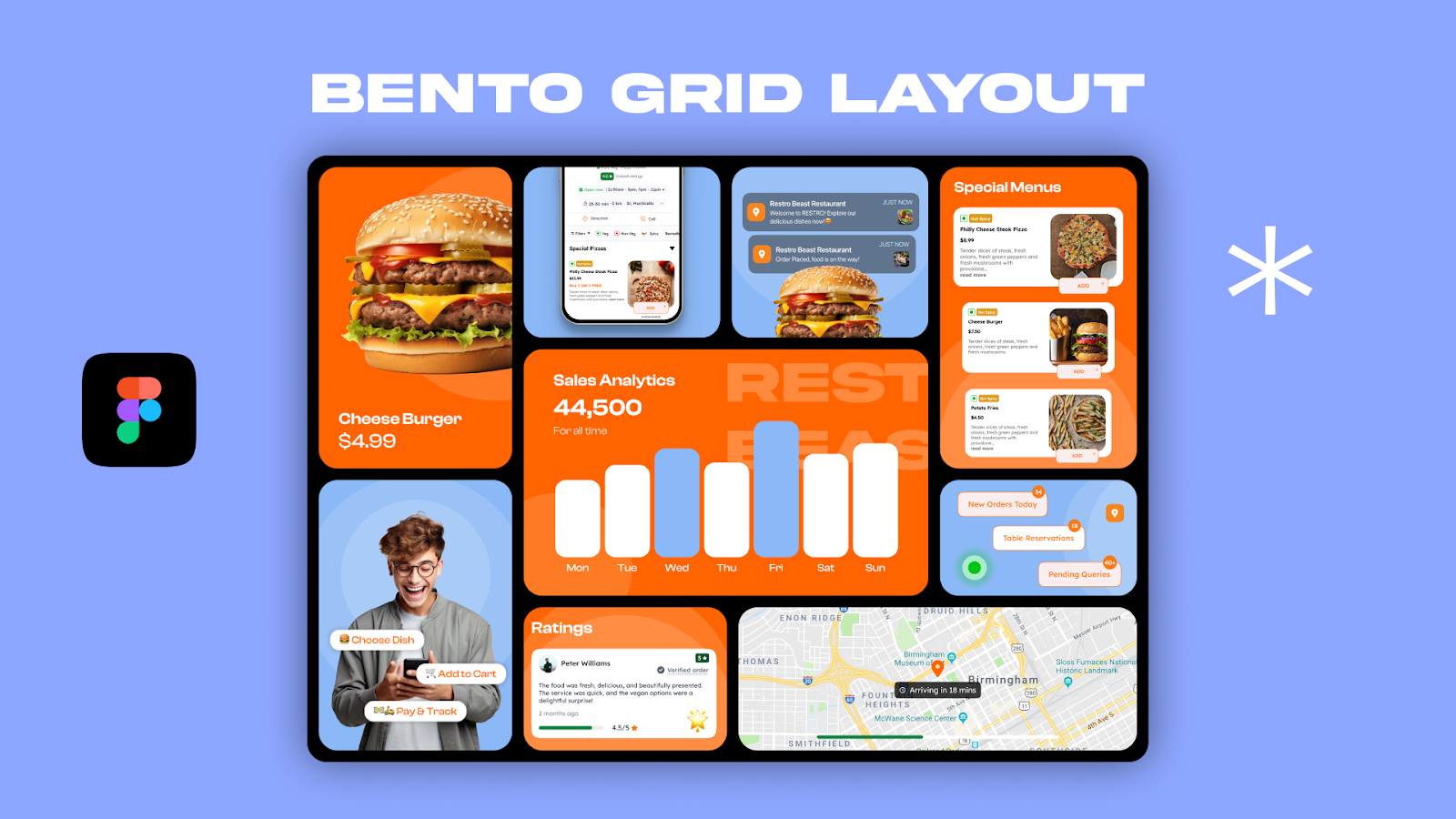
Bento Grid website Layout

Inspired by compartmentalized bento boxes, this layout arranges content into neatly organized blocks of varying sizes.

Best For: Product websites, tech platforms, portfolios.

Why it Works: Presents diverse content clearly while maintaining visual balance.

17. Dashboard-Style Layout
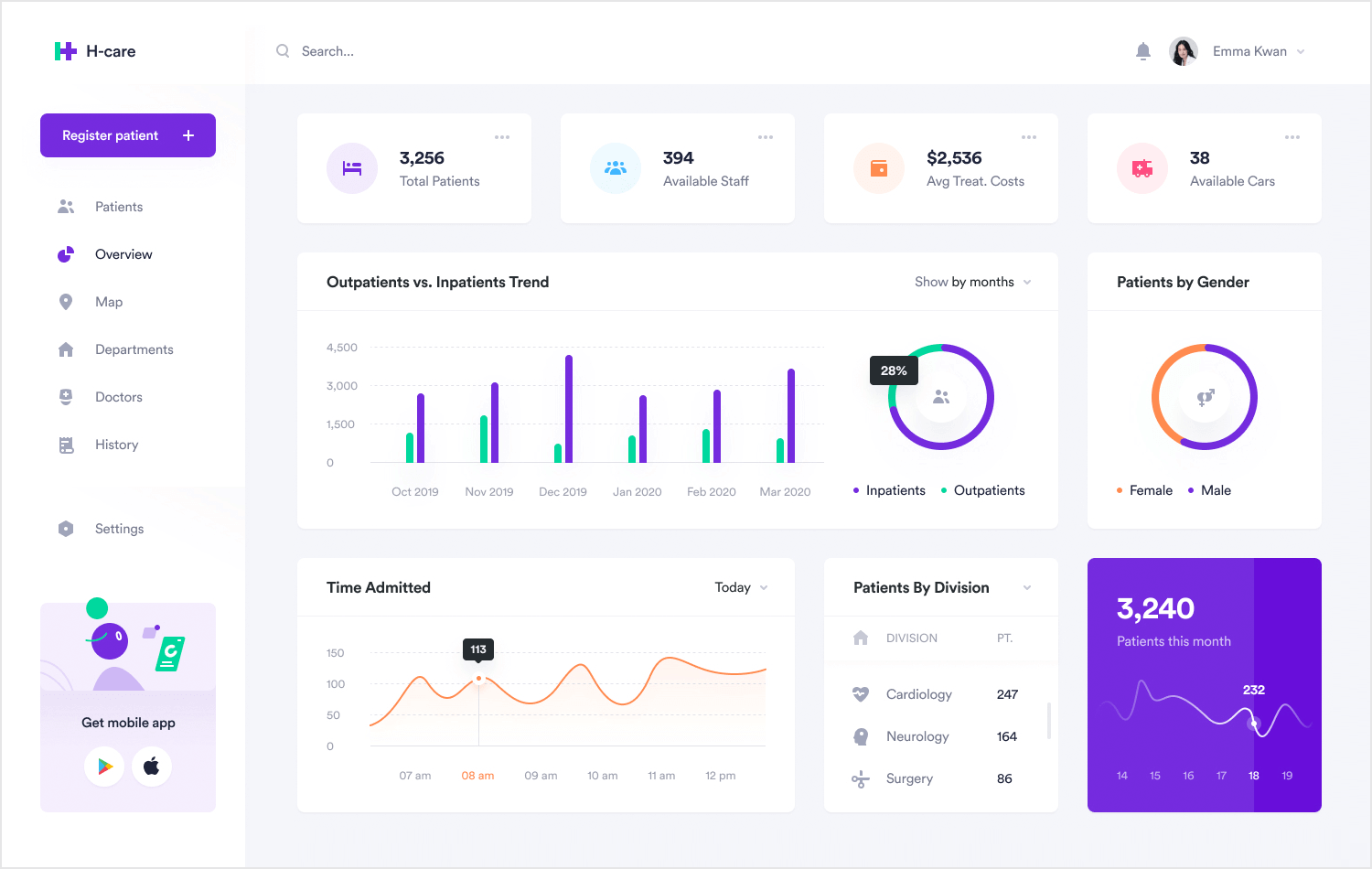
Dashboard-Style website Layout

Designed like application interfaces, this layout prioritizes quick access to tools, metrics, and navigation panels.

Best For: SaaS platforms, analytics tools, admin portals.

Why it Works: Supports efficient interaction and data visibility.

18. Minimalist Layout
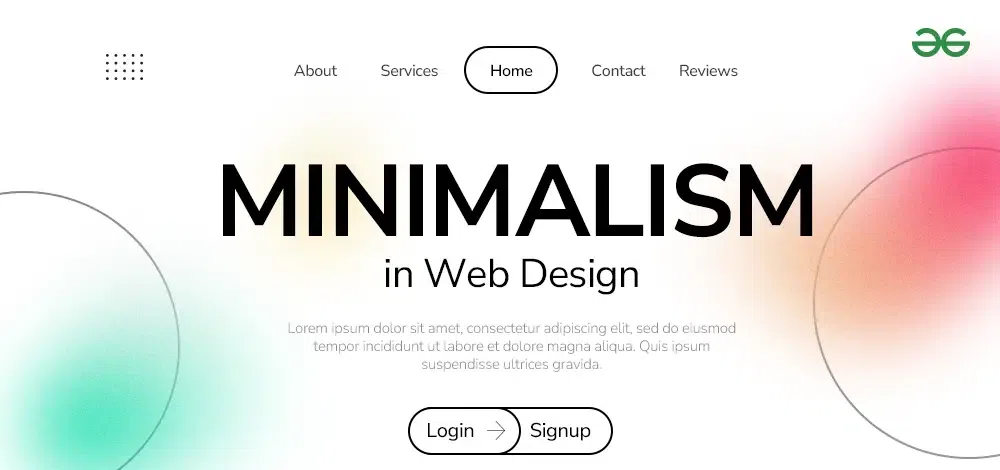
Minimalist website Layout

This layout removes nonessential elements and focuses on clarity, typography, and spacing.

Best For: Professional services, luxury brands, portfolios.

Why it Works: Reduces distractions and communicates sophistication.

19. Storytelling Scroll Layout

Storytelling Scroll website Layout

Content unfolds sequentially as users scroll, often enhanced with animations and transitions.

Best For: Brand storytelling, product launches, campaigns.

Why it Works: Guides users through a narrative journey.

20. App-Style Navigation Layout
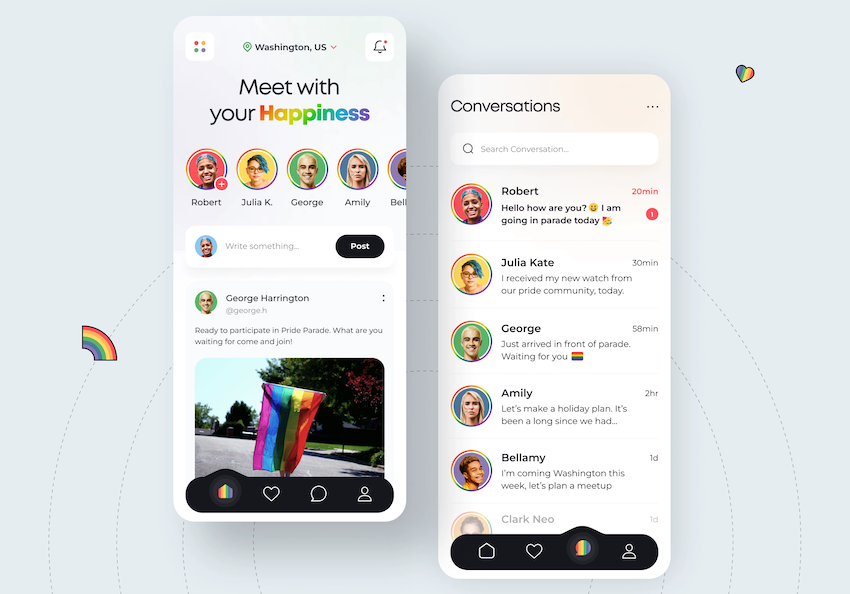
App-Style Navigation website Layout

Resembles mobile applications with persistent menus, panels, and interactive components.

Best For: Web apps, tools, community platforms.

Why it Works: Feels familiar to users accustomed to mobile interfaces.

How to Choose the Best Website Layout for Your Needs
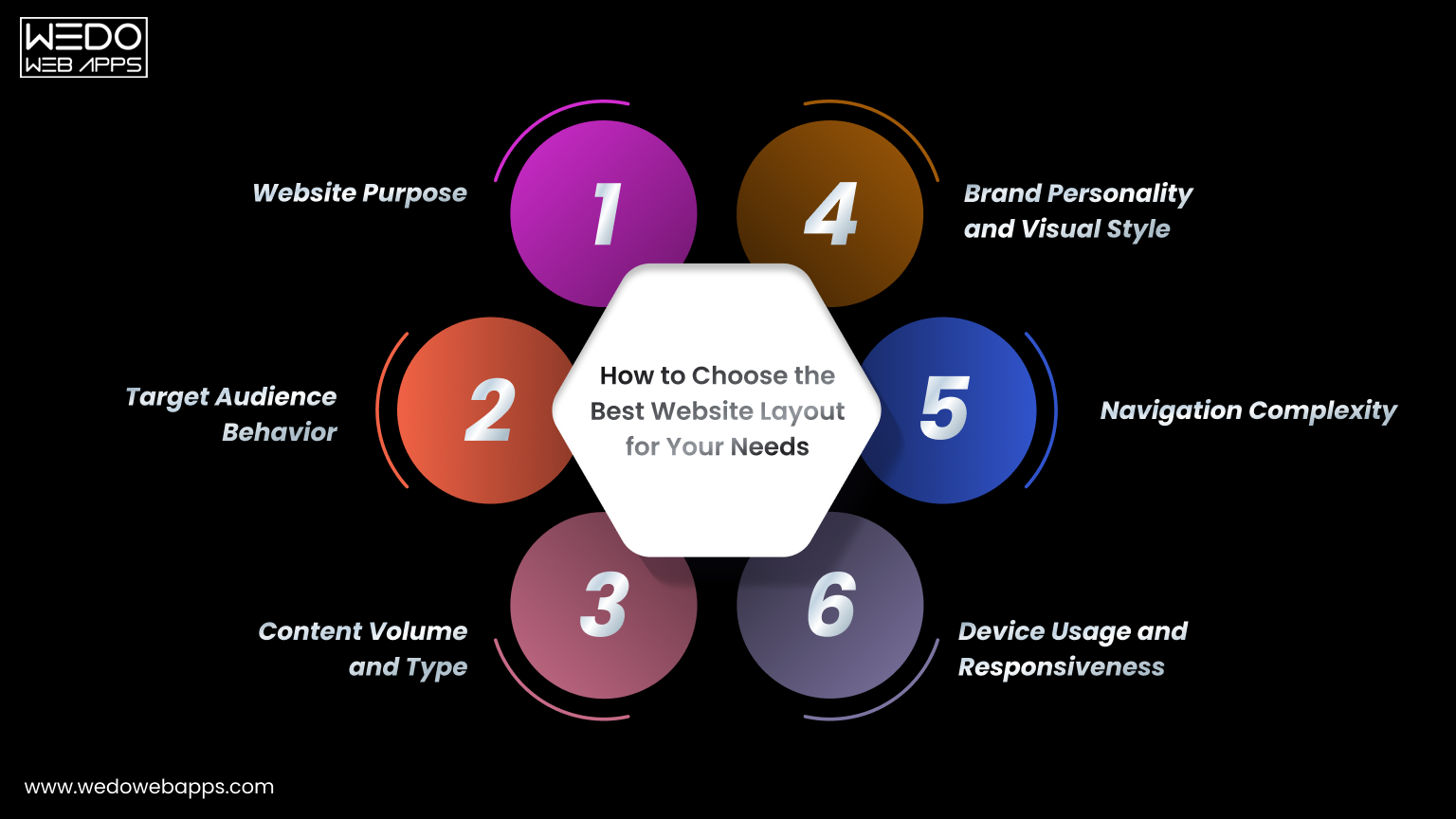
How to Choose the Best Website Layout Design

Selecting a layout is not just about visual appeal. The right structure should support your goals, audience expectations, and type of content. Consider the following factors before making a decision.

Website Purpose

Start by defining what your website needs to achieve.

  • Business sites should focus on clarity and trust.
  • eCommerce stores require easy product browsing.
  • Portfolios should highlight visual work.
  • Blogs prioritize readability and content flow.

A layout that aligns with your purpose helps visitors take the desired action.

Target Audience Behavior

Understanding how your audience interacts with websites is essential.

For example, younger users may prefer visually rich, interactive layouts, while professional audiences often value clean and straightforward structures.

Design choices should reflect how your visitors browse and what they expect to find quickly.

Content Volume and Type

The amount and format of your content strongly influence layout selection.

  • Content-heavy sites benefit from grid or magazine layouts.
  • Image-focused sites work well with fullscreen or gallery layouts.
  • Data-driven platforms often use dashboard-style layouts.
  • Minimal content may perform better with single-page designs.

Choosing a layout that fits your content prevents clutter and confusion.

Device Usage and Responsiveness

Most traffic now comes from mobile devices, making responsive design essential.

Single-column, modular, and card-based layouts adapt well to smaller screens, ensuring readability and usability across devices.

A mobile-friendly structure improves both user experience and search visibility.

Navigation Complexity

Consider how many pages and sections your site will contain.

Simple websites can rely on straightforward navigation, while large platforms may require layered menus, filters, or sidebar navigation systems.

Clear navigation prevents users from feeling lost.

Brand Personality and Visual Style

Your layout should reflect your brand’s identity.

  • Creative brands can experiment with asymmetry and bold visuals.
  • Corporate organizations benefit from structured layouts.
  • Premium brands often use minimalist designs.
  • Innovative companies may adopt unconventional formats.

Consistency between layout and brand message strengthens credibility.

Choosing a layout that balances usability, aesthetics, and functionality ensures your website delivers a positive experience while achieving its objectives.


Website Layout Design Ideas Expert Consultation

Website Layout Ideas by Industry

When exploring website layout ideas, it is important to remember that different industries require different structures. The way information is presented on a corporate site is very different from how products are displayed in an online store or how articles appear on a blog. Choosing the right web page layout ideas for your field helps users navigate easily and builds confidence in your brand.

Below are some modern website layout designs and website design layout examples tailored to specific industries for inspiration.

Business and Corporate Websites

Corporate websites need to communicate professionalism, services, achievements, and contact information clearly. Visitors are often evaluating credibility, so the layout should feel structured and trustworthy.

Popular website layout ideas for corporate sites include:

  • Grid and modular layouts for organizing services.
  • Boxed layouts for a clean, formal presentation.
  • Minimalist designs to highlight key information.
  • Structured sections for testimonials, case studies, and company details.

These website design layout examples make large amounts of information easy to scan while maintaining a polished appearance.

eCommerce Websites

Online stores require creative website layouts that make browsing products simple and enjoyable. Users typically want to compare items quickly, view images clearly, and complete purchases without obstacles.

Effective web page layout ideas for eCommerce include:

  • Product grid layouts for displaying many items at once.
  • Modular or card-based designs for product categories.
  • Split screen layouts to highlight promotions or collections.
  • Dashboard-style pages for user accounts and order tracking.

These modern website layout designs reduce friction and help shoppers move smoothly from discovery to checkout.

Portfolio Websites

Portfolio sites focus on showcasing work visually, making them ideal for creative website layouts that emphasize images and projects rather than text.

Website layout inspiration for portfolios often includes:

  • Full screen image layouts for strong visual impact.
  • Asymmetrical designs that reflect creativity.
  • Gallery or grid formats for project collections.
  • Bento-style layouts to present diverse work neatly.

These website design layout examples allow visitors to quickly evaluate skills and style, which is crucial when attracting clients or employers.

Blogs and Media Websites

Content-driven sites require website layout ideas that support readability and frequent updates. Readers often skim headlines before choosing what to read, so layouts must prioritize scanning behavior.

Common web page layout ideas for blogs include:

  • F-pattern layouts aligned with reading habits.
  • Magazine-style layouts for content-heavy sites.
  • Thumbnail galleries to showcase multiple posts.
  • Single-column layouts for long-form articles.

These modern website layout designs help readers navigate large volumes of content without feeling overwhelmed.

SaaS and Technology Platforms

Technology websites must explain complex products clearly while guiding users toward actions such as signing up or requesting a demo. The layout should simplify information rather than add confusion.

Creative website layouts commonly used by SaaS companies include:

  • Modular layouts that break features into sections.
  • Dashboard-style designs resembling app interfaces.
  • Minimalist layouts that emphasize value propositions.
  • App-style navigation familiar to modern users.

These website layout ideas make sophisticated tools feel approachable and easy to understand.

Selecting industry-specific website layout inspiration ensures your design meets user expectations while presenting information in the most effective way. When structure, content, and audience needs align, even complex websites can feel intuitive and engaging.

Website Layout Trends for Modern Website Design (2026)
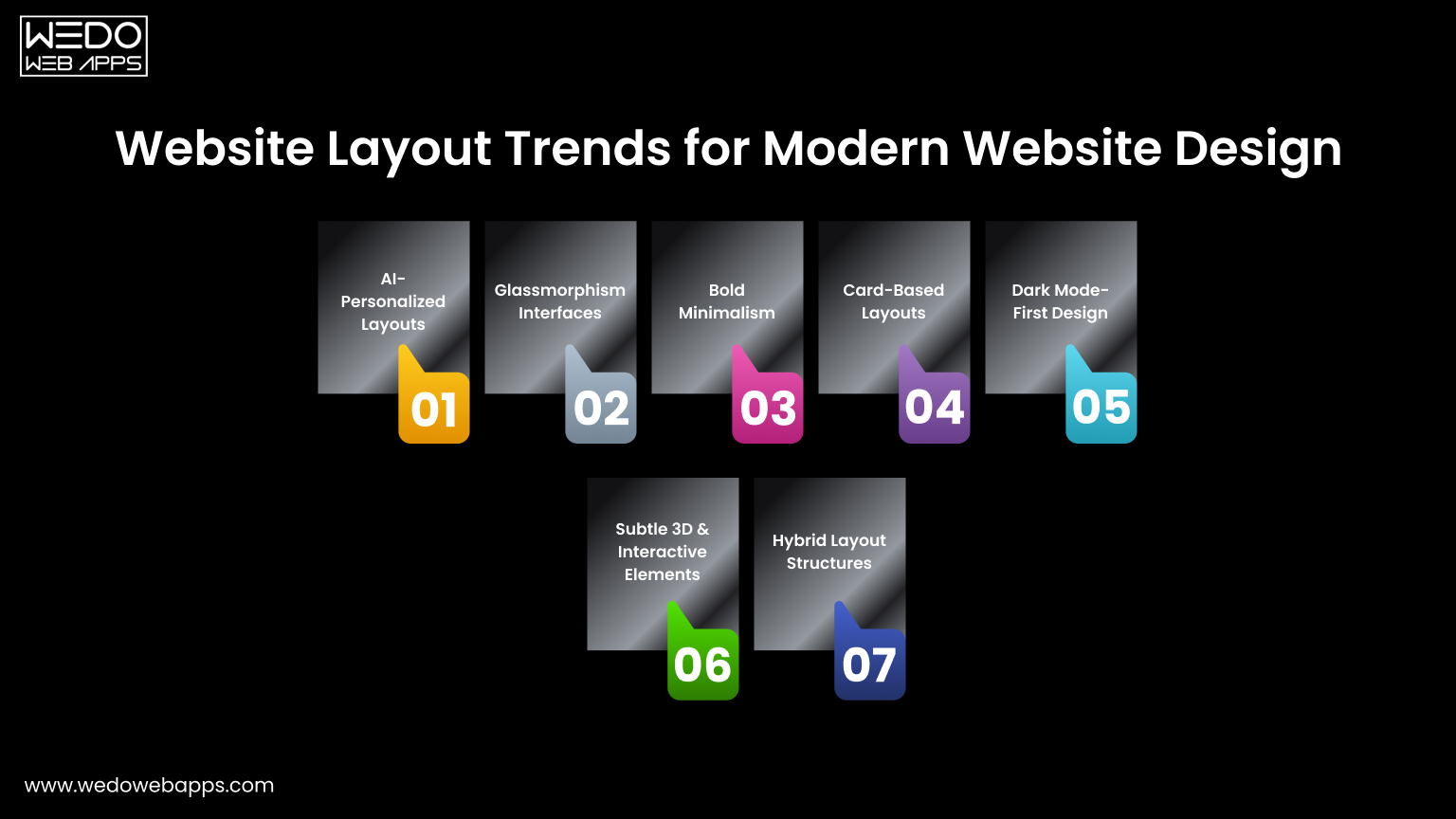

Modern Website Layout Design Ideas

Staying updated with current trends helps your site feel modern, engaging, and user-friendly. The latest modern website layout designs focus on personalization, clarity, and immersive visuals while maintaining fast performance.

Here are the most impactful website layout ideas shaping websites in 2026.

AI-Personalized Layouts

Content adapts based on user behavior, location, or preferences, improving relevance and engagement.

Glassmorphism Interfaces

Blurred backgrounds and translucent panels add depth while keeping the layout clean and minimal.

Bold Minimalism

Simple structures paired with large typography and strong visual hierarchy for quick communication.

Card-Based Layouts

Modular content blocks organize information clearly and work well across all devices.

Dark Mode-First Design

Modern interfaces optimized for dark themes, improving comfort and visual contrast.

Subtle 3D and Interactive Elements

Light animations and depth effects create memorable, modern experiences without overwhelming users.

Hybrid Layout Structures

Combining multiple layout styles on one page to support different content types effectively.

Following these trends can provide fresh website layout inspiration while ensuring your design meets current user expectations.

Common Website Layout Mistakes to Avoid
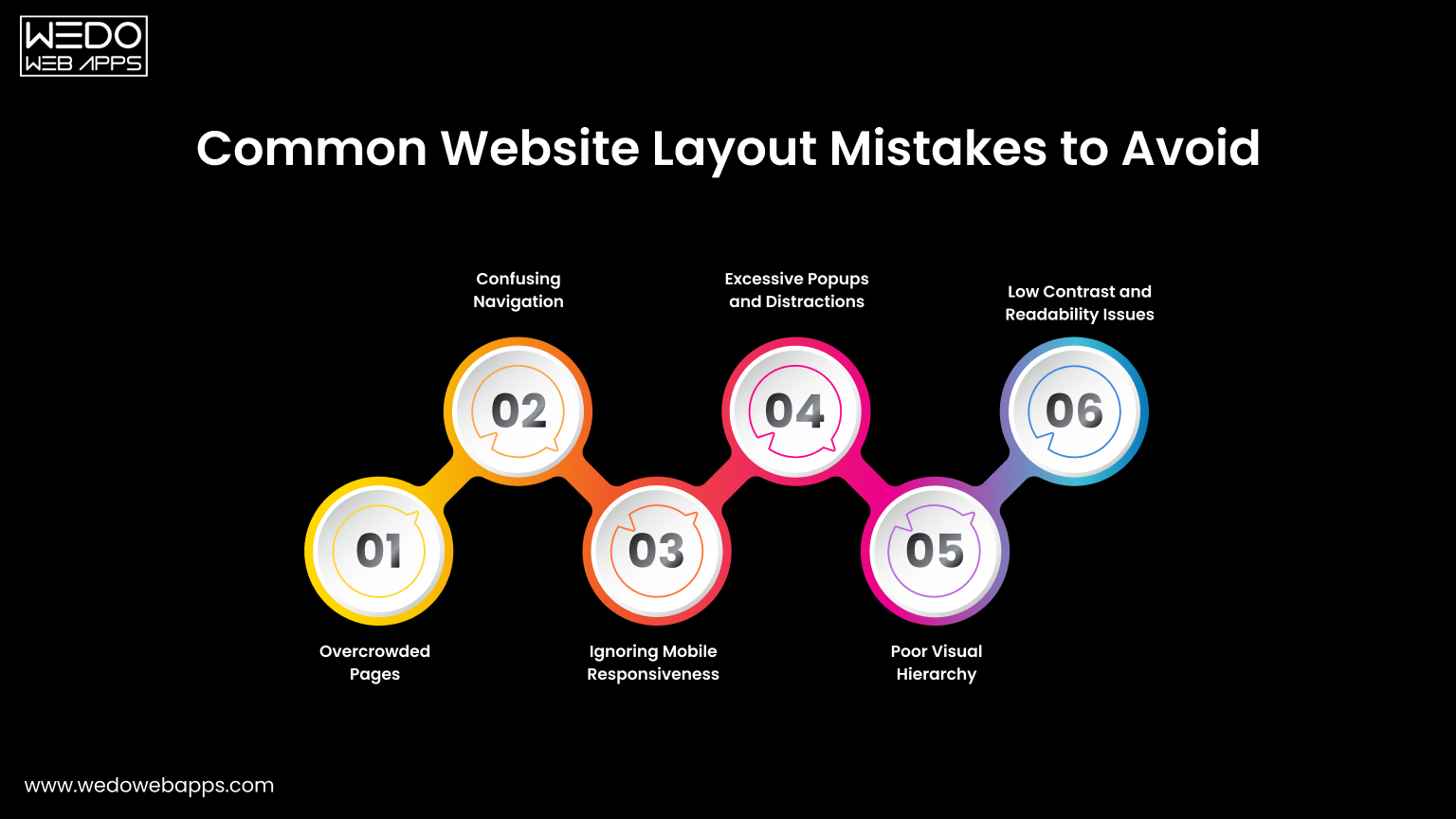
Common Website Layout Mistakes to Avoid

Even the most creative website layouts can fail if usability issues are ignored. Avoiding common mistakes ensures your design remains clean, functional, and user-friendly while supporting your goals.

Here are the most frequent problems seen across modern website layout designs.

Overcrowded Pages

Adding too many elements on one screen makes it difficult for visitors to focus.

  • Reduces readability.
  • Increases cognitive load.
  • Weakens key messages.
  • Makes the design feel unprofessional.

A clean structure improves clarity and engagement.

Confusing Navigation

If users cannot find what they need quickly, they will leave.

Common issues include unclear labels, too many menu items, or hidden navigation elements. Clear and intuitive menus are essential for effective web page layout ideas.

Ignoring Mobile Responsiveness

Layouts that look good on desktop but break on mobile create a poor user experience.

  • Text becomes hard to read.
  • Buttons may be difficult to tap.
  • Content can appear misaligned.

Responsive design is no longer optional for modern websites.

Excessive Popups and Distractions

Too many popups, auto-playing media, or flashing elements interrupt the browsing experience.

While promotional elements can be useful, they should not block content or overwhelm visitors.

Poor Visual Hierarchy

When everything looks equally important, users struggle to know where to focus.

Effective layouts guide attention using size, spacing, contrast, and positioning.

Low Contrast and Readability Issues

Text that blends into the background or uses small fonts reduces accessibility.

Readable typography and sufficient contrast are essential for all users, including those browsing on smaller screens.

Avoiding these mistakes will help you create modern website layout designs that are not only visually appealing but also easy to use and effective at converting visitors.


Launch Your Site Today

Best Practices for Creating an Effective Website Layout
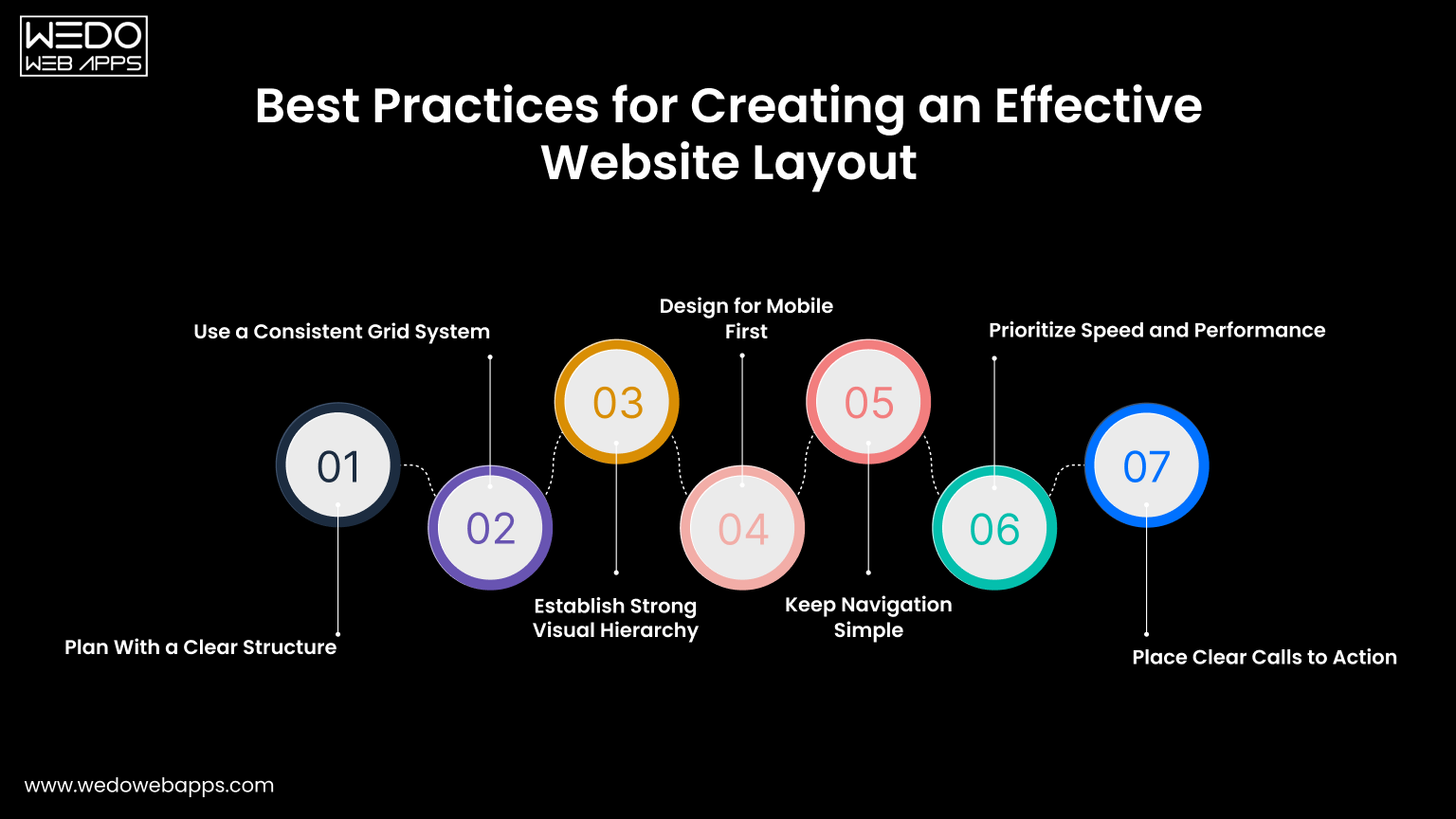
Best Practices for Creating Effective Website

A successful layout is not only visually appealing but also easy to navigate and aligned with user expectations. Applying proven design principles ensures your site performs well across devices and keeps visitors engaged.

Here are essential best practices behind effective modern website layout designs.

Plan With a Clear Structure

Start with a wireframe or content outline before designing visuals.

  • Define key sections and priorities.
  • Organize information logically.
  • Focus on user goals first.

A well-planned structure prevents clutter later.

Use a Consistent Grid System

Grids create alignment, balance, and visual harmony across pages.

They help designers maintain spacing, organize content blocks, and build scalable website design layout examples that look professional.

Establish Strong Visual Hierarchy

Guide users toward important information using size, contrast, and spacing.

  • Highlight headlines and key messages.
  • Make calls to action stand out.
  • Group related content together.

Clear hierarchy improves readability and decision-making.

Design for Mobile First

Most users browse on smartphones, so layouts should adapt seamlessly to smaller screens.

Single-column structures, large touch-friendly buttons, and readable text are essential for effective web page layout ideas.

Keep Navigation Simple

Visitors should reach any important page within a few clicks.

Use clear labels, logical grouping, and familiar menu patterns to avoid confusion.

Prioritize Speed and Performance

Heavy visuals, large scripts, or complex animations can slow down loading times.

Optimized images and lightweight design elements improve both user experience and search visibility.

Place Clear Calls to Action

Every page should guide users toward the next step.

Whether it is contacting your business, signing up, or making a purchase, visible and well-placed buttons increase conversions.

Applying these best practices will help transform creative ideas into functional, user-focused website layouts that deliver measurable results.

Conclusion: Choosing the Right Layout for Your Website

Now that you’re familiar with various website layouts, it’s time to determine which one best fits your site. Should you go for a multi-purpose layout or one tailored to a specific niche?

To make this decision, understand your audience, their behavior, needs, and expectations. Craft a message that aligns with these insights and select a layout that allows this message to stand out. The right layout will enhance your message, making it compelling and engaging for your users.


Get a Quote Today

WooCommerce Speed Optimization Tips to Speed Up WordPress Site Performance

Introduction – Speed Up WordPress Site

If you have ever realized, speed is one of the most important factors in determining the success of an online store. For WooCommerce websites, a fast-loading website does not just improve user experience; it directly impacts search engine rankings, customer satisfaction, and conversion rates. Research shows that just a second of delay in load time can reduce conversions by as much as 7% and increase bonus rates significantly.

Many WooCommerce store owners face challenges like slow checkout pages, lagging backend dashboards, or heavy themes that drag performance down. If you have ever wondered, “Why is my WooCommerce store slow?”, the answer lies in a mix of technical and business factors, ranging from hosting choices to how your store is configured.

The good news is that you do not need to be a performance engineer to fix it. With the right combination of WooCommerce speed optimization tips, you can speed up your WordPress site, optimize checkout, and streamline backend performance. In this comprehensive guide, we will provide you with the insights from the WordPress development company that includes practical, proven strategies backed by both technical best practices and real business benefits to help you build a WooCommerce store that is lightning fast and built for growth.

Why is My WooCommerce Store Slow?

One of the most common questions that store owners ask is “Why is my WooCommerce store slow?”. The truth is, WooCommerce itself is a powerful and flexible eCommerce platform, but when paired with poor hosting, heavy themes, or too many plugins, performance issues can quickly appear. A slow store does not just irritate customers, it directly affects your ability to rank in search engines and convert visitors into buyers.

Here are the most common reasons why your store may be underperforming:

  • Inadequate Hosting Environment: Cheap or shared hosting plans often lack the resources needed to run a busy WooCommerce site. To truly speed up a WordPress site, investing in WooCommerce-optimized hosting is crucial.
  • Heavy Themes and Page Builders: Feature-rich themes may look appealing, but they often load unnecessary scripts and styles, slowing down the site.
  • Too Many Plugins: Installing multiple plugins, especially poorly coded ones, increases HTTP requests and database queries, reducing performance.
  • Unoptimized Images and Media Files: Large, uncompressed product images or videos are among the biggest culprits of sluggish loading speeds.
  • Database Clutter: Over time, transients, revisions, and unused tables can slow down queries, affecting both the frontend and backend performance.
  • Slow Checkout: Features like AJAX cart fragments can cause unnecessary load during checkout, leading to abandonment.
  • Outdated Software: Running older versions of PHP, WordPress, or WooCommerce can severely limit your store’s performance.

The good news is that each of these issues can be resolved with the right WooCommerce speed optimization strategies. In the next sections, we will cover step-by-step methods to tackle these bottlenecks and ensure your store runs as fast as your customers expect.

Slow Store vs. Optimized Store: A Quick Comparison

FactorSlow WooCommerce StoreOptimized WooCommerce Store
HostingShared/cheap hosting with limited servicesWooCommerce-optimized hosting (VPS, cloud, managed)
ThemeHeavy, multipurpose themes with bloated codeLightweight, performance-focused theme
PluginsDozens of plugins (many inactive or poorly coded)Only essential, high-quality plugins
Images & MediaLarge, uncompressed filesOptimized WebP/AVIF formats with lazy loading
DatabaseFilled with revisions, transients, and unused tablesRegularly cleaned and optimized
CheckoutAJAX cart fragments slowing checkoutStreamlined one-page checkout with optimized fields
Software StackOutdated PHP, WordPress, and WooCommerce versionsUpdated to the latest stable versions (PHP 8+, MySQL/MariaDB)

WooCommerce Speed Optimization Tips

If you are wondering how to speed up a WooCommerce site, the good news is that there are proven methods you can apply at both the server and application levels. Below are some of the most effective WooCommerce speed optimization tips to ensure your store loads quickly, provides a smooth checkout experience, and scales as your business grows.

1. Optimize Hosting & Server

Your hosting environment is the foundation of your eCommerce store’s performance. No amount of frontend optimization can fix a slow, underpowered server. To speed up a WooCommerce site, start with WooCommerce-specific hosting options such as Cloud, VPS, or Managed WooCommerce hosting. These provide dedicated resources, faster processing, and better scalability than generic shared hosting.

Always make sure your server is running the latest software stack. Upgrading to PHP 8+ and using MySQL or MariaDB ensures faster query execution, reduced load times, and improved compatibility with WooCommerce’s latest features.

Additionally, enable object caching through technologies like Redis or Memcached. These stores frequently requested queries and data in memory, cutting down on repetitive database calls and significantly improving both frontend and backend speed.

With a powerful hosting setup, you lay the groundwork for all other optimizations.

2. Choose a Lightweight WooCommerce Theme

A theme is more than just design; it directly impacts your site’s loading speed. Many multipurpose WordPress themes come with excessive features, scripts, and visual effects that slow down performance.

Instead, opt for lightweight and WooCommerce-optimized themes such as Astra, GeneratePress, or Storefront. These themes are coded for efficiency, mobile responsiveness, and compatibility with speed plugins. They deliver fast page loads without sacrificing design flexibility.

By starting with a clean, performance-oriented theme, you minimize unnecessary bloat and create a faster foundation for your WooCommerce store.

3. Manage Plugins and Extensions

Plugins extend WooCommerce’s functionality, but using too many, or poorly coded ones, can significantly slow down your site. Each plugin adds scripts, database queries, or extra requests that may hurt performance.

To apply the best WooCommerce speed optimization tips, keep only essential plugins and replace resource-heavy ones with lighter alternatives. For example, use a dedicated SEO plugin instead of multipurpose toolkits.

Also, regularly audit your plugins and remove inactive ones to reduce database clutter and improve security. A minimal, well-optimized plugin stack is key to speeding up WooCommerce sites without losing functionality.

4. Enable Caching

Caching is one of the most effective ways to speed up a WooCommerce site. By serving pre-generated versions of your pages, caching reduces server load and speeds up delivery to visitors.

There are two main types:

  • Full Page Caching: Delivers static HTML versions of your store pages instead of regenerating them on every request.
  • Browser Caching: Saves frequently used resources like CSS, JS, and images locally on the user’s device for faster repeat visits.

For WooCommerce specifically, choose caching plugins that are eCommerce-friendly. Popular options include LiteSpeed Cache, WP Rocket, and W3 Total Cache, all of which handle dynamic pages like cart and checkout with special rules.

With proper caching, your site can load in milliseconds, giving users a seamless shopping experience while reducing server strain.

5. Use a CDN 

A Content Delivery Network (CDN) helps distribute your WooCommerce store’s assets (images, scripts, styles) across multiple servers worldwide. This ensures that customers, regardless of location, load your store from the nearest server.

Popular CDNs such as Cloudflare and BunnyCDN reduce latency, minimize downtime, and add an extra layer of security. For international stores, a CDN is critical to achieving global performance consistency.

Integrating a CDN alongside caching ensures your store is optimized for speed both locally and internationally.

6. Optimize Images and Videos 

Unoptimized media is one of the biggest causes of slow WooCommerce stores. Large product images and embedded videos can drastically increase page load times.

To fix this, always compress and convert images to modern formats like WebP or AVIF, which reduce file size without sacrificing quality. Implement lazy loading so images and videos load only when they appear in the user’s viewport.

For videos, avoid hosting them directly on your WordPress site. Instead, offload them to platforms like YouTube or Vimeo and embed them. This ensures your server is not overloaded with heavy media files.

By following these media optimization practices, you will greatly reduce page weight and deliver a smoother browsing experience.

7. Minify & Combine Assets

Every WooCommerce store loads CSS, JavaScript, and HTML files that control how your site looks and functions. The problem? These files are often bulky and unoptimized.

Use minification to remove unnecessary characters, spaces, and comments from your code. Then, combine smaller files where possible to reduce the number of HTTP requests.

Finally, defend render-blocking scripts so essential content loads first. This directly improves metrics like Largest Contentful Paint (LCP), which is crucial for Google rankings.

8. Database Optimization

As your WooCommerce store grows, your database accumulates unnecessary data like revisions, transients, spam comments, and unused tables. This clutter slows down queries and affects both the frontend and backend.

Regular database optimization is one of the most underrated WooCommerce speed optimization tips. Use plugins like WP-Optimize or Advanced Database Cleaner to schedule cleanups automatically. For advanced users, manual optimization via phpMyAdmin or command line tools can further fine-tune performance.

Optimizing your database ensures faster query execution, improves backend responsiveness, and prepares your store to handle more traffic without lag.

9. Improve Core Web Vitals 

Google’s Core Web Vitals are critical performance benchmarks that directly affect your SEO. For WooCommerce stores, focusing on these three metrics is essential:

  • Largest Contentful Paint (LCP): Optimize server response time, lazy load images, and use a CDN.
  • Cumulative Layout Shift (CLS): Ensure images, ads, and embeds have defined dimensions to prevent layout shifts.
  • First Input Delay (FID): Reduce JavaScript execution time by deferring or splitting code.

Improving Core Web Vitals not only boosts rankings but also ensures your customers enjoy a seamless and frustration-free shopping experience.

WooCommerce experts offering speed optimization tips and performance services for faster WordPress stores

How to Speed Up WooCommerce Checkout

Your checkout page is where your sales are won or lost. Even if your WooCommerce store loads quickly, a slow or clunky checkout process can drive customers away at the final step. Studies show that nearly 70% of online shoppers abandon their carts, and one major reason is a sluggish checkout experience. That is why knowing how to speed up WooCommerce checkout is important for increasing revenue and boosting conversions.

Here are some of the proven ways to optimize your checkout process:

1. Simplify the Checkout Form

Too many form fields create friction. Remove unnecessary fields like company name, second address line, or fax number. Keep only the essentials, such as name, email address, shipping details, and payment information. Plugins like Checkout Field Editor let you customize this easily.

2. Enable AJAX for Cart Updates 

Without AJAX, updating quantities or removing items reloads the entire page, slowing the process. Enabling AJAX ensures changes happen instantly, improving the overall user experience.

3. Optimize Payment Gateways 

Some payment gateways add extra processing time. Stick to fast payment options like Stripe, PayPal, or WooCommerce Payments. If you serve global customers, enable local gateways that speed up processing for regional buyers.

4. Use a One-Page Checkout

A multi-step checkout increases load times and abandonment rates. Switching to a one-page checkout plugin reduces clicks and makes the process smoother, especially on mobile devices.

5. Disable Cart Fragments (If Not Needed)

WooCommerce uses AJAX cart fragments to keep the cart updated in real time. While useful, it can slow down the checkout page. If you don’t rely on mini-carts, disabling this feature can significantly improve the checkout speed.

6. Enable Caching for Checkout (With Care)

Most caching plugins exclude checkout pages by default to avoid conflicts. However, some advanced WooCommerce-compatible caching solutions, such as WP Rocket or LiteSpeed, allow safe caching rules that improve performance without breaking functionality.

7. Optimize Mobile Checkout

Since more than half of eCommerce traffic comes from mobile devices, your checkout must be mobile-friendly. Use responsive designs, large input fields, and autofill options for a seamless mobile experience.

By applying these WooCommerce speed optimization tips specifically to checkout, you can dramatically reduce cart abandonment, improve user satisfaction, and boost sales. A faster checkout does not just improve conversions; it also builds trust with your customers.

WooCommerce Checkout Speed Checklist

Do’s (Best Practices)Don’ts (Common Mistakes)
Keep checkout fields minimal (name, email address, payment).Don’t overload checkout with unnecessary fields like fax or company name.
Use AJAX cart updates for instant changes.Avoid page reloads for every cart update.
Choose fast, reliable payment gateways (Stripe, PayPal).Don’t stick with slow or unsupported gateways.
Implement one-page checkout for fewer steps.Don’t force multi-step checkout with multiple reloads.
Disable cart fragments if not essential.Don’t leave AJAX cart fragments running if they slow down checkout.
Ensure mobile-first design with autofill enabled.Don’t ignore mobile checkout speed and usability.
Use WooCommerce-friendly caching plugins with safe rules.Don’t apply aggressive caching that breaks checkout functionality.

WEDOWEBAPPS WooCommerce checkout optimization services to reduce cart abandonment and boost conversions with faster checkout experience

How to Speed Up WooCommerce Backend

While most guides focus on frontend performance, many store owners face another big issue: a slow WooCommerce backend. If your admin dashboard takes ages to load, updating products or processing orders becomes frustrating and time-consuming. This is especially common as stores grow, with thousands of products, plugins, and customer records clogging the system.

Here is how you can speed up the WooCommerce backend effectively:

1. Optimize Hosting for WooCommerce

The backend relies heavily on server resources. If you are running your store on shared hosting, performance will be slow when multiple users are active. Switching to WooCommerce-optimized hosting (VPS, cloud, or managed solutions) ensures enough CPU, RAM, and bandwidth for smooth backend operations.

2. Keep WordPress, WooCommerce & PHP Updated

Running outdated versions of PHP, WordPress, or WooCommerce can slow down admin performance. For best results, use PHP 8.1 or higher, as it delivers significant speed improvements for backend processes.

3. Use Object Caching

Features like Redis or Memcached can drastically reduce database queries in the admin panel. This is particularly useful when managing large product inventories or order histories.

4. Clean Up Your Database Regularly

A bloated database is one of the main culprits behind a sluggish backend. Use tools like WP-Optimize or Advanced Database Cleaner to:

  • Remove old post revisions
  • Delete expired transients
  • Optimize WooCommerce order tables
  • Clear out unused metadata

5. Limit Dashboard Widgets & Background Tasks

The WordPress dashboard often loads unnecessary widgets (for example, news feeds, analytics, or plugin promos) that slow down performance. Disable non-essential widgets and schedule background tasks (like email reports or stock updates) to run during off-peak hours.

6. Use a Staging Environment for Testing

Installing or updating plugins directly on a live site can temporarily slow down the backend. Instead, use a staging site for testing before deploying changes.

7. Monitor & Replace Heavy Plugins

Some plugins, such as complex analytics tools or poorly coded page builders, consume excessive server resources in the backend. Use tools like Query Monitor or your hosting provider’s analytics to detect slow plugins and replace them with lighter alternatives.

By applying these measures, you will notice a significant improvement in how quickly your store’s admin area responds. A faster backend not only saves you time but also allows your team to manage products, orders, and customers more efficiently, helping your WooCommerce business scale smoothly.

WooCommerce Backend Optimization Quick Wins 

ActionImpact on Backend SpeedTools/Methods
Upgrade hosting (Cloud/VPS/Managed WooCommerce)High – ensures more server resources for smooth admin operationsSiteGround, Kinsta, Cloudways
Update PHP, WordPress & WooCommerceHigh – latest versions run faster & more securePHP 8.1+, WooCommerce latest
Enable Object CachingHigh – reduces repeated database queriesRedis, Memcached
Clean Database RegularlyMedium to High – removes clutter and speeds up queriesWP-Optimize, Advanced DB Cleaner
Disable Unnecessary Dashboard WidgetsMedium – reduces admin panel load timeScreen Options in WordPress
Monitor and Replace Heavy PluginsMedium – prevents bottlenecks in backend processesQuery Monitor, hosting performance tools
Use Staging Site for TestingIndirect – prevents backend slowdowns during updatesStaging via hosting or plugins

Tools to Test and Monitor WooCommerce Performance

To master WooCommerce speed optimization, you need the right tools to identify bottlenecks, track changes, and measure results. Here is a breakdown of the most useful tools, and how you can apply them:

1. Google PageSpeed Insights

  • Best For: Testing Core Web Vitals (LCP, CLS, FID).
  • Why Use it: Helps you understand if your store meets Google’s performance standards for SEO. 
  • Quick Win: Focus on fixing “Reduce Unused JavaScript” and “Optimize Images” warnings.

2. GTMetrix

  • Best For: Detailed performance breakdown with waterfall charts. 
  • Why Use it: Shows which scripts, styles, or plugins are slowing down your store. 
  • Quick Win: Identify the slowest requests and use a caching/CDN solution to reduce load times. 

3. Pingdom Tools

  • Best For: Testing global site performance.
  • Why Use it: Useful if you have international customers and need to measure speed in multiple regions. 
  • Quick Win: If speed varies by location, enable a CDN like Cloudflare or BunnyCDN. 

4. Query Monitor (Plugin)

  • Best For: Finding backend bottlenecks (slow queries, database load, heavy plugins). 
  • Why Use it: Crucial for large stores with thousands of products or high order volume.
  • Quick Win: Replace or optimize plugins flagged as “slow queries” culprits. 

5. WebPageTest

  • Best For: In-depth testing with filmstrip view, speed index, and mobile-first insights. 
  • Why Use it: Offers real-world testing on different devices, networks, and browsers. 
  • Quick Win: Use it to benchmark before & after optimizations to prove ROI. 

Pro Tip: Do not rely on just one tool; combine PageSpeed Insights for SEO, GTMetrix/Pingdom for user experience, and Query Monitor for backend health. This holistic approach ensures your WooCommerce store performs well across all fronts.

Conclusion: Make Your WooCommerce Store Lightning Fast

A slow store does not just frustrate customers; it costs you sales, rankings, and long-term growth. From optimizing hosting and caching to fixing checkout bottlenecks and backend performance, WooCommerce speed optimization is no longer optional; it is essential for success in today’s competitive eCommerce landscape.

By applying the strategies and tools we have covered, such as image compression, database cleanup, Core Web Vitals Improvements, and real-time performance monitoring, you can ensure your WooCommerce store runs faster, smoother, and more efficiently. The result? Happier customers, higher conversions, and stronger SEO rankings.

But we get it, implementing these technical tweaks takes time, expertise, and ongoing monitoring. That is where our team at WEDOWEBAPPS comes in.

  • We specialize in WooCommerce website development optimized for speed, scalability, and conversions.
  • From backend improvements to lightning-fast checkouts, we know exactly how to unlock your store’s full potential.
  • Our WooCommerce experts ensure your site is not just fast today, but stays optimized as your business grows.

WEDOWEBAPPS WooCommerce speed optimization services to build a fast, scalable, and sales-ready WordPress store

Mobile App Development Cost – A Complete Cost Estimation Guide

Understanding App Development Cost

Today, technology has taken the front seat in every industry, and mobile apps are playing the most important role in boosting customer engagement. Every sector starting from banking to shopping, transportation, and healthcare, mobile and web apps simplify people’s lives and boost business. With smartphone usage growing rapidly each day, both startups and enterprises are investing heavily in mobile applications.

You are not alone in the race if you are wondering, “How much does app development cost?”. It is one of the most common questions for people considering application development, but most complex to answer. App development differs widely based on the following:

  • Features and functionality 
  • Platform chosen (iOS, Android, or cross-platform)
  • App complexity 
  • Developer location (on-site, remote, hybrid)

On average, app development costs can range from $150 to $180/hour. However, the app development cost climbs high based on the custom features that you request.

Therefore, in this guide, we will walk you through the key factors that impact app development costs and provide tips to reduce unnecessary spending without compromising quality.

factors that impact app development costs

App Development Cost Breakdown

What happens when a client goes for a consultation with an app development company to discuss their app idea? They have no idea about what to expect from the app development process, or the cost as well. Surely, they must have specified their requirements and desired functionalities, but that is not enough to create a fair app development cost estimation.

Yes, the upfront cost quoted by the development company is not everything. App development is a complicated process, and knowing how much app development costs means doing in-depth research and gaining a detailed understanding of the app dynamics.

Factors Influencing the App Development Cost

Building a mobile app isn’t a one-size-fits-all process. The overall cost is shaped by various factors, from the type of app you’re creating to the region where your development team is based. Understanding these cost influencers can help you make smarter decisions while budgeting for your project.

Factors Influencing App Development Cost

1. Mobile App Complexity

The more complex your app, the more time, resources, and expertise it will demand, leading to higher development costs. Complexity is defined by user roles, backend infrastructure, integrations, real-time features, and custom workflows.

App TypeExamplesEstimated Cost RangeDevelopment Time
SimpleCalculator, To-do list$10,000 – $30,0001 – 2 months
ModerateeCommerce app, booking app$30,000 – $80,0003 – 5 months
ComplexSocial network, FinTech platform$80,000 – $250,000+6 months or more

2. App Features and Functionalities

Every feature you add, be it chat, GPS tracking, push notifications, or third-party integration, adds layers of development time and cost. Some features also require higher security and testing.

FeatureComplexity LevelImpact on CostExamples
User LoginLowLowEmail, OTP
In-app ChatMediumModerateReal-time messaging
Payment GatewayHighHighStripe, Razorpay, PayPal
Augmented RealityVery HighVery HighVirtual try-on, interior design

3. App Category

The industry your app serves influences design standards, compliance requirements, and feature expectations, ultimately affecting the cost.

App CategoryCompliance NeedsDevelopment CostExample Apps
LifestyleLowLow – ModerateMeditation, Fitness
FinanceVery High (e.g., KYC, security)HighBanking, Wallets
HealthcareHigh (HIPAA, HL7)HighTelehealth, Health Trackers
GamingVariesModerate – HighPuzzle, Battle Royale

4. App Design and Animation

Custom UI/UX design and animations can differentiate your app, but also add to the cost due to the time-intensive creative and technical work involved.

Design TypeVisual AppealCost ImpactUse Case
Basic TemplateLowLowMVPs, internal apps
Custom UI/UXHighMedium – HighB2C apps, eCommerce
Advanced AnimationsVery HighHighGaming, EdTech, FinTech

5. App Platform (iOS, Android, or Both)

Choosing between iOS, Android, or cross-platform development significantly affects the total investment. Targeting multiple platforms natively requires more time and resources.

PlatformCodebaseCost ImplicationSuitable For
iOSSeparateModerateiPhone/iPad user base
AndroidSeparateModerateWider global device coverage
Cross-platformSharedCost-efficientFaster launch on both platforms

6. App Maintenance

Post-launch costs for maintenance are often underestimated. Regular updates, OS upgrades, bug fixes, and feature enhancements are essential for performance and user retention.

Maintenance ActivityFrequencyEstimated Annual CostPurpose
Bug FixesOngoing10–15% of dev costEnsure stability
Feature UpdatesQuarterly/As neededVariesKeep the app competitive
OS/API UpdatesAnnuallyModerateEnsure compatibility

7. Code Reusability

Reusing code across platforms (via frameworks like React Native or Flutter) can significantly reduce development time and cost without compromising too much on performance.

Development ApproachCode Reuse LevelCost SavingBest For
Native0%NoHigh-performance apps
Hybrid (Cordova)50–60%ModerateSimple utility apps
Cross-platform (Flutter, RN)80–90%HighMVPs, startups, and fast launches

8. Size and Location of Development Team

Team size and geographic location heavily impact pricing. Teams in the US or UK typically charge more than those in India or Eastern Europe, even with similar technical expertise.

Team TypeRegionHourly Rate (Avg.)CommunicationCost Control
FreelancersGlobal$15 – $80Low – MediumLow
Offshore AgencyIndia, Ukraine$20 – $50Medium – HighHigh
In-house/Local TeamUS, UK$80 – $250+Very HighLow

Estimate App Development Cost Based on Different Stages

To get the estimated cost of app development, you might have used app development cost calculators on various sites. Or you might have googled the average cost of developing an app. But let’s be honest, no matter how exact the numbers appear to be, they are often misleading. The app development cost depends on features, technology, design, development team location, etc.

So, here in this blog, we will break down the cost structure for app development based on the different stages of mobile app development. This will help you bifurcate the cost of each development phase

Mobile App Development Cost Breakdown for Different Stages

App Development Cost Breakdown for Different Stages

1. Discovery/Strategy Stage

Discovery is the initial stage that includes market research, competitive analysis, MVP planning, and project roadmap creation. This phase sets the foundation of your mobile app development journey and typically takes 10% of the total app budget.

Technologies and Tools Used

  • Project Management Tools: Trello, Jira, Asana, ClickUp 
  • Collaboration Tools: Slack, Microsoft Teams, Notion
  • Wireframing Tools: Balsamiq, Figma
  • Market Research Tools: Google Trends, Statista, App Annie. 

Estimated Cost: $1200 – $11000

Timeline: 2 – 4 weeks

2. Design Stage

This stage focuses on UI/UX design, wireframes, and visual components. It defines the look and feel of your app. A well-designed app interface is the key to user engagement and retention.

Technologies and Tools Used

  • Wireframing and Prototyping: Figma, Adobe XD, Sketch, InVision
  • Graphic Design: Adobe Illustrator, Photoshop, Canva
  • UI Kits and Icon Sets: Material Design, iOS Human Interface Guidelines
  • User Testing Tools: Maze, UsabilityHub 

Estimated Cost: $2500 – $10000

Timeline: 3 – 4 weeks

3. Development Stage

The development stage is the core of app development and includes coding, backend infrastructure, third-party integrations, and feature implementation. The cost in this stage depends on app complexity and whether it is native or cross-platform.

Technologies Used for Frontend Development

  • For Native App Development: Swift, Objective-C + Xcode for iOS app development OR Kotlin, Java + Android Studio for Android App Development
  • Cross-Platform Frameworks: React Native (JavaScript/TypeScript), Flutter (Dart), Xamarin (C#), Ionic (Angular/React/Vue + Capacitor/Cordova)

Technologies Used for Backend Development

  • Programming Languages: NodeJS, Python (Django/Flask), Ruby on Rails, Java (Spring Boot), PHP (Laravel), .NET Core
  • Databases: PostgreSQL, MySQL, SQLite, MongoDB, Firebase Realtime Database, Firestore
  • API & Services: REST, GraphQL, gRPC

Estimated Cost: $3000 – $60000

Timeline: 2 – 6 months

4. Testing and Deployment Stage

This stage tests your app for bugs and errors and ensures that it is bug-free and ready to release. It involves QA testing, app store deployment, and performance optimization. A well-tested app reduces post-launch issues and increases user satisfaction.

Tools and Technologies Used for Testing & Quality Assurance

  • Manual Testing: TestRail, Jira for bug tracking 
  • Automated Testing: Jest, Mocha, JUnit for unit testing, Espresso, XCTest, Appium for UI Testing, Selenium, Detox for Integration Testing 
  • CI/CD tools: GitHub Actions, Bitrise, Jenkins, CircleCI
  • Tools and Technologies Used for Deployment
  • Build Tools: Gradle, Fastlane, XCode Build, Flutter Build
  • App Store Platforms: Google Play Console, Apple App Store Connect
  • Beta Testing: TestFlight, Firebase App Distribution, Crashlytics. 

Estimation Cost: Less Than $5000

Timeline: 2 – 4 weeks

Now that we’ve explored the development process and stages, let’s take a look at how different types of apps impact the overall cost.

Mobile App Development Cost Breakdown Based on Types

One of the biggest cost drivers in app development is the development platform that you choose. Decide if you want your application on iOS, Android, or both. And, if you want it to be built natively or using a cross-platform framework?

Native App Development

Native apps are developed using platform-specific languages: Swift, Objective-C for iOS, and Java, Kotlin for Android. They offer:

  • Superior performance
  • Platform optimized UI/UX
  • Scalability and better long-term maintainability

However, native mobile app development requires writing separate code for each platform, which doubles the development cost and time.

Estimated Cost of Native App Development: $10,000 – $2,50,000

Cross-Platform (Hybrid) App Development

Cross-platform frameworks such as Flutter or React Native allow developers to write one codebase for both iOS and Android. Its benefits include:

  • Faster development and lower upfront cost
  • Unified experience across platforms

But they come with some drawbacks as well:

  • Slower performance in some cases 
  • Debugging can be complex at times
  • Limited access to some of the native APIs

Estimated Cost of Cross-Platform App Development: $20,000 – $1,50,000

Cost of Cross-Platform App Development

Progressive Web App (PWA) Development

Progressive Web Apps are built using standard web technologies—HTML, CSS, and JavaScript—but offer app-like features such as offline access, push notifications, and home screen installation. PWAs provide:

  • Near-native performance and responsiveness
  • Offline functionality via service workers
  • No need for app store submission or updates

PWAs are highly compatible across devices and platforms, making them cost-effective. However, there are some limitations:

  • Limited access to device hardware compared to native apps
  • iOS support is still somewhat restricted (e.g., background tasks, push notifications)
  • Brand visibility is lower without presence in app stores

Estimated Cost of Progressive Web App Development: $15,000 – $1,00,000

Web App Development

Web apps are accessed through a browser and are designed to be responsive across various devices. They are developed using technologies like HTML5, CSS3, JavaScript, and backend frameworks such as Node.js, Django, or Laravel. Benefits include:

  • Easy deployment and updates
  • Accessible across all platforms via web browsers
  • Cost-efficient and simple to maintain

That said, web apps also have trade-offs:

  • No offline access or device-level integration
  • Lower performance compared to PWAs or native apps
  • Cannot be installed on the device like native apps or PWAs

Estimated Cost of Web App Development: $10,000 – $1,00,000

App Development Costs by Operating System

The overall cost of developing a mobile application largely depends on the platform it’s built for, as well as the app’s complexity, features, and developer rates.

iOS App Development

iOS App Development using Swift or Objective-C typically costs between $25,000 and $250,000. Factors affecting cost include the number of features, UI/UX complexity, and whether it’s built for iPhone, iPad, or both.

Android App Development

Android App Development using Java or Kotlin generally costs between $20,000 and $250,000+. The open ecosystem of Android means additional effort is often required to optimize across different devices and screen sizes.

Windows App Development

Targeting Windows OS, these apps are usually developed for enterprise or niche markets. Development costs range from $20,000 to $200,000, depending on scope, integrations, and design requirements.

App Development Costs by Technology

Costs also vary based on the technology or framework used to develop the app, especially when considering cross-platform options.

React Native App Development

  • React Native allows for one codebase across both iOS and Android.
  • React Native app development costs range from $20,000 to $150,000, making it a cost-effective option for startups and businesses seeking faster go-to-market solutions.

Flutter App Development

Flutter app development typically ranges between $15,000 and $200,000, depending on the project’s complexity:

  • Basic Flutter App: $8,000 – $60,000
  • Medium Complexity: $60,000 – $120,000
  • High-End, Feature-Rich App: $140,000 – $200,000

Flutter is ideal for visually rich and high-performance cross-platform apps.

Swift App Development

  • Native iOS apps built with Swift offer top-tier performance and integration with Apple’s ecosystem. 
  • Development costs typically fall between $10,000 and $250,000+, depending on features, integrations, and app complexity.

Hidden Factors Affecting Mobile App Development Pricing

What are the hidden costs in app development? With mobile app development, a few elements with hidden costs come along. Understanding these factors will help you reduce risks, save time, and money. So, let’s understand each factor in detail:

1. Quality Assurance

Based on your app size, you may also need to hire a quality assurance tester and a project manager or project coordinator as well. Also, a business analyst can help you lower development costs and keep the cost within your budget.

2. Infrastructure Costs

The costs of infrastructure include data storage, data delivery, and app hosting-related expenses. All of these increase the cost and complexity of the project. Infrastructure cost item examples include server, data storage, development tools, and libraries.

3. IT Support Costs

A high-quality application cannot be developed without the support of IT services. However, the support costs may increase over time. IT support services include iOS and Android updates, bug fixes, and API maintenance.

4. App Publishing Costs

While developing the app, developers keep in mind the app development requirements. When it comes to the fees to the app store, it is just a minimal amount. While submitting the Android application on the Play Store, you will have to pay a one-time fee of $25. Apple, on the other hand, charges $99 for app submission on the App Store.

If you want to distribute the app exclusively within your organization, you will have to pay $299 every year to join the Apple Developer Enterprise Program and provide your app via App Store. Google Play does not charge for the service.

5. App Security

The app visitors need to trust you with their information. Therefore, you need to have a proper app security plan in place. Consider this point at this initial stage, and include time for testing and security checks in advance. If you do not consider this factor, you may have to invest more in testing later on, which may also cause you financial and reputational losses.

Step-by-Step App Development Process

1. Target Market Research

Before starting to develop a mobile application for your business, you need to conduct thorough research and find out more about the target market. Doing this will help you get a clear idea about the actual market dynamics, consumers’ interaction with the brand, leading players, and more. Also, read the user reviews of the top app in the market, which will help you come out with a better idea.

2. The Right Platform Plays a Crucial Role

Your application can be compatible with both the iOS and Android platforms. However, if budget is your concern, you can initially develop on one platform and later boost your service to make the app perform better on another platform.

3. Hire an App Development Company

Hire app development company that can make sure your app includes all the required and latest features and functionalities within the deadline. A mobile app development company has a team of app developers, UI/UX designers, project managers, and market specialists who offer valuable suggestions while considering your vision.

Hiring app developers will give you access to industry expertise and the latest technologies.

4. Build an MVP

Develop an MVP (a minimum viable product) first to validate your app idea without spending much. For a successful MVP, ask your app development company to identify the must-have features and important USPs, and then develop an app accordingly.

5. Test Your App

Testing is yet another crucial process when considering developing a mobile application. Test everything from the app’s performance to consumer experience to content. If you test the app properly, it will help you reduce the development time and cost, identify bugs and errors, and significantly improve your reputation as a service provider.

6. Submit Your App to Stores

Once you are sure about your app’s performance, submit your app on the Google’s Play Store or Apple’s App Store. However, when you are submitting your application on any of the app stores, you need to comply with Apple or Google Developer Guidelines. Also, align your monetization model with their requirements.

7. Launch and Track Performance

After you have submitted your app to the store, make sure to track its performance with the analytical tools implemented during the development phase, introduce updates to increase user engagement, and address users’ requests and concerns.

How Do I Monetize a Mobile App

While there are multiple ways to make money through apps, this section will talk about a few most popular revenue methods that you can opt for to earn more revenue and enhance customer value.

1. Advertising

Advertising is one of the most well-known methods to earn money from an application. In this monetization technique, you can promote your services for third-party clients on your application and get paid in return.

2. Freemium

In this model, users are allowed to access some of the basic app features for free. To use the premium features, users are required to pay a certain amount. Freemium also allows implementing secondary revenue channels, such as in-app advertising.

3. Subscription

In the subscription model, the user is required to buy a subscription to access the features that the app is most famous for. Users can pay for a monthly plan, a yearly plan, or a per-day subscription plan. Major platforms like Google or Apple allow users to manage subscriptions.

4. Sponsorship

In this model, you need to find a sponsor related to your niche and strike up a compensation structure. In return for the compensation, the app could include the sponsor’s brands, monetize its products, or send users to its websites.

How Can I Reduce Mobile App Development Costs

Business owners and entrepreneurs can reduce the cost of app development by following a few industry best practices and applying some useful tricks.

1. Prioritize App Features

While developing a mobile application, it is important to identify and prioritize app features correctly. It is a smart decision to prioritize app functionalities that can drive business value as soon as possible. You can save the desired features for later development stages. Therefore, it is recommended to develop an MVP first.

2. Include Quality Assurance

While developing and testing a mobile application, you might observe some bugs and errors, so you need to address them quickly. It is ideal to involve QA professionals right from the beginning, so you can identify serious problems before the development begins. Doing this can save you a huge amount and time.

3. Plan for the Future

The app that is built today might completely look different in the future. For example, if you build an MVP, you would want to change some of the features as per customer feedback. Your target market might move into a completely new direction, forcing you to change your product.

That is why it is good to keep in mind the short-term and long-term goals while planning to develop an application. It will save a lot of your money in the long run.

4. In-house or Outsourcing

Picking the type of mobile app development staffing organization is a crucial part of your project planning. Your ultimate choice will have an impact on budget expenses, workflow organization, and even the idea of product maintenance. So, the question is really what to pick, outsourcing or in-house development.

Outsourcing refers to the hiring of an already existing team of developers for your project. To outsource the app development process, the IT consulting firm has access to a talent pool to select from. It also enables you to reduce office expenses as well as equipment costs, and reduce internal workflow.

5. Consider Cross-Platform Development

Each business owner, when developing an app, is confronted with a dilemma: whether to develop for Android alone, iOS alone, or both. Developing native apps for both is expensive.  If you develop for a single platform, you might be leaving out a significant part of the audience on the other platform.

The ideal solution is to create cross-platform applications that support both platforms. Twitter is a fine example of a cross-platform mobile application. The most popular technologies for building cross-platform applications are Flutter, Unity 3D, and React Native, among others.

Real-World Case Study: How WEDOWEBAPPS Helped iDreamers in Social Media App Transformation

Client: iDreamers

Platform Type: Social Media App

Old Stack: Vue.js (Frontend) + Django (Backend)

New Stack: React Native + Optimized Django + Redis

Challenges Faced

Sluggish Performance: Vue.js struggled with real-time features like reels, chat, and video streaming, especially on low-end devices.

Poor Caching: Inefficient strategies led to repeated data loads and slow media rendering.

Subpar UX: Users experienced delays, inconsistent UI behavior, and limited mobile responsiveness.

Our Solution

We overhauled the tech stack to address these issues:

  • Frontend Migration to React Native for native-like performance across Android and iOS.

Backend Optimization:

  • Integrated Redis caching,
  • Refined API response handling,
  • Optimized database queries for speed and scalability.

Key Feature Enhancements

  • Real-Time Chat with WebSockets (instant messaging, read receipts).
  • Reels (Short Videos) with preloading, compression & fast playback.
  • Audio/Video Calls via WebRTC or Agora SDK.
  • Push Notifications using FCM for chats, likes, and call invites.

iDreamers in Social Media App

Results Achieved

  • App Speed: 45% faster screen load times
  • Crashes Reduced: 60% fewer crashes on Android/iOS
  • User Engagement: 35% increase in daily active users
  • Chat Latency: Reduced to < 150ms in most regions
  • App Rating: Improved from 3.2★ to 4.6★ in just 2 months

Client Feedback

“The new version feels smooth, responsive, and engaging—just what our users needed. We’ve seen a major spike in retention and positive feedback.”

Whether you are a small to mid-size business or a well-established company looking to revamp your online presence, the experts at WEDOWEBAPPS can provide you with a solution that fits your needs. Want to know how?

How Can WEDOWEBAPPS Help You in Estimating Mobile App Development Cost

So, how much does it cost to make an app? Well, there is no precise prediction for this question. Considering all the above factors, you can come to an estimated cost of mobile app development.

In case you still want precise mobile app development pricing, get in touch with a reliable app development company like WEDOWEBAPPS. Our team of experts is specialised in developing the most feature-rich and scalable mobile applications. We have developed applications for some of the popular brands like LordHair, Bookings Africa, and Credit Sweep.

So, if you are looking for such innovative and feature-rich mobile app development or want an estimated cost of app development, get in touch with our experts.

Android 16 Features And Google I/O Android Summary 2025

Android 16 Features and Beyond from Google I/O 2025

Google I/O 2025 set a clear direction for Android’s future and brought the developers closer to an ecosystem driven by intelligence, privacy, and productivity. This year’s keynote was more than annual updates. It showed how Android continues to evolve into a smarter and more adaptable platform.

The spotlight was more on Android 16, introducing a refined user experience and smarter multitasking powered by machine learning. Also, Android Studio has received a major update with adding faster build, intuitive debugging, and integrated Gemini AI assistance to accelerate coding. Updates to Jetpack Compose added more expressive design controls, while Privacy Sandbox improved the reinforcement of Android’s ongoing commitment to user data protection.

For developers, this resulted in more flexibility, stronger performance insights, and AI-driven workflows. Google I/O 2025 proved that the future of Android development is not just about adding new features but is more about how developers build experiences for users.

With this blog, we will take you to the various announcements from the Google I/O 2025 for Android developers, including:

  • The most impactful Android 16 features and release insights.
  • Major Android Studio updates are enhancing development speed.
  • Jetpack Compose improvements for better UI design.
  • How Generative AI on Android is reshaping app creation.
  • The latest Privacy Sandbox updates for secure experiences.
  • What’s next for developers after I/O 2025.

Overview of Google I/O 2025 for Android Developers

Google I/O 2025 focuses more on how Android is becoming smarter, faster, and more secure for both users and developers. This year, the focus was more on the practical improvement that helps developers to build better apps with less effort and have more freedom for creativity.

The key announcement centered around Android 16, Android Studio updates, Jetpack Compose upgrades, and the growing role of AI in Android app development. Each update has aimed towards improving the app’s performance, design flexibility, and data privacy.

Developers were introduced to new tools powered by Gemini, Google’s AI model, that help with coding suggestions, testing, and interface design. All these new additions make it easier for the developers to turn the idea into a working application faster than before.

Another major highlight was the update to Privacy Sandbox, which helps developers to maintain the trust of users while supporting the personalized app experience. Together, these updates reflect Google’s focus on creating a developer ecosystem that values both innovation and responsibility.

In short, Google I/O 2025 gives developers a clear direction to build smarter apps, focus more on privacy, and take advantage of the tools that make Android development more efficient.

Android 16 Features and Release Overview

With the update in Android 16 features the design productivity has been increased with improved security. Android is constantly evolving and bringing a better experience. Here are the details on the latest Android version and how it helps to maximize the potential of development and the device’s potential.

At Google I/O 2025, Android 16 stood out as one of the biggest announcements for developers. It focuses on improving the everyday usability, multitasking, and on-device intelligence while keeping privacy at the core.

What’s New in Android 16

The latest version of Android is Android 16. Several updates have made the device smarter and more responsive.

  • Refined Interface: A cleaner layout and new customization options for the home and lock screen.
  • Adaptive Multitasking: Better split-screen support the improved transitions, and allow to have the support of larger and foldable screen devices.
  • Performance Boost: Faster app startup time and enhanced background optimization for fast running.
  • AI-Powered Features: Support smarter text suggestions, context-based actions, and maintain the streamlined on-device processing.
  • Improved Accessibility: New features for screen readers with a better color contrast option with visually impaired users.
  • Security Enhancements: Provide the upgraded app permissions and real-time threat detection to protect the user data.

Android 16 Release Timeline and Availability

Google has followed its familiar rollout plan for Android 16. Android 16 was released on June 10, 2025, which is making the Google Pixel devices the first to receive the update.

  • Developer Preview: Early access was released shortly after the Google I/O for testing the new APIs.
  • Public Beta: Available for the Pixel and select partner devices to gather feedback.
  • Final Release: Expected in Q3 2025, alongside official SDK and documentation updates.

How to Update or Install Android 16

A developer can test Android 16 by:

  • Enroll in the Android Beta Program via developer.android.com.
  • Downloading the system image for compatible Pixel devices.
  • Using Android Studio’s emulator to test apps with the new APIs.

Android 15 vs Android 16: Key Differences

FeatureAndroid 15Android 16
MultitaskingBasic split-screenAdaptive multitasking with smart resizing.
PrivacyApp-specific permission is needed.Dynamic permissions and local data controls.
AI IntegrationLimited suggestionsContext-aware AI across apps and widgets.
UI DesignMaterial YouEnhanced Material 3 elements with flexible customization.

Android 16 reflects Google’s ongoing goals to give developers better flexibility to create smoother, faster, and more secure apps.

We build an app that is faster, smarter, and more secure

Android Studio New Features Announced at Google I/O 2025

At Google I/O 2025, Android Studio took the center stage by giving support for the updated design to make coding, testing, and debugging more faster and more intuitive. These Android Studio new features focus on improving work productivity while giving support to developers in building more efficient and AI-powered Android apps.

For those who are wondering what’s new for Android developers, this year’s updates reflect Google’s commitment to reducing development friction and automating repetitive tasks.

Here’s a breakdown of the most significant updates revealed during the event.

IntelliJ Platform and Build Performance Updates

The latest version of Android Studio, codenamed Koala, is now built on IntelliJ 2025.1, bringing several enhancements that improve the workflow and performance.

Key highlights include:

  • Faster Gradle Sync: Projects now load up to 30% quicker, cutting down the time between code edits and test runs.
  • Optimized Build Speed: Parallel processing has been refined, allowing the faster APK and app bundle organization.
  • Smarter Code Indexing: The updated IntelliJ platform uses adaptive indexing, improving real-time code analysis and autocompletion.
  • Integrated SDK Management: Managing and updating SDK components is simpler through a unified interface.

These upgrades collectively make Android Studio more stable, ensuring that the developers spend more time on coding and less time waiting for builds to complete.

Gemini-Powered Coding Assistant

One of the most impressive announcements at Google I/O 2025 was the integration of Gemini, Google’s generative AI on Android Studio. This assistant goes beyond the basic autocomplete by learning from your patterns and provides real-time suggestions if there is a need for improvement.

What developers can now do with Gemini:

  • Generate entire code blocks using the natural language prompts.
  • Access inline documentation instantly without switching tabs.
  • Use smart refactoring to improve existing code for better readability and efficiency.
  • Get context-aware code fixes, especially when debugging or testing.

This feature helps developers to generate code faster while maintaining accuracy and consistency. This makes the Gemini a reliable AI companion for Android app creation.

Improved Debugging and UI Design Tools

Android Studio new features extend to design and debugging, which help developers to fine-tune app visuals and performance more effectively.

Key updates include:

  • Layout Inspector Enhancements: A clearer, 3D visualization of view hierarchies to understand the behavior of the app layout.
  • Live UI Preview: Real-time rendering for Jetpack Compose and XML layouts to validate the design to be more responsive.
  • Advanced Profiler: More detailed memory and CPU usage allows to keep the track and helps in identifying the performance more accurately.
  • Device Mirroring: Run and debug the app on the physical devices directly from the IDE without using the external tools.

These improvements not only help to streamline the UI development but also make the testing and debugging more transparent and efficient.

The Android Studio new feature announced at Google I/O 2025 demonstrates how Google continues to refine the developer experience. From building the app faster to AI-powered productivity tools and smarter debugging options, together these allow for connecting more and an intelligent environment for Android development.

Jetpack Compose New Features and UI Upgrades

At Google I/O Android summary, Jetpack Compose received one of its biggest updates. The designed app interface is faster and is built to make the process easier and customizable. These updates focused on flexibility, animation, and real-time design control.

For developers who have been following the what’s new for Android developers, Jetpack Compose new features continue to be the go-to UI toolkit for creating modern, adaptive designs without writing long XML layouts.

Updated Components and Motion APIs

The new Jetpack Compose feature centers around giving developers better control over the motion, transition, and layouts.

Highlights include:

  • New motion APIs for building smoother and more expressive animations.
  • Advanced layout elements like Carousel, Grid, and Flow Layouts for complex screen structures.
  • Improved the gesture responsiveness for a more fluid user experience.
  • Optimize the rendering pipeline that boosts the UI performance on lower-end devices.

These improvements make the apps feel more dynamic and reduce the frame drops during the time of navigation or screen transitions.

Material Design 3 Integration Improvements

The integration with the Material Design 3 helps developers maintain visual consistency across the various devices.

What’s new for Android developers:

  • Support for dynamic color schemes that match the user’s wallpaper and system theme.
  • Adaptive typography that automatically adjusts the font weights and sizes.
  • Extended shape customization, allowing developers to customize the corner radii and UI style effortlessly.
  • Material You theming alignment, which ensures that all components feel cohesive across various Android versions.

These updates give apps a modern and personalized look while still maintaining the consistency of the brand.

Better Testing and Preview Tools for Developers

Google has also improved the Compose Preview and Tracing tools, which help developers to test and visualize their design more efficiently.

Key Updates:

  • Compose Tracing: Real-time analysis of rendering and recomposition performance.
  • Multi-device Preview: View how your app appears across screen sizes without the need to rebuild.
  • Improved Testing APIs: Supports easier debugging of animation and layout inconsistencies.
  • Performance Metrics: Identify the frame drops and measure the rendering time directly from the IDE.

These additions simplify the testing workflows, reduce iteration time, and ensure that UI designs remain consistent and responsive.

In short, the Jetpack Compose new feature introduced at Google I/O 2025 empowers developers to create high-performing Android interface applications with the use of the top feature for Android apps. From motion control to real-time previews, these updates streamline every stage of UI development.

Android developers help you turn every interaction into engagement

Generative AI on Android: The Next Step for Developers

Generative AI on Android has become one of the most talked-about topics for the updates on Google I/O 2025. With Gemini now integrated across Android Studio and system-level APIs, developers can automate the complex tasks. This helps to improve app performance and deliver a smarter user experience without increasing the workload.

For those who are tracking what’s new for Android developers, this advancement is not just about the automations. It is more about the developer tools to build apps that can generate content, predict needs, and create more personalized user interactions.

Gemini Integration in Android Ecosystem

The Gemini integration extends across Android’s ecosystem. This streamlines the connection with the development tools, core services, and end-user experience.

Key Integrations Include:

  • Gemini in Android Studio: Developers can now access context awareness and code suggestions. This gives the impact on documentation summaries and debugging support through the AI-powered assistance.
  • AI-driven Google Play Services: Gemini helps in optimizing the app recommendation, content personalization, and dynamic suggestions.
  • User-facing Enhancements: From smart replies to the adaptive test and voice generation, Gemini brings the intelligent interaction directly to the mobile apps.

Together, these updates can show how a generative AI on Android moves from an experimental concept to a built-in development standard.

AI APIs and Use Cases for App Development

Google has introduced dedicated AI APIs to help developers integrate generative AI on Android accurately. These APIs prioritize real-time performance while maintaining local data privacy.

Practical Use Cases Include:

  • Text creation and summarization for note-taking or productivity apps.
  • Images and media generation for creating better tools and personalized features.
  • Chat assistance for easy handling of context-aware conversations.
  • Smart replies and suggestions that can adjust tone and intent based on the behavior of users.
  • Voice-to-text enhancement powered by contextual AI models.

These added applications highlight how generative AI can turn Android apps into a more dynamic and customer-centric experience.

Privacy and Performance Considerations for AI Apps

As the AI grows more powerful, Google has made privacy and on-device performance an important part of this rollout. The Android Privacy Sandbox updates ensure that apps using the AI should respect the user consent and data controls.

How Google Addresses Privacy and Performance:

  • On-device AI processing minimizes the need for cloud data transfers.
  • Privacy Sandbox APIs provide a secure way to measure app engagement and ad performance without user tracking.
  • Federated learning models allow AI to improve through the aggregated insights while keeping the user data private.
  • Optimized power management ensures that the AI-driven feature does not have an impact on device performance or battery life.

These steps maintain the balance of innovation with responsibility, helping developers to build AI-enabled apps that are both intelligent and trustworthy.

Through generative AI on Android, Google has reshaped the developer experience. It highlights a future of Android app development and where what’s new for Android developers is not just about the technology but about creating a meaningful and adaptive app experience.

Android Privacy Sandbox Updates 2025

Google’s Android privacy sandbox updates continue to redefine how apps access and process user data. The recent updates focus more on reducing cross-app tracking while preserving effective ad measurement and personalization. For developers, this means that adapting to a privacy-first ecosystem that still supports performance marketing is effective.

The important role is to protect user privacy without disrupting the tools developers rely on to measure engagement, conversions, or audience insights.

Why Privacy Sandbox Matters for Developers

The recent release introduces several new APIs and compliance updates that reshape the way Android apps collect and use data responsibly.

Here’s what developers need to know:

  • Protected Audience API: Enables personalized ads based on local device signals without sharing the user identifiers externally.
  • Attribution Reporting API: Helps to measure the campaign performance while keeping the user identity anonymous.
  • Topics API: Offers a privacy-safe method to deliver relevant ads using locally stored user interest data.
  • SDK Runtime: Separate ad SDKs from app code to prevent unauthorized data access and reduce potential vulnerabilities.

These updates ensure that Android app developers can still maintain the monetization goals while aligning with the global privacy standards set by regulators.

Developer Benefits Include:

  • Reduce the risk of policy violations through standardized APIs.
  • More transparency is maintained in ad performance data.
  • Simplified integration with advertising and analytics tools.

The Privacy Sandbox updates are not just about compliance; they create a framework for responsible innovation that builds user trust without limiting the app functionality.

Android’s latest Privacy Sandbox updates

What’s Next for Android Developers

As the Google I/O Android summary, one thing is clear: Android development is moving towards smarter tools, deeper AI integration, and privacy-first innovation.

The announcement throughout the event has set a direction that empowers developers to build a faster, safer, and more intelligent mobile experience. The future roadmap highlights Google’s ongoing investment in performance optimization, AI-based automation, and cross-platform consistency.

Developers are encouraged to stay aligned with the advancements to ensure that their apps remain modern, efficient, and user-focused.

The Future of Android Development Tools

Google plans to refine the existing suite of best Android development tools to make the process more productive and intelligent.

Upcoming tool advancements include:

  • Smarter Android Studio: Future updates will expand Gemini’s AI-powered feature for automated testing, refactoring, and debugging suggestions.
  • Evolving Jetpack Compose: Developers can expect improved rendering performance, dynamic UI previews, and faster iteration cycles.
  • Cloud-integrated Testing Environment: New testing APIs will simplify how apps are validated across multiple device types before deployment.

These updates signal a shift towards more intuitive development, where developers spend less time troubleshooting and more time refining the user experience.

Preparing for Android 17 and Beyond

With Android 17 already in early development stages, Google is focusing on extending AI-driven customization, energy efficiency, and device adaptability.

What developers can anticipate:

  • Early Beta Access: The upcoming Android 17 beta program will invite developers to test system-level changes and provide feedback on the usability of the device.
  • Improved Compatibility Tools: Google will expand developer resources to ensure backward compatibility with older Android versions.
  • Community Collaboration: Expect deeper engagement through Android developer previews, forums, and official channels to shape future updates collaboratively.

The direction beyond Android 17 reflects Google’s long-term vision for creating an ecosystem where apps are smarter, lighter, and designed with user trust at the core.

Stay Updated with the Future of Android Development

The Google I/O Android summary for 2025 highlights how Android continues to evolve with purpose and precision. From advancements in powerful Android 16 features to the improved Android Studio experience and flexible Jetpack Compose tools, Google is building an ecosystem that is designed to help developers create faster and more reliable apps.

This year’s event also marked a turning point in AI integration. With the generative AI on Android, development is not just about preparing the core but has become more about maintaining an intelligent experience.

Complementing this shift, the Privacy Sandbox updates refined Google’s focus on security and user trust. This ensures that innovation can never come at the cost of data safety.

For those who are involved in Android app development company, these updates represent more smooth processing. They define the next chapter of Android where efficiency meets intelligence and privacy aligns with creativity. As Google moves towards Android 17 and beyond, the developer will have every reason to be excited about what’s coming next.

our team turn Google’s newest updates into real business

iPhone App Development Trends Defining the Future of Mobile Apps

Introduction

A few years ago, most businesses approached iPhone app development with relatively simple goals: build a functional mobile app, launch it on the App Store, and improve customer accessibility. Today, that approach is no longer enough. User expectations have evolved dramatically, Apple’s ecosystem has become far more intelligent, and the competition for user attention is stronger than ever. Modern users now expect iOS applications to deliver personalized experiences, seamless performance across devices, AI-driven interactions, and stronger privacy protections, all within a single ecosystem.

This shift is transforming the future of iPhone app development for startups, enterprises, and digital-first brands. Businesses are no longer investing in apps only for mobile presence; they are building scalable digital products designed to improve retention, customer engagement, operational efficiency, and long-term revenue growth. As Apple continues expanding technologies like Apple Intelligence, Vision Pro, SwiftUI, HealthKit, and on-device AI capabilities, the latest iPhone app trends are creating entirely new opportunities for companies willing to innovate early.

At the same time, evolving user behavior is pushing businesses to rethink how iOS applications should function in 2026 and beyond. Users expect apps to understand preferences in real time, integrate smoothly across Apple devices, prioritize privacy, and deliver faster, more intuitive experiences. This is why keeping up with current iOS app development trends and emerging iOS app technologies has become a strategic necessity rather than a technology upgrade alone.

In this blog, we will explore the top iPhone app development trends shaping 2026, how these mobile app trends for iOS are influencing business decisions, and what companies should prioritize when building future-ready iOS applications.

Why iOS App Development Still Matters for Businesses in 2026

iOS continues to dominate the premium mobile app market, making it one of the strongest platforms for businesses investing in long-term digital growth. While many technologies continue to evolve, companies still prioritize iPhone applications because of the value Apple users bring to businesses.

Higher User Spending and Better ROI

iPhone users consistently show:

  • Higher in-app purchase behavior
  • Better subscription retention
  • Stronger engagement rates
  • Higher average customer lifetime value

For startups and enterprises, this makes iOS app development a more profitable long-term investment strategy.

Apple Users Expect Premium Digital Experiences

Modern Apple users expect apps to deliver:

  • AI-powered personalization
  • Faster loading experiences
  • Smooth cross-device synchronization
  • Strong privacy controls
  • Minimalistic and intuitive interfaces

This is one of the biggest reasons why the latest iPhone app trends are heavily focused on performance, intelligence, and user experience optimization.

The Apple Ecosystem Creates Long-Term Retention

Unlike standalone mobile experiences, Apple’s ecosystem encourages continuous user engagement across devices.

Businesses now build iOS applications that integrate with Apple Watch, iPad, MacBook, Vision Pro, AirPods, and CarPlay.

This ecosystem-driven approach is shaping the future of iPhone app development because users increasingly expect connected experiences instead of isolated mobile interactions.

Privacy Has Become a Competitive Advantage

Privacy is no longer just a compliance requirement; it directly impacts user trust and brand reputation.

Apple’s privacy-focused ecosystem supports:

  • Secure authentication
  • Controlled data sharing
  • On-device processing
  • Transparent app permissions
  • Safer payment experiences

For industries like fintech, healthcare, and eCommerce, these emerging iOS app technologies help businesses strengthen customer confidence.

Businesses are Prioritizing Scalable iOS Applications

Modern companies are no longer building apps only for market presence. They are investing in scalable digital products that support:

  • Customer retention
  • Subscription growth
  • AI integration
  • Omnichannel experiences
  • Long-term operational efficiency

This shift is driving many of the current mobile app trends for iOS.

Why This Matters for Decision Makers

For business leaders, following iOS app development trends is no longer only about staying updated with technology. It is about understanding:

  • Which iOS technologies improve user retention
  • How Apple’s ecosystem impacts scalability
  • Which app features increase long-term ROI
  • What users will expect from future mobile experiences

Companies that align early with these shifts are often better positioned to build future-ready digital products and maintain a competitive advantage in the evolving iOS market.

Explore iOS App Development

iOS App Development Trends Businesses Must Know

iOS App Development Trends Businesses

Apple Intelligence and On-Device AI are Reshaping iPhone Apps

Artificial Intelligence is no longer an experimental feature in the iOS ecosystem. In today’s time, AI is becoming one of the biggest drivers behind modern user experiences, operational efficiency, and app personalization. With Apple Intelligence expanding across devices, businesses are now rethinking how iPhone applications should interact with users, process data, and deliver real-time experiences.

This shift is rapidly becoming one of the most important iOS app development trends for businesses planning future-ready applications.

AI-Powered Personalization is Becoming Standard

Modern iPhone users now expect applications to understand preferences, behavior, and usage patterns automatically.

Businesses are using AI for:

  • Personalized product recommendations
  • Adaptive user interfaces
  • Smart content suggestions
  • Predictive search experiences
  • Customized onboarding journeys

These features improve:

  • User engagement
  • Session duration
  • Customer retention
  • Conversion rates

This is why AI-driven personalization is shaping the future of iPhone app development across industries like eCommerce, streaming, fintech, and fitness.

On-Device AI is Changing User Expectations

One of Apple’s biggest competitive advantages is its focus on on-device intelligence instead of cloud-dependent processing.

Benefits of on-device AI include:

  • Faster response times
  • Better privacy protection
  • Reduced server dependency
  • Improved app performance
  • Real-time processing capabilities

For businesses, this means applications can now deliver intelligent experiences while maintaining stronger privacy standards, a major factor influencing emerging iOS app technologies.

AI is Improving App Functionality Across Industries

Different industries are using Apple Intelligence in different ways.

eCommerce Apps

  • Personalized product feeds
  • Smart recommendations
  • Visual product search
  • Predictive customer behavior analysis

Healthcare Apps

  • Real-time health monitoring
  • AI-assisted diagnostics
  • Personalized wellness insights
  • Smarter patient engagement

Finance Apps

  • Fraud detection
  • AI-powered budgeting
  • Spending predictions
  • Intelligent financial insights

SaaS and Productivity Apps

  • Workflow automation
  • AI-generated summaries
  • Smart scheduling
  • Predictive task management

These practical use cases are making AI one of the most impactful mobile app trends for iOS today.

Privacy-Focused AI is Becoming a Business Priority

Unlike many AI ecosystems that rely heavily on cloud data collection, Apple is positioning intelligence around a privacy-first architecture.

This allows businesses to build applications that offer:

  • Smarter experiences without excessive data collection
  • Better compliance readiness
  • Improved customer trust
  • Secure personalization

For enterprise decision-makers, this balance between AI capabilities and privacy protection is becoming a major investment consideration.

What Businesses Should Consider Before Integrating AI

Before implementing AI-powered features, companies should evaluate:

  • Whether AI improves actual user experience
  • How much personalization users expect
  • Data privacy and compliance requirements
  • Scalability of AI infrastructure
  • Long-term maintenance and optimization needs

Many businesses are now shifting from “adding AI features” to building AI-driven app experiences strategically.

Why This Trend Matters in 2026

The latest iPhone app trends clearly show that users increasingly prefer applications that feel:

  • Smarter
  • Faster
  • More predictive
  • More personalized
  • Less dependent on manual interaction

As Apple continues expanding its AI ecosystem, businesses that adopt intelligent iOS experiences early will likely gain stronger engagement, retention, and competitive differentiation in the coming years.

Talk to AI App Experts

Spatial Computing and Vision Pro are Expanding the Future of iPhone App Development

The introduction of Apple Vision Pro is pushing businesses to think beyond traditional mobile interfaces. Instead of designing apps only for screens, companies are now exploring immersive and spatial experiences that combine digital content with real-world interaction.

While still evolving, spatial computing is already becoming one of the most discussed emerging iOS app technologies for businesses planning long-term digital innovation.

What is Spatial Computing in the Apple Ecosystem?

Spatial computing allows users to interact with digital applications in a more immersive environment using:

  • Gesture controls
  • Eye tracking
  • Voice interaction
  • 3D interfaces
  • Real-world spatial awareness

This creates experiences that go far beyond conventional mobile app interactions.

Industries Already Exploring Vision Pro Opportunities

Although adoption is still growing, several industries are actively investing in spatial experiences.

eCommerce and Retail

  • Virtual product visualization
  • Immersive shopping experiences
  • Interactive product demos
  • AR-based purchasing journeys

Real Estate

Companies are using spatial computing for:

  • Virtual property walkthroughs
  • Interactive architecture previews
  • Remote property showcasing

Healthcare

Healthcare apps are exploring:

  • Medical visualization
  • Surgical training simulations
  • Interactive patient education

Education and Training

Organizations are investing in:

  • Immersive learning environments
  • Real-time simulations
  • Interactive skill training

These use cases are expanding the scope of modern iPhone app development trends far beyond traditional mobile functionality.

Why Businesses Should Pay Attention Early

Not every business needs a Vision Pro app today. However, companies should still monitor how spatial computing may impact future customer expectations.

Early adoption advantages may include:

  • Stronger brand differentiation
  • Higher engagement experiences
  • Innovation positioning
  • Better customer interaction models
  • Competitive advantage in emerging markets

This is especially relevant for brands focused on premium digital experiences.

Spatial Experiences Will Depend on Ecosystem Integration

One important shift in the future of iPhone app development is that apps will increasingly work across interconnected Apple devices instead of functioning independently.

Businesses may eventually build experiences connected across:

  • iPhone
  • Vision Pro
  • Apple Watch
  • iPad
  • Mac
  • AirPods

This ecosystem-driven approach is becoming a major factor in current mobile app trends for iOS.

Challenges Businesses Should Consider

Despite the opportunities, spatial app development still comes with challenges.

Businesses must evaluate:

  • Development costs
  • User adoption rates
  • Hardware accessibility
  • UX complexity
  • Long-term scalability

For many companies, the smarter approach is preparing their app architecture for future compatibility instead of immediately investing in full immersive experiences.

Why This Trend Matters in 2026

The latest iPhone app trends show a larger shift happening across the Apple ecosystem; apps are moving from flat interfaces toward more intelligent, immersive, and interactive experiences.

As Apple continues investing in Vision Pro and spatial computing technologies, businesses that start understanding these changes early may be better prepared for the next generation of iOS user experiences.

SwiftUI Is Becoming the Standard for Modern iOS App Development

A few years ago, SwiftUI was viewed as a newer framework with limited adoption. In 2026, that has changed significantly. Many businesses and development teams now prefer SwiftUI for building scalable, modern, and performance-focused iOS applications.

As Apple continues expanding support for SwiftUI across its ecosystem, the framework is becoming one of the most important iOS app development trends shaping modern application architecture.

Why SwiftUI Is Growing So Rapidly

SwiftUI helps developers build applications faster while maintaining consistency across Apple devices.

Some of the biggest advantages include:

  • Faster UI development
  • Cleaner code structure
  • Easier maintenance
  • Better scalability
  • Improved cross-device compatibility

For businesses, this often translates into shorter development cycles and lower long-term maintenance efforts.

Better Integration Across the Apple Ecosystem

One major reason behind SwiftUI’s adoption is its ability to support seamless experiences across:

  • iPhone
  • iPad
  • Apple Watch
  • Mac
  • Vision Pro

Instead of building separate interface systems for different devices, businesses can create more unified digital experiences within Apple’s ecosystem.

This flexibility is becoming increasingly important as mobile app trends for iOS continue shifting toward ecosystem-driven experiences.

Faster Development and Easier Iteration

Modern businesses need faster product launches and continuous feature improvements.

SwiftUI supports this through:

  • Real-time previews
  • Simplified UI updates
  • Faster prototyping
  • Reusable components
  • Improved development workflows

For startups, especially, this can help accelerate MVP launches and reduce time-to-market.

Improved User Experience and Performance

User expectations around app performance continue increasing every year.

SwiftUI helps improve:

  • App responsiveness
  • Animation smoothness
  • Interface consistency
  • Adaptive layouts
  • Accessibility support

These improvements directly impact:

  • User retention
  • Engagement quality
  • Customer satisfaction

This is why many companies now view SwiftUI adoption as part of their long-term iPhone app development strategy.

SwiftUI Is Supporting Emerging iOS Technologies

As Apple introduces newer technologies like:

  • Apple Intelligence
  • Spatial computing
  • Vision Pro integration
  • Advanced widgets
  • Interactive app experiences

SwiftUI is increasingly becoming the preferred framework for implementing modern Apple ecosystem features.

This makes it highly relevant to the future of iPhone app development.

Businesses Still Need Strategic Technology Decisions

Despite its advantages, SwiftUI may not always be the perfect solution for every project.

Businesses should evaluate:

  • Existing app architecture
  • Legacy UIKit dependencies
  • App complexity
  • Scalability requirements
  • Team expertise
  • Long-term feature roadmap

In many cases, companies now use a hybrid approach combining SwiftUI with existing UIKit infrastructure.

Why SwiftUI Matters in 2026

The latest iPhone app trends clearly show that businesses are prioritizing:

  • Faster development
  • Better performance
  • Cross-device consistency
  • Future-ready app architecture

As Apple continues evolving its ecosystem, SwiftUI is likely to remain one of the core technologies influencing emerging iOS app technologies and next-generation application experiences.

Privacy-First App Development Is Becoming a Competitive Advantage

Privacy is no longer just a technical requirement in iOS app development. In 2026, it has become a major business differentiator influencing user trust, app adoption, and long-term customer retention.

As users become more aware of how their data is collected and used, businesses are under increasing pressure to build transparent, secure, and privacy-focused digital experiences. This shift is making privacy-first architecture one of the most important iOS app development trends today.

Apple’s Privacy Ecosystem Is Changing User Expectations

Apple has consistently positioned privacy as a core part of its ecosystem.

Features like:

  • App Tracking Transparency (ATT)
  • Privacy Nutrition Labels
  • On-device processing
  • Secure authentication
  • Mail privacy protection

have fundamentally changed how businesses approach iPhone app development.

Users now expect applications to clearly explain:

  • What data is collected
  • Why data is needed
  • How information is stored
  • How their privacy is protected

Privacy Now Directly Impacts User Trust

Modern users are more likely to engage with apps that demonstrate:

  • Transparent permissions
  • Secure payment systems
  • Responsible data handling
  • Minimal data collection
  • Strong authentication methods

For businesses, this directly affects:

  • App installs
  • Customer loyalty
  • Brand credibility
  • User retention

This is especially important for industries like:

  • Fintech
  • Healthcare
  • Ecommerce
  • SaaS
  • Insurance

where trust heavily influences customer decisions.

On-Device Processing Is Becoming More Important

One of the biggest emerging iOS app technologies is the growing use of on-device intelligence.

Instead of sending all user data to cloud servers, modern iOS applications increasingly process information directly on the device.

Benefits include:

  • Faster app performance
  • Reduced server dependency
  • Better privacy protection
  • Lower security risks
  • Improved user confidence

This trend is becoming even more important as Apple expands AI capabilities across its ecosystem.

Security Features Are Evolving Beyond Passwords

The latest iPhone app trends are also changing how businesses approach authentication and app security.

Modern iOS applications now integrate:

  • Face ID authentication
  • Biometric verification
  • Passkeys
  • Multi-factor authentication
  • Device-level encryption

These features help businesses create safer user experiences without adding friction to the customer journey.

Compliance Is Becoming Part of Product Strategy

Privacy regulations continue expanding globally, making compliance an important business consideration during app development.

Businesses now need to consider:

  • GDPR compliance
  • Data storage practices
  • User consent management
  • Regional privacy regulations
  • Secure API infrastructure

This is one reason why companies are prioritizing scalable and security-focused mobile app trends for iOS instead of short-term feature development alone.

What Businesses Should Prioritize

Before building or scaling an iOS application, companies should evaluate:

User Trust Factors

  • How much data is truly necessary?
  • Are permissions clearly explained?
  • Is the user experience privacy-friendly?

Security Infrastructure

  • Is sensitive data encrypted?
  • Are APIs secure?
  • Is authentication modernized?

Long-Term Scalability

  • Can the app adapt to future privacy regulations?
  • Is the architecture built for evolving Apple standards?

Why Privacy-First Development Matters in 2026

The future of iPhone app development is becoming closely tied to user trust and responsible data practices.

Businesses that prioritize privacy-focused app experiences are more likely to:

  • Build stronger customer relationships
  • Improve retention rates
  • Reduce compliance risks
  • Create long-term brand credibility

As Apple continues strengthening its privacy ecosystem, companies that adapt early to these evolving expectations will likely gain a significant competitive advantage in the iOS market.

AI-Powered Personalization Is Redefining User Experience in iOS Apps

Generic mobile experiences are rapidly disappearing. In 2026, users expect iPhone applications to adapt to their behavior, preferences, and usage patterns in real time. This growing demand for smarter experiences is making AI-powered personalization one of the fastest-growing iOS app development trends across industries.

Businesses are no longer using personalization only for recommendations. Modern iOS applications now use AI to improve engagement, retention, customer journeys, and overall user satisfaction.

Users Expect Apps to “Understand” Their Preferences

Modern users prefer applications that feel:

  • More relevant
  • Faster to navigate
  • Personalized to their behavior
  • Predictive instead of reactive

This is why businesses are integrating AI-powered personalization into:

  • Home feeds
  • Product recommendations
  • Search experiences
  • Notifications
  • Content suggestions
  • User onboarding flows

These capabilities are becoming central to the future of iPhone app development.

How Different Industries Are Using AI Personalization

Ecommerce Apps

Businesses personalize:

  • Product recommendations
  • Shopping suggestions
  • Dynamic pricing offers
  • Cart recovery experiences

Streaming and Entertainment Apps

Platforms optimize:

  • Content recommendations
  • Watch history analysis
  • Personalized playlists
  • Viewing behavior predictions

Fitness and Health Apps

Applications adapt:

  • Workout recommendations
  • Health insights
  • Personalized wellness goals
  • User activity tracking

Fintech Apps

Financial applications provide:

  • Spending insights
  • Smart budgeting suggestions
  • Personalized financial alerts
  • Predictive transaction monitoring

These practical use cases are shaping many of today’s latest iPhone app trends.

AI Personalization Improves Business Metrics

Businesses are increasingly investing in intelligent personalization because it directly impacts performance indicators.

Potential benefits include:

  • Higher user engagement
  • Longer session duration
  • Improved customer retention
  • Increased conversions
  • Better subscription renewals
  • Stronger customer loyalty

For startups and enterprises alike, personalization is becoming a long-term growth strategy instead of just a UX enhancement.

Real-Time Data Is Becoming More Valuable

One major shift in emerging iOS app technologies is the growing use of real-time behavioral analysis.

Modern applications can now adapt experiences based on:

  • User activity patterns
  • Location behavior
  • Purchase history
  • Device usage
  • Interaction frequency
  • Engagement timing

This allows businesses to create highly responsive digital experiences within the Apple ecosystem.

Privacy Still Remains Critical

Even though personalization is expanding rapidly, businesses must balance intelligence with responsible data usage.

Companies should prioritize:

  • Transparent data collection
  • Permission-based personalization
  • On-device processing when possible
  • Secure user data handling
  • Ethical AI implementation

This balance between personalization and privacy is becoming a defining factor in modern mobile app trends for iOS.

What Businesses Should Consider Before Implementing AI Personalization

Before integrating AI-driven experiences, businesses should evaluate:

User Experience Goals

  • Will personalization improve usability?
  • Does it reduce friction for users?

Data Readiness

  • Is there enough behavioral data available?
  • Is the data structured properly?

Scalability

  • Can personalization systems scale with growth?
  • Will AI recommendations improve over time?

Privacy Compliance

  • Are data practices aligned with Apple policies?
  • Is user consent handled transparently?

Why This Trend Matters in 2026

The future of iPhone app development is increasingly centered around intelligent and adaptive experiences.

As users continue expecting applications to become more personalized, businesses that invest in AI-powered engagement strategies early may achieve:

  • Stronger retention
  • Higher customer satisfaction
  • Better monetization opportunities
  • Greater competitive differentiation

This is why AI-powered personalization is quickly becoming one of the most impactful iOS app development trends shaping the next generation of mobile experiences.

Cross-Platform vs Native iOS Development in 2026: What Businesses Should Choose

One of the biggest questions businesses still ask before building an app is whether to choose native iOS development or a cross-platform framework like Flutter or React Native. In 2026, this decision will have become even more important as user expectations, AI integration, and Apple ecosystem experiences continue evolving.

The right choice often depends on business goals, scalability requirements, budget, and the type of user experience a company wants to deliver.

What Is Native iOS App Development?

Native iOS development involves building applications specifically for Apple devices using technologies like:

  • Swift
  • SwiftUI
  • UIKit

Native apps are designed specifically for the Apple ecosystem, allowing businesses to fully utilize iPhone hardware, iOS features, and Apple technologies.

What Is Cross-Platform App Development?

Cross-platform frameworks allow developers to build a single codebase that works across:

  • iOS
  • Android
  • Other platforms

Popular frameworks include:

  • Flutter
  • React Native

This approach is often used to reduce development time and launch apps faster across multiple operating systems.

Native vs Cross-Platform: Key Business Differences

FactorNative iOS DevelopmentCross-Platform Development
PerformanceHigher performance optimizationGood performance, but may vary
Apple Feature IntegrationFaster access to the latest iOS featuresSometimes delayed compatibility
UI/UX ExperienceMore polished Apple-native experienceShared UI limitations possible
Development CostHigher initial investmentLower upfront development cost
ScalabilityStrong long-term scalabilityDepends on framework complexity
MaintenanceSeparate platform maintenanceUnified codebase maintenance
Time-to-MarketLonger development cycleFaster launch speed

Why Many Businesses Still Prefer Native iOS Development

As the latest iPhone app trends continue evolving around:

  • AI-powered experiences
  • Spatial computing
  • Apple Intelligence
  • Advanced animations
  • Real-time processing
  • Privacy-first architecture

Many businesses still prefer native iOS development for better control and deeper Apple ecosystem integration.

Native apps often provide:

  • Better performance
  • Smoother animations
  • Faster feature adoption
  • Improved security
  • Stronger long-term flexibility

This is especially important for:

  • Fintech platforms
  • Healthcare applications
  • Enterprise solutions
  • High-performance consumer apps

Why Cross-Platform Development Is Still Growing

Despite native advantages, cross-platform frameworks remain highly attractive for:

  • Startups
  • MVP launches
  • Budget-conscious businesses
  • Faster market validation

Businesses choose cross-platform development because it can:

  • Reduce development costs
  • Speed up launch timelines
  • Simplify multi-platform deployment
  • Support faster iteration cycles

This makes cross-platform development one of the most practical mobile app trends for iOS-focused startups entering competitive markets.

AI and Emerging Technologies Are Influencing This Decision

One major shift in the future of iPhone app development is that newer Apple technologies increasingly favor native ecosystem integration.

Features involving:

  • Apple Intelligence
  • Vision Pro
  • Advanced device interactions
  • On-device AI
  • Hardware-level optimization

often work more efficiently within native iOS environments.

This is influencing many businesses to adopt hybrid strategies where:

  • Core experiences remain native
  • Secondary modules use cross-platform frameworks

What Businesses Should Evaluate Before Choosing

Before selecting a development approach, companies should assess:

Business Goals

  • Is speed-to-market the priority?
  • Is long-term scalability more important?

User Experience Expectations

  • Does the app require premium performance?
  • Will advanced Apple integrations be needed?

Budget and Resources

  • What is the available development budget?
  • Can separate platform teams be supported?

Future Scalability

  • Will the app expand with AI features later?
  • Is ecosystem integration part of the roadmap?

Why This Decision Matters in 2026

The future of iOS app development is becoming more experience-focused, AI-driven, and ecosystem-connected.

Businesses choosing the right development approach early are often better positioned to:

  • Scale efficiently
  • Reduce technical limitations
  • Improve user retention
  • Adapt to emerging iOS app technologies faster

Instead of choosing based only on cost, companies are increasingly making development decisions based on long-term product strategy and future digital growth.

Discuss Your App Strategy

Wearables, HealthTech, and Connected Ecosystems Are Expanding iOS App Capabilities

The iPhone is no longer the center of the Apple ecosystem alone. In 2026, businesses are increasingly building connected experiences across Apple Watch, AirPods, iPad, Vision Pro, and other smart devices to improve engagement and deliver more continuous user interactions.

This shift toward ecosystem-driven experiences is becoming one of the most important iOS app development trends shaping modern mobile applications.

Users Now Expect Connected Experiences

Modern users switch between multiple Apple devices throughout the day.

They expect apps to work seamlessly across:

  • iPhone
  • Apple Watch
  • iPad
  • Mac
  • AirPods
  • Vision Pro

This growing demand for continuity is pushing businesses to rethink how iPhone applications should function within broader digital ecosystems.

Apple Watch Integration Continues to Grow

Apple Watch remains one of the biggest drivers behind wearable-focused app development.

Businesses are using Apple Watch integration for:

  • Real-time notifications
  • Fitness tracking
  • Health monitoring
  • Contactless payments
  • Quick task management
  • Remote app controls

These capabilities help brands increase daily user engagement beyond traditional app sessions.

HealthTech Is Becoming a Major Growth Area

Health-focused applications are rapidly evolving due to Apple’s expanding healthcare ecosystem.

Modern healthcare and wellness apps now support:

  • Heart rate monitoring
  • Sleep tracking
  • Activity analysis
  • Medication reminders
  • Personalized wellness insights
  • Remote patient engagement

This makes HealthTech one of the fastest-growing segments influencing the future of iPhone app development.

Connected Ecosystems Improve User Retention

One major reason businesses invest in ecosystem integration is improved customer retention.

Connected app experiences can increase:

  • Daily interaction frequency
  • User convenience
  • Long-term engagement
  • Subscription retention
  • Brand loyalty

For many companies, ecosystem connectivity is becoming a competitive advantage rather than just an additional feature.

IoT and Smart Device Integration Are Expanding

Emerging iOS app technologies are also enabling stronger integration with:

  • Smart home devices
  • Connected vehicles
  • Wearable accessories
  • Voice assistants
  • Enterprise IoT systems

Industries actively using connected ecosystems include:

  • Healthcare
  • Logistics
  • Smart retail
  • Automotive
  • Fitness
  • Hospitality

This broader connectivity is shaping many current mobile app trends for iOS.

Businesses Must Prioritize Cross-Device User Experience

Building connected ecosystems requires more than simply syncing data across devices.

Businesses must ensure:

  • Consistent UI experiences
  • Real-time synchronization
  • Smooth performance
  • Secure data handling
  • Low-friction interactions

Poor ecosystem experiences can quickly reduce user trust and retention.

Challenges Businesses Should Consider

While connected ecosystems offer major opportunities, they also introduce additional complexity.

Businesses should evaluate:

  • Device compatibility requirements
  • Security infrastructure
  • Battery optimization
  • Real-time synchronization challenges
  • Long-term scalability

This is especially important for enterprise and healthcare applications handling sensitive user data.

Why This Trend Matters in 2026

The latest iPhone app trends clearly show that users increasingly prefer experiences that move seamlessly across devices instead of staying limited to a single screen.

As Apple continues expanding its ecosystem, businesses investing in connected and wearable-friendly applications may gain:

  • Stronger engagement
  • Higher retention
  • Better user convenience
  • Long-term ecosystem loyalty

This is why ecosystem-driven experiences are becoming one of the most influential iOS app development trends shaping the next generation of digital products.

Subscription-Based iOS Apps Continue to Dominate Revenue Models

The way businesses monetize mobile applications has changed significantly over the last few years. Instead of relying only on one-time purchases, many companies are now focusing on recurring revenue models through subscriptions, premium memberships, and service-based app experiences.

In 2026, subscription-driven platforms continue to shape some of the most profitable iOS app development trends across industries.

Why Subscription Models Work So Well in the Apple Ecosystem

Apple users are generally more comfortable with:

  • In-app purchases
  • Premium app experiences
  • Paid memberships
  • Recurring subscription services

This makes the iOS ecosystem highly favorable for businesses building:

  • SaaS applications
  • Streaming platforms
  • Fitness apps
  • Learning platforms
  • Productivity tools
  • Wellness services

For many companies, subscription-based apps provide more predictable long-term revenue compared to traditional monetization models.

Businesses Are Prioritizing Long-Term Customer Value

Modern app strategies are shifting from:

  • One-time conversions

to:

  • Long-term customer retention

This changes how businesses approach iPhone app development.

Companies now focus heavily on:

  • Continuous feature improvements
  • Personalized engagement
  • Ongoing content delivery
  • Loyalty-building experiences
  • Community-driven ecosystems

These strategies directly support recurring subscription growth.

AI and Personalization Are Improving Subscription Retention

One major reason subscription apps continue growing is the use of AI-powered engagement strategies.

Businesses are using personalization for:

  • Smart content recommendations
  • Adaptive onboarding
  • Personalized notifications
  • Usage-based feature suggestions
  • Retention-focused engagement campaigns

These intelligent experiences help reduce subscription churn and improve customer lifetime value.

Freemium Models Are Still Highly Effective

Many businesses are combining free experiences with premium upgrades.

Popular monetization structures include:

  • Free basic access with premium features
  • Limited feature trials
  • Usage-based subscriptions
  • Tiered pricing models
  • Exclusive premium content

This approach helps companies:

  • Increase app adoption
  • Reduce entry barriers
  • Improve conversion opportunities

Freemium models remain one of the most practical mobile app trends for iOS-focused startups.

App Store Policies Continue Influencing Monetization Strategies

Apple’s App Store ecosystem still plays a major role in subscription-based app development.

Businesses must carefully consider:

  • App Store commission structures
  • In-app purchase guidelines
  • Subscription renewal flows
  • User cancellation experiences
  • Payment transparency requirements

Strong monetization strategies now depend heavily on balancing revenue optimization with user trust.

Industries Seeing Strong Subscription Growth

Fitness and Wellness

  • Workout memberships
  • Meditation platforms
  • Health coaching subscriptions

SaaS and Productivity

  • Collaboration tools
  • AI-powered workflow platforms
  • Cloud-based productivity services

Entertainment and Media

  • Streaming subscriptions
  • Premium content access
  • Creator economy platforms

Education and Learning

  • Skill development apps
  • Language learning subscriptions
  • Professional certification platforms

These industries continue driving many current iOS app development trends.

What Businesses Should Prioritize Before Building Subscription Apps

Before launching a subscription-based iOS application, businesses should evaluate:

User Retention Strategy

  • What keeps users subscribed long-term?
  • Is there continuous value delivery?

Pricing Structure

  • Is pricing aligned with perceived value?
  • Are premium tiers clearly differentiated?

Engagement Optimization

  • How will users stay active?
  • Are personalization systems included?

Scalability

  • Can the subscription model evolve with growth?
  • Is the app prepared for feature expansion?

Why Subscription Models Matter in 2026

The future of iPhone app development is increasingly connected to recurring engagement and long-term customer relationships.

Businesses investing in subscription-driven iOS experiences are often better positioned to:

  • Generate predictable revenue
  • Improve customer retention
  • Build stronger brand loyalty
  • Scale sustainably over time

As digital services continue evolving, subscription ecosystems will likely remain one of the most influential emerging iOS app technologies shaping modern app business models.

Low-Code Development and AI-Assisted Workflows Are Accelerating iOS App Development

The process of building iPhone applications is changing rapidly. In 2026, businesses are no longer relying only on traditional development workflows. AI-assisted coding tools, automation platforms, and low-code technologies are helping teams build, test, and launch applications faster than ever before.

These advancements are becoming some of the most practical iOS app development trends for startups and enterprises looking to reduce development time while maintaining scalability.

Businesses Want Faster App Launches

Modern companies often face pressure to:

  • Validate ideas quickly
  • Launch MVPs faster
  • Reduce development costs
  • Accelerate feature releases
  • Adapt to changing market demands

This is why many businesses are exploring low-code and AI-assisted development strategies.

AI-Assisted Development Is Improving Productivity

AI-powered development tools are helping teams automate repetitive tasks and improve coding efficiency.

Development teams now use AI for:

  • Code generation
  • Bug detection
  • Automated testing
  • UI suggestions
  • Documentation support
  • Workflow optimization

These capabilities help developers focus more on product innovation and user experience.

Low-Code Platforms Are Supporting Faster MVP Development

Low-code technologies are becoming increasingly popular for:

  • Prototype validation
  • Internal business applications
  • Workflow automation tools
  • Early-stage startup products

Benefits often include:

  • Faster development cycles
  • Reduced initial costs
  • Simplified updates
  • Faster experimentation

For startups, this can significantly reduce time-to-market during early product stages.

Automation Is Improving App Maintenance

Beyond development itself, automation is also improving:

  • App testing
  • CI/CD workflows
  • Performance monitoring
  • Crash detection
  • Security analysis
  • Deployment management

These systems help businesses scale iOS applications more efficiently while reducing operational overhead.

AI Tools Are Not Replacing Strategic Development

Despite rapid AI adoption, businesses still require experienced development teams for:

  • Scalable architecture planning
  • Security implementation
  • Advanced integrations
  • Performance optimization
  • Complex user experiences
  • Ecosystem-level app strategy

AI-assisted workflows work best when combined with strong technical expertise and product planning.

Low-Code Does Not Fit Every Business Model

While low-code platforms offer speed advantages, they may not always support:

  • Complex app functionality
  • Advanced scalability
  • Custom AI integrations
  • High-performance experiences
  • Deep Apple ecosystem integration

This is why many businesses use low-code tools selectively instead of relying on them entirely.

How AI and Automation Are Shaping the Future of iPhone App Development

The latest iPhone app trends show that businesses increasingly value:

  • Faster iteration cycles
  • Smarter development workflows
  • Reduced operational friction
  • Efficient scaling processes

As competition grows, the development speed itself is becoming a strategic advantage.

What Businesses Should Evaluate Before Choosing AI-Assisted Development

Before adopting low-code or AI-driven workflows, companies should assess:

Product Complexity

  • Will the app require advanced customization?
  • Are ecosystem integrations important?

Scalability Goals

  • Can the chosen platform support long-term growth?
  • Will future AI features be supported?

Development Flexibility

  • Is vendor lock-in a risk?
  • Can workflows evolve later?

Security and Compliance

  • Are security standards enterprise-ready?
  • Is compliance infrastructure supported?

This Trend Matters in 2026

The future of iPhone app development is becoming faster, smarter, and increasingly automation-driven.

Businesses that strategically combine:

  • AI-assisted development
  • Scalable architecture
  • Automation workflows
  • Human expertise

may gain significant advantages in:

  • Time-to-market
  • Product iteration
  • Operational efficiency
  • Long-term scalability

This is why AI-assisted workflows and low-code development are becoming major emerging iOS app technologies influencing how modern applications are built and scaled.

What Businesses Should Prioritize Before Investing in iOS App Development?

Following the latest iPhone app trends is important, but successful iOS applications are rarely built around trends alone. Businesses that see long-term growth from mobile products usually focus on scalability, user experience, technology alignment, and future adaptability before development even begins.

In 2026, strategic planning will have become just as important as technical execution in the future of iPhone app development.

Define the Core Business Objective First

Before selecting technologies or features, businesses should clearly identify what the application is expected to achieve.

Common business goals include:

  • Customer engagement
  • Revenue generation
  • Subscription growth
  • Operational efficiency
  • Brand expansion
  • Customer retention

Clear product goals help companies avoid unnecessary development costs and feature overload.

Prioritize User Experience Over Feature Quantity

Many businesses still make the mistake of focusing heavily on features instead of usability.

Modern iOS users expect:

  • Fast navigation
  • Minimal friction
  • Personalized experiences
  • Smooth performance
  • Clean interfaces
  • Cross-device consistency

In many cases, simpler and better-optimized applications outperform feature-heavy platforms.

Build for Scalability From the Beginning

Scalability is becoming increasingly important as mobile applications evolve faster.

Businesses should evaluate whether their app architecture can support:

  • Future AI integrations
  • Growing user traffic
  • Subscription expansion
  • Ecosystem connectivity
  • Multi-device experiences
  • Advanced analytics systems

Scalable infrastructure reduces future redevelopment challenges and supports long-term business growth.

Choose the Right Technology Stack Strategically

Technology decisions directly impact:

  • App performance
  • Development speed
  • Maintenance costs
  • Scalability
  • Future integrations

Businesses should carefully assess:

  • Native iOS development needs
  • Cross-platform requirements
  • Backend infrastructure
  • AI readiness
  • Security capabilities

This is especially important as emerging iOS app technologies continue evolving rapidly.

Security and Privacy Should Be Early Priorities

Privacy-first development is no longer optional in the Apple ecosystem.

Businesses must prioritize:

  • Secure authentication
  • Encrypted data handling
  • Compliance readiness
  • Secure APIs
  • Permission transparency

Strong security planning improves both user trust and long-term product stability.

Plan Beyond the Initial App Launch

One of the biggest mistakes companies make is treating app development as a one-time project.

Successful iOS applications require:

  • Continuous optimization
  • Feature updates
  • User behavior analysis
  • Performance monitoring
  • Retention improvements
  • Ongoing scalability planning

Modern mobile app trends for iOS increasingly reward businesses that continuously evolve their applications.

AI Readiness Is Becoming Essential

As Apple Intelligence and AI-driven experiences expand, businesses should prepare their applications for:

  • Personalization systems
  • Predictive experiences
  • AI-powered automation
  • Real-time recommendations
  • Intelligent workflows

Even if AI features are not implemented immediately, scalable infrastructure preparation is becoming increasingly valuable.

Questions Businesses Should Ask Before Starting Development

Product Strategy

  • What long-term business problem will the app solve?
  • Is the app aligned with customer expectations?

Technical Planning

  • Can the infrastructure support future growth?
  • Is the app prepared for evolving Apple technologies?

User Experience

  • Will the app reduce friction for users?
  • Is retention strategy included early?

Post-Launch Scalability

  • Who will maintain and optimize the app later?
  • How will analytics and feedback improve the product?

Why Strategic Planning Matters in 2026

The latest iPhone app trends clearly show that successful apps are no longer defined only by design or functionality. Businesses now compete on:

  • User experience quality
  • AI readiness
  • Ecosystem integration
  • Privacy standards
  • Scalability
  • Long-term adaptability

Companies that prioritize these factors early are often better positioned to build future-ready iOS applications capable of growing alongside evolving user expectations and Apple’s rapidly changing ecosystem.

Plan Your iOS App

How to Choose the Right iOS App Development Partner in 2026

How to Choose iOS App Development Company

Choosing the right development partner has become far more important as iOS applications grow more complex, AI-driven, and ecosystem-focused. Businesses are no longer looking only for coding expertise; they want strategic partners who understand scalability, user experience, emerging technologies, and long-term product growth.

As modern iOS app development trends continue evolving rapidly, the right development team can directly influence how successfully an application adapts to future market demands.

Look Beyond Basic Development Capabilities

Many agencies can build an app, but not every team can build a scalable and future-ready digital product.

Businesses should evaluate whether a development partner understands:

  • Product strategy
  • Business goals
  • User retention
  • Scalability planning
  • Ecosystem integration
  • Long-term app evolution

The future of iPhone app development increasingly depends on combining technical execution with strategic thinking.

Evaluate Experience With Modern iOS Technologies

The latest iPhone app trends are heavily centered around:

  • AI-powered personalization
  • SwiftUI
  • Apple Intelligence
  • Wearable ecosystems
  • Privacy-first architecture
  • Cross-device experiences

Businesses should assess whether a development company has experience working with emerging iOS app technologies instead of relying only on outdated development practices.

Scalability Should Be a Core Discussion

One of the biggest long-term app challenges is scalability.

Before choosing a partner, businesses should ask:

  • Can the app infrastructure handle future growth?
  • Is the architecture prepared for AI integration?
  • Can new features be added efficiently later?
  • Will the app support ecosystem expansion?

Scalable planning is becoming one of the most important mobile app trends for iOS-focused businesses.

User Experience Expertise Matters More Than Ever

Modern iOS users expect:

  • Fast interfaces
  • Personalized experiences
  • Smooth performance
  • Minimal friction
  • Seamless device transitions

A strong iOS app development partner should understand how user experience directly affects:

  • Retention
  • Engagement
  • Conversion rates
  • Subscription growth

This is especially important in highly competitive industries like fintech, healthcare, ecommerce, and SaaS.

Communication and Collaboration Are Critical

Long-term app success often depends on how effectively teams collaborate during development.

Businesses should evaluate:

  • Communication processes
  • Project transparency
  • Agile workflows
  • Reporting structure
  • Post-launch support systems

A strong partnership should feel collaborative rather than transactional.

Security and Privacy Expertise Should Not Be Overlooked

As privacy-focused app development becomes more important, businesses should ensure their development partner understands:

  • Secure architecture planning
  • Data protection practices
  • Compliance readiness
  • Secure API implementation
  • Apple privacy guidelines

Security mistakes can significantly impact both user trust and long-term scalability.

Post-Launch Support Is Increasingly Important

Successful iOS applications require ongoing optimization after launch.

Businesses should confirm whether the development partner supports:

  • Performance monitoring
  • Feature updates
  • Scalability improvements
  • Analytics tracking
  • Security updates
  • AI feature expansion

Modern iOS applications evolve continuously, especially as Apple introduces new ecosystem capabilities each year.

Questions Businesses Should Ask Before Hiring

Technical Expertise

  • What iOS technologies does the team specialize in?
  • Do they work with modern Apple frameworks?

Product Scalability

  • How do they approach future scalability?
  • Can the app evolve with changing technologies?

Industry Experience

  • Have they worked on similar business models?
  • Do they understand the target audience?

Long-Term Support

  • What happens after launch?
  • Is ongoing optimization included?

Why the Right Development Partner Matters in 2026

The latest iPhone app trends clearly show that businesses need more than short-term app development support. They need partners capable of helping them navigate:

  • AI-driven innovation
  • Ecosystem expansion
  • Privacy-first development
  • User experience optimization
  • Long-term scalability

Companies that choose strategic iOS development partners early are often better positioned to build adaptable, future-ready applications that continue delivering business value as technology and user expectations evolve.

Start Building Your App

Conclusion

The iOS ecosystem is evolving far beyond traditional mobile app experiences. From Apple Intelligence and AI-powered personalization to spatial computing, wearable ecosystems, and privacy-first architecture, the latest iPhone app trends are reshaping how businesses approach digital product development in 2026.

For startups, enterprises, and growing brands, keeping up with these iOS app development trends is no longer only about technology adoption. It is about building scalable, future-ready applications that improve user engagement, strengthen customer retention, and support long-term business growth. As user expectations continue rising across the Apple ecosystem, businesses that invest early in emerging iOS app technologies may gain a significant competitive advantage in increasingly experience-driven markets.

At the same time, successful iOS applications will depend on more than following trends alone. Businesses must prioritize:

  • Scalable architecture
  • User-centric experiences
  • Privacy and security
  • AI readiness
  • Cross-device compatibility
  • Long-term adaptability

The future of iPhone app development will continue moving toward more intelligent, connected, and personalized digital experiences. Companies that strategically align with these mobile app trends for iOS today will likely be better positioned to adapt, scale, and innovate as Apple’s ecosystem continues evolving in the years ahead.

Ready to turn your iPhone app idea

WooCommerce vs Wix: Which eCommerce Platform Is Right for Your Business?

Introduction

Choosing an eCommerce platform feels simple at first. You pick the template, upload products, and start selling. But within a few months, real questions appear. Can you customise your checkout flow? Can you improve search rankings? Will monthly fees keep increasing as orders grow? This is exactly where the debate around WooCommerce vs Wix begins.

Both platforms help you launch an online store without building software from scratch. Yet they follow completely different philosophies. Wix gives you convenience. WooCommerce gives you control, which also means responsibility. So the comparison is not just about features. It is about how much freedom your business needs today and how much it may need later. That is why many small business owners searching for the WooCommerce development company or the best eCommerce platform for small businesses often feel confused after reading surface-level comparisons.

In this guide, you will not just see a checklist of tools. You will understand the practical differences, such as ownership, long-term cost, marketing flexibility, and growth limits. By the end, you will clearly know whether Wix eCommerce vs WooCommerce fits your store based on goals, skills, and future plans rather than trends.

Quick Answer: WooCommerce or Wix?

If you want a quick answer before reading a full comparison, here is the practical way to decide between WooCommerce or Wix based on how you plan to run your business.

Business SituationBetter ChoiceWhy
First online store with no technical experienceWixSetup is guided, and maintenance is handled
Small catalog with basic selling needsWixFaster launch and predictable monthly cost
Growing product rangeWooCommerceMore control over structure and scalability
Custom checkout or workflows neededWooCommerceFreedom to tailor checkout and business logic
SEO focused long-term marketingWooCommerceDeeper optimisation control
Tight budget over multiple yearsWooCommerceNo platform subscription lock-in
Want minimal management effortWixPlatform handles hosting and security

In simple terms, Wix works like renting a shop in a managed mall. You can start selling immediately, but you must operate within the building rules. WooCommerce works like owning the shop. Setup takes more effort. You decide how everything functions.

So when comparing Wix eCommerce vs WooCommerce, the real question is convenience versus control. If you want speed and simplicity, Wix fits better. If you want freedom and long-term flexibility, WooCommerce becomes the safer choice.

Understanding the Core Difference Between Wix and WooCommerce

Before comparing features, you need to understand how both platforms are built. The Wix vs WooCommerce comparison is actually about control versus convenience, not just the tools.

How Wix Works

Wix operates as a fully managed eCommerce builder. The system includes hosting, security, updates, and a visual editor. You sign up, choose a layout, add products, and start selling.

This setup is designed for speed and convenience.

What Wix handles for you:

  • Hosting and server performance.
  • Software updates and maintenance.
  • Security patches and backups.
  • Ready to use payment and shipping settings.

Because many Wix eCommerce features are pre-configured, beginners rarely need technical knowledge. The trade-off is limited control. If a workflow does not match your business processes, the platform cannot always be modified.

In simple terms, Wix lets you operate your store but not redesign how the system functions.

How WooCommerce Works

WooCommerce works differently. It is an eCommerce development plugin that runs on WordPress, which means you can build the store environment yourself. You select hosting, install the software, and configure features based on your needs.

This takes more effort at the start, but opens deeper flexibility.

What WooCommerce allows you to control:

  • Checkout logic and user flow.
  • Integrations with external tools.
  • Database and performance optimisation.
  • Custom features and automation.

Instead of adjusting your business to the platform, you adjust the platform to your business.

What This Means for Ownership and Control

The practical impact of Wix eCommerce vs WooCommerce appears as your store grows.

With Wix:

  • You can launch easily.
  • You put in minimal effort for maintenance.
  • Structural changes are limited.

With WooCommerce:

  • Setup requires higher effort.
  • You have freedom for full customisation.
  • It supports scalable architecture.

You can think of it this way. Wix gives you a ready-made shop where rules are defined. WooCommerce gives you the property where rules are created by you. Your decision depends on whether you value simplicity today or flexibility over the long run.


WooCommerce vs Wix platform selection

Feature Comparison Overview (Quick Table)

Before going deeper into individual areas, here is a quick WooCommerce vs Wix comparison to understand how both platforms differ at a functional level. This snapshot helps you see where each platform naturally fits instead of reading a long description first.

CategoryWixWooCommerce
SetupGuided and ready to useRequires hosting and configuration
Ease of UseBeginner-friendly editorLearning curve, but flexible
CustomisationLimited to platform optionsAlmost unlimited customisation
Design ControlVisual drag and dropTheme plus code level control
eCommerce FeaturesBuilt-in standard selling toolsExpandable through plugins
SEO ControlBasic optimisation settingsAdvanced optimisation flexibility
IntegrationsApp marketplace onlyLarge plugin ecosystem
Performance ControlManaged by platformDepends on hosting and setup
MaintenanceAutomaticSelf-managed or developer-managed
Long-Term CostRecurring subscriptionVariable but controllable
ScalabilityModerate growth supportHigh scalability potential

Key takeaway from this Wix eCommerce or WooCommerce overview:

  • Wix focuses on convenience and predictability.
  • WooCommerce focuses on flexibility and adaptability.

Ease of Use: Which Platform Is Easier to Launch?

When businesses compare Wix eCommerce or WooCommerce, the first concern is usually how quickly the store can go live. Ease of use affects not only launch speed but also how confidently you can manage the store daily.

Wix Setup Experience

Wix focuses on guided onboarding. After signing up, the platform asks a few questions about your business and automatically prepares a working store structure.

What the setup typically involves:

  • Choose a template.
  • Edit sections using the drag and drop editor.
  • Add products and pricing.
  • Connect payments.

Most Wix eCommerce features are already configured, so beginners rarely interact with technical settings. You do not worry about servers, installations, or compatibility issues. The platform behaves more like filling a form than building software.

This makes Wix comfortable for first-time sellers who want to launch quickly without learning website management.

WooCommerce Setup Experience

WooCommerce requires a structured setup process because the store runs on WordPress.

Typical steps include:

  • Purchase hosting and a domain.
  • Install WordPress.
  • Install the WooCommerce plugin.
  • Configure payment, taxes, and shipping.

The process takes longer than Wix, but each step gives you control over how the store operates. You decide on hosting quality, extensions, and performance configuration.

Instead of being guided end-to-end, WooCommerce feels closer to assembling a system based on your business workflow.

Learning Curve Comparison

Choosing between WooCommerce vs Wix depends on how involved you want to be.

Wix is suitable if you want:

  • Quick launch.
  • Minimal technical responsibility.
  • Predictable setup process.

WooCommerce is suitable if you want:

  • Control over features.
  • Flexible workflows.
  • Ability to expand functionality later.

So Wix reduces effort at the beginning, while WooCommerce reduces limitations later.


WooCommerce vs Wix setup consultation

Design and Customisation Flexibility

Your store design is not only about appearance. It affects branding, customer flow, and how unique your business feels online. In the Wix vs WooCommerce comparison, this is where the gap between convenience and freedom becomes visible.

Templates and Visual Editing

Wix provides ready-made templates that can be edited visually. You move sections, change colours, and adjust layouts directly on the page.

What this approach offers:

  • Fast design setup.
  • No coding required.
  • Consistent layout structure.

Because many Wix eCommerce features are built around its editor, the platform keeps the design stable. However, structural changes that go beyond the template limits are restricted. You can modify the appearance easily, but not always the behaviour.

Custom Features and Development Options

WooCommerce works with themes and extensions rather than fixed templates. You can start with a theme and then adjust layouts, add fields, or redesign the checkout behaviour.

This flexibility allows:

  • Custom product page layouts.
  • Unique checkout processes.
  • Integration with external systems.
  • Tailored user experiences.

Instead of adjusting your branding to fit a template, the store can adapt to your branding.

Branding Freedom Comparison

The practical impact of Wix eCommerce vs WooCommerce depends on how unique your store needs to be.

Wix works well when you want:

  • Clean professional design quickly.
  • Limited layout experimentation.
  • Consistent structure across pages.

WooCommerce works better when you need:

  • Brand-specific layouts.
  • Specialised product presentation.
  • Custom interaction flows.

So Wix helps you design faster, while WooCommerce helps you design more effectively with UX best practices.

Ecommerce Features Comparison

Selling online involves more than listing products. You manage pricing rules, orders, taxes, payments, and customer experience every day. This is where the practical difference in Wix eCommerce vs WooCommerce is noticeable because both platforms handle selling workflows differently.

Here is a clearer comparison of the eCommerce features:

Product Management

Wix provides a ready product dashboard where most store types work without extra setup.

Typical capabilities include:

  • Physical and digital products.
  • Product variants like size or colour.
  • Basic stock tracking.
  • Simple product filters.

These built-in Wix eCommerce features are suitable for small to medium-sized catalogues. The structure stays simple, so store owners do not spend time configuring product logic.

WooCommerce approaches product management with flexibility.

It supports:

  • Unlimited product types.
  • Custom attributes and fields.
  • Bulk import and structured catalogues.
  • Complex product relationships.

This makes it practical for stores with large inventories or specialised product structures.

Payment Gateways and Transaction Fees

Wix includes its own payment system and supports several external gateways.

What you get:

  • Quick payment activation.
  • Standard checkout flow.
  • Platform-controlled transaction rules.

WooCommerce depends on extensions for payments.

This allows:

  • Wide gateway selection.
  • Regional payment providers.
  • Customised checkout behaviour.

Businesses that need country-specific payment methods often prefer WooCommerce because the checkout can be tailored.

Inventory and Order Handling

Wix keeps order processing simple and centralised.

Key functions:

  • Order status tracking.
  • Basic shipping configuration.
  • Manual fulfilment updates.

WooCommerce provides deeper operational control.

You can implement:

  • Automated order workflows.
  • Warehouse integrations.
  • Advanced shipping logic.

This matters when operations grow beyond manual handling.

Coupons, Discounts, and Promotions

Both platforms support promotions, but at different depth levels.

Wix supports:

  • Discount codes.
  • Seasonal offers.
  • Simple pricing rules.

WooCommerce supports:

  • Conditional discounts.
  • Cart-based pricing logic.
  • Customer-specific pricing.

The difference appears when marketing campaigns require detailed rules.

Multi-Currency and International Selling

Wix offers international selling through selected settings and apps.

WooCommerce enables global selling through extensions and configuration control.

In the broader WooCommerce vs Wix discussion, Wix simplifies the selling setup while WooCommerce expands selling possibilities.


WooCommerce vs Wix store setup planning

SEO and Marketing Capabilities

Traffic is what turns a store into a business. A good design helps visitors trust you, but search visibility and marketing bring those visitors in the first place. In the WooCommerce vs Wix comparison, site best practices make the bigger difference for businesses that need consistency and long-term growth.

On Page SEO Control

Wix provides built-in optimisation settings that cover standard needs.

You can manage:

  • Page titles and descriptions.
  • Image alt text.
  • Automatic sitemap generation.

These controls work well for smaller stores that want search presence without technical involvement. Many Wix eCommerce features aim to keep configuration simple instead of detailed.

WooCommerce offers deeper control because it runs on WordPress.

You can adjust:

  • URL structure.
  • Schema markup.
  • Advanced metadata settings.
  • Technical optimisation plugins.

This allows businesses to refine their SEO strategy instead of only configuring it.

Blogging and Marketing

Wix includes a blog system connected to the store. It is straightforward and suitable for posting updates or basic guides.

WooCommerce benefits from the WordPress ecosystem, which was originally built for publishing content. This makes long-form articles, structured categories, and content-heavy marketing easier to manage.

For brands relying on educational or search-driven traffic, the difference becomes noticeable over time.

Marketing Integrations and Automation

Wix integrates marketing tools through its app marketplace.

Typical usage:

  • Email campaigns.
  • Basic automation flows.
  • Social selling connections.

WooCommerce connects with a wider range of marketing platforms.

This enables:

  • CRM synchronisation.
  • Advanced email workflows.
  • Behavioural targeting tools.

Instead of adapting campaigns to the platform, the platform can adapt to your campaign structure.

Long-Term Organic Growth Potential

The practical difference in Wix eCommerce vs WooCommerce appears after months of marketing activity.

Wix simplifies SEO setup and works well for stable small stores.

WooCommerce allows deeper optimisation and suits businesses planning aggressive organic growth.

So Wix helps you start marketing quickly, while WooCommerce gives more room to refine strategy as competition increases.

Apps, Plugins, and Integrations

No store works alone. You eventually connect payment providers, shipping services, analytics tools, or accounting software. The difference in Wix eCommerce vs WooCommerce becomes clear when your business starts depending on multiple systems working together.

Wix App Integrations

Wix provides an internal app marketplace where you install features with one click. These apps are tested to work within the platform, which keeps setup simple.

What this approach offers:

  • Quick installation.
  • Minimal compatibility issues.
  • Controlled environment stability.

However, available integrations are limited to what the platform approves. If your workflow requires a niche service, you may not find direct support even if the tool exists elsewhere.

Many Wix eCommerce features rely on this closed ecosystem. It keeps management easy but restricts technical expansion.

WooCommerce Plugin Ecosystem

WooCommerce connects with the broader WordPress plugin ecosystem. Instead of a closed marketplace, it supports thousands of extensions built by different developers.

This allows integration with:

  • Accounting and ERP software.
  • Regional payment gateways.
  • Logistics automation systems.
  • Advanced analytics platforms.

Because plugins can modify how the store behaves, the platform can adapt to business processes rather than the opposite.

When Integration Flexibility Matters

In the WooCommerce vs Wix decision, integrations matter most when operations grow.

Wix fits businesses that want:

  • Predefined workflows.
  • Fewer external dependencies.
  • Easier maintenance.

WooCommerce fits businesses that need:

  • Custom operational logic.
  • Industry-specific tools.
  • Scalable automation.

So Wix keeps the environment stable, while WooCommerce keeps it adaptable.

Pricing Comparison: Real Cost Breakdown

Pricing often looks clear at signup, but the real expense appears after running the store for months. In the WooCommerce vs Wix pricing discussion, the difference is not just about the amount you pay. It is about how the cost behaves as your business grows.

Wix Monthly Subscription Cost

Wix follows a subscription model. You pay a fixed monthly fee that includes hosting and maintenance.

Typical expenses include:

  • eCommerce plan subscription.
  • Paid apps for extra features.
  • Transaction processing fees.

This makes budgeting predictable in the beginning. However, as you add apps or expand functionality, the total monthly cost increases. The platform remains convenient, but expenses scale with usage.

WooCommerce Initial Setup Cost

WooCommerce itself is free, yet running it requires separate services.

Common starting costs:

  • Hosting plan.
  • Premium theme if needed.
  • Selected extensions.

Instead of a single subscription, you invest in components. The first setup may take more effort, but recurring platform fees are not mandatory.

Hidden Costs You Should Expect

Both platforms have additional expenses that are often overlooked.

Wix possible extras:

  • Advanced app subscriptions.
  • Upgraded plan tiers.
  • Email marketing add-ons.

WooCommerce possible extras:

  • Premium plugins.
  • Maintenance or developer support.
  • Performance hosting upgrades.

The difference is control. Wix bundles costs into the platform. WooCommerce lets you choose which features deserve spending.

3 Year Cost Projection

Over a longer period, the Wix eCommerce vs WooCommerce cost pattern changes.

Wix:

  • Lower entry effort.
  • Predictable monthly payments.
  • Increasing cost with feature expansion.

WooCommerce:

  • Higher setup involvement.
  • Flexible yearly spending.
  • Better long-term cost control.

So Wix behaves like a service subscription, while WooCommerce behaves like an owned system where spending depends on your decisions.


WooCommerce vs Wix pricing comparison

Performance, Security, and Maintenance

Once your store starts receiving regular visitors, stability becomes as important as features. Downtime, slow pages, or payment errors directly affect trust. In the Wix vs WooCommerce comparison, responsibility for keeping the store stable is handled very differently.

Hosting Responsibility

Wix includes hosting as part of the platform. You do not select servers or configure performance settings.

This means:

  • No server management.
  • Automatic scaling for moderate traffic.
  • Platform-controlled environment.

The store works without technical involvement, but you cannot adjust how the hosting operates.

WooCommerce requires you to choose a hosting provider because the store runs on WordPress.

This allows:

  • Selecting server performance level.
  • Changing hosting as traffic grows.
  • Controlling technical configuration.

You gain flexibility but also responsibility.

Website Speed Control

Wix manages speed automatically. Pages load consistently without optimisation tasks from the store owner.

WooCommerce performance depends on setup choices.

You can improve speed using:

  • Optimised hosting.
  • Caching configuration.
  • Image and database optimisation.

So Wix offers stable default performance, while WooCommerce offers adjustable performance.

Security Ownership

Security is another area where Wix eCommerce vs WooCommerce differs clearly.

With Wix:

  • Security updates happen automatically.
  • The platform handles protection layers.
  • Minimal user intervention required.

With WooCommerce:

  • Updates must be applied regularly.
  • Backups should be configured.
  • Security plugins may be installed.

The advantage is control. The trade-off is responsibility.

In simple terms, Wix manages the environment for you. WooCommerce lets you manage the environment yourself.

Scalability: What Happens When Your Business Grows?

Most stores start small, but the real test comes when orders increase, products expand, and operations become structured. This is where choosing the best eCommerce platform for a small business matters, because the platform should support growth without forcing a rebuild.

Handling More Products

Wix manages product catalogues well up to a moderate size. Adding items stays simple, and the dashboard remains clean.

Suitable when you have:

  • Limited or medium catalogue.
  • Straightforward product structure.
  • Minimal product variations.

WooCommerce handles large and complex inventories more comfortably.

It supports:

  • Large product databases.
  • Structured categories and filters.
  • Advanced product attributes.

As your catalogue grows, flexibility becomes more valuable than simplicity.

Handling More Traffic

Wix automatically manages traffic spikes within its infrastructure. You do not change settings, but performance depends on platform limits.

WooCommerce scales based on hosting resources. You can upgrade servers or optimise performance to match demand.

So Wix scales passively, while WooCommerce scales actively.

Custom Business Logic and Automation

Growth often requires workflows such as order routing, vendor distribution, or automated actions.

Wix supports standard ecommerce processes, but customisation options remain predefined.

WooCommerce allows workflow customisation using plugins or development work.

You can implement:

  • Automated order handling.
  • Third-party system connections.
  • Tailored operational logic.

In the broader WooCommerce vs Wix decision, Wix supports growth in volume, while WooCommerce supports growth in complexity.


WooCommerce vs Wix product setup

Best Ecommerce Platform for Small Business Based on Use Case

Instead of asking which platform is better in general, it is more useful to match the platform to how you run your store. The best eCommerce platform for a small business changes depending on your workflow, not popularity.

For Beginners With No Technical Knowledge

Choose Wix if your priority is launching quickly and managing everything yourself.

You will benefit from:

  • Guided setup.
  • Minimal configuration.
  • Easy product management.

Many first-time sellers prefer this because Wix eCommerce features reduce the learning curve and remove maintenance responsibility.

For Local Store Owners

Businesses that sell locally or manage limited inventory usually need reliability more than customisation.

Wix works well when you need:

  • Quick updates to products.
  • Basic delivery or pickup options.
  • Simple payment handling.

WooCommerce becomes useful only if local operations require specialised integrations.

For a Growing Online Brand

As marketing expands, the store needs better structure and flexibility. This is where WooCommerce starts to fit better.

You gain:

  • Structured catalogue organisation.
  • Advanced SEO capability.
  • Integration with marketing tools.

For businesses planning steady growth, the Wix eCommerce vs WooCommerce choice often shifts toward WooCommerce.

For High Customisation Requirements

If your store requires unique workflows, WooCommerce is usually the practical option.

Suitable scenarios:

  • Custom checkout steps.
  • Special pricing logic.
  • Integration with internal systems.

Here, the platform adapts to business rules rather than limiting them.

For Long-Term Cost Control

Over time, subscription-based platforms accumulate recurring costs. WooCommerce allows more control over spending decisions.

Wix fits a predictable monthly budget.

WooCommerce fits adjustable long-term budgeting.

So the final decision in WooCommerce or Wix depends less on features and more on how your business plans to operate over the next few years.

Final Verdict: Wix Ecommerce vs WooCommerce

The Wix eCommerce vs WooCommerce decision depends on how you plan to operate your store over time. Wix suits businesses that want a quick launch with minimal setup and maintenance. It keeps operations simple and predictable, which works well for small catalogues and straightforward selling needs.

WooCommerce suits businesses that expect growth, customisation, and deeper marketing control. It requires more effort in the beginning, but allows you to shape the store as requirements evolve. A WooCommerce developer can also support you when you want to scale faster.

So when choosing WooCommerce or Wix, think beyond the launch phase. If convenience matters most today, Wix is a comfortable choice. If flexibility matters for the future, WooCommerce is usually the stronger option.


Wix or WooCommerce platform selection