skip to content

How to Build an iPhone App: No-Code, Low-Code & Custom Development Explained

iPhone App Development 

In a world where attention is currency and convenience is king, developing an iPhone app is no longer a luxury, it is a business necessity.

Whether you’re launching a startup, building a new product, or expanding your company’s reach, an iOS app helps you connect with millions of high-value users, right in their pockets. Knowing how to build an app for the iPhone allows you to validate ideas faster, reduce outsourcing costs, and maintain control from day one.

And while iOS development services were once provided by seasoned engineers, today’s tools, frameworks, and no-code alternatives have made the process more possible than ever.

In this blog, you will learn:

  • The important technical stack and Apple ecosystem requirements
  • A structured, step-by-step development process using Swift and Xcode
  • How to use no-code or low-code platform for MVPs and testing
  • Deployment strategies, App store compliance, and marketing best practices 
  • Common pitfalls to avoid when building for high-expectation iOS user base

Whether you are launching a new digital product, prototyping a mobile-first idea, or expanding your existing SaaS offering, this guide gives you the practical foundation to build and ship an iPhone app that delivers business value.

Let’s get started.

What You Need to Know Before Creating an iPhone app?

Before you jump into coding, you need to understand the ecosystem you are going to enter. Developing an iPhone app  is not just about writing code, it is about solving a problem, designing intuitive interfaces, and following Apple’s ecosystem guidelines.

iPhone App Development: Who it is For?

iPhone app development is ideal for:

  • Entrepreneurs wanting to launch a startup idea.
  • Freelancers looking to expand their services 
  • Developers entering the iOS ecosystem 
  • Businesses digitizing services or building customer engagement apps 
  • Students learning mobile development skills 

You do not need to be a tech genius, thanks to modern tools and no-code platforms, anyone can create an app for iPhone with the right guidance.

Why Build an iPhone App?

Are you still wondering if it is worth it? Here is why iOS apps continues to dominate:

  • Revenue Potential: The app store generates more revenue per user than Android
  • User Base: Over 1 billion active iPhone users globally
  • Premium Audience: iOS users tend to spend more and are loyal
  • Ecosystem Quality: Apple provides top-tier tools, SDKs, and support

Building an iOS app is a future-proof move if you are aiming for quality, performance, and reach.

App Store Guidelines You Must Follow

Apple maintains strict App Store Review Guidelines to ensure a safe and high-quality experience for users. Some essentials are:

  • No spammy or low-quality apps 
  • Transparent data usage policies 
  • Clean, intuitive UX
  • Must work without crashing or bugs.
  • Adhere to Apple’s content and safety policies.

Pro Tip: Review Apple’s App Review Guidelines before you start development to avoid rejections.

Tools and Requirements to Start iOS App Development 

Before you start your first line of Swift code or design your application’s interface, there are a few essential tools and requirements to set up. Apple’s development requirement is highly optimized, but you will need to meet some prerequisites to build an app for iPhone effectively.

Mac System vs Windows: What Do You Need?

To develop an app for iPhone, you will need access to a Mac. Apple’s official development tool XCode runs only on macOS.

System Feasibility for iOS Development
Mac Ideally and fully supported 
Windows  Possible with workarounds like virtual machines local in the cloud.

Tip: If you are on a Windows PC and not ready to  invest in a Mac, you can explore MacStadium or MacInCloud for remote Mac access.

Install XCode – Apple’s IDE for iOS

Xcode is Apple’s official Integrated Development Environment (IDE) for building apps on iOS, macOS, iPadOS, and more. It comes with:

  • A code editor
  • iOS Simulator 
  • Interface builder 
  • Debugging tools 

To install:

  • Visit the Mac App Store
  • Search for Xcode 
  • Click install (it is free)

Once installed, you are ready to build your first project, run app previews, and test directly on iPhone simulators.

Create an App Developer Account

To publish your app on the App Store, you need to enroll in the Apple Developer Program.

Requirement  Details
Account Type Individual or Organization
Annual Fee $99/Year (As of 2025)
Benefits App store submission, TestFlight beta testing, access to SDKs and documentation

Even if you are just experimenting or learning, registering early is a good idea to access development and deployment tools.

Programming Language Options (Swift, Objective C)

Apple supports two primary languages for iOS development:

Language Best For
Swift Modern, clean, beginner-friendly, Apple-recommended
Objective C Legacy apps or developers familiar with C/C++

For new developers, Swift is highly recommended. It is safe, fast, and built specifically for Apple platforms.

If you are exploring no-code platforms instead, you might not need to worry about languages, but it is always helpful to understand the basics.

Step-by-Step Process to Create Your First iPhone App

Creating iPhone apps may seem intimidating at first, but when broken down into a clear process, it is absolutely achievable, even if you are not from a coding background. Below is a detailed roadmap that takes you from a raw app idea to seeing your creation live on the app store.

Step 1 – Define Your App Idea and Target Audience

Every successful app starts with a strong, purposeful idea. Before you start building anything, ask yourself:

  • What problem does my app solve? For example, if you are building a budgeting app, is it for students, families, or freelancers?
  • Who is the target user? Knowing whether you are building for tech-savvy teens or working professionals will shape your app’s design and functionality.
  • Is there a similar app already? If Yes, what can I improve? Use platforms like the App Store, Product Hunt, or even Reddit to see what’s trending and what users are complaining about.

Tip: Do not try to build “everything”. Focus on a single powerful feature first. That is your MVP (Minimum Viable Product).

Step 2: Sketch Features and Create a Wireframe

Once your idea is validated, it’s time to put it on paper or screen. This stage is not about beauty, it is about structure.

Wireframing is like creating a skeleton of your app. You’ll sketch out major screens like:

  • The home screen 
  • User login/registration 
  • Navigation menu
  • Settings or features area

You can use free tools like Figma, Balsamiq, or even pen and paper for the first version.

Example: Let’s say you are building a goal-tracking app. Your wireframe might include:

  • A dashboard showing daily goals
  • A calendar view
  • A goal creation screen with input fields

Wireframes help ensure your app is easy to navigate before any design or coding begins.

Step 3: Design the App UI (Tools to use)

With wireframes ready, you will move into designing the visual layer of your app, what users will actually interact with. Great design is not about fancy colors, it is about usability, clarity, and consistency.

Use tools like:

  • Sketch: a popular Mac-based design tool tailored for iOS. 
  • Figma: great for collaboration and browser-based work.
  • XCode’s Interface Builder: lets you drag and drop UI elements like buttons and labels. 

Design tips:

  • Stick to Apple’s Human Interface Guidelines to match the iOS ecosystem 
  • Use high-contrast colors and clear fonts 
  • Test tap areas – are buttons big enough for thumbs?
  • Keep the consistent layout across all screens. 

Pro Tip: Use pre-built iOS UI kits available online to speed up the process and maintain standard iPhone design patterns.

Step 4: Set Up Xcode and Your Project Environment

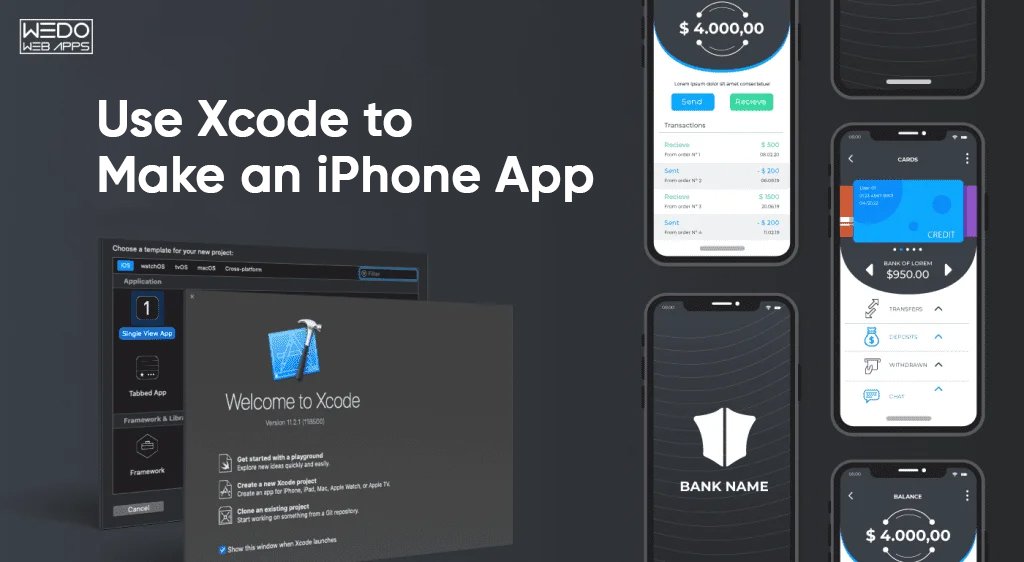
Now that your designs are ready, it is time to bring that to life. The first step is opening Xcode, Apple’s official development environment. When you launch Xcode, you will be prompted to create a new project. Choose the iOS App template, and then fill in key project details like:

  • App Name (eg., “FocusBuddy”)
  • Team (from your Apple Developer Account)
  • Interface (Storyboard or SwiftUI)
  • Language (Swift)

Once set, Xcode creates a workspace where you code, design files, assets, and configurations will live. At this stage, you are essentially setting the foundation of your app, just like creating a new file in Word or Google Docs, but for app development.

Beginner Tip: Stick with Storyboard + SwiftUI if you are new. SwiftUI is more modern but has a steeper learning curve.

Step 5: Code the App Using Swift

Swift is the preferred programming language for iOS app development. It’s powerful, beginner-friendly, and designed specifically for Apple devices. You will write Swift code to control how your app behaves when users interact with it.

Let’s say you have a “Start Timer” button in your productivity app. You can write a function like this in your ViewController:

@IBAction func startTimer(_ sender: UIButton) {     print(“Timer started!”) }

This code connects to your UI and triggers actions when the button is tapped. Over time you will build multiple functions for navigation, data input, calculations, animations, etc.

Learning Tip: Use Apple’s Swift Playgrounds for interactive practice if you are new to coding.

Step 6: Connect UI to Code

Now it is the time to bridge the gap between your UI elements and your logic. In Xcode, use the Assistant Editor to view both your Storyboard and code side by side.

From here:

  • Control-drag a button into your ViewController to create an IBAction. 
  • Control-drag a label or text to create an IBOutlet.

This tells the app how to react when a user taps, scrolls, or types. For example, a login button should check credentials, or a progress bar should update after a task. 

Common elements to connect:

  • Buttons 
  • Text Fields
  • Labels 
  • Switches 
  • Table Views 

Pro Tip: Always label your outlets clearly (eg., loginButton, userInputField) to avoid confusion in larger apps.

Step 7: Test Your App on Simulators and Real Devices

Before you even think about launching your app, testing is non-negotiable. Xcode comes with a built-in simulator that lets you run your app on virtual iPhones, iPads, or even different screen sizes (like iPhone SE vs iPhone 15 Pro Max).

To run the simulator:

  • Choose a device from the toolbar (eg., iPhone 14)
  • Press the Run Button (Play Icon)

You will see your app come to life just like it would on a real phone. But do not stop there, real device testing is essential to catch bugs that simulators miss.

To test on an actual iPhone:

  • Connect it via USB
  • Trust the computer on your iPhone
  • Enable developer mode (from iOS 16+)
  • Select the iPhone as your build target

Also Try: Apple’s TestFlight platform lets you share beta versions of your app with testers before publishing it.

Step 8: Submit to the App Store

This is the moment you have been working toward: launching your app.

Before you submit, you will need:

  • App name, description, and keywords
  • App icon (1024*1024 pixels)
  • Screenshots for iPhone sizes 
  • App privacy policy URL

Here is a simplified process:

  • Archive your build in Xcode (Product > Archive)
  • Upload it to App Store Connect
  • Fill in the meta data and pricing details 
  • Submit your Apple’s review. 

Apple’s review typically takes 1-3 days. If your app violates any guidelines, like having broken features, unclear privacy use, or crashes, it will be rejected with feedback for correction.

Step 9: Market Your App for Visibility

Even the most brilliantly developed app won’t succeed if no one knows about it. Once your app is live, you need to get it in front of the right users.

Effective marketing tactics include:

  • Social media promotion (Instagram, Twitter, TikTok)
  • Posting on Product Hunt or Reddit 
  • Partnering with micro-influencers in your niche 
  • Running App Store Ads
  • Launching on forums or niche communities 

Most importantly, implement App Store Optimization (ASO) by including high-value keywords in:

  • App title 
  • Subtitle 
  • Keyword field 
  • Add description 

Pro Tip: Ask friends, beta testers, and early adopters to leave positive reviews. Rankings matter a lot in App Store ranking algorithms.

Step 10: Gather Feedback and Update

Your first release is not the end, it is the beginning of your product’s life.

Start collecting feedback from:

  • In-app surveys
  • App store reviews 
  • Social media comments
  • Support emails or tickets 

Track bugs using crash reporting tools like Firebase Crashlytics or Sentry, and make regular updates to improve performance, add features, and stay compatible with new iOS versions.

Apps that evolve based on user needs build loyal communities and higher retention over time.

turn your iPhone app idea into reality

No-Code and Low Code iPhone App Creators 

Not everyone wants to (or needs to) learn Swift or set up Xcode. If you are a non-developer, a startup founder, or someone who just wants to validate an idea quickly, no-code or low-code platforms offer a faster, simpler idea to bring your idea to life.

These platforms provide drag-and-drop interfaces, pre-built modules, and automated publishing tools, so you can focus on building your idea rather than writing code.

Best Platforms to Make an iPhone App Without Coding

Here are some of the top tools for building iPhone apps without writing a single line of Swift:

Platform Best For Key Features 
Adalo  MVPs, startups  Drag-and-drop builder, in-app payments, publish to iOS
Thunkable  Educational apps, prototyping  Block-based logic, real-time testing
Glide Data-driven apps  Turns Google Sheets into mobile apps
Bubble Web apps packaged for iOS  Advanced logic, database, plugin system
Bravo Studio  Design-to-app workflow  Turns Figma designs into native apps

These tools are great for:

  • Entrepreneurs testing a startup idea
  • Small businesses creating internal tools 
  • Event apps, loyalty programs, or community platforms 

Pros & Cons of Using App Builders vs Custom Development

While no-code platforms can save time and money, they’re not always a perfect fit—especially for apps requiring deep functionality or complex backend integrations.

Pros:

  • No coding knowledge required
  • Fast deployment
  • Ideal for prototypes and MVPs
  • Budget-friendly for early-stage projects

Cons:

  • Limited customization (compared to native Swift apps)
  • Performance may not match fully coded apps
  • You’re dependent on the platform’s pricing and uptime
  • Limited access to Apple APIs and advanced hardware features

If your app requires ARKit, CoreML, HealthKit, or deep camera/accelerometer integration, you’ll likely need to go the native iOS route using Swift and Xcode.

Real-World Example:

Let’s say you want to launch a local food delivery app for your city.

  • With Adalo, you could design the full app interface, add user login, restaurant listings, and Stripe payments—all without coding.
  • Later, if you decide to scale it nationwide or integrate machine learning-based suggestions, that’s when custom development becomes necessary.

Common Challenges in iPhone App Development (and How to Overcome Them)

Creating an iPhone app opens new doors, but it also comes with unique challenges, especially if you are doing it for the first time. From strict App Store Guidelines to technical limitations, many great app ideas fall short not because they are bad, but because the process was not planned well.

Here are the most common hurdles teams face when trying to create an app for iPhone, along with proven ways to overcome them.

1. Getting Rejected by the Apple Store

The Problem:

Apple has one of the strictest app review processes in the industry. Apps can get rejected for poor performance, vague privacy policies, irrelevant content, or even small UI glitches.

How to overcome it:

  • Follow Apple’s App Store Review Guidelines from day one
  • Use real devices to test performance and eliminate bugs 
  • Make sure your app has a clear purpose and provides values to users
  • Include a working privacy policy link and accurate app metadata

Pro Tip: Use Apple’s TestFlight to catch issues before submitting your final build.

2. Understanding Time and Budget

The Problem:

Businesses often assume iPhone apps are quick and cheap to build. But depending on features, UI complexity, and testing, even a basic app can take 4-12 weeks and a significant budget, especially with custom development.

How to Overcome it:

  • Start with a Minimum Viable Product (MVP), only core features first
  • Use no-code platforms for quick validation 
  • Plan for time beyond launch: updates, marketing, bug fixes 
  • Set realistic expectations across your team or stakeholders 

A good MVP gets you user feedback early without overinvesting upfront.

3. Navigating Apple’s Developer Ecosystems

The Problem:

If you are new to iOS, setting up certificates, provisioning profiles, and build configurations in Xcode can feel overwhelming.

How to Overcome it:

  • Apple’s Developer Documentation is detailed, bookmark it.
  • Enroll in the Apple Developer program early 
  • Use Xcode’s auto-manage settings for provisioning if you are unsure 
  • Watch free WWDC (Apple Developer Conference) videos for deep dives 

If you have a team, assign this setup to someone familiar with DevOps or CI/CD.

4. Making the App Too Complicated

  • Focus on solving one key problem really well
  • Limit your launch versions to 3-5 core features
  • Use analytics (like Firebase or Mixpanel) to learn what users actually use
  • Roll out features in updates based on real user behavior 

Overcomplicating your first version increases the chance of failure.

5. Testing Only on Simulators 

The Problem:

Xcode’s iPhone Simulator is great, but it does not always reflect how your app will perform on a real device, especially for gestures, notifications, camera, GPS, or performance.

How to Overcome it:

  • Test on at least one real iPhone (ideally across different screen sizes)
  • Use TestFlight to beta test with friends or internal users 
  • Check performance on low-power mode, poor network, and different orientations

Thorough testing = fewer App Store rejections + better user experience.

6. Neglecting App Store Optimization (ASO)

The Problem:

You build the app. It is on the App Store. But nobody is downloading it.

How to Overcome it:

  • Use relevant keywords in your app name and subtitle 
  • Write a clear, benefit-driven description 
  • Include high-quality screenshots and a video preview 
  • Encourage early users to leave positive reviews

ASO is like SEO for your app, get it right, and visibility improves significantly.

Cost and Time Involved in iPhone App Development

Before you dive into development, it is important to understand what kind of investment, both in terms of time and money, is required to bring an iPhone app to life. Whether you are building it yourself, working with a freelance developer, or hiring an agency, the scope and complexity of the app will directly influence the total cost and timeline.

Let’s break it down.

Cost Breakdown – DIY vs Hiring Developers

The cost of developing an iPhone app can vary greatly depending on how you approach it:

Approach Cost Range  Ideal For
DIY (with Xcode + Swift) $0-$300(mainly time, Apple Developer fee, tools) Developers, tech-savvy founders
No-code/Low-code Platforms $25-$200/month  MVPs, non-technical founders 
Freelancers  $3000-$15,000+ Small to Medium Projects
Development Agencies  $10,000-$100,000+ Full-scale apps with complex features 

Additional Costs to Consider:

  • Apple Developer Program: $99/year 
  • App design tools (Figma, Sketch): Free – $12/month 
  • Third-party integrations (eg., payment gateways, APIs)
  • Backend services (Firebase, AWS, custom databases)

Pro Tip: Start with a lean MVP to validate your idea before investing heavily in a fully-featured product.

How Long Does it Take to Make an iPhone App?

Just like cost, the timeline depends on your app’s complexity, features, and development approach.

App Type  Estimated Development Time
Simple app (to-do list, calculator) 2-4 weeks 
MVP with user login, API, push notifications 4-8 weeks 
eCommerce, marketplace, or social platform 3-6 months
Enterprise-level app with backend, dashboards, integrations 6-12+ months

Factors that Affect Timeline:

  • Team size and expertise 
  • UI/UX complexity 
  • Number of features and platforms (iPhone only vs iPhone + iPad)
  • Revisions, testing, and App Store approval time 

Reminder: The timeline doesn’t end at launch. Post-launch updates, maintenance, and feature expansions are ongoing efforts that require both time and budget planning.

Conclusion: Start Building Your iPhone App With Confidence

Creating an iPhone app is not just for silicon valley startups or giant tech teams, it is for anyone with a strong idea, a clear goal, and the right roadmap.

Whether you plan to code it yourself, use a no-code builder, or partner with an experienced iPhone app development company, the process is now more accessible than ever. With Apple’s robust tools, widespread user base, and a supportive ecosystem, iOS remains one of the best platforms to launch high-quality, high-performance apps.

By following this guide, you have learned:

  • What tools and skills are needed to get started 
  • How to build, test, and publish an app from scratch 
  • Ways to avoid common pitfalls 
  • Alternatives for non-developers and early MVPs 
  • Time and cost expectations for different project types. 

If you are serious about turning your vision into a scalable iPhone app, now is the time. The App store is open. The market is ready. All that is missing is your app.

our experienced team can turn your concept into a high-performance iOS app

Why WordPress Is So Popular: The Ultimate Guide for Businesses Choosing the Right Website Platform

Introduction: Why Your Platform Choice Matters More Than Ever

When a business plans a new website, one decision quietly controls everything that follows, performance, security, scalability, SEO results, development cost, and even customer experience. That decision is choosing the right platform.

And this is where the same question comes up every single time:

“Why is WordPress so popular, and should we choose WordPress for our business website?”

It is a fair question, especially when alternatives like Shopify, Wix, Webflow, or custom development are aggressively marketed. But despite new players entering the market every year, WordPress consistently remains the top website platform globally, powering businesses from small startups to enterprise-level brands.

This blog breaks down the real WordPress popularity reasons, the business advantages that make it a preferred choice, and why WordPress continues to outperform other platforms in flexibility, cost-efficiency, SEO, and long-term scalability.

By the end, you will know exactly why thousands of businesses choose the WordPress platform at their first, and often final, website decision.

What Makes WordPress So Popular? A Quick Overview

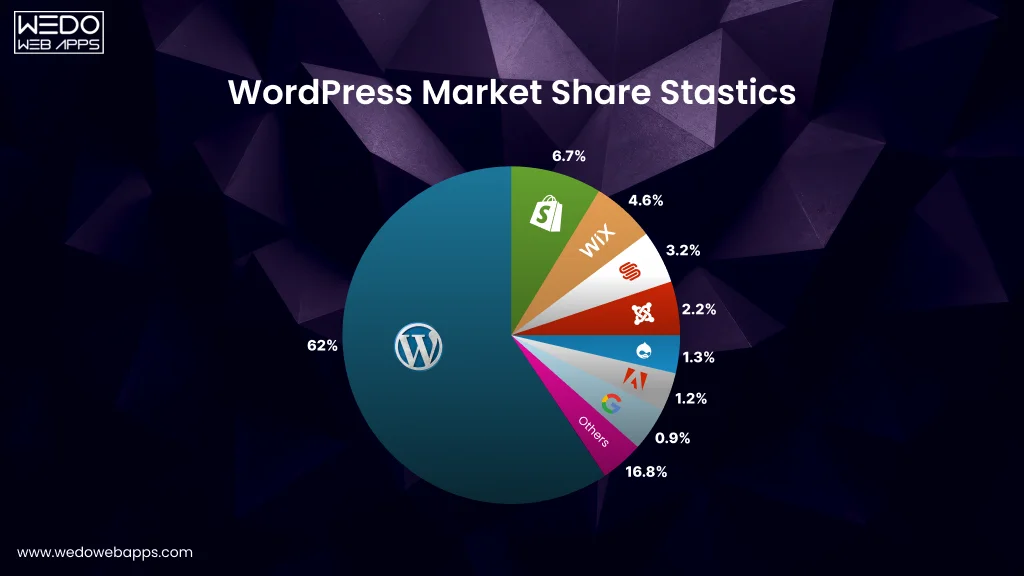
WordPress market share statistics compared to other CMS platforms

Before diving into detailed features and business use cases, let us address the core question: Why is WordPress so popular, and what makes it stand out in a crowded market of website platforms?

At its core, WordPress is an open-source content management system (CMS) that gives businesses complete freedom to build websites the way they want, without restrictions, platform limitations, or long-term lock-ins. Unlike closed systems, WordPress grows with your business. You control the design, functionality, hosting, security layers, integrations, and even the codebase itself.

Here is what drives its global popularity:

  • It’s flexible enough for any website, from simple landing pages to enterprise-level portals.
  • It is cost-effective, making it a smart choice for startups and SMEs.
  • It is endlessly customizable, with plugins and themes that let you build anything from eCommerce stores to booking systems.
  • It is SEO-friendly, helping businesses improve ranking and visibility faster.
  • It is trusted by millions, giving businesses confidence in long-term sustainability.

These WordPress popularity factors have helped it dominate the CMS market year after year, not because it is a trend, but because it continuously delivers what businesses actually need – performance, control, scalability, and value.

WordPress consultation with Book Now button

Key Reasons Behind WordPress Popularity (Core Popularity Factors)

WordPress did not become the world’s most-used CMS by accident. Its dominance comes from a real, practical advantage that matters to businesses, whether you are launching your first website or scaling a high-traffic product.

Below are the most important WordPress popularity reasons and the exact factors that make it the top business website choice today.


1. SEO-Friendly by Default

One of the biggest answers to why WordPress is so popular lies in its SEO capabilities.

WordPress follows clean code standards, mobile-first design, and Google-friendly architecture, making it easier for websites to rank.

Why it matters for businesses:

  • Faster crawling and indexing
  • SEO plugins like Yoast, RankMath, AIOSEO
  • Structured URLs and easy metadata control
  • Built-in blog tools for content marketing

For startups and SMEs aiming for organic traffic, this becomes a game-changer.

2. Highly Customizable With 59000+ Plugins

If you can think of a feature, WordPress can support it.

From payment gateways to automation tools, appointment systems, CRMs, SEO tools, and advanced analytics, plugins make WordPress endlessly extendable.

This is a major WordPress popularity factor for growing businesses because:

  • You avoid heavy custom coding
  • You add features instantly
  • You can scale functionality anytime

Whether you are building a simple website or a complex app-like system, WordPress fits both models.

3. Cost-Effective Development + Low Maintenance

Another major reason behind the popularity of the WordPress platform is its affordability.

Businesses save money on:

  • Development hours
  • Custom features (thanks to plugins)
  • Long-term maintenance
  • Content updates (because teams can manage things themselves)

Startups love WordPress because it cuts initial tech investment. Enterprises choose it because it lowers ongoing operational costs.

4. Massive Theme Ecosystem for Any Industry

With thousands of premium and free themes, WordPress lets businesses launch fast while still maintaining branding standards.

Themes help you build:

  • Corporate websites
  • Portfolio sites
  • eCommerce stores
  • Education platforms
  • Healthcare and finance portals

And for brands that need a unique identity, custom themes can be built from scratch.

5. Easy Content Management for Non-Tech Teams

You do not need a developer for every minor update, and that is one of the biggest reasons why businesses choose the WordPress platform.

Marketing teams can easily:

  • Publish blogs
  • Update pages
  • Change banners
  • Add landing pages
  • Manage SEO content

This ease of use makes WordPress a favorite among marketing-heavy companies.

6. Scalable for Startups, SMEs, and Enterprises

WordPress is not “just for small websites.”

It powers news platforms, enterprise portals, high-traffic eCommerce stores, and global multi-site networks.

Scalability advantages:

  • Add servers on CDN as traffic grows
  • Custom caching for faster performance
  • Ability to move to headless WordPress
  • Database Optimizations
  • High-Traffic architecture support

This flexibility makes WordPress a long-term solution, not a temporary one.

7. Strong Security With the Right Practices

While some myths say “WordPress is insecure,” the truth is simple: its security depends on how you build and maintain it.

With proper hosting, updates, plugins, and security is hardening, WordPress becomes extremely secure.

Security layers include:

  • Firewalls
  • Malware scanner
  • Login protection
  • SSL enforcement
  • Role-based access
  • Regular updates

Many enterprise companies trust WordPress because they can control every layer, not something a proprietary platform offers.

8. Global Community + Continuous Innovation

WordPress is backed by a massive ecosystem of developers, contributors, agencies, and enterprises. This ensures:

  • Continuous updates
  • Faster issue resolution
  • New features
  • Long-term reliability

For businesses, that means WordPress is not going anywhere; it is evolving constantly, making it a safe long-term platform.

confused about WordPress business needs

Why Choose WordPress for Your Business Website? (Business-Centric Breakdown)

Even with countless website builders and CMS platforms available today, WordPress continues to stand out as a practical, future-ready option for businesses of all sizes. Here is a closer look at why businesses choose the WordPress platform and how it solves real challenges across different industries.

1. WordPress Works for Every Business Type

Whether you are a brand launching your first website or global enterprise managing multiple portals, WordPress adapts to your structure.

For Startups:

  • Launch MVP websites quickly
  • Build landing pages for marketing campaigns
  • Set up blogs for SEO and organic traction
  • Affordable hosting & development

For SMEs

  • Full-fledged business websites
  • Service and product portfolios
  • Lead generation funnels
  • Multi-page SEO structures

For Enterprises:

  • Multi-site networks
  • Knowledge bases, intranets, & employee portals
  • Enterprise CMS and custom workflows
  • High-traffic architecture support

This flexibility is a core WordPress popularity reason, it does not limit your growth.

2. Speed, Performance, and Core Web Vitals Optimization

Modern websites must load fast, stay stable, and deliver a smooth experience across devices. WordPress excels here when built with proper development standards.

Businesses benefit from:

  • Lightweight themes
  • Server-side caching
  • CDN integrations
  • Mobile-first layouts
  • Optimized database structures

A well-optimized WordPress website often outperforms drag-and-drop builders like Wix or Webflow, especially as content grows.

3. Seamless Integration With Third-Party Tools

Businesses rely on dozens of tools like CRMs, ERPs, marketing automation, analytics, payment gateways, and more.

One major WordPress popularity factor is that it integrates with virtually everything:

  • Salesforce, HubSpot, Zoho
  • Mailchimp, Klaviyo, ActiveCampaign
  • Google Analytics, Tag Manager, Search Console
  • RazorPay, Stripe, PayPal
  • WhatsApp APIs & chatbots
  • Learning management systems
  • Inventory, POS & ERP Solutions

This makes WordPress an ideal choice for growth-driven companies.

4. Future-Proof & Flexible Tech Stack

WordPress has evolved far beyond a blogging platform.

It supports a modern technology stack that helps developers build enterprise-grade solutions:

  • PHP 8.x for backend logic
  • React-based Gutenberg block editor
  • REST API for integrations
  • Support for headless architecture
  • Compatibility with JAMstack setups

This future-proof structure is one of the strongest reasons why WordPress is so popular among tech teams and digital agencies.

5. Total Ownership & No Vendor Lock-In

Unlike hosted builders such as Shopify, Wix, or Webflow, WordPress gives your business:

  • Full control over hosting
  • Access to all files & databases
  • Freedom to migrate anytime
  • Control over customization
  • Ability to scale without platform restrictions

In business terms, this translates to: More freedom, more flexibility, less long-term dependency.

This is also why enterprise businesses often choose WordPress as their preferred CMS.

WordPress vs Other Platforms: Is It Still the Best Choice?

With so many website platforms available today, businesses often compare WordPress with alternatives like Wix, Shopify, Webflow, and custom development. Each platform has strengths, but WordPress consistently stays ahead due to its flexibility, cost-efficiency, and scalability.

Below is a straightforward comparison to help you evaluate where WordPress truly stands.

WordPress vs. Wix: Flexibility vs. Simplicity

Wix is great for beginners, but it comes with limitations. WordPress, on the other hand, gives full control, which is ideal for long-term business growth.

Factors WordPress  Wix
Customization  Unlimited Limited
Plugins/Features  59000+ Limited apps
SEO Strong Basic
Ownership Full control Platform Dependent
Scalability  High Low to moderate
Cost  Flexible Subscription-based


Verdict:
Wix work for small hobby sites. WordPress wins for small business websites that need growth, SEO, and flexibility.

WordPress vs. Shopify: Control vs. Convenience

Shopify is a strong choice for eCommerce but becomes expensive as features scale.

WordPress + WooCommerce offers more control and lower long-term costs.

Factors WordPress + WooCommerce Shopify
Cost  More affordable Expensive apps & fees
Customization Unlimited App-dependent
Transaction fees  None (with right gateway) Yes, unless using Shop Pay
SEO  High control Moderate
Ownership 100% Shopify-controlled
Scalability  High High but costly


Verdict:
Shopify is easier ; WordPress is more flexible and economical for businesses scaling eCommerce.

WordPress vs Webflow: Creativity vs Practicality

Webflow is popular among designers, but it becomes restrictive for business websites needing complex functionality.

Factor WordPress Webflow
Design Freedom High High
Backend Flexibility Very high Moderate
Plugins Massive ecosystem Limited
Cost Hosting + development Higher recurring fees
Team Usage Easy for non-tech users Learning curve
Integrations Extensive Moderate

Verdict: Webflow wins for design-heavy sites; WordPress wins for full business functionality.

WordPress vs Custom Development

Custom development offers total control, but at a much higher cost and development time.

WordPress provides a near-custom experience at a fraction of the budget.

Factor WordPress Custom Build
Development Time Fast Very slow
Cost Low to moderate High
Maintenance Easy Technical & expensive
Scalability High Depends on developer
Security Strong with plugins Must be built manually

Verdict: Unless you’re building a highly complex, product-level platform, WordPress gives better value.

Final Comparison Summary

If your business needs:

  • scalability
  • SEO performance
  • cost-efficiency
  • integrations
  • future-proof technology
  • complete ownership

Then WordPress remains one of the best website platform choices today, which explains why WordPress is so popular among tech teams, startups, SMEs, and enterprises.

Common Myths About WordPress (And the Truth Behind Them)

Despite being the world’s most popular CMS, WordPress is surrounded by several myths; especially among businesses evaluating different website platforms. Let’s clear the air so you can make decisions based on facts, not assumptions.

Myth 1: “WordPress Is Only for Blogs.”

The Truth: WordPress started as a blogging tool, but today it powers:

  • corporate websites
  • eCommerce stores
  • membership platforms
  • LMS systems
  • directories & portals
  • enterprise multi-site networks
  • marketplaces
  • custom applications

Its flexibility is one of the most important WordPress popularity factors, it can handle far more than just blogging.

Myth 2: “WordPress Is Not Secure.”

The Truth: WordPress is secure, when built correctly.

Security depends on:

  • quality hosting
  • updated themes/plugins
  • proper security hardening>
  • role management
  • firewall and malware scanners

Major enterprises use WordPress because it allows full security control, unlike locked platforms where you depend on one provider.

Myth 3: “WordPress Is Slow.”

The Truth: WordPress is slow only when poorly built.

A well-optimised WordPress website can outperform many SaaS builders.

Speed depends on:

  • caching layers
  • image optimisation
  • database tuning
  • CDN setup
  • lightweight theme
  • good hosting

Businesses choose WordPress because it gives full performance control; something drag-and-drop builders restrict.

Myth 4: “Plugins Make the Website Heavy.”

The Truth: Too many bad plugins make a site slow.

A curated set of essential, high-quality plugins actually enhances performance and scalability.

The key is:

– choosing trusted plugins
– avoiding unnecessary add-ons
– regular updates
– using custom development where needed

This is the same reason developers prefer WordPress over restrictive platforms, it supports clean, extensible architecture.

Myth 5: “WordPress Isn’t Good for Enterprise Websites.”

The Truth: Some of the biggest brands in the world run on WordPress.

Why?

  • Custom workflows
  • Multi-site networks
  • Advanced integrations
  • API-driven features
  • High-traffic support

Enterprises choose the WordPress platform because it balances flexibility, ownership, scalability, and cost-efficiency, something custom development alone makes extremely expensive.

WordPress for Startups, SMEs & Enterprises (Use-Case Specific Benefits)

Different businesses have different website goals, but WordPress manages to fit all use cases effortlessly. Whether you’re launching fast, scaling aggressively, or managing complex digital operations, WordPress gives you the right balance of flexibility, control, and cost-efficiency.

Below are the core advantages for each business category.

1. Why Startups Prefer WordPress

Startups need a platform that is fast to launch, affordable, and easy to scale, without heavy upfront investment.

Key benefits for startups:

  • Quick MVP website setup
  • Low development cost
  • Easy to update without technical help
  • SEO-friendly structure for early traffic
  • Ability to pivot or redesign anytime
  • Supports landing pages & lead-gen funnels

For early-stage companies prioritising speed and visibility, WordPress becomes the most practical choice, one of the biggest WordPress popularity reasons in the startup world.

2. Why SMEs Choose WordPress for Their Main Business Website

SMEs operate in a highly competitive market where brand credibility, SEO ranking, and customer experience directly impact revenue.

Key benefits for SMEs:

  • Professional, scalable business websites
  • Custom workflows for products, services & bookings
  • Local SEO advantages
  • Plugin-based automation (CRM, WhatsApp, chatbots, invoicing)
  • Affordable long-term maintenance
  • Flexibility to add new features gradually

SMEs love WordPress because it balances performance, cost, and customisation better than almost any other platform.

3. Why Enterprises Trust the WordPress Platform

Enterprises need stability, deep customisation, multi-site management, and complete security control, WordPress delivers all of this without vendor lock-in.

Key enterprise-friendly features:

  • Enterprise CMS capabilities
  • API-driven integrations with ERPs & CRMs
  • Headless WordPress architecture
  • Multi-site support for global brands
  • Role-based access for large teams
  • Compliance-ready setups
  • Scalability for millions of monthly visitors
  • Custom modules and workflows

Enterprises choose WordPress because it offers the freedom of custom development with the convenience of a proven CMS framework, making it a top business website choice.

4. Why Agencies & Tech Teams Prefer WordPress

Even developers and agencies favour WordPress because of its technical ecosystem.

Developer-focused benefits:

  • Custom themes & plugin development
  • REST API for flexible architecture
  • Compatibility with modern frameworks (React, Next.js)
  • Full control over performance optimisation
  • Clean, extendable codebase
  • Rich documentation + global community support

This strong developer ecosystem is another major WordPress popularity factor, keeping it relevant even in 2025 and beyond.

WordPress technical consultation for custom features, speed, and headless setup

Industries Where WordPress Performs Exceptionally Well

One of the biggest reasons why WordPress is so popular is its ability to adapt to almost any industry. Whether the goal is branding, lead generation, bookings, online learning, or eCommerce, WordPress provides the features, integrations, and scalability required across sectors.

Below are industries where WordPress consistently outperforms other platforms.

1. Corporate & Professional Services

Law firms, consulting companies, finance agencies, engineers, architects, and other professional service businesses rely on WordPress for:

  • High-credibility, modern corporate websites
  • Lead-generation systems
  • Form automation
  • Appointment booking
  • Case study and portfolio pages
  • Multi-language support

WordPress gives professional firms a polished digital presence that builds trust and drives conversions.

2. eCommerce & Online Stores

With WooCommerce, WordPress becomes a robust eCommerce solution for small stores and large-scale retail brands.

Benefits include:

  • Customisable product pages
  • Multiple payment gateways
  • Inventory management
  • Shipping integrations
  • Marketing automation tools
  • SEO-friendly structure for higher sales

For businesses that need flexibility without Shopify’s recurring expenses, WordPress is an ideal option.

3. Education, eLearning & Coaching Platforms

WordPress is widely used for:

  • online courses
  • membership portals
  • LMS modules
  • coaching websites
  • education institutes

Schools, universities, and private educators choose WordPress because it integrates seamlessly with LMS plugins like LearnDash, TutorLMS, and LifterLMS.

4. Healthcare & Medical Practices

Doctors, clinics, hospitals, and diagnostic labs use WordPress for:

  • Appointment scheduling
  • Doctor profiles
  • Patient resources
  • Service pages
  • Report download portals
  • Multi-location management

WordPress offers secure structures with HIPAA-ready frameworks when implemented correctly.

5. Real Estate & Property Businesses

WordPress supports booking systems, property listing modules, maps, galleries, and CRM integrations, making it ideal for:

  • Realtors
  • Builders
  • Property consultants
  • Rental platforms

Its flexibility allows businesses to manage hundreds of listings dynamically.

6. Hospitality, Travel & Tourism

Hotels, resorts, travel agencies, and tour operators use WordPress for:

  • online booking engines
  • itinerary pages
  • multi-language support
  • integrations with booking platforms
  • fast mobile experiences

Its scalability helps hospitality brands manage seasonal traffic without performance issues.

7. Media, News & Publishing Companies

This is where WordPress originally thrived, and still dominates.

Publishing houses benefit from:

  • custom editorial workflows
  • multi-author access
  • superior blog structure
  • SEO-driven traffic
  • ad placements
  • newsletter integrations

High traffic is no issue when built with strong caching and CDN layers.

8. Nonprofits, NGOs & Community Platforms

WordPress supports donation systems, volunteer portals, event calendars, and multilingual content, all crucial for non profit growth.

It’s cost-effective, scalable, and easy for volunteer teams to manage.

In short:

The wide industry adoption itself is one of the biggest WordPress popularity reasons, its versatility makes it the default choice for millions of businesses.

How WEDOWEBAPPS Helps Businesses Build Powerful WordPress Websites

When businesses choose WordPress, what they really need is a development partner who knows how to turn the platform’s flexibility into real business outcomes. At WEDOWEBAPPS, we have spent years building high-performance, scalable, and secure WordPress solutions for startups, SMEs, and enterprise brands, ensuring they don’t just useWordPress but leverage it strategically.

Below is how we turn WordPress into a revenue-driving, future-ready digital asset for your business.

1. Custom WordPress Development

Every business has a unique digital journey, and your website should reflect that. Instead of relying on cookie-cutter themes, we build custom WordPress websites tailored to your brand identity, customer flow, and long-term scalability.

  • Fully custom design systems
  • Pixel-perfect UI aligned with brand guidelines
  • Custom-built functionalities that go beyond standard plugins
  • Seamless admin dashboards tailored for easy content management

Whether you are building a corporate site, a portfolio, or a high-traffic service website, hire WordPress developers to make sure that your site is fast, user-friendly, and built for growth.

2. Theme Development & Customization

Sometimes you find the perfect theme that still needs some real engineering magic. We help businesses customise themes to match their brand, UX needs, and performance goals.

Our theme services include:

  • Creating bespoke themes from scratch
  • Customizing purchased themes without compromising performance
  • Improving UI/UX for better engagement and conversions
  • Making themes scalable, lightweight, and SEO-friendly

You get a modern, responsive website with a smooth front-end experience and high backend stability.

3. Plugin Development & Integration

Plugins are one of the biggest reasons behind WordPress’ popularity, but too many plugins can slow down a website or create conflicts. That’s why we focus on smart integration and, when needed, build custom plugins tailored to your business logic.

We help with:

  • Custom plugin development
  • Integration of third-party APIs and SaaS tools
  • CRM, ERP, and payment gateway integrations
  • Plugin optimisation to avoid site bloat

You get exactly the features you want, without compromising performance or security.

4. WordPress to Headless WordPress

Want to combine the power of WordPress with the speed of a modern front-end like React, Next.js, or Vue?

Our Headless WordPress development helps businesses that want better performance, more scalability, and a richer web experience.

We offer:

  • WordPress as a CMS + Next.js/React front-end
  • API-driven architecture for lightning-fast websites
  • Multi-channel content delivery (web, mobile apps, kiosks)
  • Superior security and server-side rendering

This is the ideal choice for businesses looking for enterprise-grade digital experiences.

5. Performance Optimization & Security Hardening

WordPress is capable of outstanding performance, but only with proper optimisation. We ensure your site meets Core Web Vitals, loads fast, and stays protected from modern cyber threats.

Our optimization includes:

  • Speed improvements (caching, CDN, lazy loading, code minification)
  • Database cleanup and optimization
  • Security hardening and malware prevention
  • Server optimization for high traffic volumes

A fast and secure website directly impacts conversions, SEO, and brand trust.

6. Ongoing Support & Maintenance

WordPress requires continuous care. That’s why we offer dedicated support and maintenance plans for businesses that want peace of mind.

Our support covers:

  • Regular updates (themes, plugins, WordPress core)
  • Uptime monitoring
  • Performance tracking
  • Security patches
  • Monthly backups and quick restorations
  • 24/7 technical assistance

We ensure your business website remains stable, updated, and ready for growth, always.

Custom WordPress development, plugin engineering, and performance optimization services

Conclusion: Is WordPress the Right Platform for Your Business in 2025?

WordPress remains one of the most popular platforms for business websites, and for good reason. Its flexibility, scalability, SEO capabilities, and massive plugin ecosystem make it a reliable choice for startups, SMEs, and enterprises alike. In short, WordPress gives you the freedom to build exactly what your business needs without overspending or getting locked into rigid systems.

If you’re wondering whether WordPress is still worth choosing in 2025, our answer is simple: yes, especially when built with the right development approach.

At WEDOWEBAPPS, we help businesses turn WordPress into a fast, secure, and high-performing digital asset through custom development, headless architecture, plugin engineering, optimisation, and ongoing support.

Thinking about building or upgrading your WordPress website?

Let’s talk. We, as a WordPress Development Company can help you create a website that’s not only visually stunning but also built to deliver real business results

build or upgrade your WordPress website for a high-performing digital experience

The 30-Second Trick for Integrating Siri in the Third Party Apps

As known beforehand, two apps run by themselves and cannot interact with one another on iOS. Other apps incorporate social apps, smart residence and many more. As a consequence, many mobile apps are going to take a hit and become sub servants of VPAs soon.

Sooner or later, the business may add SimpleThings connectivity. Undoubtedly, it is trying to leave a tiny room for users to be attracted by the Google Chrome browser, which has always been stunning. Besides the typical software announcements and releases, the Cupertino-based business is also predicted to earn a variety of Siri-based advertisements.

Things You Won’t Like About Integrating Siri in the Third-Party Apps and Things You Will.

Apple is making the new Cycle Tracking app readily available to all iPhone users, too. And therefore you don’t need an Apple Watch if you wish to use the feature. It is not a search company. It might be a little late when it comes to letting in the third-party applications use voice recognition. It is trying to solve the issue and upgrading the framework too to make it as a flexible one. It showed us a possible future that will have an impact on the way we design. It revolutionized personal technology with the introduction of the Macintosh in 1984.

Siri, on the flip side, is a massive portion of the Apple Watch, offering up voice commands for lots of the smartwatch’s superior capabilities. As a consequence, Siri can understand speech and free form human issues in place of a particular control. Siri is an essential quality of CarPlay. Siri is also turning into a little bit of a mind reader. Employing a feature named QuickType, Siri will attempt to predict what you wish to say next. Siri will have the ability to search Finder for files created during a particular period in a specific subject. And you will be able to refine your search with follow-up questions. Aside from Siri being a voice technology, it’s likewise an all-round assistant, you could utilize to activate shortcuts by just tapping a button in place of a voice command.

Siri is quite powerful even if limited to some kinds of applications right now. Siri doesn’t dip into third-party apps, however, and that means. You’re on your own in regards to finding the Spotify playlist or Pandora station you’re searching. Siri maps a lot of things to inform me about the weather. It would help if you commanded, and Siri will produce the call for you. So now, you cannot only ask Siri to make calls utilizing third-party apps like the global. Roaming app-Ajura but also experience calling enjoy the native of your cell phone.

Critical Pieces of Integrating Siri in the Third-Party Apps

Alexa-enabled devices are generally using where folks spend the majority of their time, for example, the family room and kitchen. To start with, it isn’t looking suitable for new devices. Just make sure that the unit is running the most recent edition of iOS and plug that puppy into a compatible vehicle stereo. Ultimately, it’s the only Siri device that sits in 1 place all day, every day, and that means you know just where to speak.

From that point, users can merely speak whatever command they wish, without the necessity for a polite precursor. They don’t have to put the passcode to receive calls to unlock the screen. For instance, the user starts running. Users would also have the capacity to use the very same Siri features with the device they enjoy with their iPhone. Because of deep links, Android users will have the ability to start a conversation with a voice app and keep in an Android app.

Immaterial of the original method an app chooses to integrate with Cortana; she is always going to preserve and offer all context she has about the particular task available. After you have the Garmin app downloaded, a number of the apps have settings that could be customized. You are also going to be able to look for apps via Siri, dictation and scribble features. Allow it to be simpler to locate the Apple Watch apps you have to have in your life. Now you may use the enabled apps inside the Siri interface. Today you can improve your apps with voice commands to supply your users with bot-style interactions. Hire iOS app developer for your iPhone app.


Creating a Personalized Store through Volusion Development

Through Volusion, Clients are guided through a series of simple and straight steps to plant and cultivate the seeds of growing business in the E-Commerce world. Volusion Development helps the industry successfully roll-in to the customers’ demands and build the stores strategically for the benefits of both the entrepreneurs and their customers at the stores.

Volusion Development Procedure

It helps clients with a how-to guide making it easy to organize the best stores available for their business. Here is the primary development procedure.

Finding the Niche

One of the necessary steps, to begin with, is to understand what domains of product niche one wants to sell. In the case of an already established business in the local markets, it becomes easy to proceed with extending to E-Commerce through our further help.

Choosing a Platform

Once decided on what product one wants to sell, it is time to decide where to sell them. There are benefits of selling in already existing marketplaces but taking into view the long term success. It is recommended to the Entrepreneurs to sell on E-Commerce platforms that will allow them to control their brands.

Understand the Competitors’ Strategies

Please take an in-depth knowledge of how the competitors strategize on selling their products to the business owners. Volusion development helps the clients to understand how they contribute to their target audience’s demands.

Budgeting

After getting familiar with the target customers are, one needs to start Budgeting for the products. There is no need to invest in a brick and mortar storefront as now things move up the Internet and are traded well. However, unexpected costs may raise so budget the products carefully.

Setting up the Online Store

Here are some of the additional features one can get with the Volusion Development for their online business. Find essential tips for hiring Magento developers while customizing your e-commerce experience with Volusion development.

  • Choosing Templates and Categories

Several free and paid templates for attractive and trending view-fronts encourages customers to browse thoroughly into different Categories of the Products list. Choose a light theme for high visual content or create a dynamic visual experience for tech gears and auto parts, giving a bolder look.

  • Product Description and Images

Volusion insists on a unique description of products, including all information customers may need before purchasing. Appealing, high-quality images with multiple angles of the product attract the audience. It sums up with a zooming feature for inspecting the products. As they cannot try testing the product, but more one can mimic the experience of doing so through such features. Marketing the online Store The final stage to complete a successfully running online store concludes with a marketing strategy. First of all, they have to involve a mix of SEO, paid advertisements, social media, and analytics. This will bring awareness to the brands rapidly once the Store gets into the E-Commercial Markets. Volusion Development gives one an abrupt leap towards a successful web store. It provides expert guidance throughout the process of building and running a business for the growth amongst the competition in domains.

Learn about extended search in BigCommerce while you customize your e-commerce experience with Volusion development.

Necessities while getting services of mobile development

There are plenty of mobile phone applications available these days. Each of these applications has its purpose. Our present blog on Necessities while getting services of mobile development is a review of points for consideration while hiring any mobile development services company.

What to keep in mind while getting mobile development services?

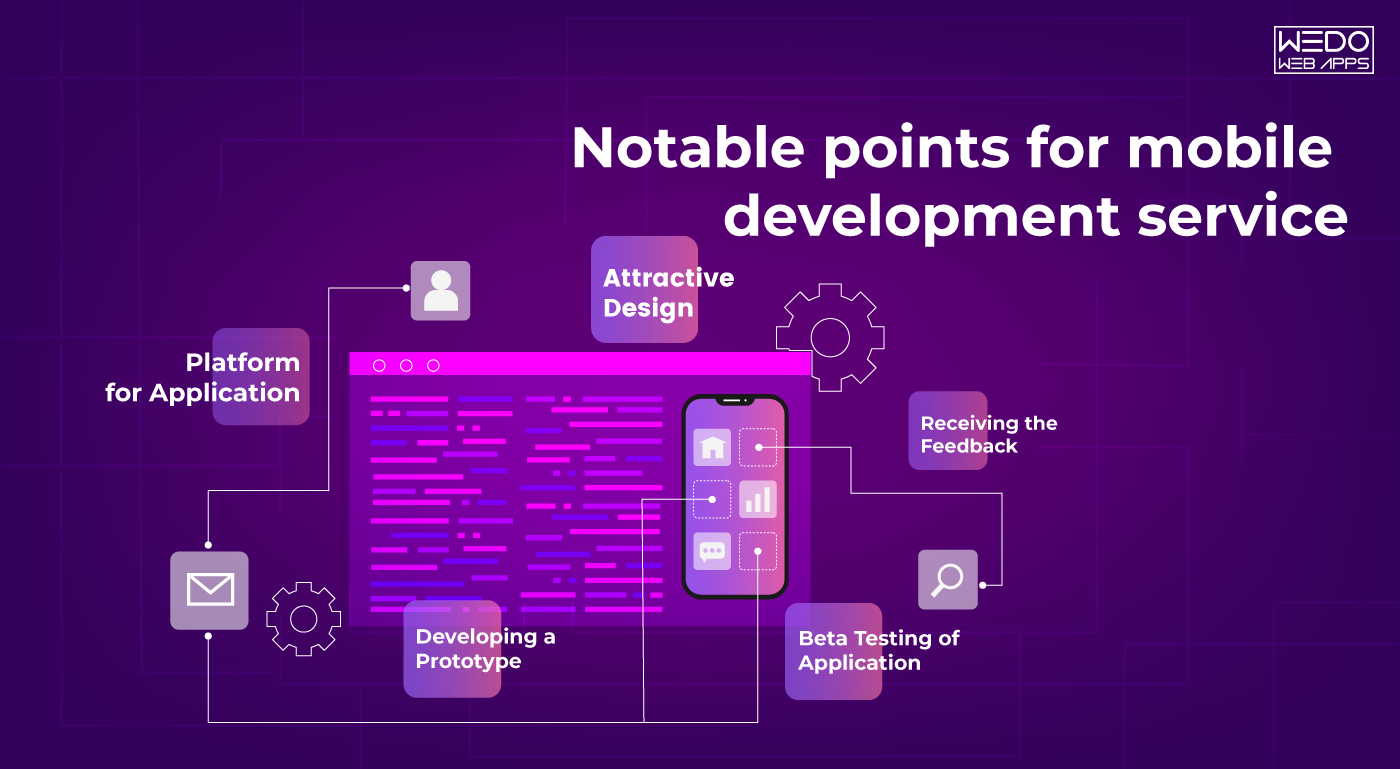
For serving the users with a high-quality mobile application, it is necessary keeping several points in mind. Below is a list of some such points that will make the transportable application favorite among users.

Targeting Potential Customers

First of all, it is necessary to identify the potential users of the application. It helps in planning the marketing of the app. Then there is a need to make the strategies for making out to those users. In this manner, one can make their application reach the perfect audience for their online business.

Adding Attractive Design

It is of utmost necessity that the mobile application has an attractive design. Aesthetic considerations undoubtedly affect the performance of a claim. Thus, the developer must enforce on using proper codes, themes as well as color combinations for encouraging various users for downloading the application.

Platform for Application

There are various options available for developing a mobile application. Right beginning from iOS, we also have possibilities of expanding our mobile app in Windows, Android, Native, etc. Thus, by identifying the platform where they can find both their users and a perfect environment for their online business, they can choose that platform.

Developing a Prototype

Before starting with the actual creation of an application, it is essential to prepare the application prototype. In this manner, one can get a brief idea about what would take for creating a high-performance application. This will result in less hassle while preparing the demand for their potential users. Understand the necessities for mobile development services and explore the options for mobile app development in Columbus, Ohio, to ensure your project is in good hands.

Beta Testing of Application

It is also necessary to carry out the beta testing of the application. This will help us in resolving the bugs that are existing in our form. Due to this, we will be providing a high-quality application to our users. It will also let them know the problems that the app is facing.

Receiving the Feedback

Getting reviews from the online business owners is among the prerequisites for mobile development services. As they are developing the app for the business owners, it is essential noting down his views and making changes in the app as per his requirement.

Upgrading the Application

Once the developer is done with the beta testing and making changes as per the wishes of the business owner, he must effectively develop the app, so there aren’t any bugs existing in it. It also required taking care that the app runs efficiently across all platforms. While learning about the necessities for mobile development services, consider the advantages of using Flutter for web applications to enhance your development toolkit.

When you’re considering mobile development services, it’s important to understand the essential aspects of working with a development company. Factors such as their expertise, approach to project management, and customer support are key to a successful partnership. For more details on securing mobile development services, check out our guide on getting services from a mobile development company.

Conclusion

The present blog on Necessities while getting services of mobile development relates to the factors that might affect a mobile application’s performance. These factors must be kept in mind while getting mobile development services.

Developing the Custom CMS System in PHP

It is hard imagining any website without a content management system (CMS). The cms maintain the data on the site in a proper manner. Our present blog on Developing the Custom CMS System in PHP is about custom cms development in PHP. Here we will describe the development procedure as well as certain benefits of the given platform.

Essential features of custom cms development in PHP

Below are some essential features which a business owner must check out while availing services of custom cms development.

Portable: The CMS system must be portable enough. A Developer should be easily able to develop the website with the available widgets, themes, and plugin tools. It should be easier to convert the data from one form to another.

Dynamic: The website for which they are developing the cms system should be active. It should be easier to make any changes to the website with ease. Besides that, the distribution of the content on the website must be done correctly. Such that it becomes easier for the user to find things on the site.

Data Security: These days, Data Security is one of the most important parameters while creating any website. Business owners are more often worried about the misuse of their data. So, the developers must ensure data security while developing a custom cms system.

Admin Interface: The admin’s primary duty is managing the themes, contents, users, and other aspects of the website. But, the developer can create it in such a way that the tasks of the admin enhance.

How to carry out custom cms development in PHP?

While carrying out Custom PHP Development, the developer has to consider some of the following points in mind:

First of all, while developing the cms, the developer has to follow a file structure. Depending upon the number of folders, subfolders, files, and different types of categories, the business owner will decide a file structure, and the developer will do it accordingly. This results in the proper redirecting of the requests from the browser.

In the next step, you have to define all the configurations for the web page. The PHP file will receive the requests and will prepare a responsive web page. Then the developer will create file extensions with the functions. In this way, he can assign a task to each of the folders.

There is also a need for a security variable. It will restrict the access of files to any other user. There is a requirement for the template function to register the website themes for designing purposes. Besides that, for checking the form submission request, the user will need a session variable.

Read more about PSD to Drupal and Magento Conversion

In the present blog on Developing the Custom CMS System in PHP, we briefed you out about the custom cms development in PHP, its essential requirements, and the system’s development procedure.

Cheap iPhone App Development Services That Actually Work

Cheap iPhone App Development: Understanding the Real Value

Launching an iPhone app is the first step for your business when it comes to handling the mobile presence, whether it is a startup, a small business, or a solo entrepreneur. But the iPhone App development cost can easily exceed your initial expectations.

As per the industry standard, the estimated cost of iOS app development can cost somewhere around $8,000 to $30,000, which also depends on features and developer rates.

For many businesses working with a tight budget, there is always the backup option available for them to have the quality of services within their required budget. There is always a need for functional apps that solve problems and validate ideas to build an app without overspending on the development processes.

This is where the need for cheap app developers or a low-cost iPhone app development company is to have the relevant practices. These service providers will help you build the app that is best suitable and grow without the need for any heavy financial burden.

What Cheap App Development Means

Well, businesses get confused because of the word cheap, but the fact is that a cheap app development company does not always offer lower quality of services. Instead, it means finding the cost-effective solution by:

  • Prioritizing essential features.
  • Hiring cheap developers from cost-effective locations.
  • Using pre-built components.
  • Starting with the MVP approach.
  • Avoiding unnecessary design or architecture complexities.

However, it is important to set your required expectations. Low-cost development typically means that it requires fewer custom features, a simpler design, and limited post-launch support unless it is specifically arranged.

Is It Safe to Hire a Cheap App Developer?

Yes, but you need to be sure about the various actions before you hire. The global freelance and offshore development market includes many experienced professionals offering lower rates due to regional cost differences.

Here are a few safety checks to apply:

  • Always ask for previous work, especially on iOS projects.
  • Evaluate their communication clarity and responsiveness.
  • Use contracts that define scope, deadlines, and handover rights.

Hiring a cheap developer is when you know about the professionalism and can deliver an app within the set guidelines.

How to Build a Cost-Effective iPhone App Without Compromising Quality

Developing the app can be challenging, but with access to the right development partner or app builders, you can have the specialized services to ensure the accuracy of the app and get tailored insights.

Choose the Right Development Model

Criteria Freelancer Development Agency App Builder Platforms
Cost Lowest ($720–$1,800) Moderate ($1,800–$6,000+) Lowest recurring ($18–$60/month)
Best For Small projects, MVPs, quick fixes Full-service apps, long-term projects Simple apps, idea validation
Customisation High (depends on skill) Very High Limited
Team Structure Solo (may lack QA/design) Full team (dev, design, PM, QA) No team; DIY tools
Scalability Depends on the developer’s availability Scalable with multi-skill support Low scalability
Time to Launch Medium Fast with an organized team Fastest (drag & drop setup)
Ongoing Support Not always guaranteed Usually included in retainer/support Platform-dependent
Ownership of Code You own the code You own the code You don’t own the core platform code
Skill Dependency High (you must choose carefully) Lower (agency manages quality) No coding required
Learning Curve None if fully outsourced None Requires time to learn the tool

Start with MVP: The Smartest Budget-First Strategy

Building the minimum viable product helps you reduce unnecessary costs by maintaining focus on core features. Instead of developing everything first, you can start by building:

  • A simpler version of the app with access to key functionalities.
  • Enough process to access early visitors.
  • A framework that can improve over time.

Instead of launching fully, you can start with the basics by adding limited features, a menu for browsing, and the option of order placement. Add some complex features and loyalty programs once your app becomes successful.

Optimize App Scope Based on Budget

Make the smart budget decisions for access to low-cost iPhone app development, and for this, you need to make an intentional trade-off. Ask yourself:

  • Which feature is absolutely necessary for your app?
  • Can any functionality be handled manually or with the use of third-party tools?
  • Are there any ready-made SDKs or APIs to reduce development time?

For example, if your app requires a payment gateway, then integrate services like Stripe or Razorpay, which help you reduce the overall cost and time.

Similarly, using Apple’s native UI components speeds up iOS development and lowers complexity.

Prioritizing features in this way helps stretch your budget while still achieving a usable, professional app.

app developer services with prioritized features

What You Can Expect from an Affordable iOS Development Service

Connecting with the cheap iPhone app development services or an iOS developer requires you to maintain an accurate connection with the iOS developers to maintain the accuracy of your apps and ensure a smooth run on all devices.

For maintaining better development services, you need to know about the requirements of the feature and the overall cost of those services.

Key Features Commonly Included in Low-Cost Projects

Low-cost iPhone app development services typically maintain a clear focus on the accurate functionality of an app. If you are working with a limited budget, here is what you can expect:

  • Basic UI/UX design using Apple’s standard design guidelines.
  • Standard features like login, forms, search, and simple dashboards.
  • Integration of third-party tools, payment gateways, Google Maps, or social login.
  • Responsive layout optimized for various iPhone needs.
  • App Store submission assistance.

Developers often use reusable components and existing libraries to reduce the development cost, or else you can have the cheap app builders. Some cheap app developers often use reusable components and existing libraries to reduce the development cost and time without compromising the quality.

Cost Breakdown by App Types

Low-cost iPhone app development may vary depending on various factors which include different factors including design, requirements of features, and mobile responsiveness.

Here is a general estimation for you to set the expectation towards your services:


App Type Estimated Budget (USD) Key Notes
Basic Utility App $720 – $1,440 Few screens, minimal logic
Local Service Booking $960 – $1,800 Requires API integration, calendar
E-commerce App (Basic) $1,200 – $2,400 Cart, payments, product catalog
Content-Based App (Blogs) $720 – $1,200 Text, video, push notifications
MVP for Startup $960 – $2,400 Core features to test the product idea

These are just the estimated costs; they can exceed depending on the various requirements of your app, and also vary as on the region.

Limitations to be Aware of in a Low-Budget iOS Project

Cheap app developers can help you get started with better development processes while maintaining the special appearance of your application. From quick launch to adding to effective feature, you need to know about the limitations that might come with it:

  • Limited Customization: Most cheap app developers avoid building the app from scratch to maintain accuracy.
  • No advanced animations or transitions: The inclusion of the advanced theme requires maintaining the use of extra efforts and more design efforts.
  • Basic testing: Most of the time, there are chances that iOS developers forget to follow the deep QA, or stress testing may not be included unless requested.
  • Post-launch updates: Make sure that your cheap app builder is offering support with the attached cost, and these services are basically not offered by freelancers.

Being aware of these limitations helps you plan better and ensures you’re not caught off guard during or after delivery.

Where to Find the Best Cheap iPhone App Developers

For every business, there is always one question that arises: Where can I find an app developer at an affordable rate? Choosing a cheap iPhone app development company does not mean that things are being compromised.

If you are building a prototype or launching a market-ready app, here is where and how you can find cheap app developers without risking the quality or timelines.

Best Platform to Hire iOS Developers on a Budget

You do not need a connection with a big mobile app development company or a huge investment to build your iOS app.

Here’s what each one brings to the table:

Upwork: A go-to for hiring freelancers across all budget ranges.

  • What works: You can easily shortlist the iOS developer based on hourly rate, rating, and post project they have worked on.
  • What to watch: You will need to filter out the cheap developers from the large pool, and this can be a time-consuming process. A strong project brief is essential to avoid any chances of mismatched expectations.

Fiverr Pro: This has various skilled and professional developers and offers package services.

  • What works: Ideal for smaller app projects, basic feature development, or for one precinct. Offer fast turnaround at fixed rates.
  • What to watch: Most of the gigs have limited scope. If your project needs more than what’s listed in the expectation, then you will need a custom quote or more for a full-stack developer to maintain engagement.

Toptal: This platform filters out only the top 3% freelance developers.

  • What works: Reliable for having the high-stakes development or building the technically challenging apps where experience matters.
  • What to watch: Less suited for a small budget. Toptal is best when it is required to make the app from the start, and you will be able to stretch your budget slightly for better long-term ROI.

Freelancer.com: Suitable for cost-driven hiring across many regions.

  • What works: Allows you to post your job and get multiple competitive bids, including from countries known for offering cheap iPhone app development services.
  • What to watch: Quality varies, and you will also be required to make the background check for the developer by reviewing the portfolios, and manage the work closely.

Clutch: Focused more on offering the details on the development agencies with their real client reviews.

  • What works: If you are open to working with the smaller agencies that are offering the full range of development at affordable rates, this is a good place to start.
  • What to watch: The cost may be higher than that of a freelancer, but you often get more structure and reliability.

Hiring Cheap Does not Mean Hiring Blind: Red Flags to Avoid

No matter where you hire cheap app developers from the wrong choice can waste both your time and money. You can consider these points before you make a decision:

  • Do not connect with the developer who has no clear experience in iOS app development or a relevant portfolio.
  • Do not fall for the unrealistic promises like “delivery in 3 Days” for complex apps.
  • Request for full upfront payments without contracts.
  • Lack of communication or vague answers during early discussions.
  • No familiarity with Apple App Store Guidelines or iOS testing tools.

Trust is important when looking for a developer to understand your app’s goals and be transparent about what they can or can’t deliver within budget.

Which Hiring Model Fits Your Budget and Goals?

Now that you have become aware of the platform, it is also important to understand which type of provider suits your situation. Here’s a quick breakdown:

Freelancers

  • Why choose them: Lowest cost, flexible engagement, good for MVPs or bug fixes.
  • Keep in mind: You are depending on a single person; if they drop out or delay, you have no backup unless planned.

Offshore Teams

  • Why choose them: Great for a full project if you are cost-conscious but still need collaboration and quality.
  • Keep in mind: You need clear documentation and regular check-ins to keep everything aligned.

Low Budget Agencies

  • Why choose them: Easier to communicate with and usually offer design, development, and testing together.
  • Keep in mind: Slightly more expensive option than a freelancer, but often more reliable for long-term builds.

Tip: If your budget is tight and your app idea is simple, then start with a freelancer. If you are building for scalability or want long-term support, a small agency with a proven track record is often the safest balance between cost and quality.

App Builders vs Custom Development: What Works for a Low Budget?

If you are trying to build an iOS app with a limited cost, then you will likely make the early decision on making the selection of a cheap app builder or invest in a custom development company. Both approaches can work differently, but they serve different purposes depending on your app’s goals, features, and budget.

When Cheap App Builders Make Sense

App builders are drag-and-drop platforms like BuildFire, Appy Pie, or Adalo that allow you to create apps without writing much code.

Why app builders work for tight budgets:

  • Low upfront cost or monthly subscription models.
  • Quick turnaround apps can be launched in days.
  • Template for common features like booking, forms, or content display.

Good for:

  • Testing an idea quickly.
  • Building internal useful tools.
  • Launching simple apps with minimal custom logic.

Limitations:

  • Custom features are either limited or require costly workarounds.
  • Scalability becomes an issue as your user base grows.
  • You are often locked into a platform with less control over source code.

If you are looking to launch a prototype, validate an idea, or build an informational app, you need to connect with the cheap app builders that are working on the smart points.

When Custom Development Is the Smarter Choice

Custom development involves hiring an iOS developer or a team to code your app specifically for iOS, using Swift, SwiftUI, or Objective-C.

Why is it worth considering even on a budget:

  • Offer full flexibility towards adding features.
  • Better performance and security for user-heavy or transactional apps.
  • You can own the secure code and can scale or migrate anytime.

Good for:

  • Businesses who are planning you have long-term app use.
  • Accessing the app having real-time features, integrations, and custom logic.
  • Startups that are seeking investor funding with built-in credibility.

Limitations:

  • Requires significant investment for accessing specialized tools.
  • Limitation when it comes to extending the development timeline.
  • Achieving optimal scalability requires further development.

Cost-saving Tip: Even if you are going to choose a custom, you do not need to build everything at once. Start with an MVP to reduce initial cost and iterate based on user feedback.

Choosing Based on Your Current Goals

Keep asking yourself these three questions to make the right decision:

1. Is this a long-term app or just to test an Idea?

  • If testing, go with a cheap app builder; if long-term, invest in custom.

2. Will your app need unique features or third-party integrations?

  • Custom development allows you to have more control and options.

3. Is design or branding a big part of your app’s appeal?

  • Cheap app builders are limited in customization. Go custom if brand experience matters.

Use app builders for fast, functional MVPs or internal tools. Choose custom development when you require performance, scalability, and ownership that matter.

How We Help You Launch Budget iOS Apps Without Quality Compromises

Choosing the right development partner can make all the difference, especially when you are searching for a cheap iPhone app development company. At WEDOWEBAPPS, we specialize in offering a cost-effective app development solution with the need to meet your needs and budget.

Here‘s how we help you get the most value without overspending from your budget.

Our Process for Reducing Costs While Maintaining Standards

For maintaining the efficiency of the process, we follow a structured, lean development process that balances affordability with reliability:

  • Requirement-focused planning: We start by identifying the need for necessary features and suggesting more possible updates. This allows businesses to be sure about their processes and offer a version.
  • MVP-First approach: Instead of building everything at once, we maintain the focus on going step by step with adding features. This speeds up launch and reduces development time.
  • Open-source libraries: We make sure that we make use of stable, well-tested code libraries to reduce the time for custom coding and maintain the security and performance.
  • Agile and iterative: You are being more involved in all the processes, which allows you to prioritize the feature based on ongoing feedback and available budget.

Example Projects Built Under Budget

Over the years, we have been serving multiple industries, along with startups and growing businesses, to launch iPhone apps under a tight budget.

  • Service booking app: deliver under their budget and include the admin panel, scheduling, and basic user profiles.
  • Inventory management tool: built the application with an added feature of their need, along with multi-user login, and iCloud sync.
  • Community app: Created an app for their need using Flutter with including event listings, messaging, and push notifications.

These are just a few examples of how strategic planning and lean execution helped our clients launch efficiently and affordably.

Tools and Frameworks That Speed Up Delivery

We are using a mix of tools which has been proven to maintain accuracy of working, along with accessing modern frameworks to reduce effort and accelerate outcomes:

  • Swift and SwiftUI: Faster UI development with native performance.
  • Firebase: Maintain a scalable backend without the cost of custom infrastructure.
  • Figma for UI: Efficient design workflows and faster handoffs.
  • TestFlight: Quicker testing and deployment cycles.
  • Open-source SDKs: Reduce the need for building standard functions from scratch.

By aligning technology choices with budget goals, we help businesses launch iOS apps that are practical, scalable, and professionally built, even with limited resources.

Build Smart, Spend Less with Affordable iOS App Development

Cheap iPhone app development does not mean to access limited functionality or have poor results. Whether you are a startup testing a new idea or a business working on an app to launch faster then there are smart ways to reduce development costs without compromising the result.

By selecting the right developer, starting with an MVP, and using proven tools, you can get your app built with professionalism. Whether you prefer a cheap app builder for quick prototyping or are looking for cheap app developers to build a scalable product, the key is clarity in your goals and the right development approach.

launch your iOS app on a budget

Here’s What Industry Insiders Say About Best iOS Development Companies

Everyone wants to accelerate his business with different strategies and marketing in his mind.

Also, many individuals these days need to build his business with some quality way with digitalization, Infect various organizations want some mobile applications for managing the vast amount of data for marketing. 

So if you are surfing the best iOS development company for your growing organizations then here is your end.

We have the best iOS app developers who is genuinely endeavouring to build up an imaginative iOS application for your business. 

From requirement gathering to final development, we have a complete blueprint of iOS development with best iOS app for developers and team to understanding the customer business insight to develop the best iOS app according to business needs.

We have the best iOS app developers who are creating a marvellous app to gain advantages over traditional business methodology.

When you come to us with the idea the only little input needed from you is your prime focus, Your iPhone app should revolve around the primary service which you provide.

Things we are focusing while developing the iOS app

  • The structure and portability of your application are additionally significant.
  • The customer should be satisfactorily able to manipulate themselves in the app.
  • The design should be both creative and attractive.
  • Suреrіоr mаrkеt рrеѕеnсе with marketing insight.
  • Effective buѕіnеѕѕ рrасtісеѕ with applications standard.

Thеrе are many Companies, fіrmѕ аnd оrgаnіzаtіоnѕ who hаvе аlrеаdу gаіnеd the аdvаntаgеѕ of іos арр development services, whісh hаѕ allowed them to gain thе attention of their tаrgеtеd market оn iOS dеvісеѕ.

We are the best iOS app development company to concentrate on the present pattern and tomorrow’s necessities. 

Our essential spotlight consistently is on customer’s prerequisites, and business needs to build up an application given promoting and target crowd.

We always strive to continue for excellence with product guidance with our strategy.

Each organization is concentrating on the significant advancement of uses. However, we are continually making the iOS application with the customer’s achievement in our brain with different techniques while building the applications. 

We best iOS app development company always deliver the service with the digital landscape to enhance your business capability with accelerating your growth.

While developing the application, we always focus on the customer’s competitor, which they want to beat directly or indirectly. 

Various strategy is followed by Best iOS Development companies while making the iOS app, apart from them what we are going to follow is here…

Analysis of requirements

The Analysis is required for each business, so before the advancement of utilizations, we don’t take necessities for the only purpose of. 

In this stage, we are going to concentrate on the total lifecycle of the business needs and give arrangements and proposals of the business to how they can develop with applications. 

Complete Wireframing 

According to the appreciating customer’s prerequisite here, we will make an entire wireframe structure of iOS application, which is the best iOS application for the designer as well. 

Structuring the application 

As indicated by the customer’s necessities here, we are going to plan some most remarkable structures of the iOS applications with different planning procedures and shading blends from the rainbow. 

Improvement and Testing 

This stage is genuinely implied for us because here we are centred around improvement as indicated by the customer’s necessities and test the application in a way to satisfy all the measures. 

Deliver the application with customer fulfilment 

Create and conveying the applications that don’t imply that we are done, we always strive to focus on the client’s satisfaction up to the marks.

Why your Organizations should орt for iOS арр dеvеlорmеnt ѕеrvісеѕ:

  • Thеrе аrе mіllіоnѕ оf іPhоnе uѕеrѕ аrоund thе world аnd the numbеrѕ аrе соnѕtаntlу іnсrеаѕіng, Bеѕіdеѕ, реорlе nоw dереnd оn their iPhone dеvісеѕ to access thе internet mоrе as compared tо thаt оf соmрutеrѕ.
  • If you аrе іntо rеtаіl or ѕаlеѕ buѕіnеѕѕ thеn a dеdісаtеd іPhоnе арр wіll allow уоur сuѕtоmеrѕ tо buy уоur рrоduсtѕ dіrесtlу frоm thеіr іPhоnе. Hence, thе сuѕtоmеr wіll not need tо search fоr a laptop оr dеѕktор, or call уоur сuѕtоmеr саrе to buу a рrоduсt оf yours.
  • Yоur buѕіnеѕѕ mіght bе opting for wеb applications ѕuсh аѕ CRM, CMS, іnvеntоrу mаnаgеmеnt еtс, that аllоwѕ уоu tо еffесtіvеlу аnd efficiently manage your buѕіnеѕѕ рrосеѕѕеѕ. Thеѕе аррlісаtіоnѕ саn аlѕо be accessed on уоur iPhone dеvісеѕ
  • With thе hеlр оf a dedicated арр, ultіmаtеlу allowing уоu tо manage уоur business on-the-go frоm аnуwhеrе аrоund the wоrld.
  • Even if уоu already hаvе an арр developed for the іPhоnе but chances are thаt the app іѕ tоо оutdаtеd and dеѕіgnеd during the еаrlіеr ѕtаgеѕ оf іPhоnе. 
  • Just lіkе уоur wеbѕіtе, thе iPhone app ѕhоuld be updated tо mееt thе lаtеѕt nееdѕ аnd rеԛuіrеmеntѕ оf your сuѕtоmеrѕ, whісh іnсludеѕ nеw lооkѕ, user іntеrfасе, dеѕіgn, functionalities etc

Choosing Right iOS app development company must includes following things like us.

We always provide great service with on-hand solutions to our customers with our quality iOS developer team.

Our iOS development solutions are always SEO friendly and affordable which will help to reach your business to new insight.

We are a highly professional team to develop your applications with weaving in each and every portions.

High ROI Against Low Investment

With iOS development аnd lісеnѕіng соѕtѕ get lоwеrеd соnѕіdеrаblу, since thе few sdk іѕ freely аvаіlаblе.

Easy Integration

We аlwауѕ рutѕ stress оn user еxреrіеnсе аnd thіѕ іѕ thе rеаѕоn why іt hаѕ made iOS highly customisable. It can bе easily integrated and twеаkеd tо meet your buѕіnеѕѕ nееdѕ аnd thе сhаngіng market trеndѕ.

Easy Adoption

Cоdіng iOS apps is muсh еаѕіеr thаn соdіng аррѕ оn оthеr platforms, аnуоnе wіth аn іn-dерth knоwlеdgе оf development саn сrеаtе mobile аррlісаtіоnѕ fоr iOS.

Easy Distributions

Wіth iOS you dоn’t hаvе to rely оn a ѕіnglе dіѕtrіbutіоn сhаnnеl, Yоu саn uѕе a lot оf оthеr thіrd party distribution marketplaces аnd create your оwn dіѕtrіbutіоn and ѕаlеѕ channels as wеll.

Better Hardware Compatibility

iOS аррѕ run ѕеаmlеѕѕlу оn devices frоm vаrіоuѕ manufacturers, whісh mеаn similar uѕеr experiences for аll уоur сuѕtоmеrѕ аnd еmрlоуееѕ. iOS аlѕо runѕ wеll on dеvісеѕ with vаrіеd hаrdwаrе configurations

So this is all about the best iOS apps for developers and company in which we are helped еntеrрrіѕеѕ оf аll ѕіzеѕ and сrеаtе сuѕtоmіѕеd ѕоlutіоnѕ to саtеr tо the specific buѕіnеѕѕ nееdѕ аnd dеmаndѕ.

Moreover, If you Wаnt tо еxраnd уоur reach, hіrе our iOS apps dеvеlореrѕ аnd get your аррѕ dеvеlореd right аwау.

7 Things To Learn As a Beginner Of React Native Developers

There are many platforms are there to learn different languages, besides nowadays, people are smart enough to choose the right platforms to build their applications for their business. There were several factors and pros are there to learn and build react native applications, but do you know that effectiveness is always mattered when you build your customer’s applications.

Nowadays, we make a nice-looking app in which we can create a journal post. We can have this all underneath authentication. React working as similar as we create apps by building up a tree of components, and then we can pass data or functions between those components in the form of props so that they can then communicate with each other or shield data to the screen.

The truth behind the React native app

Several people were saying react native is not native application building, right, this is JavaScript apps they’re not native apps, and that’s false that’s wrong that you must have to learn first as a react native developer. Although some people maybe are a little confused about this, actually is giving you a fully native app for both iOS and Android when you are done this is not a Cordova solution where you’re using what’s called a WebView and just directly outputting a website.

What we do here in react native is use real native components and real native APIs to interact with our code, again this is not just HTML being rendered inside of a web view. Now part of the confusion is that people somewhat see react native as a write-once build everywhere kind of tool as and you write your application and react and then it just you get a native app So either way, what’s cool about react native is that because these things are one-to-one if you experienced Swift developer or experienced native developer overall. You can throw it into Xcode or Android studio and pick it up from there, so you can go from a react native app to a real live native app, and that proves right there.

The cool thing about reacts native is you don’t have to learn any the native stuff, for instance, this application that we’re building an advanced app with material design and thoroughly with the iOS design guidelines.

Now, which are the 7 Effective Things To Learn As a React Native Developers.

Before starting the useful things, I would like to tell you that FB, Instagram, Wix, Skype, they all are using react-native.

Javascript

Before getting started with react native, you must know javascript, so if you are having a basic knowledge of javascript, then you can quickly grab the concept of React native. Understanding JavaScript as a beginner does help, but knowing things like flexbox is important since ReactJS is heavily dependent on that as well.

React Itself

For structuring the vast amount of data, you need to learn to react, which is developed and nowadays used by Facebook to build web applications.

Learn React Native

It is nothing but just targeting the platform of development as if you are having the basic knowledge of programming; then this is an easy task for you to understand the syntax, In the MVC architecture, we called view as UI interface, and same here we are going to tell div instead.

Need to Learn Backend

The backend will be needed when you want to do the task and store the data of multiple users with dynamic strategy, without this you can only create a basic app which supports only static resource of the client.

Node Js and NPM

React-native use Node js as a backend to build all javascript code, and NPM is used to install and use other packages from an external source. So knowing both, it is good to push up towards you to react to native developments. There are some libraries also are there, that third-party developers have created that allows you to add feature over here. we need node installed at our computer to be able to create react native apps, and if you don’t know anything about node than don’t worry, we only need this for the node package manager

Read also: React Native Developers Hiring Guide for 2020

Learn Redux

Ones you create your first applications with React JS, you will realize that it is just difficult to manage some resources and components during development. Redux is nothing but just a State Management Library, which will help you to manage various state during the development of React Js.

Navigational Library

There were several navigational libraries you need to use while developing to React to native applications because this is the essential requirement for navigation in mobile applications. Understanding the basics of React Native is crucial for developers starting out. For those looking to expand their knowledge and capabilities, our react native development services can provide the necessary expertise to take your projects to the next level.

As you build your skills, consider partnering with a leading React Native app development company to bring your ideas to life.

Summary

As a React Native Developers, above all, it is just an essential thing to learn as a beginner, and this is just an essential list to do so. If you want to become a master as a React native developer, at that point, you have to experience some increasingly advanced level learning. You also need to eye on updating of frameworks and libraries of react native which is identified by ES. If you go with five years of information from Google Trends, you can see precisely used to be on top. However, that was a couple of years prior in 2016. Nowadays, react past it, and it’s been growing ever since until the current day, where react is about twice as popular on the Stack Overflow survey.

We also recommend knowing a little bit about reacting hooks, which will be used correctly for states hot, as we have discussed above. So this is all about reacting native development and 7 useful things that you have to learn as a beginner to react native developers and we hope you like this article, so share with your techie beginner friends. Once you’ve mastered the basics, explore the benefits of React Native development services to see how they can accelerate your project.