Introduction
Building a successful startup today is no longer just about having an innovative idea. Startups also need the right digital product strategy to attract users, validate their business model, and scale efficiently in a competitive market. That is why app development for startups has become a critical investment for founders, CEOs, and growing businesses across industries.
From fintech and healthcare to eCommerce and SaaS, mobile applications are helping startups improve customer engagement, streamline operations, and create new revenue opportunities. However, a successful startup app development involves far more than simply building and launching an app. Startups must validate their idea, prioritize the right features, choose suitable technologies, manage development costs, and plan scalability from the beginning.
Many startups fail because they rush into development without a clear roadmap. Others overspend on unnecessary features or struggle with poor user adoption after launch. A well-planned mobile app development for startups strategy helps businesses reduce these risks while accelerating time-to-market and improving long-term growth potential.
Whether you are building an MVP, launching a customer-facing mobile app, or scaling an existing digital product, understanding the complete startup app development process is essential for making smarter business and technology decisions.
In this app development guide for startups, we will cover:
- how to build an app for a startup successfully
- key stages of startup app development
- common challenges startups face during app development
- cost and technology considerations
- MVP and scalability strategies
- mistakes founders should avoid
- how to choose the right mobile app development partner
For startups aiming to build scalable and user-focused applications, partnering with an experienced development team can also simplify technical planning, accelerate execution, and reduce costly development mistakes without compromising business goals.
Why Mobile App Development Matters for Startups
For modern businesses, mobile apps are no longer limited to large enterprises or tech giants. Today, mobile app development for startups plays a major role in helping emerging businesses validate ideas, reach customers faster, and compete in crowded markets. A well-designed app can become the foundation of a startup’s growth strategy, customer experience, and long-term scalability.
Startups often operate in highly competitive environments where speed, convenience, and user engagement directly impact business success. This is why many founders now prioritize startup app development early in their growth journey instead of treating mobile apps as a later-stage investment.
Faster Market Validation
One of the biggest advantages of app development for startups is the ability to validate business ideas quickly. Instead of spending years building a large-scale product, startups can launch a minimum viable product (MVP) to test market demand, gather user feedback, and improve their offering based on real customer behavior.
This approach helps startups:
- Reduce development risks
- Avoid investing in unwanted features
- Identify product-market fit faster
- Attract early adopters and investors
For many startups, early validation is more valuable than building a feature-heavy application from the start.
Improved Customer Engagement
Mobile apps create direct communication channels between startups and their users. Features like push notifications, personalized recommendations, loyalty programs, and in-app messaging allow businesses to build stronger customer relationships and increase retention.
Compared to websites alone, mobile apps often provide:
- Faster accessibility
- Smoother user experiences
- Higher engagement rates
- Better personalization opportunities
This is especially important for startups competing against established brands, where customer experience can become a major differentiator.
Better Scalability Opportunities
Scalability is one of the most important goals in the startup app development process. A properly planned application allows startups to expand features, onboard more users, and integrate advanced technologies as the business grows.
Scalable mobile apps help startups:
- Support increasing user traffic
- Launch new services faster
- Enter new markets efficiently
- Integrate AI, analytics, and automation tools
Without a scalable architecture, startups often face performance issues and costly redevelopment later.
Stronger Brand Visibility and Credibility
For startups trying to establish market presence, mobile apps can significantly improve brand recognition and credibility. Customers often associate dedicated mobile apps with professionalism, reliability, and long-term commitment.
A startup app can help businesses:
- Maintain consistent branding
- Increase customer trust
- Improve accessibility
- Strengthen digital presence across devices
This visibility becomes even more important in industries where customer convenience directly influences purchasing decisions.
Data-Driven Business Growth
Modern mobile apps provide startups with valuable user insights that support smarter business decisions. Analytics tools help startups understand:
- User behavior
- Feature usage
- Customer preferences
- Retention patterns
- Conversion bottlenecks
These insights allow startups to continuously optimize their products and marketing strategies instead of relying on assumptions.
For startups focused on rapid growth, data-driven decision-making often becomes a competitive advantage.
Increased Investor Confidence
Investors increasingly look for startups with scalable digital products and strong market validation. A functional mobile app, a growing user base, and measurable engagement metrics can strengthen investor confidence during funding rounds.
In many cases, successful startup app development demonstrates:
- Execution capability
- Market understanding
- Scalability potential
- Customer demand validation
This can improve opportunities for seed funding, partnerships, and long-term business growth.
Competitive Advantage in Crowded Markets
Many industries already have multiple startups competing for the same audience. Businesses that offer seamless mobile experiences often gain an advantage by improving convenience, accessibility, and customer satisfaction.
Strategic app development for startups allows businesses to:
- Respond to market demands faster
- Launch innovative features quickly
- Improve customer retention
- Create stronger user experiences than competitors
For startups, mobile apps are no longer just digital products. They are growth tools that influence customer acquisition, operational efficiency, and business scalability.
Before Building an App: What Startups Must Validate First
Many startups fail not because their app idea is bad, but because they begin development without proper validation. One of the biggest mistakes in startup app development is investing heavily in features, technologies, or designs before confirming whether the market actually needs the product.
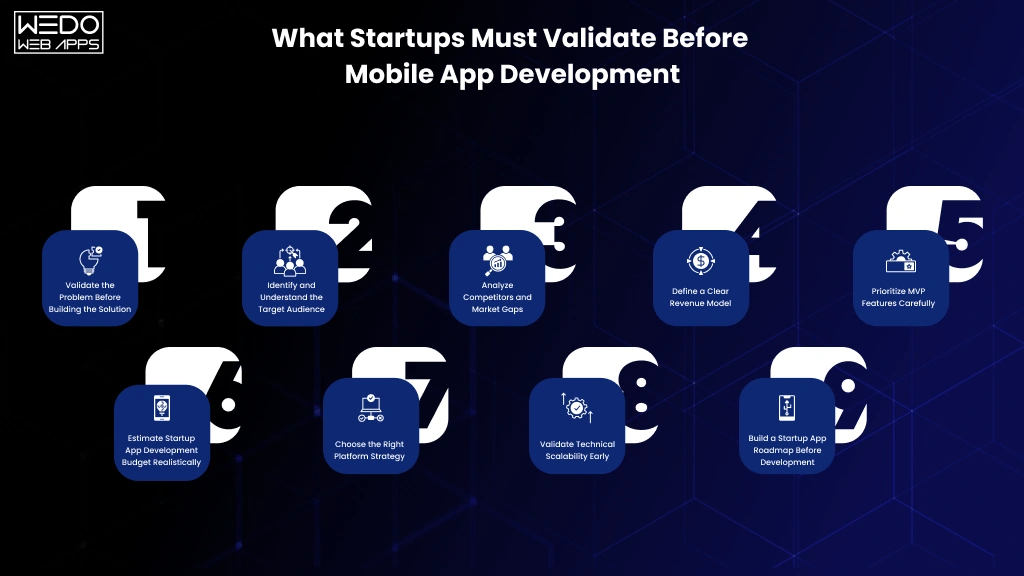
Before starting the startup app development process, founders should validate their business idea, audience demand, revenue strategy, and technical requirements. This reduces development risks, improves decision-making, and helps startups build products that solve real problems instead of assumptions.
Validate the Problem Before Building the Solution
The first step in app development for startups is understanding whether the problem is important enough for users to seek a solution. Many startups focus too much on the app idea itself while ignoring the actual customer pain points.
Startups should ask:
- What specific problem does the app solve?
- How are users currently solving this problem?
- Why would users switch to this app?
- Is the problem frequent or urgent enough?
If the problem is unclear or weak, even a technically perfect app may struggle to gain traction.
Identify and Understand the Target Audience
Successful mobile app development for startups depends heavily on understanding the target audience. Startups should define:
- Ideal customer profiles
- Age groups and demographics
- User behavior patterns
- Buying motivations
- Platform preferences
- Customer expectations
Without audience clarity, startups often build features users neither need nor value.
Founders should contact:
- Customer interviews
- Surveys
- Competitor reviews analysis
- User behavior research
- Early beta testing
This helps create a product aligned with actual market demand.
Analyze Competitors and Market Gaps
Competitor research is essential before starting the startup app development process. Instead of copying existing apps, startups should identify:
- Feature gaps
- Poor user experiences
- Underserved audiences
- Pricing weakness
- Scalability limitations
Studying competitors helps startups understand what works, what users dislike, and where differentiation opportunities exist.
Key competitor analysis areas include:
- App store reviews
- User ratings
- Onboarding experiences
- Monetization strategies
- Retention features
- Performance issues
A strong competitive advantage often comes from solving existing frustrations better than competitors.
Define a Clear Revenue Model
Many startups build apps first and think about monetization later. This often creates long-term sustainability issues. Before starting development, startups should define how the app will generate revenue.
Common startup app monetization models include:
- Subscription plans
- In-app purchases
- Marketplace commissions
- Advertisements
- Freemium models
- SaaS pricing
- Transaction fees
Revenue strategy impacts:
- Feature planning
- UI/UX decisions
- Backend architectures
- Scalability requirements
- User acquisition strategies
A clear monetization approach helps startups make smarter development decisions from the beginning.
Prioritize MVP Features Carefully
One of the most important parts of how to build an app for a startup is learning what not to build initially. Many startups fail because they overload their first version with unnecessary features, increasing costs, delays, and complexity.
An MVP (Minimum Viable Product) should focus only on:
- Core user problems
- Essential functionality
- Early customer feedback
- Rapid market validation
Instead of building a large feature-rich app immediately, startups should identify:
- Must-have features
- Secondary features
- Future scalability features
This approach reduces development costs while accelerating launch timelines.
Estimate Startup App Development Budget Realistically
Budget planning is critical in startup app development. Many founders underestimate the actual costs involved beyond coding alone.
Startups should account for:
- UI/UX design
- Frontend and backend development
- Testing and QA
- Third-party integrations
- Cloud infrastructure
- App store deployment
- Maintenance and updates
- Marketing and user acquisition
A realistic budget prevents interruptions during development and supports better resource allocation.
Choose the Right Platform Strategy
Before development begins, startups must decide whether to build iOS apps, Android apps, cross-platform apps, web apps, or hybrid solutions.
The right choice depends on the target audience, budget, launch timeline, scalability goals, and required performance.
For many early-stage startups, cross-platform frameworks like Flutter or React native help reduce initial development costs and speed up time-to-market. However, some businesses may benefit more from native development depending on their product requirements.
Validate Technical Scalability Early
Startups often focus only on launching quickly while ignoring future scalability. Poor technical planning can create major performance and infrastructure challenges later.
Before starting mobile app development for startups, businesses should evaluate:
- expected user growth
- backend scalability
- API architecture
- security requirements
- future integrations
- data storage needs
Planning scalability early helps avoid expensive redevelopment as the startup grows.
Build a Startup App Roadmap Before Development
A structured roadmap keeps the entire startup app development process aligned with business goals. Startups should define:
- launch objectives
- feature phases
- development timelines
- testing milestones
- post-launch strategies
- growth priorities
A clear roadmap improves communication between founders, stakeholders, and development teams while reducing scope creep and development confusion.
For startups, proper validation before development is often the difference between building an app that scales successfully and launching a product that struggles to gain users or generate revenue.
Startup App Development Process Step-by-Step
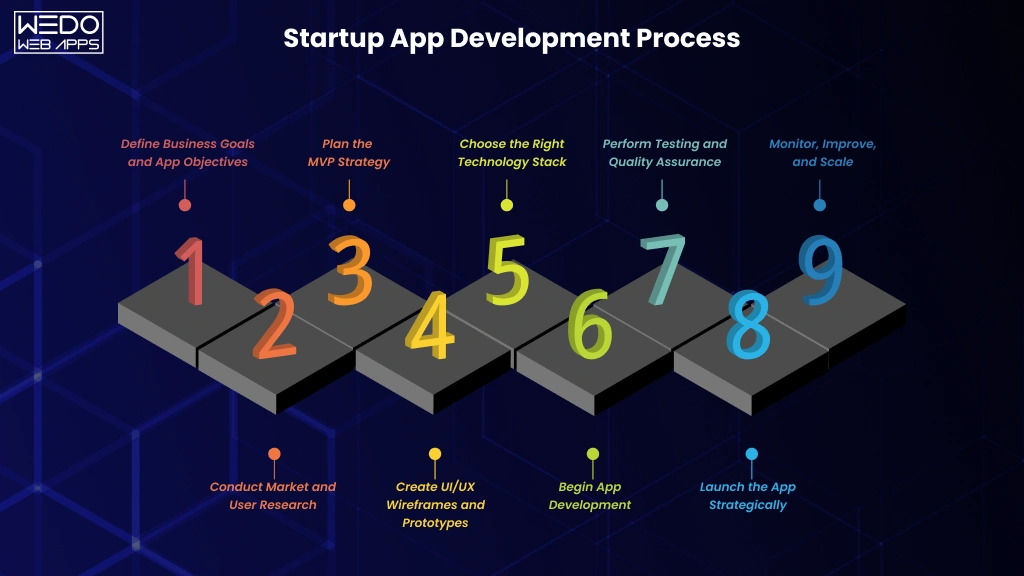
A successful app is rarely built through random feature additions or rushed execution. The most scalable products follow a structured startup app development process that aligns business goals, user needs, and technical planning from the beginning.
For founders and decision-makers, understanding each stage of app development for startups helps reduce development risks, improve collaboration with development teams, and create products that are easier to scale after launch.
Below is a step-by-step breakdown of how successful startup app development typically works.
Step 1: Define Business Goals and App Objectives
Before writing a single line of code, startups must define what the app is expected to achieve. Clear business objectives help guide feature prioritization, technology decisions, and long-term growth strategies.
At this stage, startups should identify:
- the primary business problem
- target audience needs
- core app functionality
- monetization goals
- short-term and long-term objectives
Without clear direction, startups often build disconnected features that increase complexity without improving user value.
Common startup app goals include:
- customer acquisition
- service automation
- marketplace creation
- subscription revenue
- operational efficiency
- community building
Strong business clarity improves the overall startup app development process significantly.
Step 2: Conduct Market and User Research
Research helps startups validate assumptions before development begins. This stage focuses on understanding users, competitors, and industry trends.
Research activities typically include:
- competitor analysis
- customer interviews
- audience segmentation
- user journey mapping
- app store research
- market gap analysis
This step helps startups identify:
- user expectations
- pain points
- feature opportunities
- retention challenges
- monetization potential
In many cases, research prevents startups from investing in features users may never use.
Step 3: Plan the MVP Strategy
One of the most important parts of how to build an app for a startup is developing a strong MVP strategy. Instead of launching a fully featured application, startups should focus on building a simplified version that solves the primary user problem.
An MVP allows startups to:
- launch faster
- reduce development costs
- collect early user feedback
- validate demand
- improve product-market fit
At this stage, features are usually divided into:
- must-have features
- secondary features
- future enhancements
A focused MVP helps startups avoid feature overload while accelerating market entry.
Step 4: Create UI/UX Wireframes and Prototypes
User experience plays a major role in the success of mobile app development for startups. Poor navigation, confusing interfaces, or complicated onboarding can reduce user retention even if the app idea is strong.
During the design stage, teams create:
- wireframes
- user flows
- clickable prototypes
- visual UI designs
- interaction models
The goal is to ensure:
- intuitive navigation
- faster usability
- clean interfaces
- better engagement
- seamless customer experiences
Prototyping also helps founders visualize the product before full-scale development begins.
Step 5: Choose the Right Technology Stack
Technology selection directly affects scalability, performance, development speed, and long-term maintenance costs.
Startups must decide:
- native vs cross-platform development
- frontend technologies
- backend frameworks
- cloud infrastructure
- database systems
- third-party integrations
Popular technologies for startup app development include:
- Flutter
- React Native
- Swift
- Kotlin
- Node.js
- Firebase
- AWS
The right tech stack depends on:
- app complexity
- budget
- scalability goals
- expected traffic
- security requirements
Choosing technologies based only on trends instead of business needs can create scalability challenges later.
Step 6: Begin App Development
Once planning and designs are finalized, the actual development process begins. This stage usually includes:
- frontend development
- backend development
- API integrations
- admin panel creation
- database setup
- feature implementation
Agile development methodologies are commonly used in app development for startups because they allow:
- faster iterations
- regular testing
- continuous feedback
- flexible improvements
Instead of waiting months for a final product, startups can review progress in smaller development cycles.
Step 7: Perform Testing and Quality Assurance
Testing is essential before launching any startup application. Even small performance issues or bugs can negatively impact user trust and app store ratings.
Testing generally includes:
- functional testing
- performance testing
- usability testing
- security testing
- device compatibility testing
- bug fixing
The goal is to ensure:
- stable performance
- smooth navigation
- fast loading speeds
- secure user experiences
High-quality testing reduces post-launch technical problems and improves customer satisfaction.
Step 8: Launch the App Strategically
Launching an app involves more than publishing it on app stores. A proper launch strategy helps startups improve visibility, acquire users, and generate early traction.
This stage may include:
- App Store Optimization (ASO)
- beta launches
- influencer outreach
- startup community promotions
- paid advertising
- email campaigns
- onboarding optimization
Startups should also monitor:
- user acquisition metrics
- retention rates
- crash reports
- app performance
A successful launch creates the foundation for long-term growth.
Step 9: Monitor, Improve, and Scale
The startup app development process does not end after launch. Post-launch optimization is often what separates scalable startups from stagnant products.
Successful startups continuously:
- analyze user feedback
- improve features
- optimize performance
- release updates
- expand integrations
- improve retention strategies
Analytics tools help startups track:
- active users
- session duration
- conversion rates
- churn rates
- feature engagement
Continuous improvement allows startups to adapt faster to changing customer expectations and market trends.
Why a Structured Startup App Development Process Matters
Many startup apps fail because development begins without a roadmap, scalability planning, or market validation. A structured process helps startups:
- reduce technical debt
- improve product quality
- manage budgets efficiently
- launch faster
- scale more effectively
For founders planning long-term digital growth, following a strategic and user-focused startup app development process can significantly improve the chances of building a successful and scalable product.

Native vs Cross-Platform App Development for Startups
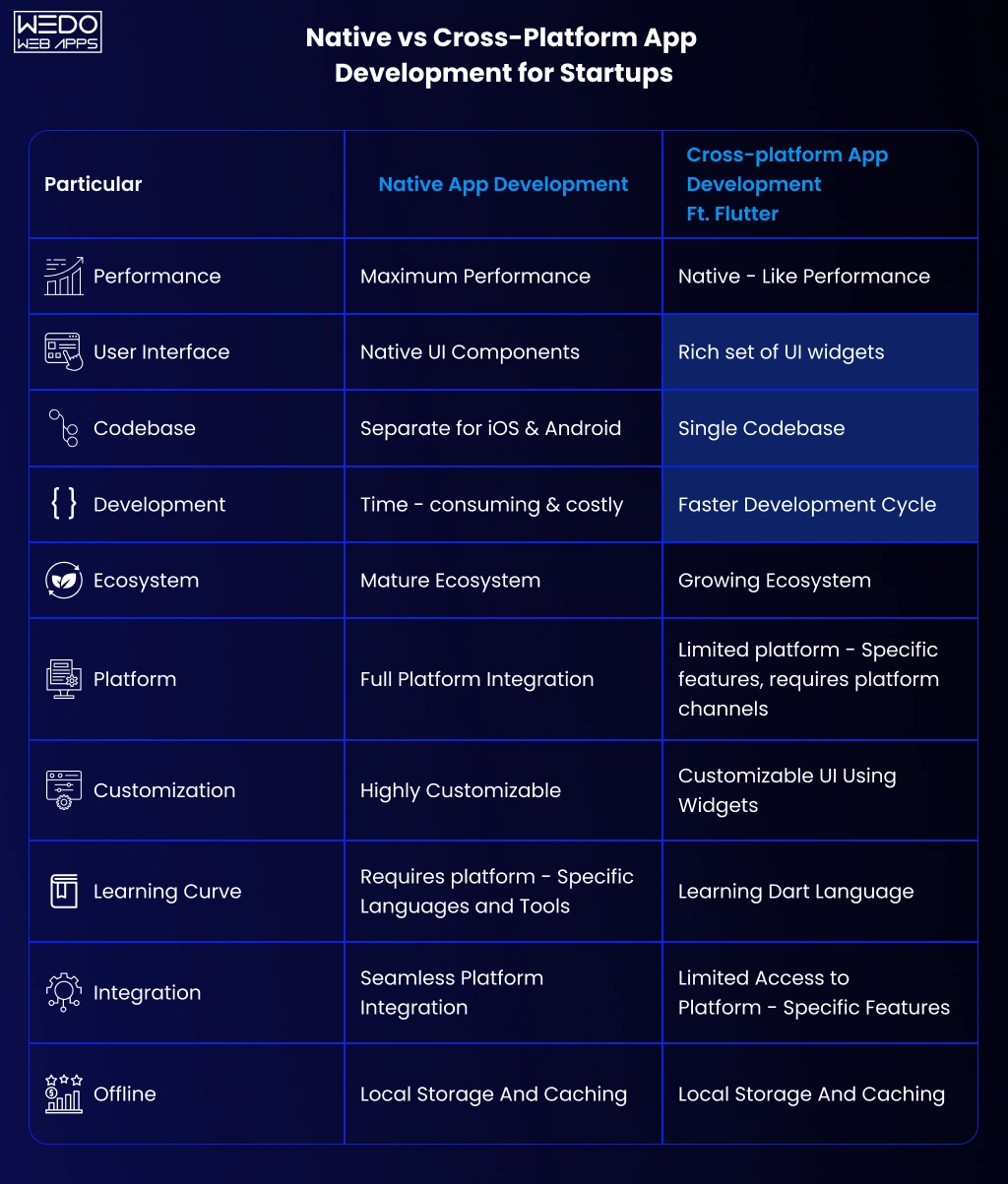
One of the biggest technical decisions in startup app development is choosing between native and cross-platform app development. This decision directly affects development cost, launch timelines, scalability, maintenance, and overall user experience.
For startups working with limited budgets and aggressive launch goals, selecting the right development approach is critical. The ideal choice depends on business objectives, target audience, app complexity, performance requirements, and future scalability plans.
Before starting mobile app development for startups, founders should understand how both approaches work and which option aligns better with their growth strategy.
What Is Native App Development?
Native app development involves building separate applications for each platform using platform-specific technologies.
Common native technologies include:
- Swift for iOS
- Kotlin for Android
With native development:
- iOS apps are developed independently
- Android apps are developed separately
This approach allows developers to fully optimize the application for each operating system.
Advantages of Native App Development
Better Performance
Native apps generally deliver faster performance because they are optimized specifically for the operating system they run on.
This is especially important for:
- gaming apps
- real-time applications
- video streaming platforms
- AR/VR experiences
- high-performance enterprise apps
Stronger User Experience
Native apps provide smoother interactions and more platform-consistent experiences.
They often support:
- better animations
- faster responsiveness
- improved navigation
- seamless hardware integration
This can improve customer satisfaction and retention rates.
Improved Scalability and Stability
For startups planning long-term growth and complex app functionality, native development may offer better scalability and long-term stability.
Native apps are often preferred for:
- enterprise-grade applications
- highly customized products
- apps requiring advanced integrations
Challenges of Native App Development
Despite its advantages, native development also comes with limitations for startups.
Higher Development Costs
Since separate codebases are required for iOS and Android, startups often need:
- larger development teams
- more development hours
- higher maintenance investments
This increases the overall cost of app development for startups.
Longer Development Timelines
Building two separate apps usually requires more time compared to cross-platform development.
For startups aiming for rapid market validation, this can slow down launch speed.
What Is Cross-Platform App Development?
Cross-platform app development allows startups to build a single codebase that works across multiple platforms, including iOS and Android.
Popular cross-platform frameworks include:
- Flutter
- React Native
This approach has become increasingly popular in startup app development because it balances cost efficiency and faster development.
Advantages of Cross-Platform App Development
Faster Time-to-Market
Cross-platform development allows startups to launch applications more quickly because developers maintain one shared codebase.
This helps startups:
- validate ideas faster
- collect early feedback sooner
- reduce launch delays
For MVP-focused businesses, speed is often a major competitive advantage.
Lower Development Costs
Since one codebase supports multiple platforms, startups can significantly reduce:
- development expenses
- maintenance costs
- testing efforts
This makes cross-platform development highly attractive for early-stage startups with limited budgets.
Easier Maintenance and Updates
Managing a single codebase simplifies:
- bug fixes
- feature updates
- app improvements
- version management
This allows startups to iterate faster during growth stages.
Challenges of Cross-Platform Development
Although cross-platform frameworks have improved significantly, they still have some limitations.
Performance Limitations for Complex Apps
Apps with highly advanced graphics, animations, or heavy processing requirements may experience performance limitations compared to native applications.
Platform-Specific Restrictions
Some platform-specific features may require additional native development work.
This can increase complexity for:
- advanced hardware integrations
- highly customized animations
- specialized APIs
Native vs Cross-Platform: Which Is Better for Startups?
The right choice depends on the startup’s business model, product complexity, and growth priorities.
Native Development May Be Better If:
- performance is the highest priority
- the app requires advanced device integrations
- long-term scalability is highly complex
- the budget supports separate development teams
- the product depends heavily on platform-specific experiences
Cross-Platform Development May Be Better If:
- rapid MVP launch is important
- startup budgets are limited
- faster development cycles are required
- the app has standard business functionality
- startups want to test market demand quickly
For many startups, cross-platform frameworks provide the best balance between speed, cost, and scalability during early growth stages.
Popular Technologies Used in Startup App Development
Flutter
Flutter is widely used for mobile app development for startups because of:
- faster UI development
- strong performance
- consistent design across platforms
- growing developer ecosystem
It is commonly preferred for MVPs and scalable cross-platform applications.
React Native
React Native allows startups to build mobile apps using JavaScript and reusable components.
Advantages include:
- faster development
- strong community support
- reusable code
- efficient iteration cycles
Many startups choose React Native for cost-efficient product launches.
Swift and Kotlin
For native development:
- Swift is used for iOS
- Kotlin is used for Android
These technologies are ideal for startups requiring:
- high-performance applications
- advanced platform functionality
- deeper OS integrations
How Startups Should Make the Final Decision
Before selecting a development approach, startups should evaluate:
- business goals
- target audience
- launch timelines
- available budget
- scalability expectations
- feature complexity
- long-term maintenance needs
Instead of choosing technologies based only on industry trends, startups should focus on what best supports their product strategy and user experience goals.
Working with experienced development teams can also help startups identify the most practical technical approach based on both short-term launch needs and long-term scalability plans.
Biggest Challenges in Startup App Development
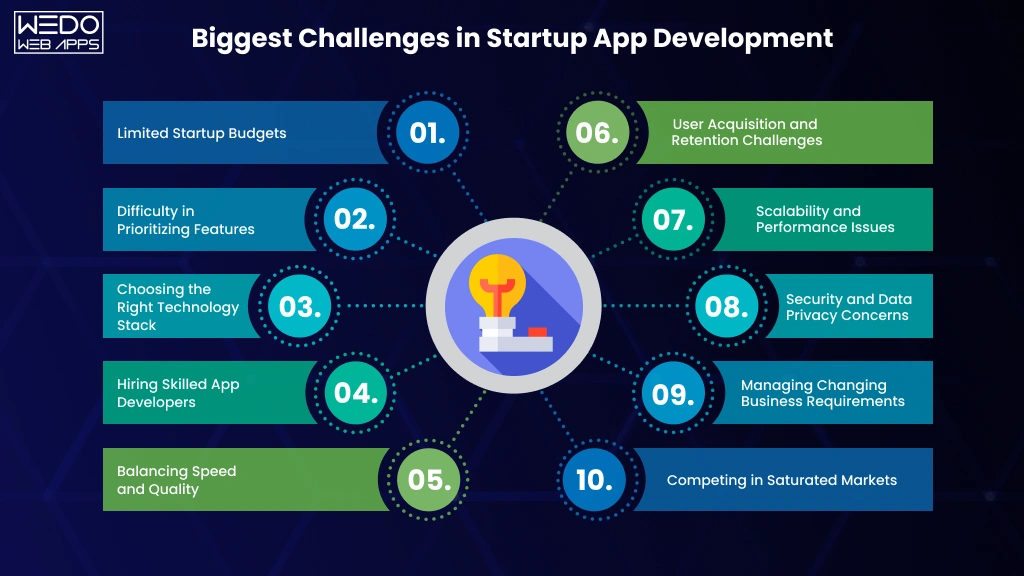
While launching a mobile app creates significant growth opportunities, the journey is rarely simple. Many startups face technical, operational, and business-related obstacles throughout the startup app development process. Without proper planning, these challenges can increase costs, delay launches, and negatively impact user adoption.
Understanding the most common challenges in startup app development helps founders make better decisions, avoid expensive mistakes, and build more scalable products from the beginning.
Limited Startup Budgets
Budget limitations are one of the biggest challenges in app development for startups. Early-stage businesses often need to balance product quality, development speed, and scalability while operating with restricted financial resources.
Many startups underestimate costs related to:
- UI/UX design
- backend infrastructure
- third-party integrations
- testing and QA
- maintenance and updates
- security implementation
- post-launch improvements
As a result, startups may:
- delay important features
- compromise app quality
- face development interruptions
- struggle with scalability later
How Startups Can Manage Budget Challenges
To reduce financial pressure, startups should:
- prioritize MVP development
- focus only on core features initially
- avoid unnecessary complexities
- use scalable technologies
- plan phased feature releases
A well-defined roadmap helps startups allocate resources more efficiently.
Difficulty in Prioritizing Features
Many founders try to include too many features in the first app version. This often leads to:
- delayed launches
- increased development costs
- complicated user experiences
- maintenance challenges
Feature overload is a common issue in startup app development because startups often fear missing market opportunities.
However, successful startups usually focus on solving one primary problem effectively before expanding functionality.
How to Avoid Feature Overload
Startups should categorize features into:
- essential MVP features
- secondary improvements
- future expansion features
This helps businesses:
- launch faster
- validate ideas sooner
- reduce development complexity
- improve user adoption
Simpler apps often perform better during early growth stages.
Choosing the Right Technology Stack
Selecting unsuitable technologies can create major scalability and maintenance problems later. Many startups choose technologies based on trends rather than actual business requirements.
Poor technology decisions may lead to:
- performance issues
- integration limitations
- security vulnerabilities
- higher maintenance costs
- redevelopment needs
The ideal tech stack depends on:
- app complexity
- expected user growth
- platform requirements
- scalability goals
- budget constraints
This is why technical planning is a critical part of mobile app development for startups.
Hiring Skilled App Developers
Finding experienced developers is another major challenge for startups. Building a successful app requires expertise across:
- frontend development
- backend architecture
- UI/UX design
- testing and QA
- cloud infrastructure
- security implementation
Startups often struggle between:
- hiring in-house teams
- working with freelancers
- partnering with development agencies
Each option has different implications for:
- cost
- communication
- scalability
- project management
- long-term support
For many startups, experienced development partners help simplify execution while reducing hiring risks.
Balancing Speed and Quality
Startups usually operate under pressure to launch quickly. However, rushing development can result in:
- unstable performance
- poor UI/UX
- security issues
- technical debt
- negative user reviews
At the same time, over-optimizing early versions may delay validation and increase costs unnecessarily.
Balancing speed and quality is one of the most important aspects of the startup app development process.
Practical Approach for Startups
Successful startups often:
- launch lean MVPs
- focus on usability first
- improve features gradually
- use agile development methods
- prioritize continuous iteration
This allows businesses to move faster without compromising product stability.
User Acquisition and Retention Challenges
Building the app is only part of the challenge. Many startups struggle after launch because they underestimate the difficulty of acquiring and retaining users.
Common post-launch challenges include:
- low app downloads
- poor onboarding experiences
- weak retention rates
- limited customer engagement
- high user churn
Even technically strong apps can fail without proper growth strategies.
Startups Should Focus On
- onboarding optimization
- user feedback collection
- push notification strategies
- referral programs
- performance improvements
- personalized user experiences
Retention often matters more than initial downloads.
Scalability and Performance Issues
Many startups build apps only for current needs without planning future scalability. As user traffic grows, poorly planned apps may experience:
- slower loading speeds
- server crashes
- database limitations
- API failures
- poor user experiences
Scalability becomes especially important for:
- marketplace apps
- SaaS platforms
- on-demand services
- social applications
Early scalability planning helps reduce redevelopment costs later.
Security and Data Privacy Concerns
Modern users expect strong security and data protection. Startups that ignore security risks may face:
- data breaches
- compliance issues
- legal complications
- customer trust loss
Security is especially critical for apps involving:
- payments
- healthcare data
- financial transactions
- user authentication
- personal information storage
Startups should prioritize:
- encrypted data storage
- secure APIs
- authentication systems
- compliance requirements
- regular security testing
Strong security builds long-term user trust.
Managing Changing Business Requirements
Startup business models often evolve rapidly. As founders receive user feedback or market insights, product requirements may change during development.
Frequent changes can create:
- scope creep
- development delays
- rising costs
- communication gaps
This is a common challenge in app development for startups, especially during MVP stages.
How Startups Can Reduce Scope Creep
- define core goals early
- prioritize feature releases
- follow agile workflows
- maintain structured documentation
- align stakeholders regularly
Flexibility is important, but uncontrolled changes can disrupt the entire development process.
Competing in Saturated Markets
Many startup industries already have strong competitors with large budgets and established user bases. Simply launching an app is no longer enough to guarantee growth.
Startups must differentiate through:
- better user experience
- niche targeting
- faster innovation
- stronger personalization
- unique business models
Successful startup app development focuses not only on building apps but also on creating meaningful user value.
Why Understanding Startup App Development Challenges Matters
Every startup faces obstacles during app development, but proactive planning significantly improves the chances of success. Startups that prepare for technical, financial, and operational challenges are better positioned to:
- launch efficiently
- reduce risks
- improve scalability
- optimize budgets
- deliver stronger user experiences
Understanding these common challenges allows founders to make more informed decisions throughout the entire startup app development process.
How Much Does App Development Cost for Startups?
One of the most common questions founders ask before starting the startup app development process is how much it will cost to build a mobile application. The answer depends on multiple factors, including app complexity, features, technologies, development approach, and scalability requirements.
There is no universal pricing model for app development for startups because every product has unique business goals and technical needs. However, understanding the major cost factors helps startups plan budgets more realistically and avoid unexpected expenses during development.
Key Factors That Influence Startup App Development Cost
The overall cost of mobile app development for startups depends on several technical and business considerations.
App Complexity
The complexity of the app has the biggest impact on development costs.
Simple Startup Apps
Basic apps usually include:
- user registration
- simple dashboards
- limited integrations
- standard UI components
These apps require fewer development hours and lower infrastructure investments.
Medium-Complexity Apps
Moderately complex apps may include:
- payment gateways
- real-time notifications
- APIs and third-party integrations
- advanced user roles
- analytics dashboards
These apps require more backend architecture and testing efforts.
Highly Complex Apps
Complex startup applications often involve:
- AI-powered functionality
- real-time synchronization
- video streaming
- marketplaces
- custom backend systems
- advanced security frameworks
Such apps require larger development teams, longer timelines, and higher scalability planning.
MVP vs Full-Scale Product Development
Many startups reduce initial costs by launching an MVP instead of a fully featured application.
MVP Development
An MVP focuses only on essential features required for:
- validating the business idea
- attracting early users
- collecting feedback
- testing product-market fit
MVP development helps startups:
- launch faster
- reduce initial investment
- minimize development risks
- improve scalability planning later
For many startups, MVP-first development is the most practical approach.
Full-Scale App Development
A fully featured app includes:
- advanced functionality
- polished UI/UX
- scalability infrastructure
- multiple integrations
- enterprise-level features
While full-scale development may improve product readiness, it also significantly increases:
- development timelines
- testing complexity
- maintenance requirements
- upfront investment
Startups should carefully evaluate whether full-scale development is necessary during early stages.
Platform Choice and Development Costs
The platform strategy directly affects the cost of startup app development.
Native App Development Costs
Native development requires separate codebases for:
- iOS
- Android
This generally increases:
- development hours
- testing requirements
- maintenance costs
However, native apps may provide better performance for certain products.
Cross-Platform Development Costs
Cross-platform frameworks like Flutter and React Native allow startups to use a shared codebase across platforms.
This often reduces:
- development expenses
- launch timelines
- maintenance efforts
Cross-platform development is commonly preferred for startups focused on MVP launches and faster market validation.
UI/UX Design Costs
User experience is a major success factor in mobile app development for startups. Startups that invest in intuitive UI/UX often achieve:
- better engagement
- improved retention
- stronger customer satisfaction
Design costs may vary depending on:
- custom interfaces
- animation complexity
- interactive prototypes
- branding requirements
- user journey optimization
While some startups attempt to minimize design investments initially, poor user experiences can negatively impact growth after launch.
Backend Infrastructure and Cloud Costs
Backend systems are responsible for:
- data management
- authentication
- APIs
- scalability
- real-time functionality
Backend complexity influences:
- server architecture
- database requirements
- cloud hosting costs
- scalability planning
Apps expecting rapid growth often require stronger infrastructure planning from the beginning.
Popular cloud solutions include:
- AWS
- Google Cloud
- Microsoft Azure
- Firebase
Infrastructure costs typically continue after launch as user traffic grows.
Third-Party Integration Costs
Modern startup apps often depend on third-party services such as:
- payment gateways
- maps and location services
- analytics platforms
- CRM systems
- AI tools
- messaging services
Each integration may increase:
- development time
- API costs
- maintenance complexity
Startups should evaluate which integrations are essential during the MVP stage.
Testing and Quality Assurance Costs
Testing is a critical part of the startup app development process. Apps that launch with performance issues or bugs often struggle with user retention and app store ratings.
Testing costs usually include:
- manual testing
- automated testing
- device compatibility checks
- performance testing
- security testing
Skipping QA to reduce costs may create larger expenses later through bug fixes and customer dissatisfaction.
App Maintenance and Post-Launch Expenses
Many startups focus only on development costs while overlooking long-term maintenance expenses.
Post-launch costs may include:
- bug fixes
- security updates
- feature improvements
- server scaling
- API maintenance
- app store compliance updates
Ongoing maintenance is essential for keeping apps secure, scalable, and competitive.
Most startup apps require continuous updates based on:
- user feedback
- operating system changes
- business growth
- new feature requirements
Hidden Costs Startups Often Ignore
Several hidden expenses can impact the total cost of app development for startups.
These may include:
- app store fees
- legal compliance
- cybersecurity implementation
- analytics tools
- customer support systems
- marketing campaigns
- user acquisition costs
Failing to account for these expenses can disrupt long-term budget planning.
How Startups Can Optimize App Development Costs
Reducing costs should not mean compromising product quality. Instead, startups should focus on strategic resource allocation.
Practical Cost Optimization Strategies
- Start With an MVP: Launch essential features first and expand gradually.
- Prioritize Core Functionality: Avoid unnecessary features during early development stages.
- Use Agile Development: Continuous iteration improves flexibility and reduces costly redevelopment.
- Choose Scalable Technologies: Future-ready technologies reduce long-term maintenance costs.
- Plan Features in Phases: Structured feature rollouts improve budget control.
- Work With Experienced Development Teams: Experienced app development partners can help startups avoid technical mistakes and improve development efficiency.
Why Startups Need Realistic Budget Planning
Accurate budgeting helps startups:
- reduce financial risks
- manage development timelines
- improve scalability planning
- avoid mid-project disruptions
- support long-term product growth
Instead of focusing only on the cheapest development option, startups should prioritize building scalable, user-focused applications that support long-term business objectives.

Must-Have Features for a Startup Mobile App
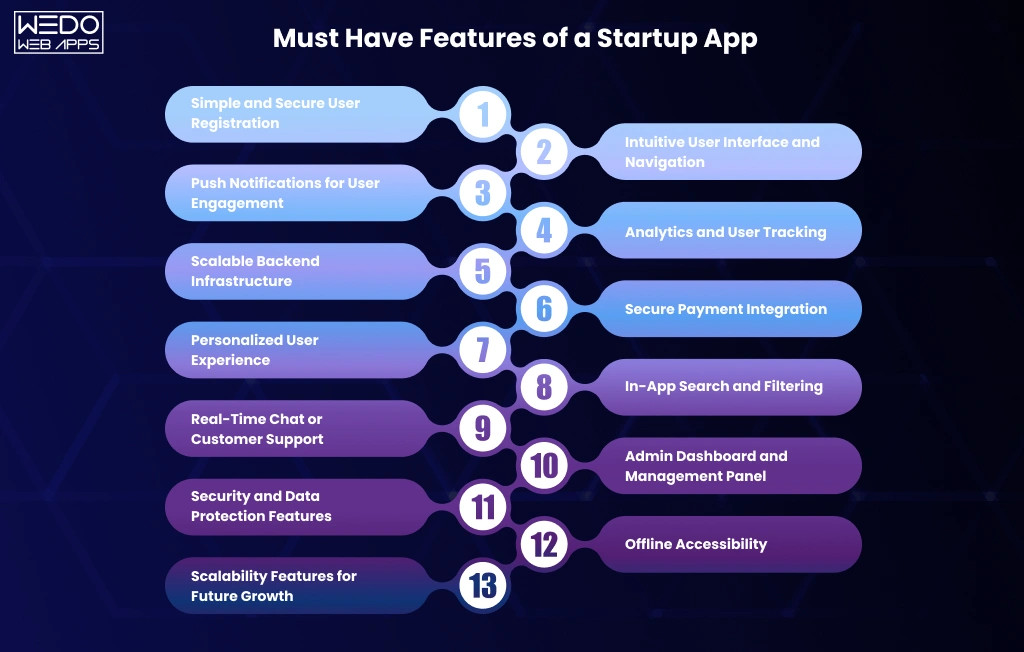
Choosing the right features is one of the most important parts of startup app development. Many startups fail because they either overload their app with unnecessary functionality or launch products that lack essential user experience features.
The goal of mobile app development for startups should not be building the most feature-heavy application. Instead, startups should focus on features that improve usability, engagement, scalability, and business growth.
A well-planned feature strategy helps startups:
- launch faster
- improve customer retention
- reduce development costs
- simplify scalability
- validate product-market fit more efficiently
Below are the most important features startups should prioritize during the startup app development process.
Simple and Secure User Registration
User onboarding is often the first interaction customers have with an app. Complicated registration processes can increase drop-offs and reduce conversions.
Startups should focus on:
- quick sign-up processes
- social login options
- OTP verification
- password recovery
- secure authentication
A smooth onboarding experience improves:
- user acquisition
- retention rates
- customer trust
For many startups, simplifying onboarding directly impacts growth performance.
Intuitive User Interface and Navigation
No matter how innovative the app idea is, poor usability can negatively affect customer engagement. Clean and intuitive navigation is essential in app development for startups because users expect fast and frictionless experiences.
Effective UI/UX design should prioritize:
- simple navigation
- faster accessibility
- mobile responsiveness
- clear user flows
- minimal learning curve
A user-friendly experience increases:
- session duration
- customer satisfaction
- feature adoption
- long-term retention
Startups should focus on usability before adding advanced functionality.
Push Notifications for User Engagement
Push notifications help startups maintain direct communication with users and improve engagement rates.
When used strategically, push notifications can support:
- user retention
- feature awareness
- abandoned cart recovery
- promotional campaigns
- personalized updates
However, excessive notifications may lead to app uninstalls. Startups should prioritize relevance and personalization instead of frequent messaging.
Analytics and User Tracking
Data-driven decision-making is critical in startup app development. Analytics features help startups understand:
- user behavior
- feature performance
- customer journeys
- retention trends
- conversion bottlenecks
Analytics tools allow startups to improve products continuously based on real usage patterns instead of assumptions.
Important analytics areas include:
- active users
- session duration
- feature engagement
- onboarding drop-offs
- customer retention
Early analytics integration helps startups scale more efficiently.
Scalable Backend Infrastructure
Many startups focus heavily on frontend design while ignoring backend scalability. However, backend architecture directly impacts:
- app performance
- loading speeds
- scalability
- security
- reliability
A scalable backend helps startups support:
- growing user traffic
- real-time updates
- future integrations
- cloud scalability
- data synchronization
Strong infrastructure planning reduces redevelopment risks later.
Secure Payment Integration
For startups operating in eCommerce, SaaS, marketplaces, or subscription-based industries, secure payment functionality is essential.
Payment integrations should support:
- multiple payment methods
- secure transactions
- recurring billing
- payment tracking
- fraud prevention
Security and reliability are especially important for building customer trust during early growth stages.
Personalized User Experience
Modern users increasingly expect personalized digital experiences. Personalization helps startups improve:
- engagement
- customer loyalty
- retention
- conversion rates
Personalization features may include:
- customized recommendations
- personalized dashboards
- behavioral suggestions
- location-based experiences
- user preference settings
As startups scale, personalization often becomes a major competitive advantage.
In-App Search and Filtering
Apps with large content libraries, marketplaces, or product catalogs require efficient search functionality.
Good search experiences help users:
- find information faster
- reduce frustration
- improve engagement
- increase conversions
Advanced filtering options further improve usability, especially for:
- eCommerce apps
- service marketplaces
- SaaS platforms
- content-driven applications
Search optimization directly affects customer experience quality.
Real-Time Chat or Customer Support
Customer support features help startups improve communication and resolve user issues faster.
Depending on the business model, startups may integrate:
- live chat systems
- AI chatbots
- help centers
- ticketing systems
- in-app messaging
Strong support experiences improve:
- customer satisfaction
- retention
- brand credibility
For many startups, responsive support becomes a major trust-building factor.
Admin Dashboard and Management Panel
An admin panel allows startups to manage operations efficiently without relying entirely on developers for updates.
Admin dashboards may support:
- user management
- analytics tracking
- content management
- order processing
- payment monitoring
- customer support workflows
A scalable admin system improves operational efficiency as the business grows.
Security and Data Protection Features
Security should never be treated as an optional feature in mobile app development for startups. Modern users expect secure digital experiences, especially when apps collect sensitive information.
Important security features include:
- data encryption
- secure authentication
- role-based access control
- session management
- compliance support
- secure APIs
Strong security infrastructure protects both startups and users from potential risks.
Offline Accessibility
Some startup apps benefit significantly from offline functionality, especially for users with inconsistent internet connectivity.
Offline support can improve:
- accessibility
- usability
- customer experience
- engagement rates
Features like offline viewing, cached data, and local storage improve app reliability in different usage environments.
Scalability Features for Future Growth
Many startups initially focus only on short-term launches without considering future expansion. However, scalable app architecture is critical for long-term growth.
Scalability-focused features may include:
- modular architecture
- cloud scalability
- API flexibility
- microservices support
- multi-user management
Planning scalability early reduces technical limitations during business expansion.
Why Feature Prioritization Matters in Startup App Development
One of the biggest mistakes startups make is building too many features too early. Successful app development for startups focuses on solving core user problems first and expanding gradually based on feedback and business growth.
Startups should prioritize features that:
- improve user experience
- support business goals
- simplify scalability
- enhance engagement
- accelerate market validation
A focused feature strategy helps startups launch faster, reduce unnecessary costs, and create stronger foundations for long-term success.
Common Startup App Development Mistakes to Avoid
Many startups invest heavily in app development but still struggle with poor user adoption, scalability issues, or unsustainable growth. In most cases, the problem is not the app idea itself but the strategic mistakes made during the startup app development process.
Understanding these common mistakes helps founders make smarter product decisions, reduce development risks, and improve the chances of building a scalable application.
Below are some of the biggest mistakes businesses should avoid during app development for startups.
Building the App Before Validating the Idea
One of the most common mistakes in startup app development is starting development without validating whether the market actually needs the product.
Many startups spend months building applications only to discover:
- weak user demand
- poor product-market fit
- limited customer interest
- unclear monetization opportunities
Before investing in development, startups should validate:
- customer pain points
- target audience demand
- competitor gaps
- willingness to pay
- long-term business viability
Market validation reduces the risk of building products users may never adopt.
Trying to Build Too Many Features Initially
Feature overload is a major challenge in mobile app development for startups. Founders often try to include every idea in the first version, which increases:
- development costs
- launch delays
- product complexity
- usability issues
A crowded app experience can confuse users and reduce retention rates.
Better Approach for Startups
Successful startups usually:
- focus on one primary problem
- launch with essential MVP features
- collect user feedback early
- expand features gradually
Lean product development improves flexibility and reduces unnecessary expenses.
Ignoring User Experience and UI Design
Even innovative apps can fail if users struggle with navigation or usability. Poor UI/UX design often leads to:
- low engagement
- high uninstall rates
- poor app store reviews
- weak customer retention
In modern startup app development, user experience is a competitive advantage.
Startups should prioritize:
- intuitive navigation
- faster onboarding
- clean interfaces
- mobile responsiveness
- frictionless user journeys
A simpler user experience often performs better than feature-heavy interfaces.
Choosing the Wrong Technology Stack
Technology decisions directly affect:
- scalability
- performance
- maintenance costs
- future integrations
Some startups select technologies based only on trends or short-term convenience instead of long-term business goals.
Poor technology choices may create:
- performance bottlenecks
- security risks
- scaling limitations
- redevelopment costs
The right tech stack should align with:
- app complexity
- growth expectations
- budget
- feature requirements
- future scalability plans
Proper technical planning is critical in app development for startups.
Underestimating Development Costs
Many startups budget only for initial development while ignoring long-term operational expenses.
Hidden costs often include:
- maintenance
- infrastructure scaling
- third-party APIs
- security updates
- marketing
- customer support
- app optimization
Poor budgeting can disrupt development timelines and slow business growth.
Smarter Budget Planning
Startups should:
- plan phased feature releases
- allocate funds for post-launch updates
- prioritize scalable infrastructure
- estimate ongoing maintenance costs
Realistic budgeting improves long-term product sustainability.
Skipping Proper Testing and QA
Some startups rush launches to save time, but insufficient testing often results in:
- app crashes
- slow performance
- security vulnerabilities
- poor user experiences
Negative first impressions can significantly impact retention and app ratings.
Proper QA should include:
- functional testing
- usability testing
- performance testing
- security testing
- device compatibility testing
Quality assurance is essential for building user trust and reducing post-launch issues.
Ignoring Scalability From the Beginning
Many startup apps are designed only for immediate needs without considering future growth.
As user traffic increases, poorly planned apps may experience:
- server overload
- slower response times
- database issues
- API limitations
Scalability planning should begin during the early stages of the startup app development process.
Startups should consider:
- cloud infrastructure
- scalable backend architecture
- modular development
- API flexibility
- future integrations
Planning ahead reduces costly redevelopment later.
Launching Without a User Acquisition Strategy
Building the app alone does not guarantee users. Many startups fail because they invest heavily in development without planning customer acquisition.
A successful launch strategy should include:
- App Store Optimization (ASO)
- content marketing
- social media campaigns
- beta user programs
- influencer partnerships
- referral systems
Without visibility and retention strategies, even strong apps may struggle to gain traction.
Ignoring User Feedback After Launch
Some startups assume development ends after launch. In reality, post-launch optimization is one of the most important stages of startup app development.
Ignoring user feedback may result in:
- declining engagement
- poor retention
- missed improvement opportunities
Successful startups continuously:
- analyze user behavior
- improve usability
- release updates
- optimize features
- monitor customer feedback
Continuous iteration helps startups stay competitive and improve product-market fit over time.
Poor Communication Between Stakeholders and Developers
Miscommunication during development often creates:
- unclear expectations
- delayed timelines
- feature confusion
- budget overruns
This is especially common when startups lack structured planning or documentation.
To improve collaboration, startups should:
- define clear goals
- maintain product roadmaps
- conduct regular reviews
- use agile workflows
- document requirements properly
Strong communication improves development efficiency and reduces project risks.
Focusing Only on Launch Instead of Long-Term Growth
Some startups treat app launches as the final goal instead of the beginning of product growth.
Sustainable growth requires:
- continuous optimization
- feature improvements
- retention strategies
- scalability planning
- customer engagement efforts
Successful mobile app development for startups focuses on building long-term digital products instead of short-term launches.
Why Avoiding These Startup App Development Mistakes Matters
Most startup app failures happen because of strategic and execution-related mistakes rather than technical limitations alone. Startups that avoid these common issues are better positioned to:
- reduce development risks
- optimize budgets
- improve user retention
- scale efficiently
- achieve long-term business growth
A structured and user-focused approach to startup app development helps businesses build stronger products while improving their chances of long-term success in competitive markets.
How Startups Can Scale Their App After Launch
Launching an app is only the beginning of the growth journey. Many startups focus heavily on development and release strategies but underestimate the importance of post-launch scaling. In reality, long-term success in startup app development depends on how effectively the app evolves after launch.
As user expectations, market demands, and competition grow, startups must continuously optimize performance, improve customer experiences, and expand functionality strategically. Without proper scaling strategies, even well-designed apps may struggle with retention, performance, or operational limitations.
For startups aiming to achieve sustainable growth, scalability should remain a continuous priority throughout the entire startup app development process.
Monitor User Behavior and Product Performance
One of the first priorities after launch is understanding how users interact with the app. Analytics help startups identify:
- user behavior patterns
- feature engagement
- retention rates
- conversion bottlenecks
- churn triggers
Tracking real user data allows startups to make informed decisions instead of relying on assumptions.
Important metrics may include:
- daily active users
- session duration
- customer retention
- onboarding completion rates
- feature usage trends
Data-driven optimization is critical for scalable mobile app development for startups.
Continuously Improve the User Experience
User expectations change rapidly, especially in competitive industries. Startups that fail to improve usability often experience declining engagement and retention.
Post-launch UX improvements may include:
- simplifying navigation
- reducing loading times
- improving onboarding
- refining interfaces
- enhancing accessibility
Even small usability improvements can significantly impact:
- customer satisfaction
- app ratings
- conversion rates
- retention performance
Successful startups treat UX optimization as an ongoing process rather than a one-time task.
Scale Backend Infrastructure Strategically
As startups gain users, backend systems must support increasing traffic and operational demands.
Poor scalability planning can lead to:
- server crashes
- slower performance
- failed transactions
- poor user experiences
Scalable infrastructure is essential for:
- SaaS platforms
- marketplaces
- on-demand applications
- social platforms
- subscription-based products
To support growth, startups should invest in:
- cloud infrastructure
- load balancing
- database optimization
- scalable APIs
- modular architecture
Scalable backend systems improve long-term app reliability and performance.
Expand Features Based on User Feedback
One of the biggest advantages of launching an MVP is the ability to improve the product using real customer insights.
Instead of adding random features, startups should prioritize:
- high-demand functionality
- customer pain points
- engagement improvements
- retention-focused enhancements
Feature expansion should always align with:
- user needs
- business goals
- scalability plans
This iterative approach improves product-market fit over time.
Improve User Retention Strategies
Acquiring users is important, but retaining them is often more valuable for sustainable growth.
Strong retention strategies may include:
- personalized recommendations
- loyalty programs
- gamification
- push notifications
- in-app engagement campaigns
- referral systems
Startups should also focus on:
- onboarding optimization
- customer support experiences
- consistent performance improvements
Retention-focused growth is a major factor in successful app development for startups.
Optimize App Performance Regularly
Performance issues become more noticeable as user traffic increases. Apps with slow loading speeds or unstable functionality often experience:
- higher uninstall rates
- lower engagement
- negative app store reviews
Performance optimization may involve:
- reducing app size
- optimizing APIs
- minimizing server requests
- improving caching
- optimizing database queries
Consistent performance improvements help startups maintain strong user experiences during growth stages.
Use Automation and AI for Scalability
Modern startups increasingly use automation and AI to improve operational efficiency and customer experiences.
AI-powered capabilities may support:
- personalized recommendations
- predictive analytics
- customer support chatbots
- automated workflows
- fraud detection
- user behavior analysis
Automation helps startups scale operations without proportionally increasing manual workloads.
As AI adoption grows, it is becoming an important part of scalable startup app development strategies.
Strengthen Security as the User Base Grows
As startups scale, security risks also increase. Growing apps often handle:
- larger datasets
- financial transactions
- customer information
- business-sensitive operations
Security improvements may include:
- stronger authentication systems
- encrypted data storage
- compliance monitoring
- regular security audits
- API protection
Maintaining strong security practices protects both the business and its users while improving trust.
Expand Across Platforms and Markets
Many startups begin with a limited launch strategy before expanding gradually.
Scaling opportunities may include:
- launching on additional platforms
- expanding internationally
- adding multilingual support
- supporting new payment systems
- integrating regional services
Market expansion should be supported by:
- localized experiences
- scalable infrastructure
- flexible architecture
Strategic expansion helps startups reach larger audiences without compromising performance.
Build a Long-Term Product Roadmap
Successful scaling requires long-term planning instead of reactive decision-making.
A structured roadmap helps startups:
- prioritize updates
- align teams
- manage budgets
- plan scalability
- improve execution efficiency
Roadmaps should include:
- feature release timelines
- infrastructure upgrades
- retention goals
- monetization strategies
- performance optimization plans
Long-term planning improves consistency throughout the startup app development process.
Invest in Ongoing Maintenance and Updates
Many startups underestimate the importance of post-launch maintenance. However, apps require continuous updates to remain secure, compatible, and competitive.
Ongoing maintenance may include:
- bug fixes
- OS compatibility updates
- security patches
- feature enhancements
- infrastructure optimization
Regular updates improve:
- app stability
- customer trust
- user engagement
- scalability performance
Apps that remain stagnant after launch often lose users to more adaptive competitors.
Why Scaling Matters in Startup App Development
Building an app is only the first step toward long-term digital growth. Sustainable success depends on how effectively startups improve, optimize, and scale their products over time.
A strong post-launch scaling strategy helps startups:
- retain users
- improve product-market fit
- increase operational efficiency
- support rapid growth
- strengthen competitive positioning
For businesses focused on long-term success, scalable and user-focused startup app development should continue far beyond the initial launch phase.
How to Choose the Right Startup App Development Partner
Choosing the right development partner is a critical part of the startup app development process. The right team can help startups launch faster, reduce technical risks, and build scalable applications aligned with long-term business goals.
Instead of selecting a company based only on pricing, startups should focus on experience, scalability expertise, communication, and product understanding.
Look for Startup App Development Experience
Startups require:
- faster launch cycles
- MVP-focused development
- agile execution
- scalability planning
An experienced startup app development partner understands how to balance speed, cost, and product quality while supporting rapid iterations and market validation.
Evaluate Technical Expertise
The development team should have expertise in:
- frontend and backend development
- UI/UX design
- cloud infrastructure
- API integrations
- security and testing
They should also understand modern technologies like:
- Flutter
- React Native
- Swift
- Kotlin
- Node.js
The right technology choices improve scalability and long-term product performance.
Assess Their MVP Development Approach
For many startups, launching an MVP is the fastest way to validate ideas and reduce development risks.
A reliable mobile app development for startups partner should help:
- prioritize essential features
- avoid unnecessary complexity
- accelerate time-to-market
- support future scalability
Lean development strategies often produce better early-stage results.
Review Communication and Project Management
Clear communication improves:
- project transparency
- development speed
- stakeholder alignment
- delivery efficiency
Startups should look for teams that use agile workflows, provide regular updates, and maintain structured development processes.
Analyze UI/UX Design Capabilities
User experience directly impacts:
- engagement
- retention
- app ratings
- customer satisfaction
Before choosing a partner, startups should review:
- previous app designs
- onboarding experiences
- usability quality
- interface consistency
Strong UI/UX often becomes a competitive advantage.
Check Scalability and Post-Launch Support
A startup app should be designed for future growth. The development partner should support:
- scalability planning
- infrastructure optimization
- performance improvements
- feature expansion
- ongoing maintenance
Long-term technical support is essential for sustainable app growth.
Review Portfolio and Industry Experience
Case studies and previous projects help startups evaluate:
- technical capabilities
- industry expertise
- product complexity handling
- design quality
Industry-specific experience can improve both execution and product strategy.
Prioritize Transparency and Long-Term Collaboration
A strong development partner should provide:
- clear pricing
- defined project scope
- realistic timelines
- scalability guidance
The best partners focus on long-term product success instead of short-term delivery alone.
Why Choosing the Right Development Partner Matters
Successful app development for startups requires more than coding expertise. Startups need development partners who understand business goals, scalability, user experience, and agile product execution.
Working with the right team can help startups:
- reduce development risks
- improve product quality
- launch efficiently
- scale more effectively
- support long-term business growth
Why Many Startups Choose MVP Development First
Many successful startups begin with an MVP (Minimum Viable Product) instead of building a fully featured application immediately. In startup app development, an MVP helps businesses validate their idea, reduce development risks, and launch faster without excessive upfront investment.
An MVP focuses only on essential features required to solve the primary user problem. This approach allows startups to:
- test market demand
- collect real user feedback
- improve product-market fit
- reduce unnecessary development costs
- accelerate time-to-market
For early-stage businesses, MVP development often provides a more practical and scalable foundation for long-term growth.
Faster Market Validation
One of the biggest benefits of MVP-based app development for startups is the ability to validate business ideas quickly.
Instead of spending months building advanced functionality, startups can:
- launch early
- analyze user behavior
- identify product gaps
- measure engagement
This reduces the risk of building features users may never need.
Lower Development Costs
Building a complete application from the beginning can significantly increase costs and development timelines.
MVP development helps startups:
- prioritize essential functionality
- reduce initial investment
- simplify testing
- avoid feature overload
This allows startups to allocate resources more strategically during early growth stages.
Easier Product Improvements
Real customer feedback is often more valuable than assumptions during the startup app development process.
An MVP allows startups to:
- understand user expectations
- identify usability issues
- improve onboarding
- optimize features gradually
Continuous iteration helps businesses build stronger and more scalable products over time.
Better Investor and Market Validation
Startups with working MVPs often have stronger opportunities to:
- demonstrate market demand
- attract investors
- secure partnerships
- build customer trust
A functional product with measurable engagement data creates stronger business credibility than an idea alone.
Future Trends in Startup App Development
The future of mobile app development for startups is evolving rapidly as businesses adopt new technologies, automation tools, and AI-driven experiences.
Startups that adapt to emerging trends early often gain competitive advantages in user engagement, operational efficiency, and scalability.
Below are some important mobile app development trends shaping the future of startup app development.
AI-Powered Mobile Applications
Artificial intelligence is becoming a major part of modern app experiences.
Startups are increasingly integrating:
- AI chatbots
- recommendation engines
- predictive analytics
- personalized experiences
- automated customer support
AI-driven functionality helps improve:
- engagement
- retention
- operational efficiency
- user personalization
Cross-Platform Development Growth
Frameworks like Flutter and React Native continue gaining popularity because they support:
- faster development
- lower costs
- multi-platform scalability
For many startups, cross-platform development remains one of the most efficient approaches for rapid product launches.
Personalization-Driven User Experiences
Modern users increasingly expect personalized app interactions.
Future-focused startup apps may include:
- behavior-based recommendations
- personalized dashboards
- location-based experiences
- dynamic content delivery
Personalization improves customer engagement and long-term retention.
Low-Code and Faster Development Solutions
Low-code and automation tools are helping startups accelerate development workflows and simplify operational processes.
While custom development remains important for scalability, low-code solutions can support:
- internal tools
- MVP validation
- workflow automation
- rapid prototyping
This trend may continue improving development efficiency for startups.
Stronger Focus on Security and Privacy
As data privacy regulations evolve, startups must prioritize:
- secure authentication
- encrypted storage
- compliance standards
- API security
Security-first development is becoming increasingly important in modern app development for startups.
Conclusion
Successful app development for startups requires more than launching a mobile application quickly. Startups need a clear strategy that combines market validation, user-focused design, scalable technology, and continuous product improvement to build sustainable digital products.
From MVP planning and feature prioritization to scalability and post-launch optimization, every stage of the startup app development process directly impacts user adoption, business growth, and long-term success. Startups that focus on solving real customer problems while building scalable mobile experiences are better positioned to compete in fast-changing markets.
Whether you are validating a new idea or scaling an existing product, partnering with an experienced mobile app development for startups team can help simplify technical execution, reduce development risks, and accelerate your path to market.