skip to content

Web Application Development in London: Personalized, Agile, and AI-Driven Solutions

Web Application Development in London

London’s tech ecosystem is buzzing, with startups launching bold new ideas, enterprises adopting digital transformation, and customers expecting a smooth user experience. And right at the center of all this, smart, scalable, custom-built web applications are emerging.

If you are exploring ways to streamline your business, serve your customers better, or launch a digital product, a web application might be a strategic move. But building a web application is not just about coding; it is about solving real business problems with the right strategy, design, and technology.

That is where we come in. WEDOWEBAPPS, our team of web app developers, helps London-based businesses and global brands turn your idea into a powerful web application that is fast, secure, user-friendly, and built to grow as you grow.

In this blog, we will talk about what makes great web apps work, why London is a great place to get your web app developed, and how our process goes from start to support. Get ready to dive in, and you will find plenty of insights along with the action steps ahead.

Looking to start your digital project in London

Why London is a Hub for Web App Development

If you are searching for the perfect place to get your next digital product developed, London might be the perfect place for you. Be its first-class tech ecosystem or its talented pool of web and app developers and designers, this city is where innovation comes to reality and scales fast.

London’s startup ecosystem is growing, supported by leading accelerators, incubators, and global investors. This city is also home to different industries like finance, retail, healthcare, logistics, and education, all of which are driving demand for smart, reliable, and scalable web application development in London.

But it is not just about technology, it is about talent. If you are looking for frontend specialists, backend engineers, UX strategists, or AI experts, London offers access to some of the best digital minds in the world. That means faster development cycle, better collaboration, and a shared understanding of business goals, especially if you are a UK-based company looking to work closely with your tech team.

And let’s not forget the regulatory advantage. With a strong focus on data protection and GDPR compliance, building your web app in London ensures that privacy and security aren’t just afterthoughts; they are baked into the process from day one.

Long story short? If you are serious about launching or scaling a digital product, web application development in London puts you right at the intersection of innovation, expertise, and opportunity.

Key Elements of High-Quality Web App Design

High-quality web app design focuses on user experience through easy and smooth navigation, responsive design, and engaging visuals. The key elements of high-quality web design include clear CTAs, fast loading times, and accessible content. A strong focus on visual hierarchy, consistent branding, and effective use of white space also contributes to a positive user experience.

Core Elements of a High-Quality Web App Design

1. User Experience

Designing for ease of use and enjoyment is important. This includes clear and smooth navigation, clear CTAs, and a layout that is easy to understand and interact with.

2. Responsive Design

The application should adjust seamlessly to different devices like desktops, tablets, and phones, and screen sizes. This ensures a consistent experience across all platforms.

3. Accessibility

Making the app usable by everyone, including those with disabilities, is important. This involves considering factors like screen reader compatibility, keyboard navigation, and color contrast.

4. Fast Loading Times

Slow-loading pages can frustrate users and lead to abandonment. Optimizing the app for speed is essential for user satisfaction.

5. Visual Hierarchy

Using visual elements such as typography, color, and imagery to guide the user’s eye and highlight important information helps users quickly understand the app’s structure and content.

6. Consistent Branding

Maintaining a consistent visual style (fonts, colors, imagery) across the app reinforces brand identity and creates a cohesive user experience.

7. White Space

Effective use of white space (or negative space) helps to separate elements, improve readability, and create a cleaner, more visually appealing design.

8. Clear and Concise Content

Using clear and concise language, avoiding jargon, and structuring content logically make the app easier to understand and use.

9. Engaging Visuals

Well-chosen images, icons, and other visual elements can enhance the user experience and make the app more visually appealing.

10. Intuitive UI Elements

Using universally recognized icons and clear, concise labels for buttons and other interactive elements helps users interact with the app.

11. User Interface (UI)

The UI encompasses the visual elements and interactive components of the app, including buttons, forms, and menus. A well-designed UI is essential for a positive user experience.

12. Interactive Design

This focuses on how users interact with the app, including animations, transitions, and feedback mechanisms. Effective interactive design can make the app feel more responsive and engaging.

13. Testing and Feedback

Regularly testing the app with real users and gathering feedback is important for identifying areas for improvement and ensuring the app meets user needs.

Custom Web Application Development in London

Custom Web Application Development in London involves developing personalized software solutions to meet specific business needs, going beyond standard website features. Companies like GoodCore, Megh Technologies, and WEDOWEBAPPS are examples of companies offering such services in London. Custom development services include frontend and backend development, cloud integration, and ongoing maintenance.

Key Aspects of Custom Web Application Development

1. Personalized Solutions

Custom web applications are designed to address unique business challenges and opportunities, offering functionalities not found in standard software.

2. Full-Stack Development

Many companies offer comprehensive development services, covering frontend (user interface), backend (server-side logic), and cloud infrastructure.

3. Scalability and Integration

Custom applications are built to be scalable, accommodating future growth and integrating with other systems like CRMs, ERPs, and third-party services.

4. User Experience

Focus is on creating intuitive and engaging user interfaces (UI) and seamless user experiences (UX).

5. Modern Technologies

Companies use a range of technologies, including various programming languages, frameworks, and cloud platforms, to ensure high performance and security.

6. Strategic Approach

Many companies adopt a strategic approach, working closely with clients to understand their business goals and develop solutions that align with their overall objectives.

7. Ongoing Support

Beyond development, many companies offer ongoing maintenance, updates, and support to ensure the application remains functional and secure.

Benefits of Custom Web Applications

1. Improved Efficiency

Automating Tasks and streamlining workflows can lead to significant efficiency gains.

2. Enhanced User Experience

Customized applications can provide a more engaging and smoother experience for users.

3. Competitive Advantage

Custom Solutions can help businesses differentiate themselves from competitors.

4. Data-Driven Insights

Applications can be designed to collect and analyze data, providing valuable insights into business performance.

5. Cost Savings

In the long run, custom solutions can be more cost-effective than relying on multiple disparate systems.

Examples of Custom Web Applications

SaaS Platforms: Software as a service applications offered on a subscription basis.

Business Applications: Applications designed to support specific business processes, such as project management or customer relationship management.

Web Portals: Platforms that provide access to information and services for a specific group of users.

Progressive Web Apps (PWAs): Web applications that offer a native app-like experience on mobile devices.

Agile Web Application Development in London

Agile Web Application Development in London involves using flexible and iterative development methodologies to build and improve web applications. Many companies in London offer agile web app development services, focusing on collaboration, continuous improvement, and delivering value to clients. Companies like WEDOWEBAPPS specialize in web app development.

Key Aspects of Web App Development in London

1. Iterative Development

Agile methodologies break down the development process into small, manageable iterations, allowing for flexibility and frequent feedback.

2. Collaboration

Agile emphasizes close collaboration between developers, clients, and stakeholders throughout the development cycle.

3. Continuous Improvement

Agile teams continuously reflect on their processes and identify areas for improvement, leading to better quality and efficiency.

4. Client Focus 

Agile development focuses on delivering value to the client, with a focus on meeting their needs and adapting to challenging requirements.

5. Specialized Companies 

Many companies in London specialize in agile web app development, offering a range of services from initial consultation to ongoing support.

Examples

Companies in London provide agile web app development services, offering expertise in various technologies, including frontend, backend, and cloud development.

  1. Personalized Solutions: Companies offer custom web application development services, crafting bespoke solutions that meet specific business needs.
  2. Focus on ROI: Agile development can help businesses achieve a higher return on investment by delivering functional and user-friendly web applications.

SaaS Web Application Development in London

SaaS (Software as a Service) web application development in London involves creating and deploying cloud-based software accessible through the internet, rather than requiring local installation. This approach offers benefits like reduced infrastructure costs, automatic updates, and accessibility from various devices.

Key Aspects of SaaS Web Application Development in London

1. Cloud-Based

SaaS applications are hosted on cloud platforms (like AWS, Azure, or Google Cloud), allowing users to access them through a web browser or mobile app.

2. Focus on User Experience

SaaS development prioritizes user-friendly interfaces and seamless functionality to ensure a positive user experience.

3. Scalability and Flexibility

SaaS applications are designed to be scalable, accommodating varying user loads and business needs.

4. Cost-Effectiveness

SaaS can be more cost-effective than traditional software, as it eliminates the need for significant upfront infrastructure investments and reduces ongoing maintenance costs.

5. Rapid Development 

SaaS development can be faster and more efficient, especially when using agile methodologies and frameworks.

Benefits of Choosing London for SaaS Development

1. Access to Skilled Developers

London has a pool of experienced web developers, including those specializing in SaaS development.

2. Strong Tech Ecosystem

London boasts a thriving tech scene with numerous startups, scale-ups, and established companies involved in SaaS development.

3. Proximity to Clients

London is a central location and strong connectivity, which makes it convenient for developers to collaborate with clients in the UK and Europe.

4. Established Development Processes

Many London-based companies have well-defined SaaS development processes, ensuring quality and efficiency.

Examples of SaaS Web Applications

Web Applications like Zoom, Canva, Dropbox, Shopify, and Google Workspace are based on SaaS platforms.

AI-Powered Web App Development in London

AI-Powered Web Application Development in London is a growing field, with many companies offering services to build intelligent and innovative applications. These companies utilize AI and machine learning to create features like natural language processing, image recognition, and predictive analytics. This enables businesses to improve user experience, improve efficiency, and gain a competitive advantage.

Key Aspects of AI-Powered Web App Development in London

1. Utilizing AI and Machine Learning

  •  Features: Companies use AI and Machine Learning to integrate features like chatbots, personalized recommendations, and predictive analytics.
  • User Experience: These features lead to more engaging and efficient user experiences.
  • Efficiency: AI can automate tasks, optimize processes, and improve overall app performance.

2. Key Technologies

  • Cloud Computing: Provides secure data storage and synchronization.
  • Cross-Platform Development: Ensures performance on both iOS and Android.
  • Blockchain Technology: Used for secure data verification and financial transactions.
  • Internet of Things (IoT): Enables real-time monitoring and data collection.
  • Augmented and Virtual Reality (AR/VR): Can be integrated for immersive user experiences.

3. Benefits of AI-Powered Web Apps

  • Increased User Engagement: AI-driven features can create more engaging and personalized experiences.
  • Improved Efficiency: AI can automate tasks and optimize processes, leading to increased productivity.
  • Competitive Advantage: AI-powered apps can offer unique features and functionality, helping businesses stand out.
  • Data-Driven Insights: AI can analyze data to provide valuable insights for business decision-making.

Choosing an AI Development Company

  • Expertise: Look for companies with proven experience in AI and machine learning.
  • Technology Stack: Ensure the company uses cutting-edge technologies that are relevant to your needs.
  • Communication and Collaboration: Select a company that prioritizes clear communication and fosters a collaborative approach.

Web App Development with Post-Launch Support

Web Application Development with Post-launch Support includes the entire lifecycle of creating and maintaining a web application, from initial concept to ongoing optimization and user satisfaction.

Web App Development

This phase involves designing, coding, and deploying the web application. Key activities include:

  1. Requirement Gathering and Planning: Defining the application’s purpose, features, and target audience.
  2. Design and Prototyping: Creating user interfaces, user experiences, and interactive prototypes.
  3. Development: Writing code for both frontend and backend components, integrating databases, and implementing functionalities.
  4. Testing: Thoroughly testing the application for bugs, performance issues, and security vulnerabilities.
  5. Deployment: Launching the application to a live environment server and making it accessible to users.

Post-Launch Support

This critical phase ensures the long-term success and relevance of your web application after its initial release. It involves continuous activities such as:

  1. Bug Fixes and Error Resolution: Identifying and rectifying any issues or defects that arise in the live environment.
  2. Performance Monitoring and Optimization: Tracking application performance, identifying bottlenecks, and implementing improvements for speed and efficiency.
  3. Security Updates and Patches: Regularly updating frameworks, libraries, and dependencies, and implementing security measures to protect against vulnerabilities.
  4. Feature Enhancements and Updates: Adding new functionalities, improving existing features, and adapting the application based on user feedback and market trends.
  5. User Support and Feedback Management: Providing channels for users to report issues and seek assistance, and analyzing user feedback to inform future development.
  6. Scalability Improvements: Ensuring the application can handle increasing user loads and data volumes as it grows.
  7. Compatibility Updates: Maintaining compatibility with new operating system versions, browsers, and devices.

In essence, web app development with post-launch support signifies a commitment to delivering a powerful, secure, and evolving digital product that meets user needs and remains competitive in the market.

Want expert guidance tailored to your business goals

Our Web App Development Process

Our web application development process represents a common and effective approach to building and maintaining web applications. This structured process ensures a smooth workflow from initial concept to ongoing user satisfaction.

Our Process Follows as Such:

1. Ideation and Research

The foundation of any successful project begins with a visionary idea. During this stage:

  • Define the purpose of your web application and identify the problems it is going to solve.
  • Conduct thorough market research to understand user needs, preferences, and pain points. 
  • Study existing solutions to identify potential gaps and make your web app stand out. 
  • For example, if you want to develop a task management tool for remote teams, research tools like Trello and Asana to identify the unique features that you can offer.

2. Planning and Strategy

Once you are clear with your idea, you may be ready to create the roadmap. This stage involves:

  • Gather and document requirements like features, functionalities, and technical specifications. 
  • Choose a correct tech stack, like tools, frameworks, and programming languages.  
  • Create a project timeline by breaking the development process into milestones and setting deadlines. 
  • If you are planning to develop a recipe-sharing app with user profiles, a searchable user database, a social sharing features, technologies like React for the frontend and NodeJS for the backend can be the best fit.

3. UI/UX Design

Design is important in shaping user experiences. A well-designed web application is smooth and visually appealing. During this phase:

  • We create a wireframe of your web app to visualize the layout 
  • Develop interactive prototypes to test the user journey
  • Focus on the design and usability, ensuring a seamless user experience across devices. 
  • We have expertise in using tools like Figma to design web applications with a clear navigational menu, attractive product pages, and simple checkout processes. 

4. Development 

The development stage is where your web app idea comes to life, which involves:

  • Frontend Development, involving building the client-side elements using HTML, CSS, and JavaScript frameworks. 
  • Backend Development, which involves the server-side logic, database interactions, and API integrations. 
  • Quality Assurance, involving bug testing and ensuring that the app meets the performance standards. 
  • For example, if you are planning to build a fitness tracker app where users can track workouts, view progress, and set goals, WEDOWEBAPPS can help you develop a competitive web application using technologies like React, Python, Django, and more.

5. Testing

Testing is an important step to ensure the reliability of your web app. Key testing methods include:

  • Functional Testing, which ensures that all the features are working as intended.
  • Performance Testing, which assesses the speed and responsiveness of the web app under varying loads. 
  • Security Testing, which identifies vulnerabilities to protect user data. 
  • For example, testing a payment gateway integration for an eCommerce app to ensure transactions are processed securely and without errors. 

6. Deployment

Once your app has passed all the tests, it is now time to launch. This involves:

  • Choosing a reliable hosting provider 
  • Secure a domain name that reflects your brand 
  • Uploading the web app to the server and making it accessible to the users 
  • We have expertise in cloud platforms like AWS, Google Cloud, and monitor the user feedback post-launch.

7. Maintenance and Updates 

This is the final stage that involves keeping your web app updated and functional. Key tasks include:

  • Resolving any bugs and issues reported by the users
  • Adding new functionalities based on user feedback
  • Continuously improving speed and reliability 

Real-World Use Cases & Industries Saved 

Web Applications are not useful only for tech companies; they are changing how businesses across London operate, connect, and grow. From streamlining logistics to enhancing patient care, the demand for web application development in London spans nearly every sector.

Here is how different industries are using custom web apps to solve real problems:

  1. Retail and eCommerce: From inventory management systems to AI-driven recommendation engines, web apps help London-based retailers personalize shopping experiences and optimize operations.
  2. Healthcare: Secure patient portals, appointment scheduling platforms, and telehealth interfaces are transforming care delivery – built with full GDPR compliance in mind.
  3. Education & eLearning: Schools and training providers are using custom web apps for virtual classrooms, learning management systems, and school progress tracking.
  4. Logistics & Transportation: Real-time tracking, route optimization, and automated dispatch solutions are helping logistics firms move smarter and faster.

Each solution is designed with the user and industry in mind. We have built apps that handle thousands of transactions per day, integrate with legacy systems, and support businesses long-term after launch.

Looking for a web app development in London personalized to your industry? WEDOWEBAPPS would be happy to explore what is possible for your business.

Why Choose WEDOWEBAPPS as Your Web App Partner in London

Choosing the right web application developers in London can make all the difference in turning your idea into a high-performing product. At WEDOWEBAPPS, we blend creativity, technical expertise, and business insight to craft web apps that aren’t just functional, they’re future-ready.

Here’s why businesses across London trust us:

London-Focused Expertise

We understand the unique digital needs and compliance standards of UK-based businesses, from GDPR to localised UX.

End-to-End Web App Services

Whether it’s strategy, web app design in London, development, testing, or support, we handle it all under one roof.

User-Centric Development 

Every product we build revolves around your users. We prioritise intuitive navigation, speed, and accessibility.

Scalability & Security 

Our web apps are built to grow with you. We use robust frameworks, follow secure coding practices, and ensure data protection from day one.

Transparent Collaboration 

We believe in clear communication, agile delivery, and shared goals. No jargon, no surprises, just results.

So if you’re looking for a team that brings the best of web app development London has to offer, WEDOWEBAPPS is ready to partner with you.

Final Thoughts: Building the Future with Smart Web Applications

Whether you’re a startup aiming to disrupt the market or an enterprise seeking better digital efficiency, a high-performing web application can be your competitive edge. London’s thriving tech scene demands solutions that are fast, secure, and user-focused, and that’s exactly what we deliver.

At WEDOWEBAPPS, we bring together top-tier web application developers in London, proven processes, and innovative design thinking to help businesses thrive in the digital world. From ideation to launch and beyond, we’re here to make your web app vision a scalable reality.

Ready to Build Your Web App in London

How to Optimize Images for WordPress to Boost Site Speed & SEO

Optimize Images for WordPress And Grow Faster

You launch your WordPress website, and everything looks perfect: design is best, bold visuals, and flawless layout.

But when you check it for the load speed, it fails. Your homepage takes a few seconds to appear, your SEO score decreases, and the Google PageSpeed keeps showing the red line.

As a successful business, it is frustrating because you have done everything right. Except for that one thing, which is that your images are too heavy for the web.

In most WordPress websites, images account for nearly half of the total page weight. That means every unoptimized banner, product photo, or blog image is quietly slowing down the performance of your website. This pushes the visitors away before they even see your content.

The solution is not adding fewer images; it is adding the smarter ones.

With the proper image compression, next-gen formats like WebP, and a well-chosen WordPress optimization plugin, you can make your website load fast without losing pixel and quality.

In this guide, you will learn how to optimize images for WordPress, explore the best image optimization plugin for WordPress, and the best WordPress image optimizer. You will also know what makes your website load twice as fast with the help of WEDOWEBAPPS and turn your website into a seamless experience.

Why Optimizing Images Matters for Your WordPress Website

When it comes to optimize images for WordPress, the visuals are both your greatest asset and your biggest performance risk. Even the beautiful design can lose its impact on the website if it takes too long to appear, and that’s exactly what happens when images are not optimized properly.

In other words, improving the image optimisation WordPress website is one of the fastest and most effective ways to improve the overall user experience and SEO.

Now you must be thinking how the image size is connected with the speed and performance of the website. So, let’s just know about the connection between the image size and the speed of the page.

Every image your site loads requires browser resources, and the large size of the image multiples the demand for resources.

Every single oversized banner can add several seconds to your page to load. And for the visitors, these seconds decrease the chances of staying on that page.

By using the best WordPress image optimizer, you can resize it to the next-gen format and optimise WordPress images for site speed and have more visitors.

Every factor is affected if your website has heavy loading visuals, and let’s just know about that.

How Core Web Vitals are Affected by Heavy Media

Unoptimized images give a direct impact on your score of Core Web Vitals and Google’s key performance metrics:

  • Large Contentful Paint (LCP): Slows when the hero image takes longer to render.
  • Cumulative Layout Shift (CLS): Increases when the image does not have clearly defined dimensions.
  • First Input Delay (FID): Gives greater impact when a heavy asset blocks the main thread.

Optimizing the image improves all these metrics collectively and gives your website better results with smoother interaction and higher SEO potential.

Benefit in SEO, User Experience and Conversion Rates

A fast website not only pleases your users but also increases the chances of having better search visibility. Google’s ranking algorithm rewards performance-focused websites because they give a better experience to readers.

Here’s what happens when you get it right:

  • Users stay longer on your website.
  • Pages rank higher because of strong Core Web Vitals.
  • Conversion rises because this site feels trustworthy.

In simple terms, the image optimisation WordPress website is not about the pixels, it is about the performance and profits.

How WEDOWEBAPPS Help in Improving the Speed

At WEDOWEBAPPS, we make sure that our clients do not face issues when it comes to loading their pages.

For our clients, we make use of the images that are compressed and convert them to WebP so that the average load time drops from 4.8 seconds to 2.9 seconds, and have a better visitor experience on the site because of its speed.

If you want the same support as our WordPress Development team can help you in faster browsing, better SEO ranking, and increase the visitors.

WordPress site speed optimization

Understanding Image Optimization for WordPress

Image optimization steps for WordPress

Before you start using any plugin or tool, it is important that you have a clear understanding of what image optimisation WordPress website really means.

Optimize images for WordPress is a process of reducing the file size without reducing the quality of visuals. Ensuring that your website loads quickly, performs efficiently, and maintains the same design is appealing to maintain the overall performance.

Images hold roughly 40% of a webpage’s total weight and making them one of the leading factors behind slow loading speed is important. When you optimize images for WordPress, you can immediately improve the overall load time, SEO performance, and user satisfaction.

What Image Optimization Really Means

Optimization is about maintaining the balance of the image while keeping the high quality, while cutting the excess data. Every image includes unnecessary elements such as metadata, unused color profiles, or oversized dimensions. By removing all these elements from the image, you can reduce the size of the file by up to 70% without visible loss.

For any WordPress website, these secure options translate into faster rendering with better Core Web Vitals and lead to stronger rankings.

Compression and Formats

When applying image compression for WordPress, these two methods are commonly used:

  • Lossy Compression: Removes some data for a smaller file size for ideal photos, banners, and blog images.
  • Lossless Compression: Retain full quality but still optimize the structure best for logos and infographics.

Choosing the right format enhances the result further:

  • JPEG for photos with color depth.
  • PNG for transparent graphics.
  • WebP or AVIF for next-generation delivery with up to 30% smaller file sizes.

Switching to these formats is one of the most effective ways to optimise WordPress images for site speed.

How WordPress Handles Images by Default

WordPress automatically creates multiple image sizes upon uploading, but it does not compress deeply or convert the file to modern formats.

This means that your media library may contain resized dimensions, but still appear to be a heavy file. To truly optimize the image for WordPress, pair these built-in tools with manual preparation or a dedicated optimization plugin.

When you understand these basics, you can give your optimization strategy a strong foundation to ensure that every image enhances in terms of performance rather than slowing down the website speed.

How to Optimize Images for WordPress Manually (Before Uploading)

Steps to optimize images for WordPress

When it comes to optimizing the image before uploading, it gives you proper control over maintaining the quality and performance. Instead of relying completely on the various plugins, these practical steps will help you prepare every image for maximum speed and clarity. Setting a clear foundation helps you to be sure about the speed and clarity of a faster and SEO-ready website.

Here are the factors that you can consider:

1. Resize Images to Match Display Dimensions

Uploading a 4000px image for a section that displays at 1200px is wasting data. Every extra pixel adds unnecessary weight and slows your page’s running time.

Best Practices:

  • Resize the image to the exact dimension used in your WordPress theme.
  • For the hero banner section, keep the size around 1200-1600px width.
  • For thumbnails, keeping it between 300-600px often works perfectly.

This will result in faster rendering, cleaner layout, and a smoother user experience.

2. Apply Smart Compression Before Uploading

Compression removes the redundant data while preserving the quality of the image. The cornerstone of image compression for WordPress can maintain performance and also there different ways to manage WordPress web development.

Recommended Tools:

  • TingPNG: Best for maintaining the balance of speed and clarity.
  • Sqoosh: Give support for fine-grained quality control.
  • Compressor.io: The reliable option for bulk optimization.

You can compare lossy vs lossless to have better results and pick the smallest file that still looks visually sharp and clear.

3. Choose the Right File Format

Selecting the right format is the best-suited way to improve the quality of the image by maintaining the balance of quality and load speed.

FormatBest ForWhy Use It
JPEGPhotographs and gradientsSupports lossy compression with great color depth and gradients.
PNGLogos and iconsUses lossless compression, resulting in sharp edges and detailed graphics.
WebP / AVIFNext-gen formatProvides superior quality compared to JPEG and PNG.

Converting your asset to WebP or AVIF is the best or effective way to optimise WordPress images for site speed.

4. Rename Files and Add Descriptive ALT Text

Search engines make use of file names and ALT text to understand the images. A file named wordpress-image-optimization.jpg tells Google more than the IMG_0012.jpg.

Checklist:

  • Use lowercase and a hyphen to separate the filename.
  • Write the ALT text that describes the image’s purpose.
  • Avoid keyword stuffing and keep it natural and contextual.

By this, you can maintain the keyword-rich file before uploading to WordPress.

5. Remove Unnecessary Metadata

Image files often include the details on the camera, GPS data, and the hidden attributes that do not serve any purpose on the web.

Use tools like:

  • ImageOptim: For Mac users to remove unnecessary data from the image.
  • EXIF Cleaner: For Windows users to maintain the quality of the image.

This can shave off the extra kilobytes from every file while keeping your image assets safe and lightweight.

6. Keep a Consistent Workflow

Organize your optimized images before uploading them on the site. Use a clear folder structure, for example:

/assets/images/optimized/

Having a consistent process ensures that your design team, developer, or content manager all follow the same optimization standards.

By following these steps, you can manually optimize the image by taking a few extra minutes per image. This gives the result in faster load times, stronger SEO signals, and a better overall user experience.

Before adding automation or the best WordPress image optimizer, this manual groundwork can ensure that images start in peak condition.

call to action for faster WordPress image performance

Best WordPress Image Optimization Plugins (Tested & Updated for 2025)

top WordPress image optimization plugins list

If you want consistent and automated performance, then you can make use of the best WordPress image optimizer to save hours of manual work and deliver with better compression, conversion, and delivery.

Each plugin below has been tested for compression quality, ease of use, CDN compatibility, and WebP/AVIF support. The four factors that matter the most when you optimize WordPress images for site speed without losing visual quality.

FormatBest ForWhy Use It
JPEGPhotographs and gradientsSupports lossy compression with great color depth and gradients.
PNGLogos and iconsUses lossless compression, resulting in sharp edges and detailed graphics.
WebP / AVIFNext-gen formatProvides superior quality compared to JPEG and PNG.

When you are choosing between the best image optimization plugin WordPress then keep these options in mind.

1. Optimole

Optimole is one of the best image optimization plugins for WordPress in recent years. It compresses images in real-time and serves them from the global CDN, adapting each image to the visitor’s screen size.

  • Uses both lossy and lossless comparison methods.
  • Automatically convert the image to WebP for modern businesses.
  • Provide lazy loading and cloud-based storage for fast delivery.
  • Ideal for agencies or high-traffic websites that need more optimization.

Why it stands out: Optimole handles everything remotely, and the server stays light to scale the website smoothly.

2. ShortPixel

ShortPixel remains a top choice for professionals who need control and reliability.

  • Support bulk optimization and smart compression profiles.
  • Automatically converts PNG to JPEG when it is beneficial.
  • Allow smooth integration with third-party CDNs.
  • Preserves the EXIF data when needed and is useful for photographers.

Best for: Developers or site owners who need fine-tuned image compression for WordPress without sacrificing control over the visuals.

3. Imagify

Created by the WP Rocket team. Imagify offers simplicity in managing the compression and performance in one package.

  • One-click optimization directly gives the impact on WordPress dashboard.
  • Converts to WebP automatically and serves the right format per browser.
  • Seamlessly integrate with the WP Rocket caching, which creates the all-in-one performance stack.
  • Free plan includes 20MB/month, with the premium option for bulk uploads.

Best for: WordPress users who are already using WP Rocket and who want an effortless integration to optimise WordPress images for site speed.

4. Smush

Smush by WPMU DEV is an effective option for beginners who want to optimize images.

  • Offers both free and Pro versions with lazy loading and bulk optimization.
  • Resizes the larger images automatically during the upload time.
  • The Pro version enables WebP conversions and CDN optimization.
  • Includes the detailed dashboard that shows how much space you have saved with compression.

Best for: Bloggers, small business owners, and the team who prefer simplicity with clear and visible results.

5. EWWW Image Optimizer

EWWW stands out for users who value privacy and server-side processing over any other processes.

  • Performs optimization directly on your own server and ensures no data leaves the site.
  • Offer WebP and AVIF conversion along with lazy loading.
  • Works well for developers who need more backend control.

Best for: Websites handling sensitive data or developers who prefer local optimization over cloud-based processing.

6. TinyPNG Plugin

TinyPNG is simple, lightweight, and reliable for a perfect starting point for small businesses.

  • Uses the popular TinyPNG API for lossy compression.
  • Maintain excellent visual quality with minimal setup.
  • Converts PNG and JPEG formats to smaller sizes quickly.
  • Support WebP conversion for modern browsers.

Best for: Lightwright sites, portfolios, or business pages that require quick loading and effective compression with minimal configuration.

Short Summary For You

If you are looking for the best image optimization plugin for WordPress, start with your goals:

  • Need full automation? Optimole
  • Want fine control? ShortPixel
  • Already using WP Rocket? Imagify
  • Focused on privacy? Smush
  • Need something minimal? TingPNG Plugin

Choosing the right plugin depends on your workflow, hosting setup, and performance expectations. With any of these options, you can optimize images for WordPress efficiently while preserving design quality.

cloud themed WordPress optimization partnership

Advanced Tips to Optimize WordPress Images for Site Speed

advanced tips to optimize WordPress images

Once you have chosen the best WordPress image optimizer, you can take your website performance even further by following a few advanced practices.

These techniques you have chosen go beyond the compression, and this ensures that every image on your WordPress website loads intelligently, efficiently, and contributes to stronger Core Web Vitals.

For advancement, you can follow these practices:

1. Implement Lazy Loading

Lazy loading delays the loading of offscreen images until the user scrolls to them. This accurately improves the largest contentful paint (LCP) and initial render time.

How to do it:

  • Use native WordPress lazy loading enabled by version 5.5.
  • For enhanced control, enable the feature within the plugins like Optimole, Smush, or Short Pixel AI.

Result: Faster page loading and reduced the initial data requests.

2. Serve Images via a CDN

A content delivery network (CDN) stores and delivers the images from servers closest to your visitor. This not only improves the speed of the website loading but also reduces the server load and bandwidth usage.

Recommended options:

  • Use built-in CDNs from Optimole, EWWW, or Smush Pro.
  • Integrate external CDNs like Cloudflare Images or Key CDN for global reach.

Benefit: Consistent loading speed worldwide, which is important for eCommerce and international websites.

3. Convert Images to Next-Gen Formats

The use of modern formats like WebP and AVIF compresses better than JPEG or PNG while maintaining the visual quality. These are new and supported by all major browsers.

How to implement:

  • Enable automatic conversion within your optimization plugins.
  • Manually convert the images before upload using tools such as Squoosh or Cloud Convert.

Outcome: Up to 30-40% smaller file size with no noticeable loss in quality.

4. Optimize Image Delivery with Responsive Sizing

Serving the images at the right size for each device prevents mobile users from downloading oversized desktop files.

Quick steps:

  • Use srcset and sizes attributes in WordPress.
  • For background or custom images, upload the device-specific sizes manually.

Result: Lighter payloads and improved the cumulative layout shift (CLS).

5. Combine Caching and Image Optimization

Caching complements the image optimization process by storing the compressed versions for repeat visitors. Using a cache plugin such as WP Rocket, LiteSpeed Cache, or W3 Total Cache allows you to be sure that optimized images are always served instantly.

6. Audit and Re-Optimize Periodically

With time, image libraries can grow, especially on blogs and eCommerce websites. Regularly auditing allows you to ensure that no outdated or oversized assets slow your site.

Pro Tips:

  • Use GTmetrix or PageSpeed Insights monthly.
  • Re-optimize heavy images using your plugin’s bulk reprocessing tools.

7. Keep Original Quality Backups

Always store uncompressed the original image before optimization. They are useful for future redesign or if you need to regenerate a larger version for new layouts.

Advanced optimization is about efficiency, not just compression. By combining lazy loading, CDN delivery, next-gen formats, and responsive sizing can optimise WordPress images for site speed while ensuring a smooth and professional experience for every visitor.

Manual vs Plugin-Based Optimization: Which Is Right for You?

When it comes to image optimization WordPress website, there are two primary approaches: doing it manually before uploading or automating the process using the best image optimization plugin WordPress.

Manual Optimization

Manual optimization means preparing every image before it is uploaded to your media library. This approach gives full control over modifying the code, server settings, and scaling the project. It makes it ideal for maintaining perfection and giving value to the developers.

Advantages:

  • Full control over image quality and size.
  • Ensures consistency across branding and design.
  • No dependency on plugin updates or APIs.

Limitations:

  • Time-consuming for large websites or eCommerce stores.
  • Requires manual resizing of images, conversion, and naming.
  • Limited scalability without the automation tools.

Best For: 

Portfolio websites, creative agencies, or smaller blogs with limited media updates.

Plugin-Based Optimization

Using the best WordPress image optimizer you can easily automate most of the process, like compression, resizing, and converting images as you upload them. Plugins also allow re-optimization of the existing media library, saving hours of manual work.

Advantages:

  • Real-time compression and delivery optimization.
  • Built-in CDN and next-gen format support.
  • Scalable for large sites with regular media updates.

Limitations:

  • Dependent on external services or APIs.
  • Some plugins store processed images on third-party servers.
  • Slight server overhead if processing loyalty.

Best For: 

Growing websites, blogs with frequent content updates, and eCommerce platform managing the various product images.

Quick Comparison

FactorManual OptimizationPlugin-Based Optimization
Control Over QualityFull control over the custom settings.Moderate, depends on plugin settings.
Time EfficiencySlower and requires manual processing.Fully automated with a faster workflow.
ScalabilityLimited for high-volume sites.Ideal for large or growing websites.
Technical KnowledgeRequires basic design and compression tool knowledge when needed.Minimal, as the plugin handles the process.
Formats SupportedDepends on external tools.Usually includes WebP and AVIF.

If you publish occasionally and prefer pixel-level control and manual optimization is the smarter route. But if you manage frequent uploads or want speed and consistency, using a plugin-based image compression for WordPress setup is far more practical.

The most efficient strategy for 2025 is the hybrid approach by optimizing the image manually before uploading, and letting them handle the ongoing compression and delivery to optimise WordPress images for site speed.

improving WordPress image optimization

Common Mistakes to Avoid While Optimizing Images

List of common mistakes to avoid when optimizing images for WordPress

Even if you are using the best WordPress image optimizer, a few common mistakes can reduce the impact of your efforts. Here is what to avoid and how to correct it to better optimise images for WordPress.

    • Uploading oversized images: Larger images add unnecessary weight to your site and slow down the loading time.
    • Using the wrong file format: Choosing a format like PNG for photos can effectively increase the file size.
  • Compressing too aggressively: Excessive compression can make the image appear more blurry or pixelated.
  • Ignoring descriptive filenames and ALT text:Using generic filenames like “IMG_001.jpg” and missing ALT tags can hurt SEO and accessibility.
  • Skipping lazy loading: Loading all images at once can affect the performance and Core Web Vitals.
  • Not using CDN for image delivery:Serving images from a single server slows the delivery for users in different regions.
  • Neglecting old and existing media:Older images often remain uncompressed, taking up unnecessary storage.
  • Skipping backups of original files:Once an image is over-compressed, quality loss cannot be reversed.


Image optimization is not about reducing the size; it is about maintaining the balance between quality, performance, and SEO value.

Avoiding these mistakes will help you optimise WordPress images for site speed and enhance the Core Web Vitals by creating a faster and more reliable user experience.

Conclusion: Faster Images, Faster Websites, Better SEO

A fast website does not just appear professional but also runs effortlessly.

Images often carry the most weight on a page, and optimizing them is one of the quickest ways to boost the speed, SEO, and user satisfaction.

With the right WordPress development company image optimization strategy, you can maintain the quality of the image while improving the performance. Whether you prefer hands-on control or automation with the best WordPress image optimizer plugins, the goal is the same, which is fast loading, better engagement, and strong results.

At WEDOWEBAPPS, we have seen how small changes in image compression for WordPress can deliver measurable growth. Start optimizing today to have the speed that is not technical but maintain the competitive edge.

WordPress website speed audit to improve Core Web Vitals and performance

A User Guide of Shopify Statistics, Revenue and Usage

Shopify is one of the most popular eCommerce development platforms, has a huge amount of businesses now adapting Shopify Website Development. Due to its interesting and useful features, Shopify has a huge fan base in the online business industry. Read the blog further to know more about various interesting Shopify statistics, revenue, and usage numbers in 2022.

You’re probably aware that Shopify Website Development and its Shopify development servicesare a big deal. Every day, millions of merchants use it. On a global scale, it has developed from a small Canadian start-up to a colossal eCommerce platform. But just how large is Shopify Inc.?

Shopify is a well-known eCommerce development platform with over 1.75 million users. Shopify, which was founded in 2006, exceeded $1 billion in gross merchandise volume (GMV) in 2013. In just the first six months of 2021, they processed $79.5 billion in eCommerce sales. In 2021, the company made $2.10 billion in sales. Every year, 457 million customers place orders with Shopify merchants. Since 2014, there has been a 16.23x rise.

Quick Facts About Shopify 

– Shopify, Started in Ottawa, Canada by three Canadians in 2006. These Canadians were inspired by the poor shopping experience with snowboarding equipment.

– With over 7000 employees and contractors working with the company, Shopify has become one of the most popular eCommerce platforms with a 23 percent market share in the US.

– Shopify is used by many of the startups. Therefore, you don’t need to be an expert to use it for development. 

– Considered second only to WooCommerce, it outpaces various popular platforms like Squarespace, Wix, Weebly, Magento, and BigCommerce

– Shopify is a highly flexible and easy to use eCommerce platform. It has over 6000 applications on the Shopify store to tailor the customer experience

– There are more than 100 free and paid Shopify themes available. 

– In any retail establishment, the Shopify POS system enables the integration of an online store.

– The Shopify Plus enterprise edition, among other things, provides for more customisation.

– Most business owners can afford Shopify’s pricing levels, which start at just $29 per month for the basic package.

– Affiliates can earn an average of $58 for each user that signs up for a paid plan through Shopify’s extensive affiliate network.

– Shopify has a big pool of Shopify professionals who can help with marketing and Shopify SEO.

Shopify Gross Merchandise Volume (GVM)

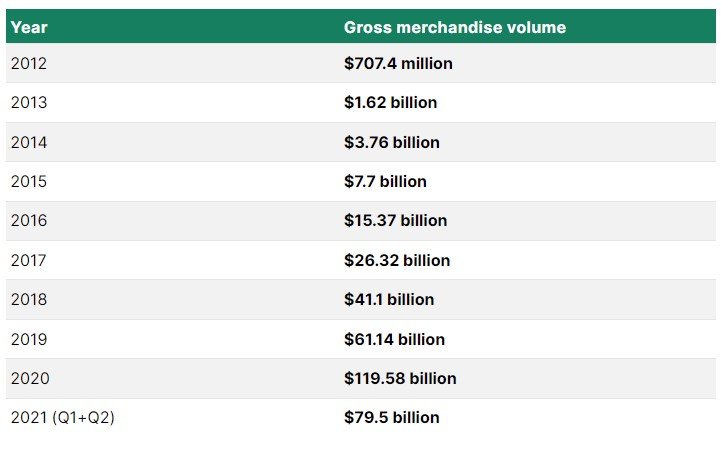
Gross merchandise volume is calculated using the dollar amount of merchandise sales numbers from all Shopify stores. These figures don’t directly contribute to Shopify’s full-year income (because of the fact that the money went to merchants), but they do demonstrate the rise of payment processing revenue and usage from Shopify’s perspective.

Shopify facilitated transactions worth $119.58 billion in the year 2020. As of June 2021, it generated a gross merchandise volume of $79.5 billion. The Gross Merchandise Volume of Shopify has increased by $12.01billion i.e., 40% over the past year which comes out to be a very great statistic. 

Shopify Gross Merchandise Volume

Shopify’s Gross Merchandise since 2012 has been represented below in a chart:

Shopify’s Gross Merchandise since 2012

Shopify Sales and Revenue Statistics

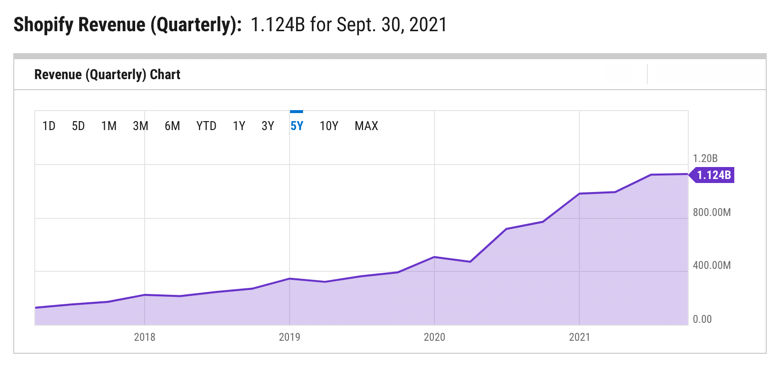
Shopify’s revenue was $1.124 billion in the third quarter of 2021.

When the sales reports for the first and second quarters were combined, total Shopify revenue for 2021 was $3.231 billion, making it the company’s highest-earning year ever.

Shopify’s revenue increased by 57% as compared to the past year. In fact, it wasn’t until 2021 that Shopify’s quarterly revenue surpassed a billion dollars.

Shopify Sales and Revenue Statistics

Shopify’s revenue has continuously climbed over the last few years, frequently more than double its previous year’s performance:

$3.2 billion in 2021

$2.9 billion in 2020

$1.6 billion in 2019

$1.1 billion in 2018

$673.3 million in 2017

$389.3 million in 2016

$205.2 million in 2015

Recurring Monthly Sales Revenue of Shopify

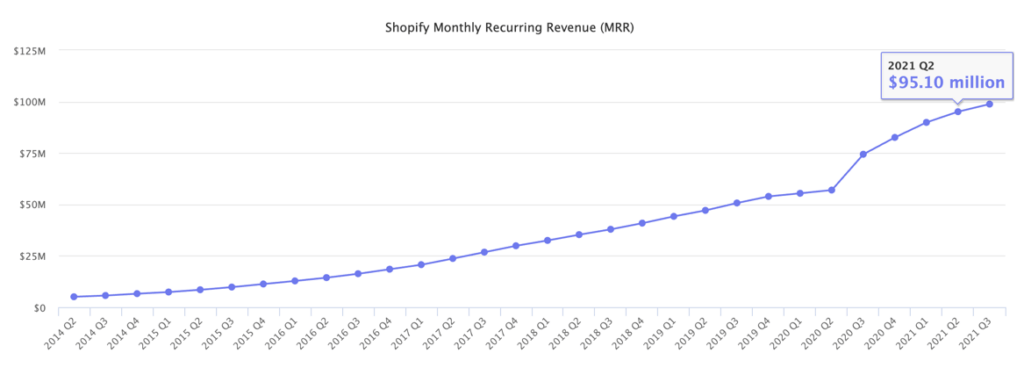
Shopify categorizes recurring income as a subset of total revenue since it includes merchant subscription fees that are paid on a monthly basis. They arrive at this figure by multiplying the monthly subscription cost by the total number of merchants who are actively using the system.

The recurring revenue of $98.8 million at the end of the third quarter in 2021 was up from $82.61 million in 2020. Although substantially lower than total sales, this is a figure that Shopify considers in order to maintain steady cash flow and merchant growth.

Recurring Monthly Sales Revenue of Shopify

Take a look at how monthly recurring Shopify revenue has changed over the past few years:

– 2021: $98.8M

– 2020: $82.6M

– 2019: $53.9M

– 2018: $40.9M

– 2017: $29.9M

– 2016: $18.5M

– 2015: $11.3M

Shopify Revenue by Region 

Shopify looks into merchant locations to see where its revenue comes from. Given that they only focus on continents, and they already know that North America generates the majority of income, it’s a rather broad look into regional revenue (primarily the United States).

Read also: Types Of Shopify Development Services And The Best Companies Offering Them!

North America accounts for 73 percent of Shopify’s sales, with 56 percent of its merchants based there.

Other sources of income include the following:

– EMEA (Europe, Middle East, and Africa) accounts for 16% of the company’s revenue.

– APAC (Asia Pacific, Australia, and China) accounts for 10% of the company’s revenue.

– LATAM (Latin America) has a 1% of total revenue.

According to the most recent data, the following are the income breakdowns by region:

– $2.2 billion in North America

– $454.3 million in EMEA

– APAC: $292.2 million

– $36.1 million in Latin America

Shopify Revenue for Subscription Solutions

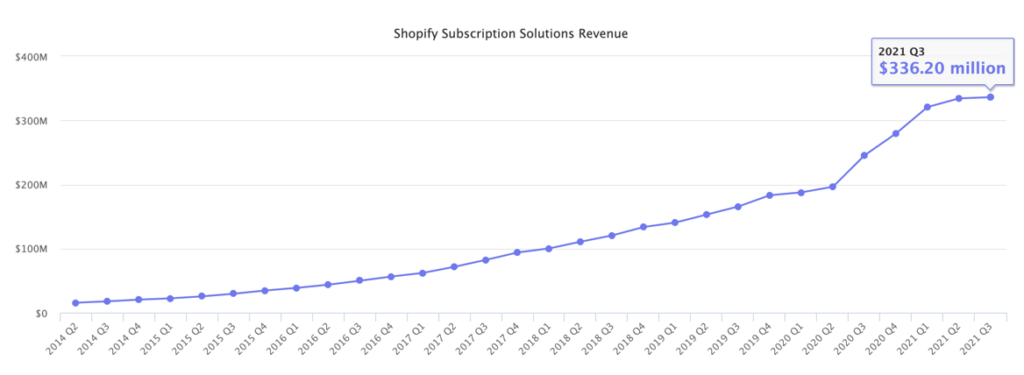
Shopify income for “subscription solutions” includes any subscription payments, such as platform subscription fees, themes, applications, domains, and POS Pro costs. It’s a one-of-a-kind revenue breakdown that shows investors how Shopify makes money.

Shopify reported $336.3 million in subscription solutions sales in Q3 2021, with a total of $654.9 million for the previous two quarters combined, for a total of $991.2 million in subscription solutions revenue in 2021.

Shopify Revenue for Subscription Solutions

This represents an increase in subscription solutions revenue over the previous year, and it’s apparent that this segment of Shopify’s business has increased over time:

–  2021: $991.2M

– 2020: $908.7M

– 2019:  $642.2M

– 2018: $465M

– 2017: $310M

– 2016: $188.6M

– 2015: $111.9M

Shopify Revenue for Merchants Solution

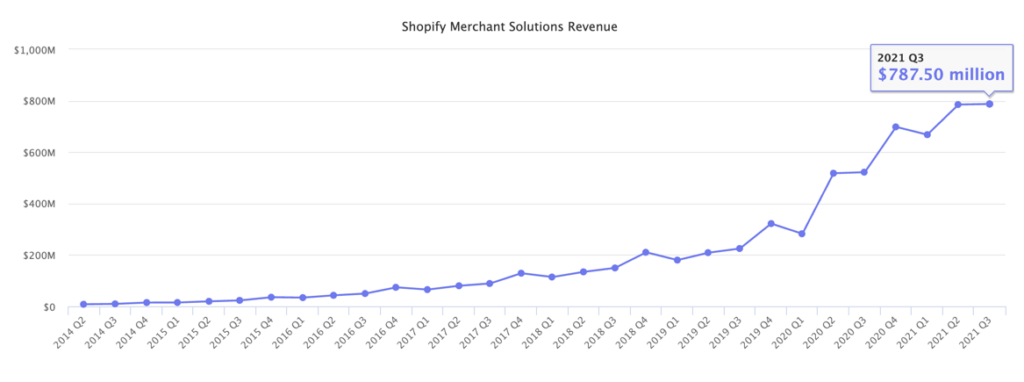
Shopify Payments provides payment processing services to many of its merchants, which the business categorises as “merchant solutions” in its financial reports. Advertising revenue, referral fees, and point-of-sale hardware purchases are all part of the merchant solutions revenue. Essentially, this combines the company’s income from non-recurring services that nonetheless help merchants.

Surprisingly, merchant solutions account for approximately 68.9% of Shopify’s total revenue, owing to the steady inflow of payment processing fees. Merchant solutions will create $2.287 billion in sales in 2021.

The final quarterly report for Q3 2021 was 787.5 million dollars.

Shopify Revenue for Merchants Solution

The number of merchant solutions has increased over time, similar to the revenue from subscription solutions:

– 2021: $2.287B

– 2020: $2.02B

– 2019: $933.9M

– 2018: $608.2M

– 2017: $363.3M

– 2016: $200.7M

– 2015: $93.25M

The Future View of Shopify Revenue and Growth

According to recent sources, Shopify intends to continue growing in the coming years, but at a slower pace than in 2020. Various variables, including the COVID pandemic, pushed sales significantly higher over that time period, and things are now levelling out. Shopify website development is a future of development. Therefore, one should hire Shopify developers from a professional Shopify Development Company if they are planning to grow their business online.

Take a look at what Shopify has to say about the future:

– As they employ additional engineers, expand into more commercial skills, and better marketing, they foresee a substantial increase in gross profit dollars in the near future.

– Adjusted operating income is predicted to be greater in 2021 than it was in 2020.

– Shopify anticipates that the fourth quarter will be the most profitable of the year.

– Shopify expects revenue growth in the subscriptions solutions space to flourish as more global merchants join the Shopify platform.

– They expect future growth rates of merchant and subscriptions solutions to be closer to each other (in percentage terms) than the higher figures reported in 2020, which were higher due to the COVID pandemic’s increase in online (and offline) entrepreneurs. The year 2020 was a one-off, and they don’t expect it to happen again.

– Growth in the merchant solutions sector will be driven by GMV growth from new merchants joining, current merchants, and developing product offerings like Shopify Shipping and Shopify Capital.

Number of Customer Buying from Shopify Store

Have you ever thought that how many people go to the Shopify Store to buy from there? According to Shopify, in 2020, 457 million people went to the Shopify store to make a purchase. This represented an increase of 53.33% in customer spending as compared to the previous year. 

There were around 300 million Shopify buyers in 2019, 216 million in 2018, and 163 million in 2017. 

Statistics for the Number of Themes and Apps on Shopify

Shopify’s Theme Store hasn’t grown all that much, instead focusing on curating a library of high-quality themes with many style variations. In essence, Shopify has a collection of 100 themes that refresh once a year. Many of the themes have two or three style versions that are vastly different from the initial design, therefore we’d say Shopify has around 300 different theme designs.

On the other hand, the App Store is continually growing. 7000 apps are available for retailers to download and use on their Shopify stores in the Shopify App Store. On the other hand, the App Store is continually growing. They had only 3700 apps in 2019.

The Shopify App Store had 900 apps in 2015, 1400 apps in 2016, 2300 apps in 2017, and 2500 apps in 2018.

Number of Shopify Sites

The United States accounts for 69.67 percent of Shopify sites. The Shopify eCommerce platform is currently used by over 3.76 million live websites around the world.

The United Kingdom and Australia are the second and third most popular Shopify destinations, with 153k and 99k sites, respectively. As you can see, Shopify caters to US merchants for the majority of its market share.

Merchants in the following countries have the highest concentration of Shopify-created websites:

– United States: 2.5 million 

– United Kingdom: 153k

– Australia: 99k

– Canada: 91k

– Germany: 76k

– France: 58k

– Brazil: 43k

– Netherlands: 33k

– India: 31k

– Italy: 25k

Shopify Plus, on the other hand, has a much less worldwide reach. That’s partly because most small and medium-sized online stores don’t require Shopify Plus, but also because Shopify Plus is a more recent addition to the Shopify product lineup. Over 6,000 online websites are powered by Shopify Plus, the majority of which are in the United States.

Below is the list of the top nations having live Shopify Plus sites:

– United States: 5.5k

– United Kingdom: 600+

– Canada: 400+

– Australia: 400+

– Germany: 100+

– France: 100+

– Netherlands: 60+

– New Zealand: 50+

– Denmark: 40+

– Spain:  40+

Final Words

Shopify is securely positioned in third place with 10.98 percent, despite WooCommerce having the greatest e-commerce market share at 28.24 percent and Squarespace coming in second at 17.69 percent.

This puts them well ahead of competitors such as MonsterCommerce, WixStores, Magento, and others. And, at this rate, they should soon be giving WooCommerce and Squarespace a run for their money.

Stay ahead of the curve with our expert ecommerce development solutions, leveraging the latest Shopify statistics and trends.

To summarise, Shopify is used by over one million enterprises in 175 countries, contributing $319 billion in worldwide activity to date.

And, unlike many other businesses that have had their expansion stifled by the pandemic, Shopify has thrived during the COVID era. In fact, the 90-day free trial they offered in 2020 to assist struggling business owners was vital in their success.

While there are other high-quality e-commerce platforms to choose from, the numbers from these Shopify statistics speak for themselves, indicating that Shopify should be at the top of your list when it comes to selecting a partner.

For the past couple of years, WeDoWebApps has emerged as the number one Shopify partner with a solid portfolio of both foreign and domestic Shopify App Solutions. We have access to powerful tools and have hands-on expertise with them to design the best Shopify app for your eCommerce business model.

As a result, enriching WeDoWebApps – the best Shopify Development Company in India providing Shopify Development services to national and international clients – is in your best interest. We will help you design the greatest Shopify App that will take your business to the next level if you hire Shopify App Developers from us.