skip to content

Getting Familiar with a Services of iPad Application Development

iPad applications have taken the hospitality industries by storm. These applications have become a gateway to a host of services. Hence, it becomes of utmost essential for us, Getting Familiar with the iPad Application Development Services. Our present post will guide you through the same topic.

Even after many competitions, Apple’s iPad is ruling the worldwide tablet market. Due to the increasing demand, the developers have led towards applications development work for iPad. The iPad has revolutionized enterprise mobility with advanced and innovative features.

iPad developer’s main aim is to develop highly effective applications for iPhone users. The forms must be having proper functionality that will benefit the users while accessing it. They must make the right use of the latest web technologies. Furthermore, with the appropriate usage of the iOS SDK, the user will get the result that will suit the application’s requirements.

Mobile Application Development Platforms

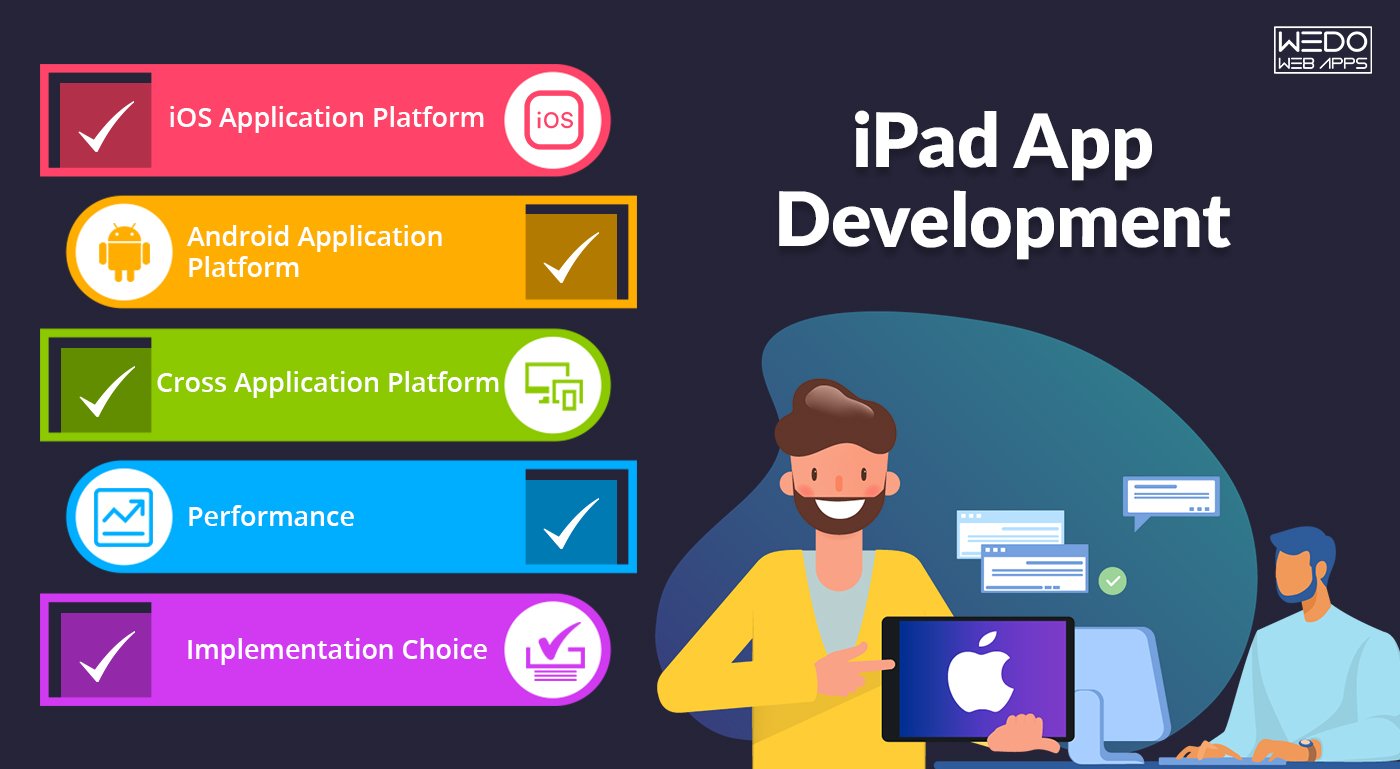
These platforms help in differentiating the various application services for different mobiles. There are three different platforms to keep in mind for branding and launching the applications. These platforms are:

iOS Application Platform

This platform is mainly for Apple users. It has a dedicated user base, and one needs to look after its needs and requirements from the application.

Android Application Platform

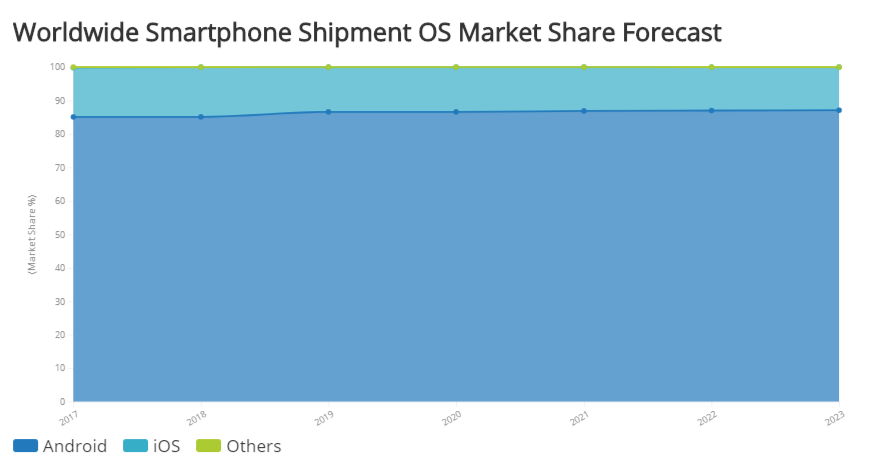
It is a platform that accounts for a maximum number of users. Launching the application on this platform will get hold of a large market.

Cross Application Platform

This platform helps in building any mobile application quickly. In this platform, one can make the application on any topic and in any language.

Critical considerations for iPad Application Development Services

As there is an increase in the maturity of the mobile application market, all enterprises are evaluating various strategic aspects crucially for long-term support and maintenance of all the mobile and iPad applications.

Performance

Rapid response time and stable performance without crashing are the key performance metrics by which the users rank a mobile app.

Implementation Choice

One of the most important considerations that an enterprise will face is the choice of technology platform or mobile operating system for which the application will be developed.

Native

A’ native’ app is an application developed for a specific mobile operating system and takes advantage of the interfaces. The advantage of this app is that it is a particular processor. The enterprise should be sure about the predominant mode of its users. Explore Apple app development and discover insights on iPad application development services for creating top-notch apps.

Mobile Web

The new generation mobile devices and all the smartphones are pre-installed mobile browser, which function to a considerable extent like standard web browsers and also the supporting applications developed using JavaScript and HTML5. Also, there is a disadvantage of the app that it is incapable of utilizing the device. Learn about choosing the right app development partner and how it complements your knowledge of iPad application development services.

Hybrid

Hybrid applications are a mixture of native and mobile web-based implementations. Frameworks like Cordova and PhoneGap help in converting mobile web-based apps into hybrid apps for multiple devices.

Finally, one should choose its implementation platform that is best suited for iPad Application Development Services and the online business.

Vital Elements Every Website Homepage Must Have

Imagine a situation – You go to a store in your area’s local mall, there you meet a frowning sales assistant. The atmosphere is unpleasant, and the store is overcrowded and disorganized. What will you do next? You will probably walk out of the store and look for some other place to shop at. Isn’t this what you’ll do? Likely, if a customer forms a wrong impression of your online website, they will bounce back and search out for your competitor’s website looking for a good user experience. Speaking of the fact, the homepage of your website is the actual representation of the soul of your brand. It establishes reliability and trust and tells customers about what you sell. It is also the place to showcase your important call to action.  Providing your customers with a great user experience on your site is very important to establish brand credibility. So, not only your homepage but the whole design of your website needs to be responsive as well as engaging. We recommend you take help from a responsive web design services company to develop an out-of-the-box website to accelerate your business.  It would not take more than just 50 milliseconds for a visitor to form an impression of your website. In that concise moment, they will decide whether to stay or to leave. Therefore, if your homepage is crafted correctly, it becomes an excellent opportunity to increase visitor engagement and conversion rate.  Elseways, ignoring the crucial homepage elements will cause you to lose potential customers as the visitors will leave your website if they cannot find the essential information they are looking for. Therefore, here we have collected some of the crucial website homepage elements for you to leverage and increase conversion.

Critical Elements Every Website Homepage Should Include

Critical Elements Every Website Homepage People put their best efforts into cracking a job interview, from getting a fresh haircut, putting on the best suit, making sure that teeth do not have a piece of spinach stuck. This is all done to form a good impression in front of the job interviewer. Just like that, every time a new visitor visits your website, it goes through a sort of “job interview.” People evaluate what they see, form an opinion of your brand, and determine if you are trustable enough to do business with. So, to establish a good impression on your visitors, ensure adding the following elements on your website’s homepage. 

1. A Unique Value Proposition(UVP)

Your website needs to have a unique and clear value proposition to set you apart from your competitors. Failing to display an enticing value proposition is clearly a blunder you are doing. Unfortunately, new businesses often commit the mistake of displaying a value proportion on their site. A value proportion is a sort of tagline that tells your customers why they should buy from you instead of your competitors. Thereby increasing the website’s conversion. How to develop your own UVP? In order to create your own UVP, determine what sets you apart from your competitors.  Does your service solve a unique problem, or do you offer better quality services to your customers? What are the benefits that cannot be found anywhere else? Also, ask your customers what makes them buy a product or service from you. This will give you real insights about your brand.  Then create a UVP and display it on your homepage to inspire increased purchases. 

2. Instinctive Navigation

Customers need to find what they are looking for quickly and easily. A Baymard Study says that poor navigation leads to customers’ bad impressions. They think that you don’t sell the product they want. Due to this false conclusion, users will abandon your website and probably won’t ever come back.  This is the exact opposite of what you want your customers to do. Therefore, your homepage should have easy and clear navigation. Your navigation should always be on the top of the homepage so that the visitors can easily find it. Also, make sure to make the destination of every link clear. 

3. A Clear Call-to-action

Your website’s homepage aims to drive the customers to dig deeper into your website and move them down to the sales funnel. Include at least one call-to-action on the homepage that can direct people to wherever you want. Place the CTAs at the place where they are easy to find.  These CTAs should be visually appealing, usually in the color that contrasts your website’s color palette. Keep them brief, not more than 5 words on one CTA, and should be action-oriented to drive your customers to do what you’re offering. 

4. Easy Access to your Learning Centre 

Since content is the crucial part of your inbound marketing strategy, motivate people to view, read, and subscribe to your content by showcasing it on your homepage. Your podcast, blog articles, webinars all show your level of expertise and offer users the safest option to convert and start a long-term relationship with your brand. 

5. Supporting Images

Gone are the days when people used to read the content of the service they wanted. People these days prefer scanning the websites rather than reading every single text on the website. Since people love to see visual content, it is recommended to post relevant images (also videos) rather than written text.  Use images that catch emotions, drive action, and digitally tell your brand story. To optimize your website for mobile devices, use high-quality images with reduced file size. Also, always remember to add ALT text on your images to make them more beneficial for the users who use screen readers and take your SEO efforts to the next level. 

6. Social Proofs

Typically, your website should build trust in your visitors, especially if you are running a business. One of the best ways to gain your visitors’ confidence is to show them that you’ve got good feedback from your past customers. To achieve this, a lot of online businesses showcase their client reviews on their website’s homepage. You can include social proof elements like client testimonials, reviews, and ratings. If you want to showcase a social proof element on your homepage, we recommend you to showcase only a handful of client reviews, so it doesn’t look like you are overselling yourself. Adding a name and the client’s headshot gives more credibility to your website. Hence, this is one of the most important elements to showcase on your homepage. 

7. Headlines and Subheadlines

As said earlier, a customer needs to understand what your business does in order to convert. As soon as a visitor comes on your website, the very first thing he does is understand your business. There is nothing more frustrating than a landing page offering zero understanding about the business.  To let your customers understand your website, you need to cut short your business motive into a headline of not more than 5 words. Cutting down everything your business does in just five words is a difficult task, but once it is done, searchers can use it to find your business online. Also, as it is short, it would be easy for your customers to remember.  Not just a headline, a well-structured business website also should contain subheadings to make it easier for the consumers to understand. 

Ensuring these homepage elements are in place is crucial, but don’t forget the importance of ongoing website maintenance and renovation to keep everything running smoothly.

8. Feature your Best Products 

Recommending products on the homepage gives suggestions to the customers what to buy. You can showcase your best products on the homepage to help them make a purchase decision. And it makes sense to help your customers buy what you offer the best.  Even if you take an example of your tinder profile, you will post the best pictures of you, not the ones your friends captured randomly, and you look like a monster. And add new products down the page.  You can test the set of pictures that best suit your homepage in the matter of conversions. The set of images can be your best sellers, seasonal products, or anything relative. The key here is to be competent in order to get more conversions. 

9. Make your Search Bar Stand Out

Probably no website is complete without a search bar. Potential visitors are most likely to use the search bar to find out what they are looking for. A search bar helps a visitor to find their information at lightning speed from the homepage itself. That is why adding a prominent search bar can increase conversions by approx 50%. But this is only when your search bar works properly.  Unfortunately, it is a big challenge to find what your visitors are looking for. On average, 34% of the search results do not show appropriate results. To resolve this, your search software should be robust to be able to recommend related products. Additionally, if your website search software has an autocomplete feature, you will likely receive six times more conversions. 

10. Demonstrate Website Security 

Consumers these days think that Google robots are always ready to grab their personal information. Therefore, you need to prove to your customers that your website is absolutely secure to shop. According to the surveys, approx 17% of the customers leave the products in the cart due to a lack of trust.  You can add widely trusted certificates or seals on your homepage to build trust in your customers. You can display your security seals in the footer, but use the recognitions that are widely famous. You should also have an SSL certificate as Google flags the websites as “Not Secure” if they don’t have their SSL certificate.  Nobody would want to hand over their credit cards to unsecured websites. Therefore, you need to convince people that your website is safe to shop for. 

Having the right homepage elements is essential, but sometimes a full business website redesign is necessary to stay ahead of the competition.

Bonus Tip: Video Content

Now, this is something that you can do apart from these elements. Implementing video content, but you certainly cannot go wrong with making the introductory videos. Having a short introduction video of what your business offers, showcasing your office, and/or introducing your entire team is one of the easiest ways to raise conversions.  Keep your videos shorter, i.e., 3 minutes or less, so that your customers don’t lose interest in your company. The idea behind implementing video content is to give an overview of what your business is about and what services/products it offers.

Conclusion

The homepage of your website is the very first impression each visitor will have of your business. Before they make up their mind to convert into a customer, they will thoroughly go through your website homepage to get an idea of what you sell, why your services matter to them, and how they can benefit from what you sell.  You should make a brilliant first impression by crafting a homepage that integrates the elements mentioned above. In addition, a good homepage has the ability to attract customers and keep them on your website. Therefore, the motive of your website should not just be an excellent design, but it should clearly communicate your value and services to your customers. Read more about How to Choose the Best Responsive Website Design Services But keep in mind, your homepage should not be set in stone; instead, it should always be fresh to keep the users engaged. Constantly keep an eye on your webpage especially focusing on the bounce rate to know whether the customers are staying on your website or immediately leaving.  With a team of designers, developers, digital marketing professionals, and content writers, WeDoWebApps LLC can help you not only develop an intuitive homepage but an absolutely enticing website that will take your business to the next level. Contact us, and we promise you to offer the best responsive web design services across the globe.

Is iPadOS Ready for Real Work? The Good and Bad Things In iPadOS

Now the iPad gets its version of OS, which called iPadOS. A new version of iOS 13, is specially designed for iPad with many more feature with larger iPad’s display. Get a new OS to make iPad desktop-class experience with new features.

Here are all the new features that are GOOD and BAD for iPadOS.

✓ Desktop Class Browsing In Safari

It was an ever tricky task to browse the site on the iPad. iPads would get websites that are mobile optimized. You’ll have the option to zoom in and out to use web applications like Google Docs and WordPress without an issue. Apple has rolled out new changes to the way Safari on iPadOS works. Moreover, the update enables you to have a desktop-class browsing experience on your iPad.

Apple’s fix was to have the present Safari browser tell sites that is what it is, the Apple variant of Safari. The solution for iPad is, Safari will allow users a full desktop-class version of the website on the gadget.

Apple has included a translation layer between your taps and the website’s expectation of clicks. This solution works well in most of the site but not a perfect for all.

✓ Open Two Split Windows From The Same App

iPads used to provide a feature that you utilize two apps at a time with Split View, however now you can use two windows from the same application. So while the open site in Safari, freely drag the Safari icon up from and open another Safari window by it in Split View. It primarily worked with Apple’s applications in the iPadOS 13.1 beta.

To drop Split View, swipe the tab between the two windows to the left or the right.

✓ Customize Home Screen With Widget

iPadOS carries an upgraded home screen with a new layout that permits space for more apps on the screen. It gives you a chance to include gadgets on the home screen so you can look at valuable data—for example, weather, headlines, event and calendar without swiping to the committed Today View Space.

The useful daily data will always ready at your fingertip. To include more gadgets, look down to the catch of the gadget bar and press edit at the base.

Read also: Getting Familiar with the iPad Application Development Services

✓ The Floating Keyboard

Have you felt board about using your iPad to type a long message? Since the iOS keyboard takes around half of your screen. Thanks, t iPadOS, you will get a floating keyboard on your iPad, and you can quickly move that anyplace on your screen.

Apple rolled out some changes to the keyboard in iPadOS. That allows the console to float around the other location on display, the keyboard giving more space to the applications you’re utilizing. The supports the feature that Apple calls QuickPath, a simple method to swipe over the software board to state what you need to say.

✓ Files App Supports External Drives

Apple presented the iPad Pro with a Type-C port; it’s open up other possibilities outcomes where clients could move files from any other gadget to the iPad. They ware making some essential changes by permitting the Files apps to help outside USB drives, SD cards, or signing into an SMB file server.

The Files app gets better with iCloud Drive support for file sharing. iPadOS 13 is good with external drives, and you can filter through of their files in the Files app much as you may in Find on a Mac.

✓ Dark Mode

Dark Mode is the new feature of iPadOS 13, and it’s become trendy. You can switch to dark mode easily by telling to Siri “turn on Dark Mode.” Apple has also support APIs for the developer to make their apps good with Dark Mode.

In iPadOS Dark Mode has control over each pixel with amazing dark shading. It’s ideal for night time use. It’s also good for your eyes. Dark Mode is likely going to be the most excellent new feature by apple in 2019.

✓ Photos App

Photo editing option is a cool feature with the updated version; it’s simpler than previously. What’s new on is the capacity to apply the majority of that same stuff to video. You may get somewhat lost in Apple put efforts for the best things in the new timeline views inside the app, yet stay with it. You’re likely taking many photographs; Apple’s AI a chance to try to manage them a tad for you.

✓ Multitask: The New Way

Performing various tasks is effectively one of the essential angles for an iPad. With iPadOS, Apple reported a lot of better approaches to do that. iPad users would now be able to work with different documents and files from a similar app with Split View. For instance, you can compose an email while seeing another email in split-screen see. You can likewise switch between various apps like calendar or messages in slide over.

Apps expose raises a powerful aspect on every open window in an app with a tap. Apple has likewise included another three-pinch gesture for a simple copy and paste.

✘The Advance Text Selection

Text selection on iPadOS has become extremely frustrating part.

Apple attempts to put text interactions on iPadOS. Now you have the option to tap or drag your finger to have the cursor do what you need. This time, different motions are using three fingers to do things like copy and cut. When does dragging move the cursor and when does dragging select the book? It’s up to you. Following three months of using the iPad’s betas consistently, you can quickly notice.

✘ There Will Be Bugs

Discovering bugs is all part of testing out the iOS beta.

This year has been lots of bugs for the betas. You should not know what you are downloading today is bug-free or not. iPadOS is getting pushed out somewhat early because it needs to go out with iOS 13.1 — which itself should be rushed out because iOS 13.0 has bugs. The most common bugs, like losing information in iCloud appear. Be that as it may, you may have some apps crash or stop. Wait longer time for download apps.

Read More:- The 30-Second Trick for Integrating Siri in the Third Party Apps

Overall Review

Have several features that recognize the iPad as a computer replacement at some point. Apple’s new security assurance makes it harder for both apps and website pages to identify you for following. Make fresh Apps design for iPadOS also to get more out of your business. New iPad with entire new operating system keyboard has a fantastic excellent experience. Build your next app with the best iOS development company.

Magento 2 Migration Service – Checklist, Plan & Benefits

If you haven’t migrated to Magento 2, you’ve clearly missed the countdown and your business is currently running on unsupported software. Magento 1 rounded off its support on 30th June 2020 after powering businesses for over a decade. If your e-commerce store is still running on Magento 1, which means your business is prone to security vulnerabilities. In a world where online security and customer database protection is a top priority, still functioning on an unsupported platform is both risking your business and customers’ privacy. A data hack on your business and customer database could cause some serious impact to your business reputation and customer loyalty.

https://www.youtube.com/watch?v=cVEmNOYaxPQ

Why Magento 2 is better and more advanced?

Still, if all is not lost, you need to connect with a Magento 2 migration service provider and have your business migrate to the updated technology. The migration service might look like a daunting task but several benefits await you including an improvised interface, strong security, enhanced performance, and fresh design. The open-source e-commerce engine platform combines powerful marketing, search engine optimization, advanced reporting, improved checkout processes, and other noteworthy tools which will empower your businesses and make them completely scalable. The interface has been improvised not only for the backend operations but gives the customers a mobile-friendly user interface. Magento 2 improves SEO, eases the checkouts while ensuring an increased user experience. Upgrading to Magento 2 with the help of a Magento 2 migration service provider gives you a niche over your competition with your customers enjoying the refreshing change and user experience. With the latest version, its easy to upgrade and customize offers instant purchase, assists in email marketing automation, boosts conversion rates and sales, and improves efficiency and agility for business users.

For quite a few years, Magento 1 has been powering numerous eCommerce websites however change is the new name of the game. Migrating to the latest version of Magento is no easy task. The dynamic platform requires the right expertise or else one wrong move could end up spending more time and money rectifying the error. To ensure your business has a smooth transition to Magento 2, opt for a certified Magento developer who has the right knowledge about the platform the expertise to upgrade and scale your existing website. The Magento 2 migration service provider needs to include both pre and post-migration support. Once the migration process is complete, every component of the website needs to be tested to ensure there are no technical glitches and the online story runs perfectly as before only now with a renewed set of benefits. The duration for the migration depends on how complex the online store is. Migration to Magento 2 should take two to three months or maybe more depending on the customizations, coding, and third-party integrations.

What’s your Migration Plan?

To migrate to the advanced version of Magento without facing any issues, you need to prepare a migration plan.

1. Analyze the migration scope: It’s best to be on the same page with a clear picture of the work lying ahead, responsibilities, and timelines. Evaluate what is the technical functionality of the website in terms of third party extensions, customized themes, integration with various CRMs and ERPs, core customizations, etc. The complete size of the store including the number of domains needs to be assessed. All these factors will help in putting an estimate to the overall time spent to migrate to the latest software.

2. Get rid of data you don’t need: Simply the process and get rid of any outdated data from the previous version. Because of the new interface, the extensions used in Magento 1 may not be compatible with the latest version. Find out which are the new extensions that will be needed for Magento 2. All unique customizations that were developed for Magento 1 will be recreated for Magento 2.  

3. Conduct thorough testing: Once the existing functionality has been replaced, it’s best to verify that the performance is glitch-free. Magento 2 module testing is a complex process therefore the Magento 2 migration service provider needs to conduct thorough testing. Before initializing a dry run, it’s best to seize all administrative activity on both the versions.

4. Initiate your migration with the Data Migration Tool: The tool s equipped to migrate all your data however there might be some customized data that will be overridden. Admin rights, media files, and some other technical aspects will not be included in the tool.

5. Update incremental data: Once the data has been migrated, collect the data updates that were added in Magento 1 store such as new order, reviews, etc, and transfer these updates to the Magento 2 store by going into Delta mode.

6. Final Check: Have the various functionalities reviewed by various stakeholders to ensure all points have been covered. Check if the files for Magento 2 are updated and functioning normally without any glitches.

Run through a proper checklist 

Before rolling out the new layout and improvised design, run through the checklist with your Magento 2 migration service provider to ensure no function has been missed out.

1. During the migration process, ensure that no themes, extensions, plugins have been overlooked. Review the final list once again to be certain.

2. All stakeholders need to be one the same page with roles and functionalities clearly defined.

3. Once the migration process is over, various tweaks will have to be incorporated, bug fixes will have to be addressed. Magento 2 should be linked with different CRMs and ERPs before the software is considered for launch.  

4. Ensure all software and hardware requirements are met and they meet the compatibility criteria.

Read also about PSD to Drupal and Magento Conversion

The checklist and the migration plan are to give an overview of the entire process. The most suitable way to go through the migration process is to get the best Magento 2 migration service provider to help you with the entire process and assist you with the technical guidance. Migrating to Magento 2 is a significant move for your business, it’s as big as creating a new website, so the migration must be done correctly with the help of experts.

WooCommerce Speed Optimization Tips to Speed Up WordPress Site Performance

Introduction – Speed Up WordPress Site

If you have ever realized, speed is one of the most important factors in determining the success of an online store. For WooCommerce websites, a fast-loading website does not just improve user experience; it directly impacts search engine rankings, customer satisfaction, and conversion rates. Research shows that just a second of delay in load time can reduce conversions by as much as 7% and increase bonus rates significantly.

Many WooCommerce store owners face challenges like slow checkout pages, lagging backend dashboards, or heavy themes that drag performance down. If you have ever wondered, “Why is my WooCommerce store slow?”, the answer lies in a mix of technical and business factors, ranging from hosting choices to how your store is configured.

The good news is that you do not need to be a performance engineer to fix it. With the right combination of WooCommerce speed optimization tips, you can speed up your WordPress site, optimize checkout, and streamline backend performance. In this comprehensive guide, we will provide you with the insights from the WordPress development company that includes practical, proven strategies backed by both technical best practices and real business benefits to help you build a WooCommerce store that is lightning fast and built for growth.

Why is My WooCommerce Store Slow?

One of the most common questions that store owners ask is “Why is my WooCommerce store slow?”. The truth is, WooCommerce itself is a powerful and flexible eCommerce platform, but when paired with poor hosting, heavy themes, or too many plugins, performance issues can quickly appear. A slow store does not just irritate customers, it directly affects your ability to rank in search engines and convert visitors into buyers.

Here are the most common reasons why your store may be underperforming:

  • Inadequate Hosting Environment: Cheap or shared hosting plans often lack the resources needed to run a busy WooCommerce site. To truly speed up a WordPress site, investing in WooCommerce-optimized hosting is crucial.
  • Heavy Themes and Page Builders: Feature-rich themes may look appealing, but they often load unnecessary scripts and styles, slowing down the site.
  • Too Many Plugins: Installing multiple plugins, especially poorly coded ones, increases HTTP requests and database queries, reducing performance.
  • Unoptimized Images and Media Files: Large, uncompressed product images or videos are among the biggest culprits of sluggish loading speeds.
  • Database Clutter: Over time, transients, revisions, and unused tables can slow down queries, affecting both the frontend and backend performance.
  • Slow Checkout: Features like AJAX cart fragments can cause unnecessary load during checkout, leading to abandonment.
  • Outdated Software: Running older versions of PHP, WordPress, or WooCommerce can severely limit your store’s performance.

The good news is that each of these issues can be resolved with the right WooCommerce speed optimization strategies. In the next sections, we will cover step-by-step methods to tackle these bottlenecks and ensure your store runs as fast as your customers expect.

Slow Store vs. Optimized Store: A Quick Comparison

Factor  Slow WooCommerce Store  Optimized WooCommerce Store
Hosting Shared/cheap hosting with limited services  WooCommerce-optimized hosting (VPS, cloud, managed)
Theme Heavy, multipurpose themes with bloated code Lightweight, performance-focused theme
Plugins Dozens of themes (many inactive or poorly coded) Only essential, high-quality plugins
Images & Media  Large, uncompressed files Optimized WebP/AVIF formats with lazy loading 
Database  Filled with revisions, transients, and unused tables Regularly cleaned and optimized 
Checkout  AJAX cart fragments slowing checkout  Streamlined one-page checkout with optimized fields
Software Stack Outdated PHP, WordPress, and WooCommerce versions Updated to the latest stable versions (PHP 8+, MySQL/MariaDB)

WooCommerce Speed Optimization Tips

If you are wondering how to speed up a WooCommerce site, the good news is that there are proven methods you can apply at both the server and application levels. Below are some of the most effective WooCommerce speed optimization tips to ensure your store loads quickly, provides a smooth checkout experience, and scales as your business grows.

1. Optimize Hosting & Server

Your hosting environment is the foundation of your eCommerce store’s performance. No amount of frontend optimization can fix a slow, underpowered server. To speed up a WooCommerce site, start with WooCommerce-specific hosting options such as Cloud, VPS, or Managed WooCommerce hosting. These provide dedicated resources, faster processing, and better scalability than generic shared hosting.

Always make sure your server is running the latest software stack. Upgrading to PHP 8+ and using MySQL or MariaDB ensures faster query execution, reduced load times, and improved compatibility with WooCommerce’s latest features.

Additionally, enable object caching through technologies like Redis or Memcached. These stores frequently requested queries and data in memory, cutting down on repetitive database calls and significantly improving both frontend and backend speed.

With a powerful hosting setup, you lay the groundwork for all other optimizations.

2. Choose a Lightweight WooCommerce Theme

A theme is more than just design; it directly impacts your site’s loading speed. Many multipurpose WordPress themes come with excessive features, scripts, and visual effects that slow down performance.

Instead, opt for lightweight and WooCommerce-optimized themes such as Astra, GeneratePress, or Storefront. These themes are coded for efficiency, mobile responsiveness, and compatibility with speed plugins. They deliver fast page loads without sacrificing design flexibility.

By starting with a clean, performance-oriented theme, you minimize unnecessary bloat and create a faster foundation for your WooCommerce store.

3. Manage Plugins and Extensions

Plugins extend WooCommerce’s functionality, but using too many, or poorly coded ones, can significantly slow down your site. Each plugin adds scripts, database queries, or extra requests that may hurt performance.

To apply the best WooCommerce speed optimization tips, keep only essential plugins and replace resource-heavy ones with lighter alternatives. For example, use a dedicated SEO plugin instead of multipurpose toolkits.

Also, regularly audit your plugins and remove inactive ones to reduce database clutter and improve security. A minimal, well-optimized plugin stack is key to speeding up WooCommerce sites without losing functionality.

4. Enable Caching

Caching is one of the most effective ways to speed up a WooCommerce site. By serving pre-generated versions of your pages, caching reduces server load and speeds up delivery to visitors.

There are two main types:

  • Full Page Caching: Delivers static HTML versions of your store pages instead of regenerating them on every request.
  • Browser Caching: Saves frequently used resources like CSS, JS, and images locally on the user’s device for faster repeat visits.

For WooCommerce specifically, choose caching plugins that are eCommerce-friendly. Popular options include LiteSpeed Cache, WP Rocket, and W3 Total Cache, all of which handle dynamic pages like cart and checkout with special rules.

With proper caching, your site can load in milliseconds, giving users a seamless shopping experience while reducing server strain.

5. Use a CDN 

A Content Delivery Network (CDN) helps distribute your WooCommerce store’s assets (images, scripts, styles) across multiple servers worldwide. This ensures that customers, regardless of location, load your store from the nearest server.

Popular CDNs such as Cloudflare and BunnyCDN reduce latency, minimize downtime, and add an extra layer of security. For international stores, a CDN is critical to achieving global performance consistency.

Integrating a CDN alongside caching ensures your store is optimized for speed both locally and internationally.

6. Optimize Images and Videos 

Unoptimized media is one of the biggest causes of slow WooCommerce stores. Large product images and embedded videos can drastically increase page load times.

To fix this, always compress and convert images to modern formats like WebP or AVIF, which reduce file size without sacrificing quality. Implement lazy loading so images and videos load only when they appear in the user’s viewport.

For videos, avoid hosting them directly on your WordPress site. Instead, offload them to platforms like YouTube or Vimeo and embed them. This ensures your server is not overloaded with heavy media files.

By following these media optimization practices, you will greatly reduce page weight and deliver a smoother browsing experience.

7. Minify & Combine Assets

Every WooCommerce store loads CSS, JavaScript, and HTML files that control how your site looks and functions. The problem? These files are often bulky and unoptimized.

Use minification to remove unnecessary characters, spaces, and comments from your code. Then, combine smaller files where possible to reduce the number of HTTP requests.

Finally, defend render-blocking scripts so essential content loads first. This directly improves metrics like Largest Contentful Paint (LCP), which is crucial for Google rankings.

8. Database Optimization

As your WooCommerce store grows, your database accumulates unnecessary data like revisions, transients, spam comments, and unused tables. This clutter slows down queries and affects both the frontend and backend.

Regular database optimization is one of the most underrated WooCommerce speed optimization tips. Use plugins like WP-Optimize or Advanced Database Cleaner to schedule cleanups automatically. For advanced users, manual optimization via phpMyAdmin or command line tools can further fine-tune performance.

Optimizing your database ensures faster query execution, improves backend responsiveness, and prepares your store to handle more traffic without lag.

9. Improve Core Web Vitals 

Google’s Core Web Vitals are critical performance benchmarks that directly affect your SEO. For WooCommerce stores, focusing on these three metrics is essential:

  • Largest Contentful Paint (LCP): Optimize server response time, lazy load images, and use a CDN.
  • Cumulative Layout Shift (CLS): Ensure images, ads, and embeds have defined dimensions to prevent layout shifts.
  • First Input Delay (FID): Reduce JavaScript execution time by deferring or splitting code.

Improving Core Web Vitals not only boosts rankings but also ensures your customers enjoy a seamless and frustration-free shopping experience.

WooCommerce experts offering speed optimization tips and performance services for faster WordPress stores

How to Speed Up WooCommerce Checkout

Your checkout page is where your sales are won or lost. Even if your WooCommerce store loads quickly, a slow or clunky checkout process can drive customers away at the final step. Studies show that nearly 70% of online shoppers abandon their carts, and one major reason is a sluggish checkout experience. That is why knowing how to speed up WooCommerce checkout is important for increasing revenue and boosting conversions.

Here are some of the proven ways to optimize your checkout process:

1. Simplify the Checkout Form

Too many form fields create friction. Remove unnecessary fields like company name, second address line, or fax number. Keep only the essentials, such as name, email address, shipping details, and payment information. Plugins like Checkout Field Editor let you customize this easily.

2. Enable AJAX for Cart Updates 

Without AJAX, updating quantities or removing items reloads the entire page, slowing the process. Enabling AJAX ensures changes happen instantly, improving the overall user experience.

3. Optimize Payment Gateways 

Some payment gateways add extra processing time. Stick to fast payment options like Stripe, PayPal, or WooCommerce Payments. If you serve global customers, enable local gateways that speed up processing for regional buyers.

4. Use a One-Page Checkout

A multi-step checkout increases load times and abandonment rates. Switching to a one-page checkout plugin reduces clicks and makes the process smoother, especially on mobile devices.

5. Disable Cart Fragments (If Not Needed)

WooCommerce uses AJAX cart fragments to keep the cart updated in real time. While useful, it can slow down the checkout page. If you don’t rely on mini-carts, disabling this feature can significantly improve the checkout speed.

6. Enable Caching for Checkout (With Care)

Most caching plugins exclude checkout pages by default to avoid conflicts. However, some advanced WooCommerce-compatible caching solutions, such as WP Rocket or LiteSpeed, allow safe caching rules that improve performance without breaking functionality.

7. Optimize Mobile Checkout

Since more than half of eCommerce traffic comes from mobile devices, your checkout must be mobile-friendly. Use responsive designs, large input fields, and autofill options for a seamless mobile experience.

By applying these WooCommerce speed optimization tips specifically to checkout, you can dramatically reduce cart abandonment, improve user satisfaction, and boost sales. A faster checkout does not just improve conversions; it also builds trust with your customers.

WooCommerce Checkout Speed Checklist

Do’s (Best Practices) Don’ts (Common Mistakes)
Keep checkout fields minimal (name, email address, payment). Don’t overload checkout with unnecessary fields like fax or company name. 
Use AJAX cart updates for instant changes.  Avoid page reloads for every cart update.
Choose fast, reliable payment gateways (Stripe, PayPal) Don’t stick with slow pr unsupported gateways.
Implement One-Page Checkout for fewer steps.  Don’t force multi-step checkout with multiple reloads.
Disable cart fragments if not essential.  Don’t leave AJAX cart fragments running if they slow down checkout.
Ensure mobile-first design with autofill enabled. Don’t ignore mobile checkout speed and usability.
Use WooCommerce-friendly caching plugins with safe rules.  Don’t apply aggressive caching that breaks checkout functionality. 

WEDOWEBAPPS WooCommerce checkout optimization services to reduce cart abandonment and boost conversions with faster checkout experience

How to Speed Up WooCommerce Backend

While most guides focus on frontend performance, many store owners face another big issue: a slow WooCommerce backend. If your admin dashboard takes ages to load, updating products or processing orders becomes frustrating and time-consuming. This is especially common as stores grow, with thousands of products, plugins, and customer records clogging the system.

Here is how you can speed up the WooCommerce backend effectively:

1. Optimize Hosting for WooCommerce

The backend relies heavily on server resources. If you are running your store on shared hosting, performance will be slow when multiple users are active. Switching to WooCommerce-optimized hosting (VPS, cloud, or managed solutions) ensures enough CPU, RAM, and bandwidth for smooth backend operations.

2. Keep WordPress, WooCommerce & PHP Updated

Running outdated versions of PHP, WordPress, or WooCommerce can slow down admin performance. For best results, use PHP 8.1 or higher, as it delivers significant speed improvements for backend processes.

3. Use Object Caching

Features like Redis or Memcached can drastically reduce database queries in the admin panel. This is particularly useful when managing large product inventories or order histories.

4. Clean Up Your Database Regularly

A bloated database is one of the main culprits behind a sluggish backend. Use tools like WP-Optimize or Advanced Database Cleaner to:

  • Remove old post revisions
  • Delete expired transients
  • Optimize WooCommerce order tables
  • Clear out unused metadata

5. Limit Dashboard Widgets & Background Tasks

The WordPress dashboard often loads unnecessary widgets (for example, news feeds, analytics, or plugin promos) that slow down performance. Disable non-essential widgets and schedule background tasks (like email reports or stock updates) to run during off-peak hours.

6. Use a Staging Environment for Testing

Installing or updating plugins directly on a live site can temporarily slow down the backend. Instead, use a staging site for testing before deploying changes.

7. Monitor & Replace Heavy Plugins

Some plugins, such as complex analytics tools or poorly coded page builders, consume excessive server resources in the backend. Use tools like Query Monitor or your hosting provider’s analytics to detect slow plugins and replace them with lighter alternatives.

By applying these measures, you will notice a significant improvement in how quickly your store’s admin area responds. A faster backend not only saves you time but also allows your team to manage products, orders, and customers more efficiently, helping your WooCommerce business scale smoothly.

WooCommerce Backend Optimization Quick Wins 

Action Impact on Backend Speed  Tools/Methods
Upgrade hosting (Cloud/VPS/Managed WooCommerce) High – ensures more server resources for smooth admin operations SiteGround, Kinsta, Cloudways
Update PHP, WordPress & WooCommerce High – latest versions run faster & more secure PHP 8.1+, WooCommerce latest
Enable Object Caching  High – reduces repeated database queries  Redis, Memcached
Clean Database Regularly Medium to High – removes clutter and speeds up queries WP-optimize Advanced DB Cleaner
Disable Unnecessary Dashboard Widgets Medium – reduces admin panel load time Screen Options in WordPress
Monitor and Replace Heavy Plugins Medium – prevents bottlenecks in backend processes Query Monitor, hosting performance tools
Use Staging Site for Testing Indirect – prevents backend slowdowns during updates  Staging via hosting or plugins

Tools to Test and Monitor WooCommerce Performance

To master WooCommerce speed optimization, you need the right tools to identify bottlenecks, track changes, and measure results. Here is a breakdown of the most useful tools, and how you can apply them:

1. Google PageSpeed Insights

  • Best For: Testing Core Web Vitals (LCP, CLS, FID).
  • Why Use it: Helps you understand if your store meets Google’s performance standards for SEO. 
  • Quick Win: Focus on fixing “Reduce Unused JavaScript” and “Optimize Images” warnings.

2. GTMetrix

  • Best For: Detailed performance breakdown with waterfall charts. 
  • Why Use it: Shows which scripts, styles, or plugins are slowing down your store. 
  • Quick Win: Identify the slowest requests and use a caching/CDN solution to reduce load times. 

3. Pingdom Tools

  • Best For: Testing global site performance.
  • Why Use it: Useful if you have international customers and need to measure speed in multiple regions. 
  • Quick Win: If speed varies by location, enable a CDN like Cloudflare or BunnyCDN. 

4. Query Monitor (Plugin)

  • Best For: Finding backend bottlenecks (slow queries, database load, heavy plugins). 
  • Why Use it: Crucial for large stores with thousands of products or high order volume.
  • Quick Win: Replace or optimize plugins flagged as “slow queries” culprits. 

5. WebPageTest

  • Best For: In-depth testing with filmstrip view, speed index, and mobile-first insights. 
  • Why Use it: Offers real-world testing on different devices, networks, and browsers. 
  • Quick Win: Use it to benchmark before & after optimizations to prove ROI. 

Pro Tip: Do not rely on just one tool; combine PageSpeed Insights for SEO, GTMetrix/Pingdom for user experience, and Query Monitor for backend health. This holistic approach ensures your WooCommerce store performs well across all fronts.

Conclusion: Make Your WooCommerce Store Lightning Fast

A slow store does not just frustrate customers; it costs you sales, rankings, and long-term growth. From optimizing hosting and caching to fixing checkout bottlenecks and backend performance, WooCommerce speed optimization is no longer optional; it is essential for success in today’s competitive eCommerce landscape.

By applying the strategies and tools we have covered, such as image compression, database cleanup, Core Web Vitals Improvements, and real-time performance monitoring, you can ensure your WooCommerce store runs faster, smoother, and more efficiently. The result? Happier customers, higher conversions, and stronger SEO rankings.

But we get it, implementing these technical tweaks takes time, expertise, and ongoing monitoring. That is where our team at WEDOWEBAPPS comes in.

  • We specialize in WooCommerce website development optimized for speed, scalability, and conversions.
  • From backend improvements to lightning-fast checkouts, we know exactly how to unlock your store’s full potential.
  • Our WooCommerce experts ensure your site is not just fast today, but stays optimized as your business grows.

WEDOWEBAPPS WooCommerce speed optimization services to build a fast, scalable, and sales-ready WordPress store

Mobile App Development Cost – A Complete Cost Estimation Guide

Understanding App Development Cost

Today, technology has taken the front seat in every industry, and mobile apps are playing the most important role in boosting customer engagement. Every sector starting from banking to shopping, transportation, and healthcare, mobile and web apps simplify people’s lives and boost business. With smartphone usage growing rapidly each day, both startups and enterprises are investing heavily in mobile applications.

You are not alone in the race if you are wondering, “How much does app development cost?”. It is one of the most common questions for people considering application development, but most complex to answer. App development differs widely based on the following:

  • Features and functionality 
  • Platform chosen (iOS, Android, or cross-platform)
  • App complexity 
  • Developer location (on-site, remote, hybrid)

On average, app development costs can range from $150 to $180/hour. However, the app development cost climbs high based on the custom features that you request.

Therefore, in this guide, we will walk you through the key factors that impact app development costs and provide tips to reduce unnecessary spending without compromising quality.

factors that impact app development costs

App Development Cost Breakdown

What happens when a client goes for a consultation with an app development company to discuss their app idea? They have no idea about what to expect from the app development process, or the cost as well. Surely, they must have specified their requirements and desired functionalities, but that is not enough to create a fair app development cost estimation.

Yes, the upfront cost quoted by the development company is not everything. App development is a complicated process, and knowing how much app development costs means doing in-depth research and gaining a detailed understanding of the app dynamics.

Factors Influencing the App Development Cost

Building a mobile app isn’t a one-size-fits-all process. The overall cost is shaped by various factors, from the type of app you’re creating to the region where your development team is based. Understanding these cost influencers can help you make smarter decisions while budgeting for your project.

Factors Influencing App Development Cost

1. Mobile App Complexity

The more complex your app, the more time, resources, and expertise it will demand, leading to higher development costs. Complexity is defined by user roles, backend infrastructure, integrations, real-time features, and custom workflows.

App Type Examples Estimated Cost Range Development Time
Simple Calculator, To-do list $10,000 – $30,000 1 – 2 months
Moderate eCommerce app, booking app $30,000 – $80,000 3 – 5 months
Complex Social network, FinTech platform $80,000 – $250,000+ 6 months or more

2. App Features and Functionalities

Every feature you add, be it chat, GPS tracking, push notifications, or third-party integration, adds layers of development time and cost. Some features also require higher security and testing.

Feature Complexity Level Impact on Cost Examples
User Login Low Low Email, OTP
In-app Chat Medium Moderate Real-time messaging
Payment Gateway High High Stripe, Razorpay, PayPal
Augmented Reality Very High Very High Virtual try-on, interior design

3. App Category

The industry your app serves influences design standards, compliance requirements, and feature expectations, ultimately affecting the cost.

App Category Compliance Needs Development Cost Example Apps
Lifestyle Low Low – Moderate Meditation, Fitness
Finance Very High (e.g., KYC, security) High Banking, Wallets
Healthcare High (HIPAA, HL7) High Telehealth, Health Trackers
Gaming Varies Moderate – High Puzzle, Battle Royale

4. App Design and Animation

Custom UI/UX design and animations can differentiate your app, but also add to the cost due to the time-intensive creative and technical work involved.

Design Type Visual Appeal Cost Impact Use Case
Basic Template Low Low MVPs, internal apps
Custom UI/UX High Medium – High B2C apps, eCommerce
Advanced Animations Very High High Gaming, EdTech, FinTech

5. App Platform (iOS, Android, or Both)

Choosing between iOS, Android, or cross-platform development significantly affects the total investment. Targeting multiple platforms natively requires more time and resources.

Platform Codebase Cost Implication Suitable For
iOS Separate Moderate iPhone/iPad user base
Android Separate Moderate Wider global device coverage
Cross-platform Shared Cost-efficient Faster launch on both platforms

6. App Maintenance

Post-launch costs for maintenance are often underestimated. Regular updates, OS upgrades, bug fixes, and feature enhancements are essential for performance and user retention.

Maintenance Activity Frequency Estimated Annual Cost Purpose
Bug Fixes Ongoing 10–15% of dev cost Ensure stability
Feature Updates Quarterly/As needed Varies Keep the app competitive
OS/API Updates Annually Moderate Ensure compatibility

7. Code Reusability

Reusing code across platforms (via frameworks like React Native or Flutter) can significantly reduce development time and cost without compromising too much on performance.

Development Approach Code Reuse Level Cost Saving Best For
Native 0% No High-performance apps
Hybrid (Cordova) 50–60% Moderate Simple utility apps
Cross-platform (Flutter, RN) 80–90% High MVPs, startups, and fast launches

8. Size and Location of Development Team

Team size and geographic location heavily impact pricing. Teams in the US or UK typically charge more than those in India or Eastern Europe, even with similar technical expertise.

Team Type Region Hourly Rate (Avg.) Communication Cost Control
Freelancers Global $15 – $80 Low – Medium Low
Offshore Agency India, Ukraine $20 – $50 Medium – High High
In-house/Local Team US, UK $80 – $250+ Very High Low

Estimate App Development Cost Based on Different Stages

To get the estimated cost of app development, you might have used app development cost calculators on various sites. Or you might have googled the average cost of developing an app. But let’s be honest, no matter how exact the numbers appear to be, they are often misleading. The app development cost depends on features, technology, design, development team location, etc.

So, here in this blog, we will break down the cost structure for app development based on the different stages of mobile app development. This will help you bifurcate the cost of each development phase

Mobile App Development Cost Breakdown for Different Stages

App Development Cost Breakdown for Different Stages

1. Discovery/Strategy Stage

Discovery is the initial stage that includes market research, competitive analysis, MVP planning, and project roadmap creation. This phase sets the foundation of your mobile app development journey and typically takes 10% of the total app budget.

Technologies and Tools Used

  • Project Management Tools: Trello, Jira, Asana, ClickUp 
  • Collaboration Tools: Slack, Microsoft Teams, Notion
  • Wireframing Tools: Balsamiq, Figma
  • Market Research Tools: Google Trends, Statista, App Annie. 

Estimated Cost: $1200 – $11000

Timeline: 2 – 4 weeks

2. Design Stage

This stage focuses on UI/UX design, wireframes, and visual components. It defines the look and feel of your app. A well-designed app interface is the key to user engagement and retention.

Technologies and Tools Used

  • Wireframing and Prototyping: Figma, Adobe XD, Sketch, InVision
  • Graphic Design: Adobe Illustrator, Photoshop, Canva
  • UI Kits and Icon Sets: Material Design, iOS Human Interface Guidelines
  • User Testing Tools: Maze, UsabilityHub 

Estimated Cost: $2500 – $10000

Timeline: 3 – 4 weeks

3. Development Stage

The development stage is the core of app development and includes coding, backend infrastructure, third-party integrations, and feature implementation. The cost in this stage depends on app complexity and whether it is native or cross-platform.

Technologies Used for Frontend Development

  • For Native App Development: Swift, Objective-C + Xcode for iOS app development OR Kotlin, Java + Android Studio for Android App Development
  • Cross-Platform Frameworks: React Native (JavaScript/TypeScript), Flutter (Dart), Xamarin (C#), Ionic (Angular/React/Vue + Capacitor/Cordova)

Technologies Used for Backend Development

  • Programming Languages: NodeJS, Python (Django/Flask), Ruby on Rails, Java (Spring Boot), PHP (Laravel), .NET Core
  • Databases: PostgreSQL, MySQL, SQLite, MongoDB, Firebase Realtime Database, Firestore
  • API & Services: REST, GraphQL, gRPC

Estimated Cost: $3000 – $60000

Timeline: 2 – 6 months

4. Testing and Deployment Stage

This stage tests your app for bugs and errors and ensures that it is bug-free and ready to release. It involves QA testing, app store deployment, and performance optimization. A well-tested app reduces post-launch issues and increases user satisfaction.

Tools and Technologies Used for Testing & Quality Assurance

  • Manual Testing: TestRail, Jira for bug tracking 
  • Automated Testing: Jest, Mocha, JUnit for unit testing, Espresso, XCTest, Appium for UI Testing, Selenium, Detox for Integration Testing 
  • CI/CD tools: GitHub Actions, Bitrise, Jenkins, CircleCI
  • Tools and Technologies Used for Deployment
  • Build Tools: Gradle, Fastlane, XCode Build, Flutter Build
  • App Store Platforms: Google Play Console, Apple App Store Connect
  • Beta Testing: TestFlight, Firebase App Distribution, Crashlytics. 

Estimation Cost: Less Than $5000

Timeline: 2 – 4 weeks

Now that we’ve explored the development process and stages, let’s take a look at how different types of apps impact the overall cost.

Mobile App Development Cost Breakdown Based on Types

One of the biggest cost drivers in app development is the development platform that you choose. Decide if you want your application on iOS, Android, or both. And, if you want it to be built natively or using a cross-platform framework?

Native App Development

Native apps are developed using platform-specific languages: Swift, Objective-C for iOS, and Java, Kotlin for Android. They offer:

  • Superior performance
  • Platform optimized UI/UX
  • Scalability and better long-term maintainability

However, native mobile app development requires writing separate code for each platform, which doubles the development cost and time.

Estimated Cost of Native App Development: $10,000 – $2,50,000

Cross-Platform (Hybrid) App Development

Cross-platform frameworks such as Flutter or React Native allow developers to write one codebase for both iOS and Android. Its benefits include:

  • Faster development and lower upfront cost
  • Unified experience across platforms

But they come with some drawbacks as well:

  • Slower performance in some cases 
  • Debugging can be complex at times
  • Limited access to some of the native APIs

Estimated Cost of Cross-Platform App Development: $20,000 – $1,50,000

Cost of Cross-Platform App Development

Progressive Web App (PWA) Development

Progressive Web Apps are built using standard web technologies—HTML, CSS, and JavaScript—but offer app-like features such as offline access, push notifications, and home screen installation. PWAs provide:

  • Near-native performance and responsiveness
  • Offline functionality via service workers
  • No need for app store submission or updates

PWAs are highly compatible across devices and platforms, making them cost-effective. However, there are some limitations:

  • Limited access to device hardware compared to native apps
  • iOS support is still somewhat restricted (e.g., background tasks, push notifications)
  • Brand visibility is lower without presence in app stores

Estimated Cost of Progressive Web App Development: $15,000 – $1,00,000

Web App Development

Web apps are accessed through a browser and are designed to be responsive across various devices. They are developed using technologies like HTML5, CSS3, JavaScript, and backend frameworks such as Node.js, Django, or Laravel. Benefits include:

  • Easy deployment and updates
  • Accessible across all platforms via web browsers
  • Cost-efficient and simple to maintain

That said, web apps also have trade-offs:

  • No offline access or device-level integration
  • Lower performance compared to PWAs or native apps
  • Cannot be installed on the device like native apps or PWAs

Estimated Cost of Web App Development: $10,000 – $1,00,000

App Development Costs by Operating System

The overall cost of developing a mobile application largely depends on the platform it’s built for, as well as the app’s complexity, features, and developer rates.

iOS App Development

iOS App Development using Swift or Objective-C typically costs between $25,000 and $250,000. Factors affecting cost include the number of features, UI/UX complexity, and whether it’s built for iPhone, iPad, or both.

Android App Development

Android App Development using Java or Kotlin generally costs between $20,000 and $250,000+. The open ecosystem of Android means additional effort is often required to optimize across different devices and screen sizes.

Windows App Development

Targeting Windows OS, these apps are usually developed for enterprise or niche markets. Development costs range from $20,000 to $200,000, depending on scope, integrations, and design requirements.

App Development Costs by Technology

Costs also vary based on the technology or framework used to develop the app, especially when considering cross-platform options.

React Native App Development

  • React Native allows for one codebase across both iOS and Android.
  • React Native app development costs range from $20,000 to $150,000, making it a cost-effective option for startups and businesses seeking faster go-to-market solutions.

Flutter App Development

Flutter app development typically ranges between $15,000 and $200,000, depending on the project’s complexity:

  • Basic Flutter App: $8,000 – $60,000
  • Medium Complexity: $60,000 – $120,000
  • High-End, Feature-Rich App: $140,000 – $200,000

Flutter is ideal for visually rich and high-performance cross-platform apps.

Swift App Development

  • Native iOS apps built with Swift offer top-tier performance and integration with Apple’s ecosystem. 
  • Development costs typically fall between $10,000 and $250,000+, depending on features, integrations, and app complexity.

Hidden Factors Affecting Mobile App Development Pricing

What are the hidden costs in app development? With mobile app development, a few elements with hidden costs come along. Understanding these factors will help you reduce risks, save time, and money. So, let’s understand each factor in detail:

1. Quality Assurance

Based on your app size, you may also need to hire a quality assurance tester and a project manager or project coordinator as well. Also, a business analyst can help you lower development costs and keep the cost within your budget.

2. Infrastructure Costs

The costs of infrastructure include data storage, data delivery, and app hosting-related expenses. All of these increase the cost and complexity of the project. Infrastructure cost item examples include server, data storage, development tools, and libraries.

3. IT Support Costs

A high-quality application cannot be developed without the support of IT services. However, the support costs may increase over time. IT support services include iOS and Android updates, bug fixes, and API maintenance.

4. App Publishing Costs

While developing the app, developers keep in mind the app development requirements. When it comes to the fees to the app store, it is just a minimal amount. While submitting the Android application on the Play Store, you will have to pay a one-time fee of $25. Apple, on the other hand, charges $99 for app submission on the App Store.

If you want to distribute the app exclusively within your organization, you will have to pay $299 every year to join the Apple Developer Enterprise Program and provide your app via App Store. Google Play does not charge for the service.

5. App Security

The app visitors need to trust you with their information. Therefore, you need to have a proper app security plan in place. Consider this point at this initial stage, and include time for testing and security checks in advance. If you do not consider this factor, you may have to invest more in testing later on, which may also cause you financial and reputational losses.

Step-by-Step App Development Process

1. Target Market Research

Before starting to develop a mobile application for your business, you need to conduct thorough research and find out more about the target market. Doing this will help you get a clear idea about the actual market dynamics, consumers’ interaction with the brand, leading players, and more. Also, read the user reviews of the top app in the market, which will help you come out with a better idea.

2. The Right Platform Plays a Crucial Role

Your application can be compatible with both the iOS and Android platforms. However, if budget is your concern, you can initially develop on one platform and later boost your service to make the app perform better on another platform.

3. Hire an App Development Company

Hire app development company that can make sure your app includes all the required and latest features and functionalities within the deadline. A mobile app development company has a team of app developers, UI/UX designers, project managers, and market specialists who offer valuable suggestions while considering your vision.

Hiring app developers will give you access to industry expertise and the latest technologies.

4. Build an MVP

Develop an MVP (a minimum viable product) first to validate your app idea without spending much. For a successful MVP, ask your app development company to identify the must-have features and important USPs, and then develop an app accordingly.

5. Test Your App

Testing is yet another crucial process when considering developing a mobile application. Test everything from the app’s performance to consumer experience to content. If you test the app properly, it will help you reduce the development time and cost, identify bugs and errors, and significantly improve your reputation as a service provider.

6. Submit Your App to Stores

Once you are sure about your app’s performance, submit your app on the Google’s Play Store or Apple’s App Store. However, when you are submitting your application on any of the app stores, you need to comply with Apple or Google Developer Guidelines. Also, align your monetization model with their requirements.

7. Launch and Track Performance

After you have submitted your app to the store, make sure to track its performance with the analytical tools implemented during the development phase, introduce updates to increase user engagement, and address users’ requests and concerns.

How Do I Monetize a Mobile App

While there are multiple ways to make money through apps, this section will talk about a few most popular revenue methods that you can opt for to earn more revenue and enhance customer value.

1. Advertising

Advertising is one of the most well-known methods to earn money from an application. In this monetization technique, you can promote your services for third-party clients on your application and get paid in return.

2. Freemium

In this model, users are allowed to access some of the basic app features for free. To use the premium features, users are required to pay a certain amount. Freemium also allows implementing secondary revenue channels, such as in-app advertising.

3. Subscription

In the subscription model, the user is required to buy a subscription to access the features that the app is most famous for. Users can pay for a monthly plan, a yearly plan, or a per-day subscription plan. Major platforms like Google or Apple allow users to manage subscriptions.

4. Sponsorship

In this model, you need to find a sponsor related to your niche and strike up a compensation structure. In return for the compensation, the app could include the sponsor’s brands, monetize its products, or send users to its websites.

How Can I Reduce Mobile App Development Costs

Business owners and entrepreneurs can reduce the cost of app development by following a few industry best practices and applying some useful tricks.

1. Prioritize App Features

While developing a mobile application, it is important to identify and prioritize app features correctly. It is a smart decision to prioritize app functionalities that can drive business value as soon as possible. You can save the desired features for later development stages. Therefore, it is recommended to develop an MVP first.

2. Include Quality Assurance

While developing and testing a mobile application, you might observe some bugs and errors, so you need to address them quickly. It is ideal to involve QA professionals right from the beginning, so you can identify serious problems before the development begins. Doing this can save you a huge amount and time.

3. Plan for the Future

The app that is built today might completely look different in the future. For example, if you build an MVP, you would want to change some of the features as per customer feedback. Your target market might move into a completely new direction, forcing you to change your product.

That is why it is good to keep in mind the short-term and long-term goals while planning to develop an application. It will save a lot of your money in the long run.

4. In-house or Outsourcing

Picking the type of mobile app development staffing organization is a crucial part of your project planning. Your ultimate choice will have an impact on budget expenses, workflow organization, and even the idea of product maintenance. So, the question is really what to pick, outsourcing or in-house development.

Outsourcing refers to the hiring of an already existing team of developers for your project. To outsource the app development process, the IT consulting firm has access to a talent pool to select from. It also enables you to reduce office expenses as well as equipment costs, and reduce internal workflow.

5. Consider Cross-Platform Development

Each business owner, when developing an app, is confronted with a dilemma: whether to develop for Android alone, iOS alone, or both. Developing native apps for both is expensive.  If you develop for a single platform, you might be leaving out a significant part of the audience on the other platform.

The ideal solution is to create cross-platform applications that support both platforms. Twitter is a fine example of a cross-platform mobile application. The most popular technologies for building cross-platform applications are Flutter, Unity 3D, and React Native, among others.

Real-World Case Study: How WEDOWEBAPPS Helped iDreamers in Social Media App Transformation

Client: iDreamers

Platform Type: Social Media App

Old Stack: Vue.js (Frontend) + Django (Backend)

New Stack: React Native + Optimized Django + Redis

Challenges Faced

Sluggish Performance: Vue.js struggled with real-time features like reels, chat, and video streaming, especially on low-end devices.

Poor Caching: Inefficient strategies led to repeated data loads and slow media rendering.

Subpar UX: Users experienced delays, inconsistent UI behavior, and limited mobile responsiveness.

Our Solution

We overhauled the tech stack to address these issues:

  • Frontend Migration to React Native for native-like performance across Android and iOS.

Backend Optimization:

  • Integrated Redis caching,
  • Refined API response handling,
  • Optimized database queries for speed and scalability.

Key Feature Enhancements

  • Real-Time Chat with WebSockets (instant messaging, read receipts).
  • Reels (Short Videos) with preloading, compression & fast playback.
  • Audio/Video Calls via WebRTC or Agora SDK.
  • Push Notifications using FCM for chats, likes, and call invites.

iDreamers in Social Media App

Results Achieved

  • App Speed: 45% faster screen load times
  • Crashes Reduced: 60% fewer crashes on Android/iOS
  • User Engagement: 35% increase in daily active users
  • Chat Latency: Reduced to < 150ms in most regions
  • App Rating: Improved from 3.2★ to 4.6★ in just 2 months

Client Feedback

“The new version feels smooth, responsive, and engaging—just what our users needed. We’ve seen a major spike in retention and positive feedback.”

Whether you are a small to mid-size business or a well-established company looking to revamp your online presence, the experts at WEDOWEBAPPS can provide you with a solution that fits your needs. Want to know how?

How Can WEDOWEBAPPS Help You in Estimating Mobile App Development Cost

So, how much does it cost to make an app? Well, there is no precise prediction for this question. Considering all the above factors, you can come to an estimated cost of mobile app development.

In case you still want precise mobile app development pricing, get in touch with a reliable app development company like WEDOWEBAPPS. Our team of experts is specialised in developing the most feature-rich and scalable mobile applications. We have developed applications for some of the popular brands like LordHair, Bookings Africa, and Credit Sweep.

So, if you are looking for such innovative and feature-rich mobile app development or want an estimated cost of app development, get in touch with our experts.

Android 16 Features And Google I/O Android Summary 2025

Android 16 Features and Beyond from Google I/O 2025

Google I/O 2025 set a clear direction for Android’s future and brought the developers closer to an ecosystem driven by intelligence, privacy, and productivity. This year’s keynote was more than annual updates. It showed how Android continues to evolve into a smarter and more adaptable platform.

The spotlight was more on Android 16, introducing a refined user experience and smarter multitasking powered by machine learning. Also, Android Studio has received a major update with adding faster build, intuitive debugging, and integrated Gemini AI assistance to accelerate coding. Updates to Jetpack Compose added more expressive design controls, while Privacy Sandbox improved the reinforcement of Android’s ongoing commitment to user data protection.

For developers, this resulted in more flexibility, stronger performance insights, and AI-driven workflows. Google I/O 2025 proved that the future of Android development is not just about adding new features but is more about how developers build experiences for users.

With this blog, we will take you to the various announcements from the Google I/O 2025 for Android developers, including:

  • The most impactful Android 16 features and release insights.
  • Major Android Studio updates are enhancing development speed.
  • Jetpack Compose improvements for better UI design.
  • How Generative AI on Android is reshaping app creation.
  • The latest Privacy Sandbox updates for secure experiences.
  • What’s next for developers after I/O 2025.

Overview of Google I/O 2025 for Android Developers

Google I/O 2025 focuses more on how Android is becoming smarter, faster, and more secure for both users and developers. This year, the focus was more on the practical improvement that helps developers to build better apps with less effort and have more freedom for creativity.

The key announcement centered around Android 16, Android Studio updates, Jetpack Compose upgrades, and the growing role of AI in Android app development. Each update has aimed towards improving the app’s performance, design flexibility, and data privacy.

Developers were introduced to new tools powered by Gemini, Google’s AI model, that help with coding suggestions, testing, and interface design. All these new additions make it easier for the developers to turn the idea into a working application faster than before.

Another major highlight was the update to Privacy Sandbox, which helps developers to maintain the trust of users while supporting the personalized app experience. Together, these updates reflect Google’s focus on creating a developer ecosystem that values both innovation and responsibility.

In short, Google I/O 2025 gives developers a clear direction to build smarter apps, focus more on privacy, and take advantage of the tools that make Android development more efficient.

Android 16 Features and Release Overview

With the update in Android 16 features the design productivity has been increased with improved security. Android is constantly evolving and bringing a better experience. Here are the details on the latest Android version and how it helps to maximize the potential of development and the device’s potential.

At Google I/O 2025, Android 16 stood out as one of the biggest announcements for developers. It focuses on improving the everyday usability, multitasking, and on-device intelligence while keeping privacy at the core.

What’s New in Android 16

The latest version of Android is Android 16. Several updates have made the device smarter and more responsive.

  • Refined Interface: A cleaner layout and new customization options for the home and lock screen.
  • Adaptive Multitasking: Better split-screen support the improved transitions, and allow to have the support of larger and foldable screen devices.
  • Performance Boost: Faster app startup time and enhanced background optimization for fast running.
  • AI-Powered Features: Support smarter text suggestions, context-based actions, and maintain the streamlined on-device processing.
  • Improved Accessibility: New features for screen readers with a better color contrast option with visually impaired users.
  • Security Enhancements: Provide the upgraded app permissions and real-time threat detection to protect the user data.

Android 16 Release Timeline and Availability

Google has followed its familiar rollout plan for Android 16. Android 16 was released on June 10, 2025, which is making the Google Pixel devices the first to receive the update.

  • Developer Preview: Early access was released shortly after the Google I/O for testing the new APIs.
  • Public Beta: Available for the Pixel and select partner devices to gather feedback.
  • Final Release: Expected in Q3 2025, alongside official SDK and documentation updates.

How to Update or Install Android 16

A developer can test Android 16 by:

  • Enroll in the Android Beta Program via developer.android.com.
  • Downloading the system image for compatible Pixel devices.
  • Using Android Studio’s emulator to test apps with the new APIs.

Android 15 vs Android 16: Key Differences

Feature Android 15 Android 16
Multitasking Basic split-screen Adaptive multitasking with smart resizing.
Privacy App-specific permission is needed. Dynamic permissions and local data controls.
AI Integration Limited suggestions Context-aware AI across apps and widgets.
UI Design Material You Enhanced Material 3 elements with flexible customization.

Android 16 reflects Google’s ongoing goals to give developers better flexibility to create smoother, faster, and more secure apps.

We build an app that is faster, smarter, and more secure

Android Studio New Features Announced at Google I/O 2025

At Google I/O 2025, Android Studio took the center stage by giving support for the updated design to make coding, testing, and debugging more faster and more intuitive. These Android Studio new features focus on improving work productivity while giving support to developers in building more efficient and AI-powered Android apps.

For those who are wondering what’s new for Android developers, this year’s updates reflect Google’s commitment to reducing development friction and automating repetitive tasks.

Here’s a breakdown of the most significant updates revealed during the event.

IntelliJ Platform and Build Performance Updates

The latest version of Android Studio, codenamed Koala, is now built on IntelliJ 2025.1, bringing several enhancements that improve the workflow and performance.

Key highlights include:

  • Faster Gradle Sync: Projects now load up to 30% quicker, cutting down the time between code edits and test runs.
  • Optimized Build Speed: Parallel processing has been refined, allowing the faster APK and app bundle organization.
  • Smarter Code Indexing: The updated IntelliJ platform uses adaptive indexing, improving real-time code analysis and autocompletion.
  • Integrated SDK Management: Managing and updating SDK components is simpler through a unified interface.

These upgrades collectively make Android Studio more stable, ensuring that the developers spend more time on coding and less time waiting for builds to complete.

Gemini-Powered Coding Assistant

One of the most impressive announcements at Google I/O 2025 was the integration of Gemini, Google’s generative AI on Android Studio. This assistant goes beyond the basic autocomplete by learning from your patterns and provides real-time suggestions if there is a need for improvement.

What developers can now do with Gemini:

  • Generate entire code blocks using the natural language prompts.
  • Access inline documentation instantly without switching tabs.
  • Use smart refactoring to improve existing code for better readability and efficiency.
  • Get context-aware code fixes, especially when debugging or testing.

This feature helps developers to generate code faster while maintaining accuracy and consistency. This makes the Gemini a reliable AI companion for Android app creation.

Improved Debugging and UI Design Tools

Android Studio new features extend to design and debugging, which help developers to fine-tune app visuals and performance more effectively.

Key updates include:

  • Layout Inspector Enhancements: A clearer, 3D visualization of view hierarchies to understand the behavior of the app layout.
  • Live UI Preview: Real-time rendering for Jetpack Compose and XML layouts to validate the design to be more responsive.
  • Advanced Profiler: More detailed memory and CPU usage allows to keep the track and helps in identifying the performance more accurately.
  • Device Mirroring: Run and debug the app on the physical devices directly from the IDE without using the external tools.

These improvements not only help to streamline the UI development but also make the testing and debugging more transparent and efficient.

The Android Studio new feature announced at Google I/O 2025 demonstrates how Google continues to refine the developer experience. From building the app faster to AI-powered productivity tools and smarter debugging options, together these allow for connecting more and an intelligent environment for Android development.

Jetpack Compose New Features and UI Upgrades

At Google I/O Android summary, Jetpack Compose received one of its biggest updates. The designed app interface is faster and is built to make the process easier and customizable. These updates focused on flexibility, animation, and real-time design control.

For developers who have been following the what’s new for Android developers, Jetpack Compose new features continue to be the go-to UI toolkit for creating modern, adaptive designs without writing long XML layouts.

Updated Components and Motion APIs

The new Jetpack Compose feature centers around giving developers better control over the motion, transition, and layouts.

Highlights include:

  • New motion APIs for building smoother and more expressive animations.
  • Advanced layout elements like Carousel, Grid, and Flow Layouts for complex screen structures.
  • Improved the gesture responsiveness for a more fluid user experience.
  • Optimize the rendering pipeline that boosts the UI performance on lower-end devices.

These improvements make the apps feel more dynamic and reduce the frame drops during the time of navigation or screen transitions.

Material Design 3 Integration Improvements

The integration with the Material Design 3 helps developers maintain visual consistency across the various devices.

What’s new for Android developers:

  • Support for dynamic color schemes that match the user’s wallpaper and system theme.
  • Adaptive typography that automatically adjusts the font weights and sizes.
  • Extended shape customization, allowing developers to customize the corner radii and UI style effortlessly.
  • Material You theming alignment, which ensures that all components feel cohesive across various Android versions.

These updates give apps a modern and personalized look while still maintaining the consistency of the brand.

Better Testing and Preview Tools for Developers

Google has also improved the Compose Preview and Tracing tools, which help developers to test and visualize their design more efficiently.

Key Updates:

  • Compose Tracing: Real-time analysis of rendering and recomposition performance.
  • Multi-device Preview: View how your app appears across screen sizes without the need to rebuild.
  • Improved Testing APIs: Supports easier debugging of animation and layout inconsistencies.
  • Performance Metrics: Identify the frame drops and measure the rendering time directly from the IDE.

These additions simplify the testing workflows, reduce iteration time, and ensure that UI designs remain consistent and responsive.

In short, the Jetpack Compose new feature introduced at Google I/O 2025 empowers developers to create high-performing Android interface applications with the use of the top feature for Android apps. From motion control to real-time previews, these updates streamline every stage of UI development.

Android developers help you turn every interaction into engagement

Generative AI on Android: The Next Step for Developers

Generative AI on Android has become one of the most talked-about topics for the updates on Google I/O 2025. With Gemini now integrated across Android Studio and system-level APIs, developers can automate the complex tasks. This helps to improve app performance and deliver a smarter user experience without increasing the workload.

For those who are tracking what’s new for Android developers, this advancement is not just about the automations. It is more about the developer tools to build apps that can generate content, predict needs, and create more personalized user interactions.

Gemini Integration in Android Ecosystem

The Gemini integration extends across Android’s ecosystem. This streamlines the connection with the development tools, core services, and end-user experience.

Key Integrations Include:

  • Gemini in Android Studio: Developers can now access context awareness and code suggestions. This gives the impact on documentation summaries and debugging support through the AI-powered assistance.
  • AI-driven Google Play Services: Gemini helps in optimizing the app recommendation, content personalization, and dynamic suggestions.
  • User-facing Enhancements: From smart replies to the adaptive test and voice generation, Gemini brings the intelligent interaction directly to the mobile apps.

Together, these updates can show how a generative AI on Android moves from an experimental concept to a built-in development standard.

AI APIs and Use Cases for App Development

Google has introduced dedicated AI APIs to help developers integrate generative AI on Android accurately. These APIs prioritize real-time performance while maintaining local data privacy.

Practical Use Cases Include:

  • Text creation and summarization for note-taking or productivity apps.
  • Images and media generation for creating better tools and personalized features.
  • Chat assistance for easy handling of context-aware conversations.
  • Smart replies and suggestions that can adjust tone and intent based on the behavior of users.
  • Voice-to-text enhancement powered by contextual AI models.

These added applications highlight how generative AI can turn Android apps into a more dynamic and customer-centric experience.

Privacy and Performance Considerations for AI Apps

As the AI grows more powerful, Google has made privacy and on-device performance an important part of this rollout. The Android Privacy Sandbox updates ensure that apps using the AI should respect the user consent and data controls.

How Google Addresses Privacy and Performance:

  • On-device AI processing minimizes the need for cloud data transfers.
  • Privacy Sandbox APIs provide a secure way to measure app engagement and ad performance without user tracking.
  • Federated learning models allow AI to improve through the aggregated insights while keeping the user data private.
  • Optimized power management ensures that the AI-driven feature does not have an impact on device performance or battery life.

These steps maintain the balance of innovation with responsibility, helping developers to build AI-enabled apps that are both intelligent and trustworthy.

Through generative AI on Android, Google has reshaped the developer experience. It highlights a future of Android app development and where what’s new for Android developers is not just about the technology but about creating a meaningful and adaptive app experience.

Android Privacy Sandbox Updates 2025

Google’s Android privacy sandbox updates continue to redefine how apps access and process user data. The recent updates focus more on reducing cross-app tracking while preserving effective ad measurement and personalization. For developers, this means that adapting to a privacy-first ecosystem that still supports performance marketing is effective.

The important role is to protect user privacy without disrupting the tools developers rely on to measure engagement, conversions, or audience insights.

Why Privacy Sandbox Matters for Developers

The recent release introduces several new APIs and compliance updates that reshape the way Android apps collect and use data responsibly.

Here’s what developers need to know:

  • Protected Audience API: Enables personalized ads based on local device signals without sharing the user identifiers externally.
  • Attribution Reporting API: Helps to measure the campaign performance while keeping the user identity anonymous.
  • Topics API: Offers a privacy-safe method to deliver relevant ads using locally stored user interest data.
  • SDK Runtime: Separate ad SDKs from app code to prevent unauthorized data access and reduce potential vulnerabilities.

These updates ensure that Android app developers can still maintain the monetization goals while aligning with the global privacy standards set by regulators.

Developer Benefits Include:

  • Reduce the risk of policy violations through standardized APIs.
  • More transparency is maintained in ad performance data.
  • Simplified integration with advertising and analytics tools.

The Privacy Sandbox updates are not just about compliance; they create a framework for responsible innovation that builds user trust without limiting the app functionality.

Android’s latest Privacy Sandbox updates

What’s Next for Android Developers

As the Google I/O Android summary, one thing is clear: Android development is moving towards smarter tools, deeper AI integration, and privacy-first innovation.

The announcement throughout the event has set a direction that empowers developers to build a faster, safer, and more intelligent mobile experience. The future roadmap highlights Google’s ongoing investment in performance optimization, AI-based automation, and cross-platform consistency.

Developers are encouraged to stay aligned with the advancements to ensure that their apps remain modern, efficient, and user-focused.

The Future of Android Development Tools

Google plans to refine the existing suite of best Android development tools to make the process more productive and intelligent.

Upcoming tool advancements include:

  • Smarter Android Studio: Future updates will expand Gemini’s AI-powered feature for automated testing, refactoring, and debugging suggestions.
  • Evolving Jetpack Compose: Developers can expect improved rendering performance, dynamic UI previews, and faster iteration cycles.
  • Cloud-integrated Testing Environment: New testing APIs will simplify how apps are validated across multiple device types before deployment.

These updates signal a shift towards more intuitive development, where developers spend less time troubleshooting and more time refining the user experience.

Preparing for Android 17 and Beyond

With Android 17 already in early development stages, Google is focusing on extending AI-driven customization, energy efficiency, and device adaptability.

What developers can anticipate:

  • Early Beta Access: The upcoming Android 17 beta program will invite developers to test system-level changes and provide feedback on the usability of the device.
  • Improved Compatibility Tools: Google will expand developer resources to ensure backward compatibility with older Android versions.
  • Community Collaboration: Expect deeper engagement through Android developer previews, forums, and official channels to shape future updates collaboratively.

The direction beyond Android 17 reflects Google’s long-term vision for creating an ecosystem where apps are smarter, lighter, and designed with user trust at the core.

Stay Updated with the Future of Android Development

The Google I/O Android summary for 2025 highlights how Android continues to evolve with purpose and precision. From advancements in powerful Android 16 features to the improved Android Studio experience and flexible Jetpack Compose tools, Google is building an ecosystem that is designed to help developers create faster and more reliable apps.

This year’s event also marked a turning point in AI integration. With the generative AI on Android, development is not just about preparing the core but has become more about maintaining an intelligent experience.

Complementing this shift, the Privacy Sandbox updates refined Google’s focus on security and user trust. This ensures that innovation can never come at the cost of data safety.

For those who are involved in Android app development company, these updates represent more smooth processing. They define the next chapter of Android where efficiency meets intelligence and privacy aligns with creativity. As Google moves towards Android 17 and beyond, the developer will have every reason to be excited about what’s coming next.

our team turn Google’s newest updates into real business

Top 10 Apple iPhone app development trends to follow

Apple iPhones are the most sort after smartphones in the market today. Apple’s native platform, iOS, remains are second-largest mobile operating system in the market. So, considering an apple iPhone app development for your business is the best decision for growth and success. Apple iPhone app development iPhone apps have a unique userbase that may be lesser than the AndroidOS, but all of them are mostly elite class users. So, any apple development company would help you with iOS apps that are native species to the iOS platform and highly functional. Apple iPhone apps are also relatively low-cost apps as far as development costs are concerned and even take less time. But, if you are considering hiring an Apple iPhone developer for app development, you should be aware of the latest trends in the app market.
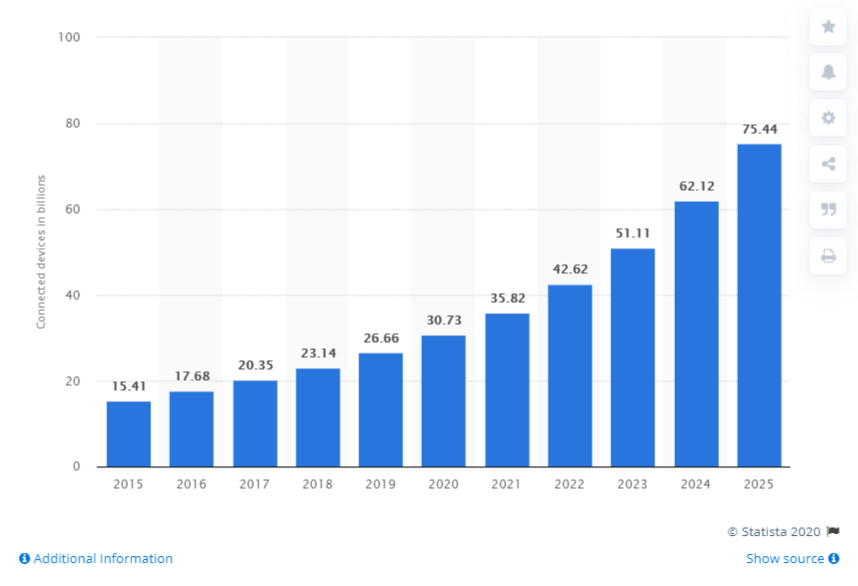

IoT App:

IoT or Internet of Things has been phenomenal over the years with a connected universe of smart devices. The total number of devices connected through IoT is projected to reach 75.44 billion by 2025. This is an excellent rise in just ten years, enabling several smart devices to share and exchange data. IoT App

iBeacon Apps:

It is the very own version of Apple’s BLE or BlueTooth low energy protocol. Such apps integrate Apple’s iBeacon technology for better connectivity among devices that have little distance between them. The so-called beacons are small and cheap Bluetooth transmitters that allow apps installed on your iPhone reach for the signal transmitted by these beacons and respond accordingly when the phone comes into range. You can leverage such technology by apple iPhone app development.

AR/VR apps:

Augmented Reality / Virtual reality is as disruptive as IoT. Apps made for AR/VR devices integrate them with smartphones for better UX. innovations like Mojo Vision, where an AR/VR microlens is a developer based on AR/VR technology, can genuinely change the app paradigm through proper integrations. Businesses can develop AR/VR apple iPhone apps to use this technology and create better UX for their audiences.

AI-based Apps:

AI or Artificial Intelligence have truly revolutionized the way business is done today. Machine Learning algorithms are used to predict user patterns, buyer patterns, and other behavioral properties. Apps like Netflix and Amazon use AI-powered algorithms for product recommendations to the users. Most importantly, any apple app development company can leverage the Core Ml3 type technical support provided in-built in the iOS platform and develop exquisite AI-powered apps for their consumers.

Cloud-Based Apps:

Cloud-based apps are popular due to their low requirements of servers, space, and ease of data exchange between system and user. Cloud-based apps can be fruitful for your business, as it does not need local servers for database management. Instead, apple iPhone developers can leverage cloud-based technology for better loading speeds due to lower overload on the local servers and equipment. To see how these trends are shaping the market locally, explore iPhone app development in Australia and Adelaide for a regional perspective.

Chatbot apps:

If your customer support is sound, 77% of customers share their positive experiences with others and even recommend your products. This makes consumer support as one of the most vital factors for success in any business. With chatbot apps that can converse in the natural way of communication through speech recognition and cognitive algorithms. So, developing an apple iPhone app with chatbot integration can undoubtedly help your business grow.

Apple Pay:

Apple Pay was launched to introduce a new player into the already booming digital payments market. Businesses and enterprises can leverage the integration of Apple pay into their apps for ease of digital payments through iOS apps.

HomeKit Apps:

The global smart home market will hit 53.45 billion by 2022, and Apple has provided developers with a chance to develop excellent smart home apps through HomeKit. With HomeKit provided by apple, you can also develop excellent smart home-based apps for your business through apple app development company.

Stay ahead with the latest iPhone app development trends, and complement your knowledge with our comprehensive guide to choosing an app development partner for seamless project execution.

Secure Native Apps:

Apple has got conscious about the data breach and data risks over the years. Now, it has become stringent on banishing non-secure apps form its platform, and as a business, you should develop secure native apps for iPhone.

Game Apps:

Last year, global mobile game revenues were soaring at $68.5 billion, and by the end of 2020, it will increase up to $76.7 billion with a year over year increase of 12%. So, investing in iPhone game apps is not a bad idea at all. Businesses and game developers can leverage the native environment of the iOS platform and develop excellent game apps. If you’re looking to implement these trends in your next project, consider working with a leading iPhone app development company to bring your ideas to life.

Conclusion:

Many iOS trends may excite you and attract you to go with Apple iPhone app development. Before diving into any trend idea for an app, you should envisage the business model into app logic for better conversion and ROI for success.

Keep up with the top iPhone app development trends, and learn all about patenting an app idea to protect your innovative concepts.

8 Best Tools to Achieve App Design and Development for iOS

What makes an iPhone worth this much buzz? Its elegant style, its luxurious look, or a premium feel! But, wait, this is a piece of technology. Apple has a design with style in its DNA, and if you hear it from the man himself, you will certainly believe it.“Design is the fundamental soul of a human-made creation that ends up expressing itself in successive outer layers of the product or service.”- Steve Jobs, Founder, Apple To achieve such app design and development for the iOS platform, many businesses invest colossal money. The best way to make the high design and a high-performance native iOS app is to use the right tools, and here we have discussed a few tools you can use.

Dash:

What makes an iOS app creation faster? An offline API documentation browser, right! That is the reason Dash is one of the most popular tools used among many app programming companies. It has more than 200 API documentation sets and facilities for developers to create their documents.

Jazzy:

It is a command-line utility tool for developers to produce Apple-style documentation for Swift and Objective-C. You can leverage Jazzy through SourceKit and the Clang AST for the representation of your code. It is a tool you can use with Dash documentation viewer. It generates simple, usable output for your documentations and creates a website for all your codes.

Hyperion:

For your iOS app performance, you may look for professional app development firms that can help you find bugs and fix them. Hyperion can help you do the same; it has helped millions of iOS developers find flaws in their apps and correct them through excellent technical solutions. It has effectively served the debugging of many apps with default plugins like view inspector, measurement plugin, and the slow animation plugin. View inspector is a plugin that inspects any view with measurements plugin measuring the distance between two pictures. The last plugin reduces the speed of animations in-app to fix animation bugs.

Raygun:

iPhones are famous for their user experiences, and the iOS platform provides complete support for apps developed by an app programming company to create great UX. You can leverage a tool like Raygun, that helps developers monitor user experience. It allows developers to identify errors, crash, and all other parameters concerned with the app’s performance. You can carry out in-depth diagnostics with error grouping through its online services. You are provided a dedicated dashboard for regular error reports. With proper tracking of errors, the app’s performance can be easily monitored by the developers, and they can easily maintain the app’s functionality.

Fabric:

How about real-time reactive iOS apps for your business? You can benefit from the lightweight suite, excellent app design, and development for iOS apps through Fabric. It is a tool with accessible functionalities for developers. It provides excellent themes for custom app developments. It also offers complete analytics on the app’s performance, and it helps developers close and lock issues regarding the apps.

Applyzer:

This tool is for app market analytics and planning your app according to the market trends. Developers can see insights into apps performance and its ranking on the app store. It is a kind of Application Store Optimizer(ASO) that can help you track your app’s rankings along with performance. Further, you can also evaluate your competitor’s ranking and find relevant keywords to bid on them. It can help you increase app downloads with marketing analytics.

XCode:

A dream tool for iOS app development for any app development firm. If you are planning to develop an iOS app, Xcode is the essential tool to choose from. It has a source code editor that can help you build app architectures and custom visualizations. You can easily compile several codes easily and quickly to develop your iOS apps faster. Xcode IDE(Integrated Development Environment) is the most popular for the swift programming language used for iOS development.

TestFlight:

How about a testing tool that helps you invite up to 10,000 testers at once for your iOS app testing. Testing your app physically can be a touch expensive if you are a developer or an app programming company. But TestFlight makes the process more comfortable with the addition of 25 members to test your app on 30 devices. This can help you gain valuable feedback before making your app live. Signing Off: iPhones are the most popular smartphones on the planet right now, by placing your business on that phone through app design and development for iOS app, you are creating a ladder to success. With some of the tools mentioned, here you can create excellent iPhone apps for your business. So, please don’t sit on your next startup idea and create an excellent iOS app.