skip to content

GitHub vs GitLab – A Comprehensive Comparison to Choose the Best

Introduction

As we delve deep into the world of source code management, two names often come up, GitHub and GitLab. Certainly, almost all the code dwells in either GitHub or GitLab which makes sense in the OSS-dependent, cloud-based environment. If we talk about the importance of  GitHub and GitLab, the OSS-dependent and collaborative application development would not have existed as they do, without GitHub or GitLab. 

Looking at the popularity of GitHub and GitLab, GitHub has almost 56 million users and GitLab has over 31 million users across the globe. It is surveyed that more than 35% of the Java Developers opt for GitLab over the other code repositories. Being quite considerate among the developers, it provides a lot of desirable features for its users.


So, most of the mobile app developers and other people involved in software development end up asking questions about GitHub and GitLab differences, which is the better option, and a lot more.

GitHub vs GitLab – which is a better app development platform for your IT team? Does your project really require a Version Control System? What is the best for deployment, code management, and monitoring? 

So, firstly what are version control systems? 

Version Control Systems are software tools that help in recording changes to the files by tracking the changes that are made in the file. To put it in simple words, version control systems keep track of the changes made to a particular software and take a screenshot of every modification. There are many VCSs, for example, GitLab, Git, Beanstalk, Mercurial, etc., among which Git and Gitlab are the most popular ones. 

In this blog, we will clear all your confusions regarding GitHub and GitLab and take you through their main differences. Read further to know more.

The Origin of Git – Introduction to Source Code Management

Before comparing GitLab vs GitHub, we must make ourselves familiar with What is Git. When we talk about software development, Git has revolutionized the way programmers collaborate and manage codes through Git projects. It is a powerful tool that allows efficient code management, enabling programmers to track changes, revert to the previous versions of the code, and seamlessly collaborate. As a result, Git has become the backbone of various project management tools, including two of the most popular platforms, GitHub and GitLab. 

Both of these platforms are built on Git’s robust framework, offering built-in code review and collaboration tools. For example, both of these platforms allow for real-time code reviewing and discussion of pull requests. The real-time code reviewing and discussion allow developers to make changes, review code differences visually, and catch mistakes early, thereby reducing the potential for major errors or security flaws. 

Both GitHub and GitLab provide robust tools for code collaboration and review, making them indispensable for modern development teams. Their review tools highlight all changes, enabling reviewers to quickly identify discrepancies and ensuring a smoother code review process. This simplicity and efficiency contribute to Git’s widespread popularity among developers and project managers.

In addition to their collaboration features, GitHub and GitLab excel in project management. GitLab allows users to establish a clear hierarchy between issues, create detailed task lists, and assign specific branches to different developers. This structured approach streamlines workflows and enhances project efficiency.

Similarly, GitHub offers powerful project management features, such as categorizing issues, pull requests, and notes for better organization. Its Marketplace further expands its functionality, providing access to various tools and extensions that cater to diverse development needs.

In summary, Git’s foundation paved the way for the development of GitHub and GitLab—two platforms that have revolutionized code management, collaboration, and project organization. Their extensive features make them essential tools in the ever-evolving landscape of software development.

Understanding GitHub and GitLab: The Basics

GitLab and GitHub are the two widely used Git repositories for managing code repositories and facilitating development operations. Both platforms have gradually grown significantly among the developers, owing to their powerful features and user-friendly interfaces. 

Many MNCs and other big organizations like NVIDIA, Sony, NASA, IBM, and Siemens already are taking advantage of these platforms to manage their software development projects and allow for seamless collaborative work among their development teams.

Though both platforms offer similar functionalities like merge requests and version control, they both have different features to cater to different user needs and preferences. Understanding the basics of these platforms is very crucial for people entering the software development realm. 

What is GitLab?

GitLab has established itself as a key player in source code management, offering a comprehensive suite of tools tailored for software development, DevOps, and code repository management. Trusted by industry leaders like NVIDIA, Sony, and IBM, GitLab’s robust version control capabilities make it an indispensable resource for global development teams. Its ability to facilitate seamless collaboration across borders has solidified its position as a cornerstone in managing complex software development operations.

For example, NASA leverages GitLab to coordinate efforts among teams working on diverse projects, highlighting the platform’s adaptability and scalability. Additionally, hosting a GitLab server gives users greater control over their repositories, enhances security by keeping sensitive code private, and eliminates storage constraints often associated with cloud-based solutions.

Who Created GitLab?

GitLab was developed by two visionary developers after they felt the need for a better Git repository management tool. This development has become the cornerstone of the modern software development landscape.

Dmitriy and Valery both were software developers who got frustrated with the existing Git repository management process at that time. That was where they felt the need for a better, more user-friendly, and scalable tool that could be available for everyone irrespective of their expertise level. 

Thus, GitLab was created. Its first version was released in 2011 and quickly gained traction among developers worldwide. Today, GitLab is trusted by millions of developers, businesses, and organizations of all sizes.

Features of GitLab

  • Imported code repository from Bitbucket or Google Code 
  • Community edition open-source repository platform 
  • Seamless maintenance of repositories on a server 
  • Multiple tools for time tracking, group milestones, issue tracking, and more 
  • Robust UI and authentication features 
  • Enhanced branch protection and user permissions

Advantages of GitLab

  • Open-source license for transparency and flexibility  
  • Self-hosting capabilities available on all plans  
  • User-friendly package distribution services  
  • Full CI/CD lifecycle support for seamless workflows  
  • Simplified code maintenance  
  • Platform-wide governance and automated security features  
  • Faster cycle times and reduced toolchain sprawl

Disadvantages of GitLab

  • Slower interface performance compared to alternatives  
  • Requires active bug management throughout the software lifecycle  
  • Lacks certain enterprise-level software development features  
  • Repositories often encounter common issues

What Makes GitHub Popular?

GitHub became popular because of its early market entry and the all-inclusive ecosystem it offers. Launched in 2008, GitHub had a significant head start over GitLab, launched three years later in 2011 as an open-source project. Its built-in continuous integration abilities and free options for private, self-hosted servers quickly made it a favorite among developers. 

GitHub’s focus on streamlined code collaboration and its seamless integration with Git for version control further enhanced its appeal. These features strengthened its position as a go-to platform for developers, contributing to its widespread adoption and market dominance. 

Who Created GitHub?

GitHub was founded in 2008 by Tom Preston-Werner, Chris Wanstrath, and PJ Hyett. They aimed to create a platform that would simplify code collaboration and make it easier for developers to share their work.

The idea stemmed from their belief that existing tools for code collaboration were lacking. They envisioned a user-friendly platform with powerful features, accessible to developers worldwide.

After building the first version of GitHub, they launched it in April 2008. The platform quickly gained traction and recognition within the developer community.

Features of GitHub 

  • Specified labels and milestones to organize your project effectively  
  • Easy branch comparison with a complete side-by-side view  
  • Supports publishing and hosting websites directly on GitHub  
  • Robust syntax highlighting for better code readability  
  • Integration with third-party APIs for cloud hosting and bug tracking

Advantages of GitHub

  • Simplifies documentation sharing for teams  
  • Features a robust open-source codebase structure  
  • Advanced and quick repository search capabilities  
  • Enables swift integration with third-party providers  
  • Offers extensive support for SVN, HG, and TFS  
  • Includes both paid and free service options

Disadvantages of GitHub

  • Limited support for efficient REST and RESTful API development  
  • Private repositories on GitHub can be costly  
  • Offers a narrower range of development functionalities compared to some competitors  
  • Not entirely free, with costs associated with certain features and plans  
  • Imposes space limitations on repositories

GitLab vs GitHub – Are They Same or Different?

The GitHub-GitLab relationship is more of a competition than a sibling rivalry. These two online code repository platforms are offered by two different companies. GitLab is the product of GitLab Inc. and is completely remote and privately owned with 1300+ strong people. Whereas, GitHub is the child product of Microsoft with its headquarters situated in San Francisco with 1600+ people globally. 

Both platforms offer robust source code management solutions, competing for user preference in the developers’ community. Although they have similar offerings, they differentiate themselves with their unique features and benefits, where users can choose one as per their preferences and requirements. 

Similarities Between GitHub and GitLab

GitHub and GitLab are the two robust code repositories that have reshaped the software development landscape. While understanding the differences between both is crucial, knowing the similarities is equally important. They share many similarities such as the use of Git for version control, they also have distinct features that set them apart. GitHub Actions and GitLab’s DevOps platform are key examples of features that set these platforms apart.

The choice between GitHub and GitLab often depends on user preferences, with factors like project management tools, third-party integrations, and pricing playing a significant role. Both platforms aim to streamline the development process by providing robust customization options and intuitive interfaces, making them essential resources for development teams.

Parameters  GitHub and GitLab – Similarities 
Third-Party Integration Services Both, GitHub and GitLab come with a lot of third-party integrations
Issues Set Up  Milestones, assignees, and problem statuses can be quickly set in both GitHub and GitLab 
Clear Labeling Scheme Both these code repository platforms use a clear labeling scheme to enable streamlined software development monitoring practices
Issues Tracking Both have issue-tracking features that help appoint members to resolve issues and update their status on demand 
Self-Hosted  GitHub and GitLab, both offer self-hosted versions, however, GitHub comes with enterprise plans
CI/CD Services CI/CD services are available on GitHub with Third-party apps, GitLab has pre-configured
Preview Code Changes  Previewing code changes is possible on both platforms
Wiki-Based Documentation Both GitHub and GitLab have Wiki-based extensive documentation
Multiple Issue Assignees  GitHub offers a public repository with a free plan, whereas Gitlab has paid plans for the same
Team Discussions  Team Discussions are possible with both these code repository platforms
Project Management Dashboard  Both support project management dashboard 
Load Performance Testing GitHub provides load performance testing features in the app, whereas GitLab has paid plans

GitHub vs GitLab – Key Differences

As we know both these source code management platforms share similar grounds, however, that doesn’t mean that they are exactly the same. There are a few significant differences that set both of them apart from each other. Let’s know the differences… 

  • GitHub provides a free private repository with up to three collaborators, while GitLab offers free private repositories without any limitations.  
  • GitLab is a repository hosting manager tool focused on the software development process, whereas GitHub is a repository hosting service that emphasizes access control and collaboration.  
  • GitHub enables users to navigate usability features, while GitLab provides a navigation feature specifically for exploring repositories.  
  • GitHub allows users to choose CI/CD tools after integration, while GitLab comes with built-in CI/CD tools and integrated DevOps workflows.  
  • GitLab lets users set and modify permission roles, whereas GitHub limits permissions to read or write access to repositories.  
  • GitHub focuses on speed, whereas GitLab prioritizes reliability.  
  • In terms of security, GitLab is more secure than GitHub, offering features like a security dashboard, license compliance, SAST, DAST, Dependency Scanning, and Container Scanning, which GitHub lacks.  
  • GitLab is a cloud-native application, while GitHub is commonly used for sharing work publicly.  

Tabular Comparison of GitHub vs GitLab

Parameters  GitLab  GitHub
Levels of Authentication  With GitLab, setting and modifying access and permissions is easy as per different roles and responsibilities  With GitHub, you can decide whether or not to give read or write access to team members
CI/CD Services GitLab offers in-built CI for free and GitLab CI provides DevOps Automation Solutions  It needs additional apps like Heroku to use CI/CD Services
Import and Export  GitLab offers rooted documentation about how to import/export data from other vendors GitHub does not provide detailed documentation for popular Git repositories
Workflow GitLab emphasizes workflow reliability GitHub emphasizes workflow speed 
Complete Platform GitLab is a packaged complete platform rather than offering choices to create a platform with different apps GitHub has 374 free applications in its marketplace along with many paid options to boot
Self-hosted Installation for Private Server  With GitLab, you can host a private GitLab version on your virtual machine through a free GitLab plan Hosting a private version is only possible with the GitHub enterprise plan
Open-Sourced  It is open-source for the community edition It is close-core and not open-source
Public Repository  It allows developers to make a public repository  It allows developers to leverage unlimited free repositories 
Project Analysis  Users can review project development charts   Users cannot get project analysis, but they can review the commit history


Pricing Plans – GitLab vs GitHub

GitLab and GitHub are the two most common Git repository hosting platforms, offering developers plenty of features and tools to manage their coding projects. However, when pricing plans are considered, there are significant differences between the two:

Pricing Plans 
GitLab  GitHub
Free Plan: Offers unlimited private repositories, unlimited collaborators, and 100 GB of storage. Free Plan: Provides basic features, including public repositories, unlimited collaborators, and 500MB of storage.
Premium Plan: Starts at $19 per user per month and provides additional features such as code review, issue tracking, continuous integration and continuous deployment pipelines. Team Plan: Starts at $4 per user per month, offering additional features such as private repositories, advanced tools, and 2GB of storage per user.
Ultimate Plan: Provides advanced features such as enterprise-grade security, governance, and compliance with pricing starting at $99 per user per month. Enterprise Plan: Tailored for larger organizations, offering advanced security, compliance, and management features, with pricing starting at $21 per user per month. 
GitHub One Plan: Designed for businesses that require an enterprise-level solution across all of their GitHub accounts and starts at $21 per user per month.

On the whole, GitHub is much more cost-effective than GitLab. However, some of the amazing features come in GitLab’s ultimate plan, however, you can only get these in GitHub if you have an Enterprise Cloud or Advanced Security Enterprise Server.

In a nutshell, GitHub is quite cheaper than GitLab with paid plans, starting from $4 per user/month, while GitLab is expensive with paid plans, starting from $21 per user/month.

GitHub vs GitLab vs BitBucket

As a cherry on top, we introduce another powerful version control system that has emerged as a strong competitor to both GitHub and GitLab – Bitbucket. Including Bitbucket in the discussion helps paint a broader picture of how these platforms compare in a competitive landscape.  

Let’s dive in and explore the comparisons between GitHub, GitLab, and Bitbucket to understand their strengths and differences.


Parameters  BitBucket GitLab GitHub
Owner  Atlassian GitLab Inc Microsoft
Programming Language Used to Develop the Platform  Python Ruby, Go, VueJS Ruby
Best For  Corporate Oriented Teams  Complete DevOps Lifecycle Implementation  Major Part of Development Community 
Not Suitable For  Small Open-Source Projects  Big Open-Source Projects  Projects that require keeping code out of third-party services 
Companies Using the Platform Atlassian, Citi, General Motors, Mastercard, Groupe BPCE, etc. GitLab, LSEG (London Stock Exchange Group), Lockheed Martin, Groupe Talents Handicap, etc.  Ford Motor Company, Optum, Microsoft, IBM, Cognizant Technology Solutions, etc
Open Source  It is not open-source  It is open-source It is not open-source
Free Private Repositories  Unlimited Upto 5 Team Members Unlimited Unlimited
Free Public Repositories  Unlimited Unlimited Unlimited
Storage Limit  1GB 5GB 500MB
Integrations  Trello, Jira, Bamboo, and Opsgenie Bugzilla, Jira, and Custom Issue Tracker Microsoft Teams, Slack, Jira, and Windows Azure 
Issue Templates or Merge Request BitKucket does not have such functionality  GitLab Inc Users can ask for Issue Templates or Merge Request
Integrated CI  Bitbucket provides integrated CI functionality GitLab platform offers Integrated CI functionality Third-party apps can be used to leverage integrated CI functionalities
Navigation Usability It does not consist of such functionalities  GitLab has navigation usability as a functionality  GitHub has navigation usability as a functionality


GitHub vs GitLab –  Which One to Choose?

Both GitHub and GitLab are robust tools for managing codes and collaborating on software projects, and choosing any one totally depends on the individual’s needs and preferences. 

When to Choose GitHub over GitLab?

Choosing between GitLab and GitHub depends on your specific preferences and project requirements. While both platforms offer Git repository hosting and collaboration tools, GitLab provides unique advantages that might make it the better fit for your needs:  

  • For Open-Source Projects: If you’re working on or contributing to open-source projects, GitHub is ideal due to its larger open-source community and reputation as the leading platform for open-source development.  
  • Cost-Effectiveness: If budget is a concern, GitLab may suit you better, as it offers unlimited free private repositories.  
  • Advanced Features: GitLab stands out with built-in features like continuous integration/continuous deployment (CI/CD), project management, and issue tracking, making it a strong choice for teams needing advanced capabilities.  
  • Enhanced Security: GitLab provides robust security features, such as mandatory code reviews and fine-grained access controls. If security is a priority, GitLab offers a more secure environment.  

When to Choose GitLab over GitHub?

  • Private Projects: For private projects, GitLab is a better option as it offers robust tools for managing private repositories and provides greater control over user access.  
  • Self-Hosting: GitLab allows self-hosting on your own servers, giving you full control over your repositories and data, while GitHub primarily operates as a cloud-based service.  
  • All-in-One Solution: GitLab includes built-in features like CI/CD, code review, and issue tracking. While GitHub offers similar features, some require third-party integrations. If you prefer an all-in-one platform, GitLab might be the better fit.  
  • Customization: GitLab is highly customizable and can be adapted to meet specific needs, whereas GitHub offers fewer customization options. For tailored version control solutions, GitLab is a stronger choice.  

 The Ultimate Decision: Choosing Between GitHub and GitLab  

Selecting between GitHub and GitLab requires a thoughtful evaluation of key factors:  

  • Collaboration: GitHub’s larger community may appeal to developers focused on teamwork and open-source contributions.  
  • Features and Control: GitLab offers a more extensive toolset, including built-in CI/CD and self-hosting options, catering to teams seeking an all-in-one solution.  
  • Branch Management: Both platforms handle merging and managing branches effectively, but GitLab’s advanced features might give it an edge for complex workflows.  
  • Security: GitLab’s robust security tools, like SAST and DAST, might be a deciding factor for teams prioritizing safety.  
  • Cost: Pricing models differ, with GitLab offering unlimited free private repositories, which may be a better fit for budget-conscious teams.  

The decision should ultimately reflect the unique priorities of developers or organizations, ensuring the chosen platform supports their specific workflow and goals.

GitHub vs GitLab: The 2024 Perspective  

As we step into 2024, the GitHub vs. GitLab debate remains as pertinent as ever. Both platforms have undergone significant evolution, adding new features and refining their tools to better cater to the diverse needs of developers and teams.  

In the coming year, users can expect both GitHub and GitLab to continue innovating, ensuring they stay competitive in an ever-changing development landscape. Ultimately, the decision between the two will depend on individual preferences, project requirements, budget constraints, and the importance of specific features. The choice will continue to hinge on what best aligns with the unique demands of each user or organization.

Future Trends: How Will GitHub Evolve in 2024?  

As the GitLab vs. GitHub debate persists, GitHub’s future trends for 2024 are crucial to consider. The platform is expected to continue its strong growth trajectory by refining its features to address the ever-changing needs of developers globally.  

  • Enhanced Collaboration: GitHub is likely to focus on advancing its collaboration tools, simplifying teamwork, and enabling smoother project workflows.  
  • Stronger Security: Anticipated improvements in security features aim to safeguard code repositories, making them more robust against evolving cyber threats.  
  • Seamless Integrations: GitHub is expected to enhance its integration with third-party tools and platforms, fostering a more cohesive and streamlined user experience.  
  • Innovation in Development: Continued investment in AI-driven tools like GitHub Copilot could redefine how developers approach coding and problem-solving.  

These trends suggest that GitHub is poised to remain a key player in the version control and collaboration space in 2024.

Projecting the Future of GitLab in 2024  

On the other side of the GitLab vs. GitHub debate, GitLab’s outlook for 2024 is equally optimistic. The platform is expected to focus on expanding its features to deliver a more unified and robust DevOps experience.  

  • Enhanced CI/CD Tools: GitLab is likely to refine its continuous integration and deployment capabilities, offering developers faster and more efficient workflows.  
  • Improved Self-Hosting Options: Anticipated upgrades to its self-hosted solutions could give organizations greater flexibility and control over their development environments.  
  • Strengthened Community Engagement: GitLab may prioritize community involvement and customer support, fostering a stronger relationship with users and driving retention.  
  • Comprehensive DevOps Suite: A focus on providing an end-to-end solution for DevOps teams could further solidify GitLab as a go-to platform for integrated development and operations.  

These trends suggest GitLab is poised to maintain its competitive edge while continuing to attract developers and organizations seeking flexibility and a complete DevOps solution.

GitLab vs GitHub contact

GitHub vs GitLab: The Final Showdown  

When comparing GitHub and GitLab, it’s clear that both platforms offer robust functionality and flexibility, tailored to different needs. The decision often boils down to individual or organizational requirements.  

  • GitHub’s Edge: Its widespread popularity and vibrant community make it a preferred choice for open-source collaboration and developers seeking a broad network.  
  • GitLab’s Strengths: Comprehensive features, self-hosting capabilities, and integrated DevOps tools attract users who value control and a streamlined workflow.  

Ultimately, the choice is not about which platform is superior but which one aligns best with specific needs and goals.  

 Wrapping Up: The GitHub vs GitLab Conundrum  

Understanding the roles of Git, GitHub, and GitLab is crucial when choosing between GitHub and GitLab. While Git is a version control system enabling collaborative development, GitHub and GitLab are repository hosting platforms built on Git, each with unique strengths.  

  • GitHub: With over 30 million users and 100 million projects, GitHub is celebrated for its planning and tracking tools, making it a favorite among developers worldwide.  
  • GitLab: A comprehensive DevSecOps platform, GitLab integrates the entire development lifecycle and is valued for its advanced CI/CD and deployment features.  

GitHub’s Microsoft connection and GitLab’s integration with Google Cloud underscore their distinct advantages. Ultimately, the decision should align with your specific project needs and workflows.

MIVA merchant to Magento 2 migration

In today’s highly competitive digital landscape, having a robust and flexible e-commerce platform is crucial for the success of any online business. For businesses currently using the MIVA e-commerce platform, migrating to Magento 2 could be wise.

Magento 2 is a more powerful and feature-rich e-commerce platform than MIVA, offering enhanced functionality, better SEO capabilities, improved scalability and performance, and increased security and stability.

There are several reasons businesses might consider transitioning from MIVA to Magento 2. For one, Magento 2 is a more modern and up-to-date platform, better suited to meet the evolving needs of businesses in today’s fast-paced digital world. 

Additionally, Magento 2 is a more user-friendly platform that is easier to customize and tailor to the specific needs of individual businesses.

The following sections will discuss the key steps in migrating from MIVA to Magento 2, best practices, and tips to ensure a successful and smooth migration process.

Preparing for Migration

Preparing for a migration from MIVA to Magento 2 is an important step that requires careful planning and preparation. It’s essential to take the time to assess the current website’s functionality and design, identify necessary data and information to transfer, select a Magento 2 hosting provider, and create a migration plan and timeline.

The following steps and tips can help ensure a successful and smooth migration process:

  • Assessing the Current Website’s Functionality and Design

Before beginning the migration process, assessing the current website’s functionality and design is important. This will help businesses identify areas that need improvement and determine what features and functionality they want to carry to the new Magento 2 website. 

Additionally, businesses should review their website’s content and ensure it is up-to-date, relevant, and optimized for SEO.

  • Identifying Necessary Data and Information to Transfer

Another important step in preparing for migration is identifying the necessary data and information to be transferred to the new Magento 2 website. 

This may include product information, customer data, order history, and other relevant information. It’s essential to ensure that all data is transferred accurately and completely to avoid data loss or corruption.

  • Selecting a Magento 2 Hosting Provider

Choosing a reliable and high-performing hosting provider is crucial for ensuring the success of the migration process. Businesses should seek a hosting provider with fast page load times, high uptime guarantees, and strong security features. 

Additionally, it’s important to ensure that the hosting provider is compatible with Magento 2 and has experience with Magento 2 migrations.

  • Creating a Migration Plan and Timeline

Creating a comprehensive migration plan and timeline ensures a smooth and successful migration process. The plan should outline the specific tasks and steps involved in the migration, including recent data migration, website design, customization, and testing.

The timeline should include specific deadlines for each task and milestone to ensure the migration stays on track and is completed on time.

Tips for Ensuring a Smooth Migration Process

To ensure a smooth migration process, businesses should consider the following tips:

  • Test the migration process:

 Before beginning, businesses should test the tools and processes to ensure they work properly and can handle data transfer.

  • Back-up data:

 It’s important to back up all data and information before migrating to avoid data loss or corruption.

  • Communicate with stakeholders: 

Communicate with all stakeholders about the migration process and any potential website or business operations disruptions, including employees, customers, and suppliers.

  • Monitor performance: 

Continuously monitor the new Magento 2 website’s performance and promptly address any issues.

  • Train staff on using Magento 2:

 Ensure all staff members are trained to use Magento 2 and its features for a smooth transition.

Migrating from MIVA to Magento 2

Migrating from MIVA to Magento 2 requires a series of steps to be followed carefully to ensure a successful transition. In this section, we will provide a step-by-step guide to migrating from MIVA to Magento 2, including installing Magento 2, configuring Magento 2, migrating data from MIVA to Magento 2, migrating products, categories, and other content, migrating customer data and orders, and testing the new Magento 2 website.Additionally, consider potential Magento 1 to 2 migration downtime to ensure a smooth transition with minimal disruption.

Installing Magento 2

The first step in the migration process is to install Magento 2 on the server. This involves downloading the latest version of Magento 2 from the official website and uploading it to the server.

Once uploaded, the Magento 2 installation wizard will guide users through the installation process, including configuring database settings and creating an admin account. For more detailed information on installing Magento 2, refer to the official Magento 2 installation guide.

Configuring Magento 2

After installing Magento 2, the next step is configuring it to meet the business’s specific requirements. This involves setting up target store information, configuring payment and shipping address options, and customizing the website’s design and functionality. 

The Magento 2 admin panel provides a user-friendly interface for configuring these settings. Additionally, numerous third-party extensions and themes can be used to customize the website’s design and functionality further.

Migrating Data from MIVA to Magento 2

Once Magento 2 is installed and configured, the next step is to migrate data from MIVA to Magento 2. This involves transferring product information, customer data, order history, and other relevant information from the MIVA database to the Magento 2 database. 

Various tools and extensions, including the Magento 2 Data Migration Tool, can assist with this process. This Magento migration tool automatically allows users to migrate data from MIVA to Magento 2.

Migrating Products, Categories, and Other Content

After migrating data from MIVA to Magento 2, the next step is to migrate products, categories, and other content. This involves transferring all product information, including product meta description, images, and pricing, to Magento 2.

Additionally, categories, pages, and other content must be migrated. Various tools and extensions are available to assist this process, including the Magento 2 Product Import/Export Tool.

Migrating Customer Data and Orders

The next step is to migrate customer data and orders; in other ways, we migrate customers, preserving relationships. This involves transferring all customer information, including customer accounts, addresses, and order history, to Magento 2. 

Additionally, any outstanding orders from the MIVA website must be migrated to Magento 2 to ensure that customers’ orders are not lost during the migration process. Various tools and extensions, including the Magento 2 Customer groups Import/Export Tool, can assist with this process.

Testing the New Magento 2 Website

The final step in the migration process is thoroughly testing the new Magento 2 website. This involves checking all website functionality and supports migrating custom products, checkout processes, and other critical website areas. 

Magento 2 migration

Additionally, ensuring that all data has been transferred accurately and completely and that the website performs optimally is important. Businesses should test the website on different browsers and devices to ensure it is accessible and user-friendly for all visitors.

Key Differences Between MIVA and Magento 2

MIVA and Magento 2 are both e-commerce platforms that enable businesses to create and manage online stores. However, there are significant differences between these two platforms in terms of their features, functionalities, and capabilities. 

In this section, we will compare and contrast the key features and functionalities of MIVA and Magento 2, and discuss the advantages of Magento 2 over MIVA.

MIVA vs. Magento 2: Key Differences

MIVA is a proprietary e-commerce platform that provides businesses with various features and functionalities, including customizable design templates, SEO optimization tools, and a range of payment and shipping, and billing address options. 

Magento 2, on the other hand, is an open-source e-commerce platform that provides businesses with a more robust and flexible set of features and functionalities. 

Some of the key differences between MIVA and Magento 2 are:

  • E-commerce Features: 

Magento 2 provides more comprehensive e-commerce features, including product customization, dynamic pricing, customer segmentation, and advanced order management. MIVA, on the other hand, provides more basic e-commerce features, including basic product management, shipping, and payment options, along with tax class.

  • SEO Capabilities:

Magento 2 offers more robust SEO capabilities, including advanced URL management, meta-tagging, and canonical tags, which help improve website ranking and visibility. MIVA also offers SEO tools, but they are more limited in scope.

  • Scalability and Performance: 

Magento 2 is known for its scalability and performance, as it can handle large volumes of traffic and transactions without compromising speed or performance. MIVA, on the other hand, may struggle to handle large volumes of traffic and may experience slower load times.

  • Security and Stability:

 Magento 2 provides enhanced security and stability features, including advanced encryption, secure payment gateways, and various security patches and updates. MIVA also offers security features, but they are more limited in scope.

Advantages of Magento 2 over MIVA

There are several advantages of Magento 2 over MIVA, including:

  • More Robust and Flexible E-commerce Features: 

Magento 2 provides businesses with more comprehensive e-commerce features, including advanced product management, order management, and customer segmentation. This enables businesses to create more customized and personalized customer shopping experiences.

  • Better SEO Capabilities:

 Magento 2 offers more advanced SEO capabilities, which help improve website ranking and visibility. This can help businesses attract more traffic and customers to their websites.

  • Improved Scalability and Performance: 

Magento 2 is known for its scalability and performance, which enables businesses to handle large volumes of traffic and transactions without compromising speed or performance.

  • Enhanced Security and Stability:

 Magento 2 provides enhanced security and stability features, which help protect businesses from cyber threats and ensure their website is stable and reliable.

Post-Migration Tasks

Once the migration from MIVA to Magento 2 is complete, businesses must focus on post-migration tasks to ensure that the new website functions optimally and delivers the desired results. Here are some of the key post-migration tasks that businesses need to consider:

  • Monitor the new Magento 2 website for any issues.

After the migration is complete, businesses need to closely monitor their new Magento 2 website for any issues, errors, or bugs that may arise. This includes testing the website’s functionality, security, and compatibility with browsers and devices. Any issues or errors should be promptly addressed and resolved to ensure a smooth user experience.

Miva merchant to magento 2 migration

  • Conduct performance testing to ensure optimal site speed and functionality.

Site speed and performance are critical factors that can impact user experience and search engine rankings. Businesses should conduct regular performance testing to ensure their Magento 2 website is optimized for speed and functionality. 

This includes testing the website’s load times, page speed, and overall performance across different devices and browsers. Any issues or bottlenecks should be identified and resolved to ensure optimal site performance.

  • Optimize the site for SEO.

Search engine optimization (SEO) is essential for driving traffic to the website and improving visibility on search engine results pages. After the migration, businesses should optimize their Magento 2 website for SEO, including optimizing page titles and descriptions, adding relevant meta keywords, and ensuring the website is structured and organized for easy navigation. 

Businesses should also implement best practices for on-page and off-page SEO to improve search engine rankings and drive more traffic to the site.

  • Implement new features and integrations.

One of the key advantages of Magento 2 over MIVA is its ability to integrate with a wide range of third-party applications and services. After the migration, businesses should consider implementing new features and integrations to enhance the website’s functionality and user experience. 

This includes integrating social media platforms, payment gateways, shipping providers, and other relevant services to streamline checkout and improve customer satisfaction.

  • Tips for ongoing maintenance and updates to the Magento 2 website

To ensure that the Magento 2 website continues optimally, businesses should perform regular maintenance and updates. 

This includes updating the website’s themes, extensions, and modules to the latest versions, fixing any bugs or issues that may arise, and keeping the website’s content up to date. 

Businesses should also monitor their website analytics to track key metrics such as traffic, conversion, and bounce rates and make necessary changes to improve performance and user experience.

In addition to the tasks outlined in the previous section, businesses should consider several other post-migration tasks to ensure the ongoing success of their Magento 2 website.

 Here are some additional tips:

  • Monitor website security

After the migration, monitoring the website’s security is important to protect it against potential security threats. This includes implementing security best practices such as using strong passwords, limiting access to sensitive website areas, and regularly scanning the website for vulnerabilities. 

Businesses should also consider implementing additional security measures such as SSL encryption, two-factor authentication, and firewall protection to enhance website security further.

  • Implement analytics and reporting tools.

Analytics and reporting tools are essential for tracking key metrics such as website traffic, user behavior, and sales performance. Businesses should implement analytics and reporting tools such as Google Analytics and Magento 2’s built-in reporting features to track these metrics and gain insights into how the website performs. 

This information can then be used to make data-driven decisions about website optimization and marketing strategies.

  • Provide ongoing customer support.

Providing ongoing customer support is crucial for maintaining customer satisfaction and loyalty. After the migration, businesses should ensure that their customer support team is equipped to handle any questions or issues that customers may have with the new Magento 2 website. 

This includes providing comprehensive training for customer support staff, creating detailed user guides and FAQs for customers, providing support, migrating customer passwords, and ensuring that customer support channels such as phone and email are easily accessible and responsive.

  • Continuously improve the website.

A website is never truly finished – there is always room for improvement. After the migration, businesses should continuously improve the website’s functionality, user experience, and performance. 

This includes regular testing and optimizing the website’s design, content, and features and conducting user surveys and feedback sessions to gain insights into how the website can be improved. By continuously improving their website, businesses can stay ahead of the competition and provide customers with an exceptional online experience.

Conclusion

Migrating from MIVA to Magento 2 can be a complex process, but it’s often worth it for businesses looking to take their e-commerce operations to the next level. Magento 2 offers a range of features and functionalities that can help businesses improve their website’s performance, scalability, security, and SEO capabilities. 

However, the key to a successful migration is proper planning and preparation and ongoing maintenance and optimization after the migration is complete.

Following the steps outlined in this guide, businesses can ensure a smooth migration process, from preparing to completing post-migration tasks. They can also benefit from the experiences of other businesses that have successfully migrated to Magento 2 and experienced the benefits firsthand. 

Whether you’re a small business owner or a large enterprise, migrating to Magento 2 can help you stay ahead of the competition and provide your customers with an exceptional online shopping experience. So, take the first step and start planning your migration today!

Additionally, consider the benefits of Cpanel to cloud migration for further optimizing your Magento store’s performance and scalability.

What Is Magento Data Migration Tool? Everything You Need To Know

Magento is a popular e-commerce platform many businesses use to manage their online stores worldwide. However, as businesses grow, they may need to move their store to a new platform or upgrade to a newer version of Magento. This is where the Magento Data Migration Tool comes in handy. 

This article will discuss the Magento Data Migration Tool and its pros and cons, giving businesses an idea of what to expect when using it for their data migration needs.

What is Magento Data Migration Tool?

Magento Data Migration Tool is a software designed to help businesses migrate their data from an old Magento store to a new one or upgrade to a newer version of Magento. The tool allows for data transfer, including products, customers, orders, and categories, without any interruptions or downtime. 

Magento 2 is currently used by 103,314 websites, in addition to 99,749 older websites and 1,910 websites in India.

The tool is user-friendly and efficient, reducing the risk of data loss or corruption during the migration process. The Magento Data Migration Tool is useful for businesses looking to move to a new platform or upgrade to a newer version of Magento, allowing for a seamless transition.

How does Data Migration work in Magento?

In Magento, data migration typically involves transferring data from an existing Magento 1 store to a new Magento 2 store. Here are the general steps in the data migration process:

  • Planning

Before you start the migration process, you must carefully plan the migration. This involves identifying what data you need to migrate, which data can be left behind, and what tools and resources you need to complete the migration.

  • Data backup

It’s important to back up your data before starting the migration process to avoid data loss or corruption. This involves creating a backup of your Magento 1 store’s database, media files, and other important files.

  • Migration setup

Once you have your backup, you must set up the migration tools on your new Magento 2 store. This typically involves installing the Magento 2 Data Migration Tool and configuring it to connect your Magento 1 and Magento 2 databases.

  • Data mapping

In this step, you need to map the data from your Magento 1 store to the corresponding fields in your Magento 2 store. This is necessary because the database schema and structure is different in Magento 2 than in Magento 1.

  • Data migration 

After mapping the data, you can start the actual migration process. This involves transferring the data from your Magento 1 store to your Magento 2 store. Depending on the size of your data, this process can take several hours or even days to complete.

  • Data validation

Once the migration is complete, you must validate the data to ensure everything has been transferred correctly. This involves checking that all products, customers, orders, and other data has been migrated successfully.

  • Testing

After validating the data, you should perform thorough testing to ensure your new Magento 2 store works properly. This includes testing your store’s front-end and back-end functionality and checking that your extensions and customizations are working as expected.

Overall, data migration in Magento can be a complex and time-consuming process. Still, by following these steps and planning carefully, you can ensure a successful migration to your new Magento 2 store.

Magento store

Things you need to know before You Install Data Migration tool

If you’re planning to use the Magento migration tool to migrate your e-commerce store, there are some important things you should keep in mind:

  • Familiarize yourself with Magento and its features before using the migration tool.
  • Check the compatibility of the migration tool with your current Magento version, third-party extensions, and customizations. Check the data migration tool version to ensure compatibility.
  • Plan the migration process, identify what data you want to migrate, and assign responsibilities to team members.
  • Test the migration process in a test environment to identify and address any issues before going live.
  • Backup the target store’s database to ensure you can restore the previous migration mode in case of any errors during the migration process.

Best Practices To Follow While Using Data Migration Tool

Data migration refers to the process of moving data from one system to another. It is a critical process that requires proper planning, execution, and monitoring to ensure the data’s accuracy and completeness. Here are some best practices to follow while using a data migration tool:

Practice 1: Plan the migration thoroughly

Proper planning is critical to the success of a data migration project. It would be best to create a detailed plan that includes all the steps involved in the migration, the timeline, and the resources required.

Practice 2: Validate the data

Before migrating data, it is essential to validate the accuracy and completeness of the data. You can use tools to perform data quality checks, identify duplicate data, and fix data errors.

Practice 3: Test the migration process

You should always test the migration process before starting the actual migration. It will help you identify potential issues or errors and fix them before they affect the data’s integrity.

Practice 4: Backup of the data 

Data backup is crucial during migration to ensure the data is safe in case of any issues. You should have a data backup in case of any unexpected data loss during the migration process.

Monitor the migration

During the migration process, it is essential to monitor the progress of the migration regularly. It will help you identify and address any issues promptly to avoid data loss or corruption.

Practice 5: Train your team

If you have a team working on the migration, ensure they are adequately trained in the migration tool’s usage and the migration process’s best practices.

Practice 6: Document the migration process

You should document the migration process thoroughly, including the steps taken, the issues faced, and how they were resolved. It will help you in any future migration projects and ensure you have a clear record of the migration.

By following these best practices, you can ensure a smooth and successful data migration process

Pros and Cons of Data Migration Tool?

User-friendly interface

The tool is designed to be user-friendly and straightforward, making it a great option for businesses unfamiliar with data migration or technical processes.

Efficient data migration process

The tool is highly efficient and can migrate large amounts of data quickly and accurately, reducing the risk of data loss or corruption during the migration process.

Flexible for new store migrations and version upgrades

The tool can be used to migrate data to both new Magento stores and upgraded versions of Magento, enabling businesses to select the best approach.

Automates many processes, saving time

Using the tool can save businesses time compared to manually migrating their data, as the tool automates many of the processes involved in data migration.

Minimises risk of data loss or corruption

The tool helps minimize the risk of data loss or corruption during the migration process, ensuring that businesses can maintain the integrity of their data throughout the transition

Seamless transition to new platform or upgraded version

The Magento Data Migration Tool helps ensure a seamless transition to a new platform or upgraded version, making it easier for businesses to focus on other important aspects of their operations.

Cons of Data Migration Tool 

Technical expertise required

The tool requires a certain level of technical expertise to use effectively, and businesses that are not familiar with technical processes or data migration may require the assistance of a developer or technical expert.

Resource-intensive

The tool can be quite resource-intensive, requiring significant server resources and bandwidth to operate effectively. This can make it difficult for businesses with limited resources to use the tool for their data migration needs.

Risk of data security

During the migration process, businesses may be required to transfer sensitive data, such as customer information and payment details, to their new store or upgraded version of Magento. Businesses must take appropriate steps to protect this data and ensure it remains secure throughout the migration process.

Limitations for custom migrations or modifications

The tool is designed to handle standard migrations and may have limitations for custom migrations or modifications that require specialized expertise.

Complex setup for larger, more complex stores

The Magento Data Migration Tool setup process can be complex, especially for larger, more complex stores. This can make it challenging for businesses to get started with the tool, especially if they are unfamiliar with technical processes or data migration.

Is There any Alternative For Magento 2 Data Migration Tool? 

Yes, there are several alternatives to the Magento 2 Data Migration Tool. Here are some of the popular ones:

  • LitExtension

LitExtension is a popular data migration tool that supports the migration of data from Magento 1, Magento 2, and other eCommerce platforms. It provides an easy-to-use interface and a range of migration options, including products, customers, orders, categories, and more.

  • Cart2Cart

A cloud-based data migration application called Cart2Cart allows users to move their data between various eCommerce systems, including Magento. It has a straightforward and understandable user interface and supports numerous migration options for items, clients, orders, and more.

  • Ubertheme

It is possible to transfer data from Magento 1 and Magento 2 to the most recent version of Magento 2 using the data migration tool Uber theme. It provides a range of migration options, including products, customers, orders, and more, and supports incremental migration to ensure that data is migrated in a timely manner.

These are some popular alternatives to the Magento 2 Data Migration Tool that you can consider for your data migration project.

Magento data migration tool

Magento Migration Tool Vs. Automated Migration: Which Is the Better Option? 

When migrating data from Magento 1 to Magento 2, two main options are available – using the Magento Migration Tool or an automated migration service. Here are some factors to consider when deciding between the two:

  • Complexity of data

The Magento Migration Tool may be a better option if you have a large and complex dataset. The tool provides granular control over the migration process and allows you to specify which data to migrate and how it should be mapped to the new Magento 2 structure.

  • Customizations and extensions

The Magento Migration Tool may be a better option if you have a large and complex dataset. The tool provides granular control over the migration process and allows you to specify which data to migrate and how it should be mapped to the new Magento 2 structure. 

You can find the data migration tool package in the data migration tool directory in the Magento root installation directory. You can also create a backup of the target store’s database before migrating to avoid data loss or corruption.

  • Time and resources

An automated migration service may be a better option if you have limited time and resources for the migration project. Automated services can be faster, easier to set up, and require less technical expertise than the Magento Migration Tool.

  • Budget

An automated migration service may be more expensive than using the Magento Migration Tool. If budget is a concern, using the Magento Migration Tool may be a more cost-effective option.

In summary, both options have their pros and cons, and the best option for your business depends on your specific requirements and constraints. If you have a large and complex dataset and need granular control over the migration process, the Magento Migration Tool may be a better option. An automated migration service may be a better option if you are limited on time and resources.

Conclusion 

In a nutshell, the Magento Data Migration Tool enables companies to upgrade to a new Magento store or migrate their data from an older one. 

It has advantages like being time-saving, effective, and user-friendly, but drawbacks like needing server resources and technical know-how. Before choosing the best option for their data migration needs, businesses must balance the advantages and disadvantages.

Contact WEDOWEBAPPS LLC if you need help with Magento migration. We’re always here to help you. Learn more about Prestashop to Magento 2 migration and get detailed guidance with our Magento to PWA migration checklist for a comprehensive migration process.

18 Best Magento Migration Companies All Over The World

Are you looking for the best Magento companies for your online store? 

Then you have reached the right page. 

Here, you will find brief information on some of the best Magento companies that will help you grow your e-commerce stores

The write-up below will also teach you to select the best Magento website development company by considering a few points. 

So, stick till the end and give it a thorough read, to know everything necessary.

As per the statistics, Magento took over 1.2% of the CMS market. But do you know how Magento migration services can be beneficial for you? 

The current platform will be SEO-friendly, highly customized, easy to integrate, and scalable. 

This Magento platform will have a better customer experience, faster loading, advanced reporting, and flexible content management compared to the existing platform.

You can hire a web design company to seek help with designing an eCommerce store on Magento. 

So, if you are looking forward to growing your online store, this write-up can help you choose the best eCommerce development company; you can find the list for the same.

1) WEDOWEBAPPS LLC

WEDOWEBAPPS LLC

In the list of best Magento migration services  companies, web apps are at the top of all. However, we know, as per the statistics, that Magento manages over $155 billion in transactions each year. Hence, the company believes in delivering creative Magento migration services at every step, which makes them better than others. 

In addition, the company’s name defines the essential role played by the company and its professionals. Talented developers, an efficient migration process, and established techniques are the three main pillars of WeDoWebApps LLC.

It is the top Magento 2 development company that offers mobile app development service and E-commerce platform development.

Besides Magento Website Development WEDOWEBAPPS LLC can also help you with: 

  • Project planning
  • Strategy and Analysis
  • UI/UX
  • Quality assurance
  • Launch, Maintenance, and Support.
  • WooCommerce to Magento 2 data migration.
  • Opencart to Magento 2 data migration
  • Zen Cart to Magento 2 data migration
  • Cubecart to Magento 2 data migration
  • VirtueMart to Magento 2 data migration
  • Prestashop to Magento 2 data migration

WeDoWebApps has offices in countries like the USA, IND, UK, CAD, and AUS. The number of customers and their projects has increased as they offer on-time delivery and quality services. As a result, the company has 100+ happy clients and 500+ worthwhile undertaking projects.

The company has received accolades for its excellent Magento migration services, a few of which are mentioned here. Top mobile app development company, best web developers in Hollywood, top app development company, verified business firm, top e-commerce development company, reliable company, we deliver on the Clutch and many more.

So, suppose you are looking for a service in any mobile app development, website development for your online store, website design services, or Magento migration and Magento Cloud Hosting; you need WEDOWEBAPPS.

In that case, you can connect with the best Magento migration company, which uses an effective data migration tool.

2) React Native Development Company

React Native Development Company

React Native Development Company is also regarded as RNDC, in short, by many of its clients. The company is believed to be one of the best Magento migration companies that offer excellent Magento platform; do you know why? 

It is because RNDC redefines work, and others follow them. If you want to scale your business, you can seek help from the company in developing leading-edge mobile application solutions.

The company is not only known as the top mobile app development company for building iOS, Android, and web apps. But this company is famous for its consistency and high-quality service delivery to its clients. A customer can brief their idea, and the professionals at React Native Development Company will stick by their side from ideation to launch.

RNDC can also help you with: 

  •  Prototyping and Wireframing
  • UI development
  • MVP development
  • full cycle app development
  • REST API development
  • REST API integration
  • Support and maintenance
  • Payment gateway integration.

Do you want to experience the latest collaborative, time-tested, collected, and agile technology? If yes, this company can let you weave your dream into reality. 

However, it’s never too late if you also want to turn your ideas into practice through an eCommerce store; you can connect with the company and enjoy seeking beneficial services from them.

3) Absolute web services

Absolute web services

Are you willing to build your Magento ecosystem? If yes, then Absolute web is at your service. This creative marketing and digital commerce agency started nearly when the internet began. 

Since 1999, till date, the company has been serving high-quality Magento stores services to its customers. In these 23 years, the Absolute web has helped several companies by building them as a business, brands, and cutting-edge solutions.

It is a digital marketing company that truly believes in branding your company and services, but do you know how we do that? Professionals at Absolute web make a brand strategy that includes services like package design, logo creation, and more. Along with a brand strategy, the company also helps build user experience design by offering services such as building and designing websites.

Absolute Web Can Also Help You With: 

  • Custom development
  • Integrations
  • Digital marketing
  • Content production 

Under these categories, one can enjoy building a scalable brand and front-end development on Shopify, Magento, WooCommerce, BigCommerce, and custom.

You can also enjoy a tailored approach at Absolute web services because the company knows one thing won’t fit all.

4) Zfort Group

Zfort Group

Nowadays, Magento has become one of the top e-commerce platforms. As per the statistics, it took over almost 2.32% of the entire market share among the other e-commerce platforms. Therefore, Zfort Group offers Magento migration services that create innovative software. 

It is a unique software used to solve real business problems, so who wants to seek help? Most of you might face problems managing your business at different steps. But Zfort group can use its ecommerce system developers who use unique ways of dealing with and solving your ecommerce business problems.

The top mobile app development company was founded in 2000 and has done 1500+ projects in 16 industries for 250+ US clients. So whether it’s an established business or a startup, both can seek services and enjoy various facilities offered by the company.

Zfort Group Can Also Help You With: 

  • digital transformation
  • mobile app development
  • web development
  • IT consulting
  • web designing
  • custom development. 

The company is known for building solid custom software products, and the best thing is that everything you get is under your budget. So you can trust the company as they deliver high-quality work on time.

Zfort group has received numerous awards, such as IT Outsourcing, 2017, Most Innovative Business Solutions Software Development Firm 2018, Company of the Year, Top Blockchain Companies 2019, 2021 B2B Leaders in the Artificial Intelligence Space, and many others.

5) VAIMO

VAIMO

Are you looking for ecommerce development company who will assist you in running your ecommerce store effortlessly? VAIMO is a full-service omnichannel partner. They can let you achieve success in ecommerce business through customer experience, digital enablement, managed services, and solution development. 

The company’s purpose is to let you take your ecommerce store to a new height by appropriately using all the data. VAIMO has a mission to help online store retailers, manufacturers, and brands worldwide. They help them store data correctly to handle all the transactions and company dealings of their online stores. 

The digital marketing company has a team of nearly 500 professionals based across North America, APAC, and EMEA. The company has delivered over 400+ projects by offering a wide range of services. 

VAIMO Can also help you with:

  • e-commerce strategy
  • e-commerce analytics
  • e-commerce design
  • customer experience optimization
  • e-commerce development
  • CMS development
  • production information management
  • e-commerce security
  • service level management
  • DevOps cloud, and others.

VAIMO is trusted by reputed customers like JDE, HH, eLOn, BAUHAUS, Heineken, and WEG. If you also want to be a part of a successful journey, you can seek services at this Magento platform. They follow a straightforward migration process for easy migration Magento 1 to Magento 2 using an effective data migration tool to allow you to gather customer data in the Magento store. 

6) ATWIX

ATWIX

ATWIX is your full-service Magento agency that delivers end-to-end implementations, award-winning digital transformations, performance improvements, design and development, ongoing maintenance, and Support. In the Magento community, ATWIX is considered one of the highly certified and longest-serving members. 

This magento 2 development  company is considered the Magento master as from 2018 to 2021, the professionals at the company offered a maximum number of high-quality services to the Magento platform

ATWIX is such an e-commerce platform that is continuously pursuing the latest certifications. With a great experience of nearly 11 years, the company can serve you with almost everything related to Adobe commerce.

ATWIX along with Migration process can also help you with other Magento services such as :

    • Magento website development
    • Magento 2 ERP integration
  • Magento 2 migration services
  • Rapid deployment packages
  • Magento’s performance audit
  • World-class Magento design
  • Magento support
  • Magento’s maintenance, and others by experienced Magento experts.

Not only this, but the company can also help you in building Magento stores with unmatched Magento expertise, great e-commerce design and user experience, and much more than this. ATWIX works in an organized way by discovering, designing, developing, providing a demo, and then deploying.

7) Fisheye Media Ltd

Fisheye Media Ltd

In recent times, the demand for an online store is constantly increasing. As per the statistics, e-commerce sales account for around $3.53 trillion. Fisheye is an adobe commerce and Magento specialist who believes in staying ahead and going beyond by simplifying the Magento data migration process. 

This e-commerce store development agency is based in the United Kingdom and has a highly professional team who performs an effortless data migration process. 

So, if you are looking for a company that offers Magento migration services, then contact Fisheye. 

The agency has strong partners like Commercetools, Adobe commerce, Marketo, Spryker, PimCore, Alumio, Akeneo, and others. Fisheye offers a wide range of design, strategy, and technology services. 

It is an e-commerce platform serving its clients since 2009 with a team of nearly 320 e-commerce system developers. Fisheye was honored with the Magento rising star award, the Magento innovation and B2B award, and others.

FishEye Can Also Help You With Other Magento 2 services, including:

  • Magento Support
  • Build Commerce Strategy
  • Design And Ux
  • Paid Search
  • Magento Seo
  • Social Advertising
  • Magento Technical Audits
  • Magento Security
  • Magento Hosting

If you want to make your online store business successful, then you can trust the Magento migration experts at the company and seek data migration services from them.

8) IWD Agency

IWD Agency

Do you want to connect with e-commerce experts? If yes, what can be a better option than reaching out to the professionals at the IWD agency? The company aims to take your business to the next level with its high-quality services. So, if you are searching for a company that offers, magento website development and Magento 2 migration services, then IWD can be your best option. 

IWD mainly focuses on developing, supporting, and designing e-commerce websites. The company’s mission is to create customized e-commerce solutions to support its clients’ goals. The experts can help you in running your online store without much hassle. You can also handle all your data seamlessly. 

This agency offers several services that can help you in growing your business. When you visit the company’s website, the service section is divided into three major categories: development, marketing, and platform. 

Apart From Magento Migration Services, IWD Agency Also Help You With E-commerce

  • UX/UI improvements
  • Email
  • SEO/content
  • Backlinking
  • PPC/Google Ads
  • SMS, Magento
  • Shopify, BigCommerce, and WooCommerce

If you are looking for similar services for your business, without any second thought, you can choose IWD and enjoy the development of your business.

9) Rave digital

Rave digital

The rising demand for digital marketing forced every sector into the digitization world. According to the statistics, the global market growth of online marketing is expected to reach $786.2 billion by 2026

So, if you are thinking of accelerating the growth of your online stores, then reach out to a digital marketing company. 

Rave Digital is a digital marketing company that is also a top-rated Magento (adobe commerce) agency that offers Magento 2 migration services. 

The company’s primary concern is to value the quality of services that they provide to its clients. Because of this reason, it has hired and made a team of experienced Magento experts.

Here, customers can seek end-to-end IT solutions for non-profit, government, and corporate sectors. The company handled a few projects: America’s test kitchen, Highlights for children, WAI Global, National Oak, Topps-India, and Topps-USA.

Some of the recognition and achievements of Rave digital are Most innovative extension developer 2016, Top quality extension developer 2017, Marketplace innovator 2019, Top 10 Magento certified developers, Top Salesforce consultants, and many others. 

This company started its journey in 2008, and its headquarter is in the United States, but it also has additional global locations in the UK, India, and Belarus. The Rave digital professionals believe in timely delivery, high-quality service, greater scalability, zero downtime, accountability, customer support, and productivity.

Key achievements of the company are it has 200+ Magento stores, 250k Magento marketplace extension downloads, 60k clients worldwide, 25+ certified Magento specialists, and 10+ years of software and technology experience.

10) Lounge Lizard

Lounge Lizard

Do you know when the lounge Lizard started its journey? The company came into the business industry in 1998, and it is an award-winning company with offices in NYC, Washington DC, Long Island, Miami, Nashville, and Charleston. The company believes equity and equality are not political issues, but human issues.

Now you might be thinking about how to seek help from the Lounge lizard. The company helps in branding, development, digital marketing, design, Magento website development and SEO. 

With Lounge Lizard, you can also opt for other services such as: 

  • Brand Storytelling, Voice Copywriting
  • Slogan, Collateral Design
  • Custom Web And Mobile Applications
  • Custom Functionality, Marketing Automation
  • Influencer Marketing, User Experience
  • Website Design, SEO Audits
  • SEO URL, Paid Search, And Others

Notable clients include Agility, REUTERS, and PRI. In addition, at Lounge lizard, you can also seek the best Magento services. Additionally, you can take their help if you think of Magento 2 migration to boost the growth of the online stores. 

11) GOMAGE

GOMAGE

It is a Magento agency, commonly known as an e-commerce development agency. Do you know what your Magento site needs? 

For example, it might need guaranteed results with realistic timeframes, new features, data security at reasonable hourly rates, and no fluff in communication. For all this, GOMAGE is available that will transform your site.

The company is the number 1 Magento stores development agency with nearly 98 e-commerce experts and has completed 1025 Magento platform projects. 

Do you want to know what services are provided by the company? 

You can opt for 

  • PWA Development
  • Speed Optimization
  • Integrations, 
  • Web Design
  • Migrations, And Magento Support.

GOMAGE is certified by adobe commerce, adobe certified master, adobe certified expert, and others. Some of the company’s partners are PAY ONE, SAMSUNG, Algolia, Digital Ocean, and MAGEFAN.

So, if you are looking for a better platform, you can choose this company as it has numerous happy clients.

12) SmartSites

SmartSites

If you are searching for a company that offers Magento 2 migration services, you can contact SmartSites at your convenience. 

SmartSites is a leading digital marketing agency that has launched 900+ websites and has generated $100M+ in client revenue.

 So, isn’t the data quite exciting? Yes, the company has a team of experienced professionals who offer services like web design, PPC advertising, Organic SEO, email marketing, and social media.

At Smart Sites, you can enjoy custom website design services from experts. The Magento 2 development company is one of the top-rated website design agencies. It has ranked as the number 1 website design agency by G 2 and the best-rated web design company by BestFirms.

Some of the company’s works include Allied glass and mirror, AirTech, AirDuctBrothers, Agile data sites, Agape health and wellness, AGA truck parts, A&A thermal spray, Anexio, Berman and Bishop, and Cut sheet labels, Everything Koi.

The company has been the IMA winner in 2019, NJBIZ Top 250; featured in Bloomberg Businessweek, Forbes, business insider, CBS, CIO, Patch, Daily Herald, FOX, and Inc. It is also a Hubspot certified gold partner, Magento-certified developer, GSA-approved professional schedule, and entrepreneur-best company.

So, do you want to choose such a reputed platform? If yes, you can visit their site and seek more information.

13) Magento IT Solutions

Magento IT Solutions

This >platform believes in empowering digital commerce transformation, so do you want to be a part of it? If yes, then here’s what you need to know about it.

What kind of services do you need? At Magento IT Solutions, the experts will let you drive success through managed services, solution development, customer experience, and growth acceleration. 

It is a web design company that can help you with innovative design, integration, development, consulting, and discovery. 

The company can also let you evolve with Support and migration as well. 

Apart from Magento Migration process, you can also avail services like: 

  • Paid Marketing
  • Content Marketing
  • Email Marketing, And CRO.

The company works with technologies like Kotlin, Flutter, AWS, Node.js, ReactJS, Vue.js, Express.js, MySQL, MongoDB, Laravel, and Swift

People worldwide trust the experienced professionals in the company as they recommend and propose the most aligned platform for your business as per your business’s objectives and visions.

Key reasons to choose Magento IT solutions are that it has an experience of more than ten years, offers services at a reasonable price, has developed 250+ stores, has a certified and strong team, and has an agile method approach.

14) Staylime

Staylime

It is an e-commerce development company with a mission to help e-commerce evolve by delivering appealing, efficient, and intelligent solutions.

Staylime is a platform that offers various Magento migration services, and some of them are mentioned here. SEO, maintenance and Support, integration, theme development, Magento 2 migration services, extension development, Magento consulting, Magento development, and UI/UX design.

Magento and Adobe vendors trust Staylime for eCommerce store development because of its high-quality service on time. Some of the pride projects of the company are Magento theme design & development for Egaming, Migration and bespoke Magento 2 theme development for Mageworx, Magento theme design for Full Race WooCommerce and many more. 

Highly experienced Magento developers provide all these services who believe in deploying the latest version of Magento with minimal downtime. However, they also provide a better platform to their customers to offer excellent support services. 

The company’s website guides you with Magento 2 migration services with a brief regarding migration services. Not only this, but you can also seek information about creating a Magento migration plan and other such details. If you are willing to seek services from migration experts, you can get started at this company.

15) Wiserbrand

Wiserbrand

Now businesses understand the importance of online marketing. So, as per the statistics, 63% of companies have enhanced their budgets for online marketing in the previous year. So, do you want your e-commerce platform to touch the height of growth? If yes, then Migrate to Magento 2 today. 

If yes, then you need to get Magento services for your business. It can boost the productivity of your existing platform as it offers great services compared to other platforms. 

You might be unaware of the several advantages of Magento, but here you will learn about the same. 

Magento can benefit you in performance and cost, SEO and marketing functionalities, and third-party integration. 

So, it would help if you are looking for a top mobile app development company that offers a faster migration process with minimal downtime.

The wiser brand can help you by providing various Magento e-commerce development services. Some of them are building and supporting your online business, developing a new storefront, Magento 2 migration, getting an extension developed, and providing a skilled team of developers.

The company also provides custom Magento development services such as 

  • Multistore development
  • Theme Development
  • Migration, store development
  • Magento enterprise, Support
  • integration, optimization, and web design

At Wiserbrand, experts use technologies like Magento, Redis, MySQL, PHP, docker, git, Knockout, React, and less. As a result, customers can expect spare time and money, obtain access to experts, and concentrate on their organization from this Magento 2 development company.

16) WebMeridian

WebMeridian

Are you looking for a full-service Magento development company? If yes, then WebMeridian can be one of the best options. What do you usually expect from a Magento agency? 

Tech expertise, communication, and business knowledge, right? You can get all of these services at WebMeridian.

This company implements e-commerce solutions using Shopware, Shopify, Magento, and other software frameworks. The company values openness to innovations, transparency and competence, responsibility for results, a customer-focused approach, and sustainable working practices.

Now you might be thinking about the services that this company offers. Here you can seek services like 

  • Custom Magento development
  • Magento’s migration service
  • Magento 2 theme development
  • Support and maintenance
  • Magento’s integration services and hiring Magento 2 developer 

You can also opt for e-commerce consulting, e-commerce website design, e-commerce website development, WooCommerce development services, Shopify development, Shopware development, and many more.

If you are looking forward to an online presence, staff augmentation, or any tailored solutions, the company can even provide you with that.

17) Inchoo

Inchoo

Are you in need of unique flavours of Magento 2? If yes, Inchoo, a leading e-commerce agency, will provide you with the best services. Some of the company’s key features are certified, recognized, transparent, dynamic, and experienced. 

But how much experience does this company hold? Inchoo has been in the field for the last 14 years, and with this experience, it understands what’s better for your business.

Inchoo offers a wide range of Magento services, so let us know about the same. The most basic one that it starts with is Magento development and consulting. Do you want to migrate toward an updated Magento version? If yes, then the Magento migration experts will help you with the same.

In the last decade, we have served nearly 150 clients and helped them with approximately 500 Magento projects. 

These projects were related to Magento development, Magento design, Magento automotive, Magento 2 migration, and others. So even if your Magento store is slow or facing issues with the theme, Inchoo can help you with Magento audits.

The company offers services such as: 

  • Magento technical audit, 
  • Magento SEO audit, 
  • E-commerce UX audit, 
  • PPC audit, and Google Analytics audit

Other than these, you can also seek services for Magento marketing. Under this category, the company can serve you with Magento SEO optimization, Magento PPC management, Magento-enhanced e-commerce, and Google shopping ads.

18) Interact One, Inc.

Interact One, Inc.

InteractOne was established in 1998 to help you build, maintain, and offer great e-commerce experiences. If you want your business to compete and grow online, then you can prefer this company. 

The company is certified with Magento-1 Certified Solution Specialist, Magento-1 Certified Professional Front End Developer, Magento-1 Certified Professional Developer, Magento-1 Certified Professional Developer Plus, Magento-2 Certified Solution Specialist.

The different kinds of services offered at the company are :

  • SEO
  • Organic Research,
  • Paid Research, 
  • Email Marketing, 
  • Content Creation, And 
  • Analytics Reporting

The platforms and solutions of the company are Magento, BigCommerce, Shopify, WordPress, Automotive fitment, Epicor Adobe connector, Migrations, Maintenance, and Support.

Some of the great works done by the company’s support services are MARCphillips, Island Inn, WATSON’s, Nutraceutical, PUTCO, LANCER, Shoe Sensation, SAM VILLA, MEDELITA, and many others. 

If you also want to seek the best services from experts, improve your SEO rankings, and let your e-commerce business grow, then you can connect with InteractOne.

Read more: Magento Web Development Company

How to Select the Best Magento Website Development Company for You?

In today’s technological era, Magento companies are of great help. As per the statistics, around 100,000 online stores are running on Magento 2. 

So make sure to choose the best Magento company that offers Magento migration services including data migration, improved SEO rankings, post-migration support, custom functionality, security patches, new and fresh design, free consultation, and advanced features. 

After that, no one can ever stop you from growing your online store.

At the best Magento company, you can find Magento migration experts and other professionals who have great communication skills and use data migration tools for your company’s growth. 

Here, you will find a piece of brief information about how to choose the best Magento company.

#1. Go Through The Website Of the eCommerce Development Company

The first and most important thing you must do while choosing the best Magento company is to go through the company’s website. It is an essential thing that every e-commerce business owner would be aware of.

The company’s website can provide detailed information about the company, its services, exact cost, the technology and tools they use, the team of experts, and much more. 

A company’s website holds almost the information you are looking for, so whenever you choose the best company or compare the Magento companies, you can visit the website and gather all the information about the same.

#2. View The Feedback Of Magento Website Development Company From Previous Customers

You can judge a company’s reality based on the feedback of previous customers. No one can be as transparent as a customer seeking services from a particular Magento company.

Whenever you choose a Magento company to seek any services, whether it is Magento development, Magento support, SEO rankings, integration, or any other, you must check the feedback of the previous customers.

#3. Interact Directly With The Migration Services Solution Provider

Do you know what plays the most crucial role in choosing the right and best Magento migration services? It is great communication and interaction, which is very important. 

Now you might be thinking, why is communication important in choosing a company? 

The reason is –

Interacting with the solution provider can tell you much more about the company.

No matter how much information you have gathered from the company’s website or people around you. The solution provider themselves can only offer a piece of detailed information about the company and its services.

When you contact the solution provider, you can discuss your ideas, plans, and how everything will take place. 

A direct interaction lets you make a better conversation with all kinds of clarity, because of which you can analyze the provider and decide whether to choose them.

Best Magento Companies

#4. Get An Interview Set Up And Check the Information Transparency

As per the experience of several e-commerce businesses, an interview set-up can be beneficial in checking the information transparency of the Magento agency.

An interview can gather information through an individual’s body language, communication tone, etc. 

When someone communicates one to one, then you can figure out whether the company is providing transparency in their information or not. So being transparent with the data, services, and other stuff is quite important.

If the company is not transparent, you must understand that there’s something wrong with it. So, be careful about every little detail during the interview. The best Magento companies are usually found to be transparent in the interview.

#5. See Price Divisions For Magento Platform

Every e-commerce business has a particular budget that they can invest in seeking different services. So, when you opt for Magento services, you must make a budget for the same, as this will let you choose the best and pocket-friendly company.

The price of different companies might differ depending on various factors such as the kind of service, location, company’s value, etc. 

The price may vary if you seek Magento migration services, post-migration Support, support services, new and fresh design, customer experience, mobile-friendly services, or any other.

So, if you want to choose the best and most affordable Magento company, you can opt for WeDoWebApps or React Native Development Company.

#6. Review Past Projects of eCommerce Store

Do you know past company projects can give you an idea about their working style, process, and standard? 

You must prefer reviewing past projects of a Magento agency, as this will help you make a more robust decision.

When you review a company’s project, you can understand its work and explain what you are looking for. Then, if the working style matches you and the solution provider, you can fix the deal with the best Magento agency.

If you are confused about selecting the best Magento company, consider the above points. Going through the company’s website, viewing the feedback from previous customers, and interacting directly with the solution provider, 

You must also organize an interview set up and check information transparency. Make sure to see the price divisions and review past projects that can let you choose the best agency for any Magento services.

Conclusion

Above in the write-up, you can find detailed information on the best Magento migration companies. All of these companies hold a great experience and market reputation. In addition, they offer a wide range of services that can let your e-commerce business grow.

Whether it’s SEO rankings, improvement in your data, Magento migration, customer experience, fresh design, or any other service, the experienced Magento experts at these companies will help you with the same. 

In addition, these experts use mobile-friendly and advanced features that can let you switch from an older version to a newer one with zero downtime.

These companies can help you have an online platform with amazing features featuring the latest version, data security, and Magento 2 migration services with the help of certified Magento developers and data migration tools.

Ecommerce Developers

You can also find brief information about selecting the best Magento company for you, as one needs to consider a few basic things.

Such considerations are going through the website, checking the reviews, interviewing to check transparency, comparing the price, and reviewing the last projects. Then, you can choose the best Magento company for your e-commerce business.

Magento eCommerce Development Services Explained: A Practical Buyer’s Guide

Introduction

Why do Magento development services often mean very different things?

When businesses start researching Magento development services, they often assume it refers to one clear, standard offering. In reality, the term covers very different scopes, responsibilities, and outcomes, depending on business size, platform maturity, and growth goals.

For some companies, Magento development means building a new eCommerce store from scratch.

For others, it refers to improving performance, integrating third-party systems, or extending an existing Magento setup.

This lack of clarity creates a common problem:

  • Businesses compare vendors before fully understanding the type of service they actually need.
  • Project scopes become unclear.
  • Expectations mismatch, timelines stretch, and budgets inflate.

This Magento development services guide is designed to solve that problem.

Instead of focusing on who to hire, this article explains:

  • What Magento development services typically include.
  • The different types of Magento-related development work.
  • When businesses usually need each type of service.
  • How to evaluate service scope before making vendor decisions.

Think of this as a service literacy guide. It helps you understand Magento development clearly enough to make informed choices later.


Magento Development Services Guide Consultation

What are Magento Development Services?

Magento development services refer to the range of technical activities involved in building, modifying, or extending a Magento-based eCommerce platform. It is not a single packaged offering.

In practice, businesses use Magento in very different ways depending on their operational complexity, digital maturity, and growth plans. As a result, the development work required around Magento can vary significantly.

This type of development work typically focuses on:

  • Configuring Magento to support specific business requirements.
  • Modifying frontend or backend functionality.
  • Adding custom features or extensions where native capabilities fall short.
  • Connecting Magento with external systems such as ERP, CRM, or payment tools.
  • Improving performance, security, or scalability over time.

An important distinction is that most organisations engage with only a subset of these activities. They do not use all of them at the same time.

Rather than being a one-time effort, Magento-related development is often:

  • Iterative.
  • Scope-based.
  • Aligned with specific business goals at different stages.

This explains why two businesses may both reference Magento development, yet be working on entirely different technical objectives.

The next section breaks down the major categories of Magento-related development work, helping you identify which types are most relevant to your situation.

Types of Magento Development Services

Magento-related development work can be grouped into distinct categories, each serving a different business need. Understanding these types helps businesses clarify what kind of work is actually required, instead of treating Magento development as a single, generic service.

Below are the most common types businesses encounter.

1. Magento Store Setup and Core Configuration

This type focuses on establishing a functional Magento foundation rather than adding complex customisations.

It usually applies when:

  • A business is launching its first Magento store.
  • The platform is being set up in a new region or market.
  • Default Magento capabilities meet most operational needs.

Typical activities include:

  • Initial Magento installation and environment setup.
  • Store configuration (currency, tax, shipping, payment rules).
  • Basic theme implementation and layout setup.
  • Admin panel and catalog structure configuration.

This type of work is generally foundational, not growth-oriented.

2. Custom Magento Development

Custom development is required when out-of-the-box Magento features are not sufficient for specific business workflows or customer experiences.

Businesses usually need this when:

  • Their product logic is complex.
  • Standard checkout or catalog flows do not fit the requirements.
  • Internal processes must be reflected in the storefront.

This category can involve:

  • Custom frontend functionality.
  • Backend logic tailored to business operations.
  • Bespoke checkout, pricing, or catalog rules.
  • Custom modules built for unique requirements.

Custom development is typically scope-driven and varies significantly from project to project.

3. Magento Extension Development and Customisation

Extensions are used to add or enhance functionality without modifying Magento core files.

This type applies when:

  • Existing extensions do not fully meet requirements.
  • Multiple extensions need to work together.
  • Performance or compatibility issues arise.

Work in this category may include:

  • Developing custom Magento extensions.
  • Modifying or extending third-party extensions.
  • Resolving extension conflicts.
  • Ensuring compatibility with Magento updates.

This approach is often preferred for modular and maintainable enhancements.

4. Magento Integration Development

Many businesses rely on external systems to operate efficiently. Magento integration work focuses on connecting the store with other platforms.

Common integration scenarios include:

  • ERP or inventory management systems.
  • CRM and customer data platforms.
  • Payment gateways and shipping providers.
  • Marketing automation or analytics tools.

This type of development ensures:

  • Data consistency across systems.
  • Reduced manual operations.
  • Better operational visibility.

Integrations are usually ongoing, not one-time tasks.

5. Magento Migration and Platform Transition Work

Migration-related development is required when a business is:

  • Moving from another eCommerce platform to Magento.
  • Upgrading between Magento versions.
  • Restructuring store architecture during growth.

This category often includes:

  • Data migration (products, customers, orders).
  • URL and SEO structure preservation.
  • Theme and functionality reimplementation.
  • Testing and validation post-migration.

Migration work is typically high-risk if not planned carefully, as it affects live operations.

6. Performance, Security, and Scalability Improvements

As stores grow, technical optimisation becomes critical. This type focuses on stability and long-term performance, rather than new features.

It is commonly needed when:

  • Page load times increase.
  • Traffic volume grows.
  • Security requirements become stricter.

Activities may include:

  • Performance tuning and caching optimisation.
  • Database and server-level improvements.
  • Security hardening and compliance updates.
  • Scalability planning for traffic spikes.

This work is often preventive, not reactive.

Why understanding these types matters

Not all Magento projects require every category above. Most businesses engage with two or three types at a time, depending on their stage and objectives.

By identifying which type of Magento-related development work applies to your situation, you can:

  • Define clearer scopes.
  • Ask better questions during evaluation.
  • Avoid over-engineering or under-investing.


Magento Development Services Guide Comparison

When Businesses Need Magento Development Services

Businesses usually do not seek Magento-related development work at random. In most cases, the need emerges from specific operational triggers tied to growth, complexity, or platform limitations.

Understanding when development becomes necessary helps organisations plan proactively, rather than reacting under pressure.

Below are the most common situations where Magento development services are typically required.

1. Business Growth Outpaces the Existing Store Setup

As order volume, product range, or customer base grows, a Magento store that once worked well may begin to show limitations.

Common indicators include:

  • Slower site performance during traffic peaks.
  • Catalog structures becoming difficult to manage.
  • Checkout friction increasing as rules grow complex.

At this stage, development work focuses on adapting the platform to scale, not rebuilding it entirely.

2. Expanding into New Markets or Channels

Growth often involves:

  • Launching in new regions.
  • Supporting multiple currencies or languages.
  • Adding B2B, wholesale, or marketplace capabilities.

These changes usually require additional Magento customisation or integrations to align with regional, legal, or operational requirements.

This is less about adding features and more about structuring Magento to support expansion.

3. Replatforming from Another eCommerce System

Businesses moving from platforms like WooCommerce, Shopify, or custom systems typically need development support during the transition.

This situation arises when:

  • Existing platforms restrict customisation.
  • Performance or scalability becomes a concern.
  • Long-term flexibility is required.

Migration-related development ensures:

  • Business logic is preserved.
  • Data integrity is maintained.
  • The new Magento setup reflects current and future needs.

4. Operational Inefficiencies Begin to Affect Teams

As internal operations grow, manual processes can become bottlenecks.

Signals often include:

  • Repeated data entry across systems.
  • Inventory mismatches.
  • Delayed order processing or reporting.

In such cases, Magento integration and backend development work is used to streamline workflows and reduce operational friction.

5. Performance, Stability, or Security Risks Appear

Technical issues are not always visible to customers immediately, but they can significantly affect revenue over time.

Common triggers include:

  • Declining page speed scores.
  • Increased downtime during promotions.
  • Security or compliance requirements becoming stricter.

Here, development work focuses on stabilising and safeguarding the platform, rather than introducing new features.

6. Strategic Changes in the Business Model

Sometimes, development needs arise from strategic decisions, such as:

  • Introducing subscription models.
  • Adding complex pricing or loyalty structures.
  • Shifting from B2C to hybrid B2B or B2C operations.

These changes require Magento to support new logic and workflows, often beyond standard configurations.

Why timing matters

Many Magento projects face challenges not because of the platform itself, but because development work starts too late or without clarity.

Recognising these triggers early allows businesses to:

  • Plan scope more accurately.
  • Prioritise the right type of development work.
  • Avoid rushed decisions during critical phases.

Custom vs Standard Magento Development

One of the most common decisions businesses face is whether to rely on standard Magento functionality or invest in custom development.

There is no universally better option. The right choice depends on business complexity, scale, and long-term objectives.

Understanding the difference helps avoid two common mistakes:

  • Over-customising too early.
  • Staying limited by default features for too long.

What Standard Magento Covers Well

Magento’s core capabilities are designed to support a wide range of eCommerce scenarios without modification.

Out-of-the-box functionality is often sufficient when:

  • Business processes are relatively standard.
  • Product and pricing logic is straightforward.
  • Time-to-market is a priority.
  • The store is in an early or validation stage.

Magento natively supports:

  • Product and catalog management.
  • Standard checkout flows.
  • Tax, shipping, and payment configurations.
  • Basic promotions and discount rules.

For many businesses, starting with standard features provides speed and stability without unnecessary complexity.

When Custom Magento Development Becomes Necessary

Custom development becomes relevant when business requirements no longer fit standard workflows.

This typically happens when:

  • Pricing, catalog, or checkout logic becomes complex.
  • Customer journeys need to be differentiated.
  • Internal operations must be reflected in the storefront.
  • Magento needs to adapt to unique business rules.

Custom work allows businesses to:

  • Modify how Magento behaves.
  • Add features not available natively.
  • Align the platform more closely with real-world operations.

However, customisation also introduces:

  • Higher implementation effort.
  • Ongoing maintenance considerations.
  • Greater dependency on technical planning.

A Practical Way to Decide

Instead of treating this as a binary choice, many businesses approach it incrementally.

A common progression looks like:

  • Start with Magento’s standard capabilities.
  • Identify friction points as the business grows.
  • Introduce custom development only where constraints appear.

This approach helps balance:

  • Flexibility.
  • Cost.
  • Long-term maintainability.

Why this decision impacts future development

Early choices around customisation influence:

  • Upgrade complexity.
  • Integration flexibility.
  • Performance optimisation options.

Businesses that clearly understand why they are customising Magento tend to make more sustainable development decisions over time.


standard features and custom Magento development

Key Factors to Consider Before Choosing Magento Services

Before engaging in any Magento-related development work, businesses benefit from clarifying what they actually need, rather than starting with who should do the work.

Many project challenges stem from unclear expectations, not technical limitations. The factors below help organisations define scope and readiness before moving forward.

1. Clarity of Business Objectives

Magento development work should always connect to a specific business outcome, not just a technical task.

Before initiating any work, it helps to ask:

  • What problem are we trying to solve?
  • Is this about growth, efficiency, stability, or experimentation?
  • How will success be measured after implementation?

Clear objectives reduce:

  • Scope creep.
  • Unnecessary customisation.
  • Misaligned technical decisions.

2. Scope Definition and Prioritisation

Not all requirements carry the same weight. Some are essential, while others are optional or future-facing.

Effective scope definition involves:

  • Separating must-have functionality from nice-to-have features.
  • Identifying dependencies between tasks.
  • Planning development in phases rather than as one great effort.

This approach allows businesses to control complexity and adjust as needs evolve.

3. Internal Readiness and Resources

Magento projects rarely exist in isolation. Internal teams often play a role in:

  • Content management.
  • Product data accuracy.
  • Testing and approvals.

Understanding internal capacity helps determine:

  • How much work can realistically be supported in parallel.
  • Whether timelines need adjustment.
  • Where external support may be required.

Ignoring internal readiness often leads to delays, regardless of development quality.

4. Technical Constraints and Platform History

Existing Magento setups come with context:

  • Previous customisations.
  • Installed extensions.
  • Infrastructure limitations.

Before planning new development, it is important to assess:

  • How current decisions affect future flexibility.
  • Whether legacy elements introduce risk.
  • What technical debt may already exist.

This helps businesses make informed trade-offs, rather than layering complexity.

5. Communication and Documentation Expectations

Magento development often involves multiple stakeholders, both technical and non-technical.

Clear communication practices matter, including:

  • How requirements are documented.
  • How changes are approved.
  • How progress is reviewed.

Strong communication reduces misunderstanding and ensures development work stays aligned with business intent.

Why these factors matter

Businesses that evaluate these factors early tend to:

  • Experience fewer surprises during development.
  • Make more confident decisions.
  • Maintain better control over timelines and outcomes.

Next, we address common misunderstandings about Magento development, which often influence expectations and decision-making in subtle ways.

Common Misunderstandings About Magento Development

Many challenges in Magento projects do not come from the platform itself. They come from assumptions businesses carry into the development process. Clearing these misunderstandings early helps teams make more realistic, confident decisions.

Below are some of the most common misconceptions.

1. Magento development is only needed at launch

A frequent assumption is that Magento-related development work is a one-time activity tied to store creation.

In reality:

  • Business requirements evolve.
  • Customer expectations change.
  • Integrations and performance needs grow over time.

Most Magento stores undergo continuous refinement, even if no major redesign is planned.

2. More customisation always means a better store

Custom development is often seen as a way to stand out. Customisation without a clear purpose can create long-term issues.

Unnecessary custom work can:

  • Increase maintenance complexity.
  • Complicate upgrades.
  • Introduce performance or stability risks.

Effective Magento development focuses on solving specific constraints, not customising everything by default.

3. Extensions eliminate the need for development

Extensions can add functionality quickly, but they are not always a complete solution.

Common realities include:

  • Extensions may conflict with each other.
  • Not all extensions align with unique business workflows.

  • Performance and security still require evaluation.

Development work is often needed to adapt or stabilise extension-based setups.

4. Magento is slow by default

Performance issues are often attributed to Magento itself, but they usually stem from:

  • Inefficient configurations.
  • Poorly optimised extensions.
  • Infrastructure mismatches.

With the right technical approach, Magento can support high-traffic, complex eCommerce operations effectively.

5. All Magento projects follow the same process

No two Magento implementations are identical.

Differences in:

  • Business models.
  • Product complexity.
  • Operational workflows.
mean development approaches vary widely. Assuming a fixed process can lead to misaligned expectations.

Why addressing these misunderstandings helps

When businesses enter Magento projects with clearer expectations, they are more likely to:

  • Scope work realistically.
  • Avoid unnecessary rework.
  • Make informed decisions at each stage.

Next, we look at how businesses typically structure Magento projects, comparing different engagement approaches without promoting any single model.

How Businesses Usually Approach Magento Projects

Once the scope and type of Magento-related development work are understood, businesses typically consider how the work should be organised and managed. There is no single correct approach. Different models suit different organisational structures, budgets, and growth stages.

Below are the most common ways businesses approach Magento projects.

1. In-House Development Teams

Some organisations choose to manage Magento development internally.

This approach is more common when:

  • eCommerce is a core business function.
  • Long-term, ongoing development is expected.
  • Technical expertise is already available internally.

Potential advantages include:

  • Direct control over priorities.
  • Faster internal communication.
  • Deep understanding of business processes.

However, in-house teams also require:

  • Continuous skill updates.
  • Broader expertise across Magento, integrations, and infrastructure.
  • Long-term resource commitment.

2. External Development Support

Other businesses rely on external teams for Magento-related development work.

This approach is often used when:

  • Development needs are project-based.
  • Internal teams lack Magento-specific expertise.
  • Speed or specialised skills are required.

External support can offer:

  • Access to a wider range of technical experience.
  • Flexibility in scaling effort up or down.
  • Exposure to different implementation patterns.

The key challenge lies in clear scope definition and communication, rather than the model itself.

3. Hybrid Development Models

Many businesses adopt a hybrid approach, combining internal oversight with external technical execution.

This model is common when:

  • Internal teams handle strategy and product decisions.
  • External teams support complex or specialised development tasks.
  • Long-term flexibility is required.

Hybrid models aim to balance:

  • Control.
  • Expertise.
  • Scalability.

Success depends heavily on coordination and documentation, not just technical capability.

How businesses choose between these approaches

Rather than selecting a model based on trend or cost alone, businesses typically evaluate:

  • Internal technical maturity.
  • Expected project duration.
  • Complexity of required Magento development work.
  • Communication and collaboration needs.

The right approach is the one that aligns operational capacity with business objectives, not the one that promises the fastest results.

Final Thoughts: Using This Magento Development Services Guide Effectively

Understanding Magento development services at a structural level allows businesses to:

  • Clarify what type of development work is actually required.
  • Set realistic expectations before engaging external support.
  • Reduce the risk of misaligned scopes and outcomes.

This guide is intended to support informed decision-making, not vendor selection. Once service requirements are clearly understood, businesses are better positioned to evaluate options and plan Magento initiatives with confidence.

For organisations exploring custom Magento development approaches or broader Magento platform development models, deeper technical planning often comes after this foundational understanding.


plan Magento development with clarity

How to Design an Eye-Catching eCommerce Website Using Magento

Introduction: Why Design Still Decides Whether Customer Will Buy or Leave

A customer lands on your eCommerce website.

They like your product.

They are ready to explore.

But the design feels outdated. Navigation is confusing. Pages take too long to load. Product information is not easy to scan.

Within seconds, they leave and buy from your competitor.

This is a real impact of design in today’s eCommerce landscape.

Design is no longer just about aesthetics. It directly influences trust, usability, brand perceptions, and conversions. For businesses building an eCommerce website using Magento, design becomes even more critical because the platform offers powerful flexibility, but only when used strategically.

An eye-catching eCommerce website design Magento users expect is not simply visually attractive. It is:

  • Easy to navigate
  • Fast and responsive
  • Brand-consistent
  • Conversion-focused

When designing for Magento, the right combination of layout, user experience, and performance optimization transforms your store into a high-performing digital asset.

Whether you choose a ready-made Magento theme ecommerce solution or custom Magento templates ecommerce businesses prefer for scalability, success depends on how well design supports the customer journey.

This blog explains how to approach designing an eye-catching ecommerce website using Magento to improve engagement, strengthen user experience, and increase conversions. You’ll learn why Magento is a strong choice for eCommerce design, which design principles matter most, and how professional Magento design and development services can help turn your online store into a revenue-generating platform.

Magento website UX and conversion audit

Why Magento Is a Top Choice for eCommerce Website Design

Magento is one of the most widely used platforms for building scalable and customizable eCommerce stores. For businesses planning an ecommerce website using Magento, the platform offers unmatched flexibility, performance, and design control.

Unlike rigid platforms, Magento allows deep customization of layouts, user experience, and functionality, making it ideal for brands that want a unique and conversion-focused store.

Here’s why Magento stands out for eCommerce website design:

Flexible Architecture for Custom Design

Magento’s modular architecture allows developers to customize nearly every visual and functional element.

This means your ecommerce website design Magento store can be:

  • Fully branded
  • Layout-customized
  • Feature-rich
  • Scalable

You are not limited to cookie-cutter designs.

Large Ecosystem of Magento Themes and Templates

Magento provides access to thousands of Magento theme eCommerce options and Magento templates eCommerce businesses can use as a foundation.

These themes:

  • Speed up development
  • Provide responsive layouts
  • Support modern UX patterns

More importantly, they can be extended or customized to match your brand identity.

Built-In SEO and Performance Capabilities

Magento includes SEO-friendly features such as:

  • Custom URLs
  • Meta tags
  • Sitemap generation
  • Structured data support

These features help your ecommerce website using Magento gain better visibility in search engines while maintaining fast page load times.

Mobile-First and Responsive Design Support

Magento supports responsive design frameworks that adapt to different screen sizes.

This ensures:

  • Consistent experience across devices
  • Better engagement
  • Higher conversion rates

Mobile-first design is essential for modern eCommerce success.

Designed for Growth and Scalability

Magento can handle:

  • Large product catalogs
  • High traffic volumes
  • Multi-store setups
  • Global expansion

This makes it a strong long-term platform choice.

Key Takeaway: Magento provides the foundation needed for creating a visually appealing, high-performing, and scalable ecommerce website design Magento businesses can rely on for growth.

Key Principles of Designing for Magento: Creating an Eye-Catching eCommerce Website

Magento website design principles for eCommerce

Designing an eye-catching ecommerce website using Magento requires more than choosing a visually appealing theme. It involves combining branding, usability, performance, and conversion strategy into one cohesive experience.

Below are the core principles that guide effective designing for Magento.

Visual Identity Aligned With Brand

Your website design should instantly communicate who you are as a brand.

Key elements:

  • Consistent color palette
  • Brand typography
  • Logo placement
  • Visual style guidelines

Strong visual identity builds recognition and trust.

Intuitive Navigation Structure

Visitors should find products with minimal effort.

Best practices:

  • Clear categories
  • Logical menu hierarchy
  • Sticky navigation
  • Prominent search bar

Good navigation improves exploration and reduces bounce rate.

Mobile-First Responsive Design

Most users browse on mobile devices.

Your ecommerce website design Magento implementation must:

  • Adapt to all screen sizes
  • Use touch-friendly elements
  • Maintain fast load speeds

Mobile-first design is essential.

Clean and Scannable Layouts

Users scan pages. They don’t read everything.

Use:

  • White space
  • Short paragraphs
  • Bullet points
  • Clear headings

Scannable layouts improve comprehension.

Performance-Oriented Design

Heavy visuals can slow websites.

Balance aesthetics with performance by:

  • Optimizing images
  • Limiting animations
  • Using lightweight components

Fast websites convert better.

Accessibility and Usability

Design should be usable for all users.

Consider:

  • Readable font sizes
  • High contrast colors
  • Keyboard navigation
  • Clear buttons

Accessibility improves the overall experience.

Key Takeaway: Great designing for Magento blends aesthetics with usability and performance to create an eye-catching ecommerce website that converts.

Magento Website Design Best Practices for Higher Conversions

An eye-catching ecommerce website using Magento should not only look good, it must guide users toward taking action.

These ecommerce website design Magento best practices are proven to increase engagement and conversions.

Clear and Compelling Homepage Messaging

Your homepage should immediately communicate:

  • What you sell
  • Who it’s for
  • Why it’s valuable

Use a strong hero section with a clear value proposition and primary CTA.

High-Quality Product Presentation

Product pages play a critical role in conversions.

Best practices:

  • Multiple product images
  • Zoom functionality
  • Product videos
  • Consistent image styling

High-quality visuals increase buyer confidence.

Persuasive Product Descriptions

Avoid generic descriptions.

Use benefit-driven copy that explains:

  • What problem the product solves
  • Key features
  • Use cases

Good copy supports decision-making.

Strong Calls-to-Action (CTAs)

CTAs should be:

  • Visible
  • Action-oriented
  • Consistent across pages

Examples: Add to Cart, Buy Now, Get Started.

Trust Signals and Social Proof

Build credibility using:

  • Customer reviews
  • Ratings
  • Testimonials
  • Security badges

Trust reduces hesitation.

Streamlined Checkout Design

Checkout should be:

  • Simple
  • Fast
  • Distraction-free

Offer guest checkout and multiple payment options.

Key Takeaway: Conversion-focused Magento website design combines clarity, persuasion, and trust.

Magento store design for higher conversions

How Magento Themes and Templates Support eCommerce Website Design

One of Magento’s biggest strengths is its extensive ecosystem of Magento theme eCommerce solutions, and Magento templates eCommerce businesses can use as a starting point for design.

However, success is not about simply installing a theme. It’s about choosing and customizing the right foundation.

Ready-Made Magento Themes for Faster Launch

Magento offers a wide range of pre-built themes designed for different industries and store types.

Benefits include:

  • Faster development
  • Responsive layouts
  • Modern UI patterns
  • Built-in design components

These themes provide a solid baseline for an ecommerce website using Magento.

Customizable Magento Templates for Brand Differentiation

Templates can be extended or modified to match your brand identity.

Customization allows you to:

  • Adjust layouts
  • Change typography and colors
  • Add custom sections
  • Create unique product page designs

This ensures your store does not look generic.

Performance-Optimized Theme Architecture

Well-built Magento themes:

  • Use clean code
  • Support caching
  • Load assets efficiently

Performance-focused themes help maintain fast load times, which directly impact conversions.

Compatibility With Extensions and Features

Magento themes are designed to work with:

  • SEO extensions
  • Personalization tools
  • Payment gateways
  • Analytics platforms

This makes it easier to enhance functionality without redesigning everything.

When to Choose Custom Theme Development

Businesses often choose custom themes when they:

  • Need unique branding
  • Have complex UX requirements
  • Want higher performance control
  • Plan long-term scalability

Custom themes provide maximum flexibility.

Key Takeaway: Choosing the right Magento theme eCommerce foundation, and customizing it strategically plays a major role in creating an eye-catching and high-performing store.

Our Magento Design and Development Process

Magento eCommerce website design and development process

Designing an eye-catching ecommerce website using Magento requires a structured, proven process. A well-defined approach ensures your store is not only visually appealing but also fast, user-friendly, and conversion-focused.

Here’s how a professional Magento design and development process typically works:

Discovery and Requirement Analysis

We start by understanding:

  • Your business goals
  • Target audience
  • Product catalog structure
  • Competitors and market positioning

This phase defines the foundation.

UX Strategy and Wireframing

Before visuals, we map user flows and page structures.

This includes:

  • Homepage layout
  • Category structure
  • Product page flow
  • Checkout journey

Wireframes ensure usability before design.

UI Design and Visual Branding

Designers create high-fidelity visuals that reflect your brand.

Focus areas:

  • Color schemes
  • Typography
  • Visual hierarchy
  • Component styling

The result is a cohesive look.

Magento Theme and Template Customization

We select or build the right Magento theme ecommerce foundation, and customize templates.

Customization includes:

  • Layout changes
  • Component styling
  • Responsive behavior

This ensures uniqueness.

Front-End and Back-End Development

Developers implement designs using Magento best practices.

They integrate:

  • Extensions
  • Payment gateways
  • Third-party tools

Functionality and performance are prioritized.

Testing and Quality Assurance

We test:

  • Responsiveness
  • Page speed
  • Browser compatibility
  • Checkout flow

Issues are resolved before launch.

Launch and Optimization

After deployment, we monitor performance and optimize.

This includes:

  • Speed improvements
  • UX refinements
  • Conversion optimizations

Key Takeaway: A structured Magento design and development process ensures your ecommerce website design Magento project delivers measurable business results.

Magento store design and redesign services for scalable growth

Metrics That Matter for Magento Website Design Success

Design success is not based on how attractive a website looks. It is measured by how well your ecommerce website using Magento performs in terms of engagement, usability, and conversions.

Tracking the right metrics helps you understand whether your eCommerce website design Magento efforts are delivering real business impact.

Conversion Rate

Shows the percentage of visitors who complete a purchase.

Why it matters: Higher conversion rates indicate your design is guiding users toward action.

Bounce Rate

Shows how many visitors leave after viewing only one page.

Why it matters: High bounce rates often signal poor first impressions, slow speed, or confusing layout.

Average Session Duration

Shows how long users stay on your site.

Why it matters: Longer sessions indicate an engaging and easy-to-navigate design.

Pages Per Session

Shows how many pages users explore.

Why it matters: Higher numbers suggest better product discovery and navigation.

Cart Abandonment Rate

Shows how many users leave after adding products to the cart.

Why it matters: Helps identify checkout and trust-related design issues.

Mobile Conversion Rate

Shows conversion performance on mobile devices.

Why it matters: Validates the effectiveness of responsive and mobile-first design.

Key Takeaway: Great designing for Magento is validated by performance data, not opinions.

Common Magento Website Design Mistakes to Avoid

Even with a powerful platform like Magento, design mistakes can quietly damage performance, conversions, and user trust. Many businesses invest in themes and visuals but overlook usability, performance, and conversion strategy.

If you’re building an ecommerce website using Magento, avoid these common pitfalls.

1. Using Overly Complex Designs

Heavy animations, cluttered layouts, and excessive visual elements overwhelm users.

Problems caused:

  • Slower page load times
  • Visual distraction from products
  • Confusing user journeys

Simple, clean, and purpose-driven design consistently performs better.

2. Choosing the Wrong Magento Theme

Not all Magento theme ecommerce options are optimized for performance and scalability.

Poor theme choices can lead to:

  • Slow speed
  • Limited customization
  • Compatibility issues with extensions

Always evaluate code quality, performance, and flexibility before selecting a theme.

3. Ignoring Mobile-First Design

Most shoppers browse and purchase on mobile.

Common mobile mistakes:

  • Small text
  • Hard-to-click buttons
  • Broken layouts

Your ecommerce website design Magento approach must prioritize mobile experience first.

4. Inconsistent Branding Across Pages

Different fonts, colors, and layouts across pages create confusion.

Inconsistent branding:

  • Weakens brand identity
  • Reduces trust
  • Feels unprofessional

Consistency strengthens recognition and credibility.

5. Poor Navigation Structure

If users can’t find products quickly, they leave.

Navigation issues include:

  • Too many categories
  • Unclear labels
  • Deep menu hierarchies

Navigation should be simple, logical, and intuitive.

6. Hiding Important Purchase Information

Customers expect transparency.

Hiding or delaying:

  • Shipping costs
  • Delivery timelines
  • Return policies
  • Warranty details

creates hesitation and abandonment.

7. Overloading Pages With Extensions

Installing too many extensions can:

  • Slow down site speed
  • Create conflicts
  • Increase maintenance complexity

Only use extensions that provide clear business value.

8. Weak Product Page Design

Product pages that lack detail fail to convert.

Common issues:

  • Few images
  • No videos
  • Thin descriptions
  • Missing reviews

Strong product pages are essential for conversions.

9. No Clear Calls-to-Action (CTAs)

If users don’t know what to do next, they won’t act.

CTAs should be:

  • Visible
  • Action-oriented
  • Consistent

Every key page should guide users forward.

10. Skipping Conversion Rate Optimization (CRO)

Design without testing leads to guesswork.

CRO includes:

  • A/B testing
  • Heatmap analysis
  • Funnel optimization

CRO ensures your design decisions are backed by data.

Key Takeaway: Avoiding these mistakes ensures your ecommerce website design Magento project delivers strong user experience, better conversions, and long-term scalability.

Conclusion: Turn Your Magento Website Design Into a Growth Engine

Design plays a decisive role in whether visitors stay, engage, and convert. For businesses building an ecommerce website using Magento, great design is not just about looking good. It’s about delivering fast, intuitive, and conversion-focused experiences.

When you combine the right design principles, optimized ecommerce website design Magento practices, high-quality Magento theme ecommerce foundations, and a structured development process, your store becomes a powerful sales platform, not just an online catalog.

An eye-catching Magento website:

  • Builds trust
  • Improves usability
  • Enhances brand perception
  • Increases conversions

If your goal is to create a store that attracts attention and turns visitors into customers, investing in professional Magento development services is one of the smartest decisions you can make.

The right partner can help you design, build, and optimize a Magento store that supports your business goals today, and scales with you tomorrow.

Start an eye-catching Magento eCommerce website design project

What is Responsive Web Design: How to Use its Services?

Irrefutably, a rising number of individuals are using the internet on mobile devices instead of desktop PCs. People, on average, spend approximately 7 hours each day consuming the internet on their mobile phones. 40% of buyers research their smartphone before making an in-person purchase. Most shoppers use their smartphones to make purchases regularly, and 55% make purchase decisions after exploring things on social media. As a result, businesses with responsive websites get more leads and maintain a growing competitive edge over those that do not. Due to this change in consumer behavior, having a website that only functions from a desktop computer are no longer sufficient. Without this, you can’t reach most web users, and your organization will likely lose valuable traffic and prospects. So, how can you develop a successful mobile experience? This is where responsive web design comes into play. “Responsive Web Design always plays an important role whenever going to promote your website.” – Mr. Josh Wilson. The above quote is backed by research. As per the studies, businesses that do not have a mobile-friendly website are slipping well behind at an astonishing rate because 8 out of 10 visitors will abandon a website that does not exhibit well on their device. But what exactly is responsive website design services, how does it function, and why must you make the jump?  This article aims to answer those questions, provide some relevant information, and teach you the fundamental responsive design characteristics that all businesses should be aware of.  So when you decide to hire a responsive web design company to design your site, you will be fully armed with all the information you need to make it a huge success.  Let’s get this ball rolling.

What is Responsive Design?

Simply put, responsive web design is the process of creating web pages that display optimally on all devices. Responsive websites are those that adjust to all screen resolutions and sizes, not just desktop but also mobile, iPad, and, in some cases, tv. In totality, Responsive design is a web design strategy that adapts your site content to the various screen and window sizes of various devices.  For instance, your information might be divided into various columns on desktop screens since they are large enough to support that design. However, users will find it difficult to read and engage with your content if you divide it into many sections on a mobile device. Responsive design enables you to provide alternative layouts of your information and design to numerous devices based on screen size.

Why Responsive Web Design Matters?

With responsive design, you can reach a larger, more engaged community wherever and whenever they may want to browse. More significantly, a lack of flexible web design can isolate your website from customers seeking an engaging user experience. According to research, a bad mobile-friendly experience might cost you up to 90% of your potential clients. That’s a lot of people — and money. Let’s go over the primary advantages of responsive web design.

1. User experience

Your viewers will not have a nice experience if your site does not load properly on their devices. This critical factor can either turn these people into satisfied consumers or ensure they never return. If someone has a negative experience while exploring your website, there is no guarantee that you will be given a second chance. After all, when searching the web for various services, customers have many possibilities to pick from. Therefore, make a pleasant experience a top concern.

2. Enhances rank and visibility

Google and other search engines are constantly looking for ways to improve the user experience. As a result, most of the criteria used to determine which websites receive top rankings are related to quality and relevancy. Mobile-first indexing can affect how your webpage ranks and force it to be pushed down on results pages of search engines (SERPs) in support of websites that give users a mobile-friendly interface. This is why the responsive site design is essential for search engine optimization. You may improve your ranking and exposure by ensuring that your website operates well in all screen sizes.

3. Session Timing and Bounce Rates

Aside from website building costs, responsive web design saves money and increases user retention. This, in turn, increases session time and decreases bounce rates. And both of these have an impact on search engine results.

Helps gain good brand recognition and consumer trust.

Aside from website security, responsiveness is also important for trust. You will lose users’ trust if your website lacks a responsive web design and provides a poor user experience. And this is an important factor in converting them into clients for your firm.

Wider audience reach

Finally, keep in mind that responsive site design might help you expand your reach. This entails encouraging more individuals to read your information and providing a positive experience related to your business. By denying responsive web design, you are isolating a hefty chunk of your audience. Correcting this could result in good results in terms of views, conversions, and customer happiness.

Cost Effective

Businesses used to develop several websites to respond to various mobile viewports prior to responsive web design, and its accompanying became available. The user was shown a customized home page based on the device from which the request was made. This is not a scalable strategy because it would necessitate changes in execution every time a new device is released to the market. This idea was used well before the mobile revolution took off! For businesses to succeed in this intensely competitive market, having an adaptable website that supports various viewports, browsers, and an OS is no longer an option—it is a necessity.

Responsive Vs. Adaptive Design

It is common to believe that responsive web design and adaptive web design are the same things. However, this is incorrect. Responsive web design is adaptable, with your website’s elements rearranging as the screen resolution changes. This is significant given the wide range of screen resolutions available on computer monitors, cellphones, and tablets. As a result, even the most specialized values are catered to. Adaptive web design, on the other hand, has predefined widths to work with, allowing for a changing layout based on them. While it may appear flexible, it may deliver a poor user experience to individuals who access your content at a non-predetermined resolution.

How Does Responsive Web Design Work?

A regular website is made up of a collection of files (each web page—home page, about page, etc.—has its own file). Each file comprises HTML code as well as content (text and images). Cascading Style Sheets (CSS) files are used to style web pages (CSS). As a result, Responsive web design uses Cascading Style Sheets (CSS) to offer various style attributes based on the screen size, orientation, resolution, color capabilities, and other aspects of the user’s device. Viewport and media queries are two examples of CSS aspects relevant to responsive website design. However, CSS and HTML are lengthy procedures.  The quick process for this situation would be a content management system (CMS) or a website builder. A content management system (CMS) is software that enables you to create your website without learning how to code — including how to code for responsive design. Site builders are similar solutions, but they forego part of the capability provided by a CMS in return for convenience and lower pricing. Responsive web design can be done with a CMS or site builder that supports responsive designs.

Best Practices of Responsive Design, That Makes Your Website Responsive?

Website Layout

The website layout is the first thing that comes to mind when we think of responsive web design. Engaging with it is the primary step toward improving the usability of your content. An excellent place to start is to imagine your layout without first considering responsiveness. You can work with pixel widths that are suitable for most computer screens. Then, in your CSS, start introducing media queries and conditions to assist in changing that basic layout into a responsive one. One example is using a 1 x 1 aspect ratio on your page. Most mobile browsers display websites in full-screen mode, which minimizes them and depends on the zoom capability for navigation. This procedure may be simplified if you are using CMS as it will have appropriate optimization WordPress Plugins. 

Take Care Of Device Features – Buttons and CTA

Buttons Want visitors to take action when they visit your site? This could be done by clicking a CTA such as Learn More, Subscribe, or even Buy. But how do users engage with these icons on your desktop version? If these CTAs appear, scroll, or are at the bottom end of your website page, you may need to reconsider how phone viewers can access them. In addition, determine the size of clickable sections on your mobile version as well. Unlike a desktop, where viewers can use a mouse cursor to click icons and hyperlinks, phone and tablet users navigate your page using their fingertips.  So, it is suggested that clickable items on mobile devices have a height of at least 48 pixels. Buttons, text boxes, inline links, and menu navigation are all examples of this. CTA Customers and prospective clients cannot call you on their PCs, but they can on their phones. Change your “Chat Now!” CTA to “Call Now!” and offer your company’s contact number instead of your email address. Furthermore, if your company has a mobile app, encourage visitors to access it from your website. As this is something, they may not be able to do on their laptops.

Responsive Breakpoint

A breakpoint in responsive web design is the “point” at which the site’s content and layout will adjust in a particular way to deliver the greatest possible user experience. Every website is viewed through various devices with varying screen sizes and resolutions. So it must function flawlessly in all screen sizes. Images and content cannot be manipulated, cut out, or concealed. To do this, developers must employ responsive breakpoints, also called CSS breakpoints or media query breakpoints. These are code-defined points. Website content interacts with these cues and modifies the screen size to exhibit the correct layout. With CSS breakpoints in position, the website content will match with display size and showcase itself pleasingly and seamlessly.

Fluid Grid

Earlier, websites were measured in pixels. They are now, however, built on what is known as a fluid grid. A fluid grid, in essence, arranges and adjusts web elements on a site in line with the screen size on which they are displayed. So, rather than designing objects in a single, fixed-size measured in pixels, items on a fluid grid would adapt and adjust to fit the screen’s dimensions. A fluid grid is organized into columns; heights and widths are adjustable rather than fixed. As a result, the text and element dimensions change depending on the screen size. Working on the source code of a website allows you to create the parameters of a fluid grid. A fluid grid also aids in maintaining a site’s visual consistency across several devices. Additionally, it helps you to make design decisions more quickly and offers you greater control over alignments.

Images Scale

Visuals and icons aren’t the only types of material that change size depending on the device. Your photographs must also be scaled. Desktop webpages, for instance, may require photos with a resolution of 1200 pixels, while mobile websites may demand images with a resolution of 400 pixels. Using a higher resolution on all devices can slow down your loading time. Thus, it’s not advisable. Consider uploading multiple image resolutions and specifying which image you wish to showcase on each device. This is commonly accomplished in website code by allocating distinct “media” tags to appropriate “source” objects (e.g., iPad or mobile). Read also: Responsive Website Design: Know the Fundamentals Additionally, images or icons must be formatted as scalable vector graphics (SVGs). Unlike all the other media formats, such as JPGs and PNGs, SVGs can be resized indefinitely. This ensures that your website gives users on every device a high-quality surfing experience. They also ensure that your website loads faster, which is important for user experience and SERP rankings.

Typography

A typeface that looks great on your desktop version may not appear well on a smartphone that is a quarter of its size. In addition, visitors who cannot read your website will almost probably not click on or purchase anything. Centering your website typefaces around the mobile website, on the other hand, can leave your desktop customers with unsightly words that are overly huge and conflict with your brand image. Here are some greatest font tips for responsive web design:

  • The rule of thumb for desktop and smartphone online content is 16pt body type.
  • Avoid ultra-thin fonts that disappear on tiny displays.
  • Make sure all headings are more significant than the body’s text and subheadings.
  • Choose contrasting colors for your typeface so that it does not blend into the backdrop colors of your website.

Testing

Without adequate testing, you cannot complete any responsive web design project. In addition, you must ensure that your layout functions properly on all devices and in all scenarios. Most recent browsers feature a testing environment that allows you to test your layout with various user agents and sizes. Also, keep in mind your ideal audience’s most usual access situations. This must pertain to your layout, navigating experience, and text type.

Examples Of Responsive Design Website

Although having access to the world’s leading responsive web design service providers gives these companies an edge, it doesn’t mean small and medium-sized businesses cannot have a good, responsive web design. They surely can! You need to look in the right direction.  Let’s look at 3 amazing responsive web design examples and ideas, so you can see what responsive web design looks like in action and get some ideas for your site.

Example #1: Dropbox

Dropbox’s website is an outstanding example of how responsive UX design can significantly impact user behavior on various screen sizes. It elevates responsive design by exhibiting what appear to be utterly separate web pages based on your device. Dropbox responsive website design Dropbox Desktop View Responsive website design mobile view Dropbox Mobile View As the iPad and desktop editions extend to incorporate a full navigation bar, we can observe the fluid grid in play. When the mobile version is clicked, the hamburger menu displays vertical navigation. The header in each of the three versions is entirely different. Each version concentrates on a single core CTA, although the desktop CTA differs from the mobile and tablet CTAs: “Sign up for free” vs. “Find your plan.” This indicates that Dropbox’s study revealed distinct user intent for various devices.

Example #2: Etsy

Another example of how the flexible grid approach can be used to ensure that your website display differ based on the device is Etsy’s site. Here is the Etsy website on three different devices: Etsy desktop responsive website design Etsy Desktop View Etsy Responsive design mobile view Etsy Mobile View Clearly, Etsy focuses on personalization to provide visitors with a seamless user experience. All we can say is their responsive website design service did a fantastic job of capturing so many elements in one place without feeling overcrowded.

Example #3: Wired

The webpage of the online technology magazine Wired is an excellent example of how fluid grids may dynamically modify column arrangement based on device attributes such as screen width. We can see two versions of their website in the photographs below: Wired responsive website design Wired Desktop View Wired responsive website design mobile view Wired Mobile View Both the PC and tablet versions are identical. However, for better readability, the mobile version displays only one column. Also, the ad is displayed differently depending on the device, with the smartphone version showing simply the heading copy and inviting a tap.

Conclusion

With so many people shopping and surfing on their smartphones, responsive design is necessary. Without that, business is a blind net that may lose leads, customers, and income.” Now that you’ve learned everything there is to know about responsive web design, it’s time to bring it all together. Use the information provided in this post to address the issue and work with responsive web design services to take your design to a new level!

A Comprehensive Guide on How to Choose the Services for Responsive Web Design

Responsive web design is essential for every business in today’s digital world, so it’s important to choose the right service provider. Discover the criteria for selecting quality responsive web design services, and get tips for testing each option and finding the best fit for your project.

Responsive web design is essential for every business in today’s digital world, much like the innovation offered by Single Page Apps (SPAs) in streamlining navigation and performance.

Research and Compare Different Services.

When choosing a design service, you should always research and compare the different options available. Consider factors such as years of experience, portfolio examples, pricing packages, customer satisfaction ratings, and customer reviews. Make sure to ask any questions you have about the service before committing to ensure that you’re happy with your choice.
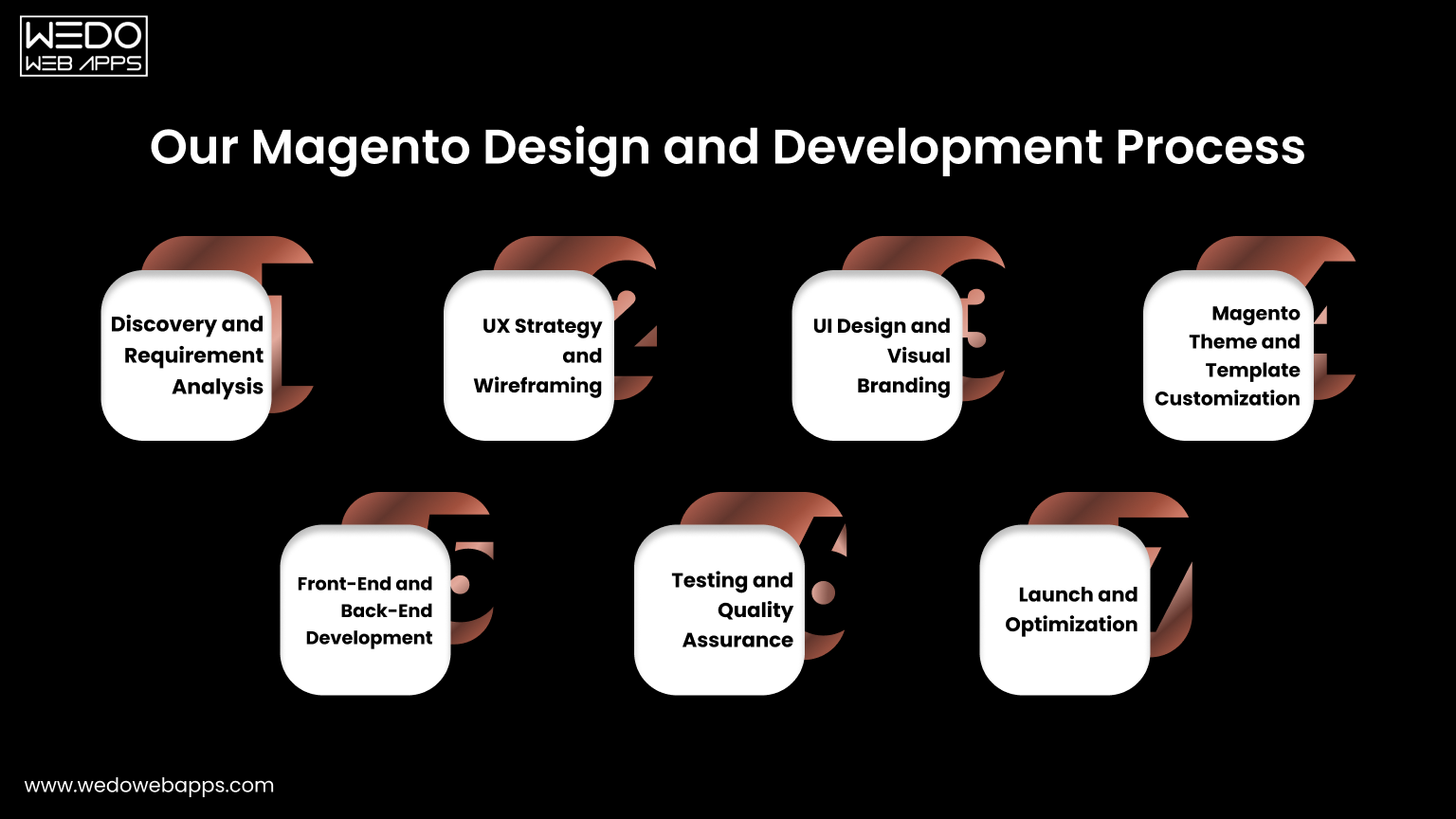
Look for Experience and Specialization in Responsive Design.

Experience is essential when choosing a web design service, as you can be confident that they are familiar with the process and will be reliable when it comes to providing high-quality results. Similarly, you want to look for companies that specialize in responsive design and offer website solutions tailored to your specific business needs. This ensures that the solution provided is best suited to the project at hand and optimized for performance on all device sizes.

Check Out Web Design Portfolios and Testimonials.

Before you decide on a web design service, it’s important to look into their past work. More often than not, top-tier web designers will showcase a portfolio of their past designs and clients they have worked with. This will offer insight into the quality of work they are producing and if they have the proper expertise in responsive design. Additionally, don’t forget to read through reviews and testimonials of previous clients, as this can give you more insights into how the company works and what other customers experienced in terms of results.

Read also: Discover the Benefits of Responsive Web Design Services

Consider Technical Support, Additional Services, and Other Benefits Offered by Services.

When you’re in the process of comparing responsive web design services, it’s important to consider which other amenities they provide, such as technical support and additional design or development services. By ensuring that your chosen service also offers technical, troubleshooting, and implementation support as required, you can guarantee that you are getting the most rounded experience. Furthermore, keep an eye out for any additional benefits offered such as discounted rates or free website hosting that can further add value to your final decision.

Selecting the perfect responsive web design company ensures your website looks great on all devices.

Assess Pricing Structure and Other Costs Related to Services

In order to ensure that you can afford your chosen responsive web design services, it’s important to review their pricing structure and any other costs related to their services. Research the standard rates for web design services in the industry and inquire about any hidden or additional fees. Additionally, consider how the services will ultimately affect your budget so that you don’t spend more than you can manage.

10 Tips for Hire the Best AngularJS Developer for Your Project

But with so many AngularJS developers out there, how do you find the right one for your project? Here are a few tips to help you hire the best AngularJS developer for your needs:

Look for a developer with relevant experience:

AngularJS is a complex framework, so it’s important to hire an AngularJS developer who has experience working with it. Look for a developer who has built AngularJS applications before and has a solid understanding of its core concepts.

Consider their portfolio:

A developer’s portfolio is a great way to gauge their skill level and see examples of their work. Take a look at their portfolio to get a sense of their style and the type of projects they have worked on.

Evaluate their communication skills:

Good communication is crucial for any project, and it’s especially important when working with a remote team. Look for a developer who is able to clearly communicate their thoughts and ideas and is responsive to feedback.

⏰ Consider their availability:

Depending on the scope of your project, you may need to hire a dedicated angular js developer who is available full-time or on a part-time basis. Be sure to discuss availability with potential candidates to ensure that they are able to commit the necessary time to your project.

Don’t forget about cultural fit:

It’s important to find a developer who not only has the technical skills you need but also fits in with your team’s culture. Consider whether the candidate’s personality and work style will mesh well with your team.

Consider their technical skills:

In addition to their experience with AngularJS, it’s also important to consider a developer’s overall technical skills. Look for someone who has a strong understanding of front-end technologies such as HTML, CSS, and JavaScript, as well as experience with other relevant frameworks and tools.

Read also: AngularJS Web Development – All About the Pros and Cons of Angular

Check their references:

Don’t be afraid to ask for references from past clients or employers. This can give you a better idea of a developer’s work ethic and how well they collaborate with others.

Consider their problem-solving skills:

A good AngularJS developer should be able to think critically and come up with creative solutions to complex problems. Hire a dedicated angular js developer who is able to think on their feet and adapt to new challenges as they arise.

Look for a developer who is up to date with industry trends:

AngularJS is constantly evolving, so it’s important to hire an angular js developer who is staying up to date with the latest trends and best practices. Look for someone who is actively learning and improving their skills.

Don’t forget about the budget:

It’s important to find a developer who fits within your budget but is careful not to compromise on quality. A developer with a lower hourly rate may not always be the best choice if they are not as skilled or experienced as another candidate. By considering all of these factors, you can find a reliable and skilled AngularJS developer who will be a valuable asset to your team and help you build a successful project.