Introduction
A website can look polished and still create problems for your business. Pages may take too long to load. Important features may depend on too many plugins. Your CRM, payment gateway, booking system, or other business tools may not connect the way you need. Even small changes can turn into a development task.
These problems become harder to manage when your website needs to grow with the business.
This is where WordPress web development needs a more considered approach. The right development strategy can give you the flexibility to create customer functionality, connect external systems, improve performance, and build experiences around how your customers actually use the website.
But where should you start? Should you customize an existing theme or build one from scratch? Can WordPress support a web application with a complex workflow? What should you plan before development begins?
If you are asking these questions, understanding the WordPress development process can help you make better choices before investing time and resources into your website.
What Is WordPress Web Development?
WordPress web development is the process of planning, designing, building, customizing, and maintaining websites or web applications using WordPress. Depending on your requirements, it can range from developing a business website to creating custom functionality for complex digital products.
A WordPress project may involve custom themes, plugins, integrations, APIs, responsive interfaces, SEO, performance optimization, security, testing, and ongoing maintenance. The exact requirements depend on what you want users to do on your website.
What Does WordPress Development Include?
The scope of WordPress development usually includes:
- Website planning and UI/UX: Defining the website structure and creating an interface around user needs.
- Theme and plugin development: Customizing existing solutions or building functionality specific to your project.
- Custom functionality: Adding features such as booking, user accounts, advanced search, dashboards, or tailored workflows.
- Integrations and APIs: Connecting WordPress with CRMs, payment gateways, marketing platforms, or other business systems.
- Performance and security: Improving website speed and applying secure development practices.
- Testing and maintenance: Checking the website before launch and keeping it functional through updates and ongoing support.
WordPress web application development is therefore more suitable when your project requires custom workflows, user-specific experiences, or deeper integrations. For a standard business website, a simpler development approach may be enough.
Why Use WordPress for Web Development?
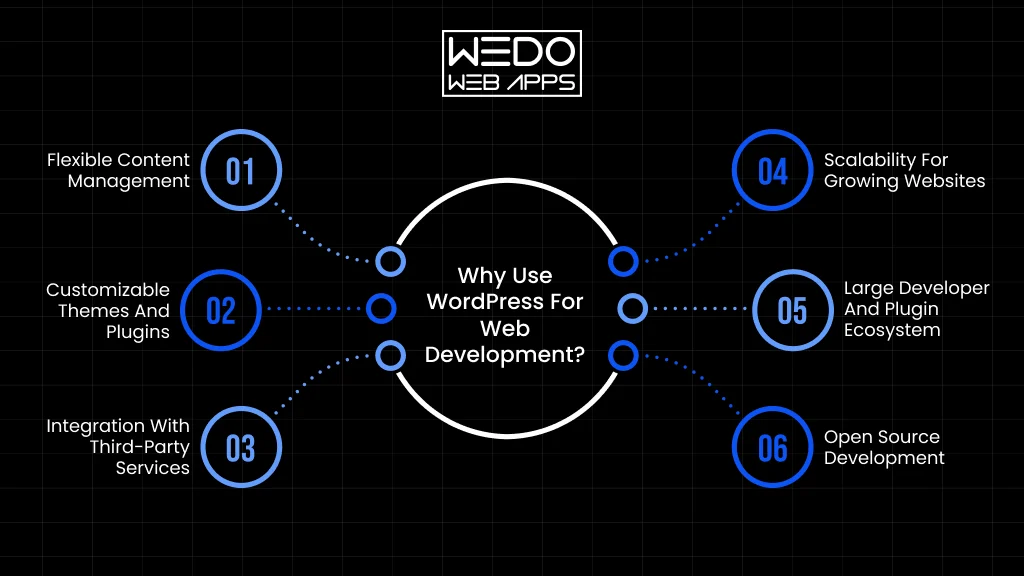
The platform you choose affects how easily you can manage content, add functionality, connect business tools, and adapt your website as requirements change. WordPress offers flexibility across these areas, making it suitable for projects ranging from business websites to custom web applications.
Flexible Content Management
WordPress gives your team control over everyday content updates without requiring web development support for every small change.
You can manage:
- Service and product pages
- Blog posts and media
- Navigation and website content
- Custom content types
For example, your marketing team can publish a new service page without waiting for a developer to update the website.
Customizable Themes and Plugins
You can customize an existing theme when your requirements are straightforward or develop a custom theme when you need greater control over the design and functionality.
Plugins can help add features such as:
- Forms and booking
- SEO functionality
- Analytics
- eCommerce
- Memberships
When existing plugins do not provide the required functionality, custom plugin development can provide a more tailored solution.
Integration with Third-Party Services
Your WordPress website can connect with external platforms through plugins and APIs. This allows website data and workflows to work with tools your business already uses.
Common integrations include:
- CRM systems
- Payment gateways
- Email marketing platforms
- Analytics tools
- ERP and business management software
Scalability for Growing Websites
Your requirements can change as your business grows. WordPress allows you to introduce new content types, user roles, integrations, and custom features without rebuilding the entire website.
Good planning still matters. A development approach that accounts for future requirements can help prevent technical issues as the website becomes more complex.
Large Developer and Plugin Ecosystem
WordPress has a broad ecosystem of WordPress developers, plugins, themes, hosting providers, and development tools. This gives you more options when you need to build, extend, troubleshoot, or maintain your website.
You can use established solutions for common requirements and reserve custom development for functionality that genuinely needs it.
Open Source Development
WordPress is open-source, giving developers access to its code and the ability to modify and extend it. This allows your development team to create functionality around specific business requirements rather than being restricted to a fixed set of platform features.
For instance, a business can extend WordPress with a custom customer portal, specialized content workflow, or application-specific functionality when standard features are not enough.
What Types of Websites Can You Build With WordPress?
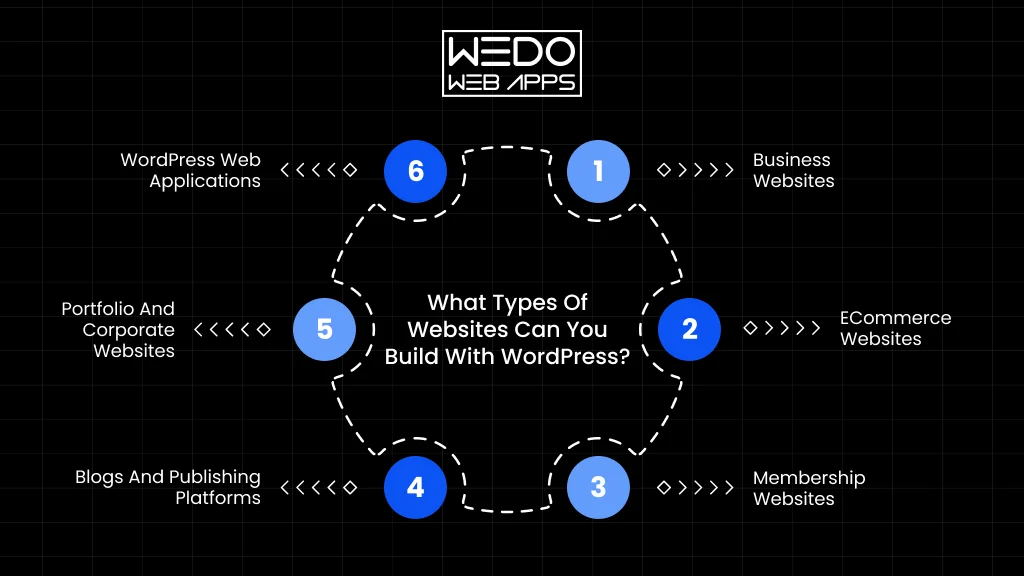
One reason businesses choose WordPress is the range of projects it can support. The development approach can be adapted to your content, users, functionality, and business goals.
Business Websites
A business website can bring your services, company information, case studies, and contact options together in one place. WordPress web development can also be used to create custom page structures and user experiences around your brand.
eCommerce Websites
With WooCommerce and custom development, you can build an online store with products, customer accounts, payments, shipping, and order management.
You can also add custom features when your store needs more than standard eCommerce functionality.
Membership Websites
Membership websites provide users with access to specific content or features based on their account or subscription. They can work well for communities, online resources, professional platforms, and subscription-based services.
Blogs and Publishing Platforms
WordPress is well-suited for content-focused websites that publish articles, news, guides, or other resources regularly. Custom post types, categories, tags, search, and editorial workflows can help manage larger content libraries.
Portfolio and Corporate Websites
Businesses, agencies, consultants, and creative professionals can use WordPress to showcase their work, services, expertise, and company information.
A customized design can give these websites a distinct brand identity while keeping content management straightforward.
WordPress Web Applications
When a project requires user accounts, personalized dashboards, bookings, complex workflows, or connections with external systems, WordPress web application development can be considered.
Common examples include:
- Customer portals
- Booking platforms
- Learning platforms
- Online marketplaces
- Custom WooCommerce applications
The development requirements are more advanced than those of a standard website. The right approach depends on the application’s users, workflows, data, and integrations.
WordPress Web Development Process
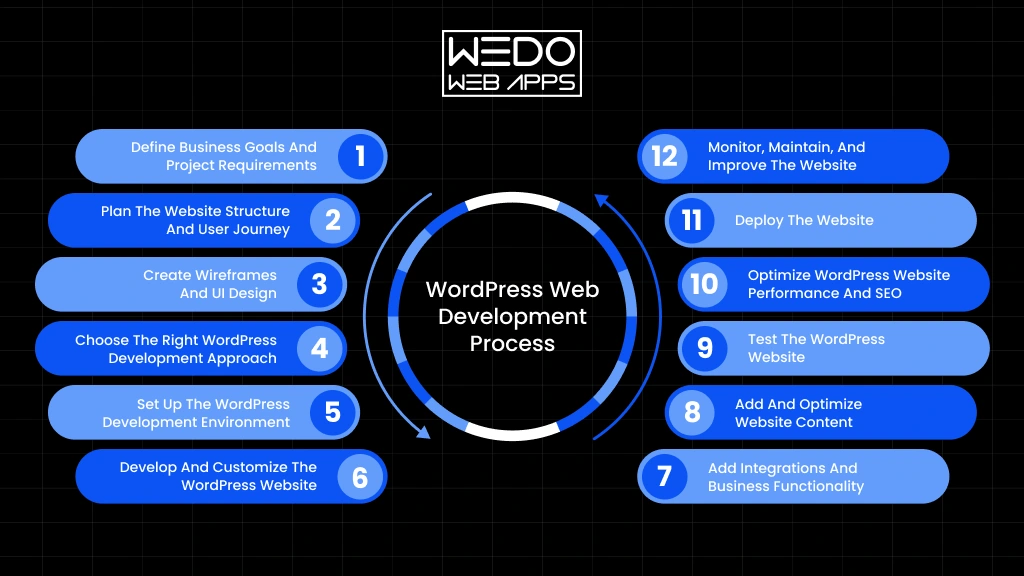
A successful WordPress project starts well before the first line of code is written. You need to understand what the website must achieve, how users will interact with it, which technologies are required, and how the website will be managed after launch.
A structured WordPress web development process helps you make these decisions in the right order. It also reduces the risk of costly changes later in the project.
1. Define Business Goals and Project Requirements
Start by establishing what you want the website to achieve. A business website focused on lead generation will have different requirements from an eCommerce store, membership platform, or customer portal.
At this stage, define:
- Website purpose and business objectives
- Target audience and user needs
- Required features and functionality
- Third-party integrations
- Content and media requirements
- Project budget and expected timeline
For example, if your goal is to generate qualified enquiries, the project should account for service pages, lead forms, conversion paths, CRM integration, and analytics from the beginning.
2. Plan the Website Structure and User Journey
Once the requirements are clear, plan how information and functionality will be organized. A well-planned structure helps users find what they need without unnecessary steps.
This stage typically covers:
- Sitemap and page hierarchy
- Navigation structure
- Information architecture
- User flows
- Conversion paths
You can map the journey from a visitor landing on a service page to completing a form, requesting a quote, booking an appointment, or making a purchase.
3. Create Wireframes and UI Design
Wireframes establish the layout before visual design and development begin. They help you decide where content, navigation, forms, calls to action, and key functionality should appear.
The approved UI design then defines the visual direction of the website, including typography, spacing, imagery, components, and responsive layouts.
This stage gives developers a clear reference for building the interface and helps identify usability issues before development progresses too far.
4. Choose the Right WordPress Development Approach
Not every project needs the same level of customization. Choosing the right approach early can affect development time, maintenance, performance, and future flexibility.
| Approach | Suitable for |
|---|---|
| Existing theme customization | Websites with standard requirements and limited design changes |
| Custom theme development | Businesses that need greater control over design and functionality |
| Page builder development | Projects that need visual editing and faster content management |
| Custom plugin development | Business-specific features that existing plugins cannot handle |
| Headless WordPress | Projects that need WordPress for content management with a separate frontend |
| WordPress web application development | Platform with complex workflows, user accounts, dashboards, or application logic |
The goal is not to choose the most complex option. It is to choose an approach that matches your actual requirements.
5. Set Up the WordPress Development Environment
Development should take place in a controlled environment rather than directly on the live website. Developers can build and test changes without affecting visitors or business operations.
The setup may include:
- Local development environment
- Development and staging websites
- Version control
- Development database
- Testing environment
A staging environment is particularly useful before launch because it lets your team review functionality and content on a version that closely matches the production website.
6. Develop and Customize the WordPress Website
This is where the approved designs and technical requirements become a working website. Developers build the frontend, configure WordPress, and add the functionality defined during planning.
Depending on the project, development may involve:
- Custom templates and theme development
- Custom post types and taxonomies
- Plugin configuration or development
- Custom business functionality
- API connections
- Database-related requirements
The development approach should also account for maintainability. Adding unnecessary plugins or custom code without a clear purpose can create problems when the website needs updates later.
7. Add Integrations and Business Functionality
Your website may need to exchange information with other systems to support everyday business operations. These integrations should be implemented and tested as part of development rather than treated as an afterthought.
Common examples include:
- CRM systems for managing leads
- Payment gateways for online transactions
- Email marketing platforms for campaigns
- Analytics tools for tracking user activity
- ERP systems for business data
- Marketing automation platforms
- External APIs for exchanging data
For example, a lead form can be connected to your CRM so that a new enquiry automatically reaches the appropriate sales workflow.
8. Add and Optimize Website Content
Once the main functionality is in place, content needs to be added according to the approved structure. This includes service pages, product information, blog content, images, videos, and other media.
During this stage, pay attention to:
- Clear content hierarchy
- Relevant headings and metadata
- Image sizes and formats
- Internal linking
- Consistent formatting
- Search intent and keyword usage
Content should be written for the people using your website first; SEO elements should support that experience rather than make pages difficult to read.
9. Test the WordPress Website
Testing should happen before the website reaches production. The objective is to identify problems that could affect functionality, usability, security, or performance.
A typical testing checklist includes:
- Functional testing for features and workflows
- Responsive testing across screen sizes
- Browser compatibility testing
- Form and payment testing
- Integration testing
- Performance testing
- Security checks
- Accessibility testing
For an eCommerce website, for example, testing should cover the complete journey from product selection through checkout, payment, order confirmation, and related notifications.
10. Optimize WordPress Website Performance and SEO
A website can have strong functionality and still deliver a poor experience if it loads slowly or has technical SEO issues. Performance and search optimization should therefore be reviewed before launch.
Key areas include:
- Core Web Vitals
- Image optimization
- Caching
- Code and script optimization
- Database performance
- Mobile performance
- Technical SEO
- Metadata and internal linking
The right optimizations depend on how your website is built and where performance bottlenecks occur. Adding plugins simply to improve a score can sometimes create additional overhead, so optimization should be based on actual performance data.
11. Deploy the Website
After development and testing are complete, the website can move from staging to the production environment.
Before going live, check that:
- The latest website files and database are ready
- Forms and integrations work correctly
- URLs and redirects are configured
- Analytics and tracking are active
- Search engine visibility settings are correct
- Backups are available
- SSL and security settings are working
A final review on the live environment can catch configuration issues that may not appear on staging.
12. Monitor, Maintain, and Improve the Website
Launching your website does not end the development process. WordPress core, themes, plugins, integrations, and business requirements can all change over time.
Ongoing WordPress development and maintenance may include:
- WordPress and plugin updates
- Security monitoring
- Regular backups
- Performance monitoring
- Content updates
- Bug fixes
- New feature development
- Compatibility checks
You should also review website performance and user behavior periodically. If visitors are abandoning an important page or a business process has changed, the website may need further development to support the new requirement.
Key Features to Consider in WordPress Web Development
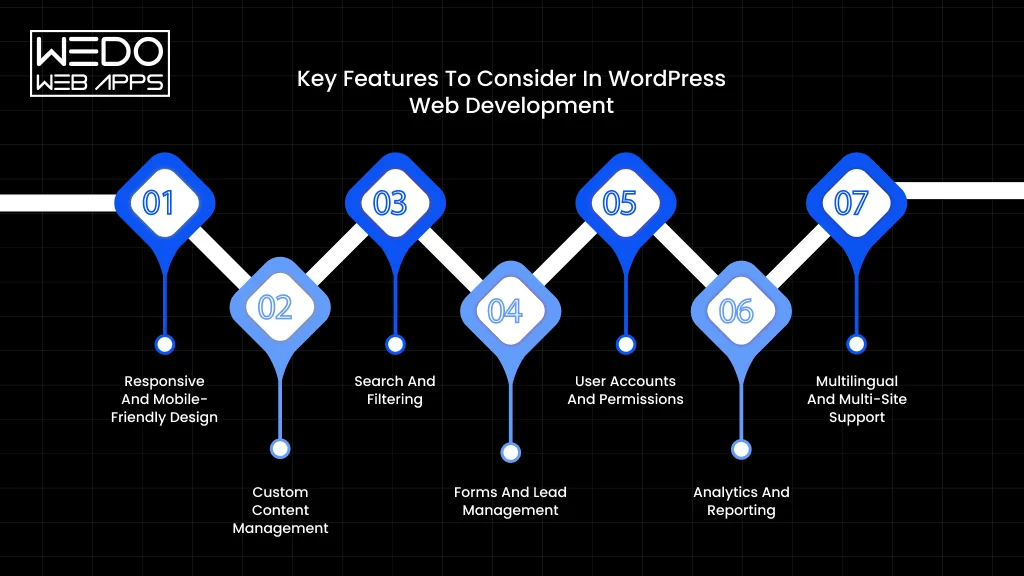
The features you include should support how your customers interact with your website and how your team manages it. A simple business website may need only content management and lead forms, while an eCommerce platform or web application may require accounts, advanced search, payments, and custom integrations.
Responsive and Mobile-Friendly Design
Your website should provide a consistent experience across desktops, tablets, and smartphones. WordPress web development should account for responsive layouts from the design stage rather than treating mobile optimization as a final adjustment.
Consider:
- Flexible layouts and content blocks
- Touch-friendly navigation and buttons
- Readable typography across screen sizes
- Mobile-optimized images and media
- Fast loading on mobile connections
Custom Content Management
WordPress allows you to manage more than standard pages and blog posts. Custom post types, taxonomies, fields, and editorial workflows can be used when your content structure is more complex.
For example, a property website could have separate content structures for properties, locations, agents, and property types. This makes content easier to organize and maintain as the website grows.
Search and Filtering
If your website contains a large amount of content, products, listings, or resources, basic navigation may not be enough. Advanced search and filtering can help users quickly find relevant information.
Depending on the project, you may need:
- Keyword search
- Category and attribute filters
- Location-based filtering
- Sorting options
- AJAX or dynamic results
- Search suggestions
Forms and Lead Management
Forms are often a key part of a business website. Beyond a basic contact form, you may need forms for enquiries, bookings, quote requests, registrations, or customer onboarding.
A well-planned setup can connect forms with your CRM or email platform so that submissions move directly into your sales or support workflow.
User Accounts and Permissions
User accounts become important when visitors need personalized access to content or functionality. WordPress development can support different user roles and permissions based on what each user should be able to view or manage.
Common requirements include:
- Customer or member accounts
- Profile management
- Role-based access
- Private content
- User dashboards
- Password reset and account security
Analytics and Reporting
Analytics help you understand how visitors use your website and where business opportunities may be getting lost. Your development setup should support accurate tracking from the beginning.
Depending on your goals, you may track:
- Traffic and acquisition sources
- Form submissions
- Product purchases
- User interactions
- Conversion rates
- Key website events
Multilingual and Multi-Site Support
Businesses serving multiple markets may need multilingual content or several websites managed through one WordPress installation. WordPress can support these requirements with the right architecture and configuration.
Before development, define whether you need separate domains, languages, regional content, shared resources, or different user permissions. Planning this early can prevent complicated restructuring later.
How AI Is Changing WordPress Web Development
AI is becoming part of the WordPress web development workflow, from early planning to content creation, coding assistance, and website functionality. The value comes from using AI where it can reduce repetitive work or help teams make faster decisions while keeping technical control with experienced developers.
AI-Assisted Website Planning
AI can help turn initial business requirements into a starting point for website planning. Developers and project teams can use it to explore possible site structures, content categories, user journeys, and feature requirements.
For example, you can use AI to generate an initial sitemap for a service website and then refine it based on your actual customers, business goals, and conversion paths.
AI can assist with:
- Initial sitemap and page structure ideas
- Content organization
- User journey mapping
- Feature and functionality brainstorming
- Early project requirements analysis
These outputs should be treated as starting points rather than final project decisions.
AI-Assisted Content and Code Development
AI can reduce time spent on repetitive development and content tasks. Developers can use it for code suggestions, documentation, debugging support, and generating initial solutions that are then reviewed and adapted to the project.
Content teams can also use AI to create initial drafts, metadata ideas, product descriptions, or content variations.
However, AI-generated code and content still need human review. Developers must verify whether the output is secure, compatible with the existing WordPress setup, maintainable, and appropriate for the website.
AI-Powered WordPress Features
AI can also become part of the functionality you build into a WordPress website. The right implementation depends on your users, data, and business objectives.
Examples include:
- AI chatbots for answering customer questions and handling common enquiries.
- Personalized content based on user behavior or preferences.
- Recommendation systems for products, services, or content.
- Automated customer support for routine requests.
- AI search assistance for helping users find relevant information.
- Content generation for specific publishing workflows.
- Data analysis to identify patterns and business insights.
These features may require APIs, external AI services, custom plugins, databases, or additional application logic. They should therefore be planned as part of the overall architecture rather than added as an afterthought.
Where Human WordPress Developers Still Matter
AI can accelerate parts of development, but it does not remove the need for experienced WordPress developers. Someone still needs to understand what the business actually requires and determine how those requirements should be implemented.
Human expertise remains important for:
- Technical architecture and development approach.
- Security and data protection
- API and third-party integrations
- Custom business logic
- Performance and scalability
- Testing and quality assurance
- Troubleshooting complex issues
- Long-term maintenance
The strongest approach is to use AI development while keeping important technical and business decisions under human control.
Conclusion
A successful WordPress web development project starts with choosing the right approach for your business, not simply selecting a theme or installing plugins. Your website structure, functionality, integrations, performance, security, and future requirements all influence how well it will perform over time.
Whether you are building a business website, eCommerce platform, or WordPress web application, the development process should be planned around your users and business objectives. Ready-made solutions can work for straightforward requirements, while custom themes, plugins, integrations, and application development provide greater flexibility when your needs are more specific.
AI is also becoming part of modern WordPress development, helping teams with planning, coding, content, and intelligent website features. However, experienced developers remain essential for architecture, security, business logic, testing, and long-term maintenance.
If your WordPress project requires more than a standard template and plugins can provide, working with an experienced development team can help you build a website that is secure, scalable, and aligned with your business goals.