Introduction
Great websites do not just appear overnight, and ones that look like they are not worth using. A template-built site created in 30 minutes might put you on the internet, but it skips every stage of the website development that actually matters: the research, the user experience strategy, the SEO architecture, and digital trust.
75% of users judge a business’s credibility based on the website design. And 74% say that they will not return to a site that is not mobile-friendly. A weak website is not neutral; it actively loses you, customers.
At WEDOWEBAPPS, our website development methodology has been refined over more than a decade now. This is a disciplined, 10-phase website development process that delivers a website that ranks, converts, and performs.
If all you need is a website that drives traffic and generates high revenue, and not a business card that only a few people may know. Below are the phases of web development that we have been following for a decade for building the most enticing and responsive websites.
Let’s know about every phase of the website development in detail.
What is a Responsive Website and Why It Is Important?
Before walking through every phase of the web development process, you must understand what responsive design means in 2026, because at every stage of development, this is an important factor.
So, what is a responsive website?
A responsive website is something that automatically adjusts the website’s layout, images, text size, and navigation as per the device size. This allows the user to maintain a seamless experience across all devices without any further changes in design. In 2026, this is not just a feature update. It is a minimum baseline for any website that wants to perform well and give a better experience.
| Important Note:- 62-64% of all global web traffic is now coming from mobile devices. Especially in eCommerce sites, mobile drives 78% of all the retail traffic, yet the desktop still converts at nearly double the rate. Also, 74% of users say that they do not return to any website that is not mobile-friendly. And a responsive website receives 50% more traffic than a non-responsive one. |
Following Google’s mobile-first indexing policy is not becoming standard for all websites, which means that your mobile version determines your search ranking, not your desktop version. A website that is not built responsibly from day one is already competing at a structural disadvantage.
In short, it is important to have a website that is mobile-friendly and is developed with a responsive website design that grows as the customer base grows.
Why You Should Invest in Building Responsive Websites?
What’s the point of a website if it does not bring traffic or revenue? There are three out of every five websites that convert visitors through mobile and reach the new market globally.
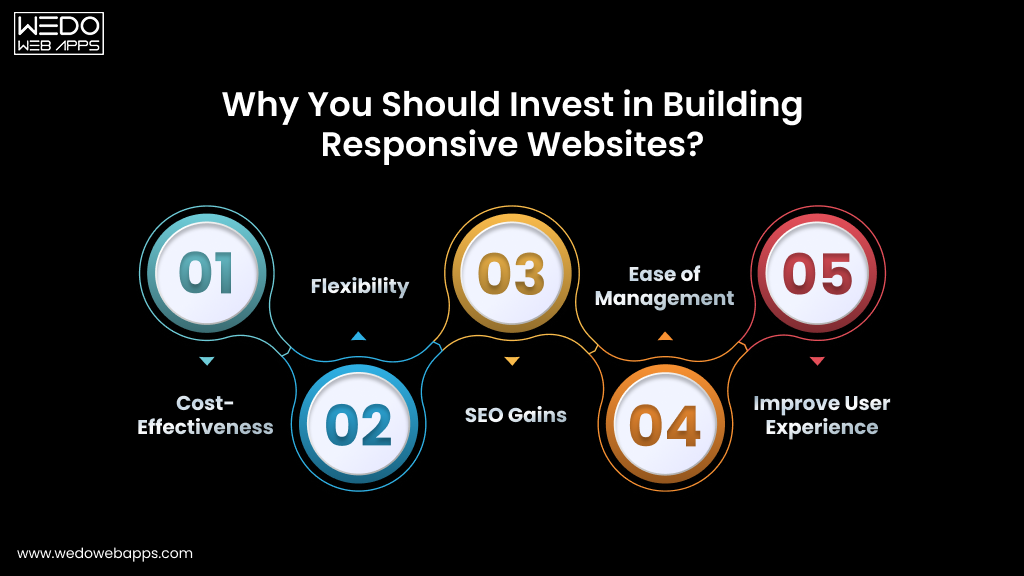
Here are the five strongest reasons that you should invest in responsive design when it comes to the website development process.
- Cost-Effectiveness: One responsive website works perfectly across every device. There is no need to build, host, and or maintain a separate mobile site, which reduces the need for additional development and maintenance costs.
- Flexibility: A responsive layout automatically adapts to new screen sizes and resolutions as technology evolves. Your site will always stay future-ready with the growing market needs.
- SEO Gains: Google’s mobile-first indexing makes responsive design one of the most direct SEO improvements available. Mobile-optimized websites can see a 20% increase in conversion rate, and also the responsive sites rank higher across competitive search results.
- Ease of Management: Follow the one codebase, which means one website to update, optimize, and maintain. This allows you to make the changes once and have the instant reflection across the desktop, tablet, and mobile site without additional efforts.
- Improve User Experience: A fast and responsive experience removes the friction from the site and keeps the visitors engaged long enough to convert.
With the responsive design established as the most negotiable foundation, the question becomes: What else separates a website that performs from one that simply exists online? It is the website development process.
Now that you know about the important responsive websites, let us come back to our primary focus, which is the key stages of the website development process.

Key Stages of Website Development Process
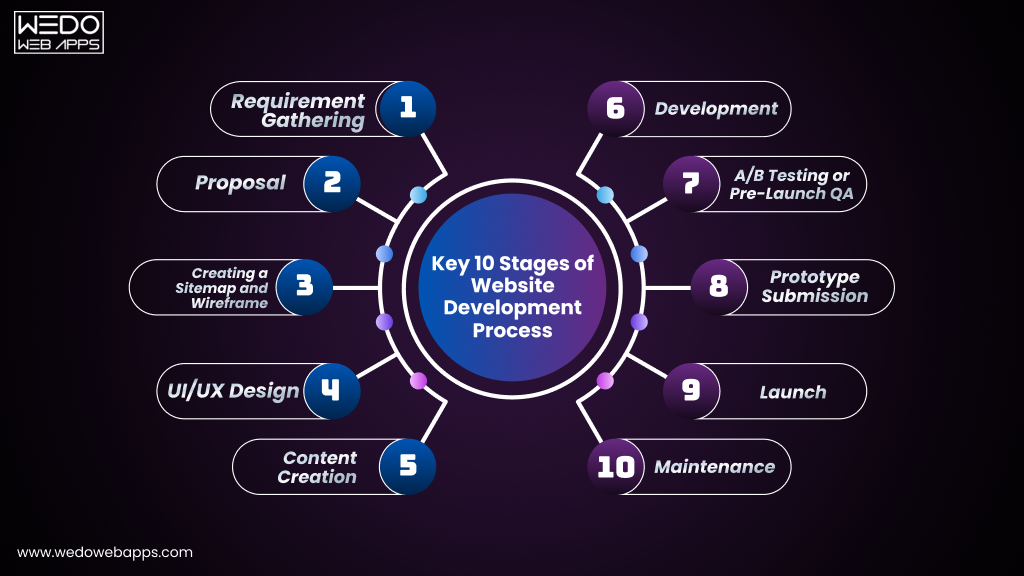
Every website that we build, whether it is for a small business or a large enterprise, we follow the same structured website development workflow. This consistency is what makes us deliver the project on time while following the predictable quality standard and specification that holds up in the competitive search environment.
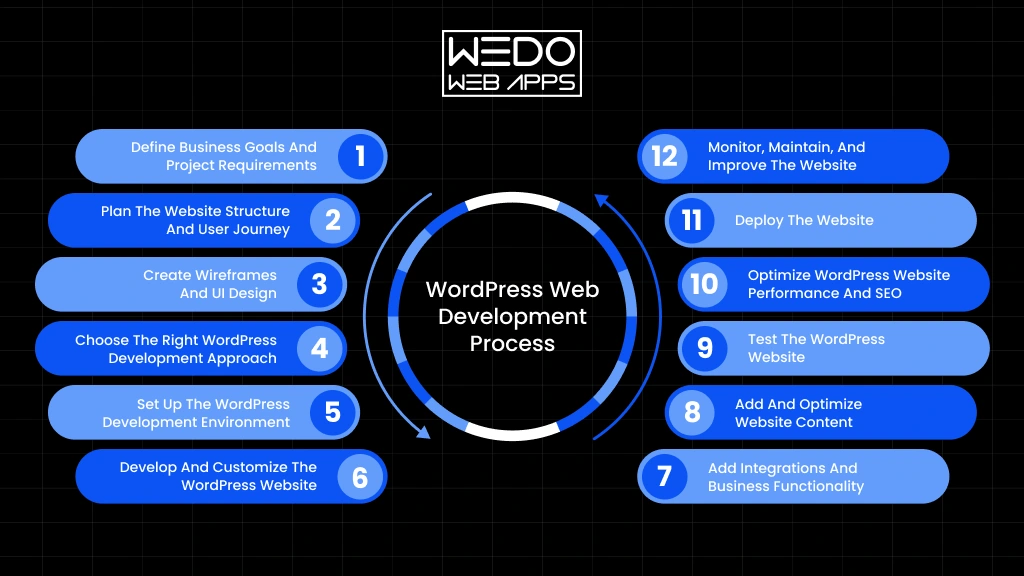
The following 10 steps in website development form a complete website development process. Each phase has defined deliverables, and the next phase will not begin until the last stage is delivered, reviewed, and approved properly.
A structured website development process reduces post-launch bug fixes by up to 80% and cuts the chances of rework by 50% compared to an unplanned development.
Step 1. Requirement Gathering
Requirement gathering is the foundation of the entire website development process. It is the discovery phase where you will discuss the objectives of your required website, the cost, and the various needs.
Without this step, even the most talented development team cannot start working. With this, every design decision, content choice, and technical implementation needs to be followed clearly. The difference between the project that delivers and one that unravels at revision stages almost traces back to whether this step was done properly.
What is established in requirement gathering:
- Business Goals: What does your website need to achieve? Lead generation, direct sales, brand credibility, customer service, recruitment, or a combination? Every goal gets clear with design, content, and development decisions.
- Target Audience: Your target audience will also get clear with the objective discussion. By understanding the audience, this stage defines the user experience from the ground up.
- Scope and Timeline: How many pages are needed on a website? Which features are essential for launch, and which can be phased later? Everything will be discussed, which allows you to know about the expected launch date and the external dependencies.
- Budget: A transparent, scope-based estimate is provided at this stage. If the budget constraints require adjustment, then the right approach is to reduce the scope rather than the quality.
| Pro Tip:- The more specific you are about your goals, the fewer revisions you pay for later. Unclear briefs produce expensive surprises at every stage of the project. Detailed briefs produce clean and on-time deliveries. |
Step 2. Proposal
Once the requirements are fully understood and agreed then everything goes into writing. A signed proposal is not just a formality, but it is the most effective project management tool available for both parties in any website development workflow.
When the disagreement arises mid-project, a well-written proposal is the neutral reference point that resolves it in a minute rather than a week. It eliminates the two most common causes of project failure: misaligned expectations and unmanaged scope.
A professional project proposal includes:
- A clear summary of the project, its context, and its business objective.
- A complete list of every deliverable and feature to be built.
- A preliminary sitemap and wireframe outline.
- The development approach, technology stack, and hosting environment.
- A detailed project timeline with key milestones, review checkpoints, and client approval gates.
- The total project fee, payment schedule, and revision policy in plain language.
No professional website development company should ever begin a website without a signed agreement in place.
At WEDOWEBAPPS, we never do this, and we recommend you never work with one that will.
Step 3. Creating a Sitemap and Wireframe
With the proposal signed, the next step is shaping the website structure before any visual design or code is written. This is where the website development phases move from works on paper to tangible blueprints.
The sitemap defines the architecture of your website, including how every page will exist, how pages connect with each other, and how users and search engines crawl your site. It is the high-level blueprint of your digital presence, and it is not only the early SEO document, but the defining URL structure and content hierarchy also play an important role in Google indexing.
The wireframe goes one level deeper than the sitemap. It maps the presence of your website layout with individual pages and headings, along with the primary CTA button. This also decides how images and text blocks are positioned, and how the navigation behaves at different screen sizes. No colors, no typography, no photography. Just pure structure.
Why sitemaps and wireframes work is worth the investment:
- Maintain full alignment between the client, designers, and developers before the work begins. This eliminates the assumptions that cause the changes at a late stage of design.
- Deliberately plan a user journey that guides visitors from landing to conversion, based on the intent.
- Early identification of missing pages, navigation gaps, and user experience problems can save hours to fix.
- Make the mobile-first layouts from the start and have more visitors.
| Pro Tip:- Always wireframe both desktop and mobile simultaneously. A layout that works perfectly on a 27-inch monitor can be completely unusable on a 6-inch screen. Discovering this at the wireframe stage takes hours to fix. Discovering it during development takes less time. |
Step 4. UI/UX Design
At this phase, the real work begins. This is where your website transforms from a structural blueprint into a real visual experience and where the first impressions are permanently made, won or lost.
The design team uses the wireframe as a practical guide and applies your brand identity into logo, color palette, typography, imagery, and iconography to create the complete visual language of every page. Each element is chosen effectively: not just for a professional look but also to guide visitors towards a specific action in a way that feels completely natural.
Before the development design check of the fully approved design for desktop and mobile devices. This eliminates the chances of a change in design after the development begins. The great UI/UX design must also satisfy Google’s technical performance standards.
What high-quality UI/UX design delivers:
- A clear visual hierarchy that directs the attention to what matters most on every page.
- Intuitive, frictionless navigation optimizes the customer interaction.
- Consistent branding that builds instant trust and recognition across every touchpoint.
- Touch-friendly mobile interface from the very first day of development.
- Accessible website design standards start that meet both legal and commercial differentiators.
- Layouts are designed to minimise cumulative layout shift, a direct Google ranking signal that is determined at the design stage, not the development stage.
Step 5. Content Creation
Design the attention, but the content makes the user stay, and what ultimately determines is whether they convert into a customer, enquire about your services, or leave for a competitor.
Content creation is one of the most important steps in website development and consistently the most under-resourced. Most of the businesses treat it as something to sort out after the website is designed. The result is websites with beautiful layouts that say nothing meaningful can rank nowhere in Google because they have no substance worth indexing.
With the recent algorithms, getting the content wrong is more costly than ever. Following Google’s core update, the EEAT requirement does not apply to virtually every competitive search category. Mass-produced, AI-generated content without genuine human expertise and editorial oversight is being actively filtered from search results. The only content that ranks and earns citations from AI search tools is content that shows real knowledge and provides real-value.
Content created during this phase:
- Homepage, About, Services, and Contact page copy all need to be written with targeted keywords, which need to be used naturally, not stuffed.
- Service and product descriptions that address your customer’s actual questions, concerns, and decision-making criteria.
- Blog articles and resource guides that build topical authority and capture long-tail search traffic.
- Meta titles and meta descriptions for every page are essential for both Google rankings and click-through rates.
- Image alt text for every added visual for accessibility compliance and image search visibility.
- Call to actions that are specific, clear, and tested for conversions.
- Structured data makeup recommendations: FAQs and article schema, which is critical for AI overview inclusion and rich result eligibility.
| 2026 Update:- Voice search is expected to account for 50% of all searches by the end of 2026. Content that answers specific, conversational questions in clear and direct language, particularly on FAQ format, is significantly positioned better for Voice search and AI overview. |
Step 6. Development
With the approved designs and finalised content in hand, the development phase begins. This is where the website is built. Every page, every feature, and every interaction is coded into existence and integrated into a functioning product.
The website development methodology splits into two parallel tracks, both executed with equal rigour: frontend and backend.
Frontend Development
Frontend development covers everything from what visitors see and interact with: the layout, buttons, forms, animations, navigation, and responsive behaviour across every screen size. The front-end developers translate the approved design into clear and standard HTML, CSS, and JavaScript.
Every page should be built to meet the performance benchmark, such as:
- Use of compressed images to avoid lazy loading issues. Render blocking script for eliminating the risks.
- JavaScript execution for optimised long tasks without delays in any interaction responses. This is the metric most developers underestimate when it measures responsiveness across an entire session.
- All images, videos, ads, and dynamically loading elements should give the explicit width and height to prevent the layout shift as the page loads.
- Testing for all sources, such as Chrome, Firefox, Safari, and Edge, along with mobile devices.
Backend Development
Backend development is the engine behind your website. While the frontend handles what users see, the backend handles what the website does: processing orders, storing form submissions, authenticating users, delivering personalized content, integrating with payment systems, and managing databases.
Backend development also means building a website with security as a first priority. Every site is built that is secured with SSL, implements proper input sanitisation, and follows current data protection regulations.
For a complex web application, the precise choice of website development company matters the most. The quality of your backend architecture determines your site’s speed, security, scalability, and resilience for years to come.
| Pro Tip:- 76% of developers now use AI tools to assist with coding, testing, and performance auditing. Our development team uses an AI-assisted workflow to accelerate code review and testing, which allows you to have faster delivery without impacting the quality. |
Step 7. A/B Testing or Pre-Launch QA
No website should go live without passing a comprehensive multi-layer quality assurance process. This is one of the most important steps in website development and one of the most frequently compressed or skipped by teams working on a project to hit the deadlines at any cost.
Our QA process is not a single-step process. It is a systematic, multi-round testing programme covering every dimension of quality: performance, compatibility, functionality, security, accessibility, and search readiness.
Our full QA testing checklist:
- Cross-Browser Testing: Chrome, Firefox, Safari, and Edge with the current version on both desktop and mobile to confirm consistent rendering, layout, and functionality across all major browsers.
- Cross-Device Testing: Check the website design for desktop, iPhone, Android, and other devices to verify the responsive behavior and touch interaction at every point.
- Core Web Vitals Audit: LCP, INP, and CLS are measured using Google PageSpeed Insight field data and Google Search Console, which help you know about the real-user performance issues.
- Functional Testing: Every form, button, link, filter, dropdown, modal, and interactive element is tested for original specification to confirm it works exactly as agreed.
- SEO Validation: All meta titles, descriptions, canonical URLs, XML sitemaps, and heading hierarchy reviewed and confirmed.
- AI Visibility Audit: Faq and article schema validated using Google’s rich result test, content structured for AI overview eligibility.
- Security Checks: SSL verification across the full domain, form input sanitisation, login protection, spam prevention, and data handling compliance.
- Accessibility Audit: Audit the site for legal and commercial risk and compliance, along with the keyword navigation, color contrast ratios, ARIA labels, and screen reader compatibility.
| Note:- A structured QA phase reduces the post-launch bug fixes by up to 80% compared to a project where testing is rushed or skipped. Every issue caught before launch costs a fraction of what it costs to fix after. |
Step 8. Prototype Submission
Before any website goes live, you experience it exactly as your future visitors will in terms of security.
This is a formal checkpoint in the website development phase. At this stage, you will have the staging link alongside a clear set of review instructions: what to check on each page, how to test interactive features across different devices, and exactly how to submit feedback or other requests.
This is not a static PDF or design mockup. It is a fully functioning website that allows you to navigate and interact with it just the way your customer reviews it. Any final changes identified at this stage are addressed before the process of launching the website.
Step 9. Launch
Launch day is a significant milestone and a carefully managed one. Once you have provided a written sign-off on the prototype, our team runs through a comprehensive pre-launch checklist before pointing your live domain to the production server.
Pre-launch checklist:
- DNS configuration and domain transfer to the live server confirmed.
- SSL certification is active and verified across the full domain.
- Google Analytics setup, configuration, and event tracking verified against specification.
- Google search console property creed, XML sitemap submitted, coverage report reviewed for errors.
- 301 redirects confirmed for any URLs that have changed from the previous site.
- Final core web vital check using field data.
- Structured data markup validation.
- AI overview, eligibility, and schema rendering.
- Post-launch smoke test for every page, every form, and every feature.
With every item checked and confirmed by the project lead, the website goes live. It is the culmination of every hour of planning, designing, writing, building, and testing that came before launch.
Step 10. Maintenance
A website launch is not just the last step of development, it is the beginning of the asset that require to maintain site consistent, professional, and competitive.
The web development lifecycle does not end at deployment; it keeps requiring content and technical review to improve the functionality of the website. CMS platforms and plugins release security patches on a continuous basis, which need to be taken care of.
What post-launch maintenance covers:
- Regular CMS, plugin, and security updates to prevent vulnerabilities.
- Continuous monitoring for traffic patterns, third-party scripts, and Google benchmark services.
- Content updates, new page creation, and feature addition.
- Analytics review and conversion rate optimization recommendation based on real visitor behavior data.
- Structured data updates to keep schema markup aligned with Google’s requirements.
- Uptime monitoring with rapid response to any unexpected downtime.
- Post-algorithum update content and technical review following major Google core updates.
This ongoing commitment is what separates a genuine long-term partnership with a trusted development partner you invest in to have better results.
How Long Does the Website Development Process Take?
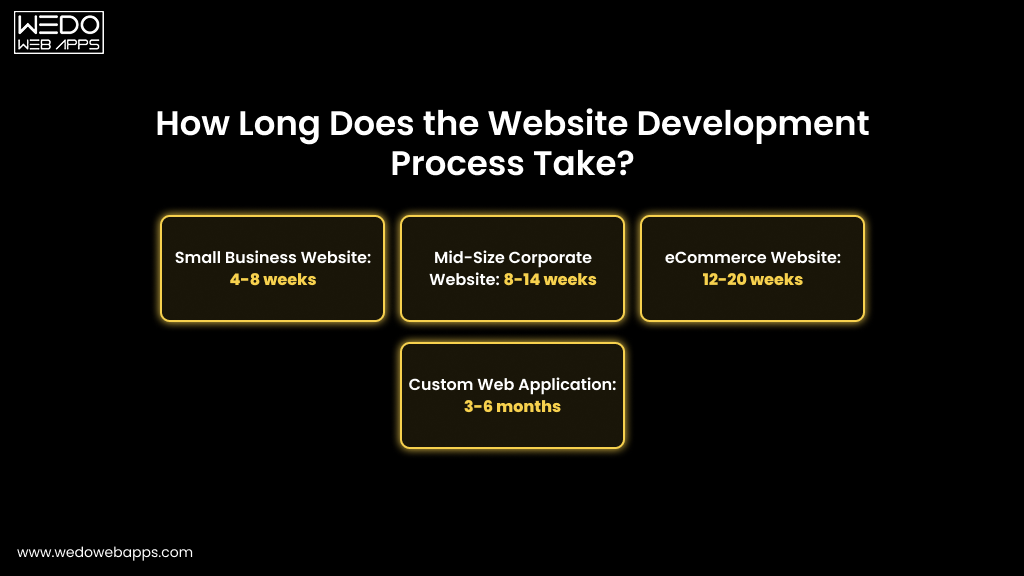
One of the most common questions that you must be thinking about, and the honest answer is that it depends on the scope.
Here is a realistic breakdown based on project type, based on project delivery data:
- Small Business Website: 4-8 weeks from requirements gathering. The most reliable cause of delay at this scale is content that is not prepared in the advanced design phase.
- Mid-Size Corporate Website: 8-14 weeks, including multiple rounds of content review, design iteration, and functional testing across departments.
- eCommerce Website: 12-20 weeks, depending on payment gateway integration complexity, product data setup, and custom checkout functionality.
- Custom Web Application: 3-6 months for builds with user authentication, custom databases, third-party API integrations, and bespoke feature sets.
| Pro Tips:- The two-phase authentication can mostly allow to maintain consistency with the project timelines are content creation and client review cycles. Agreeing on review deadlines and content delivery dates at the proposal stage keeps every project on schedule. |
Common Website Development Mistakes That You Should Avoid
Understanding the stages of website development is only halfway to your development phase. Knowing what goes wrong and why is equally important for setting realistic expectations and making the right decisions at every phase.
- Skipping Requirement Gathering: Jumping straight to design without a clear, documented brief produces websites that look fine but achieve nothing specific. Every hour saved here costs several hours of revisions later.
- Leaving Content Until Last: Designing around placeholder text and adding real copy at the end consistently breaks approved layouts. Content and design must be developed in parallel, not sequentially.
- Desktop-First Design in Mobile-First World: Designing for desktop and adapting for mobile produces consistently worse mobile experiences and lower search rankings.
- Ignoring CoreWeb Vitals: A site that fails to lose ranking to a competitor with comparable content quality. Performance is now a direct competitive differentiator.
- No Structured Data Markup: Websites with schema markup are likely to appear in search results, and skipping it leaves the organic visibility on the table.
- Rushing or Skipping QA Testing: Every bug found after launch costs significantly more to fix than one found during testing. A structured QA phase is one of the highest-return investments in any web project.
- No Post-Launch Maintenance Plan: A website without regular updates accumulates security vulnerabilities, suffers performance degradation, and drifts out of compliance standards. An initial investment depreciates rapidly without maintenance.
- Ignoring Accessibility: Accessibility is not a legal exposure and should be filled carefully.
In a Nutshell: Ready to Start Your Website Development?
Building a website that genuinely performs, ranks well, and easily earns trust requires following the 10 website development phases.
The gap between the website that works and one that merely exists is not just about the budget, but it is also about the website development process. Every stage of website development described in this guide creates a measurable impact. Follow all the steps with the right web development team and get what you need for your business.
If you follow the website development process with dedication and the right team, you can build more than a website. You will build a durable, high-performing digital presence that generates leads, earns trust, and grows alongside your business.