skip to content

How to Migrate Magento Store from cPanel to Cloud?

Due to the world-class features Magento offers, you will find 171,162 online eCommerce stores built on Magento. Numerous online shops that use Magento for their online store storage are located on various platforms.

We frequently get a lot of inquiries about transferring the Magento store from the hosting environment of cPanel to a new website. Some users might need clarification on whether they should make the same decision as those who switched from Magento to this new website. After all, it powers over 0.9% of all active websites on the internet. 

Let us begin by understanding why switching Magento to a different server is essential for the best solution. Then, we will discuss how to migrate the Magento Store from cPanel to Cloud.

Magento Shared Vs. Cloud: What Is It? Which one is better? 

Magento Shared

Many of us are familiar with shared hosting being among the most traditional forms of web hosting because it is affordable for new businesses and one-page, lightweight websites. To ensure that each website receives an equitable amount of the server’s resources, shared hosting involves hosting multiple websites on a central computer that the hosting company manages. 

The quantity of resources varies according to the package you purchase from your supplier. With this allocation, the price will remain cheap and straightforward for consumers.

Cloud Hosting

Another viable option is cloud hosting, which lets you put your website on a specialized cloud server, providing numerous benefits to your application. It includes a feature allowing you to expand the server anytime and monitors Magento server problems.

Magento Cloud hosting may be a more affordable option compared to shared hosting. Still, one significant benefit is that you only pay for the services that you use, rather than spending for resources that are not being used. You can take into account the following cloud-based architecture when transferring your Magento website:

  • Godaddy
  • Microsoft Azure
  • Google Compute Engine
  • Amazon Web Services (AWS)
  • Rackspace
  • Vultr
  • Linode

As a result of not worrying about server-related problems, you generally have more time to make the most of your company. By eliminating all the hassles associated with setups and server management, Cloud ways, a well-known and dedicated cloud server, is among the best ways to manage cPanel to cloud hosting.

Users who want to migrate to the cloud securely and efficiently can benefit significantly from migration tools. You will learn more about the top program and cloud transfer tools in the following sections of the blog.

By enhancing its performance and raising the level of security by increasing the sales ratio, Magento stores concentrated on their best and suggested choices while keeping all of these factors in mind. 

Let us examine some essential distinctions between Magento Store and cloud hosting plans.

What Problems Can Occur in the Magento Cloud Hosting?

As a versatile and powerful e-commerce application framework, Magento is well known for needing more technical knowledge to deploy directly to cloud hosting. 

It includes appropriate layout and optimization to assist it in performing much better, as trying to manage your server could be challenging to use such a provided service. 

Compared to on-premises systems, cloud software settings benefit their customers in many ways, including flexibility, automated upkeep, and simple scalability. 

Due to these advantages, many people and businesses switch from on-site to cloud-based sites. However, not all clouds are made equal, and many discover that moving their tasks and processes between cloud platforms could be advantageous.

Transferring apps and information to the cloud can be difficult, and if done incorrectly, it may even compromise security and compliance. 

Fortunately, users can simplify the procedures involved in moving workloads with cloud and application transfer tools, which also offer tools for monitoring and documenting migrations.

Undeniable Advantages of Magento Store Migration from cPanel to cloud

  1. When you move your Magento store to CloudWays, SSD cloud hosting from Magento provides greater control over your remote server and resources to support it. 
  2. You can also use advanced caching possibilities such as Varnish, Memcached, and Redis to improve your store’s performance. 
  3. Additionally, CloudwaysCDN is simple to set up and will speed up your Magento shop only with a few clicks. 
  4. The newest tools like Apache, Nginx, PHP-FPM, and MYSQL combined with an optimized framework can help your Magento shop run faster than ever.
  5. By conducting routine firmware upgrades, the Magento cloud hosting provides the security to guarantee that your Magento shops are equipped with platform-level defenses. 
  6. You could also use auto-healing servers to reduce the likelihood of shutdowns, which can result in business disruption. 

Step-By-Step Guide to the Migration of Magento Store From cPanel to cloud 

Here is a quick process to follow if you want to move your shop from Magento cPanel hosting to Cloudways. You only need to restore your store’s database before starting with Cloudways to get all the necessary information.

Step 1: Start with cPanel for Magento.

Putty or an SSH interface can connect to your Magento cPanel server. Try to browse your Magento 2 store’s primary directory once completed. Run this command to plan a copy of the database for your shop.

mysqldump -u your username -p your name > database.sql

Step 2: File Organizer should be updated

Enter your cPanel hosting database login and name in the above command line, and then upload your chosen file. After you run this program, you will be prompted to input a database password and cPanel hosting database username. Now access File Organizer through your cPanel hosting.

Step 3: Explore the base path.

Afterward, go to your store’s central location to explore the root directory. 

Step 4: It is time to bundle up all of your files and directories at this point.

Your website’s database copy is now available, and you can access it at www.yourdomain.com/magentobackup.zip.

Step 5: Create a new account.

Once you have done that, you can start Magento 2 with just a few steps by creating an account at Cloudways.

This gives you the option to select the server of your choosing from their infrastructure partners, and you must then establish the server’s location and size to meet your needs.

Magento app

Step 6: Setup the server

Once finished, select “start now” to finish the process. When the following message appears, along with the Magento 2 program underneath it, you will know that the server has been properly installed:

Step 7: Remove the previous database.

You must delete the Cloudways deployed application’s database and files before migrating your Magento shop to cPanel. SSH can be used to connect to your Cloudways hosting, after which you should choose the base location for your shop. Clean up all the saved files and directories initially by executing the following command:

rm -rf *

Step 8: Connect to the SFTP interface

Now, from your account’s program interface, select Launch Database Manager. Drop all the tables after selecting them after you launch Database Manager. Now enter the SSH terminal’s instructions to log in to the Cloudways Magento app.

wget https://yourdomain.com/magentobackup.zip

Step 9: Extract each file. 

Run the instructions to unzip the file and load the database onto your Cloudways app.

MySQL -u CLOUDWAYS-DB-USERNAME -p CLOUDWAYS-DB-NAME < database.sql

Enter the above command the database credentials for your program deployed on Cloudways. Next, enter the passcode and navigate to the env.php file to change the database passwords to those for Cloudways.

Why Must You Select Cloud Hosting Solution For Your Magento Store Migration?

Many people wonder why they must opt for cloud servers to migrate the Magento store. Here, we will discuss some reasons behind using Cloud hosting for migrating the Magento store. 

Scalability

During peak sales periods and store promotions, e-commerce shops frequently need the ability to scale their server resources quickly.

  • Performance

The primary reason behind choosing cloud hosting performance as it is a reliable hosting solution that offers private cloud computing, ensuring the store’s speed and performance.

  • Security

The fundamental procedures of cPanel to Cloud hosting are designed with security in mind. The computers also include security features like 2FA, firewalls, and anti-malware programs.

  • Resources

A specialized resource allotment is included with your cloud server. It is simple to understand the advantages of cloud hosting when combined with the scaling function.

  • Costs

Although the pricing plans initially appear expensive, you will ultimately save money by forgoing the cost of repairing problems that frequently arise with inexpensive hosting.

Migrate magento

  • Downtime Risk

Cloud computers experience minimal downtime and better efficiency due to the highly optimized design.

  • Better Management of Traffic Spikes

Cloud computers are generally better equipped to handle sporadic traffic surges due to several critical characteristics that make up cloud hosting.

Some Best Practices When Migrating the Magento Store to Cloud

Hosting in cloud options like DigitalOcean, AWS, Linode, etc., provides a ready choice to grow up. In other words, you can begin with the least for your website. Eventually, if the site traffic increases significantly, we can add more resources.

Again, cloud web pages will be utterly safe from typical security threats. The cloud barrier will protect the complete cloud network.

The dependability of cloud technologies is also well recognized. As a result, it usually prevents website outages caused by server failures.

Recap of the best practices our transfer engineers adhere to when moving cPanel to the cloud.

  • cPanel host and cloud server are similar. Setting up equivalent software versions, such as PHP, Web server, MySQL, etc., is part of this.
  • They are Lowering TTL numbers well before the transfer itself. By doing this, DNS propagation-related website outages would be avoided.
  • Deleting the instance’s current material and adding new content.
  • Before making the fundamental DNS changes, access the page on the new server.
  • Final rsync of the website’s database and content to incorporate all changes.

Salesforce to Magento 2 Migration:

Migrating from Salesforce Commerce Cloud to Magento 2 involves a detailed process to ensure a smooth transition. The benefits include better customization, flexibility, and a wider range of plugins and extensions. For more detailed steps on how to migrate from Salesforce to Magento 2, including data transfer, theme adaptation, and extension compatibility, visit our comprehensive guide on Salesforce to Magento 2 migration.

Miva Merchant to Magento 2 Migration:

Transitioning from Miva Merchant to Magento 2 can significantly enhance your eCommerce store’s performance, scalability, and functionality. Magento 2 offers advanced features that can be beneficial for businesses looking for more robust solutions. For a step-by-step guide on migrating from Miva Merchant to Magento 2, including data migration, theme transfer, and ensuring extension compatibility, check out our detailed instructions on Miva Merchant to Magento 2 migration.

Conclusion

Technology is currently advancing at an exponential rate. Things continue to get better and stronger in this wonderful technical age that we are living in. Likewise, the realm of eCommerce systems for companies of all kinds does.

If you fight against this shift, you will only suffer loss. Your company will become chaotic if you are a step behind everyone else. Moving your Magento shop from cPanel to cloud hosting servers is best advised to prevent this. This will allow you and your company to remain on top of trends and grow to their full potential.

We hope the transition of your Magento shop from shared cPanel computing to cloud hosting goes smoothly for you. We hope you are through with the Magento 2 migration procedure. You will also comprehend how Magento cloud hosting would be the best choice for your online store. 

Connect with WeDoWebApps.com to learn more about the migration process from cPanel to the cloud server for a Magento store. The experts here are well aware of the need, and we assure maximum efficiency for the migration process. 

Changing Your Magento Server? Here’s What You Need To Know.

As time passes and your business advances, you may feel the need to migrate Magento store to a new server that is more effective, fast, and reliable.  For instance, you require an upgraded web server, are unsatisfied with your hosting company’s service quality, or wish to expand your platform performance with different add-ons and believe it will function steadily.  Regardless of the reasons that you have for migrating the Magento store,moving a working store is not a simple task, and you may encounter different hurdles while executing it. Here, we’ll explain the best Magento 1 to Magento 2 data migration steps to move your Magento 1 to Magento 2 data migration to a new server smoothly.  What Is Magento? Magento is an open-source and one of the finest e-commerce platforms written in PHP. It employs various PHP extensions & frameworks, namely Symfony and Laminas. Magento’s website allows its users to manage their online store’s appearance, content, and functionality without undermining the user’s shopping experience.  Moreover, Magento website offers its users a combination of helpful features and tools, including marketing, catalog management, and search engine optimization tools. In general, a new Magento store can accommodate any store, regardless of its size. Whether you’re serving a few customers or the numbers are huge, Magento delivers a free Magento Open Source and a full of feature Headless Magento Commerce Store, implying the platform can develop and grow with your business. Often, companies have to switch platforms as they advance and develop. However, Magento setups make it simple to remain in one spot and keep advancing.  The platform likewise presents its customers with various plug-ins and themes to do whatever they wish and however they like their website to appear. It can even improve customer experience and strengthen customer relationships. Read more: Hire Magento Developers: Everything You Need to Know!

Steps To Be Followed To Magento 2 Migration To Another Server

In case you are moving to a dedicated hosting service, the probabilities are they will deliver a free migration assistance with your hosting subscription.  However, if you are migrating to a DIY provider such as Amazon Web Services (AWS) or DigitalOcean, you will have to do everything on your own and follow the Magento 2 data migration steps carefully. Before you start, keep in mind that you take an entire backup of your website. If you are operating on a dedicated hosting service, you can utilize the control panel to manually back up your store or contact your service provider’s tech support crew for help.  As an option, you can take a photo of your server if you are harnessing a provider like AWS or DigitalOcean.

STEP 1: Prepare A Complete Backup Of The Magento Database

Throughout the Magento 2 server migration, you must maintain and shift two fundamental parts of your Magento store: the filesystem and the database.  The Magento database includes information of/about your store, e.g., orders, products, customers, and store settings. And the file system consists of all product media, the Magento codebase, and extension code. We will move the Magento file system’s contents utilizing rsync, a file synchronization tool on Linux.  But as the Magento database is stowed in a distinct location, we will prepare a backup of the database in the Magento file system to allow us to move everything to the new server employing just a single command. If you are deploying a Magento 2.3.0 version, you can prepare a Magento 2 database migration database settings backup within the Magento admin panel by obeying Adobe’s guide for Magento backups or through CLI.  For additional latest Magento versions, you will just have to employ the command line in order to back up the store database. By following the below steps, you can prepare a full backup of your Magento database through the command-line interface utilizing the mysqldump program:

  1. Access your server over SSH and shift to the Magento filesystem owner.
  2. Navigate to the Magento filesystem root by changing and typing the command given below in the terminal:

<code> $ cd <path-to-magento-root> </code>

  1. Confirm you are in the correct location by executing the command given below to document/list all the directory contents:

<code> $ ls -la </code>

You may notice a checklist of all the folders and files in the Magento root directory, namely, app/, var/, pub/, and vendor/.

  1. As soon as you have confirmed that you are in the correct location, you can utilize the mysqldump tool to make a full backup of the Magento database by running the command given below:

<code> $ mysqldump -u magento-db-user -p magento-db-name > var/backups/magentobackup.sql </code>

Remember to substitute the value for magento-db-user and magento-db-name with the proper values for your store. Furthermore, ensure that the /var/backupsfolder subsists in your file system. Or else the command will show an error. After running the command, you will have to type the Magento database user password.  Once you have typed the password and pressed “Enter,” you will not be able to view anything until and unless the database backup is finished. Generally, you can anticipate the new database backup to take about 30 seconds to 1 minute per gigabyte. Therefore, if you are migrating an extensive store database, get ready to wait for a little before the backup finishes. You will not get a verification notification until the backup database is done. Rather, the terminal will restart to the normal prompt screen.

  1. Confirm the contents of the var/backups directory by executing the command given below:

<code> $ ls -la var/backups </code>

And here you go, you had your database SQL file saved successfully inside the Magento file system.  Before you move ahead, make sure to place your store in maintenance mode. It will deter data fickleness/inconsistencies/instabilities throughout file migration. You can allow maintenance mode by navigating to the Magento root directory location and running the command given below, being the Magento filesystem owner:

<code<> $ php bin/magento maintenance:enable </code>

STEP 2: Create The Destination Server

Without further ado, you must create your destination server by installing the extensions Magento demands for its procedures and operations.  It’s crucial to note that you must verify each extension version is well-suited and compatible with your Magento version during Magento 2 extension migration. Before going ahead, you can cross-reference Adobe’s system requirements and compatible software for Magento’s 2.3.0 versions and so on. You must also confirm your server contains the resources required to run a CPU-bound application such as Magento. Given below are some things to remember while you create your new server:

  1. Make sure you use the exact title for the Magento file system owner on the destination server as the origin server.
  2. Utilize equivalent database credentials on the origin as well as on the destination server.
  3. Employ equivalent credentials for additional tools, e.g., Redis or Varnish, on both servers.

As soon as you organized and made your new server, ensure you cleared the Magento destination root folder by running the commands given below as a superuser or the directory owner:

<code> $ rm -r /var/www/public_html/* </code> Confirm the directory is cleared by documenting or listing its contents utilizing the command described below: <code> $ ls -la /var/www/public_html </code>

Once you have confirmed it’s cleared, you can carry on to the subsequent stage and relocate your store data to the new server. migrate Magento store to new server

STEP 3: It’s Time To Migrate The Data

Without any delay, it’s time for you to migrate the store data to the new server. We will employ rsync because of its performance benefits and reduced bandwidth consumption.  First, you’ll have to log in into the destination server as the filesystem owner and execute the command explained below to start copying from the origin server over SSH:

<code> $ rsync -avzh ssh <username>@<origin-server-ip>:/var/www/html/ /var/www/public_html/ </code>

Command defined:This command can be split into 7 parts including:

  1. rsync
  2. -avzh
  3. ssh
  4. <username>
  5. <origin-server-ip>
  6. :/var/www/html/
  7. /var/www/public_html/.

When you run the command mentioned above, you will have to type a password for the <username> user on the origin server.  It is required if you connect via SSH with the password login, but not with the key. Once the transferring starts, you will witness a lengthy output on your terminal screen as it moves ahead.  The whole file transfer process can take minutes to finish, which might depend on the stored data size. Once it’s done, you can confirm if all files have been copied by executing the command given below in the destination directory:

<code> $ ls -la </code>

Once you have ascertained all the folders and files corresponding to the origin directory, you can continue with the subsequent steps.

STEP 4: Configuration Of Your New Store

When we applied the rsync command to shift the files to the new host server domain, we maintained all ownership and permissions according to the new server domain folder.  If the filesystem owner on your new server has the exact title as the one has on the origin server, you will not have to reallocate ownership. Nevertheless, you must reallocate file permissions to guarantee that the remaining setup functions steadily. Run the command given below as the filesystem owner in the Magento root folder:

<code> find . -type f -exec chmod 644 {} \; find . -type d -exec chmod 755 {} \; find ./var -type d -exec chmod 777 {} \; find ./pub/media -type d -exec chmod 777 {} \; find ./pub/static -type d -exec chmod 777 {} \; chmod644 ./app/etc/*.xml chmod777 ./app/etc chmod777 var/log chmod777 generated </code>

Then, we will have to restore the backed-up database from the Magento files system. You’ll have to execute the command mentioned below in the terminal:

<code> $ mysql -u magento-db-user -p magento-db < var/backups/magentobackup.sql </code>

It might take some time to complete. The screen will restart to the normal prompt screen once it completes. Once it is done, you are finally all set to go live.

STEP 5: You Can Go Live Now!

The following steps will smoothly get the job of Magento 2 migration done if you have observed and done everything precisely. Before you’ll be able to surf the website, you will have to update the DNS records of your domain and show it to the latest one server IP address. Once you have done that, it will take a few minutes to hours to propagate, which will rely on your Time-To-Live settings. For the time being, let’s fix together some odds and ends before you begin operating your website. First, you will have to install cron to enable Magento to execute major background tasks. Run the command given below as the Magento filesystem owner in the Magento root directory in order to install cron:

<code> $ php bin/magento cron:install </code>

Then, change and set up your store into production mode so that it will disable cache management, recompile data, and turn off maintenance mode. It is doable if you run the command given below:

<code> $ php bin/magento deploy:mode:set production </code>

Once it completes, you can access your store in a browser. You may witness the website running slowly when you will load it for the first time. This problem must be fixed once the Magento cache starts generating after the initial load.

Is Migrating Magento Store The Right Choice For You?

The decision of Magento 1 2 migration can’t be nor should be taken instantly. It requires meticulous forethought and implementation.  The whole objective behind operating a perfect website is to deliver customers and visitors an excellent user experience that results in increased conversions and sales. It is where the significance of migrating to Magento 2 plays its role.  Below are some of the essential characteristics of moving to Magento 2 that can influence customer experience.

  • It delivers more promising SEO and search features
  • 50% quicker page loading time
  • Touch-friendly and thoroughly responsive UX
  • Enhanced UX for admin panel accompanied by an upgraded backend
  • It has more occasional needs for third-party or custom extensions
  • It delivers manageable checkout and reduces the cart abandonment rate
  • E-retailers can handle more extensive amounts of SKUs and orders
  • It is simple to make and handle web content
  • It allows you to make more user-friendly and mobile-optimized experiences
  • Users can select from PaaS and self-hosting alternatives.

So basically, it is certainly an excellent decision to migrate to the latest version and retain your e-commerce business as competent and expandable.  This platform will provide access to the latest features and extensions, convenient maintenance, reduced Magento 1 to 2 migration costs, and a lot more advantages. 

What Are Some Mistakes To Avoid While Migrating? 

There are a lot of things that you need to take care of during the Magento 1 to 2 migration. It’s important to avoid these mistakes while migrating and those mistakes are as follows:

  • Starting without forethought or appropriate preparation, arrangements, and goal setting.
  • Not studying the effect of migration internally.
  • Not corroborating convertibility/acceptableness/modifiability
  • Not experimenting sufficiently
  • Overlooking SEO equity
  • Not discarding obsolete and futile data
  • Not heeding Adobe’s officially recommended method and tools
  • Bypassing consultation with experienced Magento 2 Migration agencies
  • Not outsourcing licensed or qualified Magento migration experts
  • Not scanning the webshop post-migration.

magento 2 server migration

Conclusion

Magento 2 is a more significant and beneficial update until now, and Magento 2 migration steps are essential are pretty straightforward too.  You’ll get a lot of features and benefits from Magento 2 migrations and upgrades such as adaptable website architectures, engrossing customer experiences, streamlined business experience, 50% quicker page loading speeds, secured payments, and more straightforward maintenance and upgrades.  Ultimately, Magento 2 is a more functional, enhanced, and rapid version of Magento. After coming across objections and contradictory remarks, the developers rebuilt it and eliminated all the flaws. If you are searching for a quicker, securer, and expandable website, Magento 2 is all you need! We at WeDoWebApps, a development company, help you migrate your Magento 1 site to Magento 2 seamlessly. Need help? Contact us anytime. 

Website Usability – Definition, Importance, and Tips to Improve

Introduction

With the search engines updating their algorithms constantly, it is essential for business owners to focus on the core elements. These days more and more people are shifting on mobile devices from desktops. Therefore, it becomes imperative to enhance website usability.

But first, what is actually the Website Usability definition?

Simply put, website usability defines the website’s ability to be accessed seamlessly and efficiently on various devices. In other words, website usability is the measure of efficiency, effectiveness, and satisfaction with which the users can achieve their goals on a website.

Since the search engines focus on providing the best user experience, it has become crucial to redesign your websites. With easy navigation, user-friendly responsive website designs, you can provide your customers with the best browsing time on your website. Whether an eCommerce business, enterprise, or brand, improving the usability of the website is the key to online success.

When businesses improve web usability, it helps them boost their SEO practices and increase conversion rate.

Website Usability Definition

Website usability is the ease with which visitors can understand, navigate, and interact with a website to complete a task. In simple terms, it measures whether a person can use the site without confusion, delay, or guesswork.

A clear website usability definition focuses on three things. Users should quickly know where they are, what they can do next, and how to finish their action.

For example, a contact page with short fields, clear labels, and a visible submit button shows good website usability.

A page that hides the form, asks unnecessary details, or shows no confirmation after submission creates frustration.

Understanding the importance of website usability begins here. When people complete tasks easily, they stay longer and trust the website more. When they struggle, they leave within seconds.

This is why website usability best practices and usability principles for websites matter. They guide how to improve website usability step by step, rather than relying only on design appearance.


Website Usability Consultation and Conversion Improvement

Usability vs User Experience

Many people treat usability and user experience as the same thing. They are connected, but not identical.

Website usability focuses on task completion.

Can users perform an action easily without confusion?

User experience focuses on the overall feeling.

Did the interaction feel smooth, helpful, and satisfying?

Think of usability as functionality and user experience as perception.

Here is different of usability and user experience:

Aspect Website Usability User Experience
Core meaning Ability to complete a task easily Overall feeling during interaction
Main focus Clarity and efficiency Comfort and satisfaction
User question Can I do this quickly? Do I feel confident doing this?
Measures Errors, task time, completion rate Trust, perception, engagement
Design goal Remove confusion Build a positive impression
Example Simple checkout form works correctly Checkout feels smooth and reassuring
Priority in process Implemented first Refined after usability works

Quick understanding:

Website usability ensures users can act. User experience ensures they enjoy acting.

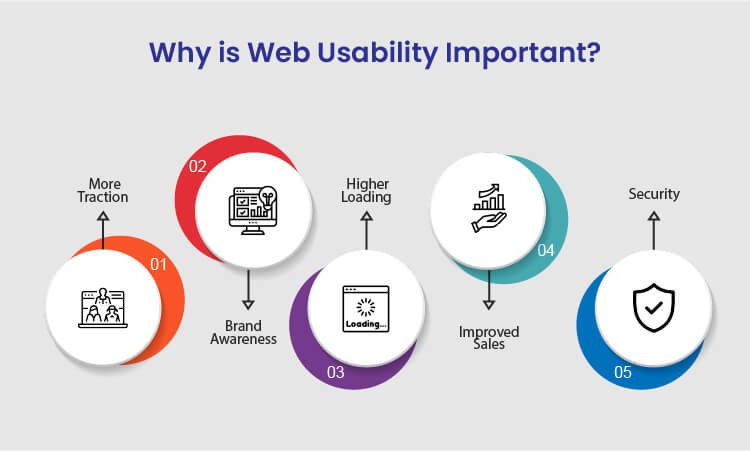
Why is Web Usability Important?

Why is Web Usability Important

There are various benefits of improving website usability for your business to achieve success. Following are the sure-shot benefits of enhancing the usability of your website:

1. More Traction

Several businesses, usually budding startups, struggle a lot to generate more traction and traffic to their websites. The best way to overcome this is to resolve all the technical issues on your website and let more traffic come in. Since the search engines also focus on technically stronger websites, you will get more organic results making you more visible on the internet.

Whether your main focus is more sales, branding, or generating traffic, enhanced usability can help you achieve your goals. When you focus on more traction, the overall authority of your business increases.

2. Brand Awareness

Many businesses these days struggle to get recognized against their competitors on the internet. This might happen because of the higher bounce rate of your website. Due to the high bounce rate, it becomes challenging for visitors to navigate through the web pages. So, with improved web usability, you can ensure a minimum bounce rate and provide a smoother browsing experience to the users.

When you offer a good user experience to the customers, the overall branding of your website improves significantly. Whether you drive traffic from social media, website, or organic results, brand awareness will ultimately increase irrespective of any factor.

3. Higher Loading Speed

Website loading speed is the most significant running factor that affects the overall credibility of the business. To increase your website usability, ensure that your website loads faster without hassle on both desktop and mobile devices. In addition, if you are adding new web pages to your site, make sure that those pages also load faster and seamlessly.

If you need, you can also use Google’s free website speed testing tool to check whether your website loads faster on every device or platform.

4. Improved Sales

If we talk about an eCommerce business, then website usability is the most important factor to take into account. There are many functionalities of a website that should work seamlessly in order to regain customers.

For example, eCommerce businesses are directly connected to so many online transactions, and you need to make sure that your website works fine on all the platforms. You need to necessarily focus on website usability to significantly increase your sales. When you combine SEO tactics with website usability principles, you tend to get more sales.

5. Security

Security is yet another important aspect to be considered for web usability. When you ensure that your website and visitors’ personal data are safe, you gain more recognition among your competitors. Therefore, always integrate the SSL certificate and other necessary documents to give your customers the most secure user experience.

Ensuring your customers that you care about the safety of their data will help you gain more traction and sales, thereby increasing the usability of your website.

After knowing about the key benefits of improving the website’s usability, you might have realized how vital website usability is for your business to grow. Many web design companies worldwide will offer you the best web design services for your website development.


Website Usability Analysis and Conversion Optimization

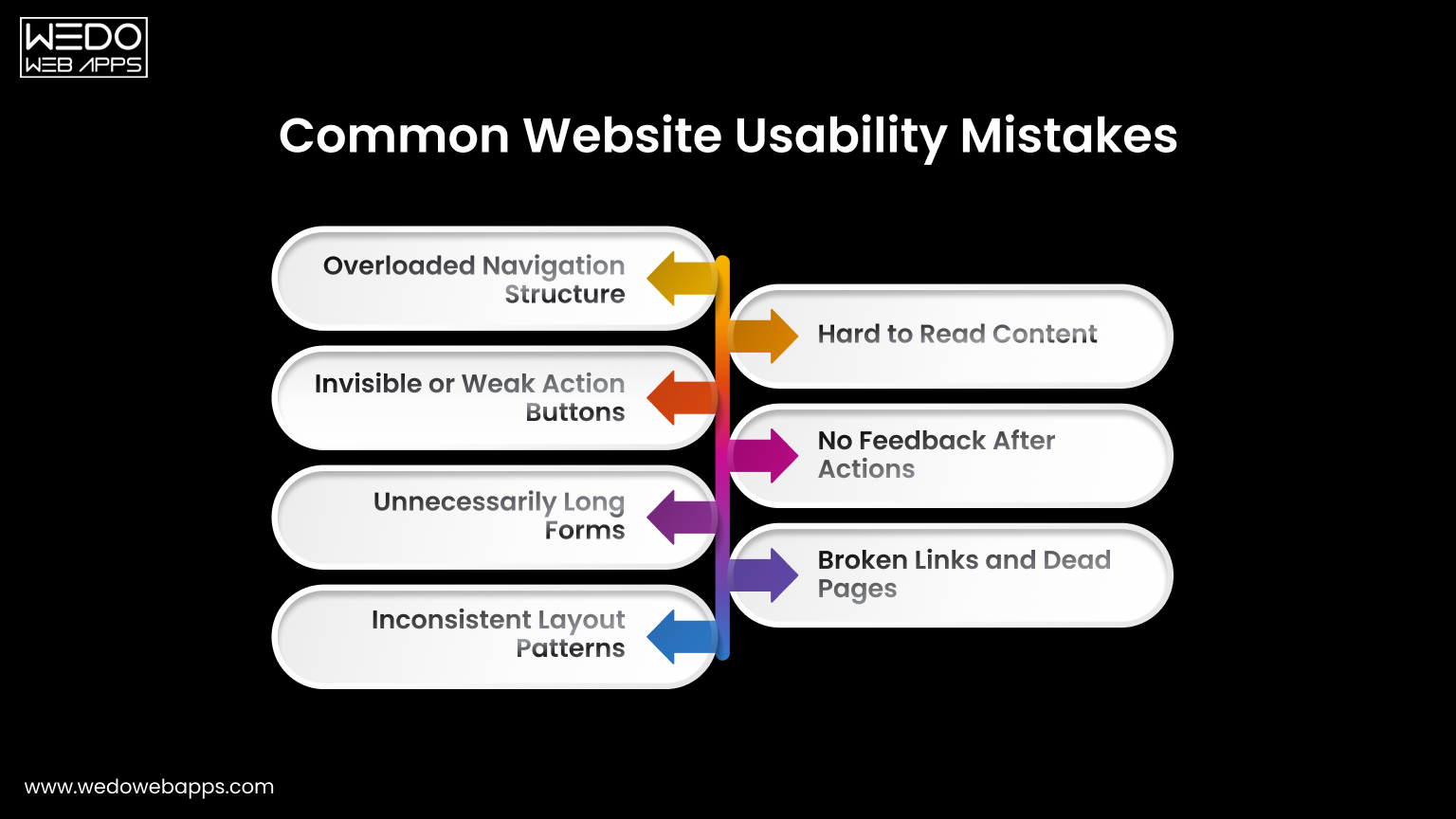
Common Website Usability Mistakes

Common Website Usability Mistakes to Avoid

Understanding the website usability definition helps to identify why users leave a site even when the content is relevant.

Most issues appear in small interaction details rather than large technical failures. Recognizing these gaps highlights the real importance of website usability.

Overloaded Navigation Structure

Many websites try to show every page in the main menu. This forces visitors to read instead of act. Follow usability principles for websites by grouping related pages and limiting primary options. Clear navigation reduces hesitation and guides movement naturally.

Invisible or Weak Action Buttons

If users must search for the next step, the design is failing. Buttons placed too low or written with unclear labels reduce conversions. One of the most effective website usability tips is keeping the primary action visible and direct.

Unnecessarily Long Forms

Forms usually collect more information than is required. Every extra field increases the drop-off rate. When considering how to improve website usability, shorten forms and request details later if needed.

Inconsistent Layout Patterns

Changing menu position, colors, or button styles between pages forces users to relearn the interface repeatedly. Consistency is one of the core website usability best practices because familiarity builds speed and confidence.

Hard to Read Content

Dense paragraphs and poor spacing discourage reading. Break content into sections, use headings, and maintain comfortable line spacing. Readable content supports both engagement and scanning behaviors.

No Feedback After Actions

Users expect to have confirmation after clicking. Missing success messages or error guidance creates uncertainty. Providing immediate feedback follows basic usability principles for websites and prevents repeated actions.

Broken Links and Dead Pages

Non-working links signal neglect and reduce the trust among the users instantly. Regular audit and proper redirects are simple yet powerful website usability tips that maintain credibility.

Correcting the issues does not require a full redesign. A small adjustment based on the importance of website usability can significantly improve interaction and completion rates.

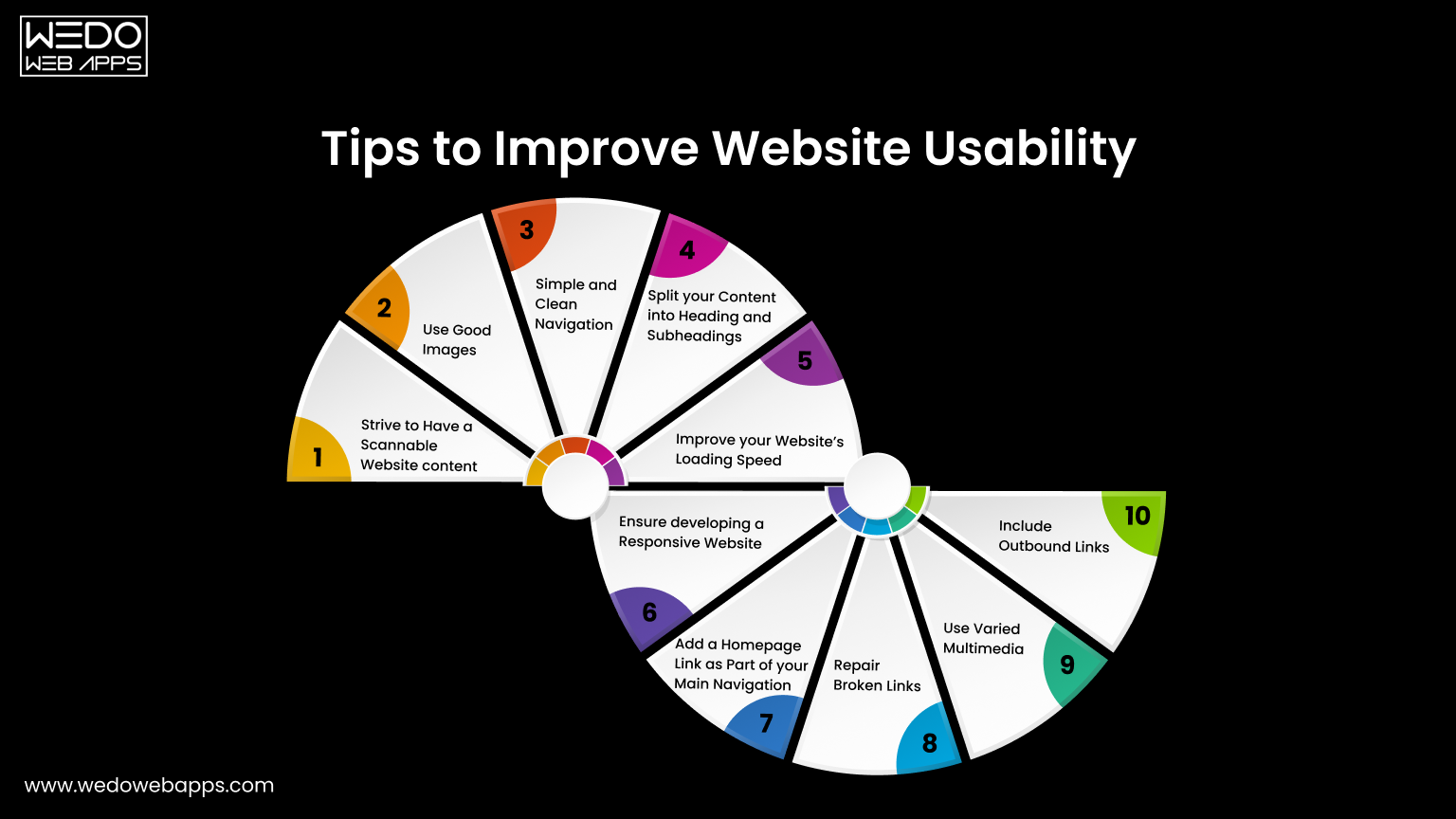
Tips to Improve Website Usability

Improve Website Usability for Better Performance

One of the greatest tips to improve website usability is to keep your website design consistent. Apart from this, there are many other tips that will help you improve the way the users interact with your website. Some of which include:

1. Strive to Have a Scannable Website Content

These days, people are hardly free to read every single piece of content on your website. In most cases, customers just scan your website and find the content that is valuable to them. If they don’t see what they are looking for, they will probably not be returning back.

The best way to improve usability is to make the website content scannable. Achieve this by using bold letters for important information and bullet points to enhance your website’s usability. Doing this will make your website easy to scan, and you will potentially gain more customers for your business.

2. Use Good Images

Using good images is a notable tip for increasing site usability because these help you break up the content. For example, instead of writing content for a point, try using images that add relevant information for that particular point.

Even though images play a vital role in the website’s usability, avoid using poorly optimized images or so many images as it can compromise your site’s usability. Instead of overdoing it, use properly optimized and limited images on your website.

3. Simple and Clean Navigation

A well-functioning website can improve usability but ensure giving a simple layout to every web page. Additionally, always try to avoid horizontal scrolling as users get irritated while horizontally scrolling the websites. A responsive website that fits every screen resolution can help you avoid horizontal scrolling.

What’s more important is to avoid the use of many navigation elements. Also, don’t use so many links within the headlines as users will hardly find what they want, which will significantly impact your website’s usability.

4. Split Your Content Into Headings and Subheadings

As we said earlier, visitors hardly read all the text written on your website. Therefore, catchy headlines are the most important for your website. Writing creative headlines can be beneficial as it is the very first thing a customer notices and builds interest in reading your content.

Apart from headings, structuring your website plays a crucial role in usability. Structuring your website with H1 and H2 tags will make your website look more appealing to your customers. It is an excellent way of resulting in long clicks and increasing engagement levels.

5. Improve Your Website’s Loading Speed

The slow loading speed can affect your website’s usability as it can cause you to lose a potential visitor. This is because a visitor gets irritated and leaves the website before it gets loaded fully. Additionally, search engines like Google use website loading speed as a significant ranking factor. This means you will lose an opportunity to rank higher on Google, ultimately losing customers.

Therefore, to resolve this issue, optimize your images and videos by reducing the file size before uploading them on the website. This will significantly increase your website’s loading speed.

6. Ensure Developing a Responsive Website

With an increase in the number of smartphone users, having a mobile-friendly website is not an option but a crucial part of web usability. Still, if you fail to incorporate responsiveness in your website it will affect your Google ranking and usability, thereby losing a high volume of traffic.

As you implement responsiveness to your website, ensure it maintains the same theme as the desktop version, regardless of the user’s device. For instance, the layout of a casino website will be different on both the desktop and the mobile versions. But, you need to make minor changes like changing the image size and maximum width of the page to have a responsive website.

If you have a website and want to incorporate responsiveness or are a business looking to develop a responsive website, we can help you offer cost-effective, responsive website design services.

7. Add a Homepage Link as Part of Your Main Navigation

Adding a homepage link on the top of your website will increase your site’s usability as it will enable the users to access the homepage easily. Definitely, the younger professionals know that the website logo acts as a link which eliminates the need to add the homepage link.

However, if your target audience is the older demographic, they may be confused about getting back to the homepage. If they do not see the home button, they won’t be able to recognize the logo as a link to the homepage easily.

8. Repair Broken Links

Broken links are terrible for website usability, but the good thing is that they can be fixed easily. There are several free and paid tools on the internet that may help you find the broken links on your website, so you can check and fix them.

9. Use Varied Multimedia

Even though it is said that content is king, images, audios, and videos play a vital role in appealing to the customers. Deliver the content that best suits your business and your users, and remember not to forget to optimize your multimedia to increase the site’s usability. Upload the content that provides value for the users.

10. Include Outbound Links

Adding some outbound links to your website will make the visitors feel valuable. This will make the content more relevant and useful for the customers. Linking your content with the high authority sites will not only make your website look trustworthy but will also make your web content more meaningful and relevant.

Now you know what you can do to improve the website’s usability. So, if you think that your website is not easily accessible for the users, implement these tips to enhance your site’s usability.


Website Usability Optimization for Better Engagement

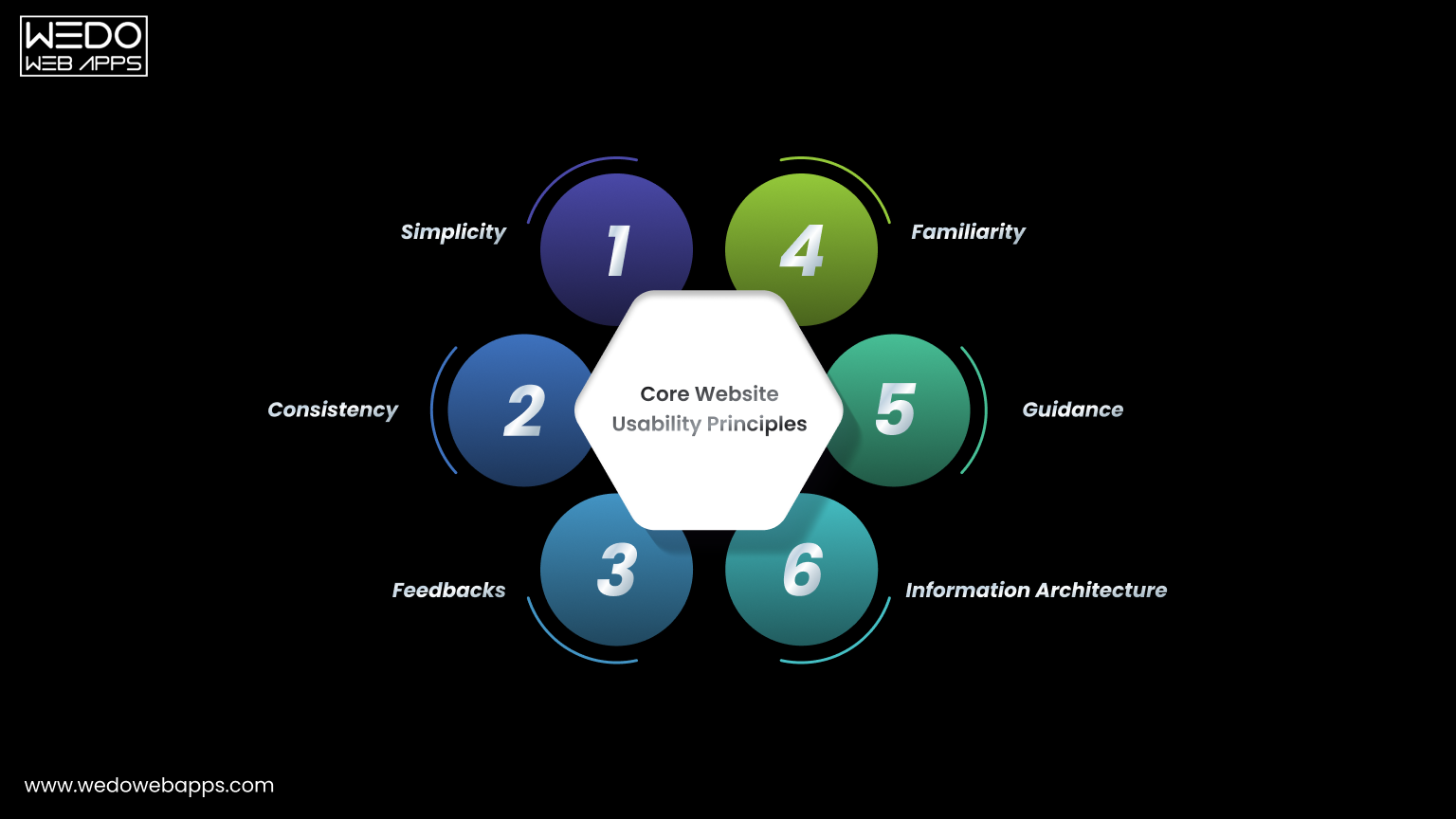
Core Usability Principles

Core Website Usability Principles Explained

After applying practical improvements, the next step is understanding the thinking behind them.

Usability principles for a website act like a rule that guides every design and content decision. Instead of fixing individual issues repeatedly, these principles help in preventing problems before they appear. They also explain the importance of website usability because they focus on human behavior rather than design trends.

Below are the core principles that support strong website usability best practices.

  1. Simplicity

A visitor should immediately understand what the page offers and what action is supposed to be taken next. Complex layouts force users to interpret instead of interact.

To apply simplicity:

  • Remove decorative elements that do not support a task.
  • Keep primary actions clearly visible.
  • Limit competing calls to action on a single screen.

Simple interfaces help users act faster and reduce hesitation.

  1. Consistency

People learn patterns quickly. When a website changes patterns across pages, users feel lost even when the website and content are being correctly managed.

Maintain consistency by:

  • Keeping navigation placement identical across pages.
  • Using the same button styles for the same actions.
  • Following a predictable content structure.

Consistency is one of the strongest answers to how to improve website usability because it lowers the mental effort.

  1. Feedback

Every user action should produce a clear response. Without feedback, visitors are unsure whether the system worked.

Provide feedback through:

  • Form submission confirmations.
  • Error messages that explain what went wrong.
  • Visual response when buttons are clicked.

Clear responses build trust and support the website usability definition of efficient interaction.

  1. Familiarity

Users prefer interfaces that behave like systems they already know. Completely new interaction patterns slow them down.

Improve familiarity by:

  • Using standard icons such as search and menu.
  • Following common checkout and form patterns.
  • Avoiding experimental layouts for important tasks.

Familiar structure improves confidence and interaction speed.

  1. Guidance

Websites should guide visitors instead of expecting them to explore your site blindly. Good guidance feels like signposts along a road rather than instructions in a manual.

Apply guidance with:

  • Clear step indicator in forms or checkouts.
  • Helpful tooltips for complex actions.
  • Suggesting next steps after task completion.

Guided navigation demonstrates how to improve website usability by reducing uncertainty.

  1. Information Architecture

Content organisation determines whether users find information quickly or abandon the search.

Improve structure by:

  • Grouping related content logically.
  • Naming categories based on user intent.
  • Keeping hierarchy shallow and predictable.

Good organisation supports long-term usability and ensures the website remains easy to use even as content grows.

Following these usability principles for a website ensures improvement remains consistent over time instead of becoming temporary fixes.

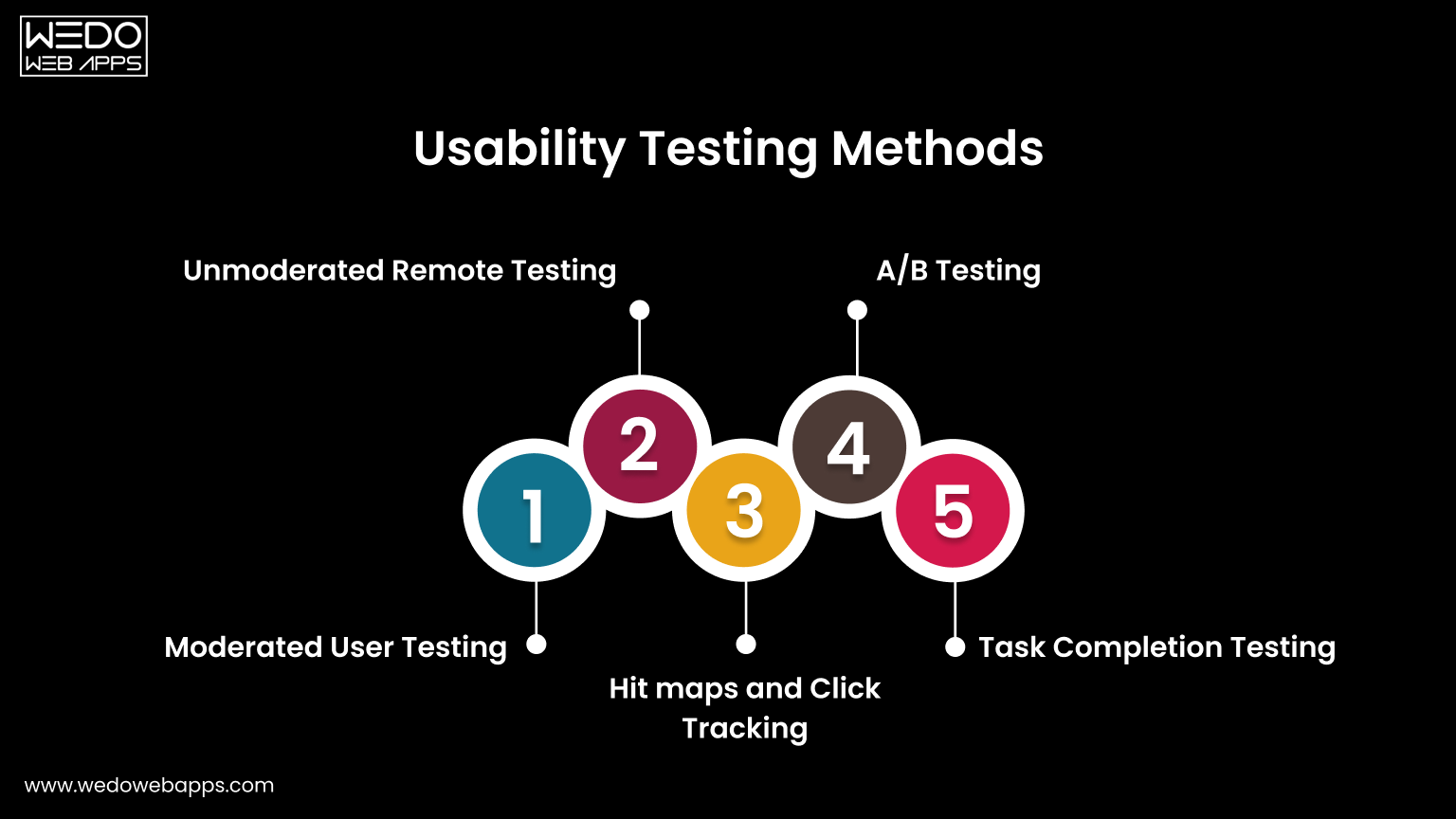
Usability Testing Methods

Website Usability Testing Methods Explained

After applying improvements and principles, the next step is validation.

You cannot rely only on assumptions when working on website usability. Testing shows whether users actually understand and complete tasks comfortably. This stage connects directly with the website usability definition because usability is measured through real interaction and not opinion.

Below are practical testing methods used in website usability best practices.

  1. Moderated User Testing

In this method, a facilitator observes users while they perform specific tasks on the website. The observer watches behavior, confusion points, and decision patterns.

Useful observations include:

  • Where users hesitate before clicking.
  • Which elements do they ignore.
  • What information do they expect but cannot find.

This method clearly demonstrates the importance of website usability because real users often behave differently than expected.

  1. Unmoderated Remote Testing

Users complete tasks independently without supervision while their actions are recorded. This provides natural behavior because participants interact in their own environment.

It helps identify:

  • Navigation misunderstanding.
  • Mobile interaction issues.
  • Content clarity problems.

This approach is widely used when learning how to improve website usability across different devices.

  1. Heatmaps and Click Tracking

Tracking tools visually display where users click, scroll, and stop reading. Instead of guessing engagement, you see attention patterns.

Common insights:

  • Buttons ignored by users.
  • Sections skipped during scrolling.
  • Overlooked important content.

These findings directly support usability principles for websites by revealing attention flow.

  1. A/B Testing
Two versions of a page are shown to different visitors to compare performance. Small layout or wording changes often produce measurable differences.

You can test:

  • Button placement.
  • Heading clarity.
  • Form structure.

This method converts website usability tips into a measurable improvement.

  1. Task Completion Testing

Users receive a clear objective, such as completing a purchase or finding contact details. The success rate and time taken are measured.

This evaluates:

  • Efficiency of navigation.
  • Clarity of instructions.
  • Overall interaction comfort.

Task completion directly reflects the website usability definition because it measures goal achievement.

Regular testing ensures improvements remain effective as the website grows. Instead of redesigning repeatedly, ongoing evaluation keeps usability aligned with user expectations.

Summarizing Website Usability

Website usability is the most significant element that cannot be achieved overnight. However, this is something every business website should primarily focus on. Avoiding website usability may cause you to drop down on the search engines and ultimately lose your potential customers.

Achieving website usability requires hard-core research and a repetitive approach of constantly testing and enhancing. Keep the above points in mind when you start developing or optimizing your website to offer the best user experience to your customers.

Designing an optimized website is a crucial part, but when the website is developed, website usability testing is highly recommended. If you are a non-tech geek having trouble creating or optimizing your website for usability, avail responsive web design services and let the professionals do their job. WeDoWebApps LLC has handled various design projects and can help you achieve success the way you want.


Transform Your Website with Website Usability

How to Leverage Social Media to Improve eCommerce Conversion Rate

Introduction – How Social Media Drives eCommerce Conversions Today

A potential customer discovers your product while scrolling Instagram during lunch. They like the design, tap your profile, browse a few posts, and save the product. Later that evening, they see your retargeting ad on Facebook. The next morning, a short TikTok video shows someone using the same product with real results. By afternoon, they visit your store and make a purchase.

This is how modern eCommerce buying journeys actually happen.

Today, social media is no longer just a place to build awareness. It plays a direct, measurable role in influencing purchase decisions and driving online revenue. Brands that successfully leverage social media are not only reaching audiences, but they are also strategically guiding them from discovery to checkout.

For startups, SMBs, and enterprises, the real opportunity lies in leveraging social media for business growth with conversion-focused strategies. When social media and eCommerce work together, brands can:

  • Improve eCommerce conversion rate
  • Increase eCommerce conversion rate across channels
  • Boost eCommerce sales consistently

This guide explains how to leverage social media for marketing that turns engagement into revenue. You will learn practical tactics, platform-specific strategies, and optimization techniques designed to help you attract high-intent shoppers, build trust, and convert more visitors into customers.


Not sure why social media traffic isn’t converting

Why Social Media Has a Direct Impact on eCommerce Conversion Rates

Most eCommerce brands treat social media as a top-of-funnel awareness channel. In reality, social platforms now influence every stage of the buying journey, from product discovery to final purchase decision.

This is why social media and eCommerce are deeply connected.

When implemented strategically, social media does more than generate traffic. It helps pre-qualify buyers, build trust, reduce hesitation, and push users toward conversion.

Here is how social media directly impacts your eCommerce conversion rate.

1. Social Platforms Capture High-Intent Traffic

  • Feed posts
  • Stories and reels
  • Influencer content
  • Paid social ads

Unlike cold website visitors, these users often arrive with context and curiosity. They have already seen the product in action, read comments, or watched a demonstration.

This warm intent increases the likelihood to:

  • Browse product pages
  • Add items to cart
  • Complete purchases

As a result, brands that leverage social media effectively tend to increase their eCommerce conversion rate compared to relying only on search or display traffic.

2. Social Proof Reduces Purchase Friction

One of the biggest barriers to online purchases is trust. Social media naturally solves this through:

  • User-generated content (UGC)
  • Reviews and comments
  • Influencer recommendations
  • Community engagement

When shoppers see real people using and endorsing a product, hesitation drops. Confidence rises. Conversions follow.

This is a core reason why social-driven traffic often helps improve the eCommerce conversion rate across product categories.

3. Faster Decision-Making Through Visual Commerce

Social platforms are built for visual storytelling.

Short videos, carousels, and lifestyle imagery allow shoppers to quickly understand:

  • What the product does
  • How it looks in real life
  • Why it is better than alternatives

This accelerates buying decisions and supports brands aiming to boost eCommerce sales without relying solely on long product descriptions.

4. Retargeting Creates Multiple Conversion Opportunities

Most users do not buy on their first visit. Social media retargeting allows brands to:

  • Re-engage product viewers
  • Remind cart abandoners
  • Upsell previous customers

Each additional touchpoint increases familiarity and purchase intent, which directly supports efforts to increase eCommerce conversion rate over time.

5. Social Commerce Shortens the Purchase Path

Features like:

  • Instagram Shops
  • Facebook Shops
  • TikTok Shops
  • Shoppable Pins

Allow users to move from discovery to checkout with fewer steps.

Fewer steps mean less friction and higher conversion probability.

This is a major reason why modern brands prioritize leveraging social media for business growth, not just brand awareness.

Proven Strategies to Leverage Social Media to Boost eCommerce Conversions

Successfully leveraging social media for marketing is not about posting frequently. It is about designing conversion-focused experiences across platforms.

Below are proven strategies used by high-performing eCommerce brands to improve eCommerce conversion rate, increase buyer confidence, and boost online sales.

1. Optimize Your Social Profiles for Conversion

Your social profile is often the first touchpoint between your brand and potential customers. It should function like a mini landing page, not just a branding asset.

Key optimization elements:

  • Clear value proposition in bio
  • Primary keyword in description (e.g., social media and eCommerce solutions)
  • Single-focused CTA (Shop Now, View Collection, Get Started)
  • Shoppable links or product catalogs

Well-optimized profiles help turn profile visitors into store visitors. This is an essential step to increase eCommerce conversion rate.

2. Build Content That Matches Buyer Intent

Different content types serve different stages of the funnel.

High-converting content formats include:

  • Product demos and usage videos
  • Before-and-after transformations
  • Customer testimonials and reviews
  • Comparison posts
  • Short problem-solution reels

This content answers buying questions upfront and reduces uncertainty. It helps shoppers move faster toward purchase.

3. Leverage User-Generated Content (UGC)

UGC acts as digital word-of-mouth.

When shoppers see real customers using your product, trust increases dramatically.

Ways to use UGC:

  • Feature customer photos on product pages
  • Repost tagged content on social channels
  • Use UGC inside paid ads
  • Highlight video testimonials

UGC directly supports brands looking to improve eCommerce conversion rate by lowering skepticism and increasing authenticity.

4. Use Paid Social Advertising with Conversion Intent

Organic reach alone is rarely enough for consistent growth.

Conversion-focused ad strategies include:

  • Retargeting website visitors
  • Retargeting cart abandoners
  • Lookalike audiences based on buyers
  • Dynamic product ads

Each campaign should point to a conversion-optimized landing page, not just a homepage.

This approach helps brands systematically boost eCommerce sales and scale faster.

5. Implement Social Commerce Features

Native shopping features reduce friction between discovery and checkout.

Examples:

  • Instagram and Facebook Shops
  • TikTok Shop
  • Pinterest Product Pins

Shoppers can browse and buy without leaving the platform, which often results in higher completion rates.

Social commerce is one of the most effective ways to increase eCommerce conversion rate today.

6. Create High-Converting Landing Pages for Social Traffic

Social traffic behaves differently from search traffic.

Best practices:

  • Clear headline aligned with the ad or post
  • Strong hero image or video
  • Benefits-focused bullet points
  • Visible social proof
  • Fast-loading mobile design
  • Simple checkout flow

Dedicated landing pages significantly outperform generic product pages when leveraging social media for business growth.

7. Use Retargeting to Recover Lost Sales

Most visitors will not purchase on their first visit.

Retargeting allows you to:

  • Show abandoned cart reminders
  • Offer limited-time discounts
  • Highlight reviews or testimonials
  • Promote urgency (low stock, ending soon)

This strategy alone can recover a large percentage of otherwise lost revenue.

8. Collaborate with Influencers Strategically

Influencer marketing works best when creators:

  • Match your target audience
  • Produce authentic content
  • Demonstrate real usage

Micro-influencers often drive higher engagement and better conversion rates than large influencers.

When executed properly, influencer partnerships become a scalable method to boost eCommerce sales.

Key takeaway. The brands that achieve the highest ROI treat social media as a conversion channel, not just a content channel. Every post, ad, and interaction should move users one step closer to purchase.

How to Measure and Improve Social Media-Driven eCommerce Conversion Rates

Leveraging social media effectively is not just about execution. It is about measuring what drives results and optimizing continuously. For startups, SMBs, and enterprises, understanding performance data is essential to increase eCommerce conversion rate and scale profitably.

This section explains what to track, what benchmarks matter, and how to optimize based on insights.

Key Metrics That Matter for Social Media and eCommerce

To evaluate whether your social strategy is working, focus on metrics tied directly to revenue, not vanity numbers.

Core performance metrics include:

  • Conversion Rate (CR): Percentage of social visitors who complete a purchase
  • Click-Through Rate (CTR): Measures content and ad relevance
  • Cost Per Acquisition (CPA): Cost to acquire one customer via social
  • Return on Ad Spend (ROAS): Revenue generated per ad dollar
  • Average Order Value (AOV): Value of each completed transaction

Tracking these metrics helps identify where friction exists and where optimization can improve eCommerce conversion rate.

What Is the Average Conversion Rate for eCommerce?

Decision-makers often ask. What is a good conversion rate for eCommerce?

While rates vary by industry, device, and region:

  • Average eCommerce conversion rate: typically ranges between 2% to 3%
  • Top-performing stores often exceed this by optimizing traffic quality, UX, and trust signals

If your social traffic converts below average, the issue is rarely the platform. It is usually message mismatch, weak landing pages, or lack of trust signals.

Understanding the conversion rate average for eCommerce gives you a realistic benchmark for improvement.

How to Identify Conversion Drop-Off Points

To increase eCommerce conversion rate, you must pinpoint where users abandon.

Common drop-off points include:

  • After clicking a social ad or post
  • On product detail pages
  • During checkout
  • At payment confirmation

Using analytics tools, heatmaps, and funnel reports helps reveal these gaps and enables targeted improvements.

Optimization Tactics That Drive Higher Conversions

Once data is available, optimization becomes systematic.

High-impact improvements include:

  • Aligning ad copy with landing page messaging
  • Simplifying checkout steps
  • Adding social proof near CTAs
  • Improving page load speed on mobile
  • Testing different creatives and offers

Each incremental improvement compounds over time, helping brands boost eCommerce sales without increasing ad spend.

Why Continuous Testing Is Non-Negotiable

Social platforms evolve constantly.

Audience behavior, algorithms, and formats change. So should your strategy.

Brands that consistently leverage social media for marketing success test:

  • Creatives (videos vs images)
  • Messaging angles
  • Offers and incentives
  • Audience segments

This iterative approach separates average performers from scalable, high-growth eCommerce businesses.

Key insight for decision-makers. If social media is not improving your eCommerce conversion rate, the issue is rarely visibility. It is almost always strategy, execution, or optimization gaps.


Find out why social media isn’t generating enough sales

Common Mistakes That Prevent Social Media from Boosting eCommerce Sales

Many businesses invest heavily in social media but struggle to see a meaningful revenue impact. In most cases, the problem is not the platform. It is how social media is being used.

Avoiding the following mistakes can significantly improve the eCommerce conversion rate and overall ROI.

1. Treating Social Media as Only a Branding Channel

Posting consistently is important, but posting without a conversion objective limits results.

When content lacks:

  • Clear CTAs
  • Product context
  • Conversion paths

Social engagement stays disconnected from revenue.

High-performing brands design every post with a purpose. Educate, build trust, or drive purchase.

2. Sending Traffic to the Homepage

Homepages are built for broad audiences, not social-specific intent.

Sending social visitors to generic pages often results in:

  • Confusion
  • Higher bounce rates
  • Lower conversion rates

Dedicated landing pages aligned with each campaign dramatically increase eCommerce conversion rate.

3. Ignoring Mobile Experience

Most social traffic is mobile-first.

If your store loads slowly or checkout is complex on mobile, conversions drop instantly.

Mobile optimization is a non-negotiable factor for brands aiming to boost eCommerce sales.

4. Using One-Size-Fits-All Content

Each platform has different user behavior.

Reposting identical content everywhere limits performance.

Instead:

  • Use short-form video for TikTok and Reels
  • Use carousels for Instagram and LinkedIn
  • Use pins for Pinterest

Platform-native content performs better and converts higher.

5. Neglecting Retargeting

Only a small percentage of users buy on their first visit.

Without retargeting:

  • Warm leads are lost
  • Customer acquisition costs increase
  • Revenue potential remains untapped

Retargeting is essential for brands looking to increase eCommerce conversion rate consistently.

6. Focusing on Vanity Metrics

Likes and followers do not equal sales.

Conversion-focused brands prioritize:

  • Purchases
  • Revenue
  • CPA
  • ROAS

This shift in mindset is critical when leveraging social media for business growth.

Bottom line. Social media success in eCommerce is rarely about doing more. It is about doing the right things strategically.

Why Partnering with Experts Helps You Scale Social Media-Driven Conversions

As social media and eCommerce become more complex, managing everything in-house becomes increasingly difficult. Platforms change, algorithms evolve, and buyer expectations rise. What worked six months ago may no longer deliver results today.

This is why many high-growth brands choose to partner with experienced eCommerce and social media specialists instead of relying solely on internal teams.

1. Strategy Before Execution

Experts do not start with posting schedules. They start with business goals.

A professional team helps define:

  • Target audiences and buyer personas
  • Platform selection
  • Conversion funnels
  • Content and advertising strategy

This strategic foundation ensures every effort supports your objective to increase eCommerce conversion rate.

2. Cross-Channel Optimization

Social media does not operate in isolation.

Specialists align:

  • Social campaigns with website UX
  • Landing pages with ad messaging
  • Email and SMS with retargeting efforts

This integrated approach creates a seamless customer journey that helps improve eCommerce conversion rate across channels.

3. Access to Specialized Skill Sets

Effective social commerce requires multiple competencies:

  • Performance marketing
  • Conversion rate optimization
  • UI/UX Design
  • Analytics and reporting
  • Content production

Building this expertise internally is expensive and time-consuming. Partnering gives instant access to these skills.

4. Faster Testing and Scaling

Experienced teams already know:

  • What strategies work
  • What mistakes to avoid
  • How to test efficiently

This shortens learning curves and accelerates results. It is crucial for brands aiming to boost eCommerce sales quickly.

5. Data-Driven Decision Making

Experts rely on real performance data, not assumptions.

They continuously analyze:

  • Campaign performance
  • Funnel drop-offs
  • User behavior
  • ROI metrics

This allows continuous optimization and predictable growth.

Key takeaway for decision-makers. If social media is an important revenue channel for your business, treating it as a specialized function, not an experimental activity, can dramatically change outcomes.


Transform social media into a predictable revenue channel

Conclusion. Turning Social Media Into a Revenue-Driving eCommerce Channel

Social media has evolved far beyond awareness and engagement. Today, it plays a direct and measurable role in how customers discover products, evaluate brands, and decide where to spend their money.

For startups, SMBs, and enterprises, the opportunity is clear.

When you leverage social media strategically, you can:

  • Improve eCommerce conversion rate
  • Increase eCommerce conversion rate across platforms
  • Build trust at scale
  • Boost eCommerce sales consistently

The brands that win are not necessarily the ones posting the most. They are the ones aligning content, commerce, advertising, and optimization around a single objective. Conversion.

By optimizing profiles, creating buyer-focused content, using social commerce features, investing in retargeting, and measuring performance continuously, social media becomes a predictable growth engine rather than an experimental channel.

If your goal is to turn social media into a serious revenue driver, the next step is having the right strategy, technology, and execution model in place. For that, you can partner with a social media marketing company that can help you boost your eCommerce sales using social media.


Boost eCommerce conversion rates and sales effectively


Website Development Process: 10 Steps for a High-Performing Website

Introduction

Great websites do not just appear overnight, and ones that look like they are not worth using. A template-built site created in 30 minutes might put you on the internet, but it skips every stage of the website development that actually matters: the research, the user experience strategy, the SEO architecture, and digital trust.

75% of users judge a business’s credibility based on the website design. And 74% say that they will not return to a site that is not mobile-friendly. A weak website is not neutral; it actively loses you, customers.

At WEDOWEBAPPS, our website development methodology has been refined over more than a decade now. This is a disciplined, 10-phase website development process that delivers a website that ranks, converts, and performs.

If all you need is a website that drives traffic and generates high revenue, and not a business card that only a few people may know. Below are the phases of web development that we have been following for a decade for building the most enticing and responsive websites.

Let’s know about every phase of the website development in detail.

What is a Responsive Website and Why It Is Important?

Before walking through every phase of the web development process, you must understand what responsive design means in 2026, because at every stage of development, this is an important factor.

So, what is a responsive website?

A responsive website is something that automatically adjusts the website’s layout, images, text size, and navigation as per the device size. This allows the user to maintain a seamless experience across all devices without any further changes in design. In 2026, this is not just a feature update. It is a minimum baseline for any website that wants to perform well and give a better experience.

Important Note:-

62-64% of all global web traffic is now coming from mobile devices. Especially in eCommerce sites, mobile drives 78% of all the retail traffic, yet the desktop still converts at nearly double the rate.

Also, 74% of users say that they do not return to any website that is not mobile-friendly. And a responsive website receives 50% more traffic than a non-responsive one.

Following Google’s mobile-first indexing policy is not becoming standard for all websites, which means that your mobile version determines your search ranking, not your desktop version. A website that is not built responsibly from day one is already competing at a structural disadvantage.

In short, it is important to have a website that is mobile-friendly and is developed with a responsive website design that grows as the customer base grows.

Why You Should Invest in Building Responsive Websites?
Why You Should Invest in Building Responsive Websites

What’s the point of a website if it does not bring traffic or revenue? There are three out of every five websites that convert visitors through mobile and reach the new market globally.

Here are the five strongest reasons that you should invest in responsive design when it comes to the website development process.

  • Cost-Effectiveness: One responsive website works perfectly across every device. There is no need to build, host, and or maintain a separate mobile site, which reduces the need for additional development and maintenance costs.
  • Flexibility: A responsive layout automatically adapts to new screen sizes and resolutions as technology evolves. Your site will always stay future-ready with the growing market needs.
  • SEO Gains: Google’s mobile-first indexing makes responsive design one of the most direct SEO improvements available. Mobile-optimized websites can see a 20% increase in conversion rate, and also the responsive sites rank higher across competitive search results.
  • Ease of Management: Follow the one codebase, which means one website to update, optimize, and maintain. This allows you to make the changes once and have the instant reflection across the desktop, tablet, and mobile site without additional efforts.
  • Improve User Experience: A fast and responsive experience removes the friction from the site and keeps the visitors engaged long enough to convert.

With the responsive design established as the most negotiable foundation, the question becomes: What else separates a website that performs from one that simply exists online? It is the website development process.

Now that you know about the important responsive websites, let us come back to our primary focus, which is the key stages of the website development process.

Struggling to generate revenue with a website

Key Stages of Website Development Process

Stages of Website Development Process

Every website that we build, whether it is for a small business or a large enterprise, we follow the same structured website development workflow. This consistency is what makes us deliver the project on time while following the predictable quality standard and specification that holds up in the competitive search environment.

The following 10 steps in website development form a complete website development process. Each phase has defined deliverables, and the next phase will not begin until the last stage is delivered, reviewed, and approved properly.

A structured website development process reduces post-launch bug fixes by up to 80% and cuts the chances of rework by 50% compared to an unplanned development.

Step 1. Requirement Gathering

Requirement gathering is the foundation of the entire website development process. It is the discovery phase where you will discuss the objectives of your required website, the cost, and the various needs.

Without this step, even the most talented development team cannot start working. With this, every design decision, content choice, and technical implementation needs to be followed clearly. The difference between the project that delivers and one that unravels at revision stages almost traces back to whether this step was done properly.

What is established in requirement gathering:

  • Business Goals: What does your website need to achieve? Lead generation, direct sales, brand credibility, customer service, recruitment, or a combination? Every goal gets clear with design, content, and development decisions.
  • Target Audience: Your target audience will also get clear with the objective discussion. By understanding the audience, this stage defines the user experience from the ground up.
  • Scope and Timeline: How many pages are needed on a website? Which features are essential for launch, and which can be phased later? Everything will be discussed, which allows you to know about the expected launch date and the external dependencies.
  • Budget: A transparent, scope-based estimate is provided at this stage. If the budget constraints require adjustment, then the right approach is to reduce the scope rather than the quality.
Pro Tip:- The more specific you are about your goals, the fewer revisions you pay for later. Unclear briefs produce expensive surprises at every stage of the project. Detailed briefs produce clean and on-time deliveries.

Step 2. Proposal

Once the requirements are fully understood and agreed then everything goes into writing. A signed proposal is not just a formality, but it is the most effective project management tool available for both parties in any website development workflow.

When the disagreement arises mid-project, a well-written proposal is the neutral reference point that resolves it in a minute rather than a week. It eliminates the two most common causes of project failure: misaligned expectations and unmanaged scope.

A professional project proposal includes:

  • A clear summary of the project, its context, and its business objective.
  • A complete list of every deliverable and feature to be built.
  • A preliminary sitemap and wireframe outline.
  • The development approach, technology stack, and hosting environment.
  • A detailed project timeline with key milestones, review checkpoints, and client approval gates.
  • The total project fee, payment schedule, and revision policy in plain language.

No professional website development company should ever begin a website without a signed agreement in place.

At WEDOWEBAPPS, we never do this, and we recommend you never work with one that will.

Step 3. Creating a Sitemap and Wireframe

With the proposal signed, the next step is shaping the website structure before any visual design or code is written. This is where the website development phases move from works on paper to tangible blueprints.

The sitemap defines the architecture of your website, including how every page will exist, how pages connect with each other, and how users and search engines crawl your site. It is the high-level blueprint of your digital presence, and it is not only the early SEO document, but the defining URL structure and content hierarchy also play an important role in Google indexing.

The wireframe goes one level deeper than the sitemap. It maps the presence of your website layout with individual pages and headings, along with the primary CTA button. This also decides how images and text blocks are positioned, and how the navigation behaves at different screen sizes. No colors, no typography, no photography. Just pure structure.

Why sitemaps and wireframes work is worth the investment:

  • Maintain full alignment between the client, designers, and developers before the work begins. This eliminates the assumptions that cause the changes at a late stage of design.
  • Deliberately plan a user journey that guides visitors from landing to conversion, based on the intent.
  • Early identification of missing pages, navigation gaps, and user experience problems can save hours to fix.
  • Make the mobile-first layouts from the start and have more visitors.
Pro Tip:- Always wireframe both desktop and mobile simultaneously. A layout that works perfectly on a 27-inch monitor can be completely unusable on a 6-inch screen. Discovering this at the wireframe stage takes hours to fix. Discovering it during development takes less time.

Step 4. UI/UX Design

At this phase, the real work begins. This is where your website transforms from a structural blueprint into a real visual experience and where the first impressions are permanently made, won or lost.

The design team uses the wireframe as a practical guide and applies your brand identity into logo, color palette, typography, imagery, and iconography to create the complete visual language of every page. Each element is chosen effectively: not just for a professional look but also to guide visitors towards a specific action in a way that feels completely natural.

Before the development design check of the fully approved design for desktop and mobile devices. This eliminates the chances of a change in design after the development begins. The great UI/UX design must also satisfy Google’s technical performance standards.

What high-quality UI/UX design delivers:

  • A clear visual hierarchy that directs the attention to what matters most on every page.
  • Intuitive, frictionless navigation optimizes the customer interaction.
  • Consistent branding that builds instant trust and recognition across every touchpoint.
  • Touch-friendly mobile interface from the very first day of development.
  • Accessible website design standards start that meet both legal and commercial differentiators.
  • Layouts are designed to minimise cumulative layout shift, a direct Google ranking signal that is determined at the design stage, not the development stage.

Step 5. Content Creation

Design the attention, but the content makes the user stay, and what ultimately determines is whether they convert into a customer, enquire about your services, or leave for a competitor.

Content creation is one of the most important steps in website development and consistently the most under-resourced. Most of the businesses treat it as something to sort out after the website is designed. The result is websites with beautiful layouts that say nothing meaningful can rank nowhere in Google because they have no substance worth indexing.

With the recent algorithms, getting the content wrong is more costly than ever. Following Google’s core update, the EEAT requirement does not apply to virtually every competitive search category. Mass-produced, AI-generated content without genuine human expertise and editorial oversight is being actively filtered from search results. The only content that ranks and earns citations from AI search tools is content that shows real knowledge and provides real-value.

Content created during this phase:

  • Homepage, About, Services, and Contact page copy all need to be written with targeted keywords, which need to be used naturally, not stuffed.
  • Service and product descriptions that address your customer’s actual questions, concerns, and decision-making criteria.
  • Blog articles and resource guides that build topical authority and capture long-tail search traffic.
  • Meta titles and meta descriptions for every page are essential for both Google rankings and click-through rates.
  • Image alt text for every added visual for accessibility compliance and image search visibility.
  • Call to actions that are specific, clear, and tested for conversions.
  • Structured data makeup recommendations: FAQs and article schema, which is critical for AI overview inclusion and rich result eligibility.
2026 Update:- Voice search is expected to account for 50% of all searches by the end of 2026. Content that answers specific, conversational questions in clear and direct language, particularly on FAQ format, is significantly positioned better for Voice search and AI overview.

Step 6. Development

With the approved designs and finalised content in hand, the development phase begins. This is where the website is built. Every page, every feature, and every interaction is coded into existence and integrated into a functioning product.

The website development methodology splits into two parallel tracks, both executed with equal rigour: frontend and backend.

Frontend Development

Frontend development covers everything from what visitors see and interact with: the layout, buttons, forms, animations, navigation, and responsive behaviour across every screen size. The front-end developers translate the approved design into clear and standard HTML, CSS, and JavaScript.

Every page should be built to meet the performance benchmark, such as:

  • Use of compressed images to avoid lazy loading issues. Render blocking script for eliminating the risks.
  • JavaScript execution for optimised long tasks without delays in any interaction responses. This is the metric most developers underestimate when it measures responsiveness across an entire session.
  • All images, videos, ads, and dynamically loading elements should give the explicit width and height to prevent the layout shift as the page loads.
  • Testing for all sources, such as Chrome, Firefox, Safari, and Edge, along with mobile devices.

Backend Development

Backend development is the engine behind your website. While the frontend handles what users see, the backend handles what the website does: processing orders, storing form submissions, authenticating users, delivering personalized content, integrating with payment systems, and managing databases.

Backend development also means building a website with security as a first priority. Every site is built that is secured with SSL, implements proper input sanitisation, and follows current data protection regulations.

For a complex web application, the precise choice of website development company matters the most. The quality of your backend architecture determines your site’s speed, security, scalability, and resilience for years to come.

Pro Tip:- 76% of developers now use AI tools to assist with coding, testing, and performance auditing. Our development team uses an AI-assisted workflow to accelerate code review and testing, which allows you to have faster delivery without impacting the quality.

Step 7. A/B Testing or Pre-Launch QA

No website should go live without passing a comprehensive multi-layer quality assurance process. This is one of the most important steps in website development and one of the most frequently compressed or skipped by teams working on a project to hit the deadlines at any cost.

Our QA process is not a single-step process. It is a systematic, multi-round testing programme covering every dimension of quality: performance, compatibility, functionality, security, accessibility, and search readiness.

Our full QA testing checklist:

  • Cross-Browser Testing: Chrome, Firefox, Safari, and Edge with the current version on both desktop and mobile to confirm consistent rendering, layout, and functionality across all major browsers.
  • Cross-Device Testing: Check the website design for desktop, iPhone, Android, and other devices to verify the responsive behavior and touch interaction at every point.
  • Core Web Vitals Audit: LCP, INP, and CLS are measured using Google PageSpeed Insight field data and Google Search Console, which help you know about the real-user performance issues.
  • Functional Testing: Every form, button, link, filter, dropdown, modal, and interactive element is tested for original specification to confirm it works exactly as agreed.
  • SEO Validation: All meta titles, descriptions, canonical URLs, XML sitemaps, and heading hierarchy reviewed and confirmed.
  • AI Visibility Audit: Faq and article schema validated using Google’s rich result test, content structured for AI overview eligibility.
  • Security Checks: SSL verification across the full domain, form input sanitisation, login protection, spam prevention, and data handling compliance.
  • Accessibility Audit: Audit the site for legal and commercial risk and compliance, along with the keyword navigation, color contrast ratios, ARIA labels, and screen reader compatibility.
Note:- A structured QA phase reduces the post-launch bug fixes by up to 80% compared to a project where testing is rushed or skipped. Every issue caught before launch costs a fraction of what it costs to fix after.

Step 8. Prototype Submission

Before any website goes live, you experience it exactly as your future visitors will in terms of security.

This is a formal checkpoint in the website development phase. At this stage, you will have the staging link alongside a clear set of review instructions: what to check on each page, how to test interactive features across different devices, and exactly how to submit feedback or other requests.

This is not a static PDF or design mockup. It is a fully functioning website that allows you to navigate and interact with it just the way your customer reviews it. Any final changes identified at this stage are addressed before the process of launching the website.

Step 9. Launch

Launch day is a significant milestone and a carefully managed one. Once you have provided a written sign-off on the prototype, our team runs through a comprehensive pre-launch checklist before pointing your live domain to the production server.

Pre-launch checklist:

  • DNS configuration and domain transfer to the live server confirmed.
  • SSL certification is active and verified across the full domain.
  • Google Analytics setup, configuration, and event tracking verified against specification.
  • Google search console property creed, XML sitemap submitted, coverage report reviewed for errors.
  • 301 redirects confirmed for any URLs that have changed from the previous site.
  • Final core web vital check using field data.
  • Structured data markup validation.
  • AI overview, eligibility, and schema rendering.
  • Post-launch smoke test for every page, every form, and every feature.

With every item checked and confirmed by the project lead, the website goes live. It is the culmination of every hour of planning, designing, writing, building, and testing that came before launch.

Step 10. Maintenance

A website launch is not just the last step of development, it is the beginning of the asset that require to maintain site consistent, professional, and competitive.

The web development lifecycle does not end at deployment; it keeps requiring content and technical review to improve the functionality of the website. CMS platforms and plugins release security patches on a continuous basis, which need to be taken care of.

What post-launch maintenance covers:

  • Regular CMS, plugin, and security updates to prevent vulnerabilities.
  • Continuous monitoring for traffic patterns, third-party scripts, and Google benchmark services.
  • Content updates, new page creation, and feature addition.
  • Analytics review and conversion rate optimization recommendation based on real visitor behavior data.
  • Structured data updates to keep schema markup aligned with Google’s requirements.
  • Uptime monitoring with rapid response to any unexpected downtime.
  • Post-algorithum update content and technical review following major Google core updates.

This ongoing commitment is what separates a genuine long-term partnership with a trusted development partner you invest in to have better results.

Request Your Project Estimations

How Long Does the Website Development Process Take?

How Long Does the Website Development Process Take

One of the most common questions that you must be thinking about, and the honest answer is that it depends on the scope.

Here is a realistic breakdown based on project type, based on project delivery data:

  • Small Business Website: 4-8 weeks from requirements gathering. The most reliable cause of delay at this scale is content that is not prepared in the advanced design phase.
  • Mid-Size Corporate Website: 8-14 weeks, including multiple rounds of content review, design iteration, and functional testing across departments.
  • eCommerce Website: 12-20 weeks, depending on payment gateway integration complexity, product data setup, and custom checkout functionality.
  • Custom Web Application: 3-6 months for builds with user authentication, custom databases, third-party API integrations, and bespoke feature sets.
Pro Tips:- The two-phase authentication can mostly allow to maintain consistency with the project timelines are content creation and client review cycles. Agreeing on review deadlines and content delivery dates at the proposal stage keeps every project on schedule.

Common Website Development Mistakes That You Should Avoid

Understanding the stages of website development is only halfway to your development phase. Knowing what goes wrong and why is equally important for setting realistic expectations and making the right decisions at every phase.

  • Skipping Requirement Gathering: Jumping straight to design without a clear, documented brief produces websites that look fine but achieve nothing specific. Every hour saved here costs several hours of revisions later.
  • Leaving Content Until Last: Designing around placeholder text and adding real copy at the end consistently breaks approved layouts. Content and design must be developed in parallel, not sequentially.
  • Desktop-First Design in Mobile-First World: Designing for desktop and adapting for mobile produces consistently worse mobile experiences and lower search rankings.
  • Ignoring CoreWeb Vitals: A site that fails to lose ranking to a competitor with comparable content quality. Performance is now a direct competitive differentiator.
  • No Structured Data Markup: Websites with schema markup are likely to appear in search results, and skipping it leaves the organic visibility on the table.
  • Rushing or Skipping QA Testing: Every bug found after launch costs significantly more to fix than one found during testing. A structured QA phase is one of the highest-return investments in any web project.
  • No Post-Launch Maintenance Plan: A website without regular updates accumulates security vulnerabilities, suffers performance degradation, and drifts out of compliance standards. An initial investment depreciates rapidly without maintenance.
  • Ignoring Accessibility: Accessibility is not a legal exposure and should be filled carefully.

In a Nutshell: Ready to Start Your Website Development?

Building a website that genuinely performs, ranks well, and easily earns trust requires following the 10 website development phases.

The gap between the website that works and one that merely exists is not just about the budget, but it is also about the website development process. Every stage of website development described in this guide creates a measurable impact. Follow all the steps with the right web development team and get what you need for your business.

If you follow the website development process with dedication and the right team, you can build more than a website. You will build a durable, high-performing digital presence that generates leads, earns trust, and grows alongside your business.

responsive website for your business

Laravel Trends: What’s Next for Developers and Web Development

Laravel Trend in Developing Scalable Applications

Laravel development company is developing with the use of PHP frameworks. It helps in powering all the factors, like startup MVPs, to web enterprise applications. And with the recent reports, it is clear that the PHP framework has become the choice of 18.2% of the developers. It is an available ecosystem of tools that allows developers to work faster with secure and scalable application development.

In the USA, Laravel adoption is growing notably in various industries like eCommerce, SaaS, and logistics platform that requires flexibility and performance at a better scale. So, if your business is also looking for scalability in terms of accessing modern solutions, keeping up with the Laravel web development trends, or connecting with a Laravel development company, that is the only solution.

This blog allows you to explore Laravel trends, along with which are listed on the top, tools, and techniques that can be used to define better web development practices, and what’s ahead for those building with it.

Why Laravel is Still the Preferred PHP Framework in 2025

Laravel continues to grow rapidly to simplify the web development processes while supporting modern, high-performing applications. This makes it easy for developers to develop secure, user-oriented, and high-performing applications while maintaining the future of Laravel.

There have been various updates while maintaining better practices for web development. With the attached frameworks, developers can build the app by accessing real-time tools and simple integration.

Continued Popularity Among Developers and Enterprises

To be used in various industries, Laravel has been the most trusted PHP framework with a large number of supporters.

  • To be used by the developer, this framework has gained advanced features to maintain accuracy.
  • It has remained among the top choices of the PHP framework among developers.
  • This is preferred to have clean and structured code.
  • Helps in reducing the coding time without lowering the quality of the code.

For a business, this means:

  • Easier to find a skilled Laravel developer.
  • Faster project delivery timelines.
  • Better long-term code maintenance and support.

Laravel Ecosystem: Tools, Community, and Documentation

Laravel offers access to different frameworks, and having those tools makes the process of development appear to be smoother and more efficient.

Here are some of the valuable Laravel tools:

  • Forge – Used for maintaining an easier server setup and management.
  • Envoyer – For safe, zero-downtime deployment of the application.
  • Vapor – It is for having a seamless hosting application on AWS.
  • Livewire and Inertia.js – For building a creative and reactive user interface without the need to access heavy JavaScript.

In Laravel development, our strengths include:

  • Well-structured and friendly access toward development.
  • A supportive development community to maintain accuracy.
  • Regular updates to match the intent while meeting tech needs.

If the company is making use of these tools, then there are chances of having reduced complexity and saving time for project rollouts.

Real-world Adoption: Use Cases from the USA Market

Laravel is trusted by many different industries to have better development. From startups to growing companies, it supports web apps that need scalability for the business.

  • SaaS Platform – Fast API development, user authentication, and role management.
  • eCommerce Platform – Secure checkouts, product management, and real-time tracking of orders.
  • Healthcare and logistics apps – Custom dashboard, secure data handling, and automated reports management.
  • Government or public platforms – Easy integration with third-party services and maintaining scalable performance.

These examples reflect how Laravel trends are meeting real-world needs while staying cost-effective and flexible.

Top Laravel Trends Developers Should Pay Attention to in 2025

There has been a quick increase in the Laravel ecosystem with the quick services to shape the new demand around speed, scalability, and application structure.

The top Laravel trends reflect how and where the developers are heading to stay competitive within the market by making use of modern tools and practices.

Below are the key trends that drive the future of Laravel development.

Serverless Deployment with Laravel Vapor

Laravel Vapor is a serverless development platform that is specifically powered by AWS and built to handle specialized application services.

Why it is growing:

Businesses want to reduce the overall cost of infrastructure and address the simple need for server management. Vapor allows businesses to scale automatically with the advanced generation of user traffic on the application.

How it is being used:

For SaaS startups and eCommerce platforms, the use of Vapor is better as this gives ease in handling the traffic and makes it easier to launch seasonal sales.

Tools Support it:

  • Laravel Vapor
  • AWS Lambda
  • Laravel Queue, S3,and CloudFront Integrations

API-First Laravel Applications with Sanctum & Passport

Laravel makes it easier to handle a better API-first application when handling the development practices with simplified manipulation of the server.

Why it is growing:

Deploying a modern application requires meeting the needs of mobile apps, third-party integrations, and frontend frameworks like React and Vue. This allows you to have an API-first structure to support your application needs.

How it is being used:

Used for managing multi-platform apps for the ease of sharing data between mobile and web, like CRMs, booking systems, or fintech dashboards.

Tools supporting it:

  • Laravel Sanctum
  • Laravel Passport
  • Laravel Resource API

Laravel Octane for High-Performance Web Apps

Laravel Octane runs Laravel development processes while maintaining the higher speed of a server like Swoole or Roadrunner. Having this will allow you to have a faster response time and persistent memory.

Why it is growing:

Laravel Octave enables the maintenance of real-time accessibility for services, chat apps, and enterprise platforms.

How it is being used:

Used for maintaining the team building real-time dashboards, analytic apps, or event-driven platforms while maintaining high concurrency.

Tools supporting it:

  • Laravel Octane
  • Swoole
  • RoadRunner

Integration with Headless CMS

Allow developers to pair the Laravel backend with modern content management while maintaining the accuracy of systems like Strapi or Storyblok.

Why it is growing:

For developing apps that have high potential and handle content separately from the different layers, while understanding the various headless CMS benefits for developing web applications.

How it is being used:

Idea for eCommerce platforms, news sites, and product documentation portals.

Tools supporting it:

  • Strapi
  • Storyblok
  • Laravel API resources

Microservices Architecture with Laravel Lumen

Laravel Lumen is a lighter version that is used for building applications for microservices and having faster API responses.

Why it is growing:

This enables the easy management of code in smaller units, facilitating the development of modular services.

How it is being used:

Use of building the application with microservices like different payment gateways, user authentication, or analytic layers.

Tools supporting it:

  • Laravel Lumen
  • Docker
  • RabbitMQ/ Redis Queues

Laravel-Powered Progressive Web Apps (PWA)

Building the application using Laravel as a web application framework allows for maintaining accuracy in the backend to serve APIs and data for the frontend built using PWA frameworks.

Why it is growing:

Retail and service-based businesses are effectively using this to maintain the accessibility of the website in terms of the performance of mobile apps.

How it is used:

Used in retail and service-based businesses to have Laravel-powered PWAs to maintain accuracy in delivering the experience without requiring app downloads.

Tools supporting it:

  • Laravel API
  • Vue.js / React
  • Workbox

AI and Machine Learning in Laravel Applications

Nowadays, technology has been updated with various extensions, and the inclusion of AI and machine learning services will allow you to have better recognition of your services.

Why it is growing:

More businesses are relying on adding services like easy recommendation, natural language processing, or data-based predictions.

How it is being used:

Used for making customer support bots, recommendation tools in eCommerce, or fraud detection systems.

Tools supporting it:

  • Laravel Jobs/ Queues
  • Python ML APIs
  • OpenAI, AWS AI Tools

Cloud-Native and Docker-Based Development

Cloud computing and integration have become popular to have the improvement in building scalable web applications and CI/CD workflows.

Why it is growing:

Docker allows for maintaining consistency across various stages, like staging or production. Also, allows for reducing errors and improving the speed.

How it is being used:

Used specifically by remote teams and agencies that need quick setup and scalable development pipelines.

Tools supporting it:

  • Laravel Sail
  • Docker Compose
  • GitHub Actions / GitLab CI

These are the trends that can be specifically followed to have the accuracy towards having better development practices and have a scalable app as the outcome to maintain the accuracy.

Want to build an app following all trends

Emerging Tools and Techniques Laravel Developers Are Using

To access better development, Laravel developers can make use of advanced technologies and tools to have smarter development. These tools are not just great for adding better features but are also among the top Laravel trends to have a practical shift in how Laravel projects are built and maintained.

Here is what a powerful modern Laravel development looks like.

Smarter Interfaces with Livewire and Alpine.js

Build faster along with the reactive user interface and maintain accuracy by switching from full JavaScript frameworks.

  • Write the interactive component directly in the blade using Laravel Livewire.
  • Add lightweight JavaScript behavior using Alphine.js.
  • Perfect for making the admin portals, real-time forms, and dynamic filters.
  • Reduces development time by connecting with backend teams.

This stack easily removes frontend complexity while keeping the user experience way smoother.

Cleaner Code, Fewer Bugs with Pint and Larastan

Automated the quality of generating the codes and maintained consistency within the project.

  • These technologies autoformat your code and make it easy to use Laravel’s best practices.
  • Scan coded for having better logic, issues, and type mismatches.
  • Easy to plug into GitHub Actions or GitLab pipelines.
  • Saves hours on manual reviews and post-deployment fixes.

This allows developers to follow Laravel trends while maintaining consistency, readable code with fewer bugs, and faster onboarding of services.

Effortless Scaling with Queues and Horizon

Easily handle the background task to maintain reliability without slowing down the need to add different applications.

  • More tasks like emails, uploads, and third-party API calls to Laravel Queues.
  • Use various options to easily manage workload distributions.
  • Monitor the processes with real-time access using Laravel Horizon.
  • Keep the app speed stable even during the peak of traffic.

Make Laravel development more scalable, especially for eCommerce, booking, and SaaS platforms.

Do you have a code but don't know where to start

Future of Laravel: What to Expect Beyond 2025

To have stronger development practices, it is required that you have an advanced shift toward upgrading the frameworks and techniques. This shift will allow developers to build, scale, and modernize web applications.

Here are the key directions that are expected as per the future of Laravel development:

Developer Experience Will Lead to Innovation

  • Easy access to more features while maintaining a clear focus on reducing errors and simplifying logic.
  • Easy update with scoped services, blade components, and built-in testing tools that help developers work faster.
  • Increase the standard by accessing official packages.
  • Laravel will continue to evolve to ensure smooth access to a full-stack solution.

Stronger Roles in Saas and Fintech Platforms

  • Laravel is being used to build secure, modular SaaS apps that can scale quickly.
  • Fintech products rely on Laravel’s built-in testing, validation, and API tools.
  • More demand is related to Laravel-based dashboards, billing systems, and CRMs.
  • Clean architecture and authentication flows make Laravel a strong choice for regulated industries.

Seamless AI Integration on the Backend

  • Laravel is increasingly used as a backend interface for AI services like OpenAI, Google Cloud AI, or custom Python models.
  • Teams make use of Laravel to collect inputs, handle AI tasks, and display real-time results.
  • Common use cases include the development of smart search, text generation, and chat assistants.
  • Queues make AI task handling more accurate, with faster and more stable outcomes.

Real-Time Applications Will Become the Norm

  • Laravel is being rapidly used in industries like logistics, healthcare, and smart device platforms for real-time data handling.
  • Tools like Laravel Echo and Pusher allow to have instant updates without refreshing the page.
  • MQTT and WebSockets are used when there is need of live location updates, chat modules, and IoT control panels.
  • Real-time capability will allow you to have better access to the real-time dashboards.

The future of Laravel development techniques requires having more flexibility with the use of the latest trends and including the tools that are supposed to be expected to maintain better development practices.

How to Use These Laravel Trends in Your Projects

Does your business also require the adoption of the top Laravel trends and the Laravel web development trends? Then you need to know about the various things that are needed to make the development better, as per the needs of the projects.

You can follow these steps to maintain the accuracy towards the adoption of technology for your next project:

1. Use Official Package Where Possible

  • Use Livewire for the project to maintain quick updates and a reactive interface without the need for heavy JavaScript.
  • You are using Interia.js if you want to build a single-page app and want to work with Vue or React.
  • Choose full API if you want to maintain a clear approach towards mobile application development or a separate frontend. 

Pick up the tools that fit your development needs, but make sure you do not make things complex.

2. Staying Updated with Laravel Releases

  • Make sure that you are following the Laravel trends and development practices.
  • Use LaravelShift to upgrade the version automatically.
  • Stay updated on the official page to know about the upcoming changes.

Staying updated with the Laravel web development trends will allow you to maintain the smooth running of your application.

3. Outsourcing Laravel Development

  • Work with the Laravel development agency when:
    • You need to launch the app quickly.
    • You need in-house Laravel development experts.
    • You want to make use of tools like Octane, Vapor, or Advanced APIs.
  • Hire skilled team that can build app with better accuracy, with using latest Laravel trends and best practices.

Need help with the development? Hire a Laravel developer and get your custom solution ready for your business.

Final Thought

Laravel trends continue to expand in ways that benefit developers, teams, and organizations alike. Whether you’re creating a lightweight MVP, a rapidly growing SaaS solution, or a complex enterprise platform, Laravel provides tools and workflows that meet modern development requirements.

An expected future of Laravel suggests that the framework is moving toward more performance-focused, API-ready, and scalable development. Tools like Octane, Vapor, Livewire, and Pint are no longer optional add-ons; they’re becoming the new standard.

For organizations in the United States and elsewhere, staying current with these developments is about more than just keeping up; it’s also about developing apps that can compete and thrive.

Are you also planning the launch or upgrade of a Laravel project

Key Factors to Consider When Hiring Magento Developers

Introduction

Why hiring the right Magento developers is critical for store success?

Hiring Magento developers is a decision that directly affects the stability, scalability, and long-term cost of an eCommerce store. Magento’s flexibility allows deep customisation, but that same flexibility increases technical complexity and dependency on developer expertise.

Understanding the key factors to consider when hiring Magento developers helps businesses avoid common pitfalls such as poor performance, difficult upgrades, and growing technical debt. Unlike simpler platforms, Magento projects demand careful evaluation of skills, experience, and working approach, not just familiarity with the technology.

This guide is designed to support informed decision-making. It focuses on how to evaluate Magento developers effectively, what questions to ask during assessment, and which mistakes to avoid, so businesses can make confident, low-risk hiring decisions when working with Magento.


Hiring Magento Developers risk awareness

Understanding the Magento Ecosystem

Why platform knowledge matters before evaluating developers

Magento is built for complex eCommerce use cases, which makes understanding the platform a critical evaluation factor. Unlike simpler systems, Magento relies on a modular architecture that allows extensive customisation, but also increases technical risk if handled incorrectly.

At an ecosystem level, the Magento platform involves:

  • Core modules that control catalog, checkout, and order management.
  • Custom modules and extensions layered on top of the core.
  • Integrations with external systems such as payments, shipping, and inventory tools.

Because these components are interconnected, development decisions in one area often affect performance, security, and upgrade stability elsewhere. Developers who understand this ecosystem can explain how customisations impact the overall system rather than treating features in isolation.

Platform awareness also includes understanding differences between Magento editions and versions. Developers who lack this knowledge may create solutions that work temporarily but become difficult to upgrade or maintain.

From an evaluation standpoint, ecosystem knowledge helps businesses distinguish between developers who use Magento and those who understand how Magento works, a critical distinction when considering long-term project stability.

Understanding Magento Version Compatibility and Upgrade Readiness

Evaluating developers for long-term platform stability

Magento development does not stop at launch. Version updates, security patches, and platform upgrades are a constant part of operating a Magento store, which makes upgrade readiness an important factor during developer evaluation.

The Magento ecosystem evolves regularly, and each version can introduce changes that affect custom modules, extensions, and integrations. Developers who lack experience with version compatibility may implement solutions that work in the short term but create issues during future upgrades.

When evaluating developers, it’s important to assess whether they:

  • Understand how Magento versions differ in structure and features.
  • Build customisations that minimise conflicts during upgrades.
  • Avoid hard-coded changes that break when the core platform is updated.

Upgrade-aware developers typically follow best practices such as modular development, dependency management, and documentation of version-specific logic. These practices reduce long-term risk and make future platform changes more predictable.

From a decision-making perspective, version compatibility awareness helps businesses avoid costly rework, extended downtime, and security gaps. It also signals whether a developer is thinking beyond immediate delivery, making upgrade readiness one of the key factors to consider when hiring Magento development teams.

Core Technical Skills to Look For in Magento Developers

Foundational capabilities that affect performance and reliability

When evaluating candidates, technical depth matters more than broad familiarity. Magento projects demand developers who can work confidently across backend logic, frontend presentation, and system optimisation, without compromising stability.

4.1 Backend Development Expertise

Strong backend skills are essential because Magento’s core logic lives server-side. Developers should demonstrate:

  • Solid PHP knowledge applied within the Magento framework.
  • Experience building custom modules rather than modifying core files.
  • Understanding of database structure, queries, and indexing.
  • Ability to integrate third-party systems using APIs.

Backend weaknesses often surface later as performance issues or upgrade conflicts, making this a primary evaluation area.

4.2 Frontend and UX Implementation Skills

Magento frontend work goes beyond theming. Developers should be able to:

  • Work with Magento themes and layout files effectively.
  • Implement responsive, performance-friendly interfaces.
  • Balance customisation with usability and accessibility standards.

Frontend decisions directly affect load times and user experience, especially on high-traffic stores.

4.3 Performance, Security, and Optimisation Knowledge

Magento performance and security are tightly linked to developer expertise. Look for knowledge of:

  • Caching, indexing, and load management techniques.
  • Secure coding practices and vulnerability prevention.
  • Handling updates and security patches without breaking functionality.

Together, these skills required for Magento developers form a strong foundation and are central factors to consider when hiring Magento developers for long-term success.


Hiring Magento Developers structured workflows

5. Code Quality, Documentation, and Maintainability

Assessing long-term sustainability beyond launch

Code quality is often overlooked during hiring because it’s harder to evaluate upfront, but it’s one of the strongest indicators of long-term project health. In Magento projects, poorly structured code can quickly lead to performance issues, upgrade conflicts, and high maintenance costs.

Developers working with the Magento framework should follow modular, readable coding practices. This includes avoiding core file overrides, keeping custom logic isolated, and writing code that other developers can easily understand and extend.

From an evaluation perspective, businesses should look for developers who:

  • Write clean, well-organised, and reusable code.
  • Document custom modules, integrations, and key decisions.
  • Actively manage technical debt instead of accumulating it.
  • Prepare projects for future handovers or team expansion.

Documentation is especially important in Magento because projects often evolve over time with multiple contributors. Clear documentation reduces dependency on individual developers and makes future updates more predictable.

Strong code quality and maintainability practices signal that a developer is thinking beyond delivery timelines, making this an essential factor to consider when hiring Magento developers for sustainable growth.

Experience Factors That Matter More Than Years

How to evaluate relevance instead of tenure

Years of experience alone rarely indicate whether a developer is the right fit for a Magento project. What matters more is relevant experience, working on projects that resemble your business in complexity, scale, and technical requirements.

When assessing experience with the Magento ecosystem, focus on whether developers have:

  • Worked with stores of similar size, traffic volume, and product range.
  • Handled Magento migrations, upgrades, or re-platforming projects.
  • Built solutions involving custom workflows or complex integrations.
  • Managed multi-store or multi-language configurations.

Developers with relevant experience are more likely to anticipate challenges early, estimate effort realistically, and avoid trial-and-error approaches. In contrast, experience limited to small or template-based projects may not translate well to more demanding environments.

From a decision-support perspective, evaluating experience relevance helps businesses reduce delivery risk and avoid costly rework, making it one of the key factors to consider when hiring Magento developers effectively.

Communication and Workflow Considerations

Why does collaboration quality influence project outcomes

Strong technical skills alone are not enough to ensure successful Magento projects. Clear communication and structured workflows play a critical role in avoiding misunderstandings, delays, and rework, especially in long-term or evolving builds.

When evaluating developers working with Magento, businesses should assess how they:

  • Gather and clarify requirements before starting development.
  • Document decisions, assumptions, and technical trade-offs.
  • Collaborate with designers, QA teams, and internal stakeholders.
  • Handle feedback, revisions, and changing priorities.

Workflow maturity also matters. Developers familiar with structured or agile processes tend to plan work more realistically, break tasks into manageable units, and communicate progress transparently. This reduces uncertainty during development and makes timelines more predictable.

From a hiring perspective, strong communication habits signal reliability and accountability. They help ensure that technical work aligns with business goals, making workflow and collaboration an important factor to consider when hiring Magento developers.

Testing, Quality Assurance, and Deployment Practices

Reducing risk through structured release processes

Testing and deployment practices often separate reliable Magento projects from unstable ones. Because Magento stores involve multiple integrations and customisations, even small changes can have unintended effects if not properly tested.

When evaluating developers working with Magento, businesses should look for clarity around:

  • Use of unit, integration, and regression testing.
  • Availability of staging or pre-production environments.
  • Structured release processes rather than direct production changes.
  • Clear rollback or issue-resolution plans.

Developers with mature QA practices tend to catch issues earlier, reduce post-launch bugs, and handle updates with less disruption. They also understand how to test changes in isolation before releasing them to live environments.

From a decision-making standpoint, strong testing and deployment discipline reduces downtime risk and protects store performance. This makes QA and release practices an important, but often underestimated, factor to consider when hiring Magento developers.

Questions to Ask Before Hiring Magento Developers

Interview-style questions that reveal real capability

Asking the right questions helps move beyond resumes and uncover how developers actually think, plan, and solve problems. These questions to ask Magento developers are designed to reveal depth, not just familiarity with tools.

9.1 Technical Evaluation Questions

Use these to assess hands-on capability with Magento:

  • How do you decide between custom modules and existing extensions?
  • How do you approach performance optimisation on high-traffic stores?
  • What steps do you take to ensure customisations remain upgrade-safe?
  • How do you handle third-party integrations and dependency conflicts?

Strong answers focus on trade-offs, best practices, and long-term impact, not just implementation steps.

9.2 Process and Collaboration Questions

These help evaluate reliability and working style:

  • How do you estimate effort and handle scope changes?
  • How do you document custom work for future reference?
  • What testing steps do you follow before deployment?
  • How do you communicate risks or delays during development?

Together, these questions support a structured evaluation approach and are a practical way to apply the key factors to consider when hiring Magento developers.

Post-Launch Readiness and Ongoing Stability Considerations

Planning beyond go-live without sales bias

Launching a Magento store is not the finish line. Ongoing stability depends on how well developers prepare the project for real-world usage, updates, and operational changes after release.

From an evaluation standpoint, businesses should assess whether developers consider post-launch needs, such as:

  • Monitoring store performance and identifying early warning signs.
  • Applying security patches and platform updates responsibly.
  • Managing bug fixes without disrupting live operations.
  • Transferring knowledge clearly to internal teams or future developers.

Developers who plan for post-launch scenarios tend to build cleaner systems, document decisions, and avoid fragile dependencies. This reduces reliance on a single individual and lowers long-term operational risk.

It’s also important to understand how developers approach continuity. Clear handover processes, structured documentation, and predictable update workflows make it easier to scale or change resources later without rebuilding large parts of the system.

Considering post-launch readiness during evaluation helps businesses avoid reactive fixes and recurring instability, making it a practical factor to consider when hiring Magento developers with long-term success in mind. See this hiring guide for more context.

Common Mistakes Businesses Make When Hiring Magento Developers

Red flags that often lead to long-term issues

Many Magento hiring challenges don’t come from lack of effort, but from avoidable evaluation mistakes. Recognising these early can prevent delays, rework, and rising maintenance costs later.

Common mistakes include:

  • Prioritising cost over capability, leading to fragile implementations.
  • Assuming general eCommerce experience equals Magento expertise.
  • Overlooking code quality and documentation during evaluation.
  • Ignoring upgrade and post-launch considerations until problems appear.

Another frequent issue is focusing only on short-term delivery. Developers may meet initial deadlines but leave behind tightly coupled code, undocumented customisations, or dependencies that complicate future updates on Magento.

Businesses also underestimate the importance of communication and testing discipline, assuming these can be fixed later. In practice, weak processes compound over time and become harder to correct once the store is live.

Being aware of these common mistakes when hiring Magento developers helps decision-makers apply the right evaluation criteria upfront, reducing risk and improving long-term outcomes.


Magento issues upgrade readiness

How Businesses Typically Approach Magento Hiring

Understanding different engagement models (neutral comparison)

Businesses use different hiring models depending on budget, timeline, and internal capability. Understanding these options helps decision-makers choose an approach that aligns with project complexity, without defaulting to assumptions.

Common Magento hiring approaches include:

Freelancers

  • Often suitable for small, well-defined tasks.
  • Limited availability and continuity for complex or long-term work.

In-house developers

  • Greater control and business alignment.
  • Higher overhead and longer onboarding time.
  • Requires consistent project volume to stay efficient.

External development teams

  • Access to broader skill sets and structured processes.
  • Easier to scale resources up or down.
  • Requires clear communication and documentation standards.

Each model has trade-offs, especially when working with Magento, where complexity can grow quickly. The right choice depends on project scope, expected growth, and internal technical maturity.

Understanding these models helps businesses evaluate candidates more objectively and apply the same key factors to consider when hiring Magento developers regardless of engagement type.

Final Checklist for Evaluating Magento Developers

A practical Magento developer hiring checklist

This checklist brings together the most important evaluation points discussed throughout the guide. It can be used to compare candidates or teams consistently, without drifting into sales or pricing considerations.

Technical capability

  • Demonstrates strong backend and frontend skills relevant to Magento.
  • Builds custom modules without modifying core files.
  • Understands performance, security, and optimisation fundamentals.

Experience relevance

  • Has worked on projects with similar complexity and scale.
  • Shows familiarity with upgrades, migrations, or complex integrations.
  • Can explain past challenges and how they were handled.

Code quality and process

  • Follows clean, modular coding practices.
  • Provides clear documentation and handover readiness.
  • Uses structured testing and deployment workflows.

Collaboration and reliability

  • Communicates clearly and documents decisions.
  • Handles feedback, risks, and changes transparently.
  • Plans beyond launch for long-term stability.

Using a structured checklist like this reduces subjectivity and helps decision-makers apply the same key factors to consider when hiring Magento developers across all evaluations.

Conclusion

Making informed, low-risk Magento hiring decisions

Hiring Magento developers requires more than checking technical skills or past experience. It’s about understanding how developers think, how they approach complexity, and how well their work will hold up over time. A structured evaluation helps businesses reduce risk, avoid costly rework, and build stores that remain stable as requirements evolve.

By focusing on platform understanding, relevant experience, code quality, communication practices, and post-launch readiness, decision-makers can move beyond surface-level criteria. These elements collectively form the key factors to consider when hiring Magento developers, regardless of whether the work is short-term or long-term.

Approaching Magento hiring as a decision process, rather than a quick resourcing task, leads to better outcomes. With the right evaluation framework in place, businesses are better equipped to choose developers who can support sustainable growth and long-term store performance.


Magento development service models

Native Applications vs Cloud Native Applications: A Complete Business Guide

Introduction

A decade ago, building an application was mostly about choosing a platform and writing code. Today, it’s about making strategic architecture decisions that directly impact scalability, performance, security, and long-term cost.

Should you build a native application for maximum device performance? Or should you invest in a cloud native application designed for elastic scaling and continuous delivery? And where do native cloud applications fit into this picture?

These questions are now common among founders, product leaders, and CTOs because application architecture has become tightly linked to business success.

Native applications continue to dominate mobile and desktop experiences thanks to their speed, reliability, and deep integration with operating systems. At the same time, cloud native applications are redefining how modern software is built, using microservices, containers, and cloud infrastructure to support rapid growth and constant change.

Yet, many businesses still struggle to understand:

  • What exactly are native applications?
  • What is cloud native applications architecture?
  • How are native cloud applications different?
  • Which approach is right for your product and growth stage?

This guide breaks down each concept in simple terms, compares native and cloud native approaches, and walks you through the native application development process as well as how to approach building cloud native applications from a business and technical perspective.

By the end, you’ll have a clear framework to decide which architecture fits your goals, and what it takes to build it successfully.


Planning a native or cloud native application development

What Are Native Applications?

Native applications are software applications built specifically for a single operating system or platform, using platform-approved programming languages and development tools.

For example:

  • iOS native applications → Built using Swift or Objective-C
  • Android native applications → Built using Kotlin or Java
  • Windows native applications → Built using C# or .NET

Because native applications are developed directly for their target platforms, they can fully access device hardware and operating system features such as camera, GPS, biometrics, storage, and sensors.

How Native Applications Work

Native apps are installed directly on a device and interact closely with the operating system. This tight integration allows the application to:

  • Execute faster with lower latency
  • Render smoother user interfaces
  • Use system-level APIs without limitations
  • Function reliably even with limited connectivity

From a user’s perspective, native applications feel more responsive and stable compared to web-based or hybrid alternatives.

Common Examples of Native Applications

You interact with native applications every day, such as:

  • Mobile banking apps
  • Ride-hailing apps
  • Social media apps
  • Health and fitness tracking apps
  • Enterprise internal tools

Most high-performance mobile experiences rely on native development to meet user expectations around speed, reliability, and usability.

When Do Businesses Choose Native Applications?

Businesses typically choose native applications when they need:

  • High performance and smooth animations
  • Advanced device-level functionality
  • Superior user experience
  • Strong offline capabilities
  • Long-term platform scalability

Native development is especially popular for consumer-facing mobile apps, where performance and UX directly affect engagement, retention, and revenue.

What Are Cloud Native Applications?

Cloud native applications are applications that are designed, built, and deployed specifically to run in cloud environments using modern, scalable architecture principles.

Instead of being hosted on a single server or monolithic system, cloud native applications are composed of small, independent components (called microservices) that run inside containers and are managed by cloud platforms.

In simple terms:

Cloud native applications are built to fully leverage the scalability, flexibility, and automation capabilities of the cloud.

This architectural approach enables applications to scale on demand, update frequently, and remain highly available even under heavy usage.

Core Characteristics of Cloud Native Applications

Cloud native applications typically follow these principles:

  • Microservices-based architecture: Each feature runs as a separate service.
  • Containerization: Services run inside lightweight containers (e.g., Docker).
  • Orchestration: Containers are managed using platforms like Kubernetes.
  • API-driven communication: Services communicate through well-defined APIs.
  • Automation & CI/CD: Continuous integration and continuous deployment pipelines.

These characteristics make cloud native applications highly adaptable to changing business needs.

Cloud Native Applications vs Traditional Applications

Traditional applications are often built as large, tightly coupled systems hosted on fixed infrastructure. Scaling usually requires adding more servers manually.

Cloud native applications, on the other hand:

  • Scale automatically based on demand
  • Allow individual services to be updated independently
  • Recover quickly from failures
  • Support faster feature releases

This is why many modern SaaS platforms, eCommerce systems, and enterprise software products are now cloud native by default.

Why Businesses Are Moving Toward Cloud Native Applications

Organizations adopt cloud native architecture to:

  • Handle rapid user growth
  • Reduce infrastructure overhead
  • Accelerate time-to-market
  • Improve system reliability
  • Support global deployments

For startups, cloud native applications enable quick experimentation. For enterprises, they support modernization and digital transformation at scale.

What Are Native Cloud Applications?

Native cloud applications (often used interchangeably with cloud native applications) refer to applications that are built specifically to operate within cloud environments and take full advantage of cloud infrastructure and services.

In practice, “native cloud applications” is a commonly used phrasing for cloud native applications, especially in business and marketing contexts. Both terms describe applications that are architected for the cloud from the ground up, not simply migrated from on-premise systems.

How Native Cloud Applications Relate to Cloud Native Applications

  • Cloud native applications → The technical and architectural concept
  • Native cloud applications → A business-oriented way of expressing the same idea

Both emphasize:

  • Cloud-first architecture
  • Microservices
  • Containers
  • Automated deployments
  • Elastic scalability

So, when someone searches for “native cloud applications,” they are usually looking for information about cloud native application development.

Examples of Native Cloud Applications

  • SaaS platforms (CRM, ERP, HR systems)
  • Streaming services
  • eCommerce platforms
  • Fintech platforms
  • Collaboration tools

These systems rely on distributed cloud infrastructure to handle variable traffic, global users, and continuous feature updates.

Why the Distinction Matters

Understanding that native cloud and cloud native typically refer to the same approach helps decision-makers avoid unnecessary complexity when evaluating vendors or technologies.

What matters more than terminology is whether the application is:

  • Architected for scalability
  • Designed for resilience
  • Built with automation in mind

Native Applications vs Cloud Native Applications

While native applications and cloud native applications can coexist within the same product ecosystem, they solve different architectural problems.

Native applications focus on how software runs on a device.

Cloud native applications focus on how software runs in the cloud.

Understanding these differences helps businesses choose the right foundation.

Key Differences at a Glance

Aspect Native Applications Cloud Native Applications
Primary Environment Mobile / Desktop Device Cloud Infrastructure
Architecture Style Platform-specific Microservices-based
Deployment Model App stores or direct installs Cloud platforms
Scalability Limited to device capacity Elastic, automatic scaling
Performance Excellent device-level performance Optimized backend performance
Update Frequency User-driven updates Continuous deployment
Offline Support Strong Depends on the architecture
Best For Mobile-first experiences Scalable backend systems

Architectural Perspective

  • Native applications run directly on operating systems and interact closely with hardware.
  • Cloud native applications run on distributed cloud infrastructure and are composed of multiple independent services.

Many modern digital products combine both:

A native mobile app on the front end + a cloud native backend powering data, authentication, and business logic.

Business Perspective

Choose native applications when:

  • User experience is a top priority
  • Device-level features are essential
  • Performance must be consistently high

Choose cloud native applications when:

  • You expect rapid growth
  • You need flexible scaling
  • You want faster releases and continuous improvement

Most successful products today rely on both approaches together rather than choosing one over the other.


Choosing between native and cloud native application architecture

Benefits of Native Applications for Businesses

Native applications continue to be the preferred choice for many mobile and desktop products because they deliver consistent performance and superior user experiences.

Here’s why businesses invest in native applications:

1. Superior Performance

Native applications are compiled specifically for their target platforms, resulting in:

  • Faster load times
  • Smooth animations
  • Minimal latency

This directly impacts user satisfaction and retention.

2. Enhanced User Experience (UX)

Native UI components follow platform design guidelines, which means:

  • Familiar navigation patterns
  • Intuitive interactions
  • Higher usability

Better UX translates into higher engagement and lower churn.

3. Full Access to Device Capabilities

Native applications can leverage:

  • Camera and microphone
  • GPS and location services
  • Biometrics (Face ID, fingerprint)
  • Push notifications
  • Sensors and hardware acceleration

This enables feature-rich experiences that web-based alternatives cannot match easily.

4. Strong Offline Functionality

Native apps can store data locally, allowing users to:

  • Continue using core features offline
  • Sync data once connectivity is restored

This is critical for productivity apps, field services, and travel-related solutions.

5. Better Security Controls

Native platforms provide built-in security mechanisms such as:

  • Secure storage
  • App sandboxing
  • OS-level encryption

This makes native applications a strong choice for finance, healthcare, and enterprise apps.

Benefits of Cloud Native Applications for Businesses

Cloud native applications are built to support growth, speed, and continuous innovation. For many organizations, they form the backbone of digital transformation.

Here are the key business benefits:

1. Elastic Scalability

Cloud native applications automatically scale resources up or down based on demand. This allows businesses to:

  • Handle traffic spikes without downtime
  • Avoid overpaying for unused infrastructure
  • Support global user bases

2. Faster Time-to-Market

With microservices and CI/CD pipelines, teams can:

  • Release features independently
  • Deploy updates frequently
  • Fix issues quickly

This shortens development cycles and improves competitiveness.

3. High Availability & Resilience

If one service fails, others continue running. This results in:

  • Reduced system downtime
  • Better fault isolation
  • Improved reliability

4. Cost Efficiency Over Time

Although the initial setup can be complex, cloud native architecture:

  • Optimizes infrastructure usage
  • Reduces long-term operational costs
  • Supports pay-as-you-go models

5. Easier Technology Modernization

New technologies can be introduced without rewriting the entire system, helping businesses stay future-ready.

When Should You Choose Native Apps vs Cloud Native Apps?

Choosing between native applications and cloud native applications is not about which is better. It’s about which fits your product goals, growth plans, and technical roadmap.

Below is a practical guide by business type.

For Startups

Choose native applications if:

  • You are building a mobile-first product
  • User experience is a key differentiator
  • You need fast, responsive interfaces

Choose cloud native applications if:

  • You expect rapid user growth
  • You are building a SaaS product
  • You need frequent feature releases

Most startups combine both: native mobile front-end + cloud native backend.

For Small & Medium Businesses (SMBs)

Choose native applications when:

  • Your app relies heavily on device features
  • You serve mobile-centric users

Choose cloud native applications when:

  • You need scalable backend systems
  • You plan to integrate multiple tools and services

For Enterprises

Choose native applications for:

  • Employee-facing mobile tools
  • Secure internal applications

Choose cloud native applications for:

  • Modernizing legacy systems
  • Large-scale digital platforms
  • Multi-region deployments

Simple Rule of Thumb

  • Native apps → Best for front-end experience
  • Cloud native apps → Best for scalable backend systems

Most successful digital products rely on both working together.

How to Develop a Native Application (Step-by-Step)

Developing a native application requires a structured approach to ensure performance, usability, and long-term maintainability. The mobile app development process includes:

Step 1: Define Goals & Requirements

  • Identify business objectives
  • Define target users
  • List core features
  • Choose iOS, Android, or both

Step 2: Validate the Idea

  • Research competitors
  • Identify unique value proposition
  • Create basic wireframes
  • Validate with potential users

Step 3: Choose the Right Tech Stack

  • iOS: Swift, Xcode
  • Android: Kotlin, Android Studio
  • Backend: APIs, databases, cloud services

Step 4: UI/UX Design

  • Create user flows
  • Design wireframes
  • Build interactive prototypes
  • Follow platform guidelines

Step 5: Native App Development

  • Implement front-end features
  • Integrate backend services
  • Add device-level functionality

Step 6: Testing & Quality Assurance

  • Functional testing
  • Performance testing
  • Security testing
  • Device compatibility testing

Step 7: Deployment

  • App store preparation
  • Compliance checks
  • Submission & review

Step 8: Ongoing Maintenance

  • Bug fixes
  • Performance optimization
  • Feature enhancements
  • OS updates

Building Cloud Native Applications: Step-by-Step Process

Building cloud native applications requires planning beyond traditional development. The focus is on scalability, resilience, and automation from day one.

Step 1: Define Architecture Strategy

  • Identify business objectives
  • Define scalability needs
  • Choose microservices approach
  • Plan service boundaries

Step 2: Select Cloud Platform

  • AWS, Azure, or Google Cloud
  • Evaluate regional availability
  • Review pricing models
  • Confirm compliance needs

Step 3: Design Microservices

  • Break application into services
  • Define APIs
  • Choose communication methods

Step 4: Containerization

  • Package services using Docker
  • Standardize runtime environments

Step 5: Orchestration Setup

  • Configure Kubernetes
  • Define scaling rules
  • Set service discovery

Step 6: CI/CD Pipeline

  • Automate builds
  • Automate testing
  • Automate deployments

Step 7: Cloud Deployment

  • Provision infrastructure
  • Deploy containers
  • Configure networking

Step 8: Monitoring & Optimization

  • Set performance metrics
  • Enable logging
  • Optimize costs


Partner for building native and cloud native applications

Technology Stack for Native & Cloud Native Development

The right technology stack directly impacts performance, scalability, and long-term maintenance.

Below is a high-level overview.

Native Application Development Stack

iOS Development

  • Swift
  • Objective-C
  • Xcode

Android Development

  • Kotlin
  • Java
  • Android Studio

Backend & Integrations

  • REST / GraphQL APIs
  • Node.js, .NET, Java, or Python
  • SQL / NoSQL databases

Cloud Native Application Development Stack

Cloud Platforms

  • Amazon Web Services (AWS)
  • Microsoft Azure
  • Google Cloud Platform (GCP)

Containerization & Orchestration

  • Docker
  • Kubernetes

Backend Technologies

  • Node.js
  • Java
  • Python
  • Go

DevOps & CI/CD

  • GitHub Actions
  • GitLab CI/CD
  • Jenkins

Monitoring & Observability

  • Prometheus
  • Grafana
  • ELK Stack

Cost Factors for Native and Cloud Native Application Development

The native and cloud native application development cost varies based on scope, complexity, and long-term goals. Rather than fixed pricing, it’s more practical to understand what drives cost.

Cost Factors for Native Applications

  • Platform choice (iOS, Android, or both)
  • UI/UX complexity
  • Feature set
  • Third-party integrations
  • Backend requirements
  • Testing scope
  • Ongoing maintenance

Cost Factors for Cloud Native Applications

  • Architecture complexity
  • Number of microservices
  • Cloud provider selection
  • Infrastructure usage
  • Security and compliance requirements
  • DevOps automation level

Typical Cost Ranges (High-Level)

  • Simple native app: Lower five figures
  • Mid-level native app: Mid five figures
  • Complex native app: Six figures+
  • Cloud native backend: Depends heavily on scale and architecture

(Exact costs should be estimated after requirement analysis.)

Cost Optimization Tips

  • Start with MVP
  • Reuse existing services
  • Use managed cloud services
  • Automate deployments

Common Challenges & How to Overcome Them

Both native and cloud native application development come with technical and operational challenges. Understanding them early helps reduce risk.

Challenges in Native Application Development

Platform Fragmentation

  • Multiple OS versions
  • Different device screen sizes

Solution: Follow platform guidelines, test on multiple devices.

Performance Optimization

  • Heavy animations
  • Memory usage

Solution: Optimize code, use profiling tools.

Long-Term Maintenance

  • OS updates
  • Library changes

Solution: Plan regular updates and refactoring.

Challenges in Cloud Native Application Development

Architectural Complexity

  • Many microservices
  • Distributed systems

Solution: Start with well-defined service boundaries.

Operational Overhead

  • Monitoring
  • Logging
  • Scaling

Solution: Use managed cloud and DevOps tools.

Security Concerns

  • Data exposure
  • Service-to-service security

Solution: Implement strong authentication and encryption.

How to Choose the Right Development Partner

Selecting the right development partner is as important as choosing the right architecture. The success of your native or cloud native application depends heavily on the team you work with.

What to Look For

  • Proven experience with native applications
  • Strong cloud native development expertise
  • Architecture consulting capabilities
  • UI/UX design strength
  • Transparent communication
  • Scalable delivery model

Questions to Ask Potential Partners

  • Have you built similar applications before?
  • Do you handle both frontend and backend development?
  • How do you ensure code quality and security?
  • What is your post-launch support model?

Why Experience in Both Matters

Modern products often combine native frontends with cloud native backends. Working with a partner that understands both ensures:

  • Better architecture decisions
  • Faster development
  • Fewer integration issues

At WEDOWEBAPPS, we help startups, SMBs, and enterprises design, build, and scale native and cloud native applications with a focus on performance, security, and long-term maintainability.


Consult experts for high performing native and cloud native applications

Website Maintenance Plans: Keep Your Site Secure And Updated

Website Maintenance Basics Every Business Should Know

You have successfully launched the website and safely covered all the development practices, and you can be fully prepared to welcome the visitors and grow the online presence. But here is the question: Is your website running at its best?

Even the most efficiently designed site can face issues without regular website maintenance. However, getting your website up to date requires you to have the proper website maintenance plan, and you keep it secure, fast, and user-friendly. Also, if you are not able to manage the website more accurately then it requires to have support web development services.

In this article, we will break down the key maintenance tasks that you need to take care of, explain why website maintenance matters the most, and show you how you can select a website maintenance plan that fits your business needs.

What Is Website Maintenance and Why Does It Matter

Website maintenance is the ongoing process to keep the website secure, properly functioning, and up-to-date. It is more than supported by the initial design and development stages. It allows you to be sure that your site continues to give you better performance while meeting the business standards. Effective maintenance allows you to cover the technical updates, content management, and security checks.

Maintaining a website is confusing as the first between web development and maintenance, but they are different:

  • Web Design Development and Maintenance: The initial phase of site development, which includes design, coding, and functionality.
  • Regular Website Maintenance: The ongoing process of keeping the site updated, secure, and well-performing optimally.

Why It Matters:

  1. Improves User Experience: Regular maintenance support to make sure that the site is loading quickly, links are working properly, and the site functions smoothly.
  2. Protects Against Security Risks: Update and check for security while preventing possible vulnerabilities.
  3. Support SEO and Traffic: Fresh content and proper technical upkeep improve search engine rankings.
  4. Prevent Downtime: Proactive maintenance reduces the risk of crashes or errors in the site while managing the disruptions.

A solid website maintenance plan combines all the tasks into a structured schedule, helping businesses of all sizes, whether it is a startup or a large enterprise. This keeps the site performing well at its best to result in accuracy.

Core Areas of Regular Website Maintenance

Having a comprehensive website maintenance plan allows you to be sure that your website remains secure, functional, and optimized. The key areas of website support and maintenance include:

1. Security Maintenance

  • Perform regular malware scans for handling website security maintenance.
  • Update firewalls, security plugins, and server configurations regularly.
  • Renew the SSL certification to handle the security and monitor HTTPS for secure connections.
  • Apply for CMS and plugin security patches to handle the website promptly.

2. Technical and Functional Updates

  • Include CMS updates, themes, and plugins under your website support and maintenance plan.
  • Fix the broken links, 404 errors, and handle navigation issues for smooth website functioning.
  • Ensure that forms, eCommerce carts, and interactive features are running properly.
  • Monitor the uptime and resolve the server or hosting issues effectively.

3. Content and SEO Updates

  • Add new blog posts, product pages, or portfolio updates as part of regular website maintenance.
  • Optimize page title, meta description, and structured data for search engines.
  • Maintain the SEO health by constantly reviewing and updating the internal links.
  • Update images, videos, and media to maintain the fast load time and better rankings.

4. Performance Optimization

  • Test for the speed of the page and Core Web Vitals under your website maintenance and support schedule.
  • Make sure you reduce the size of the image and optimize the script to maintain the load time of the website.
  • Configure the content delivery network to maintain the global performance.
  • From your website, remove the unnecessary plugins and code to maintain accurate speed.

5. Performance and Recovery

  • Schedule for maintaining the consistency of the website backup as part of regular website maintenance.
  • Test with the restoration procedure to ensure that backups work correctly.
  • Maintain control over the version with a rollback option for updates.
  • Store the backups more securely and verify the site for cloud availability.

Combining these areas into a monthly or quarterly website maintenance plan allows you to be sure that ongoing security, performance, and SEO improvements are being made.

website audit maintenance recommendations report

Website Maintenance Frequency: Daily, Monthly, and Annual Tasks

Having a successful website requires more than just the website maintenance plan. It requires maintaining the task in daily, monthly, and annual schedules. This structure allows you to be sure about the various aspects of the website and prevents being overlooked.

1. Daily Website Maintenance tasks

  • Monitor the security and site availability as part of regular website maintenance services.
  • Review the website security logs and various suspicious activities.
  • Check contact forms, checkout processes, and key functionalities.
  • Take a backup of essential data on-site for managing content or transactions.

2. Monthly Website Maintenance Tasks

  • Update the plugins and theme as the monthly website maintenance packages of your business.
  • Optimize for the speed of the website and review the metrics of Core Web Vitals.
  • Publish fresh content and update the existing posts or pages.
  • Test backups and restoration procedures for reliability.

3. Annual Website Maintenance Tasks

  • Audit for managing the design of the website and structure as the annual website maintenance plan.
  • Renew the domain registration, hosting, and SSL certificates.
  • Review marketing strategies and analytic data to refine the SEO.
  • For your website, perform a full security audit and include web penetration testing.

Many businesses handle all these tasks in a monthly website maintenance package, ensuring that the overall website consistency is maintained while minimizing the risks.

Monthly Website Maintenance Packages: What’s Typically Included

A well-structured website maintenance plan typically includes technical support, content management, and handling the security of the website. While the various details may vary, as per the needs of the regular website maintenance plans.

Service Areas Inclusion Benefits
Security Updates Regular malware scans, firewall updates, and SSL renewals Provides better protection against data theft and downtime
Technical Support Fixes issues related to bugs, hosting, and servers Keeps your website running smoothly with minimal disruptions
Content Updates Add new blogs, product pages, and refresh images Keeps the website relevant and SEO-friendly
Performance Monitoring Tests website speed, Core Web Vitals, and script optimization Improves load time and user experience
Backup and Recovery Scheduled backups, restoration, and secure off-site storage Ensures data safety and quick recovery from issues
Reporting and Analytics Monthly reports, SEO performance, and traffic insights Helps measure ROI from website maintenance

All these are the essential services that need to be included in the monthly website maintenance packages.

Cost Range of Monthly Website Maintenance Packages

The cost of monthly website packages depends on the size and complexity of your website.

Here is the comparison of the table of the website maintenance packages

Website Type Average Monthly Cost What’s Included
Small Business Website $50 – $250 Basic services including security updates, plugins, and backups
Medium-Sized Website $250 – $1,000 Security, technical support, and SEO updates
Enterprise-level Website $1,000 and more Advanced support with 24/7 monitoring and performance scaling

Benefits of Outsourcing Monthly Website Maintenance

  • Professional expertise: Provide the handlers with the support of complex tasks like security, uptime monitoring, and optimization.
  • Time Savings: Free up the internal team to focus on business operations.
  • Cost Efficiency: Allows you to spend more expense in preventing downtime issues and emergency fixes.
  • Scalability: Monthly packages allow you to grow your business needs from small sites to large enterprise platforms.

Choosing a trusted provider for regular website maintenance plans allows you to be sure about getting support for proactive monitoring.

monthly website maintenance support plans pricing business growth

Comparing Website Maintenance Plans: Basic, Standard, and Advanced

Not all businesses are required to have the same type of website support and maintenance. Providers usually offer the support of the website maintenance plans that vary by scope, response time, and pricing.

Here is a quick comparison:

Feature / Service Basic Plan ($99/month) Standard Plan ($249/month) Advanced Plan ($499/month)
Security Monitoring Basic scans & SSL renewal Malware scans, plugin patching 24/7 monitoring, firewall management
Technical Support Limited bug fixes Priority bug fixes, uptime monitoring Full hosting support, server optimization
Content Updates 1–2 updates per month 4–6 updates per month Unlimited updates with SEO review
Performance Optimization Quarterly speed check Monthly Core Web Vitals review Weekly performance optimization
Backup & Recovery Weekly backups Daily backups & test restores Real-time backups & disaster recovery
Reporting Basic monthly report Detailed performance report Advanced analytics & SEO insights
SLA Response Time 72 hours 24 hours 6–12 hours
Custom Development Hours Not included 2–4 hours per month 6–10 hours per month

How to Choose the Right Website Maintenance Plan

  • Start with the basic plan as these are the best for small businesses who are having low traffic and need minimal updates.
  • Standard plan that suits growing your business with frequent content updates and reliable support.
  • Advanced plan work for an eCommerce and enterprise website where uptime, performance, and security are maintained.

When comparing the website support and maintenance plans, you can easily pay more attention to the response time and include the development hours. These determine how quickly the issues are resolved, and there is a need for extra budget to handle the custom changes.

Choosing the Right Website Support and Maintenance Provider

Selecting the right partner for website support and maintenance allows you to know whether your website is running properly without facing any issues. A reliable provider allows you to combine technical expertise with proactive monitoring and clear communication.

Checklist for Selecting the Right Provider

When reviewing the companies that offer web development and maintenance support, you can look for:

  • Proven Experience: A record of the offered maintenance support to demonstrate the reliability of services.
  • Service Level Agreement (SLAs): Define the response time and the way of handling the process.
  • Staging Environment: Testing the safe protocols for handling the updates before the site goes live.
  • 24/7 Support:  Monitor and resolve the issues at any time.

Red Flags to Avoid

Be aware of some of the common challenges related to the website maintenance and support services. These are some of the signs that you need to consider:

  • No regular backups or unclear backup strategy.
  • Lack of transparency towards the monthly reporting on performance and updates.
  • Poor and inconsistent communication options.

Importance of Transparent Contracts

The professional website support and maintenance provider should allow you to be clear about the contract that is offered:

  • Scope of services covered in the plan.
  • Cost of additional services or custom development hours.
  • SLA commitment for security, uptime, and response time.

Before signing the request for the sample reports and verify whether the backup and monitoring processes are automated. This allows you to be sure of getting the support of basic web development and maintenance with accountability.

Emerging Trends in Website Maintenance (2025)

The scope of web design development and maintenance is increasing quickly, and you must stay ahead of all these new updates to keep your site more reliable and secure. In 2025, there are several modern and effective development trends that have reshaped how companies are developing websites and handling the ongoing maintenance.

Here are some trends that you must know about website security maintenance:

1. AI-Driven Monitoring and Predictive Maintenance

AI tools are being integrated to have a unique process of keeping track of uptime, performance, and user activity. Instead of reacting to the problems, predictive maintenance allows you to identify the failure before it causes downtime. This shift reduces the unexpected costs and improves reliability.

2. Headless CMS and JAMstack Support

Modern websites are built on the headless CMS system and modern architecture that requires more specialized maintenance and support. With the right support provider, you can maintain the focus on API monitoring, static site generation, and integration with various updates to maintain accurate performance.

3. Cloud-Native Security Solutions

Security has been updated with firewalls and SSL certifications. Cloud-native systems provide real-time protection by automating the process of scanning for vulnerabilities and ensuring compliance. These advancements can elevate the process by having standard website security maintenance services.

4. Automation in Backups and Updates

The automated system can now handle the routine tasks such as daily backups, plugin updates, and content synchronization. This reduces the chances of having human error while making the web design development and maintenance more efficient and cost-effective.

Businesses can adopt all these when there is a need for innovation, not only to reduce risks but also to improve long-term performance and scalability.

Common Mistakes to Avoid in Regular Website Maintenance

Even with a well-structured website maintenance plan, some of the mistakes can compromise the performance of the website and have an impact on the security and user experience.

Here are the top pitfalls to watch out for:

1. Not Backing Up Data Before Updates

Every regular website maintenance plans should include full backup options. Without proper management of the data, you can even fail to follow the secure updates and cause conflicts. Restoring the site becomes difficult and time-consuming.

2. Updating Directly on the Live Site

Making the changes without a staging environment can lead to errors that are immediately seen by users. Always test for the update in the safe staging environment before going live.

3. Overlooking Mobile and Accessibility Audits

Mobile responsiveness and accessibility are critical for SEO and user experience. Regular audits allow you to be sure about the smooth functioning of the website and a better appearance across all devices, with maintained accessibility.

4. Forgetting License Renewals

Plugins, themes, and security tools often require you to have more supportive and active licenses. If you miss the renewal of the license that it can break the functionality or leave the site vulnerable, even with putting the website security maintenance efforts.

When you include these practices in your regular website maintenance plan allows you to reduce downtime issues, protect your data, and ensure your website performs optimally.

Keep Your Website Secure and Optimized with a Professional Maintenance Plan

A well-maintained website is important to have strong performance, security, and user experience. Regular website maintenance support allows you to stay updated, run smoothly, and protect against downtime issues. Even if you are managing the updates in-house or partnering with an expert, having a strong, structured website maintenance plan is essential to have long-term support and success.

By investing in website support and maintenance, you can:

  • Reduce the unexpected downtime issues and technical glitches.
  • Protect the sensitive data and improve the website security maintenance.
  • Maintain a high appearance in search engine ranking and optimize the content and performance.
  • Focus more on growth while maintaining the technical upkeep for professionals.

With the start of website maintenance then you need to connect with a website development company that offers you the support of improved performance and better results.

Reliable monthly website support maintenance packages for better performance