Introduction
Why do users uninstall an app within minutes, even when the product is good?
In many cases, the answer is simple. The app does not feel familiar to them. Language shapes how users interact, trust, and connect with a mobile experience. If users struggle to understand navigation, instructions, or communication, they are far more likely to leave.
This is why businesses are investing in a multilingual app for customer acquisition. Brands expanding into international markets are using localization to create mobile experiences that feel natural for different audiences. A well-planned mobile app development strategy helps businesses improve accessibility, build customer trust, and increase engagement across regions.
Today, the benefits of multilingual mobile apps go far beyond translation. From improving multilingual app user engagement to supporting global customer acquisition through apps, localization has become a major growth driver for modern businesses.
In this blog, we will understand how multilingual mobile apps support acquisition, improve user engagement, strengthen localization efforts, and help businesses scale successfully across global markets.
What Is a Multilingual Mobile App?
A multilingual mobile app is an application designed to support multiple languages so users can interact with the app in the languages they are most comfortable with. Instead of forcing every user to follow the same language experience, the app adapts its interface, content, and communication according to user preferences or geographic regions.
For businesses, it creates a smoother and more personalized experience for global users. From onboarding screens and customer support to notifications and payment instructions, every interaction becomes easier to understand and more comfortable to use.
What Makes a Mobile App Multilingual?
A multilingual app does much more than simply change text into another language. It creates an experience that feels natural for users from different regions.
A multilingual app may include:
- Multiple language options within the app.
- Region-specific content and messaging.
- Local currencies and payment methods.
- Date, time, and number formatting based on location.
- Localized push notifications.
- Support for region-specific search behavior.
- Customer support in different languages.
For example, a food delivery app in the UAE may support Arabic and English, while also adjusting payment methods and promotional offers according to regional preferences.
Examples of Multilingual Mobile Apps Across Industries
| Industry | How Multilingual Support Helps |
|---|---|
| eCommerce | Product details and checkout in local languages |
| Travel | Booking information based on regional preferences |
| Banking | Easier financial communication and trust building |
| Healthcare | Better understanding of medical information |
| Education | Learning content accessible to a wider audience |
| Food Delivery | Local menus and promotions based on regional preferences |
Translation, Localization, and Internationalization Explained
Many businesses confuse translation with localization, but both serve different purposes. Internationalization is another important part of the process.
Translation
Translation focuses on converting words from one language into another.
Example: Changing “Track Order” from English to French.
This helps users understand the content, but it does not fully personalize the experience.
Localization
Localization adjusts the app according to language, culture, and regional expectations. It focuses on making the app feel native to users.
This may include:
- Local currencies
- Regional date formats
- Culturally relevant visuals
- Native communication style
- Region-specific offers
Example: An eCommerce app showing festive discounts during Diwali in India and Christmas offers in Europe.
Internationalization
Internationalization is the technical foundation that allows an app to support multiple languages and regions without major redevelopment later.
It prepares the app structure for future expansion.
A simple way to understand this is:
- Translation changes the words.
- Localization changes the experience.
- Internationalization prepares the system.
Why Multilingual Mobile Apps Matter Today
Users are more likely to trust and continue using apps that communicate clearly in their preferred language. Even small language barriers can affect engagement, purchases, and customer retention.
This is why businesses are increasingly investing in a multilingual app for customer acquisition. A properly localized app helps brands connect with wider audiences while improving usability and customer satisfaction.
The benefits of multilingual mobile apps are visible across customer acquisition, engagement, retention, and global expansion. Businesses that prioritize localization often create stronger relationships with international users because the app experience feels more familiar and accessible.
Why Multilingual Apps Matter for Customer Acquisition
Expanding into global markets is no longer only about launching an app internationally. The real challenge is making users feel comfortable enough to stay, engage, and convert. This is where multilingual experiences make a measurable difference.
Users are more likely to trust and interact with apps that communicate in a language they understand naturally. From onboarding and product browsing to payments and customer support, language directly influences user behavior at every stage.
Users Prefer Apps in Their Native Language
Most users do not want to spend extra time translating menus, understanding instructions, or guessing app functionality. They prefer experiences that feel familiar from the first interaction.
When apps support native languages, users often:
- Navigate faster.
- Feel more confident while using features.
- Trust payment and registration processes more.
- Spend more time inside the app.
This is why businesses using a multilingual app for customer acquisition are often able to improve both user satisfaction and conversion rates across different regions.
Language Personalization Improves First-Time User Conversion
First impressions strongly influence whether users continue using an app or uninstall it within minutes. If onboarding instructions or signup forms are difficult to understand, many users leave before completing registration.
Language personalization helps remove this friction.
A localized onboarding experience can improve:
- Account registration completion.
- Product exploration.
- First purchase confidence.
- App retention rates.
For example, users are more likely to complete a subscription process when instructions, pricing details, and configuration messages are available in their preferred language.
Multilingual Apps Expand Reach Across International Markets
Businesses no longer need to build separate applications for every country. A properly localized app can support multiple regions from a single platform.
This allows companies to:
- Enter new countries faster.
- Serve wider audiences efficiently.
- Launch region-specific campaigns.
- Scale intentionally without rebuilding the app.
A strong multilingual mobile app strategy gives businesses the flexibility to adapt content and communication for different markets while maintaining a consistent brand experience.
Better Communication Reduces Drop-Off Rates
Confusing communication is one of the biggest reasons users abandon apps during onboarding or checkout.
When users clearly understand:
- Registration steps
- Product details
- Payment instructions
- Subscription terms
- Delivery information
They are more likely to complete actions successfully.
This directly improves multilingual app user engagement while reducing drop-offs during critical user journeys.
Localized Apps Build Stronger Brand Credibility
Localized messaging helps businesses appear more customer-focused instead of simply translating content for expansion purposes.
Users often view localized apps as:
- More trustworthy
- More professional
- More reliable for support
- Better suited for local needs
This is one of the strongest mobile app localization benefits for brands targeting long-term international growth.
Impact of Multilingual Apps on Business Growth
| Business Goal | Impact of Multilingual Apps |
|---|---|
| Customer Acquisition | Higher app installs |
| User Engagement | Longer session duration |
| Conversion Rate | Better purchase completion |
| Customer Trust | Stronger brand credibility |
| Global Expansion | Easier market entry |
Key Benefits of Multilingual Mobile Apps
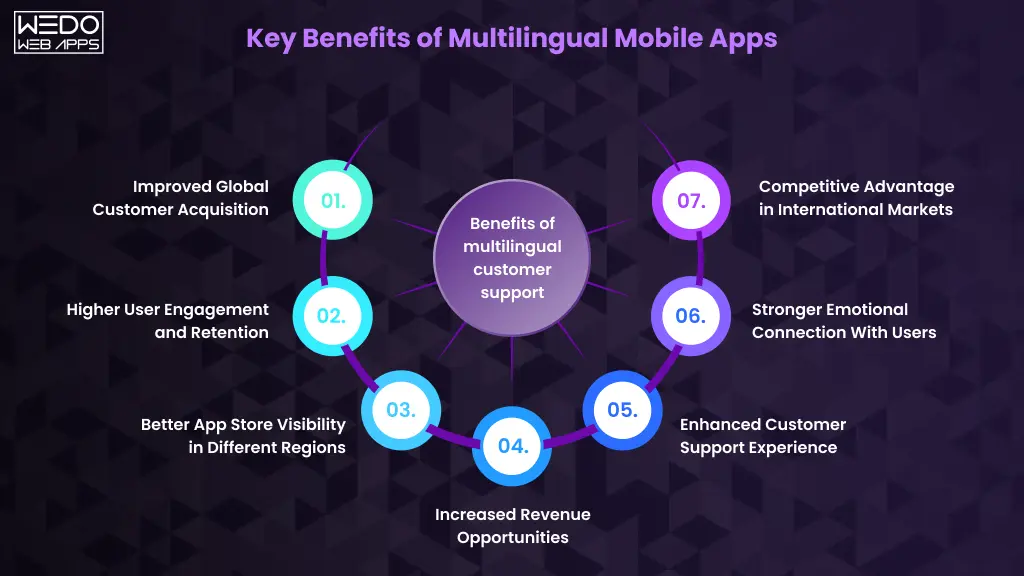
Adding multiple languages to a mobile app is not only about accessibility. It directly influences how users interact with the platform, how businesses enter new markets, and how brands compete internationally. A multilingual app creates a smoother experience for users while opening new growth opportunities for businesses.
Improved Global Customer Acquisition
One of the biggest advantages of multilingual apps is a wider audience reach. Businesses can connect with users across different countries without developing separate applications for every region.
A localized experience helps businesses:
- Attract users from international markets.
- Improve app downloads across regions.
- Increase accessibility for non-English speaking audiences.
- Create stronger regional marketing campaigns.
This makes global customer acquisition through apps more practical and scalable.
Higher User Engagement and Retention
Users spend more time on apps they understand comfortably. When navigation, notifications, and content appear in a familiar language, users interact with the app more confidently.
This often results in:
- Longer session duration
- Better feature interaction
- Increased repeat usage
- Higher customer retention
These improvements directly support better multilingual app user engagement.
Better App Store Visibility in Different Regions
Localized app titles, descriptions, and keywords can improve visibility in region-specific app store searches. This increases the chances of attracting users searching in their native language.
For example, a fitness app optimized for Spanish keywords can perform better in Spanish-speaking markets compared to an English-only listing.
This is one of the most overlooked mobile app localization benefits for businesses targeting organic growth.
Increased Revenue Opportunities
Users are more likely to make purchases when pricing details, product information, and payment instructions are easy to understand.
Multilingual apps can help businesses improve:
- In-app purchases
- Subscription conversions
- Product sales
- Cross-border transactions
Even small localization improvements can positively impact revenue generation.
Enhanced Customer Support Experience
Customer support becomes more effective when users can communicate in their preferred language. It reduces misunderstandings and helps businesses resolve issues faster.
Localized support can include:
- Multilingual chat support
- Native language FAQs
- Region-specific help centers
- Localized support emails and notifications
This creates a more reliable and customer-friendly experience.
Stronger Emotional Connection With Users
Language creates familiarity. When users interact with an app in their native language, this experience feels more personal and welcoming.
It is similar to walking into a store where every sign, conversation, and recommendation already feels familiar. Users naturally feel more connected and valued.
Competitive Advantage in International Markets
Many businesses still launch apps with limited language support. Companies that invest in localization early often gain an advantage in international markets because users prefer apps that feel easier and more accessible.
A strong multilingual mobile app strategy helps businesses stand out while building trust across diverse customer groups.

How Mobile App Localization Improves User Engagement
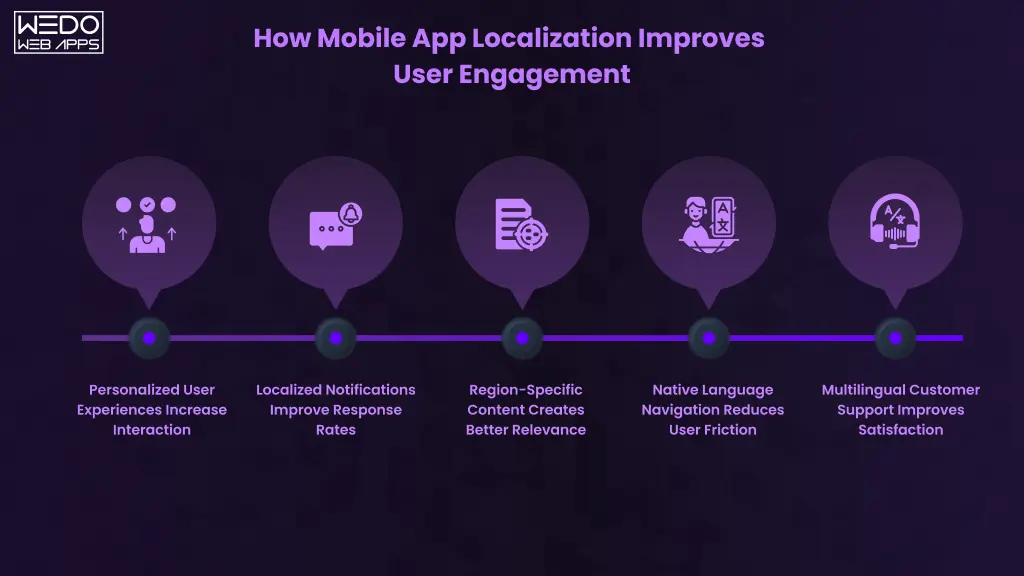
Strong user engagement does not happen only because an app has good features. Users stay active when the experience feels simple, familiar, and easy to understand. This is where mobile app localization benefits become highly valuable for businesses targeting international audiences.
A localized app helps users interact more comfortably by adapting language, communication, and content according to regional preferences. This directly improves multilingual app user engagement and creates a better overall user experience.
Personalized User Experiences Increase Interaction
Users are more likely to interact with apps that feel personalized to their needs. When content appears in a user’s preferred language, the app becomes easier to navigate and more comfortable to use.
This often improves:
- Product browsing
- Feature interaction
- Content engagement
- Repeat app usage
A well-planned multilingual mobile app strategy helps businesses create experiences that feel more relevant to users from different regions.
Localized Notifications Improve Response Rates
Push notifications are far more effective when users instantly understand the message. Notifications written in native languages feel more natural and relatable, which increases interaction rates.
Localized notifications can improve engagement for:
- Promotional offers
- Order updates
- Subscription reminders
- Event notifications
- Personalized recommendations
This is one of the practical benefits of multilingual mobile apps because better communication encourages users to return to the platform more frequently.
Region-Specific Content Creates Better Relevance
Users from different regions respond differently to promotions, visuals, and messaging styles. Localization helps businesses create content that feels more suitable for local audiences instead of showing identical communication everywhere.
| Localization Area | Example |
|---|---|
| Promotional Campaigns | Festival-specific offers |
| Product Recommendations | Region-based suggestions |
| Content Messaging | Local language communication |
| Visual Elements | Culturally relevant designs |
This localized approach supports stronger global customer acquisition through apps because users connect more easily with region-specific experiences.
Native Language Navigation Reduces User Friction
Users should not struggle to understand menus, categories, or checkout instructions. Clear navigation in native languages helps users complete actions faster and with more confidence.
This can improve:
- Signup completion
- Product searches
- Checkout success rates
- Subscription conversion
- Feature adoption
Reducing friction is one of the biggest mobile app localization benefits for businesses trying to improve engagement and retention.
Multilingual Customer Support Improves Satisfaction
Customer support experiences strongly affect user satisfaction. When users can communicate problems in their preferred language, support interactions become smoother and more effective.
Multilingual support helps businesses:
- Resolve issues faster
- Improve customer trust
- Reduce frustration
- Increase long-term retention
This directly contributes to stronger multilingual app user engagement across international audiences.
Example of Localization Improving Engagement
An eCommerce app expanding into Southeast Asian markets initially offered only English language support. Many users abandoned the app during product browsing and checkout because the experience felt difficult to understand.
After implementing a multilingual app for customer acquisition, the business added localized product descriptions, native language navigation, and region-specific promotions. Within months, the app experienced:
- Higher engagement rates
- Better checkout completion
- Increased repeat purchases
- Longer user session duration
The localized experience helped users feel more comfortable interacting with the platform, which improved both engagement and customer retention.

Multilingual App Strategy for Global Expansion
Expanding into international markets requires more than simply adding new languages to an app. Businesses need a clear strategy that helps them localize the experience according to user behavior, regional expectations, and market demand.
A strong multilingual mobile app strategy allows businesses to scale efficiently while creating better experiences for users across different regions.
Identify High-Potential Regions First
Not every market delivers the same growth opportunities. Before adding multiple languages, businesses should analyze where international demand already exists.
Important factors to evaluate include:
- App downloads by country.
- Website traffic from international regions.
- Regional purchasing behavior.
- Market competition.
- Demand for similar apps.
This helps businesses focus localization efforts on regions with stronger growth potential.
Prioritize Languages Based on Usage Data
Adding too many languages at once can increase development and maintenance complexity. Businesses should prioritize languages according to actual customer demand instead of assumptions.
For example:
| Business Expansion Goal | Recommended Focus |
|---|---|
| Enter Middle Eastern markets | Arabic support |
| Target Latin American users | Spanish and Portuguese |
| Expand across Europe | French and German |
| Reach wider Asian audiences | Hindi, Chinese, or Japanese |
Choosing the right languages improves the effectiveness of a multilingual app for customer acquisition.
Research Cultural Preferences Before Localization
Localization is not limited to translating text. User expectations often differ across regions, including communication styles, visuals, offers, and payment behavior.
Businesses should localize:
- App messaging
- Promotional campaigns
- Images and graphics
- Payment methods
- Date and currency formats
This creates a more natural user experience and improves multilingual app user engagement.
Localize Content Beyond Simple Text Translation
Direct translation may communicate the message, but it may not always sound natural to local users. Businesses should adapt content according to regional communication styles.
This includes:
- Product descriptions
- Push notifications
- Customer support responses
- Marketing campaigns
- Onboarding instructions
Proper localization improves customer trust and strengthens mobile app localization benefits across different regions.
Create Region-Specific Marketing Campaigns
Different regions respond to different marketing approaches. Businesses should adjust campaigns according to local trends, festivals, and user interests.
For example:
- Holiday promotions based on regional festivals.
- Country-specific discounts.
- Local influencer collaborations.
- Regional app store campaigns.
This supports stronger global customer acquisition through apps by making marketing efforts more relevant to local audiences.
Optimize App Store Listings for Different Languages
Localized app store optimization helps businesses improve visibility in regional searches. Translating app titles and descriptions using region-specific keywords can improve organic downloads.
A localized app listing should include:
- Native language app titles
- Localized descriptions
- Region-specific keywords
- Relevant screenshots
- Country-focused promotional visuals
Build a Scalable Localization Workflow
As businesses expand, managing multiple languages manually becomes difficult. A scalable localization process helps to maintain consistency across updates and new features.
Businesses should create workflows for:
- Translation management
- Content updates
- Regional testing
- Multilingual customer support
- Localization quality checks
A structured process helps businesses maintain app quality while scaling internationally.
Multilingual App Launch Checklist
Before launching multilingual support, businesses should confirm:
- Language switching works properly.
- Content translations are accurate.
- Navigation supports all languages.
- Payment systems match regional preferences.
- Notifications are localized.
- App store listings are optimized.
- Customer support supports regional users.
A well-planned localization strategy helps businesses improve customer acquisition, user engagement, and long-term growth across global markets.
Essential Features of a Successful Multilingual Mobile App
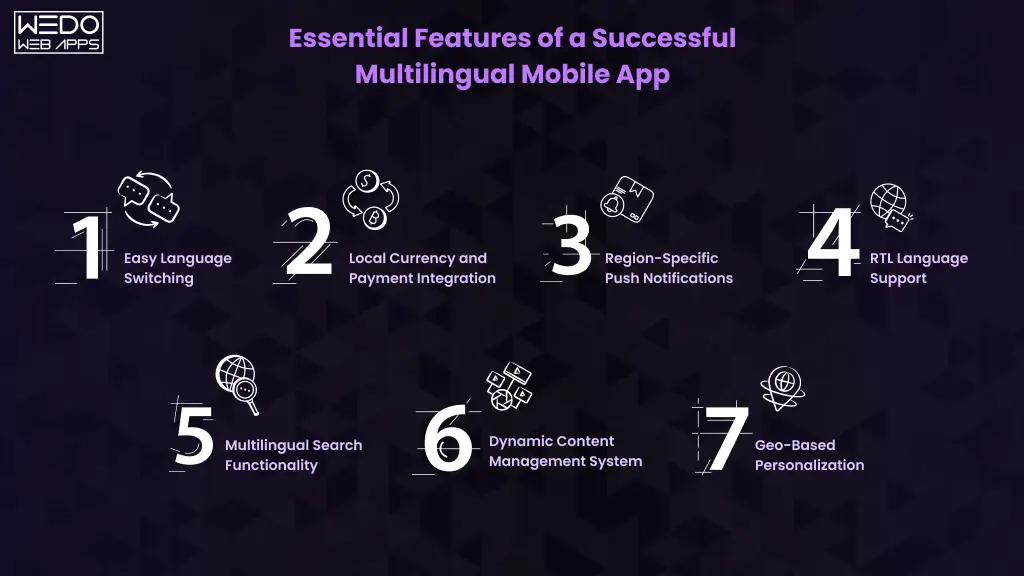
Adding multiple languages alone does not guarantee a smooth user experience. A successful multilingual app must be designed to support different regions, communication styles, and user expectations without creating confusion or usability issues.
Businesses focusing on a strong multilingual mobile app strategy often prioritize features that improve accessibility, navigation, personalization, and engagement across global audiences.
Easy Language Switching
Users should be able to change languages quickly without struggling through settings or complicated menus. A simple and visible language switcher improves usability and creates a more user-friendly experience.
Best practices include:
- Language selection during onboarding.
- One-tap language switching.
- Automatic language detection based on location.
- Remembering user language preferences.
This helps to improve multilingual app user engagement by making the app more accessible from the beginning.
Local Currency and Payment Integration
Users feel more comfortable making purchases when pricing and payment methods match local expectations.
Localized payment experience may include:
| Localization Feature | User Benefit |
|---|---|
| Local currency display | Easier price understanding |
| Region-specific payment methods | Faster transactions |
| Local tax calculation | Better pricing transparency |
| Native payment instruction | Reduced checkout confusion |
These features directly support global customer acquisition through apps by improving conversion opportunities in international markets.
Region-Specific Push Notifications
Notifications should feel relevant to users instead of being generic. Localized messaging based on language and region improves engagement rates and encourages repeat interactions.
Businesses can personalize notifications using:
- Native language communication
- Local festivals and events
- Regional offers
- Location-based updates
- Personalized recommendations
This is one of the important mobile app localization benefits for customer retention.
RTL Language Support
Languages such as Arabic and Hebrew follow a right-to-left reading structure. Apps targeting these audiences must properly support RTL layouts to maintain readability and usability.
Without proper RTL support, apps may appear broken or difficult to navigate, negatively affecting engagement and trust.
Multilingual Search Functionality
Users should be able to search products, services, or content using their native language. Multilingual search improves navigation and helps users find relevant information faster.
This feature becomes especially important for:
- eCommerce apps
- Travel platforms
- Educational apps
- Streaming applications
Clear search experiences improve overall user satisfaction and support better customer acquisition.
Dynamic Content Management System
Managing multilingual content manually can become difficult as apps grow. A dynamic content management system helps businesses update translations, notifications, and region-specific content more efficiently.
This helps businesses:
- Maintain content consistency.
- Update multiple languages faster.
- Manage localization centrally.
- Scale content operations smoothly.
Geo-Based Personalization
Geo-based personalization allows apps to customize content according to user location. This creates more relevant experiences for users from different regions.
Examples include:
- Showing local offers.
- Displaying nearby services.
- Recommending region-specific products.
- Adjusting content according to local trends.
Such personalization improves engagement while strengthening the overall benefits of multilingual mobile apps.
A multilingual app should not feel like a translated version of the original platform. It should feel natural and user-friendly for every audience it serves.
Businesses that combine localization with smart feature planning are more likely to improve engagement, retention, and long-term international growth.
Common Challenges in Multilingual App Development
Building a multilingual app creates new growth opportunities, but it also introduces several technical and operational challenges. Businesses often assume localization only involves translating content, but maintaining a smooth experience across multiple languages requires careful planning.
Without the right strategy, localization issues can affect usability, customer trust, and overall app performance.
Maintaining Translation Accuracy
Direct translation tools may convert words correctly, but they often fail to capture meaning, tone, or context. Poor translations can confuse users and make the app feel unprofessional. For example, a marketing message that works well in English may sound unnatural or even misleading in another language.
To maintain accuracy, businesses should:
- Use native language experts.
- Review translations regularly.
- Avoid word-for-word translation.
- Maintain consistent terminology across the app.
This is especially important for businesses using a multilingual app for customer acquisition, where trust and communication directly affect conversions.
Managing UI Changes Across Languages
Different languages take up different amounts of space on mobile screens. A short English phrase may become much longer in German or French, which can disrupt layouts and button placements.
Common UI challenges include:
| UI Challenge | Impact on User Experience |
|---|---|
| Text expansion | Broken layouts |
| Smaller mobile screens | Content overlap |
| Long translations | Button alignment issues |
| RTL language layouts | Navigation inconsistencies |
Apps must be designed with flexible layouts to support multiple languages smoothly.
Supporting Different Character Formats
Multilingual apps often need to support various writing systems and character formats. Languages such as Arabic, Chinese, Japanese, and Hindi require different font rendering and display handling.
Businesses may face issues with:
- Font compatibility
- Character encoding
- Right-to-left language support
- Text alignment
- Search functionality across languages
Ignoring these technical details can negatively affect multilingual app user engagement.
Cultural Misinterpretation Risks
Localization is not only about language. Cultural differences also influence how users respond to color, visuals, icons, offers, and communication styles.
Something acceptable in one region may feel confusing or inappropriate in another.
For example:
- Certain colors may carry different meanings.
- Promotional campaigns may not fit local customs.
- Images or symbols may create misunderstanding.
This is why businesses should adapt content carefully as part of their multilingual mobile app strategy.
Increased Testing Requirements
Every additional language increases testing complexity. Businesses must ensure that all app features function properly across different languages, devices, and operating systems.
Localization testing usually includes:
- Language accuracy checks
- UI and layout testing
- RTL compatibility testing
- Region-specific payment testing
- Notification testing
- Device compatibility testing
Proper testing helps businesses avoid usability issues that could affect customer acquisition and retention.
Handling Multilingual Customer Support
As apps expand internationally, customer support becomes more challenging. Users expect assistance in their preferred language, especially when dealing with payments, subscriptions, or technical problems.
Managing multilingual support often requires:
- Regional support teams
- Multilingual chat systems
- Localized FAQs
- Translation workflows for support tickets
Although this increases operational effort, it also improves customer satisfaction and strengthens the overall benefits of multilingual mobile apps.
Why Businesses Must Prepare Early
Many localization problems become expensive to fix later in development. Businesses that plan multilingual support early can avoid redesign costs, translation inconsistencies, and user experience issues during expansion.
A well-structured localization process helps businesses scale internationally while maintaining app quality and user trust.
Best Practices for Multilingual Mobile App Development
A multilingual app should feel natural for every user, regardless of language or region. Simply translating content is not enough to create a smooth experience. Businesses need proper planning, flexible app architecture, and continuous localization improvements to achieve long-term success.
Following the right development practices helps businesses improve engagement, reduce localization issues, and scale more efficiently across global markets.
Start Localization During Early Development
Many businesses treat localization as a final step, which often creates unnecessary development challenges later. Adding multilingual support early makes it easier to design flexible layouts, manage translations, and support future expansion.
Early planning helps businesses:
- Reduce redesign costs
- Avoid layout issues
- Prepare scalable app architecture
- Simplify future language additions
This creates a strong foundation for a successful multilingual mobile app strategy.
Use Native Language Experts Instead of Direct Translation Tools
Automated translation tools may save time, but they cannot fully understand tone, context, or cultural meaning. Poor translations can reduce trust and make the app feel less professional.
Native language experts help businesses:
- Maintain accurate communication
- Adapt messaging naturally
- Avoid cultural misunderstandings
- Create more relatable user experiences
This improves the overall quality of a multilingual app for customer acquisition.
Keep UI Flexible for Text Expansion
Different languages require different amounts of screen space. If the app design is too rigid, translated text may overlap buttons, break layouts, or affect readability.
To avoid this, businesses should:
- Use responsive layouts
- Avoid fixed text containers
- Test screen spacing for multiple languages
- Support scalable typography
Flexible UI design improves usability and supports better multilingual app user engagement.
Perform Regional User Testing
An app may work technically, but still feel confusing for users from certain regions. Regional testing helps businesses understand how local users interact with the app in real situations.
Testing should evaluate:
| Testing Area | Purpose |
|---|---|
| Language accuracy | Clear communication |
| Navigation flow | Easier usability |
| Payment experience | Better conversion |
| Cultural relevance | Improved engagement |
| Device compatibility | Consistent performance |
User testing helps businesses identify issues before launching internationally.
Update Localized Content Regularly
Localization should continue even after the app launches. Businesses often update products, offers, and features, but forget to update translated content at the same pace.
Regular localization updates help to maintain:
- Consistent communication
- Accurate product information
- Relevant promotional messaging
- Better customer trust
Outdated translations can negatively affect usability and brand credibility.
Monitor User Engagement by Region
Different markets often respond differently to app experiences. Businesses should monitor engagement data separately for each language and region.
Important metrics include:
- App retention rates
- Session duration
- Conversion rates
- Feature usage
- User feedback
This helps businesses improve localization strategies based on real-user behavior.
Build Localization Around User Experience
The most successful multilingual apps focus on making users feel comfortable, understood, and valued. When localization supports usability instead of simply translating content, users are more likely to engage with the app regularly.
This is where the true mobile app localization benefits become visible through stronger engagement, better retention, and improved global growth opportunities.
Industries Benefiting Most From Multilingual Mobile Apps
Businesses across multiple industries are using multilingual apps to improve accessibility, customer engagement, and international growth. As users increasingly prefer localized digital experiences, companies that support multiple languages often gain a stronger advantage in competitive markets.
The impact of a multilingual app for customer acquisition becomes even more visible in industries where communication, trust, and personalization directly influence user decisions.
eCommerce and Retail Apps
eCommerce businesses often serve customers from different countries and language backgrounds. Localized shopping experiences help users understand product details, pricing, shipping information, and payment instructions more comfortably.
Multilingual support helps eCommerce apps improve:
- Product discovery
- Checkout completion
- Customer trust
- International sales
This is one of the strongest benefits of multilingual mobile apps for global online stores.
Travel and Hospitality Apps
Travel apps interact with users from different regions every day. Language barriers during bookings, itinerary planning, or payment processes can quickly affect customer experience.
Localized travel apps can provide:
- Native language booking support
- Region-specific travel recommendations
- Local currency pricing
- Multilingual customer assistance
This helps businesses improve global customer acquisition through apps while making travel planning easier for international users.
Healthcare Apps
Healthcare communication must be clear and accurate. Multilingual support helps patients understand medical instructions, appointment details, and healthcare services more confidently.
Healthcare apps often localize:
- Consultation information
- Medication instructions
- Appointment reminders
- Patient support services
Clear communication improves accessibility and builds stronger patient trust.
FinTech and Banking Apps
Financial applications handle sensitive user information, so clarity and trust are extremely important. Users are more likely to complete transactions and use banking features when the experience feels easy to understand.
Multilingual banking apps help improve:
| Banking Feature | Localization Benefit |
|---|---|
| Transaction details | Better financial clarity |
| Security notifications | Improved trust |
| Customer support | Faster issue resolution |
| Payment instructions | Reduced confusion |
This directly supports better multilingual app user engagement in financial platforms.
Food Delivery Apps
Food delivery platforms often operate across multiple cities and regions with diverse user groups. Localized interfaces make it easier for users to browse menus, place orders, and track deliveries.
Localization can improve:
- Menu understanding
- Order accuracy
- Offer engagement
- Customer satisfaction
Apps that support regional languages often experience stronger repeat usage and customer loyalty.
Education and eLearning Platforms
Students learn more effectively when educational content is available in their preferred language. Multilingual learning platforms help businesses reach wider audiences while improving learning accessibility.
Localized education apps may include:
- Multilingual video subtitles
- Native language quizzes
- Localized study materials
- Regional learning support
This makes educational content more accessible for global learners.
Why Multilingual Support Matters Across Industries
Regardless of industry, users prefer apps that communicate clearly and feel familiar. Businesses that invest in localization are better positioned to improve customer trust, increase engagement, and expand into international markets more successfully.
A well-planned multilingual mobile app strategy allows businesses to serve diverse audiences without compromising user experience.
Technologies and Frameworks Used for Multilingual App Development
Building a multilingual app requires more than adding translated content. Businesses need the right technologies and development frameworks to manage multiple languages, maintain performance, and deliver a smooth user experience across devices and regions.
Modern app development frameworks now provide built-in localization support, making it easier for businesses to implement a scalable multilingual mobile app strategy.
Flutter Localization Support
Flutter provides strong multilingual support through its internationalization and localization libraries. Developers can manage translations, language switching, and region-based formatting from a single codebase.
Flutter helps businesses:
- Support multiple languages efficiently
- Maintain consistent UI across platforms
- Reduce development time
- Simplify localization management
This makes Flutter a popular choice for businesses building a multilingual app for customer acquisition.
React Native Localization Libraries
React Native supports multilingual development through localization libraries that help apps manage translations and language preferences smoothly.
Businesses using React Native can:
- Add dynamic language switching
- Support regional formatting
- Manage translations centrally
- Build multilingual apps for Android and iOS together
This approach helps reduce development costs while supporting international expansion.
iOS Multilingual Development
Apple provides built-in localization tools that help developers create region-specific experiences for iPhone and iPad users.
iOS localization features support:
- Multiple language resources
- Region-specific formatting
- Right-to-left language layouts
- Localized notifications
These features improve usability and contribute to better multilingual app user engagement.
Android Localization Features
Android supports multilingual app development through resource-based localization systems. Developers can create separate language files and customize app content according to regional settings.
Android localization allows businesses to manage:
| Android Localization Feature | Purpose |
|---|---|
| Language resource files | Multiple language support |
| RTL layout compatibility | Better regional usability |
| Local formatting | Dates, currency, and numbers |
| Device language detection | Automatic localization |
This flexibility supports smoother global customer acquisition through apps across Android devices worldwide.
Translation Management Systems
Managing translations manually becomes difficult as apps grow. Translation management systems help businesses organize multilingual content, collaborate with translators, and maintain consistency across updates.
These systems help businesses:
- Store translations centrally
- Update localized content faster
- Maintain language consistency
- Reduce manual localization errors
This improves the overall quality of multilingual app development.
Content Management Integration
Many businesses integrate multilingual content management systems with their apps to simplify updates across regions.
This allows teams to:
- Publish region-specific content
- Manage multilingual notifications
- Update localized product information
- Control translations more efficiently
Efficient content management is important for maintaining long-term localization quality.
Choosing the Right Technology Stack
The ideal framework depends on business goals, target markets, app complexity, and scalability requirements.
Businesses should evaluate:
- Supported languages
- Scalability needs
- Development budget
- Performance requirements
- Future expansion plans
The right technology foundation helps businesses maximize the benefits of multilingual mobile apps while reducing future development challenges.
How to Measure the Success of a Multilingual App Strategy
Launching a multilingual app is only the beginning. To understand whether localization efforts are actually improving business growth, companies need to track the right performance metrics across different regions and languages.
Measuring localization success helps businesses identify what is working, where users face friction, and which markets offer stronger growth opportunities.
Customer Acquisition Metrics
One of the first indicators of a successful multilingual app for customer acquisition is growth in international users. Businesses should monitor whether localized experiences are helping attract more app downloads and registrations from targeted regions.
Important acquisition metrics include:
- App installs by country
- New user registrations
- Cost per acquisition by region
- Organic downloads from localized app store searches
Increasing acquisition numbers often indicate that localization efforts are improving market reach.
Regional Conversion Rates
Localization should also improve conversions. If users clearly understand pricing, product details, and payment instructions, they are more likely to complete purchases or subscriptions.
Businesses should track:
| Conversion Metric | What It Measures |
|---|---|
| Checkout completion | Purchase success rates |
| Subscription signups | User commitment |
| In-app purchases | Revenue generation |
| Lead form completion | Customer interest |
Monitoring regional conversion data helps businesses refine their multilingual mobile app strategy more effectively.
User Retention Across Languages
User retention reveals whether localized experiences are keeping users engaged after installation. Strong retention usually indicates that users feel comfortable using the app regularly.
Businesses should analyze:
- 7-day retention rates
- 30-day retention rates
- Repeat session frequency
- Returning customer percentages
This helps evaluate long-term multilingual app user engagement across different markets.
App Engagement Metrics
Engagement data helps businesses understand how users interact with the app after localization.
Useful engagement indicators include:
- Average session duration
- Screen interaction rates
- Push notification response rates
- Feature usage by language
- Time spent on product pages
If engagement improves after localization, it often signals that users are finding the experience easier and more relevant.
Revenue Growth by Market
One of the strongest indicators of localization success is revenue growth from international regions.
Businesses should monitor:
- Revenue by country
- Average order value
- Subscription growth
- Regional customer lifetime value
This helps businesses understand which localized markets are generating the best return on investment.
User Feedback and Reviews
User reviews often reveal localization issues that analytics alone cannot identify. Feedback can highlight problems related to translation quality, navigation confusion, or cultural relevance.
Businesses should regularly review:
- App store ratings by region
- Customer support feedback
- Language-related complaints
- Feature requests from local users
This helps improve overall mobile app localization benefits over time.
Why Continuous Optimization Matters
Localization is not a one-time process. User behavior, language trends, and regional preferences continue changing over time. Businesses that regularly monitor performance and optimize multilingual experiences are more likely to improve customer engagement, retention, and global expansion results.
A data-driven approach helps businesses make smarter localization decisions while maximizing long-term growth opportunities.
Future Trends in Multilingual Mobile Apps
As businesses continue expanding into international markets, multilingual mobile apps are becoming more advanced, personalized, and intelligent. Companies are no longer focusing only on language translation. They are building experiences that adapt to user behavior, regional preferences, and real-time interactions.
These innovations are shaping the future of global customer acquisition through apps and improving how businesses connect with users worldwide.
AI-Powered Real-Time Translation
Artificial intelligence is making multilingual communication faster and more efficient. Modern apps can now translate conversations, product information, and support interactions in real time.
This helps businesses:
- Reduce language barriers instantly
- Improve customer communication
- Support international users more efficiently
- Deliver faster multilingual experiences
AI-driven translation is becoming an important part of a scalable multilingual mobile app strategy.
Voice-Based Multilingual Interfaces
Voice search and voice assistants are increasingly being integrated into mobile apps. Users now prefer speaking commands instead of typing, especially for shopping, travel, and customer support interactions.
Multilingual voice features can improve:
- Accessibility
- Search experiences
- Customer support interactions
- User convenience
Apps that support voice interactions in multiple languages are likely to see stronger multilingual app user engagement in the coming years.
Hyper Personalized Regional Experiences
Businesses are moving beyond basic localization by creating highly personalized regional experiences for users.
Future multilingual apps may personalize:
| Personalization Area | Example |
|---|---|
| Promotions | Region-specific discounts |
| Recommendations | Local product preferences |
| Content | Language and cultural adaptation |
| Notifications | User behavior-based messaging |
This level of personalization helps businesses create stronger emotional connections with users.
AI-Driven Localization Automation
Managing multilingual content manually becomes difficult as apps scale globally. AI-powered localization tools are helping businesses automate translation updates, content adaptation, and language management processes.
Automation can help businesses:
- Update multilingual content faster
- Reduce localization costs
- Maintain translation consistency
- Improve scalability across regions
This allows companies to manage multilingual experiences more efficiently while expanding internationally.
More Focus on Cultural Localization
Future localization efforts will focus more on cultural adaptation instead of only language support. Businesses are increasingly understanding that users connect more with apps that match local communication styles and preferences.
This includes adapting:
- App visuals
- Marketing campaigns
- Payment experiences
- User onboarding
- Customer communication
These improvements strengthen the overall benefits of multilingual mobile apps for international growth.
Smarter Localization Through User Data
Businesses are also using analytics and user behavior data to improve localization strategies. Apps can now identify user preferences, language patterns, and engagement trends automatically.
This helps businesses:
- Deliver more relevant content
- Improve regional engagement
- Personalize user journeys
- Optimize customer acquisition strategies
Data-driven localization will continue shaping the future of multilingual app development.
Why Businesses Should Invest in Multilingual Mobile Apps Now
Users prefer apps that feel familiar and easy to understand. If an app supports their preferred language, they are more likely to trust the platform, stay engaged, and complete actions confidently.
This is why businesses are investing in Android app development for customer acquisition. A localized app helps brands connect with international users, improve engagement, and enter new markets more effectively.
The benefits of multilingual mobile apps go beyond translation. A strong multilingual mobile app strategy helps businesses improve user experience, strengthen customer relationships, and support global customer acquisition through apps.
As competition continues to grow worldwide, businesses that invest in localization early are better positioned to attract and retain global audiences.