skip to content

How Applications Are Launched On Play Store: A Step by Step Guide

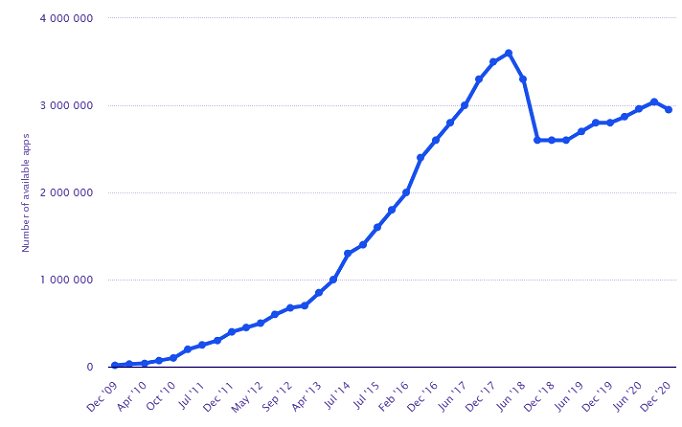
We seem to visit the Play Store more than a grocery store these days in the current digital world. Google Play Store is undoubtedly the best store for all the software, games, applications, movies, books, and a lot of other things. This digital distribution service which comes free installed in all the Android devices sure shot a savior for this generation. Over time this brilliant service has become solidified. With around 2.95 million apps, Google Play Store helps to increase the whole population of the entire world for many years now. These numbers are given by Statista according to a survey of December 2020. These numbers are enough to show that Google Play is an excellent place to hold your app for distribution. Google Play Store Statista Well, if you are wondering how to launch an app in Play Store, you’ve come to the right place. In the blog, we will give you a step-by-step guide on how to publish an Android app in the Google Play Store. Thousands of apps get released on Google Play Store each day. Coding about an app on the Play Store is not a tedious task. All it takes is good knowledge of the steps to get it done. Various Android App Development Services are at your service to help you upload the app to Google Play Store free. Let’s get you started with the requirements for promoting your app.
Requirements to upload an app on Google Play Store

While uploading and setting up the app for the first time on the Play Store, you might need to complete additional formalities so that the process becomes smooth for you. Certain things should be taken care of before taking the first step towards uploading an app.

1. Testing of Application

At the end of the development of an app, the most crucial step is its testing. The testing of an app is what makes it compatible with any device. No matter small or big, a big brand or a small enterprise, your application needs to be tested precisely so that any scope of issues is eliminated. Almost all Android development services ensure that the testing of an app is done well before launching the app. An app, respective of the extensive features it includes, has to be scrutinized for a better launch and more admirable results at the end.  Performance and the final outlook of the app are what make it stand out from the crowd. If the final testing is ignored, these aspects would be avoided, leading to issues for the users later. To make sure that your app works efficiently and gives the best results, make sure that you check the working of your app as many times as possible. The uses should be satisfied enough to rate you a good 5 on the Google Play Store. If not even that, since many of them refuse to give ratings, you should get the maximum number of downloads on your app. That’s the dream one progresses with, right? Hire top android app development companies to get this job done the right way. Also, you can employ an emulator to get that task done. As a suggestion, the Android-powered device gives you a better platform to test your app since it provides an experience like a user. This would help you get rid of the bugs and any disparities.

2. App Size

The size of the app has a significant role to play in the application upload on the Google Play Store. An app that takes a lot of space on the user’s device would be less likely to be downloaded. This puts you in quite a specific situation. If the app is not liked just because of its size, all your efforts in creating the app will go down the drain, just like that. Furthermore, the size limit of the Google Play Store restricts the upload of any app to more than 50 MB. But, guess what? There’s a solution for that too! You can use Android APK’s Expansion file to expand the limit of the size. This gives up to 4 GB of space to fit your app smoothly.

3. License is an added benefit

Getting an app license can prove to be beneficial for you and your firm. Most android development services discuss this aspect of apps before launching the app with their clients, you can also consider getting a license for your app. Once you sign up for the End User License Agreement, you have complete control over your app. This might help you in the future because who doesn’t like to have complete rights over their product. Also, this aspect will aid you in case of any disparities arising.

  • You might have to create your APK file with a Bundle ID and Version Number.
  • Further, an APK file is to be prepared, which can be used to assign the version number to the app. This assists you in getting the latest updates of the app trends in the future with a smooth procedure. The version number is actually a code that tends to increase with the increasing number of updates.
  • Bundle ID- the App ID is what makes the application unique and different from others. This counts as a critical prerequisite that needs to be submitted before the launch of the app with the Bundle ID submission. All applications of Android 5.0 and above need to complete this procedure.

4. Security Certificate

By this time, you must be wondering how to create an app in the Play store for free. Well, to get the most favorite question of yours, we need to proceed step by step, making sure that all the prerequisites are taken care of in order to avoid any conflicts in the future. So, now, the android development services come to a crucial requirement for both the company and the app’s users. This requirement is simple yet essential to be accomplished. A private key is to be built using Release Keystore. It is accounted as a security certificate that is signed as an APK. It is required every time you go out there to upload an all on the Play Store. Also termed as a JSK file, it consists of credentials such as Keystore password. Learn how to boost app downloads by understanding the process of launching applications on the Play Store.

5. App Store Listing

This step is enumerated as an important one because it guides through the attainment of maximum numbers of downloads for your app. Though not necessary to perform, this step surely adds benefit to the app launching process. In this process, the user is given brief information about the app, its features, and its purpose. The screenshots and images that you see just below the application credentials on the play store are what we are talking about. Those help the user get an insight into the app and know what they will be getting out of the app. So put up the screenshots and images that have an amazing quality so that the user is not compromised. The images can range from 2 to 8. Down below are some valuable feature stay you should inculcate in the app listing of your app:

  • Title
  • Brief description
  • Complete illustration
  • Screenshots or images of the app’s insight. (should be in JPEG format or 24-bit PNG) (Min-320px, Max- 3840 px)
  • An icon with top resolution (512×512 with alpha; 32-bit PNG)
  • Feature Graphic( 1024w× 500h)
  • Category of your application
  • Ratings with reviews of the content
  • Email of the developer or the android development services company.
  • URL

6. Analyse the Guidelines

Juxtaposing the guidelines issued by App Store and Play Store, you will be certain that the guidelines on the Google Play Store are way more adaptable for the developers. But, that doesn’t mean these guidelines can be ignored. You need to precisely follow all of the guidelines stated on the Google Play Store before you launch your app. Failing so will have your app expelled from the Play Store. That’s not what you are anticipating, right?

Steps to Upload App to Google Play Store

It’s time now to answer your question- how to publish app on play store step by step? Read carefully and ensure that you follow all these steps to avoid any discrepancies.

1. Google Play Developer Console:

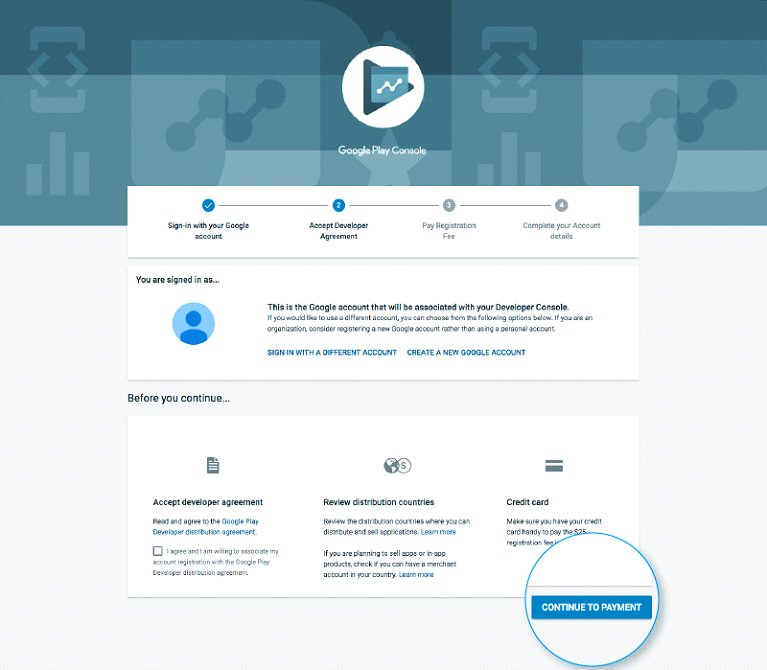
Google play console is by far the best tool for the developers to have a little game of uploading an app. Google Play Developer Console To transfer a portable application to Google Play Store, a developer dashboard is essential. The designer console is somewhat of a backend controlling focus, from where developers present an application to the Play Store.. After paying this one-time charge, you can transfer applications to Google Play Store for nothing. It would be best if you rounded out every To transfer a portable application to Google Play Store, a developer dashboard is essential. The designer console is somewhat of a backend controlling focus, from where developers present an application to Play Store. After paying this one-time charge, you can transfer applications to Google Play Store for nothing. You need to round out every one of the qualifications asked while making the record, like your name, country, and the sky is the limit from there. When you present your record, it will take up to 48 hours to get endorsed. One of the qualifications asked while making the record, like your name, country, and the sky is the limit from there. When you present your record, it will take up to 48 hours to get endorsed.
2. Linking of accounts:

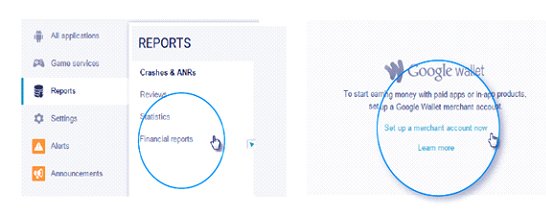
the next step brings with it the great responsibility of linking your account as a developer with the Google Wallet Merchant Account. This is required if your app endorses in-app purchases. The mentioned can be performed by signing into the Console Account on Google and Click on ‘reports’.  Linking of accounts Then proceed to search for the ‘Financial reports’ option in the same. Further, proceed by selecting the ‘set up a merchant account now’ option. This will lead you to a page where you are required to fill out your details. Following this procedure will have your merchant account automatically linked to the Google Play Console account. With tho, you can manage the sales of your app.
3. Develop Application:

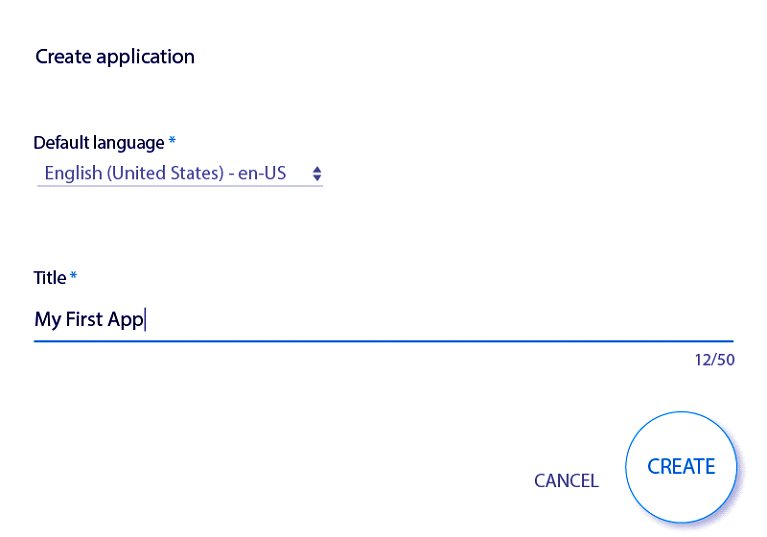
The next step in uploading an app is to create an application. Here are the steps to followed: Develop Application Develop Application 2
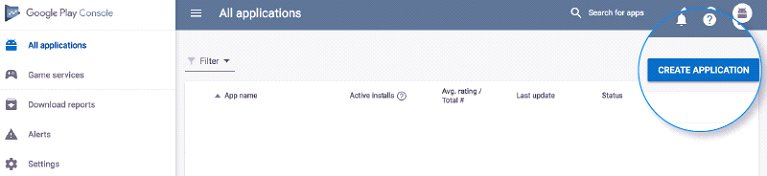
  • Look out for the “All Applications” tab in the menu
  • Here you see the ‘create application option- click it.
  • Now a drop-down menu will open up. Form this, and you have to choose the default language of your app
  • Next up, enter the application title( can be modified later)
  • Now you just have to click on ‘create.’

4. App store listing:

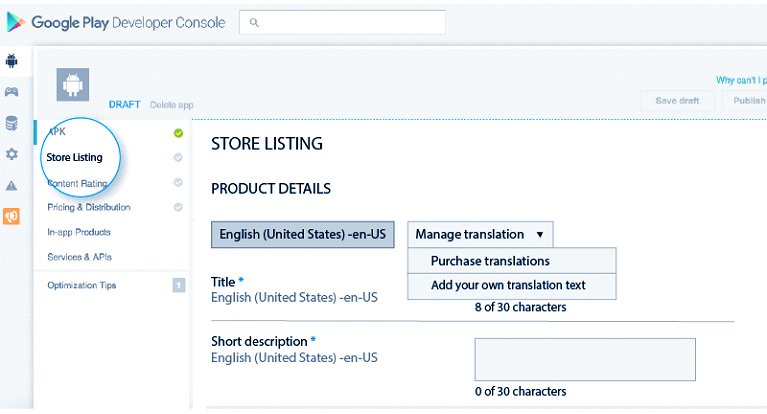
as we talked earlier about it, this is also a crucial step in uploading an app on Google Play Store. This step marks the significance of your preparations. In this step, all you need to do is to dill in the details that you have already assembled with vigilance. App store listing Look precisely at the image above to get an idea of what all information is to be filled out. Look out for the right keyword to be added to the description of your app so that the chances of your app being shown up on the top increase. Also, the data that we discussed in the requirements section is to be critically used.
5. Upload App Bundles to Google Play:

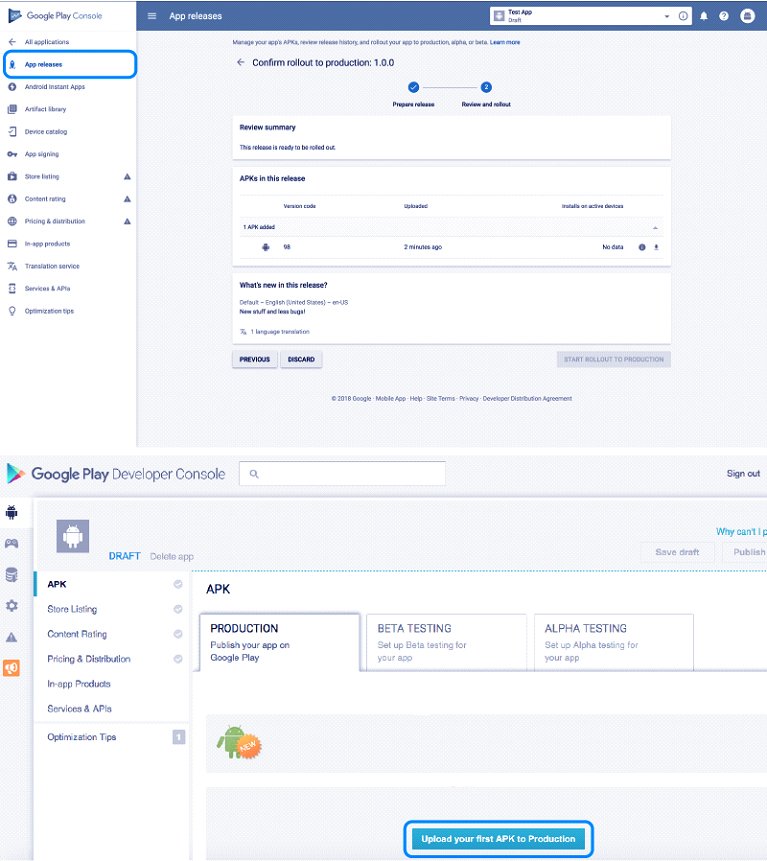
the next step requires you to upload the app bundles or the APK files to your application. Steer to the ‘Release Management’ option. Select the ‘App Release’ option from there. The next step will require you to select an option from the type of release that you desire.- internal test, production release, cloze test, and an open test. Once you are done with this part, you should select ‘Create Release.’  App Release Now redirected to the new release production page. Now comes another decision-making task- you either opt for the Google Play app sign in or not. If you choose the latter, then click on the “OPT-OUT” option. Now select the Browse files option and then monitor how you can upload APK to the Play Store whilst naming and describing your release through on-screen instructions. When all of this is done, click on Save.
6. Content Rating:

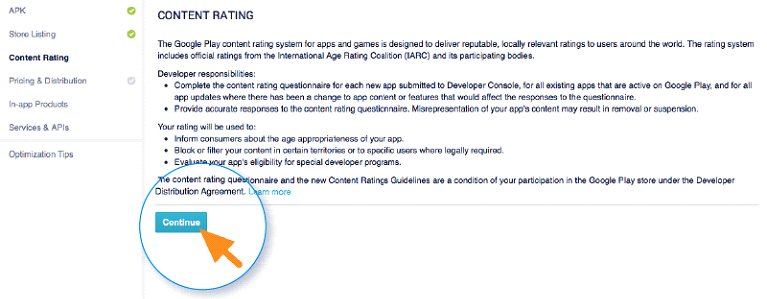
rating your rating your app before launching it on Google Play Store is a very crucial step. It becomes imperative in light of the fact that it might get removed as a result of being labeled as “Unrated.” This might get your app down the Play Store, ultimately putting you at a major loss. Content Rating To get this done, select the menu on the screen and select the same. Next up, you click on the “Continue” option and then type in your email address and confirm it. This will pop up a questionnaire for rating your app. You are required to fill Thai questionnaire. Once down, select “save questionnaire” and move forward by choosing “calculate rating” opinion to get your app rated. The last thing you do is click “apply,” and you’re done with your app’s content rating.
7. Money talks and distribution:

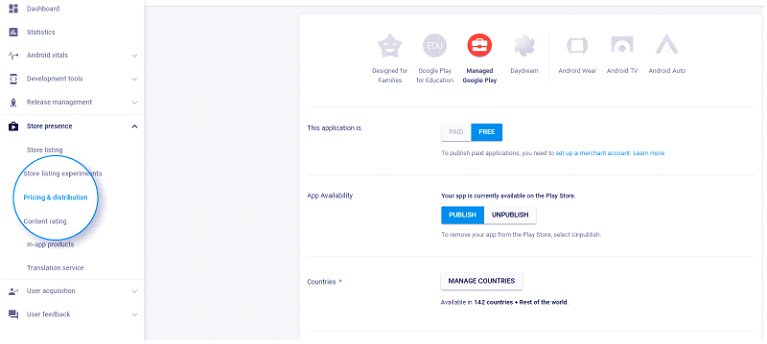
the app marketing strategy must be decided once all the formalities have been done. You should be clear about where you want your app to be published. Which countries should have access to your app. But before that, keep in mind that Google won’t allow you to get access to all provinces. app marketing strategy Likewise, deciding the cost of your app should be decided beforehand if you want it to be paid. Note that once you’ve declared your app is free, Google would not let you change that decision later on. For this, we have a guide for you. Read on! Go to the Pricing and distribution headline in the menu and decide whether the app is Free or Paid. Now select the countries, the age that is appropriate to get the app, and your task is done. If the content of your app is suitable for children of 13 years and below, click on the Yes option. If not, you merely got to choose No. Similarly, choose the ads allowance in your app.
8. Ultimately, Publish it!

Once down with all the steps provided in this guide and confirmed that they are being done correctly, please take the next big step and publish it on Google Okay Store. For this, you are instructed to go back to the App Release tab where your house Manage Productions. Further, click on Edit release and then click on review. After that, choose the start rollout to production option. Once done, Confirm the process, and you’re done! App Release tab All there is left to do now is simply trust that your application will get endorsed. It, for the most part, required around two hours for your application to get investigated. In any case, Google Play’s refreshed security strategy will now require hours and days so that equivalent, empowered organizations can pursue portable applications so that more impeccable applications can be selected quickly. In this way, hold your fervor in the spot and simply stand by. Let us know if you find this blog useful in making your app successful on the Play Store. Avil our android development services and flourish your app on the App Store.  Discover how to avoid common mistakes during your app launch and follow our step-by-step guide for launching apps on the Play Store to ensure a successful rollout.

Is a Multilingual App The Way Ahead to Ride Customer Acquisition?: Everything You Need To Know

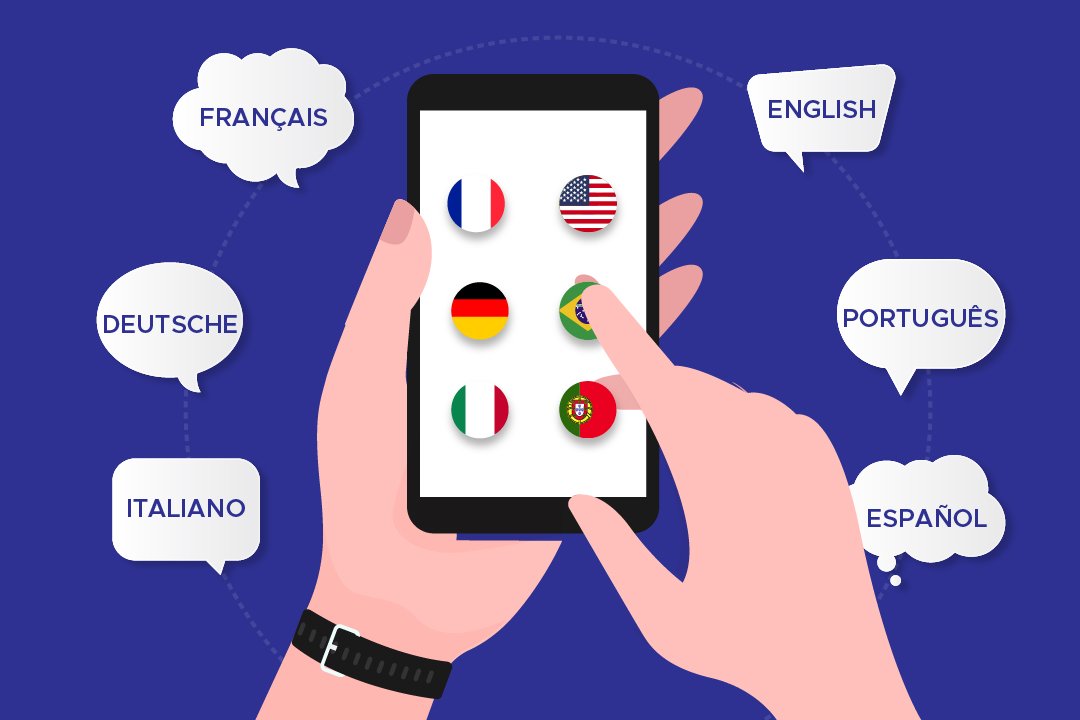
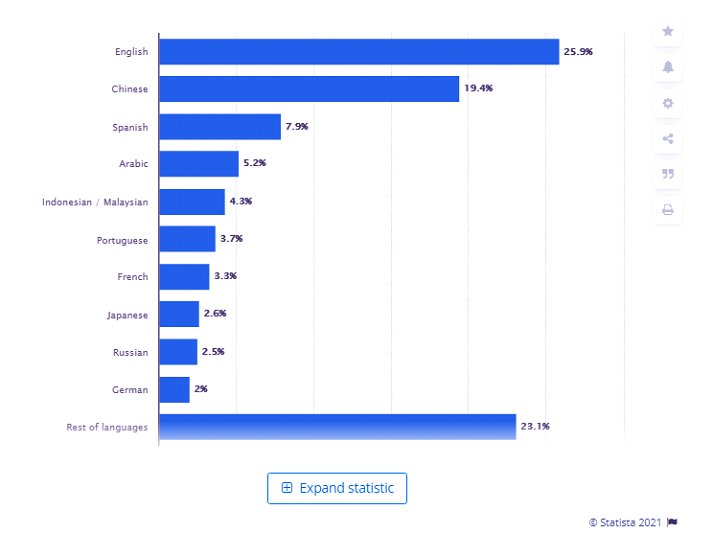
The world is a huge place, and it’s divided into regions and cultures with people speaking different languages. There are millions of languages the people speak on the earth. Talking of India alone, we have 22 official languages and more than 19,500 local languages spoken in India. Well, it might not be possible to develop an app that can inculcate all these languages of India. But there are other major languages all across the world that can be included while developing an app to ease out the efforts of users. The statistics on the< internet world stats show that English is the most frequently spoken language worldwide, which Chinese, Spanish, and Arabic follow.  These days, Android app development companies are progressing towards developing applications that include multiple languages to extensively help their customers and reach out to a larger audience. While globalization occurs at a steadier and quicker pace than earlier exchange of goods and services across the world is becoming more accessible and more prominent. A device made in China can be used by a person in South Africa or vice versa. When such things happen, a common barrier may arise, which is the language barrier. This language barrier Android app developers are working diligently to develop multi-linguistic apps. Below graph shows the most common languages used on the Internet as of January 2021. internet world stats Hiring an interpreter or a translator can be a very tedious and expensive task. To clear the air, the multi-linguistic apps have come to prove as the biggest asset. These apps have brought a drastic change in the way communication occurs worldwide on the internet. The applications that have a wide variety of users all across the world can be developed in a way that supports multiple languages by the best Android development companies.

Read on to know the crucial aspects of developing a multilingual app

Important Aspects Of Developing a Multilingual App

While developing an app, the Android development company< might delve into the dilemma of how to make an app multilingual so that it connects with a huge audience out there. Developing a multilingual app is not an easy task whatsoever. Several factors lead to a successful multi-language application. Android app developers must keep in mind that they should not turn a blind eye towards the User experience and future interface while developing a multilingual app.  This simply means that the application should not be focused only on translating the words to the desired language but should also present an interactive and high-performance User experience to the user. The app should have all the other qualities that a general application would have.

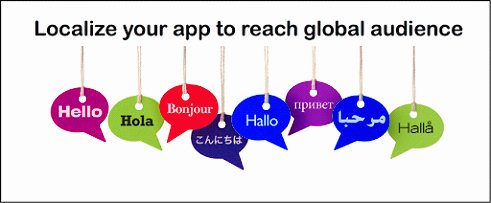
Localization is crucial: develop a steady strategy

Making an app ready for localization means the internalization of the application. Before beginning Android development, companies should focus on the process which leads to App designing.Try to follow the given approaches: app for localization

  • While programming the app, make sure that you leave some space to expand the text. There should be room for coding the UI extension programming too. This is a crucial step because several languages like Hindi take up a lot of space for translating.
  • If possible, UTF-8 encoding should be preferred to write the string so that there are fewer mistakes and the outcomes are produced quicker.
  • Another aspect that is very important in localizing is to use the specific formats of the particular region in your software. This should include the date, time, and currency of that region.
  • Do not forget to add the local language in the support and maintenance help guides of the app. Unable to do so would make your app incomplete and unfriendly for the users.
  • Not only this, but you also need to take care of the keyboards that are being used in your application. This keyboard should be customized according to the language input in the app.

Coming to the visuals

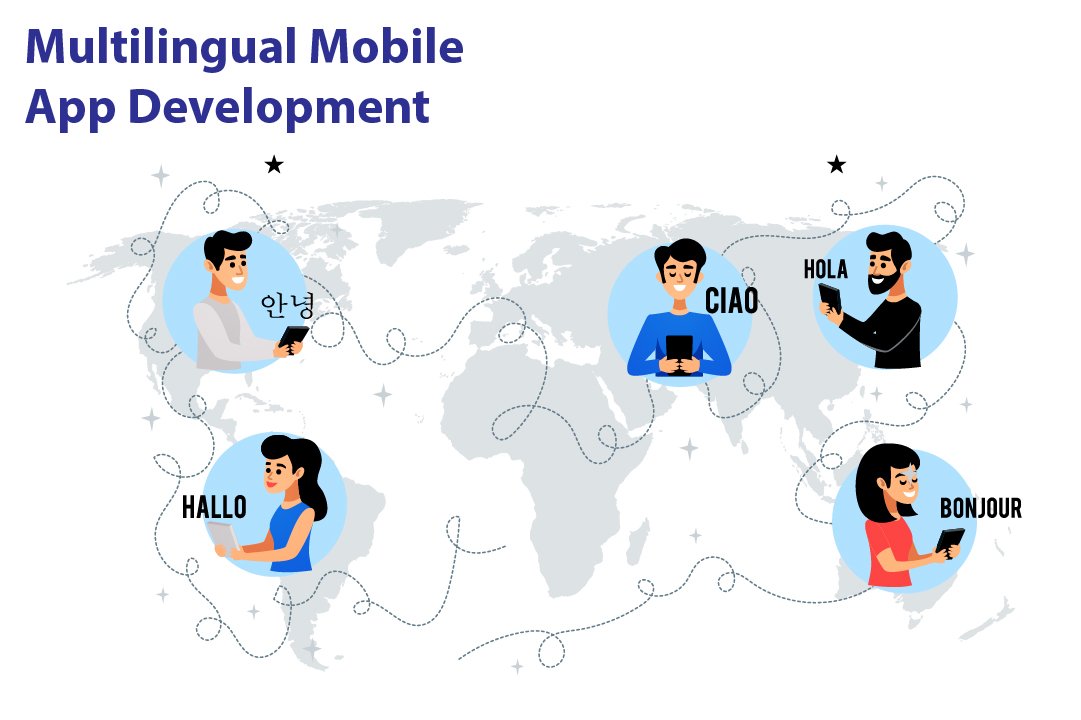
The next step while developing a multilingual app or multi-language website is to concentrate on the visual designs of the app or site. As we know, the first impression is the last impression; the app must be appealing to the users. Failing to create a well-organized and attractive visual layout of the app can lead to all your efforts going down the Drain. The first thing that is user good notices in an application would be the visual layout and designing the app. This means that the Android development company needs to focus diligently on the part of the app that is observable to the users. Multilingual mobile app While creating the app, Android development company face certain issues, such as an apparent need to use different diction, spellings, and writing. This problem may arise because the existing layout might not support the same set of writings. This can lead to the loss of pertinence. Indeed, to avoid this hassle, Android app developers should develop a fresh design for the multi-linguistic app. If this solution doesn’t work, you would have to create varied layouts for the different languages.

  • Avoid using any line for UI labels. Also, do not indicate the number of lines.
  • The height of UI labels is not to be set. Instead, it would be best if you were stabilizing the width of the UI labels.
  • It is necessary to set the flow of the content. The content should progress appropriately for the user to have a smooth experience. Also, widening the white space can aid you better as a developer.
  • Naming should be discrete and precise. The controls and functions that are out of the content names should be labeled properly.

Discover how cross-platform app development can enhance your multilingual app strategy for better customer acquisition, as discussed in multilingual app for customer acquisition.

The translation process

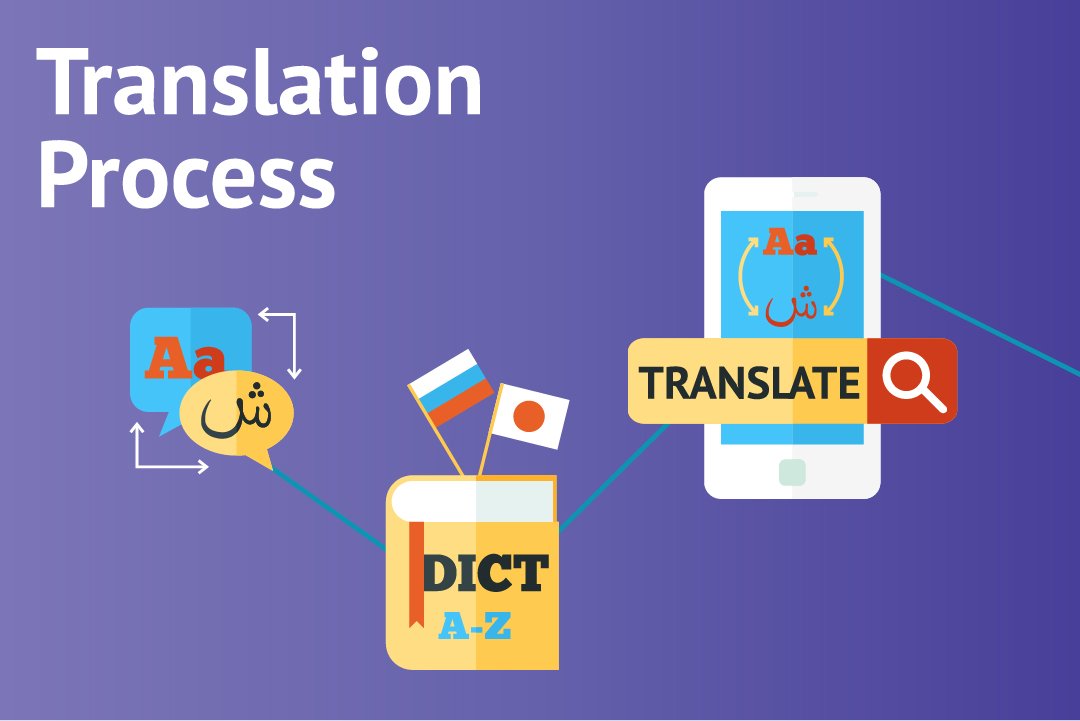
The next most prominent step in the development of a multi-linguistic application is the process of translation. It is apparent that the development of a multilingual app consumes more time and is towards the expensive side while juxtaposing other normal apps with it. But, in today’s time, it is inevitable to resist the significance of multilingual apps. Translations are of three types typically: multilingual apps

  • Machine-based
  • Manual translation
  • Translation by professionals

The first type is simpler and less time-consuming because of the intervention of a machine- a computer- a man’s friend. The results are sharper, shorter, and apt. Also, this category eats up less of your money. Next up is manual translation. This is, in a way, white difficult and time-consuming as a man is put on duty. Various companies, as well as government organizations, require a translator from time to time. As is clear, a man can make mistakes. Also, expecting a human to hold all the substantial knowledge of both the languages with each aspect of grammar and written and spoken language is quite unfair. Also, it might come in as an expensive approach. The time and efforts that go into acquiring an extensive understanding of languages are enormous and will cost a big amount to the customer. Then comes the professional translator. This person has a wide range of knowledge of different languages. These professional translators develop the glossary of words that appears on your mobile screen. Learn about creating a fitness app with multilingual support and how it can fit into the digital revolution in fitness app development.

Translation Management System:

Next in line is getting the correct translation management system for your app. The main purpose of this system is to translate the stuff that you want meticulously.

  • They are usually a stage or a program that helps with automating the significant strides in lessening the time for downloading or transferring technique and correspondence.
  • They additionally make the collaboration better with the goal that every one of the individuals fostering the application can cooperate and screen the advancement of one another while altering, editing or downstream and upstream interpretation.
  • Dispense with any odds of trickery during the interpretation
  • Assists with improving the general nature of translation work
  • Monitors the task through a solitary stage
  • Planning of concentrated data set for different sorts of activities

Outsourcing of interpretation

Interpretation of language is a tedious as well as a long-winded task. At times, you might feel that this job is not favorable to be done alone. Thus, it is advisable to hire professionals from an android development company. This might lessen your dilemma of how to create a multi-language app in Android. You will get hands-on professionals with expertise in app development. If the translation work is getting hectic, you can send these professionals the code of the app and get back the translated version of it seamlessly. Outsourcing has its windfalls and disadvantages. You can save money there since you do not need to employ professional translators, but it can lead to specific security issues because the work is being shared with someone else.

Testing

The final step of creating the app is testing what you have developed before it is launched out there. Double pseudo-language can be used to discover what has gone missing. Also, the local language is also to be chat so that the app is technically in the right shape. Testing Not just this, testing is a crucial step because it’ll help you in deciphering the faults in the language. You can also make sure that the language sounds meaningful and if the entire outlook is neat and impressive or not. While employing the TMS, you need to do the bugs testing and update the bugs additionally to the regular testing.

Challenges Encountered While Developing a Multilingual App

While the English speakers are on the top of the list, we must not forget that it is only a part of the world that speaks English. So, while developing an application, there is a need to consider the facts and data along with the extensive need for multilingual apps<. multi-language application We’ve talked enough about the development of a multi-language application. Now is the time that we share the disputes with you while working on the process. Here we have listed some of the challenges that Android app developers have to encounter from time to time.

  • Translation: the most critical step of developing a multilingual app is a translation of language. By far, it is noted that this step is the most difficult one consisting of different challenges. Translation in an application is not similar to the general translation of language. When we talk about translating a language in an app, it is not just about the words. Translation and applications are consistent with the technical as well as cultural data. The ethnicity and culture, and overall outlook of the app are to be translated into another language. Previously we talked about the three types of translations. Computer Scholars have attempted to create tools that help translate the data into another language. But this translation precisely lacks the creativity and subjective interaction with the user.
  • Date and Time: as mentioned earlier, while developing an application that can work in various world regions, it has to inculcate cultural differences. Having changed the language that the app operates in is not enough. You need to take care of the regional and geographical inputs as well. These include the date and timezone of the area in question. 
  • Design modification: as we had mentioned earlier, the design layout of a multilingual app has to be created consistently with the language. The design layout of the app should be synonymous with the local culture and ethnicity of the area and the language spoken.

Are You Ready to Build a Multilingual App?

While there are numerous languages spoken out there, we feel he needs to connect the world through the medium of the internet and applications. Thus, to implement this sentiment, we give immense importance to the development of multilingual apps. These apps can help any business thrive by establishing a tremendous reach to the audience. Do not skip the challenges faced in developing these apps, though. If you follow the instructions and keep track of the challenges that may arise, you would definitely enjoy the procedure of the development of your app. So, give your best shot at our android development company and skyrocket your business!

Know Why Android Is Preferable Platform for On-Demand App Development

Applications, or say, mobile applications, to be specific, have a significant role to play in our daily lives. It wasn’t long ago that mobile applications made their way into the technology industry. But, it is evident that these undoubtedly have become the most sought-after thing in a person’s daily routine. The first thing in the morning- talking about most of the folks- we rely on the alarm application that sits in our mobile phones. And further, it’s a chain being followed. One thing leads to another, and there! You’re trapped. In the current scenario, android app development has become secure and a significant task.  The evolution of the technology industry led to the intervention of mobile applications into our lives. After smartphones and tablets entered our lives, it was mobile applications that sneaked in and gradually became the most valuable thing today. In fact, you won’t deny that it was for these mobile applications that these smartphones got the popular response they got. Had these applications not been in line, operating a smartphone would have been a tiresome task. Taking mobile applications, mobile app development is an important aspect. This industry has many aspirants as it is mainly used for developing and growing businesses or startup ideas or simply taking forward an initiative. Sometimes, even the government requires mobile app developers for the developments that could serve the entire nation. When we discuss mobile app development or on-demand app development, for that matter, we shouldn’t turn a blind eye towards the competitors of this industry. The prominent competitors that one comes across in the mobile app development industry are- Google and Apple. Well, Microsoft is also a horse in the race, but unfortunately, the horse runs at a slower pace. According to a record from Statista, there were 2.95 million apps on Google Play Store in December 2020.  mobile app Statista That’s pretty huge. Google play store has several different categories to classify these apps into. These categories range from gaming apps, music, video streaming, social media to business apps, payment apps, etc. The list is a long one. And currently, our focus is not on this list of categories. Either, it is the most sought-after apps that are in vogue these days- On-demand Apps. Further, let us discuss in detail what on-demand apps are.

What Is An On-Demand App?

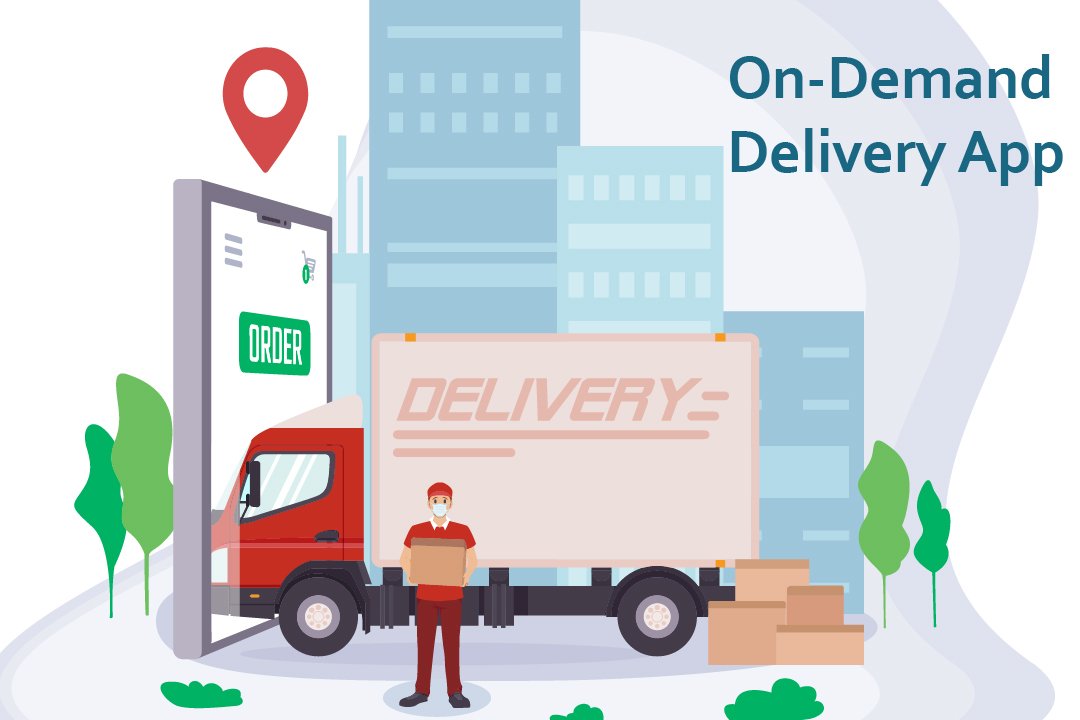
These days, the most used apps include on-demand applications. Whether you talk about the food delivery apps or the ones you use for booking cabs, these come under the category of on-demand mobile applications. These days, on-demand applications are everywhere. An on-demand app is actually software that operates as a mediator between a customer and a business. The businesses like Uber and Zomato and many others are an example of such an approach. On-demand app development is aimed at providing on-demand service to customers in a few minutes. On-Demand App These apps connect the customer indirectly to the various service providers out there in the market. The services being provided separately in the market are made to reach the customer through an online medium to be delivered at their doorsteps. Whether you talk of the food delivery apps, these apps collaborate with the various businesses around a place and simultaneously take orders from the customers and arrange the delivery of that order by themselves. On-demand app development prevails as a prominent task for android apps developers. On-demand app development services are quicker and are more convenient to use.

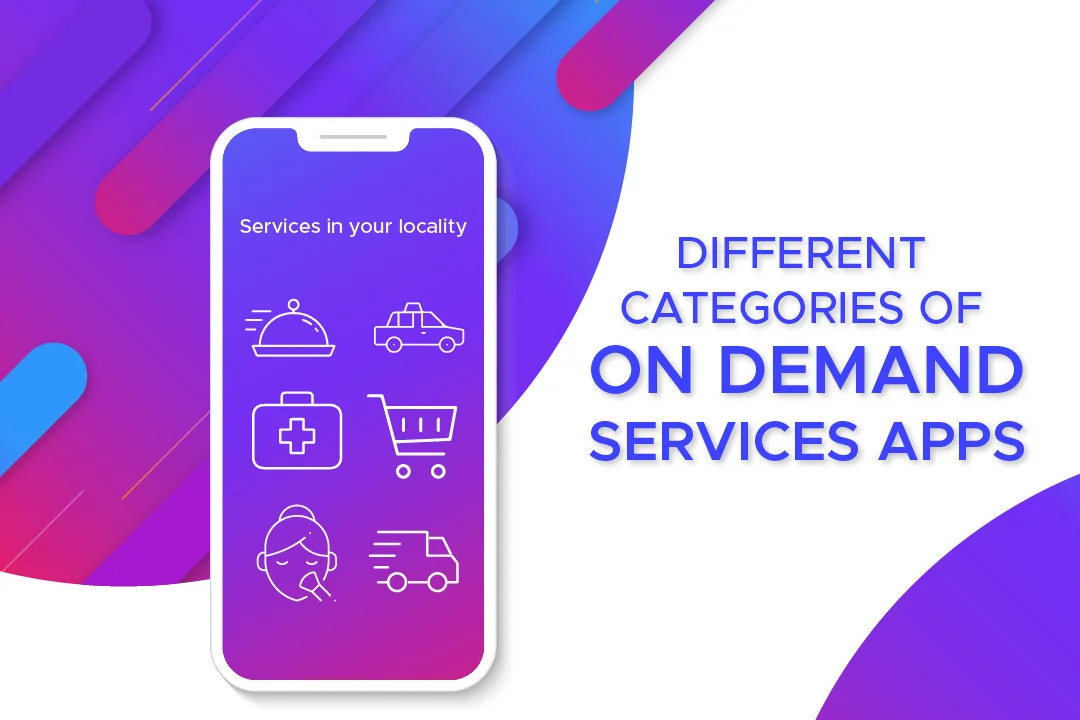
On-demand apps can be classified into different categories.

On-demand apps

  • Taxi service
  • Food delivery
  • Household chores
  • Car wash apps
  • Gifts
  • Flowers and plants
  • Healthcare
  • Medical apps

Android is a mobile operating system that is used to develop touchscreen devices, cell phones, tablets. It is based on a modified edition of Linux Kernel and other open-source software, which were predominantly designed for touchscreen devices and mobile phones. Each day, the number of mobile phones operating on Android is increasing. And likewise, the applications being added on the Google play store are also being proliferated. Trust us, and the on-demand advancement is here to stay. These apps are so convenient and liked by the users that they become habitual of ordering the essential services in just a few clicks. Further in the blog, we will decipher why android and on-demand app development goes hand in hand.

Why Is Android The Best Choice For On-Demand App Development?

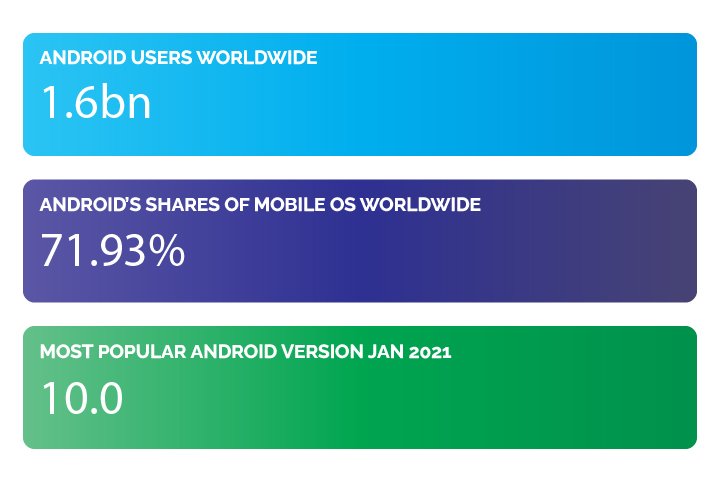
Android, the most used operating system, has taken the lead in the app development industry. The Android Operating System, which was developed by Google back in 2008, has now become developers’ choice, to be precise. Android has around 1.6 billion users worldwide. Not just this, Android has a share of 71.93% of the world’s operating systems. According to Statista, the data also shows that Android 10.0 is the most used Android version worldwide. Android app Android app development is the prominent procedure followed by several thousand developers from around the world. There are specific reasons that prove that Android is the best operating system to develop on-demand apps. Over the years, Android has set itself at an elevation from what it was in the past- at the time it was released in 2008. Android is now the most used operating system worldwide, as we already mentioned. Now is the time that you see clearly that it is, by far, the best platform for app development. Android app development doesn’t betray the developers, not the users. This way, the business owners, the developers, and the customers persist in being satisfied with the services.  The Android app platform works just the best for everyone. Here’s how:

Android apps possess a massive share in the market:

as we already mentioned earlier, Android has 71.93% of the share in the entire operating system market worldwide. This data in itself is vast and is consistent with the fact that it is by far the most preferred system. We can deny opinions, not the facts. Here we present you with the most accurate facts brought to you straight from authentic surveys done by the best websites worldwide. Android app development is and will be beneficial to everyone in all domains. People prefer the android apps present on the play store. Statistics and figures worldwide indicate only one direction- Android is faulting better than iOS. According to reports on Reports show 3.3 million Android apps in total Android also has an edge because of the vast geographical region covered by Android worldwide. Android apps also have a considerable share in the two densely or say markets- India and China- the most populated countries of the world. It’s definitely not confined to a particular continent. It finds its immense users based in large parts of Europe and South America, and even in many parts of Africa. On the other hand, iOS gets to witness its users restricted mainly to the US and Canada, if not for Australia. This clearly shows that if one wishes to reach out to a considerable mass of the populace, he should think about the platform best suited in the longer run. The only platform that would come to a developer’s mind when comparing the facts and figures of the audience being reached, a sensible one would not take a minute to go for Android app development. Likewise, on-demand applications have a great future if it is for the Android app development process. This procedure is the one that is adamant in bringing you success. Think of this as your mantra- The more influential the audience, the larger the reach, the better is the growth of your business.

Lenient and flexible app policies:

Lenient and flexible app policies are your way through any sensible, well-learned expert would have you believe that Google has the most flexible and developer and user-friendly app policies. These policies do not come in the way of developers during the android app development process, nor do they interrupt the working and usage of the end customers of the apps. Having such policies in place turns out to be a blessing for the developers. The guidelines that direct the app publishing and rejection are pretty lenient and easy on the developers. Stringent and hard to mold rules, terms, and conditions as not a thing of Android. The reviewing time taken at Android is even lesser than usual at the play store. Also, the tremendous expense that every developer or business owner wishes weren’t there is far less for Android developers than it is for iOS ones. While you’re developing an on-demand app, the requirements to pay that extra penny are eliminated. You pay a reasonable amount at Android- a contradiction to what you would pay to Apple.

More features, more fun: 

Who doesn’t like a little more than usual? Everyone wants to have that extra in just the same budget. Android allows you to have that little ‘extra’ in their apps. There is room for additional features in Android app development. Especially when creating on-demand apps, one needs to have several features handy that the customer is provided with the most convenient application to use. Features such as GPS and Maps are a boon for Android app users. These features are not something that should be, in anyways, left out. These help to communicate better with the customer and provide them with leverage of comfort. 

Customization is a piece of cake:

On-demand apps are not easy to maintain in general. Now and then, there’s something that needs to be changed to get a modified version of the app. Also, to cater to the needs of customers, you must include each functionality that is desired by your audience. This makes your app more reliable and convenient. To get this done, Android provides smooth and easy customization options for the developers to put in a feature and update the app whenever needed.

Google assistant: 

With Android, you get the benefit of google assistant. This assistant is incredibly profitable as it has a voice-enabled assistant at work. Your command is its order. You give the command, and it gets encrypted immediately, thereby leaving no room for dissatisfaction. You can search for a thing while doing a task effortlessly.

Better Data Storage: 

Google gets you 15 GB of data storage free of cost on its cloud. This data can be stored in Google Drive. This feature is highly beneficial when you wish to develop an on-demand application. Launching the on-demand app on Google Play Store will be smooth for you in light of the extensive storage that’s provided.

Multiple languages at one place: 

on-demand application The on-demand application should likewise have various language support components as it depends on the B2C model. It is a significant advantage that Android offers help for around 100 dialects in contrast with simple 34 languages on account of iOS. Read more about New Trends In Mobile App Development

Closing Lines: Are You Ready to Build an On-Demand Android App?

These days, there’s a powerful desire for on-demand applications in the market. With pandemics revolving around our lives, we surely need certain on-demand apps to work for our essential needs to be catered. Well, we’ve provided you with enough reasons why choosing Android would be the best choice for anyone. Consider all these points and choose the best for yourself.  With over a decade of experience in the field, we have covered almost all business areas of one or the other companies. If you have a project idea to discuss, you can contact us and discuss the details. Our android application development company will make the next android application a massive success!

Top SDKs, Frameworks, and Libraries for Android App Development in 2021

Android has been among the leading mobile operating systems worldwide in January 2021, occupying the mobile OS market with 71.93 percent shares. It’s no wonder; android mobile application development is highly in demand. Android app development takes more time than iOS development because of the large number of android devices. 

Whether you are a novice developer or experienced one, you know that performing a simplest task can be complicated sometimes. Luckily, there are many android frameworks, SDKs (Software Development Kits), and Libraries that can help you reduce the complexity of development, increase the speed of development and optimize your application’s performance. So, here are some of the essential Android Libraries, SDKs, and Frameworks that will accelerate your android application development.

Top Frameworks to Use for Android Application Development

There are many frameworks available for Android Application Development, which also includes many cross-platform frameworks like Flutter and React Native. Let’s talk about some of the popular frameworks out there.

1.Kotlin

Kotlin is a programming language that has gained outstanding popularity and interest among developers. According to Google’s Google’s #IO17 announcement, Kotlin has become an official language for Android apps. Its clean language-design and powerful features make it popular among developers. Kotlin aims to bring together the features of programming languages that have proven beneficial for large-scale projects. 

Even though developers can use Kotlin anywhere Java is used, it is primarily used in android app development. Many companies like Google, Trello/Atlassian, Pinterest, Kickstarter, and Uber are using Kotlin for their benefits. Some of its benefits include writing less code, easy adoption, fully compatible with Java, and imposes no runtime overhead. 

Kotlin being more fault-proof, the app developed through Kotlin will be easier and cheaper to maintain. Kotlin also helps you in faster development as it is briefer. Fewer lines of code mean less time spent on coding and less money spent on development. Isn’tIsn’t this great? You can also transform your app from one platform to another if required.

2.Flutter

Flutter is an open-source mobile app SDK developed by Google in 2017. Dart is the language in which Flutter applications are developed. It is quite a simple language to start with and a clear language intended by Google to replace JavaScript. Since Flutter has recently entered the list of cross-platform app development frameworks, the great ideas have caused it to catch on among the developers. 

Although there are many successful frameworks in the industry, many big companies like The Google Ads app, Alibaba, The eBay Motors app, etc. that are choosing Flutter for android application development. Even Though Flutter is quite capable, it is still new in the industry and continuously updating its features.

The most significant benefit of Flutter for most businesses is hiring only one team for both iOS and Android Platforms. Flutter allows developers to build stunning and attractive interfaces. However, there are many other benefits of Flutter Framework such as high productivity, fast and simple development, excellent performance, compatibility, and most importantly, Flutter is open-source. 

3.React Native

React Native is among the most popular JavaScript libraries used to develop both Android and iOS applications. React Native can help you develop native applications for all devices and operating systems. It’s an open-source, cross-platform framework that is developed by Facebook. Using React Native, developers can develop high-performance apps with faster deployment time in less duration. 

It uses JavaScript and helps in developing rich, responsive, and unique apps. In 2021, React Native has gained popularity in the top mobile app development frameworks. React Native provides a set of unbelievable native components like Views, Text, etc. It supports JavaScript, which is crucial for full-stack development.

React Native offers some outstanding features like low code, support for third-party libraries, short development time, live reload, and declarative API for predictive UPI. These are some of the features that make many famous companies like Facebook, SoundCloud, Instagram, Ubereats, and Airbnb use React Native. By migrating to React Native, you’ll find a simple architecture, increased app performance, and also you will be easily able to control the builds.

4.Ionic

Ionic is an entirely free and open-source framework developed with Angular and Apache Cordova. It allows the developers to develop apps for iOS, Windows, and Android. Ionic is used to build cross-platform mobile applications for high mobile performance. Mobile App Developers use Ionic Framework for powerful and fully-featured mobile application development.

One of the most significant advantages of the Ionic Framework is that developers can use several UI elements in their application development. The UI elements like ListViews, Forms, filters, action sheets, navigation menus, and tab bars help developers develop high-performance, robust, and responsive mobile applications. 

Ionic is a feature-rich cross-platform development framework. It can prove to be the best framework if the developer is well-experienced with HTML, JavaScript, or CSS. There are various features in Ionic Framework like Cordova Plugin, easy and fast development, JavaScript Components, complete control over app building, and much more. These features make Ionic one of the best frameworks for cross-platform development.

Useful Libraries for Cross-platform Mobile Application Development 

Using third-party libraries in your mobile application development can help you boost the productivity of your app, whether it is iOS or Android. But the important thing is, with so many third-party libraries in the market, which could be the ones worth using? Let’s discuss some of the best Libraries to use while cross-platform application development.

Android Jetpack

Android Jetpack is a series of libraries that helps the mobile app developers to follow best practices, decrease standard code, and write code that constantly works across all the Android devices and android versions so that the mobile app developers can focus on the code they care about. Below is the list of the libraries most commonly used for developing an android app.

Dependency Injection Frameworks

1.Dagger

Dagger is a library developed for low-end devices and is based on annotations. Dagger is based on Java Specification Code 330 and uses code generation. The code generated by Dagger is straightforward to read and troubleshoot.

2.Koin

Koin is an intelligent Injection Framework that helps you focus on your app, not on the tools. It is a realistic, lightweight dependency Injection Framework developed in Kotlin. It generates less standard code as compared to Dagger. 

3.ButterKnife

Butterknife uses annotation development to generate modified Java classes that are based on annotations. It allows you to interpret the views and OnClickListeners. Butterknife also involves findById methods that simplify the code to find views on a View, Activity, or Dialog.

Network Libraries

1.Retrofit

In Android Application Development, Retrofit is a REST Client for Android and Java developed by Square Inc. under Apache 2.0. It is a simple library used for network transactions. To seamlessly capture JSON response by web services or web API, Retrofit can be the best choice. It is an easy and fast library to recover and upload JSON or any other structured data through REST-based web services.

2.Volley 

Volley is a network library developed by Google. It is an HTTP library that makes networking more accessible and faster. It supports the arrangement of network requests. If you are searching for a network client for network operations, Volley will be a better choice than Retrofit.

Image Loading

1.Fresco

Fresco is a library created by Facebook. It is the library developed explicitly for loading images. It works faster than the other Image Loading Libraries and does not slow down the app, which is in process. Fresco also reduces the OutOfMemoryError. 

2.Coil

The coil is the very first image loading library for android app development backed by Kotlin. It is fast, lightweight, easy to use, and a modern library. It is Kotlin-first and makes use of modern libraries, including Coroutines, Okio, OkHttp, and AndroidX Lifecycles.

3.Picasso

Picasso is a famous library developed by Square Inc. It displays and caches images. Picasso Library is famous because it requires only one line of code and has a similar coding style for each of its features. 

4.Glide

Glide is an open-source, fast and efficient image loading library for Android that includes memory and disk caching, media decoding, and merging the resources into the simple and easy-to-use interface. It supports fetching, decoding, and displaying video stills, GIFs, and images. 

Analytics and Crash reporting

1.Firebase Analytics

Firebase Analytics is a library that helps you to know how visitors are engaging with our application. From the first step, i.e., setup, Firebase Analytics will automatically start tracking defined sets of events, and we can also add our custom set of events for tracking.

2.Crashlytics

Crashlytics provides multi-platform support for Android and iOS to help you find out crash analytics and the errors that affect your apps and cause the apps to crash. Moreover, it identifies and highlights the exact line of code that produces problems. It is a free and straightforward tool that SDK to help you make your work easier.

Read more about New Trends In Mobile App Development

Conclusion

Here we conclude the list of Top SDKs, Frameworks, and Libraries for android app development. There are many SDKs, frameworks for developing your mobile app, but we have collected some of the best ones. Choose the best ones and make your mobile app development exciting and more effortless; knowing these frameworks will help you enhance the performance of your mobile applications.

10+ Trending Mobile App Ideas to Inspire Your Next Big Project

Introduction

The mobile app market is ever-evolving, with countless opportunities for businesses and developers to create impactful solutions. Whether you’re a budding entrepreneur or an experienced app developer, finding the right app idea can be a game-changer. With the global app economy projected to reach $935 billion in revenue by 2023 (Statista), the demand for innovative and user-centric apps continues to grow.

This blog dives into trending app ideas that align with current user needs and technological advancements. Whether you’re interested in AI-powered tools, sustainable solutions, or community-based platforms, these ideas are designed to spark creativity and help you build an app that stands out in today’s competitive market.

How to Choose the Right Mobile App Idea

Before you dive into development, it’s essential to choose an app idea that aligns with your goals and meets market demands. Here’s a step-by-step guide to help you select the best concept:

  1. Identify a Problem to Solve:
    • Understand your target audience’s pain points. What problems can your app address effectively?
    • Example: If users struggle with managing fitness routines, consider creating an AI-driven fitness tracker.
  2. Analyze Current Trends:
    • Use tools like Google Trends to identify trending app categories.
    • Explore platforms like Statista to understand market projections and popular app features.
  3. Evaluate Resources:
    • Assess whether your team, budget, and tools can support the development of your app idea.
    • If resources are limited, consider starting with a Minimum Viable Product (MVP) to test your concept.
  4. Research Competitors:
    • Study existing apps in your niche to identify gaps you can fill or features you can enhance.
    • Example: If competitors’ fitness apps lack personalized meal plans, incorporate that feature in your app.

Latest Trending Mobile App Ideas

1. AI-Powered Fitness Tracker

With the increasing focus on health and wellness, AI-powered fitness trackers are in high demand. Features to include:

  • Personalized workout plans based on user data.
  • AI analysis of exercise form via camera integration.
  • Integration with wearables for real-time tracking of vitals like heart rate and calorie burn.

2. Real-Time Language Translator

A real-time language translation app can revolutionize communication across different cultures. Features:

  • Offline translation for accessibility in remote areas.
  • Voice-to-text and text-to-voice capabilities.
  • Support for multiple languages and dialects, ideal for global travelers or business professionals.

3. Sustainable Shopping Assistant

Eco-conscious consumers are looking for ways to make informed purchases. Build an app that helps users choose sustainable products with:

  • Barcode scanning to analyze environmental impact.
  • Recommendations for eco-friendly alternatives.
  • Integration with e-commerce platforms for direct purchases.

4. AR-Powered Interior Design App

Augmented reality (AR) is transforming interior design by enabling users to visualize changes before implementation. Key features:

  • Upload a photo of a room and visualize furniture placements.
  • Wall color matching with AR overlays.
  • Direct integration with furniture stores for seamless shopping.

5. Hyperlocal Delivery Tracker

Hyperlocal delivery apps cater to small businesses and individual users. Features:

  • GPS-enabled live tracking of packages.
  • A centralized dashboard for managing multiple deliveries.
  • Notifications for real-time delivery updates.

6. Mental Health and Wellness App

Mental health apps are becoming increasingly popular for their ability to support well-being. Features to include:

  • Mood tracking with personalized suggestions.
  • Guided meditations and breathing exercises.
  • Virtual therapy sessions with licensed professionals.

7. Career Guidance Platform

Help users navigate their career paths with an interactive career guidance app. Features:

  • AI-based assessments to recommend suitable career options.
  • Access to certified courses and training programs.
  • Community forums to connect with industry experts and mentors.

8. Recipe Finder with AI Integration

Enhance cooking experiences with a recipe finder app powered by AI. Features:

  • Users input available ingredients, and the app suggests recipes.
  • Filters for dietary preferences, cooking time, and difficulty.
  • AR-guided cooking for hands-free step-by-step instructions.

9. Emotional Food Matcher

Build a fun and engaging app that recommends meals based on users’ emotions. Features:

  • Mood-based questionnaires to assess emotions.
  • Food recommendations tailored to user preferences.
  • Integration with local restaurant delivery services.

10. Smart Home Automation Controller

With smart homes becoming mainstream, a unified controller app can simplify management. Features:

  • Compatibility with multiple smart devices and brands.
  • Custom automation routines for lighting, temperature, and appliances.
  • Energy usage insights to promote sustainability.

11. On-Demand Tutoring App

Remote education is on the rise, creating opportunities for on-demand tutoring apps. Features:

  • Instant booking of qualified tutors for various subjects.
  • Real-time video conferencing for interactive learning.
  • Session recordings for future reference.

Key Considerations Before App Development

  1. Technical Feasibility:
    • Ensure your app idea is technically viable. Use prototyping tools to validate the concept.
  2. Monetization Strategy:
    • Decide whether your app will generate revenue through ads, subscriptions, or in-app purchases.
  3. User-Centric Design:
    • Prioritize ease of use and accessibility in your app’s interface to enhance user experience.
  4. Scalability:
    • Design your app with future scalability in mind to accommodate growing user demand.

Marketing Strategies for Your Mobile App

Developing an app is only half the battle; marketing plays a critical role in its success. Here are some proven strategies:

  1. Social Media Campaigns:
    • Use visually appealing posts and stories on Instagram, TikTok, and LinkedIn to create buzz.
  2. Influencer Collaborations:
    • Partner with influencers in your niche to promote your app to a targeted audience.
  3. App Store Optimization (ASO):
    • Optimize your app title, description, and screenshots for better visibility in app stores.
  4. Content Marketing:
    • Publish blogs, case studies, and how-to guides to establish authority and attract organic traffic.

Conclusion

The mobile app market is brimming with opportunities for innovation and growth. From AI-driven fitness trackers to AR-powered interior design solutions, the app ideas outlined in this blog offer immense potential to cater to diverse user needs. By aligning your app with current trends, focusing on user-centric design, and leveraging robust marketing strategies, you can position your app for success.

Are you ready to turn your app idea into reality? Collaborate with a trusted mobile app development company to bring your vision to life. Let’s build something extraordinary together!

Latest updates by Google for their Android Users: That will transform your phone

Introduction:

As we all know, Google has released android 11 versions and Pixel 5 for some time. With this, certain features were also introduced for their android users to make their daily tasks accomplished on their phones easier. Still, there are several updates on which Google is working currently, which may act as a revolution for its android users. There were a number of features introduced by Google, which changed its users’ methodology in accessing their smartphones. These updates were: Google Assistant, Google Duo, Blocking of calls that considered spam from the phone itself, notification sound improvement, action block and many more to list. Some of these features are already being used by smartphone users, while some are still in their beta versions, available to only beta testers. The android app development services have gained momentum after introducing these features and hence given a new way for the android app development procedure. These features have also been incorporated in the third-party applications launched on Google Play by the android app development companies. The applications having these latest features are now on the top downloaded applications from Google Play. Hence, this holiday season, Google has decided to launch a wide range of features to let their users enjoy their vacation and have to spend the least time surfing for their activities. Let us discuss these features in detail in the next section.

Features from Google- A gift for its Android Users:

This section will provide the introduction to the features developed and released by Google for the smooth functioning of Android devices, along with their usefulness to a layman android user.

1. A tool for Password Check-up:

Password Check-up This tool checks the passwords that were saved by the users previously. These credentials of the users were known as “known compromised passwords”. This feature was initially available to desktop users only, but now it is also made available to Android smartphone users. For this, the user has to switch on to the option for auto-filling the details, as their credentials will be saved as per the user permissions. Hence, when filling the data, auto-filling is on, the compromised information will be automatically entered over the text box to fill the data.

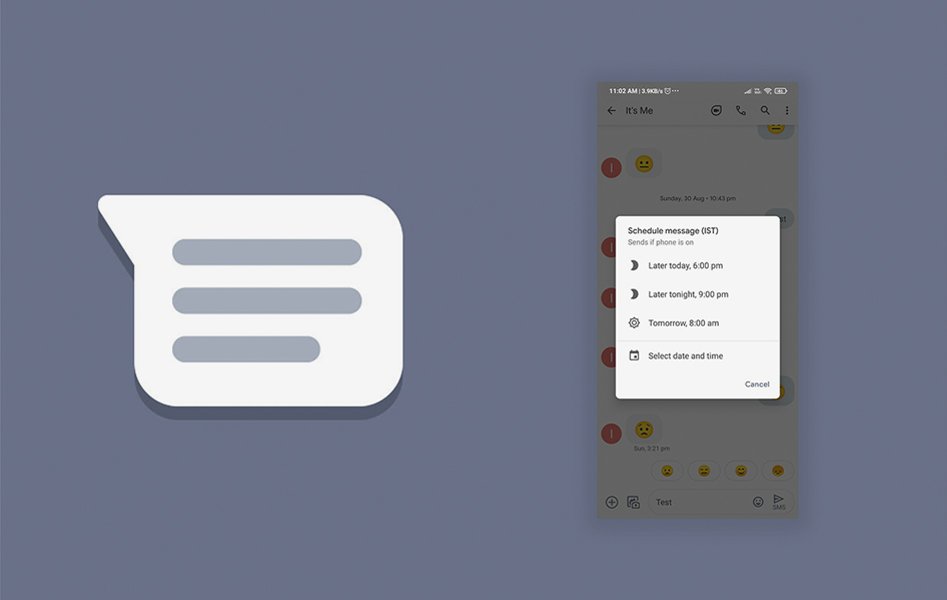
2. Scheduling of Messages:

Scheduling of Messages According to the latest updates in Android smartphones’ messaging app, one can now set the date and time to send their message to their recipients’ inbox. This feature reported to get started in September 2020, but there was no official confirmation from the company, which has now confirmed the release of this update. All the user needs to do is compose a message, schedule it, get the scheduling options by long-pressing the send button, and then set the date and time. There will also be suggestions provided to the user by the system to set the date and time.

3. Dark mode in Google Maps:

Dark mode in Google Maps Google had released the update in almost all of its applications for the mobile screen’s dark mode except for the Google Maps. But recently, this feature also got introduced in the same. It scheduled to be released around September 2020, but due to certain delays, this feature came into consideration and used recently. Considering this feature, many android app development companies have created applications that enable the dark mode. To set your screen to dark mode in Google Maps, go to the Settings tab of the application, and select the themes option. Then, select the toggle button Always named in Dark Theme or similar options in it, and your screen will be visible in dark mode. Explore innovations in Android development and how the latest updates can enhance your experience and app capabilities.

4. Now give commands to Google Assistant without physical connection:

Google Assistant We all know Google Assistant is not a new feature for its users as it introduced a long time ago. But there are certain features and functionalities in Google Assistant that added recently. For example, initially, the Google Assistant accepted the commands like the keywords for Google Search, opening the applications, etc. After the release of new updates, users can now set alarms, make phone calls, play music, send and receive messages, etc. Above this, few cards are there to make visible, which we call Glances, while the screen is locked.

5. Updates introduced in TalkBack:

Updates introduced in TalkBack For its specially-abled android users who might have low or no vision, Google has introduced TalkBack, which acts as a reader of the components active on the screen. Updates like dynamic gestures, menu, reading controls, etc., are added recently. Google has made the announcement for the release of these advanced features, some of this being- easy to use multiple fingers gesture supported in Pixel as well as Samsung phones, three-finger swipes enabled reading controls, various commands added recognizing the voice of the user, support for braille keyboard and other two additional languages, etc.
6. Introducing Android Auto:

Android Auto The latest updates released in the Android Auto application included customized wallpapers and games that are voice-controlled. There are also various shortcuts available on the home screen, for example, contacts, weather updates, temperature check, etc., with the help of Google Assistant fed in the application. The future updates of the application included the splitting of the screen due to the higher width of the screen in the vehicles, which will be helpful to the users in accessing the phone easily.

7. Customized Emoji Stickers:

Customized Emoji Stickers Till now, there were a few hundred stickers available on Gboard, a keyboard defined by Google for its users. The latest update has released more than 14000 such emojis, which can also be customized as per user preferences. This is known as Emoji Kitchen among android users. This enables its users to select two emojis and check out their combinations for creating a customized one, along with a number of features and emojis provided to them as a suggestion. Currently, the Emoji Kitchen is available as a Beta version for its users. Still, it will be available shortly to all the users in a short span, according to Google’s statement.

8. Launch of more number Audiobooks applications on Google Play:

The latest release of Google is to launch more Audiobooks possible on Google Play. The company has also provided the tools for narration to help the authors of the US and UK to compose the audio for their literature easily. The launched applications are still in the Beta phase and will be available to users in early 2021.

9. Nearby Share:

Nearby Share Using this application, one android user can easily send and receive the android applications to and from the other android users. These apps can be sent via multiple options available- for example, Bluetooth, WebRTC, Wi-fi, etc. Share an app directly from Google Play, go to the Share apps menu in the Manage app and games section and choose an app that you want to share. It required that the other android user must permit to accept that application. This feature will also be released soon, as shared by Google.

10. Share your screen on Google Duo:

Google Duo Being on a video call and sharing the screen with friends on Google Duo was an impossible task earlier. But with the latest release, Google has added the feature of screen share while the call is on Google Duo. This is similar to Google Meet, in which screen sharing is possible, which allows us to share various types of content like videos, images, etc. In addition to this, the sharing of video messages has also been introduced, in case the person you are calling is not available at the moment. For those having issues with hearing, or the receiver’s location is such that the voice in the video is not audible, the video messages are available with captions that are automatically generated.

11. Action Block for effective communication:

If you want to communicate without voice, in the form of descriptive short phrases and pictures, Google has come up with this latest release known as Action Block. This is an artificial voice generator, which will help people with cognitive disabilities for speech, age, etc. Google has incorporated a large number of pictures, in addition to various learning materials for speech therapy. In addition to this, the feature is available in multiple languages like Japanese, German, Italian, French, etc.

12. Selecting Smart Texts:

This feature automatically recognizes the meaning of the word you are entering, and based on that, would suggest specific actions you can perform. This feature is now made active in Overview so that it becomes easy for you to perform your desired action.

13. Smartly controlled Auto-rotate feature:

The auto-rotate feature of the phone is now well maintained and is also becoming less frustrating as the selection of toggle for auto-rotate on or off is now a pop up that is placed near the icons in the navigation bar and gives you the options to choose whether you want to keep the auto rotate on or not. Also, this will be helpful for the applications that are designed, especially in portrait orientation. This will result in a locked orientation of the screen, preventing sudden screen rotation.

14. Control the ringer volume smartly:

Sometimes, you try to lower the media volume playing in the background, but you end up reducing your ringer volume and missing the necessary calls and notifications. Hence, as per the latest release, the volume controls are given as a vertical pop up where you can select the volume type to be lowered. Also, there are built-in icons with specific purposes like mute, no volume, full volume, etc.

15. ML kit:

For new developers and learners in Machine learning, Google has announced a set of APIs that can detect the face, speech, image, etc., in the form of an ML kit. With the use of this, mobile app developers can easily develop ML-enabled applications.

16. Android Dashboard:

This feature is made available to look after the well-being of its device users! For example, your habits, search pattern, gaming choices, etc., will be recorded in the dashboard, and at a specific time, it will ask you to switch the apps off and spend quality family time too! For example, if the dashboard tracks higher screen time on youtube, it might notify you about the overuse of the application and suggest you spend some qualitative time with family and friends.

17. App Timer:

With this update, one can set the timer for limiting the usage of a particular application. You will be prompted once you are close to the timer getting off. Hence, the feature will continuously remind you about the time spent and the remaining time to use the phone.

Final Thoughts

These were Google features that were going to be introduced for users’ ease of accessing their android devices. If you are an entrepreneur and want to create an Android app that perfectly works with the android device or want to hire Android app developers to build your app, you need the Best Android app development company.

Android 12 “Snow Cone”: All New Features and Changes That You Need to Know About

Introduction:

Android has now become an inseparable part of people’s lives that mostly rely on their smart Android devices to accomplish their daily tasks. Be it professional tasks, games, communication with near ones, etc., and Android has been a full package of utilities for its users. Not limited to smartphones only, Android has been functioning in various devices such as smart cars, TV sets, tablets, smartwatches, etc. Hence, since its introduction in early 2008, under the name of Android 1.0, Android has increased its popularity immensely among smartphone users, and now available on various smart devices too, and hence it is now the system having the highest number of users across the globe. More is the number of people engaging with Android, more will be the expectations of the people in terms of ease and smooth functioning of the system, along with the addition of various automation features in the device. Hence, we have seen that each release of the android version has introduced many new features. So, many Android App Development Company have been working hard and have developed high-end applications providing advanced features for Android users. For example, Face detection for unlocking the phone and other applications on Android is now a part of the device in Android 11- R, which was not a part of the earlier versions of Android.

When will Android 12 be available?

The timeline for the release of this version of Android is as follows:

  • Developer preview release date: 18 February 2021
  • Public beta release date: Around May 2021
  • The official rollout for consumers: Around September 2021

The procedure for the final release of the system will commence from August 2021, after observing the API compatibility, SDKs, libraries, etc., and will then be continued in releasing updates in the future. In this article, we shall be discussing the latest version of Android, for which the developer preview for testing and providing feedback, has been released recently, Android 12. Let us visit its features, functionalities, etc., and see what new it has to offer.

All about Android 12!

android 12 With the release of every new version of Android, the android developer teams have tried to provide more enhanced features in the operating system, such as security, privacy, better performance as compared to earlier versions, and ease in accessing the devices. Some of the new features added to the latest version of the OS can be listed as follows: – Compatibility for transcoding the media files, i.e., if there are specific formats for images or videos which were not supported earlier, can now be accessed easily on the latest version, in addition to easy migration of the media content into other applications, developed by the android app development company. – Privacy and security measures to protect your application data. – Enhancement in the app performance so that the responsiveness of the app increases and the user can use the app with the least delay in response time. Let us discuss the features of this version of Android in detail.

Trust and Security:

Security, Privacy, Safety, etc., are the terms that we generally take into the limelight. At the same time, we switch over to a whole new system, and this comes as the main concern for us before adapting to the new system.  In Android 12, the developers have a motto to provide the control and the best possible transparency and the dynamic identifiers that are traceable, that eases the job of an Android App Development Company for building high-end applications and hence keeps the devices and their data safe. More secure components of the apps have been defined for providing the best Android App Development Services to its users. However, if you update your device to this version, many configurations of the existing apps in your device might change. And hence, it comes under the Android App Development Services providers to test the application before launching it on the store. Trust and security is the most valuable aspect for Android App Development Services.So If you are looking for the best Android App Development Company, build your app with the WEDOWEBAPPS LLC team that you can trust.   1. Introduction of SameSite cookies for WebView: Once the changes in the system are introduced, the changes in the configuration of the chrome browser are also introduced. In the new configurations, SameSite cookies are introduced within the WebView, looking at the security and the privacy point of view for the browsing data. These cookies are intended to be more secure and transparent for passing the data amongst the other sites. 2. Restrictions on Netlink MAC: The developers of Android have been ensuring the migration of its users to the identifiers that are dynamic and can be reset, and hence enabling the privacy settings. In the version Android 11, the API levels have been set to 30, considering the efforts taken for migrating the Netlink MAC, now in the Android 12 version, regardless of what the target SDK level is, the restrictions are being placed in all the applications. 3. Components can be exported safely: To prevent the applications from exporting the android frameworks such as activities, services, broadcasts, etc., the latest release of Android has changed the handles for the Android: exported attribute and is now more explicit as compared to older versions. In this update, it has been specified that the components which define one or more than one intent filters need to declare the Android: exported attribute explicitly. In order to avoid the errors at the installation time, it is recommended that you inspect the components and their order in the manifest file, as the changes in the system may introduce errors in installing the IDE. Read also: Google’s Latest Android Updates: Transforming Your Phone 4. Better handling of the Intents: The android apps should now explicitly define and declare the mutable flag, i.e., FLAG_MUTABLE or FLAG_IMMUTABLE, for the purpose of handling the PendingIntents element more securely and safely. These flags are to be defined for each of the PendingIntent elements.

Better tools for the best user experience:

Better performance of the Android applications is one of the key points of the system to be a success. In this version of Android, the developers have taken this point into consideration, and they have invested their time and efforts in creating a smooth and polished user experience in the system by developing advanced tools. Let us discuss some of the updates related to this in detail: 1. Transcoding media for compatibility with the system: Due to the latest update in an android device, HEVC, which are the encoders for hardware devices, the camera application has now become compatible with the HEVC formats and hence captures the images in this format only. This format provides an excellent quality of pictures, even when an image is compressed using the older code encoders. In the latest devices, most of the installed applications accept the media files in this format, but if some applications do not support this format, the newest version in Android has introduced the transcoding of the media files. For the applications that do not support the HEVC format, the updated platform transcodes the media file to the AVC format, which is acceptable in all Android devices. Although, the process to transcode those media files takes time, as per the properties of the media files and the configurations of the hardware of the device. This can be done by declaring the formats of the media files that the app does not support and hence choosing the built-in transcoding services on the devices. Developers are recommended to create applications that support the HEVC formats for better video and image qualities. 2. Support for AVIF images: Android 12 has released the AV1 Image File Format (AVIF) to provide the users with a better experience of compressed video and image files. AVIF acts as a container of images that are encoded in AV1. The advantage of this format is that it takes the content that is encoded intra-frame, especially in the compression of videos. Hence, the image and video quality improve drastically, without any changes in the size of the file as compared to the images and videos with older formats. 3. Optimization in services running foreground: Foreground tasks are generally helpful in managing the tasks that involve user interaction. But, access implementation of these tasks led to adverse effects on the performance of the applications, and sometimes this may lead to the killing of the current activity in the application. To prevent these issues, the foreground processes will be blocked for the apps that are developed to run on the newer version of the platform. This is done by the introduction of JobScheduler, which will be helpful for deciding the priority of the processes, network access and hence works with high speed and performance. Also, a delay of 10 seconds has been introduced in displaying these foreground activities and notifications, with an advantage given to the shorter tasks in completing on time. 4. Inserting the media content easily: Moving the content like images and videos on the application seems to be a tedious task. An API has been introduced in this version, which allows the user to insert the content easily with the help of drag and drop, keyboard, etc. You can map the OnReceiveContent listener with the UI elements to get a notification whenever the media content is inserted into an application. 5. Haptic effect for the sound vibrations: Applications in the newer version can now provide the haptic feedback that is audio coupled, with the help of the phone’s vibrator. The strength and frequency of these vibrations can be obtained from the audio session, creating the best experiences of audio while gaming. 6. Improvements in gesture navigations: These improvements in gesture navigations have been remarkable while carrying out activities like watching videos, reading e-books, playing games, etc. These navigations can be done with a single swipe in the new version. 7. Notifications for updates in UI: Smoother transitions in addition to the animations in the system have been introduced in Android 12. Modern designs, more specific, and improved functionalities of the notifications of these updates have also been implemented. 8. Responsiveness of notifications improved: Generally, when a notification arrives, the user has the practice of moving to the relevant app as soon as possible. This might lead to the less responsive behavior of the application. In android 12, the notification trampolines are blocked, and as a result, the user experience is improved remarkably. 9. Improvement in Inter-Process Communication: The workload distribution and latency have been taken care of in Android 12 so as to reduce the system variability. Enabling the cache and removing the locking calls are some of the measures taken to improve the latency in the new version. Overall, with this, the performance of the system has almost doubled.

While Android 12 introduces enhanced tools for a smoother user experience, it is crucial for developers to focus on the key factors for Android app development. These include ensuring compatibility with various devices, optimizing performance, and integrating security features. By keeping these factors in mind, developers can create apps that are not only functional but also deliver a seamless experience across different devices.

App Compatibility:

The applications on the Android 12 devices have been provided a better environment after adding the system updates on Google Play. 1. Updates via Google Play: To enable secure access and environment for applications to run, most of the updates are now introduced through Google Play. You do not need to update the full system to boost your memory, libraries, Kotlin operations, etc. 2. Optimized performance for watches, TV, and other devices: Developers preview for the devices like tablets, smartwatches, smart TV sets, etc., is also released to check the app compatibility of the Android 12 system. Also, you can test your applications on smart TV using the Google TV interface. 3. Testing the changes now became easier: The opt-in changes that may affect the performance of the application are now enabled with toggles. You can help or disable the toggles from the Developer Options tab on your device.

As developers continue to enhance Android apps to be compatible with multiple devices like smartwatches and TVs, many business owners may wonder how to hire an app developer who can navigate these complexities. It’s important to select a developer who has experience with the latest Android versions and understands how to optimize apps for diverse hardware configurations.

Wrapping up:

In this article, we came across various features introduced in Android 12, which are yet to be released and are available only for the developer preview. I hope the information mentioned above becomes helpful for all in one or another ways. You can avail of our Android App Development Services and let WEDOWEBAPP LLC A Android App Development Company be your growth partner.