Introduction
Publishing an Android application today involves much more than simply uploading a file to Google Play. The modern Android app release process now includes compliance checks, security validation, testing workflows, privacy requirements, and release management configurations that directly impact approval speed and app performance.
For startups, enterprises, and growing digital businesses, a poorly managed launch can lead to Play Store rejections, delayed approvals, security concerns, and reduced visibility. That is why businesses researching how to publish an app on the Google Play Store need a structured release strategy instead of just a technical upload guide.
Google has also introduced stricter publishing requirements around:
- Android App Bundles (AAB)
- Data Safety disclosures
- App permissions
- Testing tracks
- Privacy compliance
- Policy verification
As a result, the Google Play Console app submission process has become far more detailed than many older guides suggest.
At WEDOWEBAPPS, we have seen businesses complete android app development successfully but still face launch delays because of incomplete release preparation or compliance gaps. In many cases, the challenge is not development quality but release readiness.
This guide explains the complete Google Play Store app launch steps, including preparation, submission, testing, review, and deployment best practices businesses should follow before publishing an Android app successfully.
What Businesses Must Prepare Before Publishing an Android App
Before starting the how to upload app to play store process, businesses should ensure their application is technically, operationally, and compliance-ready. Many Play Store submission delays happen because companies treat publishing as the final step instead of a planned release phase.
A successful Google Play Store app launch process begins with proper preparation across security, testing, store assets, and policy compliance.
Create a Google Play Developer Account
The first requirement in the Google Play Console App Submission Process is creating a Google Play Developer Account. Businesses must register using an active Google account and complete identity verification before accessing publishing features.
For organizations managing multiple apps, using a centralized business account instead of personal credentials improves long-term access control and operational security.
Prepare the Android App Bundle (AAB)
Google Play now prioritizes Android App Bundles over APK files because they optimize app delivery across devices. Before submission, businesses should ensure:
- The app is production-ready
- Release builds are stable
- Debug configurations are removed
- App versioning is properly configured
- Signing certificates are securely managed
This is one of the most important stages in the Android App release process because incorrect build configurations often lead to review failures or update issues later.
Complete Privacy and Data Safety Requirements
Google has significantly tightened policies around user data collection and privacy transparency. Businesses must prepare:
- A valid privacy policy
- Data Safety declarations
- Permission usage explanations
- Third-party SDK disclosures
Even functional apps can face rejection if these details are incomplete or misleading.
Prepare Play Store Listing Assets
A well-optimized store listing improves both approvals and discoverability. Before submission, businesses should finalize:
- App title
- Short and long descriptions
- Screenshots
- Feature graphics
- App icon
- Promotional assets
This stage also supports App Store Optimization (ASO), which directly affects post-launch visibility.
Test the Application Thoroughly
Testing is one of the most overlooked parts of the Play Store app publishing checklist. Before release, businesses should validate:
- App performance across devices
- Crash stability
- Login flows
- Payment functionality
- API integrations
- Permission behavior
- Offline handling
Many companies now use internal and closed testing tracks before production rollout to reduce launch risks and improve review readiness.
Pre-Launch Publishing Checklist
Before moving into the actual Google Play Console App Submission Process, businesses should confirm:
- Developer account verification completed
- Android App Bundle finalized
- Privacy policy published
- Data Safety form prepared
- Store listing assets optimized
- App permission reviewed
- Internal testing completed
- Crash reports resolved
- Release version finalized
- Rollout strategy prepared
Completing these preparations early helps businesses reduce approval delays, avoid common submission errors, and create a smoother Android app launch experience.

Step-By-Step Google Play Store App Launch Steps
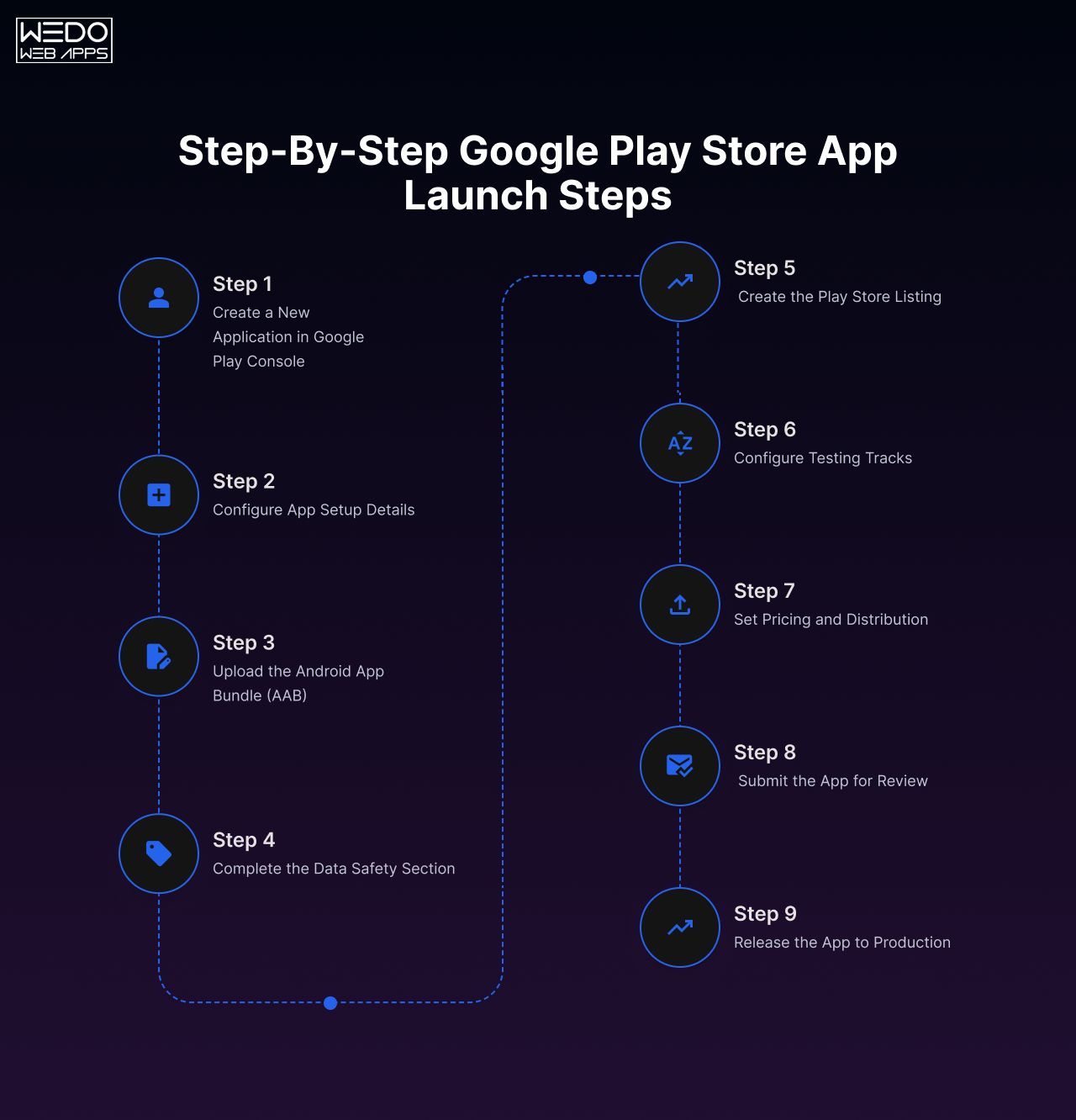
Once the preparation phase is complete, businesses can begin the actual Google Play Console App Submission process. While the interface itself may appear straightforward, each stage of the submission workflow affects app approval, visibility, and long-term release management.
Here is a practical breakdown of the complete Google Play Store App launch steps businesses should follow.
Step 1: Create a New Application in Google Play Console
After logging into Google Play Console, create a new application and configure the basic details, including:
- App name
- Default language
- App type
- Free or paid model
Businesses should finalize naming conventions carefully because changing branding later can affect recognition, ASO consistency, and marketing alignment.
Step 2: Configure App Setup Details
Google requires several mandatory setup sections before submission. These typically include:
- App category
- Contact information
- Privacy policy URL
- Target audience selection
- Advertising declarations
This stage is critical because inaccurate disclosures are among the most common Google Play policy violations.
Step 3: Upload the Android App Bundle (AAB)
The next step in the how to publish an app on Google Play Store process is uploading the Android App Bundle.
Businesses should:
- Upload production-ready builds only
- Verify version codes carefully
- Check signing configurations
- Review compatibility warnings
Google automatically scans uploaded builds for security issues, policy concerns, and technical stability indicators.
Step 4: Complete the Data Safety Section
The Data Safety form explains how the app collects, processes, stores, and shares user data. Businesses must disclose:
- Personal information collection
- Location tracking
- Payment data handling
- Third-party SDK usage
- Encryption practices
Incomplete or misleading disclosures are major contributors to app review delays and rejections.
Step 5: Create the Play Store Listing
The Play Store listing directly influences discoverability and conversion rates. During this stage, businesses add:
- App descriptions
- Screenshots
- Feature graphics
- Promtoional videos
- App icon
Keyword placement should remain natural throughout the listing. Over-optimization or misleading descriptions can negatively affect approvals and user trust.
Step 6: Configure Testing Tracks
Before production release, businesses should use Google Play testing environments such as:
- Internal testing
- Closed testing
- Open beta testing
These environments help identify:
- Crashes
- Performance issues
- UI consistencies
- Compatibility problems
For many organizations, testing tracks are an essential part of the broader android app release process because they reduce launch instability significantly.
Step 7: Set Pricing and Distribution
Businesses must then configure:
- Country availability
- Pricing structure
- Device support
- Age ratings
- Monetization settings
Global release often require additional localization preparation, especially for screenshots, descriptions, and compliance requirements.
Step 8: Submit the App for Review
After completing all required sections, businesses can submit the application for Google review.
During the review process, Google evaluates:
- Policy compliance
- App functionality
- Metadata accuracy
- Permission usage
- User safety standards
Review timelines vary depending on:
- App category
- Account history
- Permissions requested
- Regional compliance checks
Step 9: Release the App to Production
Once approved, businesses can launch the app either immediately, through staged rollout, or via scheduled release.
Many organizations prefer phased rollouts because they allow monitoring of:
- Crash rates
- User feedback
- Performance stability
- Server load handling
This reduce operational risk during large-scale launches.
Following these structured Google Play Store app launch steps helps businesses avoid unnecessary delays, improve launch quality, and create a more reliable publishing workflow.
Google Play Console App Submission Process Explained
Many businesses assume the submission process ends after uploading an app build and clicking “Publish.” In reality, the modern Google Play Console app submission process includes multiple release management stages that directly affect launch quality, scalability, and long-term app maintenance.
Understanding how Google Play Console works beyond basic uploads helps businesses reduce operational risks and manage releases more efficiently.
Understanding Release Tracks
Google Play Console offers multiple release environments that support safer deployments and controlled testing. These include:
- Internal testing
- Closed testing
- Open testing
- Production release
Internal testing is commonly used for quick QA validation within development teams. Closed testing helps businesses gather controlled user feedback before public release, while open testing allows broader audience participation.
For startups and enterprises handling large user bases, testing tracks play an important role in the overall Android app release process because they reduce the chances of unstable public launches.
Managing App Versions Properly
Version management becomes increasingly important as applications scale. Businesses should maintain:
- Structured version naming
- Release documentation
- Rollback planning
- Deployment history tracking
Improper version management often creates update conflicts, especially when multiple development teams are involved.
A clear release workflow also simplifies future maintenance and emergency patch deployments.
Using Staged Rollouts to Reduce Launch Risk
Instead of releasing updates to all users immediately, Google Play Console allows staged rollouts.
This approach enables businesses to:
- Release updates gradually
- Monitor crash reports
- Identify performance issues early
- Minimize large-scale user impact
For example, businesses may initially release an update to 5% of users before expanding distribution gradually.
Staged deployment strategies are especially useful for:
- Enterprise applications
- High-traffic consumer apps
- Fintech products
- eCommerce platforms
- Apps with complex backend dependencies
Monitoring App Performance After Submission
The Google Play Console App submission process continues even after approval. Businesses must actively monitor:
- Crash analytics
- ANR (Application Not Responding) reports
- User reviews
- Uninstall trends
- Device compatibility issues
Google Play Console provides reporting tools that help teams identify stability concerns early before they impact ratings or user retention significantly.
Handling Policy Warnings and Compliance Updates
Google frequently updates its Play Store policies around:
- User privacy
- Data collection
- Permissions
- Advertising practices
- Subscription handling
Businesses that ignore compliance updates risk:
- Reduced visibility
- App suspension
- Monetization restrictions
- Delayed updates
Maintaining ongoing compliance is now a critical part of long-term Android app management.
Why Businesses Need Structured Release Management
As mobile applications become more feature-rich and interconnected, release management has evolved into an operational responsibility rather than a one-time technical task.
At WEDOWEBAPPS, release planning is often treated as a separate workflow because launch stability depends not only on development quality but also on testing coordination, deployment sequencing, compliance preparation, and post-launch monitoring.
Businesses that establish structured publishing workflows usually experience:
- Fewer review delays
- Smoother updates
- Better app stability
- Improved user trust
- Stronger long-term scalability
Common Google Play Store Rejection Reasons Businesses Should Avoid
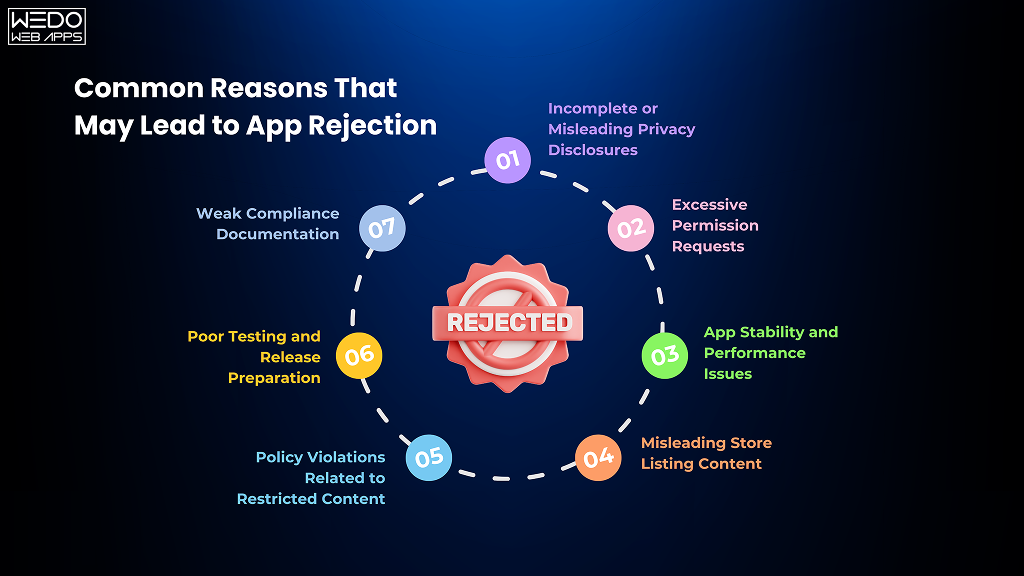
One of the biggest challenges in the Google Play Console App submission process is handling Play Store policy compliance correctly. Even well-developed applications can face approval delays or outright rejection if submission requirements are incomplete, misleading, or non-compliant.
For businesses investing heavily in mobile products, understanding common rejection triggers can significantly improve launch efficiency and reduce operational setbacks during the Android App Release process.
Incomplete or Misleading Privacy Disclosures
Google has become increasingly strict about privacy transparency. Applications that collect user information without proper disclosure often face immediate review issues.
Common problems include:
- Missing privacy policies
- Inaccurate data safety declarations
- Undisclosed third-party SDK tracking
- Unclear data-sharing practices
Businesses should ensure all disclosures accurately reflect how the application handles user information.
Excessive Permission Requests
Many apps request device permissions that are not essential to core functionality. This creates both compliance concerns and user trust issues.
Permissions frequently flagged during review include:
- Background location access
- Unnecessary camera permissions
- Unrestricted storage access
- Contact list access without justification
Google expects businesses to request only the permission required for app functionality.
App Stability and Performance Issues
Technical instability remains one of the most common Google Play review concerns.
Apps may face rejection due to:
- Frequent crashes
- ANR errors
- Broken navigation flows
- Failed login systems
- Payment processing failures
- Poor responsiveness across devices
Before starting the how to upload app to play store workflow, businesses should complete extensive multi-device testing to identify performance issues early.
Misleading Store Listing Content
Store listing metadata must accurately represent the actual application experience. Review problems often occur because of:
- Exaggerated feature claims
- Misleading screenshots
- Inaccurate app descriptions
- Irrelevant keywords
- Promotional content unrelated to app functionality
This not only affects approvals but can also reduce user trust after launch.
Policy Violations Related to Restricted Content
Google Play policies restrict certain categories of content, including:
- Deceptive behavior
- Harmful content
- Unauthorized financial claims
- Misleading health information
- Copyrighted material misuse
Businesses operating in regulated industries should review Play Store policies carefully before submission.
Poor Testing and Release Preparation
Rushed releases frequently create approval problems during the Google Play Store app launch steps.
Common operational mistakes include:
- Uploading debug builds
- Incomplete testing
- Broken APIs
- Unfinished onboarding flows
- Inconsistent UI behavior
Using internal and closed testing tracks before production release helps reduce many of these risks.
Weak Compliance Documentation
Applications connected to payments, healthcare, fintech, or enterprise systems often require additional compliance readiness.
Missing documentation around:
- Subscription handling
- Financial disclaimers
- User consent
- Data processing
- Business verification
can slow down approvals considerably.
How Businesses Can Reduce Rejection Risks
A structured Play Store App publishing checklist helps businesses minimize launch problems before submission.
Recommended practices include:
- Conducting full QA testing
- Reviewing policy compliance early
- Validating Data Safety disclosures
- Testing across multiple devices
- Auditing app permissions
- Reviewing metadata accuracy
- Preparing rollback plans
At WEDOWEBAPPS, app publishing workflows typically include dedicated release validation stages because small compliance gaps can delay launches even when development is technically complete.
Understanding these rejection triggers early helps businesses streamline approvals, protect launch timelines, and improve overall release reliability.
Play Store App Publishing Checklist for Businesses
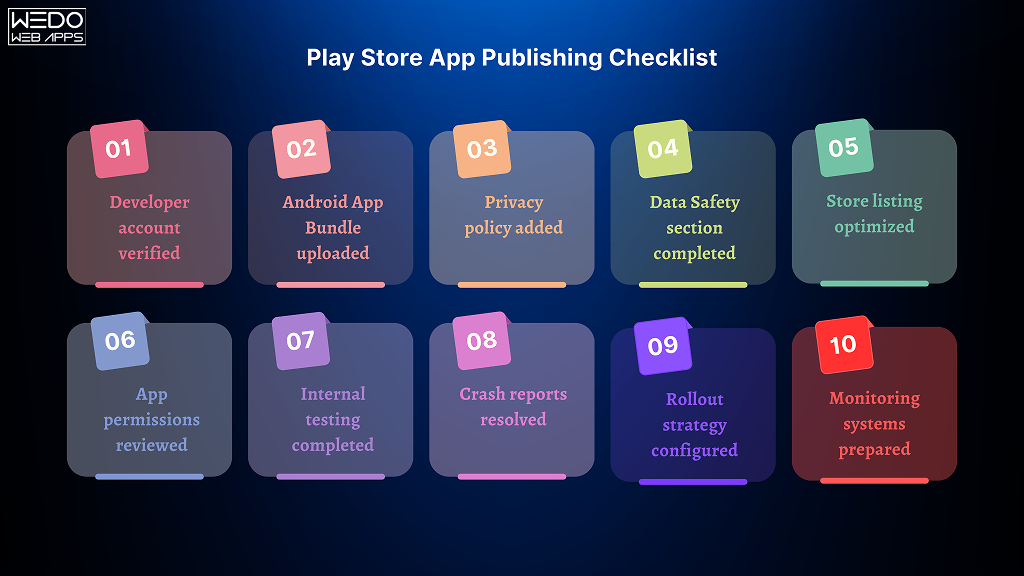
A structured Play Store App Publishing Checklist helps businesses avoid launch delays, compliance gaps, and post-release stability issues. Before completing the final Google Play Console app submission process, teams should validate every critical area of the application and release workflow.
Many Play Store rejections happen because businesses skip small but important verification steps during the final release phase.
Here is a practical checklist businesses should complete before publishing an Android application.
Developer Account and Access Verification
Before submission, confirm that:
- Google Play Developer Account is fully verified
- Business ownership details are accurate
- Admin access permissions are configured properly
- Recovery credentials are securely managed
For enterprises managing multiple applications, centralized account governance improves long-term operational control.
App Build and Release Readiness
Validate that:
- Android App Bundle (AAB) is production-ready
- Debug configurations are removed
- Version codes are updated correctly
- App signing is configured properly
- Release notes are finalized
Build-related mistakes are among the most common technical issues during the android app release process.
Privacy and Compliance Preparation
Businesses should ensure:
- Privacy policy URL is active
- Data Safety form is completed accurately
- Permission disclosures are transparent
- Third-party SDK usage is documented
- Compliance requirements are reviewed
This is especially important for apps handling payments, location tracking, healthcare data, or user-generated content.
Store Listing Optimization
Before publishing, verify:
- App title is finalized
- Descriptions are optimized naturally
- Screenshots match actual functionality
- Feature graphics meet Play Store guidelines
- Branding remains consistent
A strong listing improves both discoverability and user conversion rates after launch.
Application Testing and Stability Checks
Before starting the how to publish an app on Google Play Store workflow, businesses should complete:
- Functional testing
- UI testing
- Device compatibility testing
- Crash monitoring
- Payment flow validation
- API integration testing
- Network performance testing
Internal and closed testing tracks should also be used to gather early feedback before production rollout.
Release and Rollout Planning
Teams should confirm:
- Rollout strategy is finalized
- Staged deployment percentages are configured
- Rollback procedures are prepared
- Support teams are informed
- Monitoring tools are active
For large-scale applications, phased rollouts reduce operational risks significantly during launch periods.
Post-Launch Monitoring Preparation
After approval, businesses should actively monitor:
- Crash analytics
- ANR reports
- User reviews
- Retention metrics
- Uninstall trends
- Server stability
The Google Play Store app launch steps do not end after approval. Continuous monitoring helps businesses identify issues early and maintain long-term app performance.
Final Pre-Publishing Checklist
Before pressing “Publish,” businesses should verify:
- Developer account verified
- Android App Bundle uploaded
- Privacy policy added
- Data Safety section completed
- Store listing optimized
- App permissions reviewed
- Internal testing completed
- Crash reports resolved
- Rollout strategy configured
- Monitoring systems prepared
A structured release checklist helps businesses improve approval success rates, reduce deployment risks, and create a smoother app launch experience overall.
How Businesses Can Reduce App Launch Delays
For many organizations, the biggest challenge in the Google Play Console App submission process is not development, it is launch coordination. Even high-quality applications can face approval delays when release preparation, testing, compliance, and deployment planning are handled too late in the workflow.
Businesses that approach app publishing strategically usually experience faster approvals and smoother production releases.
Start Release Planning Early
Many companies begin preparing for Play Store submission only after development is completed. This often creates last-minute issues involving:
- Missing compliance documentation
- Unoptimized store assets
- Incomplete testing
- Incorrect permission handling
- Unstable production builds
Instead, businesses should treat release planning as an ongoing part of the overall Android App Release process from the early development stages.
Use Internal and Closed Testing Before Production
Testing environments inside Google Play Console help businesses identify issues before public deployment.
Internal and closed testing tracks allow teams to:
- Validate app stability
- Gather user feedback
- Detect device compatibility issues
- Review onboarding experiences
- Test payment workflows
This reduces the chances of failed reviews and unstable launches during the final Google Play Store app launch steps.
Review Play Store Policies Before Submission
Google frequently updates publishing guidelines related to:
- User privacy
- Financial transactions
- Subscriptions
- Health claims
- Permissions
- Advertising practices
Businesses that review policies early avoid many of the common Google Play Store rejection reasons discussed earlier.
Policy compliance should be reviewed alongside development and QA workflows rather than treated as a final publishing task.
Optimize App Performance Before Release
Performance issues can delay approvals and negatively affect early user retention.
Before starting the how to upload app to play store process, businesses should validate:
- App startup speed
- Crash stability
- Memory usage
- Battery optimization
- API response performance
- Offline handling behavior
Even minor performance problems can impact review outcomes and initial ratings after launch.
Prepare a Staged Rollout Strategy
Releasing updates gradually allows businesses to monitor real-world performance before expanding deployment fully.
Staged rollouts help teams:
- Identify unexpected crashes
- Monitor backend scalability
- Reduce large-scale user impact
- Validate update stability
This strategy is especially valuable for enterprise applications, fintech platforms, and apps with large active user bases.
Maintain Cross-Team Coordination
Publishing delays often happen because development, QA, design, compliance, and marketing teams work independently without synchronized release timelines.
Businesses should align:
- Testing schedules
- Store listing approvals
- Compliance reviews
- Deployment timelines
- Post-launch monitoring responsibilities
Structured coordination improves overall release efficiency significantly.
Why Release Readiness Matters for Long-Term Growth
A successful launch is not only about Play Store approval. It also affects:
- User trust
- App ratings
- Retention
- Scalability
- Operational stability
At WEDOWEBAPPS, release planning is often integrated into the broader product delivery workflow because app success depends heavily on launch readiness, testing discipline, and deployment management; not just development completion.
Businesses that build structured release processes early are usually better positioned for scalable growth and smoother future updates.
ASO Considerations Before Publishing to Google Play
Publishing an application successfully is only one part of the growth process. To improve discoverability and acquisition, businesses must also optimize their Play Store presence strategically. This is where App Store Optimization (ASO) becomes an important part of the overall android app release process.
Without proper ASO planning, even well-developed applications may struggle to gain visibility in competitive app categories.
Optimize the App Title Naturally
The app title remains one of the strongest ranking signals in Google Play search results. Businesses should:
- Keep titles clear and readable
- Include primary keywords naturally
- Maintain brand consistency
- Avoid keyword stuffing
Over-optimized titles can reduce credibility and negatively impact user trust.
Write Keyword-Focused App Descriptions
Decsriptions should balance SEO optimization with readability. A strong Play Store description should:
- Explain the app’s core value clearly
- Highlight major features
- Address business or user problems
- Include relevant keywords naturally
- Maintain scannable formatting
Keywords such as:
- How to publish an app on Google Play Store
- Google Play Console app submission process
- Android app release process
Should appear organically throughout content instead of being forced repeatedly.
Use High-Quality Screenshots and Visual Assets
Visual assets significantly influence conversion rates after users discover the app. Businesses should use:
- Clean screenshots
- Feature-focused visuals
- Consistent branding
- Clear UI demonstrations
- Readable text overlays
Poor-quality screenshots often reduce installation intent, even when the application itself performs well.
Focus on Ratings and Early User Feedback
Early reviews and ratings influence both Play Store Rankings and User Trust.
Before public release, businesses should use testing groups and early adopters to gather:
- Usability feedback
- Performance insights
- Bug reports
- Onboarding observations
Positive early engagement helps strengthen post-launch visibility.
Improve Retention and Stability Metrics
Google Play increasingly prioritizes user experience signals such as:
- Cash rates
- Uninstall trends
- Session retention
- Engagement quality
Apps with poor stability may lose visibility over time, regardless of initial download volume.
This is why technical performance remains closely connected to long-term ASO success.
Localize Listings for Global Reach
Businesses planning international expansion should localize:
- App descriptions
- Screenshots
- Keywords
- Promotional messaging
Localization improves discoverability in regional Play Store searches and creates stronger engagement with local audiences.
Align ASO With Business Positioning
Many companies treat ASO purely as keyword optimization. In reality, effective ASO should also support:
- Brand positioning
- Customer acquisition
- Product credibility
- Long-term growth strategy
At WEDOWEBAPPS, ASO considerations are often planned alongside release preparation because visibility, user trust, and launch performance are closely interconnected in competitive app ecosystems.
Businesses that combine structured publishing workflows with strong ASO preparation are generally better positioned for sustainable app growth after launch.

When Businesses Should Work With an App Development Partner
As mobile applications become more complex, many businesses realize that launching an app successfully requires more than just coding expertise. The modern Google Play Console app submission process involves compliance management, release planning, testing coordination, deployment workflows, and long-term maintenance preparation.
For startups and enterprises handling critical digital products, working with an experienced application development partner can help reduce operational risks throughout the android app release process.
When Internal Teams Lack Release Management Experience
Some organizations have in-house development teams but limited experience with large-scale app deployments.
This often creates challenges involving:
- Play Store compliance
- Testing workflows
- Release version management
- Staged rollout planning
- Post-launch monitoring
An experienced development partner can help structure deployment workflows more efficiently and reduce launch-related bottlenecks.
When Applications Require Scalability Planning
Apps expected to support growing user bases require additional preparation before launch. This may include:
- Backend scalability validation
- API performance optimization
- Infrastructure monitoring
- Security testing
- Rollback planning
Without proper release planning, rapid growth can create stability issues immediately after launch.
When Compliance and Security Requirements are Complex
Industries such as:
- Healthcare
- Fintech
- eCommerce
- Enterprise SaaS
Often require stronger compliance validation before publishing.
Businesses operating in regulated sectors must carefully manage:
- User data handling
- Permission disclosures
- Payment security
- Privacy compliance
- Third-party integrations
These areas directly affect approval timelines during the Google Play Store app launch steps.
When Businesses Need Faster Deployment Cycles
Frequent updates and feature releases require structured deployment systems. Development partners often help businesses establish:
- CI/CD pipelines
- Automated testing workflows
- Release documentation standards
- Rollback procedures
- Deployment monitoring systems
This improves long-term release efficiency and simplifies future app maintenance.
When Cross-Platform Expansion is Planned
Businesses planning both Android and iOS deployment typically benefit from centralized release management strategies.
Coordinated deployment planning helps maintain:
- Feature consistency
- Branding alignment
- Synchronized updates
- Testing accuracy
- Unified user experiences
This becomes increasingly important as applications scale across platforms and markets.
Why Strategic Release Support Matters
A successful app launch impacts far more than Play Store approval alone. It influences:
- User trust
- App stability
- Ratings and reviews
- Retention
- Long-term scalability
At WEDOWEBAPPS, app publishing workflows are often approached as part of a broader product delivery strategy because release quality directly affects business performance after launch.
Businesses that invest in structured deployment planning usually experience:
- Smoother approvals
- Fewer production issues
- Better launch stability
- Improved long-term maintainability
Conclusion
Publishing an Android application today requires far more than simply uploading a build to Google Play Console. The modern google play console app submission process involves testing, compliance management, release planning, security validation, ASO preparation, and ongoing performance monitoring.
For startups, enterprises, and growing digital businesses, a structured release workflow helps reduce approval delays, improve launch stability, and create a stronger user experience from day one.
Businesses preparing for the android app release process should focus on:
- Release readiness
- Policy compliance
- App stability
- Staged rollout planning
- Long-term maintenance preparation
A well-managed launch not only improves Play Store approvals but also supports better visibility, user retention, and scalable growth after deployment.
As Google continues tightening publishing standards around privacy, security, and app quality, businesses that follow a strategic release process are generally better positioned for long-term success within the Android ecosystem.
At WEDOWEBAPPS, app deployment is often approached as part of a broader software product delivery strategy because successful launches depend not only on development quality but also on planning, testing, compliance, and release execution.
Whether you are preparing your first mobile application or scaling an enterprise product, following the right google play store app launch steps can help create a smoother, more reliable publishing experience on Google Play Store.