skip to content

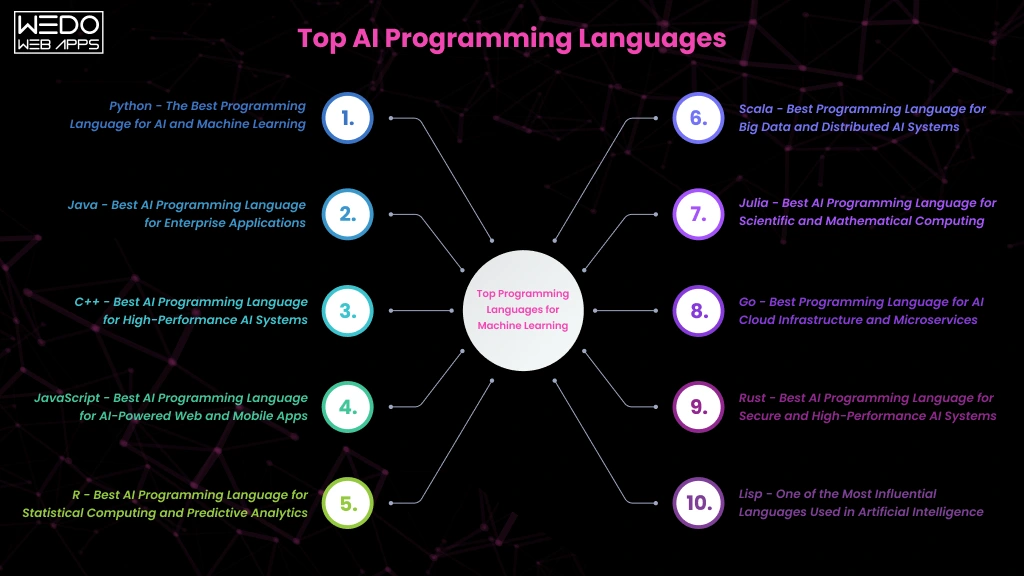
10 Best AI Programming Languages to Focus on in 2025

AI is on everyone’s lips these days. With tools like OpenAI’s Dall-E creating images from text and DeepMind using AI to predict protein structures, the possibilities seem endless. Even natural language processing is advancing, making chatbots and search engines smarter.

But with all this excitement, it can be tough to cut through the noise. The variety of programming languages and frameworks out there can be confusing. That’s why in this post, we’ll take a look at the top languages for AI development and help you figure out which one is right for your next project.

Best Programming Languages for AI 2024

Let’s take a look at why these AI programming languages are so popular and how they are used in different scenarios.

1. Python

Python is a favorite in the AI community, mainly because of its strong data visualization and analytics capabilities. Its straightforward and easy-to-read syntax makes it a popular choice among data scientists and analysts.

One of the great things about Python is its automatic memory management, thanks to garbage collection. Plus, since it’s an interpreted language, you can quickly develop and test your code without needing to recompile.

Python shines in scientific computing with libraries like NumPy, which provide excellent support for working with matrices and running complex AI algorithms, such as statistical models and neural networks.

Moreover, Python offers a wealth of AI-focused libraries and frameworks like scikit-learn, TensorFlow, and PyTorch, making it easier to handle machine learning, deep learning, and building neural networks.

How is Python Used in AI?

Python is incredibly popular in the AI world. It’s used for everything from machine learning systems and computer vision applications to natural language processing. If you’re building predictive models, neural networks, or diving into deep learning, Python is the way to go. It’s also perfect for tasks like image recognition, face detection, chatbots, and document analysis.

However, keep in mind that Python might not be the best choice for computationally intensive tasks. For those, you’ll need to consider your project requirements carefully and possibly look at other languages.

2. R Language 

R is the preferred language for statistical computing and is extensively used in data science. It’s particularly powerful for AI algorithms that rely on statistical techniques, such as probabilistic modeling, simulations, and data analysis.

R’s rich ecosystem of packages is perfect for manipulating and visualizing data, which is crucial for AI development. The caret package, for instance, boosts machine learning capabilities with its preprocessing and validation options.

Additionally, R allows for creating custom data visualizations and professional graphics through the flexible layered grammar of graphics concepts offered by ggplot2. The TensorFlow for R package makes it possible to implement scalable, production-grade deep learning by leveraging TensorFlow’s robust capabilities.

How is R Used in AI?

R is widely used for various statistical machine learning tasks, such as Naive Bayes and random forest models. It’s great for data mining, creating association rules, clustering data, and dimensionality reduction. When it comes to time series forecasting, R shines with ARIMA and GARCH models, as well as multivariate regression analysis.

R is also a go-to for risk modeling techniques, from generalized linear models to survival analysis. In bioinformatics, it’s used for sequencing analysis and statistical genomics.

R is perfect for early-stage experimentation and research. However, it’s not the best choice for later stages like deploying machine learning models into real-world products, as it lacks compilers and memory management. It also has a learning curve for those outside the data science field.

3. Java 

Java is a popular choice for AI systems that need to integrate with existing business setups and runtimes. The JVM lets you deploy AI while keeping the code compatible. Java’s extensive ecosystem offers a wealth of libraries, tools, stable runtimes, a large community of developers, and cross-platform portability. This makes it easy to build and deploy AI applications that work seamlessly across different hardware and software.

For example, DeepLearning4j supports neural network architectures on the JVM. The Weka machine learning library provides a range of algorithms for classification, regression, and clustering, while Mallet brings natural language processing capabilities to AI systems.

How is Java Used in AI?

Java is ideal for creating standalone AI agents and integrating analytics into business software. It’s used in monitoring and optimization scenarios, such as predictive maintenance and performance tuning agents. With Java’s libraries for natural language processing, you can develop conversational interfaces like chatbots and voice assistants.

Java also powers recommendation engines, helping to suggest relevant products and target advertising effectively.

Java is a great choice for large business AI systems that need to turn algorithms into reliable software. Its speed, reliability, and cross-device compatibility make it an excellent option.

4. C++

For deploying AI models in low-latency production environments, C++ is a great choice. As a compiled language with direct memory control, C++ can run machine learning programs quickly and efficiently. This makes it perfect for AI projects requiring significant processing power.

C++ code can be compiled into standalone executable programs, ensuring high performance across all operating systems and chips like Intel and AMD. This means you can deploy complex AI software reliably and with hardware acceleration anywhere.

In terms of libraries, the TensorFlow C++ interface lets you directly use TensorFlow’s machine learning capabilities. Caffe2 is ideal for deep learning tasks, while ONNX provides a standard for exchanging neural networks, making it easy to switch models between tools. Additionally, OpenCV offers crucial building blocks for computer vision projects.

How is C++ Used in AI?

C++ is ideal for scenarios that require millisecond latency and scalability, such as high-frequency trading algorithms, autonomous robotics, and embedded appliances. It’s also great for production environments that need large-scale or latency-sensitive inferencing due to its speed. Additionally, C++ works well alongside Python, making it possible to prototype in Python and then deploy high-performance applications with C++.

Using both C++ and Python together is a good idea for building scalable AI prototypes.

5. Julia

Julia uses a multiple dispatch technique to make functions more flexible without slowing them down. It’s also great for parallel programming and using many cores efficiently. Whether you’re running multiple threads on one machine or distributing tasks across many machines, Julia handles it smoothly.

One of the best things about Julia is that it works well with existing Python and R code. This means you can take advantage of the mature libraries from Python and R while benefiting from Julia’s strengths.

Julia’s key libraries for data manipulation (DataFrames.jl), machine learning (Flux.jl), optimization (JuMP.jl), and data visualization (Plots.jl) are continually improving. The IJulia project also integrates Jupyter Notebook functionality, making it easy to use.

How is Julia Used in AI?

Julia is quickly becoming a favorite for data science prototyping, with results often later moved to Python for production. It excels in areas that require heavy computation, such as scientific simulations and models, bioinformatics and computational biology research, time series analysis, and signal processing workflows. Julia’s strong mathematical capabilities and high performance make it a valuable tool for engineers, scientists, and analysts.

6. JavaScript

JavaScript is great for adding AI to websites and web apps. It makes it easy to build AI features using the same language you use for web development. This is why it’s popular for full-stack development and integrating AI into web interactions.

JavaScript’s event-driven model lets you update pages and handle user inputs in real-time without any lag. It’s also flexible, allowing for quick prototyping because it doesn’t require strict typing.

For libraries, TensorFlow.js lets you use Google’s ML framework in the browser and with Node.js. Brain.js offers neural networks for deep learning, while Synaptic.js provides flexible neural networks. Node-RED makes it easy to integrate models with its visual workflow.

How is JavaScript Used in AI?

JavaScript toolkits can bring advanced ML features to the browser, such as analyzing images and speech right on the client side without needing backend calls. Node.js makes it easy to host and run machine learning models using serverless architectures.

Using frameworks like React Native, JavaScript helps build AI-driven interfaces for web, Android, and iOS from a single codebase. While GPU acceleration and other specialized libraries in lower-level languages are better for training complex models, JavaScript’s versatility makes it ideal for adding intelligent features to media-rich applications.

7. Lisp

Lisp is a powerful language known for its use in rule-based AI applications and logical reasoning. It can represent both code and data in the same structures, and it can even modify its own code while running through metaprogramming.

The syntax of nested lists in Lisp makes it easy to analyze and process, which is crucial for modern machine learning. Modern versions of Lisp keep its core strengths while adding useful features like memory management.

For dialects and ecosystems, Clojure brings Lisp’s capabilities to Java virtual machines. CLIPS helps in building expert systems. By connecting with TensorFlow, Lisp can now use modern techniques like neural networks while keeping its symbolic strengths.

How is Lisp Used in AI?

Lisp is great for AI systems that need to handle complex symbolic knowledge or logic, such as automated reasoning, natural language processing, game-playing algorithms, and logic programming. It represents information as code and data symbols, making it easy to encode concepts and rules for AI applications.

While it was a pioneer in AI, Lisp has become less popular compared to statistical machine learning and neural networks. However, it is still perfect for expert systems and decision-making logic that rely on symbolic reasoning instead of data models.

Lisp’s ability to rewrite its own code also makes it highly adaptable for automated programming applications.

8. Haskell

Haskell is a purely functional programming language that relies on mathematical functions for AI algorithms. By avoiding side effects within functions, it helps reduce bugs and makes verification easier, which is important for safety-critical systems.

One of the best things about Haskell is its lazy evaluation, meaning it only runs calculations when necessary, which boosts efficiency. It also allows you to easily create and reuse AI components.

Haskell offers libraries like HLearn and LambdaNet for machine learning and neural networks. It also provides Haxcel and BayesHaskell for support with linear algebra and probability math.

How is Haskell Used in AI?

Haskell is a great choice for AI systems that rely on logic and symbolism, such as proving theorems, constraint programming, probabilistic modeling, and combinatorial search. It elegantly translates mathematical specifications into running code, making it a good match for how data scientists define AI algorithms.

With its strong foundations and robust data types, Haskell offers both correctness and flexibility for math-heavy AI tasks.

For quality-critical AI applications that need verifiable logical representation, Haskell is a solid option.

9. Prolog

Prolog is a logic programming language that uses facts and rules to encode knowledge, similar to how humans organize information. It automatically draws conclusions by connecting these logical declarations.

This query-based, declarative approach makes it easier to focus on high-level AI goals rather than detailed step-by-step procedures.

For libraries and frameworks, SWI-Prolog is a popular open-source implementation. For advanced probabilistic reasoning, ProbLog allows you to include uncertainty in your logic. Libraries like DeepLogic combine traditional Prolog with deep neural networks, integrating symbolic and differentiable components.

How is Prolog Used in AI?

Prolog is excellent for AI systems that need to represent and reason with knowledge, such as expert systems, intelligent agents, formal verification, and structured databases. Its declarative approach makes it easy to model complex logical constraints and automate tasks through logic programming.

For creating explainable, rule-based AI systems that can verify and validate models or capture detailed relational knowledge, Prolog is a great choice.

10. Scala

Scala blends object-oriented and functional programming, allowing you to use classes and methods for modular data abstraction while benefiting from mathematical clarity through pattern matching and immutability.

Its advanced type system uses inference for flexibility and ensures robustness through static checking. Scala also supports asynchronous processes, making it easier to distribute AI workloads across parallel infrastructure.

Specialty libraries enhance Scala’s AI capabilities. ScalNet provides neural networks, Breeze handles numerics, and it supports distributed machine learning on Spark. Scala also integrates well with Java ecosystems like DeepLearning4J. This combination of advanced language features and a rich technology stack makes Scala highly productive for AI development.

How is Scala Used in AI?

Scala is great for deploying machine learning models into high-performance production environments. It supports real-time model serving and building streaming analytics pipelines, along with distributed data processing and robust feature engineering.

Scala works well with big data tools like Spark, which speeds up the math transformations used in many machine learning techniques. This integration helps create scalable, DevOps-ready AI applications using a single, reliable language.

Comparative Analysis of Best AI Programming Languages

Language Strengths Weaknesses Usability Common AI Applications Examples of AI Applications
Python Easy to learn, lots of libraries, very productive Can be slow, threading issues with GIL High, great for beginners and experts Machine learning, computer vision, natural language processing Siri, Alexa, Tesla Autopilot
R Excellent for statistical modeling and analysis Not a general-purpose language, hard to learn Moderate, best for data scientists Statistical analysis, data mining IBM Watson Analytics, Google BigQuery ML
Java Works on many platforms, ready for enterprise use, strong typing Verbose code, not specialized for AI Moderate, good for production environments Search algorithms, natural language processing, enterprise AI Google Search, Cortana, Banking APIs
C++ Very fast, efficient, good control over hardware Complex, hard to learn Hard, for advanced developers Optimized machine learning applications, robotics Stock trading systems, self-driving cars
Julia Very fast, great for math and numerical analysis Newer language, smaller community Moderate, similar to Python Data science, numerical analysis Used by a central bank in the US and the NY Fed for ML modeling
JavaScript Widely used, great for full-stack web development Not the best for math and machine learning Moderate, mainly for front-end use Browser-based machine learning, Node.js backends Chrome ML image search, Angular recommendation engine
Lisp Great for symbolic AI, treats code as data Not widely used today, fewer libraries Moderate, niche use Early AI research, pattern recognition SPIKE, the planning tool for the Hubble Space Telescope
Haskell Purely functional, strong type safety Abstract, not widely used for AI Hard, niche research use Theoretical machine learning research Meta’s Sigma platform for handling over a million requests per second
Prolog Excellent for logic programming, pattern matching Limited use and libraries Moderate, uses a declarative style Expert systems, natural language processing Small Prolog interpreter for network setup in Microsoft Windows NT
Scala Combines Java’s strengths with functional programming Hard to learn Moderate, good for big data Machine learning on Spark, distributed systems eSentire uses Scala for real-time cybersecurity solutions

Choosing the Best AI Programming Language for Your Needs

Selecting the right AI programming language depends on your specific goals and use case since different languages are suited for different tasks.

For example, Python is a great choice for most AI applications, thanks to frameworks like TensorFlow and PyTorch. However, if you’re working on specialized systems that require a lot of computational power, you might want to consider languages like C++, Java, or Julia.

Think about your needs, and don’t hesitate to use more than one language if necessary. Focus on making your AI systems work well together. Make smart choices that fit your long-term goals and use good design principles to create AI solutions that are ready for the future.

Exploring Types of Application Software: Examples and Uses

Application software provides a wide range of solutions designed to cater to various needs and goals. Selecting the appropriate application software can revolutionize your operations and boost efficiency. Additionally, it can significantly affect your profitability, enhancing overall business performance.

There are numerous options available when it comes to application software. We’ve classified them into three main categories: general, business, and custom applications. Below is a comprehensive list of the different types of application software available on the market.

General Applications

  1. Word Processing Software: Tools for creating and editing text documents, such as Microsoft Word.
  2. Graphics Software: Programs for designing and manipulating visual content, like Adobe Photoshop.
  3. Spreadsheet Software: Applications for organizing and analyzing data in tabular form, such as Microsoft Excel.
  4. Presentation Software: Software for creating and delivering slideshows, like Microsoft PowerPoint.
  5. Web Browsers: Programs for accessing and navigating the internet, such as Google Chrome and Mozilla Firefox.
  6. Multimedia Software: Tools for creating, editing, and playing audio and video files, like VLC Media Player.
  7. Education and Reference Software: Applications designed for learning and information retrieval, such as encyclopedias and language learning apps.
  8. Simulation Software: Programs that mimic real-world activities for training and research purposes, like flight simulators.
  9. Content Access Software: Tools that provide access to various types of digital content, such as e-readers and streaming services.
  10. Information Worker Software: Applications that facilitate the daily tasks of information workers, such as email clients and project management tools.

Business Applications

In business environments, application software plays a crucial role in managing daily operations and customer interactions. Tools like CRM systems, DBMS, etc help organizations track leads, manage customer data, automate follow-ups, and improve overall customer relationship management across sales and support teams.

  1. Customer Relationship Management (CRM) Software: Tools designed to manage a company’s interactions with current and potential customers, such as Salesforce.
  2. Enterprise Resource Planning (ERP) Software: Integrated applications that help manage core business processes, including finance, HR, and supply chain, like SAP. 
  3. Project Management Software: Programs for planning, executing, and monitoring projects, such as Asana or Trello.
  4. Business Process Management (BPM) Software: Applications that improve and automate business processes, like Bizagi.
  5. Database Management Software: Systems for creating, managing, and querying databases, such as MySQL or Oracle Database.
  6. Resource Management Software: Tools for managing resources efficiently, including human resources, equipment, and finances, like Resource Guru.
  7. Productivity Software: Applications that boost efficiency and performance in the workplace, such as Microsoft Office Suite.
  8. Time Management Software: Programs that help individuals and teams track and optimize their time usage, like Toggl or Clockify.
  9. Educational Software: Tools designed for learning and training within a business context, such as e-learning platforms and corporate training modules.

Applications Based on Distribution Model

  1. Freeware: Software that is available for use at no cost, such as Adobe Acrobat Reader.
  2. Shareware: Programs that are initially distributed for free on a trial basis with the option to purchase, like WinRAR.
  3. Open Source: Software with source code that anyone can inspect, modify, and enhance, such as the Linux operating system.
  4. Closed Source: Applications whose source code is proprietary and not shared with the public, like Microsoft Windows.

Explore in-depth everything you need to know about application software and how to choose the right type for your business.

What is Application Software?

Application software refers to computer programs designed to perform specific functions, whether for educational, personal, or business purposes. Also known as end-user or productivity programs, these applications help users accomplish various tasks related to creativity, productivity, or communication. Each application is tailored to a particular function and executes the job it is intended for. The primary objective of application software is to streamline operations and enable users to complete their tasks effortlessly.

Today, we have access to a wide array of sophisticated application software that shapes our daily lives and meets our ever-changing needs. Common examples include office productivity suites, data management tools, media players, and security programs. The apps on our smartphones are also prime examples of application software.

Popular Examples of Application Software

Whether you need to complete tasks, take notes, conduct online research, set alarms, manage accounts, or play games, there are dedicated application software programs to help. These applications are designed to perform specific tasks, streamline workflows, and enhance team communication. Below are some popular examples of application software used by millions every day:

  • Microsoft Office Suite: Includes MS Office, PowerPoint, MS Word, Excel, and Outlook.
  • Graphics and Design Tools: Like Adobe Photoshop, CorelDraw, and AutoCAD.
  • Online Communication Platforms: Including Skype, Hangouts, Google Meet, Zoom, and WhatsApp.
  • Web Browsers: Such as Google Chrome, Safari, and Firefox.
  • Multimedia and Music Streaming Applications: Examples include MX Player, VLC Media Player, Spotify, and Pandora.
  • Project Management Software: Like Asana, Zoho, Slack, and Forecast.

Key Features to Consider in Application Software

With a multitude of application software options on the market, some come pre-built with customizable features, while others allow you to build from scratch with your preferred functionalities. However, not all application software is created equal. Some may fall short of expectations, and others might be completely ineffective. It is crucial to ensure that the application software you choose meets your requirements and proves to be useful.

So, how do you determine if an application software is good? Here are six essential characteristics that every quality application should have:

1. User Experience (UX)

A well-designed user interface (UI) that allows users to navigate easily, smoothly, and efficiently use the application’s features.

2. Performance

The application should be fast, seamless, and free of errors in both functionality and interface.

3. Security

It must ensure the confidentiality, authentication, and integrity of user data while mitigating the risk of external threats.

4. Accessibility

The application should be compatible with various operating systems and accessible to a broad range of users.

5. Scalability

The software should be capable of handling varying volumes of data operations, transactions, and services as needed.

6. Customer Support

Prompt and effective customer service to engage with users proactively and resolve any issues or queries.

While all these qualities are important, getting the user experience right is paramount. The UX serves as the face of the application, interacting with users and providing the overall look and feel of the software.

Core Functions of Application Software

Application software programs are developed to perform a wide range of tasks. These functions can vary greatly based on the users’ specific needs. Regardless of the industry or business sector, application software can be tailored to fulfill distinct purposes. Here are some examples:

  • Data analysis and information management
  • Document management
  • Communication tools for emails, text messaging, and audio/video conferencing
  • Graphics, animation, and video production
  • Accounting, payroll, and financial management
  • Project management
  • Resource management (ERP and CRM systems) and HR management
  • Healthcare management software
  • Business project management
  • Learning Management Systems (LMS) and eLearning software

The Differences: System Software vs. Application Software

Software consists of sets of instructions or programs designed to perform tasks. It can be broadly categorized into two types: System Software and Application Software. While both types serve to instruct and interact with the system or user, they differ significantly in their design and purpose. Let’s explore their key differences.

Key Points System Software Application Software
Purpose Controls and manages the hardware and other system resources. Designed to accomplish specific tasks based on user requirements.
Installation Comes pre-installed with the operating system. Can be downloaded and installed as needed.
Nature Known as general-purpose software. Known as specific-purpose software.
Function/Hosting Acts as an interface between application software and the system. Runs on the platform provided by the system software.
Development Written in low-level language or machine code, making it highly compatible with system hardware. Written in high-level languages like C++, Python, or JavaScript.
Independence/Dependence Operates independently without requiring other software.
Complexity: More complex programming.
Requires system software to function.
Complexity More complex programming. Generally simpler programming.
Operation Runs in the background as a platform. Runs in the foreground, performing tasks based on user requests.
Primary/Specific Functions Handles process management, memory management, task scheduling, and hardware installation. Executes user-specific tasks for which it is designed.
User Interaction Users typically do not interact directly with system software. Directly interacted with by users.
Necessity Essential for the system’s operation. Not essential for the system to operate, but enhances functionality.
Examples Compiler, assembler, debugger, driver. Word processor, web browser, media player, Photoshop.

Understanding the Difference: App vs. Application

App: An app is a software designed to perform a single specific function for users. Primarily created for mobile devices and tablets, apps can also run on desktops if the operating system supports them. Popular examples include Open Office, Photoshop, web browsers, WhatsApp, and games like Angry Birds.

Application: An application is a comprehensive software intended to perform a wide range of functions for users. It provides services in areas such as automation, data processing, and integration. Applications are typically designed to run on desktops or laptops, but not on mobile devices or tablets. They often come as larger packages with multiple features. Examples are Microsoft Office, VLC Media Player and Adobe Photoshop.

On-Premise vs. Hosted Application Software: What’s the Difference?

On-Premise

On-premise software is the traditional model where businesses buy the software and its license, install it on their own servers, and manage it internally. This includes taking care of servers, performing backups, and handling software updates. On-premise solutions offer higher security because you have complete control over the software and its updates.

Hosted

Hosted software, while similar to on-premise, differs in that the software is installed on servers managed by a third-party provider. You purchase and maintain the software, but instead of investing in your own hardware, you rent it from a vendor. Although the software is hosted remotely, you still own it. Hosted solutions provide advantages like lower initial costs and the flexibility to scale resources as needed.

Application Software vs. Application Platform: Key Differences

Application Software

Application software assists users in performing specific tasks. These programs operate locally on a server or computer system. They range from simple tools like word processors to complex database systems.

Application Platform

An application platform serves as the foundation on which application software runs. It encompasses both hardware architecture and a software framework, providing the necessary environment for the application software to function effectively.

System Software vs. Application Software: Know the Differences

System Software

System software manages system resources and provides a platform for running application software. It acts as an intermediary between the hardware and the application software, ensuring smooth communication and operation.

Application Software

Application software is created to perform specific tasks or functions as requested by users. It relies on system software to operate and cannot function independently. Application software is tailored to meet particular user needs, from word processing to complex data management.

Exploring Different Types of Application Software

In the current digital world’s era, every business sector relies heavily on application software. From banking and healthcare to education, retail, travel, and logistics, software is essential across all domains. Choosing the right application software for your needs can significantly enhance functionality and efficiency. Understanding the various types of application software can help you save costs, time, and resources, boost productivity, and improve decision-making. Application software can be broadly categorized into General Applications, Business Applications, and Custom Developed Applications.

General Application Software: An Overview

General application software is designed to handle a variety of basic functions that users commonly need on their systems. There are numerous applications that fall into this category, each serving different purposes. Here’s a closer look at some key types of general application software:

Word Processing Software

Word processing software is used for creating and formatting text documents such as memos, letters, faxes, and reports. It allows users to enhance and beautify text with various features including thesaurus, synonyms, antonyms, and word art. Users can also change font colors, styles, and effects, and utilize grammar and spell-check tools. Popular examples include Google Docs and Microsoft Word.

Graphics Software

Graphics software enables users to edit and manipulate visual data or images. This category includes both illustration and picture editing tools. Adobe Photoshop and PaintShop Pro are prominent examples of graphics software.

Spreadsheet Software

Spreadsheet software is used primarily for performing calculations and organizing data in tabular form. Users can input data into rows and columns, and utilize various formulas to perform calculations. Microsoft Excel and Google Sheets are widely used examples of spreadsheet software.

Presentation Software

Presentation software helps users convey their ideas and information visually through slides. Users can incorporate text, images, graphs, and videos to make their presentations more engaging. Microsoft PowerPoint is a well-known example of presentation software.

Web Browsers

Web browsers are used to access and navigate the internet, allowing users to search for information, watch videos, download images, and more. The most popular web browsers include Google Chrome and Firefox, with other examples being Internet Explorer, Microsoft Edge, and Safari.

Multimedia Software

Multimedia software is used for creating and editing audio and video files, and is commonly used in animation, graphics, and video editing. Examples of multimedia software include VLC Media Player, MX Player, and Windows Media Player.

Education and Reference Software

Also known as academic software, these applications are designed to aid learning and provide educational resources. They are widely used in the education sector and include tutorial software. Examples include Google Earth and NASA World Wind.

Simulation Software

Simulation software is used in fields such as military engineering, industrial training, robotics, flight systems, weather forecasting, and video games. It allows users to replicate real-life conditions without the risks associated with actual operations. Technologies like Augmented Reality (AR) and Virtual Reality (VR) are often used in these applications. MATLAB is a notable example of simulation software.

Content Access Software

Content access software allows users to access and manage various types of digital content. Examples include e-readers and streaming services.

Information Worker Software

Information worker software assists users in managing, processing, and organizing information efficiently. Examples include email clients and project management tools.

Essential Business Application Software

Business application software is designed to meet specific business needs and enhance operational efficiency, accuracy, and productivity. Here are some commonly used business application software types:

Customer Relationship Management (CRM) Software

CRM software manages an organization’s interactions with customers by organizing essential data. It helps provide a seamless customer experience by collecting, analyzing, and strategizing customer information across different touchpoints. Examples include Salesforce, Zoho CRM, and Netsuite.

Enterprise Resource Planning (ERP) Software

At the enterprise level, ERP application software is designed to handle complex workflows and large-scale operations. Advanced tools such as supply chain software solutions enable businesses to manage inventory, logistics, vendor coordination, and real-time demand forecasting efficiently.

Project Management Software

Project management software aids in planning, resource allocation, and scheduling. It facilitates communication and collaboration among project stakeholders and helps manage costs, budgets, documentation, and reporting. Common examples are Zoho Projects, Basecamp, and Trello.

Business Process Management (BPM) Software

BPM software automates and optimizes business processes, providing a comprehensive overview of operations to reduce errors, miscommunications, and inefficiencies. Examples include Zoho Creator, Nintex, and Kissflow.

Database Management Software (DBMS)

DBMS software helps create, manage, and organize an organization’s data. It stores, modifies, extracts, and searches for information within a database. Popular databases include Oracle, MySQL, Microsoft SQL Server, PostgreSQL, MongoDB, and IBM Db2.

Resource Management Software

Resource management software assists in allocating and assigning personnel to projects based on requirements, ensuring smooth management of multiple projects simultaneously. Examples include Mavenlink, monday.com, and Forecast.

Productivity Software

Productivity software enhances organizational efficiency by helping users complete tasks more effectively. These programs assist with time management, document creation, and collaboration. Examples are tools for word processing, spreadsheets, and presentations like PowerPoint.

Time Management Software

Time management software helps teams stay organized and track the time spent on projects, enhancing productivity. Examples include Asana, ClickTime, and DeskTime.

Educational Software

Educational software supports teaching and learning by promoting personalized and collaborative interactions between students and tutors. It includes features like content creation, lesson sharing, classroom management, and student-teacher interaction. Examples include TalentLMS, Skill Lake, Google Classroom, and Litmos.

Custom Developed Application Software: Solutions for Unique Needs

Custom-developed application software, also known as bespoke or tailor-made software, is specifically created for a particular organization or user based on their unique business requirements. This approach has gained prominence in the web and mobile application industry due to its flexibility and ability to enhance productivity. Custom software is designed to perform specific functions and can be fully tailored to meet the precise needs of the user or organization. While off-the-shelf applications offer limited functionality, custom software ensures that the organization gets exactly what they need. Consequently, custom software product development is a strategic choice for businesses aiming for long-term success and tailored solutions.

Selecting the Perfect Application Software for Your Business

As your business expands, there’s a constant drive to enhance operations and work more efficiently. Whether you’re looking to replace an outdated system or find a new solution to boost performance, choosing the right application software is crucial but challenging.

Selecting the appropriate software for your business requires careful decision-making, brainstorming, and critical analysis. Before investing in any application, ensure it aligns with your business processes, streamlines operations, enhances customer experience, and minimizes risks. The success of your business model and its goals heavily depend on this choice. While the selection process can be daunting, the right software can be transformative for your business.

Here’s a checklist to help you confidently choose the right application software for your business:

  1. Assess Current Software: Identify the strengths and weaknesses of your existing software, if any.
  2. List Your Requirements: Determine the services and features you need in new application software.
  3. Shortlist Options: Compile a list of software applications that meet your requirements.
  4. Evaluate Budget and Features: Assess the shortlisted software based on your budget, licensing, and required features.
  5. Test and Demo: Conduct thorough evaluations or demos of the shortlisted applications to ensure they meet both current and future needs.
  6. Finalize Your Choice: Select the software that best fits all your requirements.

The Costs of Developing Application Software for Your Business

Pricing is a critical consideration for any business looking to develop application software. The cost can vary widely based on several key factors:

  • Functionality, Scope, and Features: The more complex and feature-rich the application, the higher the cost.
  • Supported Platforms and Devices: Developing software that runs on multiple platforms (like Windows, macOS, Android, iOS) can increase costs.
  • Third-Party Integrations: The need for integration with other systems or services can add to the expense.
  • Back-End Development: Creating a robust and scalable back-end infrastructure is crucial and can be costly.
  • Hardware Components and Compatibility: Ensuring the software works seamlessly with various hardware components may require additional investment.
  • Application Complexity: More intricate applications that require advanced technologies or specialized skills will be more expensive to develop.
  • Maintenance and Support Requirements: Ongoing maintenance and customer support also contribute to the overall cost.

Given the many variables that influence the development cost, it is challenging to provide an exact figure. However, our experts can offer a ballpark estimate based on your specific requirements.

Custom Application Software: Perfect for Businesses with Specific Needs

Businesses of all sizes depend on custom application software to meet their unique business requirements. To gain a competitive edge in today’s market, you need technically advanced custom application software that can drive your business forward.

Custom application software is specifically designed and developed for a particular organization’s group of users. Unlike generic software packages that serve a broad audience, custom software is tailored to an organization’s specific goals and needs, and is typically used by a limited number of users. This type of software is built to meet all the precise preferences and requirements of a business. Additionally, custom application software offers benefits such as flexibility, ease of integration, and scalability.

Final Thoughts

Application software is essential for improving business operations across various industries. From general applications to custom business solutions, the right software can boost efficiency, productivity, and profitability. Selecting the appropriate software involves carefully considering your business needs, budget, and future goals. Whether choosing off-the-shelf solutions or custom-developed software, the impact on your business can be significant. By understanding the types and benefits of different application software, businesses can make informed decisions that support success and meet their specific requirements in the ever-changing digital landscape.

To build reliable and scalable application software, businesses often partner with a professional software development company that offers expertise in custom development, integration, deployment, and long-term technical support.


TypeScript vs JavaScript: Which One is Better to Choose?

Introduction

TypeScript and JavaScript are two of the most popular programming languages for building client-side applications on the web. Both share syntax similarities but differ in fundamental aspects, like static vs. dynamic typing.

JavaScript has been around since 1995 and is natively supported in all modern browsers. It is an essential part of the web and powers client-side logic through scripts. Its dynamic nature allows flexibility but lacks compiler checks.

TypeScript was developed by Microsoft in 2010 as a typed superset of JavaScript, adding static typing and tooling support while still compiling to plain JavaScript. It aims to apply rigorous checking during development for fewer bugs.

Since then, TypeScript has grown rapidly due to its promise of enhanced developer productivity and code quality. However, a pure replacement of JavaScript is not feasible given its ubiquity. This has led to diverse opinions on whether to choose TypeScript or JavaScript for a new project.

This blog analyzes the core differences between TypeScript and JavaScript regarding their type systems, tooling, performance, and ecosystem to help understand their strengths and whether one is a better choice in different scenarios. It also addresses common questions developers face when deciding which language to adopt.

TypeScript and JavaScript contact to know more

What is TypeScript?

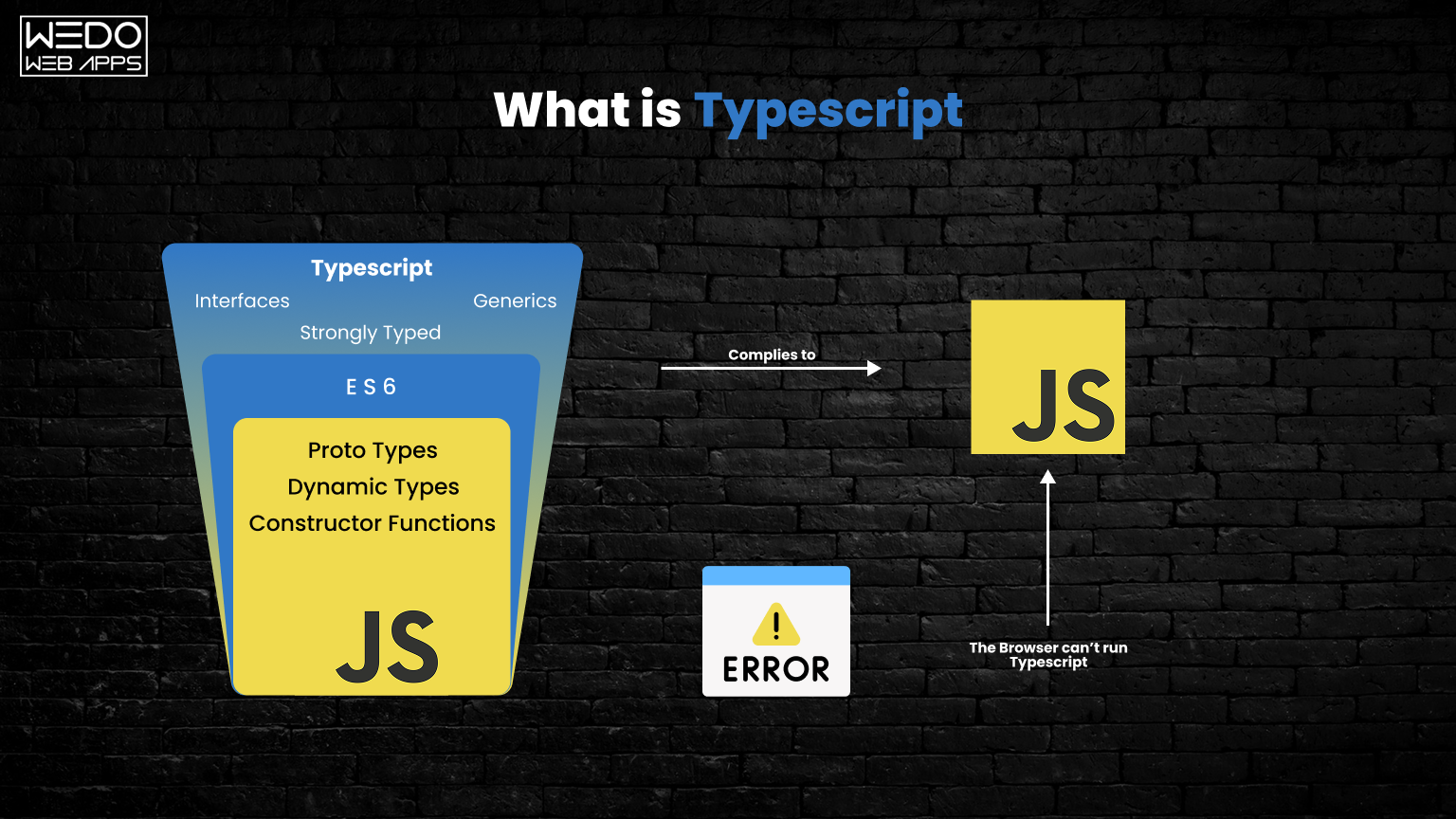
TypeScript is an open-source programming language developed and maintained by Microsoft. It is a strict syntactical superset of JavaScript and primarily adds optional static typing to the language. 

This helps catch errors early and allows leveraging modern tooling. Today, 55,944+ websites are using this effective language worldwide.

TypeScript compilation outputs plain JavaScript code, allowing it to run directly in any web browser or JavaScript runtime environment. It builds on JavaScript syntax and provides features like classes, interfaces, typed variables, and error checking during compilation. This superior type-safety and IntelliSense capabilities aid in managing large codebases.

The codebases are also highly scalable and reusable. Its static analysis at compile time means programmers can build robust apps with more maintainable code. 
With increased adoption by enterprises, TypeScript promises longevity and acts as the safe evolution of JavaScript. It has secured its place in the industry with continued enhancements.

What is JavaScript?

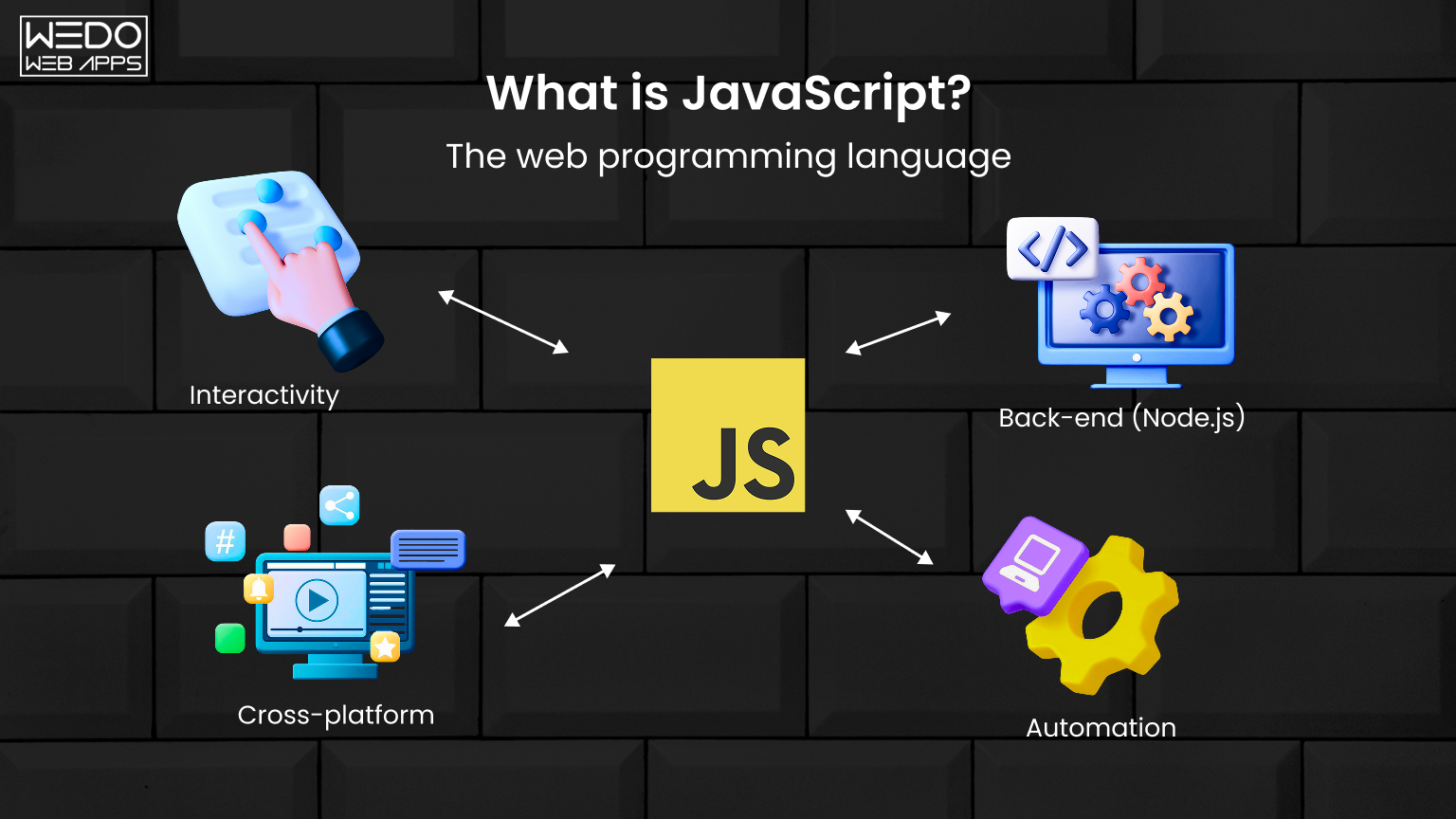
JavaScript is a lightweight, cross-platform, and interpreted scripting language best known as the scripting language for Web pages. It was spearheaded by Netscape in 1995 and has since become essential for adding interactivity to Web pages.

JavaScript can update dynamic HTML/XML content, control program flow, and handle events. It has made front-end development easier by enabling dynamic content reloading without reloading the web page. 

JS also forms the basis of frontend frameworks like AngularJS and ReactJS for enhanced productivity. JavaScript is used by 98.7% (or 49,501.698 websites) of the websites worldwide.

While JS excels at enabling interactive UIs and websites, its weakly typed and loosely structured nature initially made codebases hard to scale. However, features like classes, modules, and type-checking have advanced it significantly. Still evolving rapidly with improvements, JS remains the primary language for browser-based scripting.

For expert guidance on choosing between TypeScript and JavaScript, rely on our comprehensive digital marketing services in the USA to make informed decisions.

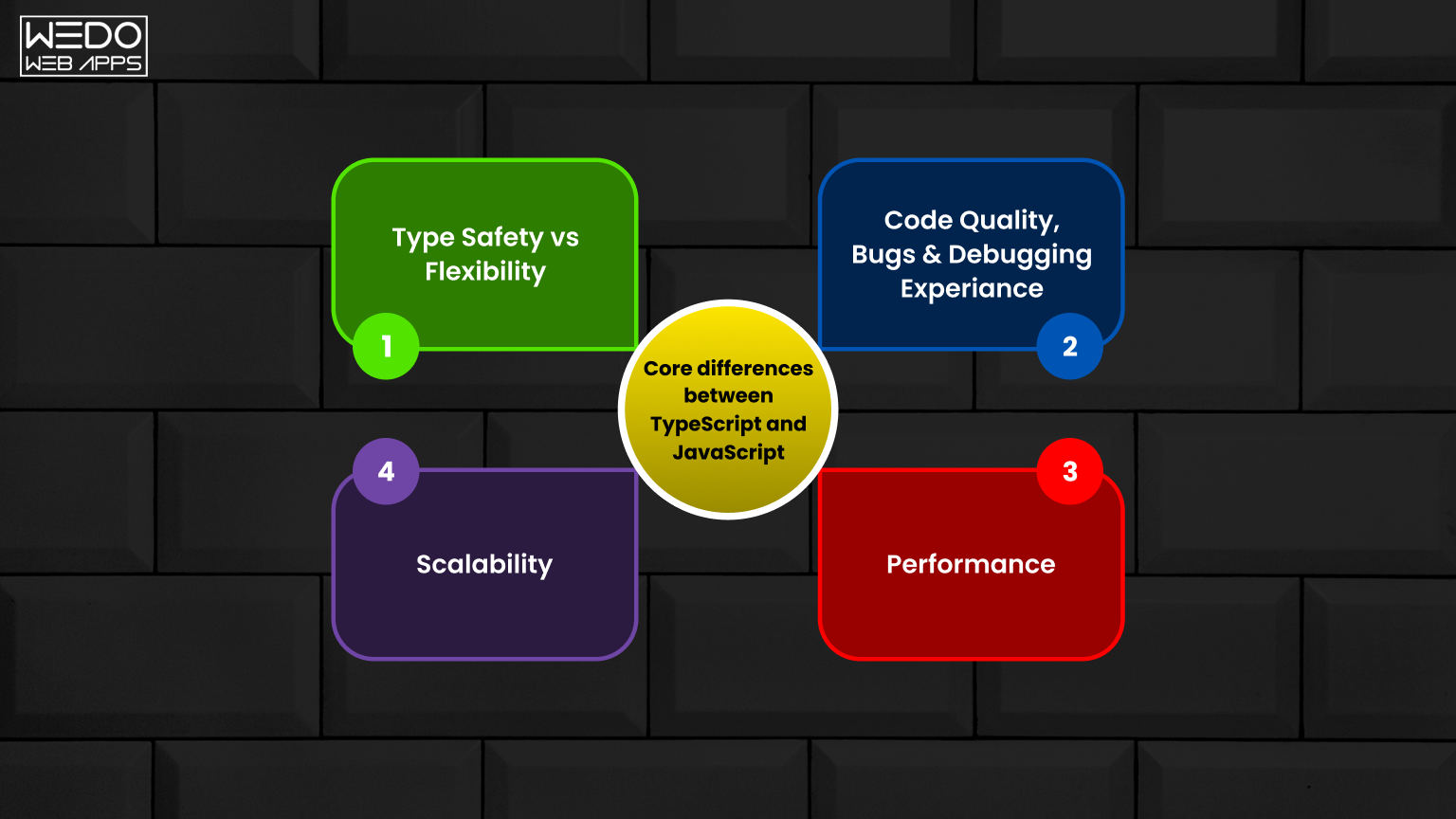
Core differences between TypeScript and JavaScript

Now, we are in the post’s primary section, where we will emphasize “Typescript vs JavaScript” in terms of different aspects. Let’s start!  

1. Static Typing

Static typing refers to a type system where the data type is known at compile time rather than run time. This means the compiler can validate and ensure the code uses the expected types correctly.

Differences between TypeScript and Javascript according to Static Typing

TypeScript

JavaScript

TypeScript uses static typing where data types are known at compile time.

JavaScript uses dynamic typing where data types are checked at run time only.

The benefits of static typing include catching errors early during compilation, providing auto-complete suggestions in editors, and refactoring code safely.

No type-checking is done during compilation. Any type of error is caught during execution.

Benefits of static typing in TypeScript:

  • Catch errors early: Static type checking during compilation catches errors related to types, like passing wrongly typed parameters to functions. This helps fix issues early.
  • Auto-complete: Editor suggestions are available based on static types, improving developer productivity.
  • Refactoring: Refactoring code is safer as the compiler catches any introduced type errors.
  • Documentation: Types provide documentation for parameters/return values useful during collaboration.

JavaScript is dynamically typed:

  • No type-checking was done during compilation. Code is only checked at runtime.
  • No errors were caught during the writing/editing of code related to types. Only surfaces during execution.
  • No auto-complete suggestions related to types in code editors.
  • Refactoring carries the risk of introducing hidden type bugs not caught until runtime.
  • Missing documentation for functions regarding expected/return types.

2. Compile-time Checks

TypeScript code is compiled to JavaScript, allowing static analysis that catches errors before runtime. This improves productivity by fixing bugs sooner. Features like refactoring are also safer in TypeScript. JavaScript, on the other hand, does not have this compile-time safety net.

Differences between TypeScript and Javascript according to Compile-time Checks

Aspect

TypeScript

JavaScript

Compilation

Type checks and errors are shown

No compilation – Runs directly

Benefits

Fix errors early, and refactors is safe

Errors only at runtime

TypeScript compilation process:

  • TypeScript code is first compiled into JavaScript code.
  • During compilation, the type checker validates types across the codebase.
  • Any type errors, missing imports, etc, are reported at compile time before runtime.

Benefits of compile-time checks:

  • Catches errors early before running code
  • Fix and prevent bugs before they occur at runtime
  • Enables refactoring safely by catching issues during compile
  • Improves code quality by validating correct usage of types

No compile-time checks in JavaScript:

  • JavaScript code executes directly without the compilation step
  • No type checking or validation of code done beforehand
  • Errors related to types only occur and are reported at runtime
  • No guarantee code is bug-free before executing

3. Interfaces

Interfaces in TypeScript define contracts for objects and functions to implement. This allows for describing relationships between various components. Interfaces promote code reuse through strong abstraction and decoupling of types from implementations. This aids in developing robust and maintainable apps over JavaScript’s looser implicit typing.

Differences between TypeScript and Javascript according to Interfaces

TypeScript

JavaScript

Has support for primitive types like numbers, strings, booleans, etc, and composite types like arrays, objects, tuples, enums, unions, voids, etc.

Similar primitive types as TypeScript but no other composite types.

Type aliases and interfaces can be created for reusable custom types.

No custom types support, relies on native types.

Benefits of TypeScript interfaces:

  • Enforce contracts between classes/functions
  • Self-documenting code with interfaces
  • Strict type-checking for objects
  • Aids refactoring by catching failures to adhere to shape

JavaScript does not have interfaces:

  • No way to define custom value shapes that classes/functions can adhere to
  • Missing type safety between functions/classes interacting with each other
  • Harder to understand expected object properties from code
  • Difficult refactoring if changing class structure

4. Object-Oriented Programming

OOP refers to programming using objects and related concepts like abstraction, encapsulation, polymorphism, and inheritance. It allows the modeling of real-world entities as objects that interact by passing messages. 

Below are the features that we are going to assess in context to the comparison of TypeScript and JavaScript:

  • Classes – Classes are blueprints for objects that define their properties and behaviors. They support inheritance and polymorphism.
  • Encapsulation – It is the bundling of data with the methods that operate on that data. Encapsulation prevents data from direct modification.
  • Inheritance – It allows the creation of new classes that reuse and inherit properties and behaviors of existing classes.
  • Interfaces – Interfaces define common behaviors/actions but leave implementation to classes. It allows polymorphism.
  • Abstraction – It focuses on important attributes hiding unnecessary details behind class/interface definitions.
  • Polymorphism – It means multiple forms and allows one interface with multiple implementations through inheritance.

Differences between TypeScript and Javascript according to OOP

Feature

TypeScript

JavaScript

Classes

Supported with class keyword

Prototypal inheritance with constructor functions

Encapsulation

Access modifiers like public, private, protected

No access modifiers

Inheritance

Classes can be extended to other classes

Prototypal inheritance

Interfaces

Define common structures for classes to follow

No language-level interfaces

Abstraction

Abstract classes & interfaces

No language abstraction support

Polymorphism

Method overriding

Polymorphism via prototypal inheritance

Benefits of OOP in TypeScript:

  • Supports OOP concepts like classes, inheritance, and abstraction, allowing object-oriented modeling
  • Encapsulates state and behaviors within classes
  • Interfaces define common shapes for multiple classes
  • Inheritance allows code reuse through class extension

Limited OOP concepts in JavaScript:

  • Prototypal inheritance instead of classes
  • No access modifiers like private
  • Object models built via prototypes lack abstraction and structure
  • Functions mimic classes but miss OOP structure

5. Development Tools and IDE Support

Development tools refer to compilers, linters, editors, debuggers, etc, that improve developer productivity and code quality. Below are the attributes that differentiate both TypeScript and JavaScript. Check it out:

  • Auto Complete – It intelligently suggests properties and methods as code is typed based on static type analysis.
  • Refactoring Support – Refactoring is supported through rename/extract methods etc without breaking existing code.
  • Linting & Errors – Linting performs static analysis to find stylistic/structural errors, while errors highlight issues.
  • Debugging – Debugging tools allow stepping through code, inspecting scope, accessing variable values etc.
  • Code Navigation – It allows quickly navigating to references, traversing hierarchical imports, file structures etc.

Check out the development tools and IDE support available in TypeScript vs JavaScript:

Feature

TypeScript

JavaScript

Auto Complete

Supported based on static types

No auto-complete of types

Refactoring Support

Supported with type-checking

Limited due to lack of types

Linting & Errors

Supported by TSC compiler

Limited linting, errors at runtime

Debugging

Full source-level debugging

Limitations in debugging

Code Navigation

Go to definition, see callers supported

No static type aware navigation

Benefits of TypeScript IDE Features:

  • Autocomplete speeds up coding based on expected types
  • Refactoring safety via compilation checking for breaking changes
  • Bugs caught during editing via linting rather than runtime
  • Seamless debugging experience with source maps

JavaScript tooling has improved but is still inconsistent with TypeScript’s static analysis abilities.

6. Application Performance

Performance refers to how fast an application executes and responds and efficient memory usage. 

Here are a few app performance features that differentiate TypeScript and JavaScript. 

  • Type Check Overhead – Type checking during compilation increases bundle size and initialization time.
  • Bundle Size – Larger bundles require more bandwidth for loading applications.
  • Initialization – Initialization is the loading and execution of code during app startup.
  • Runtime – Runtime is the time taken for code execution after app initialization and loading.

Check out the Application performance considerations in TypeScript vs JavaScript:

Feature

TypeScript

JavaScript

Type Check Overhead

Types removed through  transpilation

No type-checking overhead

Bundle Size

Slightly larger due to type definitions

Smallest size without types

Initialization

Marginally slower with type checks

Fastest initialization

Runtime

Near identical performance

Potentially faster execution

Type erasure removes types after TypeScript compilation, keeping code size almost equivalent to JavaScript. Modern bundlers also minimize runtime overhead. In most cases, nominal performance differences are negligible compared to gains in developer productivity from TypeScript.

7. Backward Compatibility

Backward compatibility refers to the ability of newer versions of software to work with older versions. 

Below are the features of Backward Compatibility that showcase the difference between TypeScript and JavaScript:

  • Compilation Target – Older JS versions for wider browser coverage without the latest JS features.
  • JavaScript Compatibility – Maintains compatibility while adding new language features.
  • Browser Support – Needs compilation for older browser support while JS runs directly.
  • Features Parity – Maintains language structure and semantics comparable to JavaScript.

Check out the Backward Compatibility in TypeScript vs JavaScript

Feature

TypeScript

JavaScript

Compilation Target

Compiled to plain JavaScript

Interpreted/JIT compiled

JavaScript Compatibility

Can use any JavaScript library

Natively compatible

Browser Support

Requires transpilation for browser support

Runs natively in browsers

Features Parity

Occasional missing features vs latest JS

Keeps full parity

TypeScript compiles to plain JavaScript, allowing the use of any existing JavaScript libraries and frameworks without issues. New TypeScript versions don’t break existing code and stay backward compatible.
JavaScript has remained backward compatible by design – newer scripts can run in older JavaScript environments. Features are added without breaking changes to existing codebases.

8. Modern JavaScript Support

Keeping pace with the latest advances in JavaScript language and ecosystem, we have identified 3 features to compare TypeScript and Javascript. 

Here are these 3 features:

  • Latest ECMAScript: A standard programming language used for client-side scripting on the World Wide Web. 
  • Types Checking: A feature that checks your program is correctly coded before execution. There are 2 types of Type checking – Static and Dynamic. 
  • Transpiling for Older Browsers: A feature to convert a language’s source code into an equivalent version of the same or different programming language. 

In the table below, we have represented how these features are used in the exosystem of TypeScript and JavaScript

Check out the differences between TypeScript and JavaScript in the context of Modern JavaScript Support:

Feature

TypeScript

JavaScript

Latest ECMAScript Features

Supported via TypeScript versions

Support varies across environments

Type Checking for New Features

Yes, provides types for all features

No type of safety for new APIs

Transpiling for Older Browsers

Compiles to ES5 for browser compat

Needs transpilation for older browsers

Future-Proof Code

Leverage upcoming features now

Need to wait for native support

TypeScript adds typed support for new JavaScript features as they emerge, enabling their use immediately. JavaScript must wait for native implementation across runtimes.

9. Learning Curve

It means the amount of initial effort that is required to learn the language. Below we discuss differences of the same in terms of TypeScript and JavaScript.

Check out the Learning Curve differences for TypeScript vs JavaScript:

Aspect

TypeScript

JavaScript

Static Typing Concepts

Must learn static typing paradigm

No prior static typing is needed

Code Editing

Robust IDE with types improves DX

Limited DX without types initially

OOP Concepts

To understand classes and interfaces

To learn Prototypal patterns

Ramp-Up Time

More effort than JavaScript

Easy to pick up dynamically typed code

Long Term Benefits

Outweighs the initial learning time

Flexible but lack of type safety

While TypeScript has a larger initial learning curve, its benefits, such as safety and productivity, far outweigh the costs over the long term. Both languages can coexist and learn together.

10. Maturity and Adoption

When it comes to maturity and adoption, it is considered to be different phases or stages of development and community support levels. Below, we discuss different parameters of development stages that differentiate TypeScript and JavaScript.

Check out the Maturity differences in TypeScript vs. JavaScript:

Parameter

TypeScript

JavaScript

Age

Introduced in 2012

Existed since 1995

Adoption Growth

Growing exponentially

Almost universal

Framework Support

Excellent compatibility

Prototypical inheritance

Language Specification

ECMA standard approved in 2020

ECMA-262standard

Community Support

Very active on GitHub, Stack Overflow

One of the largest communities

Future Roadmap

Actively developed by Microsoft

Maintained by TC39 committee

While JavaScript has decades of head start in terms of maturity, TypeScript adoption is growing rapidly among new projects due to strong developer experience and backing from Microsoft. Both have large communities and long-term prospects.

Should I learn JavaScript or TypeScript?

TypeScript builds on JavaScript syntax and adds optional static types, interfaces, and class features. Learning TypeScript is better for new projects because of its robust type safety and compiler checks, which reduce bugs. 

However, JS still has excellent browser support and compatibility. Overall, it is better to learn both for a full-stack career.

Will TypeScript Replace JavaScript?

Considering JavaScript’s dominance in web development, it is unlikely TypeScript will fully replace it. However, TypeScript is projected to become the mainstream language of choice for new complex web applications due to its strong typing, compiler capabilities and being a superset of JavaScript. 

It ensures safer and more maintainable apps at scale. JavaScript will still be required for runtime compatibility but TypeScript will eventually overtake JS for new large projects for its advantages.
Final Verdict

So, TypeScript combines the debugging and catch-errors-early benefits of static typing with JavaScript’s flexibility to significantly improve the development experience without major trade-offs in comprehension, compatibility, or performance. 

For new applications, libraries, and frameworks, TypeScript is generally the best choice to write high-quality code while leveraging modern IDE features and tooling. 
While JavaScript will remain relevant, TypeScript hits an excellent balance of type safety with approachability, making it the future-proof option. Make your choice wisely!

Learn more about TypeScript vs JavaScript

A Guide to Small Business Website Design Services

Small Business Website Design Services

Are you in search of website designing services for your small business, there are plenty of options available in the market.  a website is no longer an option for small businesses – it’s a necessity. Your website serves as your digital storefront, brand ambassador, and communication hub, all rolled into one. But with so many website design services available, navigating the options can feel overwhelming. By writing this informative blog for you, we aim to simplify the process by addressing your key questions and empowering you to choose the right fit for your small business.

Understanding Your Needs: What Are You Looking For?

Before moving on to specific services, take a moment to reflect on your individual needs. Ask yourself:

  • What are your business goals for your website? Do you want to showcase your products, generate leads, sell online, or simply establish brand awareness?
  • What budget do you have allocated for website design? Services range from DIY platforms to custom-built solutions, each with its own cost structure.
  • Do you have any existing branding guidelines or design preferences? Consistency is key, so consider how your website should align with your brand identity.
  • What level of technical expertise do you possess? Are you comfortable managing the website yourself, or would you prefer ongoing support?

By answering these questions, you’ll have a clearer understanding of your priorities and help narrow down your service options.

Exploring Your Options: A Spectrum of Website Design Services

Now, let’s delve into the various types of website design services available:

1. DIY Website Builders:

  • Pros: Affordable, user-friendly, easy to set up and manage. No coding required.
  • Cons: Limited customization options, may appear generic, often lack advanced features like e-commerce functionality.
  • Popular platforms: Wix, Squarespace, GoDaddy Website Builder

2. Website Templates:

  • Pros:  More affordable than custom design, offer a variety of pre-designed themes to choose from.
  • Cons:  Limited customization, can appear cookie-cutter, may not be optimized for specific business needs.
  • Popular platforms: TemplateMonster, ThemeForest, Envato Elements

3. Freelance Web Designers:

  • Pros: Offer personalized attention and custom design tailored to your specific needs.
  • Cons: Prices can vary greatly, experience and quality can differ, managing communication and revisions can be time-consuming.
  • Finding platforms: Upwork, Fiverr, Toptal, Dribbble

4. Web Design Agencies:

  • Pros: Offer a full range of services, including design, development, branding, and ongoing support. Expertise in various industries and marketing strategies.
  • Cons: Can be more expensive than other options, decision-making may involve multiple stakeholders, potential for communication bottlenecks.
  • Finding platforms: Clutch, DesignRush, GoodFirms, Dribble

5. Content Management Systems (CMS):

  • Pros: Flexible and scalable, allow you to easily update content and manage different website sections. Open-source options offer cost-effectiveness.
  • Cons: Require some technical knowledge for setup and maintenance, plugins and extensions can create security vulnerabilities.
  • Popular platforms: WordPress, Drupal, Joomla, Shopify

Beyond Design: Essential Considerations for Your Small Business Website

Website design is crucial, but it’s just one piece of the puzzle. Consider these additional factors for a successful online presence:

  • Search Engine Optimization (SEO): Ensure your website is discoverable by optimizing content and structure for search engines.
  • Mobile Responsiveness: Today’s users browse primarily on mobile devices, so your website must be adaptable for seamless viewing across all platforms.
  • Website Security: Implement robust security measures to protect your website and user data from potential threats.
  • Website Analytics: Track website traffic and user behavior to gain valuable insights and optimize your website performance.

Making the Right Choice: Finding Your Perfect Match for your Small Business

Choosing the right website design service depends on your unique needs and budget. Start by:

  • Researching potential providers: Read testimonials, browse portfolios, and compare pricing structures.
  • Seeking consultations: Discuss your project requirements with different providers to gauge their understanding and approach.
  • Asking questions: Don’t hesitate to ask about their experience, process, and communication style.

Remember, the ideal partnership is built on trust, clear communication, and a shared vision for your website’s success.

In Conclusion:

Building a website for your small business can be an exciting yet daunting venture. By understanding your needs, exploring different service options, and considering additional crucial factors, you’ll be well-equipped to make an informed decision. With the right website design partner, you can craft a captivating online presence that drives growth and success for your small business.

Struggling to find quality web page development services for your small business? WeDoWebApps offers a comprehensive suite of design solutions to help you establish a strong online presence.

Want to convert website visitors into paying customers? WEDOWEBAPPS offers Ecommerce Development Services to create high-performing websites for small businesses!

15 Top-Tier React Carousel Components Libraries and Usage Trends

React is a widely-used JavaScript library. It is key for crafting dynamic and responsive user interfaces in web applications. React now offers additional features, like the ReactJS Carousel Component Libraries. These enhance its functionality. In this blog post, we’ll explore Carousel Component Libraries. We’ll also look at their growing trends. This will provide insights for creating modern carousels for React-based web applications in 2024. This guide aims to equip you with the latest tools and practices. It will help you implement carousels in your React projects effectively.

Exploring React Carousel Features

As we navigate the web, we frequently encounter various features. We recognize them, but may not fully understand how to implement them in our own projects. One such feature is the ReactJS Carousel. It is an important UI component in React-based web applications. It allows the seamless display of a series of contents or images in a rotating fashion. React is popular in web development because of its component-based structure. It offers flexibility to create and reuse UI components. You can use them across web and mobile platforms. The React Carousel is a pre-designed package. It provides ready-to-go carousel components for React apps. These libraries have many functions. They make it easier for developers to add carousels to their projects without starting from scratch. Common features in these components include image and content carousels, responsive designs, navigation controls, autoplay options, infinite scrolling, and more. We’ve understood the basics of the ReactJS Carousel Component Libraries. Now, let’s delve into the specifics of these component libraries.

Exploring the Best 15 Top-Tier React Carousel Component Libraries

Choosing the right carousel component can be overwhelming. There are so many options available. To simplify this task, we’ve compiled a list of top-notch React Carousel Components. These libraries are designed to elevate the user experience in your React applications. Let’s dive into these exceptional options.

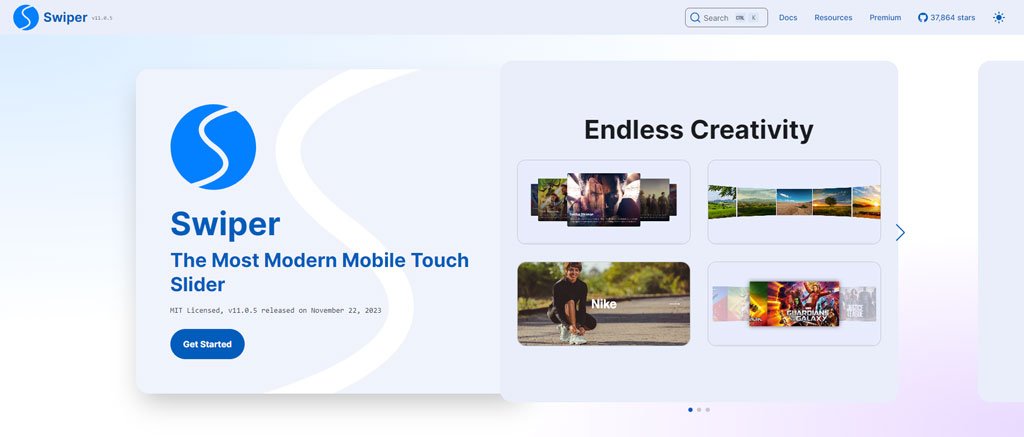
1. SwiperJS: A Versatile Mobile Touch Slider

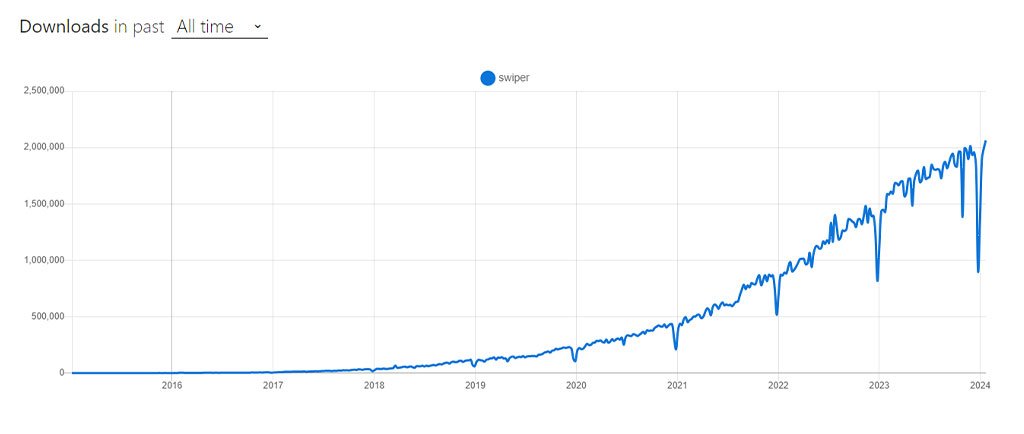
SwiperJS, also known as React Slider Swiper, is a robust mobile touch slider library. It’s designed to deliver seamless transitions and a native-like experience on mobile devices. SwiperJS is ideal for mobile websites, apps, and native or hybrid mobile applications. It simplifies slide animations. Key features include image lazy loading. It also includes default transition effects and uses CSS flexbox for slide layout. This enhances the overall functionality and user experience. SwiperJS Check SwiperJS NPM Swiper Trends All Time Downloads graph: graph for the SwiperJS

2. FullPage.js: Top-Notch Full-Screen Carousel for React

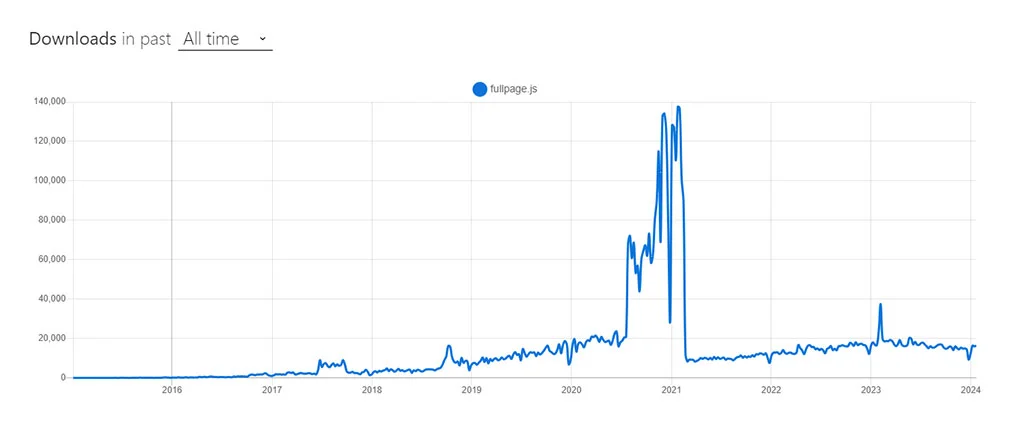
FullPage.js is a highly versatile full-screen carousel component tailored for React applications. Renowned for its configurability, it offers an efficient fullscreen page slider. This tool is perfect for creating snap-scrolling navigation. It works in both horizontal and vertical directions. It works across various sections in single page applications (SPAs). It is easy to use and adaptable. People often choose it to improve user navigation in React projects. FullPage.js Check FullPage.js FullPage.js NPM Trends All Time Downloads graph: FullPage.js NPM Trends

3. React Responsive Carousel: A Feature-Packed, Lightweight Library

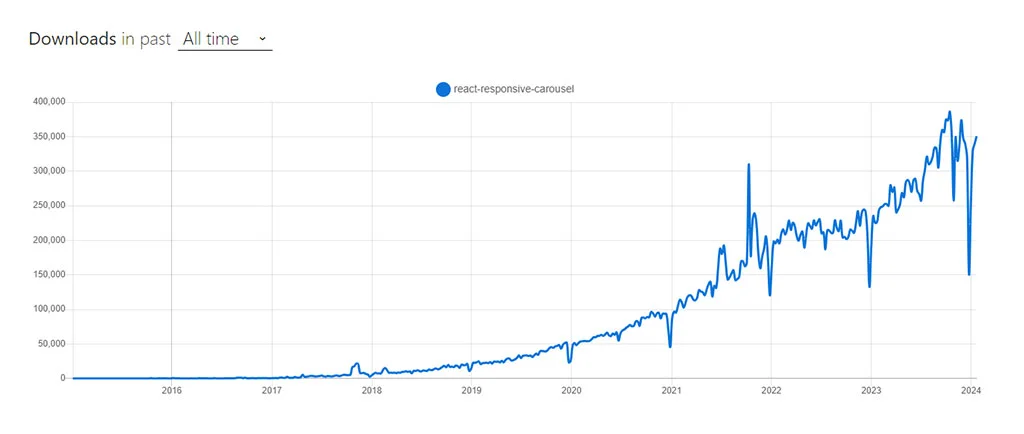
The React Responsive Carousel is a lightweight yet feature-rich library. It’s designed for crafting carousels in React applications. It boasts a wide array of customization features. It includes options for lazy loading, YouTube autoplay, creating custom thumbnails, and implementing external controls. The library also supports vertical scrolling. It offers additional visual effects, such as fade transitions and a presentation mode. While it provides many benefits, it’s worth noting that its drag feature might not be as smooth as some other carousel options. When releasing the mouse or lifting a finger off the screen, the drag might not be as smooth. React Responsive Carousel Check React Responsive Carousel React carousel NPM Trends All Time Downloads graph: React Responsive Carousel trend

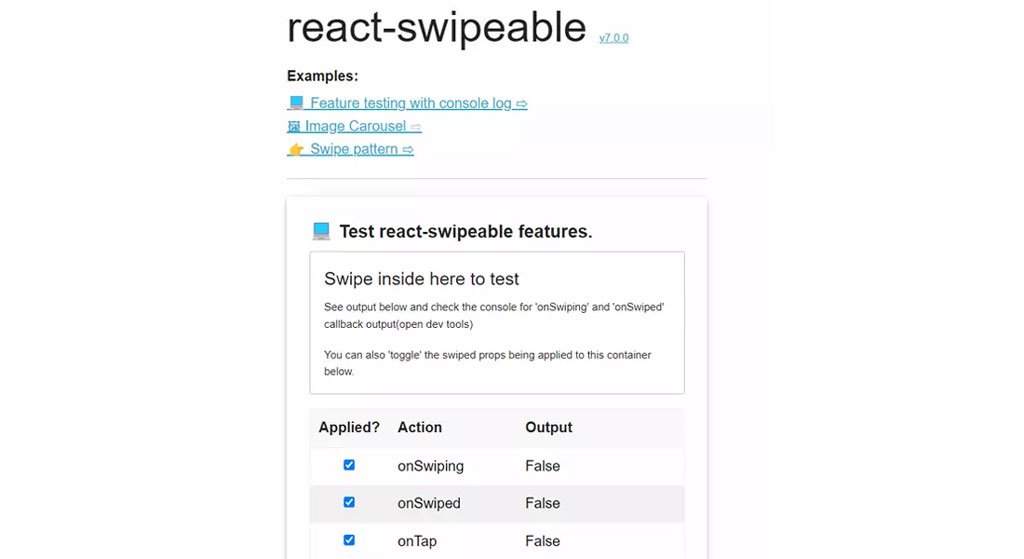
4. React-swipeable: Simple and Dependable Carousel Component

React-swipeable is a user-friendly and dependable carousel component in the React ecosystem. It focuses on making carousel items swipeable. It may offer a more limited set of options compared to others. However, its ease of implementation is a significant advantage. React-swipeable’s distinguishing feature is its ability to accurately respond to various swipe patterns. This functionality is not typically seen in similar carousel components. This unique feature positions it as a notable choice among ReactJS carousel offerings. React-swipeable Check React-swipeable React-swipeable NPM Trends All Time Downloads graph:

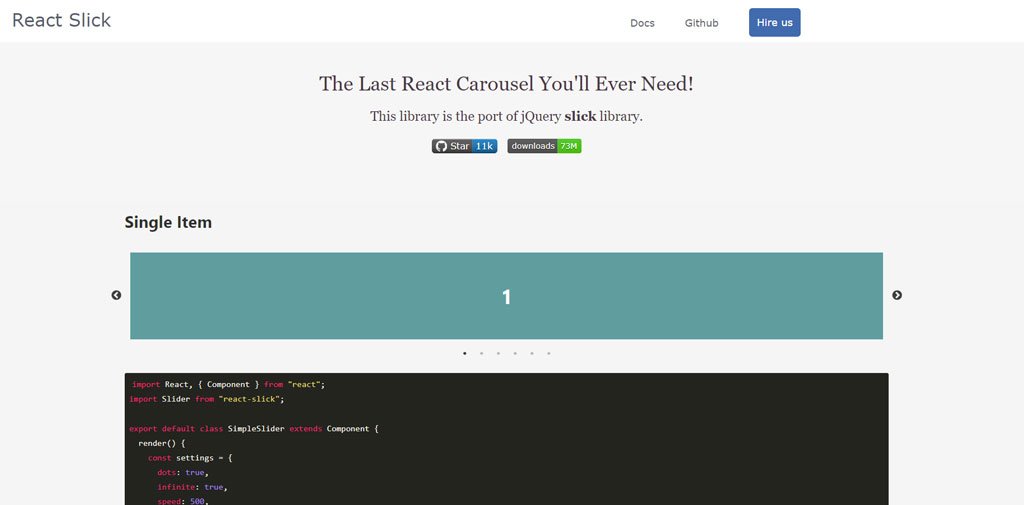
5. React Slick Slider: A Versatile and Popular Carousel Solution

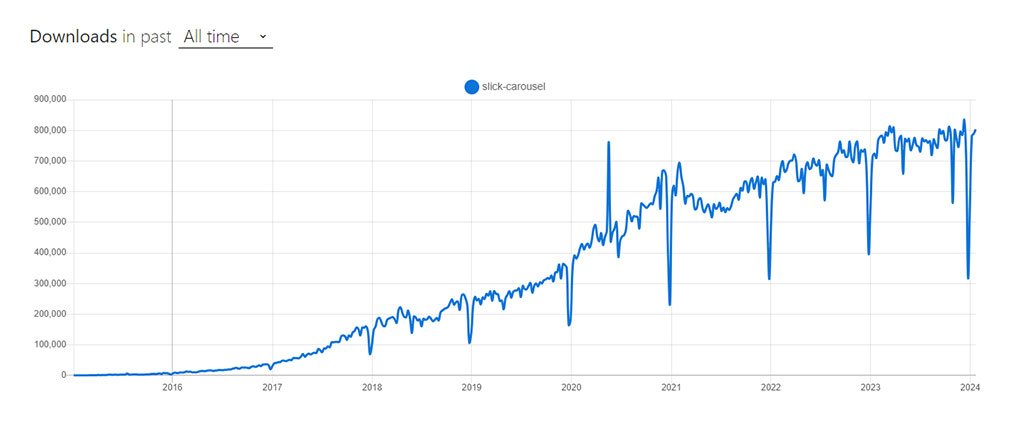
Originally a JavaScript and WordPress plugin, Slick has been adeptly adapted for React by third-party developers, showcasing its versatility and popularity in the developer community. Slick is renowned for creating responsive sliders. It offers a comprehensive range of carousel features, making it a premier choice in its category. React Slick stands out with an additional fading effect. This effect brings an elegant and sophisticated touch to the sliding experience. Slick caters to a variety of needs. It offers basic scrolling carousels and more visually impactful presentations. This ensures your requirements are met with style and functionality. React Slick Slider Check React Slick Slider Slick Carousel NPM Trends All Time Downloads graph: React Slick Slider NPM Trends

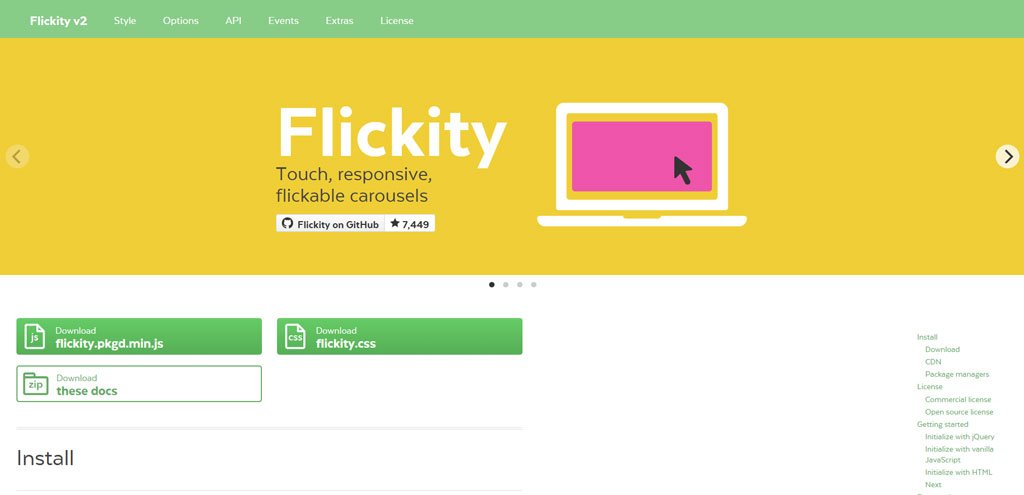
6. React Flickity: Touch-Friendly Carousel Component for React

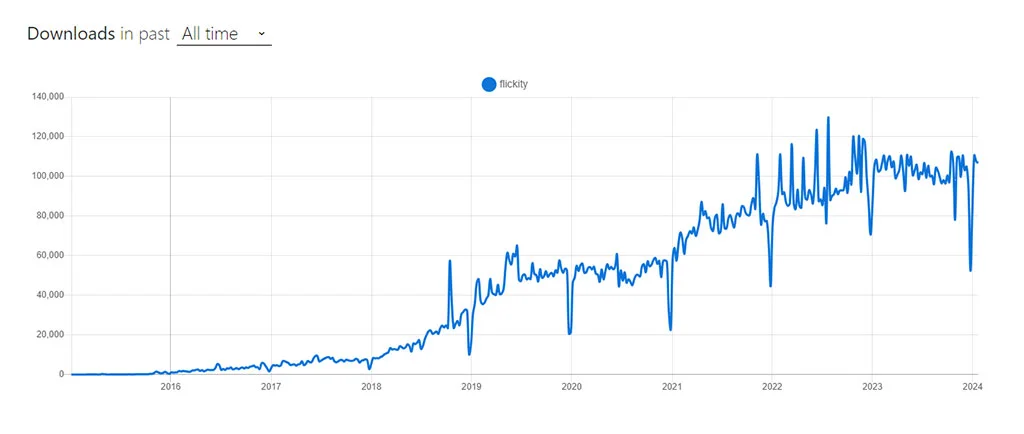
React Flickity is a carousel component tailored for React. It enables the creation of touch-friendly, responsive carousels with customizable navigation. Originating from the JavaScript component Flickity by Desandro, it has been effectively adapted for React by third-party developers. React Flickity is known for its well-crafted design and comprehensive documentation. It offers a range of options, though it may not be as responsive as some other plugins. A standout feature is its “show on full screen” button. It is an ideal choice for projects where high-level responsiveness is not a primary concern. React Flickity Check React Flickity React Flickity NPM Trends All Time Downloads graph: React Flickity NPM Trends

7. Pure React Carousel: Uncomplicated and Flexible Carousel Library

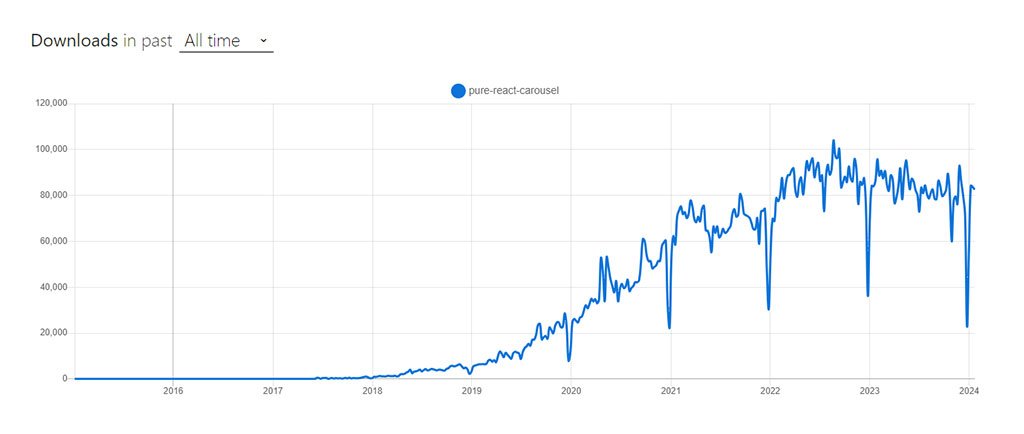
Pure React JS Carousel is a straightforward and efficient carousel library for React. It offers a no-frills approach to carousel design. It stands out by giving you control over the dimensions of your slides. Other carousel components commonly lack this feature. Additionally, it provides the flexibility to customize the layout with CSS to suit your specific needs. Its popularity in the developer community is partly due to its unique zooming capabilities. Many other libraries lack this feature. Pure React Carousel Check Pure React Carousel Pure React Carousel NPM Trends All Time Downloads graph: Pure React Carousel NPM Trends This library is designed to be as unstyled as possible. It is similar to how a <table> element is expected to have minimal styling. This allows developers to tailor the appearance according to their vision. Furthermore, the Pure React Carousel prioritizes WCAG accessibility standards. It is an inclusive choice for web development.

8. Nuka Carousel: A Balanced React Carousel Library

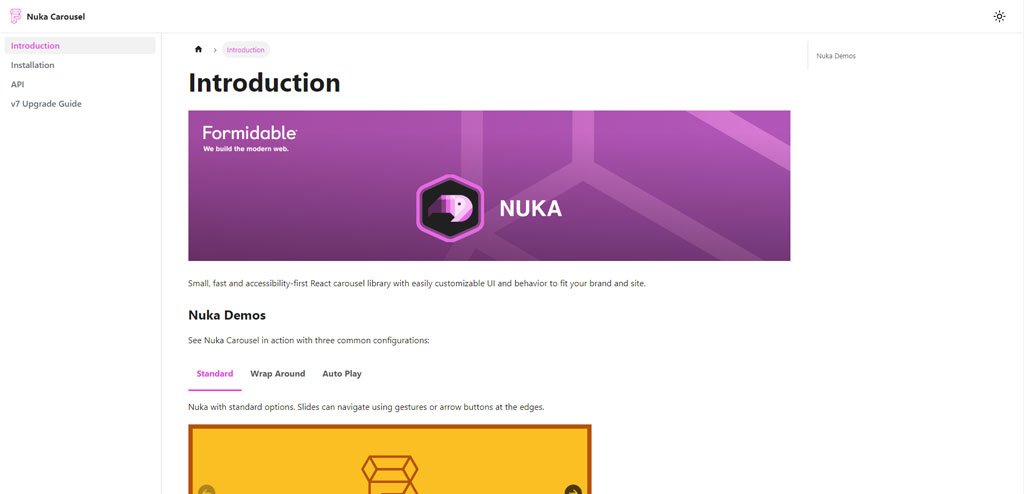
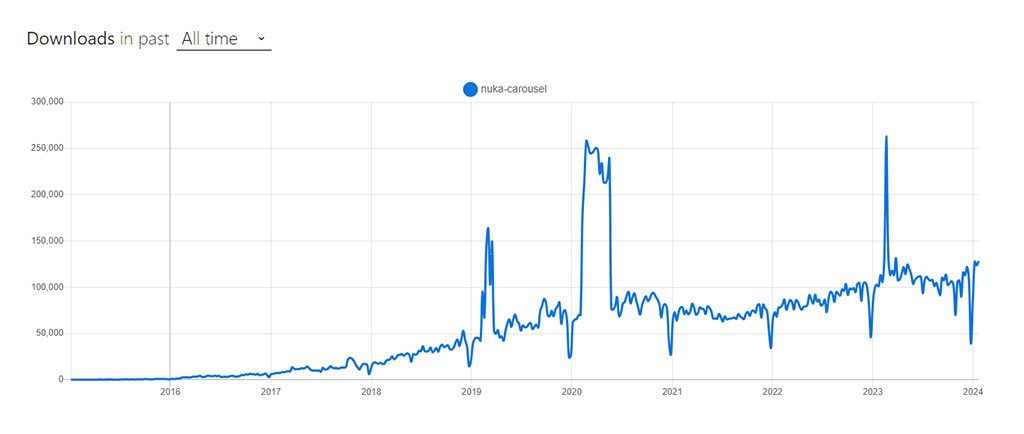
Nuka Carousel stands out in the React ecosystem. It’s a carousel library that strikes an ideal balance between simplicity and functionality. It’s designed to offer an accessible and user-friendly carousel experience. It elevates the user interface on your brand’s website. Nuka Carousel comes equipped with a basic slider. It is fully customizable in both UI and behavior. It supports vertical scrolling and provides three distinct transition styles: scroll, fade, and 3D scroll. For those looking for additional functionality, there’s also an optional zoom feature that can be integrated. Nuka Carousel Check Nuka Carousel Nuka Carousel NPM Trends All Time Downloads graph: Nuka Carousel NPM Trends

9. React Awesome Slider: High-Performance Full-Page Transition Component

The React Awesome Slider is a robust and flexible React component. It is specifically crafted for seamless full-page transitions. It’s engineered to deliver a smooth, 60fps experience, ensuring high performance. The component is ready for production use. It stands out for its extensive customization possibilities. Ideal for rendering both image and video galleries, the React Awesome Slider offers an effective and adaptable approach to creating sliders or carousels in your applications. React Awesome Slider Check React Awesome Slider React Slider NPM Trends All Time Downloads graph: React Awesome Slider NPM Trends

10. React Image Gallery: Distinctive Carousel Component for React

React Image Gallery sets itself apart in the realm of React UI component libraries. This carousel component is specially designed to craft image galleries and carousels with a range of features. It supports mobile swipe gestures, thumbnail navigation, full-screen capabilities, and custom slide rendering. It also supports Right-to-Left (RTL) and responsive design. This library is unique because it offers options like pagination display. It also has a ‘show on full screen’ icon tailored for galleries. Additionally, it lets you add thumbnails to the carousel’s core. Additionally, it caters to RTL navigation preferences. React Image Gallery also includes several render functions, allowing for customized creation of elements like navigation buttons, play/pause controls, and individual carousel items. React Image Gallery Check React Image Gallery React Image Gallery NPM Trends All Time Downloads graph: React Image Gallery NPM Trends

11. React Swipe: Lightweight Carousel Component for Touch-Enabled Devices

React Swipe is a streamlined version of the Swipe.js carousel library, tailored specifically for ReactJS. It’s a lightweight option that focuses on simplifying the carousel experience for touch-enabled devices, offering helpful configuration options. React Swipe is designed for touch-enabled devices that do not support mouse dragging. If your priority is to cater to the simplicity and ease of use on touch devices, React Swipe is an optimal choice. React Swipe Check React Swipe React Swipe NPM Trends All Time Downloads graph: React Swipe NPM Trends

12. React Id Swiper: A React Wrapper for Swiper.js

React Id Swiper serves as a bridge, bringing the capabilities of Swiper.js into the React ecosystem. It transforms React Slider Swiper into a React component, complete with advanced effects like 3D Cube, Coverflow, and Flip. This library, acting as a dependency on Swiper, was created prior to the official React wrapper from Swiper.js. React Id Swiper is particularly designed to enhance the mobile user experience, making it ideal for mobile websites, web apps, and native or hybrid mobile applications. It’s compatible with iOS, Android, Windows Phone, and modern web browsers. Since it’s essentially a wrapper for Swiper, it inherits all the configurable options, events, and methods of the original component, maintaining consistency and versatility. React Id Swiper Check React Id Swiper React ID Swiper NPM Trends All Time Downloads graph:

13. React Owl Carousel: A Versatile and User-Friendly Carousel Component

React Owl Carousel stands out as a top choice for crafting highly adaptable and responsive carousels in React projects. It incorporates touch and drag capabilities, delivering an engaging user experience. This component acts as a React wrapper for the well-known jQuery plugin, Owl Carousel, effectively merging the strengths of React and jQuery. Although it depends on jQuery, which some might consider a bit traditional, React Owl Carousel is still a strong and reliable choice. It boasts a plethora of features like responsive settings, URL hashing, lazy loading, autoplay, and drag functionality. These attributes ensure smooth integration and significantly boost user interaction on your website. React Owl Carousel Check React Owl Carousel React Owl Carousel NPM Trends All Time Downloads graph: React Owl Carousel NPM Trends

14. React Alice Carousel: Smooth and Customizable Carousel Library

React Alice Carousel is an exceptional choice among carousel component libraries. It’s known for its fluid swipe functionality. It’s equipped with features such as responsive design and autoplay functionality. It also has elegant fade animations, Right-to-Left (RTL) support, and drag capabilities. These make it ideal for crafting attractive, mobile-responsive content galleries. With advanced React rendering capabilities, it allows for detailed customization. This includes displaying multiple items per slide and tailoring navigation elements. These features combined make React Alice Carousel a superb option for those looking to develop visually appealing and interactive carousels in React applications. React Alice Carousel Check React Alice Carousel React Alice Carousel NPM Trends All Time Downloads graph: React Alice Carousel NPM Trends

15. React-elastic-carousel: Flexible and Customizable Carousel Component

React-elastic-carousel is a powerful and adaptable React carousel component, ideal for designing sliders or carousels in React-based applications. Its versatility and range of customization options make it easy to present content items in a fluid, sliding format, be it horizontally or vertically. This library offers the freedom to tailor and create attractive, interactive carousels that seamlessly integrate with your specific design and functional needs. React-elastic-carousel Check React-elastic-carousel React Carousel NPM Trends All Time Downloads graph: React-elastic-carousel NPM Trends

Creating a Simple Image Carousel in React: A Step-by-Step Guide

After exploring the top React Carousel Component Libraries, it’s time to dive into a practical guide. We’ll walk you through a straightforward tutorial on how to construct a basic image carousel in React. This step-by-step approach will provide you with the essentials to get started with your image carousel project in React.

Step 1: Initiating Your React Project

To begin your new React project, utilize tools such as Create React App. This tool efficiently generates a basic project structure, simplifying the initial setup process.

Step 2: Install Necessary Dependencies

Once your project setup is complete, proceed to install the essential dependencies. This is done by executing a specific command within your project directory.

 npm install react-slick slick-carousel 

Step 3: Crafting the Carousel Component

Begin by creating a new file named ‘Carousel.js’ in your project. This file will house the basic framework of your carousel component. Start by importing all the necessary dependencies into this file.

 import React from 'react'; import Slider from 'react-slick'; const Carousel = ({ slides }) => { // Implement carousel functionality here return ( <Slider {...settings}> {/* Render slides here */} </Slider> ); } export default Carousel; 

Step 4: Slide Information Set Up

Prepare the data for your slides. This can be done either by creating a separate file or directly within your carousel component. Ensure each slide object includes essential details like image URLs, captions, or any other content you wish to showcase.

Step 5: Developing Carousel Features

Within your Carousel.js component, establish the core functionality of the carousel. This involves importing and applying the appropriate settings and styles from react-slick, tailored to your specific needs. For instance:

 const Carousel = ({ slides }) => { const settings = { dots: true, infinite: true, speed: 500, slidesToShow: 1, slidesToScroll: 1, }; return ( <Slider {...settings}> {slides.map((slide, index) => ( <div key={index}> <img src={slide.image} alt={slide.caption} /> <p>{slide.caption}</p> </div> ))} </Slider> ); } 

Step 6: Displaying the Carousel

Within the main component of your application, ensure to import the Carousel component. Then, provide the slide data to it by passing this information as a prop:

 import React from 'react'; import Carousel from './Carousel'; import slideData from './slideData'; const App = () => { return ( <div className="App"> <h1>Image Carousel</h1> <Carousel slides={slideData} /> </div> ); } export default App; 

Step 7: Customizing Carousel Appearance

Enhance the visual appeal of your carousel by applying custom styles. This can be achieved through traditional CSS rules or by adopting a CSS-in-JS approach, such as utilizing styled-components for more dynamic styling options. Find out how our react native app development company leverages top-tier React carousel component libraries to create engaging and dynamic mobile app experiences in 2024.

Step 8: Launch and Evaluate Your Carousel

After saving all your modifications, initiate your React development server and launch your application in a web browser. You should now observe your image carousel in action, showcasing the slides based on the data you’ve inputted. While this guide employs the react-slick library, feel free to select any from the previously mentioned React JS Carousel Component Libraries to construct your carousel. Dive into the react-slick documentation and samples for further customization options, such as adding navigation controls, implementing autoplay, or integrating additional features to enrich your carousel’s functionality and user experience.

Conclusion

Wrapping up our journey through the realm of Top React Carousel Component Libraries and their prevalent trends, we’ve aimed to shed light on the most favored options among product managers and developers. While each ReactJS Carousel Component we discussed provides the essential carousel functionality, selecting the perfect fit for your project hinges on your specific needs and goals. For business owners navigating the complexities of choosing the right Carousel Component Library for their upcoming project, partnering with a Partnering with a React JS Development Company like WEDOWEBAPPS like WEDOWEBAPPS can be a game-changer. Such collaboration offers invaluable insights into the practical applications and distinctive features of each carousel component, guiding you to make an informed decision and seamlessly integrating it into your next venture.

21 Exclusive Features of Magento 2 Commerce Edition

In all possibilities, there are still a considerable number of people who are unaware that Magento 2 has two versions—Open Source and Commerce cloud —and that it is very crucial to understand the differences between the two eCommerce platforms to make sound decisions for choosing one for the business which can have a significant effect on their company.

Now, this brings a new question to the forefront! “What is the difference between Magento 2 Open Source and Magento 2 Commerce Edition?”

Let’s explore in detail.

Difference Between Adobe Commerce Edition (previously Magento) and Magento Community Edition 

This is one of the most frequently asked queries regarding Magento cloud. Of course, owners of businesses are perfectly normal to want to fully comprehend the investment in Magento’s business offering. 

To answer the question of the difference between the two versions of the eCommerce platforms, Magento 2 Commerce and Magento community edition Open Source are as follows.

The “free” version of the Magento platform is Magento Open Source. It comes with several handy features. On the other hand, Magento 2 Cloud Edition, the paid version of Magento 2, has several impressive features to offer, along with the best of Magento Open Source. And it provides technical support. 

Therefore, investing in Magento Migration towards the Magento 2 Commerce edition will not be a decision to regret later! 

But how can businesses anticipate, and how might they take advantage of the new capabilities of the Magento platform? Here are some exclusive features and their roles below in helping you understand what you will work with.

21 Exclusive Features of Magento 2 Commerce Edition 

  • Permission to access categories

Sellers can restrict customer group-based access to browse through categories, view prices, and “add to cart” for products in a class with Category Permissions.

  • Credit cards

Sellers can sell virtual, physical, or combined gift cards online using the Gift Cards feature. Through Gift Card accounts a record of gift card issuance and use can be kept through Gift Card accounts. The Magento community edition administrator dashboard is where these accounts can be accessed.

  • Advanced Search in the Catalog

Elasticsearch is supported in Magento for eCommerce, whereas MySQL search is only supported in Magento Open Source. Elasticsearch is a distributed search engine with a lot of power and scalability used by websites with a lot of traffic, like eBay, Wikipedia, and GitHub.

Magento

  • Banners in eCommerce Website Design

Vendors can use Banners to display images and blocks of content only visible to specific customer segments when applying price control terms and coupons or on a schedule. “Banners” differ from Content blocks (static blocks or CMS blocks), an Open Source feature that displays fixed information like text, images, embedded video, or dynamic data from a widget. 

These features set “Banners” apart from CMS blocks in the eCommerce website design. In contrast to carousels, rotating banners can be viewed sequentially or randomly each time a page is viewed. Vendors can now conduct on-site marketing campaigns as a result of this.

  • Staging The Content

Products, Categories, Promotions (shopping cart and list price rules), CMS Pages, CMS Blocks, Widgets, and Promotions (shopping cart and list price rules) can all be easily changed using Content Staging.

When planning on-site marketing for a new promotion that needs to be published at a specific time, often at night or on the weekend, when your team may be out of the office, this is certain to be very helpful. 

Additionally, Magento Commerce edition is the best eCommerce platforms that provides a user-friendly visual dashboard for planned content, the Staging Dashboard. This dashboard displays both currently active and upcoming “campaigns” in a timeline view.

  • Page Structure

Sellers on the eCommerce platforms can arrange content page hierarchy using this option. In addition, you can add menus, navigation, and pagination using a drag-and-drop interface.

  • Segments of Customers

Customers’ addresses, order history, cart contents, and other attributes can be used to dynamically display content (banners) and promotions (shopping cart price lines). In addition, customers can be linked to and divided into segments while shopping, thanks to the continuous updating of customer segment information.

With this, sellers using the Magento commerce edition can target campaigns based on how customers behave. In addition, sellers can export customer segment data and measure the number of customers in each segment using customer segment reports.

  • Reminders By Email

Customers receive automated emails based on their wish list or shopping cart using the email reminder feature in the Magento commerce edition. These can entice them to purchase again from the online store. When a shopping cart or wish list has been “abandoned for too long,” sellers can send automated emails. This is done in response to triggers like “total cart,” “item quantity,” “several days abandoned,” and others.

  • Register of Gifts

For special occasions, sellers can allow customers to create gift registries. Using Magento’s Gift Registry Search widget, customers’ friends and family can be invited to purchase gifts from the gift registry. The registered items through the Magento community edition that have been purchased, as well as the remaining quantities, are tracked by Magento.

Register of gifts

  •  Google Tag Manager

Vendors can use Google Tag Manager to manage the multiple tags, also known as JavaScript pixels or fragments, necessary for analytics and marketing services to monitor customer activity. 

In addition, it is capable of retargeting, measuring engagement, customizing content, and external marketing initiatives. However, Magento for  eCommerce version only includes by default support for Google Tag Manager and [Google Analytics Enhanced Ecommerce] (optimized e-commerce).

  •  Private Sales And Events

With Events & Private Sales, sellers can create exclusive sale events for their clients on the digital commerce platforms. Events can be set up only to be accessible to customers who are logged in, which is an option. 

The event sticker can display a countdown to the conclusion, which is common in time-based events. In addition, customers can send invitations to other potential customers. The success rate of each event’s invitations and the number of invitations sent, accepted, and discarded are shown in private sales reports when using the Magento commerce edition.

  •  Products That Are Related To Rules

Instead of manually assigning product relationships in eCommerce website theme, this feature lets sellers specify which related products, up-sells, and cross-sells are conditionally displayed based on rules. For dynamic targeting, these rules can be linked to a customer segment.

Magento migration

  •  Loyalty and Rewards

With the Rewards and Loyalty feature, sellers can provide customers with a loyalty program based on points. For example, customers can earn points for registering for a digital commerce platform account, signing up for the newsletter, making purchases, inviting other members to sign up for an account or place an order, and writing product reviews. 

A site administrator can manage points, enabling sellers to better control point allocations, balances, and expiration times. In addition, reward Exchange Rates allow customers to use points toward purchases. Customers can also receive points based on a price line.

  •  Merchandiser of Visuals

With the Visual Merchandiser feature, salespeople can visually create merchandise (i.e., determine the order in which products appear within a category) or use rule-based conditions triggered by “smart” features to create inventory in the eCommerce website theme.

  •  Log of Admin Actions

All administrator actions are recorded in detail in the Admin Action Log. The IP address and user name are recorded in each record, along with a timestamp. In addition, information about the administrator user and changes made during the action is included in the log detail. If you want to have a look at such details, reach out to customer service representatives.

  •  Manager of Customer Attributes

To support order, fulfillment, and customer management processes, Customer Attribute Manager makes it simple for sellers to add additional customer attributes to the standard features that Magento maintains.

Magento 2 commerce

  •  An Assistant For Shopping 

Customers registered for an account at their store can receive immediate assistance with their shopping cart. Sellers can edit the customer’s shopping cart from the administrator interface in real-time. While a customer is on the phone, customer service representatives can see what’s in the customer’s cart and see the changes as soon as the page refreshes.

  •  Credit From The eCommerce Store

Sellers can reimburse customers for cash purchases by using Store Credit on the digital commerce platform. From the dashboard for the customer account, you can easily use this feature to make payments and keep track of refunds and company credit status.

  • Markets Without Heads

Magento 2’s Headless eCommerce feature separates the e-commerce store’s front-end and back-end headless e-commerce. It lets you customize customer experiences across multiple touchpoints.

All of the complex steps are taken by the backend layer. Therefore, the front end can be customized without breaking the backend system. Multiple storefronts can be created using the API-based method.

  •  B2B Functions

The features of the Magento 2 commerce edition version features are designed to improve the customer experience. For example, numerous buyers can be set up, and company accounts can be added.

Create individual catalogs for your business clients. Then, you can ensure buyers understand the contract terms when they buy. Order forms and requisition lists can be made. These functions assist in increasing customer loyalty and repeat orders.

Among the B2B functions are:

  • Manage Quotes And Company Accounts.
  • Allow numerous customers per business.
  • Accept account payments.
  • Bespoke Catalogs
  • Facilitate quick ordering.
  • Make lists of requests.
  • Reorder items from earlier orders.
  • On the dashboard, access B2B reports.
  •  Management of Inventory And Orders

The inventory and the Magento 2 platform’s Order Management Features offer numerous steps to manage your inventory. Site wide analysis tool is available for both single stores and multiple warehouses.

There are pick-up and drop-off locations included as well. If lost, you can seek help from customer service representatives. The features can be used to keep product quantities constant. In addition, you can effectively manage orders with it.

Conclusion 

There is a reason why Magento is one of the world’s leading e-commerce platforms. It constantly strives to improve its offerings and does not rest on its laurels.

There are many good reasons to choose Magento 2 Commerce Edition as your digital commerce platform right now, as Magento is helping to shape the future of e-commerce stores. Large companies offering all services in one location are looking for solutions. And that’s precisely what some eCommerce platforms like Magento 2 Commerce are doing.

Partner with wedowebapps.com if you need help with Magento migration.

Let WeDoWebApps take your Shopify Responsibility

More than a hundred thousands of Shopify developers around the web, it makes it difficult for anyone to chose suitable developer among them. WeDoWebApps gives you the reason to hire Shopify developers out of many and make the top business results productive for every stakeholder related to the business.

Understanding the importance of the business environment

Before any of the technical qualifications required for being a Shopify developer, the most needed quality is regarding vision and approach towards the business. Besides several developers, the upcoming race in the future shall decide the winner from an organization’s perspective will be its approach with which, the organization deals with its business, goals, internal environment management and resources to deal with the external environment and the market as well. WeDoWebApps shares a vision of growth with every aspect of its strategy. Thus, it has become an organization preferred by most of the clients to hire Shopify developer.

The upper hand at technical abilities

The immense knowledge of technical staff related to every design, customizable themes, shipping and transactions options worldwide according to the country and gateway options, are a few of numerous reasons to hire Shopify developer from WeDoWebApps. At present, WeDoWebapps has completed Shopify project by clients successfully covering every potential task related to Shopify Website Development. WeDoWebApps have gained a better position in the market and grown irrespective of situations getting hard regarding business and market competence. So, there is no doubt one can have on capabilities of the organization when it comes to IT business sector.

Get valuable tips to choose the right eCommerce platform while WeDoWebApps LLC takes care of your Shopify responsibilities.

Consistency in quality management

WeDoWebApps is not just an organization that develops websites and applications for its clients. Still, it has grown with understanding the importance of consistency in the performance of every services and product that has arrived out the Shopify workshop. This way, WeDoWebApps manages to go beyond the development domain and take every responsibility for the client to reach the best figures regarding the consistent performance of the organization.

Beyond Shopify, discover how our web agency in Melbourne can support all your digital needs with expert services.

The best possible content to reach out to people and assistance with dynamic SEO techniques to keep the reach of regular figures are what WeDoWebApps provide to its customers when they hire Shopify developers. It is not because WeDoWebApps has an experience of scope regarding client’s expectation, it gives a valid reason to hire Shopify developer from WeDoWebApps, but it is its clients’ experiences working with the organization that supports the reason for its existence.

Check out the various services of BigCommerce development while letting WeDoWebApps LLC handle your Shopify responsibilities.

In addition to Shopify, explore our tailored small business web design services to give your brand the perfect online presence.

Hand-picked List Of Best Magento Migration Services in the USA

Are you planning to move to Magento 2 and execute the Magento migration process? Well, you need Magento 2 development services on whom you can rely on. Magento offers a feature-rich e-commerce platform, and has been widely adopted by numerous businesses globally that’s why the need for magento migration experts is thriving.

Magento 2 Migration Services USA – Why Go For Them?

As per the sources, Magento is one of the leading eCommerce platforms in the world with 2,50,000 merchants and powers around 28% of the websites on the internet. As ecommerce store grow in volume, they may need a more flexible platform that can accommodate their evolving needs. And choosing the right Magento 1 to Magento 2 migration issues and magento 2 migration service along with hiring Magento certified developers is essential for businesses looking to take advantage of the platform’s capabilities. So in such cases, the Magento Migration Process becomes imperative. However, Magento Migration can be a complex and challenging task. Nevertheless, with the right Magento 2 upgrade service provider, it can become a seamless and hassle free experience. In this blog, we have meticulously selected the best Magento 2 Migration service providers in the USA to assist you in making an informed decision. Whether you’re looking to move to a new hosting environment or switch to an alternative e-commerce platform, these are Magento 2 migration services company poss the knowledge and experience to help you with the transition.  Our selection criteria are based on their reputation, customer satisfaction, and the quality of their work. Thus, let us delve into the list of the most exceptional Magento 2 Migration service providers in the USA and also 3d Cart to Magento 2 migration.

Best Magento Migration Services USA 

1. WeDoWebApps Development Company

WEDOWEBAPPS LLC

WeDoWebApps LLC in the USA was founded by Mr. Pratik Patel, Founder and Managing Director, and Mr. Milan Soni, CEO, with the sole goal of giving clients cutting-edge IT solutions.  WeDoWebApps LLC is a provider of Magento Ecommerc Develpment services, Website Development Services and Mobile App Development Services with 500+ successful projects and 100+ satisfied clients. WeDoWebApps, a Magento development business with years of experience, offers exceptional Magento development services supported by Magento experts. 

Magento Migration Services Offered By WeDOWEBAPPS

  • Magento 1 to Magento 2 Migration
  • Zen Cart to Magento 2 Migration
  • Volusion to Magento 2 Migration
  • 3dcart To Magento 2 Migration
  • Salesforce Commerce Cloud to Magento 2 Migration
  • BigCommerce To Magento 2 Migration
  • Squarespace To Magento 2 Migration
  • WooCommerce to Magento 2 Migration
  • Prestashop to Magento 2 Migration
  • Migrating from Shopware to Magento 2
  • Migration from Amazon Webstore to Magento 2
  • Migrating Shopify Plus to Magento 2
  • MIVA to Magento 2

Why Hire WeDoWebApps LLC for Magento Migration Services? 

Hire Magento 2 developers from WeDoWebApps because they are active in the Magento industry and have helped companies all around the globe. As one of the most well-known firms in the region, they have experience in devising a customized development plan for each consumer. This professional agency offers bespoke Magento web development, Magento theme development, and Magento extension development. In fact, they specialize in using most ideal features of Magento Commerce.  As a result, the company develops feature-rich Magento solutions for B2B and B2C enterprises based on extensive research to fit your specific needs.

Service Locations Of WEDOWEBAPPS

  • WeDOWebAPPS Magento Services in California

WEDOWEBAPPS offers excellent services in California, including magento migration, web development, mobile application development, custom development, Magento, and WordPress.

Why Hire WEDOWEB APPS For Getting Magento Migration Services in California?

We are a top-rated Magento development company achieving the ideal combination of pricing and quality. Our development team has extensive experience designing eCommerce platforms and can tailor a solution to your specific business requirements.  They provide numerous benefits, such as 

  • Improved performance
  • Increased security
  • Simple checkout process
  • Customization options. 

WEDOWEBAPPS’s dedicated Magento developers will assist you in completing the Magento 2 Migration process smoothly, without data loss, and with maximum security! The firm guarantees to assist you with Magento Migration in the most efficient manner possible.

WeDOWebAPPS Magento Services in New York

At WeDOWebAPPS, we offer top-rated Magento migration services to businesses looking to enhance their online stores. Our development team has extensive experience designing eCommerce platforms and can tailor a solution to your business requirements. Why Choose WeDOWebAPPS for Magento Migration Services in New York? Our team specializes in custom solutions for challenges in the Magento ecosystem. We can promptly resolve difficulties and expand business opportunities related to migration. We provide a range of migration-related tasks, including customization and integration.  WeDoWebApps helps you with:

  • Enhance your store’s performance
  • Help secure your store and protect it from potential threats
  • Streamline your checkout process for a better user experience. 
  • A range of customization options to make your store unique and tailored to your brand.

We have an outstanding track record in the industry, making us a reliable partner for your e-commerce development needs. Our services can help increase your revenue and reduce unnecessary overheads, providing you with the high-quality services required to succeed online. If you’re looking to migrate your online store to Magento, consult WeDOWebAPPS today for a smooth and secure migration process.

WeDOWebAPPS Magento Services in Los Angeles

At WeDOWebAPPS, we offer excellent Magento migration services to help businesses seamlessly transfer to Magento and create great digital experiences for their customers. Our team has extensive experience in designing eCommerce platforms and can provide custom solutions for your specific business requirements. Why Choose WeDOWebAPPS for Magento Migration Services in Los Angeles? Our team has a proven track record in the industry, and we pride ourselves on being a reliable partner for your e-commerce development needs.   They provide numerous benefits, such as 

  • Improved User Experience
  • Enhanced SEO
  • Mobile Responsiveness
  • Scalability

We offer a diversified team that works remotely across multiple time zones, providing a unique and unorthodox work atmosphere that empowers our team to deliver high-quality services. Our operational success management approach is an integral element of who we are. This fundamental, iterative strategy drives all of our procedures and activities, including success management teams and success path mapping for our partners.

2. React Native Development Company

React Native Development Company

React Native Development Company is an experienced software development firm that provides Magento 2 migration services, Magento ecommerce development services, and mobile app development solutions to businesses worldwide. They have a team of experienced Magento migration experts and developers who use the latest coding methodologies.  Their end-to-end solutions use rapid and agile coding methodologies, high-quality serverless computing, and contemporary software development methodologies, ensuring the maximum potential for your eCommerce business. With a focus on delivering exceptional customer service and quality work, React Native Development Company is a reliable and experienced partner for any Magento development project.

While exploring the best Magento migration services in the USA, don’t overlook our tips on resolving HTML conversion conflicts to ensure a seamless migration.

Why Hire React Native Development Company?

React Native Development Company is the ideal partner for migrating your eCommerce store to Magento 2 or other platforms. Their team of experienced Magento migration experts and developers provides seamless migration and end-to-end solutions that ensure maximum potential for your eCommerce business.  They use rapid and agile coding methodologies, high-quality serverless computing, and contemporary software development methodologies to deliver quality work on time and within budget.  With a focus on delivering exceptional customer service and quality work, React Native Development Company is a reliable and experienced partner for any Magento development project. 

3. Endertech, Los Angeles – CA

Endertech LLC is a multinational group of technologists based in Los Angeles, providing a wide range of services that cater to the evolving needs of businesses worldwide. From its Establishment, the company’s mission is to assist individuals and technology professionals alike in leveraging the power of the latest web technologies.  With years of experience in web design, web development, digital marketing, software development, cloud hosting, and e-commerce, Endertech LLC has a proven track record of delivering exceptional results for their clients.  Their team of expert Magento developers ensures that your e-commerce store is migrated seamlessly to the Magento platform, maximizing front-end features and functionality while guaranteeing a smooth and efficient process. 

Why Hire Endertech LLC for Your Magento Website Migration Needs? 

If you are looking for a reliable and experienced company to migrate your traditional website to Magento, look no further than Endertech LLC. With their team of expert Magento developers, they provide the best Magento migration solutions that maximize front-end features and functionality.  As a popular California-based Magento migration company, Endertech LLC has extensive experience in Magento 2 migration, ensuring a smooth transition to this powerful e-commerce platform. They work closely with their clients to ensure that the migration process is seamless and efficient, resulting in a successful e-commerce store that drives business growth. While considering the best Magento migration services in the USA, also find out about getting Joomla development services to expand your web development toolkit.

4. Blacksmith Agency New York NY

The Blacksmith Agency is a Phoenix-based boutique web design and development firm specializing in providing merchants with unique eCommerce solutions. They offer a range of Magento development services tailored to the needs of businesses of all sizes, with experienced Magento developers who create and optimize online stores.  In addition to development services, Blacksmith Agency also provides third-party application integration, website design, and performance optimization. As a well-known corporation, they stand for excellent work, ethics, integrity, and high-quality results. Magento Migration

Why Hire Blacksmith Agency? 

Blacksmith Agency is a top-rated Magento development firm that provides scalable development, top migration solutions, and attractive, award-winning designs for ecommerce businesses.  They have a team of expert Magento developers who ensure their clients receive high-quality results and a great return on investment. With their comprehensive range of services and reputation for excellence, Blacksmith Agency is an excellent choice for all your Magento requirements.

5. P2H INC – San Francisco

Founded in 2005, P2H Inc is a leading web development, design, and Magento migration services provider. The company boasts a team of over 400 skilled professionals with expertise in various sectors such as mobile development, UI/UX design, and more. They are renowned for their ability to launch sites with minimal or no downtime, which sets them apart from their competitors.  P2H Inc’s reputation in the industry is excellent, and they consistently provide unique ideas, effective communication, and top-notch deployment procedures. By hiring P2H Inc for your Magento migration needs, you can be confident that your site will be up and running quickly and efficiently.

Why Hire P2H INC? 

P2H Inc is recognized for its efficient Magento migration services with minimal downtime. The team stands out by delivering innovative ideas and keeping clients informed with excellent communication. They possess an exceptional reputation for their top-notch deployment procedures, providing a smooth transition for your website. P2H Inc’s extensive knowledge and expertise in website and mobile development, and UI/UX design.  It ensures that your Magento site will be up and running quickly, with maximum front-end features and functionality. Trust P2H Inc to provide you with quality migration solutions that cater to your unique business requirements.

6. Comrade Digital Marketing Agency – Chicago

Comrade is a good choice for a Magento development firm to assist you with your next project.  Comrade Digital Marketing Agency, a top-rated Magento development firm located in Chicago, is an excellent choice for your next project. They specialize in Magento 2 migration and have a team of skilled Magento specialists who can assist you in achieving a quick and seamless migration.  In addition, their experts can assist in taking your ecommerce store to new heights and surpassing the competition. Comrade has several years of industry expertise, having worked with some of the world’s leading businesses, and has a solid reputation as a top Magento development agency.

Why Hire Comrade Digital Marketing Agency? 

With several years of industry expertise, they’ve worked with some of the world’s leading businesses and have a solid reputation as a top Magento development agency.  Their deployment procedure is smooth and efficient, and they provide excellent post-deployment assistance to guarantee the success of your project.  Furthermore, Comrade is one of the greatest Top Magento Migration companies based on good customer reviews and comments. So, their Magento website development services will surely increase your client base and earnings.

7. Power Sync – Round Rock Texas

PowerSync is a reputable e-commerce development company founded in 2011 and based in Round Rock, Texas. Their team of experts specializes in various services, including e-commerce, web development, IT-managed services, and UX/UI design. With a focus on helping businesses transform into best-in-class service organizations, PowerSync offers custom solutions for challenges in the Magento ecosystem. If you want to migrate your online store to Magento, PowerSync is the right company. Their platform experts can help you promptly resolve difficulties, increase efficiency, reduce expenses, and expand business opportunities. They can assist you with customization, integration, or any other migration-related tasks. PowerSync has an outstanding track record in the industry, making them a reliable partner for your e-commerce development needs. Their services can help increase your revenue and reduce unnecessary overhead, providing you with the high-quality services required to succeed in the online business world.

Why Hire Power Sync? 

When it comes to Magento migration, PowerSync stands out from the crowd by being a platform expert who assists merchants and integrators alike in promptly resolving difficulties, increasing efficiency, lowering expenses, and expanding business opportunities. They have a proven track record of delivering successful migration projects that exceed client expectations.  Whether you need modification, integration, or any other Magento migration service, PowerSync is a trustworthy organization that can supply you with the high-quality services you require to be successful in the internet business. Companies looking for migration services can consult them immediately to increase their revenue and decrease unneeded overhead.

How Do I Choose The Best Magento Migration Service For My Business In USA?

Best Magento Migration Service Magento is a powerful platform, viability by offering its users a number of capabilities. It fortifies the eCommerce website from the ground up. The Magento team is constantly working to improve existing functionality and user assistance. If you do not want this to occur, upgrade your Magento site.  There are numerous Magento developers available, so pick one of the finest Magento migration service providers. As a result, selecting a professional Magento development firm is essential to the growth of your online store/business. When selecting a Magento development business, consider the following characteristics:

1. Hire Someone With A Good Reputation And Experience

First and foremost, be certain that the provider is well-versed in the Magento platform. This ensures that they can correctly use its features and capabilities to design a website that matches your requirements. A competent Magento development firm would have a team of professionals who are well-versed in all elements of the Magento platform. They will be capable of providing you with personalized solutions that are geared to your exact requirements. You should also ensure that the organization has a track record of achievement. Request references from previous clients and inquire about the types of achievements they were able to attain.  These are two critical components of any professional website, and you should make sure that the company you hire is knowledgeable in both.  By keeping these factors in mind, you can be confident that you will discover a web development service to assist you in creating a powerful online presence.

Minimize disruptions during your upgrade by learning how to effectively manage Magento migration downtime for a seamless transition.

2. Make Sure You Hire A Company That Offers Both Pre- And Post-Migration Support

Magento is a rapidly evolving platform, so proper planning is required before beginning the move. As a result, before hiring an agency to convert your shop to Magento 2, make sure that the firm offers before and post-migration support to make the transition process go as smoothly as possible. Pre-migration assistance simply determines whether you’ll need to purchase and install new extensions rather than the ones you’re currently using. Whereas, post-migration support services will assist you in resolving any problems that may occur after you open your Magento or ecommerce store.

3. Hire only Certified Magento Migration Experts With Experience

Another factor to consider when picking a Magento migration service agency is whether the agency employs Certified Magento developers. Magento website development This is primarily because Certified Magento developers can assure you that they have an up-to-date understanding of the platform and can quickly conduct the migration procedure on your ecommerce store. Aside from that, choosing an Agency with Certified Magento developers may also help you scale your existing shop in a way that will enhance your total conversion rate. Another key consideration is that the agency you intend to engage has qualified Magento experts with hands-on Migration expertise. So, before they get on your Magento Migration Project, make sure you request portfolios and review the agency’s previous Migration work.

4. Consider The Timeline Of Migration

Migrating your store to Magento is a time-consuming procedure. It may take many weeks to successfully transfer your store and ensure that everything works properly. As a result, knowing the timetable for your Magento migration is critical so that you can plan ahead and perform it correctly. Even if technical challenges arise, your chosen agency will be able to quickly address and resolve them if a proper schedule is established before beginning the conversion process.

5. Hire an Agency That Helps You Plan The Budget

Magento 2 development services Before you begin, you must create a budget for the Magento migration project.  It is advisable to look into the migration experience of the prospective Magento developer. Since the cost breakdown for the migration procedure must be analyzed. The Magento specialists you’re dealing with should be able to answer your budget questions. Don’t focus on lowering migration costs because this could harm your website in the long term. So now you know the traits to look for while hunting the ideal Magento migration company for your business.

Conclusion

“Successful migrations are about more than just moving data from one platform to another. It’s about preserving the business’s soul and culture.” – Jeff Bezos, Amazon CEO. In conclusion, it’s essential to have a reliable and efficient Magento migration service when upgrading your current platform. The Hand-picked List of Best Magento 2 Migration Services in the USA presents an overview of some of the top providers in the country.  By carefully considering the services, location, and expertise of these providers, businesses can make informed decisions and ensure a successful and seamless migration.  Remember, Magento migration is a complex process that requires a lot of planning, preparation, and technical knowledge. With the help of a trusted service provider, businesses can minimize the risks and enjoy the benefits of Magento’s powerful e-commerce platform.

Android Apps for Business: Driving Operations, Automation, and Enterprise Mobility

Android App for Business To Reduce Workload

Android apps are changing the way businesses are operating. A smart Android app for business allows you to simplify tasks, improve efficiency, and make it easier for the team to collaborate.

With the digital transformation of Android, you connect the system with automation and easily manage repetitive work. Whether you are a small business managing everyday operations or a large enterprise supporting the mobile workforce. An Android application for business operations provides the solution that saves time, reduces the chances of errors, and boosts productivity.

By using Android apps, you can work more smartly, move faster, and stay ahead of the competition in the market.

In this blog, we will cover the key ways Android apps help businesses to streamline operations. Also, highlight the emerging trends and real-world case studies to support the business work. It will guide you to the steps to launch an Android app that is custom to your business needs.

Understanding the Role of Android in Business

Android apps have become an essential part when it comes to having the support of modern processes to manage operations. Android apps help you manage everyday tasks with ease and improve efficiency while working. This streamlines the process, whether it is managing remote or office work.

Android Apps for Business Operations 

A well-designed Android app for business operations makes managing the daily work simple and streamlined. With the Android apps, you can easily keep track of sales, manage inventory, and handle HR tasks from a single app.

For example, a retail store can update the stock in real-time and avoid the chances of shortages. The HR team can easily keep track of attendance, leaves, and tasks with the help of a single app. 

To keep your business operations simple, you can take support from the Android app development company, which can save your time and reduce the chances of error.

Digital Transformation with Android

Digital transformation with Android helps you to have the support of modernizing the processes. Android apps help you connect systems, collect data, and help in generating insights on business decisions to maintain a smooth process.

For example, a service company can make use of an Android app to manage the project process and client interactions in real-time. Managers can use the Android app to get instant reports and handle teamwork quickly.

With the help of an Android app, you can turn your traditional business work into an automated task while maintaining efficiency with smart processing.

Business Process Automation with Android

Android apps help you automate repetitive tasks while maintaining effective focus on handling the important work.

For instance, a logistics company can help you automatically plan the delivery routes and send updates to drivers and customers instantly. These apps also streamline the process of handling the invoices, reminders, and scheduling some processes.

Android app solutions to automate tasks and improve business efficiency, book a strategy call

Android for Enterprise Mobility

The workforce requires more when it comes to handling office work. Employees expect to have access to various business tools to manage data and communication through a single source. This is where Android for enterprise mobility becomes the popular choice.

Enterprise mobility with Android gives your company the ability to support remote work with more flexibility and the ability to maintain security without impacting performance. From the sales team working in the field to the manager monitoring the operation, the Android app ensures that your business never slows down.

Why Enterprise Mobility Matters

  • Remote Access to Business Tools: Employees can stay connected to the essential apps, documents, and handle the workflow at the required time from anywhere.
  • Bring Your Own Device (BYOD) Support: Android has a flexible ecosystem that allows you to securely manage the employee-owned device while keeping the company’s data protected.
  • Stronger Security: With Android Enterprise, you can include strict policies for data encryption and device management. It will give your IT team the proper control over access to various processes with permission.
  • Better Collaboration: Teams can use Android apps to share files to manage the project, and chat for the virtual meeting.

Imagine a logistics company where drivers are making use of an Android app to update delivery status, and while managers are keeping track of performance instantly. Or a healthcare provider can give the staff you what secure access to patient details. These are some of the real examples of how Android apps empower mobility without adding complexity.

By enabling enterprise mobility, Android apps do not just make managing work flexible but also make businesses more agile and more connected to serve customers with their preferred needs.

Advantages of Developing Custom Android Apps

Developing custom Android apps offers you several advantages that are tailored to the unique workflow and your business goals. Custom Android apps provide flexibility, scalability, and a complete set of solutions that allow you to maintain a stronger competitive presence.

Why Choose a Custom Android App for Your Business?

1. Tailored to Your Business Needs

Custom apps are specifically built to manage your process while ensuring that every feature solves the problem more effectively. For example, a logistics company’s custom app can handle the route optimization tool while integrating directly into the app.

2. Enhance User Experience

A custom Android app allows you to design an intuitive interface that matches the expectations of your customers and employees with the interactive system. Maintain a smooth, easy-to-use flow and reduce the need for training.

3. Scalable and Future-Ready

Your business requires you to grow with the future of mobile app development to build an app. Custom Android apps are built with scalability and allow you to add new features to the system with simple integration, and meet with the user’s expectations.

4. Improved ROI Efficiency

Custom apps allow you to streamline the workflow, automate the tasks, and reduce errors. This will allow you to have a direct impact on improved efficiency and ROI. You can have measurable benefits while saving time and leading to higher customer satisfaction.

5. Stronger Integration with Existing Systems

A custom Android app can connect seamlessly with your ERP, CRM, analytics, or other internal tools. This allows you to be sure about maintaining the smooth data flow and more accurate reporting across your organization.

When you choose the custom Android app, it will give your business the proper control, flexibility, and efficiency, which allow you to stay competitive and grow fast with the changes in the market.

Custom Android app development for unique business processes, connect with our team

Key Features Businesses Should Look for in an Android App

Key features businesses should look for when building an Android app

When building an Android application for business to maintain the focus on the addition of features that allow you to improve the security, performance, and long-term growth. The right set of features not only ensures that your app supports the smooth operation but also grows with your business needs.

Here are some of the must-have features every business-focused Android app should include:

1. Security and Compliance

Security should always be the first priority when it comes to developing the business app. Android app offers support to the enterprise-grade protection with a feature that allows for safe management of the data and ensures that compliances are followed.

Key elements to include:

  • Data encryption and secure APIs.
  • User authentication and role-based access.
  • Regular updates to manage the vulnerabilities.
  • Integration with Android Enterprise for device and data management.

A secure app builds trust among the users and protects the sensitive business information from potential threats.

2. Integration and APIs

A successful Android app for business operations should connect smoothly with your existing tools. Whether it is your CRM, ERP, or analytics system. It allows to have the smooth integration for handling the data flow seamlessly across all departments.

Important integration features:

  • API support for third-party tools.
  • Real-time data synchronization.
  • Cross-platform compatibility for mobile and web systems.

This helps you to reduce the manual efforts, prevent the chances of data duplication, and keep the teamwork aligned.

3. Analytics and Reporting

Data is one of the biggest advantages of digital business operations. With the built-in analytics and reporting tools, you can easily keep track of usage of the app, productivity of employees, and customer behaviour with ease.

Look for features like:

  • Real-time performance dashboard.
  • Custom report generation.
  • Insights on user engagement and ROI.

Having access to these insights helps you to make advanced and data-driven decisions to identify new options for growth opportunities.

4. Scalability and Future Readiness

Your business will grow, and your app should grow with it. A scalable Android app allows you to add new functionalities and support more users without impacting performance.

Scalability features to consider:

  • Modular architecture for easy upgrades.
  • Cloud-based backend for flexibility.
  • Compatibility with AI, IoT, and automation tools.

An app designed with scalability in mind allows you to be sure that long-term value is being generated while keeping the business ahead of the changing technology trends.

By focusing on the addition of these features, you can create Android apps that are secure, integrated, insightful, and scalable while helping businesses run smarter and serve customers better.

Emerging Trends in Android Business Apps

Emerging trends in Android business apps shaping enterprise mobility and innovation

Modern businesses are increasingly turning to make use of Android app development trends for business to improve efficiency, automation, and customer engagement. With the continuous innovation in various technologies, digital transformation with Android has made a bigger impact in maintaining the strategy to meet the competitive necessity.

Here are some of the key trends that are shaping how companies are building a strong Android application for business operations.

1. AI for Smarter Decision-Making

Artificial Intelligence (AI) has become a popular and integral part of how businesses are optimizing their operation and improving their customer experience.

Through business process automation with Android, AI-driven apps help you make faster and more accurate decisions.

How it benefits businesses:

  • Predictive Insights: Android app can analyze sales, customer behavior, and operational data to predict future trends.
  • Personalized Interactions: AI algorithms allow you to maintain a tailored app experience as per the user preferences and purchase patterns.
  • Task Automation: Routine actions like data entry, support tickets, or report generation are being automatically handled with the advanced technology.

This allows businesses to focus more on innovation instead of following the task manually.

2. IoT Integration for Connected Operations

The Internet of Things (IoT) is reshaping how companies collect and analyze data in real-time.

When an Android app for business is combined with an IoT-enabled solution brings visibility and control across multiple devices and systems.

Practical business applications:

  • Real-time Tracking: Logistics and retail companies use connected Android apps to monitor shipments and stock levels.
  • Remote Management: Facility teams can easily have control of the equipment, lighting, and the security system with the help of Android-based dashboards.
  • Predictive Maintenance: Manufacturing companies use sensor data from Android-connected devices to identify issues before disrupting production.

This trend directly supports the digital transformation with Android and enables the support of data-driven operations.

3. Android for Enterprise Mobility

With the increase in the remote and hybrid work models, there has been an expansion of Android for enterprise mobility that ensures that teams stay connected. This maintains productivity and streamlines the collaboration.

Android’s enterprise solution provides support for tools that allow you to manage the device, project data, and streamline collaboration.

Core benefits include:

  • BYOD (Bring Your Own Device) Support: Employees can use their personal Android devices with enterprise-level data security.

  • Centralized Device Management: IT teams can monitor, update, and secure multiple devices using the Android Enterprise tools.
  • Seamless Collaboration: Supports the integration with a Cloud-based business app like Slack, Microsoft Teams, and Google Workspace support remote productivity.

This improves the business experience while maintaining strong communication and control, while supporting flexibility.

4. Custom Android Apps for Tailored Business Growth

For your every unique business need Android app for business allows you to meet the various specifications. 

Developing a custom Android application for business allows companies to design a solution that aligns with the specific goals and workflow.

Advantages of custom development:

  • Personalized Workflow: Apps can be designed specifically to meet the exact operational structure of the business.
  • Scalability: Businesses can easily expand the functionality while maintaining growth to follow the new market trends.
  • Improved ROI: With the use of top features in your Android app, you can reduce redundancy and maximise the return on investment.

Custom-built Android apps often deliver better long-term value compared to generic software.

5. Cross-Platform and Hybrid Development

Cross-platform frameworks such as Flutter and React Native are making Android apps for business operations more accessible and efficient. 

With this, you can build an application that can perform seamlessly across multiple devices while maintaining consistency in quality.

Why this matter for businesses:

  • Broader Reach: One app can serve Android, iOS, and web users simultaneously.
  • Cost-efficient Development: Allow for sharing the codebase to reduce the development time and maintenance expenses.
  • Faster Updates: You can include the new features and fixes quickly without rebuilding the platform from the start.

This approach ensures that the Android app for business remains adaptable and future-ready.

Modern Android applications for business are not just about the simple utilities; it is more about having a system that drives automation, mobility, and innovation.

Through the digital transformation with Android, companies can create a connected ecosystem that improves decision-making, optimizes resources and delivers measurable growth.

Case Studies: Businesses Succeeding with Android

There are many businesses that have transformed their operations, increased efficiency, and enhanced customer engagement with the help of Android apps for business. 

These real-world examples illustrate how investing in an Android solution can drive measurable results.

1. Retail: Boosting Sales and Customer Engagement

A leading retail chain implemented a custom Android application for business operations, allowing you to streamline inventory management and personalize customer experience.

Achieved Results:

  • Real-time inventory tracking allows for reducing the stockout issues by 30%.
  • Personalize the promotion to increase the repeat purchase by 25%.
  • Mobile analytics that help in optimizing the store’s layout and product placement.

This case demonstrates how digital transformation with Android can directly have an impact on improving sales and customer satisfaction.

2. Logistics: Enhancing Operational Efficiency

A logistics company can adopt future opportunities in Android apps for businesses to manage shipments, track vehicles, and automate the delivery notification.

Outcomes include:

  • Route optimization reduces the fuel cost by 20%.
  • Automated notifications can improve the chances of communication with customers and increase satisfaction.
  • Real-time tracking improved with the operational transparency for managing practices.

The company uses business process automation with Android to increase productivity while lowering operational costs.

3. Healthcare: Improving Patient Care

A healthcare provider deployed a custom Android application for healthcare to manage the details of patient-related appointments, digital records, and teleconsultations.

Impact Achieved:

  • Appointment scheduling automation reduces the administrative workload by 40%.
  • Handling the patient records with a minimum of errors and improving the accuracy of data.
  • Telehealth feature allows doctors to easily consult with their patients and improve service accessibility.

This example shows the importance of Android for enterprise mobility in ensuring the secure and efficient handling of operations.

4. Manufacturing: Streamline the Production

A manufacturing company uses an Android application for business to monitor the machinery, manage inventory, and automate the process of reporting.

Key Benefits:

  • Predictive maintenance reduced the chances of equipment downtime by 35%.
  • Automate the inventory tracking to minimize the material wastage.
  • Real-time reporting allows faster decision-making and workflow optimization.

By using an Android app for business operations, the company improves productivity and maintains a competitive edge.

Steps to Launch an Android App for Your Business

Steps to launch an Android app for your business from planning to deployment

To launch a successful Android app for your business is not that complex. By following a structured approach how to develop an Android app that drives business process automation with Android. The smooth flow of the process helps in improving efficiency and supporting growth.

Here is a step-by-step guide for businesses to make the most out of their Android apps:

1. Define Your Goals and Business Processes

Every successful app starts with being clearer about the app’s objective. Identify the key operation areas to optimize and the problem you want to solve with the help of the app.

Key Considerations:

  • Know which workflow can be automated with the app.
  • Understand about the pinpoints and pain points with existing operations.
  • Set the measurable outcomes, like faster processing with fewer errors, and improve engagement.

Having a clear understanding ensures that your Android application for business delivers real value.

2. Decide Between Custom or Ready-Made Solutions

Selecting the right approach for early process handling that saves time and resources.

Options to Consider:

  • Custom Android App: Fully tailored to your business workflow, scalable, and easily integrable.
  • Ready-Made Solutions: Give support for quicker deployment with limited customization.
  • Hybrid Approach: Combine the off-the-shelf tools with a custom module for its flexibility.

Your decision will shape your Android app for business operations and make it an effective and long-term valuable solution.

3. Prioritize Security, Scalability, and Analytics

Having an effective business app must protect data, grow with the company, and provide actionable insights.

Focus Areas Include:

  • Enterprise-grade security for encryption, role-based access, and compliance.
  • Scalability to support more users and features to grow your business.
  • Analytic support to monitor performance, track usage, and make better decisions.

These features ensure that your Android application for business is reliable, efficient, and ready to meet future needs.

4. Launch, Test, and Iterate

Releasing your app online is the final step, which requires continuous improvement to maximise adoption and maintain a better impact.

Best Practices:

  • Conduct beta testing with a small group of users.
  • Collect the feedback from users about flexibility and functionality.
  • Update and enhance the app based on real-world insights.

With iterative testing, you can be sure that your Android app for business supports the digital transformation with Android effectively.

If the company is following these steps, then you can easily launch your Android app for business operations and improve productivity while automating the process.

Conclusion

An Android app for business can simply manage the operations, boost efficiency, and provide support for real-time decision-making. With the growing adoption of digital transformation with Android businesses can easily automate the workflow and improve the communication.

Whether you are aiming for the customer services., streamline processes or enhance the team’s productivity, you can connect with an Android app developer to build an Android application for business to make a measurable difference.

If you are ready to build a custom solution that fits your goals, then our team can help you.

Global Presence

wedowebapps-usa-hq-new-jersey-map
usa-location-icon USA
address-icon-img HQ : 21 Charles St, Clifton,
New Jersey, 07013.
wedowebapps-usa-hq-new-jersey-map
usa-location-icon USA
address-icon-img BO : 450 Paradise Isle Blvd Suite 306 Hallandale Beach, Florida 33009.
wedowebapps-uk-london-office-map
address-icon-img 2 Garrick Rd, London
NW96AA, UK.
wedowebapps-australia-melbourne-office-map
address-icon-img 70 Everton Road , Truganina
Victoria 3029
wedowebapps-canada-ontario-office-map
address-icon-img 14 Alfredo Ave, Brampton,
Ontario Canada L6P 1K1
wedowebapps-india-ahmedabad-office-map
India-location-icon INDIA
address-icon-img A 706/707 Empire Business Hub, Science City Road, Ahmedabad – 380060
Call Mail Whatsapp