skip to content

Android Developer Skills And Qualities Essential For App Success

Android Developer Skills to Build Better Apps

Being successful in Android app development depends more on the combination of Android developer skills. Skilled developers know how to write clean and efficient code while maintaining an intuitive interface. Integration of features is also supported to enhance the user experience.

With a skilled developer, it is equally important that you know about the qualities of a good Android developer. Skills like problem-solving, adaptability, and collaboration allow you to distinguish professionals who consistently deliver high-quality apps.

In this guide, we will give you the details on the essential skills for Android developer, highlight the top qualities of Android app developer, and provide the practical steps on how to publish an Android app on Google Play whether you are aiming to grow your career or hire the right Android app developer, by understanding these skills and qualities to build impactful and reliable Android apps.

What is Android Development?

Android development involves creating applications for devices powered by the Android operating system. Android is the operating system developed by Google and is widely used in mobile devices. It includes designing the interface, writing cleaner code, and integrating the APIs for testing the various functionality while ensuring the overall app performance.

Strong Android developer skills are essential to deliver the apps that are efficient, secure, and user-friendly. A developer who has strong knowledge of various fields allows you to transform your Android app development idea into a functional application that meets both business objectives and user expectations.

Having the essential skills for Android developers is equally important as maintaining the combination of technical expertise with problem-solving, and adaptability. Having these skills not only boosts career growth but also enables developers to build an app that stands out better in a competitive market.

Core Technical Skills for Android Developers

Core Technical Skills for Android Developers

To succeed in Android development, mastering the right technical Android developer skills is important. These skills allow mobile app developers to build an app that is highly reliable, secure, and delivers an exceptional user experience.

Below are the essential skills for Android developers that every professional should have:

1. Kotlin and Java Mastery

Kotlin and Java are an essential part of Android development. A developer should be more proficient in using these languages and can write clear, maintainable code while managing the integration of complex features. A developer with strong Kotlin skills allows you to be sure about having highly valued and modern Android apps.

2. XML and UI Basics

Understanding XML is important for maintaining an efficient user interface in Android apps. A developer with XML skills can easily structure the various layouts, define the UI elements, and ensure that apps are visually appealing and responsive across all devices.

3. Android SDK and Android Studio

The Android software development kit and Android apps are essential. Developers with the essential Android developer skills allow you to have more efficiency to build, test, and debug applications while ensuring smooth functionality.

4. Jetpack Compose (Modern UI)

Jetpack Compose is a modern tool that is specifically built to navigate across various Android UIs. A developer who can easily take advantage of Jetpack Compose can easily make an app that is dynamic with an intuitive interface and requires less code. It helps you improve both development speed and app quality.

5. MVVM and Architecture Patterns

A clear understanding of the architecture pattern, like MVVM, helps developers to write an organized and scalable code for the app while maintaining better efficiency. It ensures that the app remains effective as the feature grows and evolves.

6. Dependency Injection (Hilt/Dagger)

Dependency injection frameworks such as Hilt or Dagger streamline the performance of the app while making the process smoother and easier. Mastering these tools allows you to have a skilled professional for your Android development needs.

7. Firebase And APIs

Integration with Firebase services and external APIs allows you to be sure that the developer is handling authentication, cloud storage, notifications, and real-time updates more efficiently. A developer who understands these tools can build the app with rich functionality and seamless backend communication.

8. Database Management (Room, SQLite)

Efficient data storage and retrieval are the fundamental options which come to qualities of a good Android developer. Skills in databases like Room and SQLite ensure that your app manages the app information more efficiently and maintains the data integrity with more accuracy. It delivers faster performance.

9. Testing Fundamentals

Testing for accuracy is important to maintain the stability of the app. A developer with the knowledge of unit testing, UI testing, and debugging helps you to have an app that is bug-free and meets the user’s expectations.

10. Git and Version Control

Version control systems like Git are important to manage code changes, collaborate with teams, and maintain a clean development workflow. Proficiency with Git ensures that smooth teamwork and project management are done.

Need a developer who has the essential Android skills?

Qualities of Android App Developers

Qualities of Android App Developers

Technical expertise alone cannot make the developer exceptional. The qualities of Android app developers often show how effectively a developer helps you to turn your ideas into high-quality and user-friendly apps.

Beyond coding, several skills need to be taken care of when you look for Android app developer skills to navigate complex projects, collaborate with a team, and deliver reliable results.

Key qualities of Android app developers include:

  1. Problem-Solving Ability: Top developers can quickly identify difficulties, troubleshoot issues, and implement effective solutions while ensuring that the app runs smoothly and meets the user’s expectations.
  2. Adaptability: Android is constantly updating, and developers must stay updated with the new tools, frameworks, and platform changes to maintain the stability of the app with performance and competitiveness.
  3. Strong Communication: Clear communication with team members, designers, and stakeholders allows you to be sure that the project requirements are understood and executed effectively.
  4. Teamwork: Successful Android development often requires collaboration across cross-functional teams. Developers who worked well on the other project allow you to be clear with the schedules and quality standards of processes.
  5. Attention to Security and Performance: A good developer prioritizes app security, optimizes performance, and ensures that your users have a seamless and reliable experience while maintaining accuracy.

By combining these qualities of a good Android developer with the right technical skills, the developer can build an app that allows you to have a functional app that is more engaging, efficient, and scalable. These attributes make them highly valuable to your business and users.

How to Publish an Android App on Google Play

How to Publish an Android App on Google Play

Publishing an Android app is the final step that allows you to know about the developer’s hard work towards the application and the accessibility of the product to millions of users. Developers with strong Android developer skills understand the process more efficiently and maintain a smooth submission to the App Store by following all guidelines. This allows the maximum visibility of the app.

Here is a detailed guide for publishing your app successfully:

1. Create a Google Play Developer Account

  • Sign up on the Google Play Console with a Google account.
  • Pay the one-time registration fee of $25.
  • By creating this account, you can upload the apps, manage updates, and monitor performance analytics.
  • Make sure you keep your account information secure to avoid verification issues.

2. Prepare Your App for Release

  • Conduct thorough testing for functionality, performance, and security.
  • Prepare marketing assets, which include the app icons, screenshots, and feature graphics.
  • Write a clear and engaging app description that highlights the features and user benefits.
  • Optimize the metadata to improve the app’s discoverability on the Google Play Store.

3. Upload APK or AAB File

  • Export your app as an APK or AAB file, which allows you to have stronger compatibility with various Android devices.
  • Upload the built app to the Google Play Console and make sure that it meets the needs of various technical specifications.
  • By making use of the Android App Bundles, you can reduce the app size and improve the overall installation rates.

4. Configure App Details and Policies

  • Set up the category of your app, content rating, and the targeted audiences.
  • Define the pricing, distribution countries, and privacy policies.
  • Make sure that compliance with the Google Play policies is being fulfilled to avoid the chances of app rejection.

5. Submit for Review and Publish

  • Review all the app details carefully before making the submission.
  • Google Play review process to check for the following compliances, security, and technical issues.
  • Once your app is approved, make sure that the app runs successfully and is accessible to users globally.
  • Monitor the analytics after launch to optimize the updates and improve the user experience.

By accurately following these steps, developers not only show strong Android developer skills but also apply the essential skills for Android developers needed to build a strong and optimized app to maintain higher efficiency. Proper preparation and attention to detail should be given to have a significant increase in app visibility, downloads, and overall user satisfaction.

Want your Android app published successfully on Google Play?

Responsibilities of an Android Developer

Responsibilities of an Android Developer

An Android developer’s role is not just about writing the code or preparing the structure for the app. Their responsibilities include handling the entire lifecycle of the app. From planning, development, to deployment, every process is being managed.

The responsibilities of Android app developers are a mix of technical expertise and the qualities of a good Android developer that ensure consistency is maintained to have a successful project.

Key responsibilities include:

  • Designing and Building Applications

Developers use their Android developer skills to create an intuitive, scalable, and high-performing app to have a tailored approach to fulfill user needs.

  • Collaborating with Teams

Effective communication should be maintained with designers, backend engineers, and stakeholders to make sure that the app meets both functional and business requirements.

  • Testing and Debugging

Ensuring that the app is stable and followed by the proper unit testing, debugging, and handling continuous improvements. These are the essential responsibilities of every developer.

  • Maintaining and Updating Apps

After launch, developers need to continuously monitor the performance and release the update. By doing this, the developer can fix bugs and keep the app secure, optimized, and aligned with evolving Android standards.

  • Ensuring Security and Compliance

A skilled developer will always pay attention to maintain the security of the app and handle compliance with Google Play policies for protecting the added information and user data.

By balancing all these responsibilities with the right essential skills for Android developers. A professional can deliver an app that has reliable performance and meets all the business demands to stay strong in the competitive market. These responsibilities also give the reflection of the qualities of Android app developer businesses that are looking to partner with the app development team.

Conclusion and Next Steps

Becoming a successful Android developer requires having more than just developing the code of various practices. With the right blend of Android developer skills and the qualities of a good Android developer helps you to build the apps that perform well and meet the user expectations.

It helps in making a stronger brand presence and mastering the technical expertise to learn how to publish an Android app on Google Play. Each step plays a part in shaping the developer’s career and success in building a strong app.

At WEDOWEBAPPS, our team combines the essential skills for Android developers with years of experience in delivering scalable, reliable, and user-friendly applications. Whether you are a business looking for a developer to help you launch fast and upgrade the existing app, we can help you turn your app vision into a functional product.

Ready to build your Android app?

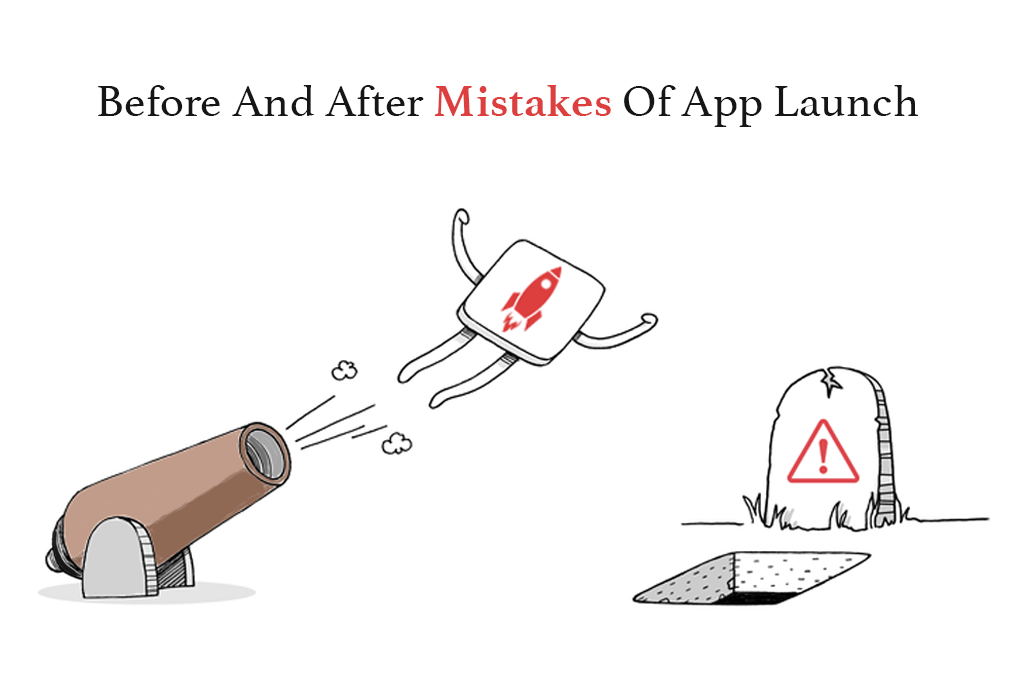
What Mistakes Should An App Entrepreneur Avoid Before And After Launching A Mobile App?

Having the first rank in the entire App Store or PlayStore sounds like every app marketer’s dream!

The mobile device is perceived as a fundamental tool in this epoch. From perusing the news to playing games, exploring, shopping, social media, and far more, the best mobile development companies have changed the scene of the current time.

As per the survey, 20% of apps fail as they’re neither seen by users nor searched by users. However, that doesn’t mean that application development or the app design is bad! It’s just they might not pull themselves out of failure they fall under. If you have worked hard to building apps, then it’s not that you have achieved everything. The half battle is still remaining!

Avoid Mistakes Before the launch of an Application 

Do Not Grab Pre-launch Opportunities

Before Launching the app, grab the pre-launch app marketing opportunity. Whilst it’s essential to make a high performing app, marketing endeavors are even as vital to ensure achievement, once your app has propelled to the app store. Eventually, people start promoting too late and as a resultant, there is less time to build up the brand.

For App marketing, start advertisements on different channels, social media platforms, pre-launch events, even encourage industry influencers and reporters to speak about your app. Put your maximum amount of effort to make it visible to your targeted audience before launch.

Custom mobile app development company and Application developers also need to focus on this approach for good mobile solutions and apps development.

App Release Date Not Planned

Plan the app launch date before you get done with coding. Keep track of upcoming tech events and news, with the goal that the release date doesn’t crash. This may increase the expected response on your android app or iOS app along with more attention for your app as soon as it’s ready.

For a specific mobile platform, you need to differentiate the date as well, whether applications will be launched for Android users or iPhone users.

No Beta-testing

Beta testing isn’t almost discovering bugs in mobile applications. it’s all about the way to confirm an app can honestly be taken care of, so that it can have the type of impact on the user’s thinking.

In other words, an independent trial of software, app or product reached the final stages of development, it’s not much of a difference here because the main task for developers is to seek out the proper group of end-users to check the app that’s almost complete, that’s why Beta-testing is a wise decision for the best Mobile application development.

Beta testing is a crucial and important step to a Mobile application development company, for all the Android app, iOS app, and Enterprise apps, test thoroughly before doing Branding and Centric with the people.

Do Not Focus On Targeted Audience

Understanding the targeted audience is key to a successful and scalable mobile app launch. After knowing the audience, your task will be a focus, and it will increase higher conversion and retention rates.

Targeted Audience

But in case, if you have no idea about what exactly your audience wants, then it won’t be an easy task to understand what they dislike about the already available apps within the market. So various ways of surveys would help greatly to gather the key points & loop wholes.

Whilst App development process whether Android development or Trend of Custom iPhone app development, Mobile app developer must have to focus on Targeted audience along with the Mobile strategy to achieve recommended review over respective play stores.

Set your promoting plan with these inquiries:

  • For what reason is your application worked for?
  • What issues is your application unraveling for your clients?
  • How is the worth your application will offer to clients?
  • Is Mobile apps development plan goes with Pre-planned activity?

Once you have the responses to those inquiries, you’ll revolve your promoting plan around those clients.

Read More: 5 Unique Ways to Boost Your App’s Download Count

Not Choosing The Proper Platform

You’d worked with iOS app development or Android app development, both have complete-featured native and cross-platform apps. Nonetheless, firstly, learn the pros and cons of every platform and consider where to launch first. Before selecting the platform, first, believe the timeline and priority.

Moreover, Every Software development company have to follow Prototype along with the proper platform, various Mobile app company follows Agile development for Enterprise application. Check out our Play Store app launch guide and avoid common mistakes before and after your app launch with tips from common app launch mistakes.

Mistakes To Avoid Post-launch Of An Application: 

No Focus On The Update Release

Publishing or launching the app isn’t just the end! Instead, the work begins. Updates are significant as they’re made after the interaction with the specified audience, bugs fixing, lack in core functionality, battery usage, etc. such problems motivate users to update the app with a replacement release.

Whilst Developing a mobile app, Application development companies also need to focus on update release along with the custom mobile application. Explore effective app marketing strategies to ensure a successful launch and avoid common mistakes before and after your app launch with insights from common app launch mistakes.

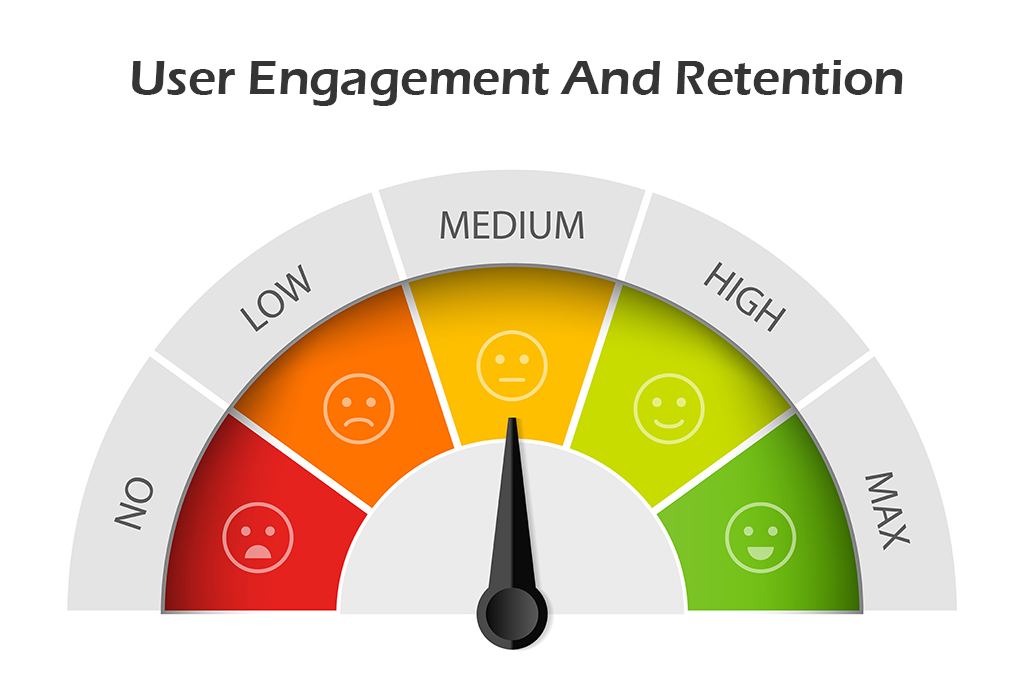
No Track Of User Engagement

As far as when we talk about the after launch, the focus should get on the user’s involvement factors. It’s essential to stay vigilant on several downloads, comments, and reviews. You ought to also keep track of users dropping far away from the app. You’ll have a thought of users coming in and going out.

Through proper check, you’ll target users who contribute their involvement to your iOS app and Android app. Simplify your application design to attract more users.

Ignoring User Reviews

You need to target the factors that are necessary for creating an app successfully. If you ignore reviews and constructive criticism for your app, you’ll find yourself not having enough support from the end-users as they’re going to consider you as a non-professional company.

You need to reply to both positive and negative reviews for sure.

Avoid App Security

security

The primary focus should get on before and after app development security as security breaches can leak customer and company data at an equivalent time. It’s easy and economical to include security at the initial stage.

Security is the main factor in gaining the customer’s trust, so the android app developer must have to focus on security if you go with the android application development process. Create powerful and secure business applications for enterprise mobility trends.

Bug Fixing After App Launch

Sometimes what happens, bugs may come after the app launch; thus, fixing them with an update to build trust among customers. Neglecting a bug is often dissatisfying and should undo all the efforts done at the time of the iOS or Android app development process.

There are many bugs like app crash, functional bugs, UI bugs, slow response, and many more. Hence, attention to detail in application bugs are equally important as quality coding.

Low Customer Support

Every user is vital. Perhaps, it’s possible you’ve got thousands of users during this competitive market, but handling every user carefully is critical.

Customer support is mandatory but very few developers use it to supply timely assistance to the customers when required. Poor customer support can harm your business.

We are focusing on User interface design, Wireframes, Prototyping to Development of mobile applications but we also need to emphasize customer support along with Mobile application development.

Concluding words

Choose the best mobile app developers that have enormous potential. Aspects like close user engagement, reduced app size, addressing the problems, fixing the errors, best mobile design, optimizing app performance, improving user experience, eliminating inconveniences can all help in making the app successful. By avoiding the common pitfalls, you’ll make sure the growth of your mobile application.

Mobile app development companies must have to follow these guidelines to multiple platforms along with the development process to develop mobile applications. However, developing an app without a proper lifecycle and a good interface design is not efficacious. Hire a skilled mobile application developer from the best mobile app development company.

If you are looking for the best mobile app design, choose the best mobile development companies, and develop highly interactive custom mobile apps for your business.

Contact WEDOWEBAPPS LLC mobile app development company at sales@wedowebapps.com and know more.

Hybrid Application vs Native Application Detailed Comparison Guide

Understanding Hybrid Application vs Native Application Before You Start Building

Developing a successful mobile app begins with a clear decision. The choice between the hybrid application and native application sets the standard for speed, usability, and overall experience. Many businesses compare native apps vs hybrid apps to understand which structure supports their goals, budgets, and long-term plans.

This comparison becomes even more important as users expect fast responses, stable performance, and smooth interaction from every mobile app. Each approach brings different strengths, like native apps, which offer direct access to device features. Hybrid apps allow a wider reach through a unified code base.

Understanding the difference between native application and hybrid application helps you to pick the better mobile app development method that aligns with your product priority. This guide will walk you through every part of the decision clearly and practically. It helps you choose the direction that fits your vision and supports growth without confusion.

What is a Native Application

A native application is built using platform-approved languages. iOS apps use Swift or Objective-C. Android apps use Kotlin or Java. This allows the app to communicate with device features while maintaining strong accuracy. It also helps to deliver a smooth interaction because the code runs inside the system environment.

The developer uses platform-approved languages, which help the app interact smoothly with the device tools.

How native apps are built:

  • iOS uses Swift or Objective-C.
  • Android uses Kotlin or Java.
  • The code runs within the system environment.
  • Interaction with the camera, GPS, sensors, and notification stays accurate.

Many teams compare the native apps vs hybrid apps at this early stage to decide which structure supports them with the performance and feature requirements. This also helps you understand the difference between native application and hybrid application before moving ahead.

When to Choose a Native Application

A native structure app works well when the project demands fast responses, advanced animations, or direct access to the hardware tools. You can pick the option when the product is required to meet the strict performance standards with the native mobile app development.

A native app setup fits the project that requires the application to perform strongly and needs advanced device controls.

Best suited for:

  • Apps with high animation or visual processing.
  • A product that must respond quickly.
  • Tools that rely on GPS, Bluetooth, a camera, or sensors.
  • Services that must work offline.
  • Projects that need a reliable and consistent user flow.

You can compare the mobile apps, hybrid vs native, to pick the one that is accurate and matters more to have effective development.

Benefits of Native Applications

Native applications often provide a more polished experience because the structure matches the operating system.

Key advantages:

  • Fast response due to direct system access.
  • Smooth interaction with stable performance.
  • Strong security as per the platform rules.
  • Better use of push notifications and device tools.
  • A familiar interface because it follows platform-specific design and guidelines.

These strengths often influence the decision during the app native vs hybrid evaluation when the team wants predictable performance.

Limitations of Native Applications

Native apps offer strong performance, but they also bring certain challenges, and here are the points that you can consider while choosing a native app.

Points to consider:

  • A separate version is needed for iOS and Android.
  • Required high development efforts.
  • Longer build and release cycles.
  • More detailed maintenance work.
  • Larger team involvement in some cases.

These factors shape early discussion around hybrid application vs native application, especially for businesses that are aiming for a quick multi-platform release.

Examples of Native Applications

There are several well-known apps that rely on native development due to their functional needs.

Common examples:

  • High-graphic mobile games.
  • A navigation tool that relies on real-time GPS.
  • Photo and video editing apps.
  • Banking apps require secure access.
  • Fitness tracking using motion and sensor data.

These examples help you illustrate that native vs hybrid mobile app comparison with real use cases.

Ready to plan your app with the right structure

What is a Hybrid Application

A hybrid app is an application created using a single code base that works on both iOS and Android. The core structure is built with web-based languages, then combined with native apps that allow the app to interact with device features. This setup will help you release the product across two different platforms without building a separate version. It also becomes a common choice during early evaluations of hybrid application vs native application when speed and accuracy are important factors.

How hybrid apps are built:

  • One code base for iOS and Android.
  • Developed with HTML, CSS, and JavaScript.
  • Runs inside the native shell that connects to the device’s tools.
  • Frameworks such as React Native, Iconic, and Flutter are widely used.

Businesses often compare hybrid application vs native application at this point to deduce if a fast multi-platform release will matter more than the deeper system integration.

When to Choose a Hybrid Application

Many businesses consider hybrid application development when they want a faster release across both platforms. The structure suits projects that depend on content delivery rather than on heavy system interaction. The team also prefers this method when the budget or timeline limit separates native builds. These points often guide early discussion around mobile app hybrid vs native to see which option matches product expectations.

Best suited for:

  • Apps with moderate speed and interaction needs.
  • Content-focused products, such as listings or media.
  • Early-stage ideas that need quick market entry.
  • Businesses that are targeting iOS and Android users together.
  • Teams with limited resources for dual development.

During planning, you can analyze mobile apps, hybrid vs native, to check if a unified code base can support timelines and given budgets.

Benefits of Hybrid Applications

Hybrid apps bring practical advantages for you if you need simplicity in development. Since the same code works for both platforms. The build process becomes quicker and easier to handle the application. The updates for the app take less time because changes apply across all devices. These strengths often influence the comparison between native apps vs hybrid apps for your project needs.

Key advantages:

  • Lower effort due to a single code base.
  • Faster development for both platforms.
  • Lower initial investment.
  • Uniform updates across the system.
  • Broad plugin support for device features.

These benefits will often help you highlight the comparison of native apps vs hybrid apps for the project that needs a quick release cycle.

Limitations of Hybrid Applications

Hybrid apps offer convenience, but they also come with performance and feature-related restrictions. Some apps may not achieve the same responsiveness as native builds. Access to advanced device tools often relies on plugins, which can limit customization. These factors shape the difference between native application and hybrid application for businesses planning for long-term growth.
Points to consider:

  • May not match native responsiveness for heavy tasks.
  • Limited access to deeper system functions.
  • UI may not fully match platform behavior.
  • Performance for graphics and complex animation may vary.
  • Dependence on third-party plugins for feature support.

These factors influence the difference between native application and hybrid application, helping businesses to understand where each method fits.

Examples of Hybrid Applications

A wide range of apps may choose hybrid development because they focus on content, reach, and simpler interactions. These apps do not rely on heavy functions and can deliver consistent results with the unified structure. This helps the product team understand the native vs hybrid mobile app with the help of relatable examples.

Common examples:

  • News and media apps.
  • Service booking platform.
  • eCommerce catalog browsing apps.
  • Corporate internal tools.
  • Social apps with moderate device interaction.

These examples help teams understand native vs hybrid mobile app decisions through practical scenarios.

Want to make the right choice for your mobile app

Difference Between Native Application and Hybrid Application

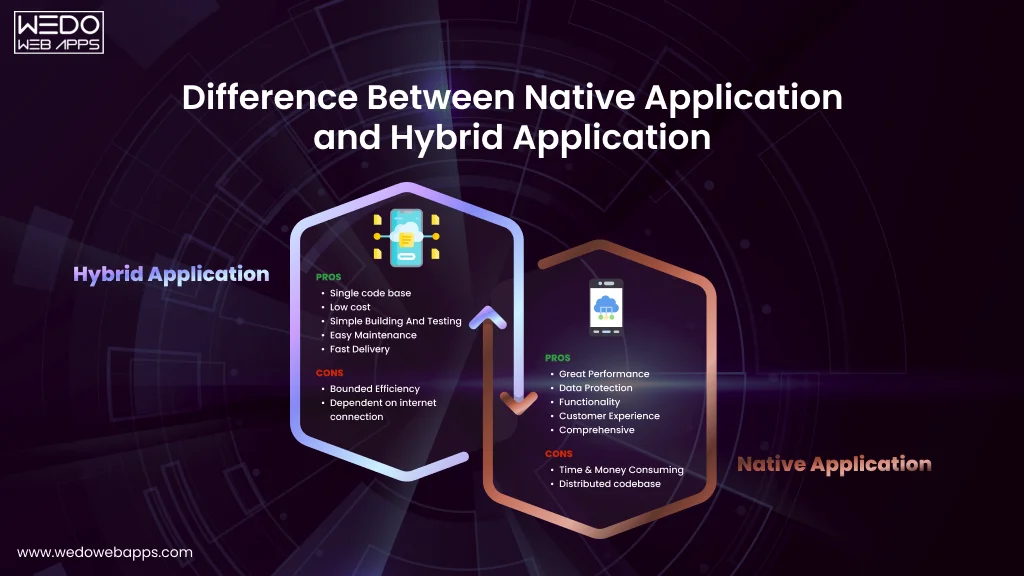
pros and cons of hybrid application and native application

Understanding the difference between native application and hybrid application becomes easier when you look at how each option shapes your overall experience. The points below help you evaluate hybrid application vs native application without reading the same information twice.


Comparison AreasNative ApplicationHybrid Application
PerformanceNative apps are rich in performance and are built using the design and development timeline.Uses a web-based layer that can give a direct impact on overall speed.
System AccessFull access to GPS, camera, sensor, and notifications.Access through a plugin that can restrict deeper features.
Design ConsistencyMatches the platform design rules while maintaining strong accuracy.The interface may differ slightly across different devices.
Code BaseSeparate code for iOS and Android.One shared code for both platforms.
Development TimelineMore time is required due to separate builds.Faster delivery because of one build server for all platforms.
MaintenanceUpdated inventory.One update applied everywhere.
Budget RequirementsUsually higher due to parallel development.Lower because of the structure.
Best FitHigh-performing apps, gaming, multimedia, and navigation.Content apps, eCommerce catalog, service platform, and MVPs.

Explanation of Each Comparison Point

Below is the simplified breakdown of the key areas shown in the table. This helps you understand the difference between native application and hybrid application with clear context.

1. Performance

Native apps perform well because they operate within the device’s system, which allows for a smooth transition and stable speed. This becomes an important decision around native apps vs hybrid apps, especially for products that require heavy visuals and real-time interaction.

A hybrid application runs through a shared base that works across multiple platforms. For the most general feature, the speed remains consistent. In many hybrid application vs native application comparisons, this becomes a strong advantage for the team to work quietly.

2.  User Interface Flow

Native apps follow Android and iOS design with device compatibility to make the interface look natural and consistent. Users recognize the gestures, layouts, and motion patterns instantly, which aligns well during the comparison in the app native vs hybrid evaluation.

Hybrid apps follow the platform design pattern, and some visual elements may require putting in some extra effort for adjustments. This can influence the early user perceptions of mobile app hybrid vs native.

3. Development Flexibility

Native development gives you deeper control over the visual elements and hardware connections. This helps in managing the demand of the project with refined elements, strong security measures, and specialized features.

A hybrid app supports one codebase platform, which reduces the development time and simplifies the expansion. You can consider this to have a strong influence when evaluating native apps vs hybrid apps in a project that needs faster and frequent modification.

4. Use of Device Features

Native apps interact directly with the device components like the camera, GPS, sensors, and processor modules. This reduced the chances of delays and helped to accelerate the results, especially in apps that rely on real-time data and complex processing.

Hybrid apps can access device hardware using the plugins. The experience depends on the quality of the plugin and community support. This model works well for standard features such as notification, camera access, and basic sensor functions.

5. Maintenance Outlook

Native applications require individual updates for Android and iOS. This allows precise control over improvements and optimisation. Businesses often choose this model to have detailed feature refinement on each platform.

Since hybrid apps share a unified codebase and are updated with a single cycle. This simplifies the long-term maintenance, which becomes a practical benefit when comparing the hybrid application vs native application for mobile to improve the team efficiency.

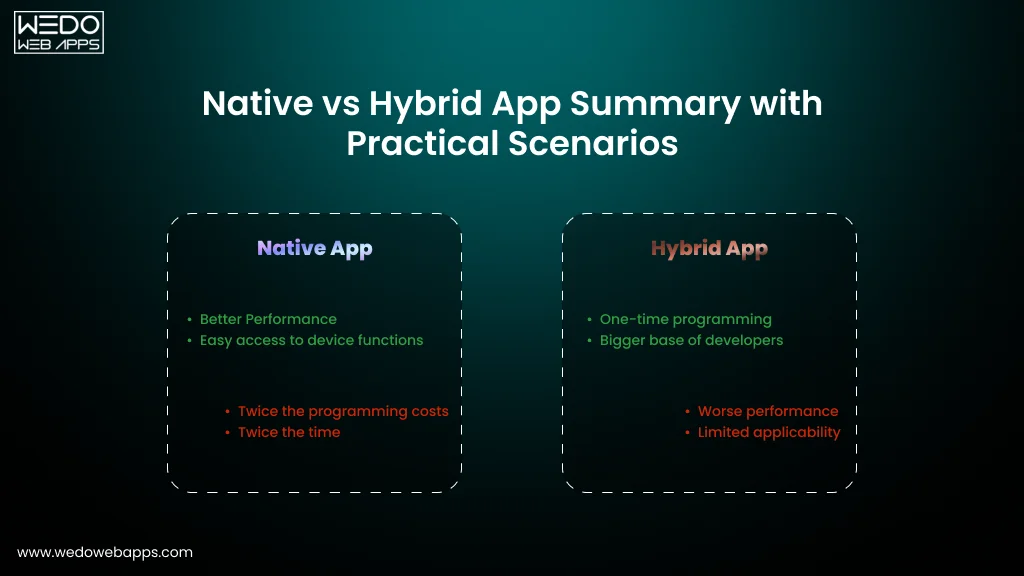
Native vs Hybrid App Summary with Practical Scenarios

Native vs Hybrid App Summary with Practical Scenarios

Choosing between native and hybrid apps often depends on the purpose of your product, the expected experience, and how quickly the team wants to launch. With the help of this section, you will understand about the native apps vs hybrid apps, especially when comparing the real situation where each option performs differently. It also supports the search intent for app native vs hybrid and hybrid application vs native application through the practical examples.
Quick Summary Table

ScenarioNative App OutcomeHybrid App Outcome
High-performance needs such as video editing or gaming.Smooth flow with fast response due to platform-specific build.Acceptable speed for simpler workloads, but may show minor delay in heavy tasks.
Early-stage startup aiming for faster release.Longer development time since separate builds are required.Quicker launch because the codebase is shared.
Apps with advanced device integration, such as sensors or camera-based tools.Direct access to hardware results in accurate output.Works with plugins that may require extra setup.
Long-term brand-centric products.Greater visual control and polished interactions.A common interface that fits both platforms with moderate adjustments.
Budget-sensitive projects.Higher investment due to two builds.Lower upfront cost because one codebase powers both apps.

How Native Works in Real Use Cases

A native structure fits well when the app must deliver high precision, strong interaction, and a polished interface. Brands that rely heavily on mobile experience prefer native because users require a smooth interface and fast responses. For instance, a fitness tracking product needs an app to monitor steps and heart rate benefits from direct access to device sensors.

This matches what users expect when they compare native apps vs hybrid apps, especially in performance-centric cases.

How Hybrid Fits Practical Situations

A hybrid build is suitable when your primary aim is faster availability without managing two separate versions. If you want to test the idea quickly or reach both Android and iOS at the same time, you can choose a hybrid app. For example, a service booking app or a news app with basic interactive pages works well in this structure. This aligns with the intent behind app native vs hybrid, particularly for teams with limited time or budgets.

Not sure which app approach fits your idea

How to Select the Right Approach for Your Mobile App

How to Select the Right Approach for Your Mobile App

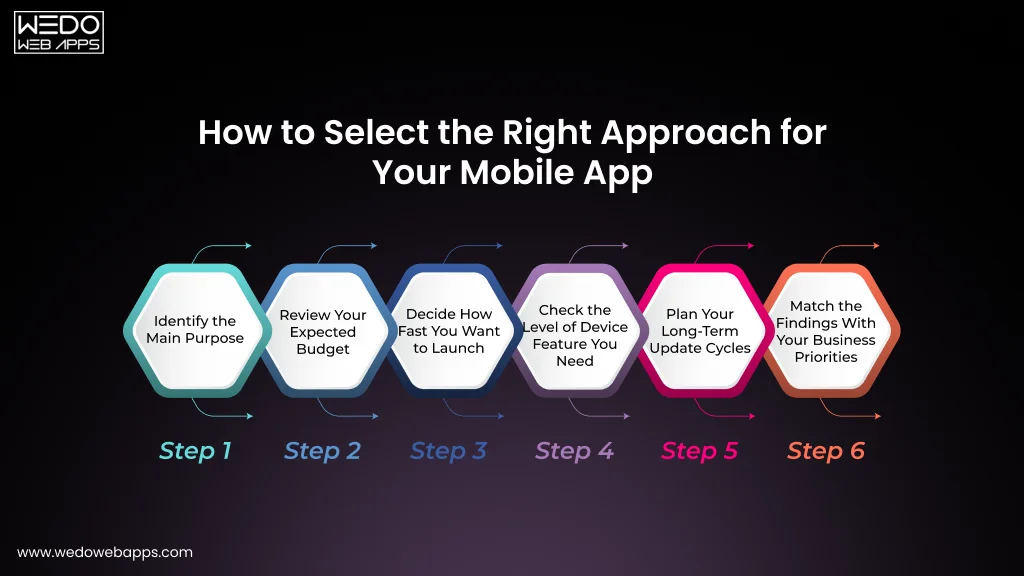
When you compare hybrid application vs native application, the decision becomes easier if you follow the clear process, and that too in sequence. These steps guide you through every step so that you can choose the right structure with confidence.

Step 1: Identify the Main Purpose

Start by understanding the core goal of your application and the purpose that it will solve.

  • If the app must deliver high speed, smooth interaction, or advanced features, then a native app becomes a better option.
  • If your goal is quick availability across all platforms, then a hybrid app works well.

This step directly gives support to your search intent for native vs hybrid mobile apps.

Step 2: Review Your Expected Budget

Check how much you can invest in the development of your application and your long-term plans.

  • Native requires a separate build, which increases spending.
  • Hybrid support to share a codebase, which helps when the budget is controlled.

This gives you clarity while knowing about the difference between native application and hybrid application.

Step 3: Decide How Fast You Want to Launch

If your aim is to have the fastest development, then a hybrid offers the shortest development time. Native apps take longer to develop for different operating systems, but give better refinement. This helps you easily compare mobile apps hybrid vs native, based on the timelines.

Step 4: Check the Level of Device Feature You Need

Native apps provide direct access to device systems such as sensors, camera tools, and secure payment functions. Hybrid can use these features through plugins, which may require extra work. This supports knowing better for app native vs hybrid for your business.

Step 5: Plan Your Long-Term Update Cycles

Native is ideal when it comes to having frequent improvements, high-scale interactions, and large design updates. The hybrid works well if your app is more focused on the content update or routine adjustments.

Step 6: Match the Findings With Your Business Priorities

List your needs in simpler terms. Assess which structure aligns with your goals, budget, and timeline, along with the technical expectations. This structured approach gives a clear path for choosing between native apps vs hybrid apps.

Deciding What Works Best: Hybrid Application vs Native Application

Choosing the right approach between a native build and a hybrid build allows you to maintain the future of your mobile app. Each option supports a different version. Native fits are suitable where refined interaction, accuracy, and long-term experience are top priority. Hybrid support brands that want quicker availability and shared code structured without adjusting the budget.

Once you understand how both approaches work, it becomes simpler for you to decide which one matches your end goal. The comparison between hybrid application vs native application gives a strong base for shaping a product that feels right and fits your long-term plans.

If you want expert guidance on picking the right structure or planning your next mobile project, our team can help you move forward with a clear strategy. Reach out to the mobile app development company you have the product you need.

Make the right app choice with expert guidance